Don't Get Fooled by Unclosed Candles! Improve Your Entry Precision with MTF Countdown for MT5

In the trading world, timing is everything. Have you ever experienced this situation: you see a candlestick forming a very convincing confirmation pattern (like a Pin Bar or Engulfing). Fearing you'll miss out on the move (FOMO), you enter the market immediately. However, a few minutes later, the price reverses sharply, and the candle pattern fails to form because the candle time on the higher timeframe hasn't actually closed yet.
This is a classic mistake that often drains a trader's account. Entering the market prematurely before the candle closes is a huge trap. But don't worry, there is now a must-have utility solution for your charts: Multi Timeframe (MTF) Countdown .
What is MTF Countdown?
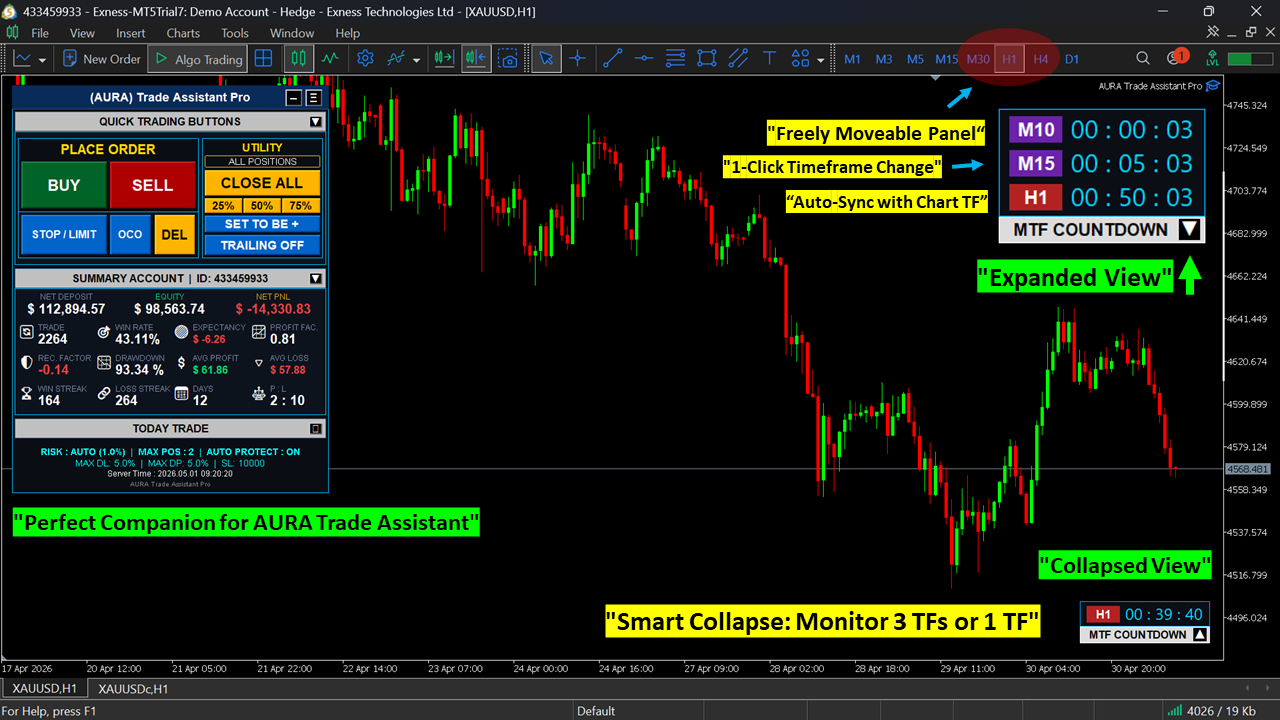
MTF Countdown is a utility tool for MetaTrader 5 (MT5) that allows you to monitor the remaining time of 3 different timeframes (TF) simultaneously in one compact and professional panel.
With this indicator, you can confidently perform top-down analysis, knowing exactly when a candle on a higher timeframe (like H1 or H4) will close, while looking for entry momentum on a lower timeframe (like M5 or M15). And the best news? You can download this premium utility for FREE!
Key Features of MTF Countdown
Designed specifically with User Experience (UX) in mind, MTF Countdown ensures your chart remains clean and unobstructed. Here are its standout features:
- ⏱️ Dynamic Current TF Lock The bottom row of the panel automatically locks onto and follows your currently active chart timeframe. No need to manually adjust settings repeatedly!
- 👁️ Smart Auto-Collapse Do you frequently switch timeframes for top-down analysis? This panel is smart enough to automatically collapse when you change the chart's timeframe. This ensures your screen stays clean and focused on candlestick movements.
- 🖱️ 1-Click TF Change Want to change the monitored timeframe on the panel from M15 to H4? No need to bother opening the settings menu. Simply click the timeframe box directly on the panel, and the TF changes instantly!
- 🤏 Drag & Drop Anywhere Easily move the panel to any corner of your chart. Just click and drag the panel's header area.
- 🎨 Professional UI Design Features a modern, elegant, and minimalist look. You have 100% control to customize all colors (Background, Text, Buttons, Borders) via the Input parameters to perfectly match your MT5 theme.
Why is this Indicator a Must-Have on Your Chart?
MTF Countdown is not just a timer; it's a FOMO (Fear of Missing Out) prevention tool. It is incredibly lightweight, causes absolutely zero lag, and blends seamlessly with your MT5. If you are a Price Action, Supply & Demand, or SMC trader who heavily relies on valid candle close confirmations, this utility will change the way you execute orders.
👉 Click Here to Download MTF Countdown for FREE on MQL5!
🚀 Complete Your Trading Arsenal! Don't stop at just timing precision. Maximize your daily accuracy and risk management with our other premium tools:
- AURA Trading Panel Dashboard : Manage your trade executions like a professional! This all-in-one panel helps you automatically calculate lot sizes, execute orders, and manage open positions with a single click. Perfect if you're taking Prop Firm challenges!
- RSI Zone Master : Filter out market noise with an advanced momentum indicator. The Dynamic Zone visualization helps you detect Overbought, Oversold, and Sideways areas without any guesswork.
(Don't forget to visit Roby Hidayat's profile on MQL5 to discover other revolutionary trading tools!)