Spent the better part of last year building Nexus Nine — a 9-pair mean reversion EA — and discovered along the way that MetaTrader 5's Strategy Tester silently produces misleading results for multi-symbol systems unless you change a handful of non-default settings.
If you have ever:
- Run a multi-symbol backtest that looked too clean, then watched it fall apart live
- Got an equity curve that seemed flat or weird and could not figure out why
- Wondered why your EA "does not trade" certain pairs in tester
… this post is the checklist I wish I'd had when I started.
The core problem
The MetaTrader 5 Strategy Tester was originally designed around single-symbol testing. Multi-symbol support exists, but it is gated behind several non-default settings. If your EA accesses pairs other than the chart symbol, by default:
- Tick history for non-chart pairs will not load
- SymbolInfoDouble() returns zero or stale prices for non-chart symbols
- Trades on those symbols silently fail to register
Your equity curve will look smooth, your stats will look acceptable, and the data feeding your EA will be wrong. The tester gives no warning.
Required setting #1: Market Watch → Show All
Before opening Strategy Tester, right-click in the Market Watch panel → "Show All".
This tells MT5 to make all available symbols candidates for tick data loading. Without this, only currently visible symbols get data — and any pair your EA references that is hidden returns blank ticks.
Required setting #2: Pre-load tick history per symbol
Even after "Show All", MT5 does not automatically download history. For each symbol your EA trades:
- Right-click → "Symbol Specification" → confirm enabled
- Open a chart for that symbol (any timeframe — opening forces download)
- Wait for the progress indicator at the bottom-right to complete
For 9 pairs, that is 9 manual chart-opens. Tedious. But skip it and you are testing on holes in the data.
Required setting #3: "Every tick based on real ticks"
Strategy Tester defaults to "Every tick" — the generated tick model. Fine for single-symbol on liquid pairs. Useless for multi-symbol because the generator assumes a single chart context. Cross-pair correlations and shared timing windows do not reproduce.
Switch to "Every tick based on real ticks". It uses actual broker tick data across all symbols in correct chronological order. About 10× slower. The only mode that gives you accuracy.
Required setting #4: Verify the broker's server time zone
Multi-symbol EAs often base entries on session times (London / NY / Tokyo). Brokers report bar timestamps in the broker's server time zone — Exness uses GMT+3, IC Markets uses GMT+2 with DST, and so on.
If your EA hard-codes hours like if (hour == 21) , those mean different things on different brokers. Before testing:
- Open M1 chart on your broker
- Hover over a candle to see its timestamp
- Compare to actual UTC
Document the offset — either auto-detect in the EA, or expose it as a configurable input.
Pitfall #1: the Spread parameter
Defaults to "Current" — the spread shown right now in your terminal. Fine for short tests. Wildly unrealistic for multi-year backtests where spread varied dramatically.
Either set spread to a realistic worst-case constant, or use the real-ticks mode (which preserves historical spread variation per tick). A test that ignores spread variability will systematically overestimate your edge — and for tight-range strategies, can flip a winner into a loser.
Pitfall #2: optimization runtime explodes
Multi-symbol × parameter combinations × years of data = days of compute, even on fast machines. Pragmatic approach:
- Optimize on EURUSD or another representative pair first
- Validate the chosen parameters on all pairs in regular backtest mode
- Forward-test on demo before going live
Pitfall #3: VPS is the wrong place to backtest
Counter-intuitive, but trading VPS plans (1-2 GB RAM, CPU profiles tuned for low-latency execution) are terrible for batch tick processing. Multi-symbol backtests need 8-16 GB RAM. On a 1 GB VPS, the test swaps to disk and runs 10-100× slower.
Backtest locally. Use the VPS for live deployment.
Pre-flight checklist
Before pressing Start in Strategy Tester:
- Market Watch → Show All
- Tick history downloaded for every pair (chart opened)
- Tick model = "Every tick based on real ticks"
- Spread set realistically (not "Current" for long historical tests)
- At least 8 GB RAM on the test machine
- Broker server time zone verified
- Running locally, not on a low-end VPS
If any are missing, the result is not trustworthy. Do not make trading decisions on bad data.
What I built using this methodology
Nexus Nine: 9 FX pairs (EURUSD, EURGBP, EURJPY, GBPJPY, USDCHF, EURAUD, GBPAUD, GBPCAD, EURCAD) + XAUUSD as a 10th instrument. Mean reversion at session boundaries. Fixed SL/TP on every trade. No martingale, no grid, no averaging.
11-year backtest (01 Jan 2015 → 31 Mar 2026), $1,000 starting balance → $18,508 ending equity at 37.39% maximum drawdown. Every test run with the settings above.
Full equity curve, parameters, and edition comparison at the project page:
MQL5 product pages:
- Free Edition: https://www.mql5.com/en/market/product/174994 — fixed 0.05 lot, all 9 FX pairs
- Pro Edition: https://www.mql5.com/en/market/product/174998 — adjustable lot, SL, TP, full parameter customization, 3-month rental option
A separate Community Edition (account-bound, free under our Exness IB partnership, XAUUSD always enabled) is available through the project site.
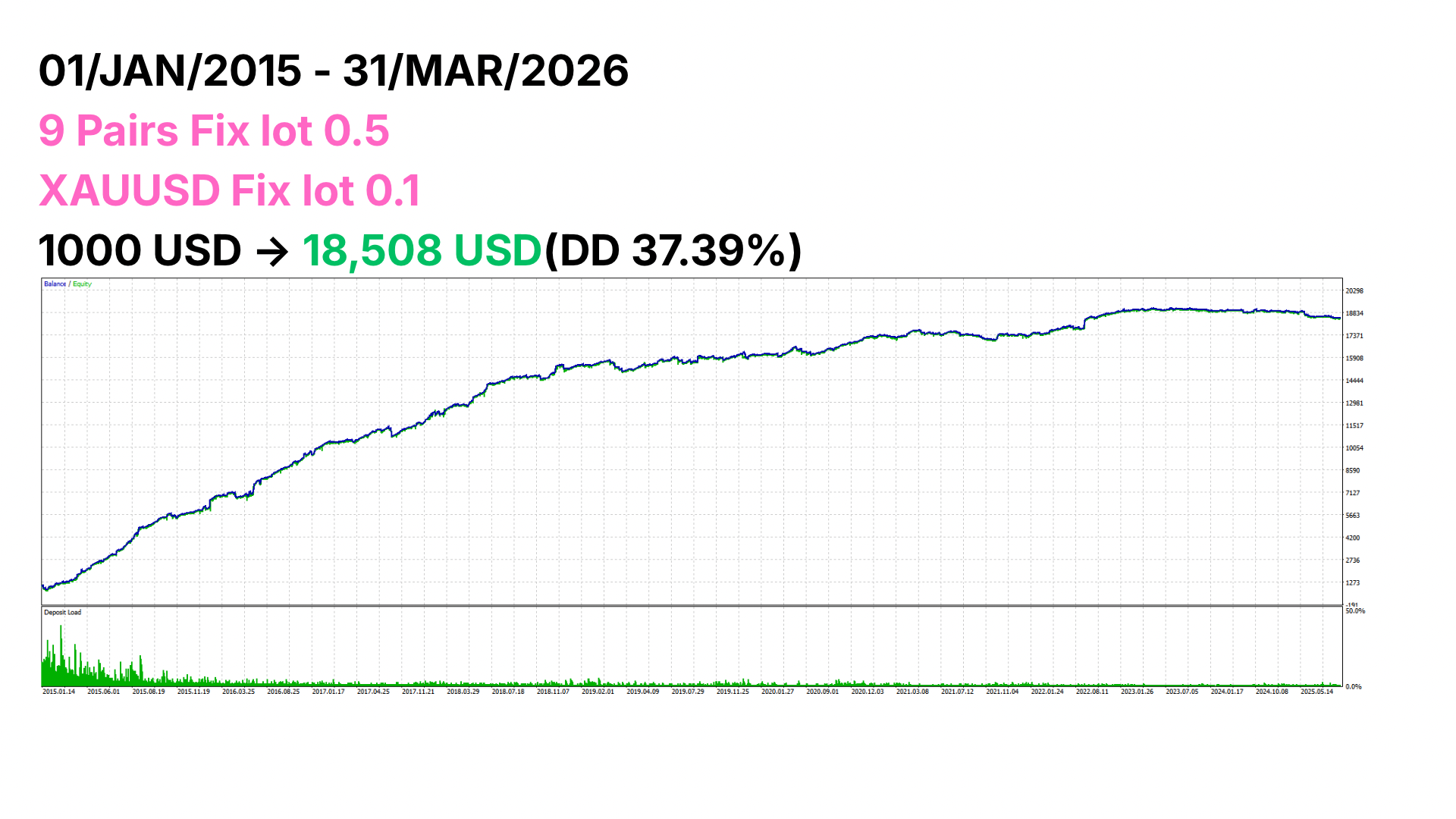
If you are building your own multi-currency system, hopefully this checklist saves you some pain. The biggest lie in retail systematic trading is a beautiful equity curve from a misconfigured Strategy Tester. Backtest correctly.