
Veröffentlicht von AlgoSphere Quant · April 2026
Willkommen im offiziellen Benutzerhandbuch von Quant Valencia Gold, einem Multi-Strategie-Expertenberater, der exklusiv für XAUUSD auf MetaTrader 5 entwickelt wurde. Dieses Dokument behandelt alles, was Sie benötigen, um die EA selbstbewusst einzusetzen: was jede der fünf Strategien bewirkt, wie der Risikostack Ihr Konto schützt, wie man das On-Chart-Cockpit liest und welche Einstellungen für verschiedene Kontogrößen und Handelsziele empfohlen werden.
📥 Hol dir Quant Valencia Gold auf dem MQL5-Markt → https://www.mql5.com/en/market/product/171629
Brandneue Veröffentlichung · Startpreis für frühe Nutzer · Lebenslange Lizenz · Kostenlose Updates

1. Was Quant Valencia Gold ist
Quant Valencia Gold ist ein spezialisierter XAUUSD-Expertenberater, der parallel fünf unabhängige Strategien betreibt, von denen jede ein anderes Goldmarktregime anstrebt. Es gibt kein Martingal, kein Gitter, keine Absicherung und keine Ergänzungsmittelwerte. Jede Position trägt einen harten Stop-Loss, der aus der Echtzeit-ATR-Volatilität ausgeprägt ist, und die EA setzt harte tägliche Verlustlimits und maximale Drawdown-Obergrenzen unabhängig vom Strategiestand durch.
Das EA basiert auf dem AlgoSphere Quant Framework – derselben modularen Bibliotheksarchitektur wie unsere Open-Source-ASQ-Beiträge zur MQL5-Codebasis. Gesamtcodebasis: ~45.000 Zeilen in 30 modularen Dateien. Fünf dieser Module setzen die Strategien um; Die übrigen 25 kümmern sich um Umsetzung, Risiko, Nachrichten, Regeln für Requisitenfirmen, Dashboard-Rendering und Analysen.
Gebaut für:
- Privathändler, die ein multistrategisches XAUUSD-System wollen, ohne mehrere EAs zu verwalten
- Requisitenfirmen-Challenge-Teilnehmer (FTMO, MFF, FundedNext, TFT, E8-Presets inklusive)
- Systematische Trader, die institutionelles Risikomanagement gegenüber Erholungstricks bevorzugen
Nicht für:
- Trader, die nach einer "Set it and forget it"-Blackbox suchen – Quant Valencia Gold gibt dir volle Sichtbarkeit und volle Kontrolle
- Trader, die martingalen oder in Verluste einsteigen wollen – dieses EA ist strukturell inkompatibel mit diesem Ansatz
2. Schneller Start
| Schauplatz | Wert |
|---|---|
| Symbol | XAUUSD (Gold) — Symbolvalidierung erzwungen |
| Standard-Angliederungszeitraum | M15 |
| Mindestkaution | 500 Dollar |
| Empfohlenes Depot | 1000+ $ |
| Kontoverschuldung | 1:30 bis 1:500 (typisch 1:100) |
| Maklertyp | ECN / Rohaufstrich wird dringend empfohlen |
| Maximaler Spread (Standard) | 5 Punkte |
| VPS | Erforderlich für den 24/5-Betrieb |
Fügen Sie das EA auf ein XAUUSD M15-Diagramm ein, erlauben Sie algorithmischen Handel, und das Cockpit erscheint oben im Chart. Die fünf Strategien sind standardmäßig aktiviert. Der EA führt kontinuierlich die Signalbewertung durch und feuert Trades nur aus, wenn die konfigurierten Filter übereinstimmen.
3. Die fünf Strategien
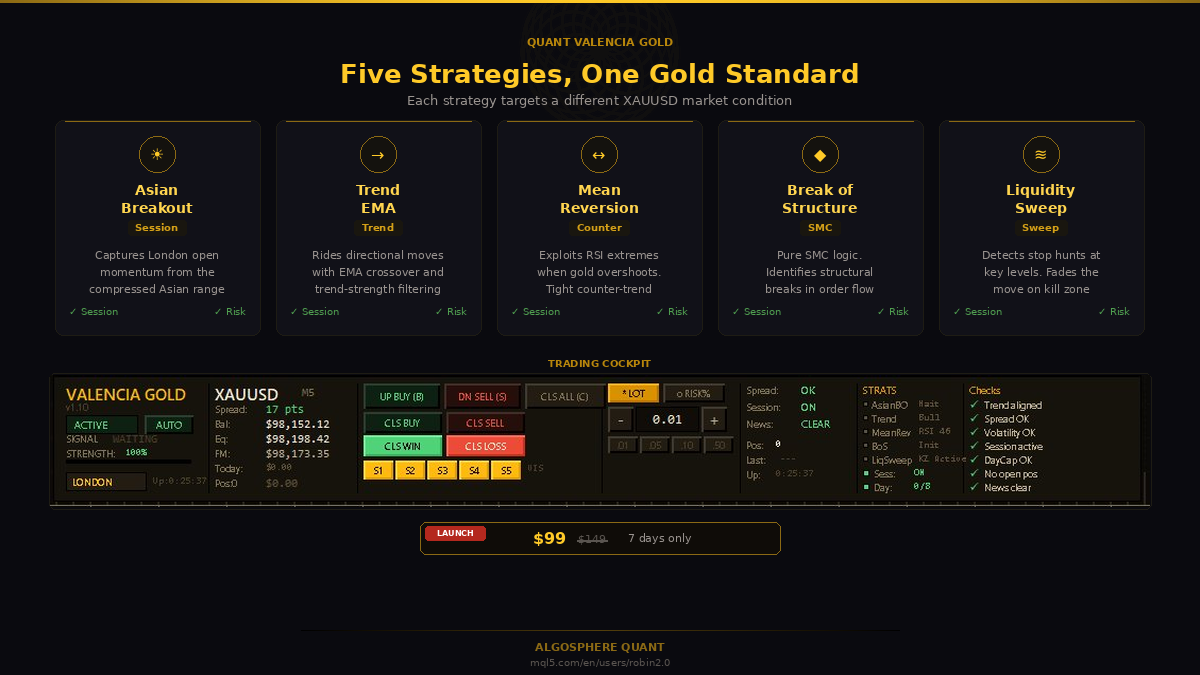
Jede Strategie arbeitet unabhängig, erzeugt eigene Signale und verwendet ihre eigene SL/TP-Logik. Sie teilen denselben Risikorahmen (maximale Positionen, tägliches Verlustlimit, Nachrichtenfilter), kombinieren sich aber nie zu zinseszinsen Positionen.
Strategie 1 — Asian Range Breakout (AVGoldAsianBreakout)
Fängt das London-Open-Momentum nach der komprimierten asiatischen Kollektion ein. Die Strategie kartiert das asiatische Sitzungshoch und -tief (konfigurierbar, Standard 00:00–06:00 GMT) und sucht dann nach einem von zwei Mustern bei Sitzungsöffnung:
- Sweep + Reversal-Modus — der Preis überschreitet die Spannweite und springt zurück (hochwahrscheinliches Stop-Hunt-Verblassen)
- Clean-Breakout-Modus – der Preis schließt mit anhaltendem Momentum eindeutig außerhalb der Spannweite
Ein konfigurierbarer EMA-200-Richtungsfilter (Standard H1) verhindert Gegentrend-Einträge an makroausgerichteten Tagen. Stop-Loss wird über das Swept Extreme hinaus plus ein Puffer platziert; Take Profit wird als Bruchteil des asiatischen Bereichs festgelegt. Die maximalen Trades pro asiatischer Spanne sind gedeckelt (Standard 2), um ein Überhandel mit demselben Setup zu verhindern.
Strategie 2 — Trendfolgendes EMA (AVGoldTrendEMA)
Fährt mit Richtungsbewegungen im H1-Zeitrahmen über eine SMA 9 / EMA 30 Frequenzweiche, mit optionalem EMA 200 Makrofilter. Einträge werden auf bestätigten Crossovers mit Trendstärke-Validierung aufgenommen; Stop-Loss wird ATR-multipliziert (Standard 2,0× ATR), und die Position liegt hinter dem EMA 30 plus einem ATR-Puffer für dynamische Ausstiege.
Die Strategie umfasst ATR-Boden- und Deckenfilter: Sie überspringt Einträge während der flachen Kompression (ATR unter dem Schwellenwert) und bei extremen Volatilitätsregimen (ATR über der Obergrenze), in denen die Richtungsfolge statistisch schwächer ist.
Strategie 3 — Mean Reversion (AVGoldMeanReversion)
Zielt auf RSI-Extreme, wenn Gold seine kurzfristige Reichweite überschreitet. Der Standard-Bestätigungsstack verwendet Bollinger-Bänder (20, 2,0σ) + RSI (14) + MACD-Divergenz, mit einem optionalen EMA-200-Filter für den strengsten Modus. Es stehen drei Bestätigungsmodi zur Verfügung:
- Nur BB + RSI – mehr Signale, geringere Selektivität
- BB + RSI + MACD-Divergenz — balanciert (Standard)
- BB + RSI + MACD + EMA 200 — strengste, niedrigste Signalmenge
Gegentrend-Einträge erhalten enge Stopps jenseits des Bollinger-Bandes plus einen Puffer, und die Strategie erzwingt eine konfigurierbare Abklingzeit zwischen den Signalen, um Stapelung bei rauschen Schwingungen zu verhindern.
Strategie 4 — Strukturbruch (AVGoldBoS)
Reine SMC-Logik (Smart Money Concept). Die Strategie identifiziert Swing-Highs/-Tiefs im konfigurierten Zeitrahmen (Standard M15), wartet auf einen strukturellen Bruch (HH→HL-Wechsel zu LH→LL oder umgekehrt) mit minimalem Break-Abstand und tritt dann ein:
- Sofort beim Break, oder
- Beim erneuten Testen des gebrochenen Levels oder
- Beides – zuerst ausbrechen, zweites Mal testen (Standard)
Der Stop-Loss wird über die Ausgangsstruktur hinaus sowie ein Puffer platziert; Take Profit-Standardwerte auf 2,0 × der SL-Distanz, was ein strukturell sauberes Belohnungsprofil ergibt. EMA 200 Makrofilter optional.
Strategie 5 — Liquiditätssweep + FVG (AVGoldLiquiditySweep)
Erkennt standardmäßig Stoppjagden auf Schlüsselebenen während der London (07:00–10:00 GMT) und New York (13:00–16:00 GMT) Kill Zones – vollständig konfigurierbar. Die Strategie scannt Fair Value Gaps (FVGs), die durch den Sweep-Impuls erzeugt werden, erfordert eine minimale FVG-Größe (standardmäßig 10 Pips) und eine minimale Sweep-Distanz und verlangsamt die Bewegung, sobald der Preis wieder in die Ungleichgewichtszone eintritt.
Stop-Loss liegt außerhalb des Swept-Extrems plus eines Puffers; Das Mindestrisiko-Ertrag-Verhältnis liegt standardmäßig bei 2,0. FVGs, die älter sind als das konfigurierbare Maximalalter (Standard 15 Balken), werden verworfen.
4. Risikomanagement-Stack
Der EA legt sieben unabhängige Schutzmaßnahmen ein. Jeder von ihnen kann neue Einträge stoppen; Keiner von ihnen kann einen anderen dazu bringen, Risiken einzugehen.
Positionsgröße – 7 verfügbare Methoden:
- Festes Grundstück
- Prozentuales Risiko pro Handel (Zahlungsausfall — 1% empfohlen)
- Kelly-Kriterium
- Halb Kelly
- Optimal F
- ATR-volatilitätsbereinigt
- VaR-eingeschränkt
ATR-adaptive Stopps — Stop Loss und Take Profit können feste Pip-Werte oder ATR-Multiplikatoren verwenden (Standard: 1,5× ATR für SL, 2,0× ATR für TP). Auf v1.12+ verhindert ein XAUUSD-spezifischer Stop-Loss-Floor, dass der EA während asiatischer Sitzungen mit komprimierter Volatilität Einträge einnimmt, in denen der berechnete SL unter einem sicheren Minimum liegt – eine häufige Ursache für vorzeitige Stop-outs bei klassischen ATR-Systemen.
Trailing Stop & Break-even — Konfigurierbare Aktivierungsschwellenwerte (Standard: BE bei +25 Pips, Trail beginnt bei +30 Pips mit 15 Pips Abstand hinter dem Preis).
Tages-Verlustlimit — Standardmäßig 3 % des täglichen Anfangssaldos. Bei einer Verletzung schließt die EA die ausstehende Bewertung und lehnt neue Einträge bis zum nächsten Handelstag ab.
Maximale Drawdown-Durchsetzung — Zahlungsausfall 10 % vom Spitzenkapital. Harte Obergrenze, keine Übersteuerung.
Nachrichtenfilter — Basierend auf dem MQL5-Wirtschaftskalender. Vier Modi: aus, nur Hochwirkung (Standard), hoch+mittler, alle Nachrichten. Pausefenster sind konfigurierbar (standardmäßig 30 Minuten davor, 15 Minuten danach).
Erholungsmodus – Unterscheidet von "Erholungsmartingal". Wenn der EA N aufeinanderfolgende Verluste registriert (Ausfall 3), reduziert er das Positionsrisiko um einen konfigurierbaren Prozentsatz (Verzug 50 %) und bleibt bei der niedrigeren Größe, bis die Serie endet. Der Risikoboden verhindert einen Einsturz auf null.
Volatilitäts-, Spread- und Distanzfilter — Min/Max-ATR-Verhältnisgrenzen, maximale Spread-Durchsetzung (standardmäßig 5 Pips für XAUUSD) und minimaler Abstand zu bestehenden offenen Positionen, um Stapelung zu verhindern.
Eintrittsabklingzeit (v1.12+) — Ein gleich-Richtung-Wiedereintritt auf der unmittelbar folgenden Leiste wird blockiert, wodurch das Stapel-auf-Rauschen-Verhalten bei ruckartigen Durchfahrten eliminiert wird.
5. Prop-Firm-Modus
Quant Valencia Gold liefert sieben Prop-firmen-Presets aus, die die täglichen Verlustlimits, maximalen Drawdown-Limits und Wochenend-/Nachrichten-Limits automatisch an die Regeln jedes Unternehmens anpassen:
PROP_NONE · PROP_CUSTOM · PROP_FTMO · PROP_MFF · PROP_FUNDEDNEXT · PROP_TFT · PROP_E8
Setze InpPropFirmMode auf deine Firma, setze InpPropAccountSize auf die Challenge-Größe (standardmäßig 100.000 $) und aktiviere InpPropStrictMode, um firmenspezifische Limits als Hard Blocks statt als weiche Warnungen durchzusetzen. Der EA wird Trades ablehnen, die die tägliche Verlust- oder Trailing/Stationary-Drawdown-Regel auch nur um einen Tick Slippage-Toleranz verletzen könnten.
Das garantiert keine Challenge Passage – die Strategieleistung gilt weiterhin – aber es entfernt den Fehlermodus "durch einen 0,1%-Regelverstoß getötet", der die meisten Herausforderungen beendet, bevor irgendein strategischer Vorteil ausgespielt werden kann.
6. Armaturenbrett & Cockpit
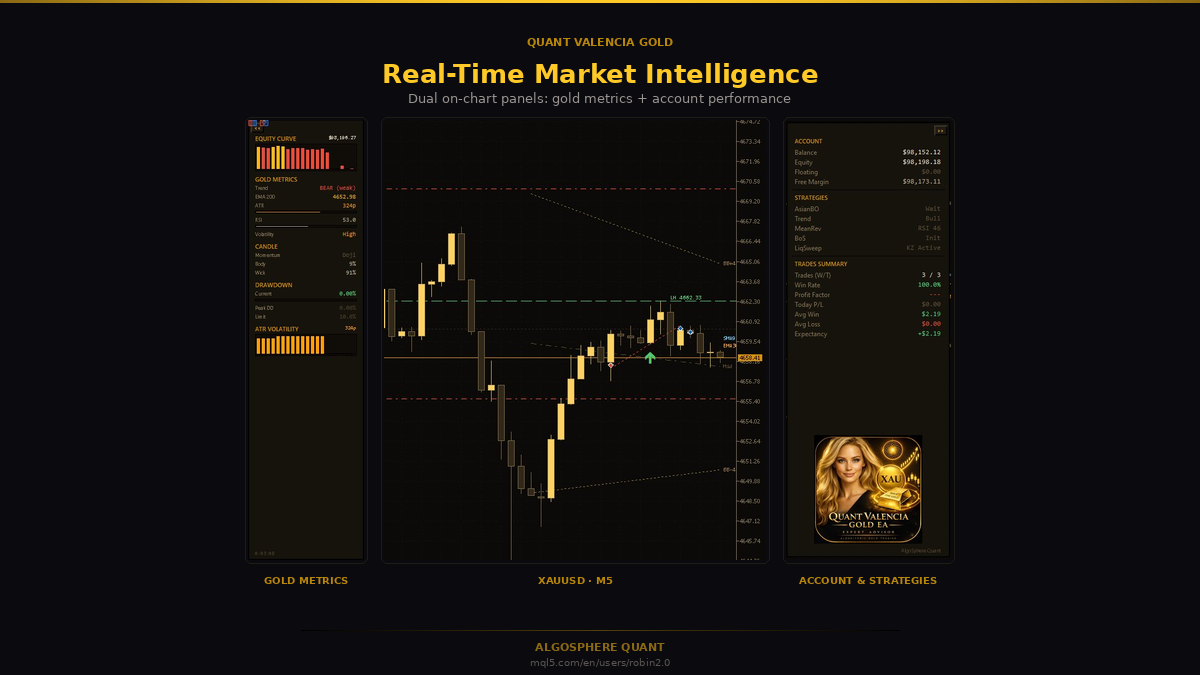
Die On-Chart-Benutzeroberfläche besteht aus drei Komponenten:
Trading Cockpit (oben im Chart) — Live-Status-Zeile zeigt Bilanz, Aktien, schwebende Kurs-/Verlustrechnung, heutiges KGV, Positionsanzahl, aktuellen Spread/Sitzung/Nachrichtenstatus. Aktionsköpfe für manuelle Lang/Kurzzeit, Knapp-Alles, Knapp-Kaufen, Schließen-Verkaufen, Knapp-Gewinnen, Knapp-Verlieren. Viel-/Risiko-Prozent-Schalter mit Schnellanpassungstasten. Taktik pro Strategie Schalter ein- und ausschalten (S1–S5). Frequenzkontrolltasten (Konservativ, ↔ Normal ↔ Aggressiv) mit einem Faktor von 0,25× bis 3,0×.
Gold Metrics-Panel (links im Diagramm) — Aktienkurven-Sparkline, EMA-200-Trendstatus, ATR, RSI, Kerzenmomentum/Körper/Wick-Analyse, aktueller und Spitzenrückgang, ATR-Volatilitäts-Heatmap.
Konto & Strategien Panel (rechts im Diagramm) — Kontobilanz/Eigenkapital/floating/freie Marge, Live-Status pro Strategie (warten / Signal / ausführen), Trade-Zusammenfassung mit Gewinnrate, Gewinnfaktor, durchschnittlicher Gewinn/Verlust, Erwartung.
Fünf verfügbare Themen: Emerald (Standard), Dark Professional, Blue Modern, Green Matrix, Minimal Light. Der Diagramm-Hintergrund kann sich automatisch mit dem EA-Thema synchronisieren.
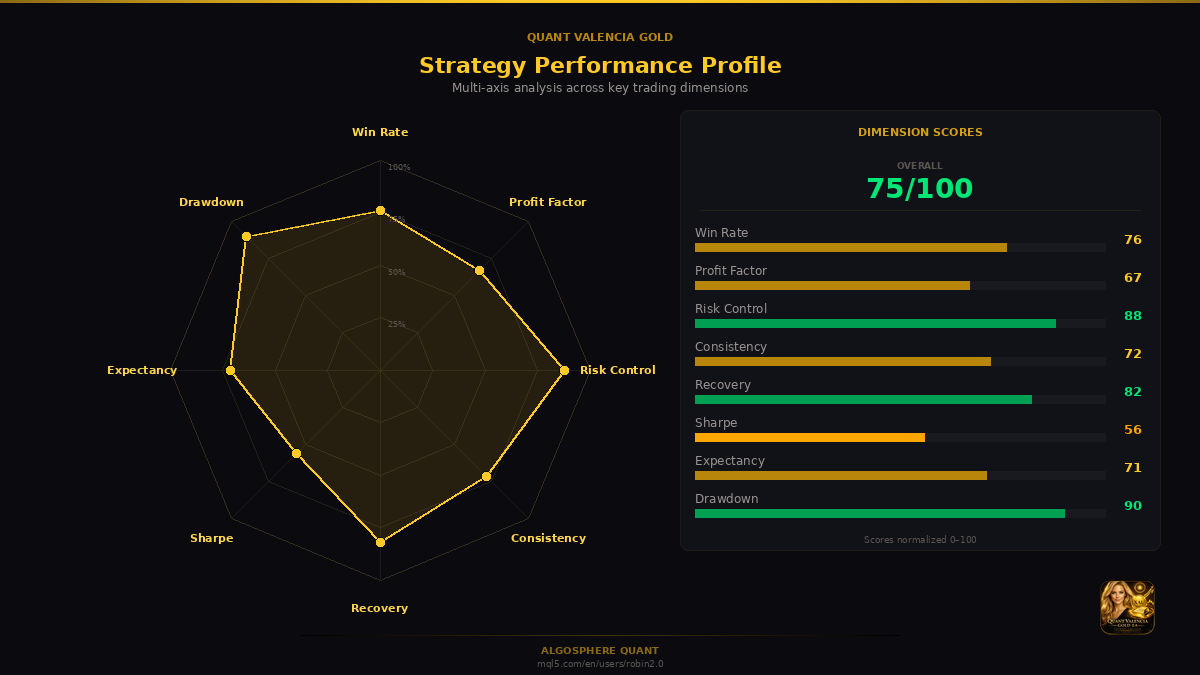
7. Empfohlene Profile
Drei Startprofile sind gebündelt. Passen Sie sich Ihrem Konto und Ihrer Risikotoleranz an:
Konservativ (Prop-Firm-Herausforderung / Kapitalerhaltung)
- InpRiskPercent = 0,5
- InpScalpMode = SCALP_CONSERVATIVE
- InpFreqMode = FREQ_MODE_CONSERVATIVE (0,75× Faktor)
- InpMRConfirmMode = MR_BB_RSI_MACD_EMA (strengste)
- InpUseSessionFilter = true (nur London + NY)
- InpDailyLossLimitPct = 2,0
- InpMaxDrawdownPct = 5,0
Balanced (Standard – Live-Retail-Konto)
- InpRiskPercent = 1,0
- InpScalpMode = SCALP_AGGRESSIVE
- InpFreqMode = FREQ_MODE_NORMAL (1.0×)
- InpMRConfirmMode = MR_BB_RSI_MACD
- InpDailyLossLimitPct = 3,0
- InpMaxDrawdownPct = 10.0
Aggressiv (erfahrene Trader / höhere Signalfrequenz)
- InpRiskPercent = 1,5
- InpScalpMode = SCALP_ULTRA
- InpFreqMode = FREQ_MODE_AGGRESSIVE (1,5× Faktor)
- InpMRConfirmMode = MR_BB_RSI_ONLY
- InpUseMTF = wahr (nur Boost)
- InpDailyLossLimitPct = 5,0
Telegram-Benachrichtigungen können in jedem Profil aktiviert werden, indem Sie InpTelegramEnabled = true setzen und Ihr Bot-Token (von @BotFather ) sowie die Chat-ID (von @userinfobot konfigurieren).
8. Interne Backtest-Referenz
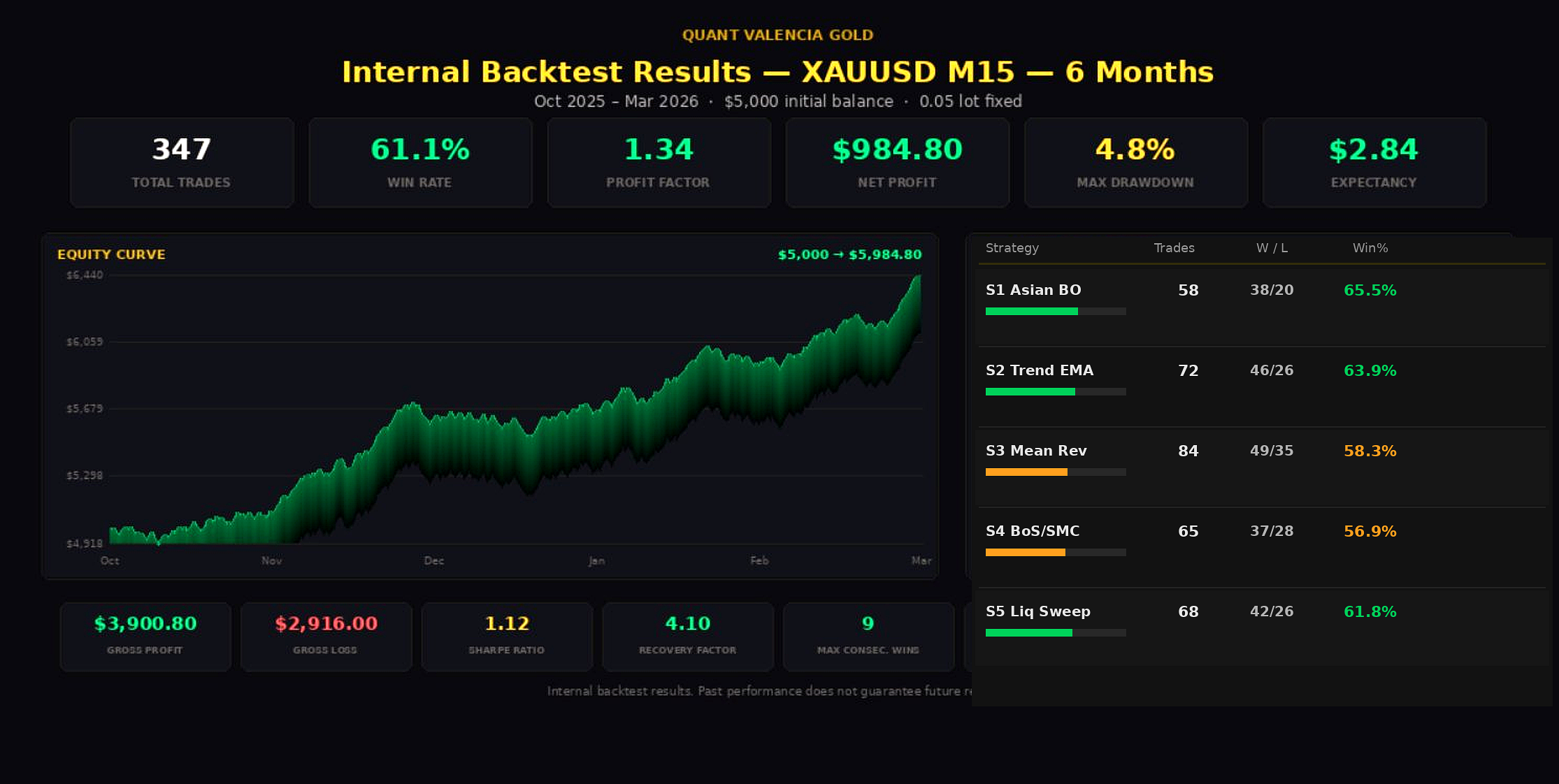
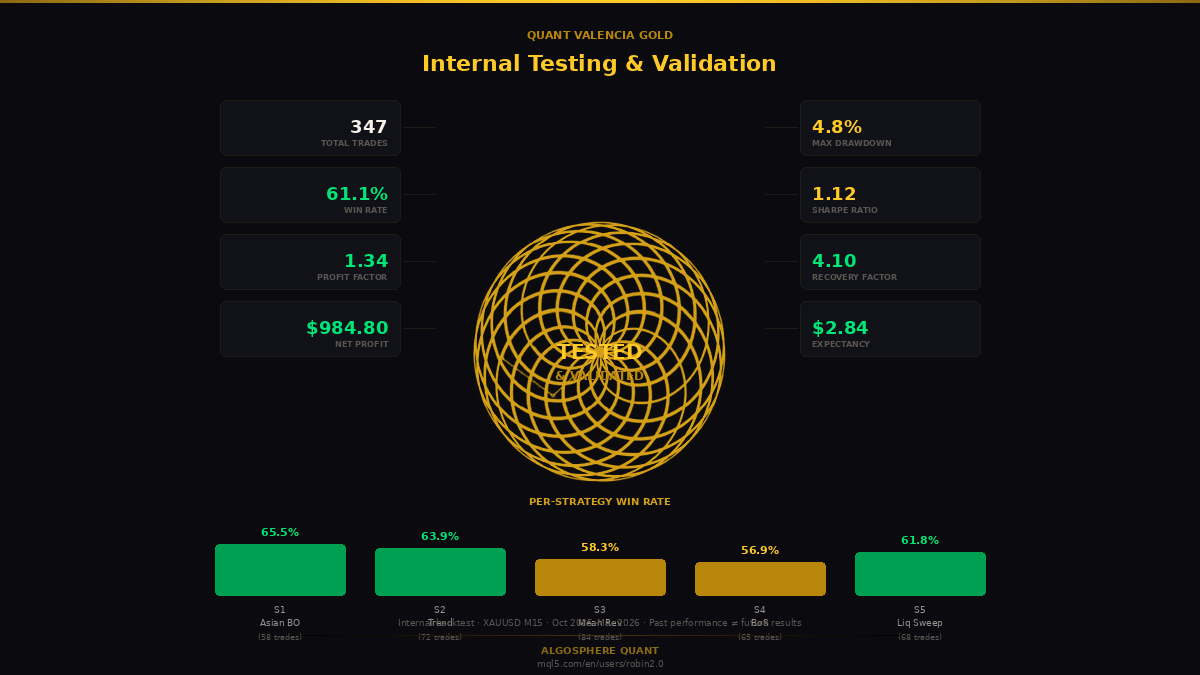
Interner Backtest, XAUUSD M15, Oktober 2025 – März 2026 (6 Monate), Anfangssaldo von 5.000 US-Dollar, festes Lot von 0,05 zur Vergleichbarkeit:
| Metrik | Wert |
|---|---|
| Gesamtzahl der Trades | 347 |
| Gewinnrate | 61.1 % |
| Gewinnfaktor | 1.34 |
| Nettogewinn | 984,80 $ |
| Maximaler Drawdown | 4.8 % |
| Erwartung | 2,84 $ |
| Sharpe-Verhältnis | 1.12 |
| Erholungsfaktor | 4.10 |
| Maximal aufeinanderfolgende Siege / Niederlagen | 9 / 5 |
Gewinnraten pro Strategie: S1 Asian Breakout 65,5 % (58 Trades), S2 Trend EMA 63,9 % (72), S3 Mean Reversion 58,3 % (84), S4 BoS/SMC 56,9 % (65), S5 Liquiditätssweep 61,8 % (68).
Haftungsausschluss. Dies sind interne Backtestergebnisse mit historischen Daten und fester Größe für einen gleichwertigen Vergleich. Vergangene Werte garantieren keine zukünftigen Ergebnisse. Live-Performance unterscheidet sich aufgrund von Spread, Slippage, Qualität der Broker-Ausführung und der Mikrostruktur des Live-Marktes. Ein Live-MQL5-Signal wird veröffentlicht, sobald die Erfolgsbilanz reift.
Funktioniert es auch bei anderen Symbolen? Nein. Die EA erzwingt die XAUUSD-Symbolvalidierung beim Start (hinzugefügt in Version 1.11). Stop-Loss-Floors, ATR-Bereiche, Sitzungsfenster und asiatische Parameter sind alle speziell für das Volatilitätsprofil von Gold kalibriert.
Warum standardmäßig M15, wenn manche Strategien M5 und andere H1 sind? Der EA kann auf jeden Zeitraum zwischen M5 und H1 angehängt werden. Das M15 ist der empfohlene Aufsatz, weil er dem Dashboard eine ausgewogene Bildwiederholrate verleiht. Jede Strategie fragt intern ihren eigenen Arbeitszeitrahmen ab, sodass der Anbindungszeitrahmen nicht verändert, wie Signale erzeugt werden.
Wird es eine Requisitenfirma-Challenge bestehen? Der Prop-Firm-Modus setzt die Regeln durch – Tagesverlust, maximale DD, Wochenend-Exposure – aber die Performance ist nicht garantiert. Stelle das passende Preset ein, führe das EA auf einem Demo-Account aus, das die Herausforderungsbedingungen mindestens zwei Wochen lang repliziert, bevor es live geht.
Verwendet es Martingal, Gitter oder Hecke? Nein. Jede Position hat einen harten Stop-Loss. Der Wiederherstellungsmodus verringert die Positionsgröße nach aufeinanderfolgenden Verlusten; Es erhöht die Exposition nicht, um sie wiederherzustellen. Der EA kann keine gegensätzlichen Positionen gleichzeitig auf demselben Symbol öffnen.
Kann ich einzelne Strategien deaktivieren? Ja. Jede Strategie hat ein InpGoldXxxEnabled-Flag in den Eingaben, und das Cockpit verfügt über S1–S5-Umschalttasten zum Aktivieren und Deaktivieren der Laufzeit.
Welchen Broker sollte ich nutzen? ECN- oder Raw-Spread-Konten werden dringend empfohlen – XAUUSD läuft auf einem Standardkonto oft Spreads über dem 5-Pip-Max-Filter, der die meisten Signale blockiert. Von unseren Kunden häufig genutzte Broker: IC Markets Raw, Pepperstone Razor, Tickmill Pro, FusionMarkets, BlackBull. Teste immer zuerst beim Demo.
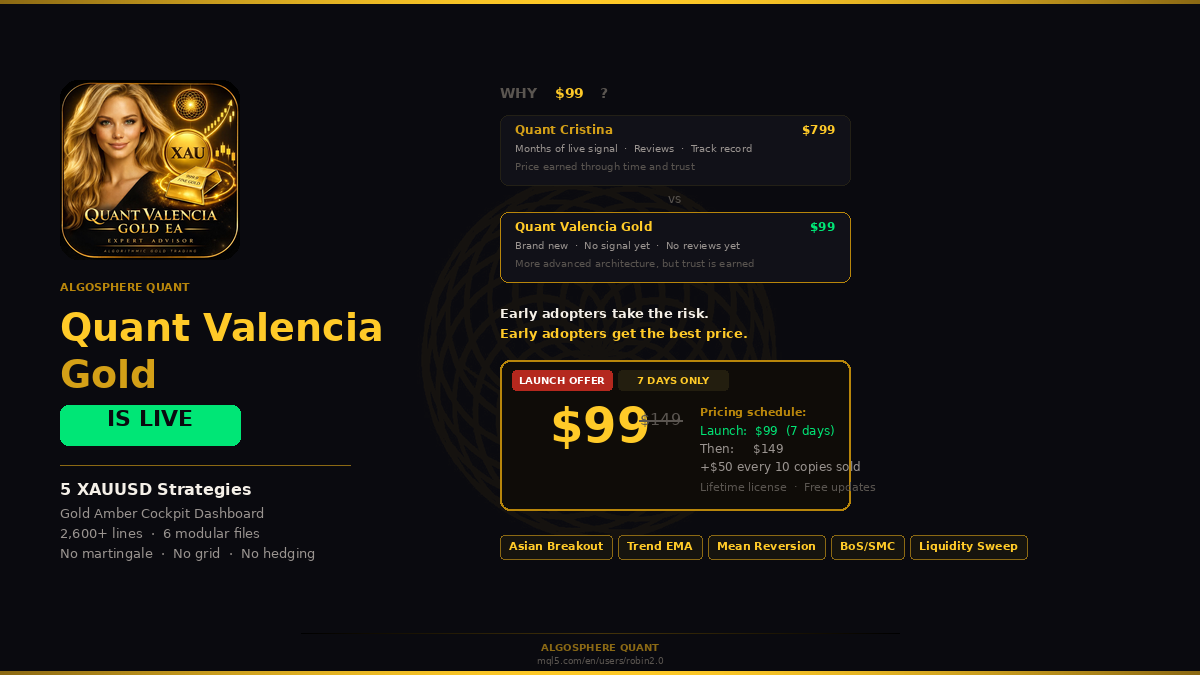
Warum kostet der Startpreis 99 Dollar, wenn Sie das als institutionelle Qualität positionieren? Weil das Produkt brandneu ist. Es gibt noch kein Live-Signal von MQL5, keine öffentlichen Reviews, keine mehrmonatige Erfolgsbilanz. Vertrauen wird verdient, nicht angekündigt. Early Adopter gehen das Risiko ein, als Erster zu sein; Im Gegenzug erhalten sie das Produkt, bevor der Preis auf das Altersniveau steigt (149 $ nach der Markteinführungswoche, dann +50 $ pro 10 verkaufte Exemplare).
10. Wechselprotokoll
v1.13 — 21.04.2026 (aktuell)
- Dashboard-Korrektur: Die Statusanzeige der Kill Zone in S5 zeigt nun vom Benutzer konfigurierte Eingabeparameter statt fest kodierter Standardwerte an. Keine Änderung der Handelslogik.
v1.12 — 14.04.2026
- Adaptives Pullback-Proximitätsband – verschärft sich bei zunehmender Volatilität, vergrößert sich bei schrumpfender Volatilität
- XAUUSD-Stop-Loss-Floor – verhindert Eintritte in komprimierte Volatilität während asiatischer Sitzungen mit niedrigem ATR
- Eintrittsabklingzeit – blockiert den gleichzeitigen Wiedereintritt auf der folgenden Leiste, um Stapeln auf lauten Kreuzungen zu vermeiden
- Synchronisierte Versionsheader über alle Module hinweg
- Leistungs- und Stabilitätsverbesserungen im gesamten Signaltriebwerk
v1.11 — 07.04.2026
- Verbesserte Signal-Engine mit verbesserter Trenderkennung und Pullback-Eingängen
- Optimierte SL/TP-Kalibrierung für XAUUSD-Volatilitätsprofile
- Verbessertes Multi-Position-Management für bessere Kapitaleffizienz
- Verfeinerte Strategiebewertungspipeline für schnellere Signalverarbeitung
- Nur XAUUSD-Symbolvalidierung zur Marktkonformität
- Aktualisierte Rendering von Dashboard-Daten
v1.10 — 2026.03.10
- Erste öffentliche Veröffentlichung · 5 Strategien · 30 Module · Prop Firm Presets · Cockpit-UI
11. Quant Valencia Gold erhalten
Lebenslange Lizenz · Kostenlose Updates · Direkter Entwickler-Support.
Preisplan:
- Startwoche: 99 $ (7 Tage nach Veröffentlichung)
- Nach dem Stapellauf: 149 $
- Dann +50 $ pro 10 verkaufte Exemplare bis zum Zielpreis
Sehen Sie sich Quant Valencia Gold auf dem MQL5-Markt → https://www.mql5.com/en/market/product/171629
For questions, support, or strategy discussion, leave a comment below or reach out via the AlgoSphere Quant profile on MQL5.
Questions about setup, configuration, or strategy logic?
Drop a comment below — I answer every question personally.
Fragen zu Aufbau, Konfiguration oder Strategielogik?
Quant Valencia Gold ist ein Produkt von AlgoSphere Quant. Basierend auf dem AlgoSphere-Framework – siehe unsere kostenlosen Bibliotheken auf der MQL5-Codebasis für die Open-Source-Module, die unsere kostenpflichtigen Produkte antreiben.
Handel birgt erhebliches Risiko. Vergangene Werte garantieren keine zukünftigen Ergebnisse. Teste immer bei der Demo vor der Live-Bereitstellung.