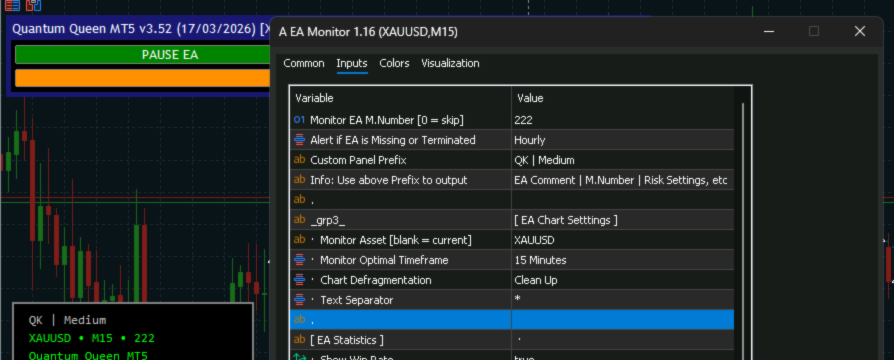

You’ve spent hours—maybe weeks—optimizing your Expert Advisor.
You’ve configured the asset, the timeframe, and the magic number.
You deploy it to your VPS, and then... the anxiety sets in.
Is it actually running as intended? Is it taking trades on the wrong timeframe? Did it silently crash?
Until now, checking up on your EAs meant digging through the History tab, squinting at messy terminal logs, or mentally calculating your risk-to-reward ratio on the fly.
Missing EAs or incorrect configurations can ruin an account, and finding out about them hours later is a terrible feeling.
That is exactly why I built the Amazing EA Monitor.
About Author:
Ivan Privalov is a Web Performance Engenier and an active Trader and MetaTrader Developer since 2015.
All his Free and Pro MetaTrader products are obsessed with quality and productivity:
https://www.mql5.com/en/users/ivanprivalov/seller
Telegram: https://t.me/InProfiting
YouTube: https://www.youtube.com/@InProfiting
Trading Signals:
InProfiting | Since July 2026 | P/L: +41% | DD: 29%
PerCent a Day | Since September 2026 | P/L: +17% | DD: 7%
⚡ Engineered for Absolute Zero VPS Drain
As a systems developer, I cannot stand terminal lag. Most monitoring dashboards available today are notoriously heavy—they loop through open positions and recalculate massive history pools on every single tick, chewing up shared CPU cycles on remote VPS environments.
I engineered the Amazing EA Monitor from the ground up to prioritize terminal performance.
-
Variable Float Refresh Rates: You control the tick-level overhead. Throttle your floating P/L updates from every 1 second up to 1 hour (or set it to manual).
-
Epsilon Drift Checks: The dashboard completely eliminates redundant UI redraws caused by microscopic double-precision drift. If the value hasn't meaningfully changed, the terminal doesn't redraw.
-
Server Time Alignment: Statistical boundaries (Today, This Week, 30D) are strictly aligned with your broker's Trade Server Time, ensuring your analytics match daily candle rollovers perfectly.
📊 The Stats You Actually Need, On Your Chart
The monitor is a lightweight, beautifully designed overlay that instantly aggregates your EA’s combined performance—even if it is trading a multi-currency basket across different symbols from the same magic number.
Actionable Statistics at a Glance:
-
Closed P/L with a clear win/loss breakdown.
-
Win rate with intuitive success/failure coloring.
-
Open positions and floating P/L updated in real-time.
Pro-Grade Analytics:
-
Profit Factor & Expectancy per trade.
-
Best trade vs. Worst trade comparisons.
-
Risk-to-Reward ratio.
-
Closed Maximum Drawdown tracking.
🔔 Smart Alerts (Zero Spam)
You shouldn't have to babysit your charts. Set the monitor to Hourly or Daily, and it will notify you if your EA unexpectedly disappears from the chart, or if the magic number is missing/has no history.
Crucially, it features Smart Recovery: If your EA crashes and you restart it, the alert cooldown resets the exact moment the EA returns to the chart. You are always protected, but never spammed.
🎨 Fully Customizable & HiDPI Ready
Whether you trade on a laptop or a 4K monitor, the dashboard dynamically queries your terminal's screen DPI and automatically scales panel dimensions, padding, and font sizes to remain perfectly crisp.
Choose from built-in Dark or Light modes, or build a fully Custom Theme with seven configurable colors. Opt for a solid background or a semi-transparent overlay, place it in any corner, and make it your own.
🤝 Available for Free
Trading is stressful enough; your tools shouldn't add to the burden.
The Amazing EA Monitor is 100% free. I released it as my personal input into your well-being and comfort of mind. Set your magic number, step away from the terminal, and let it run forever.
https://www.mql5.com/en/market/product/173379
Let me know in the comments how the dashboard is running on your setups, or if you have any feature requests for the next update!
— IP, InProfit.ing




