This article contains the following sections:
- ✅ How to setup this Forex Robot
- ...................................................................................................
⚠️ How to setup this Forex Robot:
- Open EURUSD 5M Chart
- Enable “AutoTrading”
- Connect the EA to the chart and press OK
- Watch this video on Youtube
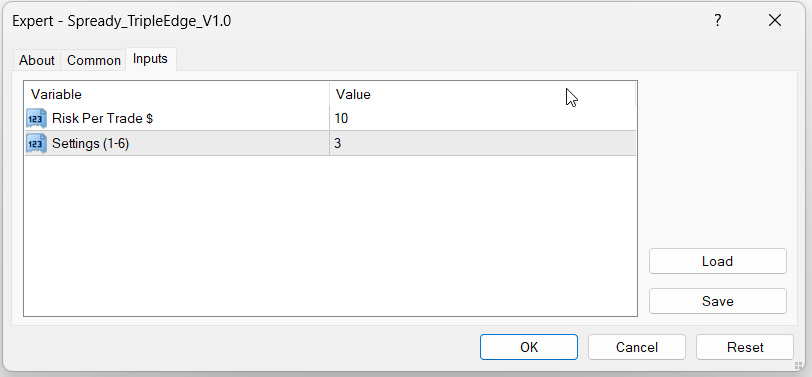
Default settings is, Risk per trade = 10$ and Settings = 6 if you have balance 500$ or more (in current version setting 6 is less risk and profitable)
There are only 2 input
Settings : There are 6 settings. You have to type between 1-6 settings. If there is small trend then setting 1 will generate good profit and setting 6 will generate good profit if the trend is very strong. Check below Live trading results for different settings and decide which settings you want to use. One setting can be use for One MT4 account. If you want to use all 6 setting then create 6 MT4 account, each with initial balance 500$ or more and then connect the EA for each MT4 account and specify setting.
Leverage requirement:
This EA can be use for 1:1 leverage then it will require higher initial balance. So, it is recommended to use 1:500 or higher leverage if you want to use this EA with initial balance from 500$.
Pairs :
This EA is configured for 7 pairs. All these 7 pairs should be exactly like below. Some broker uses some extra character, in that case EA will not open any order for that pair. Most of the Forex broker uses pair name similar to below:
EURUSD , GBPUSD , USDJPY , USDCHF , AUDUSD , USDCAD , XAUUSD
Forex Broker Server Time :
Most of the MT4 Forex broker server time is EET time zone. It is recommended to use any broker with EET server time to get better performance but EA can work in any Broker with different time zone. Below, top Forex broker list is given which uses EET server time.
Join Telegram Channel to get updates of this Robot : @ForxAnalytics
Telegram Support : @ForxAnalytics_Support
Subscribe Youtube to get details : https://www.youtube.com/@ForxAnalytics
bookmark our website for future : https://www.forxanalytics.com/
...................................................................................................