

Building a Divergence System (Part V): Adaptive Parabolic SAR Trailing Stop Utility
 63
 0

Contents
- Introduction
- Why a Reusable Header
- Designing the Utility
- Adapting the Acceleration Factor
- The Side Check
- The Remaining Gates
- Result Codes
- Using the Utility From an Indicator
- Building the Demo EA
- Results
- Scope Limitations
- Conclusion
Introduction
Part 4 of this series extracted the divergence logic into DivergenceEngine.mqh and demonstrated it in a small Adaptive Parabolic SAR EA. That article closed by pointing at something the demonstration had deliberately left alone. In most systems, Parabolic SAR is a trailing-stop tool rather than an entry trigger, and the same adaptive acceleration factor can be used to tighten or loosen a trailing stop on an already-open position from an Expert Advisor that knows nothing about this series. This part builds that. AdaptivePSARTrail.mqh is a header that an existing Expert Advisor can include to gain an adaptive Parabolic SAR trailing stop, and it can trail positions that it did not open.
Moving the stop to the current SAR level as each bar closes looks like the whole job. Two things make it more than that. Parabolic SAR changes sides. Its dots sit below price during an uptrend and above price during a downtrend, and the moment price crosses them, they jump to the opposite side. A position does not change sides with them, so at every flip the indicator briefly produces a level that cannot legally serve as a stop for the position it is meant to protect. A broker can also refuse stops that are arithmetically correct. There is a minimum distance from the price at which a stop may be placed, a separate distance within which an existing stop cannot be modified, and a tick grid on which the level must sit. The utility adds a rule of its own on top: a trailing stop never moves backwards. If these checks are treated as a single condition, the stop may stop moving with no clear reason.
AdaptivePSARTrail.mqh owns its own SAR series and its own DivergenceEngine instance, so the host Expert Advisor adds four calls and manages nothing else. The acceleration factor responds to an opposing divergence in whichever direction the trader chooses, and a position is qualified by symbol and magic number rather than by the code that opened it. The companion file, DEMO_PSAR_Trailing.mq5, runs the utility in two modes: attached to its own test trades so you can watch the behavior in the Strategy Tester, or attached to nothing of its own, trailing another Expert Advisor's positions.
Scope of This Article
In this article, we will:
- Explain why this part ships a header rather than another demonstration EA.
- Design the configuration struct and the four calls that form the integration contract.
- Adapt the acceleration factor from the divergence state, one bar at a time.
- Handle the side change that makes a naive SAR trailing stop unsafe.
- Order the broker and improvement checks, and name the result each one returns.
- Compile the trading half out for indicators.
- Build the demonstration EA in both modes and set out the runs that verify it.
Why a Reusable Header
One chart runs one Expert Advisor, so trailing logic shipped as an EA has two ways in: replace the system it was meant to improve, or run on a second chart and reach across to the first one's positions by symbol and magic number. The second route works, and the demonstration EA in this article does exactly that. It also needs a chart, a second program in the terminal, and a magic number that stays in step with the system it is trailing. A header removes all three for anyone who can recompile the host, and leaves the second-chart route available for the cases where they cannot.
Three design decisions follow. The utility owns its own state. One instance holds one symbol, one timeframe, one SAR series, and one DivergenceEngine instance, so the host never has to size a buffer or follow the engine's integration sequence itself. Ownership of a position is decided by symbol and magic number rather than by which code opened it. An instance configured with another Expert Advisor's magic numbers will trail that Expert Advisor's positions, with no shared code and no modification to it. The trading methods are optional. An indicator cannot send trade requests, so those methods and their CTrade dependency are compiled out behind a single define.
What the Previous Part Already Settled
Three points carry over into this article and are not repeated here.
- MQL5's built-in iSAR() fixes its acceleration factor when the handle is created, which is why the Parabolic SAR is calculated directly rather than read from a handle.
- The divergence engine stays neutral about what a divergence means, reporting type and age and leaving the interpretation to its consumer. For a trailing stop, that neutrality has a concrete meaning that the entry case did not: reducing the acceleration factor keeps the stop farther from price for longer and gives the trend more room, while increasing it draws the stop in faster and can lock in profit sooner.
- The divergence engine knows nothing about what consumes it. This header sits on the consumer side of that boundary and extends it by one step: the engine still knows nothing about Parabolic SAR and now knows nothing about positions either.
The header drives the engine through the same setup, refresh, per-bar, and teardown sequence documented in the previous part, and nothing in the engine changed for this one.
Designing the Utility
The Configuration Struct
The header is configured through a single struct that the host fills in once:
//+------------------------------------------------------------------+
//| Every setting in one place, so the host EA fills one struct      |
//| instead of matching a long argument list                         |
//+------------------------------------------------------------------+
struct PSARTrailConfig
  {
   //--- Market context
   string            Symbol;                // Empty string = current chart symbol
   ENUM_TIMEFRAMES   Timeframe;             // Timeframe the SAR and divergence run on
   int               Lookback;              // Bars to process per refresh

   //--- Parabolic SAR
   double            SARStep;               // Base acceleration step
   double            SARMaximum;            // Acceleration ceiling

   //--- Divergence source (handed straight to DivergenceEngine.mqh)
   ENUM_DIV_SOURCE   DivSource;             // MPO4 or RSI
   int               MPOLength;             // MPO length
   int               MPOSmooth;             // MPO smoothing
   int               RSIPeriod;             // RSI period (used when DivSource is RSI)
   int               PivotLength;           // Bars either side of an oscillator pivot

   //--- Adaptation
   bool              EnableAdaptive;        // Off = a plain Parabolic SAR trailing stop
   ENUM_PSAR_ADAPT_MODE AdaptMode;          // Loosen or tighten on an opposing divergence
   double            AdaptFactor;           // Fraction of the base step to add or remove [0..1]
   int               DivBarsLimit;          // Ignore divergences older than this many bars
   bool              ResetOnTrendChange;    // Clear divergence state when the SAR flips

   //--- Which positions this instance is allowed to touch
   string            MagicList;             // Comma-separated magic numbers, e.g. "23456,999"
   bool              TrailAllMagics;        // Ignore MagicList and trail every position on the symbol

   //--- Trailing behaviour
   int               StartPoints;           // Start trailing once price has moved this many points past the entry (0 = immediately)
   int               StepPoints;            // Minimum improvement before a modify is sent (0 = any)
   int               OffsetPoints;          // Positive moves the stop towards price (tighter); negative gives the trend more room
   int               MinStopBufferPoints;   // Own floor under the broker's stops level
   bool              RequireTrendAgreement; // Skip when the SAR is on the wrong side of price
   bool              RequireBreakEven;      // Never move a stop to worse than the entry price
   bool              VerboseLog;            // Log every skip reason, not just modifications

   //--- Sensible starting point; the host overrides what it cares about
   void              SetDefaults(void)
     {
      Symbol                = "";
      Timeframe             = PERIOD_CURRENT;
      Lookback              = 300;

      SARStep               = 0.02;
      SARMaximum            = 0.20;

      DivSource             = DIV_SRC_MPO;
      MPOLength             = 6;
      MPOSmooth             = 7;
      RSIPeriod             = 14;
      PivotLength           = 2;

      EnableAdaptive        = true;
      AdaptMode             = PSAR_ADAPT_REDUCE;
      AdaptFactor           = 0.3;
      DivBarsLimit          = 200;
      ResetOnTrendChange    = false;

      MagicList             = "";
      TrailAllMagics        = false;

      StartPoints           = 0;
      StepPoints            = 0;
      OffsetPoints          = 0;
      MinStopBufferPoints   = 0;
      RequireTrendAgreement = true;
      RequireBreakEven      = false;
      VerboseLog            = false;
     }

                     PSARTrailConfig(void) { SetDefaults(); }
  };
Twenty-four settings passed as arguments would be unreadable and difficult to extend without breaking existing calls, so they travel in a struct. The constructor calls SetDefaults(), so a host that needs to change only three settings can set those three and leave the rest at their defaults. SetDefaults() is declared before the constructor in the struct body, so the constructor can call it without relying on a member function being defined later in the struct. The five divergence fields pass straight through to the engine and keep the meanings the previous part documented. Symbol accepts an empty string, which resolves to the chart symbol during initialization.
The defaults are starting points, not values selected for this header. SARStep 0.02 and SARMaximum 0.20 are the usual Parabolic SAR settings and the defaults of the terminal's own Parabolic SAR indicator. MPOLength 6, MPOSmooth 7, RSIPeriod 14 and PivotLength 2 are the oscillator defaults this series has used since the MPO4 oscillator was introduced. AdaptFactor 0.3 and DivBarsLimit 200 are the shrink factor and the bar limit of the earlier parts, carried over unchanged. None of them was tuned for trailing, and they are best set for the instrument, the timeframe and how much room the stop should give.
The Four-Call Lifecycle
The whole integration contract is four methods:
| Host event | Call | Cost |
|---|---|---|
| OnInit() | Init(cfg) | Once. Validates the configuration, resolves symbol properties, parses the magic list, and starts the engine. |
| New bar in OnTick() | Refresh() | Recomputes the oscillator, divergence, and SAR series. |
| Every tick | ApplyToPositions() | Reads the SAR level from the last refresh and the live tick; no recalculation. |
| OnDeinit() | Deinit() | Releases the engine and every buffer. |
Initialization does more than copy the configuration:
//+------------------------------------------------------------------+
//| Initialization                                                   |
//+------------------------------------------------------------------+
bool CAdaptivePSARTrail::Init(const PSARTrailConfig &cfg)
  {
   m_cfg    = cfg;
   m_symbol = (StringLen(cfg.Symbol) == 0) ? _Symbol : cfg.Symbol;
   m_tf     = cfg.Timeframe;
   m_ready  = false;

   if(!ValidateConfig())
      return false;

//--- Symbol properties. A symbol that is not in Market Watch reports zero for everything.
   if(!SymbolSelect(m_symbol, true))
     {
      Print("[PSARTrail] Could not select symbol ", m_symbol, " in Market Watch.");
      return false;
     }
   m_digits   = (int)SymbolInfoInteger(m_symbol, SYMBOL_DIGITS);
   m_point    = SymbolInfoDouble(m_symbol, SYMBOL_POINT);
   m_tickSize = SymbolInfoDouble(m_symbol, SYMBOL_TRADE_TICK_SIZE);
   if(m_point <= 0.0)
     {
      Print("[PSARTrail] Symbol ", m_symbol, " reported a point size of 0.");
      return false;
     }

   if(!ParseMagicList())
      return false;

//--- The divergence engine is ours; the host never sees it
   if(!InitializeDivergenceEngine(m_engine,
                                  m_cfg.DivSource,
                                  m_cfg.MPOLength,
                                  m_cfg.MPOSmooth,
                                  m_cfg.RSIPeriod,
                                  m_cfg.PivotLength,
                                  m_symbol,
                                  m_tf))
     {
      Print("[PSARTrail] Failed to initialize the divergence engine.");
      return false;
     }

//--- Refuse a lookback that cannot hold a pivot pair plus working room
   int required = GetRequiredLookback(m_engine) + 30;
   if(m_cfg.Lookback < required)
     {
      Print("[PSARTrail] Lookback (", m_cfg.Lookback, ") raised to the engine's requirement (", required, ").");
      m_cfg.Lookback = required;
     }

#ifndef PSAR_TRAIL_CALC_ONLY
   m_trade.SetAsyncMode(false);
   m_trade.LogLevel(LOG_LEVEL_ERRORS);
#endif

//--- Try a first refresh now. Until one succeeds, IsReady() stays false.
   if(!Refresh())
      Print("[PSARTrail] Initialized, but the first refresh found no usable history yet.");
   else
      Print("[PSARTrail] Initialized on ", m_symbol, " with ", m_bars, " bars, adaptive=",
            (m_cfg.EnableAdaptive ? "on" : "off"), ".");

   return true;
  }
Four things are deliberate. A symbol missing from Market Watch can report zero for its properties, so it is selected and its point size checked before anything is divided by it. The lookback is raised rather than rejected when it falls below what the engine needs, because a host that requests too little history is better served by a working window than by a failed startup. The CTrade settings sit behind the compile guard since an indicator build has no CTrade to configure. A first refresh also runs immediately, so the opening tick usually has a level to offer already. If history is not available yet, initialization still succeeds. The log reports that the refresh found no data, and the ready flag remains false until a refresh completes. Until then, queries return no data and the trailing pass does nothing. The next call to Refresh() acts as the retry. A failure is logged rather than treated as fatal because history is frequently incomplete at startup.
The refresh itself is short because the work lives in the engine and in the SAR loop:
//+------------------------------------------------------------------+
//| Recompute the oscillator, divergence state and SAR series        |
//| Call once per new bar.                                           |
//+------------------------------------------------------------------+
bool CAdaptivePSARTrail::Refresh(void)
  {
   m_ready = false;

   if(!CopyPrices())
      return false;

   if(!UpdateDivergenceRSI(m_engine, m_limit))
      return false;

   InitDivergenceBoundaries(m_engine, m_limit);
   ComputeSeries();

   m_lastRefreshBar = iTime(m_symbol, m_tf, 0);
   m_ready = true;
   return true;
  }
The ready flag is cleared first and set only on success, so a failed refresh leaves every query returning nothing rather than returning data from a partially filled buffer. The refresh and the trailing attempt are separate calls because they answer to different clocks. Recalculating the series is the expensive work, and none of it changes inside a bar. Whether the broker will accept a modification depends on the live price, so the attempt runs as often as the host calls it.
UpdateDivergenceRSI() is named for the one source that needs it. With RSI selected, it copies the RSI indicator's buffer into the engine before the loop starts. With MPO selected, it returns at once, because the MPO oscillator is calculated bar by bar inside the series walk.
The Calculation and Trading Halves
Of the twenty public methods, eighteen perform no trading call. Only the trailing pass and the per-ticket method send anything to the server. The rest either read what the last refresh stored or, in the case of the proposed stop, read the live tick and the broker's two distance properties, and none of them changes anything on the account. Maintaining that division is what allows the trading half to be removed for indicators without disturbing the rest.Adapting the Acceleration Factor
Parabolic SAR has one sensitivity control. The acceleration factor begins at the base step, and each time the price sets a new extreme in the direction of the trend, the step is added to it, up to a configured ceiling. A larger factor makes the SAR advance toward the price more quickly. Adaptation changes the size of the step contributed by a particular bar:
//+------------------------------------------------------------------+
//| Step for one bar, adapted only by a divergence that argues       |
//| against the direction the SAR is currently trailing              |
//+------------------------------------------------------------------+
double CAdaptivePSARTrail::AdaptiveStepAt(const int shift, const int trendDir)
  {
   double stepNow = m_cfg.SARStep;
   if(!m_cfg.EnableAdaptive)
      return stepNow;

   int divType   = GetLastDivergenceType(m_engine, shift);
   int barsSince = GetBarsSinceDivergence(m_engine, shift);

   if(divType == 0 || barsSince > m_cfg.DivBarsLimit)
      return stepNow;

//--- A bullish divergence during a downtrend, or a bearish one during an uptrend
   bool opposes = (trendDir == 1 && divType == -1) || (trendDir == -1 && divType == 1);
   if(!opposes)
      return stepNow;

   if(m_cfg.AdaptMode == PSAR_ADAPT_REDUCE)
      stepNow = m_cfg.SARStep * (1.0 - m_cfg.AdaptFactor);
   else
      stepNow = m_cfg.SARStep * (1.0 + m_cfg.AdaptFactor);

//--- Confine to a usable range
   if(stepNow < 0.0001)
      stepNow = 0.0001;
   if(stepNow > m_cfg.SARMaximum)
      stepNow = m_cfg.SARMaximum;

   return stepNow;
  }
Four conditions must be met before the step changes. Adaptation has to be switched on. With it off the base step is returned on every bar, and what trails the position is a plain Parabolic SAR, computed by this header from its own seed rather than read from a handle, with the differences that follow from that set out in the limitations. A divergence has to exist, since the engine reports zero when there is none. It must satisfy DivBarsLimit, because a divergence from two hundred bars ago is not necessarily evidence about the current bar, and without that limit a single signal could leave the adaptation active indefinitely. It must also oppose the direction the SAR is currently following, since a regular divergence that agrees with the trend does not call for a change in what the SAR is already doing.
AdaptFactor is a fraction of the base step, so a factor of 0.3 in reduce mode multiplies the step by 0.7 on that bar. The two confines keep the result within a usable range. A step of zero would freeze the acceleration factor at whatever it had reached, and a step larger than the ceiling achieves nothing a step equal to it would not.
The step is calculated per bar rather than once per series because the SAR computation walks from the oldest processed bar forward and requests a step for each bar. The acceleration factor built up across a trend is therefore the result of what each bar was permitted to add. That is why the SAR is computed here rather than read from a handle: a handle's step is fixed when the handle is created, and a new handle computes its whole history with one step, while this needs one bar's step to differ without rewriting the bars before it.
The Series Walk
The loop that requests each bar's step is also where the trend flips and where ResetOnTrendChange takes effect:
//+------------------------------------------------------------------+
//| The Parabolic SAR itself, walked from the oldest processed bar   |
//| forward to the current one so each bar's step can differ         |
//+------------------------------------------------------------------+
void CAdaptivePSARTrail::ComputeSeries(void)
  {
   int limit = m_limit;

//--- Seed the oldest bar. Direction of that single candle is an arbitrary
//--- starting guess; the SAR converges away from it within a few flips.
   int    trend = (m_close[limit] > m_open[limit]) ? 1 : -1;
   double sar   = (trend == 1) ? m_low[limit]  : m_high[limit];
   double ep    = (trend == 1) ? m_high[limit] : m_low[limit];
   double af    = m_cfg.SARStep;

   for(int i = limit; i >= 0; i--)
     {
      //--- Divergence state for this bar. The engine owns it entirely.
      CalculateOscillator(m_engine, i, m_open, m_close, m_point);
      DetectDivergence(m_engine, i, m_high, m_low, limit);

      //--- Trend flip: the SAR jumps to the extreme point of the trend
      //--- that just ended, and the acceleration factor starts over
      bool flipped = false;
      if(trend == 1 && m_low[i] < sar)
        {
         trend   = -1;
         sar     = ep;
         ep      = m_low[i];
         af      = m_cfg.SARStep;
         flipped = true;
        }
      else
         if(trend == -1 && m_high[i] > sar)
           {
            trend   = 1;
            sar     = ep;
            ep      = m_high[i];
            af      = m_cfg.SARStep;
            flipped = true;
           }

      if(flipped && m_cfg.ResetOnTrendChange)
         ResetDivergenceState(m_engine, i);

      //--- The step this bar is allowed to add to the acceleration factor
      double stepNow = AdaptiveStepAt(i, trend);

      //--- A new extreme point is what earns an acceleration increase
      if(trend == 1)
        {
         if(m_high[i] > ep)
           {
            ep = m_high[i];
            af = MathMin(af + stepNow, m_cfg.SARMaximum);
           }
        }
      else
        {
         if(m_low[i] < ep)
           {
            ep = m_low[i];
            af = MathMin(af + stepNow, m_cfg.SARMaximum);
           }
        }

      //--- Store what this bar actually used
      m_sar[i]   = sar;
      m_trend[i] = trend;
      m_step[i]  = stepNow;

      //--- Project the SAR for the next (more recent) bar
      sar = sar + af * (ep - sar);
      if(trend == 1)
         sar = MathMin(sar, MathMin(m_low[i], (i < limit) ? m_low[i+1]  : m_low[i]));
      else
         sar = MathMax(sar, MathMax(m_high[i], (i < limit) ? m_high[i+1] : m_high[i]));
     }
  }
Each pass through the loop does the same things in the same order. The engine first updates its divergence state for the bar. The flip test runs next, and on a flip the SAR jumps to the extreme point of the trend that just ended and the acceleration factor starts over. With ResetOnTrendChange set, the engine's divergence state is cleared on that same bar, before the step is requested, so a divergence from the trend that just ended cannot adapt the first bar of the new one. Only then is the bar's step requested, and it is added to the acceleration factor only if the bar sets a new extreme point.
Last, the bar's values are stored and the SAR is projected for the next bar, kept at or below the last two lows in an uptrend and at or above the last two highs in a downtrend. Because a step is consumed only on a bar that sets a new extreme, the reported step is the step in effect rather than the step consumed, and the adapted flag marks bars where an adaptation was active rather than bars where it changed the value. ResetOnTrendChange defaults to false, which preserves divergence history across flips, but a trader who treats each SAR trend as an independent episode will want it enabled. The oldest bar's direction is taken from that single candle, a starting guess the series moves away from within a few flips; the limitations come back to it.
Nothing in the walk reads a bar newer than the one it is computing. For bar i, CalculateOscillator() reads bar i and older bars only, whichever source is selected. DetectDivergence() then tests whether bar i + PivotLength is an oscillator pivot by comparing it with the PivotLength bars on each side, and the newest of those is bar i itself. A divergence is therefore recorded on the bar that confirms the pivot, PivotLength bars after it, and never on the pivot bar. With the default PivotLength of 2, a pivot is known two closed bars after it formed.
The trailing pass proposes StopPrice(1), the SAR of the last closed bar. Bar 1's own high and low decide whether that level flips, and the steps that moved it were taken on bar 2 and older, so every input to it comes from closed bars. Bar 0, which is still forming, is also computed on each refresh from the ticks it has so far, but the level the trailing pass sends never comes from it; only the checks read the live price.
The Side Check
A long position is being trailed by a SAR sitting below price. The price falls through the SAR, and on the following bar, the SAR is above the price. A trailing routine that reads the current SAR value and sends it as the stop has attempted to place a stop-loss above the market on a long position. 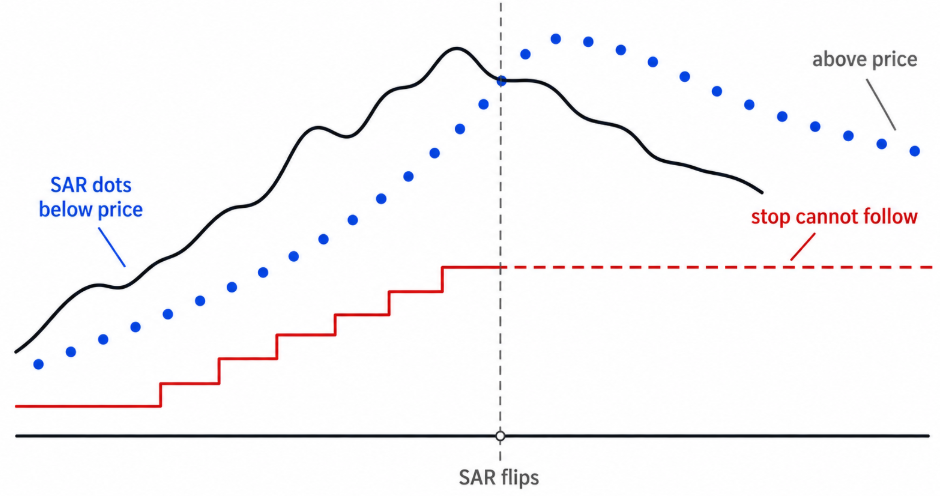
Fig. 1. A trailing stop cannot point the wrong way.
The trade server refuses a buy stop-loss above the bid, or a sell stop-loss below the ask, as an invalid stop, and the position keeps the stop it already had. Without a side check, the routine keeps sending the same invalid level while the SAR stays on the wrong side. Each attempt is refused, generating journal spam, while the existing stop remains unchanged. The mistake is also easy to make, because the naive routine is right on most bars. Whenever the SAR is on the correct side it produces the right level, and it only goes wrong at flips, which are the moments a trailing stop matters most.
One check, placed before any other work, prevents it:
//--- The side check. The SAR flips; a position does not
   if(m_cfg.RequireTrendAgreement)
     {
      if(isBuy  && sar >= tick.bid)
         return PSAR_TRAIL_WRONG_SIDE;
      if(!isBuy && sar <= tick.ask)
         return PSAR_TRAIL_WRONG_SIDE;
     }
Comparing Against Bid and Ask
A long position's stop is evaluated against bid, and a short position's against ask, so the check uses those two prices rather than a single mid or close value. Using one price would shift the comparison by the spread, which can determine the outcome in a marginal case. A SAR sitting one point below the close of a long position can still be above the bid, particularly on an instrument with a wide spread.Trend Agreement as a Setting
With the agreement requirement enabled, which is the default, a flipped SAR produces a wrong-side result, and the position keeps its existing stop until the SAR returns to the correct side. That also means the trailing stop makes no change during a flip. Some traders read a SAR flip against an open position as an exit signal rather than as a temporary absence of a stop level, and the utility does not overrule that reading. The trend direction and the flip flag are both exposed, so a host Expert Advisor can close the position itself if that is its policy.
With the requirement switched off, a flipped SAR is still offered as a candidate. The stops-level check then refuses it, because that check refuses any level at or beyond the bid for a buy, or at or beyond the ask for a sell, before it measures the minimum distance, so the log reports a distance problem rather than a side problem. The same check refuses a candidate that a positive OffsetPoints has pushed to or past the price. In both cases no stop at or beyond the price is sent, even when the broker reports a stops level of zero and MinStopBufferPoints is zero too.
The Remaining Gates
The proposal runs as a sequence of checks in a fixed order, and the order matters because each stage assumes the previous one has passed. One row in the table is not a check: offset and tick alignment changes the candidate rather than judging it, and it sits where it does so that every check after it measures the level that will actually be sent.
| Step | What it does | Result when it refuses |
|---|---|---|
| Data | No refresh yet, no SAR value, or no tick available. | PSAR_TRAIL_NO_DATA |
| Side check | Covered above. | PSAR_TRAIL_WRONG_SIDE |
| Distance gate | StartPoints withholds trailing until price has moved this many points past the entry. Zero starts immediately. | PSAR_TRAIL_NOT_STARTED |
| Offset and tick alignment | OffsetPoints shifts the candidate off the SAR before any later check runs. A positive value moves it toward price, which tightens the stop; a negative value gives the trend more room. The level is then aligned to the tick grid. | None. The candidate is changed, not judged. |
| Break-even guard | With RequireBreakEven on, a candidate worse than the entry price is refused. | PSAR_TRAIL_BELOW_BREAKEVEN |
| Stops level | A candidate at or beyond the price, or closer to it than the broker permits. | PSAR_TRAIL_STOPS_LEVEL |
| Freeze level | The existing stop is inside the broker's freeze band. | PSAR_TRAIL_FROZEN |
| Improvement | The candidate does not move the stop toward profit. | PSAR_TRAIL_NO_IMPROVEMENT |
| Minimum step | StepPoints suppresses one-point adjustments. | PSAR_TRAIL_STEP_TOO_SMALL |
Two results sit outside this table because they are decided outside the proposal: PSAR_TRAIL_NOT_MINE, when a position's symbol or magic number does not belong to this instance, and PSAR_TRAIL_MODIFY_FAILED, when the server refuses a request that passed every check here.
The distance gate and the break-even guard both measure distance from the entry price. Neither accounts for commission, swap, or spread. Therefore, StartPoints movement does not guarantee account-level profit, and an entry-price stop is not necessarily break-even. On an instrument with a wide spread or a per-lot commission, the level that actually breaks even sits further out. The header has no field for those costs, so both remain price rules, and a stop the guard accepts at the entry price can still close the trade at a small loss once costs are counted.
Tick Alignment
A stop has to sit on the symbol's tick grid, or the broker may reject it. Rounding to the nearest tick is the obvious approach, but it is subtly wrong because it can move the level by up to half a tick toward price, which is precisely the direction that can cause the candidate to breach the stops level against which it is about to be measured.
//+------------------------------------------------------------------+
//| Round a stop to the symbol's tick grid, always away from price   |
//+------------------------------------------------------------------+
double CAdaptivePSARTrail::AlignStopToTick(const double price, const bool isBuy)
  {
   if(m_tickSize <= 0.0)
      return NormalizeDouble(price, m_digits);

   double ticks = price / m_tickSize;
   double aligned = (isBuy ? MathFloor(ticks) : MathCeil(ticks)) * m_tickSize;
   return NormalizeDouble(aligned, m_digits);
  }
Flooring for a buy and ceiling for a sell always round away from price. The cost is at most one tick of additional room; in exchange, the rounding cannot invalidate a check that runs after it.
Stops Level and Freeze Level
//--- Broker distance rules. A level at or beyond the price fails even when the minimum is 0
   int    stopsPts  = (int)SymbolInfoInteger(m_symbol, SYMBOL_TRADE_STOPS_LEVEL);
   int    freezePts = (int)SymbolInfoInteger(m_symbol, SYMBOL_TRADE_FREEZE_LEVEL);
   double minDist   = MathMax(stopsPts, m_cfg.MinStopBufferPoints) * m_point;

   if(isBuy)
     {
      if(candidate >= tick.bid || (tick.bid - candidate) < minDist)
         return PSAR_TRAIL_STOPS_LEVEL;
     }
   else
     {
      if(candidate <= tick.ask || (candidate - tick.ask) < minDist)
         return PSAR_TRAIL_STOPS_LEVEL;
     }

//--- Freeze level
   if(freezePts > 0 && currentSL > 0.0)
     {
      double freezeDist = freezePts * m_point;
      if(isBuy  && (tick.bid - currentSL) < freezeDist)
         return PSAR_TRAIL_FROZEN;
      if(!isBuy && (currentSL - tick.ask) < freezeDist)
         return PSAR_TRAIL_FROZEN;
     }
The two properties answer different questions. SYMBOL_TRADE_STOPS_LEVEL is the minimum distance from price at which a stop may sit, so its check measures the candidate against price and asks whether the new level can be set at all. SYMBOL_TRADE_FREEZE_LEVEL is the distance within which an order already in place is treated as pending execution, so its check measures the existing stop against price and asks whether the level already there can be touched. A trailing stop meets the second condition regularly because creeping toward the price is what it does.
MinStopBufferPoints exists because some brokers report a stops level of zero while applying dynamic, spread-dependent limits instead. With a reported zero, the check still refuses a level at or beyond the price, and any further minimum the broker applies is left to the server, so the configuration field places the trader's own floor beneath the broker's reported value, with the larger of the two used.
The freeze check is skipped when the broker reports zero and when the position has no stop yet. A position without a stop takes the first candidate that clears the earlier checks, which allows an Expert Advisor to open without a stop and let the utility set the first one. Neither check measures the proposed level against the freeze distance. If a broker applies that distance to the new level as well, the refusal comes from the server, and it arrives as PSAR_TRAIL_MODIFY_FAILED with the server's own return code in the log.
Complete Proposed Stop
With the individual checks covered, here is the complete function in execution order:
//+------------------------------------------------------------------+
//| What stop would this position get, and if none, why not.         |
//+------------------------------------------------------------------+
ENUM_PSAR_TRAIL_RESULT CAdaptivePSARTrail::ProposeStop(const ENUM_POSITION_TYPE posType,
      const double entryPrice,
      const double currentSL,
      double &newSL)
  {
   newSL = 0.0;

   double sar = StopPrice(1);
   if(sar <= 0.0)
      return PSAR_TRAIL_NO_DATA;

   MqlTick tick;
   if(!SymbolInfoTick(m_symbol, tick))
      return PSAR_TRAIL_NO_DATA;
   if(tick.bid <= 0.0 || tick.ask <= 0.0)
      return PSAR_TRAIL_NO_DATA;

   bool isBuy = (posType == POSITION_TYPE_BUY);

//--- The side check. The SAR flips; a position does not
   if(m_cfg.RequireTrendAgreement)
     {
      if(isBuy  && sar >= tick.bid)
         return PSAR_TRAIL_WRONG_SIDE;
      if(!isBuy && sar <= tick.ask)
         return PSAR_TRAIL_WRONG_SIDE;
     }

//--- Distance gate: how far price has moved past the entry
   if(m_cfg.StartPoints > 0)
     {
      double movedPoints = isBuy ? (tick.bid - entryPrice) / m_point
                           : (entryPrice - tick.ask) / m_point;
      if(movedPoints < (double)m_cfg.StartPoints)
         return PSAR_TRAIL_NOT_STARTED;
     }

//--- Candidate stop: the SAR, shifted by the configured offset. A positive
//--- offset moves it toward price (tighter), negative gives the trend room.
   double candidate = sar;
   if(m_cfg.OffsetPoints != 0)
      candidate += (isBuy ? 1.0 : -1.0) * m_cfg.OffsetPoints * m_point;
   candidate = AlignStopToTick(candidate, isBuy);

//--- Break-even guard
   if(m_cfg.RequireBreakEven)
     {
      if(isBuy  && candidate < entryPrice)
         return PSAR_TRAIL_BELOW_BREAKEVEN;
      if(!isBuy && candidate > entryPrice)
         return PSAR_TRAIL_BELOW_BREAKEVEN;
     }

//--- Broker distance rules. A level at or beyond the price fails even when the minimum is 0
   int    stopsPts  = (int)SymbolInfoInteger(m_symbol, SYMBOL_TRADE_STOPS_LEVEL);
   int    freezePts = (int)SymbolInfoInteger(m_symbol, SYMBOL_TRADE_FREEZE_LEVEL);
   double minDist   = MathMax(stopsPts, m_cfg.MinStopBufferPoints) * m_point;

   if(isBuy)
     {
      if(candidate >= tick.bid || (tick.bid - candidate) < minDist)
         return PSAR_TRAIL_STOPS_LEVEL;
     }
   else
     {
      if(candidate <= tick.ask || (candidate - tick.ask) < minDist)
         return PSAR_TRAIL_STOPS_LEVEL;
     }

//--- Freeze level
   if(freezePts > 0 && currentSL > 0.0)
     {
      double freezeDist = freezePts * m_point;
      if(isBuy  && (tick.bid - currentSL) < freezeDist)
         return PSAR_TRAIL_FROZEN;
      if(!isBuy && (currentSL - tick.ask) < freezeDist)
         return PSAR_TRAIL_FROZEN;
     }

//--- A trailing stop only ever moves toward profit
   if(currentSL > 0.0)
     {
      if(isBuy  && candidate <= currentSL)
         return PSAR_TRAIL_NO_IMPROVEMENT;
      if(!isBuy && candidate >= currentSL)
         return PSAR_TRAIL_NO_IMPROVEMENT;

      if(m_cfg.StepPoints > 0)
        {
         double moved = isBuy ? (candidate - currentSL) : (currentSL - candidate);
         if(moved < m_cfg.StepPoints * m_point)
            return PSAR_TRAIL_STEP_TOO_SMALL;
        }
     }

   newSL = candidate;
   return PSAR_TRAIL_OK;
  }
Reading it end to end shows something the table does not. There is no trading call anywhere in it. The function takes the position type, entry price, and current stop as arguments, reads the live tick and the broker's two distance properties, and writes the proposed level through a reference parameter. An indicator or chart panel can therefore ask what stop a position would receive, and why it would not receive one, without touching the account.
Result Codes
//+------------------------------------------------------------------+
//| Why a stop was or was not moved. Every skip has a name.          |
//+------------------------------------------------------------------+
enum ENUM_PSAR_TRAIL_RESULT
  {
   PSAR_TRAIL_OK = 0,           // Stop moved (or a valid stop was produced)
   PSAR_TRAIL_NO_DATA,          // Not refreshed, no SAR value, or no tick
   PSAR_TRAIL_NOT_MINE,         // Symbol or magic number does not match
   PSAR_TRAIL_WRONG_SIDE,       // SAR sits on the wrong side of price for this position
   PSAR_TRAIL_NOT_STARTED,      // Price has not yet moved StartPoints past the entry
   PSAR_TRAIL_BELOW_BREAKEVEN,  // Break-even guard is on and the stop is still worse than entry
   PSAR_TRAIL_STOPS_LEVEL,      // Closer to price than the broker's minimum stop distance
   PSAR_TRAIL_FROZEN,           // Existing stop is inside the broker's freeze level
   PSAR_TRAIL_NO_IMPROVEMENT,   // New stop is not better than the current one
   PSAR_TRAIL_STEP_TOO_SMALL,   // Improvement is smaller than StepPoints
   PSAR_TRAIL_MODIFY_FAILED     // Broker rejected the modification
  };
A named result is returned instead of a boolean. A trailing stop that silently does nothing is difficult to diagnose: the log is empty, the report shows a stop that never moved, and there are several plausible explanations. With a named result, enabling the verbose flag prints which check stopped the process, so the reason appears in the Experts tab.
Trailing a single position by ticket is where the proposal is applied to an actual position:
//+------------------------------------------------------------------+
//| Trail one position by ticket.                                    |
//+------------------------------------------------------------------+
ENUM_PSAR_TRAIL_RESULT CAdaptivePSARTrail::ApplyToTicket(const ulong ticket)
  {
   if(!PositionSelectByTicket(ticket))
      return PSAR_TRAIL_NO_DATA;

//--- Never modify a position this instance was not configured to manage
   if(PositionGetString(POSITION_SYMBOL) != m_symbol)
      return PSAR_TRAIL_NOT_MINE;
   if(!MatchesMagic(PositionGetInteger(POSITION_MAGIC)))
      return PSAR_TRAIL_NOT_MINE;

   ENUM_POSITION_TYPE posType = (ENUM_POSITION_TYPE)PositionGetInteger(POSITION_TYPE);
   double entry = PositionGetDouble(POSITION_PRICE_OPEN);
   double curSL = PositionGetDouble(POSITION_SL);
   double curTP = PositionGetDouble(POSITION_TP);

   double newSL = 0.0;
   ENUM_PSAR_TRAIL_RESULT result = ProposeStop(posType, entry, curSL, newSL);

   if(result != PSAR_TRAIL_OK)
     {
      //--- NOT_MINE is excluded on purpose
      if(result != PSAR_TRAIL_NOT_MINE && VerboseThisBar(ticket))
         Print("[PSARTrail] #", IntegerToString((long)ticket), " skipped: ",
               PSARTrailResultToString(result));
      return result;
     }

//--- Carry the take-profit through unchanged; PositionModify replaces both
   if(!m_trade.PositionModify(ticket, newSL, curTP))
     {
      Print("[PSARTrail] #", IntegerToString((long)ticket), " modify failed: ",
            m_trade.ResultRetcode(), " (", m_trade.ResultRetcodeDescription(), ")");
      return PSAR_TRAIL_MODIFY_FAILED;
     }

   Print("[PSARTrail] #", IntegerToString((long)ticket), " stop -> ",
         DoubleToString(newSL, m_digits),
         (IsAdapted(1) ? "  [adapted step " + DoubleToString(AppliedStep(1), 4) + "]" : ""));
   return PSAR_TRAIL_OK;
  }
Ownership is checked before anything else, so a position on another symbol or outside the magic list is rejected before any calculation runs. The existing take-profit is read and passed straight back because PositionModify() replaces both levels, and omitting the take-profit would clear it. The success line reports the step of the last closed bar when that step was adapted, making the adaptation visible in the log as well as on the chart. A refusal is logged at most once per bar for each ticket, which is what keeps a verbose run readable.
The pass over the account is a loop around that:
//+------------------------------------------------------------------+
//| Trail every position in scope. Returns how many were modified.   |
//+------------------------------------------------------------------+
int CAdaptivePSARTrail::ApplyToPositions(void)
  {
   if(!m_ready)
      return 0;

   int modified = 0;
   for(int i = PositionsTotal() - 1; i >= 0; i--)
     {
      ulong ticket = PositionGetTicket(i);
      if(ticket == 0)
         continue;
      if(ApplyToTicket(ticket) == PSAR_TRAIL_OK)
         modified++;
     }
   return modified;
  }
The loop counts down rather than up, which is the standard precaution when the collection being walked can change during the walk. Because every position on the account is visited, the NOT_MINE result is the one excluded from verbose logging; on a busy account, it would fill the log while carrying no information.
What the Log Shows
One line per refusal would be too many. The trailing pass runs on every tick, and a position waiting out a SAR flip meets the same refusal on every tick of every bar, which on real ticks is hundreds of identical lines for one decision. The verbose log is therefore throttled to one line per ticket per bar: the first refusal a ticket meets in a bar is printed and the rest are dropped, so the log reads as one entry per position per bar with the reason attached. Successful modifications are not throttled. The candidate is fixed for the whole bar, so once a stop has moved there is nothing left to improve until the next refresh, and a position is modified at most once per bar. A refusal from the server is not throttled either, because it is the one message that should never be missing, even though a server that keeps refusing is then reported on every attempt.
The named results cover the checks the header makes itself. Anything the server decides, whether a dynamic stop limit, a freeze applied to the new level or a closed market, arrives as PSAR_TRAIL_MODIFY_FAILED, and the return code and description printed beside it are the only detail the header can give.
Using the Utility From an Indicator
An indicator cannot modify a position, but it may still need the SAR level, trend direction, divergence state, or the proposed stop for a position. The trading dependency is wrapped in a single guard: #ifndef PSAR_TRAIL_CALC_ONLY #include <Trade/Trade.mqh> #endif
The same guard surrounds the CTrade member and both trading methods, so defining the symbol before the include compiles all three out:
#define PSAR_TRAIL_CALC_ONLY
#include <AdaptivePSARTrail.mqh>
Everything except the two trading methods remains available:
| Method | Returns |
|---|---|
| Init(), Refresh(), Deinit() | The lifecycle, unchanged |
| IsReady() | Whether the last refresh produced a usable series |
| BarCount(), Limit() | Bars copied this refresh, and the oldest usable bar index |
| GetSymbol(), GetTimeframe() | The resolved market context |
| StopPrice(shift) | The SAR level on that bar |
| Trend(shift) | 1 for up, -1 for down |
| IsFlip(shift) | Whether the SAR changed direction on that bar |
| AppliedStep(shift) | The acceleration step in effect on that bar |
| IsAdapted(shift) | Whether an adaptation was live on that bar |
| DivergenceType(shift), DivergenceAge(shift) | The engine's divergence state, passed through |
| Oscillator(shift) | The smoothed oscillator value |
| ProposeStop(...) | The proposed stop and the reason, with no trading call |
| MatchesMagic(magic) | Whether this instance is configured to manage that magic |
Building the Demo EA
DEMO_PSAR_Trailing.mq5 makes the utility observable and runs in two modes. Initialization fills the configuration in one place and then checks something that would otherwise be discovered much later:
//+------------------------------------------------------------------+
//| Initialization                                                   |
//+------------------------------------------------------------------+
int OnInit()
  {
//--- Fill the trailing utility's configuration in one place
   PSARTrailConfig cfg;
   cfg.Symbol                = _Symbol;
   cfg.Timeframe             = PERIOD_CURRENT;
   cfg.Lookback              = InpLookback;

   cfg.SARStep               = InpSARStep;
   cfg.SARMaximum            = InpSARMaximum;

   cfg.DivSource             = InpDivSource;
   cfg.MPOLength             = InpMPOLength;
   cfg.MPOSmooth             = InpMPOSmooth;
   cfg.RSIPeriod             = InpRSIPeriod;
   cfg.PivotLength           = InpPivotLength;

   cfg.EnableAdaptive        = InpEnableAdaptive;
   cfg.AdaptMode             = InpAdaptMode;
   cfg.AdaptFactor           = InpAdaptFactor;
   cfg.DivBarsLimit          = InpDivBarsLimit;
   cfg.ResetOnTrendChange    = InpResetOnTrendChange;

   cfg.MagicList             = InpMagicList;
   cfg.TrailAllMagics        = InpTrailAllMagics;

   cfg.StartPoints           = InpStartPoints;
   cfg.StepPoints            = InpStepPoints;
   cfg.OffsetPoints          = InpOffsetPoints;
   cfg.MinStopBufferPoints   = InpMinStopBuffer;
   cfg.RequireTrendAgreement = InpRequireTrendAgree;
   cfg.RequireBreakEven      = InpRequireBreakEven;
   cfg.VerboseLog            = InpVerboseLog;

   if(!psarTrail.Init(cfg))
     {
      Print("Failed to initialize the adaptive PSAR trailing utility.");
      return INIT_FAILED;
     }

//--- The test block is a convenience, not part of the utility
   if(!InitTestTrades())
      return INIT_FAILED;

//--- A test magic outside the trail list means nothing would ever be trailed.
   if(Enable_TestTrades && !InpTrailAllMagics && !psarTrail.MatchesMagic(T_Magic))
     {
      Print("T_Magic (", T_Magic, ") is not in MagicList (\"", InpMagicList,
            "\"). Test trades would open but never be trailed.");
      return INIT_PARAMETERS_INCORRECT;
     }

   ClearVisuals();
   DrawVisuals();

   return INIT_SUCCEEDED;
  }
Every input is copied into the configuration struct, and nothing else in the demo reads the inputs again. This is the pattern any host should follow. The magic check at the end catches a configuration that opens trades normally but never trails them, which on a chart is indistinguishable from a trailing stop that does not work.
Attached Mode
With Enable_TestTrades set to true, a crossover between a fast and a slow simple moving average (10 and 20 periods by default) opens one position at a time. This is a position generator rather than a strategy; it exists so the Strategy Tester has something to trail. T_OpenWithoutStop, on by default, opens positions without a stop, so the first stop a position receives comes from the utility.
Utility Mode
With Enable_TestTrades set to false and InpMagicList set to another Expert Advisor's magic numbers, the demo opens nothing at all. It attaches to a chart and trails positions belonging to a different Expert Advisor, which needs no knowledge of this one, no shared code, and no modification. This is the mode that implements what the earlier article described as possible. InpTrailAllMagics extends this further by trailing every position on the symbol, regardless of origin. InpUseTrailing is a master switch for both modes. Turning it off leaves the demo drawing its dots and opening its test trades without modifying any stops, providing a convenient way to observe the SAR series before allowing it to manage positions.
Ownership by magic number assumes a hedging account, where each Expert Advisor's trades on a symbol are separate positions. On a netting account a symbol carries one position built from every deal on it, so two systems trading the same symbol share a single position, and its magic number cannot say which of them it belongs to. On such an account, the utility should only be pointed at a symbol that one system trades alone.
Tick and Bar Timing
//+------------------------------------------------------------------+
//| Main Tick                                                        |
//+------------------------------------------------------------------+
void OnTick()
  {
//--- Bar clock. The SAR series, the dots and the test signal are all built from closed bars
   if(IsNewBar())
     {
      if(!psarTrail.Refresh())
         return;
      DrawVisuals();
      CheckTestCrossover();
     }

//--- Tick clock. Only the trailing attempt depends on the live price.
   if(InpUseTrailing)
      psarTrail.ApplyToPositions();
  }
The two clocks answer to different things. The SAR series, the chart objects and the test signal are all built from bars that have closed, so none of them has anything new to say until a bar closes. Only the trailing attempt depends on the live price: a stop refused for being frozen or too close to price on one tick can be accepted on the next once price has moved. Running the drawing routine only on new bars is important. It runs a loop over every visible bar and creates or moves a chart object for each one, and on a tick that is several hundred calls that reproduce the picture already on screen. The order inside the handler matters as well. The refresh runs before the trailing pass, so on the first tick of a new bar the stop is proposed from the bar that has just closed rather than from the one before it.
A position opened just after a bar closes would otherwise wait for the next tick before receiving a stop, so the demo also attempts to trail on a trade transaction:
//+------------------------------------------------------------------+
//| Give a brand new position its stop without waiting for a tick    |
//+------------------------------------------------------------------+
void OnTradeTransaction(const MqlTradeTransaction &trans,
                        const MqlTradeRequest &request,
                        const MqlTradeResult &result)
  {
   if(!InpUseTrailing)
      return;
   if(trans.type != TRADE_TRANSACTION_DEAL_ADD)
      return;

//--- Uses the SAR already cached by the last Refresh(); no recalculation
   psarTrail.ApplyToPositions();
  }
TRADE_TRANSACTION_DEAL_ADD also triggers for balance operations, which is harmless here because the loop finds nothing to modify. It is nevertheless a detail to remember before reusing the pattern where that distinction matters.
The transaction handler does not refresh. In attached mode that costs nothing, because the demo opens its positions right after its own refresh. In utility mode, another Expert Advisor can open a position on the first tick of a bar before this one has refreshed, and that position is offered the previous refresh's level. The next tick offers the current one, and since a trailing stop only moves toward profit, the tighter of the two is the one that stays.
Chart Visuals
Three inputs control the chart drawing. InpDrawSAR draws the dots, InpDrawDivergence draws an arrow on the closed bar where the engine confirmed a divergence, PivotLength bars after the oscillator pivot, and InpMaxVisualBars limits how far back either goes. The bar still forming gets no arrow, because its oscillator value can change until the bar closes; its dot is moved again at the next refresh. Adapted bars draw their dots in a second color, making the adaptation visible on the chart rather than only in the log and allowing a split-chart comparison. The drawing routines are ordinary chart-object code and are in the attached file rather than reproduced here.
Results
As in Part 4, the intention is to illustrate behavior rather than demonstrate a statistical edge. The demo EA was run in attached mode on XAUUSD, M15, from August 1 to August 30. The master trailing switch was enabled, the demo EA's magic number was included in the trailing list, and trend agreement was enabled so that trailing would be skipped whenever the SAR was on the wrong side of the position. MA Crossover was enabled only to generate positions for the tests. When test-trade generation is disabled, the demo does not open positions and uses the comma-separated magic-number list to determine which positions it is allowed to trail.
The runs were made in the MetaTrader 5 Strategy Tester on a MetaQuotes-Demo hedging account. The settings they share are listed first, then the inputs each run changed from the demo's defaults.
| Setting | Value |
|---|---|
| Symbol and timeframe | XAUUSD, M15 |
| Period | 2026.08.01 to 2026.08.30; Run C from 2026.08.03 |
| Data | MetaQuotes-Demo history |
| Tick model | Every tick based on real ticks, so each tick carries its recorded spread |
| Execution | No delay |
| Deposit and leverage | 100,000 USD, 1:100 |
| Visual mode | On |
| Commission and swap | As the tester applies them to the account; no check in the header uses them |
| Run | Used for | Inputs changed from the defaults |
|---|---|---|
| A | Fig. 4, the plain run | InpVerboseLog = true |
| B | Fig. 5 and the side-check excerpt | InpEnableAdaptive = true, InpVerboseLog = true |
| C | The remaining gates | InpEnableAdaptive = true, InpStartPoints = 400, InpMinStopBuffer = 400, InpRequireBreakEven = true, InpVerboseLog = true |
| D | The numbers in Table 3 | Two calculation-only instances of the header with its defaults, adaptation off in one and on in the other; 2026.08.01 to 2026.08.05, visual mode off |
Every other input stayed at the demo's default, among them a SAR step of 0.02 and maximum of 0.20, MPO4 with a length of 6, smoothing of 7 and a pivot length of 2, reduce mode with a factor of 0.3 and a limit of 200 bars, a lookback of 300 bars, trend agreement on, magic list "23456", and test trades from a 10 and 20 period crossover at 0.10 lots, opened without a stop.
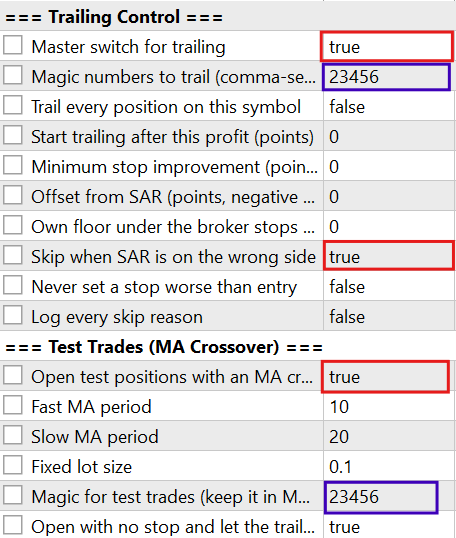
Fig. 2. Trailing stop utility settings.
The behavior produced by these settings is shown below.
Animation 1. Trailing-stop demonstration.
Three runs were used to demonstrate the parts of the utility that are not apparent from the code alone: adaptive changes to the stop, the side check holding an existing stop through a SAR flip, and the remaining gates that refuse a candidate until the position qualifies. The verbose log is limited to one refusal per ticket per bar, so the excerpts below can be read bar by bar.
Adaptive Against Plain
The first test compares two runs over the same period. In the first, InpEnableAdaptive is set to false; in the second, it is set to true. The adaptation settings are the same ones used throughout the series.
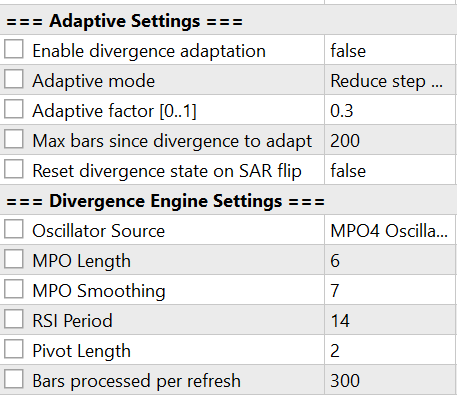
Fig. 3. Divergence adaptation settings.
An arrow on the chart marks a divergence on the closed bar where the engine confirmed it. Only a divergence that opposes the direction the SAR is trailing, and is no older than DivBarsLimit bars, changes the step, so an arrow that agrees with the trend, or an older one, changes nothing. With adaptation off, every bar uses the base step. With it on, an opposing divergence lowers the step in reduce mode, so each new extreme adds less to the acceleration factor, the SAR advances more slowly, and while both runs trail the same trend, the adapted run's dots, drawn in the second color, sit further from price than the plain run's.
The first image shows the plain run after a divergence arrow, together with its stop-modification log.
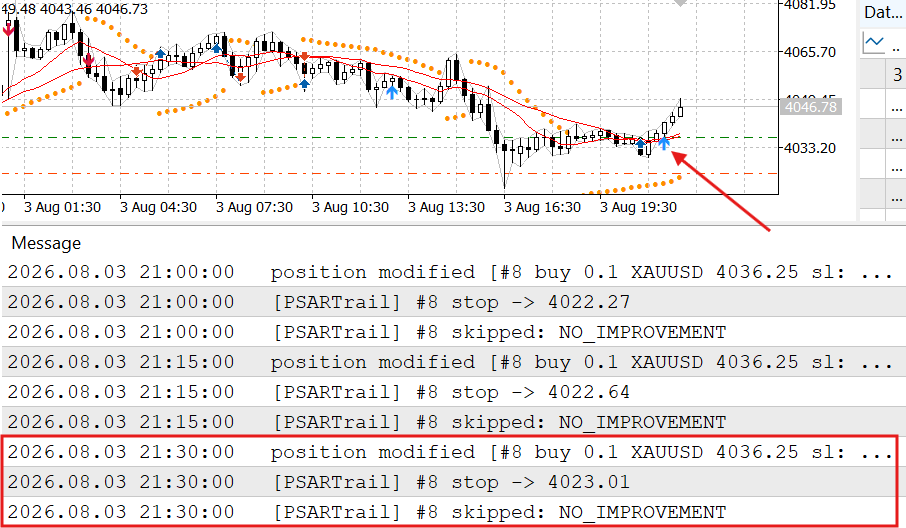
Fig. 4. A plain run after a divergence arrow and its log output.
The second image shows the same period with InpEnableAdaptive = true. A modification is tagged [adapted step] in the log when an adaptation was in effect on the last closed bar.

Fig. 5. An adaptive run on the same chart in the same period.
The comparison is therefore not intended to show that one setting produces better trades. It shows that the same trailing mechanism can operate with either the base step or a divergence-adjusted step. In the plain run, no [adapted step] entry can appear because adaptation is disabled and every bar uses the base step.
The values behind the two figures can be read from the header's calculation half. In Run D, two calculation-only instances of the header, one with adaptation off and one with it on and every other setting the same, printed the SAR of each closed bar over the same days. Five consecutive bars from that run:
| Closed bar, 2026.08.04 | Plain SAR | Adaptive SAR | Adaptive step | Adapted |
|---|---|---|---|---|
| 17:00 | 4066.73 | 4065.59 | 0.0140 | yes |
| 17:15 | 4070.53 | 4068.53 | 0.0140 | yes |
| 17:30 | 4073.80 | 4071.17 | 0.0140 | yes |
| 17:45 | 4074.33 | 4073.53 | 0.0140 | yes |
| 18:00 | 4074.33 | 4074.33 | 0.0140 | yes |
The bearish divergence confirmed on the 09:00 bar opposes the uptrend the SAR was trailing, so on these bars a new high adds 0.014 to the adaptive run’s acceleration factor instead of 0.02. Its SAR therefore sits below the plain one, 2.63 lower at 17:30, which is the extra room reduce mode gives. The stops of the adaptive run at 17:45, 18:00 and 18:15, 4071.16, 4073.52 and 4074.33, are the adaptive SAR of the bars 17:30, 17:45 and 18:00, rounded down to the tick. On the 18:00 bar both series reach 4074.33, and on the next bar both flip to 4093.87, the flip the side-check excerpt starts from. After a flip both restart from the same extreme point, and they stay equal until a new extreme adds an adapted step.
The Side Check Through a Flip
The second test examines what happens when the SAR flips against an open position. InpVerboseLog is enabled so that the skipped attempts are visible. The excerpt begins while the SAR is still on the correct side of the position.
CS      0       17:46:04.648    Trade   2026.08.04 18:00:00   position modified [#12 buy 0.1 XAUUSD 4068.39 sl: 4073.52]
CS      0       17:46:04.651    DEMO_PSAR_Trailing (XAUUSD,M15) 2026.08.04 18:00:00   [PSARTrail] #12 stop -> 4073.52  [adapted step 0.0140]
CS      0       17:46:04.698    DEMO_PSAR_Trailing (XAUUSD,M15) 2026.08.04 18:00:00   [PSARTrail] #12 skipped: NO_IMPROVEMENT
CS      0       17:46:28.412    Trade   2026.08.04 18:15:00   position modified [#12 buy 0.1 XAUUSD 4068.39 sl: 4074.33]
CS      0       17:46:28.414    DEMO_PSAR_Trailing (XAUUSD,M15) 2026.08.04 18:15:00   [PSARTrail] #12 stop -> 4074.33  [adapted step 0.0140]
CS      0       17:46:28.464    DEMO_PSAR_Trailing (XAUUSD,M15) 2026.08.04 18:15:00   [PSARTrail] #12 skipped: NO_IMPROVEMENT
CS      0       18:08:10.724    DEMO_PSAR_Trailing (XAUUSD,M15) 2026.08.04 18:30:00   [PSARTrail] #12 skipped: WRONG_SIDE
CS      0       18:08:13.962    DEMO_PSAR_Trailing (XAUUSD,M15) 2026.08.04 18:45:00   [PSARTrail] #12 skipped: WRONG_SIDE
CS      0       18:08:16.067    DEMO_PSAR_Trailing (XAUUSD,M15) 2026.08.04 19:00:00   [PSARTrail] #12 skipped: WRONG_SIDE
CS      0       18:08:18.358    DEMO_PSAR_Trailing (XAUUSD,M15) 2026.08.04 19:15:00   [PSARTrail] #12 skipped: WRONG_SIDE
CS      0       18:08:20.178    DEMO_PSAR_Trailing (XAUUSD,M15) 2026.08.04 19:30:00   [PSARTrail] #12 skipped: WRONG_SIDE
CS      0       18:08:22.879    DEMO_PSAR_Trailing (XAUUSD,M15) 2026.08.04 19:45:00   [PSARTrail] #12 skipped: WRONG_SIDE
CS      0       18:08:23.412    Trade   2026.08.04 19:49:17   position modified [#12 buy 0.1 XAUUSD 4068.39 sl: 4092.03]
CS      0       18:08:23.414    DEMO_PSAR_Trailing (XAUUSD,M15) 2026.08.04 19:49:17   [PSARTrail] #12 stop -> 4092.03
Before the flip, the trailing stop moves normally. Once the SAR changes to the wrong side, the utility stops proposing modifications and reports skipped: WRONG_SIDE for the position. The existing stop remains unchanged during this period. The WRONG_SIDE result continues once per bar while the SAR remains on the wrong side. When the SAR returns to the correct side, a new candidate can pass the side check and the next stop -> entry appears. The NO_IMPROVEMENT entries immediately following successful modifications are also expected. The trailing pass runs on every tick, while the candidate remains based on the last refreshed SAR value. Once the stop has already been moved to that candidate, later ticks in the same bar have nothing further to improve.
The Remaining Gates in Order
The third test demonstrates the checks that remain after the side check. InpVerboseLog is enabled, with InpStartPoints, set above zero, InpRequireBreakEven enabled, and InpMinStopBuffer set above zero. The test follows one position from entry until its first successful modification.
CS      0       18:56:03.836    Trades  2026.08.03 20:45:00   deal #4 buy 0.1 XAUUSD at 4036.25 done (based on order #4)
CS      0       18:56:03.836    Trade   2026.08.03 20:45:00   deal performed [#4 buy 0.1 XAUUSD at 4036.25]
CS      0       18:56:03.836    Trade   2026.08.03 20:45:00   order performed buy 0.1 at 4036.25 [#4 buy 0.1 XAUUSD at 4036.25]
CS      0       18:56:03.838    DEMO_PSAR_Trailing (XAUUSD,M15) 2026.08.03 20:45:00   CTrade::OrderSend: market buy 0.10 XAUUSD [done at 4036.25]
CS      0       18:56:03.838    DEMO_PSAR_Trailing (XAUUSD,M15) 2026.08.03 20:45:00   [PSARTrail] #4 skipped: WRONG_SIDE
CS      0       18:56:03.898    DEMO_PSAR_Trailing (XAUUSD,M15) 2026.08.03 21:00:00   [PSARTrail] #4 skipped: WRONG_SIDE
CS      0       18:56:03.909    DEMO_PSAR_Trailing (XAUUSD,M15) 2026.08.03 21:15:00   [PSARTrail] #4 skipped: NOT_STARTED
CS      0       18:56:05.246    DEMO_PSAR_Trailing (XAUUSD,M15) 2026.08.03 21:30:00   [PSARTrail] #4 skipped: NOT_STARTED
CS      0       18:56:06.950    DEMO_PSAR_Trailing (XAUUSD,M15) 2026.08.03 21:45:00   [PSARTrail] #4 skipped: BELOW_BREAKEVEN
CS      0       18:56:08.763    DEMO_PSAR_Trailing (XAUUSD,M15) 2026.08.03 22:00:00   [PSARTrail] #4 skipped: BELOW_BREAKEVEN
CS      0       18:56:10.423    DEMO_PSAR_Trailing (XAUUSD,M15) 2026.08.03 22:15:00   [PSARTrail] #4 skipped: BELOW_BREAKEVEN
CS      0       18:56:14.755    DEMO_PSAR_Trailing (XAUUSD,M15) 2026.08.04 01:00:00   [PSARTrail] #4 skipped: WRONG_SIDE
CS      0       18:56:15.138    DEMO_PSAR_Trailing (XAUUSD,M15) 2026.08.04 01:15:00   [PSARTrail] #4 skipped: WRONG_SIDE
CS      0       18:56:17.146    DEMO_PSAR_Trailing (XAUUSD,M15) 2026.08.04 02:15:00   [PSARTrail] #4 skipped: BELOW_BREAKEVEN
CS      0       18:56:17.693    DEMO_PSAR_Trailing (XAUUSD,M15) 2026.08.04 02:30:00   [PSARTrail] #4 skipped: BELOW_BREAKEVEN
CS      0       18:56:18.115    DEMO_PSAR_Trailing (XAUUSD,M15) 2026.08.04 02:45:00   [PSARTrail] #4 skipped: BELOW_BREAKEVEN
CS      0       18:56:18.787    DEMO_PSAR_Trailing (XAUUSD,M15) 2026.08.04 03:00:00   [PSARTrail] #4 skipped: BELOW_BREAKEVEN
CS      0       18:56:36.634    Trade   2026.08.04 05:45:00   position modified [#4 buy 0.1 XAUUSD 4036.25 sl: 4036.52]
CS      0       18:56:36.636    DEMO_PSAR_Trailing (XAUUSD,M15) 2026.08.04 05:45:00   [PSARTrail] #4 stop -> 4036.52
The first two attempts, on the entry bar at 20:45 and the bar after it, stop at the side check: the SAR of the last closed bar was still at or above the bid, the wrong side for a buy, so no later gate was reached. Once the SAR was below the bid, the next gate was the distance gate, and NOT_STARTED shows that the bid had not yet moved 400 points past the 4036.25 entry. When it had, the candidate reached the break-even guard, and BELOW_BREAKEVEN shows that the SAR was still below the entry.
At 01:00 and 01:15 the bid fell to or below the SAR again, and the result returned to WRONG_SIDE. After that the lines shown are BELOW_BREAKEVEN until the first stop -> line at 05:45, which moves the stop to 4036.52, above the 4036.25 entry. MinStopBuffer adds one more gate, which this position did not reach: a candidate past the entry but closer than 400 points to the bid would have returned STOPS_LEVEL. The checks run one after another rather than as one combined condition, so each line names the first gate the candidate failed on that bar. Lines for the bars in between are left out of the excerpt.
Results That Require External Conditions
Two result codes could not be reproduced deliberately in these Strategy Tester runs. PSAR_TRAIL_FROZEN requires a symbol reporting a freeze level greater than zero, and the selected test conditions did not produce that case. PSAR_TRAIL_MODIFY_FAILED requires the trade server to reject a modification that has already passed the utility's own checks. No input parameter can guarantee that server response. Both cases are nevertheless handled by the utility. A freeze condition returns PSAR_TRAIL_FROZEN, while a failed modification returns PSAR_TRAIL_MODIFY_FAILED and records the server's return code and description in the log.
The final limitation concerns utility mode. It cannot be demonstrated in the Strategy Tester because the tester runs one Expert Advisor at a time. To demonstrate the utility trailing another EA's positions, the demo must run on a demo account alongside a second Expert Advisor whose magic number is included in the trailing list.
Scope Limitations
The initial SAR seed is arbitrary. The series is computed from the oldest processed bar forward, and that bar's direction is inferred from a single candle. It converges within a few flips, but the earliest bars in the window are not authoritative, and changing the lookback can change them. The divergence state is rebuilt on every refresh rather than persisted. The engine holds per-bar buffers in memory, and a terminal restart recomputes them from the same window. Positions survive a restart, but the record of why a stop moved does not.
The engine reports recency rather than divergence quality. An old divergence still counts if it falls within DivBarsLimit, and nothing measures how far the price extended, how strongly the oscillator diverged, or how far apart the pivots were. One instance handles one symbol, since initialization resolves a single symbol and timeframe. Trailing several symbols requires several instances. The usable window ends before the copied history does. The engine processes forward from the oldest usable bar, so the earliest bars in the buffer cannot be queried, and the limit accessor reports where that boundary falls.
StartPoints and RequireBreakEven are price rules; commission, swap and the spread are not counted. Ownership by magic number is reliable on a hedging account only, since on a netting account a symbol's single position is shared by every system that trades it. The reported step is the step in effect rather than the step consumed, because a step is only added to the acceleration factor on a bar that sets a new extreme point. The adapted flag marks bars where an adaptation was live rather than bars where it changed the number. Lastly, there is no handling for partial closes, and the SAR level offered to every matching position on the symbol is the same one. What each position ends up with is not: the distance gate, the break-even guard, the improvement check and the minimum step are all measured against that position's own entry price and current stop, so two positions opened at different prices can take different outcomes from one candidate.
Conclusion
The earlier article ended by noting that Parabolic SAR is usually a trailing-stop tool rather than an entry trigger and that its adaptive acceleration factor could be offered to other Expert Advisors as a reusable tool. This part delivers that as AdaptivePSARTrail.mqh. What it produces:
- A Parabolic SAR trailing stop in a header, configured through one struct and driven by four calls, which any Expert Advisor can include without understanding its internals.
- An acceleration factor that responds bar by bar to an opposing divergence, in whichever direction the trader chooses to interpret the divergence.
- A fixed order of checks before a modification is sent, each refusal carrying its own result code, so a stop that does not move reports which check stopped it or that the server refused the request.
- A calculation half that compiles with no trading dependency for indicators and chart panels.
- A demonstration EA that trails positions it did not open.
Most of the header is devoted to those checks rather than to the SAR arithmetic, which the earlier article already covered.
What it cannot do is tell you whether a divergence is significant. The engine reports that one exists and how old it is, and age is a weak substitute. An improved implementation could address that with a scoring engine that stores multiple pivots and applies amplitude and separation filters before producing a divergence score. Once it exists, the adaptation in this header becomes a two-line change that scales by the score instead of gating on age.
The source files used throughout this article are attached below.
| Filename | Description |
|---|---|
| AdaptivePSARTrail.mqh | A reusable MQL5 header providing an adaptive Parabolic SAR trailing stop, driven by DivergenceEngine.mqh, usable by any Expert Advisor and compilable without its trading half for indicators. |
| DEMO_PSAR_Trailing.mq5 | A demonstration EA that runs the utility in two modes: trailing its own test trades and trailing positions opened by a different Expert Advisor. |
Warning: All rights to these materials are reserved by MetaQuotes Ltd. Copying or reprinting of these materials in whole or in part is prohibited.
This article was written by a user of the site and reflects their personal views. MetaQuotes Ltd is not responsible for the accuracy of the information presented, nor for any consequences resulting from the use of the solutions, strategies or recommendations described.


