

Building Your Personal Expert Advisor (Part 4): Risk Management III—Risk Models and Order Execution
 1 319
1 319
 0
0

Table of Contents
- Introduction
- What "Risk Per Trade" Actually Means
- The Second Assumption: A Trade Enters Now
- The Price the Trade Intends to Enter At
- Pending Orders Must Sit Far Enough Away
- What A Pending Order Actually Costs
- Plan, Validate, Execute
- Verification
- A Word About All These Inputs
- Conclusion
Introduction
The EA from the previous part already sizes trades from a risk input and enforces broker volume and margin limits — but it did so while quietly assuming two things: "risk" always means a percentage of the account, and every trade enters immediately at the current price. Those assumptions break practical use-cases: fixed-dollar risk, sub‑allocated strategies, or any workflow that relies on pending (limit/stop) entries. When you try to use those, the EA sizes stops and lots against the wrong price or silently changes the effective risk, so identical signals can produce different volumes, stop distances, and trade frequency depending on timing and account state. This part makes those assumptions explicit choices in the code and delivers a clear, testable interface: multiple risk models (percent/cash/fixed‑lot), percent measured against balance or equity, market/limit/stop entries, sizing from the intended entry price, and a strict separation between planning, validation and execution.
This is the most involved part so far. Earlier parts added safeguards to existing behavior. This part changes what the EA is allowed to do and also corrects assumptions made earlier.
What "Risk Per Trade" Actually Means
Ask three traders how much they risk per trade, and you can easily get three correct answers. One says 1% of the account. One says $100. Furthermore, one says a tenth of a lot. They don't describe the same quantity. The first two describe money, and the third describes size, and the difference between them is not a preference detail. It decides what the EA controls and what the market controls.
The EA now supports all three through a single input group:
input group "Risk Model"
input ENUM_RISK_MODE   RiskMode = RISK_PERCENT;          // How risk per trade is defined
input ENUM_RISK_BASE   RiskBase = RISK_BASE_BALANCE;     // Risk percentage measured against
input double           RiskPercent = 1.0;                // Risk per trade [%] (percent mode)
input double           FixedCashRisk = 100.0;            // Risk per trade [account currency] (cash mode)
input double           FixedLotSize = 0.10;              // Lot size (fixed-lot mode)
input double           RiskMultiplier = 1.0;             // Strategy risk factor [1.0 = unchanged]
input bool             AllowMinLotOverRisk = true;       // Trade min lot even if it exceeds intended risk
Backed by two enumerations:
enum ENUM_RISK_MODE
  {
   RISK_PERCENT,        // Percentage of account
   RISK_FIXED_CASH,     // Fixed cash amount
   RISK_FIXED_LOT       // Fixed lot size
  };

enum ENUM_RISK_BASE
  {
   RISK_BASE_BALANCE,   // Account balance
   RISK_BASE_EQUITY     // Account equity
  };
Using an enumeration rather than an integer or a set of booleans is worth a second of thought. MetaTrader renders it as a dropdown with your own labels, the compiler rejects a value that is not on the list, and a reader of the code sees the three options in one place. A bool UseFixedCash plus a bool UseFixedLot would allow both to be true at once, which means nothing, and the code would need to decide what nothing means. The startup checks follow the same logic, validating only the input the selected mode will actually use inside OnInit():
//--- Validate only the risk input the selected mode actually uses
   if(RiskMode == RISK_PERCENT && RiskPercent <= 0)
     {
      Print("Risk per trade [%] must be greater than zero in percentage mode.");
      return INIT_PARAMETERS_INCORRECT;
     }

   if(RiskMode == RISK_FIXED_CASH && FixedCashRisk <= 0)
     {
      Print("Fixed cash risk must be greater than zero in cash mode.");
      return INIT_PARAMETERS_INCORRECT;
     }

   if(RiskMode == RISK_FIXED_LOT && FixedLotSize <= 0)
     {
      Print("Fixed lot size must be greater than zero in fixed-lot mode.");
      return INIT_PARAMETERS_INCORRECT;
     }
Percentage of the Account
The familiar one. Risk is 1%, and a $10,000 account risks $100 per trade while a $20,000 account risks $200. Exposure grows and shrinks with the account without anyone touching a setting, which is what most traders want from a long-running system.
A Flat Cash Amount
This is less common in tutorials but common in practice. A trader who thinks in absolute drawdown terms wants to know that a bad week costs a specific number of dollars, not a percentage of a balance that keeps moving. It also fits anyone running a strategy on a sub-allocation of a bigger account, where the account balance is not the right denominator in the first place. The trade-off is that a flat amount does not compound. Double the account, and the risk per trade is unchanged, so the strategy's contribution to the account shrinks in relative terms. That is sometimes exactly the point.
A Fixed Lot Size
The third mode is different in kind from the other two, and the article would be doing you a disservice if it presented it as just another item on a list. In fixed-lot mode, risk stops being an input and becomes an outcome. You dictate volume, and the loss you take when the stop is hit is then whatever the stop distance happens to make it. A quiet market gives a tight stop and a small loss. A volatile one gives a wide stop and a large loss, on the same volume, from the same setting.
There are legitimate reasons to want that. Comparing two strategies is easier when volume is held constant. Some brokers and some instruments make small volume adjustments awkward. And a trader running a deliberately small fixed size may simply not care about the variance. But it should be a choice made with open eyes, not a default someone drifts into because it is the simplest setting to understand.
Balance or Equity
One more input applies to percentage mode only, and it decides which number the percentage is taken from. Balance is what the account is worth once every trade is closed. It ignores floating profit and loss on anything currently open. Equity includes it.
Risking 1% of equity means that while another position is underwater, the next trade is automatically sized smaller. Losses compound the caution. Risking 1% of balance keeps sizing steady regardless of what else is open, so a temporary drawdown on an open position does not change what the next trade looks like. Neither is correct. They are different behaviors, and knowing which one you are getting matters more than which one you choose. Note that the drawdown reduction feature added earlier in the series already measures against equity, and for a different reason: it is trying to detect a losing streak, and a balance figure would not notice a large floating loss at all.
How the Three Come Together
Two of the modes produce a monetary amount. One produces a volume directly. A tidy way to handle that is to let the money-producing modes converge into a single function so the sizing arithmetic downstream never has to ask which mode is active:
//+------------------------------------------------------------------+
//| Return the monetary amount to risk on this trade                 |
//+------------------------------------------------------------------+
double GetRiskAmount()
  {
   double riskAmount = 0.0;

   if(RiskMode == RISK_FIXED_CASH)
     {
      riskAmount = FixedCashRisk;
     }
   else
     {
      //--- Balance ignores open floating P/L; equity includes it
      double riskBaseValue = (RiskBase == RISK_BASE_EQUITY)
                             ? AccountInfoDouble(ACCOUNT_EQUITY)
                             : AccountInfoDouble(ACCOUNT_BALANCE);
      riskAmount = riskBaseValue * (RiskPercent / 100.0);
     }

//--- Drawdown reduction scales the final amount
   return riskAmount * GetDrawdownRiskFactor();
  }
The drawdown reduction is used to return a percentage, which only made sense while percentage was the only risk model. It now returns a plain multiplier, either 1.0 or the reduction factor, so the same drawdown rule applies whichever mode you are in. For anyone upgrading their own EA: with percentage mode, a balance base, and the drawdown feature off, this produces exactly the number the previous version produced. The drawdown rule itself is unchanged in behavior, only in what it returns:
//+------------------------------------------------------------------+
//| Return the drawdown-based risk factor [1.0 = no reduction].      |
//+------------------------------------------------------------------+
double GetDrawdownRiskFactor()
  {
   if(!EnableAdaptiveRisk)
      return 1.0;

   double equity = AccountInfoDouble(ACCOUNT_EQUITY);

//--- Initialize or update the peak
   if(g_PeakEquity == 0.0 || equity > g_PeakEquity)
      g_PeakEquity = equity;

//--- Calculate current drawdown from peak
   double drawdownPercent = 0.0;
   if(g_PeakEquity > 0.0)
      drawdownPercent = (g_PeakEquity - equity) / g_PeakEquity * 100.0;

   if(drawdownPercent >= DDLevel)
     {
      PrintFormat("Adaptive Risk | Drawdown: %.2f%% >= %.2f%% | Risk scaled by %.2f",
                  drawdownPercent, DDLevel, RiskReductionFactor);
      return RiskReductionFactor;
     }

   return 1.0;
  }
Fixed-lot mode gets its own decision about drawdowns because "fixed means fixed" and "safety overrides everything" are both defensible, and the code should not pick a winner. ApplyDrawdownToFixedLot is off by default, so a fixed lot stays fixed unless the user says otherwise. The input group in full:
input group "Adaptive Risk (Drawdown)"
input bool             EnableAdaptiveRisk  = false;      // Reduce risk during drawdowns
input double           DDLevel             = 3.0;        // Drawdown % that triggers reduced risk
input double           RiskReductionFactor = 0.5;        // Adaptive risk multiplier when triggered [0.5 = half risk]
input bool             ApplyDrawdownToFixedLot = false;  // Also shrink the fixed lot during drawdowns
Where Position Sizing Goes Wrong
Brokers accept volume in steps. A calculation that produces 0.137 lots has to become something the broker will take, usually 0.13 or 0.14 on a 0.01 step. Rounding to the nearest step is the obvious move, and it is subtly wrong. Half the time it rounds up, and rounding up means the position risks slightly more than you asked for. It is a small error, but it is a biased one: it only ever pushes in the direction of more risk than intended, and it does so on roughly half of all trades. Rounding down cannot do that. The trade risks slightly less than the target, which is the harmless direction to be wrong in. The EA now rounds down.
Rounding down looks like a one-line job:
result = MathFloor(volume / lotStep) * lotStep; That line is wrong, and it is wrong in a way that passes most testing. Binary floating point cannot represent 0.01 exactly. Divide 0.30 by 0.01 and the result can come out as 29.999999999999996 rather than 30. MathFloor() takes that to 29, and the EA trades 0.29 lots while every part of the calculation that produced the number said 0.30.
It is value-dependent, which is what makes it dangerous. Test with 0.25 and it behaves. Test with 0.30 and it does not. Nothing in the code looks suspicious, because nothing in the code is suspicious. The arithmetic is right, and the representation is not.
The fix is to clean up the step count before flooring it:
//+------------------------------------------------------------------+
//| Round a volume DOWN to the broker's volume step.                 |
//+------------------------------------------------------------------+
double FloorToVolumeStep(double volume, double lotStep)
  {
   if(lotStep <= 0)
      return volume;

   double steps  = NormalizeDouble(volume / lotStep, 8);
   double result = MathFloor(steps) * lotStep;

//--- Match the step's own precision so the value sent to the broker is clean
   int stepDigits = (int)MathMax(0, MathCeil(-MathLog10(lotStep)));
   return NormalizeDouble(result, stepDigits);
  }
Normalizing to eight decimal places turns 29.999999999999996 into 30 before the floor sees it, while leaving any genuine fractional step alone. The second normalization matches the result to the step's own precision, so what reaches the broker is 0.30 rather than 0.30000000000000004. If you take one habit away from this section, take this one: any time you floor or truncate a value that came out of a division, assume the division lied to you slightly and normalize first.
When the Minimum Lot Is Larger Than Your Risk
The last case is the one that costs small accounts money. Suppose the risk-correct volume works out to 0.004 lots and the broker's minimum is 0.01. There is no way to trade the intended risk. The only tradable size is more than twice it. Earlier versions of this EA quietly confined it to the minimum size and traded it. That is a defensible default, and it is still the default here, because refusing to trade at all is its own kind of failure. What is not defensible is doing it silently. The trader believes they are risking 1% and the account is risking 2.5%, and nothing anywhere says so.
   if(lotSize < minLot)
     {
      if(!AllowMinLotOverRisk)
        {
         PrintFormat("Risk-correct volume (%.4f) is below the minimum lot (%.2f). Trade skipped to avoid over-risking.",
                     rawLot, minLot);
         return 0.0;
        }

      PrintFormat("Caution: risk-correct volume (%.4f) is below the minimum lot (%.2f). Trading %.2f - actual risk will EXCEED the intended amount.",
                  rawLot, minLot, minLot);
      lotSize = minLot;
     }
Two behaviors, one input. Leave AllowMinLotOverRisk on, and the trade goes ahead at the minimum with a warning that states plainly what is happening. Turn it off, and the EA skips the trade rather than exceed the risk you set. Which default is right depends on the account. On a $500 account with a 0.5% risk setting, that warning may fire on most trades, and it is telling you something real about whether the settings and the account fit each other. On a larger account, it will rarely appear.
All three sizing modes, the rounding, and both minimum-lot behaviors live in one function:
//+------------------------------------------------------------------+
//| Calculate lot size for the given stop distance and risk amount.  |
//+------------------------------------------------------------------+
double CalculateLotSize(double stopDistance, double riskAmount)
  {
   double minLot  = SymbolInfoDouble(_Symbol, SYMBOL_VOLUME_MIN);
   double maxLot  = SymbolInfoDouble(_Symbol, SYMBOL_VOLUME_MAX);
   double lotStep = SymbolInfoDouble(_Symbol, SYMBOL_VOLUME_STEP);

   if(minLot <= 0 || lotStep <= 0)
     {
      Print("Invalid broker volume specification. Cannot calculate lot size.");
      return 0.0;
     }

   double rawLot = 0.0;

   if(RiskMode == RISK_FIXED_LOT)
     {
      //--- The trader dictates the volume; risk becomes an outcome, not an input
      rawLot = FixedLotSize;

      if(EnableAdaptiveRisk && ApplyDrawdownToFixedLot)
        {
         double ddFactor = GetDrawdownRiskFactor();
         if(ddFactor < 1.0)
           {
            PrintFormat("Fixed lot %.2f scaled by drawdown factor %.2f.", rawLot, ddFactor);
            rawLot *= ddFactor;
           }
        }
     }
   else
     {
      if(stopDistance <= 0)
        {
         Print("Stop distance is zero. Cannot calculate lot size.");
         return 0.0;
        }

      double tickSize  = SymbolInfoDouble(_Symbol, SYMBOL_TRADE_TICK_SIZE);
      double tickValue = SymbolInfoDouble(_Symbol, SYMBOL_TRADE_TICK_VALUE);

      if(tickSize <= 0 || tickValue <= 0)
        {
         Print("Invalid tick size or tick value. Cannot calculate lot size.");
         return 0.0;
        }

      double monetaryRiskPerLot = (stopDistance / tickSize) * tickValue;
      if(monetaryRiskPerLot <= 0)
        {
         Print("Monetary risk per lot is zero. Cannot calculate lot size.");
         return 0.0;
        }

      if(riskAmount <= 0)
        {
         Print("Risk amount is zero. Cannot calculate lot size.");
         return 0.0;
        }

      rawLot = riskAmount / monetaryRiskPerLot;
     }

//--- Round down to the broker's volume step
   double lotSize = FloorToVolumeStep(rawLot, lotStep);

   if(lotSize > maxLot)
      lotSize = FloorToVolumeStep(maxLot, lotStep);

//--- Below the minimum tradable volume the intended risk is unreachable
   if(lotSize < minLot)
     {
      if(!AllowMinLotOverRisk)
        {
         PrintFormat("Risk-correct volume (%.4f) is below the minimum lot (%.2f). Trade skipped to avoid over-risking.",
                     rawLot, minLot);
         return 0.0;
        }

      PrintFormat("Caution: risk-correct volume (%.4f) is below the minimum lot (%.2f). Trading %.2f - actual risk will EXCEED the intended amount.",
                  rawLot, minLot, minLot);
      lotSize = minLot;
     }

   return lotSize;
  }
The strategy tester log shows how this works. Below is an image showing a warning before trading a minimum lot over risk.
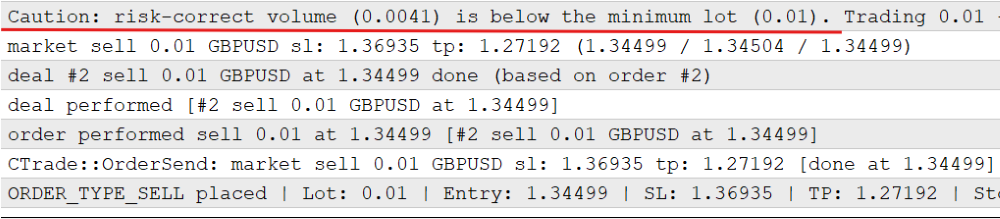
The risk-correct volume is 0.0041; the minimum volume is 0.01, almost 2.5x the normal risk. 0.01 lot is traded because AllowMinLotOverRisk is turned on. Below is what happens when the input is turned off:

The Second Assumption: A Trade Enters Now
The first half of this part dealt with how much to risk. The second deals with something the EA has never questioned: that a trade enters immediately, at whatever price the market is currently showing. For a market order, that is true by definition. It is also the only kind of order the EA has ever sent, which is why the assumption never caused trouble. The moment a trade can be placed to wait for a price, the assumption breaks in two places at once. The entry price is no longer today's price, and everything derived from it, the stop, the target, and the volume, has to follow the intended price rather than the current one.
Three Ways to Act on the Same Signal
The different entry modes for a buy trade can be illustrated as such:
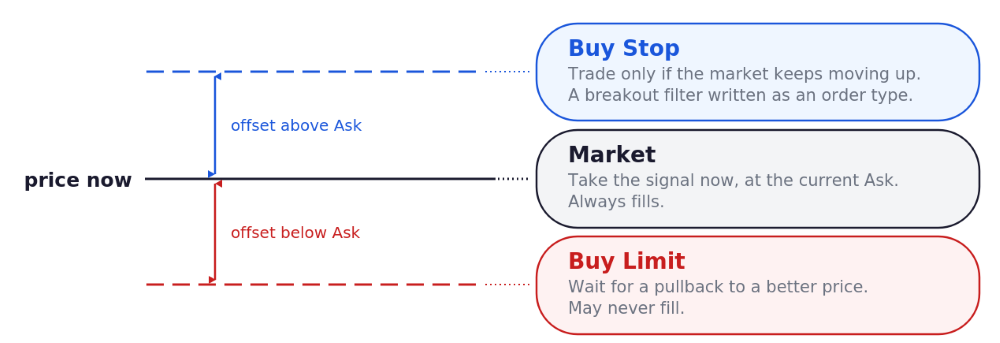
Sell trades are reversed. The crossover logic is untouched. What changes is what the EA does when the crossover appears.
A market order takes the signal now and accepts the current price. It always fills. Whatever the signal is worth, you get all of it, including any slippage.
A limit order says the signal is valid but the price is not and waits for the market to come back to a better level. On a buy, that means sitting below the current price. The upside is a better entry and a shorter distance to the stop. The cost is that the market may simply keep going and never come back, and the signal passes with no trade at all.
A stop order says the opposite: act only if the market keeps moving in the signal's direction. On a buy that means sitting above the current price. It is a confirmation filter, and it does its filtering through the order type rather than through more signal code. The cost is a worse entry price when it does fill and no trade at all when the move stalls.
Something important follows from that, and this series has a standing rule about flagging it. Everything added in earlier parts was a safeguard: it changed how a trade was sized or whether it was allowed, but a valid signal still became a trade. This does not. A limit or stop entry means some signals never become trades at all, and the ones that do enter at a different price. Changing the entry mode changes the strategy's behavior, not just its internal depth. Backtest results from one entry mode say nothing about another.
Four inputs cover the whole feature:
input group "Order Execution"
input ENUM_ENTRY_MODE  EntryMode = ENTRY_MARKET;         // Order type used to enter
input ENUM_OFFSET_MODE PendingOffsetMode = OFFSET_ATR;   // How the pending entry offset is measured
input double           PendingOffsetATR = 0.5;           // Pending offset as ATR multiple (ATR mode)
input int              PendingOffsetPoints = 150;        // Pending offset in points (points mode)
input int              PendingExpiryBars = 10;           // Delete untriggered pending after N bars [0 = never]
The offset is how far from the market the pending entry sits, and it can be measured two ways. An ATR-based offset scales with volatility, which keeps it consistent with how the stop distance already works and means one setting behaves sensibly across quiet and busy markets. A fixed points offset is predictable and easy to reason about, but it needs tuning per symbol and per timeframe. Both are supported because both are defensible, and an EA written for other traders to use is better off covering the two philosophies than picking one on the reader's behalf.
Both choices are enumerations; one small function turns the selected one into a distance, and the startup checks only look at these inputs when a pending entry is actually selected:
enum ENUM_ENTRY_MODE
  {
   ENTRY_MARKET,        // Market order (immediate)
   ENTRY_LIMIT,         // Pending limit (pullback entry)
   ENTRY_STOP           // Pending stop (breakout entry)
  };

enum ENUM_OFFSET_MODE
  {
   OFFSET_ATR,          // ATR-based offset
   OFFSET_POINTS        // Fixed points offset
  };
The function:
//+------------------------------------------------------------------+
//| Resolve the concrete order type from direction and entry mode    |
//+------------------------------------------------------------------+
ENUM_ORDER_TYPE ResolveOrderType(int direction)
  {
   if(direction == 1)
     {
      switch(EntryMode)
        {
         case ENTRY_LIMIT:
            return ORDER_TYPE_BUY_LIMIT;
         case ENTRY_STOP:
            return ORDER_TYPE_BUY_STOP;
         default:
            return ORDER_TYPE_BUY;
        }
     }
   switch(EntryMode)
     {
      case ENTRY_LIMIT:
         return ORDER_TYPE_SELL_LIMIT;
      case ENTRY_STOP:
         return ORDER_TYPE_SELL_STOP;
      default:
         return ORDER_TYPE_SELL;
     }
  }
Turning a direction and an entry mode into a concrete order type is then a small lookup. A Buy signal in stop mode becomes a Buy Stop, a Sell signal in limit mode becomes a Sell Limit, and so on across the six combinations. Keep this mapping in one function. Everything downstream branches on the resulting order type, so there should be exactly one place that decides it.
The Price the Trade Intends to Enter At
Once the order type is known, the entry price follows from it.
//+------------------------------------------------------------------+
//| The price this trade actually intends to enter at.               |
//+------------------------------------------------------------------+
double ResolveEntryPrice(ENUM_ORDER_TYPE orderType, double atrValue, const MqlTick &tick)
  {
   double offset = GetPendingOffset(atrValue);

   switch(orderType)
     {
      //--- Buys are filled at Ask, sells at Bid
      case ORDER_TYPE_BUY:
         return tick.ask;
      case ORDER_TYPE_SELL:
         return tick.bid;

      //--- Limit orders wait for a better price than the market offers now
      case ORDER_TYPE_BUY_LIMIT:
         return tick.ask - offset;
      case ORDER_TYPE_SELL_LIMIT:
         return tick.bid + offset;

      //--- Stop orders wait for the market to move further in the signal's direction
      case ORDER_TYPE_BUY_STOP:
         return tick.ask + offset;
      case ORDER_TYPE_SELL_STOP:
         return tick.bid - offset;
     }
   return 0.0;
  }
The first two cases are the rule most traders already know: a buy fills at Ask, and a sell fills at Bid. The other four apply the same rule and then step away from it by the offset. A buy limit is measured down from Ask, not from Bid, because Ask is the price a buy would actually pay right now, and the offset is meant to express "cheaper than that."
Everything else the trade needs, the stop, the target, and the volume, is then measured from this price rather than from the market. For a market order the two are the same number. For a pending order they are not, and using the market price would size the trade against a stop distance the trade will never have.
Correction: Stops Need Room for the Spread
Every part of this series so far has calculated the broker's minimum stop distance like this:
minStopDistance = SYMBOL_TRADE_STOPS_LEVEL * _Point;
That is slightly optimistic, and this is the right point in the series to correct it because pending orders make the error easier to hit.
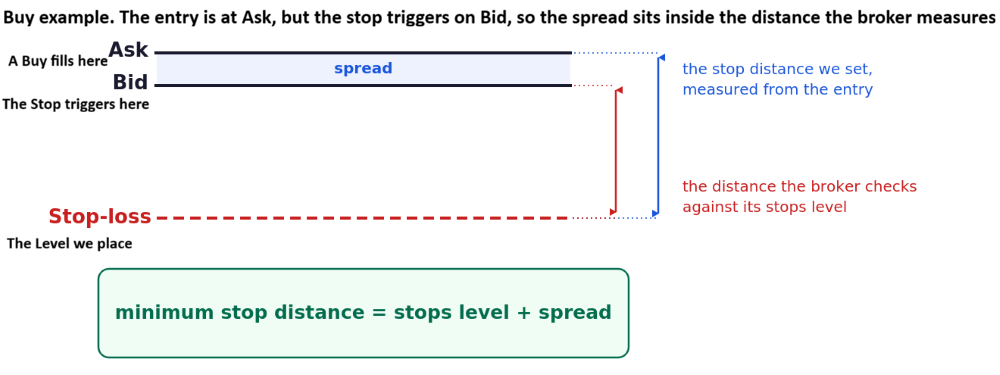
Take a buy. The trade enters at Ask. Its stop-loss, once the position exists, is triggered on Bid. The broker therefore measures the stop against the Bid, not against the price you paid.
So the broker requires the following:
bid - stopLoss >= stopsLevel
And the stop is placed at:
stopLoss = ask - stopDistance
Substituting one into the other:
bid - (ask - stopDistance) >= stopsLevel
stopDistance >= stopsLevel + (ask - bid)
stopDistance >= stopsLevel + spread
The same algebra on a sell gives the same answer. The true minimum is the stop level plus the current spread, which is what the EA now uses:
//+------------------------------------------------------------------+
//| Smallest stop distance the broker will accept, measured from     |
//| the entry price.                                                 |
//+------------------------------------------------------------------+
double GetMinStopDistance(const MqlTick &tick)
  {
   double stopsLevel = (double)SymbolInfoInteger(_Symbol, SYMBOL_TRADE_STOPS_LEVEL) * _Point;
   double spread     = tick.ask - tick.bid;

   if(spread < 0)
      spread = 0;

   return stopsLevel + spread;
  }
On a tight-spread symbol, the difference is a fraction of a point, and nothing bad ever happens. On wide-spread symbols (or during news), this can be the difference between a valid stop and an 'invalid stops' rejection with no useful explanation. The spread margin does a second job for pending orders. A pending order's stop is checked against the order's own price when it is placed, but the moment it fills, it becomes a position whose stop is measured against Bid or Ask. Building the spread in at placement keeps the stop valid across that transition instead of leaving it barely legal and hoping.
One limitation: the spread used here is the spread right now, not the spread whenever a pending order eventually fills. For an order that sits for hours, those can differ. It is a reasonable approximation rather than a guarantee, and it strays in the safe direction most of the time because it only ever widens the required distance.
Pending Orders Must Sit Far Enough Away
Brokers also enforce a minimum distance between a pending order's price and the current market. Place a Buy Stop two points above Ask and the server rejects it. Which side to measure from depends on the order type, and getting the direction wrong produces a check that passes when it should fail:
| Order type | Entry sits | Distance measured as |
|---|---|---|
| Buy Limit | below the market | Ask - entry price |
| Sell Limit | above the market | entry price - Bid |
| Buy Stop | above the market | entry price - Ask |
| Sell Stop | below the market | Bid - entry price |
In every case the result must be at least the broker's stops level, and in every case the comparison uses the side of the spread the order would actually interact with. A market order skips the check entirely since there is no distance to measure. The table as code:
//+------------------------------------------------------------------+
//| A pending entry must sit far enough from the current price       |
//+------------------------------------------------------------------+
bool IsPendingDistanceValid(const STradePlan &plan, const MqlTick &tick)
  {
   double stopsLevel = (double)SymbolInfoInteger(_Symbol, SYMBOL_TRADE_STOPS_LEVEL) * _Point;
   double distance   = 0.0;

   switch(plan.orderType)
     {
      case ORDER_TYPE_BUY_LIMIT:
         distance = tick.ask - plan.entryPrice;
         break;
      case ORDER_TYPE_SELL_LIMIT:
         distance = plan.entryPrice - tick.bid;
         break;
      case ORDER_TYPE_BUY_STOP:
         distance = plan.entryPrice - tick.ask;
         break;
      case ORDER_TYPE_SELL_STOP:
         distance = tick.bid - plan.entryPrice;
         break;
      default:
         return true;
     }
   if(distance < stopsLevel)
     {
      PrintFormat("Pending entry sits %.1f points from market, broker minimum is %.1f. Trade skipped.",
                  distance / _Point, stopsLevel / _Point);
      return false;
     }
   return true;
  }
What A Pending Order Actually Costs
Adding a feature is rarely just the feature. Two things came with pending entries that were not obvious from the outside, and both are more instructive than the feature itself.
An Existing Safeguard Quietly Stopped Working
Since the first part of this series, over-trading has been prevented by counting positions. If a position exists, no new trade opens. A pending order is not a position. It sits in the orders list, not the positions list, and a count of positions returns zero while it waits. So the sequence goes: a signal on one bar places a pending order, and the count still reads zero. The next bar produces another signal and places a second pending order. Then a third. The over-trading protection has not failed; it simply is not looking at the right list anymore, and nothing in it changed. The fix is to count pending orders too and to apply the same hedging rule to them:
   if(AllowHedging)
     {
      if(CountOpenPositionsByDirection(plan.direction) > 0 ||
         CountPendingOrdersByDirection(plan.direction) > 0)
         return false;
     }
   else
     {
      if(CountOpenPositions() > 0 || CountPendingOrders() > 0)
         return false;
     }
The counters behind it, plus the small helper that reduces any order type to a direction:
//+------------------------------------------------------------------+
//| Translate any order type into its trade direction                |
//+------------------------------------------------------------------+
int OrderTypeDirection(ENUM_ORDER_TYPE orderType)
  {
   switch(orderType)
     {
      case ORDER_TYPE_BUY:
      case ORDER_TYPE_BUY_LIMIT:
      case ORDER_TYPE_BUY_STOP:
      case ORDER_TYPE_BUY_STOP_LIMIT:
         return 1;
      case ORDER_TYPE_SELL:
      case ORDER_TYPE_SELL_LIMIT:
      case ORDER_TYPE_SELL_STOP:
      case ORDER_TYPE_SELL_STOP_LIMIT:
         return -1;
     }
   return 0;
  }

//+------------------------------------------------------------------+
//| Count this EA's pending orders on the current symbol             |
//+------------------------------------------------------------------+
int CountPendingOrders()
  {
   int count = 0;
   for(int i = OrdersTotal() - 1; i >= 0; i--)
     {
      ulong ticket = OrderGetTicket(i);
      if(ticket == 0)
         continue;
      if(OrderGetString(ORDER_SYMBOL) == _Symbol &&
         OrderGetInteger(ORDER_MAGIC) == MagicNumber)
        {
         count++;
        }
     }
   return count;
  }

//+------------------------------------------------------------------+
//| Count this EA's pending orders in one direction                  |
//+------------------------------------------------------------------+
int CountPendingOrdersByDirection(int direction)
  {
   int count = 0;
   for(int i = OrdersTotal() - 1; i >= 0; i--)
     {
      ulong ticket = OrderGetTicket(i);
      if(ticket == 0)
         continue;
      if(OrderGetString(ORDER_SYMBOL) != _Symbol ||
         OrderGetInteger(ORDER_MAGIC) != MagicNumber)
         continue;

      ENUM_ORDER_TYPE orderType = (ENUM_ORDER_TYPE)OrderGetInteger(ORDER_TYPE);
      if(OrderTypeDirection(orderType) == direction)
         count++;
     }
   return count;
  }
This is worth thinking about for a moment, because the pattern generalizes well beyond this EA. A safeguard is written against the world as it exists when you write it. Add a capability, and the safeguard can become wrong without anyone editing it and without any error appearing anywhere. The only defense is to ask, for each new capability, which existing assumptions it just invalidated.
Signals Expire, Orders Do Not
A pending order placed on a crossover is only meaningful while the original conditions still roughly hold. Left alone, it waits indefinitely. A Buy Stop from a signal three days ago can trigger into a market that has since done something entirely different, and the trade it opens has no relationship to the reasoning behind it. The EA now deletes its own untriggered pending orders after a set number of bars. The check runs once per new bar, before any signal logic, so housekeeping happens whether there is anything new to do://+------------------------------------------------------------------+ //| Delete this EA's pending orders that never triggered. | //+------------------------------------------------------------------+ void ManagePendingOrders() { if(PendingExpiryBars <= 0) return; int barSeconds = PeriodSeconds(_Period); if(barSeconds <= 0) return; datetime now = TimeCurrent(); for(int i = OrdersTotal() - 1; i >= 0; i--) { ulong ticket = OrderGetTicket(i); if(ticket == 0) continue; if(OrderGetString(ORDER_SYMBOL) != _Symbol || OrderGetInteger(ORDER_MAGIC) != MagicNumber) continue; datetime setupTime = (datetime)OrderGetInteger(ORDER_TIME_SETUP); if(setupTime <= 0 || now <= setupTime) continue; int barsElapsed = (int)((now - setupTime) / barSeconds); if(barsElapsed < PendingExpiryBars) continue; if(trade.OrderDelete(ticket)) PrintFormat("Pending order #%I64u expired after %d bars (limit %d). Deleted.", ticket, barsElapsed, PendingExpiryBars); else PrintFormat("Failed to delete expired pending order #%I64u. Retcode: %u (%s)", ticket, trade.ResultRetcode(), trade.ResultRetcodeDescription()); } }
MetaTrader can expire orders server-side, and at first glance that looks like the tidier answer. It was not chosen here for a practical reason: support for a specified expiration time varies by broker and by symbol, and an EA that relies on it works on some accounts and silently does nothing on others. A check the EA runs itself works everywhere. Setting the expiry input to zero turns the whole thing off for anyone who wants orders to persist.
Plan, Validate, Execute
By the end of the previous part, one function was deciding whether a trade was allowed, calculating its volume, computing its stop and target, and sending it. That was already close to its limit. Adding three risk models and three entry modes to it would have produced something nobody could read, including the person who wrote it. So the work is split into three stages, each with one job:
| Stage | Decides | Must Not |
|---|---|---|
| Build | what the trade should look like: entry, stop, target, volume | read account state or send anything |
| Validate | whether live account and broker conditions allow it and at what size | recalculate the strategy's intent |
| Execute | nothing at all | make any decision |
They communicate through a single structure, which is worth showing because it is the interface between the stages:
//+------------------------------------------------------------------+
//| A fully-specified trade before anything is sent to the broker.   |
//+------------------------------------------------------------------+
struct STradePlan
  {
   int               direction;      // 1 = Buy, -1 = Sell
   ENUM_ORDER_TYPE   orderType;      // Concrete order type being sent
   bool              isPending;      // True for limit/stop entries
   double            entryPrice;     // Intended entry, not necessarily current price
   double            stopLoss;
   double            takeProfit;
   double            stopDistance;   // Derived from entryPrice and stopLoss
   double            lotSize;
   double            riskAmount;     // Intended monetary risk (0 in fixed-lot mode)
  };
The tick handler now reads as three lines, in context with the housekeeping pass that runs first and the signal detection that feeds it:
//--- Housekeeping runs every new bar, whether or not a signal appears
   ManagePendingOrders();

//--- Identify the signal on the latest closed bar (index 1)
   int direction = 0;
   if(fast[1] > slow[1] && fast[2] <= slow[2])
      direction = 1;
   else
      if(fast[1] < slow[1] && fast[2] >= slow[2])
         direction = -1;

   if(direction == 0)
      return;

//--- Plan, validate, then execute
   STradePlan plan;
   if(!BuildTradePlan(direction, atrValue, tick, plan))
      return;

   if(!ValidateTradePlan(plan, tick))
      return;

   ExecuteTradePlan(plan);
  }
Two details are worth stopping on.
The sizing function is now genuinely independent. It takes a stop distance and a risk amount and returns a volume. It does not know whether it is sizing a market order or a Sell Stop, and it has no reason to. Not merely putting them in different functions, which was already true, but arranging things so that neither one needs to know anything about the other. A function that cannot see execution cannot be broken by a change to it.
The volume is sized against the distance the trade will really have. Inside the planning stage, after the entry and stop have both been rounded to the symbol's digits:
plan.stopDistance = MathAbs(plan.entryPrice - plan.stopLoss); That looks redundant. The stop distance was already known, and the stop was calculated from it a few lines earlier. The reason to re-derive it is that rounding moves both prices slightly, so the distance that actually exists between the final entry and the final stop is not exactly the distance we asked for. Sizing against the requested figure would be sizing against a trade that does not exist. The difference is tiny and will never show up in a backtest. When one value is derived from others, derive it from the final values rather than carrying an earlier copy forward. Carried copies are how a file drifts out of agreement with itself as it grows. The planning stage in full:
//+------------------------------------------------------------------+
//| Build a complete trade plan: intended entry, stops, and volume.  |
//+------------------------------------------------------------------+
bool BuildTradePlan(int direction, double atrValue, const MqlTick &tick, STradePlan &plan)
  {
   ZeroMemory(plan);

   plan.direction = direction;
   plan.orderType = ResolveOrderType(direction);
   plan.isPending = (EntryMode != ENTRY_MARKET);

   int digits = (int)SymbolInfoInteger(_Symbol, SYMBOL_DIGITS);

//--- Everything below is anchored to the intended entry
   plan.entryPrice = ResolveEntryPrice(plan.orderType, atrValue, tick);
   if(plan.entryPrice <= 0)
     {
      Print("Failed to resolve an entry price. Trade skipped.");
      return false;
     }
   plan.entryPrice = NormalizeDouble(plan.entryPrice, digits);

//--- Volatility-based stop distance, widened if the broker demands it
   double stopDistance = atrValue * ATRMultiplier;
   double minStop      = GetMinStopDistance(tick);

   if(stopDistance < minStop)
     {
      PrintFormat("Stop distance %.1f points is below the broker minimum %.1f (stops level + spread). Widening.",
                  stopDistance / _Point, minStop / _Point);
      stopDistance = minStop;
     }

//--- Stops and targets measured from the intended entry
   if(direction == 1)
     {
      plan.stopLoss   = NormalizeDouble(plan.entryPrice - stopDistance, digits);
      plan.takeProfit = NormalizeDouble(plan.entryPrice + (stopDistance * TPRatio), digits);
     }
   else
     {
      plan.stopLoss   = NormalizeDouble(plan.entryPrice + stopDistance, digits);
      plan.takeProfit = NormalizeDouble(plan.entryPrice - (stopDistance * TPRatio), digits);
     }

//--- Re-derive the sizing distance from the plan's own entry and stop.
   plan.stopDistance = MathAbs(plan.entryPrice - plan.stopLoss);
   if(plan.stopDistance <= 0)
     {
      Print("Entry and stop resolved to the same price. Trade skipped.");
      return false;
     }

//--- Resolved once here, then handed to the sizing function
   plan.riskAmount = (RiskMode == RISK_FIXED_LOT) ? 0.0 : GetRiskAmount();
   plan.lotSize    = CalculateLotSize(plan.stopDistance, plan.riskAmount);

   if(plan.lotSize <= 0)
     {
      Print("Position sizing produced no tradable volume. Trade skipped.");
      return false;
     }

   return true;
  }
Margin checking follows the same principle. The margin for a pending order is priced using the market order it will become, at the price it intends to become it, rather than at the current price. That is a deliberate model rather than an exact figure, and whether a broker reserves margin before a pending order triggers varies. What it does reliably answer is whether the account can hold the resulting position. The validation stage, with the helper that reduces a pending order type to the market order, is as follows:
//+------------------------------------------------------------------+
//| Reduce any order type to the market order it becomes once filled |
//+------------------------------------------------------------------+
ENUM_ORDER_TYPE MarketOrderTypeOf(ENUM_ORDER_TYPE orderType)
  {
   return (OrderTypeDirection(orderType) == 1) ? ORDER_TYPE_BUY : ORDER_TYPE_SELL;
  }

//+------------------------------------------------------------------+
//| Final pre-trade validation gate.                                 |
//+------------------------------------------------------------------+
bool ValidateTradePlan(STradePlan &plan, const MqlTick &tick)
  {
//--- Exposure awareness now covers pending orders too.
   if(AllowHedging)
     {
      if(CountOpenPositionsByDirection(plan.direction) > 0 ||
         CountPendingOrdersByDirection(plan.direction) > 0)
         return false;
     }
   else
     {
      if(CountOpenPositions() > 0 || CountPendingOrders() > 0)
         return false;
     }

//--- A pending entry too close to market is rejected by the server
   if(plan.isPending && !IsPendingDistanceValid(plan, tick))
      return false;

//--- Margin is priced for the position this order will become
   double marginCheckedLot = ValidateMarginForLot(MarketOrderTypeOf(plan.orderType),
                             plan.lotSize,
                             plan.entryPrice);
   if(marginCheckedLot <= 0)
     {
      Print("Trade skipped: insufficient free margin to safely open a position.");
      return false;
     }

   plan.lotSize = marginCheckedLot;
   return true;
  }
And the execution stage, which decides nothing and only translates:
//+------------------------------------------------------------------+
//| Send the validated plan to the broker.                           |
//+------------------------------------------------------------------+
bool ExecuteTradePlan(const STradePlan &plan)
  {
   string comment = (plan.direction == 1) ? "MA Cross Buy" : "MA Cross Sell";
   bool   sent    = false;

   switch(plan.orderType)
     {
      case ORDER_TYPE_BUY:
         sent = trade.Buy(plan.lotSize, _Symbol, 0.0, plan.stopLoss, plan.takeProfit, comment);
         break;
      case ORDER_TYPE_SELL:
         sent = trade.Sell(plan.lotSize, _Symbol, 0.0, plan.stopLoss, plan.takeProfit, comment);
         break;
      case ORDER_TYPE_BUY_LIMIT:
         sent = trade.BuyLimit(plan.lotSize, plan.entryPrice, _Symbol, plan.stopLoss, plan.takeProfit,
                               ORDER_TIME_GTC, 0, comment);
         break;
      case ORDER_TYPE_SELL_LIMIT:
         sent = trade.SellLimit(plan.lotSize, plan.entryPrice, _Symbol, plan.stopLoss, plan.takeProfit,
                                ORDER_TIME_GTC, 0, comment);
         break;
      case ORDER_TYPE_BUY_STOP:
         sent = trade.BuyStop(plan.lotSize, plan.entryPrice, _Symbol, plan.stopLoss, plan.takeProfit,
                              ORDER_TIME_GTC, 0, comment);
         break;
      case ORDER_TYPE_SELL_STOP:
         sent = trade.SellStop(plan.lotSize, plan.entryPrice, _Symbol, plan.stopLoss, plan.takeProfit,
                               ORDER_TIME_GTC, 0, comment);
         break;
      default:
         Print("Unsupported order type in trade plan. Nothing sent.");
         return false;
     }

   if(!sent)
     {
      PrintFormat("%s failed. Retcode: %u (%s)",
                  EnumToString(plan.orderType), trade.ResultRetcode(), trade.ResultRetcodeDescription());
      return false;
     }

   int digits = (int)SymbolInfoInteger(_Symbol, SYMBOL_DIGITS);

//--- Fixed-lot mode has no intended risk to report; printing 0.00 there
   string riskText = (plan.riskAmount > 0.0)
                     ? StringFormat("%.2f", plan.riskAmount)
                     : "n/a (fixed lot)";

   PrintFormat("%s placed | Lot: %.2f | Entry: %.*f | SL: %.*f | TP: %.*f | Stop: %.1f pts",
               EnumToString(plan.orderType), plan.lotSize,
               digits, plan.entryPrice, digits, plan.stopLoss, digits, plan.takeProfit,
               plan.stopDistance / _Point);
   PrintFormat("Intended risk: %s", riskText);

   return true;
  }
Verification
We chose two Strategy Tester runs because in both cases the log is the only real evidence. The rest of this part can be checked by reading the code.
Test 1—A Pending Order Placed and One Expired
We set up a Stop entry with an offset large enough to not quickly get triggered and a short expiry of 5 bars.
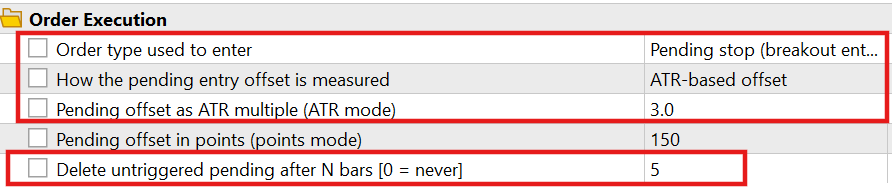
The logs:

Test 2—Fixed Cash Risk Against Percentage Risk
The same period was run twice, once in percentage mode and once in cash mode at comparable amounts.
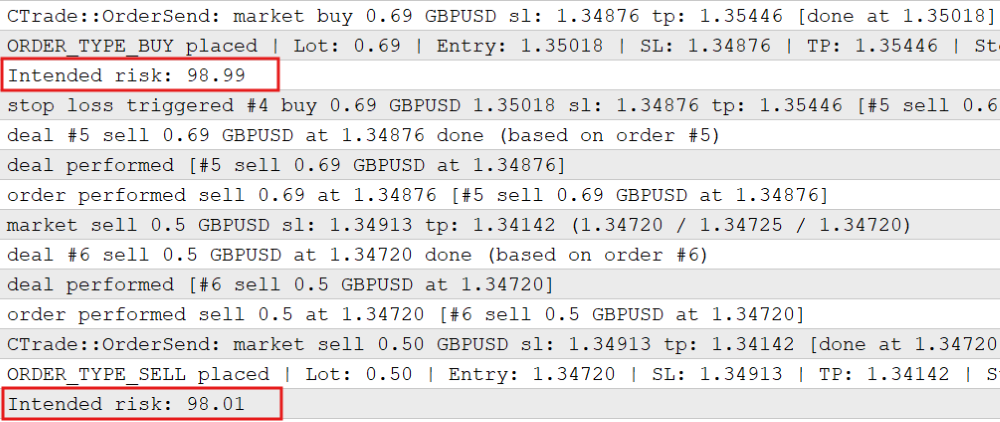
The percentage mode shows that the intended risk fluctuates as the account gets into drawdown, mirroring exactly 1% of the account balance. The cash amount mode shows us something different.
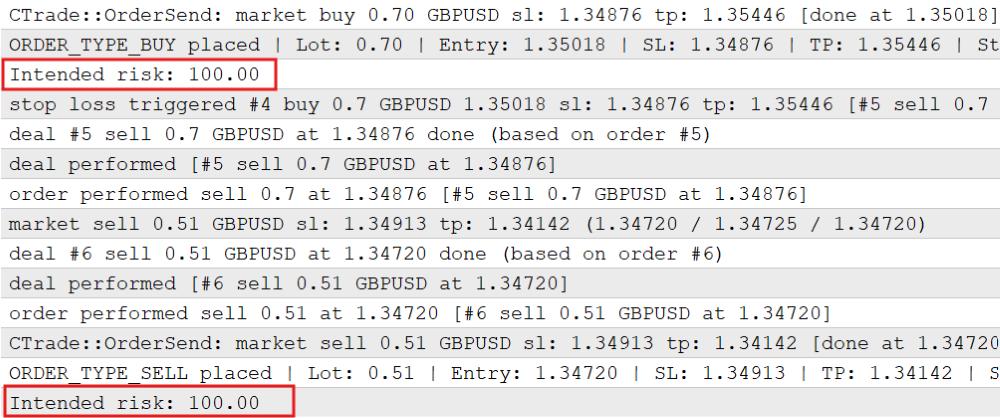
This log indicates that the intended risk remains constant regardless of the state the account balance or equity is in. This mirrors the $100 input as the risk per trade. One claim in this part is not backed by a test run and should be read accordingly. Percentage mode with a balance base produces the same volume as the previous version of this EA because the formula and its inputs are unchanged. That is true by construction rather than by measurement.
A Word About All These Inputs
The EA now has twenty-seven inputs across seven groups. Every numeric input is a dial an optimizer can turn, and an optimizer turning twenty dials against one stretch of history will always find a combination that looks excellent on that history. It will look excellent because it has memorized the history, not because it has understood anything. Add enough parameters, and a strategy can be fitted to noise so precisely that it fails the moment it meets a market it has not already seen. The inputs here are not all the same kind of thing, and separating them helps:
- Structural choices are the ones you make once, based on how you actually trade. Risk model, risk base, entry mode, and whether hedging is allowed. These are not optimization targets. Choosing cash risk over percentage risk because it fits how you think about your account is a decision. Choosing it because it backtested better on one symbol is a mistake.
- Safety limits are the margin cap, the spread ceiling, and the drawdown threshold. These should be set conservatively and then left alone. Optimizing a safety limit for profit defeats the purpose of having it.
- Genuine parameters are the small remainder: the moving average periods, the ATR multiplier, the take-profit ratio, and the pending offset. These are the only ones worth optimizing; they should be optimized a few at a time, and the result should always be checked on data the optimizer never saw.
This EA is a teaching vehicle. Every mechanism in it is real, works, and is worth lifting into your own systems, but the whole assembly is deliberately built to demonstrate as many of them as possible in one readable file. A production EA is usually the opposite: fewer options, decided in advance, with the unused paths deleted rather than left switchable. Take the parts you need. Do not run the demonstration.
What This Part Does Not Do
A pending order's margin is estimated, not reserved. The margin calculation still prices a trade as though nothing else is open on the account, which stays accurate on netting accounts and drifts on hedging accounts that already hold opposing exposure. Risk is still measured one trade at a time. Nothing here knows or cares how many positions exist in total, what they add up to, or whether they are correlated. The spread ceiling still assumes a broker quoting five or three digits, an inherited simplification worth knowing about if you run this on an unusual symbol. The freeze level is still not implemented, for the same reason as before: it governs modifying orders and positions that already exist, and this EA still only ever creates them. It belongs with trailing stops.
Conclusion
We removed the two implicit defaults and reorganized the EA so intentions are explicit and verifiable. Key changes:
- Three risk models: percent (balance or equity), fixed cash, fixed lot (with optional drawdown scaling).
- Entry modes: market, limit, stop — with pending offsets (ATR or fixed points), pending expiry, and pending‑distance validation.
- Sizing and rounding: lot calculation rounds DOWN to broker step, handles min/max lot, and warns or skips when min lot would exceed intended risk.
- Stops: minimum stop distance now includes the current spread (stops level + spread).
- Exposure checks now include pending orders.
- Architecture: plan → validate → execute, with a single STradePlan structure passed between stages so sizing and execution cannot silently corrupt one another.
Verification checklist (what to look for in logs/tests):
- Pending order expiry messages and deletion when PendingExpiryBars is set.
- “Caution: risk-correct volume … below the minimum lot” or a trade-skipped message when AllowMinLotOverRisk is disabled.
- Intended risk printed (percent vs fixed cash) matching the chosen RiskMode and RiskBase.
- Pending-distance and min-stop widening messages when broker limits force changes.
- No trade sent that violates hedging/count rules (counts include pending orders).
This refactor yields a small, auditable contract: a trade is first described (STradePlan), then validated against account and broker constraints, then executed unchanged. That makes the EA safer to extend and its behavior reproducible across accounts and entry styles.
The source file of the EA implemented throughout this article is attached below.
Warning: All rights to these materials are reserved by MetaQuotes Ltd. Copying or reprinting of these materials in whole or in part is prohibited.
This article was written by a user of the site and reflects their personal views. MetaQuotes Ltd is not responsible for the accuracy of the information presented, nor for any consequences resulting from the use of the solutions, strategies or recommendations described.

 Working with ONNX Models in MQL5 (Part 1): Decoding the Model File with a Protobuf Parser
 Automating Classic Market Methods in MQL5 (Part 6): Jesse Livermore's Pivotal Point System
 Adaptive Position Sizing in MQL5: A Prototype Risk Engine with Generalized Kelly and Bootstrap Calibration
 MQL5 Bootstrap (IV): Trailing and Break-even Stop Helpers

- Free trading apps
- Over 8,000 signals for copying
- Economic news for exploring financial markets
You agree to website policy and terms of use