

From Novice to Expert: Systematic Profit Conservation Using Candle Range Theory
 2 380
2 380
 0
0

You have likely watched a winning trade bleed back to breakeven. The analysis was right, the entry was precise, yet the profit evaporated because a static take‑profit (TP)—chosen for convenience rather than structure—acted as an immovable barrier.
The market does not care about round numbers. It respects structural levels derived from price action. When your systems ignore those levels, you consistently hand back profits to the market, often missing the target by just a few points.
A static TP is a fixed target at a round number, Fibonacci extension, or a simple risk‑to‑reward ratio. It is easy to code, but it assumes the market will always reach that exact point. In reality, price reverses before hitting the target, particularly at CRT levels—swing highs and lows, order blocks, and liquidity zones.
The common fallback is the trailing stop-loss. However, this is a different failure mode. A fixed trailing stop tightens against every new high and gets choked by every natural pullback. It protects small gains but systematically exits your positions before they reach significant structural targets—the very moves you entered to capture.
A more sophisticated approach is partial profit booking. Closing a portion of the position at intermediate levels secures tangible profit while keeping the remainder working. The challenge is twofold. You need a lot size that can be split without violating the broker's minimum. You also need objective reference points to decide where to take the first partial profit. Without structural anchors such as CRT zones or Fibonacci extensions, partial booking becomes arbitrary and unreliable.
Our strategy acknowledges that partial booking and trailing are not mutually exclusive. We use structural CRT levels to define precise booking zones. Once the partial profit is secured, we deploy a trailing stop solely on the remaining position. This hybrid approach locks in realized profit early while allowing the runner the space to breathe—guided by structural levels, not arbitrary points. We present this not as a guaranteed panacea, but as a testable, conceptual framework.
Contents- From Visualization to Execution
- Core Concept – CRT Structural Levels for Profit Conservation
- Implementation – Breakdown of the Three Source Files
- Visual Confirmation – Live Market Demonstration
- Conclusion
- Key Lessons
- Attachments
From Visualization to Execution
The MTF CRT Overlay indicator solves the visualization problem. It projects higher‑timeframe candle ranges, bodies, and wicks onto lower‑timeframe charts to provide structural context for execution. It maps each lower‑timeframe bar to its parent higher‑timeframe candle, detects CRT patterns after the signal candle closes, and automatically draws entry, TP, and SL lines. The overlay turns CRT from an abstract concept into a continuously visible reference.
Yet a gap remains: the indicator draws levels, but it does not manage your trade after entry. Even with the overlay, you still must decide when to trail a stop, when to take partial profits, and when to exit based on structural levels. These decisions remain manual, inconsistent, and subject to emotion. The same static TP that fails in the original problem persists because the overlay does not automate profit conservation.
We address that second gap directly. We introduce a profit‑conservation engine that uses the same CRT logic—the same bar‑mapping and level detection—to manage your exits systematically. The engine attaches to an open position, monitors price relative to CRT structural levels, and adjusts the stop‑loss to lock profit as those levels are approached. It transforms the overlay's visual context into active trade management, removing your need to interpret levels manually in real time.
Core Concept – CRT Structural Levels for Profit Conservation
Our conservation engine builds on a simple, observable fact from the overlay indicator: every CRT pattern produces a range candle (the higher‑timeframe candle that establishes the zone) and a signal candle (the candle that manipulates outside that zone before reversing). The overlay draws entry at the signal close, TP at the range extreme, and SL at the opposite extreme.
For profit conservation, the same structural points become your trailing anchors:
- Invalidation level for long trades: the range high (for a sell pattern) or the signal low (for a buy pattern)—the level beyond which price is likely to reverse.
- Invalidation level for short trades: the range low (for a buy pattern) or the signal high (for a sell pattern)—the structural support or resistance zone.
When a trade moves toward its intended target, we move the stop‑loss to these structural levels. Unlike a fixed trailing stop that moves every n points, we anchor the stop to levels that have genuine market significance—the same levels the overlay identifies as CRT zones. The stop adjusts only when price reaches a new structural level, not on every tick, eliminating noise‑induced exits.
The logic mirrors the CRT detection algorithm:
- For a long trade, identify the range high and the signal low from the CRT pattern.
- When price reaches the range high (the original TP), move your stop‑loss to the range low (breakeven or better).
- If price continues, trail your stop to the signal low plus a buffer (the manipulation zone).
- For a short trade, mirror the logic: range low becomes the trailing anchor for your stop.
This approach conserves profit because it exits or locks profit exactly where the CRT overlay suggests price is likely to reverse—at the structural extremes the indicator draws. It is not arbitrary; it is structural.
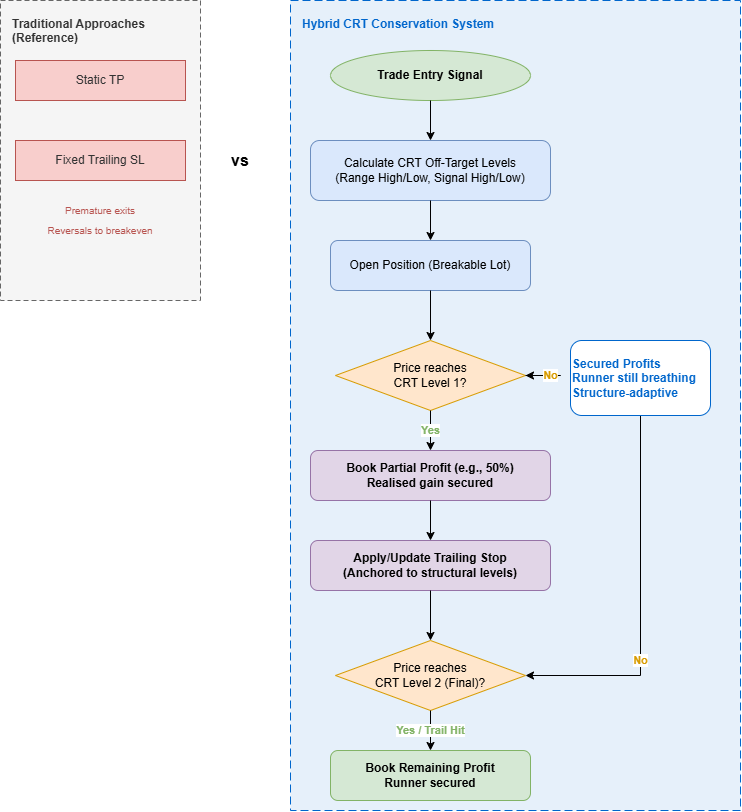
Fig. 1. CRT_ProfitConserve system concept.
Implementation – Breakdown of the Three Source Files
The system is built across three complementary files. The first two form the core trading system; the third is a standalone visual tool for manual validation. Below we walk through the implementation step by step, explaining each component's purpose and showing the essential code snippets. The complete source code is provided as attachments, so here we focus on the mechanisms. All code snippets retain their full header comments and property directives as they appear in the source files.
File 1: CRT_ProfitConserve.mqh – The Conservation Class
This header file defines the CRT_ProfitConserve class, which encapsulates all profit‑conservation logic. It is designed to be reusable: you can drop it into any EA and attach it to a position to manage exits. The class relies exclusively on the MQL5 Standard Library (CTrade for order management and CPositionInfo for position queries). The file begins with copyright, link, and version metadata as shown below.
//+------------------------------------------------------------------+
//|                                               CRT_ProfitConserve |
//|                         CRT Off‑Target Profit Conservation Engine|
//|                                     Copyright, Clemence Benjamin |
//|                                                         mql5.com |
//+------------------------------------------------------------------+

#property copyright "CRT Article Series"
#property link      "https://www.mql5.com"
#property version   "1.00"

#include <Trade\Trade.mqh>
#include <Trade\PositionInfo.mqh>
The #include statements bring in the MQL5 Standard Library classes for trading operations (CTrade) and position information (CPositionInfo), which are the only external dependencies.
Class Declaration and Private Members
The class declaration begins with a private section containing all member variables and helper methods. The member variables are organized into logical groups: trading objects (m_trade, m_pos), configuration parameters (m_crtBars, m_trailBufferPips, m_minBodyRatio, m_partialPercent, m_minLotStep), state variables (m_ticket, m_attached, m_levelsValid, m_partialClosed, m_trailActive, m_initialVolume, m_remainingVolume, m_openPrice, m_posType, m_lastBarTime), and CRT structural levels (m_rangeHigh, m_rangeLow, m_signalHigh, m_signalLow, m_level1Price, m_level2Price, m_trailStopPrice). The private helper methods—ComputeCRTLevels() and ClosePartial()—implement the core logic and are not exposed to the host EA.
//+------------------------------------------------------------------+
//| Main class for hybrid CRT profit conservation                    |
//+------------------------------------------------------------------+
class CRT_ProfitConserve
  {
private:
   CTrade            m_trade;
   CPositionInfo     m_pos;

   int               m_crtBars;
   double            m_trailBufferPips;
   double            m_minBodyRatio;
   double            m_partialPercent;
   double            m_minLotStep;

   ulong             m_ticket;
   bool              m_attached;
   bool              m_levelsValid;
   bool              m_partialClosed;
   bool              m_trailActive;
   double            m_initialVolume;
   double            m_remainingVolume;
   double            m_openPrice;
   ENUM_POSITION_TYPE m_posType;

   double            m_rangeHigh;
   double            m_rangeLow;
   double            m_signalHigh;
   double            m_signalLow;

   double            m_level1Price;
   double            m_level2Price;
   double            m_trailStopPrice;
   datetime          m_lastBarTime;

   bool              ComputeCRTLevels(string symbol, ENUM_TIMEFRAMES tf);
   bool              ClosePartial(double volume);

public:
                     CRT_ProfitConserve(int crtBars = 10, double trailBufferPips = 10.0,
                        double minBodyRatio = 3.0, double partialPercent = 0.5,
                        double minLotStep = 0.01);
                     ~CRT_ProfitConserve();

   bool              SetLevels(string symbol, ENUM_TIMEFRAMES tf);
   bool              AttachToPosition(ulong ticket);
   void              OnTickHandler();
   void              Reset();
   bool              IsAttached() const { return m_attached; }
   bool              IsLevelsValid() const { return m_levelsValid; }
   bool              GetLevels(double &rangeHigh, double &rangeLow, double &signalHigh, double &signalLow) const;
  };
Constructor – Initialization with Validation
The constructor receives the CRT parameters (crtBars, trailBufferPips, minBodyRatio, partialPercent, minLotStep) and initializes all member variables using the initializer list. This approach is efficient and ensures that all variables start in a known state. The constructor performs validation on the partial percentage: if the supplied value is outside the range [0.0, 1.0], it clamps the value to the nearest valid boundary. This prevents division errors or invalid booking volumes later in the execution. The destructor simply calls Reset() to clean up any remaining state.
//+------------------------------------------------------------------+
//| Constructor                                                      |
//+------------------------------------------------------------------+
CRT_ProfitConserve::CRT_ProfitConserve(int crtBars, double trailBufferPips,
                                       double minBodyRatio, double partialPercent,
                                       double minLotStep)
   : m_crtBars(crtBars),
     m_trailBufferPips(trailBufferPips),
     m_minBodyRatio(minBodyRatio),
     m_partialPercent(partialPercent),
     m_minLotStep(minLotStep),
     m_ticket(0),
     m_attached(false),
     m_levelsValid(false),
     m_partialClosed(false),
     m_trailActive(false),
     m_initialVolume(0.0),
     m_remainingVolume(0.0),
     m_openPrice(0.0),
     m_posType(POSITION_TYPE_BUY),
     m_rangeHigh(0.0),
     m_rangeLow(0.0),
     m_signalHigh(0.0),
     m_signalLow(0.0),
     m_level1Price(0.0),
     m_level2Price(0.0),
     m_trailStopPrice(0.0),
     m_lastBarTime(0)
  {
   if(m_partialPercent < 0.0)
      m_partialPercent = 0.0;
   if(m_partialPercent > 1.0)
      m_partialPercent = 1.0;
  }

//+------------------------------------------------------------------+
//| Destructor                                                       |
//+------------------------------------------------------------------+
CRT_ProfitConserve::~CRT_ProfitConserve() { Reset(); }
CRT Detection – ComputeCRTLevels()
This is the heart of the class. It loads higher‑timeframe OHLC data using CopyHigh, CopyLow, and CopyClose. It then scans back m_crtBars candles, looking for a reference candle whose range is later broken (a close above the high or below the low) and then closes back inside that range. The reference candle becomes the range candle; the breaking candle becomes the signal candle. The function stores the extremes of both and returns true if a valid pattern is found. The algorithm ignores tiny candles (less than 10 points) to filter out noise.
//+------------------------------------------------------------------+
//| Computes CRT levels from higher timeframe candles                |
//+------------------------------------------------------------------+
bool CRT_ProfitConserve::ComputeCRTLevels(string symbol, ENUM_TIMEFRAMES tf)
  {
   int bars = Bars(symbol, tf);
   if(bars < m_crtBars + 3)
      return(false);
   double high[], low[], close[];
   ArraySetAsSeries(high, true);
   ArraySetAsSeries(low, true);
   ArraySetAsSeries(close, true);
   int toCopy = m_crtBars + 5;
   if(CopyHigh(symbol, tf, 0, toCopy, high) < toCopy ||
      CopyLow(symbol, tf, 0, toCopy, low) < toCopy ||
      CopyClose(symbol, tf, 0, toCopy, close) < toCopy)
      return(false);
   double point = SymbolInfoDouble(symbol, SYMBOL_POINT);
   if(point <= 0.0)
      point = 0.00001;
   m_rangeHigh = 0.0;
   m_rangeLow  = 0.0;
   m_signalHigh = 0.0;
   m_signalLow  = 0.0;
   bool foundRange = false;
   for(int i = 1; i < m_crtBars; i++)
     {
      double candleRange = high[i] - low[i];
      if(candleRange < 10.0 * point)
         continue;
      for(int j = i - 1; j >= 0; j--)
        {
         if(close[j] > high[i])  // break above – sell setup
           {
            if(!foundRange)
              {
               m_rangeHigh = high[i];
               m_rangeLow = low[i];
               m_signalHigh = high[j];
               m_signalLow = low[j];
               foundRange = true;
               break;
              }
           }
         else
            if(close[j] < low[i]) // break below – buy setup
              {
               if(!foundRange)
                 {
                  m_rangeHigh = high[i];
                  m_rangeLow = low[i];
                  m_signalHigh = high[j];
                  m_signalLow = low[j];
                  foundRange = true;
                  break;
                 }
              }
        }
      if(foundRange)
         break;
     }
   m_levelsValid = foundRange;
   if(m_levelsValid)
     {
      Print("CRT levels: RangeHigh=", DoubleToString(m_rangeHigh, _Digits),
            " RangeLow=", DoubleToString(m_rangeLow, _Digits),
            " SignalHigh=", DoubleToString(m_signalHigh, _Digits),
            " SignalLow=", DoubleToString(m_signalLow, _Digits));
     }
   return m_levelsValid;
  }
Attaching to a Position – AttachToPosition()
This method links the class to an open position. It then sets booking levels from the computed CRT structure. It begins by calling Reset() to clear any previous state, then selects the position by ticket using CPositionInfo. If the position cannot be selected, the method returns false. It stores the open price, initial volume, remaining volume, and position type. The method checks whether CRT levels are valid. If they are, it sets booking levels based on trade direction. For a buy position, Level 1 is set to the range high (the first structural target), and Level 2 is set to the signal high (the secondary target). If Level 2 is not beyond Level 1 in the intended direction (i.e., not higher), it applies a half‑range buffer to create a meaningful second target. For a sell position, the logic is reversed: Level 1 is the range low, and Level 2 is the signal low, with a half‑range buffer applied if Level 2 is not lower. If CRT levels are not available, the method falls back to fixed offsets (50 and 100 points from entry) and logs a warning.
//+------------------------------------------------------------------+
//| Attaches the class to an open position and sets booking levels   |
//+------------------------------------------------------------------+
bool CRT_ProfitConserve::AttachToPosition(ulong ticket)
  {
   Reset();
   if(!m_pos.SelectByTicket(ticket))
      return(false);
   m_ticket = ticket;
   m_openPrice = m_pos.PriceOpen();
   m_initialVolume = m_pos.Volume();
   m_remainingVolume = m_initialVolume;
   m_posType = m_pos.PositionType();
   m_attached = true;
   m_partialClosed = false;
   m_trailActive = false;
   m_trailStopPrice = 0.0;
   if(m_levelsValid)
     {
      if(m_posType == POSITION_TYPE_BUY)
        {
         m_level1Price = m_rangeHigh;
         m_level2Price = m_signalHigh;
         if(m_level2Price <= m_level1Price)
            m_level2Price = m_level1Price + (m_rangeHigh - m_rangeLow) * 0.5;
        }
      else
        {
         m_level1Price = m_rangeLow;
         m_level2Price = m_signalLow;
         if(m_level2Price >= m_level1Price)
            m_level2Price = m_level1Price - (m_rangeHigh - m_rangeLow) * 0.5;
        }
      Print("Booking levels: L1=", DoubleToString(m_level1Price, _Digits),
            " L2=", DoubleToString(m_level2Price, _Digits));
     }
   else
     {
      //--- fallback
      double point = SymbolInfoDouble(_Symbol, SYMBOL_POINT);
      if(m_posType == POSITION_TYPE_BUY)
        {
         m_level1Price = m_openPrice + 50 * point;
         m_level2Price = m_openPrice + 100 * point;
        }
      else
        {
         m_level1Price = m_openPrice - 50 * point;
         m_level2Price = m_openPrice - 100 * point;
        }
     }
   return(true);
  }
The Main Loop – OnTickHandler()
This method is called from the EA's OnTick(). It runs the profit‑conservation logic. The method begins by checking that a position is attached (m_attached) and that the position still exists (m_pos.SelectByTicket). If the position has been closed, it calls Reset() and exits. It then retrieves the current price (bid for buys, ask for sells) and the current stop‑loss level. The method uses a three‑stage decision pipeline:
- Stage 1 – Partial Booking at Level 1: If the partial has not yet been booked (!m_partialClosed), the method checks whether price has reached Level 1 (range high for buys, range low for sells). If so, it calculates the volume to close: the initial volume multiplied by the partial percentage, ensuring the volume does not go below the minimum lot step and does not exceed the remaining volume. It then calls ClosePartial() to execute the partial close. If successful, it sets m_partialClosed to true, updates m_remainingVolume, and activates the trailing stop on the remaining position. The initial trailing stop is set at breakeven plus a buffer (m_trailBufferPips), which provides a safety net while allowing the runner to breathe.
- Stage 2 – Structural Trailing: Once the trail is active (m_trailActive) and there is remaining volume, the method computes a new trailing stop‑loss anchored to the opposite structural level. For a buy position, the anchor is the range low (structural support); for a sell position, the anchor is the range high (structural resistance). The new stop is set at the anchor plus/minus the trail buffer. The method only modifies the position if the new stop improves the current stop (higher for buys, lower for sells). This ensures that the trailing stop only moves in the favorable direction and never loosens.
- Stage 3 – Final Exit at Level 2: If the partial has been booked and there is remaining volume, the method checks whether price has reached Level 2 (signal high for buys, signal low for sells). If so, it closes the remaining volume using PositionClosePartial() and resets the class. This completes the trade lifecycle.
//+------------------------------------------------------------------+
//| Main tick handler – executes the conservation logic              |
//+------------------------------------------------------------------+
void CRT_ProfitConserve::OnTickHandler()
  {
   if(!m_attached)
      return;
   if(!m_pos.SelectByTicket(m_ticket))
     {
      Reset();
      return;
     }
   double currentPrice = (m_posType == POSITION_TYPE_BUY) ?
                         SymbolInfoDouble(_Symbol, SYMBOL_BID) :
                         SymbolInfoDouble(_Symbol, SYMBOL_ASK);
   double currentSL = m_pos.StopLoss();
   double point = SymbolInfoDouble(_Symbol, SYMBOL_POINT);
   if(point <= 0)
      point = 0.00001;
//--- Partial booking
   if(!m_partialClosed)
     {
      bool reached = (m_posType == POSITION_TYPE_BUY && currentPrice >= m_level1Price) ||
                    (m_posType == POSITION_TYPE_SELL && currentPrice <= m_level1Price);
      if(reached && m_initialVolume > m_minLotStep)
        {
         double closeVol = m_initialVolume * m_partialPercent;
         if(closeVol < m_minLotStep)
            closeVol = m_minLotStep;
         if(closeVol > m_remainingVolume)
            closeVol = m_remainingVolume;
         if(ClosePartial(closeVol))
           {
            m_partialClosed = true;
            m_remainingVolume = m_initialVolume - closeVol;
            Print("Partial booked: ", DoubleToString(closeVol, 2), " lots. Remaining: ", DoubleToString(m_remainingVolume, 2));
            if(m_remainingVolume > 0.0)
              {
               m_trailActive = true;
               double trailSL = (m_posType == POSITION_TYPE_BUY) ?
                              m_openPrice + m_trailBufferPips * point :
                              m_openPrice - m_trailBufferPips * point;
               if(m_trade.PositionModify(m_ticket, trailSL, m_pos.TakeProfit()))
                 {
                  m_trailStopPrice = trailSL;
                  Print("Trail activated at ", DoubleToString(trailSL, _Digits));
                 }
              }
           }
        }
     }
//--- Update trailing stop
   if(m_trailActive && m_remainingVolume > 0.0)
     {
      double anchor = (m_posType == POSITION_TYPE_BUY) ? m_rangeLow : m_rangeHigh;
      double newSL = (m_posType == POSITION_TYPE_BUY) ?
                   anchor + m_trailBufferPips * point :
                   anchor - m_trailBufferPips * point;
      if((m_posType == POSITION_TYPE_BUY && newSL > currentSL) ||
         (m_posType == POSITION_TYPE_SELL && newSL < currentSL))
        {
         if(m_trade.PositionModify(m_ticket, newSL, m_pos.TakeProfit()))
           {
            m_trailStopPrice = newSL;
            Print("Trail updated to ", DoubleToString(newSL, _Digits));
           }
        }
     }
//--- Final target
   if(m_partialClosed && m_remainingVolume > 0.0)
     {
      bool reachedFinal = (m_posType == POSITION_TYPE_BUY && currentPrice >= m_level2Price) ||
                          (m_posType == POSITION_TYPE_SELL && currentPrice <= m_level2Price);
      if(reachedFinal)
        {
         if(m_trade.PositionClosePartial(m_ticket, m_remainingVolume))
           {
            m_remainingVolume = 0.0;
            Print("Final profit taken. Trade closed.");
            Reset();
           }
        }
     }
  }
Partial Close – ClosePartial()
This method handles the execution of partial position closes. It validates the volume parameter to ensure it is positive and does not exceed the remaining volume. It then calls m_trade.PositionClosePartial(ticket, volume), which is the dedicated MQL5 method for closing a specific volume of an open position. This is the correct approach for partial closes, as opposed to closing the entire position and reopening a smaller one. If the operation succeeds, the method returns true. If it fails, it prints the error description using m_trade.ResultRetcodeDescription() and returns false. This error handling is essential for debugging and understanding why partial closes might fail in live trading (e.g., due to insufficient margin, invalid ticket, or market conditions).
//+------------------------------------------------------------------+
//| Closes a partial volume of the attached position                 |
//+------------------------------------------------------------------+
bool CRT_ProfitConserve::ClosePartial(double volume)
  {
   if(volume <= 0.0 || volume > m_remainingVolume)
      return(false);
   if(m_trade.PositionClosePartial(m_ticket, volume))
      return(true);
   Print("Failed to close partial volume ", volume, ". Error: ", m_trade.ResultRetcodeDescription());
   return(false);
  }
Reset and GetLevels – State Management
The Reset() method clears the attached position state, allowing the class to be reused for a new trade. It resets all position‑related variables (ticket, attached flag, partial and trail flags, volumes, open price, and trail stop price) to their default values. This ensures that when a new position is attached, the class starts in a clean state without any residual data from the previous trade. The GetLevels() method provides read‑only access to the computed CRT levels for the host EA or for visualization purposes. It takes four reference parameters (rangeHigh, rangeLow, signalHigh, signalLow) and populates them with the stored CRT levels. If no valid levels are available, it returns false. This method is used by the EA's DrawCRTLevels() function to render the structural levels on the chart, ensuring that the visual overlay matches the levels used by the conservation engine.
//+------------------------------------------------------------------+
//| Resets all internal state variables                              |
//+------------------------------------------------------------------+
void CRT_ProfitConserve::Reset()
  {
   m_ticket = 0;
   m_attached = false;
   m_partialClosed = false;
   m_trailActive = false;
   m_initialVolume = 0.0;
   m_remainingVolume = 0.0;
   m_openPrice = 0.0;
   m_trailStopPrice = 0.0;
  }

//+------------------------------------------------------------------+
//| Retrieves the stored CRT structural levels                       |
//+------------------------------------------------------------------+
bool CRT_ProfitConserve::GetLevels(double &rangeHigh, double &rangeLow,
                                    double &signalHigh, double &signalLow) const
  {
   if(!m_levelsValid)
      return(false);
   rangeHigh = m_rangeHigh;
   rangeLow = m_rangeLow;
   signalHigh = m_signalHigh;
   signalLow = m_signalLow;
   return(true);
  }

//+------------------------------------------------------------------+
//| Public wrapper to recompute CRT levels                           |
//+------------------------------------------------------------------+
bool CRT_ProfitConserve::SetLevels(string symbol, ENUM_TIMEFRAMES tf)
  {
   return ComputeCRTLevels(symbol, tf);
  }
//+------------------------------------------------------------------+
File 2: CRT_ProfitConserve_EA.mq5 – The Integrated Expert Advisor
This is the main trading system that combines CRT level detection, chart visualization, MA crossover entry with structural filters, and the conservation class into a single, self‑contained file. The EA does not depend on the separate overlay indicator; it draws its own objects directly on the chart. This integration reduces complexity and eliminates the need for multiple files when deploying the system. The file begins with copyright, link, version, and description metadata.
//+------------------------------------------------------------------+
//|                                           CRT_ProfitConserve_EA  |
//|                    Demonstration EA for hybrid CRT conservation  |
//+------------------------------------------------------------------+
#property copyright "CRT Article Series"
#property link      "https://www.mql5.com"
#property version   "1.01"
#property description "EA that enters on MA crossover and uses CRT profit conservation"

#include <Trade\Trade.mqh>
#include <CRT_ProfitConservation\CRT_ProfitConserve.mqh>   // Updated include path
The #property description provides a brief explanation of the EA's purpose. The #include statement brings in the CRT_ProfitConserve class from the include folder, using the path "CRT_ProfitConservation\CRT_ProfitConserve.mqh". This path assumes that the header file is placed in MQL5\Include\CRT_ProfitConservation\.
Input Parameters
All configurable settings are exposed as inputs, organized into logical groups. The entry parameters include lot size, MA periods, magic number, and trade direction toggles. The CRT detection parameters include the higher timeframe, lookback bars, offset factor, and body multiplier—these control how CRT patterns are identified. The profit conservation parameters include the trail buffer in pips and the partial close percentage, which determine how the hybrid conservation strategy behaves. This comprehensive set of inputs gives you full control over the system's behavior without modifying the code.
//--- Input parameters
input double   InpLotSize         = 0.1;          // Base lot size
input int      InpMAPeriodFast    = 10;           // Fast MA period
input int      InpMAPeriodSlow    = 20;           // Slow MA period
input int      InpCRTBars         = 10;           // CRT lookback bars
input double   InpTrailBufferPips = 10.0;         // Trailing buffer in pips
input double   InpPartialPercent  = 0.5;          // Partial close percentage (0.0-1.0)
input int      InpMagicNumber     = 12345;        // EA magic number
input bool     InpUseLong         = true;          // Allow long trades
input bool     InpUseShort        = true;          // Allow short trades
Global Objects and OnInit/OnDeinit
The EA declares global objects for trading (CTrade) and the conservation class (CRT_ProfitConserve). It also declares handles for the moving average indicators and a variable to track the last bar time. OnInit() validates the input parameters, creates the conservation class instance, initializes the MA indicator handles, sets the magic number, and calls SetLevels() to compute initial CRT levels. If any step fails, the function returns an appropriate INIT_* error code. OnDeinit() deletes the conservation class instance, releases the indicator handles, and removes all drawing objects with the prefix "CRT_EA_".
//--- Global objects
CTrade                 trade;
CRT_ProfitConserve*    g_profitConserve = NULL;
int                   fastMAHandle, slowMAHandle;
datetime              lastBarTime = 0;

//+------------------------------------------------------------------+
//| Expert initialization function                                   |
//+------------------------------------------------------------------+
int OnInit()
  {
//--- Validate inputs
   if(InpLotSize <= 0 || InpPartialPercent < 0 || InpPartialPercent > 1)
     {
      Print("Invalid input parameters");
      return(INIT_PARAMETERS_INCORRECT);
     }

//--- Create CRT conservation object
   double minLotStep = SymbolInfoDouble(_Symbol, SYMBOL_VOLUME_STEP);
   if(minLotStep <= 0) minLotStep = 0.01;

   g_profitConserve = new CRT_ProfitConserve(InpCRTBars, InpTrailBufferPips,
                                            3.0, InpPartialPercent, minLotStep);
   if(g_profitConserve == NULL)
     {
      Print("Failed to create CRT_ProfitConserve");
      return(INIT_FAILED);
     }

//--- Initialize MA handles
   fastMAHandle = iMA(_Symbol, _Period, InpMAPeriodFast, 0, MODE_SMA, PRICE_CLOSE);
   slowMAHandle = iMA(_Symbol, _Period, InpMAPeriodSlow, 0, MODE_SMA, PRICE_CLOSE);
   if(fastMAHandle == INVALID_HANDLE || slowMAHandle == INVALID_HANDLE)
     {
      Print("Failed to create MA indicators");
      return(INIT_FAILED);
     }

//--- Set magic number
   trade.SetExpertMagicNumber(InpMagicNumber);

//--- Set initial CRT levels (will be recalculated periodically)
   g_profitConserve.SetLevels(_Symbol, _Period);

   lastBarTime = 0;
   return(INIT_SUCCEEDED);
  }

//+------------------------------------------------------------------+
//| Expert deinitialization function                                 |
//+------------------------------------------------------------------+
void OnDeinit(const int reason)
  {
   if(g_profitConserve != NULL)
     {
      delete g_profitConserve;
      g_profitConserve = NULL;
     }
   if(fastMAHandle != INVALID_HANDLE) IndicatorRelease(fastMAHandle);
   if(slowMAHandle != INVALID_HANDLE) IndicatorRelease(slowMAHandle);
  }
OnTick – Orchestration
The tick handler is the central control loop. It performs three main tasks: detects a new bar and recalculates CRT levels; handles an attached position by calling the conservation handler; and, if no position is open, checks for entry signals. The new bar detection uses iTime() to get the current bar time and compares it with the stored lastBarTime. On a new bar, it calls SetLevels() to recompute CRT levels. If a position is attached, it calls g_profitConserve.OnTickHandler() and returns, preventing the EA from opening multiple positions. If no position is attached and the CRT levels are valid, it checks for entry signals using the MA crossover. On a valid entry, the EA sets the initial stop‑loss and take‑profit at arbitrary levels that will be overridden by the conservation class, opens the trade, and attaches the conservation class.
//+------------------------------------------------------------------+
//| Expert tick function                                             |
//+------------------------------------------------------------------+
void OnTick()
  {
//--- Recalculate CRT levels on new bar
   datetime currentTime = iTime(_Symbol, _Period, 0);
   if(currentTime != lastBarTime)
     {
      lastBarTime = currentTime;
      if(g_profitConserve != NULL)
         g_profitConserve.SetLevels(_Symbol, _Period);
     }

//--- Handle existing position if attached
   if(g_profitConserve != NULL && g_profitConserve.IsAttached())
     {
      g_profitConserve.OnTickHandler();
      return; // EA doesn't open new positions if one is active
     }

//--- Check for entry signals
   if(!InpUseLong && !InpUseShort) return;

   double fastMA[], slowMA[];
   ArraySetAsSeries(fastMA, true);
   ArraySetAsSeries(slowMA, true);
   if(CopyBuffer(fastMAHandle, 0, 0, 3, fastMA) < 3 ||
      CopyBuffer(slowMAHandle, 0, 0, 3, slowMA) < 3)
      return;

   double ask = SymbolInfoDouble(_Symbol, SYMBOL_ASK);
   double bid = SymbolInfoDouble(_Symbol, SYMBOL_BID);
   double point = SymbolInfoDouble(_Symbol, SYMBOL_POINT);
   if(point <= 0) point = 0.00001;

//--- Long signal: fast MA crosses above slow MA
   if(InpUseLong && fastMA[1] > slowMA[1] && fastMA[2] <= slowMA[2])
     {
      double sl = ask - 50 * point; // initial stop (will be managed by class)
      double tp = ask + 100 * point; // initial TP (will be overridden)
      if(trade.Buy(InpLotSize, _Symbol, ask, sl, tp, "CRT Buy"))
        {
         ulong ticket = trade.ResultOrder();
         if(ticket > 0)
           {
            Print("Buy order opened, ticket: ", ticket);
            g_profitConserve.SetLevels(_Symbol, _Period);
            g_profitConserve.AttachToPosition(ticket);
           }
        }
     }
//--- Short signal: fast MA crosses below slow MA
   else if(InpUseShort && fastMA[1] < slowMA[1] && fastMA[2] >= slowMA[2])
     {
      double sl = bid + 50 * point;
      double tp = bid - 100 * point;
      if(trade.Sell(InpLotSize, _Symbol, bid, sl, tp, "CRT Sell"))
        {
         ulong ticket = trade.ResultOrder();
         if(ticket > 0)
           {
            Print("Sell order opened, ticket: ", ticket);
            g_profitConserve.SetLevels(_Symbol, _Period);
            g_profitConserve.AttachToPosition(ticket);
           }
        }
     }
  }
File 3: CRT_MTF_Overlay.mq5 – The Integrated EA with Visual Overlay
This file is the integrated EA that combines CRT level detection, visual overlay, and hybrid profit conservation into a single EA. It is provided for traders who want a complete solution with full visual feedback. The EA draws its own levels directly on the chart, making the separate overlay indicator optional. The file begins with copyright, link, version, and description metadata.
//+------------------------------------------------------------------+
//|                                              CRT_MTF_Overlay.mq5 |
//|               Integrated CRT EA with visual overlay + management |
//+------------------------------------------------------------------+
#property copyright "CRT Article Series"
#property link      "https://www.mql5.com"
#property version   "2.00"
#property description "EA that detects MTF CRT levels, draws them, and applies hybrid profit conservation."

#include <Trade\Trade.mqh>
#include <CRT_ProfitConservation\CRT_ProfitConserve.mqh>
The #property description explains the EA's functionality. The #include statement brings in the CRT_ProfitConserve class from the include folder. This EA is the complete package: it detects levels, draws them, opens trades, and manages exits.
Input Parameters and Global Objects
The input parameters are organized into logical groups: entry parameters (lot size, MA periods, magic number, trade direction), CRT detection parameters (higher timeframe, lookback bars, offset factor, body multiplier), profit conservation parameters (trail buffer, partial percentage), and visual parameters (draw levels toggle, colors, line extension). This comprehensive set of inputs gives you full control without code changes. The global objects include the trade object, the conservation class instance, MA handles, and a lastBarTime variable for new bar detection.
//--- Input parameters (Entry)
input double               InpLotSize               = 0.1;          // Base lot size
input int                  InpMAPeriodFast          = 10;           // Fast MA period
input int                  InpMAPeriodSlow          = 20;           // Slow MA period
input int                  InpMagicNumber           = 12345;        // EA magic number
input bool                 InpUseLong               = true;          // Allow long trades
input bool                 InpUseShort              = true;          // Allow short trades

//--- Input parameters (CRT Detection)
input ENUM_TIMEFRAMES      InpHigherTF              = PERIOD_H1;    // Higher Timeframe for CRT
input int                  InpCRTBars               = 10;           // CRT lookback bars
input double               InpOffset                = 2.0;          // Range Offset Factor
input double               InpCandleBodyMultiplier  = 3.0;          // Body Size Filter

//--- Input parameters (Profit Conservation)
input double               InpTrailBufferPips       = 10.0;         // Trailing buffer in pips
input double               InpPartialPercent        = 0.5;          // Partial close percentage (0.0-1.0)

//--- Input parameters (Visuals)
input bool                 InpDrawLevels            = true;         // Draw CRT levels on chart
input color                InpRangeColor            = clrOrange;    // Range rectangle color
input color                InpBuyColor              = clrLimeGreen; // Buy signal color
input color                InpSellColor             = clrCrimson;   // Sell signal color
input int                  InpLineExtendBars        = 50;           // Lines extension bars

//--- Global objects
CTrade                 trade;
CRT_ProfitConserve*    g_conserve = NULL;
int                   fastMAHandle, slowMAHandle;
datetime              lastBarTime = 0;

//--- Stored CRT levels for drawing
struct CRTLevels
  {
   datetime   rangeTime;
   double     rangeHigh;
   double     rangeLow;
   double     signalHigh;
   double     signalLow;
   double     entryPrice;
   bool       isSell;
   bool       isBuy;
   bool       drawn;
  };
CRTLevels g_lastCRT;
OnInit, OnDeinit, and OnTick
OnInit() validates inputs, creates the conservation object, initializes MA handles, sets the magic number, computes initial CRT levels, and zeros the drawing structure. OnDeinit() cleans up the conservation object, releases indicator handles, and deletes all drawing objects with the prefix "CRT_EA_". OnTick() detects new bars and recalculates levels and drawing; if a position is attached, it calls the conservation handler; if no position is open and CRT levels are valid, it checks for entry signals using the MA crossover with structural filters (long entries only when price is above the range low; short entries only when price is below the range high). On a valid entry, it sets the initial stop‑loss at the opposite range extreme plus a 10‑point buffer, opens the trade, attaches the conservation class, and draws a trade arrow.
//+------------------------------------------------------------------+
//| Expert initialization function                                   |
//+------------------------------------------------------------------+
int OnInit()
  {
//--- Validate inputs
   if(InpLotSize <= 0 || InpPartialPercent < 0 || InpPartialPercent > 1)
      return(INIT_PARAMETERS_INCORRECT);

//--- Create CRT conservation object
   double minLotStep = SymbolInfoDouble(_Symbol, SYMBOL_VOLUME_STEP);
   if(minLotStep <= 0) minLotStep = 0.01;
   g_conserve = new CRT_ProfitConserve(InpCRTBars, InpTrailBufferPips,
                                       InpCandleBodyMultiplier, InpPartialPercent, minLotStep);
   if(g_conserve == NULL) return(INIT_FAILED);

//--- MA handles
   fastMAHandle = iMA(_Symbol, _Period, InpMAPeriodFast, 0, MODE_SMA, PRICE_CLOSE);
   slowMAHandle = iMA(_Symbol, _Period, InpMAPeriodSlow, 0, MODE_SMA, PRICE_CLOSE);
   if(fastMAHandle == INVALID_HANDLE || slowMAHandle == INVALID_HANDLE)
      return(INIT_FAILED);

   trade.SetExpertMagicNumber(InpMagicNumber);

//--- Initialise CRT levels
   g_conserve.SetLevels(_Symbol, InpHigherTF);
   lastBarTime = 0;
   ZeroMemory(g_lastCRT);
   return(INIT_SUCCEEDED);
  }

//+------------------------------------------------------------------+
//| Expert deinitialization function                                 |
//+------------------------------------------------------------------+
void OnDeinit(const int reason)
  {
   if(g_conserve != NULL) { delete g_conserve; g_conserve = NULL; }
   if(fastMAHandle != INVALID_HANDLE) IndicatorRelease(fastMAHandle);
   if(slowMAHandle != INVALID_HANDLE) IndicatorRelease(slowMAHandle);
   ObjectsDeleteAll(0, "CRT_EA_"); // Clean up drawings
  }
Visualization – DrawCRTLevels()
This function retrieves the computed levels from the class and renders them on the chart. It creates a semi‑transparent rectangle for the range, a colored rectangle for the signal candle, dashed entry/TP/SL lines, an arrow marker, and text labels. All objects are placed with OBJPROP_BACK = true to stay behind price bars, and OBJPROP_SELECTABLE = false to prevent accidental dragging. The DrawHorizontalLine() helper creates trend lines with a dashed style and a fixed right extension. DrawSignalArrow() places an arrow on the chart when a trade is opened, using the ticket number in the object name for uniqueness.
//+------------------------------------------------------------------+
//| Draw CRT levels on chart                                         |
//+------------------------------------------------------------------+
void DrawCRTLevels()
  {
   if(!g_conserve.IsLevelsValid()) return;

   double rangeHigh, rangeLow, signalHigh, signalLow;
   if(!g_conserve.GetLevels(rangeHigh, rangeLow, signalHigh, signalLow))
      return;

//--- Determine if it's a buy or sell pattern based on current price position
   double currentPrice = SymbolInfoDouble(_Symbol, SYMBOL_BID);
   bool isSell = (currentPrice > rangeHigh && currentPrice > signalHigh);
   bool isBuy  = (currentPrice < rangeLow && currentPrice < signalLow);

//--- If unclear, default based on which is closer
   if(!isSell && !isBuy)
     {
      if(rangeHigh - currentPrice < currentPrice - rangeLow)
         isSell = true;
      else
         isBuy = true;
     }

   datetime time0 = iTime(_Symbol, InpHigherTF, 0);
   datetime time1 = iTime(_Symbol, InpHigherTF, 1);
   if(time0 == 0 || time1 == 0) return;

   datetime rangeStart = time1;
   datetime rangeEnd = time0;

//--- Delete old drawings
   ObjectsDeleteAll(0, "CRT_EA_");

//--- 1. Range Rectangle
   string rectName = "CRT_EA_Range";
   ObjectCreate(0, rectName, OBJ_RECTANGLE, 0, rangeStart, rangeHigh, rangeEnd, rangeLow);
   ObjectSetInteger(0, rectName, OBJPROP_FILL, true);
   ObjectSetInteger(0, rectName, OBJPROP_COLOR, InpRangeColor);
   ObjectSetInteger(0, rectName, OBJPROP_BACK, true);
   ObjectSetInteger(0, rectName, OBJPROP_SELECTABLE, false);

//--- 2. Signal candle highlight (smaller rectangle)
   string sigRect = "CRT_EA_Signal";
   ObjectCreate(0, sigRect, OBJ_RECTANGLE, 0, rangeStart, signalHigh, rangeEnd, signalLow);
   ObjectSetInteger(0, sigRect, OBJPROP_FILL, true);
   ObjectSetInteger(0, sigRect, OBJPROP_COLOR, isSell ? InpSellColor : InpBuyColor);
   ObjectSetInteger(0, sigRect, OBJPROP_BACK, true);
   ObjectSetInteger(0, sigRect, OBJPROP_SELECTABLE, false);

//--- 3. Entry, TP, SL lines (extend to the right)
   double entryPrice = (isSell) ? signalHigh : signalLow;
   double tpPrice    = (isSell) ? rangeLow : rangeHigh;
   double slPrice    = (isSell) ? rangeHigh : rangeLow;

   datetime lineEnd = rangeEnd + InpLineExtendBars * PeriodSeconds(_Period);

   DrawHorizontalLine("CRT_EA_Entry", entryPrice, clrWhite, STYLE_DASH);
   DrawHorizontalLine("CRT_EA_TP", tpPrice, clrDodgerBlue, STYLE_DASH);
   DrawHorizontalLine("CRT_EA_SL", slPrice, clrRed, STYLE_DASH);

//--- 4. Arrow at entry
   string arrow = "CRT_EA_Arrow";
   ObjectCreate(0, arrow, OBJ_ARROW, 0, time0, entryPrice);
   ObjectSetInteger(0, arrow, OBJPROP_ARROWCODE, isSell ? 234 : 233);
   ObjectSetInteger(0, arrow, OBJPROP_COLOR, isSell ? InpSellColor : InpBuyColor);
   ObjectSetInteger(0, arrow, OBJPROP_WIDTH, 3);
   ObjectSetInteger(0, arrow, OBJPROP_SELECTABLE, false);

//--- 5. Labels
   string labelEntry = "CRT_EA_LblEntry";
   ObjectCreate(0, labelEntry, OBJ_TEXT, 0, lineEnd, entryPrice);
   ObjectSetString(0, labelEntry, OBJPROP_TEXT, isSell ? "Sell Entry" : "Buy Entry");
   ObjectSetInteger(0, labelEntry, OBJPROP_COLOR, clrWhite);
   ObjectSetInteger(0, labelEntry, OBJPROP_FONTSIZE, 10);
   ObjectSetInteger(0, labelEntry, OBJPROP_SELECTABLE, false);

   string labelTP = "CRT_EA_LblTP";
   ObjectCreate(0, labelTP, OBJ_TEXT, 0, lineEnd, tpPrice);
   ObjectSetString(0, labelTP, OBJPROP_TEXT, "TP");
   ObjectSetInteger(0, labelTP, OBJPROP_COLOR, clrDodgerBlue);
   ObjectSetInteger(0, labelTP, OBJPROP_FONTSIZE, 10);
   ObjectSetInteger(0, labelTP, OBJPROP_SELECTABLE, false);

   string labelSL = "CRT_EA_LblSL";
   ObjectCreate(0, labelSL, OBJ_TEXT, 0, lineEnd, slPrice);
   ObjectSetString(0, labelSL, OBJPROP_TEXT, "SL");
   ObjectSetInteger(0, labelSL, OBJPROP_COLOR, clrRed);
   ObjectSetInteger(0, labelSL, OBJPROP_FONTSIZE, 10);
   ObjectSetInteger(0, labelSL, OBJPROP_SELECTABLE, false);

   ChartRedraw(0);
  }

//+------------------------------------------------------------------+
//| Helper: Draw horizontal line                                     |
//+------------------------------------------------------------------+
void DrawHorizontalLine(string name, double price, color clr, ENUM_LINE_STYLE style)
  {
   datetime startTime = iTime(_Symbol, _Period, 0);
   datetime endTime = startTime + InpLineExtendBars * PeriodSeconds(_Period);
   if(ObjectFind(0, name) < 0)
     {
      ObjectCreate(0, name, OBJ_TREND, 0, startTime, price, endTime, price);
      ObjectSetInteger(0, name, OBJPROP_COLOR, clr);
      ObjectSetInteger(0, name, OBJPROP_STYLE, style);
      ObjectSetInteger(0, name, OBJPROP_RAY_RIGHT, false);
      ObjectSetInteger(0, name, OBJPROP_SELECTABLE, false);
     }
  }

//+------------------------------------------------------------------+
//| Draw signal arrow at trade open                                  |
//+------------------------------------------------------------------+
void DrawSignalArrow(ulong ticket, bool isBuy, double price)
  {
   string name = "CRT_EA_Trade_" + IntegerToString(ticket);
   datetime time = TimeCurrent();
   ObjectCreate(0, name, OBJ_ARROW, 0, time, price);
   ObjectSetInteger(0, name, OBJPROP_ARROWCODE, isBuy ? 233 : 234);
   ObjectSetInteger(0, name, OBJPROP_COLOR, isBuy ? clrLimeGreen : clrCrimson);
   ObjectSetInteger(0, name, OBJPROP_WIDTH, 4);
   ObjectSetInteger(0, name, OBJPROP_SELECTABLE, false);
   ChartRedraw(0);
  }
Optimization and Edge Cases
Several design choices ensure the EA runs efficiently even on large histories. CRT conditions are evaluated only when a new bar forms, reducing calculations. Object deduplication using the drawn flag prevents redrawing the same setup on every tick. The EA exits early if fewer than three higher‑timeframe candles are available, preventing errors. The EA only operates on completed candles—all levels are computed from closed candles, making it reliable for backtesting and live execution alike.
Strategy Tester Demonstration
In Fig. 2, we demonstrate the system's behavior through a screenshot of the EA running on a Strategy Tester chart. The GIF shows the complete trade lifecycle:
- Trade Entry
- Partial Profit Booking at Level 1
- Runner Continues to Level 2
- Final Exit at Level 2

Fig. 2. Strategy Tester demonstration of the hybrid CRT profit conservation system.
The screencast shows the intended sequence: identify levels, take partial profit at the first target, trail the remainder, and exit at the final target. The visual confirmation provides practical evidence of the concept working in real market conditions.
Conclusion
We have delivered a complete, self‑contained Expert Advisor that integrates multi‑timeframe CRT level detection, visual overlay, and hybrid profit conservation into a single file. The EA automatically:
- Detects CRT range and signal candles on a higher timeframe.
- Draws structural levels, entry, TP, and SL directly on the chart.
- Opens trades on MA crossover with structural filters.
- Manages exits using a hybrid of partial booking and structural trailing.
The live market screencast demonstrates the system's behavior in real conditions, showing how partial profit booking secures gains early while allowing the runner to continue toward structural targets. This hybrid approach addresses the limitations of static TPs and fixed trailing stops by anchoring exit logic to market structure.
I encourage you to test the EA on your preferred pair—while the results are promising, validation across diverse market conditions is essential before live deployment.
Key Lessons
| Lesson | Description |
|---|---|
| 1. CRT levels provide objective booking points | The range and signal extremes are not arbitrary—they represent areas where liquidity sweeps occur. Using them for partial booking removes subjectivity. |
| 2. Partial booking protects profits early | Closing a portion of the position at the first structural level secures tangible profit, improving the win rate and reducing the impact of reversals. |
| 3. Structural trailing outperforms fixed trailing | Anchoring the stop to the opposite structural level (range low/high) allows the runner to survive normal pullbacks, increasing the average win size. |
| 4. Entry filters matter | Requiring price to be on the correct side of the range before entering avoids chasing breakouts that are likely to fail. |
| 5. Visualization aids validation | Drawing the levels on the chart allows you to visually confirm that the EA's logic matches your interpretation of the market structure. |
| 6. Integration simplifies deployment | Having everything in a single EA reduces dependency on separate indicator files and makes installation straightforward. |
| 7. Modular design enables reuse | The CRT_ProfitConserve class can be used with any entry strategy, making it a valuable component for building future systems. |
| 8. Non‑repainting ensures reliability | All levels are computed from completed candles only, ensuring that historical signals and backtests are reproducible. |
| 9. Visual confirmation validates the concept | A live screencast confirms the system functions as designed, providing practical evidence without relying on statistical claims. |
| 10. Test before trusting | While the concept is sound, every market and timeframe behaves differently. Validate the EA on your own data before going live. |
Attachments
The complete source code for all three files is provided as attachments. Place CRT_ProfitConserve.mqh in MQL5\Include\CRT_ProfitConservation\, and place both CRT_ProfitConserve_EA.mq5 and CRT_MTF_Overlay.mq5 in MQL5\Experts\CRT_ProfitConservation\ (the latter is the integrated EA with visual overlay). The implementation details above walk through the key functions; the full files contain all the necessary code.
| File Name | Type | Version | Description |
|---|---|---|---|
| CRT_ProfitConserve.mqh | Include | 1.00 | Core profit‑conservation class. Place in MQL5\Include\CRT_ProfitConservation\ |
| CRT_ProfitConserve_EA.mq5 | Expert Advisor | 1.01 | Demonstration EA that uses the conservation class with a simple MA crossover entry. |
| CRT_MTF_Overlay.mq5 | Expert Advisor | 2.00 | Integrated EA with level detection, visual overlay, MA crossover entry, and hybrid conservation. |
| MQL5.zip | Zip Archive | Null | Contains all the source files organized into their correct folders, can be merged into the main MQL5 terminal folder. |
Warning: All rights to these materials are reserved by MetaQuotes Ltd. Copying or reprinting of these materials in whole or in part is prohibited.
This article was written by a user of the site and reflects their personal views. MetaQuotes Ltd is not responsible for the accuracy of the information presented, nor for any consequences resulting from the use of the solutions, strategies or recommendations described.

 Designing a Unified Order Execution Gateway Class in MQL5
 Automating Trading Strategies in MQL5 (Part 52): The tCISD Model with SSMT and Quarterly Theory
 Unified Multi-Timeframe Renko: Synthesizing the Market's Temporal Dimensions
 Quick Integration of a Large Language Model into MetaTrader 5 (Part I): Building the Model

- Free trading apps
- Over 8,000 signals for copying
- Economic news for exploring financial markets
You agree to website policy and terms of use