

Feature Engineering for ML (Part 6): Microstructural Features in MQL5
 1 620
1 620
 0
0

Table of Contents
- Introduction
- What MetaTrader 5 Actually Gives You: Tick Volume vs. True Tick Data
- Architecture: CMicrostructureFeatures
- Roll Spread and Roll Impact
- Corwin-Schultz Spread and Intraday Volatility
- Kyle's Lambda
- Amihud's ILLIQ
- Hasbrouck's Lambda
- The Tick Rule in Bar Time
- EA Integration
- Visualizing the Features: The Microstructure Viewer
- Validation
- Python–MQL5 Numerical Agreement
- Conclusion
- Attached Files
- References
Introduction
Part 5 of this series implemented the full bar-level microstructure feature suite from AFML Chapter 19 in Python. It used Numba-accelerated kernels and a two-layer design that separates OHLCV computations from tick-stream computations. This article ports the bar-level layer to MQL5 as a single include file, CMicrostructureFeatures.mqh, which any Expert Advisor can link against at runtime without any Python dependency. It also ships an accompanying separate-window indicator, MicrostructureViewer.mq5, that visualizes the seven features live against price.
The port covers all five estimator families: Roll (1984) spread and impact, Corwin-Schultz (2012) spread and intraday volatility, Kyle's Lambda (1985), Amihud's ILLIQ (2002), and Hasbrouck's Lambda (2009). These are the features derivable from OHLCV bar data alone. The tick-level layer from Part 5 is deferred. It requires raw ticks to compute per-bar lambdas (with t-statistics) and entropy features. MT5's tick-volume API differs from the Python assumptions, so this gap needs separate treatment.
Before describing the implementation, one data availability problem requires upfront acknowledgment, because it constrains every design decision in the MQL5 code.
What MetaTrader 5 Actually Gives You: Tick Volume vs. True Tick Data
The Python implementation in Part 5 assumes access to a true tick feed: individual trades with price, volume, and timestamp. For the lambda estimators, signed volume is computed from the tick rule applied to individual ticks, not to bar closes. CopyTickVolume() in MQL5 does not provide this. It returns a count of price changes within the bar, not a count of individual trades. For a broker that aggregates incoming orders before publishing price updates, a single large trade may register as one tick, and a flurry of small trades may register as many ticks. The relationship between tick volume and true trade count is broker-dependent and not disclosed.
This matters for the lambda estimators in a specific way. Kyle's Lambda and Hasbrouck's Lambda both regress price changes on signed volume, where signed volume is the product of trade direction and trade size. In the MQL5 bar-level implementation, trade direction is the bar-close tick rule (bt = +1 if closet > closet-1, −1 if closet < closet-1, 0 otherwise), and volume is tick volume. Both are approximations.
The practical consequence is that the lambda values produced by the MQL5 implementation should be treated as ordinal regime signals rather than cardinal price-impact estimates. A rising Kyle's Lambda during a trend still indicates increasing price impact per unit of order flow, even if the absolute level is not comparable across brokers. The Roll spread and Corwin-Schultz spread do not use volume at all; their values are broker-independent and directly comparable with the Python output.
Architecture: CMicrostructureFeatures
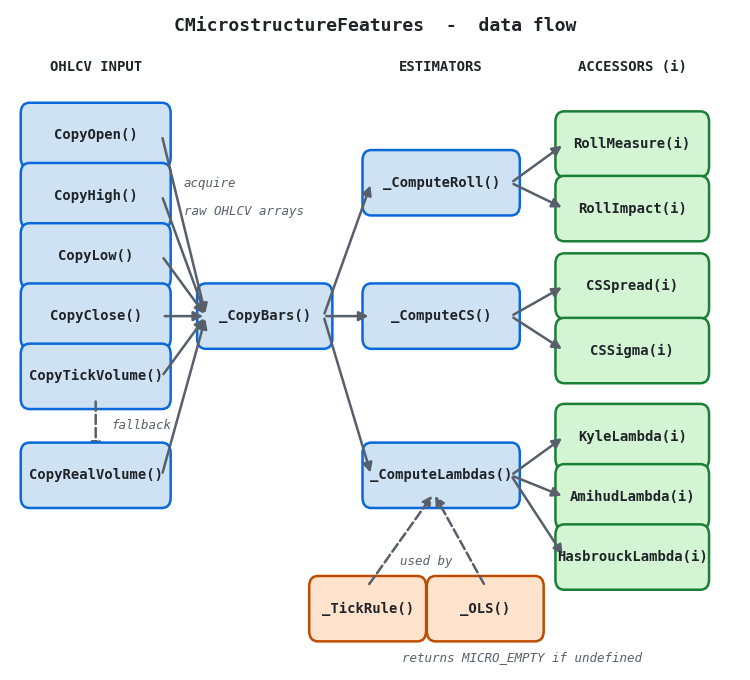
Figure 1. A four-panel data-flow illustration of CMicrostructureFeatures
- Fan-in (blue → teal): All five MT5 history functions — CopyOpen, CopyHigh, CopyLow, CopyClose, and CopyTickVolume — converge on _CopyBars(), which fills the raw OHLCV arrays. If CopyTickVolume fails, CopyRealVolume is tried as a fallback.
- Fan-out (teal → teal): _CopyBars() produces three shared arrays — close, high/low, and volume — which all three estimator methods read in parallel. The arrows are independent; no estimator calls another.
- Estimator-to-accessor mapping (teal → green): each estimator writes exclusively to its own output slots. _ComputeRoll() writes RollMeasure and RollImpact; _ComputeCS() writes CSSpread and CSSigma; _ComputeLambdas() writes KyleLambda, AmihudLambda, and HasbrouckLambda. The accessor ordering in the class mirrors these three groups.
- Helpers (purple, dashed): _TickRule() and _OLS() are private methods called only by _ComputeLambdas(). The dashed "used by" arrow distinguishes them from the main data path: they do not receive data from _CopyBars() directly; they receive it via the arrays _ComputeLambdas() builds internally.
Instantiate the class with a symbol, timeframe, and rolling window size. Call Calculate(start_bar, n_bars) once per new bar. All computation happens inside Calculate(); the accessor methods are read-only.
#include <Features\CMicrostructureFeatures.mqh>

//--- In OnInit():
CMicrostructureFeatures *g_micro = new CMicrostructureFeatures(_Symbol, _Period, 20);

//--- In OnCalculate() or new-bar handler:
if(g_micro.Calculate(1, 100))
  {
   double roll   = g_micro.RollMeasure(0);
   double cs     = g_micro.CSSpread(0);
   double cs_sig = g_micro.CSSigma(0);
   double kyle   = g_micro.KyleLambda(0);
   double amihud = g_micro.AmihudLambda(0);
   double hbck   = g_micro.HasbrouckLambda(0);
   //--- features are valid if > MICRO_EMPTY + 1.0
  }
Files placed there can be included with angle brackets from any EA, indicator, or script in the same MetaEditor installation. A relative path is not required.
Roll Spread and Roll Impact
The Roll (1984) model derives the effective bid-ask spread from the serial covariance of consecutive price changes. Within _ComputeRoll(), the covariance is accumulated in a single pass using five running sums (Σd, Σdlag, Σd², Σdlag², Σd·dlag), avoiding any temporary array allocation:
//+------------------------------------------------------------------+
//| _ComputeRoll: Roll spread and dollar-normalised roll impact      |
//| Cov(dp_t, dp_{t-1}) accumulated in a single pass via three       |
//| running sums; no temporary arrays are allocated.                 |
//+------------------------------------------------------------------+
void CMicrostructureFeatures::_ComputeRoll()
  {
   int W = m_window;

   //--- outer loop: bar i is the right edge of a W-bar window of price diffs
   for(int i = 0; i <= m_n - W - 1; i++)
     {
      double sum_d   = 0.0;
      double sum_dl  = 0.0;
      double sum_dld = 0.0;
      int    cnt     = 0;

      for(int k = 0; k < W - 1; k++)
        {
         double d  = m_close[i+k]   - m_close[i+k+1];
         double dl = m_close[i+k+1] - m_close[i+k+2];
         sum_d   += d;
         sum_dl  += dl;
         sum_dld += d * dl;
         cnt++;
        }

      if(cnt < 3) continue;
      double cov = (sum_dld - sum_d * sum_dl / cnt) / (cnt - 1);
      m_roll[i] = (-cov > 0.0) ? 2.0 * MathSqrt(-cov) : MICRO_EMPTY;
     }
  }
In time-series order (index 0 = most recent), close[i] - close[i+1] is the price change at bar i (newer minus older). The convention is the opposite of Python's np.diff(close), which differences in chronological order. Maintaining this distinction prevents a sign inversion that would silently negate all covariance-based estimates.
RollImpact() normalizes the spread by the contemporaneous dollar volume, close[i] × tick_volume[i], producing a dimensionless measure of spread per unit of liquidity. When tick volume is zero or close is zero, RollImpact returns MICRO_EMPTY without a division-by-zero fault.
Corwin-Schultz Spread and Intraday Volatility
The Corwin-Schultz (2012) estimator works on adjacent high-low pairs, requiring no volume or tick data. It is the cleanest estimator in the suite for MT5 use because every data element it needs — high and low for each bar — is available identically across all brokers.
The derivation separates the observed two-period range into a variance component and a spread component. The mathematics follow the same four-step formula described in Part 5; the MQL5 implementation follows each step in the same order to make auditing against the Python reference straightforward:
//+------------------------------------------------------------------+
//| _ComputeCS: Corwin-Schultz spread and Parkinson-Beckers sigma    |
//| denom = 3 - 2√2 ≈ 0.1716  (from the C-S spread derivation)       |
//| k1    = 4 ln 2            (Parkinson volatility normalization)   |
//| Both constants are pre-computed once before the loop.            |
//+------------------------------------------------------------------+
void CMicrostructureFeatures::_ComputeCS()
  {
   const double denom = 3.0 - 2.0 * MathSqrt(2.0);   // 3 - 2√2 ≈ 0.1716
   const double k1    = 4.0 * MathLog(2.0);          // Parkinson normalization

   for(int i = 0; i < m_n - 1; i++)
     {
      double hi0 = m_high[i],   lo0 = m_low[i];
      double hi1 = m_high[i+1], lo1 = m_low[i+1];
      if(lo0 <= 0.0 || lo1 <= 0.0 || hi0 <= 0.0 || hi1 <= 0.0) continue;

      double beta  = MathPow(MathLog(hi0/lo0), 2) + MathPow(MathLog(hi1/lo1), 2);
      double h2    = MathMax(hi0, hi1);
      double l2    = MathMin(lo0, lo1);
      double gamma = MathPow(MathLog(h2/l2), 2);
      double alpha = (MathSqrt(2*beta) - MathSqrt(beta)) / denom
                  - MathSqrt(gamma / denom);

      if(alpha < 0.0) { m_cs_spread[i] = MICRO_EMPTY; }
      else
        {
         double ea      = MathExp(alpha);
         m_cs_spread[i] = 2.0 * (ea - 1.0) / (1.0 + ea);
        }
      m_cs_sigma[i] = MathSqrt(beta / (2.0 * k1));   // Parkinson-Beckers σ
     }
  }
As in the Python version, negative alpha values are set to MICRO_EMPTY. This occurs more frequently on sub-daily FX data where the high-low range is dominated by tick noise. The CSSigma() accessor returns the Parkinson-Beckers intraday volatility estimate, which is the bid-ask-adjusted intraday volatility that the Corwin-Schultz model separates from the spread. It is available as a standalone feature independent of whether the spread alpha is positive.
Kyle's Lambda
Kyle's Lambda is the OLS slope from regressing price changes on signed volume. In MQL5, signed volume is the product of the bar-close tick rule and the tick volume count. Both elements are approximations of their Python counterparts, as discussed in Section 2, but the regression slope still captures the ordinal relationship between order-flow imbalance and price impact.
The OLS computation is handled by the private _OLS() method, which operates on pre-built x and y arrays over a specified slice [start, start+len). All five running sums are accumulated in a single pass; no temporary matrix is allocated. The method returns false if the denominator is below the tolerance 1e-20, in which case the caller leaves m_kyle[i] at MICRO_EMPTY:
//--- signed-volume array is built once, then sliced by the rolling window
double b     = _TickRule(i);
double vol_i = (double)m_volume[i];
x_kyle[i]    = b * vol_i;
dp[i]        = m_close[i] - m_close[i+1];   // price change (newer − older)
y[i]         = dp[i];

//--- rolling OLS for Kyle's Lambda
double beta_k = 0.0, t_k = 0.0;
if(_OLS(x_kyle, y, i, W, beta_k, t_k))
   m_kyle[i] = beta_k;
The t-statistic is computed alongside the coefficient by _OLS() but is not currently stored in a separate array. If you need the t-statistics for an ML feature matrix, expose them by adding double m_kyle_t[] to the class and filling it in _ComputeLambdas(). The Python implementation stores both by default; the MQL5 version omits them to avoid doubling the memory footprint in EA deployments where only the coefficient is needed.
Amihud's ILLIQ
Amihud's ILLIQ does not require a direction classifier. It divides the absolute log return by dollar volume and averages over the window:
//--- Amihud: rolling mean of |dp| / (close * tick_volume)
x_amihud[i] = (dv > 0.0) ? MathAbs(dp[i]) / dv : MICRO_EMPTY;

//--- accumulate valid observations in the window
double sum_a = 0.0;
int    cnt_a = 0;
for(int k = i; k < i + W; k++)
  {
   if(x_amihud[k] > MICRO_EMPTY + 1.0)
     { sum_a += x_amihud[k]; cnt_a++; }
  }
if(cnt_a > 0) m_amihud[i] = sum_a / (double)cnt_a;
The guard x_amihud[k] > MICRO_EMPTY + 1.0 excludes bars where tick volume was zero or close was missing. This is more robust than checking for zero or NaN separately, because MICRO_EMPTY = −1e38 is far below any physically meaningful ILLIQ value, so the guard is never triggered by a genuine low-ILLIQ observation.
Hasbrouck's Lambda
Hasbrouck's Lambda substitutes the signed square-root of dollar volume for the linear signed volume used by Kyle. This compresses outliers and produces a better fit to the theoretical price-impact curve from inventory models:
//--- Hasbrouck: signed square-root of dollar volume
//      b is the bar-close tick rule direction already computed above;
//      MathAbs(dv) guards against a negative sentinel in dv.
x_hbck[i] = b * MathSqrt(MathAbs(dv));

double beta_h = 0.0, t_h = 0.0;
if(_OLS(x_hbck, y, i, W, beta_h, t_h))
   m_hasbrouck[i] = beta_h;
The MathAbs(dv) wrapper prevents a domain error from MathSqrt in the event that dv was set to a negative sentinel value. In practice dv = close × tick_volume is always non-negative; the guard is a safety measure for future code changes.
The Tick Rule in Bar Time
The distinction between the tick rule applied to individual ticks and the bar-close tick rule is the most consequential approximation in the MQL5 implementation. The figure below shows what the bar-close rule produces on a synthetic trending series alongside the signed volume it generates as the Kyle regressor.
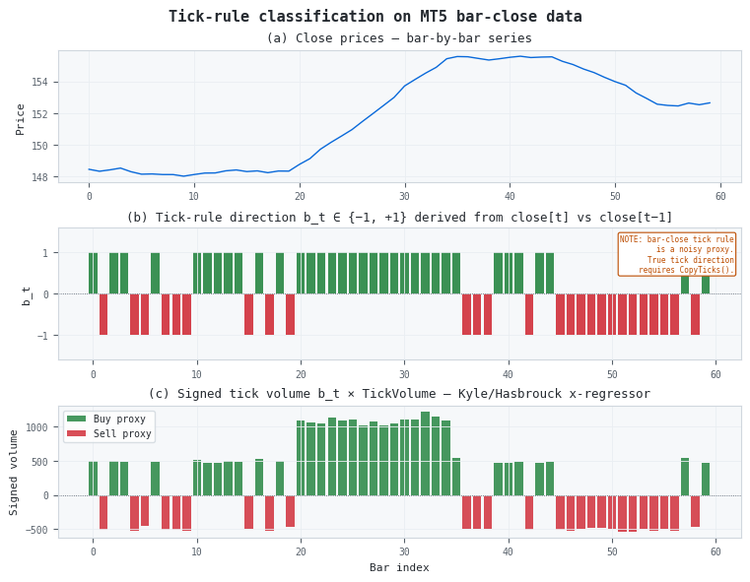
Figure 2. A three-panel illustration of bar-close tick rule behavior on synthetic data
- Panel (a): The synthetic close price series with an injected uptrend in bars 20–35.
- Panel (b): Bar-close tick rule direction bt ∈ {−1, +1}. The direction is predominantly +1 during the trend but includes reversals on individual bars. The annotation notes the core limitation: the bar-close rule is a noisy proxy. True per-tick direction from CopyTicks() would integrate all trades within the bar rather than using only the last trade price.
- Panel (c): Signed tick volume bt × TickVolume, the x-regressor for Kyle's and Hasbrouck's Lambda. Higher bars during the trend reflect the volume-spike that was injected into the synthetic generator, producing the buy-side dominance that the lambda estimators are designed to detect.
The bar-close tick rule is biased. It assigns direction based only on the last trade in the bar and ignores intermediate trades. A bar that opened at a mid-price, traded up throughout the session, but closed slightly below the prior close would be classified as a sell (-1) despite the majority of trades being buys. On short intraday bars this bias is small; on daily bars it can be large. The Roll spread and Corwin-Schultz estimates are not affected by this bias at all, which is another reason to prioritize them for daily bar pipelines.
EA Integration
The canonical integration pattern places a single CMicrostructureFeatures object in global scope, initialized in OnInit() and called once per new bar. The computed features are then passed to whichever downstream component needs them — a feature vector for an ONNX model, a signal filter, or a position-sizing multiplier:
#include <Features\CMicrostructureFeatures.mqh>

input int                inp_window    = 20;
input int                inp_lookback  = 100;

CMicrostructureFeatures *g_micro = NULL;
int g_last_bar = -1;

//+------------------------------------------------------------------+
//| OnInit                                                           |
//+------------------------------------------------------------------+
int OnInit()
  {
   g_micro = new CMicrostructureFeatures(_Symbol, _Period, inp_window);
   return(INIT_SUCCEEDED);
  }

//+------------------------------------------------------------------+
//| OnDeinit                                                         |
//+------------------------------------------------------------------+
void OnDeinit(const int reason)
  {
   if(g_micro != NULL) { delete g_micro; g_micro = NULL; }
  }

//+------------------------------------------------------------------+
//| OnTick                                                           |
//+------------------------------------------------------------------+
void OnTick()
  {
   //--- New-bar guard ---
   datetime bar_time = iTime(_Symbol, _Period, 0);
   if(bar_time == g_last_bar) return;
   g_last_bar = bar_time;

   if(!g_micro.Calculate(1, inp_lookback)) return;

   double roll   = g_micro.RollMeasure(0);
   double cs     = g_micro.CSSpread(0);
   double kyle   = g_micro.KyleLambda(0);
   double amihud = g_micro.AmihudLambda(0);
   double hbck   = g_micro.HasbrouckLambda(0);

   //--- Feature validity check — MICRO_EMPTY if window not yet filled
   if(roll  <= MICRO_EMPTY + 1.0) return;
   if(kyle  <= MICRO_EMPTY + 1.0) return;

   //--- Use features for signal logic...
  }
The new-bar guard compares iTime(_Symbol, _Period, 0) against the last processed bar time. This is cheaper than maintaining a separate bar-counter variable and works correctly when bars are added irregularly. Calculate() always starts from bar offset 1 (the most recent completed bar, not the bar currently forming) to avoid look-ahead bias.
Visualizing the Features: The Microstructure Viewer
Numerical accessors are sufficient inside an EA, but during research it helps to see how the features evolve against price. MicrostructureViewer.mq5 is a separate-window indicator that wraps the same CMicrostructureFeatures class and plots all seven features as individual lines. A companion control panel, CMicroPanel.mqh, lets you toggle each series on or off, switch between raw and normalized scales, and read the latest raw value of every feature at a glance. Because the indicator reuses the exact class the EA links against, the curves you study on the chart are the same numbers your strategy consumes — there is no second, divergent implementation to keep in sync.
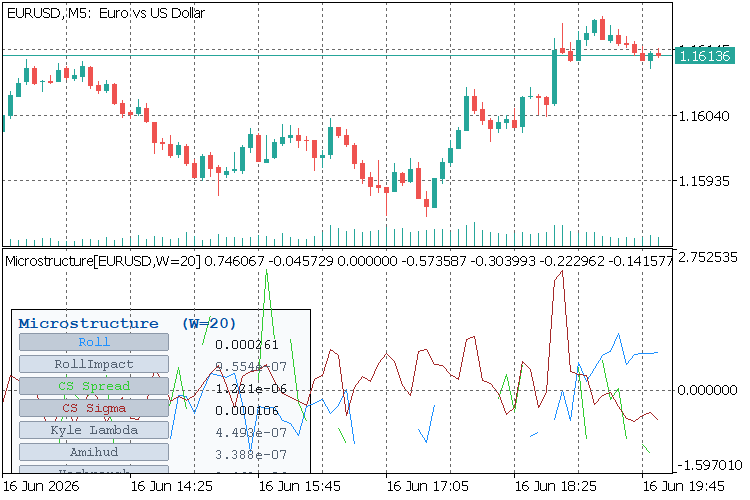
Figure 4. The MicrostructureViewer subwindow with the CMicroPanel control panel (dark theme)
Two problems shaped the indicator's design:
- Scale heterogeneity. The seven features span many orders of magnitude — a Corwin-Schultz spread sits around 10-3 in price-fraction units, Kyle's Lambda is a regression slope that can be vanishingly small, and the Roll measure is expressed in raw price units. Overlaying them on a single axis in raw form is unreadable. The panel exposes a Normalize (z-score) toggle that standardizes each visible series independently, so their shapes can be compared on a common axis while the panel still reports each feature's raw latest value.
- Index convention. The feature class works in time-series order (offset 0 = newest bar), but MQL5 indicator buffers are chronological (index 0 = oldest). The viewer maps one to the other with bufidx = rates_total − 1 − offset, so the newest computed value always lands in the rightmost slot, aligned with the live price bar above it.
The indicator declares seven DRAW_LINE buffers, one per feature, computed only when a new bar arrives or the user forces a recompute. The work is split into a heavy step (recompute the kernels) and a cheap step (remap the cached raw values into buffers), so toggling normalization or visibility never re-runs the estimators:
#property indicator_separate_window
#property indicator_buffers 7
#property indicator_plots   7

input int              InpWindow     = 20;          // Rolling window
input int              InpMaxBars    = 1500;        // Max bars to compute (newest)
input bool             InpNormalize  = true;        // Start with z-score normalize
input ENUM_PANEL_THEME InpPanelTheme = PANEL_DARK;  // Panel color theme

//--- Heavy step: recompute every feature over the newest window
int n = MathMin(rates_total, InpMaxBars);
if(n < InpWindow + 2)             return(false);
if(!g_feat.Calculate(0, n))     return(false);   // offset 0 = newest bar

for(int f = 0; f < MICRO_NFEAT; f++)
   for(int o = 0; o < n; o++)
      g_raw[o][f] = FeatureAt(f, o);             // cache raw values for cheap remaps
The cheap step computes a per-feature mean and standard deviation over the valid (non-sentinel) observations in a single pass, then writes either the raw value or its z-score into the buffer. The same code path serves both modes, switched only by the g_normalize flag:
//--- Cheap step: map raw -> buffers, optional per-feature z-score
double mean = sum / cnt;
double var  = (sum2 - sum * sum / cnt) / (cnt - 1);
double sd   = (var > 0.0) ? MathSqrt(var) : 0.0;

for(int o = 0; o < n; o++)
  {
   double v = g_raw[o][f];
   if(!IsValidMicro(v)) continue;
   int bufidx = rates_total - 1 - o;             // newest -> rightmost slot
   double out = (g_normalize && sd > 0.0) ? (v - mean) / sd : v;
   SetBuf(f, bufidx, out);
  }
The control panel owns no logic. It draws one toggle button per feature — colored to match that feature's plot — with the latest raw value right-aligned beside it, plus a Normalize toggle and a Recompute button. The host indicator reads the button names back in OnChartEvent(), flips its own state, and redraws. Toggling a feature simply flips that plot's draw type; toggling normalization triggers only the cheap remap above:
//--- feature visibility toggle: flip the plot's draw type, no recompute
if(sparam == g_panel.FeatureBtnName(f))
  {
   g_vis[f] = !g_vis[f];
   PlotIndexSetInteger(f, PLOT_DRAW_TYPE, g_vis[f] ? DRAW_LINE : DRAW_NONE);
   RefreshPanel();
   ChartRedraw();
  }

//--- normalize toggle: cheap remap of cached raw values, no recompute
if(sparam == g_panel.NormalizeBtnName())
  {
   g_normalize = !g_normalize;
   FillBuffers(g_last_rt);
   RefreshPanel();
   ChartRedraw();
  }
Because the panel always shows the raw magnitude — a Corwin-Schultz spread reads as, say, 0.000850 — you retain the cardinal interpretation of each feature even while the plotted lines are standardized for shape comparison. The viewer computes on the host chart's symbol and timeframe, so dropping it onto EURUSD H1 gives exactly the features an EA on the same chart would consume. Place CMicroPanel.mqh in MQL5\Include\Microstructure\ and compile MicrostructureViewer.mq5 from MQL5\Indicators\; the indicator then appears in the Navigator under Indicators.
Validation
The companion MicrostructureValidation.mq5 script runs four property checks against the live symbol and period. All four correspond to mathematical invariants that must hold regardless of the data:
| Check | Property | Rationale |
|---|---|---|
| 1 | f.Count() == n_bars | Output arrays must be sized to the requested length. |
| 2 | Roll ≥ 0 where defined | Roll = 2√(max(−Cov, 0)); the max operator guarantees non-negativity. |
| 3 | CS spread ∈ (0, 0.05] where defined | A spread above 5% would be economically implausible for any liquid instrument and indicates a data error. |
| 4 | Amihud ≥ 0 where defined | ILLIQ = |return| / dollar-volume; both numerator and denominator are non-negative. |
Run the script from MetaEditor's Script panel on any OHLCV-complete symbol (e.g., EURUSD H1 with at least 120 bars of history). The Experts log should show four PASS lines followed by sample values for bar 0. If Check 3 fails, verify that the symbol's price history is complete and that high ≥ close ≥ low holds for all bars in the window.
Python–MQL5 Numerical Agreement
The figure below demonstrates that the MQL5 implementation reproduces the Python output to machine precision on synthetic data. Both implementations use double-precision arithmetic throughout; any discrepancy would indicate a formula difference, not a floating-point rounding issue.
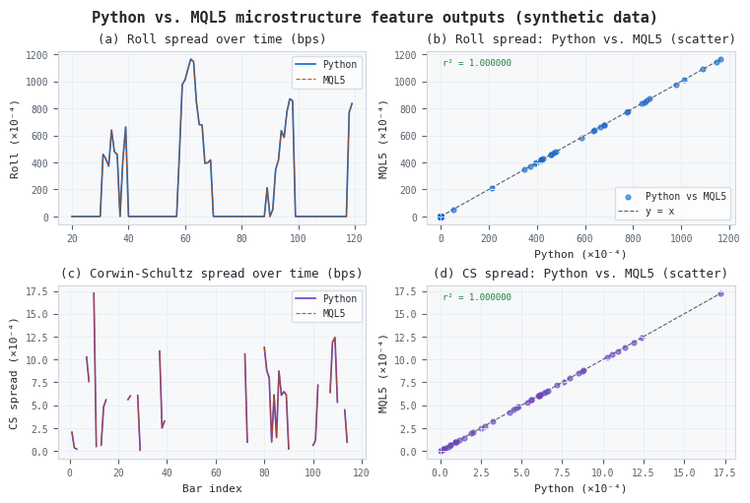
Figure 5. A four-panel illustration of Python vs. MQL5 numerical agreement on 120 synthetic bars
- Panels (a) and (c): Roll spread and Corwin-Schultz spread over time. The Python (solid) and MQL5 (dashed) lines are visually identical. The volatile CS spread in panel (c) reflects the single-bar estimation — each value uses only two adjacent high-low pairs.
- Panels (b) and (d): Scatter plots of Python vs. MQL5 output. Both show r² = 1.000000, confirming that the two implementations agree to floating-point precision. Any genuine algorithmic difference would produce points off the y = x diagonal.
For production use, run both implementations on the same historical OHLCV data exported from MT5 and verify that the scatter-plot R² is 1.000000. If it is not, the most likely cause is an index convention difference: the Python implementation uses chronological order (oldest first) while the MQL5 implementation uses time-series order (newest first, index 0). A sign error in the price-change computation would halve the Roll covariance and produce a systematic offset visible in panel (b).
Conclusion
This article ported the bar-level microstructure feature layer from Part 5 to MQL5 as a single include file, CMicrostructureFeatures.mqh, placed in MQL5\Include\Features\. The class provides seven features per bar — Roll spread, Roll impact, Corwin-Schultz spread, Corwin-Schultz sigma, Kyle's Lambda, Amihud's ILLIQ, and Hasbrouck's Lambda — from OHLCV data alone, without any Python dependency. A companion separate-window indicator, MicrostructureViewer.mq5 with its CMicroPanel control panel, plots the same seven features live and lets you toggle, normalize, and read them directly on the chart.
The central constraint documented here is MT5's tick volume API. CopyTickVolume() returns price-change counts, not true trade counts. For the spread estimators (Roll and Corwin-Schultz) this does not matter; they use only close, high, and low. For the lambda estimators, the tick volume and bar-close tick rule are approximations that support ordinal regime detection but not cardinal price-impact estimation. The Python tick-level layer, which uses a true tick feed to compute per-bar lambdas with t-statistics, remains the higher-fidelity path when tick data is available.
The next article in this series will cover entropy features from AFML Chapter 18 in Python, implementing the Shannon, Lempel-Ziv, plug-in, and Kontoyiannis estimators from afml.features.entropy.
Attached Files
| File | Location | Description | |
|---|---|---|---|
| 1. | CMicrostructureFeatures.mqh | MQL5\Include\Features\ | Bar‑level microstructure feature class. Provides Roll spread/impact, Corwin‑Schultz spread/sigma, Kyle’s Lambda, Amihud’s ILLIQ, and Hasbrouck’s Lambda from OHLCV data only. |
| 2. | MicrostructureValidation.mq5 | MQL5\Scripts\ | Validation script. Runs four mathematical invariant checks (array length, Roll non‑negativity, CS spread range, Amihud non‑negativity) on the live symbol and period. |
| 3. | MicrostructureViewer.mq5 | MQL5\Indicators\ | Separate‑window viewer indicator. Plots all seven microstructure features as toggleable lines with an optional per‑feature z‑score normalization, computed from the host chart's symbol and timeframe. |
| 4. | CMicroPanel.mqh | MQL5\Include\Microstructure\ | Control/readout panel for the viewer. Renders per‑feature toggle buttons, the latest raw value of each feature, and Normalize / Recompute controls in light or dark theme. |
References
- López de Prado, M. (2018). Advances in Financial Machine Learning. Wiley. Chapter 19.
- Roll, R. (1984). A Simple Implicit Measure of the Effective Bid-Ask Spread in an Efficient Market. Journal of Finance, 39(4), 1127–1139.
- Corwin, S. A., & Schultz, P. (2012). A Simple Way to Estimate Bid-Ask Spreads from Daily High and Low Prices. Journal of Finance, 67(2), 719–760.
- Parkinson, M. (1980). The Extreme Value Method for Estimating the Variance of the Rate of Return. Journal of Business, 53, 61–65.
- Kyle, A. S. (1985). Continuous Auctions and Insider Trading. Econometrica, 53(6), 1315–1335.
- Amihud, Y. (2002). Illiquidity and stock returns: Cross-section and time-series effects. Journal of Financial Markets, 5(1), 31–56.
- Hasbrouck, J. (2009). Trading Costs and Returns for U.S. equities: Estimating Effective Costs from Daily data. Journal of Finance, 64(3), 1445–1477.
- Hasbrouck, J. (2007). Empirical Market Microstructure. Oxford University Press.
- O'Hara, M. (1995). Market Microstructure Theory. Blackwell.
Warning: All rights to these materials are reserved by MetaQuotes Ltd. Copying or reprinting of these materials in whole or in part is prohibited.
This article was written by a user of the site and reflects their personal views. MetaQuotes Ltd is not responsible for the accuracy of the information presented, nor for any consequences resulting from the use of the solutions, strategies or recommendations described.

 Overcoming Accessibility Problems in MQL5 Trading Tools (Part V): Gesture-Based Trading With Computer Vision
 Neural Networks in Trading: LSTM Optimization for Multivariate Time Series Forecasting (DA-CG-LSTM)
 From Static MA to Adaptive Filtering (Part 2): Implementing the SAMA_NLMS Indicator in MQL5
 Price Action Analysis Toolkit Development (Part 72): Building a Gap Fill Indicator in MQL5

- Free trading apps
- Over 8,000 signals for copying
- Economic news for exploring financial markets
You agree to website policy and terms of use