

Recurrence Quantification Analysis (RQA) in MQL5: Building a Complete Analysis Library
 3 078
3 078
 0
0

Table of Contents
- Introduction
- RQA on a Chart
- Recurrence: The Core Idea
- The Metrics
- Choosing Epsilon
- Library Architecture
- CRQAMatrix: Embedding and the Recurrence Matrix
- CRQAMetrics: Quantifying Structure
- CRQAEpsilon: Automatic Threshold Selection
- CRQAWindow: Rolling Analysis
- CRQA: The Facade
- The RQA Indicator
- What's Next
- Conclusion
Introduction
Many indicators available in MetaTrader 5 are linear, but they cannot easily test hypotheses from nonlinear dynamics such as "does the market revisit previously seen states, and with what patterns?" Recurrence Quantification Analysis (RQA) provides concrete numerical metrics—DET, LAM, ENTR, TREND, and others—that quantify determinism, laminarity, complexity and non-stationarity in a time series. However, until now there has been no ready‑made, modular RQA toolkit for MQL5 that you can drop into an MetaTrader 5 project, configure (embedding, norm, epsilon), and run either as a single computation or as a rolling analysis that emits a time series of metrics and plots them on the chart.
This article fills that gap. It delivers a practical MQL5 implementation designed for use on any symbol and timeframe: a modular library with a clear API, automatic epsilon selection (including an RR‑target bisection), a rolling‑window engine, an example script, and an indicator that plots live RQA metrics. The goal is engineering productivity: instead of reimplementing RQA from scratch, you get a tested computational layer you can immediately incorporate into experiments and later into trading logic.
RQA on a Chart
Before we dig into the theory or the code, let us start with the result. The image below shows the RQA indicator running on a live chart in MetaTrader 5. It plots five metrics in a separate window beneath the price chart: Recurrence Rate (RR), Determinism (DET), Laminarity (LAM), Shannon Entropy (ENTR), and Trend.

Fig. 1 — RQA indicator on EURUSD H1
Each of those lines is computed from a rolling window of price data. At every bar, the library takes a slice of recent closes, constructs a recurrence matrix, counts the patterns inside it, and outputs the metrics. What you see on the chart is the evolution of those metrics over time. Spikes, drops, and sustained levels all carry meaning. But we will not interpret them in this article. For now, the point is this: the library we are about to build produces this output. The rest of the article explains how.
Recurrence: The Core Idea
RQA begins with a concept from dynamical systems theory called phase space reconstruction. The idea, formalized by Takens (1981), is that you can reconstruct the essential dynamics of a system from a single observed variable, as long as you embed it with the right parameters. For a price time series, this means taking the sequence of close prices and converting it into a set of higher-dimensional vectors.
Time-Delay Embedding
Given a time series x(1), x(2), ..., x(N), we construct embedded vectors by combining each value with its delayed copies. For an embedding dimension m and a time delay tau, each embedded vector looks like this:
v(i) = [ x(i), x(i + tau), x(i + 2*tau), ..., x(i + (m-1)*tau) ]
When m = 1 and tau = 1, there is no embedding at all. Each "vector" is just a single price value. When m = 2 and tau = 1, each vector is a pair of consecutive prices: [x(i), x(i+1)]. This pair can be plotted as a point in two-dimensional space. Do this for all valid indices and you get a trajectory through phase space. The shape of that trajectory reveals structure that the raw time series alone does not show.
The number of valid embedded vectors is N - (m - 1) * tau. As the embedding dimension or delay increases, fewer vectors can be formed from the same data. This is an important practical constraint when working with short windows.
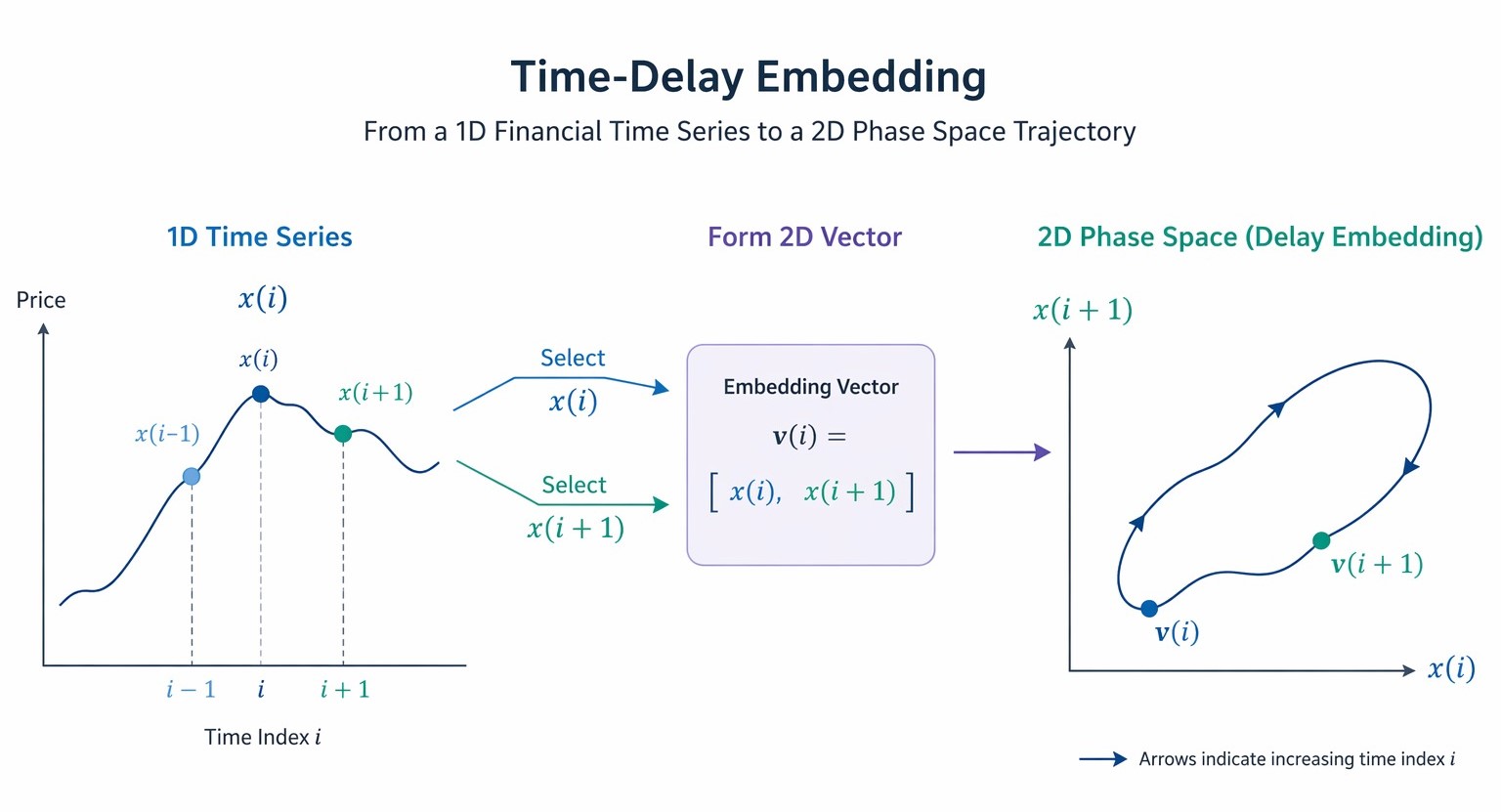
Fig. 2 — Time-delay embedding pipeline
The Distance Matrix
Once we have our embedded vectors, we need a way to measure similarity between them. We compute the distance between every pair of vectors v(i) and v(j). This gives us an N x N distance matrix. The library supports three distance norms:
- Euclidean norm: the standard straight-line distance. This is the default.
- Maximum norm (Chebyshev): takes the largest absolute difference across all dimensions. Often used in RQA literature because it defines hypercube neighborhoods.
- Manhattan norm (L1): the sum of absolute differences. Computationally cheaper than Euclidean since it avoids the square root.
Thresholding: The Recurrence Matrix
The final step is to apply a threshold. Given a distance epsilon, we define two states as recurrent if their distance is less than or equal to epsilon. This turns the distance matrix into a binary matrix: 1 where states recur, 0 where they do not. This binary matrix is the recurrence matrix, and it is the foundation of everything that follows.
R(i, j) = 1 if distance(v(i), v(j)) ≤ epsilon, else 0
The recurrence matrix is symmetric (if i recurs with j, then j recurs with i) and has ones along the main diagonal (every state is identical to itself). When you visualize this matrix as an image, with black dots for 1s and white for 0s, you get a recurrence plot. The patterns visible in that plot are what RQA quantifies.
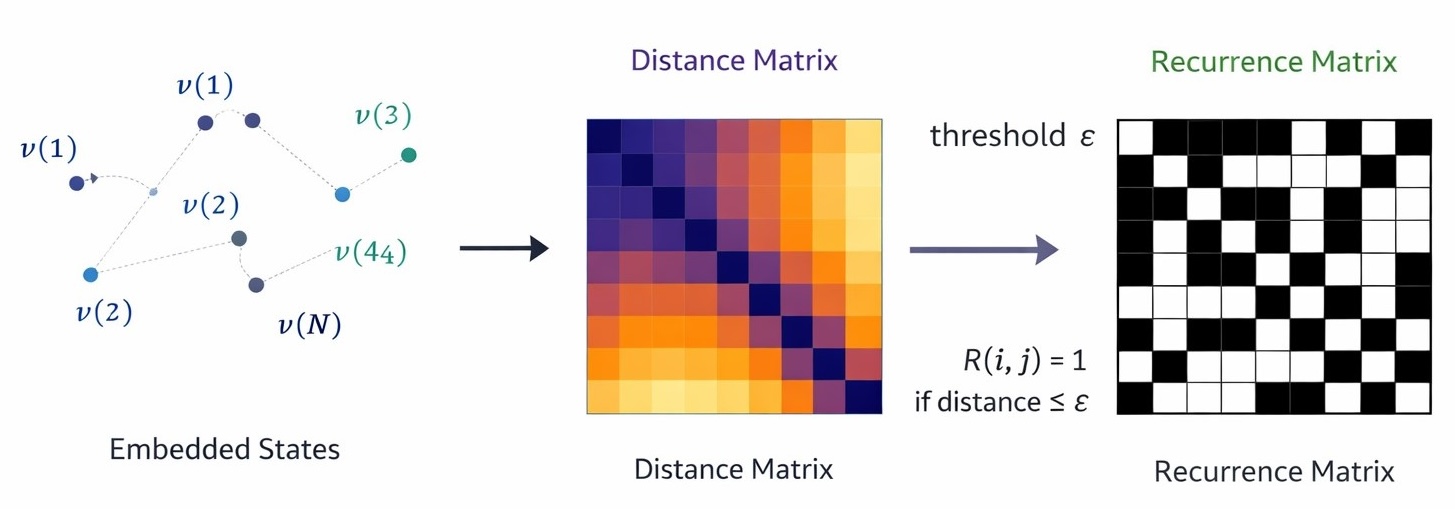
Fig. 3 — Recurrence plot example
Diagonal lines in the recurrence plot mean that two segments of the time series evolved similarly for several consecutive steps. This indicates deterministic behavior. Vertical (or horizontal) lines mean that the system stayed near the same state for multiple time steps. This indicates laminar or trapped behavior. Isolated single dots suggest randomness or noise. The density of the entire plot reflects how often the system revisits any previous state. All of these visual features are what the RQA metrics capture numerically.
The Metrics
RQA extracts twelve metrics from the recurrence matrix. Each one captures a different aspect of the system's dynamics. Rather than walk through each metric in separate paragraphs, the table below provides a compact reference. We expand on the most important ones afterward.
| Metric | Symbol | Formula | What It Measures |
|---|---|---|---|
| Recurrence Rate | RR | (recurrent points) / (N^2 - N) | How often the system revisits previous states. Higher RR means more self-similarity in the data. |
| Determinism | DET | (points on diagonal lines >= lmin) / (all recurrent points) | Fraction of recurrences that form diagonal lines. High DET means predictable, rule-governed dynamics. |
| Laminarity | LAM | (points on vertical lines >= vmin) / (all recurrent points) | Fraction of recurrences that form vertical lines. High LAM means the system gets stuck in states. |
| Trapping Time | TT | Average length of vertical lines | How long the system stays trapped in a state on average. |
| Average Diagonal Line | L | Average length of diagonal lines >= lmin | Average duration of predictable (deterministic) segments. |
| Max Diagonal Line | Lmax | Longest diagonal line (excl. main diagonal) | Longest stretch of deterministic behavior observed. |
| Max Vertical Line | Vmax | Longest vertical line | Longest period the system remained trapped. |
| Shannon Entropy | ENTR | -sum(p(l) * ln(p(l))) | Complexity of the diagonal line distribution. Higher entropy means more varied line lengths. |
| Divergence | DIV | 1 / Lmax | Inverse of the longest diagonal. A proxy for the largest Lyapunov exponent. |
| Ratio | RATIO | DET / RR | Determinism normalized by recurrence rate. Filters out the effect of overall recurrence density. |
| Trend | TREND | Regression slope of diagonal-wise recurrence density | Drift or non-stationarity in the data. Positive trend means recurrence is increasing over time. |
| Complexity | COMPLEXITY | RR * DET | Composite measure. High when data is both highly recurrent and highly deterministic. |
RR (Recurrence Rate) is the most basic metric. It simply counts what fraction of all possible state pairs are recurrent. An RR of 0.05 means 5% of state pairs fall within epsilon of each other. Very high RR often means epsilon is too large (everything looks similar), while very low RR means epsilon is too tight (almost nothing qualifies as recurrent). This is why epsilon selection, covered in the next section, matters so much.
DET (Determinism) is perhaps the most informative single metric. It asks: of all the recurrent points in the matrix, how many of them form diagonal lines of at least length lmin? Diagonal lines appear when two segments of the time series evolve in parallel for several steps. This only happens in deterministic systems where the current state constrains the next state. Random data produces scattered recurrent points but very few diagonal lines, so DET stays low. A trending or mean-reverting market that follows recognizable patterns will show high DET.
LAM (Laminarity) is the vertical counterpart of DET. Vertical lines in the recurrence plot appear when the system stays near the same state for multiple consecutive time steps. In market terms, this corresponds to consolidation, tight ranges, or periods where price barely moves. A spike in LAM often signals that the market has entered a holding pattern.
ENTR (Shannon Entropy) measures the complexity of the diagonal line distribution. If all diagonal lines have the same length, entropy is low. If the lengths are spread across many values, entropy is high. High entropy in RQA terms suggests a system with rich, varied deterministic structure, not simple repetition.
TREND captures non-stationarity. It computes the linear regression slope of recurrence density across the diagonals parallel to the main diagonal. A positive trend means that states closer together in time are more likely to recur with each other than states far apart, which is a sign of structural change or drift in the underlying dynamics.
Choosing Epsilon
Epsilon is the threshold that decides what counts as "close enough" to be recurrent. It is the single most important parameter in any RQA analysis, and getting it wrong will produce misleading results. Too small and the recurrence plot is nearly empty; the metrics have nothing to work with. Too large and the plot is nearly full; everything looks recurrent and all structure is washed out.
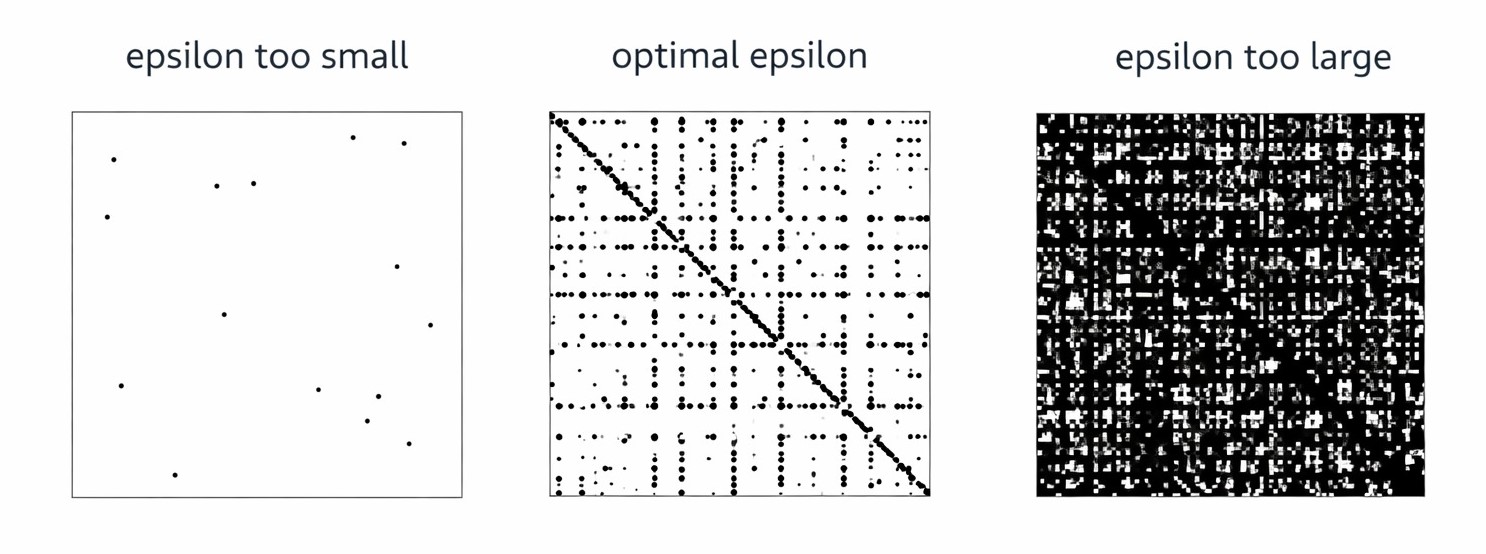
Fig. 4 — Epsilon comparison
There is no universal "correct" value. Epsilon depends on the scale of the data, the embedding parameters, and what you are trying to detect. The library provides four strategies for choosing it:
1. Fixed value (EPSILON_FIXED)
You specify epsilon directly. This is useful when you know the scale of your data and have a domain-informed value in mind. For normalized or standardized data, values between 0.1 and 0.5 are typical starting points.
2. Standard deviation fraction (EPSILON_STD_FRACTION)
Epsilon is set to a fraction of the series standard deviation. For example, with a parameter of 0.1, epsilon becomes 10% of the standard deviation. This scales naturally with volatility. The formula is simply:
epsilon = param * std(series)
3. Range fraction (EPSILON_RANGE_FRACTION)
Epsilon is set to a fraction of the series range (max minus min). With a parameter of 0.05, epsilon is 5% of the total range. This approach is less sensitive to outliers than the standard deviation method but can be distorted by a single extreme value.
epsilon = param * (max(series) - min(series))
4. Target recurrence rate (EPSILON_RR_TARGET)
This is the most principled approach. You specify a target RR (typically 0.01 to 0.10), and the library uses bisection search to find the epsilon that produces approximately that recurrence rate. The implementation does not build the full recurrence matrix for each trial. Instead, it uses a subsampled approximation: it evaluates distances on a grid of sampled point pairs, counts the recurrence fraction, and adjusts epsilon accordingly. After 40 bisection iterations, the epsilon converges to a value that yields very close to the target RR.
The RR-target method is the default in the library. A target RR of 0.05 (5%) is a common recommendation in the RQA literature and works well as a starting point for financial data.
Library Architecture
The library is organized into four header files and one facade class, each with a single clear responsibility. The design follows a bottom-up dependency chain: each layer builds on the one below it, and the top-level facade combines them all into a single interface.
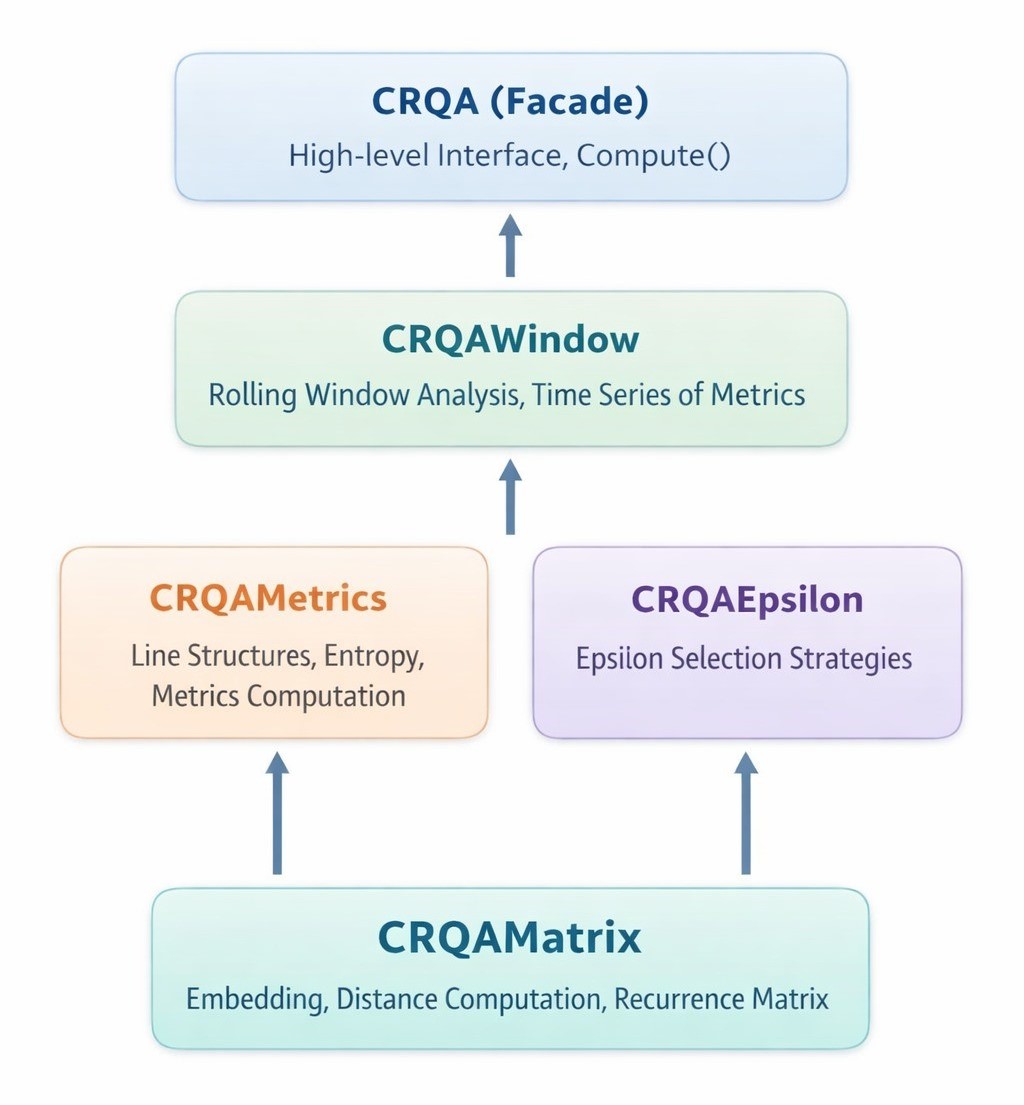
Fig. 5 — RQA library architecture
| File | Class | Responsibility |
|---|---|---|
| RQAMatrix.mqh | CRQAMatrix | Time-delay embedding, distance computation, and construction of the N x N binary recurrence matrix. |
| RQAMetrics.mqh | CRQAMetrics | Diagonal and vertical line counting, Shannon entropy, trend computation. Fills the SRQAResult struct with all twelve metrics. |
| RQAEpsilon.mqh | CRQAEpsilon | Automatic epsilon selection via four strategies: fixed, std-fraction, range-fraction, and RR-target bisection. |
| RQAWindow.mqh | CRQAWindow | Applies RQA over a rolling window, producing a time series of SRQAResult structs. Includes static extractors for individual metrics. |
| RQA.mqh | CRQA | High-level facade. Configures and chains CRQAEpsilon, CRQAMatrix, and CRQAMetrics into a single Compute() call. |
Two structs support the classes:
- SRQAResult holds all twelve metric values plus a Reset() method. This is what CRQAMetrics fills and what you read after computation.
- SRQAWindowResult pairs an SRQAResult with a bar index, identifying which window the metrics belong to.
And two enums define configuration options:
- ENUM_RQA_NORM selects the distance norm: Euclidean, Maximum (Chebyshev), or Manhattan.
- ENUM_EPSILON_METHOD selects the epsilon strategy: Fixed, RR Target, Std Fraction, or Range Fraction.
To use the library, you only need one include:
#include <RQA\RQA.mqh> This pulls in all four header files and exposes every class, struct, and enum. The sections that follow walk through each module in detail.
CRQAMatrix: Embedding and the Recurrence Matrix
CRQAMatrix is the foundation of the entire library. It takes a raw price series, embeds it into phase space, computes pairwise distances, and produces the binary recurrence matrix. Everything else in the library operates on the output of this class.
Class Structure
The class stores the embedding parameters, the flattened embedded vectors, and the flattened boolean recurrence matrix. Both are stored as one-dimensional arrays using row-major indexing: element (i, j) maps to index i * N + j.
class CRQAMatrix
  {
private:
   int               m_N;           // number of embedded vectors
   int               m_embDim;      // embedding dimension
   int               m_delay;       // time delay (tau)
   double            m_epsilon;     // threshold
   ENUM_RQA_NORM     m_norm;        // distance norm
   bool              m_R[];         // flattened NxN boolean matrix
   double            m_embedded[];  // flattened embedded vectors [N x embDim]
public:
   bool              Build(const double &series[], int seriesLen,
                           double epsilon,
                           int embDim      = 1,
                           int delay       = 1,
                           ENUM_RQA_NORM norm = RQA_NORM_EUCLIDEAN);
   bool              Get(int i, int j) const;
   int               Size() const;
  };
Time-Delay Embedding
The Embed() method constructs the embedded vectors from the raw series. The number of valid vectors is N = seriesLen - (embDim - 1) * delay. Each vector is stored as a contiguous block of embDim values in the flattened m_embedded array.
void CRQAMatrix::Embed(const double &series[], int seriesLen)
  {
   m_N = seriesLen - (m_embDim - 1) * m_delay;
   if(m_N <= 0)
     {
      m_N = 0;
      return;
     }
   ArrayResize(m_embedded, m_N * m_embDim);
   for(int i = 0; i < m_N; i++)
      for(int d = 0; d < m_embDim; d++)
         m_embedded[i * m_embDim + d] = series[i + d * m_delay];
  }
The indexing pattern series[i + d * m_delay] picks up values spaced tau apart. For embedding dimension 2 and delay 1, vector i contains [series[i], series[i+1]]. For dimension 3 and delay 2, it contains [series[i], series[i+2], series[i+4]]. The delay parameter controls how far apart in time the coordinates of each vector are, which affects how much of the system's dynamics each vector captures.
Distance Computation
The Distance() method computes the distance between two embedded vectors according to the selected norm. All three norms iterate over the embedding dimensions and accumulate the result differently.
double CRQAMatrix::Distance(int i, int j) const
  {
   double dist = 0.0;
   for(int d = 0; d < m_embDim; d++)
     {
      double diff = m_embedded[i * m_embDim + d]
                 - m_embedded[j * m_embDim + d];
      switch(m_norm)
        {
         case RQA_NORM_MAX:
            dist = MathMax(dist, MathAbs(diff));
            break;
         case RQA_NORM_MANHATTAN:
            dist += MathAbs(diff);
            break;
         case RQA_NORM_EUCLIDEAN:
         default:
            dist += diff * diff;
            break;
        }
     }
   if(m_norm == RQA_NORM_EUCLIDEAN)
      dist = MathSqrt(dist);
   return dist;
  }
For the Euclidean norm, the method accumulates squared differences and takes the square root at the end. The Maximum norm keeps a running maximum of absolute differences. The Manhattan norm sums absolute differences directly. The choice of norm affects the shape of the neighborhood around each point: Euclidean defines spheres, Maximum defines cubes, and Manhattan defines diamonds.
Building the Matrix
The Build() method is the main entry point. It validates parameters, runs the embedding, allocates the boolean matrix, and fills it by comparing every pair of embedded vectors against epsilon.
bool CRQAMatrix::Build(const double &series[], int seriesLen,
                      double epsilon,
                      int embDim,
                      int delay,
                      ENUM_RQA_NORM norm)
  {
   if(seriesLen < 2 || epsilon <= 0.0
     || embDim < 1 || delay < 1)
     {
      Print("RQAMatrix::Build - invalid parameters");
      return false;
     }
   m_epsilon = epsilon;
   m_embDim  = embDim;
   m_delay   = delay;
   m_norm    = norm;
   Embed(series, seriesLen);
   if(m_N <= 0)
     {
      Print("RQAMatrix::Build - series too short");
      return false;
     }
   ArrayResize(m_R, m_N * m_N);
   for(int i = 0; i < m_N; i++)
      for(int j = 0; j < m_N; j++)
         m_R[i * m_N + j] = (Distance(i, j) <= m_epsilon);
   return true;
  }
The nested loop runs N^2 iterations, each calling Distance(). For a window of 50 bars with embedding dimension 1, that is 2,500 distance calls. For 100 bars, it is 10,000. For 200 bars, it is 40,000. The cost is quadratic in the number of embedded vectors, which is the primary performance constraint of the library. The matrix is stored as a flat boolean array rather than a two-dimensional structure, both for memory efficiency and because MQL5 handles one-dimensional arrays more predictably.
The Get() method provides bounds-checked access to the matrix:
bool CRQAMatrix::Get(int i, int j) const
  {
   if(i < 0 || i >= m_N || j < 0 || j >= m_N)
      return false;
   return m_R[i * m_N + j];
  }
This is the only way the metrics module accesses the matrix contents, ensuring that out-of-bounds reads return false rather than crashing.
CRQAMetrics: Quantifying Structure
CRQAMetrics takes a built CRQAMatrix and extracts all twelve metrics from it. This is the most computationally dense module in the library. It scans every diagonal and every column of the matrix, counts line structures, computes their distributions, and derives the aggregate statistics.
The SRQAResult Struct
All metrics are stored in a single struct with a Reset() method that zeros everything out. This struct is the data contract between the metrics engine and the rest of the library.
struct SRQAResult
  {
   double   RR;
   double   DET;
   double   LAM;
   double   TT;
   double   L;
   double   Lmax;
   double   Vmax;
   double   ENTR;
   double   DIV;
   double   RATIO;
   double   TREND;
   double   COMPLEXITY;
   void     Reset()
     {
      RR=0; DET=0; LAM=0; TT=0; L=0;
      Lmax=0; Vmax=0; ENTR=0; DIV=0;
      RATIO=0; TREND=0; COMPLEXITY=0;
     }
  };
Counting Diagonal Lines
Diagonal lines in the recurrence plot represent segments where two parts of the time series evolved in parallel. The CountDiagonals() method scans every diagonal of the matrix (excluding the main diagonal), tracks runs of consecutive recurrent points, and records the length of each run that meets the minimum length threshold.
void CRQAMetrics::CountDiagonals(const CRQAMatrix &mat,
                                int &lineLengths[]) const
  {
   int N = mat.Size();
   ArrayResize(lineLengths, N + 1);
   ArrayInitialize(lineLengths, 0);
   for(int diag = -(N - 1); diag <= (N - 1); diag++)
     {
      if(diag == 0) continue;
      int len = 0;
      int iStart = MathMax(0, -diag);
      int iEnd   = MathMin(N - 1, N - 1 - diag);
      for(int i = iStart; i <= iEnd; i++)
        {
         int j = i + diag;
         if(mat.Get(i, j))
            len++;
         else
           {
            if(len >= m_minDiagLine && len < N)
               lineLengths[len]++;
            len = 0;
           }
        }
      if(len >= m_minDiagLine && len < N)
         lineLengths[len]++;
     }
  }
The method iterates over all 2*(N-1) diagonals (N-1 above the main diagonal and N-1 below). For each diagonal, it walks along the cells, tracking the current run length. When a non-recurrent cell is encountered, the accumulated run (if long enough) is recorded in the lineLengths histogram. The histogram is indexed by line length: lineLengths[3] counts how many diagonal lines of length 3 were found. The condition len < N excludes any line spanning the full matrix width, which would correspond to trivial self-similarity.
Counting Vertical Lines
Vertical lines represent states where the system stayed trapped near the same point. The logic is analogous to diagonal counting, but scans down each column instead of along diagonals.
void CRQAMetrics::CountVerticals(const CRQAMatrix &mat,
                                int &lineLengths[]) const
  {
   int N = mat.Size();
   ArrayResize(lineLengths, N + 1);
   ArrayInitialize(lineLengths, 0);
   for(int j = 0; j < N; j++)
     {
      int len = 0;
      for(int i = 0; i < N; i++)
        {
         if(mat.Get(i, j))
            len++;
         else
           {
            if(len >= m_minVertLine)
               lineLengths[len]++;
            len = 0;
           }
        }
      if(len >= m_minVertLine)
         lineLengths[len]++;
     }
  }
Note that the vertical line counter does not apply the len < N cap that the diagonal counter uses. A vertical line spanning the full column height is a valid observation: it means that at one particular time index j, the system's state was close to every other state in the series. This is unusual but not meaningless.
Shannon Entropy
The entropy of the diagonal line length distribution measures how complex the deterministic structure is. A system where all diagonal lines have the same length has zero entropy. A system with many different line lengths has high entropy.
double CRQAMetrics::ShannonEntropy(const int &lengths[],
                                  int total) const
  {
   if(total == 0) return 0.0;
   double entr = 0.0;
   int    sz   = ArraySize(lengths);
   for(int l = 0; l < sz; l++)
     {
      if(lengths[l] > 0)
        {
         double p = (double)lengths[l] / total;
         entr -= p * MathLog(p);
        }
     }
   return entr;
  }
The function computes the standard Shannon entropy formula: H = -sum(p(l) * ln(p(l))), where p(l) is the proportion of diagonal lines that have length l. The "total" parameter is the total number of diagonal lines (not points), so each p(l) is a proper probability. The natural logarithm is used, giving entropy in nats.
Trend Computation
The TREND metric detects non-stationarity by computing the linear regression slope of recurrence density across the upper diagonals.
double CRQAMetrics::ComputeTrend(const CRQAMatrix &mat) const
  {
   int N = mat.Size();
   if(N < 4) return 0.0;
   int numDiag = N - 1;
   double sumX = 0, sumY = 0, sumXY = 0, sumX2 = 0;
   for(int d = 1; d < N; d++)
     {
      int count = 0, total = N - d;
      for(int i = 0; i < total; i++)
         if(mat.Get(i, i + d)) count++;
      double density = (total > 0)
                   ? (double)count / total : 0.0;
      double x = (double)(d - numDiag / 2);
      sumX  += x;
      sumY  += density;
      sumXY += x * density;
      sumX2 += x * x;
     }
   double denom = (double)numDiag * sumX2 - sumX * sumX;
   if(MathAbs(denom) < 1e-12) return 0.0;
   return ((double)numDiag * sumXY - sumX * sumY) / denom;
  }
For each diagonal offset d (from 1 to N-1), the method computes the fraction of recurrent points on that diagonal. Diagonals close to the main diagonal correspond to nearby time indices. Diagonals far from the main diagonal compare states that are far apart in time. The linear regression fits a line through these density values as a function of the centered offset. A positive slope means that nearby states are more recurrent than distant states, indicating the system's dynamics are changing over time.
The Main Compute Method
The Compute() method brings everything together. It counts recurrent points (excluding the main diagonal), runs both line counters, and derives all twelve metrics.
bool CRQAMetrics::Compute(const CRQAMatrix &mat,
                         SRQAResult &result) const
  {
   result.Reset();
   int N = mat.Size();
   if(N < 2) return false;
   //--- 1. Recurrence Rate
   long recCount = 0;
   long total    = (long)N * N - N;
   for(int i = 0; i < N; i++)
      for(int j = 0; j < N; j++)
         if(i != j && mat.Get(i, j))
            recCount++;
   result.RR = (total > 0)
              ? (double)recCount / total : 0.0;
   //--- 2. Diagonal metrics
   int diagLengths[];
   CountDiagonals(mat, diagLengths);
   long  diagPoints = 0, totalDiagLines = 0;
   int   lmax = 0;
   int   sz = ArraySize(diagLengths);
   for(int l = m_minDiagLine; l < sz; l++)
     {
      if(diagLengths[l] > 0)
        {
         diagPoints     += (long)l * diagLengths[l];
         totalDiagLines += diagLengths[l];
         if(l > lmax) lmax = l;
        }
     }
   result.Lmax = (double)lmax;
   result.DIV  = (lmax > 0) ? 1.0 / lmax : 0.0;
   result.DET  = (recCount > 0)
                ? (double)diagPoints / recCount : 0.0;
   result.L    = (totalDiagLines > 0)
                ? (double)diagPoints / totalDiagLines : 0.0;
   result.ENTR = ShannonEntropy(diagLengths,
                              (int)totalDiagLines);
   //--- 3. Vertical metrics
   int vertLengths[];
   CountVerticals(mat, vertLengths);
   long vertPoints = 0, totalVertLines = 0;
   int  vmax = 0;
   int  vsz = ArraySize(vertLengths);
   for(int l = m_minVertLine; l < vsz; l++)
     {
      if(vertLengths[l] > 0)
        {
         vertPoints     += (long)l * vertLengths[l];
         totalVertLines += vertLengths[l];
         if(l > vmax) vmax = l;
        }
     }
   result.Vmax = (double)vmax;
   result.LAM  = (recCount > 0)
                ? (double)vertPoints / recCount : 0.0;
   result.TT   = (totalVertLines > 0)
                ? (double)vertPoints / totalVertLines : 0.0;
   //--- 4. Derived
   result.RATIO      = (result.RR > 1e-12)
                      ? result.DET / result.RR : 0.0;
   result.COMPLEXITY = result.RR * result.DET;
   result.TREND      = ComputeTrend(mat);
   return true;
  }
The method proceeds in four stages. First, it counts all recurrent points (excluding the main diagonal) to compute RR. Second, it runs CountDiagonals() and derives DET, L, Lmax, ENTR, and DIV from the diagonal line histogram. Third, it runs CountVerticals() and derives LAM, TT, and Vmax. Fourth, it computes the three derived metrics: RATIO, COMPLEXITY, and TREND. The total count in the denominator for RR is N^2 - N (all off-diagonal cells), which means the main diagonal is excluded from the recurrence rate calculation.
CRQAEpsilon: Automatic Threshold Selection
CRQAEpsilon is a static utility class. It does not hold state. You call CRQAEpsilon::Select() with a series, a method, and a parameter, and it returns the computed epsilon. The class also contains three private helper methods: SeriesStdDev(), SeriesRange(), and ApproxRR().
The Select Method
double CRQAEpsilon::Select(const double &series[], int N,
                          ENUM_EPSILON_METHOD method,
                          double param)
  {
   switch(method)
     {
      case EPSILON_FIXED:
         return param;
      case EPSILON_STD_FRACTION:
         return param * SeriesStdDev(series, N);
      case EPSILON_RANGE_FRACTION:
         return param * SeriesRange(series, N);
      case EPSILON_RR_TARGET:
        {
         double lo = 0.0;
         double hi = SeriesRange(series, N);
         if(hi < 1e-12) return 1e-6;
         for(int iter = 0; iter < 40; iter++)
           {
            double mid = (lo + hi) * 0.5;
            double rr = ApproxRR(series, N, mid, 1, 1);
            if(rr < param) lo = mid;
            else           hi = mid;
           }
         return (lo + hi) * 0.5;
        }
     }
   return param;
  }
The FIXED and fraction-based methods are straightforward one-liners. The RR_TARGET method is more involved. It initializes the search range from 0 to the full series range, then runs 40 bisection iterations. At each step, it estimates the RR at the midpoint epsilon using ApproxRR(). If the estimated RR is below the target, it raises the lower bound (larger epsilon needed). If above, it lowers the upper bound. After 40 iterations, the interval has shrunk by a factor of 2^40 (roughly one trillion), so the result is extremely precise.
Approximate Recurrence Rate
Building the full N x N matrix just to estimate RR would be wasteful during bisection. ApproxRR() instead samples a grid of point pairs, computing distances only at regularly spaced indices.
double CRQAEpsilon::ApproxRR(const double &series[], int N,
                           double epsilon,
                           int embDim, int delay)
  {
   int samples = MathMin(N, 200);
   int M = N - (embDim - 1) * delay;
   if(M <= 0 || samples < 2) return 0.0;
   long rec = 0, total = 0;
   int step = MathMax(1, M / samples);
   for(int i = 0; i < M; i += step)
     for(int j = 0; j < M; j += step)
       {
        if(i == j) continue;
        double dist = 0;
        for(int d = 0; d < embDim; d++)
          {
           double diff = series[i + d * delay]
                       - series[j + d * delay];
           dist += diff * diff;
          }
        dist = MathSqrt(dist);
        if(dist <= epsilon) rec++;
        total++;
       }
   return (total > 0) ? (double)rec / total : 0.0;
  }
The method caps the sample count at 200, then computes the step size to evenly space samples across the data. For a 1000-bar series, the step is 5, so it evaluates a 200 x 200 grid of pairs (40,000 comparisons) instead of the full 1,000,000. This gives a good enough RR estimate for the bisection to converge accurately. Note that ApproxRR always uses the Euclidean norm regardless of the norm configured in the matrix. This is a deliberate simplification for speed during epsilon search. The final matrix build will use the configured norm.
CRQAWindow: Rolling Analysis
A single RQA computation gives you one set of metrics for one block of data. To track how dynamics evolve over time, you need windowed RQA: slide a fixed-size window across the series, compute RQA for each position, and produce a time series of metrics. CRQAWindow handles this.
Configuration
The class stores all the parameters needed for each per-window RQA computation: window size, step size, epsilon, embedding dimension, delay, norm, and minimum line lengths. The Run() method takes the full series, iterates through windows, and fills an array of SRQAWindowResult structs.
bool CRQAWindow::Run(const double &series[], int seriesLen,
                     SRQAWindowResult &results[])
  {
   if(seriesLen < m_windowSize)
     {
      Print("RQAWindow::Run - series shorter than window");
      return false;
     }
   CRQAMatrix  mat;
   CRQAMetrics mtr(m_minDiagLine, m_minVertLine);
   int numWindows = (seriesLen - m_windowSize) / m_step + 1;
   ArrayResize(results, numWindows);
   double slice[];
   ArrayResize(slice, m_windowSize);
   int idx = 0;
   for(int start = 0;
       start + m_windowSize <= seriesLen;
       start += m_step)
     {
      for(int k = 0; k < m_windowSize; k++)
         slice[k] = series[start + k];
      double eps = (m_epsilon > 0.0)
                  ? m_epsilon : 0.1;
      if(!mat.Build(slice, m_windowSize, eps,
                   m_embDim, m_delay, m_norm))
        {
         results[idx].barIndex = start;
         results[idx].metrics.Reset();
         idx++;
         continue;
        }
      results[idx].barIndex = start;
      mtr.Compute(mat, results[idx].metrics);
      idx++;
     }
   ArrayResize(results, idx);
   return true;
  }
Each iteration copies a slice of the series into a local array, builds a recurrence matrix for that slice, computes metrics, and stores the result alongside the starting bar index. If the matrix build fails for a particular window (which should not happen under normal conditions), the metrics are reset to zero and the loop continues. The CRQAMatrix and CRQAMetrics objects are reused across iterations, and each Build() call overwrites the previous matrix.
Static Extractors
After Run() completes, you have an array of SRQAWindowResult structs. To feed individual metrics to indicator buffers or to further analysis, the class provides static extractor methods that pull out a single metric into a plain double array.
void CRQAWindow::ExtractRR(const SRQAWindowResult &r[],
                          double &out[])
  {
   int n = ArraySize(r);
   ArrayResize(out, n);
   for(int i = 0; i < n; i++)
      out[i] = r[i].metrics.RR;
  }
There is one extractor for each commonly used metric: ExtractRR, ExtractDET, ExtractLAM, ExtractTT, ExtractENTR, ExtractLmax, and ExtractTREND. They all follow the same pattern. This design keeps the data extraction separate from the computation, so the caller can pick only the metrics they need without recomputing anything.
CRQA: The Facade
The CRQA class is a convenience wrapper. It holds a CRQAMatrix, a CRQAMetrics, and all configuration state in one object. You configure it, call Compute(), and read the results. No need to manually chain the matrix build and metrics computation.
CRQA rqa;
rqa.SetEmbedding(2, 1);
rqa.SetNorm(RQA_NORM_EUCLIDEAN);
rqa.SetEpsilonAuto(EPSILON_RR_TARGET, 0.05);
if(rqa.Compute(close, copied))
   rqa.PrintSummary();
The Compute() method first checks whether epsilon needs to be auto-selected. If the epsilon method is anything other than EPSILON_FIXED, it calls CRQAEpsilon::Select() to determine the threshold. Then it builds the recurrence matrix and computes all metrics in one pass.
bool CRQA::Compute(const double &series[], int N)
  {
   m_computed = false;
   m_result.Reset();
   if(N < 4)
     {
      Print("CRQA::Compute - series too short (min 4)");
      return false;
     }
   double eps = m_epsilon;
   if(m_epsilonMethod != EPSILON_FIXED)
      eps = CRQAEpsilon::Select(series, N,
                 m_epsilonMethod, m_epsilonParam);
   m_epsilon = eps;
   if(!m_matrix.Build(series, N, eps,
                      m_embDim, m_delay, m_norm))
      return false;
   if(!m_metrics.Compute(m_matrix, m_result))
      return false;
   m_computed = true;
   return true;
  }
After Compute() returns true, you can access individual metrics through the named accessor methods (RR(), DET(), LAM(), etc.) or retrieve the full SRQAResult struct via GetResult(). The PrintSummary() method outputs all twelve metrics to the Experts log in a formatted block, which is useful during development and debugging.
The Example Script
The RQA_Example.mq5 script demonstrates both the facade and the windowed analysis in a single script. It copies close prices from the current chart, runs a full RQA computation via the CRQA facade, prints the results, then runs a windowed analysis and prints the first and last window metrics.
#property script_show_inputs
#include <RQA\RQA.mqh>
input int    InpBars    = 100;
input int    InpEmbDim  = 2;
input int    InpDelay   = 1;
input double InpEpsilon = 0.0;
void OnStart()
  {
   double close[];
   int copied = CopyClose(_Symbol, _Period,
                          0, InpBars, close);
   if(copied < InpBars)
     { Print("Not enough bars"); return; }
   CRQA rqa;
   rqa.SetEmbedding(InpEmbDim, InpDelay);
   rqa.SetNorm(RQA_NORM_EUCLIDEAN);
   if(InpEpsilon > 0.0)
      rqa.SetEpsilon(InpEpsilon);
   else
      rqa.SetEpsilonAuto(EPSILON_RR_TARGET, 0.05);
   if(!rqa.Compute(close, copied))
     { Print("RQA failed"); return; }
   rqa.PrintSummary();
   //--- Windowed analysis
   CRQAWindow win;
   win.SetWindow(30, 5);
   win.SetEmbedding(InpEmbDim, InpDelay);
   win.SetEpsilon(rqa.Epsilon());
   SRQAWindowResult results[];
   if(win.Run(close, copied, results))
     {
      double rrSeries[], detSeries[];
      CRQAWindow::ExtractRR(results, rrSeries);
      CRQAWindow::ExtractDET(results, detSeries);
      int n = ArraySize(results);
      PrintFormat("Windows: %d", n);
      if(n >= 2)
        {
         PrintFormat("First - RR=%.4f DET=%.4f",
                    rrSeries[0], detSeries[0]);
         PrintFormat("Last  - RR=%.4f DET=%.4f",
                    rrSeries[n-1], detSeries[n-1]);
        }
     }
  }
The script first runs the CRQA facade on the full 100-bar series with auto-epsilon targeting 5% RR. It prints the summary. Then it creates a CRQAWindow with a 30-bar window and 5-bar step, reusing the epsilon that the facade computed. The windowed run produces a series of results, from which it extracts RR and DET and prints the first and last values. This shows both usage patterns in action: single-shot analysis and rolling analysis.
The RQA Indicator
The RQA_Indicator.mq5 file turns the library into a live chart tool. It plots five metrics as separate lines in a sub-window: RR, DET, LAM, ENTR, and TREND. Each metric is drawn as a colored line that updates with every new bar.
Buffer and Plot Setup
#property indicator_separate_window
#property indicator_buffers 5
#property indicator_plots   5
#property indicator_label1  "RR"
#property indicator_type1   DRAW_LINE
#property indicator_color1  clrDodgerBlue
#property indicator_width1  2
#property indicator_label2  "DET"
#property indicator_type2   DRAW_LINE
#property indicator_color2  clrLimeGreen
#property indicator_width2  2
#property indicator_label3  "LAM"
#property indicator_type3   DRAW_LINE
#property indicator_color3  clrOrange
#property indicator_width3  2
#property indicator_label4  "ENTR"
#property indicator_type4   DRAW_LINE
#property indicator_color4  clrViolet
#property indicator_width4  2
#property indicator_label5  "TREND"
#property indicator_type5   DRAW_LINE
#property indicator_color5  clrRed
#property indicator_width5  1
Five indicator buffers are declared, one for each metric. All are drawn as lines in a separate window. The colors were chosen for visual contrast: blue for RR, green for DET, orange for LAM, violet for ENTR, and red for TREND.
Input Parameters
#include <RQA\RQA.mqh>
input int    InpWindowSize   = 50;
input int    InpStep         = 1;
input int    InpEmbDim       = 1;
input int    InpDelay        = 1;
input double InpEpsilon      = 0.0;
input double InpEpsilonParam = 0.05;
input ENUM_EPSILON_METHOD InpEpsMethod
                           = EPSILON_RR_TARGET;
input ENUM_RQA_NORM InpNorm
                           = RQA_NORM_EUCLIDEAN;
input int    InpMinDiag      = 2;
input int    InpMinVert      = 2;
The indicator exposes every RQA parameter as an input. InpWindowSize controls how many bars each RQA computation uses. InpStep controls how many bars the window advances between computations (set to 1 for per-bar output). InpEpsilon at 0.0 triggers automatic epsilon selection using InpEpsMethod and InpEpsilonParam. The enum inputs for epsilon method and distance norm appear as dropdown menus in the indicator's settings dialog, making the full range of options accessible without editing code.
The OnCalculate Logic
int OnCalculate(const int rates_total,
               const int prev_calculated,
               const datetime &time[],
               const double &open[],
               const double &high[],
               const double &low[],
               const double &close[],
               const long &tick_volume[],
               const long &volume[],
               const int &spread[])
  {
   if(rates_total < InpWindowSize + 10)
      return 0;
   CRQAWindow win;
   win.SetWindow(InpWindowSize, InpStep);
   win.SetEmbedding(InpEmbDim, InpDelay);
   win.SetNorm(InpNorm);
   win.SetMinLines(InpMinDiag, InpMinVert);
   //--- epsilon selection
   if(InpEpsilon > 0.0)
      win.SetEpsilon(InpEpsilon);
   else
     {
      double fullSeries[];
      ArrayResize(fullSeries, rates_total);
      for(int i = 0; i < rates_total; i++)
         fullSeries[i] = close[i];
      double autoEps = CRQAEpsilon::Select(
         fullSeries, rates_total,
         InpEpsMethod, InpEpsilonParam);
      win.SetEpsilon(autoEps);
     }
   //--- build price array
   double prices[];
   ArrayResize(prices, rates_total);
   for(int i = 0; i < rates_total; i++)
      prices[i] = close[i];
   //--- run rolling RQA
   SRQAWindowResult results[];
   if(!win.Run(prices, rates_total, results))
      return prev_calculated;
   int nRes = ArraySize(results);
   for(int k = 0; k < nRes; k++)
     {
      int bar = results[k].barIndex
              + InpWindowSize - 1;
      if(bar < rates_total)
        {
         BufferRR[bar]    = results[k].metrics.RR;
         BufferDET[bar]   = results[k].metrics.DET;
         BufferLAM[bar]   = results[k].metrics.LAM;
         BufferENTR[bar]  = results[k].metrics.ENTR;
         BufferTREND[bar] = results[k].metrics.TREND;
        }
     }
   return rates_total;
  }
The indicator assigns each window's metrics to the last bar of that window (barIndex + InpWindowSize - 1). This is the correct convention for real-time use: the metrics at bar B reflect only data from bars B - windowSize + 1 through B, with no look-ahead. A window size of 50 with step 1 means every bar from index 49 onward gets its own RQA computation.

Fig. 6 — RQA indicator on GBPUSD M30
What's Next
This article built the toolkit. We now have a complete, modular RQA library for MQL5 that can compute twelve metrics from any price series, with automatic epsilon selection and rolling window support. The indicator plots these metrics live on the chart.
But the library, by itself, does not make trading decisions. It computes numbers. The question of what those numbers mean in a trading context, and how to act on them, is a separate problem. That is what the next article will address. Possible directions include:
- Using DET and LAM thresholds to classify market regimes (trending, ranging, transitioning).
- Building an Expert Advisor that adjusts its strategy parameters based on rolling RQA metrics.
- Combining RQA metrics with conventional indicators to create filtered entry and exit signals.
- Cross-recurrence quantification analysis (CRQA) between two related instruments to detect divergence or convergence in their dynamics.
The library was designed with these applications in mind. The modular architecture means you can use the CRQA facade for quick experiments, drop down to CRQAMatrix and CRQAMetrics for custom analysis, or extend CRQAWindow for more sophisticated windowing schemes. The foundation is in place.
Conclusion
What we built is a purpose-driven RQA toolkit for MetaTrader 5: a modular, documented MQL5 library plus example code and an indicator. Concretely, the delivery includes:
- A library exposing a single‑call facade (CRQA) and modular components (CRQAMatrix, CRQAMetrics, CRQAEpsilon, CRQAWindow) that handle embedding, distance computation, recurrence matrix construction, metric extraction (12 metrics), epsilon selection (fixed, std‑fraction, range‑fraction, RR‑target), and rolling analysis.
- An example script demonstrating single‑shot and windowed usage, and an indicator that plots RR, DET, LAM, ENTR and TREND in a separate window.
This toolkit is intended as the computational foundation—not a trading system. Important practical constraints remain: the recurrence matrix is O(N^2) so usable window sizes are typically limited to ~100–200 samples; there is no automatic embedding‑dimension selection (eg, false nearest neighbors) and no cross‑recurrence module yet. These are deliberate tradeoffs to keep the code clear and performant for real‑time MetaTrader 5 use.
Next steps are clear: use this layer to build regime classifiers and EAs that adapt to rolling RQA metrics, add adaptive embedding and cross‑recurrence support, and explore algorithmic optimizations to extend feasible window sizes. The library gives you the reproducible, testable building blocks to pursue those directions without rewriting the core mathematics each time.
| # | File name | Type | Description |
|---|---|---|---|
| 1 | RQA.mqh | Include | Main include file and CRQA facade class |
| 2 | RQAMatrix.mqh | Include | CRQAMatrix class: embedding and recurrence matrix construction |
| 3 | RQAMetrics.mqh | Include | CRQAMetrics class and SRQAResult struct: all twelve RQA metrics |
| 4 | RQAEpsilon.mqh | Include | CRQAEpsilon class: automatic epsilon selection with four strategies |
| 5 | RQAWindow.mqh | Include | CRQAWindow class and SRQAWindowResult struct: rolling window analysis |
| 6 | RQA_Example.mq5 | Script | Example script demonstrating CRQA facade and windowed analysis |
| 7 | RQA_Indicator.mq5 | Indicator | Indicator plotting RR, DET, LAM, ENTR, and TREND in a separate window |
Warning: All rights to these materials are reserved by MetaQuotes Ltd. Copying or reprinting of these materials in whole or in part is prohibited.
This article was written by a user of the site and reflects their personal views. MetaQuotes Ltd is not responsible for the accuracy of the information presented, nor for any consequences resulting from the use of the solutions, strategies or recommendations described.

 CFTC Data Mining in Python and Building an AI Model
 Building a Liquidity Spectrum Volume Profile Indicator in MQL5
 Stress Testing Trade Sequences with Monte Carlo in MQL5
 Mining Central Bank Balance Sheet Data to Get a Picture of Global Liquidity

- Free trading apps
- Over 8,000 signals for copying
- Economic news for exploring financial markets
You agree to website policy and terms of use