

From Novice to Expert: Market Periods Synchronizer
 3 041
3 041
 0
0

Contents
Introduction
Understanding the Limitation of Standard Period Visualization in MetaTrader 5
When analyzing charts on higher timeframes such as D1 or H4, traders often observe candlestick formations that carry significant meaning—for example, Doji, Hammer, or Bullish Engulfing patterns. However, these higher-timeframe candles represent the aggregation of many smaller candles, and as such, they obscure the precise internal price action that occurred within the lower timeframes.
Switching the chart from a higher to a lower timeframe does not preserve the visual allocation of those broader periods. Consequently, traders lose the ability to easily identify how price evolved within each major candle—for instance, where momentum shifted or consolidation occurred inside a higher timeframe bar.
Although MetaTrader 5 provides a built-in option to display period separators, this feature is static and limited in scope. It becomes particularly inadequate when working with periods shorter than a day or when traders need a finer degree of control over how these periods are displayed.
Introducing the Market Periods Synchronizer Indicator
To overcome this limitation, we introduce a custom solution called the Market Periods Synchronizer—an indicator developed in MQL5 that allows full customization of vertical period markers across multiple timeframes. The tool visually synchronizes higher-timeframe boundaries within lower-timeframe charts, enabling traders to study detailed intra-period price action while maintaining context from the higher timeframe.
Through this approach, users can:
- Display and color-code markers for multiple higher timeframes simultaneously.
- Examine how smaller candles form larger structures across market phases.
- Customize marker intervals, visibility, and color schemes.
- Highlight and fill higher-timeframe candle bodies.
- Mark, open and close price horizontals for each higher period.
- Limit drawing to the visible chart range (performance option).
- Use multiple minor intervals that do not overlap majors.
The following image shows the default MetaTrader 5 visualization before enhancement—highlighting the gap that the Market Periods Synchronizer is designed to fill.

Fig 1. Setting default period separators on MetaTrader 5
At the implementation stage, our goal is to design the Market Periods Synchronizer indicator with an emphasis on both visual clarity and analytical depth. The tool will enable traders to visually explore intra-bar price evolution, such as how M1 or M5 candles form within an H1 or D1 bar, revealing the momentum shifts, rejections, and micro-structures that compose higher-timeframe patterns. A key advantage of this design is that users will also be able to observe wick price action extending beyond higher-timeframe candle bodies, offering new insights into the volatility and rejection behavior that shape those larger candles.
The indicator will display both major and optional intermediate (minor) timeframe boundaries on a single lower-timeframe chart, each with independent color and line style for clear visual separation. Users can choose which timeframes to display, set the lookback depth, and toggle individual series on or off while customizing colors, widths, and line styles to match their analytical preferences.
To enhance interpretation, the system will include an option to fill the price range of each higher-timeframe candle (bullish, bearish, or neutral) and to draw short horizontal lines for open and close levels, helping traders study intra-period pivots and reaction zones. To ensure smooth performance, the indicator will optimize drawing operations by rendering only the markers that fall within the current visible chart window, which is especially critical when analyzing large lookbacks on M1 or M5 charts. Finally, the implementation will guarantee that intermediate timeframe markers are positioned strictly between consecutive major boundaries, avoiding any overlap or obstruction of major markers.
Implementation
This indicator uses a minimal dummy plot buffer (to silence MetaTrader 5 warnings) and drives all visuals with chart objects (OBJ_VLINE, OBJ_TEXT, etc.). A timer refreshes the objects periodically so the indicator adapts even when attached to low-timeframe charts. The core routine is RefreshLines(), which copies higher-timeframe bar times and creates/removes objects accordingly. Helpers manage object cleanup.
1. File header & dummy plot (metadata)
We declare the indicator metadata and a dummy plot buffer. In MQL5 an indicator must implement OnCalculate(), and normally you create plot buffers that the terminal draws. Our tool doesn’t draw price-series data; it draws chart objects (vertical lines, rectangles, and text). But the compiler and terminal still expect at least one buffer/plot definition for an indicator. The usual trick is to declare a single “dummy” buffer, set its PLOT_EMPTY_VALUE to EMPTY_VALUE, and never assign meaningful values to it. That way the indicator appears to the terminal as valid but produces no visible buffer plot. This pattern prevents warnings while allowing us to manage visuals exclusively with chart objects.
A few MQL5 subtleties to keep in mind:
- #property indicator_chart_window instructs MetaTrader 5 to attach the indicator to the main price chart (so objects line up with the price axis).
- Keep the dummy buffer simple and mark it INDICATOR_DATA when calling SetIndexBuffer.
- Always call ArraySetAsSeries() in OnCalculate() for buffers that are indexed like price series (0 = newest)—we show that later.
//+------------------------------------------------------------------+
//| MarketPeriodsSynchronizer.mq5                                    |
//+------------------------------------------------------------------+
#property copyright "Clemence Benjamin"
#property version   "1.01"
#property indicator_chart_window

// Dummy buffer to satisfy MT5 (we draw with chart objects)
#property indicator_buffers 1
#property indicator_plots   1
#property indicator_label1  "HiddenDummy"
#property indicator_type1   DRAW_LINE
#property indicator_width1  1
#property indicator_color1  clrSilver

double PlotDummyBuffer[];
2. Input Parameters
Inputs are the public API of your indicator. When you declare input variables, MetaTrader creates UI fields for them (in the indicator dialog) and makes them read-only at runtime. Because input variables are constant in code, we copy any values that might need internal adjustment into mutable globals (e.g., g_lookback). This separation prevents accidental modification of input values while keeping runtime variables flexible for optimization.
Key points for each kind of input:
- ENUM_TIMEFRAMES—convenient typed constants for timeframes (PERIOD_M15, PERIOD_H1, etc.). They compile to integers but are clearer to read.
- Colors—MQL5 accepts named color constants (e.g., clrRed) or integer ARGB values; named colors are safer for readability.
- Line styles—style constants such as STYLE_SOLID and STYLE_DASH are integer constants; declare the input as int for robust behavior across terminals.
- Performance inputs—InpLookback controls how many HTF bars we copy. A large lookback on M1/M5 may be expensive; consider a conservative default (200) and add visible-range optimization later.
- Booleans to enable/disable optional features (fills, minors, open/close lines) allow the user to trade visual richness for performance.
//--- inputs (Major)
input ENUM_TIMEFRAMES InpHigherTF = PERIOD_H1;   // Major higher timeframe to mark
input int            InpLookback   = 200;        // How many higher-TF bars to draw
input color          InpColorMajor = clrRed;     // Major line color
input int            InpWidthMajor = 2;          // Major line width
input int            InpRefreshSec = 5;          // Refresh interval in seconds

//--- inputs (Open/Close horizontals for Major)
input bool           InpShowOpenClose = true;    // Show open/close horizontal markers?
input color          InpColorOpen    = clrGreen; // Open line color
input color          InpColorClose   = clrLime;  // Close line color
input int            InpWidthOC      = 1;        // Open/Close line width
input int            InpStyleOC      = STYLE_DASH;// Open/Close line style (integer)
input int            InpHorizOffsetBars = 3;     // Horizontal length in current TF bars

//--- inputs (Body fill for Major)
input bool           InpShowFill     = true;     // Show body fill?
input color          InpFillBull     = clrLime;  // Bullish fill color
input color          InpFillBear     = clrTomato; // Bearish fill color

//--- inputs (Minor 1)
input bool           InpShowMinor1 = false;      // Show intermediate Minor 1?
input ENUM_TIMEFRAMES InpMinor1TF  = PERIOD_M30; // Minor1 TF (default M30)
input color          InpColorMin1  = clrOrange;  // Minor1 color
input int            InpWidthMin1  = 1;          // Minor1 width

//--- inputs (Minor 2)
input bool           InpShowMinor2 = false;      // Show intermediate Minor 2?
input ENUM_TIMEFRAMES InpMinor2TF  = PERIOD_M15; // Minor2 TF (default M15)
input color          InpColorMin2  = clrYellow;  // Minor2 color
input int            InpWidthMin2  = 1;          // Minor2 width
3. Buffers, mutable copies, and naming conventions
Good naming and controlled state make the code maintainable and robust. A few principles:
- Dummy buffer: We declared PlotDummyBuffer[] earlier; it never draws anything (we will fill it with EMPTY_VALUE).
- Mutable copies: g_lookback mirrors InpLookback but can be adjusted internally (e.g., capped).
- Prefixes for objects: Using consistent prefixes (e.g., HTF_MAJ_, HTF_MIN1_) prevents name collisions with other chart objects and makes cleanup easy (search for "HTF_" when deleting).
- Array lifetime: Use ArrayFree() before CopyTime() to ensure arrays are empty; use ArrayResize() to size arrays when you want to write by index. ArraySetAsSeries() affects index ordering (0 = newest)—be explicit about orientation when reading/writing arrays.
//--- indicator buffer (dummy)
double PlotDummyBuffer[];

// mutable working copy of input(s)
int g_lookback = 200;

// name prefixes
static string PREFIX_MAJ  = "HTF_MAJ_";
static string PREFIX_MIN1 = "HTF_MIN1_";
static string PREFIX_MIN2 = "HTF_MIN2_";
4. Initialization (OnInit)—Lifecycle mechanism and safety
OnInit() is the place to set up: bind buffers, set PLOT_EMPTY_VALUE, copy/validate inputs, set timers, and do the first draw. Important details and pitfalls:
- SetIndexBuffer(0, PlotDummyBuffer, INDICATOR_DATA) binds the buffer to index 0. INDICATOR_DATA is the common flag for indicator buffers.
- PlotIndexSetDouble(0, PLOT_EMPTY_VALUE, EMPTY_VALUE) tells the terminal that EMPTY_VALUE means “no plot”—by writing EMPTY_VALUE into the buffer, the plot stays invisible.
- EventSetTimer(MathMax(1, InpRefreshSec)) registers a periodic callback to OnTimer(). Pick a sensible minimum (1 second) to avoid hammering the CPU. Remember to call EventKillTimer() in OnDeinit().
- Do a first call to RefreshLines() so the chart is synchronized immediately after init.
int OnInit()
{
   SetIndexBuffer(0, PlotDummyBuffer, INDICATOR_DATA);
   PlotIndexSetDouble(0, PLOT_EMPTY_VALUE, EMPTY_VALUE);

   // copy input to mutable
   g_lookback = (InpLookback <= 0 ? 200 : InpLookback);

   // set timer (minimum 1s)
   EventSetTimer(MathMax(1, InpRefreshSec));

   // initial draw
   RefreshLines();

   return(INIT_SUCCEEDED);
}
5. Deinitialization and Timer—Clean Exit and Controlled Refresh
Properly kill the timer in OnDeinit() so the terminal doesn’t leave orphan timers, which can continue to call OnTimer() after the indicator is gone. OnTimer() should be lightweight—it simply calls RefreshLines() to keep objects up-to-date. If you later add heavy operations (file I/O, network), wrap them in checks so OnTimer() stays cheap.
void OnDeinit(const int reason)
{
   EventKillTimer();
   // Optionally remove objects:
   // DeleteAllHTFLines();
}

void OnTimer()
{
   RefreshLines();
}
6. Minimal OnCalculate—indicator model compliance and buffer orientation
MetaTrader 5 expects OnCalculate() for every indicator. Even though we don’t use buffers for drawing, we still must implement it. A few important MQL5 concepts for readers:
- ArraySetAsSeries(array, true) sets series orientation where index 0 is the newest bar. This is crucial if you index arrays using bar-shifts (shift=0 current bar).
- prev_calculated tells how many bars were calculated previously. Use it to only initialize once and to fill recently added bars with EMPTY_VALUE to keep the dummy plot quiet.
- Always return rates_total (the number of bars processed) at the end; MetaTrader 5 uses the return value to set prev_calculated on the next call.
int OnCalculate(const int rates_total,
                const int prev_calculated,
                const datetime &time[],
                const double &open[],
                const double &high[],
                const double &low[],
                const double &close[],
                const long &tick_volume[],
                const long &volume[],
                const int &spread[])
{
   // make the dummy buffer a series (0 = newest)
   ArraySetAsSeries(PlotDummyBuffer, true);

   // initialize to EMPTY_VALUE so no visible plot appears
   if(prev_calculated < 1) ArrayInitialize(PlotDummyBuffer, EMPTY_VALUE);
   else
   {
      int to_fill = rates_total - prev_calculated;
      if(to_fill > 0)
         for(int i = 0; i < to_fill && i < rates_total; ++i)
            PlotDummyBuffer[i] = EMPTY_VALUE;
   }

   return(rates_total);
}
7. Core routine—RefreshLines() with visible-range optimization.
This is the most important function. I’ll explain the steps, typical MQL5 gotchas, and include an optimized implementation that restricts markers to the visible chart window (big performance win on M1/M5 with large lookbacks).
Why visible-range optimization?
Copying long HTF histories and creating hundreds or thousands of chart objects on a low timeframe is expensive. If the user is only viewing a small portion of history, you should only create objects that fall inside the visible time window. MetaTrader 5 provides ChartGetInteger(0, CHART_FIRST_VISIBLE_BAR) (index of first visible bar) and ChartGetInteger(0, CHART_WIDTH_IN_BARS) (number of visible bars)—these let you compute time_from and time_to in the current chart timeframe and then filter HTF timestamps to that interval.
Important MQL5 functions used:
- CopyTime(symbol, timeframe, start_shift, count, array)—copies timestamps from the specified timeframe. It returns the number of copied elements. Note: results are newest-first (shift 0 = newest), so we usually reverse to oldest-first for interval comparisons.
- CopyOpen, CopyClose—similar to CopyTime but copy open/close prices.
- PeriodSeconds(tf)—returns the number of seconds in a given timeframe (useful for computing period end times).
- ObjectCreate(chart_id, name, type, sub_window, time1, price1, time2, price2)—different objects require different parameter lists:
- OBJ_VLINE: time1 and price are accepted, but only time matters.
- OBJ_RECTANGLE: requires (time1, price1, time2, price2)—use low/high/ open/close appropriately.
- OBJ_TREND needs two points (time1, price1, time2, price2).
Error handling:
- Always check the ObjectCreate() return value and call GetLastError() to log/diagnose creation failures.
- Use ObjectFind() (returns index or -1) to check existence before creating—prevents duplicates.
Implementation (visible-range optimized)
- Query CHART_FIRST_VISIBLE_BAR and CHART_WIDTH_IN_BARS to compute t_from and t_to using iTime() on the current chart timeframe.
- Copy HTF times using CopyTime but still cap by g_lookback—you can optionally reduce g_lookback to the amount required by visible range.
- Filter HTF times: only create objects for HTF timestamps that intersect [t_from - period_seconds, t_to + period_seconds] (add a small margin to catch objects exactly at the boundary).
//--- helper: get visible chart time range (returns false if couldn't obtain)
bool GetVisibleTimeRange(datetime &time_from, datetime &time_to)
{
   // ChartGetInteger uses constants CHART_FIRST_VISIBLE_BAR and CHART_WIDTH_IN_BARS
   long first_visible = ChartGetInteger(0, CHART_FIRST_VISIBLE_BAR);
   long visible_bars  = ChartGetInteger(0, CHART_WIDTH_IN_BARS);

   if(first_visible < 0 || visible_bars <= 0)
      return(false);

   // first_visible is index in the time series (0 = newest)
   // iTime(symbol,period,shift) expects shift as bar index
   time_from = iTime(_Symbol, _Period, (int)first_visible);              // time of first visible bar (leftmost)
   int last_index = (int)(first_visible + visible_bars - 1);             // index of rightmost visible bar
   time_to   = iTime(_Symbol, _Period, last_index);                      // time of last visible bar (rightmost)
   // If iTime returns 0 or invalid, fail gracefully
   if(time_from == 0 || time_to == 0) return(false);
   return(true);
}

//--- RefreshLines with visible-range filter
void RefreshLines()
{
   // determine visible chart time window (optional optimization)
   datetime vis_from = 0, vis_to = 0;
   bool have_vis = GetVisibleTimeRange(vis_from, vis_to);
   // optional: expand the visible window by one HTF period on each side
   uint64 ht_period_secs = (uint64)PeriodSeconds(InpHigherTF);
   datetime vis_from_margin = (have_vis ? vis_from - (int)ht_period_secs : 0);
   datetime vis_to_margin   = (have_vis ? vis_to + (int)ht_period_secs   : 0);

   // copy HTF times (newest-first)
   datetime major_times[];
   ArrayFree(major_times);
   int copiedMaj = CopyTime(_Symbol, InpHigherTF, 0, g_lookback, major_times);
   if(copiedMaj <= 0) return;

   // copy opens & closes (same count)
   double major_opens[], major_closes[];
   if(CopyOpen(_Symbol, InpHigherTF, 0, copiedMaj, major_opens) != copiedMaj ||
      CopyClose(_Symbol, InpHigherTF, 0, copiedMaj, major_closes) != copiedMaj)
      return;

   // reverse to ascending order (oldest-first) — easier for interval checks
   datetime sorted_times[]; ArrayResize(sorted_times, copiedMaj);
   double sorted_opens[];  ArrayResize(sorted_opens, copiedMaj);
   double sorted_closes[]; ArrayResize(sorted_closes, copiedMaj);
   for(int k = 0; k < copiedMaj; ++k)
   {
      sorted_times[k]  = major_times[copiedMaj - 1 - k];
      sorted_opens[k]  = major_opens[copiedMaj - 1 - k];
      sorted_closes[k] = major_closes[copiedMaj - 1 - k];
   }

   // Build keep-list (only include HTF entries in the visible window when available)
   string keepNames[]; ArrayResize(keepNames, 0);

   for(int i = 0; i < ArraySize(sorted_times); ++i)
   {
      datetime t = sorted_times[i];
      // If we have a visible window, skip majors outside it (margin added)
      if(have_vis && (t < vis_from_margin || t > vis_to_margin))
         continue;

      // create/vet major VLINE
      string name = PREFIX_MAJ + EnumToString(InpHigherTF) + "_" + IntegerToString((int)t);
      if(ObjectFind(0, name) == -1)
      {
         double dummy_price = 0.0;
         if(!ObjectCreate(0, name, OBJ_VLINE, 0, t, dummy_price))
            PrintFormat("Failed to create major %s error %d", name, GetLastError());
         else
         {
            ObjectSetInteger(0, name, OBJPROP_COLOR, InpColorMajor);
            ObjectSetInteger(0, name, OBJPROP_WIDTH, InpWidthMajor);
            ObjectSetInteger(0, name, OBJPROP_STYLE, STYLE_SOLID);
            ObjectSetInteger(0, name, OBJPROP_SELECTABLE, false);
            ObjectSetInteger(0, name, OBJPROP_HIDDEN, false);
         }
      }
      // push to keepNames
      int sz = ArraySize(keepNames); ArrayResize(keepNames, sz+1); keepNames[sz] = name;

      // (rest: fills, open/close trend lines, and adding their names to keepNames)
      // ... same logic as before, but guarded by have_vis if you want to only create their labels when visible.
   }

   // Cleanup: delete HTF_ objects not in keepNames[]
   int total = ObjectsTotal(0);
   for(int idx = total - 1; idx >= 0; --idx)
   {
      string oname = ObjectName(0, idx);
      if(StringFind(oname, "HTF_") != -1)
      {
         bool found = false;
         for(int k = 0; k < ArraySize(keepNames); ++k) if(oname == keepNames[k]) { found = true; break; }
         if(!found) ObjectDelete(0, oname);
      }
   }
}
8. DrawMinorsBetweenIntervals
This helper’s job is to insert intermediate (minor) timeframe markers only where they belong—strictly between consecutive major timestamps. Implementation details and decisions:
- We read all minor TF times via CopyTime() (newest-first) and reverse to oldest-first for interval logic.
- For each minor timestamp mt, we check first whether it equals any major timestamp (skip exact overlaps).
- Then we locate the interval j where major[j] < mt < major[j+1]. Because majors are ascending, a linear scan is easy and reliable.
- When there are many majors and minors, you may want to speed this up by:
- Using binary search (ArrayBsearch) if major_times is large and sorted (it is),
- Or building a single pass through majors and minors simultaneously (merge-join) to achieve O(n) complexity instead of O(n*m).
- Keep names list updated to ensure cleanup is correct.
void DrawMinorsBetweenIntervals(const string prefix,
                                const ENUM_TIMEFRAMES minorTF,
                                const color c,
                                const int width,
                                const datetime &major_times[],
                                string &keepNames[])
{
   datetime minor_times[];
   int copiedMin = CopyTime(_Symbol, minorTF, 0, g_lookback, minor_times);
   if(copiedMin <= 0) return;

   // Reverse to ascending (oldest-first)
   datetime sorted_minor_times[]; ArrayResize(sorted_minor_times, copiedMin);
   for(int k = 0; k < copiedMin; ++k) sorted_minor_times[k] = minor_times[copiedMin - 1 - k];

   // Merge-like linear pass (more efficient than nested loops) — optional improvement:
   // if you expect many entries, implement two-pointer merge; below is the simpler approach.
   for(int m = 0; m < copiedMin; ++m)
   {
      datetime mt = sorted_minor_times[m];

      // skip if equals any major time (linear check)
      bool equals_major = false;
      for(int kk = 0; kk < ArraySize(major_times); ++kk)
         if(major_times[kk] == mt) { equals_major = true; break; }
      if(equals_major) continue;

      // find interval where mt belongs
      bool placed = false;
      for(int j = 0; j < ArraySize(major_times)-1; ++j)
      {
         if(major_times[j] < mt && mt < major_times[j+1])
         {
            string name = prefix + EnumToString(minorTF) + "_" + IntegerToString((int)mt);
            if(ObjectFind(0, name) == -1)
            {
               if(ObjectCreate(0, name, OBJ_VLINE, 0, mt, 0.0))
               {
                  ObjectSetInteger(0, name, OBJPROP_COLOR, c);
                  ObjectSetInteger(0, name, OBJPROP_WIDTH, width);
                  ObjectSetInteger(0, name, OBJPROP_STYLE, STYLE_DOT);
                  ObjectSetInteger(0, name, OBJPROP_SELECTABLE, false);
                  ObjectSetInteger(0, name, OBJPROP_HIDDEN, false);
               }
            }
            // add to keepNames
            int sz = ArraySize(keepNames); ArrayResize(keepNames, sz+1); keepNames[sz] = name;
            placed = true;
            break;
         }
      }
      if(!placed) continue;
   }
}
9. Cleanup and object management
Deleting only objects with our prefix avoids accidental deletion of user or other indicators’ objects. A few extra considerations:
- Prefer ObjectFind(0, name) before calling ObjectCreate() to avoid duplicates.
- Use GetLastError() after a failed ObjectCreate() for debugging.
- If your indicator creates many objects, consider grouping them by prefix and optionally storing a single master “index object” (small text) containing a comma-separated list of created names for faster existence checks—though the keepNames[] technique shown here is usually sufficient.
void DeleteAllHTFLines()
{
   int total = ObjectsTotal(0);
   for(int idx = total - 1; idx >= 0; --idx)
   {
      string oname = ObjectName(0, idx);
      if(StringFind(oname, "HTF_") != -1)
         ObjectDelete(0, oname);
   }
}
Testing
After compiling, testing the tool is straightforward: find Market Periods Synchronizer under the Indicators folder in the MetaTrader 5 Navigator and attach it to any chart. All behavior is configurable from the indicator’s Inputs—for example, you can choose the major timeframe used for period markers, set lookback depth, and tune colors and widths. You can also enable optional intermediate markers and select their timeframes so they appear strictly between consecutive major boundaries.
The name Market Periods Synchronizer reflects the tool’s purpose: it visually links higher-timeframe structure with lower-timeframe price action. In practice this means you can map higher-timeframe wicks to the exact lower-timeframe candles that produced them, letting you inspect how those wicks formed (rejections, tails, intra-bar spikes, etc.). The illustrations below demonstrate typical results and example input settings used during our tests.

Figure 2. Market Periods Synchronizer input settings

Figure 3. Adding the Market Periods Synchronizer indicator to the chart
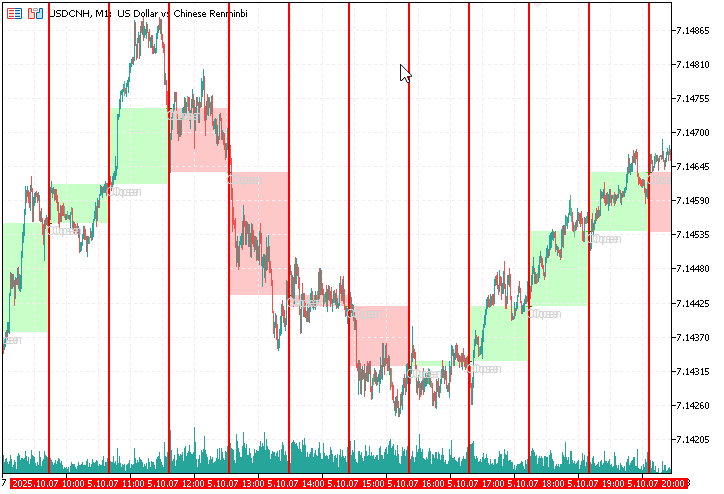
Fig 4. Trends formed by H1 period fillings
In Figure 4, our Market Periods Synchronizer labels the open and close of each major period, allowing us to observe emerging trends at a finer scale. Within each marked interval, the lower-timeframe price action becomes clearly visible, revealing how the intra-bar structure evolves inside the boundaries of higher-timeframe candles.
This creates a dual-perspective view—one where traders can simultaneously analyze both the broader trend context and the detailed micro-movements that form it. The colored fills serve as a visual abstraction of higher-timeframe candlesticks, effectively transforming the chart into a multi-layered representation of market behavior.

Fig 5. Labeling Candlesticks Parts
Figure 5 illustrates the labeling of a region bordered by red lines, representing a single hourly period. This section functions much like a magnified candlestick—it encapsulates the open, close, body, upper wick, and lower wick of a higher-timeframe bar. Within this bordered zone, traders can interpret price movement in the same analytical manner as they would with traditional candlestick components. In essence, each highlighted period serves as a visual reconstruction of a higher-timeframe candlestick, enabling a more detailed examination of how its structure was formed by lower-timeframe fluctuations.
Conclusion
We have successfully transformed a conceptual idea into a fully functional analytical tool through the power of MQL5 programming. The Market Periods Synchronizer indicator brings a new dimension to chart analysis by enabling traders to view higher and lower timeframe structures together in one seamless interface. It visually synchronizes market periods across multiple timeframes, allowing for clear identification of how smaller candles contribute to the formation of major market phases and trend structures. This innovation bridges a long-standing gap in MetaTrader 5's visualization capabilities, especially for analysts seeking a more in-depth understanding of price evolution within broader time contexts.
One of the key strengths of this tool lies in its period body visualization. By filling higher-timeframe candle bodies with distinct colors, traders can immediately recognize whether a period was bullish, bearish, or neutral—and then inspect how the lower-timeframe candles behaved inside those regions. This also reveals the story behind wick formations, as users can observe the lower timeframe volatility, liquidity movements, and intra-bar reactions that created those extended highs or lows. Such insights are invaluable when analyzing reversals, fakeouts, or continuation patterns that are otherwise hidden within larger candlestick bodies.
Equally important is the high level of customization and optimization integrated into the tool. Users can configure which timeframes to display, set independent line styles and colors for each, define lookback depth, and toggle series visibility to maintain a clean yet informative chart layout. These adjustable features make the indicator adaptable for various trading styles—from intraday scalpers studying M1/M5 behavior to long-term analysts aligning D1 and W1 structures. By enabling flexibility, the Market Periods Synchronizer empowers users to analyze markets in a way that matches their unique trading approach and cognitive workflow.
For upcoming MQL5 developers, this project demonstrates how abstract trading concepts can be translated into visual and interactive tools through structured coding practices. It highlights practical skills like event handling, chart object management, and multi-timeframe data synchronization—all central topics for anyone seeking to master the MQL5 language. For traders, the indicator encourages a habit of structured observation, helping them understand not just what the market is doing, but how price develops over time across nested timeframes. This cross-disciplinary understanding between coding and market analysis fosters both technical proficiency and analytical depth, forming a strong foundation for future innovation in trading tool development.
In essence, the Market Periods Synchronizer stands as both a functional advancement for technical analysis and a learning platform for those entering MQL5 development. It reflects how creative problem-solving, guided by real trading challenges, can lead to meaningful tools that enhance the clarity, precision, and educational value of chart analysis within the MetaTrader 5 environment.
Please refer to the table below for key lessons learned throughout the development process, along with the attached source file provided at the end of this article.
Key Lessons
| Key Lesson | Description |
|---|---|
| 1. Multi-Timeframe Data Handling: | Learn how to access, compare, and align higher-timeframe data while working on a lower-timeframe chart. The project demonstrates the correct use of iTime() , iOpen() , and iClose() functions to synchronize data from different periods. |
| 2. Object Creation and Chart Drawing: | Understand how to create and manage chart objects like vertical lines, rectangles, and labels programmatically using ObjectCreate() and ObjectSetInteger() . Proper naming conventions and resource cleanup are emphasized to avoid clutter and memory leaks. |
| 3. Input Parameter Design: | Gain experience defining flexible input parameters that allow users to customize timeframe selections, colors, line widths, and marker visibility. The indicator showcases practical use of input variables for maximum configurability. |
| 4. Algorithm Optimization and CPU Management: | Learn how to optimize indicator performance by limiting object drawing to the visible chart range. This teaches the importance of efficient loops, conditional checks, and minimal resource usage when dealing with high-frequency updates on M1 or M5 charts. |
| 5. Visual Synchronization Concepts: | Understand how visual elements can communicate structural relationships between timeframes. By marking major and intermediate periods, the tool helps users intuitively map price evolution and observe how lower-timeframe candles build higher-timeframe formations. |
| 6. Practical Debugging and Testing: | Explore the process of compiling, attaching, and testing custom indicators in MetaTrader 5. Developers learn how to interpret compiler messages, handle errors like “wrong parameter count,” and validate logic step-by-step during live chart execution. |
| 7. Modular Code Structuring: | Experience how separating logic into initialization, calculation, and visualization segments leads to clean and maintainable code. This aligns with MQL5 best practices for reusable and extensible indicator design. |
| 8. Bridging Analysis and Automation: | Recognize how analytical concepts such as timeframe alignment and price-action mapping can be transformed into automated visual tools. This fusion of coding and trading logic strengthens both programming and analytical thinking skills. |
| 9. Understanding Market Microstructure: | Through visual synchronization, traders can examine wick formation, momentum transitions, and intra-bar reactions, helping them interpret how micro-price movements compose higher-timeframe candle bodies and wicks. |
| 10. Educational Value for New Developers: | The project demonstrates a full development cycle—from idea conception and problem definition to coding, debugging, and publishing. It serves as a practical learning template for upcoming MQL5 developers aspiring to build their own professional indicators. |
Attachments
| File name | Version | Description |
|---|---|---|
| MarketPeriodsSynchronizer.mq5 | 1.01 | This indicator provides a visual synchronization tool for observing how lower timeframe price movements form the structure of higher timeframe periods. It draws vertical markers and optional labels corresponding to selected higher timeframes, allowing traders to identify the start and end of larger market periods directly within smaller timeframe charts. The tool refreshes automatically and supports customizable marker colors, widths, and lookback depth. It was developed using core MQL5 functionalities, including CopyTime(), ObjectCreate(), and timer events, making it a practical study case in combining chart visualization with multi-timeframe data processing. |
Warning: All rights to these materials are reserved by MetaQuotes Ltd. Copying or reprinting of these materials in whole or in part is prohibited.
This article was written by a user of the site and reflects their personal views. MetaQuotes Ltd is not responsible for the accuracy of the information presented, nor for any consequences resulting from the use of the solutions, strategies or recommendations described.

 Introduction to MQL5 (Part 22): Building an Expert Advisor for the 5-0 Harmonic Pattern
 Reusing Invalidated Orderblocks As Mitigation Blocks (SMC)
 Moving to MQL5 Algo Forge (Part 4): Working with Versions and Releases
 Market Simulation (Part 03): A Matter of Performance

- Free trading apps
- Over 8,000 signals for copying
- Economic news for exploring financial markets
You agree to website policy and terms of use