Uwe Goetzke / Newsfeed
- Information
|
12+ Jahre
Erfahrung
|
0
Produkte
|
0
Demoversionen
|
|
0
Jobs
|
0
Signale
|
0
Abonnenten
|
I have a very solid background as a professional programmer and a software architect having designed and implemented several commercial programs since 1980.
So I know how to program and all about market theory ;)
Now I am trying to get a big foot into forex...
How do forex prices move? (I just look on the smaller timeframes up to M5)
as waves - in trend direction up and down, or sidewards ;)
in jumps - on news
in spikes - on speaches, as we have some kind of real time interpretation/expectation
Concerning waves we find different types, depending on volatlity of currency or liquidity of the market for the currency.
At some point we can identifiy that a counter trend is starting and we have to reverse our strategy until we have again a trend.
So, to automate strategies we have to look for self adapting methods as there are no constant parameters.
The state of the market should be determined from short (M1,M5,M15), medium (M15,H1,H4) and longer term observations (H4,D1,W1).
On each time frame calculate an lower and upper bound and segment the range into several bands (more bands on longer time frames).
Depending where the price is located in the bands I see 7 states which could be calculated:
up, moving higher than a previous high. Do not sell.
down, moving lower than a previous low. Do not buy.
counter trend up, a specific time in the trend has passed. The last high point is lower than the previous high point.
counter trend down, a specific time in the trend has passed. The last low point is higher than the previous low point.
squeeze, current range is smaller than a previous range.Protect your position with buy-stop or sell stop in the opposite direction (or do both to enter the market on break-out)
range-up, the price is in the bounds of a previous high & low and moving up
range-down, the price is in the bounds of a previous high & low and moving down
Partial exits in a trend (we never know what happens next, so let us protect any gains):
I uses a number of linear regressions lines as protective trend lines. Their periods might depend on the choosen currency and its volitility.
In a pull back of a trend, one of linear regression protective trend lines is hit and a partial exit out of the position is done.
I call this the "gear change method" ;-)
For example the EA uses linear regressions of period 50 (gear4 = the fastest), 100 (gear3) , 200 (gear2) and 400 (gear1).
If in an uptrend the price hits on ites way down the lr50, a fourth of the position is sold and the trend follower switches one gear lower.
If lr100 is hit, we switch in this example to lr200, and again sell another fourth of the original position size.
And so on.
So if lr400 is hit the position is closed.
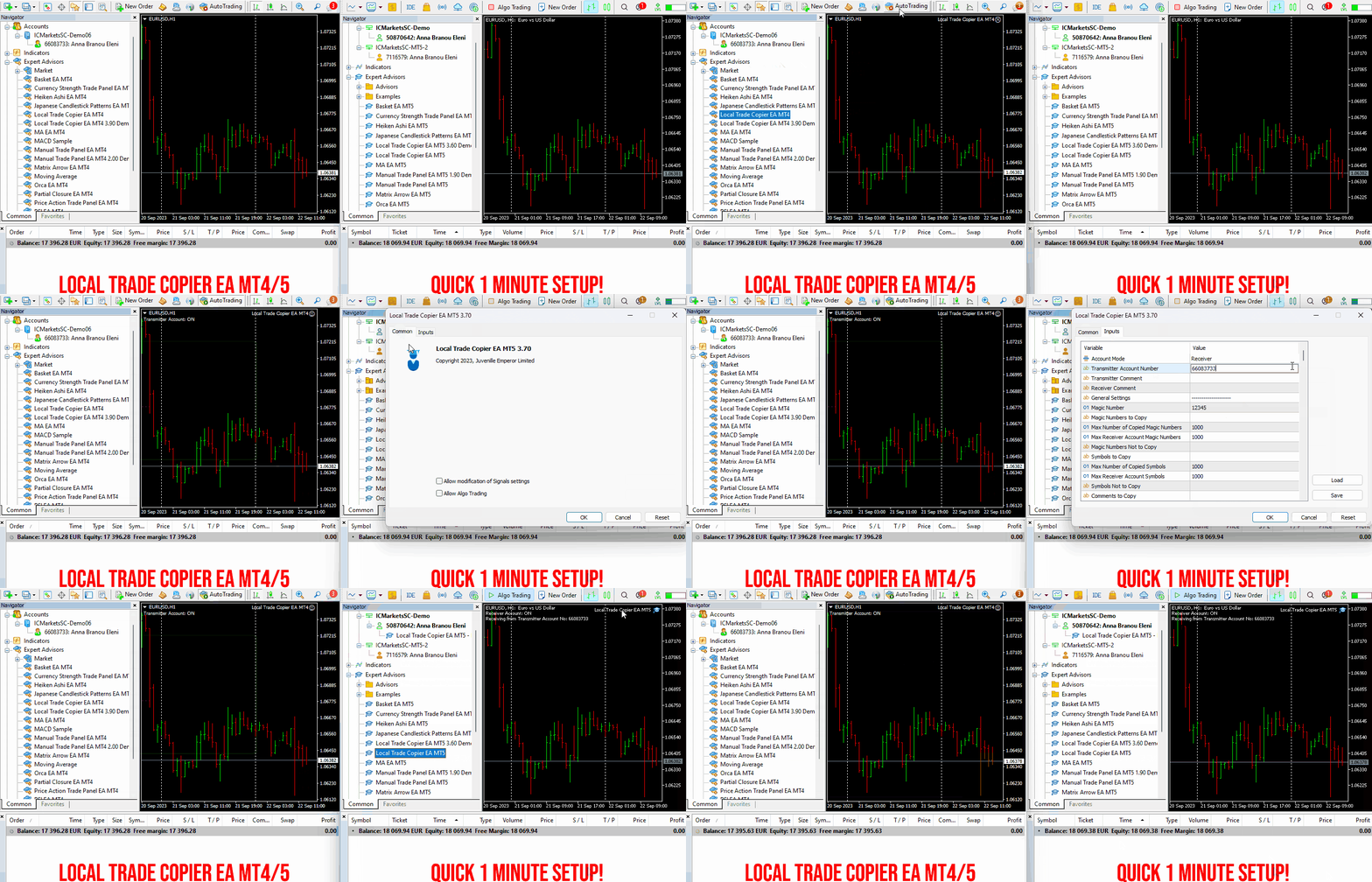
Set up your Transmitter and Receiver terminals in about 1 minute and copy manual or EA trades between accounts at the same or different brokers. Under suitable conditions, trade information can be synchronized between local MetaTrader terminals in under 0.5 seconds. Actual trade execution depends on broker latency, network conditions, computer/VPS performance and terminal workload.
Each Receiver account can use its own lot sizing, risk management, trade filtering, symbol mapping, trade management and account-protection settings. This allows the same trading activity to be synchronized across multiple accounts while each Receiver can be configured according to its own requirements.
✔️ Copying & Connectivity: Copy between multiple MT4/MT5 accounts* on the same Windows computer or VPS, across different brokers and real/demo accounts.
✔️ Lot Sizing & Risk Management: Choose from 18 lot size and risk options, with independent sizing and risk settings for each Receiver.
✔️ Trade Filtering & Copying Controls: Filter copied trades by symbol, magic number, comment, ticket, volume, direction, day and time.
✔️ Trade Management: Manage market and pending orders, TP/SL, partial closures, reopening, reverse copying, better-price conditions and trade splitting.
✔️ Account Protection: Control lot limits, risk, daily drawdown/profit, copying restrictions and emergency protection independently for each Receiver.
✔️ Broker Compatibility & Symbol Mapping: Copy between different brokers and configure suffixes and special symbol mappings when symbol names differ.
✔️ Notifications & Reliability: Use email/push notifications, persistent settings and MetaTrader logs for monitoring and troubleshooting.
✔️ 20 Activations: Each MT4/MT5 version includes 20 activations, allowing you to install and use it on multiple Windows computers or VPSs.
* MT4 → MT5 and MT5 → MT4 copying requires both LTC versions. Both terminals must run on the same Windows computer or Windows VPS.
🔥🔥🔥🔥🔥 Watch the Local Trade Copier EA MT4/5© Quick Setup Video: https://www.youtube.com/watch?v=zhc9s56QhlE
⭐️⭐️⭐️⭐️⭐️ Local Trade Copier EA MT4©: https://www.mql5.com/en/market/product/68950
⭐️⭐️⭐️⭐️⭐️ Local Trade Copier EA MT5©: https://www.mql5.com/en/market/product/68951
📥 Download the Local Trade Copier EA MT4© Free Demo: https://c.mql5.com/6/1030/Local_Trade_Copier_EA_MT4_4_60_Demo.ex4
📥 Download the Local Trade Copier EA MT5© Free Demo: https://c.mql5.com/6/1030/Local_Trade_Copier_EA_MT5_4_40_Demo.ex5
✅ Local Trade Copier EA MT4/5© Purchase, Installation & Quick Setup Guide: https://www.mql5.com/en/blogs/post/745683
✅ Local Trade Copier EA MT4/5© Detailed Inputs/Settings Guide: https://www.mql5.com/en/blogs/post/745681
✅ Local Trade Copier EA MT4/5© Troubleshooting Guide: https://www.mql5.com/en/blogs/post/746561
💎💎💎💎💎 View all my Expert Advisors, Indicators and Utilities: https://www.mql5.com/en/users/eleanna74/seller
11 October 2026
.
Trend Master Pro — Entiende la dirección del mercado antes de buscar una entrada
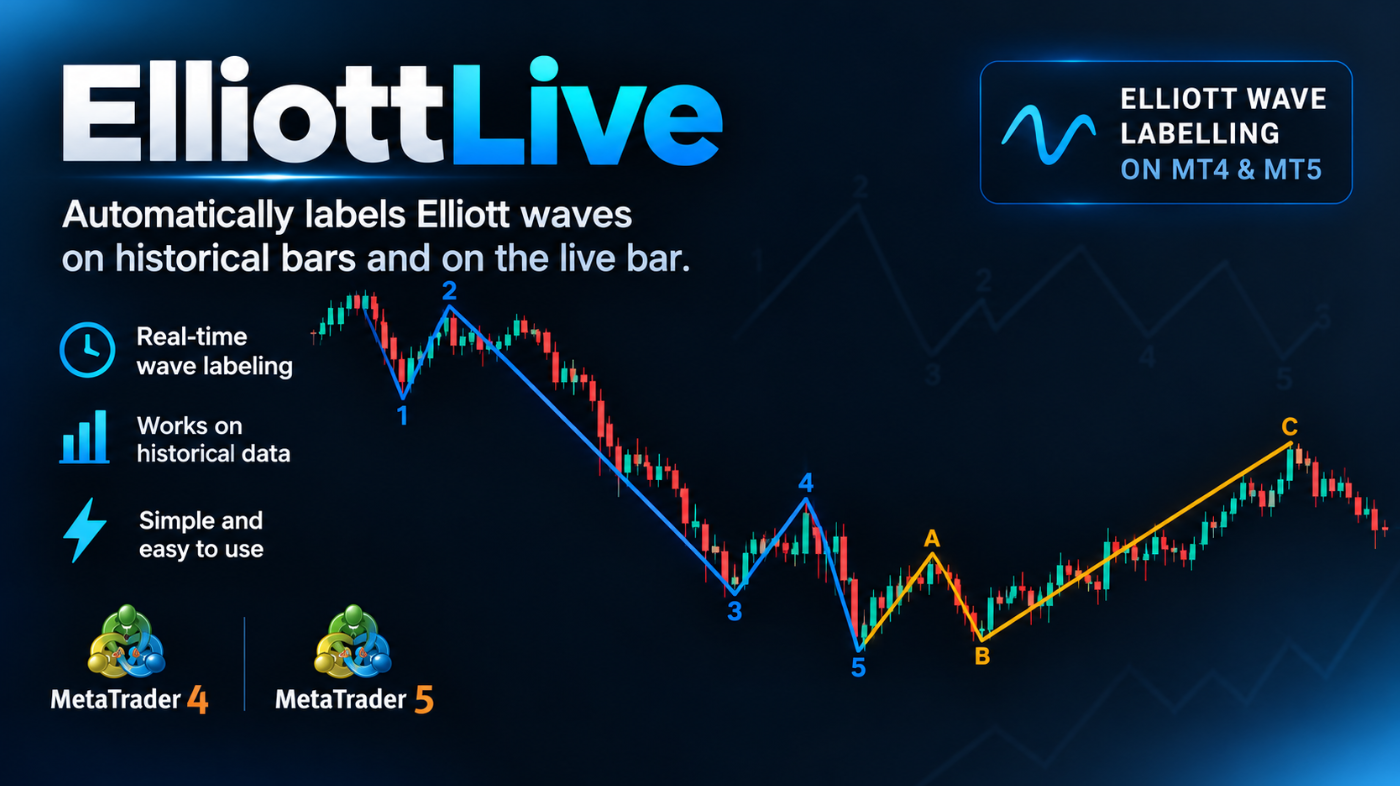
What sets it apart is that it also tracks the wave that is still forming. The live leg is drawn dotted with a “?” mark and updates as price moves, while Fibonacci target levels and an invalidation level are projected to the right of the current bar. Targets that price has already passed are hidden, so the chart stays clean. Optional alerts (popup, sound, push, email) notify you when a wave is confirmed or when a new wave starts forming. History never triggers alerts, only new events.
MT4-version: https://www.mql5.com/en/market/product/200613
MT5-version: https://www.mql5.com/ru/market/product/200604
Elliott Live ist ein Indikator für MetaTrader 5, der Elliott-Wellen automatisch markiert – sowohl in der Historie als auch auf der aktuellen Kerze. Abgeschlossene Wellen werden mit durchgezogener Linie gezeichnet, die sich gerade bildende Welle gepunktet und mit einem Fragezeichen (z. B. „3?“), dazu Fibonacci-Ziele und ein Invalidierungsniveau. MT5-version: https://www.mql5.com/en/market/product/200604 So funktioniert es Zuerst baut der Indikator Swings (ZigZag) auf. Eine Umkehr gilt als
Elliott Live ist ein Indikator für MetaTrader 5, der Elliott-Wellen automatisch markiert – sowohl in der Historie als auch auf der aktuellen Kerze. Abgeschlossene Wellen werden mit durchgezogener Linie gezeichnet, die sich gerade bildende Welle gepunktet und mit einem Fragezeichen (z. B. „3?“), dazu Fibonacci-Ziele und ein Invalidierungsniveau. MT4-version: https://www.mql5.com/en/market/product/200613 So funktioniert es Zuerst baut der Indikator Swings (ZigZag) auf. Eine Umkehr gilt als
The opening price is the price of the first trade in a selected period, and the closing price is the price of the last trade. In Japanese candlestick analysis, the open and the close form the body of the candle: if the close is above the open, the candle is bullish; if below, it is bearish, while the thin wicks above and below mark the high and low of the period. The opening price reflects the starting balance of power — often the result of overnight trading and a reaction to news — while the closing price fixes the outcome of the battle between buyers and sellers.
It is the closing price that is considered the main price of the period: moving averages, MACD, RSI and most other indicators are built on it, because the close is the "official" result rather than a random intraday spike. The daily opening level is also actively used in trading: while the price stays above it, buying pressure remains, and a break below often sets a bearish tone for the session. Experienced traders always look at the open and the close together, assessing who controlled the market and how confidently.
To learn how to read these signals, memorizing definitions is not enough — you need practice on real charts. Candlestick analysis is the foundation on which the whole further trading system is built, so move step by step: from a single candle to patterns, levels and strategies.
In my profile you will find a lot of useful educational information (don't forget to add me as a friend!) Profile: https://www.mql5.com/en/users/voldemar
Что такое цена открытия и цена закрытия?
Цена открытия — это цена первой сделки за выбранный период времени, цена закрытия — цена последней сделки. В японском свечном анализе открытие и закрытие образуют тело свечи: если закрытие оказалось выше открытия, свеча бычья, если ниже — медвежья, а тонкие фитили сверху и снизу показывают максимум и минимум периода. Цена открытия отражает стартовый баланс сил — нередко это результат ночных торгов и реакции на новости, тогда как цена закрытия фиксирует итог борьбы покупателей и продавцов.
Именно цена закрытия считается главной ценой периода: на ней строятся скользящие средние, MACD, RSI и большинство других индикаторов, потому что закрытие — это «официальный» результат, а не случайный внутридневный выброс. Уровень открытия дня тоже активно используется в торговле: пока цена выше него, давление покупателей сохраняется, пробой вниз часто задаёт медвежий тон на сессию. Опытные трейдеры всегда смотрят на открытие и закрытие в связке, оценивая, кто контролировал рынок и с какой уверенностью.
Чтобы научиться читать эти сигналы, недостаточно запомнить определения — нужна практика на реальных графиках. Больше учебных материалов в MAX — https://max.ru/channel_tradinggo, а короткие практические разборы и свежие наблюдения за рынком выходят в нашем Телеграм-канале: https://t.me/tgforexru. Свечной анализ — это фундамент, от которого строится вся дальнейшая торговая система, поэтому не пропускайте шаг за шагом: от одной свечи — к паттернам, уровням и стратегиям.
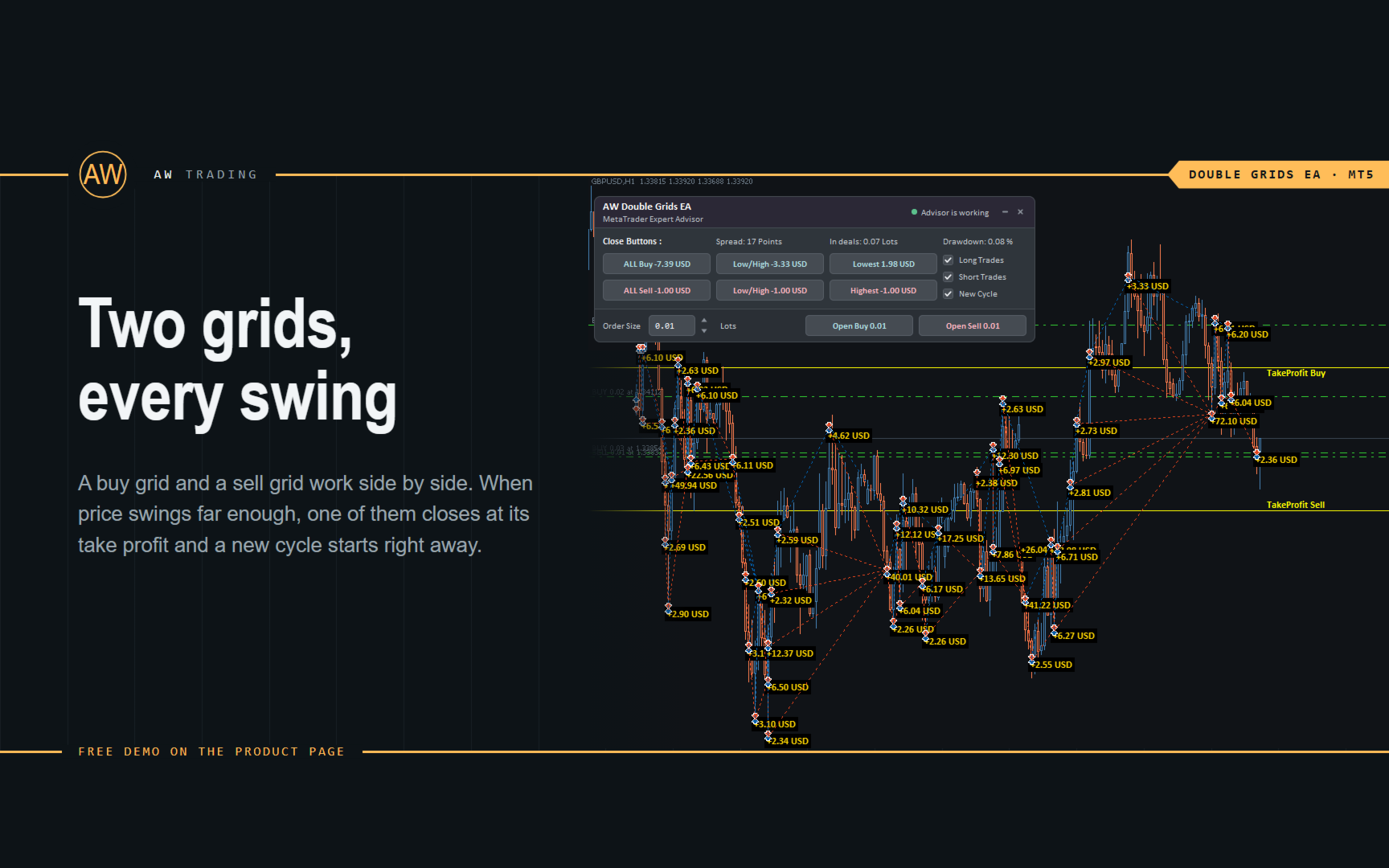
❗The AW Double Grids Expert Advisor is an aggressive, fully automated grid-based Expert Advisor with an informational trading panel and easy setup. The strategy consists in simultaneous two-sided work, multiplying the volume of one direction. Built-in automatic calculation of the lot, as well as a variation of the multiplication of orders.
❗How the advisor trades: The EA starts trading by opening two opposite orders. After closing a profitable order, the EA opens two orders again, multiplying the volume for the open direction. If there are open orders, the EA changes TakeProfit in points. TakeProfit is dynamic and is adjusted depending on the number of open orders in the opposite direction
Additional opening of grids of orders also has a dynamic step that changes depending on the number of open orders in the current direction
MT4 👉 https://www.mql5.com/en/market/product/48191
MT5 👉 https://www.mql5.com/en/market/product/48884
Pips Kicker ist ein professionelles Handelssystem, das Trends folgt und auf Mean-Reversion basiert. Es analysiert kontinuierlich die aktuelle Marktstruktur, berechnet die relevantesten Parameter und kombiniert diese mit fortschrittlichen Marktfiltern, um Handelsmöglichkeiten mit hoher Wahrscheinlichkeit zu identifizieren. LIVE-SIGNAL : Pips Kicker Signal Take advantage of the current launch promo price . ONLY 10 copies of Pips Kicker are available at $149. Price will be increased after that
Trend Master Pro — Понимайте направление рынка перед поиском точки входа
When all indicators give a valid buy or sell signal, a corresponding arrow will be printed on the chart, at the opening of the next candle/bar indicating a strong uptrend/downtrend. The user can choose which indicators will use and can adjust the parameters of each indicator separately. With Matrix Arrow EA MT5 you can trade the Matrix Arrow Indicator MT4/5© signals, directly from a trade panel on the chart manually or 100% automatically with a 100% algorithmic trading option!
✔️ Martingale, Grid, Averaging or other dangerous techniques are not used
✔️ Features on chart Trade Panel for manual or 100% algorithmic trading
✔️ SL, TP, BE and Trailing SL levels in Points and in Percentage of the Average Daily Range
✔️ New optimized set files for trading 12 popular symbols/instruments
✔️ Based on the 100% Non-Repainting Matrix Arrow Indicator MT5
✔️ Working, Entry & Exit Confirmation timeframes available
✔️ Works on all timeframes and all symbols/instruments
✔️ Super accurate Arrow signals that indicate a strong trend
✔️ Exit dot signals define neutral periods with no clear trend
✔️ Equally effective in trending and ranging markets
✔️ Each one indicator can be turned ON/OFF
✔️ Each and every parameter of all 10 indicators are fully adjustable
✔️ Ideal for beginners but also a great asset for experienced traders
✔️ 100% automated Expert Advisor
✔️ MQL5 VPS compatible
🔥🔥🔥🔥🔥 Matrix Arrow EA MT4/5© Backtests & Optimized Set Files: https://www.mql5.com/en/blogs/post/745695
⭐️⭐️⭐️⭐️⭐️ Matrix Arrow EA MT4©: https://www.mql5.com/en/market/product/70812
⭐️⭐️⭐️⭐️⭐️ Matrix Arrow EA MT5©: https://www.mql5.com/en/market/product/70813
✅ How to Test the Matrix Arrow EA MT4/5©: https://www.mql5.com/en/blogs/post/745701
✅ Matrix Arrow EA MT4/5© Installation Guide: https://www.mql5.com/en/blogs/post/745703
📢📢📢📢📢 ATTENTION: If you want to trade the Matrix Arrow signals with your Matrix Arrow EA MT4/5©, you must purchase the Matrix Arrow Indicator MT4/5© separately! Otherwise the Matrix Arrow EA MT4/5© will work as a manual trade panel only.
Buy now the Matrix Arrow Indicator MT4©: https://www.mql5.com/en/market/product/69726
Buy now the Matrix Arrow Indicator MT5©: https://www.mql5.com/en/market/product/69725
💎💎💎💎💎 Check out all my Expert Advisors, Indicators and Utilities: https://www.mql5.com/en/users/eleanna74/seller
9 October 2026
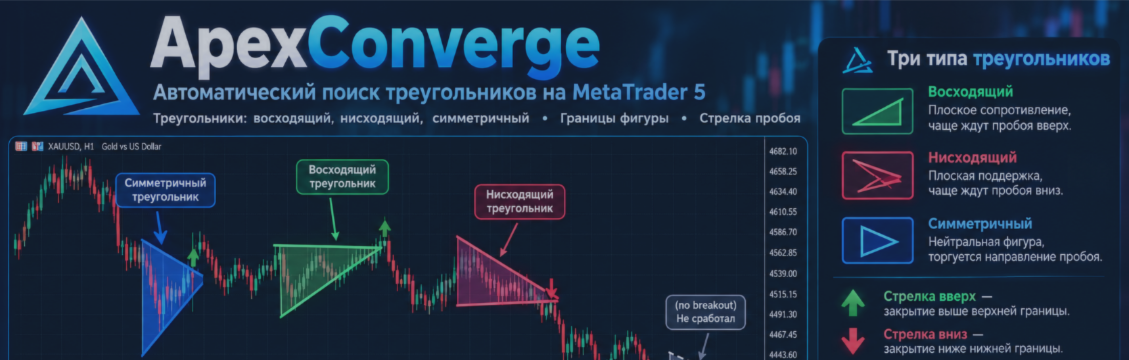
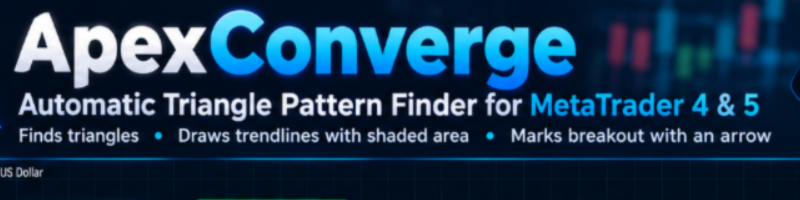
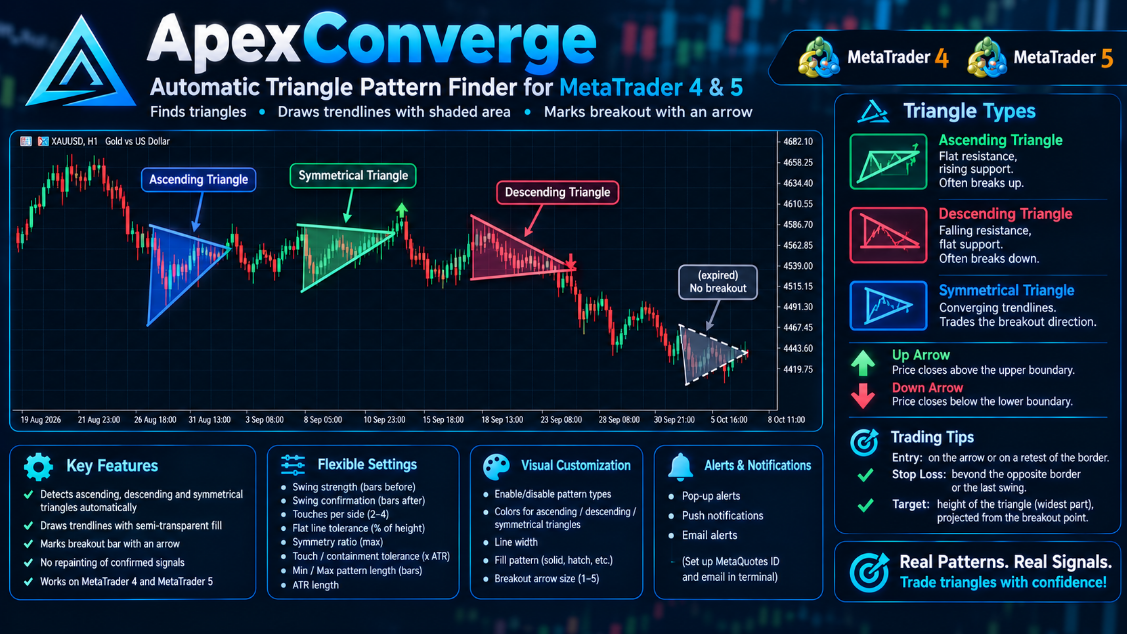
When price closes beyond a triangle’s boundary, the indicator plots a breakout arrow up or down and sends an alert: a pop-up, a push notification to your phone, or an email. Patterns that never broke out or ran out of time are marked separately. Everything is adjustable: swing sensitivity, tolerances, pattern length, which triangle types to show, colors and display style.
MT4-version: https://www.mql5.com/en/market/product/200443
MT5-version: https://www.mql5.com/en/market/product/200424
Subscribe to my channel on MQL5.com: https://www.mql5.com/en/channels/algotrader
And to my Telegram channel, where I post new releases and sometimes free Expert Advisors and indicators: https://t.me/algotrdr
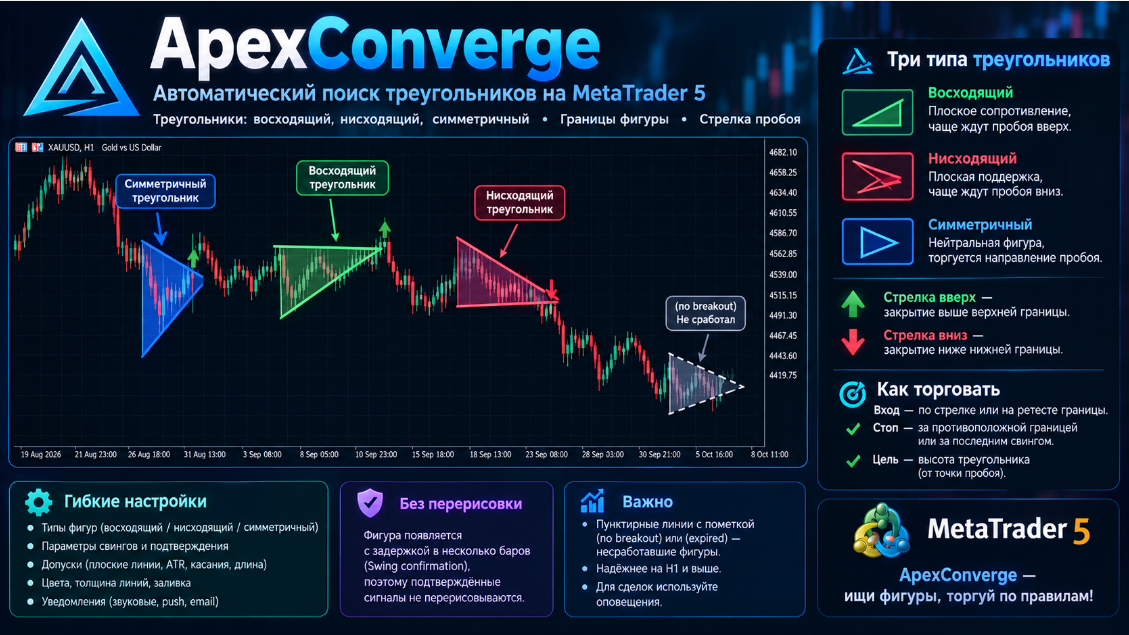
Когда цена закрывается за границей треугольника, индикатор ставит стрелку пробоя вверх или вниз и присылает уведомление: всплывающее окно, push на телефон или письмо. Паттерны, которые не получили пробоя или истекли по времени, помечаются отдельно. Все параметры настраиваются: чувствительность поиска вершин, допуски, длина паттерна, типы треугольников, цвета и стиль отображения.
MT4-version: https://www.mql5.com/en/market/product/200443
MT5-version: https://www.mql5.com/en/market/product/200424
Подписывайтесь на мой канал на MQL5.com: https://www.mql5.com/en/channels/algotrader
А также на Telegram-канал, где я выкладываю новинки и иногда бесплатные советники и индикаторы: https://t.me/algotrdr
ApexConverge ist ein Indikator für MetaTrader 5, der automatisch Dreiecksformationen (aufsteigend, absteigend und symmetrisch) erkennt, ihre Begrenzungen mit einer schattierten Fläche zeichnet und die Ausbruchskerze mit einem Pfeil markiert. MT5-version: https://www.mql5.com/en/market/product/200424 Funktionsweise Der Indikator findet Swing-Hochs und -Tiefs, legt zwei Trendlinien durch sie und prüft die Form: flache Oberkante mit steigender Unterkante ergibt ein aufsteigendes Dreieck; fallende
ApexConverge ist ein Indikator für MetaTrader 5, der automatisch Dreiecksformationen (aufsteigend, absteigend und symmetrisch) erkennt, ihre Begrenzungen mit einer schattierten Fläche zeichnet und die Ausbruchskerze mit einem Pfeil markiert. MT4-version: https://www.mql5.com/en/market/product/200443 Funktionsweise Der Indikator findet Swing-Hochs und -Tiefs, legt zwei Trendlinien durch sie und prüft die Form: flache Oberkante mit steigender Unterkante ergibt ein aufsteigendes Dreieck; fallende
Set up your Transmitter and Receiver terminals in about 1 minute and copy manual or EA trades between accounts at the same or different brokers. Under suitable conditions, trade information can be synchronized between local MetaTrader terminals in under 0.5 seconds. Actual trade execution depends on broker latency, network conditions, computer/VPS performance and terminal workload.
Each Receiver account can use its own lot sizing, risk management, trade filtering, symbol mapping, trade management and account-protection settings. This allows the same trading activity to be synchronized across multiple accounts while each Receiver can be configured according to its own requirements.
✔️ Copying & Connectivity: Copy between multiple MT4/MT5 accounts* on the same Windows computer or VPS, across different brokers and real/demo accounts.
✔️ Lot Sizing & Risk Management: Choose from 18 lot size and risk options, with independent sizing and risk settings for each Receiver.
✔️ Trade Filtering & Copying Controls: Filter copied trades by symbol, magic number, comment, ticket, volume, direction, day and time.
✔️ Trade Management: Manage market and pending orders, TP/SL, partial closures, reopening, reverse copying, better-price conditions and trade splitting.
✔️ Account Protection: Control lot limits, risk, daily drawdown/profit, copying restrictions and emergency protection independently for each Receiver.
✔️ Broker Compatibility & Symbol Mapping: Copy between different brokers and configure suffixes and special symbol mappings when symbol names differ.
✔️ Notifications & Reliability: Use email/push notifications, persistent settings and MetaTrader logs for monitoring and troubleshooting.
✔️ 20 Activations: Each MT4/MT5 version includes 20 activations, allowing you to install and use it on multiple Windows computers or VPSs.
* MT4 → MT5 and MT5 → MT4 copying requires both LTC versions. Both terminals must run on the same Windows computer or Windows VPS.
🔥🔥🔥🔥🔥 Watch the Local Trade Copier EA MT4/5© Quick Setup Video: https://www.youtube.com/watch?v=zhc9s56QhlE
⭐️⭐️⭐️⭐️⭐️ Local Trade Copier EA MT4©: https://www.mql5.com/en/market/product/68950
⭐️⭐️⭐️⭐️⭐️ Local Trade Copier EA MT5©: https://www.mql5.com/en/market/product/68951
📥 Download the Local Trade Copier EA MT4© Free Demo: https://c.mql5.com/6/1030/Local_Trade_Copier_EA_MT4_4_60_Demo.ex4
📥 Download the Local Trade Copier EA MT5© Free Demo: https://c.mql5.com/6/1030/Local_Trade_Copier_EA_MT5_4_40_Demo.ex5
✅ Local Trade Copier EA MT4/5© Purchase, Installation & Quick Setup Guide: https://www.mql5.com/en/blogs/post/745683
✅ Local Trade Copier EA MT4/5© Detailed Inputs/Settings Guide: https://www.mql5.com/en/blogs/post/745681
✅ Local Trade Copier EA MT4/5© Troubleshooting Guide: https://www.mql5.com/en/blogs/post/746561
💎💎💎💎💎 View all my Expert Advisors, Indicators and Utilities: https://www.mql5.com/en/users/eleanna74/seller
9 October 2026
For added protection, the EA includes advanced account safeguarding mechanisms. When a specified equity take profit or stop loss level or a maximum drawdown from the account's balance high is reached, the EA can automatically close all open trades, delete any pending orders, and shut down all charts, removing any Expert Advisors running on them. This feature helps protect your capital during unexpected market movements or when reaching your predefined account targets.
✔️ Does not use Martingale, Grid, Averaging, or other high-risk techniques
✔️ Allows exclusion of specific Magic Numbers, trade comments, or symbol trades from management
✔️ Basket Take Profit in % for all managed trades combined
✔️ Basket Stop Loss in % for all managed trades combined
✔️ Basket Break Even in % for all managed trades combined
✔️ Basket Trailing Stop Loss in % for all managed trades combined
✔️ Basket Take Profit in money for all managed trades combined
✔️ Basket Stop Loss in money for all managed trades combined
✔️ Basket Break Even in money for all managed trades combined
✔️ Basket Trailing Stop Loss in money for all managed trades combined
✔️ Basket Take Profit in average points for all managed trades combined
✔️ Basket Stop Loss in average points for all managed trades combined
✔️ Basket Break Even in average points for all managed trades combined
✔️ Basket Trailing Stop Loss in average points for all managed trades combined
✔️ Option to reset all Basket settings after each account balance update or after a Basket target is hit
✔️ Option to close all managed trades at break even after recovering from a drawdown
✔️ Option to close all managed trades at a specific time on a chosen day or daily
✔️ Account protection feature that closes all trades and charts when equity-based TP or SL is reached
✔️ Maximum drawdown % from balance high that closes all trades and charts/EAs if triggered
✔️ Optional on-chart panel to monitor profit/loss and close trades by type or all at once
✔️ Terminal, push notification, and email alerts when any Basket or protection condition is triggered
✔️ 100% automated Expert Advisor
✔️ Fully compatible with MQL5 VPS
⭐️⭐️⭐️⭐️⭐️ Basket EA EA MT4©: https://www.mql5.com/en/market/product/45192
⭐️⭐️⭐️⭐️⭐️ Basket EA EA MT5©: https://www.mql5.com/en/market/product/72782
📥 Download the Basket EA MT4© demo version in your demo account now: https://c.mql5.com/6/988/Basket_EA_MT4_2_20_Demo.ex4
📥 Download the Basket EA MT5© demo version in your demo account now: https://c.mql5.com/6/988/Basket_EA_MT5_2_00_Demo.ex5
✅ Basket EA MT4/5© detailed Settings/Inputs guide: https://www.mql5.com/en/blogs/post/746117
💎💎💎💎💎 Check out all my Expert Advisors and Utilities: https://www.mql5.com/en/users/eleanna74/seller
9 October 2026
A bearish candlestick is a basic element of Japanese candlestick analysis that shows the closing price ended lower than the opening price over a given period. The body of such a candle is usually colored red or dark: it reflects the range between the open and the close, while the thin lines above and below — the wicks or shadows — mark the highest and lowest prices of the period. When a bearish candle appears after a series of bullish ones, it is often the first sign that sellers are starting to take control of the market.
The shape of a bearish candle tells you a lot about its strength. A long body with short wicks means sellers confidently dominated the market throughout the period. A short body with a long upper wick suggests that buyers tried to push the price up but met strong supply, and the price fell back. Such patterns frequently appear near resistance levels and may indicate a potential reversal to the downside. Still, a single candle is just a fragment of the bigger picture, not a complete signal.
For more reliable conclusions, always read bearish candles in context: where they formed, whether trading volume and the following candles confirm the signal, and whether the direction matches the higher timeframe. Candlestick analysis is an art of reading the market, not a recipe for guaranteed profit — so always use a stop loss and a carefully planned risk management strategy.
In my profile you will find a lot of useful educational information (don't forget to add me as a friend!) Profile: https://www.mql5.com/en/users/voldemar
Что такое медвежья свеча?
Медвежья свеча — один из базовых элементов японского свечного анализа, показывающий, что за выбранный период цена закрытия оказалась ниже цены открытия. Тело такой свечи обычно закрашивают красным или тёмным цветом: оно отражает диапазон между ценой открытия и ценой закрытия, а тонкие линии сверху и снизу — фитили — показывают максимальную и минимальную цену за период. Если медвежья свеча появилась после серии растущих свечей, это первый признак того, что продавцы начали перехватывать инициативу.
Понимать силу медвежьей свечи помогает её форма. Длинное тело без длинных фитилей говорит о том, что продавцы уверенно контролировали рынок в течение всего периода. Короткое тело с длинным верхним фитилём — это сигнал того, что покупатели пытались поднять цену, но встретили активное предложение, и цена вернулась вниз. Такой паттерн часто встречается у уровней сопротивления и может указывать на разворот движения вниз. При этом важно помнить: одна свеча — это ещё не сигнал, а лишь фрагмент общей картины.
Чтобы выводы были надёжнее, оценивайте медвежьи свечи в контексте: на каком уровне они образовались, подтверждается ли сигнал объёмом и последующими свечами, совпадает ли направление со старшим таймфреймом. Свечной анализ — это искусство чтения рынка, а не готовый рецепт прибыли, поэтому всегда используйте стоп-лосс и продуманную стратегию управления рисками.
В моём профиле Вы найдете много полезной обучающей информации, (не забудь добавить в друзья) Профиль: https://www.mql5.com/ru/users/voldemar
✔️ Extremely easy and straightforward interface
✔️ Works smoothly on any chart, account type, or broker
✔️ Automatic partial closure of managed trades at specified TP/SL levels, closing independent percentages of the initial lot size across up to 10 TP and 10 SL levels
✔️ Manual partial closure of all managed trades or any individual trade by ticket number, based on a percentage of the lot size
✔️ Option to move the stop loss to break even for the remaining portion of trades automatically partially closed as above
✔️ Option to move the stop loss to break even once a specified profit level (in points) is reached
✔️ Ability to exclude certain magic numbers, comments, or symbol trades from management
✔️ Compatible with MQL5 VPS
⭐️⭐️⭐️⭐️⭐️ Partial Closure EA MT4©: https://www.mql5.com/en/market/product/82356
⭐️⭐️⭐️⭐️⭐️ Partial Closure EA MT5©: https://www.mql5.com/en/market/product/82357
📥 Download the Partial Closure EA MT4© demo version in your demo account now: https://c.mql5.com/6/975/Partial_Closure_EA_MT4_1.30_Demo.ex4
📥 Download the Partial Closure EA MT5© demo version in your demo account now: https://c.mql5.com/6/975/Partial_Closure_EA_MT5_1.30_Demo.ex5
✅ Partial Closure EA MT4/5© installation & user guide: https://www.mql5.com/en/blogs/post/749385
💎💎💎💎💎 Check out all my Expert Advisors, Indicators and Utilities: https://www.mql5.com/en/users/eleanna74/seller
9 October 2026