Uwe Goetzke
Uwe Goetzke
5 (1)
  • Informazioni
12+ anni
esperienza
0
prodotti
0
versioni demo
0
lavori
0
segnali
0
iscritti
In the beginning of the nineties I developed commercial stock market programs.
I have a very solid background as a professional programmer and a software architect having designed and implemented several commercial programs since 1980.

So I know how to program and all about market theory ;)
Now I am trying to get a big foot into forex...

How do forex prices move? (I just look on the smaller timeframes up to M5)
as waves - in trend direction up and down, or sidewards ;)
in jumps - on news
in spikes - on speaches, as we have some kind of real time interpretation/expectation

Concerning waves we find different types, depending on volatlity of currency or liquidity of the market for the currency.
At some point we can identifiy that a counter trend is starting and we have to reverse our strategy until we have again a trend.

So, to automate strategies we have to look for self adapting methods as there are no constant parameters.

The state of the market should be determined from short (M1,M5,M15), medium (M15,H1,H4) and longer term observations (H4,D1,W1).
On each time frame calculate an lower and upper bound and segment the range into several bands (more bands on longer time frames).
Depending where the price is located in the bands I see 7 states which could be calculated:

up, moving higher than a previous high. Do not sell.
down, moving lower than a previous low. Do not buy.
counter trend up, a specific time in the trend has passed. The last high point is lower than the previous high point.
counter trend down, a specific time in the trend has passed. The last low point is higher than the previous low point.
squeeze, current range is smaller than a previous range.Protect your position with buy-stop or sell stop in the opposite direction (or do both to enter the market on break-out)
range-up, the price is in the bounds of a previous high & low and moving up
range-down, the price is in the bounds of a previous high & low and moving down

Partial exits in a trend (we never know what happens next, so let us protect any gains):
I uses a number of linear regressions lines as protective trend lines. Their periods might depend on the choosen currency and its volitility.
In a pull back of a trend, one of linear regression protective trend lines is hit and a partial exit out of the position is done.

I call this the "gear change method" ;-)

For example the EA uses linear regressions of period 50 (gear4 = the fastest), 100 (gear3) , 200 (gear2) and 400 (gear1).
If in an uptrend the price hits on ites way down the lr50, a fourth of the position is sold and the trend follower switches one gear lower.
If lr100 is hit, we switch in this example to lr200, and again sell another fourth of the original position size.
And so on.
So if lr400 is hit the position is closed.
Tatiana Zyrianova
Tatiana Zyrianova
TREND MASTER PRO ПОНИМАЙТЕ НАПРАВЛЕНИЕ РЫНКА ПЕРЕД ПОИСКОМ ТОЧКИ ВХОДА Trend Master Pro помогает понять направление рынка, его текущее состояние и контекст нескольких таймфреймов — чтобы принимать более обоснованные решения при оценке сетапа...
Eleni Anna Branou - Juvenille Emperor Limited
Eleni Anna Branou
Matrix Arrow EA MT4/5© is a unique expert advisor that can trade the Matrix Arrow Indicator's MT4/5© signals with a trade panel on the chart, manually or 100% automatically. Matrix Arrow Indicator MT4/5© will determine the current trend at its early stages, gathering information and data from up to 10 standard indicators, which are: Average Directional Movement Index (ADX), Commodity Channel Index (CCI), Classic Heiken Ashi candles, Moving Average, Moving Average Convergence Divergence (MACD), Relative Vigor Index (RVI), Relative Strength Index (RSI), Parabolic SAR, Stochastic Oscillator, Williams' Percent Range.

When all indicators give a valid buy or sell signal, a corresponding arrow will be printed on the chart, at the opening of the next candle/bar indicating a strong uptrend/downtrend. The user can choose which indicators will use and can adjust the parameters of each indicator separately. With Matrix Arrow EA MT5 you can trade the Matrix Arrow Indicator MT4/5© signals, directly from a trade panel on the chart manually or 100% automatically with a 100% algorithmic trading option!

✔️ Martingale, Grid, Averaging or other dangerous techniques are not used
✔️ Features on chart Trade Panel for manual or 100% algorithmic trading
✔️ SL, TP, BE and Trailing SL levels in Points and in Percentage of the Average Daily Range
✔️ New optimized set files for trading 12 popular symbols/instruments
✔️ Based on the 100% Non-Repainting Matrix Arrow Indicator MT5
✔️ Working, Entry & Exit Confirmation timeframes available
✔️ Works on all timeframes and all symbols/instruments
✔️ Super accurate Arrow signals that indicate a strong trend
✔️ Exit dot signals define neutral periods with no clear trend
✔️ Equally effective in trending and ranging markets
✔️ Each one indicator can be turned ON/OFF
✔️ Each and every parameter of all 10 indicators are fully adjustable
✔️ Ideal for beginners but also a great asset for experienced traders
✔️ 100% automated Expert Advisor
✔️ MQL5 VPS compatible

🔥🔥🔥🔥🔥 Matrix Arrow EA MT4/5© Backtests & Optimized Set Files: https://www.mql5.com/en/blogs/post/745695

⭐️⭐️⭐️⭐️⭐️ Matrix Arrow EA MT4©: https://www.mql5.com/en/market/product/70812

⭐️⭐️⭐️⭐️⭐️ Matrix Arrow EA MT5©: https://www.mql5.com/en/market/product/70813

✅ How to Test the Matrix Arrow EA MT4/5©: https://www.mql5.com/en/blogs/post/745701

✅ Matrix Arrow EA MT4/5© Installation Guide: https://www.mql5.com/en/blogs/post/745703

📢📢📢📢📢 ATTENTION: If you want to trade the Matrix Arrow signals with your Matrix Arrow EA MT4/5©, you must purchase the Matrix Arrow Indicator MT4/5© separately! Otherwise the Matrix Arrow EA MT4/5© will work as a manual trade panel only.

Buy now the Matrix Arrow Indicator MT4©: https://www.mql5.com/en/market/product/69726

Buy now the Matrix Arrow Indicator MT5©: https://www.mql5.com/en/market/product/69725

💎💎💎💎💎 Check out all my Expert Advisors, Indicators and Utilities: https://www.mql5.com/en/users/eleanna74/seller

9 October 2026
Evgeniy Zhdan
Evgeniy Zhdan
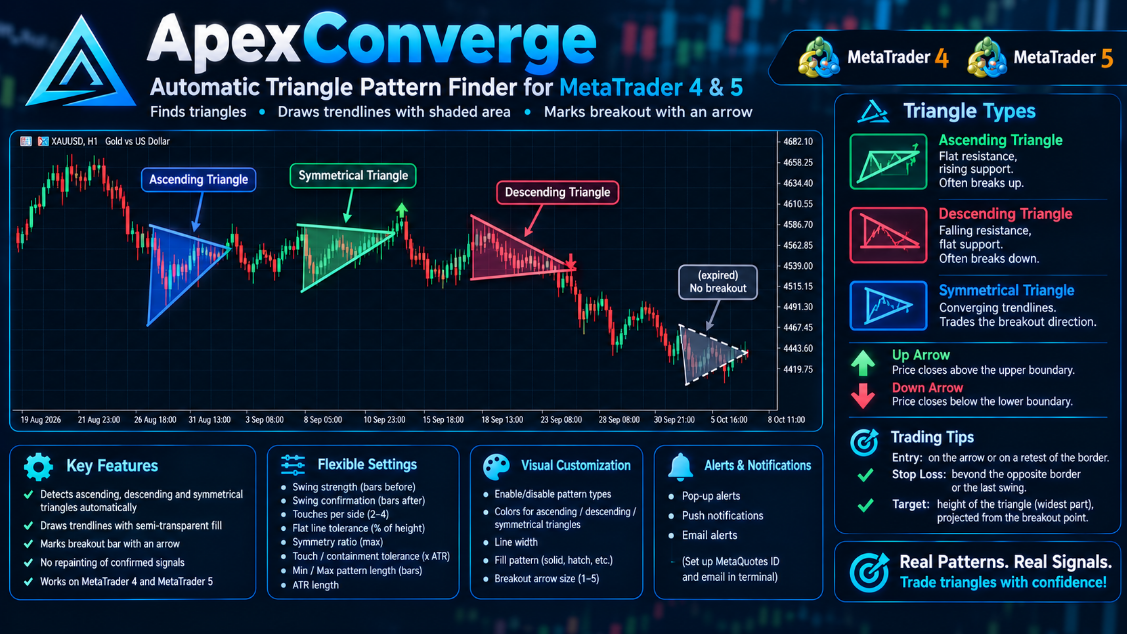
ApexConverge is an indicator that automatically finds triangle patterns on your chart: ascending, descending and symmetrical. It detects significant swing highs and lows, draws resistance and support lines through them, and checks that price has stayed inside the pattern the whole time. Each triangle found is highlighted in color and labeled, and its lines are available as buffers, so you can read them from your own Expert Advisors.

When price closes beyond a triangle’s boundary, the indicator plots a breakout arrow up or down and sends an alert: a pop-up, a push notification to your phone, or an email. Patterns that never broke out or ran out of time are marked separately. Everything is adjustable: swing sensitivity, tolerances, pattern length, which triangle types to show, colors and display style.

MT4-version: https://www.mql5.com/en/market/product/200443

MT5-version: https://www.mql5.com/en/market/product/200424

Subscribe to my channel on MQL5.com: https://www.mql5.com/en/channels/algotrader

And to my Telegram channel, where I post new releases and sometimes free Expert Advisors and indicators: https://t.me/algotrdr
Evgeniy Zhdan
Evgeniy Zhdan
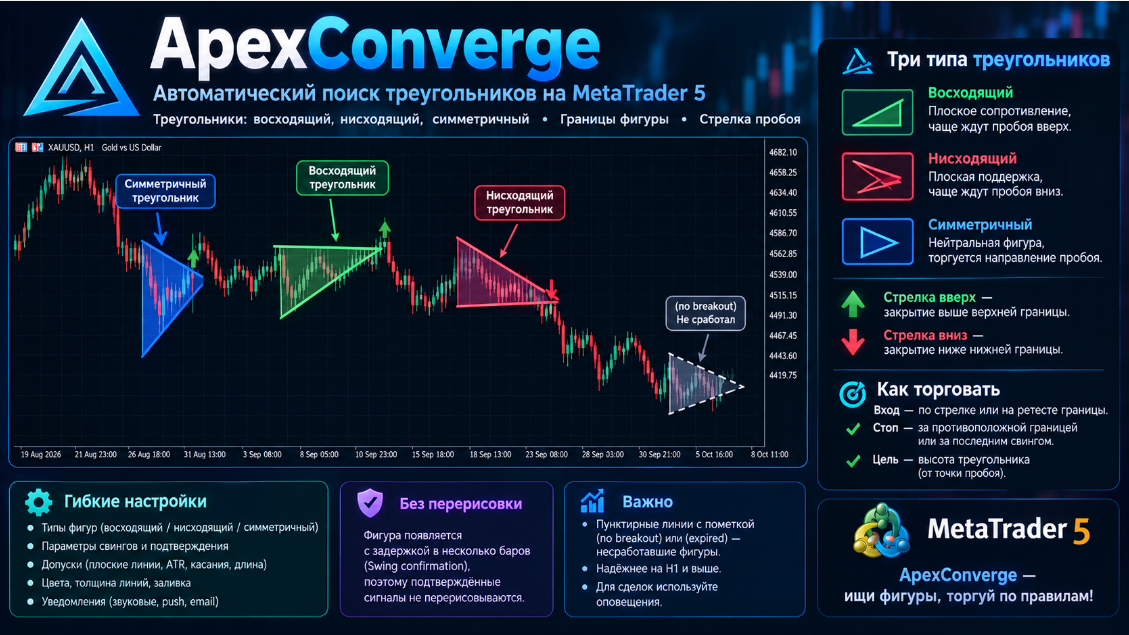
ApexConverge — индикатор, который сам находит на графике треугольники: восходящие, нисходящие и симметричные. Он ищет значимые вершины и впадины цены, проводит по ним линии сопротивления и поддержки и проверяет, что цена всё это время оставалась внутри фигуры. Найденный треугольник подсвечивается цветом и подписывается, а его линии можно считать из буферов для своих советников.

Когда цена закрывается за границей треугольника, индикатор ставит стрелку пробоя вверх или вниз и присылает уведомление: всплывающее окно, push на телефон или письмо. Паттерны, которые не получили пробоя или истекли по времени, помечаются отдельно. Все параметры настраиваются: чувствительность поиска вершин, допуски, длина паттерна, типы треугольников, цвета и стиль отображения.

MT4-version: https://www.mql5.com/en/market/product/200443

MT5-version: https://www.mql5.com/en/market/product/200424

Подписывайтесь на мой канал на MQL5.com: https://www.mql5.com/en/channels/algotrader

А также на Telegram-канал, где я выкладываю новинки и иногда бесплатные советники и индикаторы: https://t.me/algotrdr
Evgeniy Zhdan
Evgeniy Zhdan Prodotto pubblicato

ApexConverge è un indicatore per MetaTrader 5 che rileva automaticamente le figure a triangolo (ascendente, discendente e simmetrico), ne disegna i confini con un'area ombreggiata e segnala con una freccia la candela di rottura. MT5-version: https://www.mql5.com/en/market/product/200424 Come funziona L'indicatore individua massimi e minimi di swing, traccia due trendline attraverso di essi e verifica la forma: resistenza piatta con supporto crescente è un triangolo ascendente; resistenza

Evgeniy Zhdan
Evgeniy Zhdan Prodotto pubblicato

ApexConverge è un indicatore per MetaTrader 5 che rileva automaticamente le figure a triangolo (ascendente, discendente e simmetrico), ne disegna i confini con un'area ombreggiata e segnala con una freccia la candela di rottura. MT4-version: https://www.mql5.com/en/market/product/200443 Come funziona L'indicatore individua massimi e minimi di swing, traccia due trendline attraverso di essi e verifica la forma: resistenza piatta con supporto crescente è un triangolo ascendente; resistenza

Eleni Anna Branou - Juvenille Emperor Limited
Eleni Anna Branou
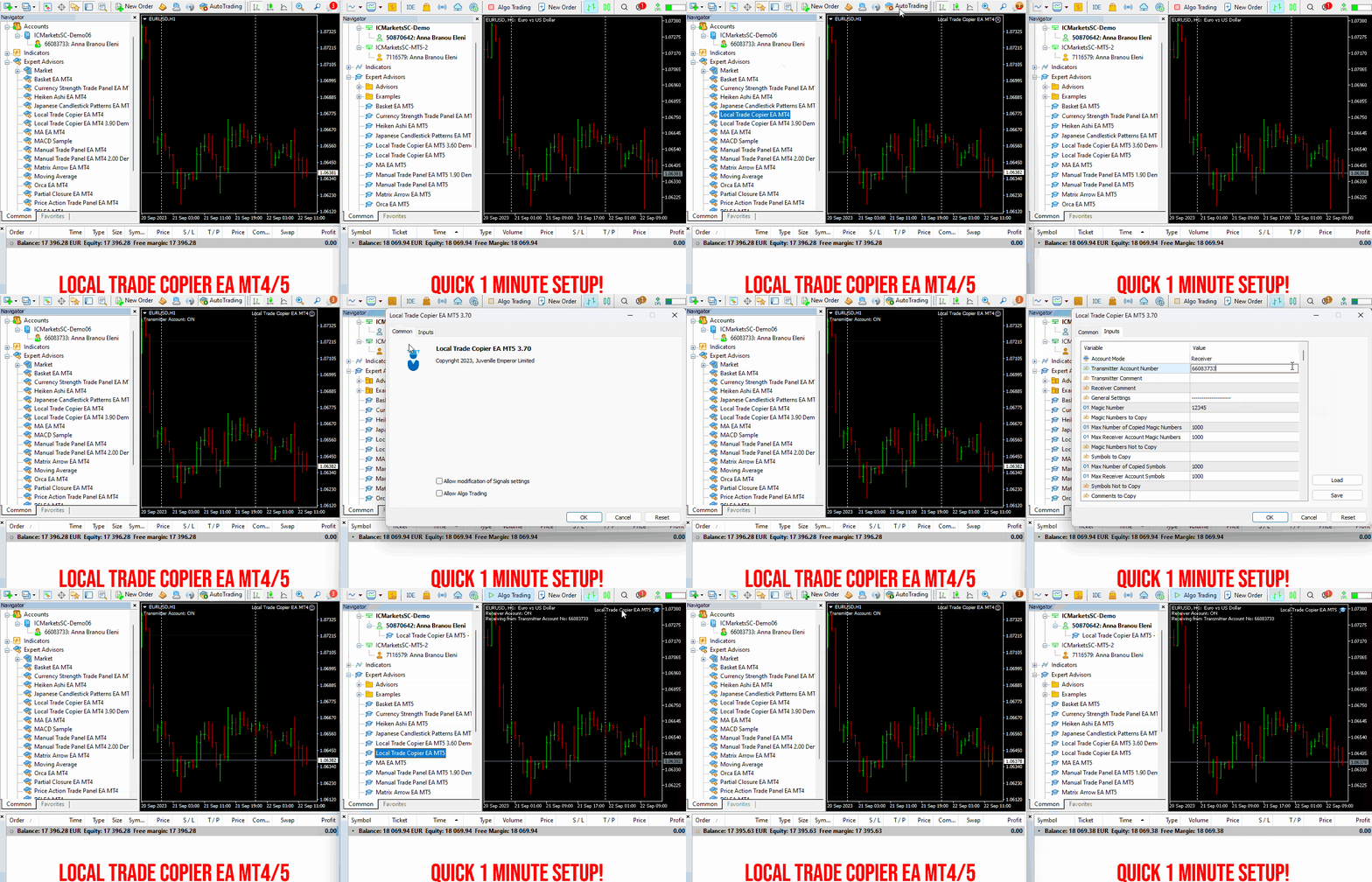
Local Trade Copier EA MT4/5© is a fast and flexible trade copier for copying and managing trades between multiple MetaTrader 4 and MetaTrader 5 accounts on the same Windows computer or Windows VPS.

Set up your Transmitter and Receiver terminals in about 1 minute and copy manual or EA trades between accounts at the same or different brokers. Under suitable conditions, trade information can be synchronized between local MetaTrader terminals in under 0.5 seconds. Actual trade execution depends on broker latency, network conditions, computer/VPS performance and terminal workload.

Each Receiver account can use its own lot sizing, risk management, trade filtering, symbol mapping, trade management and account-protection settings. This allows the same trading activity to be synchronized across multiple accounts while each Receiver can be configured according to its own requirements.

✔️ Copying & Connectivity: Copy between multiple MT4/MT5 accounts* on the same Windows computer or VPS, across different brokers and real/demo accounts.
✔️ Lot Sizing & Risk Management: Choose from 18 lot size and risk options, with independent sizing and risk settings for each Receiver.
✔️ Trade Filtering & Copying Controls: Filter copied trades by symbol, magic number, comment, ticket, volume, direction, day and time.
✔️ Trade Management: Manage market and pending orders, TP/SL, partial closures, reopening, reverse copying, better-price conditions and trade splitting.
✔️ Account Protection: Control lot limits, risk, daily drawdown/profit, copying restrictions and emergency protection independently for each Receiver.
✔️ Broker Compatibility & Symbol Mapping: Copy between different brokers and configure suffixes and special symbol mappings when symbol names differ.
✔️ Notifications & Reliability: Use email/push notifications, persistent settings and MetaTrader logs for monitoring and troubleshooting.
✔️ 20 Activations: Each MT4/MT5 version includes 20 activations, allowing you to install and use it on multiple Windows computers or VPSs.

* MT4 → MT5 and MT5 → MT4 copying requires both LTC versions. Both terminals must run on the same Windows computer or Windows VPS.

🔥🔥🔥🔥🔥 Watch the Local Trade Copier EA MT4/5© Quick Setup Video: https://www.youtube.com/watch?v=zhc9s56QhlE

⭐️⭐️⭐️⭐️⭐️ Local Trade Copier EA MT4©: https://www.mql5.com/en/market/product/68950

⭐️⭐️⭐️⭐️⭐️ Local Trade Copier EA MT5©: https://www.mql5.com/en/market/product/68951

📥 Download the Local Trade Copier EA MT4© Free Demo: https://c.mql5.com/6/1030/Local_Trade_Copier_EA_MT4_4_60_Demo.ex4

📥 Download the Local Trade Copier EA MT5© Free Demo: https://c.mql5.com/6/1030/Local_Trade_Copier_EA_MT5_4_40_Demo.ex5

✅ Local Trade Copier EA MT4/5© Purchase, Installation & Quick Setup Guide: https://www.mql5.com/en/blogs/post/745683

✅ Local Trade Copier EA MT4/5© Detailed Inputs/Settings Guide: https://www.mql5.com/en/blogs/post/745681

✅ Local Trade Copier EA MT4/5© Troubleshooting Guide: https://www.mql5.com/en/blogs/post/746561

💎💎💎💎💎 View all my Expert Advisors, Indicators and Utilities: https://www.mql5.com/en/users/eleanna74/seller

9 October 2026
Eleni Anna Branou - Juvenille Emperor Limited
Eleni Anna Branou
Basket EA MT4/5© is a powerful profit-harvesting tool and a comprehensive account protection system, all combined into a simple and easy-to-use solution. Its core purpose is to give you complete control over your trading account’s overall profit and loss by managing all open positions at the basket level, rather than individually. The EA offers a full range of basket-level features, including take profit, stop loss, break even, and trailing stop loss. These can be configured as a percentage of your account balance, a fixed amount in your account’s currency, or a target in average points across all managed trades. This flexibility allows traders to tailor risk and profit strategies to their unique needs. Basket EA MT4/5© also supports intelligent trade filtering, allowing you to include or exclude specific trades from management based on their magic number, symbol, or comment. This ensures that only the trades you want managed by the EA are affected, while others are left untouched.

For added protection, the EA includes advanced account safeguarding mechanisms. When a specified equity take profit or stop loss level or a maximum drawdown from the account's balance high is reached, the EA can automatically close all open trades, delete any pending orders, and shut down all charts, removing any Expert Advisors running on them. This feature helps protect your capital during unexpected market movements or when reaching your predefined account targets.

✔️ Does not use Martingale, Grid, Averaging, or other high-risk techniques
✔️ Allows exclusion of specific Magic Numbers, trade comments, or symbol trades from management
✔️ Basket Take Profit in % for all managed trades combined
✔️ Basket Stop Loss in % for all managed trades combined
✔️ Basket Break Even in % for all managed trades combined
✔️ Basket Trailing Stop Loss in % for all managed trades combined
✔️ Basket Take Profit in money for all managed trades combined
✔️ Basket Stop Loss in money for all managed trades combined
✔️ Basket Break Even in money for all managed trades combined
✔️ Basket Trailing Stop Loss in money for all managed trades combined
✔️ Basket Take Profit in average points for all managed trades combined
✔️ Basket Stop Loss in average points for all managed trades combined
✔️ Basket Break Even in average points for all managed trades combined
✔️ Basket Trailing Stop Loss in average points for all managed trades combined
✔️ Option to reset all Basket settings after each account balance update or after a Basket target is hit
✔️ Option to close all managed trades at break even after recovering from a drawdown
✔️ Option to close all managed trades at a specific time on a chosen day or daily
✔️ Account protection feature that closes all trades and charts when equity-based TP or SL is reached
✔️ Maximum drawdown % from balance high that closes all trades and charts/EAs if triggered
✔️ Optional on-chart panel to monitor profit/loss and close trades by type or all at once
✔️ Terminal, push notification, and email alerts when any Basket or protection condition is triggered
✔️ 100% automated Expert Advisor
✔️ Fully compatible with MQL5 VPS

⭐️⭐️⭐️⭐️⭐️ Basket EA EA MT4©: https://www.mql5.com/en/market/product/45192

⭐️⭐️⭐️⭐️⭐️ Basket EA EA MT5©: https://www.mql5.com/en/market/product/72782

📥 Download the Basket EA MT4© demo version in your demo account now: https://c.mql5.com/6/988/Basket_EA_MT4_2_20_Demo.ex4

📥 Download the Basket EA MT5© demo version in your demo account now: https://c.mql5.com/6/988/Basket_EA_MT5_2_00_Demo.ex5

✅ Basket EA MT4/5© detailed Settings/Inputs guide: https://www.mql5.com/en/blogs/post/746117

💎💎💎💎💎 Check out all my Expert Advisors and Utilities: https://www.mql5.com/en/users/eleanna74/seller

9 October 2026
Vladimir Pastushak
Vladimir Pastushak
What Is a Bearish Candlestick?

A bearish candlestick is a basic element of Japanese candlestick analysis that shows the closing price ended lower than the opening price over a given period. The body of such a candle is usually colored red or dark: it reflects the range between the open and the close, while the thin lines above and below — the wicks or shadows — mark the highest and lowest prices of the period. When a bearish candle appears after a series of bullish ones, it is often the first sign that sellers are starting to take control of the market.

The shape of a bearish candle tells you a lot about its strength. A long body with short wicks means sellers confidently dominated the market throughout the period. A short body with a long upper wick suggests that buyers tried to push the price up but met strong supply, and the price fell back. Such patterns frequently appear near resistance levels and may indicate a potential reversal to the downside. Still, a single candle is just a fragment of the bigger picture, not a complete signal.

For more reliable conclusions, always read bearish candles in context: where they formed, whether trading volume and the following candles confirm the signal, and whether the direction matches the higher timeframe. Candlestick analysis is an art of reading the market, not a recipe for guaranteed profit — so always use a stop loss and a carefully planned risk management strategy.

In my profile you will find a lot of useful educational information (don't forget to add me as a friend!) Profile: https://www.mql5.com/en/users/voldemar


Что такое медвежья свеча?

Медвежья свеча — один из базовых элементов японского свечного анализа, показывающий, что за выбранный период цена закрытия оказалась ниже цены открытия. Тело такой свечи обычно закрашивают красным или тёмным цветом: оно отражает диапазон между ценой открытия и ценой закрытия, а тонкие линии сверху и снизу — фитили — показывают максимальную и минимальную цену за период. Если медвежья свеча появилась после серии растущих свечей, это первый признак того, что продавцы начали перехватывать инициативу.

Понимать силу медвежьей свечи помогает её форма. Длинное тело без длинных фитилей говорит о том, что продавцы уверенно контролировали рынок в течение всего периода. Короткое тело с длинным верхним фитилём — это сигнал того, что покупатели пытались поднять цену, но встретили активное предложение, и цена вернулась вниз. Такой паттерн часто встречается у уровней сопротивления и может указывать на разворот движения вниз. При этом важно помнить: одна свеча — это ещё не сигнал, а лишь фрагмент общей картины.

Чтобы выводы были надёжнее, оценивайте медвежьи свечи в контексте: на каком уровне они образовались, подтверждается ли сигнал объёмом и последующими свечами, совпадает ли направление со старшим таймфреймом. Свечной анализ — это искусство чтения рынка, а не готовый рецепт прибыли, поэтому всегда используйте стоп-лосс и продуманную стратегию управления рисками.

В моём профиле Вы найдете много полезной обучающей информации, (не забудь добавить в друзья) Профиль: https://www.mql5.com/ru/users/voldemar
Eleni Anna Branou - Juvenille Emperor Limited
Eleni Anna Branou
Partial Closure EA MT4/5© allows you to partially close any trade on your account, manually by a chosen percentage of the lot size and/or by trade ticket, or automatically at specified percentages of the TP/SL level, closing a percentage of the initial lot size across up to 10 take profit and 10 stop loss levels.. It can manage all or selected trades in your account by specifying or excluding certain magic numbers, comments, or symbols.

✔️ Extremely easy and straightforward interface
✔️ Works smoothly on any chart, account type, or broker
✔️ Automatic partial closure of managed trades at specified TP/SL levels, closing independent percentages of the initial lot size across up to 10 TP and 10 SL levels
✔️ Manual partial closure of all managed trades or any individual trade by ticket number, based on a percentage of the lot size
✔️ Option to move the stop loss to break even for the remaining portion of trades automatically partially closed as above
✔️ Option to move the stop loss to break even once a specified profit level (in points) is reached
✔️ Ability to exclude certain magic numbers, comments, or symbol trades from management
✔️ Compatible with MQL5 VPS

⭐️⭐️⭐️⭐️⭐️ Partial Closure EA MT4©: https://www.mql5.com/en/market/product/82356

⭐️⭐️⭐️⭐️⭐️ Partial Closure EA MT5©: https://www.mql5.com/en/market/product/82357

📥 Download the Partial Closure EA MT4© demo version in your demo account now: https://c.mql5.com/6/975/Partial_Closure_EA_MT4_1.30_Demo.ex4

📥 Download the Partial Closure EA MT5© demo version in your demo account now: https://c.mql5.com/6/975/Partial_Closure_EA_MT5_1.30_Demo.ex5

✅ Partial Closure EA MT4/5© installation & user guide: https://www.mql5.com/en/blogs/post/749385

💎💎💎💎💎 Check out all my Expert Advisors, Indicators and Utilities: https://www.mql5.com/en/users/eleanna74/seller

9 October 2026
Eleni Anna Branou - Juvenille Emperor Limited
Eleni Anna Branou
Local Trade Copier EA MT4/5© is a fast and flexible trade copier for copying and managing trades between multiple MetaTrader 4 and MetaTrader 5 accounts on the same Windows computer or Windows VPS.

Set up your Transmitter and Receiver terminals in about 1 minute and copy manual or EA trades between accounts at the same or different brokers. Under suitable conditions, trade information can be synchronized between local MetaTrader terminals in under 0.5 seconds. Actual trade execution depends on broker latency, network conditions, computer/VPS performance and terminal workload.

Each Receiver account can use its own lot sizing, risk management, trade filtering, symbol mapping, trade management and account-protection settings. This allows the same trading activity to be synchronized across multiple accounts while each Receiver can be configured according to its own requirements.

✔️ Copying & Connectivity: Copy between multiple MT4/MT5 accounts* on the same Windows computer or VPS, across different brokers and real/demo accounts.
✔️ Lot Sizing & Risk Management: Choose from 18 lot size and risk options, with independent sizing and risk settings for each Receiver.
✔️ Trade Filtering & Copying Controls: Filter copied trades by symbol, magic number, comment, ticket, volume, direction, day and time.
✔️ Trade Management: Manage market and pending orders, TP/SL, partial closures, reopening, reverse copying, better-price conditions and trade splitting.
✔️ Account Protection: Control lot limits, risk, daily drawdown/profit, copying restrictions and emergency protection independently for each Receiver.
✔️ Broker Compatibility & Symbol Mapping: Copy between different brokers and configure suffixes and special symbol mappings when symbol names differ.
✔️ Notifications & Reliability: Use email/push notifications, persistent settings and MetaTrader logs for monitoring and troubleshooting.
✔️ 20 Activations: Each MT4/MT5 version includes 20 activations, allowing you to install and use it on multiple Windows computers or VPSs.

* MT4 → MT5 and MT5 → MT4 copying requires both LTC versions. Both terminals must run on the same Windows computer or Windows VPS.

🔥🔥🔥🔥🔥 Watch the Local Trade Copier EA MT4/5© Quick Setup Video: https://www.youtube.com/watch?v=zhc9s56QhlE

⭐️⭐️⭐️⭐️⭐️ Local Trade Copier EA MT4©: https://www.mql5.com/en/market/product/68950

⭐️⭐️⭐️⭐️⭐️ Local Trade Copier EA MT5©: https://www.mql5.com/en/market/product/68951

📥 Download the Local Trade Copier EA MT4© Free Demo: https://c.mql5.com/6/1030/Local_Trade_Copier_EA_MT4_4_60_Demo.ex4

📥 Download the Local Trade Copier EA MT5© Free Demo: https://c.mql5.com/6/1030/Local_Trade_Copier_EA_MT5_4_40_Demo.ex5

✅ Local Trade Copier EA MT4/5© Purchase, Installation & Quick Setup Guide: https://www.mql5.com/en/blogs/post/745683

✅ Local Trade Copier EA MT4/5© Detailed Inputs/Settings Guide: https://www.mql5.com/en/blogs/post/745681

✅ Local Trade Copier EA MT4/5© Troubleshooting Guide: https://www.mql5.com/en/blogs/post/746561

💎💎💎💎💎 View all my Expert Advisors, Indicators and Utilities: https://www.mql5.com/en/users/eleanna74/seller

9 October 2026
.
Eleni Anna Branou - Juvenille Emperor Limited
Eleni Anna Branou
Japanese Candlestick Patterns EA ΜΤ4/5© is a fully automated Expert Advisor with 8 built in strategies, based on the well known Japanese Candlestick Patterns. It has a unique number of settings that make it extremely versatile in all market conditions. This EA comes with new set files for many symbols/instruments, specially optimized for ECN Raw Spread ICMarkets accounts (New York based GMT+3 time zone servers).

✔️ Martingale, Grid, Averaging or other dangerous techniques are not used
✔️ 8 built in Strategies, based on the extremely reliable Japanese Candlestick Patterns
✔️ Specially optimized set files for many symbols/instruments
✔️ Hard and Virtual Take Profit and Stop Loss levels at various timings
✔️ SL, TP, BE and Trailing SL levels in Percentage of the Average Daily Range
✔️ Time and Price Level settings for maximum flexibility
✔️ 100% automated Expert Advisor
✔️ MQL5 VPS compatible

🔥🔥🔥🔥🔥 Japanese Candlestick Patterns EA MT4/5© Backtests & Set Files: https://www.mql5.com/en/blogs/post/745873

⭐️⭐️⭐️⭐️⭐️ Japanese Candlestick Patterns EA MT4©: https://www.mql5.com/en/market/product/45732

⭐️⭐️⭐️⭐️⭐️ Japanese Candlestick Patterns EA MT5©: https://www.mql5.com/en/market/product/45800

💎💎💎💎💎 Check out all my Expert Advisors, Indicators and Utilities: https://www.mql5.com/en/users/eleanna74/seller

8 October 2026
Eleni Anna Branou - Juvenille Emperor Limited
Eleni Anna Branou
Local Trade Copier EA MT4/5© is a fast and flexible trade copier for copying and managing trades between multiple MetaTrader 4 and MetaTrader 5 accounts on the same Windows computer or Windows VPS.

Set up your Transmitter and Receiver terminals in about 1 minute and copy manual or EA trades between accounts at the same or different brokers. Under suitable conditions, trade information can be synchronized between local MetaTrader terminals in under 0.5 seconds. Actual trade execution depends on broker latency, network conditions, computer/VPS performance and terminal workload.

Each Receiver account can use its own lot sizing, risk management, trade filtering, symbol mapping, trade management and account-protection settings. This allows the same trading activity to be synchronized across multiple accounts while each Receiver can be configured according to its own requirements.

✔️ Copying & Connectivity: Copy between multiple MT4/MT5 accounts* on the same Windows computer or VPS, across different brokers and real/demo accounts.
✔️ Lot Sizing & Risk Management: Choose from 18 lot size and risk options, with independent sizing and risk settings for each Receiver.
✔️ Trade Filtering & Copying Controls: Filter copied trades by symbol, magic number, comment, ticket, volume, direction, day and time.
✔️ Trade Management: Manage market and pending orders, TP/SL, partial closures, reopening, reverse copying, better-price conditions and trade splitting.
✔️ Account Protection: Control lot limits, risk, daily drawdown/profit, copying restrictions and emergency protection independently for each Receiver.
✔️ Broker Compatibility & Symbol Mapping: Copy between different brokers and configure suffixes and special symbol mappings when symbol names differ.
✔️ Notifications & Reliability: Use email/push notifications, persistent settings and MetaTrader logs for monitoring and troubleshooting.
✔️ 20 Activations: Each MT4/MT5 version includes 20 activations, allowing you to install and use it on multiple Windows computers or VPSs.

* MT4 → MT5 and MT5 → MT4 copying requires both LTC versions. Both terminals must run on the same Windows computer or Windows VPS.

🔥🔥🔥🔥🔥 Watch the Local Trade Copier EA MT4/5© Quick Setup Video: https://www.youtube.com/watch?v=zhc9s56QhlE

⭐️⭐️⭐️⭐️⭐️ Local Trade Copier EA MT4©: https://www.mql5.com/en/market/product/68950

⭐️⭐️⭐️⭐️⭐️ Local Trade Copier EA MT5©: https://www.mql5.com/en/market/product/68951

📥 Download the Local Trade Copier EA MT4© Free Demo: https://c.mql5.com/6/1030/Local_Trade_Copier_EA_MT4_4_60_Demo.ex4

📥 Download the Local Trade Copier EA MT5© Free Demo: https://c.mql5.com/6/1030/Local_Trade_Copier_EA_MT5_4_40_Demo.ex5

✅ Local Trade Copier EA MT4/5© Purchase, Installation & Quick Setup Guide: https://www.mql5.com/en/blogs/post/745683

✅ Local Trade Copier EA MT4/5© Detailed Inputs/Settings Guide: https://www.mql5.com/en/blogs/post/745681

✅ Local Trade Copier EA MT4/5© Troubleshooting Guide: https://www.mql5.com/en/blogs/post/746561

💎💎💎💎💎 View all my Expert Advisors, Indicators and Utilities: https://www.mql5.com/en/users/eleanna74/seller

8 October 2026
Tatiana Zyrianova
Tatiana Zyrianova
TREND MASTER PRO 在寻找入场机会之前了解市场方向 Trend Master Pro 帮助您了解市场方向、当前市场状态以及多时间框架背景,从而在评估交易机会时做出更有依据的判断。 仅有交易策略并不总是足够 您可能已经有自己的交易策略来寻找交易机会。 但在进行交易之前,您仍然需要了解当前市场正在发生什么。 01. 我应该重点关注哪个方向? 02...
Eleni Anna Branou - Juvenille Emperor Limited
Eleni Anna Branou
Partial Closure EA MT4/5© allows you to partially close any trade on your account, manually by a chosen percentage of the lot size and/or by trade ticket, or automatically at specified percentages of the TP/SL level, closing a percentage of the initial lot size across up to 10 take profit and 10 stop loss levels.. It can manage all or selected trades in your account by specifying or excluding certain magic numbers, comments, or symbols.

✔️ Extremely easy and straightforward interface
✔️ Works smoothly on any chart, account type, or broker
✔️ Automatic partial closure of managed trades at specified TP/SL levels, closing independent percentages of the initial lot size across up to 10 TP and 10 SL levels
✔️ Manual partial closure of all managed trades or any individual trade by ticket number, based on a percentage of the lot size
✔️ Option to move the stop loss to break even for the remaining portion of trades automatically partially closed as above
✔️ Option to move the stop loss to break even once a specified profit level (in points) is reached
✔️ Ability to exclude certain magic numbers, comments, or symbol trades from management
✔️ Compatible with MQL5 VPS

⭐️⭐️⭐️⭐️⭐️ Partial Closure EA MT4©: https://www.mql5.com/en/market/product/82356

⭐️⭐️⭐️⭐️⭐️ Partial Closure EA MT5©: https://www.mql5.com/en/market/product/82357

📥 Download the Partial Closure EA MT4© demo version in your demo account now: https://c.mql5.com/6/975/Partial_Closure_EA_MT4_1.30_Demo.ex4

📥 Download the Partial Closure EA MT5© demo version in your demo account now: https://c.mql5.com/6/975/Partial_Closure_EA_MT5_1.30_Demo.ex5

✅ Partial Closure EA MT4/5© installation & user guide: https://www.mql5.com/en/blogs/post/749385

💎💎💎💎💎 Check out all my Expert Advisors, Indicators and Utilities: https://www.mql5.com/en/users/eleanna74/seller

8 October 2026
Evgeniy Zhdan
Evgeniy Zhdan
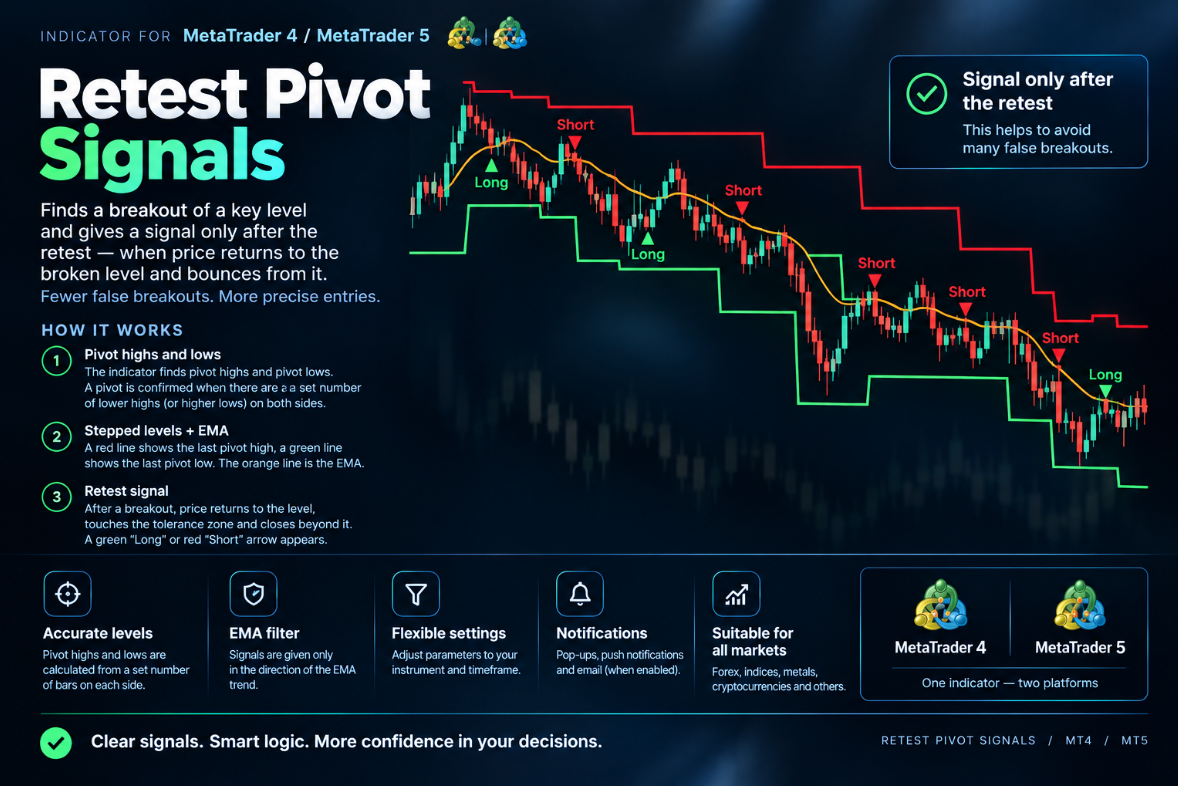
Retest Pivot Signals finds swing highs and lows (pivots) and trades the classic "break and retest" pattern around them. A pivot is confirmed once it has been the highest high or lowest low over the number of bars set in Pivot Length, and the most recent pivot high and pivot low are drawn as horizontal lines. When price closes beyond one of these levels, the indicator marks it as broken and starts watching for a return to it.

A signal appears when price comes back to test the broken level, within the Retest Tolerance (%) range, and closes back on the breakout side. A "Long" arrow is drawn below the bar after an upside breakout and a successful retest of the former resistance. A "Short" arrow is drawn above the bar after a downside breakout and a retest of the former support. Each breakout produces at most one signal, so the chart stays clean. The optional EMA trend filter (Use EMA Trend Filter, EMA Length) keeps only the signals that agree with the trend: longs above the EMA and shorts below it. The signals are generated on bar close, and the arrows automatically keep their distance from the candles when you zoom or resize the chart. The indicator can notify you by pop-up alert, push notification or email (Alerts, Push Notifications, Email Notifications).

MT5-version: https://www.mql5.com/en/market/product/200224

MT4-version: https://www.mql5.com/en/market/product/200236
Evgeniy Zhdan
Evgeniy Zhdan Prodotto pubblicato

Retest Pivot Signals è un indicatore per MetaTrader 5 che rileva la rottura di un livello pivot importante e genera il segnale solo dopo il retest di quel livello, cioè quando il prezzo torna sulla linea rotta e rimbalza da essa. Questo filtra una parte delle false rotture: il segnale arriva dopo la conferma del livello e non nel momento della rottura. MT5-version:  https://www.mql5.com/en/market/product/200224 Come funziona L'indicatore individua i massimi e i minimi pivot. Un pivot viene

Evgeniy Zhdan
Evgeniy Zhdan Prodotto pubblicato

Retest Pivot Signals è un indicatore per MetaTrader 5 che rileva la rottura di un livello pivot importante e genera il segnale solo dopo il retest di quel livello, cioè quando il prezzo torna sulla linea rotta e rimbalza da essa. Questo filtra una parte delle false rotture: il segnale arriva dopo la conferma del livello e non nel momento della rottura. MT4-version:  https://www.mql5.com/en/market/product/200236 Come funziona L'indicatore individua i massimi e i minimi pivot. Un pivot viene

Eleni Anna Branou - Juvenille Emperor Limited
Eleni Anna Branou
Matrix Arrow Indicator MT4/5© is a unique 10 in 1 trend following 100% non-repainting multi-timeframe indicator that can be used on all symbols/instruments: forex, commodities, cryptocurrencies, indices, stocks. Matrix Arrow Indicator MT4/5© will determine the current trend at its early stages, gathering information and data from up to 10 standard indicators, which are: Average Directional Movement Index (ADX), Commodity Channel Index (CCI), Classic Heiken Ashi candles, Moving Average, Moving Average Convergence Divergence (MACD), Relative Vigor Index (RVI), Relative Strength Index (RSI), Parabolic SAR, Stochastic Oscillator, Williams' Percent Range.

When all indicators give a valid buy or sell signal, a corresponding arrow will be printed on the chart, at the opening of the next candle/bar indicating a strong uptrend/downtrend. The user can choose which indicators will use and can adjust the parameters of each indicator separately. Matrix Arrow Indicator MT4/5© gathers information only from the selected indicators and prints the arrow based only on their data. Matrix Arrow Indicator MT4/5© can also send terminal, push notification or email alerts for all new signals. Matrix Arrow Indicator MT4/5© is a super friendly & efficient solution whether you are a scalper, intraday or swing trader!

Matrix Arrow Indicator MT4/5© comes with a free add on, the Matrix Arrow Indicator Multi Timeframe Panel MT4/5© that offers the option to show the Matrix Arrow Indicator signals for 5 customizable timeframes of 16 modifiable symbols/instruments. It gives also the option to change the current chart it is attached onto, by clicking any one of the 16 modifiable symbol buttons. This will allow you to work much faster between different symbols and never miss a trading opportunity again.

✔️ 100% Non-Repainting indicator
✔️ 10 in 1 unique and extremely efficient Matrix and Arrow indicator
✔️ Works on all timeframes and all symbols/instruments
✔️ Super accurate entry Arrow signals that indicate a strong trend
✔️ Exit dot signals define neutral periods with no clear trend
✔️ Equally effective in trending and ranging markets
✔️ Each one indicator can be turned ON/OFF
✔️ Each and every parameter of all 10 indicators are fully adjustable
✔️ Matrix and Arrow colors are fully customizable
✔️ Free add on Panel with Matrix Arrow signals for 16 symbols and 5 timeframes
✔️ Terminal, Push Notification and Email Alerts available
✔️ Ideal for beginners but also a great asset for experienced traders

🔥🔥🔥🔥🔥 Matrix Arrow Indicator MT4/5© Demonstration Video: https://www.youtube.com/watch?v=-teba5v_90I

⭐️⭐️⭐️⭐️⭐️ Matrix Arrow Indicator MT4©: https://www.mql5.com/en/market/product/69726

⭐️⭐️⭐️⭐️⭐️ Matrix Arrow Indicator MT5©: https://www.mql5.com/en/market/product/69725

👉 Matrix Arrow Indicator MT4/5© Real Trading Examples: https://www.mql5.com/en/blogs/post/745715

✅ Matrix Arrow Indicator MT4/5© Installation Guide: https://www.mql5.com/en/blogs/post/745711

✅ Matrix Arrow Indicator MT4/5© Settings/Inputs: https://www.mql5.com/en/blogs/post/745707

💎💎💎💎💎 Check out all my Expert Advisors, Indicators and Utilities: https://www.mql5.com/en/users/eleanna74/seller

8 October 2026
Alexander Zelchert - AW Trading Software Limited
Alexander Zelchert Segnale MetaTrader 4 pubblicato
AW Breakout Catcher EA
Prezzo: 30 USD, Crescita: 0.27%