AutoPilot Trading Service

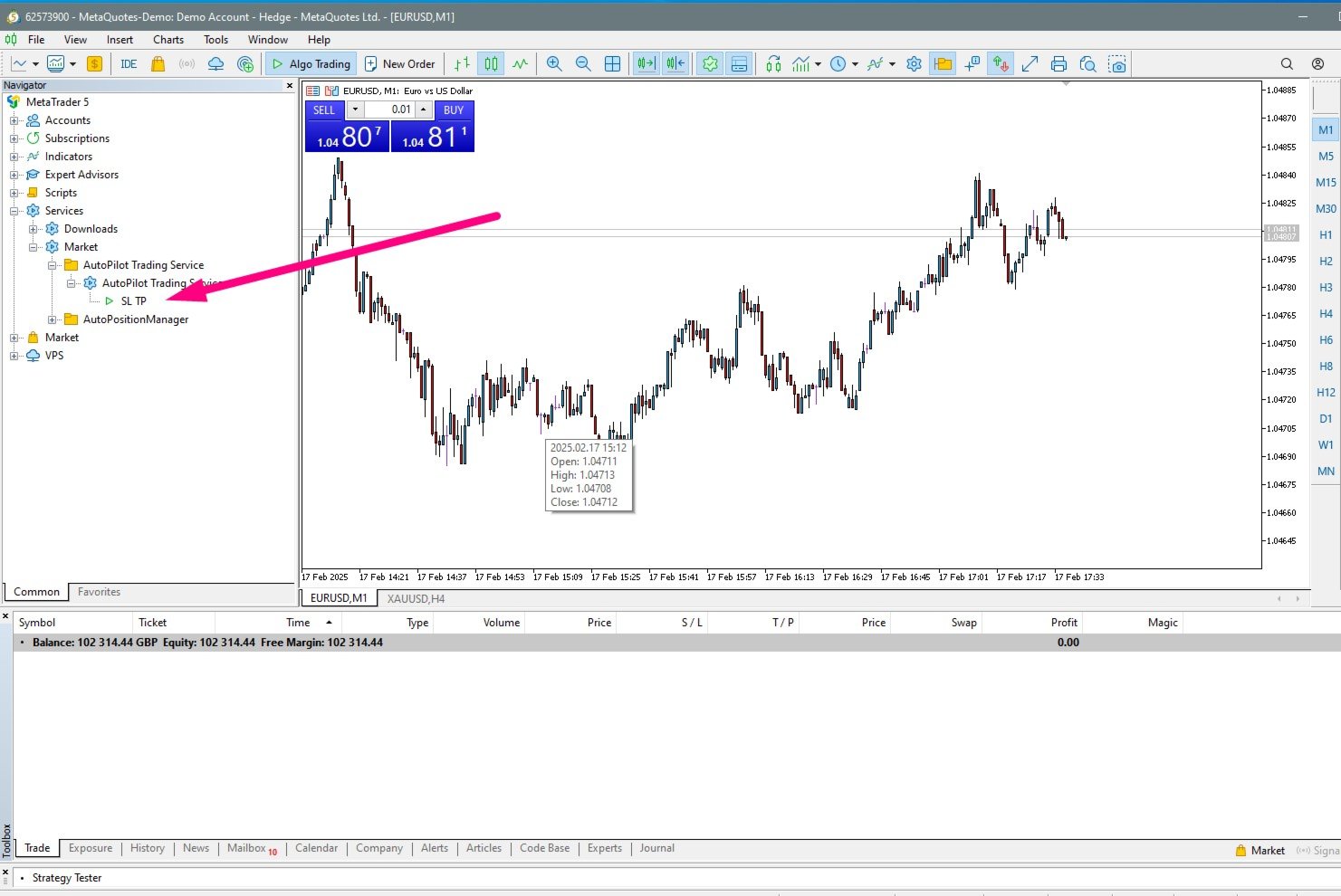
AutoPilot Trading Service for MetaTrader 5 is an advanced application designed to enhance the MT5 platform by automating and optimizing both manual and algorithmic trading activities. By integrating seamlessly into the (recommended but not mandatory) <terminal_directory>\MQL5\Services directory, this service not only supports the automation of trading strategies but also improves the execution of trades, whether they are initiated manually or through Expert Advisors (EAs). The AutoPilot Trading Service excels in managing top-performing positions, enabling traders to maximize returns and minimize risks effectively. Moreover, this service stands out as a unique offering on the MQL5 market, setting a new standard for trading tools. It provides traders with a powerful, versatile tool, facilitating better management and oversight of their trading portfolios, making it an indispensable asset for anyone looking to leverage the full potential of the MetaTrader 5 platform.

Key Features:

  1. Comprehensive Order Management:

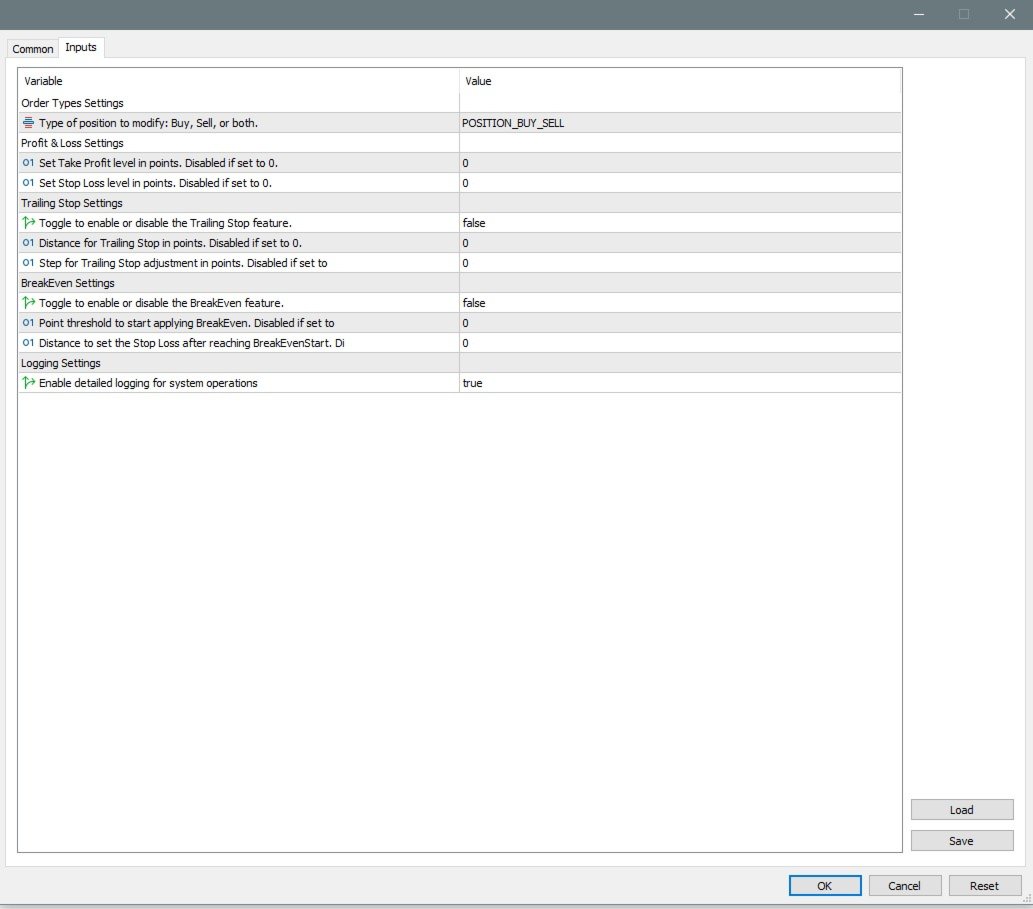
    • Automates the modification of trading orders based on predefined rules for stop loss, take profit, trailing stop, and breakeven levels.
  2. Flexible Trading Options:

    • Supports various trading scenarios through customizable settings for buying, selling, and dual-operation modes on multiple currency pairs.
  3. Advanced Trailing and BreakEven Functions:

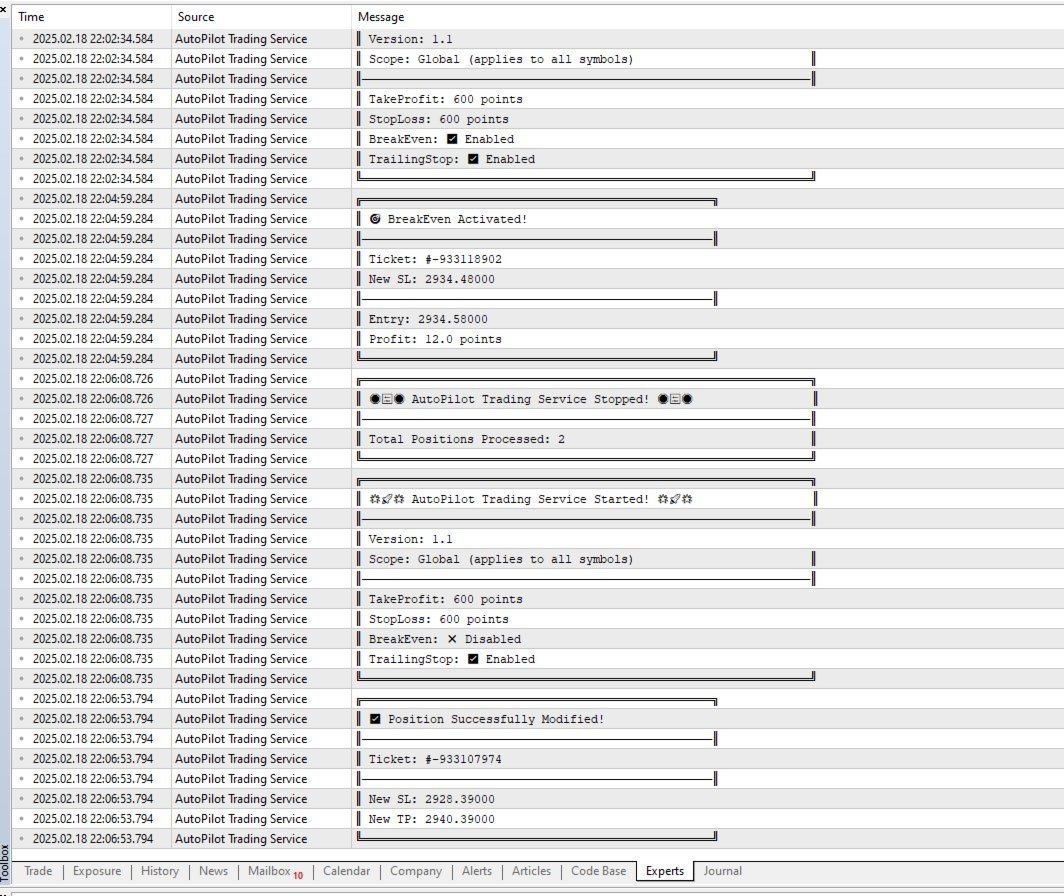
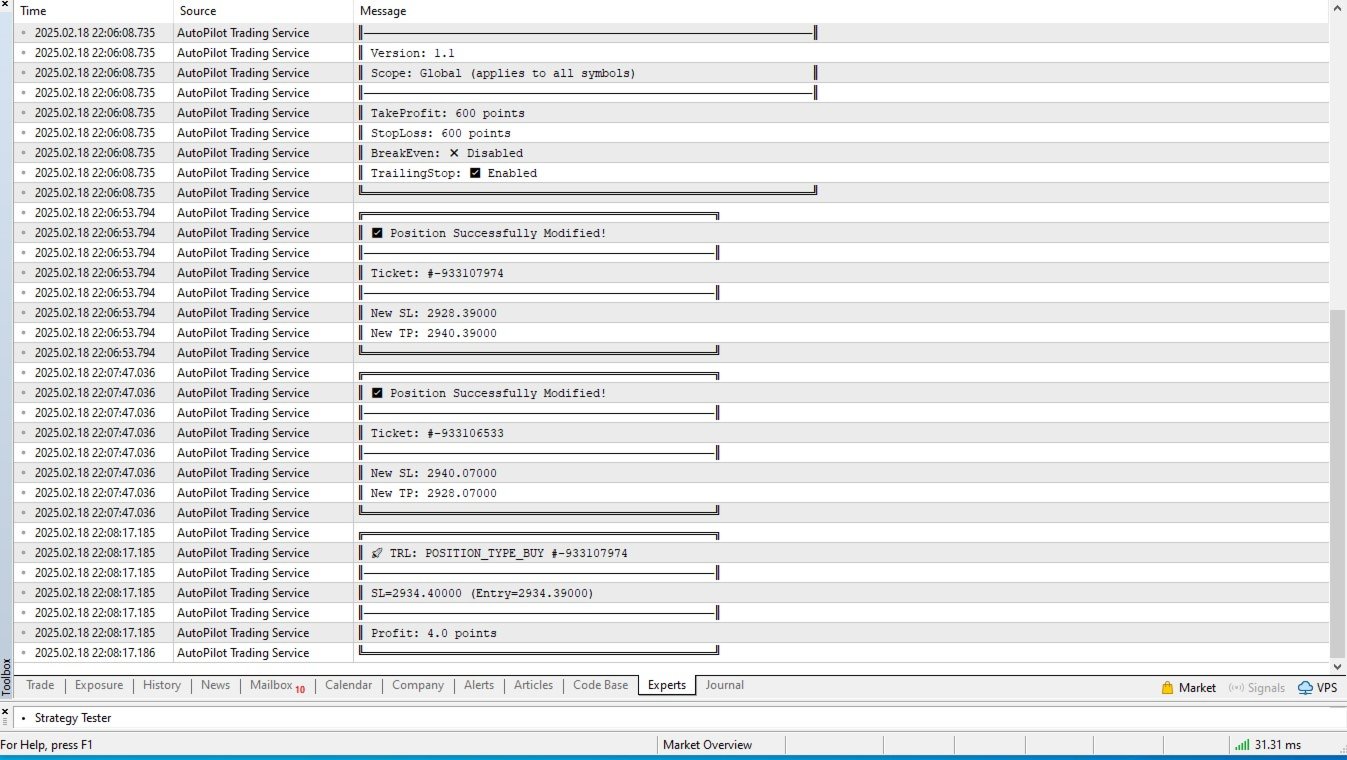
    • Trailing stop functionality allows for dynamic adjustment of stop loss to protect gains as prices move favorably.
    • BreakEven functionality secures trading positions by adjusting the stop loss to the entry point once a specified profit threshold is reached.
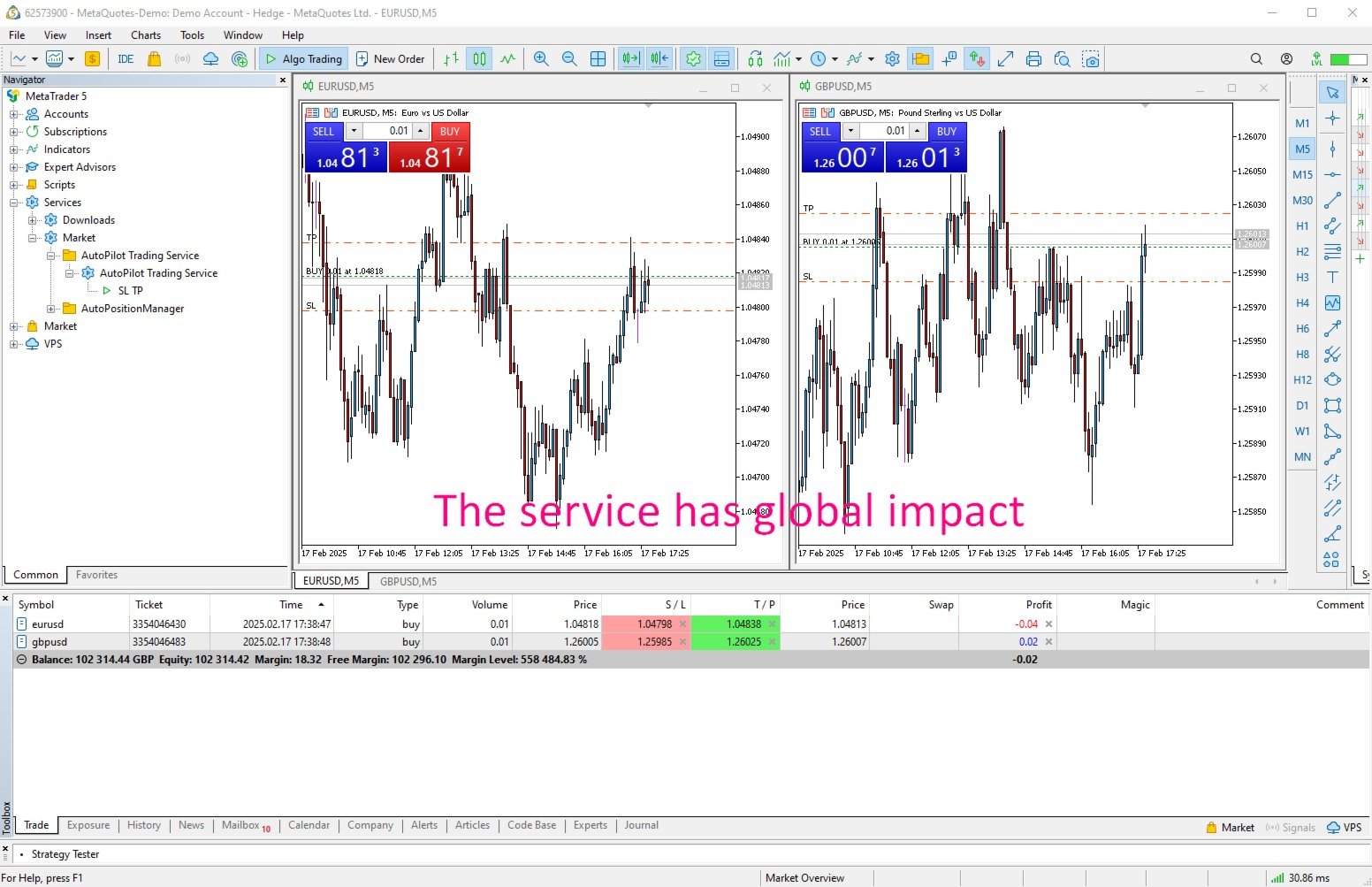
  4. Global Impact:

    • Designed to operate on a system-wide level, impacting all trading activities on the account. Users trading manually or using other automated systems on the same account should be aware of its pervasive effects.
  5. User Control and Customization:

    • Each operational feature (e.g., Trailing Stop, BreakEven) can be individually activated or deactivated, giving traders control over which functions are active at any time.
    • Offers detailed logging options to monitor and review all modifications and trading actions performed by the service.

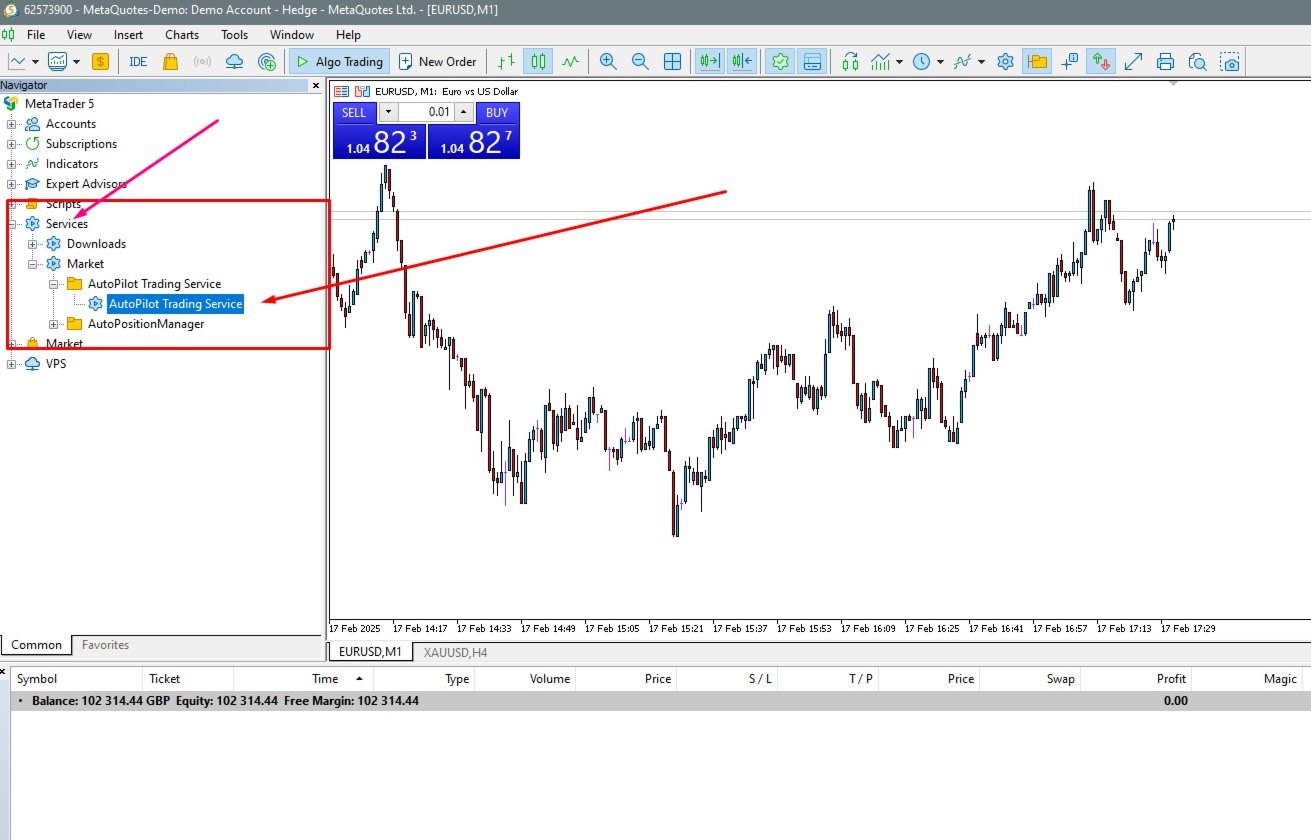
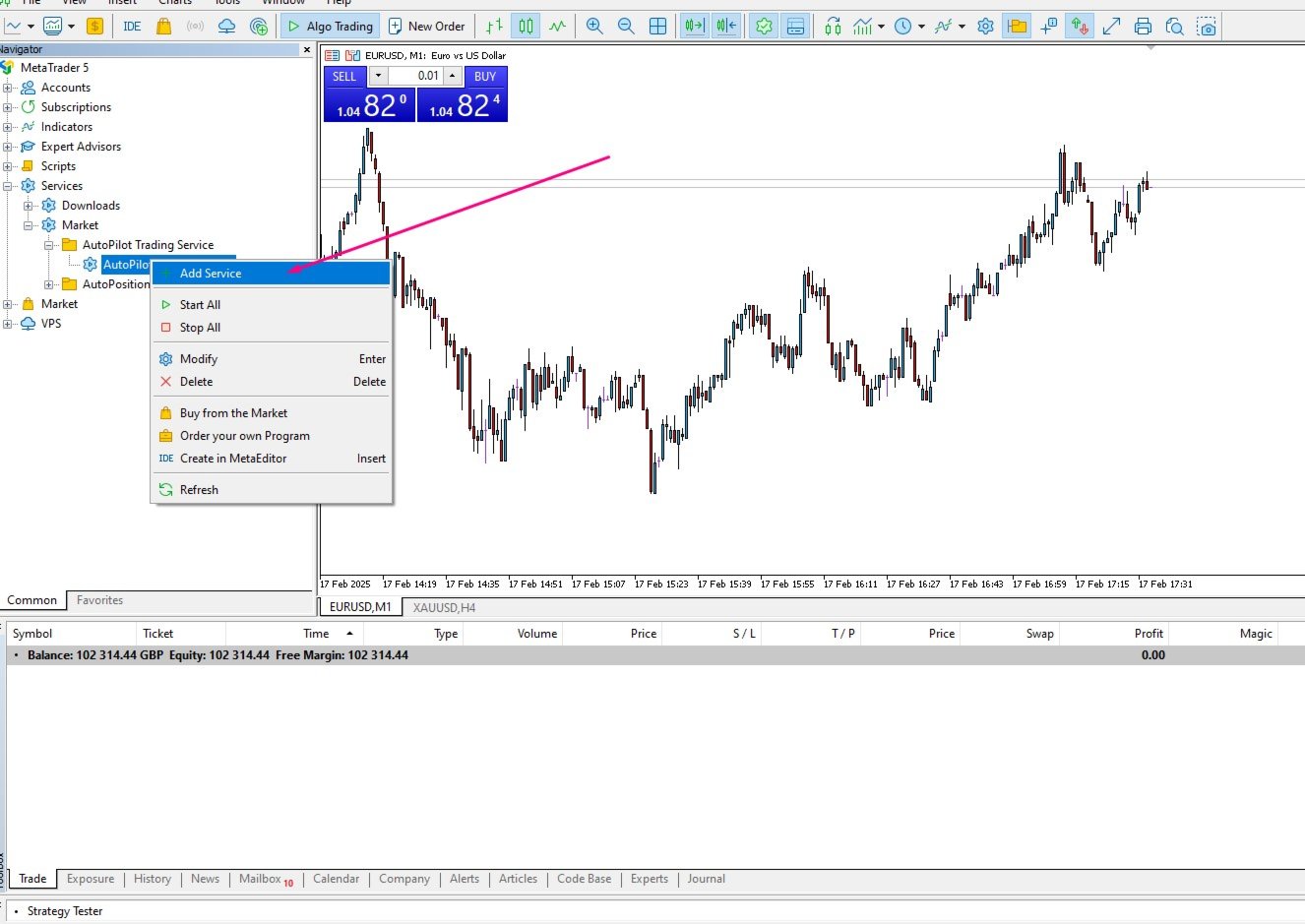
Usage Instructions: To use AutoPilot Trading Service, simply place the service file into the designated Services directory of your MT5 terminal. Configure the settings via the input parameters to match your trading strategy. Once activated, the service will automatically manage all specified trading orders according to the settings provided.

Note: This service influences all trading operations across various currency pairs simultaneously and can have significant implications for your overall trading strategy. It is crucial for traders to understand the scope of changes made by this service and to configure its settings responsibly to align with their overall trading objectives.

By leveraging the AutoPilot Trading Service, traders can enhance their trading efficiency and effectiveness, capitalizing on automated adjustments to trading orders that respond intelligently to market changes.

Helpful Links

Installation Guide

  • For detailed instructions on purchasing and installing a trading robot from the MQL5 Market, refer to this article.

Testing

  • How to Test a Trading Robot Before Buying: Read more

Warning: I sell all my products only via the MQL5 website. If you see them somewhere else, be aware of scams.
推荐产品
Free automatic Fibonacci is an indicator that automatically plots a Fibonacci retracement based on the number of bars you select on the BarsToScan setting in the indicator. The Fibonacci is automatically updated in real time as new highest and lowest values appears amongst the selected bars. You can select which level values to be displayed in the indicator settings. You can also select the color of the levels thus enabling the trader to be able to attach the indicator several times with differe
FREE
Donchian Breakout And Rsi
Mattia Impicciatore
4.33 (3)
概述 本指标是经典 Donchian 通道 的增强版,增加了多种实用的交易功能。 除了标准的三条线(最高、最低和中线),系统能够检测 突破 ,并在图表上用箭头进行可视化标记,同时只显示 与当前趋势方向相反的那条线 ,让图表更加简洁。 功能包括: 可视化信号 :突破时在图表上绘制彩色箭头 自动通知 :弹窗、Push 推送和 Email 邮件 RSI 过滤 :根据市场相对强弱验证信号 个性化设置 :颜色、线条粗细、箭头符号、RSI 阈值等 工作原理 Donchian 通道计算: 上轨线 :最近 N 根已收盘 K 线的最高价 下轨线 :最近 N 根已收盘 K 线的最低价 中线 :最高价和最低价的平均值 看涨突破 :收盘价高于上轨线 看跌突破 :收盘价低于下轨线 指标会: 绘制三条 Donchian 通道线 仅在 方向变化后的首次突破 绘制箭头 隐藏顺应趋势方向的那条线(上涨趋势: 只显示红色下轨线;下跌趋势: 只显示绿色上轨线) 可选用 RSI 过滤突破信号,减少虚假突破 支持实时发送通知 参数说明 Donchian 通道设置 indPeriod :计算通道高低点的已收盘 K 线数量 Lin
FREE
Elevate Your Trading with Advanced Anchored Volume Weighted Average Price Technology Unlock the true power of price action with our premium Anchored VWAP Indicator for MetaTrader 5 - the essential tool for precision entries, strategic exits, and high-probability trend continuation setups. Write me a DM for a 7 day free trial.  Anchored VWAP Plus gives traders unprecedented control by allowing custom anchor points for Volume Weighted Average Price calculations on any chart. With support for 4 sim
FREE
Trendline mt5 indicator
David Muriithi
4 (2)
Are you tired of drawing trendlines every time you're analyzing charts? Or perhaps you would like more consistency in your technical analysis. Then this is for you. This indicator will draw trend lines automatically when dropped on a chart. How it works Works similar to standard deviation channel found on mt4 and mt5. It has 2 parameters: 1. Starting Bar 2. Number of bars for calculation The   starting bar   is the bar which drawing of the trend lines will begin, while the   number of bars for c
FREE
Blahtech VWAP MT5
Blahtech Limited
5 (1)
Blahtech VWAP - Volume Weighted Average Price (VWAP) is the ratio of price to total volume. It provides an average price over a specified time interval.  Links [  Install  |  Update  |  Documentation   ] Feature Highlights Configurable VWAP Line Sessions, intervals, anchored or continuous Previous day settlement line Standard Deviation bands Alerts at bar close or real time Automatic Broker or Tick volumes Significantly reduced CPU usage Input Parameters Expert Advisor Mode  - Reserved for iCu
FREE
Donchian Pro
Paulo Henrique Faquineli Garcia
5 (3)
The Donchian Channel Channels are among the most popular tools of technical analysis, as they visually convey to the analyst the limits within which most price movement tends to occur. Channel users know that valuable information can be obtained at any time, whether prices are in the central region of a band or close to one of the border lines. One of the best known techniques to explore these concepts is Bollinger Bands. However, John Bollinger was not the only one to research the application
FREE
Prometheus Analyst
Humphrey Mangera
PROMETHEUS TECHNICAN VERSION Free | By THE SONS A gift from The Sons — no strings, no trial, no expiry. Every trader deserves access to professional-grade market intelligence. That belief is why Prometheus Technical Version exists, and why it costs nothing. Consider it our handshake to the trading community. What You're Getting This is not a simplified tool dressed up as a gift. Prometheus Technican Version is a fully built, institutional-quality technical analysis indicator running a dual-model
FREE
MSX Hybrid Heiken Scalper
Som Prakash Gehlot
5 (1)
MSX Hybrid Heiken Scalper Overview MSX Hybrid Heiken Scalper is a MetaTrader 5 indicator based on a modified Heiken Ashi methodology with closed-bar smoothing. The indicator is designed to display trend direction through color-coded candles while reducing sensitivity to short-term market fluctuations. All calculations are performed using completed candles, allowing historical values to remain fixed after bar close. Features • Modified Heiken Ashi calculation • Closed-bar processing • Color-code
FREE
MACD Colored ZeroLag
Farzin Sadeghi Bonjar
4.73 (11)
It is the MQL5 version of zero lag MACD that was available for MT4 here: https://www.mql5.com/en/code/9993 Also there was a colored version of it here but it had some problems: https://www.mql5.com/en/code/8703 I fixed the MT4 version which has 95 lines of code. It took me 5 days to write the MT5 version.(reading the logs and testing multiple times and finding out the difference of MT5 and MT4!) My first MQL5 version of this indicator had 400 lines of code but I optimized my own code again and n
FREE
ConsistencyGuard
Vanessa Cristina Ribeiro Dos Anjos
版本 7.04 重大更新,重点加强日内交易纪律和账户保护。 • Post-Session Review(交易后复盘)模式,复盘时间可设置为 0 至 60 分钟。 • 完成当天允许的交易次数后,交易者可以保持 MetaTrader 5 开启,用于查看图表、截图以及填写交易日志。 • 达到每日交易次数限制后,如果尝试进行新的交易,将触发 Emergency Close(紧急平仓)保护。 • Emergency Close 会关闭未平仓头寸并取消挂单,然后锁定交易时段并关闭 MetaTrader 5。 • 持久化每日锁定机制可防止交易者在严重违规后重新打开 MetaTrader 5 继续交易。 • 最大授权交易手数保护。 • 最大交易手数提高后将锁定 7 天。在此期间仍允许使用更小的交易手数。 • 改进交易次数统计。 • 部分平仓不会被计算为新的交易。 • 面板实时显示 Realized P/L(已实现盈亏)和 Floating P/L(浮动盈亏)。 • 改进连续止损统计。 • 图表面板更加紧凑、简洁。 • 每日交易次数直接显示在图表上。 • 改进 MetaTrader 5 重启后的交易规则
FREE
Heiken Ashi Smoothwave
Alexandre Vincent Traber
概述 Heiken Ashi Smoothwave 将您的图表直接转换为平滑的平均K线(Heiken Ashi),并在主图表窗口中替代标准K线,呈现更清晰的趋势视图。无需单独窗口,界面简洁。 工作原理 每根K线根据真实价格数据计算 Heiken Ashi 的开高低收值。 直接在主图表上绘制彩色 Heiken Ashi K线。 自动隐藏原生图表K线,仅显示 Heiken Ashi K线。 移除指标时自动恢复标准K线。 输入参数 无可配置参数,添加即可使用。 推荐设置 适用于任何交易品种、任何时间周期。可在外汇、黄金、指数及MetaTrader 5支持的任何品种上使用。 截图 应用 Heiken Ashi Smoothwave 后的图表,原生K线已自动隐藏。 免责声明 本指标为趋势分析的可视化工具,并非交易信号生成器。过往表现及视觉平滑效果不保证未来结果。使用真实账户前请务必先在模拟账户上测试。
FREE
MACD Intraday Trend
JETINVEST
4.81 (57)
免费的斐波那契比例 MACD,用于日内趋势。需要警报和完整工具包? MACD Intraday Trend PRO MACD 日内趋势是通过改编自 Gerald Appel 在 1960 年代创建的原始 MACD 而开发的指标。 通过多年的交易,观察到通过使用斐波那契比例更改 MACD 的参数,我们可以更好地呈现趋势运动的连续性,从而可以更有效地检测价格趋势的开始和结束。 由于其检测价格趋势的效率,还可以非常清楚地识别顶部和底部的背离,从而更好地利用交易机会。 特征 适用于任何货币对 在任何时间范围内工作 适用于 Renko 图表 如果您仍有疑问,请通过直接消息与我联系: https://www.mql5.com/zh/users/robsjunqueira/ ----------------------------------------- 如果可能,请留下您的评论和评论,以帮助向社区传播信息。 还可以了解我们的其他指标和专家顾问。 我有几种有用的指标和专家顾问。 如果您有任何建议,请随时提出建议,这样我才能改进产品,使持续改进永无止境。
FREE
Follow The Line MT5
Oliver Gideon Amofa Appiah
4.6 (35)
This indicator obeys the popular maxim that: "THE TREND IS YOUR FRIEND" It paints a GREEN line for BUY and also paints a RED line for SELL. (you can change the colors). It gives alarms and alerts of all kinds. IT DOES NOT REPAINT and can be used for all currency pairs and timeframes. Yes, as easy and simple as that. Even a newbie can use it to make great and reliable trades. NB: For best results, get my other premium indicators for more powerful and reliable signals. Get them here: https://www.m
FREE
Simple MACD Expert
Abraao Moreira
3 (1)
Why use it A simple, readable rule: the EA trades when the MACD and its signal line both cross the zero line. Every position gets a stop loss and a take profit when you set them. Daily gain and daily loss limits in money: when one is hit, the EA closes its positions and stops for the day. A trading-hours window, plus a clear message if the volume does not fit the symbol. How the rule works MACD is calculated on every tick and the EA keeps the last three values. When the latest MACD value is abo
FREE
MACD Enhanced
Nikita Berdnikov
4 (4)
Introducing the MACD  Enhanced – an advanced MACD (Moving Average Convergence Divergence) indicator that provides traders with extended capabilities for trend and momentum analysis in financial markets. The indicator uses the difference between the fast and slow exponential moving averages to determine momentum, direction, and strength of the trend, creating clear visual signals for potential entry and exit points. Attention! To achieve the best results, it is recommended to adapt the indicator
FREE
Basic Vwap
james mugendi
4 (1)
Simple Vwap with the daily, weekly and monthly VWAP is the abbreviation for   volume-weighted average price , which is a technical analysis tool that shows the ratio of an asset's price to its total trade volume. It provides traders and investors with a measure of the average price at which a stock is traded over a given period of time. How it's used Identify entry and exit points:   Traders can use VWAP to determine when to buy or sell an asset.   Understand price trends :  Traders can use V
FREE
MIDAS Super VWAP
Flavio Javier Jarabeck
4.27 (11)
Imagine VWAP, MVWAP and MIDAS in one place... Well, you found it! Now you can track the movement of Big Players in various ways, as they in general pursue the benchmarks related to this measuring, gauging if they had good execution or poor execution on their orders. Traders and analysts use the VWAP to eliminate the noise that occurs throughout the day, so they can measure what prices buyers and sellers are really trading. VWAP gives traders insight into how a stock trades for that day and deter
FREE
MA Color Candles
Vladimir Kuzmin
MA Color Candles Indicator MA Color Candles is an indicator for visually displaying market trends by coloring chart candles. It does not add objects or distort price data, instead coloring real candles based on the state of two moving averages. This enables quick trend assessment and use as a filter in trading strategies. How It Works Bullish trend: Fast MA above slow MA, slow MA rising (green candles). Bearish trend: Fast MA below slow MA, slow MA falling (red candles). Neutral state: Candles
FREE
Spike Catch Pro
Amani Fungo
4.14 (7)
Spike Catch Pro 22:03 release updates Advanced engine for searching trade entries in all Boom and Crash pairs (300,500 and 1000) Programmed strategies improvements Mx_Spikes (to combine Mxd,Mxc and Mxe), Tx_Spikes,   RegularSpikes,   Litho_System,   Dx_System,   Md_System,   MaCross,   Omx_Entry(OP),  Atx1_Spikes(OP),   Oxc_Retracement (AT),M_PullBack(AT) we have added an arrow on strategy identification, this will help also in the visual manual backtesting of the included strategies and see ho
FREE
Master HMA
Leonel Alberto Jose Quintana
MetaTrader 5 的 Master HMA Master HMA 是一款适用于 MetaTrader 5 的技术指标,将不同的 Hull Moving Average 计算方式结合到一个可视化结构中,用于分析价格的方向、斜率以及运动行为。 该指标使用三个 HMA 周期:Fast、Main 和 Slow。这些线之间的关系可以帮助观察市场运动结构的变化,并跟踪不同的市场阶段。 Main HMA 使用不同颜色表示系统识别出的状态。指标还可以显示由 Fast 和 Slow HMA 之间关系形成的云带。 结构分析 Master HMA 分析移动平均线行为的不同特征,包括斜率、HMA 之间的距离、压缩、扩张、加速、力量减弱以及云带宽度的变化。 这些信息经过综合分析后,用于形成当前市场运动结构的可视化读数。 Master Score 该指标包含一个名为 Master Score 的内部系统,其计算范围为 -100 至 +100。 计算会考虑 HMA 结构的不同组成部分,包括趋势、斜率、均线之间的关系以及加速度。 Master Score 与 Master State 结合使用,将当前分析状态
FREE
Lot Size Ruler
Joshua Akinetos Malik
SI Ruler A clean, one-click price ruler that shows points and exact dollar cost between any two levels on your chart. Every trader needs to quickly measure the distance between two price levels and know what it costs in real money. Most platforms make this harder than it should be. SI Ruler puts a single icon in the corner of your chart — click it, click your entry level, and drag to your stop or target. The label tells you instantly how many points that distance is and exactly what it costs in
FREE
QuantMatrix Candle Patterns is a free MetaTrader 5 indicator designed to identify classic candlestick formations directly on the chart. The indicator analyzes completed candles and detects recognized bullish, bearish and neutral price-action patterns. When a valid bullish or bearish formation is confirmed, the corresponding BUY or SELL signal is displayed on the following candle . This means the signal is only generated after the source pattern has been completed. The indicator also displays a c
FREE
Free Renko Brick Engine with EMA Overlay No Offline Charts Builds a Renko brick series directly from live price inside a normal MT5 chart — no offline chart, no history conversion, no external plugin. Bricks are constructed with independent open, high, low and close, and EMA 20/50 are computed on the bricks themselves rather than on time based candles. Every brick is logged so you can verify exactly what the engine built.   WHAT IT DOES Constructs Renko bricks in-memory from live tick data, plu
FREE
LT Donchian Channel
Thiago Duarte
4.86 (7)
Donchian Channel is an indicator created by Richard Donchian. It is formed by taking the highest high and the lowest low of the last specified period in candles. The area between high and low is the channel for the chosen period. Its configuration is simple. It is possible to have the average between the upper and lower lines, plus you have alerts when price hits one side. If you have any questions or find any bugs, please contact me. Enjoy!
FREE
Эксперт  MACD_LevelTrader MT5   создан для торговле валютной пары XAUUSD. Данная версия это наработки того, что можно извлечь  из  индикатора MACD и Moving Average.  Важно   перед тестированием изменить настройку с 1000 на 5000                       Offset in points UP from SMA200 for sell              5000                       Offset in points DOWN from SMA200 for buy        5000   Тайм фрейм  М5. Два варианта логики, П араметр  true=вход по уровню  MACD +   SMA200, false=вход по MACD  Тестиру
FREE
Value Chart Candlesticks
Flavio Javier Jarabeck
4.57 (14)
The idea of a Value Chart indicator was presented in the very good book I read back in 2020 , " Dynamic Trading Indicators: Winning with Value Charts and Price Action Profile ", from the authors Mark Helweg and David Stendahl. The idea is simple and the result is pure genius: Present candlestick Price analysis in a detrended way! HOW TO READ THIS INDICATOR Look for Overbought and Oversold levels. Of course, you will need to test the settings a lot to find the "correct" one for your approach. It
FREE
AntaresX Volume Profile — Indicator for MetaTrader 5 AntaresX Volume Profile is an indicator that displays the price levels where the highest trading activity was concentrated during a selected period, and calculates the historical probability of the price reacting when it reaches each of those levels. What the indicator draws The indicator identifies three levels on the chart: POC (Point of Control): the price where the highest trading activity was recorded during the selected period. Displaye
FREE
VisualVol EURUSD
Maxim Kuznetsov
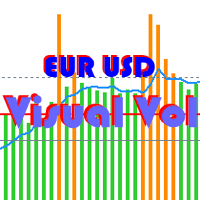
The indicator highlights the points that a professional trader sees in ordinary indicators. VisualVol visually displays different volatility indicators on a single scale and a common align. Highlights the excess of volume indicators in color. At the same time, Tick and Real Volume, Actual range, ATR, candle size and return (open-close difference) can be displayed. Thanks to VisualVol, you will see the market periods and the right time for different trading operations. This version is intended f
FREE
Montecarlo forecast
Giuseppe Pajusco
Description of the MonteCarloBands Indicator The   MonteCarloBands   indicator is a forward-looking analytical tool that employs the Monte Carlo method to project potential future price scenarios of a financial asset. It appears as a set of five percentile bands extending into the future, visualizing a "probability cone" based on the historical behavior of the market. Visual Appearance: P50 (Median) : Solid green line at the center, representing the expected median path P25 and P75 : Two orange
FREE
TradeVision Pro
Ian Nganga Comba
TradeVisonPro Forex Analyzer Pro MT5 交易账户分析与监控仪表板 TradeVisonPro Forex Analyzer Pro 是一款专为 MetaTrader 5 用户设计的交易分析和账户监控解决方案。 本产品将 MT5 交易数据整理到结构化的网页仪表板中,使交易者能够查看账户信息、监控未平仓头寸、分析交易历史、跟踪策略、记录交易日志以及查看绩效统计数据。 TradeVisonPro Forex Analyzer Pro 旨在帮助交易者整理交易信息,并通过受支持的桌面和移动网页浏览器访问这些数据。 主要功能 • MT5 账户仪表板 • 未平仓头寸监控 • 交易历史分析 • 交易日历 • 策略跟踪 • 交易日志 • 账户绩效统计 • 绩效报告 • 交易通知 • 多账户支持 • 可分享的只读报告 MT5 账户仪表板 在一个结构化的仪表板中查看 MetaTrader 5 交易账户的重要信息。 可显示的信息包括: • 账户余额 • 净值 • 可用保证金 • 保证金水平 • 未平仓头寸 • 浮动盈亏 • 交易量 • 经纪商信息 • 账户信息 仪表板集中显示
FREE
该产品的买家也购买
Trade Assistant MT5
Evgeniy Kravchenko
4.43 (216)
它有助于计算每笔交易的风险,容易安装新的订单,具有部分关闭功能的订单管理, 7 种类型的追踪止损和其他有用的功能。   附加材料和说明 安装说明   -   应用程序说明 线条功能  - 在图表上显示开仓线、止损线、止盈线。 有了这个功能,就可以很容易地设置一个新的订单,并在开仓前看到它的附加特性。   风险管理  - 风险计算功能在考虑到设定的风险和止损单的大小的情况下,计算新订单的成交量。它允许你设置任何大小的止损,同时观察设定的风险。 批量计算按钮 - 启用 / 禁用风险计算。 在 " 风险 " 一栏中设置必要的风险值,从 0 到 100 的百分比或存款的货币。 在 " 设置 " 选项卡上选择风险计算的变量: $ 货币, % 余额, % 资产, % 自由保证金, % 自定义, %AB 前一天, %AB 前一周, %AB 前一个月。   R/TP 和 R/SL - 设置止盈和止损的关系。 这允许你设置相对于损失的利润大小。 例如, 1 : 1 - 这决定了 TP = SL 的大小。 2 : 1 - 这意味着 TP 是 SL 的两倍。 RR - 它禁用比率。   订单管理 该面板支
Farmed Hedge Yield Farming | All Markets (Manual - Hybrid - Semi/Automated EA) VERIFIED TRADING RESULTS - Farmed Hedge Yield Axi Copy:  https://www.mql5.com/en/signals/2356376 - Farmed Hedge Yield Exn Copy:   https://www.mql5.com/en/signals/2356404 - Farmed Hedge Yield V Copy:  https://www.mql5.com/en/signals/2357156 IMPORTANT NOTICE: FarmedHedge is a MANUAL-FOCUSED TRADING UTILITY ,not a fully automated EA. Results shown on this Signal include manual trades and overall strategic management.
欢迎来到 Trade Manager EA——这是一个终极风险管理工具,旨在使交易变得更直观、精准和高效。它不仅仅是一个下单工具,而是一个用于无缝交易计划、仓位管理和风险控制的全面解决方案。不论您是新手交易员、资深交易员,还是需要快速执行的剥头皮交易员,Trade Manager EA 都可以满足您的需求,适用于外汇、指数、大宗商品、加密货币等各种市场。 借助 Trade Manager EA,复杂的计算已成过去。只需分析市场,在图表上用水平线标记入场、止损和止盈,设置您的风险水平,Trade Manager 就会立即计算出理想的头寸规模,并实时显示以点、账户货币计价的止损和止盈。每笔交易都得以轻松管理。 主要功能: 头寸规模计算器 :根据定义的风险瞬间确定交易规模。 简单的交易计划 :在图表上用可拖动的水平线直接计划交易,设置入场、止损和止盈。 实时显示 SL 和 TP :以账户货币、点或分显示止损和止盈,便于分析。 高级保护工具 盈亏平衡选项 : 基本盈亏平衡 :当您的交易达到设定水平时自动保护利润。 多级盈亏平衡 :设置多达 4 个级别以逐步保护利润。 尾随止损选项 : 基本尾随
Telegram to MT5 Multi-Channel Copier   可将您 Telegram 和 Discord 频道中的交易信号自动复制到 MetaTrader 5。无需机器人、无需浏览器扩展、无需手动复制。信号一到 Telegram 或 Discord,EA 几秒内就在您的终端开仓。 在复制某个频道之前,内置回测器还能告诉您该频道在您的账户上会有怎样的表现。 产品包含两个组件:一个监听您 Telegram 频道的 Windows 应用程序,以及在 MT5 终端执行信号的本 EA。同时提供 MT4 版本   点此 . 购买前先试用:   应用程序可免费下载。连接您自己的频道,查看每条信号的读取结果。Backtest 选项卡和实际交易需要已购买或已租用的 EA。本页面的免费演示版只能在策略测试器中运行,而策略测试器无法读取 Telegram 和 Discord。 设置指南与应用下载:   https://www.mql5.com/zh/blogs/post/779480 了解如何 回测任何 Telegram 信号频道 。 当前价格将来会上调。 工作原理 应用通过您自己的 Te
Local Trade Copier EA MT5
Juvenille Emperor Limited
4.94 (150)
Local Trade Copier EA MT5 是一款快速、灵活的交易复制工具,用于在同一台 Windows 电脑或 Windows VPS 上的多个 MetaTrader 5 账户之间复制和管理交易。 它将本地交易同步与 Receiver 端的手数管理、风险管理、交易过滤、品种映射、交易管理和账户保护功能结合在一起。 只需约 1 分钟 即可完成 Transmitter 和 Receiver 终端的设置,并可在同一经纪商或不同经纪商的账户之间复制手动交易或 EA 交易。在合适的条件下,本地 MetaTrader 终端之间的交易信息可以在 0.5 秒以内 完成同步。实际交易执行速度取决于经纪商延迟、网络状况、电脑/VPS 性能以及终端负载。 购买前先试用免费演示版 您可以在 MT5 模拟账户上测试 功能完整的 Local Trade Copier EA MT5 免费演示版 ,每次可使用 4 小时 : 下载 Local Trade Copier EA MT5 免费演示版 将下载的文件放入: MT5 → 文件 → 打开数据文件夹 → MQL5 → Experts 然后重新启动 MT
TradePanel MT5
Alfiya Fazylova
4.89 (174)
交易面板是一款多功能交易助手。该应用包含超过50种手动交易功能,并允许您自动执行大多数交易任务。 应用程序说明 : https://www.mql5.com/zh/blogs/post/761102 用于模拟账户的应用程序试用版: https://www.mql5.com/zh/blogs/post/762579 如何安装应用程序: https://www.mql5.com/zh/blogs/post/762580 如何在可视化模式下测试应用程序: https://www.mql5.com/zh/blogs/post/770278 如何在VPS MetaTrader上安装应用程序: https://www.mql5.com/zh/blogs/post/770196 贸易. 只需单击一下即可执行交易操作: 打開掛單和頭寸,並自動計算風險。 一鍵打開多個訂單和頭寸。 打開訂單網格。 按組別關閉掛單和頭寸。 反轉頭寸方向(關閉買入>打開賣出,關閉賣出>打開買入)。 鎖定頭寸(通過開啟缺少的頭寸,使買入和賣出頭寸的數量相等)。 一鍵部分關閉所有頭寸。 將所有頭寸的止盈和止損設置在同一價格水平。
EA Overfitter
Stephen J Martret
5 (4)
回测看起来很漂亮。但它明天、下周、下个月还能继续赚钱吗? EA Overfitter 让您的 EA 在 100 段它从未见过的价格历史上重新运行。一个分数告诉您这个优势是否真实。 回测告诉您的,是 EA 在某一段价格历史上的表现——那段恰好发生过的历史。您无法从中判断,这个结果有多少来自策略本身,又有多少只是那一条特定路径带来的。 EA Overfitter 回答的正是这个问题。它构建最多 100 段您的 EA 从未交易过的合成价格历史,让策略在全部这些历史上重新运行,并展示它所产生的完整结果区间。您得到的不再是一条幸运或不幸路径上的单个数字,而是一幅真实的图景:策略在陌生数据上多久能赚钱、典型结果是什么样(而不是最好的那一次),以及您的回测离它有多远。 这些世界是由您自己的近期历史重建而成,因此这不是预测——任何从历史数据出发的检验都不可能是预测。它告诉您的是:这个优势是否依赖于价格的某一种特定排列,以及回测数字距离典型结果有多远。在投入资金之前,这才是值得回答的问题。 三个步骤 1. 构建。在图表上选择时间区间和世界数量,然后按 Build。EA Overfitter 会
按照自己的交易规则复制 Telegram 信号 Telegram to MT5 Signal Trader 可将 Telegram 公开及私密频道和群组中的文字交易信号自动复制到 MetaTrader 5。通过一个桌面应用管理多个信号提供者和 MT5 账户,并为 每个提供者单独设置风险和交易参数 。 复制信号无需 Telegram 机器人,也无需配置 API。 只需通过手机号或二维码登录您自己的 Telegram 账户,然后选择您已加入的频道或群组。您无需创建机器人,也无需提供 Telegram API 令牌、API ID 或 API hash。 自行选择仓位大小,将平仓分配到多个止盈价位,并自动执行保本止损和移动止损。在跟随信号提供者的同时,掌握信号的实际交易方式。 本产品由这款 MT5 EA 和必须配合使用的 Windows 桌面应用组成。请参阅 安装指南及应用下载 。 管理多个信号提供者和账户 为每个提供者单独设置: 为每个频道设置专属的仓位计算方式、入场规则、止损、止盈和交易管理参数。 灵活分配至不同账户: 将同一提供者的信号复制到多个已连接的 MT5 账户,并为每个账户使用不
Strategy Ledger Pro
Abdullah Uygar Tuna
5 (16)
现已支持中文。 Strategy Ledger Pro 是一款适用于 MetaTrader 5 的只读账户分析面板。它按智能交易系统(EA)、策略、品种和魔术号拆分账户结果,让您看清每一个的真实贡献。 面板支持 11 种语言:English、Français、Deutsch、Español、Italiano、Português、Русский、Türkçe、中文、日本語 和 한국어。 下载演示版之前请注意。 Market 仅在策略测试器中运行任何付费产品的演示版。本面板分析的是您自己账户上的交易,而策略测试器中没有可读取的账户历史,因此演示版会打开一个空面板并加以说明。这是演示机制的工作方式,并非产品的限制。 本描述中的视频展示了面板在真实账户上的运行效果。 详细的 使用手册 (英文)介绍了每项功能, AureusAI Trading Suite 群组欢迎交流讨论并发布公告。 MetaTrader 对整个账户只显示一个余额。当多个 EA 同时交易时,这个余额无法说明每个 EA 的贡献。Strategy Ledger Pro 读取账户历史,重建已平仓头寸,将其归入各个策略,并在一个
Exp COPYLOT CLIENT for MT5
Vladislav Andruschenko
3.97 (35)
适用于 MetaTrader 5 的专业交易复制器 快速、专业、稳定可靠的 交易复制器 ,适用于 MetaTrader 。 COPYLOT 可在 MT4 和 MT5 终端之间复制 Forex 交易,并支持 Hedge 和 Netting 账户。 COPYLOT 的 MT5 版本支持: - MT5 Hedge → MT5 Hedge - MT5 Hedge → MT5 Netting - MT5 Netting → MT5 Hedge - MT5 Netting → MT5 Netting - MT4 → MT5 Hedge - MT4 → MT5 Netting MT4 版本 完整说明 + DEMO + PDF 如何购买 如何安装 如何获取日志文件 如何测试和优化 Expforex 的所有产品 您也可以将交易复制到 MT4 终端(MT4 → MT4,MT5 → MT4): COPYLOT CLIENT for MT4 COPYLOT 是一款专业的交易和持仓复制器,可同时与 2、3 甚至 10 个终端协同工作。 支持从 模拟账户和投资者账户 复制,也支持同时在多个终端上运行。 您可以使
News Trade EA MT5
Konstantin Kulikov
4.55 (11)
在此向大家介绍一款我本人使用多年的机器人。该产品支持半自动和全自动交易模式。 >>> Chat <<< 本程序包含基于经济日历新闻的灵活交易设置功能。不支持策略测试器检验。仅可进行实际操作。 下載最新的設定檔: https://www.mql5.com/en/blogs/post/747929 訊號監控: https://www.mql5.com/en/signals/author/test-standart 请参考博客中各类参数说明自行实现个性化设置   : https://www.mql5.com/en/blogs/post/748545   。 主要默认设置说明 单一图表英镑/GBP(英镑美元/GBPUSD、欧元英镑/EURGBP、英镑日元/GBPJPY、英镑加拿大元/GBPCAD、英镑澳大利亚元/GBPAUD、英镑瑞士法郎/GBPCHF)货币对操作。英镑/GBP是波动性最大的货币,能够为用户顺利完成交易提供更多机会。 Use_Symbols_from_Line = true; Symbols_Line = GBPUSD, EURGBP, GBPJPY, GBPCAD, GB
================================================================================ POC BREAKOUT - V20.72. Full Professional Grade Toolkit ================================================================================ POC Breakout is a full MetaTrader 5 trading dashboard for discretionary traders who want breakout signals, Point of Control (POC) context, volume profiles, order flow, market structure, news, alerts, and advanced trade planning in one professional workspace. Attached directly to you
The product will copy all telegram signal to MT5 ( which you are member) , also it can work as remote copier.  Easy to set up, copy order instant, can work with almost signal formats, image signal,  s upport to translate other language to English Work with all type of channel or group, even channel have "Restrict Saving Content", work with  multi channel, multi MT5 Work as remote copier: with signal have ticket number, it will copy exactly via ticket number. Support to backtest signal. How to s
下一次更新 — 版本 2.52 即将推出![全新功能] 准备迎接 4 项重大新功能,全面提升您的市场分析能力与交易流程! 我们将通过 4 项全新功能,进一步提升市场分析水平,满足您的交易需求。现为您介绍: 1. TRADE OVERVIEW DASHBOARD 2. CONFLUENCE AT ZONE 3. STRONG & WEAK HIGH/LOW 4. OTE 1. TRADE OVERVIEW DASHBOARD 一个帮助您更轻松地了解整体市场状况的仪表盘,为您的交易决策提供参考指引,帮助您系统地分析市场并规划交易,所有信息尽在一个屏幕中。 多时间周期市场概览(Multi-Timeframe Market Overview) 更清晰地了解市场方向与价格结构 快速查看市场状况 为系统化市场分析和入场规划提供指引。 2. CONFLUENCE AT ZONE 当价格进入关键区域时……您将了解有多少项支持因素相互吻合。 关键区域是交易决策至关重要的地方。但仅仅是价格进入某个区域还不够。此功能可帮助您在入场交易前,识别相互吻合的因素,包括信号及其他相关因素,从而进行更全面的分析,并
EA Auditor
Stephen J Martret
5 (7)
EA Auditor is an independent analysis tool for traders evaluating Expert Advisors and trading signals on MetaTrader 5. It audits backtest reports, reviews posted developer signals, and cross-verifies the two against each other to help traders assess strategies before committing capital. The MQL5 market offers a wide range of Expert Advisors from many developers, with varying approaches, quality, and transparency. EA Auditor provides a consistent, data-driven framework for reviewing them, answer
Telegram To MT5 Ultra
Mirel Daniel Gheonu
5 (5)
Telegram To MT5 — 信号复制器 将您的 Telegram 频道中的交易信号变成真实的 MT5 订单 — 自动执行,可用于任意数量的账户,风险与规则完全由您掌控。 Telegram To MT5 将您已在 Telegram 关注的 VIP / 信号频道连接到您的 MetaTrader 5 终端。一个免费的配套桌面应用读取消息(即使是禁止机器人的频道),而本 EA 在您的账户上执行这些信号 — 应用您自己的风险设置、品种映射、止盈处理、交易时段与新闻过滤。 它是一个信号复制器,而非黑箱策略:由您决定信任哪些频道,以及每笔交易如何计算手数和管理。 分步设置与配套应用安装指南 工作原理 [您的 Telegram 频道] -> [配套桌面应用] -> [MT5 + 本 EA] -> 订单 配套桌面应用(免费,已包含)使用您的 Telegram 账户登录并监视您所选择的频道。即使是禁止机器人的 VIP 频道也能正常工作,它通过一个私有、加密的本地桥接转发每条消息。 本 EA 挂在一个图表上,在 MT5 接收这些信号,并按照您的规则开仓 / 管理交易。 应用与 EA 之间的连接是位于
HINN MagicEntry Extra
ALGOFLOW OÜ
4.74 (19)
HINN MAGIC ENTRY – the ultimate tool for entry and position management! SIMPLE. FASTEST. INTUITIVE. MAX AUTOMATED. Place orders by selecting a level directly on the chart! full description   ::  demo-version  :: 60-sec-video-description Key features: - Market, limit, and pending orders - Automatic lot size calculation - Automatic spread and commission accounting - Unlimited partitial take-profits  - Breakeven and trailing stop-loss and take-profit  functions - Invalidation leves - Intuitive, a
Telegram to MT5 Coppy
Sergey Batudayev
5 (10)
Telegram 到 MT5: 终极信号复制解决方案 使用 Telegram 到 MT5 简化您的交易,这款现代化工具可直接从 Telegram 频道和聊天室复制交易信号到您的 MetaTrader 5 平台,无需 DLL 文件。这款强大的解决方案可确保精准的信号执行、丰富的自定义选项,节省时间并提高您的效率。 [ Instructions and DEMO ] 主要特点 直接 Telegram API 集成 通过电话号码和安全码进行身份验证。 通过用户友好的 EXE 桥轻松管理聊天 ID。 添加、删除和刷新多个频道/聊天以同时复制信号。 使用高级过滤器进行信号解析 跳过包含异常词(例如“报告”、“结果”)的不需要的信号。 支持灵活的 SL 和 TP 格式:价格、点数或点数。 自动计算指定点而不是价格的信号的切入点。 订单定制和灵活性 使用多种模式配置订单大小:固定手数、动态手数(% 风险)或特定符号手数。 使用信号数据或自定义参数调整 SL/TP。 设置滑点限制、挂单到期时间和重试参数,以实现无缝执行。 综合符号管理 排除特定符号或映射到特定经纪人的符号。 自定义信号和经纪商符号之间
Trade copier MT5
Alfiya Fazylova
4.61 (57)
Trade Copier 是一种专业实用程序,旨在复制和同步交易账户之间的交易。 复制发生从供应商的帐户/终端到收件人的帐户/终端,安装在同一台计算机或 vps 上。 在购买之前,您可以在演示帐户上测试演示版本。 演示 这里 。 完整说明 这里 。 主要功能和优点: 支持复制MT5>MT5、MT4>MT5、MT5>MT4,包括МТ5 netting账户。 供应商和收件人模式在同一产品中实现。 简单直观的界面,允许您直接从图表中实时控制复制。 连接中断或终端重新启动时不会丢失设置和位置。 允许您选择要复制的符号,也可以替换接收者的符号,例如 EURUSD> USDJPY。 允许为每个符号设置个性化的复制设置。 支持回拷贝。 能够仅复制某些订单。 允许您设置开仓交易价格的最大差异和最大时间延迟。 正确复制部分订单关闭的执行。 计算复制手数的几种方法。 同步止盈和止损。有几种方法可以计算它们的位置。 支持通过执行在“Market account”上工作,其中 SL / TP 仅在开仓后设置。 如何使用简单的设置复制交易 将供应商终端和接收终端安装在同一台计算机或 VPS 上。 在供应商终端上
AW Shepherd Safety MT5
AW Trading Software Limited
5 (5)
AW Shepherd Safety EA 是一款用于管理已开仓位的智能交易系统。首单由交易者通过面板开出,之后由智能交易系统自行管理篮子:结合趋势过滤加开补仓单,按 TakeProfit、追踪或止损平掉该方向的订单,并在图表上显示平仓水平。 买单和卖单分开管理,两个方向可以同时持仓。补仓单并非价格走过设定间距就开出,而是要等 Parabolic SAR、两条 MA 或K线颜色显示价格朝持仓方向反转之后才开出。手动开出的仓位或由其他智能交易系统开出的仓位,只要 Orders Magic number 一致,智能交易系统同样会接管。 智能交易系统如何管理仓位: 1 交易者点击 Open Buy 或 Open Sell 按钮开出首单,手数取自 Order Size 字段。 2 当价格逆向移动达到 Minimal step between recovery orders 且趋势过滤显示反转时,智能交易系统开出补仓单,手数按 Type of increase orders 计算。 3 目标从该方向全部订单的盈亏平衡价起算:每加一张补仓单,盈亏平衡价都会向当前价格靠近。 4 该方向按 Type
News Filter EA
Rashed Samir
5 (2)
News Filter EA: Advanced Algo Trading Assistant News Filter EA is an advanced algo trading assistant designed to enhance your trading experience. By using the News Filter EA , you can integrate a Forex economic news filter into your existing expert advisor, even if you do not have access to its source code. In addition to the news filter, you can also specify trading days and hours for your expert. The News Filter EA also includes risk management  and equity protection features. MT4 Version Ma
MT5 to Telegram Signal Provider 是一个易于使用且完全可自定义的工具,它允许向 Telegram 的聊天室、频道或群组发送 指定 的信号,将您的账户变为一个 信号提供商 。 与大多数竞争产品不同,它不使用 DLL 导入。 [ 演示 ] [ 手册 ] [ MT4 版本 ] [ Discord 版本 ] [ Telegram 频道 ]  New: [ Telegram To MT5 ] 设置 提供了逐步的 用户指南 。 不需要了解 Telegram API;开发者提供了您所需的一切。 关键特性 能够自定义发送给订阅者的订单详情 您可以创建分层的订阅模型,例如铜、银、金。其中金订阅获得所有信号等。 通过 id、符号或评论过滤订单 包括执行订单的图表截图 在发送的截图上绘制已关闭的订单,以便额外核实 延迟发送新订单消息的可能性,以便在发送前对位置进行调整 订单详情完全透明: 新的市场订单*带截图 订单修改(止损、获利) 已关闭的订单*带截图 部分关闭的订单** 新的挂单 修改的挂单(进场价格) 挂单激活(作为新的市场订单附加) 已删除的挂单 历史订单报告
Timeless Charts
Samuel Manoel De Souza
5 (9)
Timeless Charts is an all-in-one trading utility for professional traders. It combines custom chart types such as Seconds Charts and Renko with advanced order flow analysis using Footprints , Clusters , Volume Profiles , VWAP studies, and anchored analysis tools for deeper market insight. Trading and position management are handled directly from the chart through an integrated trade management panel , while Market Replay and Virtual Accounts provide environments for practicing trading skills and
VirtualTradePad PRO SE MT5 — MetaTrader 5 专业交易控制中心 VirtualTradePad PRO SE 是一款基于图表的高级交易面板,也是适用于 MetaTrader 5 的交易管理工作区。它专为希望获得更快执行、更清晰持仓控制、结构化交易管理、可视化价位规划,以及直接在图表上完成专业交易流程的交易者而设计。 这不仅仅是一个 BUY / SELL 面板。PRO SE 将手动交易、挂单、持仓管理、部分平仓、篮子利润/亏损控制、加仓均价层级、ATM 规则、信号监控、实时市场信息、策略测试器 (Strategy Tester) 流程以及面向 VPS 的运行方式整合到一个互相关联的界面中。 MT4 版本 | 完整说明和截图 | 如何购买 | 如何安装 | 如何获取日志文件 | 如何测试与优化 | Expforex 的所有产品 为什么交易者会选择这套面板 图表一键交易 ,并支持键盘快速操作 快速完成开仓、平仓、修改、反转、锁仓与部分平仓 深度控制仓位、挂单、总利润与风控逻辑 自动参数计算,减少手动输入与重复劳动 为什么 PRO SE 比标准手动交易更高
Trader Evolution
Siarhei Vashchylka
5 (7)
" Trader Evolution " - A utility designed for traders who use wave and technical analysis in their work. One tab of the utility is capable of money management and opening orders, and the other can help in making Elliott wave and technical analysis. Manual (Be sure to read before purchasing) | Version for MT4 Advantages 1. Trading in a few clicks. Immediate and pending orders are available in the panel 2. Money management. The program automatically selects the appropriate lot size 3. Simplifies
AW Trade Manager
AW Trading Software Limited
AW Trade Manager 是一款 MetaTrader 5 交易面板,在图表上提供风险/回报工具。交易通过用鼠标拖动 Entry、Stop Loss 和 Take Profit 线来规划:标签显示价格、距离和金额,区域显示盈利和亏损,手数按风险计算。发送之前,确认窗口完整显示这笔交易,包括风险、保证金和该仓位的规则。 使用手册与说明 -> 这里 / 免费 LIVE 演示版 -> 这里 入场后的仓位管理方面,面板提供保本、追踪止损、部分平仓、按时间平仓和隐藏价位。这些功能可在 Rules 选项卡中为所有新交易开启,也可在仓位窗口中只为单个仓位开启。在单笔交易之上,还有账户风险限制、篮子、定时任务、提醒和 MT5 经济日历统一发挥作用。 优势: 图表上的交易计划:Entry、Stop Loss 和 Take Profit 线,带标签、区域和 R:R 按百分比或金额形式的风险计算手数,手数向下取整,入场前即可看到实际风险 市价单和挂单、Stop-Limit、在图表上用标尺设置到期时间、OCO:Mirror、Fork、Pair 保本、7 种追踪止损及 Step lock、TP 和 SL
RETAILBERG FOOTPRINT CHART PRO — Order-Flow Workspace for MetaTrader 5 Version 7.00  |  Professional System  |  31 tools  |  One chart A full 150-page illustrated User Manual is included. Please read the full manual to understand this feature packed footprint chart elements and ui. https://www.mql5.com/en/blogs/post/777982 DEMO / STRATEGY TESTER — PLEASE READ FIRST
MetaTrader 5 专业交易面板 —— 图表与键盘一键交易的高效控制中心 一款面向主动交易者的专业 Trading Panel,可让您比标准 MetaTrader 操作方式更快、更直观地完成开仓、平仓、修改、管理与控制。 这不是一个普通的小工具,而是一个为高频手动操作、仓位管理、挂单控制与利润管理而设计的完整交易工作台。 通过这套面板,您可以直接在图表上一键执行交易,通过键盘快速触发核心操作,并借助自动参数计算、图形提示、信息标签以及可视化管理功能,大幅减少重复性操作,让整个交易流程更加流畅、高效且专业。 使用我们的交易面板,您可以直接从图表上一键下单,执行交易操作的速度可比标准 MetaTrader 控件快约 30 倍。 全新高级版本现已推出: 使用 VirtualTradePad PRO SE 升级您的交易流程 — 适用于 MetaTrader 5 和 MetaTrader 4 的新一代专业交易面板。 MT4 版本 | 完整说明 + DEMO + PDF | 如何购买 | 如何安装 | 如何获取日志文件 | 如何测试与优化 | Expforex 的所有产品 为什么交易者会
图表交易助手与风险管理面板 功能全面的图表级交易工具:支持多模式止损(SL)和止盈(TP)(ATR、风险收益比R:R、点数、账户货币)、实时分析和财经日历 Ergotick Trade Manager 是一款专为主观交易员、自营挑战交易员和剥头皮交易员打造的多合一专业交易面板。它将瞬时自动手数计算、多模式止损止盈设置、高级一揽子订单(Basket)管理、实时账户统计以及集成的财经新闻日历融为一体,提供单一、清爽的 MetaTrader 5 交互界面。 告别手动计算仓位大小!在毫秒级内自动计算出精准手数,立即执行带风险管理的订单,并通过内置的每日亏损限制保护来捍卫您的资本安全。 核心功能 1. 交互式视觉工具与手数自动计算器 图表拖拽设置(Drag & Drop): 在入场交易前,直接在图表上拖放和调整入场线、止损(SL)、止盈(TP)、保本(BE)、移动止盈1(TP1)和移动止盈2(TP2)线条。 自动手数计算器: 根据您的 账户风险百分比(%) 或 固定美元风险($) 立即计算出精确的仓位大小;或者输入 固定手数 来自动反向计算您的美元风险。 内置风险计算与 ATR 仓位管理: 支持
RS Trade Copier - 超快 本地跟单系统,配备 真正的 图形界面。别再手动输入账号了。告别200多个晦涩的参数设置。 一款可靠且灵活的工具,用于在 MT5 和 MT4 多个终端之间复制交易操作。适合专业交易员、信号服务商以及个人投资者使用。能够以高精度和低延迟将一个或多个信号源(Provider)的 交易操作同步 到一个或多个接收端(Client)。支持简单自动配置和高级手动设置。不会干扰手动或其他 EA 开的订单。完全 在 MT5 本地运行 ,无需第三方服务器。 RS Trade Copier 与其他解决方案的对比 RS Trade Copier 其他解决方案 设置 可视化分步向导。 设置大约需要 1 分钟。 200 多个晦涩的输入参数。 设置大约需要 20 分钟。 速度 异步交易操作。 批量平仓 50 个头寸仅需 ~1 秒。 缓慢的顺序执行。 批量平仓 50 个头寸需要约 25 秒。 界面 真正的图形界面,支持 11 种语言的工具提示。 无需手册即可上手。 EA 属性中“输入参数”选项卡下的长长参数列表。 需要阅读所有文档。 批量操作 完全支持。 接收端上的批量平仓瞬
作者的更多信息
Crypto Kong
Dragan Drenjanin
加密金刚:下一代加密货币自动交易系统 加密金刚(Crypto Kong) —— 专为加密市场打造的超强 EA,适配 MetaTrader 5 集顶尖技术指标 + 智能风控于一身,真正实现 24/7 全自动替你交易! 详细资料 MQL5 官方博客文章:《 加密金刚来袭:开启你的智能加密交易之路 》 视频教学: https://youtu.be/aQLU2TpFxzM 核心亮点与交易逻辑 默认完美优化 BTCUSD H4 (中线策略) 进场:多重指标精准组合过滤 出场:基于 ATR 波动率智能计算 追踪止损 + 保本机制,全系数可调 周末自动休眠(周五 22:30 关,周日 05:30 开),完美避开流动性缺口 真的能赚钱吗? 只有实盘数据会说实话。 直接看 MQL5 文章里的信号链接,如果曲线让你心动,那就入手吧。 超灵活参数,任何行情都能适配 固定手数或按余额比例 止盈默认 5.0×ATR,止损默认 4.0×ATR 追踪止损、保本全可调 支持只多、只空或双向交易 极端波动时把止损系数调到 6.0–7.0,扛得住任何插针 正确启动加密金刚的 4 步 安装 → 直接拖到 BTCUSD H4
CyberExpert
Dragan Drenjanin
CyberExpert  is a cutting-edge Expert Advisor (EA) designed for the MetaTrader 5 (MT5) platform, offering traders a streamlined yet powerful tool for automated forex trading. Built with a philosophy of simplicity within complexity, this EA features a minimalist user interface that doesn’t compromise on performance. Introduces significant enhancements over previous iterations, reflecting a complete redesign focused on efficiency, pre-optimized settings, and adaptability. Whether you're an experi
Quark
Dragan Drenjanin
5 (1)
Quark "Old Style Guy!" Expert Advisor for MT5 The Quark "Old Style Guy!" Expert Advisor is a versatile trading robot designed for MetaTrader 5 , compatible with any currency pair but optimized for EURUSD on the H1 timeframe . Preconfigured for immediate use, it offers a minimalist and user-friendly interface for seamless operation. Key Features: Flexible Trading : Works on any currency pair, with default settings tailored for EURUSD (H1). Multi-symbol trading.  The ability to trade multiple sym
Aladin
Dragan Drenjanin
Adam is a flexible and robust expert advisor designed for traders who value simplicity, reliability, and broad applicability across financial markets. The EA delivers excellent usability on any timeframe, allowing you to adjust trading frequency according to your preferences. On shorter timeframes such as H1 , Adam generates a higher number of trades, while on higher timeframes like H12 or daily,  the trading frequency is lower and more selective. This adaptability makes it suitable for both act
RedHotChiliEA
Dragan Drenjanin
RHC EA - Advanced Multi-Strategy Trading Expert Advisor Overview The RHC EA is a highly customizable Expert Advisor (EA) for MetaTrader 5, designed to empower traders with flexible and precise trading strategies. Built on the robust framework, RHC EA offers a versatile platform for both novice and experienced traders. Featuring 14 independent signal modules based on popular technical indicators, RHC EA allows users to deploy a single strategy or combine multiple signals for enhanced decision-ma
Hulk
Dragan Drenjanin
5 (1)
The Hulk Expert Advisor for MT5 The Hulk is a powerful Expert Advisor designed for MetaTrader 5, optimized for trading on XAUEUR , USDCAD, XAUUSD, BTCUSD , LNKUSD, and GBPCAD, etc., with an H1  timeframe . For multi-symbol trading, a unique magic number is automatically added to each symbol to ensure seamless operation. Key Features: Multi-symbol trading on the same chart ( use a comma as a separator).  Ex: XAUEUR,USDCAD,XAUUSD,GBPCAD 50 Independent Strategies : Includes 22 indicator-based and
MilojicaAI
Dragan Drenjanin
MilojicaAI is a versatile Expert Advisor (EA) designed for MetaTrader 5 (MT5), offering automated trading through three independent signal modules: DEMA , TRIX , and Bollinger Bands . This guide provides clear instructions on how to effectively use the EA, ensuring optimal performance while maintaining simplicity. Key Features Three Signal Modules : Choose or combine DEMA, TRIX, and Bollinger Bands for entry and exit signals, each with customizable parameters like period, weight, and price serie
Akihiko
Dragan Drenjanin
2.5 (2)
Akihiko is a sophisticated trading robot distinguished by its minimalist user interface, designed to deliver powerful functionality with simplicity at its core. To further enhance its capabilities, I’m excited to announce the release of version 19, a significant update that refines its performance and usability. This robot integrates a versatile strategy, blending multiple options to adapt to diverse market conditions. It employs carefully crafted rules for initiating both long and short positi
Jurgen
Dragan Drenjanin
The Jurgen Expert Advisor is part of my advanced series of trading robots published on MQL5 and represents a sophisticated algorithmic solution fully integrated into the system. Depending on the chosen timeframe—for example, H1 or H4—the EA generates different trade frequencies. If you opt for XAUUSD on H1 , the robot is capable of closing over 500 total trades (more than 1,000 individual deals) within a single year. On the H4 timeframe, the frequency is naturally lower. This version of the rob
EmaPro
Dragan Drenjanin
4 (1)
Ema Pro is a newly developed Expert Advisor (EA) that implements a classic moving average crossover strategy using two MA indicators. What truly sets this system apart from similar EAs is the integrated data miner built directly into the advisor. This powerful feature analyzes historical data to identify the optimal starting points (in time and price) for generating high-probability signals according to the chosen logic. Exit rules are managed intelligently using an independent ATR (Average True
Kirov
Dragan Drenjanin
Kirov is a robust and versatile Expert Advisor specifically designed for traders who prefer stable, lower-frequency trading on higher timeframes. The core algorithm behind Kirov gives it exceptional flexibility, allowing it to operate effectively across a wide range of timeframes from M1 up to H12 and Daily . The trading frequency naturally adjusts according to the selected timeframe. On lower timeframes such as M30 or H1 , the EA will open and close a significantly higher number of trades per y
Portuguese
Dragan Drenjanin
Introducing Portuguese EA for MT5: Precision Trading, Simplified The Portuguese EA is an expertly designed automated trading solution for MetaTrader 5, tailored to empower traders with a robust, flexible, and user-friendly experience. Built with a focus on precision and adaptability, this Expert Advisor (EA) combines advanced signal logic with a streamlined interface, making it suitable for both novice traders and seasoned professionals. Whether you’re looking to capitalize on market trends or
Kral
Dragan Drenjanin
KRAL – Professional Expert Advisor for MetaTrader 5 Welcome to KRAL —a sophisticated and reliable Expert Advisor designed exclusively for the MetaTrader 5 platform. Engineered for traders who demand precision, adaptability, and consistent performance, KRAL serves as a powerful ally in navigating today’s dynamic financial markets. Key Features Comprehensive Order Management —Supports market, stop, and limit orders with flawless execution. Flexible Trade Direction —Choose buy-only, sell-only, or
Super Cyborg
Dragan Drenjanin
Super Cyborg 1.4 is a powerful and highly effective algorithmic trading system designed for the MetaTrader 5 platform. The Expert Advisor supports trading on Forex pairs , CFDs , indices , metals , and many other financial instruments. Thanks to its exceptional flexibility, the robot performs reliably across multiple timeframes—from M5 up to H12 (and beyond). Before using Super Cyborg on a live account, we strongly recommend thorough testing in the Strategy Tester on your chosen symbols and time
Crypto Hunter
Dragan Drenjanin
5 (1)
加密货币猎人专家顾问 Crypto Hunter 智能交易系统 (EA) 专为 BTC/USD 交易而设计。凭借其极简的设计,该机器人操作极其简便,适合各种经验水平的交易者。Crypto Hunter 的交易频率经过精心设置,旨在提高交易精度。这种策略使机器人能够专注于高质量交易,而非频繁交易。此外,Crypto Hunter 可以与其他机器人(例如 Crypto Kong   、   Kon AI   、   Crypto Monkey 等)有效配合使用,构建多元化的交易组合。这种策略允许多个机器人使用不同的交易规则交易相同的交易品种,从而为加密货币交易提供平衡且全面的解决方案。为了获得最佳性能,强烈建议将 Crypto Hunter 与虚拟专用服务器 (VPS) 配合使用。VPS 可确保不间断的连接和交易策略的执行,这对于保持稳定的交易结果至关重要,尤其是在波动性较大的加密货币市场中。 重要考虑因素: 在多个图表和时间周期中使用 Crypto Hunter 时,每次都必须分配一个唯一的“魔数”。 这对于防止冲突并确保每个图表和时间周期独立运行至关重要。同样,如果您将 Crypto
Crypto Mama
Dragan Drenjanin
The latest version of Crypto Mama, v1.13,  represents a major evolution from its original crypto-focused roots. While it continues to deliver strong, reliable performance on cryptocurrency pairs (especially BTCUSD and other major cryptos), the EA has been significantly enhanced and adapted for multi-market versatility . Crypto Mama now performs impressively across a wide range of instruments, including Forex (major and minor pairs) Metals (XAUUSD/gold, XAGUSD/silver, etc.) Indices And, of course
Crypto MonKey
Dragan Drenjanin
Crypto Monkey 是我们最新推出的比特币自动交易机器人。它采用极简设计,与我们之前在 本在线商店 发布的应用程序风格完美契合。Crypto Monkey 配备了预设的入场规则,能够生成市价单进行买卖。此外,该机器人还包含出场信号规则,以及止盈 (TP)、止损 (SL)、追踪止损 (TS) 和盈亏平衡 (BE) 等标准规则。默认情况下,该机器人配置为交易 BTCUSD 货币对,并在 H1 时间框架下运行,无需对该货币对进行任何其他操作。如果您想将该机器人与其他智能交易系统(您可以通过此 链接 找到)集成到更广泛的投资组合中,则需要为每个机器人分配一个唯一的 ID 或魔法数字。另外需要注意的是,该机器人的交易频率不高,因此建议您创建一个机器人投资组合(例如 Crypto Kong、KongAI、Crypto Hunter、Crypto Mama 等)。为了获得最佳性能,我强烈建议使用虚拟专用服务器 (VPS)。这确保了机器人运行完美无瑕,使其能够有效管理止损、追踪止损和盈亏平衡机制。祝您交易顺利。 平台类型:MT5 账户类型:任意 如果您现在购买,您将保留拥有该机器人全新升级
LionKing
Dragan Drenjanin
Lion King EA v13 – MetaTrader 5 高级神经网络增强型智能交易系统 Lion King EA 是一款功能强大且灵活的 MetaTrader 5 自动交易系统,专为 H1 时间框架下的 XAUUSD(黄金) 交易而优化。13 版本引入了一项重大升级:完全集成的 神经网络 ,将自适应智能融入到久经考验的算法核心中,为交易者提供前所未有的选择和控制力。 三种强大的交易模式 Lion King 提供 三种不同的操作模式 ,以适应不同的交易风格和偏好: 纯算法模式 (神经网络已禁用):EA 系统采用其久经考验的原始技术指标逻辑运行——基于布林带、移动平均线、CCI 指标和波动率分析,提供可靠的入场/出场信号。非常适合偏好稳定、基于规则的交易者,无需机器学习。 神经网络作为信号过滤器 (默认模式):核心算法信号的生成方式与之前相同,但所有潜在交易都会经过神经网络的最终验证。神经网络充当智能过滤器,仅当其置信度超过用户设定的阈值(默认为 0.2)时才允许交易。这显著提高了信号质量和对不断变化的市场环境的适应能力。 全神经网络决策器: 神经网络完全掌控交易决策。它分析市场状
Yukimura
Dragan Drenjanin
YUKIMURA—— 精准与简约的完美结合 尽管内部逻辑复杂,YUKIMURA 的设计却秉承了 用户友好、简单易用的 原则。它提供了所有必要的控制功能,让您轻松管理交易,即使是喜欢“放手不管”的交易者也能轻松上手。YUKIMURA 默认 针对 H1 时间框架下的 EURUSD 进行优化——经过过去六个月的广泛测试,这一配置始终被证明是最可靠、最有效的。虽然该机器人也支持其他交易品种,但 EURUSD H1 仍然是获得最佳性能的推荐选择,也是最便捷的选择。该策略依赖于多个 基于 ATR 的指标 来动态计算退出规则。止损和止盈水平使用可自定义的系数进行智能设置,并能适应市场波动。所有入场条件和交易规则都经过精心预定义,以确保一致性。风险管理功能内置且简单易懂:EA 对每笔交易都使用 固定的手数 ,让您可以完全掌控仓位大小和风险敞口。如果您想知道这款纪律严明的“武士”机器人是否适合您的交易风格,最好的办法就是 亲自体验 ——购买许可证即可完全访问并测试和评估其真正的潜力。 关键信息 平台:   MetaTrader 5 (MT5) 账户类型: 任意(净额结算或套期保值) 推荐货币对及时间周期
Error EA
Dragan Drenjanin
Error EA Introducing Error EA: Your Advanced Forex Trading Companion for MT5 Error EA is a cutting-edge Expert Advisor (EA) designed for the MetaTrader 5 (MT5) platform, crafted to elevate your forex trading experience. This sophisticated tool empowers traders with unparalleled flexibility, precision, and automation in trading currency pairs. Capable of operating across a wide range of timeframes, Error EA adapts seamlessly to various trading styles, making it an ideal companion for both novice
PredatorEA
Dragan Drenjanin
5 (1)
Predator EA 简介 Predator是一款适用于MetaTrader 5 (MT5)平台的尖端智能交易系统(EA),旨在简化和提升外汇交易体验。该EA已针对多种货币对和时间周期进行预优化,因此非常适合寻求可靠自动化交易解决方案的交易者。 规格 平台 :MT5 账户类型 :建议使用对冲账户以获得最佳效果。 测试对于释放 Predator 的潜力至关重要: 使用 MT5 的策略测试器评估所有可用货币对的表现,找出表现最佳的货币对,例如 XAUUSD-H1。 根据经纪商的条件调整设置,因为业绩会因账户和市场环境而异。 为什么选择《铁血战士》? Predator 的优势在于其简洁易用的操作和先进的自动化功能,预先优化以提高效率,并可适应各种交易策略。其未来的升级和专属支持使其成为寻求稳定收益的交易者的长期投资之选。 如有任何疑问或需要帮助,请随时直接联系我们。 关键引用 Predator EA开发者简介 查看“最新动态”部分 >> 最新资讯 << 查看 >> 评论     << 各部分内容,解压缩文件,并阅读用户手册了解操作方法。另附两组文件。 如果您现在购买,您将保留拥有该机器
Ultimate Machine
Dragan Drenjanin
Ultimate Machine EA: Advanced Forex and Metals Trading Robot for MT5 The Ultimate Machine EA is a powerful and highly adaptable expert advisor designed for automated trading of metals (primarily XAUUSD) and major forex pairs on the MetaTrader 5 platform. Default settings are optimized for XAUUSD, EURUSD, and BTCUSD on the H1 timeframe, and GBPJPY on the M30 timeframe. The EA is fully customizable through optimization for other instruments and timeframes. Key Features Risk Management The EA uses
TripleDouble
Dragan Drenjanin
5 (1)
Triple Double EA —A Surprisingly Powerful Little Beast Honestly, I have to admit—Triple Double is a quirky little robot. When I say "little," I don't mean the number of inputs; I mean the core mechanism I built inside it. Why quirky? Because it consistently performs far better than I ever expected . Sometimes even I look back at the code and wonder how something so seemingly simple turned out to be this effective. This EA shines on lower timeframes like M15 and M30 , but it also delivers excelle
Satoshi
Dragan Drenjanin
The Satoshi EA is a powerful and adaptable Expert Advisor (EA) for MetaTrader 5, crafted to deliver consistent and precise trading performance. Designed for seamless operation on a Virtual Private Server (VPS) , Satoshi EA ensures uninterrupted trading with minimal latency. Leveraging a robust combination of technical indicators—including Stochastic, ATR, and Envelopes for entry signals, and Force Index for exit signals—this EA offers traders a flexible platform to automate their strategies. Wi
Cyber Ape
Dragan Drenjanin
This robot features a simple user interface design, yet beneath its surface lies a wealth of advanced capabilities that enable a variety of functions. You have the freedom to create various order types, including market, stop, and limit orders, and you can choose to buy or sell. The strategy is fully customizable to suit your preferences, and you can select the calculation method for all exit levels, choosing between percentages or pips. What’s particularly interesting about this robot is that i
BlackDragon
Dragan Drenjanin
The Black Dragon robot is designed to operate seamlessly across various trading symbols, such as currency pairs and metals, using its default settings, which eliminates the need for additional user intervention in most cases. When applying the robot to a single currency pair, no further adjustments are necessary, making it straightforward for beginners or those focusing on a specific market. However, for users who wish to expand its use to multiple currency pairs or symbols simultaneously, it’s
Bip
Dragan Drenjanin
1 (1)
BiP is an advanced trading system designed to offer dynamic and intelligent trade management. The system identifies potential entries (both long and short) by scanning through eight different signals, ensuring a solid strategy for pinpointing market opportunities. Additionally, it incorporates two distinct exit rules for managing active positions, offering flexibility in both long and short trades.  The latest update brings notable enhancements, including new trading engines with expanded funct
Predator On Steroids is a robust and highly adaptive Expert Advisor (EA) for MetaTrader 5, engineered for consistent performance across all timeframes and a wide range of financial instruments. The robot is designed to open trades with high frequency using market, stop, or limit orders (order type is fully customizable by the user). One of its most powerful features is the ability to automatically adapt its trading strategy to the specific instrument being traded. For example: On metals → it act
Predator Nitro
Dragan Drenjanin
Predator Nitro is a powerful and robust Expert Advisor (EA) for MetaTrader 5, designed with a unique and versatile trading engine. This allows it to operate effectively across virtually any financial instrument, including Forex pairs , metals, indices, cryptocurrencies, and more. Thanks to its open architecture and highly intuitive user interface, traders enjoy full control and precise customization of every aspect of the system. This flexibility makes it easy to adapt the robot to your specifi
TheThing
Dragan Drenjanin
The Thing is an Expert Advisor (EA) designed for the MetaTrader 5 platform, aimed at automating trading strategies across various financial instruments. It incorporates a range of configurable parameters to support different market conditions and user preferences, allowing for customization without requiring deep knowledge. This EA is structured as a high-frequency trading system, capable of generating frequent signals depending on the timeframe and instrument. Initial testing has indicated suit
筛选:
无评论
回复评论