 MetaTrader 5
 专家
专家
 指标
指标
 程序库
程序库
 实用工具
实用工具
 窗口小部件
窗口小部件
 规则
规则
全新的MetaTrader 5 交易实用工具 - 50
 以下是可在MetaTrader 5中简化交易的交易程序。将鼠标悬停在一个工具上,阅读它的描述和用途。
Smart Trading Dashboard for MetaTrader 5 Smart Trading Dashboard is a professional multilingual control panel that consolidates all key trading elements into a single convenient interface. No more switching between tabs—all important data and tools are now right in front of you! KEY FEATURES All Data at a Glance Account: Balance, Equity, Margin Level, Free Margin Instrument: Bid, Ask, Spread in points Open Positions: Number of Buy/Sell, Volume in lots, Profit per symbol Total Profit: O
FREE

PulsePanel FREE – The exact same clean, professional and powerful dashboard as the Pro, completely free so you can test it thoroughly before upgrading. Limited to USDCHF and GBPNZD , this free edition gives you full, unrestricted access to every core feature: What You Get in the FREE Version One-click instant execution (buy/sell) Real-time currency strength meter Precise momentum scanner Watchlist with trend, momentum and conviction Live position tracking: net P&L, dynamic risk/reward ratio, sto
FREE

Smart TP by Risk Ratio
MT5 脚本 – 根据止损计算止盈 概述 Smart TP by Risk Ratio 是一款 MetaTrader 5 脚本,根据开仓价与止损的距离,乘以用户定义的系数(R-Multiple)计算止盈水平。 脚本 每次执行一次 ,可应用于当前图表品种或账户所有已开仓位。
不开仓,计算需要已有止损。 功能 TP计算: 根据止损距离和比例系数设置止盈(例如 1:2, 1:3)。 交易品种: 应用于当前图表或所有开仓品种。 达到目标立即关闭: 可选择,如果当前价格已超过目标立即关闭仓位。 输入参数 Ratio Multiplier: 风险距离倍数。 Apply To All Symbols (true/false): 是否应用于所有仓位。 Close If Reached (true/false): 当前价格超过目标时关闭仓位。 重要说明 必须在仓位上设置止损。 仅脚本,不是EA。 不开仓,不管理其他订单。

Advanced Breakeven & Partial Close Manager
MT5 脚本 – 一键交易管理 概述 Advanced Breakeven & Partial Close Manager 是一个用于 MetaTrader 5 的交易管理脚本。
它 仅作用于已打开的仓位 ,并严格按照用户设定的规则执行操作。 该脚本在加载到图表时 只执行一次 ,仅执行在参数中明确启用的操作。
不会后台运行,不会自动交易,也不会生成交易信号。 核心功能 该脚本提供严格的保本止损和部分平仓管理,并包含多重安全检查。 保本止损管理
当达到最小盈利条件时,可将止损移动到计算后的保本位置。
支持在入场价基础上增加可选的利润缓冲。
买单保本设置在入场价之上,卖单设置在入场价之下。 部分平仓管理
每次执行仅允许一次部分平仓,按固定百分比减少仓位。
系统会确保剩余手数不低于最小允许值。
默认情况下,仅对盈利仓位执行部分平仓。 重要说明 本产品为 脚本 ,非 EA。
不负责开仓、不分析市场方向、不生成信号。
所有操作需由用户明确配置。

Smart Bulk SL Setter MT5 Script – Bulk Stop Loss Management Overview Smart Bulk SL Setter is a trade management script for MetaTrader 5 designed to modify the Stop Loss level of multiple existing open positions at once. The script executes once per attachment and applies a user-defined Stop Loss price based on selected filters.
It does not run in the background, does not open trades, and does not generate signals. Core Functionality The script allows setting a unified Stop Loss level for multip

Smart Bulk TP Setter MT5 Script – Bulk Take Profit Management Overview Smart Bulk TP Setter is a trade management script for MetaTrader 5 designed to modify the Take Profit level of multiple existing open positions at once. The script executes once per attachment and applies a user-defined Take Profit price based on selected filters.
It does not run in the background, does not open trades, and does not generate signals. Core Functionality The script allows setting a unified Take Profit level fo
WARNING: Is your Backtest lying to you?
Did you know that 95% of Expert Advisors (EAs) fail in live accounts because they were optimized on “clean” and perfect data? The live market is imperfect, asymmetric, and hostile. Tick Data Stress Tester – Chaos Edition is a professional stress testing and extreme validation tool, designed to expose hidden weaknesses before your strategy faces the harsh reality of live trading and you risk a single dollar.
It transforms static CSV files into adverse mar

Trade Interface Pro – The Ultimate Visual Trading Platform for MetaTrader 5
This is a All-In-One Trading Tool, but in general it's a Full Expert Advisor but without automated Trade-Execution Trade Interface Pro transforms MetaTrader 5 into a fully automated, interactive trading environment, turning every chart into a real-time intelligence terminal. All market analysis, trade execution, and structure visualization happen directly on the chart — instantly, intuitively, and without menus or delay

RiskMaster EA Pro – Next-Gen Trading Assistant & Risk Management System
Absolute Capital Protection • Precision Money Management • Smart Automation Major Feature: Universal and simultaneous support for both CFD and FUTURES markets, Hedging or Netting automatically identified (with automatic detection and real-time calculation of contract expirations). ️ Built-in Safety Layer (Unique per user) : To maximize your account protection and prevent any conflicts with automatic trading

WS Trade Result HUD is a lightweight and fast utility that displays essential information about your open trade directly on the chart: current profit/loss, lot/contract size, and TP/SL values automatically converted into points.
It is perfect for traders who want clarity and speed without cluttering the chart with heavy dashboards. The HUD works on any MetaTrader 5 instrument — including Forex, Crypto, Indices, Stocks and Futures — and updates in real time with every tick.
You can customize corn
FREE
本 EA 只做一件事:删除超过设定时长的挂单(pending order)。它不开仓、不平仓,也不做任何交易判断。
挂单放久了会一直占用保证金,或在行情变化后被以你不想要的价格成交。这个 EA 会在挂单存在时间超过你设定的期限后自动删除,让保证金及时释放,挂单列表保持干净。
主要功能
- 按设定的时间自动删除挂单 - 不含任何交易逻辑和指标,绝不发出市价单 - 支持手动挂单,也支持其他 EA 下的挂单 - 支持魔术号过滤,只管理某一策略的挂单 - 支持品种过滤,可只管理当前图表品种 - 支持挂单类型过滤:buy limit、sell limit、buy stop、sell stop - 每次删除都会写入日志,可选弹窗提醒 - 占用资源极低,挂一个图表即可管理全账户
使用方法
1. 把 EA 挂到任意 MT5 图表,开启算法交易。 2. 设置 TimeoutPeriod:挂单允许的存活时间。 3. 设置 CheckInterval:扫描挂单列表的频率。 4. 可选设置 MagicNumber 和 SymbolFilter,填 0 表示不限。 5. 保持 EA 运行,超时挂单会

EcoFineX – Multi-Factor Adaptive Bias Dashboard for MetaTrader 5 EcoFineX is a non-trading Expert Advisor that delivers a real-time, quantitative assessment of market direction through a clear, card-based dashboard. Designed for disciplined traders who value clarity, confluence, and controlled risk , it synthesizes 14+ analytical filters into a single Trade Bias Score (0–100) and displays an ATR-based risk percentage for informed position sizing. This tool does not execute trades—it provides tr

基于时间算法的自动平仓订单管理工具(MT5)—— 技术说明 概述
本工具为基于时间算法的自动订单管理EA。其核心功能是根据用户预设的持仓时间周期,自动执行相应的平仓操作,旨在帮助交易者以机械化方式执行既定规则,减少人为情绪干扰。 核心功能模式 平仓模式 功能定义 全部平仓(Close All) 到达指定时间后,关闭所有符合过滤条件的持仓。 盈利平仓(Close Profit) 仅关闭当前处于盈利状态的持仓。 亏损平仓(Close Loss) 仅关闭当前处于亏损状态的持仓。 平多头(Close Buy) 仅关闭所有多头(买入)持仓。 平空头(Close Sell) 仅关闭所有空头(卖出)持仓。 核心算法与参数配置 时间监测引擎 :EA持续监控每个持仓的“存活时间”,当达到用户设定的持仓时间周期时,触发预设的平仓逻辑。 参数配置 :用户可设置检查时间周期、选择上述五种平仓模式之一,并通过魔术数字(Magic Number)和交易品种过滤功能实现精确的订单管理。 使用流程 :将EA加载至监控品种图表,配置持仓时间周期与平仓模式,EA即自动运行。 技术特点 完全基于时间条件执行操作,不涉及任

这款下单风控面板以“简单高效、精准控险”为核心设计理念,专为各类交易者打造,无论是新手入门还是资深玩家,都能快速上手并实现对交易风险的精细化管理。面板将风控逻辑深度融入下单全流程,从根源上解决了传统交易中“风控设置繁琐、操作滞后”的痛点,让每一笔交易都自带安全屏障。 在核心风控功能上,面板支持下单环节同步预设止盈止损参数,无需额外跳转操作,交易者可根据行情波动规律、自身风险承受能力精准设定点位。当交易标的达到预设条件时,系统将自动执行止盈或止损指令,既避免了因人工盯盘疲劳导致的收益流失,又能有效规避行情突变带来的大额亏损,尤其适用于波动剧烈的交易场景。 针对突发行情下的应急操作,面板贴心配备一键平仓与一键减仓功能。当需要快速离场规避风险,或想要部分减持锁定部分收益时,只需点击对应按钮,系统便会以最优价格完成交易指令,相比传统分步操作大幅缩短响应时间,减少滑点损失。整体界面简洁明了,功能分区清晰,将复杂的风控逻辑转化为直观易懂的操作,真正实现“风控不复杂,交易更安心”。

JP2 CoreHedge – Prop Risk Dashboard (Standard Edition) Professional Drawdown Monitor for Prop Firm Traders JP2 CoreHedge STANDARD is a lightweight and precise risk monitoring panel designed for traders working with prop firm rules.
It does not open or manage trades — instead, it provides clean, real-time visibility of your account’s risk status. This utility is ideal for challenge accounts, funded accounts, and traders who need to avoid hidden drawdown violations. Key Features Real-time Prop Ris

Drawdown Terminator – Account-wide Equity Guardian for MT5
Protect your capital. Lock your profits. Sleep without watching every tick. ️
1. What is Drawdown Terminator? Drawdown Terminator is an MT5 utility (non-trading Expert Advisor) designed to protect your entire account equity – not just a single EA or symbol. It continuously monitors your total account equity / capital , and when your Equity Profit Target or Equity Loss Limit is reached, it can automatically: Close all open position

JVH Trading Information Panel – Professional Account Dashboard (MT5) The JVH Trading Information Panel is a clean, accurate, and professional account monitoring dashboard for MetaTrader 5.
It gives traders full control and insight into account performance, risk, drawdown, and trading statistics — all in real time , directly on the chart. Designed for manual traders, funded traders, scalpers, and algorithmic traders , this panel focuses on clarity, correctness, and stability . What This Indic
FREE

FTU Auto Trade with on Chart Panel Mt5 (basic version)
This EA will improve your trading, lower work load and improve risk management Adjust Lot size, entry based on at market or by price input EA will manage entry, stop loss, partial close and adjust stop loss after tp1, partial Designed to be compact and efficient, small layout for multiple chart trading
Features: Lot groups - Allows for fast change to various risk models Tp, Partial and SL management Multiple No Trade Times - Various time
FREE

SympleAssist is a smart risk & trade panel for MetaTrader 5.
It does not generate signals or “magic entries”. It helps you execute your own strategy with strict risk control: Set your account size (COUNT) . Set your Stop Loss price . Type how many USD you want to risk . SympleAssist calculates the lot size , draws the SL line on the chart and gives you one-click BUY / SELL / CLOSE .
Main Features Risk per trade in USD You type the risk in USD, SympleAssist calculates the position size based on
FREE
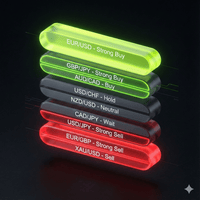
Market Watch Sentiment Scanner Pro (MT5) Overview The Market Watch Sentiment Scanner Pro is a high-performance dashboard utility for MetaTrader 5 designed to eliminate the noise of manual charting. It instantly scans every symbol in your "Market Watch" window, processes them through a complex algorithm of 10 different technical indicators , and creates a visual "Heat Map" of Buy/Sell signals directly on your chart. Instead of flipping through 50 charts one by one, this tool gives you a com

Ping-Monitor — Never Miss a Tick Again!
Do you run EAs and worry about silent chart freezes or data feed stalls ?
This utility is your ultimate watchdog, alerting you the moment your charts stop receiving updates.
Ping-Monitor is designed to detect when a chart freezes or the data feed stalls, even if MT5 still shows that the connection is active.
It works by tracking the time of the last incoming tick. Every time the chart receives a new price update, the EA records the timestamp.
Then, on a

AxiomSuite Pro — Institutional-Grade Risk & Compliance Engine for MetaTrader 5 AxiomSuite Pro is a complete institutional risk-management system designed for traders, prop firms and professional managers who need real-time protection, automated discipline, and full compliance tracking inside MetaTrader 5. Unlike classic trading EAs, AxiomSuite Pro does not execute trades.
It supervises every trade you place — manually or through your own strategy — and enforces strict rules to prevent viol

Manual Trading Dashboard for MT5 Strategy Tester
This utility adds a clean on-chart dashboard that lets you manually trade inside the MetaTrader 5 Strategy Tester — ideal for discretionary backtesting, replay-style practice, and validating execution rules under realistic conditions.
Instead of relying on the standard interface, you get a fast workflow to place and manage orders directly from the panel .
Features • Place Market orders and Pending orders from the dashboard • Quickly

Trade Assistance AlgoMatrix v2.0 – Advanced Trade Management Utility for MetaTrader 5 Trade Assistance AlgoMatrix v2.0 is a professional trade management utility for MT5 designed for traders who want better control over positions, exits, and risk directly from the chart. Many traders spend most of their time searching for entries, but long-term consistency often depends on how trades are managed after entry. This utility was created to make that process easier by providing a structured and pract
This EA Trails your stops for both manually and auto-opened trades. This EA will work whether you have manually or automatically set stop loss or not.
Trailing stop is a more flexible variation of a normal exit order. Trailing stop is the practice of moving the stop-loss level closer to the current price when the price moves in your favor. Trailing the stop-loss allows traders to limit their losses and safeguard their positive trades. It is a very popular practice. This EA will manage your ord

SmartT AI Levels (MT5) is a professional utility that displays trading levels generated by SmartT’s autonomous AI Traders - fully independent algorithmic models, each with its own unique trading behavior, logic, and risk pattern.
Every AI Trader evaluates the market separately and produces its own Entry, SL, and TP levels.
This tool does not merge or combine models. It simply retrieves the selected AI Trader’s output and displays its exact levels on your MT5 chart.
This tool is not free and re
FREE

- Download historical rates via `CopyRates()` for many symbols and timeframes. - Works with Market Watch symbols or explicit symbol list. - Optional CSV export into the terminal `Files` folder (per symbol/timeframe). - Configurable retries, pause and exponential backoff. - Verbose logging and progress comments for convenience.
## Usage 1. Copy `AutoHistoryDownloader_mq5.mq5` into `MQL5/Scripts` or open in MetaEditor. 2. Attach / run the script from the Navigator (Scripts). 3. Configure inputs:
FREE

Trade Control Panel Function
Normal One Click Function
Close All Close All Profit Close All Loss
Close All Pending Order Close All Sell
Close All Buy
Advance One Click Function 1. Close Partial Lot Sell by Percent It will help you partial close for all open position by desire percent you wanted.
No longer partial close one by one for every open position Manual input for desire percent 2. Close Partial Lot Buy by Percent It will help you partial close for all open position by desire percent
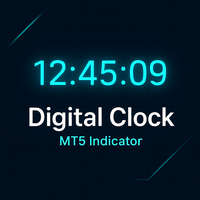
总体说明
Digital Clock 是由 Everton Messias 开发的一款 MetaTrader 5 (MT5) 专用实时数字时钟指标。该工具旨在帮助交易者在分析图表时随时查看准确时间,而无需切换到系统时钟或外部软件。对于需要严格掌握交易时段、重要新闻发布时间、市场开盘与收盘节奏的交易者来说,此指标提供了极高的实用性。无论您是进行剥头皮交易、日内交易、波段交易,还是依赖时间周期的策略,这款数字时钟都能为您带来更高的效率与更清晰的节奏感。 主要功能:
实时显示 —— 以时、分、秒为单位,每秒自动更新,确保时间精准
完全自定义 —— 可调整颜色、字体、字号,让时钟完美融入您的图表风格
灵活定位 —— 可放置在图表的左侧、右侧、顶部、底部甚至中央任意位置
自动刷新 —— 不需要手动干预,时钟始终保持最新状态
兼容所有时间周期与交易品种 —— 从1分钟到月线图,从外汇到指数、黄金、加密货币均可使用
支持暗色/亮色主题 —— 在任何 MT5 主题中都具有良好可读性
适用于多图表环境 —— 多窗口监控市场时也能轻松掌握当前时间
轻量
FREE
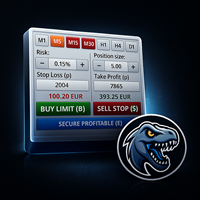
MrRexo Trade Panel - MT5 图表交易面板 MrRexo Trade Panel 是一款用于 MetaTrader 5 的图表交易面板,适合需要快速执行、清晰风险控制和直接在图表上管理仓位的手动交易者。 该面板将订单执行、风险管理、手数计算器、可视化 R:R 计划、Break Even、Trailing Stop、仓位保护、交易时段、趋势环境、价格水平和图表模块集成在一个 Expert Advisor 中。 可用于 Forex、指数、商品、金属、CFD 以及带有经纪商后缀的交易品种。支持 Hedging 和 Netting 账户类型。 手动交易与执行 从图表直接执行 Buy 和 Sell 。 使用预设手数、Stop Loss 和 Take Profit 的 市场订单 。 通过可视化价格水平规划 pending orders 。 Close All 、Close Profit、Close Loss、Close Buy 和 Close Sell。 快捷键 提高操作速度。 Position splitting 可将总交易量拆分为多个较小订单。 风险管理与手数计算 内置计算
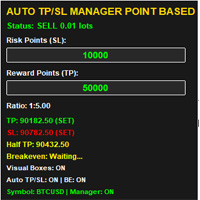
RR Ratio KS 可视化计算器(点数模式)EA
利用“RR Ratio KS 可视化计算器(点数模式)EA”提升您的风险管理水平——这是一款终极的 MetaTrader 5(MT5)辅助工具,能将复杂的风险回报计算转化为图表上简单直观且功能强大的可视化界面。专为追求精准的交易者设计,这款智能交易系统(EA)能够自动执行基于点数的风险回报比(RR Ratio)分析,助您动态调整仓位大小、设置止损与止盈点位,并在无需手动计算或凭空猜测的情况下,保持铁一般的交易纪律。告别过度冒险的交易,迎接那些与您的策略优势完美契合、经过深思熟虑且始终如一的入场机会。
核心功能
即时可视化 RR 计算器:只需在图表上拖放线条,即可直观展示入场、止损和止盈水平;系统将自动计算以点数、点差单位(Pips)或货币金额表示的风险回报比,并辅以颜色编码提示(绿色表示回报有利,红色表示风险过高)。
基于点数的精准计算:专为各类交易品种(外汇、股指、大宗商品)量身打造,在计算中充分考量点差、佣金及滑点因素,确保结果极度精准——无论是超短线交易者(Scalpers)还是波段交易者(Swing Traders)

Buy Sell Keyboard — 专业的键盘冲动交易专家顾问 闪电般的键盘交易。单次点击即可完全控制市场。分配热键即可瞬间执行交易,无需鼠标和对话框。 主要特性: 用于精准进场的冲动算法
专业交易者的秘密公式。算法可识别价格即将出现强势波动的市场冲动时刻。过滤假突破,判断吸筹点,提供经冲动确认的信号。 即时键盘交易
A/S - 即时买入/卖出开仓(不受键盘大小写影响 (A/a, S/s)),并设置魔术编号
Q/W/Z/X - 智能平仓(不受键盘大小写影响 (Q/q, W/w, Z/z, X/x))
零延迟 - 毫秒级执行
极简模式 - 可隐藏面板,仅使用键盘操作 智能仓位管理
以手术般的精度平仓。4种平仓策略:
Q - 关闭投资组合中所有盈利仓位(所有品种,根据其魔术编号)
W - 关闭投资组合中所有亏损仓位(所有品种,根据其魔术编号)
Z - 关闭当前品种的盈利仓位(根据其魔术编号)
X - 关闭当前品种的亏损仓位(根据其魔术编号) 专业风险管理
按时间自动平仓:可配置的超时设置,用于自动锁定利润和限制亏损
盈利仓位在设定时间后平仓(例如,1分钟)
FREE
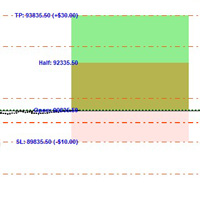
RR Ratio KS 可视化计算器(基于金额)EA
借助“RR Ratio KS 可视化计算器(基于金额)EA”,以前所未有的方式精通基于美元的风险管理——这是一款颠覆性的 MetaTrader 5 实用工具,可在您的图表上自动设置精确、固定金额的风险/回报参数。对于厌倦了波动不定的头寸大小(手数)或繁琐手动计算的交易者而言,这款 EA 是完美之选。它能锁定精确的美元风险金额(例如,每笔交易亏损 50 美元)和回报金额(例如,在 1:3 的风险回报比下盈利 150 美元),并根据头寸大小动态调整止损(SL)和止盈(TP)位置。告别盲目猜测:只需入场交易,该 EA 就会在 1-2 秒内自动处理后续一切事务,确保您在外汇、股票或任何 MT5 交易品种上都能保持始终如一的交易纪律。
核心功能
固定金额风险回报(RR)精度:以货币单位(而非点数/Pips)设定绝对的风险/回报金额——无论头寸大小如何,系统都会自动调整止盈/止损的距离,在确保不过度暴露风险的前提下,维持您预设的交易优势。
一键自动执行:入场交易时即刻自动设置并管理止盈/止损;支持同时开启无限数量的头寸,且无需任何手动微

Chinese (中文) PREDATOR DAILY LEVELS 软件: Predator Daily Levels 自动在 MT5 图表上绘制每日高点、低点和开盘(HLO)线,取代手动标记水平以实现高效交易。它显示多个历史天数,带有描述性标签如“Monday High”,彩色线条(深红色高点、森林绿色低点、浅珊瑚色开盘),并可自定义宽度、样式和字体大小。更新在新柱和图表变化时自动进行,确保所有符号和时间框架的实时精确性。 关键特性
自动 HLO 线:绘制前日高点(PDH)、低点(PDL)和开盘水平,向前延伸 2 天,适合识别支撑/阻力及突破区。 完全自定义:调整颜色、线条样式(实线/虚线)、宽度至 3px、标签可见性、字体大小(默认 20pt)和回溯天数(至 20 天)以适应任何设置。 终身支持:为买家提供代码自定义修改,加上所有市场的非重绘性能。 完美适合日交易员、波段交易员和剥头皮交易员,寻求无延迟或重绘的干净即时每日参考水平。直接消息我或联系 mizzlah17@gmail.com 以进行购后修改。

ForceCode Risk Assist Panel ForceCode Risk Assist Panel 是一款专为严格风险管理和自营交易公司 (Prop Firm) 合规性设计的专业交易工具。它的独特之处在于其独有的“实时净值预览”功能,可直观地预测您未来的账户余额,以及用于加权头寸规模管理的创新“矩形入场区域”系统。 该工具将复杂的风险管理计算转化为即时的可视化工作流程,让软件处理数学计算和纪律控制,使交易者能够完全专注于价格行为 (Price Action)。 主要功能 ️ Prop Firm 保护 & 回撤控制 对于参加资金挑战的交易者至关重要。您可以在设置中定义 最大日回撤 (Max Daily Drawdown) 限制。该工具会主动监控您的风险,如果潜在交易可能超过您的每日亏损限额,它将阻止交易执行,帮助您严格遵守交易规则。 独特的实时净值 & 风险可视化 与标准面板不同,ForceCode Risk Assist 提供账户未来的 独特可视化预测 。它直接在图表上显示动态的“假设”情景,精确展示如果达到止盈或止损目标,您的净值 (Equity) 和未结风险将

MQL5 交易控制面板 - 全能交易助手 专为 MetaTrader 5 交易者设计的专业级桌面控制面板。本工具集成了交易执行、订单管理、风险控制与可视化监控于一体,通过一个简洁直观的悬浮面板,大幅提升您的交易效率与纪律性。 核心功能亮点: 一站式交易执行: 快速开仓(多/空)、一键全平、分类平仓(盈利单/亏损单、多单/空单),操作直观迅捷。 智能订单管理:灵活管理来自本EA、手动操作及其他EA的订单,并可自定义过滤规则。 专业风险管控: 账户级止盈止损:设定整体盈利目标和最大亏损限额,达到目标自动平仓所有关联订单,帮助严守纪律。 提前设定止盈目标,到达目标平仓指定仓位。 点差保护:实时监控点差,超过设定阈值时自动禁用开仓按钮并告警,防止滑点过大。 资金管理:支持固定手数与基于风险百分比的自动手数计算,并内置手数范围校验。 实时数据看板:清晰展示多空总持仓手数、实时盈亏、当前点差、平台时间等关键信息。 卓越的用户体验: 双语界面:支持中文/英文一键切换。 悬浮面板:可随意拖拽、最小化、锁定,不影响图表分析。 个性化设置:所有参数(手数、目标值、开关状态)均自动保存,持

Sajiro Copier Pro – Ultra-Fast File-Based Master/Slave Trade Copier (MT5) CSV Sync | Reverse Mode | Pending Sync | Partial Close Engine | Consecutive Loss Filter (A1)
Lightning-Fast | Ultra-Stable | Professional-Grade Trade Replication What is Sajiro Copier Pro? Sajiro Copier Pro is a high-speed, file-based trade copier that mirrors trades from one MT5 account (Master) to multiple MT5 accounts (Slave) with ultra-low latency , precision , and prop-firm-safe consistency .
Perfect for signal

TrendView Zero Automator — Full Automation with One Click
TrendView Zero Automator is the official automation module designed to work seamlessly with the TrendView Zero indicator. While the indicator analyzes the market, selects the best internal configuration, and generates trading signals, the Automator transforms those signals into fully automated trades. It follows the same philosophy as TrendView Zero: zero complexity and maximum clarity. A single on-screen button controls the entire sy

Panel Trade Basic: Speed and Total Control
It is the ultimate tool for high-speed manual trading. Trade directly from the chart with a single click or thru keyboard shortcuts, eliminating unnecessary menus.
Key Functions
Instant execution: Market and Pending Orders (Limit/Stop). Quick management: Total control of Batch, SL, and TP instantly. Pro Interface: Floating, draggable panel and real-time P&L/Margin visualization. Keyboard Shortcuts (Hotkeys)
C / V: Buy / Sell. X / Z: Close all / Cle
FREE

SL Locker — Stop-Loss Discipline for MetaTrader 5 Your stop-loss is supposed to protect the trade. SL Locker is designed to stop that protection from being weakened after it has been established. SL Locker is a MetaTrader 5 risk-discipline Expert Advisor built around one focused principle: a protective stop may move in a safer direction — but it should not be casually moved back into a less protective one. Once SL Locker has recorded a valid Stop Loss for a position, it monitors that position a
FREE

SRT Levels Pro Indicator — Support, Resistance & Trend Levels (Visual Trade Ideas & Alerts)
Brief description SRT Levels Pro is a powerful on-chart indicator that reads user-drawn Support, Resistance, Channels and Trend lines/zones and turns them into actionable trade ideas (Breakout, Bounce, Retest). It scores level strength, provides entry/stop/target suggestions (ATR or dynamic stops), and shows a compact dashboard and on-chart visual trade ideas. Alerts include pop-ups, email, push

This utility trails not each position separately, but the entire profit on the account (by money or by percentage).
Activate_Trailing - activation of trailing by money or by percentage of profit. Start_Trailing - the required profit value to start the trailing. Size_Trailing - the size of the trailing stop. Min_Value_for_Close - the minimum profit value after the start of trailing to close positions (in case of a large negative gap to stay in the game). Select_trades - selecting positions t

Professional Trading Analytics — A Complete Picture of Your Trading in Real Time
Do you know your true statistics?
Most traders trade blindly. They don't know their true win rate, don't understand which direction is profitable, and which is wasting their deposit. They don't see that their long trades are losing money while their short trades are profitable.
Professional Trading Analytics shows the truth about your trading — right on the chart, in real time.
What will you get?
Instant analy

Risk Manager Best: The Benchmark for Professional Money Management
Why do I consider this utility the best solution on the market? The answer is simple: it was created by a trader for traders who value their time and money. Unlike overloaded alternatives, it doesn't have a single unnecessary feature that could distract you from chart analysis. This is a tool that turns routine risk calculations into instant action.
Here are the key advantages, broken down into sections:
1. Intuitive Interfac

Automated account protection for prop trading. PropProtector monitors your trading rules in real time, closes trades when a limit is reached, and helps protect your capital on funded and challenge accounts. Important: test on a demo account first Never run PropProtector on a live account with open trades before verifying all settings on a demo account. Adjust min/max balance, loss limit, profit target and trade limits to match your account size and strategy. Incorrect settings can immediately cl

核心功能 智能交易管理 一键开仓平仓操作,支持自定义手数设置. 多种平仓模式:全部平仓、按方向平仓、按盈亏状态平仓. 专业风险控制控制风险 实时监控点差,避免高成本交易环境.可视化控制面板。 直观的图形界面所有功能一键操作. 实时显示仓位信息、盈亏状况、点差状态. 支持面板最小化、锁定功能,防止误操作 . 产品优势 高效便捷无需复杂设置,开箱即用 图形化操作,告别繁琐代码.实时数据更新,决策更及时. ️安全可靠点差监控,避免恶劣市场条件交易. 专业实用支持多种订单类型管理,灵活的手数配置 详细的仓位信息展示. 适用场景 手动交易者:提供专业的方便控制工具 效率追求者:一键式操作,提升交易效率. 如果你用的方便的话,记得分享给你的朋友!
FREE

专业的 MT5 模块化交易面板。集成了自动风控计算、分批止盈(PTP)、移动止损及独创的“订单焦点管理”功能。支持中英阿日四国语言。 让手动交易像量化一样精准。 KAB 操盘指挥中心 (V33) 专为日内交易者设计,彻底告别繁琐的手动计算和默认下单面板的局限性。 核心亮点: 可视化下单 (Ghost Lines): 下单前在图表上直接拖拽“幽灵线”设定入场、止损和止盈,所见即所得。 智能风控: 输入您愿意承担的金额风险(例如 $50),面板自动计算合适的手数,防止重仓。 独创“焦点管理 (Focus Mode)”: 多数面板只能全平或全改,我们允许您锁定一张特定的订单,对其进行独立的反手、部分平仓或保本操作。 分批止盈 (PTP): 设置多级隐形止盈位,价格触碰自动平仓部分手数,落袋为安。 界面模块化: 下单、风控、工具箱均为独立悬浮窗,可随意拖动或关闭,不遮挡K线。 多语言适配: 完美支持中文、英语、阿拉伯语(修正字体显示)和日语。 智能风控计算 (Smart Risk Calculation) – 在考虑止损距离的情况下,自动计算新订单的成交量(手数)。它允

Pare de lutar contra o terminal. Comece a operar com precisão cirúrgica. O Profit Station Pro não é apenas um painel; é uma reformulação completa da experiência de trading no MetaTrader 5. Desenvolvido para traders que exigem agilidade, este utilitário transforma o gráfico em um Cockpit Operacional , eliminando a necessidade de boletas complexas e cálculos manuais lentos. Seja você um Scalper ou Day Trader, o Profit Station oferece as ferramentas que faltavam para sua consistência. Funcio
FREE
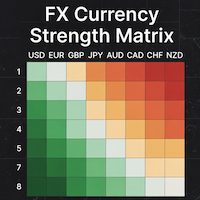
### MQL5 Marketplace Product Description FX Currency Strength Matrix – Professional MT5 Indicator
#### Overview The FX Currency Strength Matrix is a powerful, real-time visual tool that instantly reveals the true strength and weakness of all 8 major currencies in a clean, color-coded matrix format. No more guessing which currency is driving the pair – see the complete strength hierarchy at a glance and trade with institutional-level clarity.
#### Key Features - True 8×8 Currency
FREE
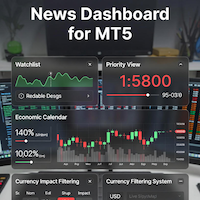
### MQL5 Marketplace Product Description News Dashboard for MT5 – with Live Sessions Map
#### Professional Real-Time Economic News Dashboard + Live Trading Sessions Map
Never get caught off-guard by high-impact news again. The ultimate all-in-one news tool trusted by thousands of professional traders – now with a beautiful embedded Live Sessions Map.
#### Core Features - Uses MT5’s built-in Economic Calendar (zero WebRequest, 100% compliant) - Real-time countdown timer to the
FREE

️ Instant Close All Charts – MT5 Utility Script One-Click Solution to Instantly Close Every Chart Window in MetaTrader 5 Managing too many open chart windows in MetaTrader 5 can slow down your platform, clutter your workspace, and reduce productivity. Instant Close All Charts is a lightweight, ultra-fast MT5 utility script designed to close all open chart windows with a single click — clean, safe, and efficient. Download MT5 EA Products Whether you're a trader working with dozens of charts or
FREE
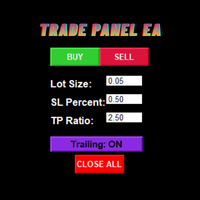
Trade Panel EA – Smart Manual Trading with Professional Risk Management Trade Panel EA is a powerful and user-friendly trading assistant for MetaTrader 5, designed for traders who prefer manual execution while benefiting from advanced trade management and automated risk control. Built with speed, simplicity, and precision in mind, this EA helps traders execute positions efficiently, manage risk consistently, and reduce emotional trading mistakes through an intuitive on-chart trading panel. Trad

VelocityX is a manual trade execution panel for MetaTrader 5. It provides instant order placement with automatic position sizing, structure-based stop loss targets, and built-in risk management protocols. Core Execution Smart Structure Buttons: Three pre-set Stop Loss distances (COLOURED: Gold, Silver, Bronze) calibrated to market structure. Auto-Calculation: Automatically calculates lot size based on your defined risk percentage. Instant Entry: Immediate market entry with a single click. Asset

Here our more valuable tools
SMC Trend Trading , Easy SMC Trading , Institutional SMC Architect Volume Analysis Tools , Volume flow Profile , Market volume profile , FVG with Volume , Liquidity Heatmap Profile , Volume Spread Analysis Key Features 1. Total Immersion UI (The "Blackout") Chart Masking: Upon loading, the tool turns the background, grid, and candles pitch black. This hides the noise of the market ticks, allowing you to focus purely on your performance data withou

AxiomSuite – Advanced Risk Manager for MetaTrader 5 A full-account real-time risk controller for disciplined and prop-firm-compliant trading. AxiomSuite is a professional Risk Management System for MetaTrader 5 , designed to actively protect trading accounts with institutional-grade rules.
It supervises all trading operations — manual entries, EA trades, pendings, multi-EA VPS environments — acting as a full-account risk firewall . AxiomSuite does not open or close trades.
It enforces your ri

FTU Auto Trade with Panel Mt5
This EA will improve your trading, lower work load and improve risk management Adjust Lot size, entry based on at market or by price input EA will manage entry, stop loss, partial close and adjust stop loss after tp1, partial Test on demo to be sure of all the features and inputs Special Features: This version includes price mode PRC, set a price for entry, no need to wait for MKT execution
Features: Multiple No Trade Times - Various time inputs to stop the EA fro

=== RISK ANALYZER MT5 ===
Professional position sizing and margin calculator for serious traders.
MAIN FEATURES:
• LOT SIZE CALCULATOR - Calculate optimal position size based on your risk • MARGIN CALCULATOR - See required margin, free margin, and margin level BEFORE trade • TRADING STATISTICS - Win rate, profit factor, expected payoff analysis • DRAWDOWN MONITORING - Track absolute and maximal drawdown • REAL-TIME RISK ANALYSIS - All metrics update automatically
CALCULATE BEFORE YOU TRADE:

Overview Mirror Signals EA is a powerful monitoring Expert Advisor that automatically sends real-time Telegram notifications for all important trade events on your MetaTrader 5 account.
It is engineered specifically for signal providers , trade-copier operators , auditors , educators , and professional trading services that require immediate, detailed, and reliable reporting. Everything from entries, exits, SL/TP changes, comment changes, trailing stop activations, pending order modifications

SMART TRADE COPIER MT5 - LOCAL TRADE REPLICATOR Copy trades instantly between multiple MT5 accounts on the same computer or VPS. Fast, reliable local copying system. WHAT IT DOES Replicates all trading activity from one master account to unlimited slave accounts running on the same machine. Copies: Market orders (Buy/Sell) Pending orders (all types) TP/SL modifications Trade closures and deletions KEY FEATURES Smart Symbol Matching Handles different broker suffixes (.a, .z, .m, .ecn, etc.) Works
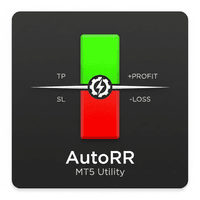
Product Description The RR & Panel Manager v4 is a professional trade management utility designed for MetaTrader 5. It is not an auto-trading bot that opens trades for you; rather, it is a visual assistant that activates as soon as you open a manual trade. It serves two main purposes: Risk/Reward Visualization: It instantly draws visual boxes on the chart showing your Stop Loss (Risk) and Take Profit (Reward), including intermediate targets (TP1, TP2, TP3) and the monetary value (USD)

Overview Mirror Signals Service EA (Text only) is a powerful monitoring Expert Advisor that automatically sends real-time Telegram notifications for all important trade events on your MetaTrader 5 account.
It is engineered specifically for signal providers , trade-copier operators , auditors , educators , and professional trading services that require immediate, detailed, and reliable reporting. Everything from entries, exits, SL/TP changes, comment changes, trailing sto

Risk Manager Panel PRO — Smart Trading Assistant for MT5 Risk Manager Panel PRO is an advanced trade-execution panel designed for professional traders who need speed, accuracy, and full control over their risk.
This tool replaces manual calculations and transforms your chart into a powerful trading workstation. It is built especially for traders who value lot precision, risk management, smart pending orders , and instant execution — all in one clean and intuitive interface. Key Features

MT5 Telegram Notifier — Real-Time Account Monitoring Stay informed and in control of your trading account from anywhere. This utility Expert Advisor sends instant notifications and detailed reports directly to your Telegram chat. Key Benefits Real-Time Alerts : Receive notifications when positions open, close, or pending orders change. Risk Management : Margin level alerts help you act before critical thresholds. Hedging Support : Displays every position individually using ticket-based logic. O

Join WhatsApp Group for Free Signals & More Discussion
https://chat.whatsapp.com/IWc1CaxviFw8Bu94JGRIQv For Live Signals Please Visit
https://www.mql5.com/en/signals/2352564?source=Site+Profile+Seller
Epic Spikes EA – Key Features
for Set Files when you purchase EA contact me.
1. Smart Breakout Trading The EA automatically detects strong price levels and places pending orders when the market is about to break out.
It buys above the recent high and sells below the recent low. 2. Automat

Prop Guardian Risk Manager MT5 – Drawdown, Risk & Hedge Protection for Prop Firm and Managed Accounts Prop Guardian Risk Manager is a professional risk-control utility for MetaTrader 5, designed for prop firm traders, money managers and anyone who wants strict account-level risk protection. It does not generate trading signals, strategy entries or trading decisions. Instead, it runs in the background, monitors your account risk and can automatically block new exposure, close managed positions or

AI Advisor – 让 AI 真正看见你的交易世界 AI Advisor 会根据你的真实账户信息自动生成高质量提示词,可以直接粘贴到任意 AI 聊天中使用。
它帮你快速梳理账户状态,理解当前品种格局,识别风险点,挖掘潜在盈利机会,让 AI 以你的真实交易情况为基础来思考和交流,而不是凭空猜测。 快速链接 Download: AI Advisor v1.02.ex4 AI Advisor v1.02.ex5 Installation guide
AI Advisor Version Overview FAQ & troubleshooting
使用方法 – 三步搞定 在你关心的品种图表上打开 AI Advisor。 在右侧列表中选择一个合适的 “AI Advisor 模式”(AI Advisor Modes),让程序自动把账户信息、仓位、品种和结构整理进提示词。 点击「复制」,然后把生成的文本粘贴到你常用的任意 AI 聊天界面中,开始对话即可。 内置 Prompt 简要说明 AI Advisor 内置了一组常用分析场景,覆盖交易中最典型的几类问题,例如
FREE

在冒险使用真实资金之前掌握prop firm挑战! 我们的高级模拟器重现真实的prop firm交易环境,帮助您练习、制定策略并自信通过挑战。使用我们的模拟器,您可以通过模拟或真实账户模拟任何prop firm挑战,支持手动交易策略和通过EA的自动交易,创建个性化挑战周期,并挑战自己培养持续盈利所需的纪律。 FTMO 1万和10万挑战配置文件: 提供主要prop firm的配置文件和专属支持 - 只需询问! 前10名买家享受7折优惠。 主要功能
实时挑战监控
实时统计仪表板 - 实时追踪余额、净值、盈亏、回撤 专业指标 - 已平仓与未平仓盈亏、胜率、交易分析 支持手动/自动交易:同时支持手动交易策略和通过专家顾问的自动交易 完整Prop Firm规则执行
盈利目标管理 - 设置和追踪具体盈利目标 回撤保护 - 每日和最大回撤限制及警报 交易天数要求 - 最低活跃交易天数追踪 风险管理 - 止损合规、仓位大小限制 时间限制 - 挑战持续时间倒计时 高级风险管理
双重盈亏追踪 - 分离已实现盈利和未平仓头寸 实时违规警报 - 规则违反即时通知 自动交易保护 - 违规时可选自

在行情波动剧烈或平台出现故障时,逐一平仓会浪费时间,而每多花一秒钟,都会增加滑点风险。
“平仓所有交易”按钮让您只需单击一次,即可立即平仓整个投资组合中的所有持仓。点击该按钮后,所有未平仓头寸将依次平仓,系统会针对被拒绝的订单和重新报价自动重试,因此单个卡住的订单不会阻碍其余订单的执行。
如何加速平仓
- 单击即可平仓该EA所关联账户上的所有未平仓头寸
- 针对被拒绝的订单和重新报价自动重试处理,滑点容忍度为100点
- 执行后显示已平仓和失败头寸的摘要
- 默认不触碰挂单,因此有效的限价单/止损单将保持不变
自定义设置
按钮位置(自动居中或手动设置 X/Y 坐标)、大小、背景色和文字颜色,以及自定义按钮文字均可配置。通过热键可即时隐藏或显示按钮。
使用“平仓所有交易”按钮可:
- 在市场高波动或突发新闻时,一键清空账户头寸
- 交易时段结束时快速清空投资组合,无需逐一平仓
- 当平台或网络连接问题导致无法逐一管理多个头寸时,可立即采取应对措施
使用方法
1. 将其附加到任意图表上;按钮会立即显示。
2. 如果默认设置不符
FREE

Equity Tracker MT5 Equity Tracker MT5 是一款用于 MetaTrader 5 的账户监控型智能交易系统(Expert Advisor),可通过通知消息报告交易活动、账户状态和技术运行情况。 该智能交易系统独立于任何交易逻辑运行,不会影响订单执行或交易管理。 本产品不会开仓、修改或平仓交易。 它仅用于监控和发送通知。 用途 Equity Tracker MT5 适用于希望随时了解交易账户状态、但又不想持续盯盘的交易者。它可以与任何交易策略或其他智能交易系统同时使用。 账户级别监控 交易活动通知 技术状态监测 账户与风险状态监控 该智能交易系统会持续评估账户参数,并在满足预设条件时报告变化。 净值(Equity)和回撤水平通知 保证金水平监控 用户自定义预警阈值 心跳机制与终端状态 可启用心跳机制,定期确认 MetaTrader 终端和智能交易系统是否正常运行。 如果心跳消息停止,可能表示终端卡死、崩溃或连接中断。 定期状态确认消息 提前发现终端或 VPS 中断问题 通知发送方式 通知通过 MetaTrader 的 WebRequest 功能发送至受支持

Ultimate Extractor - Professional Trading Analytics for MT5 *****this is the local HTML version of Ultimate Extractor. !!!!!it is not compatible with Cloud!!!! For the online version please reach out to me directly****** Ultimate EA manager also now available when you use cloud pro and above for free!!
Ultimate Extractor transforms your MetaTrader 5 trading history into actionable insights with comprehensive analytics, interactive charts, and real-time performance tracking. What It Does Automa
MetaTrader市场是一个简单方便的网站,在这里开发者可以出售自己的交易应用程序。
我们将帮助您发布您的产品,并向您解释如何为市场准备您的产品描述。市场上所有的应用程序都是加密保护并且只能在买家的电脑上运行。非法拷贝是不可能的。
