 MetaTrader 5
 专家
专家
 指标
指标
 程序库
程序库
 实用工具
实用工具
 窗口小部件
窗口小部件
 规则
规则
全新的MetaTrader 5 交易实用工具 - 49
 以下是可在MetaTrader 5中简化交易的交易程序。将鼠标悬停在一个工具上,阅读它的描述和用途。
️ KP Stability Engine – Professional Risk Infrastructure for MT5 KP Stability Engine is not a trading robot.
It is a professional-grade account protection and risk control engine. Designed for traders and developers running one or multiple Expert Advisors, KP Stability Engine acts as a central risk governor that continuously monitors your account and dynamically limits exposure, drawdown, and floating losses in real time. It publishes live risk permissions using MT5 Global Variables, allowing

Обычная трейдец-сетка, но не имеет явного диапазона. Вместо диапазона, в настройках устанавливаются стоп-лоссы. Закрытие происходит по тейк-профиту, так же устанавливаются в настройках. Робот может торговать в любом направлении, как вверх или вниз, так и в обоих направлениях. Робот не проверяет баланс счета, а потому имеет очень высокий риск. По умолчанию стоят настройки для EURUSD пары (не самые лучшие). Рекомендуемый минимальный депозит $200. Имеется вторая версия в которой добавлены дополните
FREE

This EA does not make entry,you must setup first. After setup this EA will execute order based on input parameter.
For MT4 Version : CLICK HERE TO BUY MT4 VERSION
EA BOOM CODED NEWS Time-Locked Entry System
Executes one precise market order exactly at your predefined MT5 server time (HH:MM:SS). Single Trade Per News
Designed to avoid overtrading — ideal for news. Recommended on high impact news like NFP,CPI,FOMC and other red high impact news Auto-Off After Entry
EA can automatic

Take full control of your trading like a PRO with the most complete, intuitive, and powerful manual/grid trading panel ever built for MetaTrader 5. Why traders choose Ultimate Trade Manager Pro: Close ALL trades instantly with ONE CLICK (emergency button – red danger style) Smart partial close system: • Close Half Profit (green) • Close Profit Only (blue) • Close Loss Only (orange) • Close Half + Keep the rest running Advanced Stop Loss management: • Set All SL (price or points) • SL + Nearest (

Join WhatsApp Group for Free Signals & More Discussion
https://chat.whatsapp.com/IWc1CaxviFw8Bu94JGRIQv For Live Signals Please Visit
https://www.mql5.com/en/signals/2352564?source=Site+Profile+Seller
Core Features: Manual Trading Panel - Graphical interface with buttons for Buy/Sell Stop/Limit orders Trailing Stop System - Automated trailing stop with customizable settings Order Management - One-click close all positions, trail all positions Real-time Dashboard - Visual display

Description: Stop leaving your capital exposed. Trade Sentinel Pro is a high-performance utility designed specifically for manual traders using MetaTrader 5. Whether you are scalping Gold (XAUUSD) or trading major pairs, this tool acts as your automated safety shield. It does not open trades for you; it protects the trades you open. It eliminates human error, ensures every trade has a hard Stop Loss instantly, and automates profit-taking logic that is impossible to execute manually at high speed

DAQ Capital - Visual Position Tool
Stop guessing your lot sizes. Start planning trades like a professional with the visual precision of TradingView, now inside MetaTrader 5.
Get this tool for FREE Unlock lifetime access to this tool (and much more) by joining the DAQ Capital community!
Join here: https://daqcapital.pro/
Designed by DAQ Capital, this utility solves the biggest problem for trade

Risk/Reward Tool是一款专业级EA(智能交易系统),旨在彻底改变您在MetaTrader 5中规划、可视化和执行交易的方式。无论您是重视精确风险管理的自主交易者,还是需要直观测试交易设置的策略开发者,这款工具都能在一个优雅直观的界面中提供您所需的一切。 与基础的仓位计算器不同,Risk/Reward Tool将可视化交易规划与即时执行功能、实时盈亏监控和全面的交易管理功能相结合。该工具与MT5策略测试器完全兼容,让您能够练习交易策略并完善方法,无需冒真实资金的风险。 完整使用手册请访问: https://www.mql5.com/en/blogs/post/766244 MT4版本: https://www.mql5.com/en/market/product/78020/ 主要功能 可视化交易规划 可拖拽调整的入场、止损和止盈线 随交易参数调整实时更新的彩色风险/收益区域 基于ATR的自动止损计算,实现波动率调整的仓位管理 可配置的风险收益比,带可视化显示 支持市价单和挂单(限价单/止损单),根据入场线位置自动判断 智能仓位计算 以账户余额百分比或固定金额设置风险 实时

OneClick Trade Panel 是一款专业的交易管理工具,让您轻松掌控关键交易功能。该EA专为需要快速高效进行交易管理的交易者设计,可将复杂的交易任务简化为一键操作。
这款工具可以帮助您比传统手动方法更快、更高效地管理您的持仓。
该EA的功能 这款智能交易助手提供三个关键的交易管理功能:
移动止损/止盈至盈亏平衡点 - 智能交易保护
自动将盈利交易的止损位移动到入场价格
自动将亏损交易的止盈位移动到入场价格
一键保护所有持仓
部分平仓 - 逐步获利
平仓一定比例的仓位(10%、25%、50%等)
可在设置中配置百分比
可同时处理多个仓位
全部平仓 - 紧急退出
立即平仓所有持仓
可应用于当前交易品种或所有交易品种
非常适合快速退出市场
主要特点 三个核心功能:在一个面板中完成所有交易管理
智能盈亏平衡逻辑:针对盈利和亏损情况采取不同的操作
灵活的设置:调整部分平仓百分比(1-99%)
可视化自定义:选择按钮颜色、布局(垂直/水平)和面板位置
交易品种控制:仅管理当前交易品种或所有持仓交易品种
安全选项:可选的确认对话框
追踪盈亏平衡

Equity Firewall 是一款适用于 MT5 的工具,旨在实现账户级别的自动回撤控制和风险管理。它能够保护资金,尤其是在同一账户上有多个智能交易系统同时交易,存在仓位突然增加或回撤的风险时。 安装演示账户试用版本 Equity Firewall 允许设置最大总体回撤、每日亏损限额以及盈利目标,并可选择在达到限制时的操作:关闭所有持仓和挂单、关闭所有图表,或同时执行这两项操作。 程序会在触发限制时自动执行所选操作,并且完全兼容智能交易系统——即使多个 EA 同时交易。程序支持推送和电子邮件通知,并在清晰的仪表盘上显示当前回撤、每日亏损和目标进度。 使用场景 • Prop 交易和多 EA 账户:在多个智能交易系统同时交易时进行风险控制。 • 资金保护:当达到盈利目标或最大回撤时,完全停止交易。 提示与建议 • 程序可在策略测试器中使用。设置交易手数和交易方向——在测试器中启动智能交易系统时将自动开仓。使用可视化测试模式查看面板工作情况,并验证限制是否正确触发。 • 确保在演示账户上测试您的交易场景。 • 账户余额操作不会被自动考虑——所有计算基于当前权益。在进行存入或取出操作之前,

产品名称:Sentinel Pro - 哨兵专业版 (趋势扫描 & 隐形风控终端) 重新定义手动交易:从趋势识别到隐形风控的一站式解决方案 Sentinel Pro (哨兵专业版) 不仅仅是一个交易面板,它是您的智能交易副驾驶。结合了基于线性回归的 全市场趋势扫描 、 机构级隐形止损 、 多图表绘图同步 以及 自动风控系统 ,它专为追求极致效率和资金安全的职业交易员打造。 告别繁琐的计算和盲目的盯盘,让哨兵为您守望市场。 核心功能亮点 1. 智能趋势扫描仪 (TrendScan Technology) 这是 Sentinel Pro 的核心大脑。它不仅仅是显示价格,而是基于 M5周期 的底层算法为您筛选最佳交易品种。 算法逻辑: 系统实时分析最近20根K线的 线性回归斜率 (Linear Regression Slope) 与 平均波幅 (ATR) 的比率。 五态识别: ↑ Strong Up (强多头): 动能强劲,适合顺势突破。 Channel Up (通道上行): 震荡上行,适合回调做多。 ≈ Shock (震荡/死

Trailing Caddy is best understood as an Expert Advisor–style utility. It does not initiate trades; instead, it manages exits automatically. This bot was developed to support manual trading while multitasking, where identifying optimal exit points can be more challenging than entering positions. Trailing Caddy functions as a configurable trailing-stop utility, allowing users to tailor its behavior based on their own market analysis. After a trade is opened, it applies a default take-profit of 5 p

Smart Bulk Order Closer
MT5 脚本 – 按浮动盈亏关闭交易 概述 Smart Bulk Order Closer 是一款 MetaTrader 5 脚本,可根据仓位当前浮动盈亏关闭交易。 脚本在图表加载时 仅执行一次 ,只关闭符合用户定义 PnL 条件的仓位。
不后台运行,不修改止损或止盈,也不开仓。 核心功能 每个仓位单独评估,并可使用以下过滤: PnL 阈值: 仅当浮动盈亏超过设定值时关闭。 交易状态: 仅关闭盈利、仅关闭亏损或全部。 方向: 仅买单、仅卖单或两者。 交易品种: 当前图表品种或账户所有已开品种。 输入参数 CurrentSymbolOnly (true/false): 限制为当前图表品种。 ProfitFilter: 选择要关闭的交易(盈利、亏损、全部)。 Direction: 按买卖方向过滤(买、卖、两者)。 Min_PnL_Amount: 最小浮动盈亏以关闭交易。 例: 10.0 关闭盈亏大于10单位的交易。 例: -4.0 关闭浮动盈亏大于-4的交易,忽略更大亏损。 用户 管理多仓位的交易者、剥头皮交易者和日内交易者,需要基于盈亏精

Apex StopLoss Manager
MT5 脚本 – 止损管理工具 概述 Apex StopLoss Manager 是一款 MetaTrader 5 脚本,可对 已有持仓 的止损进行精确控制。 脚本在图表加载时 仅执行一次 ,所有操作均通过用户输入启用。
不使用自动交易逻辑,不开仓,也不生成交易信号。 核心功能 止损移动至无亏水平
可将止损移动到考虑点差和手续费的无亏水平,仅适用于盈利仓位。
可选择自动点差缓冲或手动固定缓冲。 移除止损
用户明确启用时,脚本可删除选定仓位的止损。
未启用时不删除。 仓位选择 仅对符合条件的仓位应用操作。
不符合条件的仓位将被忽略。 重要说明 本产品为 脚本 ,非 EA。
不开仓,不管理策略,也不生成信号。
所有操作需用户明确配置并手动执行。

ATR Grid Risk Controller – Trade Management Utility ATR Grid Risk Controller is a manual trade execution and risk management Expert Advisor , designed for discretionary traders and prop firm traders who require strict risk control, precision, and execution discipline . This EA does NOT generate trading signals , does NOT decide when to enter , and does NOT use martingale or lot multiplication .
The trader keeps full control of trade decisions, while the EA handles risk calculation and executi

Daily Stop & Profit Daily Stop & Profit 是一款专业的 风险管理型智能交易系统(Expert Advisor) ,旨在自动控制 每日盈利和亏损限额 ,帮助交易者以纪律化的方式保护资金并锁定利润。 该 EA 独立于交易策略运行,可用于 任何交易品种和任何时间周期 。 主要功能 设置 每日止盈(Take Profit) 和 每日止损(Stop Loss)
限额可按 百分比(%)或固定金额(USD / EUR) 设置
实时自动监控每日交易结果
清晰显示 剩余的盈利或亏损目标
风险与收益管理 每日止盈(TP):
当达到设定的每日盈利目标后,自动管理交易。 每日止损(SL):
通过限制每日最大亏损来保护交易账户。 实时统计数据: 盈利交易总额(USD) 亏损交易总额(USD) 当前持仓总盈亏(USD) 交易控制面板 EA 在图表上提供直观的控制面板,支持一键操作: 关闭盈利单 — 关闭所有盈利交易 关闭亏损单 — 关闭所有亏损交易 全部关闭 — 关闭所有未平仓交易 删除挂单 — 删除所有挂单 启用 / 禁用 EA — 快速控制 EA
FREE

SB-8 – Manual Trading Panel with Fixed Risk & TradingView-Style Visualization for MT5 SB-8 is an advanced manual trading panel for MetaTrader 5 , designed to execute trades visually, quickly and without calculations . It is especially built for traders coming from TradingView , who often find MT5 confusing when it comes to risk management and trade visualization. With SB-8, you don’t calculate lot size, percentages or risk .
You simply move the Stop Loss line , and the panel handles everything a

一键保本功能:同币种、 不 同订单类型 ( sell 或 buy )的多个订单 ,在整体盈利的条件下,设置同一数值的止损线或止盈线。 比如目前有 10 个 EURUSD 订单,其中 sell 订单 7 个, buy 订单 3 个。当总体盈利的情况下,如果设置整体 sell 订单止盈 50 点: ( 1 )当 7 个 sell 订单 的合计盈利大于 3 个 buy 订单合计亏损时, EA 将自动计算 7 个 sell 订单的止损线和 3 个 buy 订单的止盈线为同一数值,并将这一数值设置在总仓位盈利 50 点的位置上。 ( 2 )当 3 个 buy 订单的合计盈利大于 7 个 sell 订单合计亏损时, EA 将自动计算 3 个 buy 订单的止损线和 7 个 sell 订单的止盈线为同一数值,并将这一数值设置在总仓位盈利 50 点的位置上。 使用方法: ( 1 )将 One Click Breakeven 作为 EA 加载到需要保本的图表窗口上,点击 “Open” 。 ( 2 )每增加一个订单,需点击一次 “Open” 。 注意事项: 某些订单未能设置止损或止盈线,是因为市场价和订单

Global Equity Manager Global Equity Manager is an account-level risk management tool designed to protect your trading capital by monitoring the entire account equity in real time and acting immediately when your predefined limits are reached. It works independently of any trading strategy and manages all open positions together as one basket . Key Advantages Full Account Protection
Monitors total account equity instead of individual trades. Works with Any Strategy
Compatible with manual
FREE

Live Chart Viewer – Real-Time Trading Chart Anywhere Live Chart Viewer lets you view and share your MetaTrader 5 chart in real time from any modern device.
Whether you are away from your trading desk, monitoring trades remotely, or sharing your analysis live, this tool keeps you and your audience connected to the market instantly. Notice: Charting library by TradingView Demo: https://chartviewer.live/view/ElVTwx9Lf5w • Key Features Real-time chart updates
Price movements, drawings, and char
FREE

https://www.mql5.com/tr/users/bilisimprofesoru/seller Flash Copy Pro MT5 - Professional & Ultra Fast Local Trade Copier Short Description: A professional Trade Copier designed for Prop Firms and multi-account management. Features zero-lag copying, smart symbol matching, and advanced error protection. Full Description: Flash Copy Pro MT5 is a high-performance tool designed to copy trades from a single Master account to unlimited Slave accounts within milliseconds. It is specifically develope

FREE FREE FREE Trade Assistant MT5 – Professional Trading & Risk Management Panel Trade Assistant MT5 is an advanced trading panel designed to help traders execute orders faster, safer, and more professionally .
It simplifies manual trading by combining smart order management , precise risk control , and one-click execution , making it ideal for both beginners and advanced traders. This tool does not trade automatically . Instead, it empowers you with full control while applying professional-gra
FREE

Product Name: Stream Deck Pro Trader - Ultimate Manager & Charting Suite Short Description: The definitive Trading Assistant for manual execution. Features professional Setup Tagging, "Ghost Mode" risk management, and built-in Institutional Indicators (Volume Profile, VWAP, S/D Zones). Full Description: Stream Deck Pro Trader is a professional trading ecosystem designed for high-performance manual traders and Prop Firm candidates who need speed, precision, and consistent risk management. Stop w
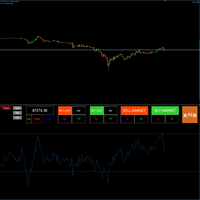
Hello friends, I want it to be large so mouse clicks are faster and more accurate. Scalpers like this. Please click the resize button to fit your screen (it looks better on a 4K monitor)
I would like to introduce a very convenient trading tool designed to meet the needs of fast and high-frequency trading. Its main advantages are convenience and accuracy, with virtually no delay. In particular, it allows traders to easily update and manage Stop Loss and Take Profit levels, and quickly calculate

Professional P/L Calculator & Risk-Reward Tool
**The complete trading management solution combining two powerful tools in one!**
What You Get:
Advanced P/L Calculator - Real-time profit/loss tracking with percentage - Automatic break-even price calculation - Risk levels: -10%, -20% loss lines displayed on chart - Profit targets: +10%, +20% gain lines - Complete position breakdown (Buy/Sell lots, swap, net position) - Target price calculator - see P/L at any price level - Set SL/TP fo

Position Tool Position Tool is a manual trading assistant for MetaTrader 5, designed to help traders visualize positions, manage risk, and plan trades clearly on the chart . This product does not perform automated trading and does not provide trading signals .
It is intended for traders who prefer full control over their trading decisions . Key Features Draw Long and Short positions directly on the chart Automatic Risk/Reward (R:R) visualization Adjustable entry, stop-loss, and take-profit level

Buffer Finder MT5
Is a custom technical Utility for MetaTrader 5, designed to inspect and analyze buffers of other indicators for EA integration, signal detection, or debugging. Support and questions via MQL5 product comments. For questions, updates, and to connect with other traders, join my official MQL5 group ForexEAandMore Major update in Version 1.2 All update Infos in the first comment. You can check now the indicator directly without loading in the chart by filling the exact indicator
FREE

Trades Manager Buy and Sell Close MT5
The Close Buy and Sell Expert Advisor is a free EA given to help traders manage trades easily especially during volatile market environment.
Features:
It helps to quickly close trades either in profit or loss. Close for separate Buy Only Close for separate Sell Only Close for both Buy and Sell Only Control Box can be minimized, closed or moved around from the chart. Check the MT4 here
It works for all open trades opened on the
FREE

Why execution quality matters more than you think You can have the best trading strategy, perfect entry points, and proper risk management. But if your broker consistently executes orders at worse prices, you lose money before the market even moves. A slippage of 0.01% seems insignificant. But over 100 trades per month, it becomes a noticeable amount. Over 1000 trades, it becomes a serious problem. Scalpers and algorithmic traders understand this well: execution quality directly affects your bot

Scalping Trade Panel – Fast and Precise Trading Control for MT5
Scalping Trade Panel is a professional trading panel designed for MetaTrader 5, offering traders lightning-fast access to market and pending orders directly from the chart. Optimized for scalping strategies, it combines precision, speed, and simplicity in one compact interface.
Key Features:
Market Orders: Execute BUY and SELL orders instantly with a single click.
Stop Losses : You can add a stop loss for any market or pending

️ UTS TradeGuardian — The Ultimate Risk Manager for Manual Traders UTS TradeGuardian is a powerful utility Expert Advisor designed to protect your account and automate the tedious parts of trade management. Whether you open trades from your PC or your mobile phone, TradeGuardian acts as your personal financial bodyguard. It automatically manages your Stop Loss, Take Profit, and Trailing Stops, ensuring you never let a winning trade turn into a loser again. How It Works TradeGuardian does

Mobile Trade Manager - Professional Trading Management from Your Phone INTRODUCTION Mobile Trade Manager is a professional trading management EA specifically designed to give you complete control over your trades using only your phone, from anywhere. Key Features: THE ONLY EA on the market that can manage trades from anywhere - Features fully optimized for mobile, no computer needed Visual Entry Panel - Drag-and-drop to p

Protect your capital and lock in profits automatically with Account Guard Pro . This indispensable account management Expert Advisor ensures strict adherence to your daily risk limits. Set a maximum daily loss and a daily profit target—once either is reached, Guardian Pro instantly closes all open positions and pending orders, and halts all trading activity until the start of the next day. Its integrated visual dashboard provides a clear, real-time view of your daily P/L and current status. A cr

HB Trading Bot – Professional Risk & Trade Management for MT5 HB Trading Bot is a professional risk management and trade management Expert Advisor designed for MetaTrader 5 .
It does not open trades . Instead, it manages already opened positions with strict, rule-based logic to help traders protect their capital and remove emotional decision-making from trading. Most trading losses are caused by psychology, not poor analysis. HB Trading Bot was built to solve this problem by enforcing discipline
FREE

Join WhatsApp Group for Free Signals & More Discussion
https://chat.whatsapp.com/IWc1CaxviFw8Bu94JGRIQv For Live Signals Please Visit
https://www.mql5.com/en/signals/2352564?source=Site+Profile+Seller
TRADE EXECUTION Auto-trade on pattern confirmation Reverse trading signals option Multiple order management Customizable magic number for identification ️ RISK MANAGEMENT Fixed or dynamic lot sizing Automated stop loss placement Take profit targets Maximum orders limit control PROFIT PROT
FREE

功能一:全景式订单路径回溯,让交易历史一目了然 智慧视觉区分 :系统自动以 实线 清晰标记 历史订单 的完整生命周期(从入场到离场),同时以 虚线 高亮显示 当前持仓 的浮动盈亏路径。线段样式与颜色完全支持自定义。 一键全景复盘 :独家支持 自定义时间范围 内所有订单路径的 一键加载 。无论是复杂的分批止盈、中途减仓,还是多笔交易叠加,都能在图表上瞬间清晰呈现,助您深度复盘策略得失,优化风控点位。( 默认为显示五天内的持仓 ) 功能二:K线收线精准倒计时,永远快市场一步 决胜秒针 :在图表醒目位置实时显示 当前周期K线的剩余收线时间 ,精确到秒。告别凭感觉猜测,让离场或入场决策在关键时刻更加从容、精准。 完全个性化 :倒计时显示的大小、位置均可自由定义,完美融入您的个性化交易界面,信息获取零干扰。 告别盲点交易,拥抱全景决策。立即拥有 OrderMap and Timing Pro ,将复杂的交易数据转化为清晰的制胜地图,并精准把握市场的每一次“心跳节拍”。

EA NAME: Trade Manager mit Signalgeber
OPTIMIERT FÜR TIMEFRAMES: Alle Timeframes
KURZBESCHREIBUNG: Ein hochentwickelter, semi-automatischer Expert Advisor mit einem dualen Strategiesystem für Swing-Trading auf Forex-Paaren und spezialisiertem Scalping auf Gold. Die Strategie basiert auf einem Scoring-System aus mehreren Indikatoren. Empfohlene Timeframes sind M5/M15 für Scalping und H1/H4 für Swing-Trading.
Dieser Expert Advisor ist ein hybrides Trading-Tool, das einen automatischen Signal-G

Auto SL/TP EA is a lightweight and reliable MetaTrader 5 Expert Advisor designed to automatically place Stop Loss and Take Profit for each open position.
When a trader manually or through limit orders opens a trade (BUY or SELL), the EA:
automatically sets Stop Loss
automatically sets Take Profit
according to the user-selected pip / USD distance
The EA works fully automatically:
no need to manually calculate prices
no need to be afraid of forgetting to set SL or TP
suitable for bot

推出最新版本的 MT5 动态斐波那契网格仪表盘(Dynamic Fibonacci Grid Dashboard)。
全新版本配备了众多新功能,为您的交易体验带来彻底升级,并让您从全新的角度观察市场和价格行为。通过同时分析多个时间周期和多个交易品种,探索更多可能性。界面友好,支持手动交易和持仓管理,并大幅扩展了预设自动化策略的应用能力。此外,DFG 现在在策略测试器中可作为交易模拟器全面运行,您可以使用历史数据重现不同的交易环境。在可视化模式中练习手动交易,在高速模式中测试自动化策略。 主要功能 • 基于动态斐波那契通道(Dynamic Fibonacci Bands)的多周期、多品种高级技术分析。
通过我们的实时市场监控仪表盘,体验前所未有的高效分析能力。我们将来自 M1、M5、M15 和 H1 图表的复杂数据合成为易于理解的网格水平。这种独特呈现方式让交易者能够在同一个屏幕上监控 10 个不同品种的价格行为,而无需依赖传统图表。结果是更快速的决策过程,以及更简洁、不杂乱的交易环境。 • 可自定义且用户友好的界面,集成最重要的功能。
包括账户状态与信息、快捷手动交易与持仓管理按
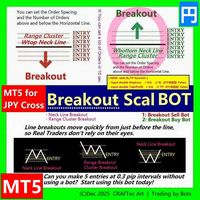
MT5【 Breakout Scal BUY BOT 】Script ( for JPY Cross pairs )
Breakout Buy Bot { Quick steps to compile in MetaEditor }
※ Enter the Horizontal line price and you can set up a lot of orders in less than 10 seconds.
for :
・USD/JPY(米ドル/円) ・EUR/JPY(ユーロ/円) ・GBP/JPY(英ポンド/円) ・AUD/JPY(豪ドル/円) ・NZD/JPY(ニュージーランドドル/円) ・CAD/JPY(カナダドル/円) ・CHF/JPY(スイスフラン/円) ・SGD/JPY(シンガポールドル/円) ・HKD/JPY(香港ドル/円)
Entry @
・Neck Line Breakout ( W Top, Head & Shoulder ... ) ・Range Breakout ( Tokyo Range ... ) ・Cluster Breakout
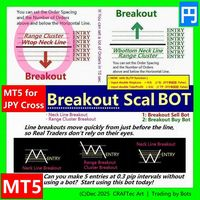
MT5【 Breakout Scal SELL BOT 】Script ( for JPY Cross pairs )
Breakout SELL BOT { Quick steps to compile in MetaEditor }
※ Enter the Horizontal line price and you can set up a lot of orders in less than 10 seconds.
for :
・USD/JPY(米ドル/円) ・EUR/JPY(ユーロ/円) ・GBP/JPY(英ポンド/円) ・AUD/JPY(豪ドル/円) ・NZD/JPY(ニュージーランドドル/円) ・CAD/JPY(カナダドル/円) ・CHF/JPY(スイスフラン/円) ・SGD/JPY(シンガポールドル/円) ・HKD/JPY(香港ドル/円)
Entry @
・Neck Line Breakout ( W Top, Head & Shoulder ... ) ・Range Breakout ( Tokyo Range ... ) ・Cluster Breako
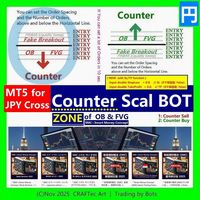
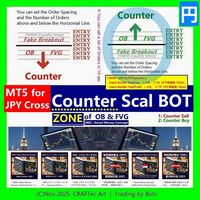
MT5【 Counter SELL Bot 】( for JPY Cross pairs )
Counter SELL Bot { Quick steps to compile in MetaEditor }
※ You can set a lot of Orders in 10 sec.
@ LINE of Round Number, Resistance & Support @ ZONE of OB & FVG by SMC Smrt Money Concept
For :
・Order Block (OB) Counter ・Fair Value Gap (FVG) Counter ・Round Number (RN) Counter ・Fake Breakout (PINBAR) ・etc ...
for :
・USD/JPY(米ドル/円) ・EUR/JPY(ユーロ/円) ・GBP/JPY(英ポンド/円) ・AUD/JPY(豪ドル/円) ・NZD/JPY(ニュージーランドドル/円) ・CAD/JPY(カナダドル/円) ・CHF/JPY(スイスフラン/円) ・
MT5【 Counter BUY Bot 】( for JPY Cross pairs )
Counter BUY Bot { Quick steps to compile in MetaEditor }
※ You can set a lot of Orders in 10 sec.
@ LINE of Round Number, Resistance & Support @ ZONE of OB & FVG by SMC Smrt Money Concept
For :
・Order Block (OB) Counter ・Fair Value Gap (FVG) Counter ・Round Number (RN) Counter ・Fake Breakout (PINBAR) ・etc ...
for :
・USD/JPY(米ドル/円) ・EUR/JPY(ユーロ/円) ・GBP/JPY(英ポンド/円) ・AUD/JPY(豪ドル/円) ・NZD/JPY(ニュージーランドドル/円) ・CAD/JPY(カナダドル/円) ・CHF/JPY(スイスフラン/円) ・SGD

KS PropFirm 与 Broker Dashboard Pro:您在自营交易挑战中的终极合规守护者
通过精准监控,助您在自营交易之路上更上一层楼。您是否厌倦了在充满高风险的自营交易挑战中,为了保持合规而不得不费力地在电子表格、计算器和人工检查之间来回切换?KS PropFirm 与 Broker Dashboard Pro 是一款专为专业交易者打造的一站式 MT5 辅助工具,旨在助力您成功应对 FTMO、MyForexFunds、The5%ers 等知名自营交易机构的挑战。这款轻量级仪表板能实时洞察您的账户健康状况,自动执行规则以防止代价高昂的违规行为——且绝不会拖慢您的 EA(智能交易系统)运行速度或终端性能。助您更快通过挑战,更智能地进行交易,并充满信心地解锁实盘资金账户。
为何选择 KS PropFirm 仪表板?解锁专业级交易功能
无缝支持多家机构:预置了针对 14 家以上顶级自营交易机构的模板,并可轻松自定义规则以适配任何经纪商或挑战项目。自动从入金历史中检测您的初始资金余额——无需任何猜测或估算。
坚不可摧的亏损保护:通过清晰直观的图表展示和违规风险预警,实时

该工具直接在图表上显示经济新闻。它会显示即将发生的事件、事件发生时间、事件的重要性,并发送通知。
适用对象:
关注经济新闻的交易者
根据新闻进行交易的交易者
希望及时接收提醒的交易者
需要在图表上直接使用简洁直观日历的用户
主要功能
新闻面板 - 在图表上显示最近的经济事件
货币筛选器 - 仅显示您交易品种的货币新闻
提醒 - 在新闻发布前指定时间发出通知
推送通知 - 向您的 MetaTrader 移动设备发送通知
声音提醒 - 可自定义声音提醒
颜色指示器 - 以视觉方式指示重要性和紧急程度
设置 提醒时间 - 事件发生前多少分钟发送提醒
最低重要性 - 提醒的最低新闻重要性
按货币筛选 - 按当前交易品种的货币筛选新闻
启用声音提醒 - 启用声音提醒通知
启用推送提醒 - 启用推送通知到您的手机
启用额外 1 分钟提醒 - 在事件发生前 1 分钟发送额外提醒
使用方法使用方法
在图表上安装该实用程序
在属性窗口中配置设置
面板将显示在左上角
事件发生前指定时间将发送警报
FREE

GUARDIAN 交易面板 GUARDIAN 交易面板 控制市场,而非追随市场。 GUARDIAN 不仅仅是另一个交易面板。
它是一个命令系统 ,专为拒绝混乱、犹豫或情绪化执行的交易者设计。 为理解一个真理的专业人士打造:
执行速度和掌控力决定结果。️ GUARDIAN 消除了决策与行动之间的隔阂。
它以结构取代随机性。️
它将您的图表转变为指挥中心。 GUARDIAN 强制执行:️ 直接从图表一键执行 ️ 通过受控的、基于规则的操作强制遵守纪律 实时交易环境感知 自动拒绝不安全条件 无噪音。无装饰。纯粹功能。 每次点击都有意图 每笔交易都经过深思熟虑 GUARDIAN 不仅仅是辅助您。
它指挥您的工作流程。️ GOLDEN EDGE 生态系统 您不是在用工具交易。
您是在操作系统。 GUARDIAN 是核心。️
其他一切都服务于它: Price Edge — 实时分析价格强度和动量 Candle Sentinel — 将时间转化为战术优势 FVG Edge — 揭示价格未竟之区域
FREE

WS TakeStop AutoPilot 是一款轻量、安全且可靠的 自动风险管理工具 ,适用于希望在开仓后立即自动设置止盈(TP)、止损(SL)和保本(Break-Even)的交易者,而无需依赖自动交易机器人开单。 此工具 不会开仓 。
它只会监控账户中的持仓,并在检测到新持仓时立即设置您预先配置的 TP / SL 和保本参数。 主要功能 开仓后自动设置 止损 SL 和 止盈 TP 可选 保本功能 (触发点与偏移可自定义) 支持 所有品种 :指数、外汇、股票、加密货币、大宗商品 极其轻量且快速(基于定时器运行) 只管理已有持仓 — 不进行开仓操作 可选择只管理当前图表品种或整个账户的所有品种 非常适合需要纪律性与自动风险保护的交易者 适用人群 经常忘记设置 TP/SL 的手动交易者 需要立即保护仓位的交易者 使用信号、外部系统或手动开仓的交易者 希望自动化风险管理流程的用户 重要说明 本工具 不会开仓或平仓 — 仅修改已有持仓。
兼容 MetaTrader 5 的 netting 和 hedging 账户模式。

AI Trading Assistant | Discord/Telegram → MetaTrader 5 Automation An advanced automation framework that enables natural language trade instructions sent from Discord or Telegram to be executed automatically on MetaTrader 5 using n8n workflows and a custom Expert Advisor. This solution integrates modern workflow automation with MetaTrader 5, allowing users to send trade instructions such as: “buy EURUSD 1% risk 30 pip SL 3R TP” “sell GBPUSD now 2% 20 SL 60 TP” “buy limit EURUSD at 1.0850 with 1%

This panel was built on one simple philosophy: focus only on what truly matters . Clean, minimalist, and uncluttered, it displays just the information you need to make decisions: trend scanner, momentum scanner, real-time currency strength, and dominant market direction. Everything is grouped into a clear, fast-to-read interface designed for active trading and prop firm challenges . Unlike the overloaded and confusing panels flooding the Market, this one is all about efficiency. It features inst
Alpha Risk Controller PRO – Complete Risk Discipline for Every Trader Most traders lose not because their strategy is wrong, but because their risk is inconsistent , their lot sizes fluctuate , and their drawdown grows silently .
Alpha Risk Controller PRO provides a consistent, structured, and disciplined framework to keep trading controlled and stable. This tool monitors exposure, manages position size, safeguards the account, and enforces rules that prevent emotional mistakes. It works with bo

Smart Trading Dashboard for MetaTrader 5 Smart Trading Dashboard is a professional multilingual control panel that consolidates all key trading elements into a single convenient interface. No more switching between tabs—all important data and tools are now right in front of you! KEY FEATURES All Data at a Glance Account: Balance, Equity, Margin Level, Free Margin Instrument: Bid, Ask, Spread in points Open Positions: Number of Buy/Sell, Volume in lots, Profit per symbol Total Profit: O
FREE

PulsePanel FREE – The exact same clean, professional and powerful dashboard as the Pro, completely free so you can test it thoroughly before upgrading. Limited to USDCHF and GBPNZD , this free edition gives you full, unrestricted access to every core feature: What You Get in the FREE Version One-click instant execution (buy/sell) Real-time currency strength meter Precise momentum scanner Watchlist with trend, momentum and conviction Live position tracking: net P&L, dynamic risk/reward ratio, sto
FREE

Smart TP by Risk Ratio
MT5 脚本 – 根据止损计算止盈 概述 Smart TP by Risk Ratio 是一款 MetaTrader 5 脚本,根据开仓价与止损的距离,乘以用户定义的系数(R-Multiple)计算止盈水平。 脚本 每次执行一次 ,可应用于当前图表品种或账户所有已开仓位。
不开仓,计算需要已有止损。 功能 TP计算: 根据止损距离和比例系数设置止盈(例如 1:2, 1:3)。 交易品种: 应用于当前图表或所有开仓品种。 达到目标立即关闭: 可选择,如果当前价格已超过目标立即关闭仓位。 输入参数 Ratio Multiplier: 风险距离倍数。 Apply To All Symbols (true/false): 是否应用于所有仓位。 Close If Reached (true/false): 当前价格超过目标时关闭仓位。 重要说明 必须在仓位上设置止损。 仅脚本,不是EA。 不开仓,不管理其他订单。

Advanced Breakeven & Partial Close Manager
MT5 脚本 – 一键交易管理 概述 Advanced Breakeven & Partial Close Manager 是一个用于 MetaTrader 5 的交易管理脚本。
它 仅作用于已打开的仓位 ,并严格按照用户设定的规则执行操作。 该脚本在加载到图表时 只执行一次 ,仅执行在参数中明确启用的操作。
不会后台运行,不会自动交易,也不会生成交易信号。 核心功能 该脚本提供严格的保本止损和部分平仓管理,并包含多重安全检查。 保本止损管理
当达到最小盈利条件时,可将止损移动到计算后的保本位置。
支持在入场价基础上增加可选的利润缓冲。
买单保本设置在入场价之上,卖单设置在入场价之下。 部分平仓管理
每次执行仅允许一次部分平仓,按固定百分比减少仓位。
系统会确保剩余手数不低于最小允许值。
默认情况下,仅对盈利仓位执行部分平仓。 重要说明 本产品为 脚本 ,非 EA。
不负责开仓、不分析市场方向、不生成信号。
所有操作需由用户明确配置。

Smart Bulk SL Setter MT5 Script – Bulk Stop Loss Management Overview Smart Bulk SL Setter is a trade management script for MetaTrader 5 designed to modify the Stop Loss level of multiple existing open positions at once. The script executes once per attachment and applies a user-defined Stop Loss price based on selected filters.
It does not run in the background, does not open trades, and does not generate signals. Core Functionality The script allows setting a unified Stop Loss level for multip

Smart Bulk TP Setter MT5 Script – Bulk Take Profit Management Overview Smart Bulk TP Setter is a trade management script for MetaTrader 5 designed to modify the Take Profit level of multiple existing open positions at once. The script executes once per attachment and applies a user-defined Take Profit price based on selected filters.
It does not run in the background, does not open trades, and does not generate signals. Core Functionality The script allows setting a unified Take Profit level fo
WARNING: Is your Backtest lying to you?
Did you know that 95% of Expert Advisors (EAs) fail in live accounts because they were optimized on “clean” and perfect data? The live market is imperfect, asymmetric, and hostile. Tick Data Stress Tester – Chaos Edition is a professional stress testing and extreme validation tool, designed to expose hidden weaknesses before your strategy faces the harsh reality of live trading and you risk a single dollar.
It transforms static CSV files into adverse mar

Trade Interface Pro – The Ultimate Visual Trading Platform for MetaTrader 5
This is a All-In-One Trading Tool, but in general it's a Full Expert Advisor but without automated Trade-Execution Trade Interface Pro transforms MetaTrader 5 into a fully automated, interactive trading environment, turning every chart into a real-time intelligence terminal. All market analysis, trade execution, and structure visualization happen directly on the chart — instantly, intuitively, and without menus or delay

RiskMaster EA Pro – Next-Gen Trading Assistant & Risk Management System
Absolute Capital Protection • Precision Money Management • Smart Automation Major Feature: Universal and simultaneous support for both CFD and FUTURES markets, Hedging or Netting automatically identified (with automatic detection and real-time calculation of contract expirations). ️ Built-in Safety Layer (Unique per user) : To maximize your account protection and prevent any conflicts with automatic trading

WS Trade Result HUD is a lightweight and fast utility that displays essential information about your open trade directly on the chart: current profit/loss, lot/contract size, and TP/SL values automatically converted into points.
It is perfect for traders who want clarity and speed without cluttering the chart with heavy dashboards. The HUD works on any MetaTrader 5 instrument — including Forex, Crypto, Indices, Stocks and Futures — and updates in real time with every tick.
You can customize corn
FREE
本 EA 只做一件事:删除超过设定时长的挂单(pending order)。它不开仓、不平仓,也不做任何交易判断。
挂单放久了会一直占用保证金,或在行情变化后被以你不想要的价格成交。这个 EA 会在挂单存在时间超过你设定的期限后自动删除,让保证金及时释放,挂单列表保持干净。
主要功能
- 按设定的时间自动删除挂单 - 不含任何交易逻辑和指标,绝不发出市价单 - 支持手动挂单,也支持其他 EA 下的挂单 - 支持魔术号过滤,只管理某一策略的挂单 - 支持品种过滤,可只管理当前图表品种 - 支持挂单类型过滤:buy limit、sell limit、buy stop、sell stop - 每次删除都会写入日志,可选弹窗提醒 - 占用资源极低,挂一个图表即可管理全账户
使用方法
1. 把 EA 挂到任意 MT5 图表,开启算法交易。 2. 设置 TimeoutPeriod:挂单允许的存活时间。 3. 设置 CheckInterval:扫描挂单列表的频率。 4. 可选设置 MagicNumber 和 SymbolFilter,填 0 表示不限。 5. 保持 EA 运行,超时挂单会

EcoFineX – Multi-Factor Adaptive Bias Dashboard for MetaTrader 5 EcoFineX is a non-trading Expert Advisor that delivers a real-time, quantitative assessment of market direction through a clear, card-based dashboard. Designed for disciplined traders who value clarity, confluence, and controlled risk , it synthesizes 14+ analytical filters into a single Trade Bias Score (0–100) and displays an ATR-based risk percentage for informed position sizing. This tool does not execute trades—it provides tr

基于时间算法的自动平仓订单管理工具(MT5)—— 技术说明 概述
本工具为基于时间算法的自动订单管理EA。其核心功能是根据用户预设的持仓时间周期,自动执行相应的平仓操作,旨在帮助交易者以机械化方式执行既定规则,减少人为情绪干扰。 核心功能模式 平仓模式 功能定义 全部平仓(Close All) 到达指定时间后,关闭所有符合过滤条件的持仓。 盈利平仓(Close Profit) 仅关闭当前处于盈利状态的持仓。 亏损平仓(Close Loss) 仅关闭当前处于亏损状态的持仓。 平多头(Close Buy) 仅关闭所有多头(买入)持仓。 平空头(Close Sell) 仅关闭所有空头(卖出)持仓。 核心算法与参数配置 时间监测引擎 :EA持续监控每个持仓的“存活时间”,当达到用户设定的持仓时间周期时,触发预设的平仓逻辑。 参数配置 :用户可设置检查时间周期、选择上述五种平仓模式之一,并通过魔术数字(Magic Number)和交易品种过滤功能实现精确的订单管理。 使用流程 :将EA加载至监控品种图表,配置持仓时间周期与平仓模式,EA即自动运行。 技术特点 完全基于时间条件执行操作,不涉及任

这款下单风控面板以“简单高效、精准控险”为核心设计理念,专为各类交易者打造,无论是新手入门还是资深玩家,都能快速上手并实现对交易风险的精细化管理。面板将风控逻辑深度融入下单全流程,从根源上解决了传统交易中“风控设置繁琐、操作滞后”的痛点,让每一笔交易都自带安全屏障。 在核心风控功能上,面板支持下单环节同步预设止盈止损参数,无需额外跳转操作,交易者可根据行情波动规律、自身风险承受能力精准设定点位。当交易标的达到预设条件时,系统将自动执行止盈或止损指令,既避免了因人工盯盘疲劳导致的收益流失,又能有效规避行情突变带来的大额亏损,尤其适用于波动剧烈的交易场景。 针对突发行情下的应急操作,面板贴心配备一键平仓与一键减仓功能。当需要快速离场规避风险,或想要部分减持锁定部分收益时,只需点击对应按钮,系统便会以最优价格完成交易指令,相比传统分步操作大幅缩短响应时间,减少滑点损失。整体界面简洁明了,功能分区清晰,将复杂的风控逻辑转化为直观易懂的操作,真正实现“风控不复杂,交易更安心”。

JP2 CoreHedge – Prop Risk Dashboard (Standard Edition) Professional Drawdown Monitor for Prop Firm Traders JP2 CoreHedge STANDARD is a lightweight and precise risk monitoring panel designed for traders working with prop firm rules.
It does not open or manage trades — instead, it provides clean, real-time visibility of your account’s risk status. This utility is ideal for challenge accounts, funded accounts, and traders who need to avoid hidden drawdown violations. Key Features Real-time Prop Ris

Drawdown Terminator – Account-wide Equity Guardian for MT5
Protect your capital. Lock your profits. Sleep without watching every tick. ️
1. What is Drawdown Terminator? Drawdown Terminator is an MT5 utility (non-trading Expert Advisor) designed to protect your entire account equity – not just a single EA or symbol. It continuously monitors your total account equity / capital , and when your Equity Profit Target or Equity Loss Limit is reached, it can automatically: Close all open position

JVH Trading Information Panel – Professional Account Dashboard (MT5) The JVH Trading Information Panel is a clean, accurate, and professional account monitoring dashboard for MetaTrader 5.
It gives traders full control and insight into account performance, risk, drawdown, and trading statistics — all in real time , directly on the chart. Designed for manual traders, funded traders, scalpers, and algorithmic traders , this panel focuses on clarity, correctness, and stability . What This Indic
FREE

FTU Auto Trade with on Chart Panel Mt5 (basic version)
This EA will improve your trading, lower work load and improve risk management Adjust Lot size, entry based on at market or by price input EA will manage entry, stop loss, partial close and adjust stop loss after tp1, partial Designed to be compact and efficient, small layout for multiple chart trading
Features: Lot groups - Allows for fast change to various risk models Tp, Partial and SL management Multiple No Trade Times - Various time
FREE

SympleAssist is a smart risk & trade panel for MetaTrader 5.
It does not generate signals or “magic entries”. It helps you execute your own strategy with strict risk control: Set your account size (COUNT) . Set your Stop Loss price . Type how many USD you want to risk . SympleAssist calculates the lot size , draws the SL line on the chart and gives you one-click BUY / SELL / CLOSE .
Main Features Risk per trade in USD You type the risk in USD, SympleAssist calculates the position size based on
FREE
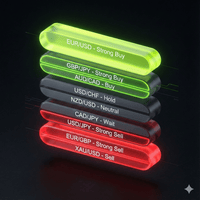
Market Watch Sentiment Scanner Pro (MT5) Overview The Market Watch Sentiment Scanner Pro is a high-performance dashboard utility for MetaTrader 5 designed to eliminate the noise of manual charting. It instantly scans every symbol in your "Market Watch" window, processes them through a complex algorithm of 10 different technical indicators , and creates a visual "Heat Map" of Buy/Sell signals directly on your chart. Instead of flipping through 50 charts one by one, this tool gives you a com
MetaTrader 市场 - 在您的交易程序端可以直接使用为交易者提供的自动交易和技术指标。
MQL5.community 支付系统 提供给MQL5.com 网站所有已注册用户用于MetaTrade服务方面的事务。您可以使用WebMoney,PayPal 或银行卡进行存取款。
