

您应该了解的MQL5向导技巧(第七十九部分):在监督学习中使用鳄鱼震荡指标和A/D震荡指标
 174
174
 0
0

引言
在前两篇文章中,我们沿用惯例,测试了鳄鱼震荡指标与A/D震荡指标组合下的十种信号形态。和以往实验一样,我们发现其中三组形态表现持续落后:形态0、形态3和形态4。本文并不打算直接舍弃这些信号,而是探究监督式学习能否改善它们的表现。我们采用融合核回归与点积相似度的CNN,验证该架构的网络是否能从这些初始表现偏弱的信号中挖掘潜在价值。与前两篇文章保持一致,全部测试基于GBPJPY(英镑兑日元)交易品种,使用30分钟时间周期。
基于点积相似度的核回归
我们选用的监督学习模型是采用核回归与点积相似度的CNN。核回归根据观测输入与特定查询点之间的相似度赋予权重,以此估算CNN每一层的输出。该相似度由点积相似度作为核函数进行量化。本文模型代码会在下一节给出。模型中的_dot_product_kernel_regression方法利用torch.bmm(x, x.T)计算特征图上所有时间位置之间的相似度,并增加Softmax归一化,机制与自注意力十分相似。
点积作为一种自适应数据相似度度量:点积值越高,代表两个位置在各通道上具备相同的激活模式,在加权求和过程中获得更大权重。可以将它类比为:每个位置会按照与查询位置的一致程度获得相应“票数”。CNN层可以理解为一张电子表格:行代表时间步,列代表特征。在该设定下,单独一行即为一个位置,而查询位置就是当前正在更新的行。在更新过程中,模型会将查询位置与其余所有位置对比,量化彼此的相似度。文中将这种位置更新类比为反向传播(Backpropagation)中的更新过程。
从数学角度出发,可将新权重定义如下:给定特征向量xi与xj,权重wij满足:
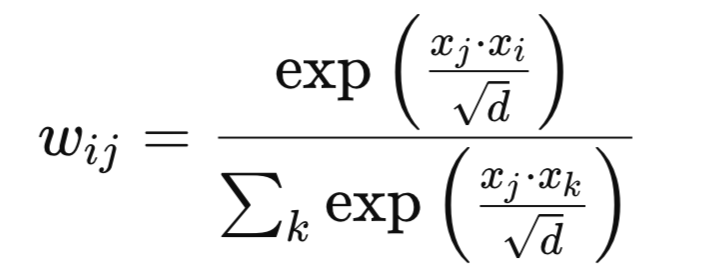
其中:
- d代表通道维度
- exp代表自然指数函数
我们的权重矩阵对整个序列执行非局部平滑,不同于卷积操作,它不受相邻位置的限制。该机制的优势是可以捕捉特征空间内部的长距离依赖与相关性,有望提升时间序列任务及其他结构化输入场景的性能。适用场景参考:当任务中非相邻特征之间存在显著相关关系,同时希望获得一种类注意力机制,但又不需要额外引入查询/键/值(Q/K/V)投影层时,就可以使用点积相似度。该模块和CNN能够形成很好的协同:CNN负责提取局部特征,而核回归用来引入全局上下文信息。
利用点积指导卷积神经网络的卷积核与通道大小
点积核回归可以揭示相关性最强发生在哪些位置、对应何种分辨率。结合相似度结构来调整CNN的卷积核尺寸与通道数,可以实现两方面效果:第一,有助于让感受野匹配相关长度。当强相关性可以维持在较远距离时,适合选用更大的卷积核。第二,可以依据相关性的复杂程度分配通道数量。相似度模式变化剧烈时分配更多通道;模式较为均一则分配更少通道。这就有可能生成一套由数据驱动、面向特定任务的网络架构,而不是完全依赖固定的人工启发式规则。
在本文的实现方案中(详见后续章节源代码),卷积核尺寸循环取[3,5,7,9],通道数从32逐步提升至320。每隔一层就执行一次点积核回归,这意味着网络层能够“看到”全局相关性图。如果相似度图出现宽阔的峰值,则后续卷积层可以使用更大的卷积核,充分利用该特征;如果相似度图是尖锐峰值,则小卷积核就足够,模型可以聚焦于微小细节优化。这类似于由全局相关性信号引导的自适应感受野调优。
将该机制接入CNN时,建议先执行预分析:把数据送入小型CNN+点积核模块,分析数据的相关长度,以此作为主CNN卷积核/通道配置方案的设计依据。另外,做局部边缘、模式检测的浅层网络,应当优先使用小卷积核;深层网络的卷积核尺寸则可以根据观测到的相似度分布来确定。
潜在缺陷与可行的改进方案
我们这套点积核实现方式最主要的缺点显而易见:计算开销巨大。点积相似度的计算复杂度为O(L2),其中L代表序列长度。对于长序列信号或规模较大的特征输入,计算压力会非常大。另一个风险是过度平滑,如果权重分布过于弥散,特征可能变得过于相似,丢失部分细粒度细节。训练不稳定也是一大问题,相似度数值很大时,如果不做归一化,会出现权重爆炸现象。最后,存储完整相似度矩阵会带来极高的内存开销,有时会达到硬件难以承受的程度。
不过上述问题都存在缓解手段,其中一种方案是局部注意力窗口。不再对全部位置两两计算相似度(也就是不再使用前面提到的高复杂度计算逻辑),只针对每个查询位置,限定在固定窗口内做相似度比对。这既能降低计算与内存消耗,又能融合周边的有效上下文信息。除此之外,还可以采用温度缩放。这里,直接把相似度分数乘以1/τ,τ即为温度。较低的温度会生成更尖锐、选择性更强的权重,少数位置/层行会占据主导地位;较高的τ会让权重在整个层网格上变得更平滑、分布更均匀。温度属于额外引入的超参数。
最后,还可以在执行核回归之前先进行下采样。即在计算点积之前,通过池化或者步幅卷积降低输入序列长度L。缩短L不仅可以加速相似度运算,减少内存占用,同时仍然可以捕获大规模长距离相关特征。
点积用于增强CNN的其他可选方案
除了点积核回归之外,还可以构建自注意力混合卷积网络。此方案将点积回归作为非局部模块,和CNN层并行接入,而不是使用标准注意力层。这与本文的实现有所区别:本文是在卷积堆叠网络中间周期性插入核回归;而混合架构会把模块放到并行分支中,最后融合各分支输出。我们还可以结合多尺度特征融合使用该核:把核回归作用于CNN多层输出的特征,之后再融合特征。和本文相比的不同点是,本文每次只在单层执行核回归;而多尺度融合将来自不同层/分辨率的全局上下文信息进行整合。
也可以将该核用于辅助任务,以实现正则化效果。这种场景下,除主任务以外,我们训练核回归的输出去完成辅助任务,例如预测下一步的嵌入向量。这和接下来本文描述的实现思路明显不同:本文只是将该核用于特征细化;而这里它还承担正则化作用。最后,还有一种我们在之前的文章中探讨过的卷积核应用思路,动态卷积核尺寸调整。该方案利用核回归输出的相似度统计量,在训练/推理阶段动态调整卷积核大小。而本文的实现方案中,卷积核尺寸是预先固定好的。
网络
实现这套带回归运算的点积核的网络类代码如下:
class DotProductKernelRegressionConv1D(nn.Module):
    def __init__(self, input_length=100):
        super().__init__()
        self.input_length = input_length

        self.kernel_sizes, self.channels = self._design_architecture()

        self.conv_layers = nn.ModuleList()
        self.use_kernel_regression = []  # <-- Python list for markers

        in_channels = 1
        for i, (out_channels, kernel_size) in enumerate(zip(self.channels, self.kernel_sizes)):
            conv_layer = nn.Sequential(
                nn.Conv1d(in_channels, out_channels, kernel_size=kernel_size, padding=kernel_size // 2),
                nn.BatchNorm1d(out_channels),
                nn.ReLU(),
                nn.Dropout(0.2))
            self.conv_layers.append(conv_layer)

            self.use_kernel_regression.append(i % 2 == 0)
            in_channels = out_channels

        self.head = nn.Sequential(
            nn.AdaptiveAvgPool1d(1),
            nn.Flatten(),
            nn.Linear(in_channels, 128),
            nn.ReLU(),
            nn.Dropout(0.2),
            nn.Linear(128, 64),
            nn.ReLU(),
            nn.Linear(64, 1),
            nn.Sigmoid()
        )

    def _dot_product_kernel_regression(self, x):
        """
        Dot product kernel regression.
        For each time position, outputs a weighted sum of all positions using dot product similarity as weights.
        """
        # x: (B, C, L)
        x_ = x.permute(0, 2, 1)  # (B, L, C)
        # Dot product similarity
        sim = torch.bmm(x_, x_.transpose(1, 2))  # (B, L, L)
        # Optionally normalize for stability (like attention)
        weights = F.softmax(sim / (x_.size(-1) ** 0.5), dim=-1)  # (B, L, L)
        out = torch.bmm(weights, x_)  # (B, L, C)
        return out.permute(0, 2, 1)  # (B, C, L)

    def _design_architecture(self):
        num_layers = 10
        kernel_sizes = [3 + (i % 4) * 2 for i in range(num_layers)]
        channels = [32 * (i + 1) for i in range(num_layers)]
        return kernel_sizes, channels

    def forward(self, x):
        x = x.unsqueeze(1)  # (B, 1, L)
        for conv_layer, use_kr in zip(self.conv_layers, self.use_kernel_regression):
            x = conv_layer(x)
            if use_kr:
                x = self._dot_product_kernel_regression(x)
        return self.head(x)
代码清单的首段是类框架与构造函数。该类继承自nn.Module,由此启用PyTorch的参数追踪、.to(device)、.eval()等能力。尽管卷积操作本身对序列长度不敏感,代码依然将序列长度保存在input_length变量中。该变量用于合理性校验、导出ONNX模型,或是后续编写依赖序列长度的逻辑。完成这一步后,我们继续搭建“架构蓝图”,设置卷积核尺寸与通道数量。这一步至关重要,因为在此统一管理感受野配置(卷积核大小)以及模型容量配置(通道数)。把这部分配置集中放在一处,有两方面优点:第一,在匹配卷积核尺寸时,可以使用核回归得到的相似度观测结果;第二,当相似度模式变得更加复杂时,可以对模型容量做缩放调整。
使用指南:_design_architecture架构设计函数应当采用数据驱动方式。可以取一批样本数据送入回归模块,测算相似度衰减程度,再据此扩大卷积核尺寸。还可以将通道数量与相似度分布的熵值绑定。如果采用该方案,熵值越高,分配的通道数就越多,以此提升模型的表达多样性。
接下来的代码定义卷积堆叠层,并标记哪些位置需要执行核回归。这里使用ModuleList注册网络层,保证权重可以按需保存与加载。将填充(padding)设置为卷积核尺寸的一半,能够让卷积输出序列长度基本保持不变。这一点非常关键,因为后续核回归运算要求输入序列长度保持一致。
代码中使用批量归一化、ReLU激活函数与Dropout,均属于增强模型鲁棒性的手段:批量归一化稳定训练过程,ReLU引入非线性,Dropout起到正则化效果。布尔变量use_kernel_regression可以将计算开销巨大的核回归模块和普通层解耦,只在有增益的位置启用。附加的使用建议:当核回归模块作用较强时,可以在卷积层块外围增加残差跳跃连接,降低模型优化难度。
接下来,我们定义预测头。这一段堆叠结构十分关键,包含多个核心组件:首先,AdaptiveAvgPool1d(1)为每个通道输出一个与序列长度无关的全局汇总值。在输入长度存在波动时该层尤为重要。简单来说,它把每个通道长度可变的时序序列压缩为单个平均值,输出固定维度的汇总向量。这样一来,网络输出不再依赖输入序列长度。当样本之间时间步数量不一致时,该设计非常关键。
多层感知机(MLP)将特征汇总向量映射为标量输出,用于0.0至1.0区间内的回归任务。因此,这里选用Sigmoid激活函数;如果是无约束回归输出,可以替换为恒等映射(Identity);多分类任务则可以改用Log-Softmax。如果需要考虑多方向预测(例如做多/做空方向判断),可以把Sigmoid替换成双输出头。第一个头依然使用Sigmoid输出概率分布;第二个头用于预测波动幅度,激活函数使用SoftPlus。如果需要模型可解释性,还可以把池化后的向量对外暴露,用来计算各个通道的重要度。
完成上述部分后,接下来我们定义核回归核心函数。在此,我们第一步执行维度置换,将输入张量x调整为(批次大小,通道数,序列长度)的格式。点积运算会在每个位置的通道嵌入向量上执行,因此把通道数C设置为内层维度。随后,我们计算跨全部位置的非局部亲和矩阵,计算复杂度为序列长度的平方。也就是相似度矩阵sim。再用通道数的平方根缩放相似度矩阵,以此保证通道维度增大时,逻辑值(logits)保持稳定。Softmax激活将原始相似度归一化为概率分布。每一行都变成所有行的凸组合。下一步执行核回归:将得到的权重矩阵,与转置/置换后的输入向量x相乘。网络层里的每个时间位置,都会从全局窗口内其他相似位置借用信息。
使用建议:处理长序列时,可以采用局部窗口或分块对角注意力;也可以使用Nystrom、Linformer这类低秩算法;还可以先下采样,执行核回归后再上采样恢复尺寸。对于预测或者因果类任务,要在Softmax之前加入因果掩码,防止信息泄露或引用未来数据。如果观察到明显的过度平滑现象,可以引入温度超参数,示例代码:
weights = F.softmax(sim / (tau * x_.size(-1) ** 0.5), dim=-1)

x = x + alpha * self._dot_product_kernel_regression(x)
下一个函数用于定义/生成“模型架构”。该函数以3至9的循环范围做多尺度卷积核配置,使每一层都能响应核回归输出的全局上下文。通道数线性增长,让网络深层拥有更大容量,用来表达更加抽象的特征。最佳实践:让卷积核循环规则响应实测相似度宽度,相似度范围越宽,网络越倾向选用大卷积核。通道数也不能盲目增加,需要监控激活稀疏度或者核回归熵值,按需分配通道。
网络类的最后一个函数是前向传播函数forward。函数一开始增加维度,保证张量满足批次-通道-长度的标准格式。一维CNN初始通道数为1。局部卷积与全局核回归交替使用,形成强大的处理模式。先识别局部形态,再依据学习得到的相似度传播信息;之后在下一层卷积中做局部特征精炼;返回self.head(),保持前向计算图整洁,方便导出ONNX并部署。
如果需要更强的梯度流动,可以在核回归或者残差模块外围增加层归一化。
指标转换
要把前两篇文章用到的信号形态,作为输入送入上面这套CNN核回归模型,我们需要在Python中实现等价的指标计算逻辑。Python中虽然有现成的指标库,但从零编写指标代码同样简单,还能完整掌握指标计算公式的细节。和之前文章一样,我们将指标读数编码成二维向量,取值仅为0或1,分别代表看涨或看跌。核回归在这里非常适用:提取到的特征包含K线/震荡指标的结构形态。那些形态相似或点积嵌入相近的远距离时序位置,可以互相强化信号。因此,核回归(KR)能够让模型跨时间维度聚合统计信息。当每种形态单独来看样本稀少或信号偏弱时,该机制价值很高。
另外,KR的放置时机也会影响效果:浅层KR可以传播基础原始形态;深层KR用于整合高层复合形态。一种合理方案:浅层位置使用KR配上较小的通道数;深层位置同样放置KR,搭配更大的通道数C。
鳄鱼震荡指标
该函数基于Bill Williams(比尔・威廉姆斯)的鳄鱼线组件实现:使用中位数价格的平滑移动均线,分别向前偏移,得到鳄鱼颚部、牙齿、嘴唇三条均线。前两篇文章已经介绍过原理。我们输出两组缓存序列:颚部均线减去牙齿均线的绝对值,标记为“gator up”;牙齿均线与嘴唇均线之差的绝对值取负值。同时增加颜色状态标识,区分指标扩张/收缩状态。该函数在Python中的实现概述如下:
def Gator_Oscillator(df: pd.DataFrame,
                     jaw_period: int = 13, jaw_shift: int = 8,
                     teeth_period: int = 8, teeth_shift: int = 5,
                     lips_period: int = 5, lips_shift: int = 3) -> pd.DataFrame:
    """
    Calculate the Bill Williams Gator Oscillator and append the columns to the input DataFrame.

    Adds color columns for each bar:
    - Gator_Up_Color: 'green' for increasing, 'red' for decreasing, else previous color.
    - Gator_Down_Color: 'green' for increasing (less negative), 'red' for decreasing (more negative), else previous color.

    Args:
        df (pd.DataFrame): DataFrame with 'high' and 'low' columns.
        jaw_period (int): Jaw period (default 13).
        jaw_shift (int): Jaw shift (default 8).
        teeth_period (int): Teeth period (default 8).
        teeth_shift (int): Teeth shift (default 5).
        lips_period (int): Lips period (default 5).
        lips_shift (int): Lips shift (default 3).

    Returns:
        pd.DataFrame: Input DataFrame with 'Gator_Up', 'Gator_Down', 'Gator_Up_Color', 'Gator_Down_Color'.
    """
    required_cols = {'high', 'low'}
    if not required_cols.issubset(df.columns):
        raise ValueError("DataFrame must contain 'high' and 'low' columns")
    if not all(p > 0 for p in [jaw_period, jaw_shift, teeth_period, teeth_shift, lips_period, lips_shift]):
        raise ValueError("Period and shift values must be positive integers")

    result_df = df.copy()
    median_price = (result_df['high'] + result_df['low']) / 2

    def smma(series, period):
        smma_vals = []
        smma_prev = series.iloc[0]
        smma_vals.append(smma_prev)
        for price in series.iloc[1:]:
            smma_new = (smma_prev * (period - 1) + price) / period
            smma_vals.append(smma_new)
            smma_prev = smma_new
        return pd.Series(smma_vals, index=series.index)

    jaw = smma(median_price, jaw_period).shift(jaw_shift)
    teeth = smma(median_price, teeth_period).shift(teeth_shift)
    lips = smma(median_price, lips_period).shift(lips_shift)

    result_df['Gator_Up'] = (jaw - teeth).abs()
    result_df['Gator_Down'] = -(teeth - lips).abs()

    # Color logic
    up_vals = result_df['Gator_Up'].values
    down_vals = result_df['Gator_Down'].values

    up_colors = ['green']  # Start with green (or change to None/'grey' if you want)
    for i in range(1, len(up_vals)):
        if pd.isna(up_vals[i]) or pd.isna(up_vals[i-1]):
            up_colors.append(up_colors[-1])
        elif up_vals[i] > up_vals[i-1]:
            up_colors.append('green')
        elif up_vals[i] < up_vals[i-1]:
            up_colors.append('red')
        else:
            up_colors.append(up_colors[-1])

    down_colors = ['green']  # Start with green for "less negative" (getting closer to zero is "increasing")
    for i in range(1, len(down_vals)):
        if pd.isna(down_vals[i]) or pd.isna(down_vals[i-1]):
            down_colors.append(down_colors[-1])
        elif down_vals[i] > down_vals[i-1]:
            down_colors.append('green')  # "less negative" = "up"
        elif down_vals[i] < down_vals[i-1]:
            down_colors.append('red')    # "more negative" = "down"
        else:
            down_colors.append(down_colors[-1])

    result_df['Gator_Up_Color'] = up_colors
    result_df['Gator_Down_Color'] = down_colors

    return result_df
我们逐行来看代码,函数首先做的是防护处理,防止输入格式异常和超参数不合理。偏移量必须为正数,因为鳄鱼线本身就在图表上被有意向前平移,以形成视觉上的前移效果。接下来,我们创建输入数据副本,并生成中位数价格序列。这样可以保留原始数据不被修改;同时中位数价格相比仅用收盘价,能够降低噪声。这也是鳄鱼线指标的常规做法。
完成上述步骤后,我们实现平滑移动平均线(SMMA)。SMMA属于递归平滑算法,响应速度比普通指数移动平均线(EMA)更慢,适合震荡时序数据的降噪。通过series.iloc[0]初始化首个数值,避免过长的预热期。之后,定义鳄鱼三条均线,并设置前向偏移。周期长度从颚部(Jaws)、牙齿(Teeth)到嘴唇(Lips)依次缩短。三条均线全部向前偏移,因此鳄鱼“嘴”的张开或闭合会出现在当前K线前方。
接下来,定义两个目标输出序列:鳄鱼上行与鳄鱼下行。二者基于绝对值计算,用来衡量鳄鱼嘴的张口幅度。柱线正负符号仅为绘图约定。最后,我们实现颜色编码逻辑,核心判断价差的变化趋势:是持续扩大还是收窄。下行柱绘制在零轴下方,数值为负。如果该柱数值向上抬升,并不代表变为正数,只是负的程度变小。代码对空值(NaN)做处理,保留之前状态,避免在行情震荡起始阶段出现图表闪烁。
A/D震荡指标
该震荡指标的原理:利用资金流乘数乘以成交量,计算A/D线。它借助K线区间内收盘价相对位置,并结合成交量(或Tick成交量)加权,捕捉多空买卖力量对比。Python实现代码如下:
def AD_Oscillator(df: pd.DataFrame, fast_period: int = 5, slow_period: int = 13) -> pd.DataFrame:
    """
    Calculate the Accumulation/Distribution Oscillator (A/D Oscillator) and append it to the input DataFrame.

    A/D Oscillator = EMA(ADL, fast_period) - EMA(ADL, slow_period)

    ADL (Accumulation/Distribution Line) is calculated as:
    Money Flow Multiplier = [(Close - Low) - (High - Close)] / (High - Low)
    Money Flow Volume = Money Flow Multiplier * Volume
    ADL = cumulative sum of Money Flow Volume

    Args:
        df (pd.DataFrame): DataFrame with 'high', 'low', 'close', 'volume' columns.
        fast_period (int): Fast EMA period (default 3).
        slow_period (int): Slow EMA period (default 10).

    Returns:
        pd.DataFrame: Input DataFrame with 'ADL' and 'AD_Oscillator' columns added.
    """
    required_cols = {'high', 'low', 'close', 'tick_volume'}
    if not required_cols.issubset(df.columns):
        raise ValueError("DataFrame must contain 'high', 'low', 'close', 'tick_volume' columns")
    if not all(p > 0 for p in [fast_period, slow_period]):
        raise ValueError("Period values must be positive integers")
    if fast_period >= slow_period:
        raise ValueError("fast_period must be less than slow_period")

    result_df = df.copy()
    high = result_df['high']
    low = result_df['low']
    close = result_df['close']
    volume = result_df['tick_volume']

    # Avoid divide by zero, replace zero ranges with np.nan
    range_ = high - low
    range_ = range_.replace(0, pd.NA)

    mfm = ((close - low) - (high - close)) / range_
    mfv = mfm * volume
    result_df['ADL'] = mfv.cumsum()

    fast_ema = result_df['ADL'].ewm(span=fast_period, adjust=False).mean()
    slow_ema = result_df['ADL'].ewm(span=slow_period, adjust=False).mean()
    result_df['AD_Oscillator'] = fast_ema - slow_ema

    return result_df
与前文鳄鱼震荡指标的代码解读方式一致,我们逐段分析。代码开头首先校验输入数据框,确保最高价、最低价、收盘价以及成交量四个字段齐全。由于与前期文章一致,测试标的为外汇品种,因此我们采用Tick成交量而非真实成交量。接下来我们做校验,保证这是一个“标准震荡指标” —— 慢速周期必须大于快速周期。然后提取区间内所需的价格相关列数据,并增加除0保护。如果最高价等于最低价(例如十字星K线或非交易时段报价),此时K线区间为0,会造成乘数数值爆炸。
完成校验后,我们继续计算资金流乘数与资金流量。资金流乘数取值有边界,最大值趋近+1,最小值趋近-1。我们将该序列命名为mfm,其中,mfv是其成交量加权版本。通过累加函数cumsum,把成交量压力随时间累积,得到A/D线。接下来,对于A/D线序列,我们分别计算快速EMA与慢速EMA。将参数adjust设置为false,得到标准递归式EMA,也是绝大多数交易者所熟悉的版本。两条EMA序列的差值构成最终信号:正值代表近期吸筹力度超过长期趋势。
精选信号形态
我们研究的三组形态(形态0、形态3和形态4),每个形态对应的函数都会返回一个NumPy数组,维度为(数据行数×2)。沿用前文中的处理方式:[:, 0]编码多头(看涨)信号,根据上一篇文章定义的指标条件判断;满足形态标记为1,否则为0。[:, 1]编码空头(看跌)信号;出现空头形态标记为1,无空头信号则为0。这三组信号形态都融合了三类条件:鳄鱼震荡指标定义的上涨和下跌颜色状态;价格行为约束,通过移位函数对比最高、最低、收盘价;动量/量能压力,使用A/D震荡指标并搭配移位对比。三组形态代码最后都会根据比对窗口长度,将数组起始若干行置0,避免产生虚假信号。
形态0
在前两篇文章里我们介绍过该信号形态:鳄鱼指标背离+突破行情,附带A/D指标确认信号。该形态的Python实现如下:
def feature_0(df):
    """
//+------------------------------------------------------------------+
//| Check for Pattern 0.                                             |
//+------------------------------------------------------------------+

    """
    feature = np.zeros((len(df), 2))

    cond_1 = df['Gator_Up_Color'] == 'red'
    cond_2 = df['Gator_Down_Color'] == 'green'

    feature[:, 0] = (cond_1 &
                     cond_2 &
                     (df['high'].shift(2) > df['high'].shift(3)) &
                     (df['high'].shift(1) >= df['high'].shift(2)) &
                     (df['close'] > df['high'].shift(1)) &
                     (df['AD_Oscillator'].shift(1) > df['AD_Oscillator'].shift(2)) &
                     (df['AD_Oscillator'] <= df['AD_Oscillator'].shift(1))).astype(int)

    feature[:, 1] = (cond_1 &
                     cond_2 &
                     (df['low'].shift(2) < df['low'].shift(3)) &
                     (df['low'].shift(1) <= df['low'].shift(2)) &
                     (df['close'] < df['low'].shift(1)) &
                     (df['AD_Oscillator'].shift(1) < df['AD_Oscillator'].shift(2)) &
                     (df['AD_Oscillator'] >= df['AD_Oscillator'].shift(1))).astype(int)


    feature[0, :] = 0
    feature[1, :] = 0

    return feature
在上述代码清单中,我们创建一个两列的二值矩阵,用来存放多头、空头标记位。接下来,我们定义鳄鱼指标颜色核心过滤条件。简单来说,要求上行柱处于收缩状态(红色),下行柱处于扩张状态(绿色)。随后,正式定义第0列对应的多头交易规则。这里,我们对鳄鱼指标状态进行编码:基于预先定义好的颜色状态判定市场环境。多头条件中,代码同时校验更高高点,确认行情存在蓄势过程;并且搭配A/D指标飙升作为动量层面的突破确认。所有这些指标条件共同验证看涨方向:我们需要满足市场环境+蓄势积累+突破+可控动量这套逻辑链。这是一种结构清晰、强度偏弱但持续性较好的信号。
空头侧采用对称逻辑:行情下探之后出现放量派发动能衰减,形成向下突破。函数的收尾处理:将移位运算产生的空值全部置0,以此规避虚假信号。将模型导出为ONNX,在MQL5向导生成的EA中使用该模型处理输出信号,单独测试这一形态,得到如下回测报告:
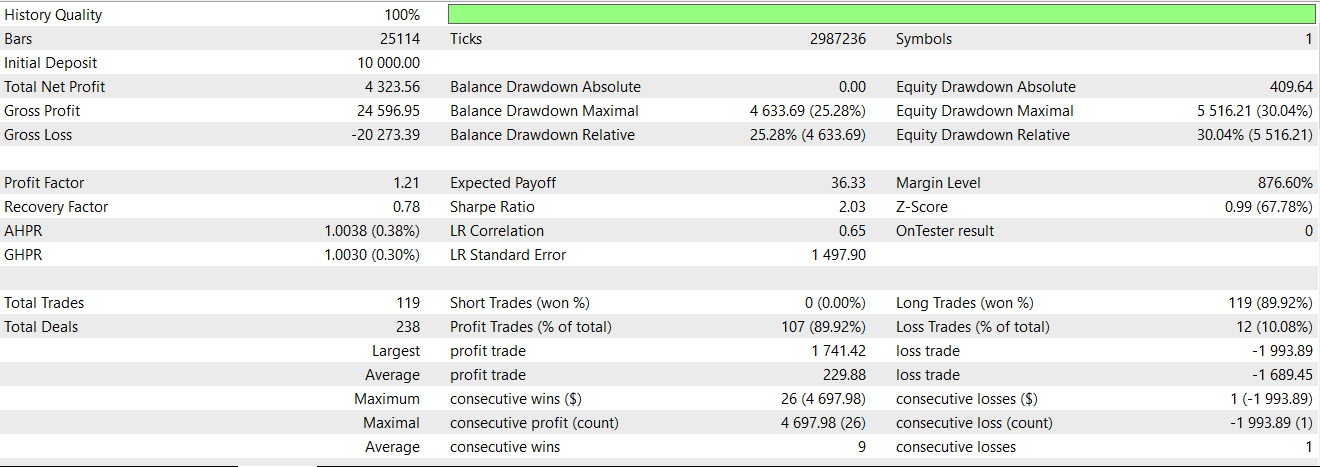
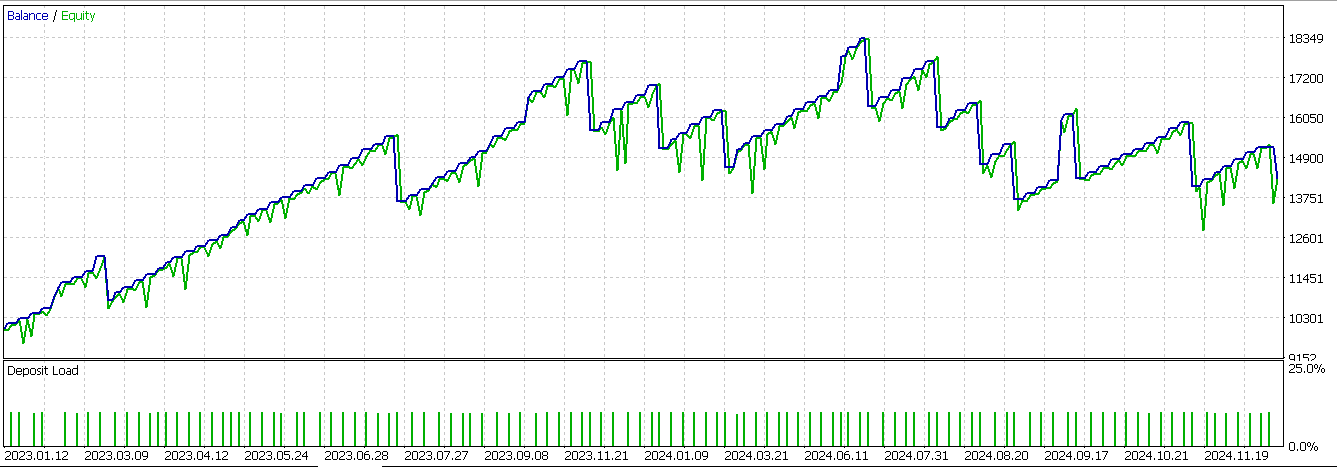
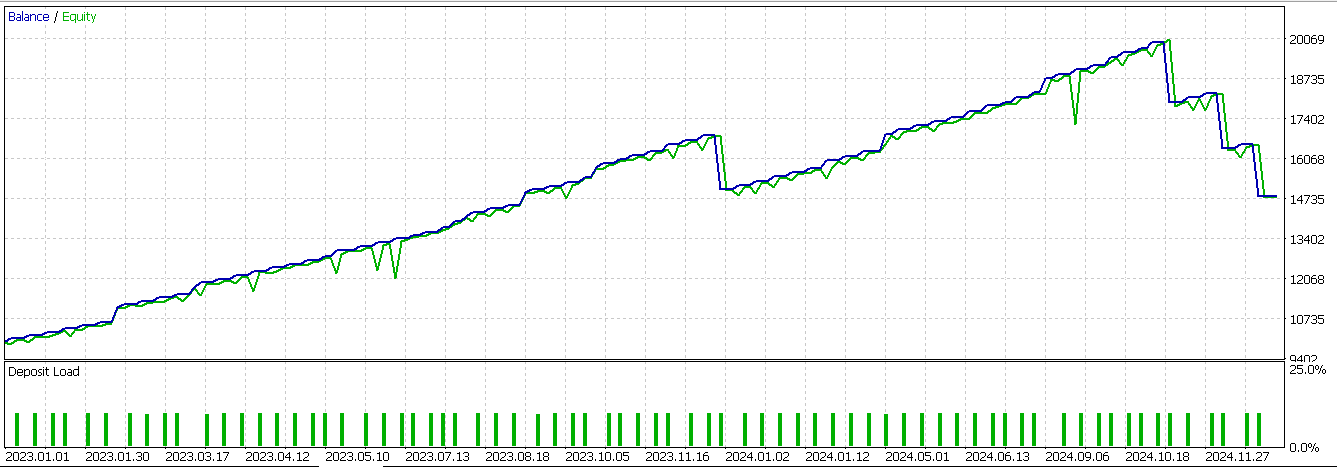
虽然该信号能够产生大量盈利交易,但在2024年的样本外滚动测试中,整体并未能实现盈利。
形态3
第二种信号形态基于行情由收缩转为扩张,同时伴随K线内部的强力推动。在Python中的具体实现如下:
def feature_3(df):
    """
//+------------------------------------------------------------------+
//| Check for Pattern 3.                                             |
//+------------------------------------------------------------------+
    """
    feature = np.zeros((len(df), 2))

    cond_1 = df['Gator_Up_Color'].shift(1) == 'red'
    cond_2 = df['Gator_Down_Color'].shift(1) == 'red'
    cond_3 = df['Gator_Up_Color'] == 'red'
    cond_4 = df['Gator_Down_Color'] == 'green'

    feature[:, 0] = (cond_1 &
                     cond_2 &
                     cond_3 &
                     cond_4 &
                     (df['close']-df['low'].shift(1) > 0.5*(df['high'].shift(1)-df['low'].shift(1))) &
                     (df['AD_Oscillator'].shift(2) > df['AD_Oscillator']) &
                     (df['AD_Oscillator'] > df['AD_Oscillator'].shift(1))).astype(int)

    feature[:, 1] = (cond_1 &
                     cond_2 &
                     cond_3 &
                     cond_4 &
                     (df['high'].shift(1)-df['close'] < 0.5*(df['high'].shift(1)-df['low'].shift(1))) &
                     (df['AD_Oscillator'].shift(2) < df['AD_Oscillator']) &
                     (df['AD_Oscillator'] < df['AD_Oscillator'].shift(1))).astype(int)


    feature[0, :] = 0
    feature[1, :] = 0

    return feature
本形态的基础条件:鳄鱼震荡指标的柱状图上行和下行柱此前同时显示红色,随后其中一根翻转为绿色,以此作为行情状态切换信号,相关逻辑在本系列第七十七部分中已有阐述。该形态的大部分说明内容已在那篇文章中介绍过,因此我们直接将该形态经由神经网络进行过滤后,得到的测试报告如下:
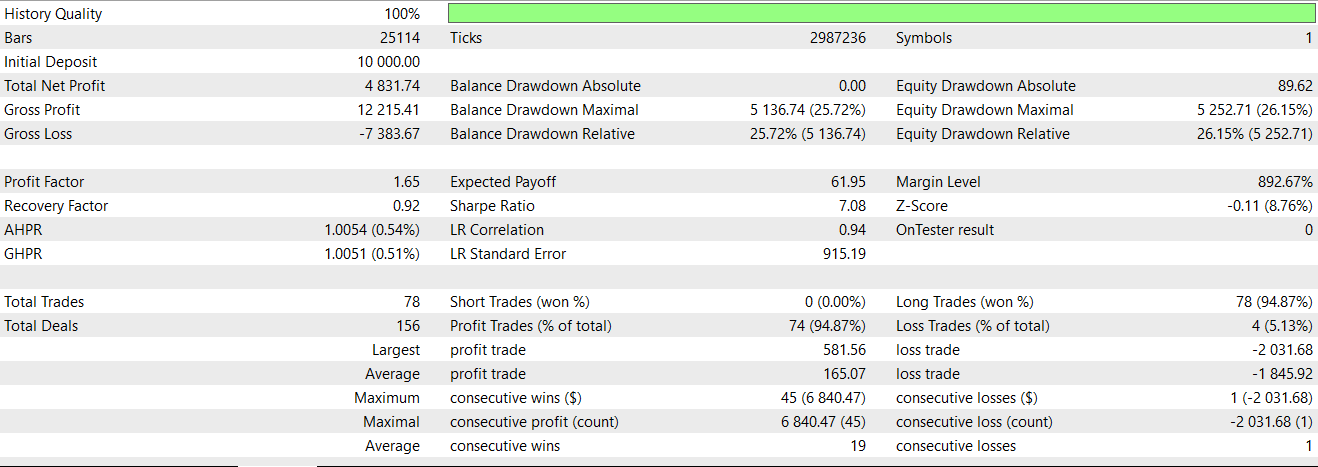
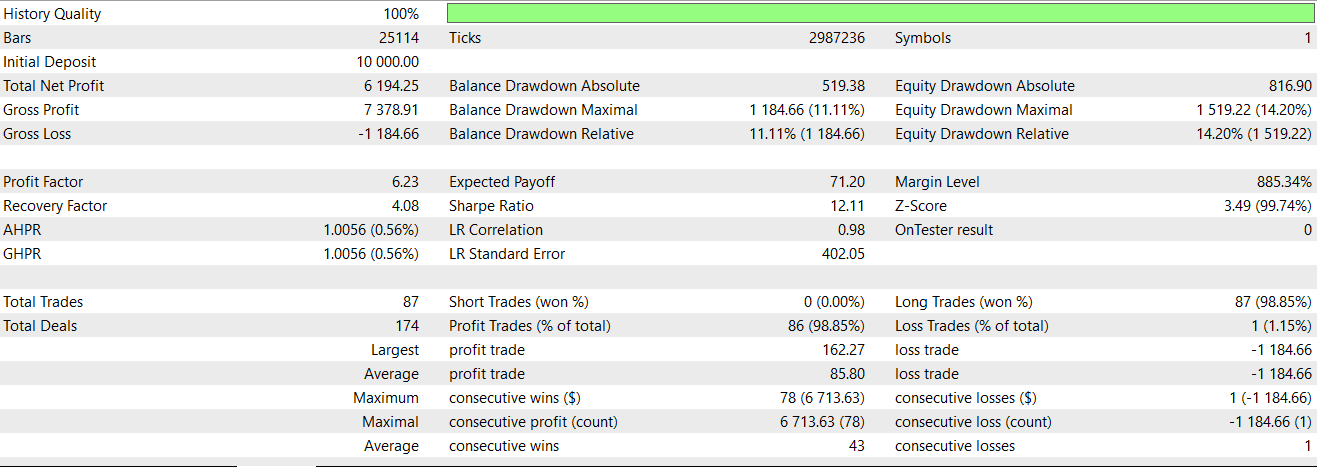
前向滚动测试原本接近达标,但最后一连串亏损交易直接拖垮了整体结果。我们这套系统只设置止盈目标,未使用止损,这正是问题所在:系统依靠反向信号来平仓亏损头寸。
形态4
我们研究的最后一类信号形态:颜色翻转延续形态,搭配简易动量确认。如果前一根K线对应的鳄鱼柱状图处于上行扩张状态:上方柱为绿色且下方柱为红色;后续K线的上方柱状图转为红色(收缩),而下方柱变为绿色,这就有可能预示鳄鱼震荡指标识别的市场状态发生切换。同时还会执行价格拒斥校验与A/D动量校验,相关逻辑前文已有介绍。该信号的Python代码实现如下:
def feature_4(df):
    """
//+------------------------------------------------------------------+
//| Check for Pattern 4.                                             |
//+------------------------------------------------------------------+
    """
    feature = np.zeros((len(df), 2))

    cond_1 = df['Gator_Up_Color'].shift(1) == 'green'
    cond_2 = df['Gator_Down_Color'].shift(1) == 'red'
    cond_3 = df['Gator_Up_Color'] == 'red'
    cond_4 = df['Gator_Down_Color'] == 'green'

    feature[:, 0] = (cond_1 &
                     cond_2 &
                     cond_3 &
                     cond_4 &
                     (df['close'] > df['close'].shift(1)) &
                     (df['low'].shift(1) > df['low']) &
                     (df['AD_Oscillator'] > df['AD_Oscillator'].shift(1))).astype(int)

    feature[:, 1] = (cond_1 &
                     cond_2 &
                     cond_3 &
                     cond_4 &
                     (df['close'] < df['close'].shift(1)) &
                     (df['high'].shift(1) < df['high']) &
                     (df['AD_Oscillator'] < df['AD_Oscillator'].shift(1))).astype(int)


    feature[0, :] = 0
    feature[1, :] = 0

    return feature
我们使用神经网络作为额外过滤器,对该信号进行测试(神经网络作用于前几篇文章搭建好的EA),得到的测试报告如下:
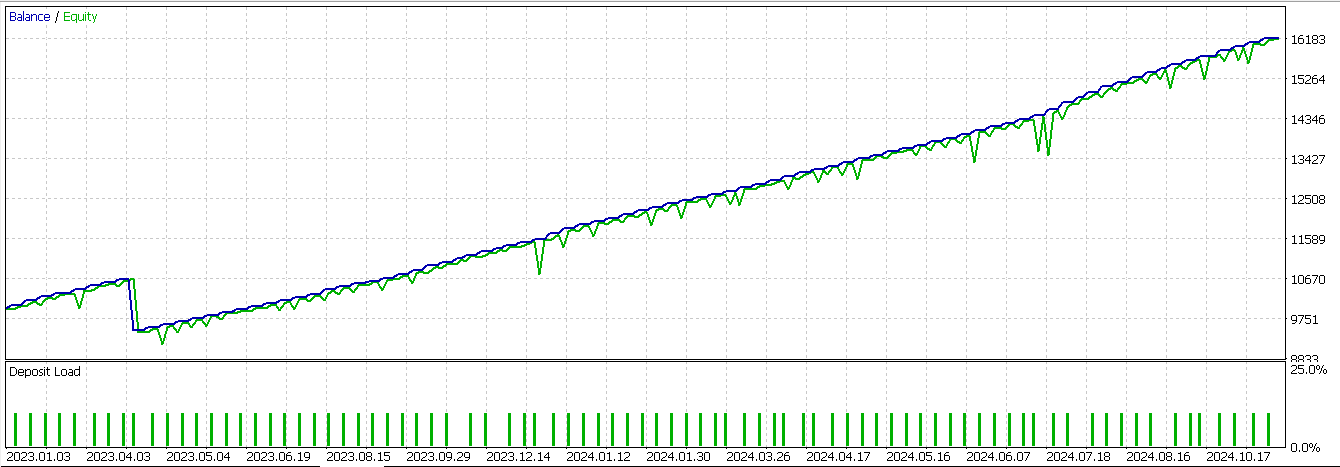
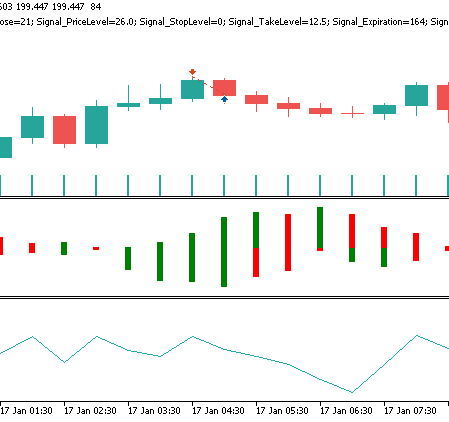
在本文重新测试的三组信号形态当中,只有这一组的表现相比初次测试出现明显改善,扭亏为盈。再次说明:我们的测试窗口仅为2年。因此任何想要进一步开发该信号的开发者,都务必自行开展独立严谨的验证。形态4对应的空头信号形态,在价格图表上大致呈现如下:
结论
本文研究的这类监督学习模型(也就是我们用到的CNN),在融合核回归与点积相似度机制进行增强后,确实展现出一定潜力,能够强化弱信号形态。本次测试的所有形态中,并非全部都能获得同等程度的性能提升。但形态4效果突出,实现了明显的业绩反转。这一结果初步验证:该方案可以作为EA中的有效信号过滤器。尽管该方法证明自适应架构能够从历史表现不稳定的信号中挖掘价值,但受限于测试周期较短,我们仍需审慎地看待由此得出的结论。
| 名称 | 描述 |
|---|---|
| WZ-79.mq5 | 由MQL5向导生成的EA,其标题指示所使用的文件,向导使用指南可参见此处 |
| SignalWZ-79.mqh | 向导构建EA时用到的信号类头文件 |
| 79_0.onnx | 信号形态0导出的神经网络模型 |
| 79_3.onnx | 信号形态3导出的神经网络模型 |
| 79_4.onnx | 信号形态4导出的神经网络模型 |
本文由MetaQuotes Ltd译自英文
原文地址: https://www.mql5.com/en/articles/19220
注意: MetaQuotes Ltd.将保留所有关于这些材料的权利。全部或部分复制或者转载这些材料将被禁止。
本文由网站的一位用户撰写,反映了他们的个人观点。MetaQuotes Ltd 不对所提供信息的准确性负责,也不对因使用所述解决方案、策略或建议而产生的任何后果负责。

 从基础到中级:在 MetaTrader 5 沙箱中处理文件
 在线性自回归模型残差上训练非线性 U-Transformer
 从新手到专家:使用MQL5实现动态新闻标题(9)—— 新闻交易中的单图表多品种管理
 价格行为分析工具包开发(第三十七部分):市场情绪偏向计
