

Introduction to MQL5 (Part 32): Mastering API and WebRequest Function in MQL5 (VI)
 2 386
2 386
 0
0

Introduction
Welcome back to Part 32 of the Introduction to MQL5 series! I explained how to use the WebRequest function and API to request candle data from external sources in the previous article. We went over how to get the server response as raw text, how to carefully separate it into individual candles, and how to store the cleaned and arranged candle values on your PC in a structured file. By the end, you had a comprehensive file with well-organized candle data that you could use again at any moment without contacting the server.
We'll go to the next phase in this section. We'll concentrate on reading the candle data back into an MQL5 program, as it has already been saved in a file. To use the data inside an indicator or EA, you will learn how to open the file, extract each candle value, and arrange the information. You will understand how data moves in both directions by the end of this article: from the external platform into a file and then back into MQL5. This gets you ready for the following step, when we will use the information you have retrieved to visualize the data in candle format.
Setting Indicator Properties
In this section, we are going to begin building the indicator that will visualize the candle data in candle format. The indicator will read the data directly from the file we created earlier, since indicators cannot use the WebRequest function on their own. Expert Advisors can request data from external sources, but indicators cannot, so using a file is the safest and most efficient way to transfer the information.
Determining the key characteristics of any custom indicator is the first step in creating it. Before programming the core logic, this includes determining how the indicator will show on the chart, how many buffers it will require, how the plots will be generated, and other fundamental configurations. By establishing these qualities first, we give the indicator a suitable structure and get it ready to properly receive, process, and show the saved candle data.
Example:
// PROPERTY SETTINGS
#property indicator_separate_window
#property indicator_buffers 5
#property indicator_plots   1

// PLOT SETTINGS FOR THE CANDLES
#property indicator_label1  "BTCUSDT CANDLE BARS"
#property indicator_type1   DRAW_COLOR_CANDLES
#property indicator_color1  clrGreen, clrRed

//+------------------------------------------------------------------+
//| Custom indicator initialization function                         |
//+------------------------------------------------------------------+
int OnInit()
  {
//--- indicator buffers mapping
//---
//---
   return(INIT_SUCCEEDED);
  }
//+------------------------------------------------------------------+
//| Custom indicator iteration function                              |
//+------------------------------------------------------------------+
int OnCalculate(const int32_t rates_total,
                const int32_t prev_calculated,
                const datetime &time[],
                const double &open[],
                const double &high[],
                const double &low[],
                const double &close[],
                const long &tick_volume[],
                const long &volume[],
                const int32_t &spread[])
  {
//---
//--- return value of prev_calculated for next call
   return(rates_total);
  }
Explanation:
Determining how the indicator will show on the chart and how many internal data containers it will need is the first step in the indicator setup process. You start by instructing MetaTrader to show the indicator in a different window rather than on the primary price chart. This keeps the personalized candle display separate, which facilitates reading and keeps it from interfering with the main chart.
The number of buffers the indicator will require is then specified. A buffer is merely a place for the indicator to store its data. A total of five buffers are built because a candle needs four values plus an extra value to regulate the color of the candle. Next, you specify the number of visual plots that the indicator will create. In this instance, only one plot is required, since the plot will use the data from the buffers to display entire candles.
The candles' appearance rules are then established. This includes selecting the candle drawing method, naming the plot so the user knows what the indicator is drawing, and designating colors for rising and falling candles. By doing this, once the data is entered into the buffers, the platform knows just how to display the candles.
The indicator declares the buffers that will store the candle values after setting up the plot parameters. Every buffer has a designated function. The open values, highs, lows, closes, and numbers that determine whether each candle will display in the bullish or bearish color are all stored in separate buffers.
Every buffer is linked to the indicator within the initialization function. Telling MetaTrader that a particular array of values should be used to control a visual feature or render a portion of the candle is all it takes to map a buffer. The color buffer is mapped as a color index buffer, and the open, high, low, and close buffers are mapped as data buffers. The color that each candle should utilize when presented is determined by this final buffer. The indicator finishes initialization and is prepared to load data during runtime once all buffers have been successfully mapped. Before the candle values are filled in later, this preparatory process makes sure that everything is properly organized.
Analogy:
Imagine your indicator as a separate reading area from the library's main hall. Rather than putting your unique candle books on the main library shelf, you build a dedicated shelf in a quiet area so you can see them clearly and separate them from everything else. Focusing on the candle information you are going to display is made easy by this distinct area. You determine how many sections the shelf will require before putting anything on it. You build five sections, since each candle book has four key pages plus an additional page that determines the color of the candle. All the pages will be arranged in these sections. To keep each sort of page correct, you will still require individual compartments, even though the books will be shown as a single collection.
For anyone entering the room to know exactly what they are looking at, you then label the display portion. You decide how the books will look and even designate two colors to show whether the flame is rising or falling. By establishing these guidelines in advance, your reading room will know how to deliver the content once the pages are arranged. You arrange five distinct stacks of pages after establishing the display rules. There are four stacks: one for opening values, one for highs, one for lows, one for closing values, and one for the color markers that decide each candle's appearance. Every stack is ready and ready to be put into the appropriate shelf section.
You meticulously place each stack of pages on the appropriate shelf compartment during the startup process. The exact stack of pages that each compartment will hold and display is now known. The last stack contains the tags that determine the candle's look, while the four-page stacks are utilized to construct the candle body. The reading chamber is ready to receive the candle information when all stacks have been arranged correctly.
Output:
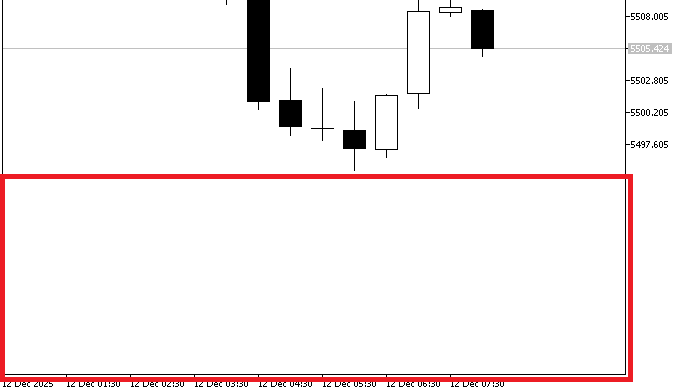
As shown in the above image, the indicator formed a secondary chart when it was activated, but it is still empty. This occurs because we have merely configured the indicator's fundamental structure. This section involves the creation of an indicator that will display the candle data that we have previously stored in a file. Indicators can only get external candle data by reading it from a file because they are unable to use the WebRequest function directly.
Before we can read the file and display the candles, we must set the essential indicator attributes. The number of buffers, the way the data is shown, and the general layout of the indicator window are all controlled by these parameters.
Reading the File and Grouping Candle Time Data
The indicator then reads the file and clusters related data together. Time values are not necessary for candle display, but they keep things organized when they are arranged with price data. This method makes it simple to get candle times in the future or use them in other calculations as necessary.
Opening the File
We first access the file containing the saved candle information to arrange the time data. After opening the file, we examine the values under the Time column by looping through each row. We can combine all the open times together by choosing only the time entries that are valid. Although the indicator doesn't require the time data to display the candles, grouping it keeps the structure constant and can be helpful if you need to refer to the candle times later for analysis or other calculations.
Example:// PROPERTY SETTINGS #property indicator_separate_window #property indicator_buffers 5 #property indicator_plots 1 // PLOT SETTINGS FOR THE CANDLES #property indicator_label1 "BTCUSDT CANDLE BARS" #property indicator_type1 DRAW_COLOR_CANDLES #property indicator_color1 clrGreen, clrRed // INDICATOR BUFFERS double bar_open[]; double bar_high[]; double bar_low[]; double bar_close[]; double ColorBuffer[]; string SharedFilename = "BTCUSDTM30_MQL5.csv"; int time_handle; //+------------------------------------------------------------------+ //| Custom indicator initialization function | //+------------------------------------------------------------------+ int OnInit() { //--- indicator buffers mapping //--- SetIndexBuffer(0, bar_open, INDICATOR_DATA); SetIndexBuffer(1, bar_high, INDICATOR_DATA); SetIndexBuffer(2, bar_low, INDICATOR_DATA); SetIndexBuffer(3, bar_close, INDICATOR_DATA); SetIndexBuffer(4, ColorBuffer, INDICATOR_COLOR_INDEX); //--- return(INIT_SUCCEEDED); } //+------------------------------------------------------------------+ //| Custom indicator iteration function | //+------------------------------------------------------------------+ int OnCalculate(const int32_t rates_total, const int32_t prev_calculated, const datetime &time[], const double &open[], const double &high[], const double &low[], const double &close[], const long &tick_volume[], const long &volume[], const int32_t &spread[]) { //--- //TIME time_handle = FileOpen(SharedFilename, FILE_READ | FILE_CSV | FILE_ANSI, ','); if(time_handle == INVALID_HANDLE) { Print("Failed to open file. Error: ", GetLastError()); } //--- return value of prev_calculated for next call return(rates_total); }
Explanation:
To save the filename of the CSV file containing the candle data, a string variable is first established. When the program has to read the candle information, this enables it to know just which file to open. Any function within the indicator can access it if it is declared in the global space. The file handle is then stored in a variable that is specified. The open file's file handle functions similarly to an ID or reference. The program utilizes this handle to read the data rows and access each value in the file after the file has been successfully opened.
The file is then opened by the software using particular parameters that specify its structure. The original data is preserved by reading the file without writing to it. Each row is presumed to include numerous values separated by commas, reflecting candle data like time and price levels, because the file is handled as a CSV. The application may appropriately split and read each value by using ANSI encoding and explicitly designating the comma as the separator.
After that, the file is accessed using settings that instruct the application on how to read its contents. To safely extract data, it is opened in read-only mode. Because the file has a CSV format, commas are used to separate values such as time and price components. The application can consistently read and separate each piece of candle information by utilizing ANSI encoding and designating the comma as the delimiter. Only if the file is publicly accessible can your indicator read it. Your MQL5 code might not be able to access the file if it is currently open in another program. To prevent read issues and guarantee seamless data loading, always close the file in any external application before starting the indicator.
Analogy:
Imagine the CSV file as a shelf-mounted binder with all of your candle data neatly arranged in rows and columns. You know precisely which binder to pick up thanks to the filename variable, which functions similarly to a label on the binder. It is similar to putting the label in a prominent location so that everyone in the library can see it and access the appropriate binder when the filename is declared in the global space.
One way to think of the file handle is as a key that opens a binder full of well-organized candle records. You can navigate between sections precisely by opening the file in read mode and identifying it as a CSV file with commas. You can view the time and pricing data of each candle in an organized and understandable manner because each comma separates one figure from the next. The program quickly verifies that access to the binder was authorized. Similar to a librarian alerting you that the binder cannot be accessed at this time, it instantly reports an error if access is unsuccessful. This ensures that any problem is immediately identified before the data is processed.
Lastly, if the file is opened manually on your PC, the application cannot access it, just as you cannot read the binder while someone else is holding it. For your indicator to open it and properly analyze the candle information, you must ensure that it is free.
Looping Through the File
Once the file has been opened, we count the data pieces that are separated by commas. The application reads the file as individual values divided by the specified separator, notwithstanding the file's visual representation as rows and columns. By counting these values, we may verify the arrangement of the candle data and avoid mistakes when later grouping and processing the data.
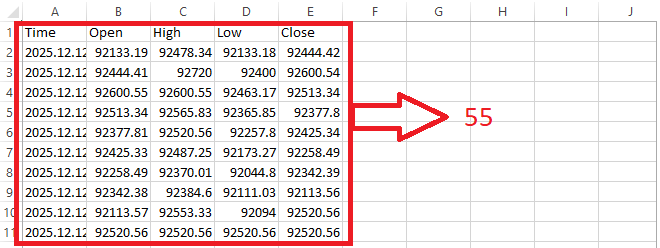
The file appears to be a tidy table with rows and columns in the image above, but the code treats it as though everything is typed on a single, straight line.
Time, Open, High, Low, Close,
2025.12.12 05:30:00, 92133.19, 92478.34, 92133.18, 92444.42,
2025.12.12 06:00:00, 92444.41,92720, 92400, 92600.54,
2025.12.12 06:30:00, 92600.55, 92600.55, 92463.17, 92513.34,
2025.12.12 07:00:00, 92513.34, 92565.83, 92365.85, 92377.8,
2025.12.12 07:30:00, 92377.81, 92520.56, 92257.8, 92425.34,
2025.12.12 08:00:00, 92425.33, 92487.25, 92173.27, 92258.49,
2025.12.12 08:30:00, 92258.49, 92370.01, 92044.8, 92342.39,
2025.12.12 09:00:00, 92342.38, 92384.6, 92111.03, 92113.56,
2025.12.12 09:30:00, 92113.57, 92553.33, 92094, 92520.56,
2025.12.12 10:00:00, 92520.56, 92520.56, 92520.56, 92520.56
The algorithm can easily tell one element from another since each value in the file is separated by a comma. A total of 55 items, comprising the header labels and the whole set of data for the ten candles, are revealed by counting each comma-separated piece.
Examples:
string GlobalOpenTime[55];Example:
//TIME
   time_handle = FileOpen(SharedFilename, FILE_READ | FILE_CSV | FILE_ANSI, ',');

   if(time_handle == INVALID_HANDLE)
     {
      Print("Failed to open file. Error: ", GetLastError());
     }

     for(int i = 0; i < 55; i++)
     {

      GlobalOpenTime[i]  = FileReadString(time_handle);

     }
Explanation:
Each of the 55 string values in the GlobalOpenTime array represents a single item that was read from the file. All the comma-separated elements in the file, including the header names and the data values for the ten candles, add up to 55. To run over all 55 elements, a loop is employed. The software reads one element from the file and saves it in the array at the appropriate location throughout each iteration. This indicates that the array's first element has the first value from the file, the second element contains the second value, and so on until the last element contains the last value.
Importing everything as a string is crucial at this point. For now, even values that indicate times or numbers are read as text. This guarantees that all the data is accurately extracted from the file before it is subsequently arranged, transformed into the appropriate data types, and utilized for additional processing or indicator presentation.
Grouping All Candle Times into a Single Array
Without distinguishing whether the value belongs to open, high, low, close, or time, the loop iterates through each element in the file one after the other. All it does is read each thing exactly as it appears. The objective is to determine which of those things are in the Time column while looping through the elements so that we may gather them all at a later time. We can use the element positions inside the loop to determine whether the loop is currently reading a time value because the file is organized in a repeating pattern of columns.
According to the file's structure, the Time column is always at index 0 in the pattern of values because it appears first in each row. The subsequent time value will always be precisely five locations after the preceding one because each row has five fields. Consequently, we will finally get at each time entry in the file one by one if we begin at index 0 and continue adding 5 to the index. Until all 55 elements in the file are looped through, this process is repeated. We will gather these values, transform them from text to the proper datetime data type, and store them in a single array to facilitate their use later in the indicator.
Example:
int index_time;
datetime bar1_time;
datetime bar2_time;
datetime bar3_time;
datetime bar4_time;
datetime bar5_time;
datetime bar6_time;
datetime bar7_time;
datetime bar8_time;
datetime bar9_time;
datetime bar10_time;

datetime OpenTime[10];
//+------------------------------------------------------------------+
//| Custom indicator iteration function                              |
//+------------------------------------------------------------------+
int OnCalculate(const int32_t rates_total,
                const int32_t prev_calculated,
                const datetime &time[],
                const double &open[],
                const double &high[],
                const double &low[],
                const double &close[],
                const long &tick_volume[],
                const long &volume[],
                const int32_t &spread[])
  {
//---
//TIME
   time_handle = FileOpen(SharedFilename, FILE_READ | FILE_CSV | FILE_ANSI, ',');

   if(time_handle == INVALID_HANDLE)
     {
      Print("Failed to open file. Error: ", GetLastError());
     }

//LOOPING THROGH THE FILE ELEMENTS
   for(int i = 0; i < 55; i++)
     {

      GlobalOpenTime[i]  = FileReadString(time_handle);

     }
//GROUPING ALL TIME TOGETHER
   index_time = 5;
   bar1_time = StringToTime(GlobalOpenTime[index_time]);
   index_time += 5;
   bar2_time = StringToTime(GlobalOpenTime[index_time]);
   index_time += 5;
   bar3_time = StringToTime(GlobalOpenTime[index_time]);
   index_time += 5;
   bar4_time = StringToTime(GlobalOpenTime[index_time]);
   index_time += 5;
   bar5_time = StringToTime(GlobalOpenTime[index_time]);
   index_time += 5;
   bar6_time = StringToTime(GlobalOpenTime[index_time]);
   index_time += 5;
   bar7_time = StringToTime(GlobalOpenTime[index_time]);
   index_time += 5;
   bar8_time = StringToTime(GlobalOpenTime[index_time]);
   index_time += 5;
   bar9_time = StringToTime(GlobalOpenTime[index_time]);
   index_time += 5;
   bar10_time = StringToTime(GlobalOpenTime[index_time]);

   OpenTime[0]  = bar1_time;
   OpenTime[1]  = bar2_time;
   OpenTime[2]  = bar3_time;
   OpenTime[3]  = bar4_time;
   OpenTime[4]  = bar5_time;
   OpenTime[5]  = bar6_time;
   OpenTime[6]  = bar7_time;
   OpenTime[7]  = bar8_time;
   OpenTime[8]  = bar9_time;
   OpenTime[9]  = bar10_time;
   FileClose(time_handle);

//--- return value of prev_calculated for next call
   return(rates_total);
  }
Explanation:
An index pointing to the first actual time value in the file is constructed to start extracting the candle times. The first actual candle time begins at position five since the heading takes up the first five places. The ten candle times that will be retrieved are then temporarily stored in a number of datetime variables. To retrieve the original time value and transform it into a datetime that MQL5 can comprehend, the application uses the index. The index moves by five places after reading this value, guaranteeing that it indicates the time of the subsequent candle. Until all ten candle times are successfully retrieved and translated, this pattern is repeated, with each jump of five leading to the subsequent time value.
The ten datetime items are extracted and then grouped into a single array. It is easy to refer to any candle's open time by its index because the array locations correspond to the candles' order, from earliest to latest. The file is closed when the time data has been grouped into the array. Closing it keeps it from being locked, lowers the possibility of mistakes, and enables the software to handle the data without encountering any issues with file access.
Analogy:
Imagine a long shelf filled with neatly organized little cards. Each card has information from the candle file. The file appears as a table on your computer, but to the application, it is just a long row of cards with commas between each. The labels, such as the column headings, make up the first five cards on the shelf. The actual candle data starts after those designations. The sixth card on the shelf represents the first candle time. You put your finger on the sixth card to begin gathering the candle times. Your starting index is that finger location. You pick up the card, read the time on it, and then convert the text into a date format that your system can comprehend. As the first candle time, you put that card away.
Since each candle's information takes up five cards overall, each candle's next time value is always precisely five cards farther down the shelf. You slide your finger five cards forward after drawing the first card. After lifting, reading, and converting the next time card, you put it in the second spot in your candle time collection. You keep doing this motion over and over. Lift the next time card, read it, convert it, and save it each time you advance your finger precisely five cards. This process is repeated until you have gathered all 10 candle times off the shelf.
Ten time cards are neatly grouped together in a separate box after the operation. In the right order, each card in this box represents a single candle. Instead of looking through the lengthy shelf of conflicting information, you can now just check the appropriate card in your time box whenever you need to know when a candle opened. You close the shelf once all the time cards have been gathered and arranged. Closing the file in your code is mirrored by this. After use, closing the file prevents locking issues, protects the data, and permits error-free access to other resources.
Reading the File and Grouping Candle Open Prices
To use them in the indicator, all the open prices from the file must be grouped in the next step. This procedure is quite similar to what we did for the candle times, but since prices are represented as double values in MQL5, we transform the data into numbers with decimals rather than a date-time format. To read the file again, a new file handle is first established. This is crucial since we had to reopen the file to retrieve the data since we had previously closed it after reading the times. The program runs through every element in the file after it is opened. The header labels and all the data points for the ten candles comprise the total of 55 items.
The program looks at each element's position inside the loop to determine which ones reflect open prices. As the second item in the first row, the Open column has an index of 1. The value at this index is read by the program, which then stores it as the first candle's open price after converting it from text to a numerical representation. The computer then increases the index by five to go to the next open price because each candle's information takes up five elements in the file. This procedure is repeated, reading each succeeding open price, doubling it, and then sequentially placing it in an array reserved for open prices. By the time this loop is finished, all 10 open prices have been neatly arranged into a single array, with each place in the array representing a distinct candle.
To free up system resources and prevent unintentional manual access while the software is still operating, the file is closed once all the open prices have been gathered and stored. This guarantees that the file is saved correctly and that the open price array's data is prepared for use in the indicator's computations or visualization.
Example://OPEN PRICE string GlobalOpenPrice[55]; int open_handle; int index_open; double bar1_open; double bar2_open; double bar3_open; double bar4_open; double bar5_open; double bar6_open; double bar7_open; double bar8_open; double bar9_open; double bar10_open; double OpenPrice[10];
//TIME
time_handle = FileOpen(SharedFilename, FILE_READ | FILE_CSV | FILE_ANSI, ',');

if(time_handle == INVALID_HANDLE)
  {
   Print("Failed to open file. Error: ", GetLastError());
  }

//LOOPING THROGH THE FILE ELEMENTS
for(int i = 0; i < 55; i++)
  {

   GlobalOpenTime[i]  = FileReadString(time_handle);

  }
//GROUPING ALL TIME TOGETHER
index_time = 5;
bar1_time = StringToTime(GlobalOpenTime[index_time]);
index_time += 5;
bar2_time = StringToTime(GlobalOpenTime[index_time]);
index_time += 5;
bar3_time = StringToTime(GlobalOpenTime[index_time]);
index_time += 5;
bar4_time = StringToTime(GlobalOpenTime[index_time]);
index_time += 5;
bar5_time = StringToTime(GlobalOpenTime[index_time]);
index_time += 5;
bar6_time = StringToTime(GlobalOpenTime[index_time]);
index_time += 5;
bar7_time = StringToTime(GlobalOpenTime[index_time]);
index_time += 5;
bar8_time = StringToTime(GlobalOpenTime[index_time]);
index_time += 5;
bar9_time = StringToTime(GlobalOpenTime[index_time]);
index_time += 5;
bar10_time = StringToTime(GlobalOpenTime[index_time]);

OpenTime[0]  = bar1_time;
OpenTime[1]  = bar2_time;
OpenTime[2]  = bar3_time;
OpenTime[3]  = bar4_time;
OpenTime[4]  = bar5_time;
OpenTime[5]  = bar6_time;
OpenTime[6]  = bar7_time;
OpenTime[7]  = bar8_time;
OpenTime[8]  = bar9_time;
OpenTime[9]  = bar10_time;

FileClose(time_handle);

// OPEN
open_handle = FileOpen(SharedFilename, FILE_READ | FILE_CSV | FILE_ANSI, ',');

if(open_handle == INVALID_HANDLE)
  {
   Print("Failed to open file. Error: ", GetLastError());
  }

for(int i = 0; i < 55; i++)
  {

   GlobalOpenPrice[i]  = FileReadString(open_handle);

  }

index_open = 6;

bar1_open = StringToDouble(GlobalOpenPrice[index_open]);
index_open += 5;
bar2_open = StringToDouble(GlobalOpenPrice[index_open]);
index_open += 5;
bar3_open = StringToDouble(GlobalOpenPrice[index_open]);
index_open += 5;
bar4_open = StringToDouble(GlobalOpenPrice[index_open]);
index_open += 5;
bar5_open = StringToDouble(GlobalOpenPrice[index_open]);
index_open += 5;
bar6_open = StringToDouble(GlobalOpenPrice[index_open]);
index_open += 5;
bar7_open = StringToDouble(GlobalOpenPrice[index_open]);
index_open += 5;
bar8_open = StringToDouble(GlobalOpenPrice[index_open]);
index_open += 5;
bar9_open = StringToDouble(GlobalOpenPrice[index_open]);
index_open += 5;
bar10_open = StringToDouble(GlobalOpenPrice[index_open]);

OpenPrice[0]  = bar1_open;
OpenPrice[1]  = bar2_open;
OpenPrice[2]  = bar3_open;
OpenPrice[3]  = bar4_open;
OpenPrice[4]  = bar5_open;
OpenPrice[5]  = bar6_open;
OpenPrice[6]  = bar7_open;
OpenPrice[7]  = bar8_open;
OpenPrice[8]  = bar9_open;
OpenPrice[9]  = bar10_open;
FileClose(open_handle);
Explanation:
First, all elements read from the file, including headers and candle data, are temporarily stored in a string array. To grant access to the file, a file handle is also generated. Ten different variables are created to temporarily store the open price of each candle, one to track the index for open prices, and a structured array to store all ten open prices for usage in the indicator. The program opens the file in CSV mode with the proper encoding and sharing settings after defining the required variables. If the file cannot be accessed, it generates an error message and an error code to assist in determining the issue, such as a missing file or inadequate permissions.
A loop iterates through each of the file's 55 elements when it has been successfully opened. The headers and all the candle data are among these components. The program receives the next value from the file and saves it as a string in the temporary array for each loop iteration. The program will have collected all the raw file data in sequential order by the end of this loop. The program establishes an initial index for the open prices after reading every element. The first open price in the file is represented by this index. The first open price appears at position six because the file layout places headers and the time value of the first candle in the first five elements.
The value at this first index is then accessed by the program to read the first candle's open price. The string value is transformed into a double so that it can be charted in an indicator or utilized in calculations. The software advances to the open price of the subsequent candle once the index is increased by 5 following the storage of the initial open price. This process is repeated for all ten candles, with each conversion and storage taking place one after the other. By the time this phase is finished, each of the ten open prices has been temporarily saved in separate variables and transformed into the appropriate numeric type.
Putting all ten open prices into a single array is the next stage. The first position in this array has the open price of the first candle, the second position holds the open price of the second candle, and so on until the tenth candle. Each position in this array represents a distinct candle. Any candle's open price may be easily accessed using its position in the array thanks to this structure. The file has finally been closed. Because it guarantees that all resources required to access the file are relinquished, closing the file is crucial. Additionally, if the file is accessed manually while the program is still operating, it avoids conflicts or failures. The open prices are now securely saved in the array and prepared for use in computations, indicator plotting, or other processing.
Analogy:
Picture a large bookcase with a straight line of cards on it. A piece of information from your candle file is represented by each card. A portion of the initial cards are headers, whereas the remaining cards contain real candle data. Your objective is to gather only the open pricing from each of the ten candles and store them in a tidy, separate box for convenient access. You start by setting up a blank box to store the open prices. Next, you use your application to "open" the bookshelf, which is similar to opening a cabinet to access the cards. The application will notify you if the cabinet cannot be opened so you may address the issue before moving forward.
After that, you examine each of the 55 cards sequentially, one by one, and temporarily arrange them in a pile so you can see everything clearly. The headers and all the data from the bookshelf are now in this pile. The sixth card has the first open price, as you are aware. This is because the first candle's time and the first five cards are headers. You take the sixth card, read the number on it, then format it appropriately so that your "box" can hold it. Your box's first open price is now this.
You advance down the shelf by precisely five cards at the subsequent open price. Likewise, you take the card, read it, convert it, and insert it into your box's second slot. You read, convert, and store each open price in order while continuously advancing five cards. You may ensure that you are selecting only the open prices and keeping the proper order for all ten candles by adhering to this fixed step routine. Not only that, but you "close" the bookcase once all ten Open prices have been gathered and placed in your box. It's crucial to close the cabinet so that no one else may unintentionally tamper with the cards while you continue to work with your well-organized open prices.
Reading the File and Grouping Candle High Prices
We now concentrate on taking the high prices out of the candle data file and organizing them. The method is comparable to open prices. To avoid conflicts, a special handle accesses the file in read mode. Each element is then read one at a time and temporarily stored as strings in a global array. To find the high prices, we discover the first high price in the file based on its index in relation to the first element. To select just the high prices, we increase the index by a predetermined amount for each consecutive candle. After that, each value is transformed from a string to a double, guaranteeing that it is in the proper numerical format for computations or indicator visualization.
After converting and grouping all the high prices, we store them in a special array, with each element representing a single candle in chronological order. This makes it simple to retrieve the high price of any candle at a later time without consulting the original file. To guarantee that the file is correctly saved and made available for use by other processes, we close the file handle when grouping is finished.
Example://HIGH PRICE string GlobalHighPrice[55]; int index_high; double bar1_high; double bar2_high; double bar3_high; double bar4_high; double bar5_high; double bar6_high; double bar7_high; double bar8_high; double bar9_high; double bar10_high; double HighPrice[10];
// HIGH
int high_handle = FileOpen(SharedFilename, FILE_READ | FILE_CSV | FILE_ANSI, ',');

if(high_handle == INVALID_HANDLE)
  {
   Print("Failed to open file. Error: ", GetLastError());
  }

for(int i = 0; i < 55; i++)
  {

   GlobalHighPrice[i]  = FileReadString(high_handle);

  }

index_high = 7;

bar1_high = StringToDouble(GlobalHighPrice[index_high]);
index_high += 5;
bar2_high = StringToDouble(GlobalHighPrice[index_high]);
index_high += 5;
bar3_high = StringToDouble(GlobalHighPrice[index_high]);
index_high += 5;
bar4_high = StringToDouble(GlobalHighPrice[index_high]);
index_high += 5;
bar5_high = StringToDouble(GlobalHighPrice[index_high]);
index_high += 5;
bar6_high = StringToDouble(GlobalHighPrice[index_high]);
index_high += 5;
bar7_high = StringToDouble(GlobalHighPrice[index_high]);
index_high += 5;
bar8_high = StringToDouble(GlobalHighPrice[index_high]);
index_high += 5;
bar9_high = StringToDouble(GlobalHighPrice[index_high]);
index_high += 5;
bar10_high = StringToDouble(GlobalHighPrice[index_high]);

HighPrice[0]  = bar1_high;
HighPrice[1]  = bar2_high;
HighPrice[2]  = bar3_high;
HighPrice[3]  = bar4_high;
HighPrice[4]  = bar5_high;
HighPrice[5]  = bar6_high;
HighPrice[6]  = bar7_high;
HighPrice[7]  = bar8_high;
HighPrice[8]  = bar9_high;
HighPrice[9]  = bar10_high;

FileClose(high_handle);
Explanation:
Initially, all the raw values from the file are briefly stored in a global string array. To hold the converted high price for each of the ten candles, individual double variables are also stated. Lastly, a special double array is made to store all the high prices for future access. Using a handle that offers secure read access, the software opens the CSV file. If the file does not open successfully, an error message containing the pertinent code is printed. After the application is open, it reads each of the 55 elements as a string and saves it in a temporary global array. All the candle values and the headers are contained in this array.
The code begins with a predetermined index that corresponds to the first high price in the sequence to extract the high prices explicitly. The algorithm selects just the high prices by increasing the index by a predetermined amount for each consecutive candle. To ensure that it may be utilized for numerical computations or visualizations, each value is transformed from a string to a double. The converted high prices are arranged chronologically in an array, where each item represents a single candle. After then, closing the file protects the contents and avoids access conflicts. This organized storing makes it simple to refer to the high prices in the indicator or for additional research.
Analogy:
Imagine the file as a lengthy shelf of cards with information from a candle on each card. The high costs are comparable to a certain collection of cards that you wish to get from the shelf. Starting with the first high card, you pick it up, read it, and transform it into a format that you can utilize. The following high card is then obtained by moving a predetermined amount of cards down the shelf; this process is repeated until you have all 10. When you're done, you put all of these high cards in a special box so you can easily access them whenever you need them.
Reading the File and Grouping Candle Low and Close Prices
Grouping the low and close prices from the file is the next step. This procedure is nearly the same as how we classified the open and high prices. First, we reopen the file with a different handle for every data collection. Next, we read each element as a string into temporary storage arrays as we loop over the entire file. To identify each low value for the low prices, we begin at the index that corresponds to the low column and advance by a certain interval. Every value is kept in a specific low-price array after being transformed from a string to a double. For the close prices, we begin at the index that corresponds to the close column, proceed in the same stepwise fashion, double each value, and store it in a close price array.
After the operation, each candle's low and close prices are neatly arranged in their associated arrays in the proper sequence. To guarantee appropriate resource management and avoid any problems when accessing the file later, the file is closed once the data has been grouped.
Example://LOW PRICE string GlobalLowPrice[55]; int index_low; double bar1_low; double bar2_low; double bar3_low; double bar4_low; double bar5_low; double bar6_low; double bar7_low; double bar8_low; double bar9_low; double bar10_low; double LowPrice[10]; //CLOSE PRICE string GlobalClosePrice[55]; int index_close; double bar1_close; double bar2_close; double bar3_close; double bar4_close; double bar5_close; double bar6_close; double bar7_close; double bar8_close; double bar9_close; double bar10_close; double ClosePrice[10];
//LOW
int low_handle = FileOpen(SharedFilename, FILE_READ | FILE_CSV | FILE_ANSI, ',');

if(low_handle == INVALID_HANDLE)
  {
   Print("Failed to open file. Error: ", GetLastError());
  }

for(int i = 0; i < 55; i++)
  {

   GlobalLowPrice[i]  = FileReadString(low_handle);

  }

index_low = 8;

bar1_low = StringToDouble(GlobalLowPrice[index_low]);
index_low += 5;
bar2_low = StringToDouble(GlobalLowPrice[index_low]);
index_low += 5;
bar3_low = StringToDouble(GlobalLowPrice[index_low]);
index_low += 5;
bar4_low = StringToDouble(GlobalLowPrice[index_low]);
index_low += 5;
bar5_low = StringToDouble(GlobalLowPrice[index_low]);
index_low += 5;
bar6_low = StringToDouble(GlobalLowPrice[index_low]);
index_low += 5;
bar7_low = StringToDouble(GlobalLowPrice[index_low]);
index_low += 5;
bar8_low = StringToDouble(GlobalLowPrice[index_low]);
index_low += 5;
bar9_low = StringToDouble(GlobalLowPrice[index_low]);
index_low += 5;
bar10_low = StringToDouble(GlobalLowPrice[index_low]);


LowPrice[0]   = bar1_low;
LowPrice[1]   = bar2_low;
LowPrice[2]   = bar3_low;
LowPrice[3]   = bar4_low;
LowPrice[4]   = bar5_low;
LowPrice[5]   = bar6_low;
LowPrice[6]   = bar7_low;
LowPrice[7]   = bar8_low;
LowPrice[8]   = bar9_low;
LowPrice[9]   = bar10_low;

FileClose(low_handle);

//CLOSE
int close_handle = FileOpen(SharedFilename, FILE_READ | FILE_CSV | FILE_ANSI, ',');

if(close_handle == INVALID_HANDLE)
  {
   Print("Failed to open file. Error: ", GetLastError());
  }

for(int i = 0; i < 55; i++)
  {

   GlobalClosePrice[i]  = FileReadString(close_handle);

  }

index_close = 9;

bar1_close = StringToDouble(GlobalClosePrice[index_close]);
index_close += 5;
bar2_close = StringToDouble(GlobalClosePrice[index_close]);
index_close += 5;
bar3_close = StringToDouble(GlobalClosePrice[index_close]);
index_close += 5;
bar4_close = StringToDouble(GlobalClosePrice[index_close]);
index_close += 5;
bar5_close = StringToDouble(GlobalClosePrice[index_close]);
index_close += 5;
bar6_close = StringToDouble(GlobalClosePrice[index_close]);
index_close += 5;
bar7_close = StringToDouble(GlobalClosePrice[index_close]);
index_close += 5;
bar8_close = StringToDouble(GlobalClosePrice[index_close]);
index_close += 5;
bar9_close = StringToDouble(GlobalClosePrice[index_close]);
index_close += 5;
bar10_close = StringToDouble(GlobalClosePrice[index_close]);

ClosePrice[0] = bar1_close;
ClosePrice[1] = bar2_close;
ClosePrice[2] = bar3_close;
ClosePrice[3] = bar4_close;
ClosePrice[4] = bar5_close;
ClosePrice[5] = bar6_close;
ClosePrice[6] = bar7_close;
ClosePrice[7] = bar8_close;
ClosePrice[8] = bar9_close;
ClosePrice[9] = bar10_close;

FileClose(close_handle);
Explanation:
To start, two string arrays with 55 elements to cover headers and candle entries are declared to temporarily hold all the low and close price data from the file. The beginning positions of the low and close data in the file are stored in integer variables. The low and close prices for each individual candle are stored in separate double variables. To gather all ten low and close prices in an organized order, two arrays are finally assigned. A file handle is used to open the file in read-only mode at the low prices. The program verifies if the file was opened correctly and, if it is not, shows an error message along with a code. After the file is opened, each of the 55 elements is read by a loop and stored as strings in the array for low price data.
The code then sets an index to the relevant column in the dataset to determine the beginning location of the low prices in the file. Each low price is extracted from the temporary array using this index, transformed from a string to a double (the correct numerical format for calculations), and then stored in a different variable that represents that candle. Once a value has been retrieved, the index is increased by a fixed step of five, which is equivalent to going to the low price of the subsequent candle in the series. Until all ten low prices are converted and saved, this procedure is repeated. Lastly, the file is closed to release resources after the individual candle low prices are combined into the final LowPrice array for faster access.
The close prices procedure operates in the same manner. Reopening the file requires a different file handle. Each of the 55 elements is read as a string into a temporary close price array. The column that corresponds to the closing prices is where the index is set. After that, each close price is taken out of the temporary array, doubled, and kept in separate variables for every candle. All ten close prices are collected into the close price array after the index is increased by five for each candle. To guarantee appropriate resource management, the file is then closed.
Visualizing Candle Data in Chart Format
Displaying the data in candle format on the chart comes after our application has properly retrieved and arranged the candle data. This kind of data visualization is essential because it converts the file's raw numbers into a format that traders are accustomed to and can understand. We can quickly observe patterns, trends, and price movements because each candle will show the open, high, low, and closing values for a given time period.
This step aids in confirming that all candle data that has been taken out of the file is correct and appropriately connected to the appropriate candles. Data visualization facilitates additional indicator or strategy work and offers an instantaneous perspective of market dynamics. Matching each candle on the chart with the open, high, low, and close data from the arrays is the initial stage in the visualization process.
Example:
int start_chart_index;
int current_index;
start_chart_index = rates_total - 10;

for(int i = 0; i < 10; i++)
  {

   current_index = start_chart_index + i;
   bar_close[current_index] = ClosePrice[i];
   bar_open[current_index] = OpenPrice[i];
   bar_high[current_index] = HighPrice[i];
   bar_low[current_index] = LowPrice[i];

// SET COLOR: GREEN FOR BULLISH, RED FOR BEARISH
   if(ClosePrice[i] >= OpenPrice[i])
     {
      ColorBuffer[current_index] = 0; // Index 0 of indicator_color1 (clrGreen)
     }
   else
     {
      ColorBuffer[current_index] = 1; // Index 1 of indicator_color1 (clrRed)
     }
  }
Result:
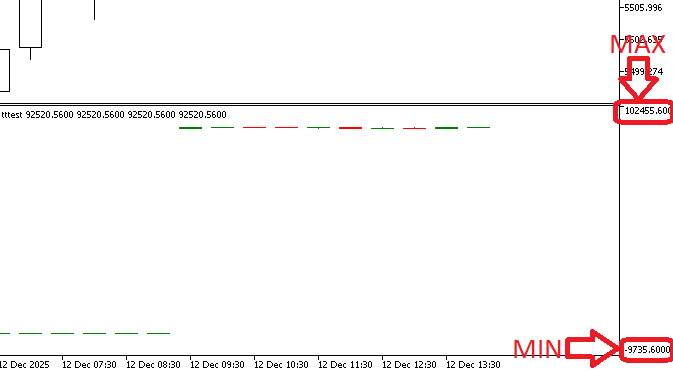
Explanation:
The location of the candle data on the chart is controlled by two important variables in this section. The initial position for plotting the candles is determined by the first variable. This starting point is determined by subtracting ten from the total number of bars on the chart because the objective is to show the final 10 candles. This guarantees that, with relation to the most recent data, the graphing starts at the right place. As the loop continues, the second variable monitors the current bar on the chart. To make sure that every candle is positioned correctly, this variable updates sequentially for each iteration of the loop. The algorithm precisely maps every candle from the data arrays to the chart by increasing this index with each iteration.
The candle's open, high, low, and close values are allocated to the appropriate buffers for display at each loop iteration. This stage guarantees that the price data is accurately represented graphically on the chart. The computer also determines the candle's color by analyzing the correlation between the open and close prices. The candle is given one color and is deemed bullish if the closing is larger than or equal to the open; a lower close denotes a bearish candle with a different color. All ten candles, each with precise pricing and color information, are plotted sequentially on the chart using this method. By converting the arranged data from the arrays into a visual representation, this technique enables the chart to accurately show the location, size, and color of the candles, giving a clear picture of recent market activity.
Analogy:
Imagine a bookcase with candle slots on the chart. For the ten most recent candles, the first variable indicates the beginning point. The second variable places each candle in its proper location by moving down the shelf like a hand. As you position each candle, you look at its data to determine its color: red indicates a negative outlook, and green indicates a bullish one.
Each candle is meticulously positioned in the subsequent slot as it moves along the shelf, ensuring that all ten recent candles are properly organized with the appropriate colors and values. Due to the indicator window's lack of a stated maximum or minimum price, the candles are hardly visible in the image above. The candles are currently shrinking due to the usage of an arbitrarily high value. We need a technique to dynamically alter the window because the market is constantly changing, and the method is straightforward.
We may loop through all of these bars, examine the high and low prices of each candle, and ascertain the overall maximum and minimum because our indicator only uses the last ten bars. The indicator window's range will then be adjusted using these settings, guaranteeing that all ten candles are appropriately visible and scaled.
Example:int highest_index; int lowest_index; double max_level; double min_level;
//VISUALIZING IN CANDLE FORMAT
highest_index = ArrayMaximum(HighPrice,0,WHOLE_ARRAY);
lowest_index = ArrayMinimum(LowPrice,0,WHOLE_ARRAY);

max_level = HighPrice[highest_index] + (HighPrice[highest_index] - LowPrice[lowest_index]);
min_level = LowPrice[lowest_index] - (HighPrice[highest_index] - LowPrice[lowest_index]);

IndicatorSetDouble(INDICATOR_MAXIMUM, max_level);  // maximum value
IndicatorSetDouble(INDICATOR_MINIMUM,min_level);  // minimum value

start_chart_index = rates_total - 10;

for(int i = 0; i < 10; i++)  // START FROM SECOND BAR
  {

   current_index = start_chart_index + i;
   bar_close[current_index] = ClosePrice[i];
   bar_open[current_index] = OpenPrice[i];
   bar_high[current_index] = HighPrice[i];
   bar_low[current_index] = LowPrice[i];

// SET COLOR: GREEN FOR BULLISH, RED FOR BEARISH
   if(ClosePrice[i] >= OpenPrice[i])
     {
      ColorBuffer[current_index] = 0; // Index 0 of indicator_color1 (clrGreen)
     }
   else
     {
      ColorBuffer[current_index] = 1; // Index 1 of indicator_color1 (clrRed)
     }
  }
Result:
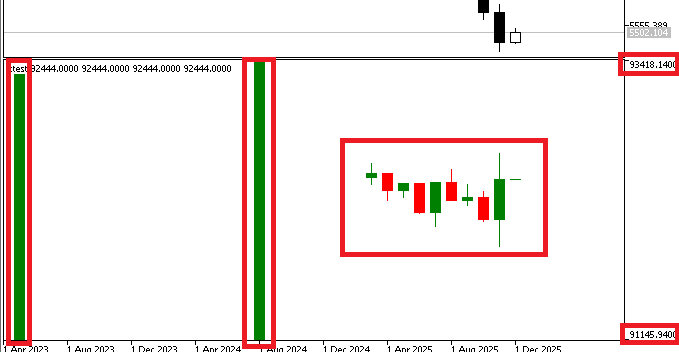
Explanation:
The indices of the highest and lowest values in the candle arrays are first stored in two integer variables, and the position of the highest price among all the candles will be held by one variable, while the lowest price will be held by the other. Also, the candle with the highest price is then identified by a function that scans the high price array to determine the index of the maximum value. Similarly, another function locates the candle with the lowest price by searching the low price array for the index of the smallest value.
The actual maximum and minimum levels for the indicator window are computed when these indices are located. The highest high and the difference between the highest high and the lowest low are added to determine the maximum level. To prevent the candles from being crushed at the top of the window, this guarantees that there is some extra room above the tallest candle. Similarly, the minimum level is determined by deducting the same difference from the lowest low, leaving additional space beneath the lowest candle.
Lastly, the indicator window is subjected to these computed maximum and minimum levels. This adjusts the window's vertical range so that all the candle data, regardless of price value variation, fits neatly inside and is easily seen. Now, the indicator will show all ten candles in a window that is appropriately scaled.
Analogy:
Picture 10 books on a shelf, each of which stands in for a candle. There is a highest page and a lowest page in every book. You initially don't know how much room the shelf needs above the tallest book or below the smallest. The books appear cramped and difficult to see if the spacing is not set correctly. The next stage is to modify the shelf's proportions such that the tallest book may fit comfortably and the tiniest book isn't buried at the bottom. Similarly, the software determines the indicator window range from the highest and lowest candle values and then slightly enlarges it to display the candles in a clear and balanced manner.
The indicator is showing several very enormous candles that are not included in the actual data, if you look at the image. We must modify the indicator to display only the pertinent data because these candles appear outside the imported 10-bar dataset's range.
Example:bool DataLoaded = false; // Flag to ensure data is loaded only once
//VISUALIZING IN CANDLE FORMAT
highest_index = ArrayMaximum(HighPrice,0,WHOLE_ARRAY);
lowest_index = ArrayMinimum(LowPrice,0,WHOLE_ARRAY);

max_level = HighPrice[highest_index] + (HighPrice[highest_index] - LowPrice[lowest_index]);
min_level = LowPrice[lowest_index] - (HighPrice[highest_index] - LowPrice[lowest_index]);

IndicatorSetDouble(INDICATOR_MAXIMUM, max_level);  // maximum value
IndicatorSetDouble(INDICATOR_MINIMUM,min_level);  // minimum value

DataLoaded = true;

if(!DataLoaded || rates_total < 10)
  {
   return(0); // Not enough bars yet or data loading failed
  }

ArrayFill(bar_open, 0, rates_total, EMPTY_VALUE);
ArrayFill(bar_high, 0, rates_total, EMPTY_VALUE);
ArrayFill(bar_low, 0, rates_total, EMPTY_VALUE);
ArrayFill(bar_close, 0, rates_total, EMPTY_VALUE);

start_chart_index = rates_total - 10;

for(int i = 0; i < 10; i++)  // START FROM SECOND BAR
  {

   current_index = start_chart_index + i;

   bar_close[current_index] = ClosePrice[i];
   bar_open[current_index] = OpenPrice[i];
   bar_high[current_index] = HighPrice[i];
   bar_low[current_index] = LowPrice[i];

// SET COLOR: GREEN FOR BULLISH, RED FOR BEARISH
   if(ClosePrice[i] >= OpenPrice[i])
     {
      ColorBuffer[current_index] = 0; // Index 0 of indicator_color1 (clrGreen)
     }
   else
     {
      ColorBuffer[current_index] = 1; // Index 1 of indicator_color1 (clrRed)
     }
  }
Result:
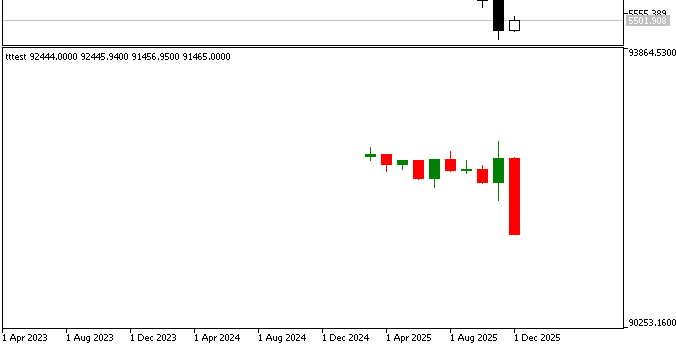
Explanation:
To determine whether candle data has been loaded, the indicator first looks at a flag. It also verifies that there are enough bars on the chart. Execution ceases if either check is unsuccessful. To avoid residual data influencing the outcome, the candle arrays are cleared after both conditions are met.
Note:
The WebRequest EA must be active in order for live updates to function correctly. New market data is routinely retrieved and added to the file. The indicator automatically reloads the data and updates the candle display with the most recent numbers when the file changes.
Conclusion
In this article, we created an indicator to visualize candle data stored in a file. We set up the indicator properties, read the file, grouped the candle values into arrays, converted them to the correct types, and plotted them on the chart. We also adjusted the indicator window to show only the relevant data. Since indicators cannot directly use API or WebRequest functions, storing the data in a file provides an alternative way to access external data.
Warning: All rights to these materials are reserved by MetaQuotes Ltd. Copying or reprinting of these materials in whole or in part is prohibited.
This article was written by a user of the site and reflects their personal views. MetaQuotes Ltd is not responsible for the accuracy of the information presented, nor for any consequences resulting from the use of the solutions, strategies or recommendations described.

 Tables in the MVC Paradigm in MQL5: Integrating the Model Component into the View Component
 From Novice to Expert: Automating Trade Discipline with an MQL5 Risk Enforcement EA
 Creating Custom Indicators in MQL5 (Part 1): Building a Pivot-Based Trend Indicator with Canvas Gradient
 Building AI-Powered Trading Systems in MQL5 (Part 7): Further Modularization and Automated Trading

- Free trading apps
- Over 8,000 signals for copying
- Economic news for exploring financial markets
You agree to website policy and terms of use