

构建K线图趋势约束模型(第5部分):通知系统(第二部分)
 714
714
 0
0

内容
- 引言
- 在趋势约束代码中集成Telegram
- 理解Telegram BOT API
- 在Windows上安装Telegram Python模块
- 理解send_telegram_messages Python脚本
- 为Telegram配置趋势约束指标
- 最终代码
- 错误处理
- 测试结果
- 结论
引言
在之前的文章中,我们简要介绍了集成过程。通过将其拆分为小节,我们旨在逐步简化对该过程的理解。坚实的基础至关重要,随着我们更深入地探索如何使这些集成无缝运行,尤其是在我们的趋势约束模型中,我们希望我们所打下的基础是坚实的。最终,我们的目标是在项目结束时能够轻松地在Telegram和WhatsApp上接收通知。此设置将确保我们能够及时了解指标,不错过任何信号,同时还可以在社交媒体上与朋友和家人互动。直接在社交平台上分享信号将变得轻而易举,无需在应用程序之间来回切换。
本文的目标是全面指导我们完成每一步,直到实现预期结果。有了在前文中获得的基础知识,现在一切都清晰明了了。我将详细解释集成程序中的每一行代码。在这个项目中,与Telegram集成相关的四个关键组件需要始终牢记。
- Telegram的API。
- Python 脚本。
- 处理Web请求时用于托管脚本的专用服务器。
- 已配置为与Telegram通信的指标程序。
这是主要集成过程中所涉及组件的基本概述。虽然我特别提到了Telegram和WhatsApp,但值得注意的是,只要存在可用于促进该过程的编程语言,其他社交媒体平台也可以集成。认识到编程语言兼容性的重要性,我们在一个项目中结合了Python和MQL5。这凸显了熟悉Python、C++、ONNX和C#等多种语言的好处。这样的知识可以极大地帮助MQL5程序员在平台内开发功能,并与其他社交API集成。
Telegram的实际集成将引导我们进入文章系列的第五部分的第三个小节,在那里我们将进一步集成WhatsApp,其结构与Telegram相似,但使用的是消息API而不是机器人API。在我们已经建立的基础之上,由于我们现在心中有了这些原则,这项任务将变得更加容易。
在趋势约束代码中集成Telegram
让我们继续推进我们的重要项目:此刻,我们实际上是从上次暂停的地方继续进行的。根据我的研究,只要理解了代码逻辑,就有几种方法可以实现这一目标,但我选择专注于一种方法,即使用Python脚本和ShellExecuteW函数来促进MetaTrader 5指标与Telegram的telebot之间的交互。我将进一步详细阐述这些方面。这种方法的一个优势是,对于熟悉Python和MQL5的人来说,它相对简单直接。它不需要对MQL5指标进行大量修改。唯一的缺点是它需要外部依赖,如Python脚本和库。
我们的目标是提高MetaTrader 5信号在Telegram上的可及性,以便更广泛的受众能够轻松共享和转发信号,这通过实施telebots来实现。
在之前的文章(第一部分)中,我讨论了使用WebRequest函数的集成方法。但是,在查阅MQL5文档后,我们发现这种方法对于集成指标来说并不理想,但对于机器人来说则效果很好。
在使用shell DLL文件时应格外小心,因为它们在与不受信任的应用程序一起使用时可能会带来严重的风险。为了防止攻击和黑客入侵,必须完全理解和信任这些系统在您计算机上的功能。
了解Telegram BOT API
我假设您已经是Telegram的活跃用户。该项目需要更多的个性化和隐私设置,包括一些我将保密的细节。跟随我的步骤,使用@Botfather创建一个具有独特名称的Telegram机器人。我为我的机器人命名为Trend Constraint,用户名为@trend_constraint_bot。您可以用类似的方式创建一个具有独特名称的机器人。以下是如何在Botfather上开始的简要概述。按照Botfather的指示完成流程。完成后,您将收到一个用于访问API的bot令牌。之后,与机器人发起对话,将其添加到群组或频道中开始聊天。每个聊天都有一个唯一的ID,机器人将使用该ID与特定用户进行交互。此聊天还用于将MetaTrader 5指标中的信号传递给Telegram用户。
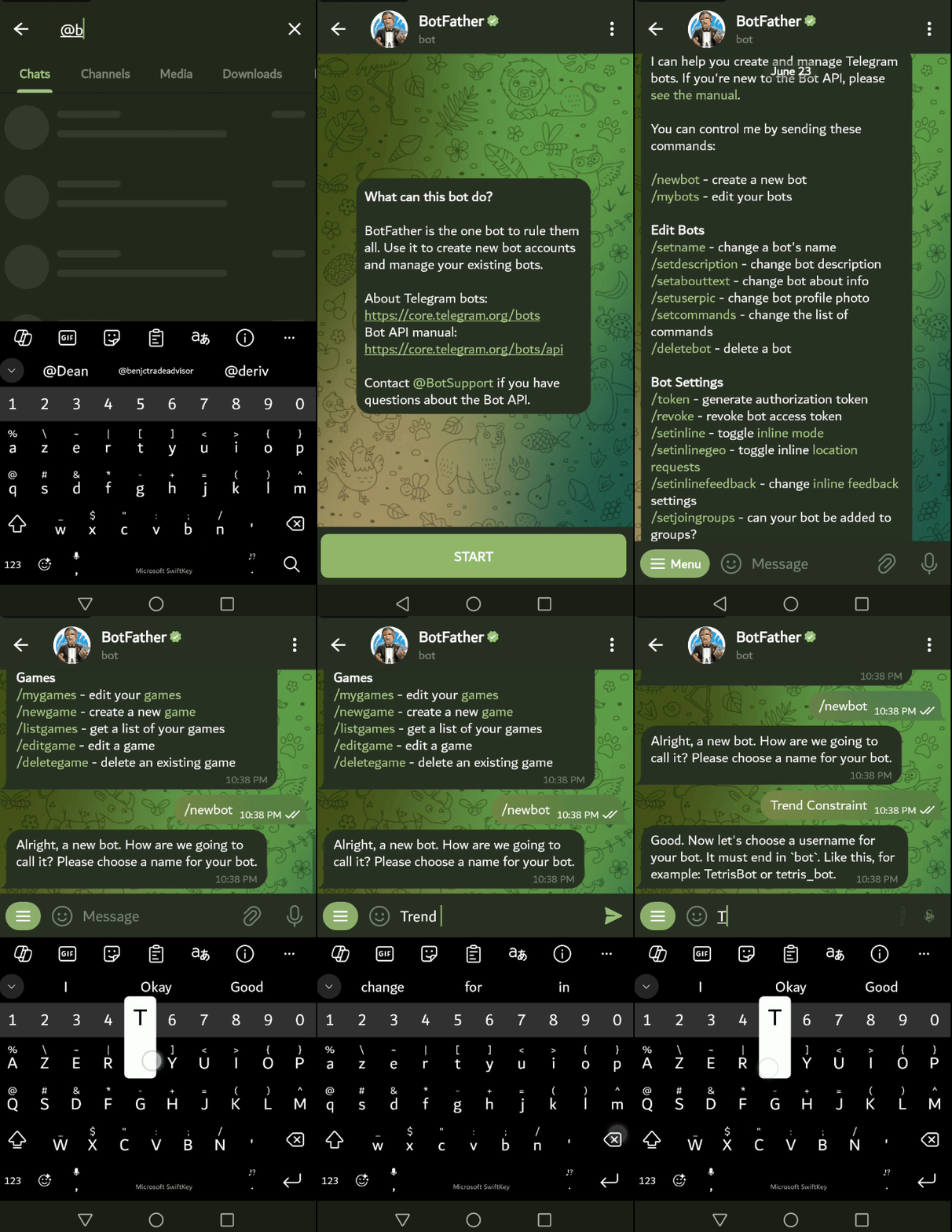
在我设置好一切之后,我使用Chrome浏览器访问了bot API。请记得你从BotFather那里收到的机器人令牌,使用以下链接访问API:https://api.telegram.org/bot<你的机器人令牌>/getUpdates,将高亮显示的文本替换为你的机器人令牌才能使其工作。
这里有一个典型的例子:https://api.telegram.org/bot9004946256:shTUYuq52f8CHLt8BLdYGHYJi2QM6H3donA/getUpdates
注意:上面高亮显示的API令牌是为了教学目的而随机生成的。请使用@BotFather为你的机器人提供的令牌。确保与机器人进行聊天,这样API才能显示我们想要的信息。同时,刷新API浏览器标签页,以便新的聊天更新能够显示出来。在API浏览器标签页上勾选“美化打印”复选框,以获得易于跟踪的布局。
API将显示一个JSON代码,用于显示与机器人的当前通信。首先,我们来定义一下JSON(JavaScript对象表示法),它是一种轻量级的数据交换格式,易于人类读写,也易于机器解析和生成。它通常用于在Web应用程序中传输数据(例如,在服务器和客户端之间),以及用于配置应用程序和数据存储。JSON由对象和数组构成。
下面是在向机器人发送“嘿”消息后显示的API JSON:
{
  "ok": true,
  "result": [
    {
      "update_id": 464310132,
      "message": {
        "message_id": 12,
        "from": {
          "id": 7049213628,
          "is_bot": false,
          "first_name": "Clemence",
          "last_name": "Benjamin",
          "username": "benjc_trade_advisor",
          "language_code": "en"
        },
        "chat": {
          "id": 7049213628,
          "first_name": "Clemence",
          "last_name": "Benjamin",
          "username": "benjc_trade_advisor",
          "type": "private"
        },
        "date": 1719044625,
        "text": "hey"
      }
以下是JSON代码详细解释:
顶层结构:
- ok:这是一个布尔值,用于表示API请求是否成功。在此情况下,它的值为true,意味着请求已成功。
- result:这是一个数组,包含一个或多个更新对象。在此示例中,有一个更新对象。
在result数组内
数组中的每个元素都代表一个更新。在这里,我们有一个单独的更新:
- update_id:这是更新的唯一标识符。它有助于跟踪更新,并确保没有遗漏或重复处理任何更新。在这种情况下,update_id是
- 464310132。
消息对象
此对象包含有关触发更新的消息的信息:
- message_id:这是聊天中消息的唯一标识符。在这里,它是12。
- from:此对象包含有关消息发送者的信息:
- id:发送消息的用户的唯一标识符。在这里,它是7049213628。
- is_bot:此布尔值指示发送者是否为bot,即机器人。在这种情况下,它是false,意味着发送者是人类。
- first_name:发送者的名字,是Clemence。
- last_name:发送者的姓氏,是Benjamin。
- language_code:表示发送者语言设置的语言代码。在这里,它是en,代表英语。
- chat:此对象包含有关发送消息的聊天的信息。
- id:聊天的唯一标识符。由于这是私人聊天,因此它与用户的ID(7049213628)相匹配。
- first_name:聊天参与者的名字,是Clemence。
- last_name:聊天参与者的姓氏,是Benjamin。
- type:聊天的类型。在这里,它是private,表示用户与机器人之间的一对一聊天。
- date:消息发送的日期和时间,以Unix时间戳表示(自1970年1月1日起的秒数)。在这种情况下,时间戳是1719044625。
- text:消息的实际文本内容,是"hey"。
我决定将JSON中的聊天部分放在一边,以便我们可以轻松地关注最重要的部分,即我们在指示器程序中需要的聊天ID。查看下面的JSON片段:
"chat": {
          "id": 7049213628,
          "first_name": "Clemence",
          "last_name": "Benjamin",
          "username": "benjc_trade_advisor",
          "type": "private"
        }
"chat" 对象提供了关于发送消息的聊天的详细信息,包括聊天的唯一标识符、参与者的名字和姓氏以及聊天的类型。在这种情况下,它指定了一个涉及名为 Clemence Benjamin 的用户的私人聊天。让我们详细解释一下 "chat" 对象:
id:
- 描述:这是聊天的唯一标识符。
- 值:7049213628
- 含义:在私人聊天的上下文中,此ID通常与参与聊天的用户的用户ID相匹配。
first_name:
- 描述:聊天中参与者的名字。
- 值:Clemence
- 含义:这有助于在聊天中通过名字识别用户。
last_name:
- 描述:参与聊天者的姓氏。
- 值:Benjamin
- 含义:这与名字一起,完全标识了聊天中的用户。:
"username"
- 描述:它是关键,
- 值:"benjc_trade_advisor"
- 含义:此行指示与对象(如用户、机器人或聊天)关联的用户名是"benjc_trade_advisor"。这个用户名通常用于在使用JSON数据的应用程序或系统中以可识别的格式标识实体。
类型:
- 描述:聊天的类型。
- 值:private
- 含义:表示此聊天是用户与机器人之间的一对一对话(而不是群聊或频道)。
总结:
上述部分的目标是开发一个工作的Telegram机器人,并获取机器人令牌和聊天ID,这两个都是主项目中的关键元素。我们深入了解了API,以更深入地理解每个组件。拥有机器人令牌和聊天ID后,我们可以继续进行集成过程,同时还将探索各种编程语言。
在Windows上安装Telegram Python模块
我们需要在您的计算机上安装Python。确保您的计算机已连接到互联网。您可以从Python.org下载它。以下指南是基于Windows计算机的。Mac、Linux和其他框架可能会有不同的方法。完成Python安装后,下一步是安装Python Telegram API模块,这些模块将使Telegram的Python脚本能够顺利运行。打开cmd.exe(Windows命令提示符),并运行下面的代码片段。复制代码并将其粘贴到Windows命令提示符中。在键盘上按Enter键以启动下载,并等待模块安装完成。
pip install pyTelegramBotAPI
命令提示符的部分截图如下所示。

完成后,您可以关闭窗口并重新启动计算机。
完成此步骤后,您的计算机现已准备好执行与Telegram Bot API交互的Python脚本。在下一阶段,我们将仔细研究代码,以设置我们的系统来完成任务。
理解send_telegram_messages Python脚本
让我们看看脚本的构造。然后,我将给出最终代码的一个片段。文件应命名为send_telegram_message.py
脚本首先导入必要的模块,如下所示:
- import telebot:导入telebot模块,该模块提供了与Telegram Bot API交互所需的函数。
- import sys:导入sys模块,该模块允许脚本使用命令行参数。
import telebot
import sys
我们继续声明API_TOKEN和CHAT_ID:
- API_TOKEN:此变量存储机器人的API令牌,用于与Telegram服务器进行身份验证。
- CHAT_ID:每个聊天(无论是用户与机器人之间,还是频道和群组)的唯一身份值。
API_TOKEN = '9004946256:shTUYuq52f8CHLt8BLdYGHYJi2QM6H3donA' #用您的从@BotFather获取的机器人令牌替换API TOKEN
CHAT_ID = '7049213628'  #用您的实际聊天ID替换,该ID来自机器人API
我们需要使用提供的API令牌初始化TeleBot对象,以允许与Telegram Bot API进行交互。
bot = telebot.TeleBot(API_TOKEN)
下面的Python代码片段定义了一个通过Telegram发送消息的函数,以及与API和系统相关的错误处理异常。
def send_telegram_message(message):
    try:
        bot.send_message(CHAT_ID, message)
        print("Message sent successfully!")
    except telebot.apihelper.ApiTelegramException as e:
        print(f"Failed to send message: {e}")
    except Exception as e:
        print(f"An error occurred: {e}")
代码的最后一部分是一个条件语句,它确保这段代码只有在脚本被直接执行时才运行,而不是在作为模块被导入时运行。它从命令行参数中获取消息,如果没有提供参数,则设置一个默认消息。
if __name__ == "__main__":
    message = sys.argv[1] if len(sys.argv) > 1 else "Test message"
    send_telegram_message(message)
总结以上所有内容,我们得到了最终的代码,并将其保存为send_telegram_message.py文件,存放在你的Python脚本文件夹中。我发现脚本文件夹的访问一切正常。
import telebot
import sys

API_TOKEN = '9004946256:shTUYuq52f8CHLt8BLdYGHYJi2QM6H3donA'#Replace with your API_TOKEN given by BotFather
CHAT_ID = '7049213628' #Replace with your CHAT_ID

bot = telebot.TeleBot(API_TOKEN)

def send_telegram_message(message):
    try:
        bot.send_message(CHAT_ID, message)
        print("Message sent successfully!")
    except telebot.apihelper.ApiTelegramException as e:
        print(f"Failed to send message: {e}")
    except Exception as e:
        print(f"An error occurred: {e}")

if __name__ == "__main__":
   message = sys.argv[1] if len(sys.argv) > 1 else "Test message"
    send_telegram_message(message)
下一步的主要工作是设置MQL5指标来调用Python脚本。
为Telegram配置趋势约束指标
在这里,我们需要修改MQL5指标中的myAlert函数,以使用ShellExecuteW 函数来调用Python脚本。这个函数将执行Python脚本,并将警报消息作为参数传递给它。
以下是如何在“Trend Constraint”(趋势约束)中修改它的示例,我包含了修改前后的两个代码片段:
修改前:
void myAlert(string type, string message)
  {
   if(type == "print")
      Print(message);
   else if(type == "error")
     {
      Print(type+" | Trend Constraint V1.05 @ "+Symbol()+","+IntegerToString(Period())+" | "+message);
     }
   else if(type == "order")
     {
     }
   else if(type == "modify")
     {
     }
   else if(type == "indicator")
     {
      if(Audible_Alerts) Alert(type+" | Trend Constraint V1.05 @ "+Symbol()+","+IntegerToString(Period())+" | "+message);
      if(Push_Notifications) SendNotification(type+" | Trend Constraint V1.05 @ "+Symbol()+","+IntegerToString(Period())+" | "+message);
     }
  }
修改后:
//--- ShellExecuteW declaration ----------------------------------------------
#import "shell32.dll"
int ShellExecuteW(int hwnd, string lpOperation, string lpFile, string lpParameters, string lpDirectory, int nShowCmd);
#import


datetime last_alert_time;
input int alert_cooldown_seconds = 60; // Cooldown period in seconds, this helps to avoid instant continuous alerting depending on indicator conditions

//Modify the myAlert Function for telegram notification
void myAlert(string type, string message) {
    datetime current_time = TimeCurrent();
    if (current_time - last_alert_time < alert_cooldown_seconds) {
        // Skip alert if within cooldown period
        return;
    }

    last_alert_time = current_time;
    string full_message = type + " | Trend Constraint V1.04 @ " + Symbol() + "," + IntegerToString(Period()) + " | " + message;
    if (type == "print") {
        Print(message);
    } else if (type == "error") {
        Print(type + " | Trend Constraint V1.04 @ " + Symbol() + "," + IntegerToString(Period()) + " | " + message);
    } else if (type == "order") {
        // Add order alert handling if needed
    } else if (type == "modify") {
        // Add modify alert handling if needed
    } else if (type == "indicator") {
        if (Audible_Alerts) {
            Alert(full_message);
        }
        if (Push_Notifications) {
            SendNotification(full_message);
        }

        // Send to Telegram
        string python_path = "C:\\Users\\Pro_tech\\AppData\\Local\\Programs\\Python\\Python312\\python.exe";
        string script_path = "C:\\Users\\Pro_tech\\AppData\\Local\\Programs\\Python\\Python312\\Scripts\\send_telegram_message.py";
        string command = python_path + " \"" + script_path + "\" \"" + full_message + "\"";

        Print("Executing command to send Telegram message: ", command);

        // Use cmd.exe to execute the command and then wait for 5 seconds
        string final_command = "/c " + command + " && timeout 5";
        int result = ShellExecuteW(0, "open", "cmd.exe", final_command, NULL, 1);
        if (result <= 32) {
            int error_code = GetLastError();
            Print("Failed to execute Python script. Error code: ", error_code);
        } else {
            Print("Successfully executed Python script. Result code: ", result);
        }
    }
}


//--- End of Telegram Integration functions ---------------------------------------
下面我将简要解释所做的修改。
首先,我们需要从Windows的shell32.dll库中导入ShellExecuteW函数,这样MQL5程序就能够执行外部命令,在这个案例中,它将运行send_telegram_message.py脚本。如果不声明ShellExecuteW函数,程序将无法正常工作。我们还实现了一个冷却机制(cooldown),以应对由于指标条件配置错误而导致的cmd.exe连续瞬间执行的问题。就我而言,正如我在之前的文章中提到的,Trend Constraint V1.04的Buffer 5和6中存在一个警报条件,它会在短时间内触发多个信号警报。当我集成了Telegram功能后,情况变得更糟,cmd.exe会在瞬间被多次启动,导致电脑死机。为了消弭这个问题,我不得不只允许指标进行绘制而不调用myAlert()函数。换句话说,我通过将其注释掉来将其“静音”,因为你知道,程序中的注释是不会被执行的。
//--- ShellExecuteW declaration ----------------------------------------------
#import "shell32.dll"
int ShellExecuteW(int hwnd, string lpOperation, string lpFile, string lpParameters, string lpDirectory, int nShowCmd);
#import
代码的其他关键部分如下:
// Send to Telegram
string python_path = "C:\\Users\\Pro_tech\\AppData\\Local\\Programs\\Python\\Python312\\python.exe";
string script_path = "C:\\Users\\Pro_tech\\AppData\\Local\\Programs\\Python\\Python312\\Scripts\\send_telegram_message.py";
string command = python_path + " \"" + script_path + "\" \"" + full_message + "\"";
上述代码构建了一个命令,用于在MetaTrader 5指标程序中运行Python脚本,其中指定了Python解释器和脚本的路径,以及要发送的消息。请注意,对于高亮显示的文本(即路径),你需要根据自己的计算机情况进行替换。我给出的示例是基于我的电脑配置。
最终代码
在解释完所有内容并成功集成后,我们现在拥有了一个新功能,并且升级到了Trend Constraint V1.05版本。
//+------------------------------------------------------------------+
//|                                       Trend Constraint V1.05.mq5 |
//|                                Copyright 2024, Clemence Benjamin |
//|                                             https://www.mql5.com |
//+------------------------------------------------------------------+
#property copyright "Copyright 2024, Clemence Benjamin"
#property link      "https://www.mql5.com"
#property version   "1.05"
#property description "A model that seeks to produce sell signals when D1 candle is Bearish only and buy signals when it is Bullish"


//--- indicator settings
#property indicator_chart_window
#property indicator_buffers 6
#property indicator_plots 6

#property indicator_type1 DRAW_ARROW
#property indicator_width1 5
#property indicator_color1 0xFF3C00
#property indicator_label1 "Buy"

#property indicator_type2 DRAW_ARROW
#property indicator_width2 5
#property indicator_color2 0x0000FF
#property indicator_label2 "Sell"

#property indicator_type3 DRAW_ARROW
#property indicator_width3 2
#property indicator_color3 0xE8351A
#property indicator_label3 "Buy Reversal"

#property indicator_type4 DRAW_ARROW
#property indicator_width4 2
#property indicator_color4 0x1A1AE8
#property indicator_label4 "Sell Reversal"

#property indicator_type5 DRAW_LINE
#property indicator_style5 STYLE_SOLID
#property indicator_width5 2
#property indicator_color5 0xFFAA00
#property indicator_label5 "Buy"

#property indicator_type6 DRAW_LINE
#property indicator_style6 STYLE_SOLID
#property indicator_width6 2
#property indicator_color6 0x0000FF
#property indicator_label6 "Sell"

#define PLOT_MAXIMUM_BARS_BACK 5000
#define OMIT_OLDEST_BARS 50

//--- indicator buffers
double Buffer1[];
double Buffer2[];
double Buffer3[];
double Buffer4[];
double Buffer5[];
double Buffer6[];

input double Oversold = 30;
input double Overbought = 70;
input int Slow_MA_period = 200;
input int Fast_MA_period = 100;
datetime time_alert; //used when sending alert
input bool Audible_Alerts = true;
input bool Push_Notifications = true;
double myPoint; //initialized in OnInit
int RSI_handle;
double RSI[];
double Open[];
double Close[];
int MA_handle;
double MA[];
int MA_handle2;
double MA2[];
int MA_handle3;
double MA3[];
int MA_handle4;
double MA4[];
double Low[];
double High[];
int MA_handle5;
double MA5[];
int MA_handle6;
double MA6[];
int MA_handle7;
double MA7[];

//--- ShellExecuteW declaration ----------------------------------------------
#import "shell32.dll"
int ShellExecuteW(int hwnd, string lpOperation, string lpFile, string lpParameters, string lpDirectory, int nShowCmd);
#import

//--- functions for telegram integration -----------------------------------------------
datetime last_alert_time;
input int alert_cooldown_seconds = 60; // Cooldown period in seconds

void myAlert(string type, string message) {
    datetime current_time = TimeCurrent();
    if (current_time - last_alert_time < alert_cooldown_seconds) {
        // Skip alert if within cooldown period
        return;
    }

    last_alert_time = current_time;
    string full_message = type + " | Trend Constraint V1.05 @ " + Symbol() + "," + IntegerToString(Period()) + " | " + message;
    if (type == "print") {
        Print(message);
    } else if (type == "error") {
        Print(type + " | Trend Constraint V1.05 @ " + Symbol() + "," + IntegerToString(Period()) + " | " + message);
    } else if (type == "order") {
        // Add order alert handling if needed
    } else if (type == "modify") {
        // Add modify alert handling if needed
    } else if (type == "indicator") {
        if (Audible_Alerts) {
            Alert(full_message);
        }
        if (Push_Notifications) {
            SendNotification(full_message);
        }

        // Send to Telegram //Remember to replace the storages path with your actual path.
        string python_path = "C:\\Users\\Pro_tech\\AppData\\Local\\Programs\\Python\\Python312\\python.exe";
        string script_path = "C:\\Users\\Pro_tech\\AppData\\Local\\Programs\\Python\\Python312\\Scripts\\send_telegram_message.py";
        string command = python_path + " \"" + script_path + "\" \"" + full_message + "\"";

        // Debugging: Print the command being executed
        Print("Executing command to send Telegram message: ", command);

        // Use cmd.exe to execute the command and then wait for 5 seconds
        string final_command = "/c " + command + " && timeout 5";
        int result = ShellExecuteW(0, "open", "cmd.exe", final_command, NULL, 1);
        if (result <= 32) {
            int error_code = GetLastError();
            Print("Failed to execute Python script. Error code: ", error_code);
        } else {
            Print("Successfully executed Python script. Result code: ", result);
        }
    }
}

//+------------------------------------------------------------------+
//| Custom indicator initialization function                         |
//+------------------------------------------------------------------+
int OnInit()
  {
   SetIndexBuffer(0, Buffer1);
   PlotIndexSetDouble(0, PLOT_EMPTY_VALUE, EMPTY_VALUE);
   PlotIndexSetInteger(0, PLOT_DRAW_BEGIN, MathMax(Bars(Symbol(), PERIOD_CURRENT)-PLOT_MAXIMUM_BARS_BACK+1, OMIT_OLDEST_BARS+1));
   PlotIndexSetInteger(0, PLOT_ARROW, 241);
   SetIndexBuffer(1, Buffer2);
   PlotIndexSetDouble(1, PLOT_EMPTY_VALUE, EMPTY_VALUE);
   PlotIndexSetInteger(1, PLOT_DRAW_BEGIN, MathMax(Bars(Symbol(), PERIOD_CURRENT)-PLOT_MAXIMUM_BARS_BACK+1, OMIT_OLDEST_BARS+1));
   PlotIndexSetInteger(1, PLOT_ARROW, 242);
   SetIndexBuffer(2, Buffer3);
   PlotIndexSetDouble(2, PLOT_EMPTY_VALUE, EMPTY_VALUE);
   PlotIndexSetInteger(2, PLOT_DRAW_BEGIN, MathMax(Bars(Symbol(), PERIOD_CURRENT)-PLOT_MAXIMUM_BARS_BACK+1, OMIT_OLDEST_BARS+1));
   PlotIndexSetInteger(2, PLOT_ARROW, 236);
   SetIndexBuffer(3, Buffer4);
   PlotIndexSetDouble(3, PLOT_EMPTY_VALUE, EMPTY_VALUE);
   PlotIndexSetInteger(3, PLOT_DRAW_BEGIN, MathMax(Bars(Symbol(), PERIOD_CURRENT)-PLOT_MAXIMUM_BARS_BACK+1, OMIT_OLDEST_BARS+1));
   PlotIndexSetInteger(3, PLOT_ARROW, 238);
   SetIndexBuffer(4, Buffer5);
   PlotIndexSetDouble(4, PLOT_EMPTY_VALUE, EMPTY_VALUE);
   PlotIndexSetInteger(4, PLOT_DRAW_BEGIN, MathMax(Bars(Symbol(), PERIOD_CURRENT)-PLOT_MAXIMUM_BARS_BACK+1, OMIT_OLDEST_BARS+1));
   SetIndexBuffer(5, Buffer6);
   PlotIndexSetDouble(5, PLOT_EMPTY_VALUE, EMPTY_VALUE);
   PlotIndexSetInteger(5, PLOT_DRAW_BEGIN, MathMax(Bars(Symbol(), PERIOD_CURRENT)-PLOT_MAXIMUM_BARS_BACK+1, OMIT_OLDEST_BARS+1));
   //initialize myPoint
   myPoint = Point();
   if(Digits() == 5 || Digits() == 3)
     {
      myPoint *= 10;
     }
   RSI_handle = iRSI(NULL, PERIOD_CURRENT, 14, PRICE_CLOSE);
   if(RSI_handle < 0)
     {
      Print("The creation of iRSI has failed: RSI_handle=", INVALID_HANDLE);
      Print("Runtime error = ", GetLastError());
      return(INIT_FAILED);
     }

   MA_handle = iMA(NULL, PERIOD_CURRENT, 7, 0, MODE_SMMA, PRICE_CLOSE);
   if(MA_handle < 0)
     {
      Print("The creation of iMA has failed: MA_handle=", INVALID_HANDLE);
      Print("Runtime error = ", GetLastError());
      return(INIT_FAILED);
     }

   MA_handle2 = iMA(NULL, PERIOD_CURRENT, 400, 0, MODE_SMA, PRICE_CLOSE);
   if(MA_handle2 < 0)
     {
      Print("The creation of iMA has failed: MA_handle2=", INVALID_HANDLE);
      Print("Runtime error = ", GetLastError());
      return(INIT_FAILED);
     }

   MA_handle3 = iMA(NULL, PERIOD_CURRENT, 100, 0, MODE_EMA, PRICE_CLOSE);
   if(MA_handle3 < 0)
     {
      Print("The creation of iMA has failed: MA_handle3=", INVALID_HANDLE);
      Print("Runtime error = ", GetLastError());
      return(INIT_FAILED);
     }

   MA_handle4 = iMA(NULL, PERIOD_CURRENT, 200, 0, MODE_SMA, PRICE_CLOSE);
   if(MA_handle4 < 0)
     {
      Print("The creation of iMA has failed: MA_handle4=", INVALID_HANDLE);
      Print("Runtime error = ", GetLastError());
      return(INIT_FAILED);
     }

   MA_handle5 = iMA(NULL, PERIOD_CURRENT, Fast_MA_period, 0, MODE_SMA, PRICE_CLOSE);
   if(MA_handle5 < 0)
     {
      Print("The creation of iMA has failed: MA_handle5=", INVALID_HANDLE);
      Print("Runtime error = ", GetLastError());
      return(INIT_FAILED);
     }

   MA_handle6 = iMA(NULL, PERIOD_CURRENT, Slow_MA_period, 0, MODE_SMA, PRICE_CLOSE);
   if(MA_handle6 < 0)
     {
      Print("The creation of iMA has failed: MA_handle6=", INVALID_HANDLE);
      Print("Runtime error = ", GetLastError());
      return(INIT_FAILED);
     }

   MA_handle7 = iMA(NULL, PERIOD_CURRENT, 200, 0, MODE_EMA, PRICE_CLOSE);
   if(MA_handle7 < 0)
     {
      Print("The creation of iMA has failed: MA_handle7=", INVALID_HANDLE);
      Print("Runtime error = ", GetLastError());
      return(INIT_FAILED);
     }

   return(INIT_SUCCEEDED);
  }

//+------------------------------------------------------------------+
//| Custom indicator iteration function                              |
//+------------------------------------------------------------------+
int OnCalculate(const int rates_total,
                const int prev_calculated,
                const datetime& time[],
                const double& open[],
                const double& high[],
                const double& low[],
                const double& close[],
                const long& tick_volume[],
                const long& volume[],
                const int& spread[])
  {
   int limit = rates_total - prev_calculated;
   //--- counting from 0 to rates_total
   ArraySetAsSeries(Buffer1, true);
   ArraySetAsSeries(Buffer2, true);
   ArraySetAsSeries(Buffer3, true);
   ArraySetAsSeries(Buffer4, true);
   ArraySetAsSeries(Buffer5, true);
   ArraySetAsSeries(Buffer6, true);
   //--- initial zero
   if(prev_calculated < 1)
     {
      ArrayInitialize(Buffer1, EMPTY_VALUE);
      ArrayInitialize(Buffer2, EMPTY_VALUE);
      ArrayInitialize(Buffer3, EMPTY_VALUE);
      ArrayInitialize(Buffer4, EMPTY_VALUE);
      ArrayInitialize(Buffer5, EMPTY_VALUE);
      ArrayInitialize(Buffer6, EMPTY_VALUE);
     }
   else
      limit++;
   datetime Time[];

   datetime TimeShift[];
   if(CopyTime(Symbol(), PERIOD_CURRENT, 0, rates_total, TimeShift) <= 0) return(rates_total);
   ArraySetAsSeries(TimeShift, true);
   int barshift_M1[];
   ArrayResize(barshift_M1, rates_total);
   int barshift_D1[];
   ArrayResize(barshift_D1, rates_total);
   for(int i = 0; i < rates_total; i++)
     {
      barshift_M1[i] = iBarShift(Symbol(), PERIOD_M1, TimeShift[i]);
      barshift_D1[i] = iBarShift(Symbol(), PERIOD_D1, TimeShift[i]);
   }
   if(BarsCalculated(RSI_handle) <= 0)
      return(0);
   if(CopyBuffer(RSI_handle, 0, 0, rates_total, RSI) <= 0) return(rates_total);
   ArraySetAsSeries(RSI, true);
   if(CopyOpen(Symbol(), PERIOD_M1, 0, rates_total, Open) <= 0) return(rates_total);
   ArraySetAsSeries(Open, true);
   if(CopyClose(Symbol(), PERIOD_D1, 0, rates_total, Close) <= 0) return(rates_total);
   ArraySetAsSeries(Close, true);
   if(BarsCalculated(MA_handle) <= 0)
      return(0);
   if(CopyBuffer(MA_handle, 0, 0, rates_total, MA) <= 0) return(rates_total);
   ArraySetAsSeries(MA, true);
   if(BarsCalculated(MA_handle2) <= 0)
      return(0);
   if(CopyBuffer(MA_handle2, 0, 0, rates_total, MA2) <= 0) return(rates_total);
   ArraySetAsSeries(MA2, true);
   if(BarsCalculated(MA_handle3) <= 0)
      return(0);
   if(CopyBuffer(MA_handle3, 0, 0, rates_total, MA3) <= 0) return(rates_total);
   ArraySetAsSeries(MA3, true);
   if(BarsCalculated(MA_handle4) <= 0)
      return(0);
   if(CopyBuffer(MA_handle4, 0, 0, rates_total, MA4) <= 0) return(rates_total);
   ArraySetAsSeries(MA4, true);
   if(CopyLow(Symbol(), PERIOD_CURRENT, 0, rates_total, Low) <= 0) return(rates_total);
   ArraySetAsSeries(Low, true);
   if(CopyHigh(Symbol(), PERIOD_CURRENT, 0, rates_total, High) <= 0) return(rates_total);
   ArraySetAsSeries(High, true);
   if(BarsCalculated(MA_handle5) <= 0)
      return(0);
   if(CopyBuffer(MA_handle5, 0, 0, rates_total, MA5) <= 0) return(rates_total);
   ArraySetAsSeries(MA5, true);
   if(BarsCalculated(MA_handle6) <= 0)
      return(0);
   if(CopyBuffer(MA_handle6, 0, 0, rates_total, MA6) <= 0) return(rates_total);
   ArraySetAsSeries(MA6, true);
   if(BarsCalculated(MA_handle7) <= 0)
      return(0);
   if(CopyBuffer(MA_handle7, 0, 0, rates_total, MA7) <= 0) return(rates_total);
   ArraySetAsSeries(MA7, true);
   if(CopyTime(Symbol(), Period(), 0, rates_total, Time) <= 0) return(rates_total);
   ArraySetAsSeries(Time, true);
   //--- main loop
   for(int i = limit-1; i >= 0; i--)
     {
      if (i >= MathMin(PLOT_MAXIMUM_BARS_BACK-1, rates_total-1-OMIT_OLDEST_BARS)) continue; //omit some old rates to prevent "Array out of range" or slow calculation

      if(barshift_M1[i] < 0 || barshift_M1[i] >= rates_total) continue;
      if(barshift_D1[i] < 0 || barshift_D1[i] >= rates_total) continue;

      //Indicator Buffer 1
      if(RSI[i] < Oversold
      && RSI[i+1] > Oversold //Relative Strength Index crosses below fixed value
      && Open[barshift_M1[i]] >= Close[1+barshift_D1[i]] //Candlestick Open >= Candlestick Close
      && MA[i] > MA2[i] //Moving Average > Moving Average
      && MA3[i] > MA4[i] //Moving Average > Moving Average
      )
        {
         Buffer1[i] = Low[1+i]; //Set indicator value at Candlestick Low
         if(i == 1 && Time[1] != time_alert) myAlert("indicator", "Buy"); //Alert on next bar open
         time_alert = Time[1];
        }
      else
        {
         Buffer1[i] = EMPTY_VALUE;
        }
      //Indicator Buffer 2
      if(RSI[i] > Overbought
      && RSI[i+1] < Overbought //Relative Strength Index crosses above fixed value
      && Open[barshift_M1[i]] <= Close[1+barshift_D1[i]] //Candlestick Open <= Candlestick Close
      && MA[i] < MA2[i] //Moving Average < Moving Average
      && MA3[i] < MA4[i] //Moving Average < Moving Average
      )
        {
         Buffer2[i] = High[1+i]; //Set indicator value at Candlestick High
         if(i == 1 && Time[1] != time_alert) myAlert("indicator", "Sell"); //Alert on next bar open
         time_alert = Time[1];
        }
      else
        {
         Buffer2[i] = EMPTY_VALUE;
        }
      //Indicator Buffer 3
      if(MA5[i] > MA6[i]
      && MA5[i+1] < MA6[i+1] //Moving Average crosses above Moving Average
      )
        {
         Buffer3[i] = Low[i]; //Set indicator value at Candlestick Low
         if(i == 1 && Time[1] != time_alert) myAlert("indicator", "Buy Reversal"); //Alert on next bar open
         time_alert = Time[1];
        }
      else
        {
         Buffer3[i] = EMPTY_VALUE;
        }
      //Indicator Buffer 4
      if(MA5[i] < MA6[i]
      && MA5[i+1] > MA6[i+1] //Moving Average crosses below Moving Average
      )
        {
         Buffer4[i] = High[i]; //Set indicator value at Candlestick High
         if(i == 1 && Time[1] != time_alert) myAlert("indicator", "Sell Reversal"); //Alert on next bar open
         time_alert = Time[1];
        }
      else
        {
         Buffer4[i] = EMPTY_VALUE;
        }
      //Indicator Buffer 5, Alert muted by turning it into a comment
      if(MA3[i] > MA7[i] //Moving Average > Moving Average
      )
        {
         Buffer5[i] = MA3[i]; //Set indicator value at Moving Average
         //if(i == 1 && Time[1] != time_alert) myAlert("indicator", "Buy"); //Alert on next bar open
         //time_alert = Time[1];
        }
      else
        {
         Buffer5[i] = EMPTY_VALUE;
        }
      //Indicator Buffer 6, Alert muted by turning it into a comment
      if(MA3[i] < MA7[i] //Moving Average < Moving Average
      )
        {
         Buffer6[i] = MA3[i]; //Set indicator value at Moving Average
         //if(i == 1 && Time[1] != time_alert) myAlert("indicator", "Sell"); //Alert on next bar open
         //time_alert = Time[1];
        }
      else
        {
         Buffer6[i] = EMPTY_VALUE;
        }
     }
   return(rates_total);
  }
//+------------------------------------------------------------------+
错误处理
发送消息失败:向Telegram API的请求未成功。错误代码:401。描述:未授权 根据我的测试,上述错误代码是由于使用了无效的API_TOKEN,例如我们之前作为示例使用的那个。你需要使用一个有效的API_TOKEN值。为了本指南,我删除了大部分错误,以得到一个干净且可工作的代码示例。然而,当你在编辑或更改代码时可能会出错,因此你需要仔细检查你执行的每一步。
测试结果
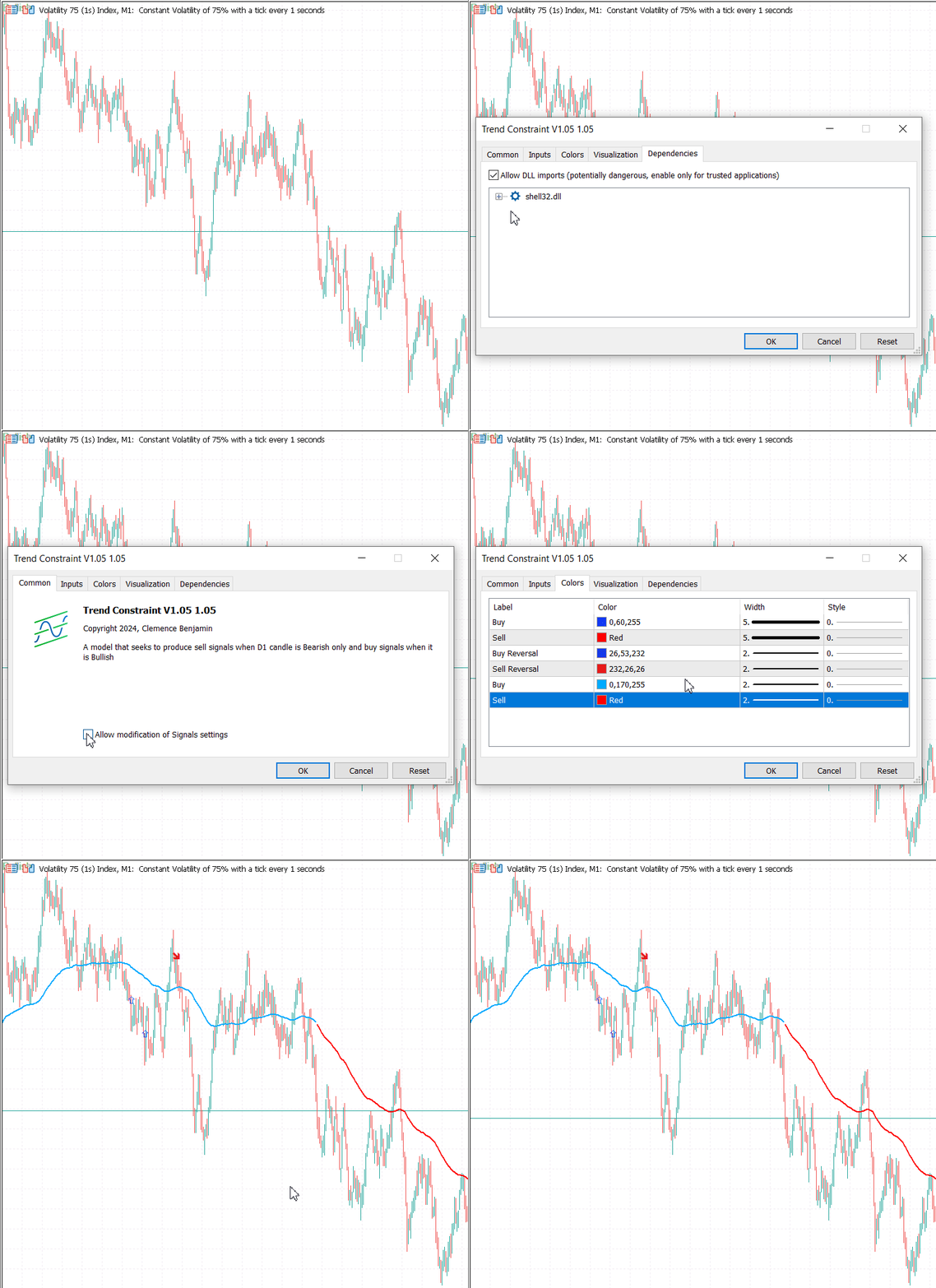
将指标添加到图表后,我启用了允许DLL选项,以允许我们的指标通过命令提示符执行脚本。下面的动画图片展示了如何将指标添加到图表上以及它在图表上的外观。
你可以通过命令提示符在脚本的路径下运行文件来测试脚本是否工作,参见下面的图片。在命令提示符中打开包含你的脚本的文件夹,输入python send_telegram_message.py。如果消息发送成功,响应将显示脚本正在工作,并且测试消息也被转发到了聊天中。

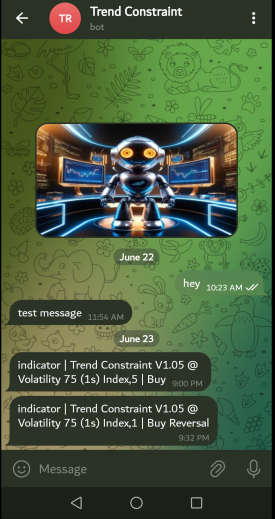
下面的结果图片展示了与机器人对话的开始,这使我们能够在机器人API中获取Chat ID。它还显示了由Trend Constraint V1.05中的机器人发送的传入信号。信号在MetaTrader 5平台上生成后立即传入。
结论
我们已经成功地将Telegram集成到了我们的模型中。Trend Constraint V1.05取得了显著进步,现在能够内部和外部传递信号,使全球范围内的Telegram用户受益。信号传输快速,由于算法的高效执行,没有任何延迟。该系统专门用于平台内的特定指标,确保不会干扰其他功能。信号被安全地直接传输到指定的ID。这些系统可以托管在虚拟专用服务器上以持续运行,为用户提供稳定的信号供应。在开发过程中,此类项目可能会遇到错误,但我很高兴能够成功地解决它们。
我希望这个项目在某种程度上能够启发你。如果你正在从事一个项目,并且在这种类型的集成中遇到了挑战,请随时在下面的讨论部分分享你的想法。附件是源文件,你可以根据自己的需要修改,以及在用于教学目的的注释的帮助下,探索一些想法。接下来,我们计划集成另一个流行的社交平台,WhatsApp。
| 附件 | 说明 |
|---|---|
| send_telegram_message.py | 该脚本允许指标将通知传递给Telegram,它包含API_Token和Chat ID |
| Trend Constraint V1.05.mq5 | 主要的MQL5指标程序源代码 |
| Telebot_API.txt | Telegram Bot API 结构 |
本文由MetaQuotes Ltd译自英文
原文地址: https://www.mql5.com/en/articles/14968
注意: MetaQuotes Ltd.将保留所有关于这些材料的权利。全部或部分复制或者转载这些材料将被禁止。
本文由网站的一位用户撰写,反映了他们的个人观点。MetaQuotes Ltd 不对所提供信息的准确性负责,也不对因使用所述解决方案、策略或建议而产生的任何后果负责。

 数据科学与机器学习(第24部分):使用常规AI模型进行外汇时间序列预测

 神经网络实践:直线函数
 神经网络实践:伪逆(I)
