More BackTest Results

1. What is this

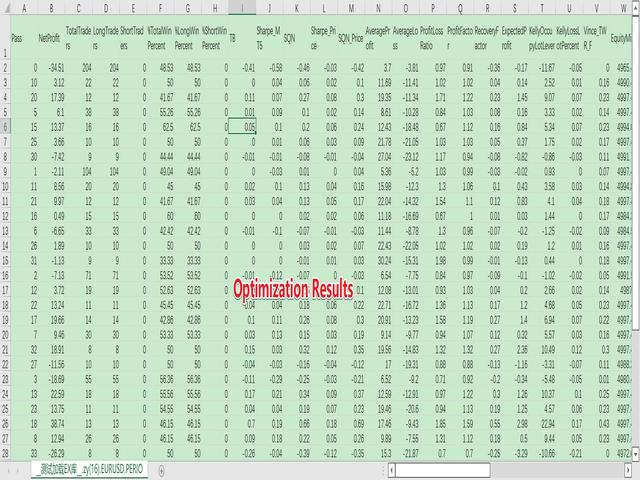
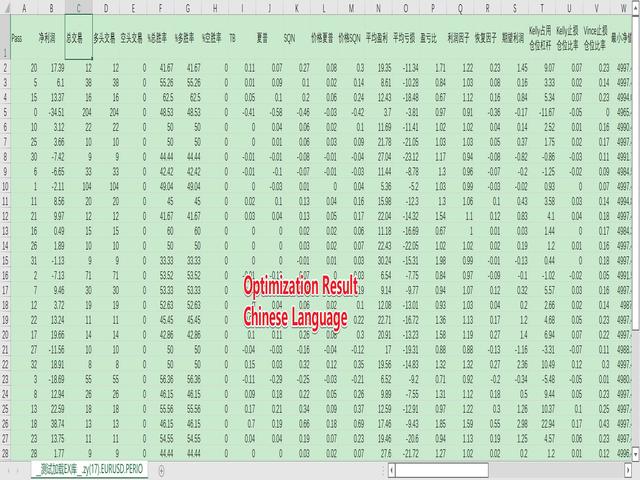
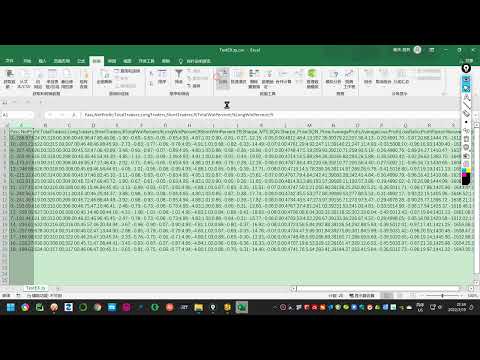
The MT5 system comes with very few optimization results. Sometimes we need to study more results. This library allows you to output more results during backtest optimization. It also supports printing more strategy results in a single backtest.

2. Product Features

  • The results of the optimized output are quite numerous.
  • CustomMax can be customized.
  • The output is in the Common folder.
  • It is automatically named according to the name of the EA, and the name of the same EA will be automatically updated for multiple backtests without overwriting the previous results.
  • The function is so simple that you can understand it at a glance.
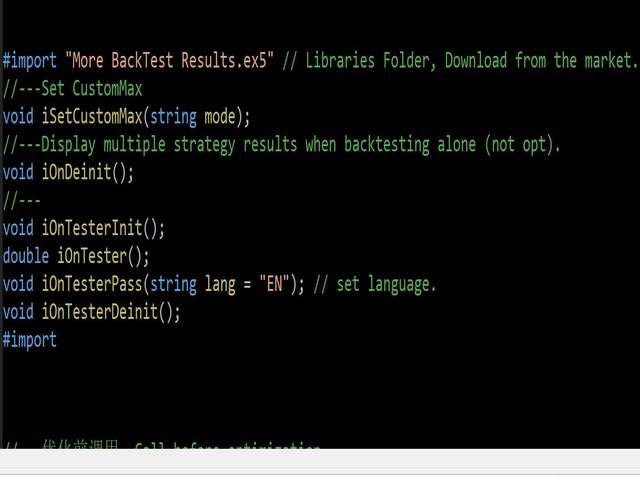
    #import "More BackTest Results.ex5" // Libraries Folder, Download from the market.
    //---Set CustomMax
    void iSetCustomMax(string mode); 
    //---Display multiple strategy results when backtesting alone (not opt).
    void iOnDeinit(); 
    //---
    void iOnTesterInit();
    double iOnTester();
    void iOnTesterPass(string lang = "EN"); // set language.
    void iOnTesterDeinit();
    #import

3. How to use

  • Download the .ex5 library, normally it is under the \Scripts\Market folder. Then move it to the \Libraries folder.
  • Download the More_BackTest_Result.mqh file from this link and place the More_BackTest_Result.mqh file in the Include folder.
  • You can refer to the usage method in More_BackTest_Result.mqh, I designed it very simple, so that you can understand it at a glance.
  • Usually, you just need to load a code in the EA and you're done. 
    #include <More_BackTest_Result.mqh>
  • If you need to modify the language, it is not necessary, you need to modify an affix in mqh. Refer to 4 for details.
  • If you need to set CustomMax, you need to set it in EA, it is not necessary, the default is TB value. Refer to 5 for details.

4. Change the language

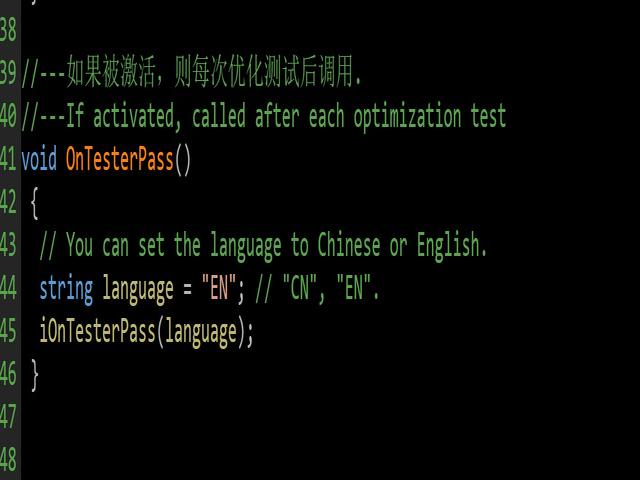
Support English (EN) and Chinese (CN), it is not necessary, if you do not set it, the default is English, you can also set the output to Chinese.

Just modify an affix in More_BackTest_Result.mqh:

void OnTesterPass()
 {
  // You can set the language to Chinese or English.
  string language = "EN"; // "EN","CN"
  iOnTesterPass(language);
 }

5. Set CustomMax

All policy results are supported as CustomMax. It is not required. If you do not set it, it defaults to the TB value. You can also set it according to your own needs.

You just need to type the following code in your EA:

int OnInit()
 {
//---Set CustomMax
  iSetCustomMax("CUSTOM_SQN"); 
//---
  return(INIT_SUCCEEDED);
 }

6. Function iSetCustomMax(string mode) parameter analysis

Please refer to the Chinese and English versions: https://www.mql5.com/en/blogs/post/748011

7. EA uses samples

//+------------------------------------------------------------------+
//|                                                  __TEST_EX__.mq5 |
//|                                      Copyright 2022, i201102053. |
//|                         https://www.mql5.com/en/users/i201102053 |
//+------------------------------------------------------------------+
#property copyright "Copyright 2022, i201102053."
#property link      "https://www.mql5.com/en/users/i201102053"
#property version   "1.00"
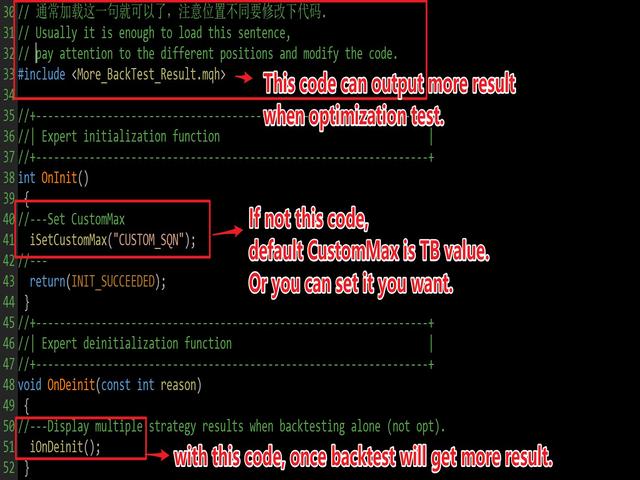
#include <More_BackTest_Result.mqh>  // Usually it is enough to load this sentence.

//+------------------------------------------------------------------+
//| Expert initialization function                                   |
//+------------------------------------------------------------------+
int OnInit()
 {
//---Set CustomMax, unnecessary.
  iSetCustomMax("CUSTOM_SQN"); 
  return(INIT_SUCCEEDED);
 }
//+------------------------------------------------------------------+
//| Expert deinitialization function                                 |
//+------------------------------------------------------------------+
void OnDeinit(const int reason)
 {
//---Display multiple strategy results when backtesting alone (not opt). unnecessary
  iOnDeinit();
 }
//+------------------------------------------------------------------+
//| Expert tick function                                             |
//+------------------------------------------------------------------+
void OnTick()
 {

 }


Önerilen ürünler
MT4/5通用交易库(  一份代码通用4和5 ) #ifdef __MQL5__      #define KOD_TICKET ulong      #define KOD_MAGIC   long #else        #define KOD_TICKET long      #define KOD_MAGIC   int #endif class ODLIST; #import "K Trade Lib Pro 5.ex5"       //祝有个美好开始,运行首行加入    void StartGood() ;    //简单开单    long OrderOpen( int type, double volume, int magic, string symbol= "" , string comment= "" , double opprice= 0 , double sl= 0 , double tp= 0 , int expiration= 0 , bool slsetmode= false , bool tpsetmode= false );    //复杂开单
Introducing "TG Trade Service Manager" — your all-in-one solution for seamless trade management in both MQL4 and MQL5 environments. With a focus on speed, reliability, and convenience, this powerful library simplifies the complexities of trade execution and management, empowering developers with a single interface for enhanced efficiency. Metatrader4 Version   |   All Products   |   Contact   Key Features: Unified Interface : TG Trade Service Manager" provides a unified interface for   MQL4   an
Scan a fixed list of assets (Ibovespa) in the chosen timeframe (TimeFrame). For each pair and for various periods. Calculate a regression model between the two assets (and, if desired, using the bova11 index as a normalizer). Generate the spread of this relationship, its mean, standard deviation, speculative deviation, and betas (B1 and B2). Apply an ADF test without exclusion (cointegration/stationarity). Calculate the Z-score of the current exclusion (how many standard deviations are away from
Otomatik sipariş ve risk yönetimi için yardımcı program. Kârlardan maksimumu almanızı ve kayıplarınızı sınırlandırmanızı sağlar. Tüccarlar için pratik bir tüccar tarafından düzenlendi. Yardımcı programın kullanımı kolaydır, bir tüccar tarafından manuel olarak veya danışmanların yardımıyla açılan herhangi bir piyasa emriyle çalışır. İşlemleri sihirli sayıya göre filtreleyebilir. Yardımcı program aynı anda herhangi bir sayıda siparişle çalışabilir. Aşağıdaki işlevlere sahiptir: 1. Zararı durd
***** Ana ticaret XAUUSD'dir. Teste yaparsa, XAUUSD'e ayarlanma tavsiye ediliyor. Diğer ticaret hedefleri faydallığını garanti edemez****** Teste ihtiyacınız olursa, lütfen bir mesaj bırakın (gördüğüm anda cevap vereceğim). Çalışma sonuçlarını korumak için belirli parametreler girmeli. Sistemin öntanımlı parametreleri ekran fotoğrafında gösterilen etkileri ulaşamaz! Teste ihtiyacınız olursa, lütfen bir mesaj bırakın (gördüğüm anda cevap vereceğim). Çalışma sonuçlarını korumak için belirli par
Gold plucking machine   Gold plucking machine is an Expert Advisor designed specifically for trading gold. The operation is based on opening orders using the Fast and Slow lines indicator, thus the EA works according to the "Trend Follow" strategy, which means following the trend. Use grid strategy to place orders without stop loss operation, so please make sure the account has sufficient funds. magic number      -  is a special number that the EA assigns to its orders. Lot Multiplier        - 
Hello friends. I wrote this utility specifically for use in my profile with a large number of Expert Advisors and sets ("Joint_profiles_from_grid_sets"   https://www.mql5.com/en/blogs/post/747929 ). Now, in order to limit losses on the account, there is no need to change the "Close_positions_at_percentage_of_loss" parameter on each chart. Just open   one   additional chart, attach this utility and set the desired percentage for closing all trades on the account. The utility has the following fu
Order Book, known also as Market Book, market depth, Level 2, - is a dynamically updated table with current volumes of orders to buy and to sell specific financial instument at price levels near Bid and Ask. MetaTrader 5 provides the means for receiving market book from your broker, but in real time only, without access to its history. The library OrderBook History Library reads market book state in the past from archive files, created by OrderBook Recorder . The library can be embedded into you
Moving Average Surfer – MT5 için Hassas Trend Yakalama EA’sı Moving Average Surfer, yüksek doğruluk, verimlilik ve otomatik risk yönetimi isteyen traderlar için geliştirilmiştir. Öne çıkan özellikler: Çift hareketli ortalama analizi Entegre RSI filtresi Dinamik risk yönetimi Esnek işlem yönü kontrolü ATR tabanlı SL/TP Her zaman diliminde çalışma Benzersiz Magic Number Trend tespiti, momentum doğrulaması ve akıllı risk yönetimini birleştiren tam otomatik, disiplinli bir çözüm sunar.
Kaseki
Ben Mati Mulatya
The Hybrid Metaheuristic Algorithm (HMA) is a cutting-edge optimization approach that combines the strengths of genetic algorithms with the best features of population-based algorithms. Its high-speed computation ensures unparalleled accuracy and efficient search capabilities, significantly reducing the total time required for optimization while identifying optimal solutions in fewer iterations. HMA outperforms all known population optimization algorithms in both speed and accuracy. Use Cases AO
Bober Real MT5
Arnold Bobrinskii
4.76 (17)
Bober Real MT5 is a fully automatic Forex trading Expert Advisor. This robot was made in 2014 year and did a lot of profitbale trades during this period. So far over 7000% growth on my personal account. There was many updates but 2019 update is the best one. The robot can run on any instrument, but the results are better with EURGBP, GBPUSD, on the M5 timeframe. Robot doesn't show good results in tester or live account if you run incorrect sets. Set files for Live accounts availible only for cu
MT5'ten Telegram'a tamamen özelleştirilebilir sinyaller gönderin ve bir Sinyal Sağlayıcı olun! Bu ürün, kullanımı kolay ve görsel olarak çekici bir grafik arayüzünde sunulmaktadır. Ayarlarınızı özelleştirin ve ürünü birkaç dakika içinde kullanmaya başlayın! Kullanıcı Kılavuzu + Demo  | MT4 Sürümü  | Discord Sürümü Demo denemek istiyorsanız, Kullanıcı Kılavuzuna bakın. MT5'ten Telegram'a gönderen, strateji testinde çalışmaz. MT5'ten Telegram'a Özellikler Büyük bir seçenek yelpazesi ile sinyali
Premium seviye, %80'den fazla doğru tahmin doğruluğuna sahip benzersiz bir göstergedir! Bu gösterge en iyi Ticaret Uzmanları tarafından iki aydan uzun süredir test edilmiştir! Yazarın göstergesini başka hiçbir yerde bulamazsınız! Ekran görüntülerinden bu aracın doğruluğunu kendiniz görebilirsiniz! 1, sona erme süresi 1 mum olan ikili opsiyon ticareti için harikadır. 2 tüm döviz çiftleri, hisse senetleri, emtialar, kripto para birimleri üzerinde çalışır Talimatlar: Kırmızı ok göründüğü an
PipFinite Razor Scalper MT5
Karlo Wilson Vendiola
2 (1)
Pipfinite creates unique, high quality and affordable trading tools. Our tools may or may not work for you, so we strongly suggest to try the Demo Version for MT4 first. Please test the indicator prior to purchasing to determine if it works for you. We want your good reviews, so hurry up and test it for free...we hope you will find it useful. Combo Razor Scalper with Trend Laser Strategy: Scalp in the direction of the trend Watch Video: (Click Here) Features Scalping indicator using a confirme
Native Websocket
Racheal Samson
5 (6)
An   easy to use, fast,  asynchronous   WebSocket library  for MQL5. It supports: ws://   and   wss://  (Secure "TLS" WebSocket) text   and   binary   data It handles: fragmented message  automatically (large data transfer) ping-pong   frames  automatically (keep-alive handshake) Benefits: No DLL required. No OpenSSL installation required. Up to 128 Web Socket Connections from a single program. Various Log Levels for error tracing Can be synchronized to MQL5 Virtual Hosting . Completely native t
##   ONLY GOLD ##   Тiльки Золото ## **Mercaria Professional Trading Zones - Complete Guide** ## **Mercaria Professional Trading Zones - Повний посібник** ### **How Mercaria Zones Work / Як працюють зони Mercaria** **English:** Mercaria Zones is an advanced trading indicator that identifies high-probability support and resistance areas using ZigZag extremes combined with mathematical zone calculations. The indicator works on multiple timeframes simultaneously, providing a comprehensive view
TradePilotmt5
Hossein Khalil Alishir
TradePilot Expert Advisor (EA) for MetaTrader 5 TradePilot is a professional and user-friendly Expert Advisor (EA) for MetaTrader 5 (MT5) . It simplifies automated trading , risk management , and trade execution with a smart trading panel . Perfect for beginners and experienced traders looking for a reliable trade manager EA with automated lot size calculation and smart position management. Key Advantages User-Friendly Trading Panel: Customizable panel with buttons and hotkeys for fast ex
Noize Absorption Index - is the manual trading system that measures the difference of pressure between bears forces and bulls forces. Green line - is a noize free index that showing curent situation. Zero value of index shows totally choppy/flat market.Values above zero level shows how powerfull bullish wave is and values below zero measures bearish forces.Up arrow appears on bearish market when it's ready to reverse, dn arrow appears on weak bullish market, as a result of reverse expectation.
LANSMAN ÖZEL FIRSATI: 99$ (İlk 10 satıştan sonra fiyat 199$'a yükselecektir) Turtle Six Pattern Pro: Bitcoin için Trend Takibinin Evrimi Bu Uzman Danışman (EA), efsanevi "Turtle Trading" (Kaplumbağa) kurallarının basit bir kopyası değildir. Bitcoin (BTCUSD) 'in yüksek volatilitesi için özel olarak modernize edilmiş, sistemin tamamen yeniden yapılandırılmış halidir. Klasik Donchian Kanalı Kırılımı (Donchian Breakout) stratejisini, özel Altı Model Piyasa Yapısı Filtresi (Six-Pattern Filter) ile
All-in-One Chart Patterns Professional Level: The Ultimate 36-Pattern Trading System All-in-One Chart Patterns Professional Level is a comprehensive 36-pattern indicator well known by retail traders, but significantly enhanced with superior accuracy through integrated news impact analysis and proper market profile positioning. This professional-grade trading tool transforms traditional pattern recognition by combining advanced algorithmic detection with real-time market intelligence.  CORE FEATU
Signal Copy Multiplier automatically copies trades on the same account, for example, to get a better entry and adjusted volume on a subscribed signal. MT4-Version:  https://www.mql5.com/de/market/product/67412 MT5-Version:  https://www.mql5.com/de/market/product/67415 You have found a good signal, but the volume of the provider's trades is too small?  With Signal Copy Multiplier you have the possibility to copy trades from any source (Expert Advisor, Signal, manual trades) and change the volume
Volume Profile V6
Andrey Kolesnik
4.67 (3)
The volume profile indicator of the market + a smart oscillator. It works on almost all instruments-currency pairs, stocks, futures, cryptocurrency, on real volumes and on tick ones. You can set both the automatic definition of the profile range, for example, for a week or a month, etc., and set the range manually by moving the boundaries (two vertical lines red and blue). It is shown as a histogram. The width of the histogram at this level means, conditionally, the number of transactions condu
Gold plucking machine S   Gold plucking machine  S Gold plucking machine S   is an Expert Advisor designed specifically for trading gold. The operation is based on opening orders using the Fast and Slow lines indicator, thus the EA works according to the "Trend Follow" strategy, which means following the trend. Use grid strategy to place orders without stop loss operation, so please make sure the account has sufficient funds. magic number        -  is a special number that the EA assigns to its
Trade History By Magic Indicator Unlock Your Trading Insights with Trade History By Magic! Enhance your MetaTrader 5 experience with this powerful indicator designed for traders who demand precision and clarity. Trade History By Magic provides a clear, real-time display of your trading history, organized by magic numbers, directly on your chart. Perfect for both automated and manual traders, this tool helps you track performance effortlessly. Key Features: Organized Trade Tracking : Displays tra
Owl Smart Levels MT5
Sergey Ermolov
4.03 (32)
MT4 versiyonu  |  FAQ Owl Smart Levels Indicator , Bill Williams'ın gelişmiş fraktalları , piyasanın doğru dalga yapısını oluşturan Valable ZigZag ve kesin giriş seviyelerini gösteren Fibonacci seviyeleri gibi popüler piyasa analiz araçlarını içeren tek gösterge içinde eksiksiz bir ticaret sistemidir. pazara ve kar elde edilecek yerlere. Stratejinin ayrıntılı açıklaması Gösterge ile çalışma talimatı Baykuş Yardımcısı ticaretinde Danışman Yardımcısı Kullanıcıların özel sohbeti -> Satın aldıktan
Description of   Simo : an innovative robot with a unique trading system Simo is a revolutionary trading robot that changes the rules of the game with its unique trading system. Using sentiment analysis and machine learning, Simo takes trading to a new level. This robot can work on any time frame, with any currency pair, and on the server of any broker. Simo uses its own algorithm to make trading decisions. Various approaches to analyzing input data allow the robot to make more informed decis
The Trendline Trade Panel was created to make it easier to train forex trading skills in backtester and at the same time make it easier to live trade using trendlines with the push of a button. This ea is perfect for beginners who want to learn to trade manually because all of its features are equipped with basic tools for trading forex. Other uses for Trendline Trade Panel: + Can be used to perform recovering loss positions made by other EA or positions that open manually. Fill in magic number
Visual CrossPulse Dynamics Indicator
AL MOOSAWI ABDULLAH JAFFER BAQER
Visual CrossPulse Dynamics: Trade with the Market's True Rhythm Unlock a new level of market insight with Visual CrossPulse Dynamics, a sophisticated trading indicator designed to adapt to ever-changing volatility and reveal the true direction of the trend. Are you tired of indicators that lag in fast-moving markets or give false signals during consolidation? The Visual CrossPulse Dynamics indicator solves this problem by using an advanced, adaptive algorithm that intelligently adjusts to the m
Inverted_Chart_EA Utility Expert Advisor Inverted_Chart_EA creates and maintains a mirror-inverted chart of any symbol and timeframe. It automatically generates a custom instrument (e.g. US30_INV ) and keeps its price history updated in real time, with bars mirrored around a chosen pivot. This utility gives traders a new way to analyze the market from a different perspective by flipping the chart upside down. Why use an inverted chart? Highlight hidden patterns – price formations that look ordin
EA'nın stratejisi, iPump göstergesi tarafından hesaplanan keskin darbelerden sonra girişlerle Swing ticaretine dayanmaktadır. Daha önce de belirtildiği gibi, EA, otomatik destek ile manuel ticaret açma yeteneğine sahiptir. - düşüş trendi için ↓ fiyatta düzeltici bir artıştan sonra bir ticarete gireriz, varlık aşırı alım bölgesine düşer, trend boyunca satarız. - bir yükseliş trendi için ↑, fiyatta düzeltici bir düşüşten sonra bir ticarete gireriz, varlık aşırı satım bölgesine düşer, trend boy
Bu ürünün alıcıları ayrıca şunları da satın alıyor
Bu kütüphane, herhangi bir EA'nızı kullanarak işlemleri yönetmenize izin verecektir ve açıklamalarda belirtilen komut dosyası koduyla ve ayrıca tüm süreci gösteren videodaki demo örnekleriyle kendi başınıza yapabileceğiniz herhangi bir EA'ya entegrasyonu çok kolaydır. - Limit Ver, SL Limit Ver ve Kar Al Limit Emirleri - Market, SL-Market, TP-Market siparişlerini verin - Limit emrini değiştirin - Siparişi iptal et - Siparişleri Sorgula - Kaldıraç, marjı değiştir - Pozisyon bilgisini al ve
WalkForwardOptimizer MT5
Stanislav Korotky
3.78 (9)
WalkForwardOptimizer library allows you to perform rolling and cluster walk-forward optimization of expert advisers (EA) in MetaTrader 5. To use the library include its header file WalkForwardOptimizer.mqh into your EA source code, add call provided functions as appropriate. Once the library is embedded into EA, you may start optimization according to the procedure described in the User guide . When it's finished, intermediate results are saved into a CSV file and some special global variables.
MetaCOT 2 CFTC ToolBox is a special library that provides access to CFTC (U.S. Commodity Futures Trading Commission) reports straight from the MetaTrader terminal. The library includes all indicators that are based on these reports. With this library you do not need to purchase each MetaCOT indicator separately. Instead, you can obtain a single set of all 34 indicators including additional indicators that are not available as separate versions. The library supports all types of reports, and prov
If you're a trader looking to use Binance.com and Binance.us exchanges directly from your MetaTrader 5 terminal, you'll want to check out Binance Library MetaTrader 5. This powerful tool allows you to trade all asset classes on both exchanges, including Spot, USD-M   and COIN-M futures, and includes all the necessary functions for trading activity. Important: you need to have source code to properly implement the library. With Binance Library MetaTrader 5, you can easily add instruments from Bi
The library is dedicated to help manage your trades, calculate lot, trailing, partial close and other functions. Lot Calculation Mode 0: Fixed Lot. Mode 1: Martingale Lot (1,3,5,8,13) you can use it in different way calculate when loss=1 ,when profit=0. Mode 2: Multiplier Lot (1,2,4,8,16) you can use it in different way calculate when loss=1 ,when profit=0. Mode 3: Plus Lot (1,2,3,4,5) you can use it in different way calculate when loss=1 ,when profit=0. Mode 4: SL/Risk Lot calculate based on s
This is a simplified and effective version of the library for walk forward analysis of trading experts. It collects data about the expert's trade during the optimization process in the MetaTrader tester and stores them in intermediate files in the "MQL5\Files" directory. Then it uses these files to automatically build a cluster walk forward report and rolling walk forward reports that refine it (all of them in one HTML file). Using the WalkForwardBuilder MT5 auxiliary script allows building othe
Cryptocurrency analysis has never been easier with Crypto Charts for MetaTrader 5. Now, trading on BitMEX has never been easier with BitMEX Trading API for MetaTrader 5. BitMEX Trading API library was built to be as easy to use as possible. Just include the library into your Expert Advisor or Script, call the corresponding methods and start trading! Features Trade on BitMEX and BitMEX Testnet. Build and automate your strategies. Concern more with the trading strategy logic and less with the co
Goliath Mt5
Nicolokondwani Biscaldi
Goliath MT5 - scalper fully automated Expert Advisor for medium-volatile forex markets P roperties: The Library trades 10 currency pairs (USDCHF, EURCHF, EURGBP, AUDUSD, USDCAD, GBPUSD, EURUSD, NZDUSD, CADCHF, EURAUD, EURCAD, AUDJPY) The Library does not use martingale The Library sets a fixed stop loss and take profit for all orders The Library only trades a user input volume The Library can be installed on any currency pair and any timeframe Recommendations: Before using on a real account, t
Binance Library
Hadil Mutaqin SE
5 (1)
The library is used to develop automatic trading on Binance Spot Market from MT5 platform. Support all order types: Limit, Market, StopLimit and StopMarket Support Testnet mode Automatically display the chart on the screen Usage: 1. Open MQL5 demo account 2. Download Header   file and EA sample   https://drive.google.com/uc?export=download&id=1kjUX7Hyy02EiwTLgVi8qdaCNvNzazjln Copy Binance.mqh to folder \MQL5\Include Copy  BinanceEA-Sample.mq5 to folder \MQL5\Experts 3. Allow WebRequest from MT5
The library is used to develop automatic trading on Binance Futures Market from MT5 platform. Support Binance Futures USD-M and COIN-M Support Testnet mode Support all order types: Limit, Market, StopLimit, StopMarket, StopLoss and TakeProfit Automatically display the chart on the screen Usage: 1. Open MQL5 demo account 2. Download Header file and EA sample https://drive.google.com/uc?export=download&id=17fWrZFeMZoSvH9-2iv4WDJhcyxG2eW17 Copy BinanceFutures.mqh to folder \MQL5\Include Copy  Bina
AO Core
Andrey Dik
3.67 (3)
AO Core is the core of the optimization algorithm, it is a library built on the author's HMA (hybrid metaheuristic algorithm) algorithm. Pay attention to the MT5 Optimization Booster product , which makes it very easy to manage the regular MT5 optimizer . An example of using AO Core is described in the article: https://www.mql5.com/ru/articles/14183 https://www.mql5.com/en/blogs/post/756510 This hybrid algorithm is based on a genetic algorithm and contains the best qualities and properties of p
EA Toolkit
Esteban Thevenon
EA Toolkit   is a library that allows any developer to quickly and easily program Advisor experts. It includes many functions and enumerations such as trailing stop, lot, stop loss management, market trading authorisations, price table updates, trading conditions and many more. Installation + Documentation : You will find all the information to install this library and the documentation of its functions on this GitHub : https://github.com/Venon282/Expert-Advisor-Toolkit WARNING : The installat
Hello everyone! I am a professional MQL programmer , Making EAs, Indicators and Trading Tools for my clients all over the world. I build 3-7 programs every week but I seldomly sell any ready-made Robots. Because I am fastidious and good strategy is so few...  this EA is the only one so far I think its good enough to be published here.  As we all know, the Ichimoku indicator has become world popular for decades, but still, only few people knows the right way of using it, and if we check the clo
Applying these methods, I managed to arrive at a nuanced conclusion that is crucial to understanding the importance of unique strategies in contemporary trading. Although the neural network advisor showed impressive efficiency in the initial stages, it proved to be highly unstable in the long run. Various factors such as market fluctuations, trend changes, external events, etc. cause its operation to be chaotic and eventually lead to instability. With these experiences, I accepted the challenge
The following library is proposed as a means of being able to use the OpenAI API directly on the metatrader, in the simplest way possible. For more on the library's capabilities, read the following article: https://www.mql5.com/en/blogs/post/756098 The files needed to use the library can be found here: Manual IMPORTANT: To use the EA you must add the following URL to allow you to access the OpenAI API as shown in the attached images In order to use the library, you must include the following Hea
Here   is   the   English translation   of   your   description   for   the EA   (Expert   Advisor): --- This   is a   time -based   automatic trading   EA . It allows   you   to   set the   exact   time   for trading , down   to   the   second , and   specify the   maximum number   of   orders . You   can choose   to   place   either   buy   or   sell   orders . It   is possible to   set take   profit and   stop   loss   points . Additionally , you can   specify   how   long after   placing  
Molo kumalo
James Ngunyi Githemo
Trading Forex with our platform offers several key advantages and features: Real-time Data : Stay updated with live market data to make informed decisions. User-Friendly Interface : Easy-to-navigate design for both beginners and experienced traders. Advanced Charting Tools : Visualize trends with interactive charts and technical indicators. Risk Management : Set stop-loss and take-profit levels to manage your risk. Multiple Currency Pairs : Access a wide range of forex pairs to diversify your tr
Bu ürün 3 yıldır geliştirilmektedir. MQL5 programlama dilinde her türlü Yapay Zeka ve makine öğrenimi kodlarıyla çalışmak için en gelişmiş kod tabanıdır. MetaTrader 5'te birçok yapay zeka destekli ticaret robotu ve gösterge oluşturmak için kullanılmıştır. Bu, MQL5 için makine öğrenimi üzerine ücretsiz ve açık kaynaklı bir projenin premium sürümüdür. Bağlantı burada:  https://github.com/MegaJoctan/MALE5 . Ücretsiz sürüm daha az özelliğe sahiptir, belgelenmemiştir ve düzenli olarak bakım görmez. S
Shawrie
Kevin Kipkoech
This Pine Script implements a Gaussian Channel + Stochastic RSI Strategy for TradingView . It calculates a Gaussian Weighted Moving Average (GWMA) and its standard deviation to form an upper and lower channel. A Stochastic RSI is also computed to determine momentum. A long position is entered when the price closes above the upper Gaussian band and the Stoch RSI K-line crosses above D-line . The position is exited when the price falls back below the upper band. The script includes commission, cap
Pionex API EA Connector for MT5 – MT5 ile Sorunsuz Entegrasyon Genel Bakış Pionex API EA Connector for MT5 , MetaTrader 5 (MT5) ve Pionex API arasında sorunsuz entegrasyon sağlar. Bu güçlü araç, traderların doğrudan MT5 üzerinden işlemler yapmasına, bakiyelerini görüntülemesine ve emir geçmişini takip etmesine olanak tanır. Öne Çıkan Özellikler Hesap ve Bakiye Yönetimi Get_Balance(); – Pionex hesabındaki mevcut bakiyeyi alır. Emir Yönetimi ve Uygulama orderLimit(string symbol, string side,
Bookeepr
Marvellous Peace Kiragu
Bookeepr is an advanced MQL5 trading bookkeeping software that automates trade logging, tracks real-time P&L, and integrates a ledger-style financial system for deposits, withdrawals, and expenses. It supports multi-currency assets , generates detailed performance reports , and provides risk management tools to help traders optimize their strategies. With secure cloud storage, exportable reports, and seamless MetaTrader 5 integration , Bookeepr ensures accurate, transparent, and hassle-free fina
A free indicator for those who purchase the full version This indicator is created by this Ai, with your desired settings Artificial Intelligence at your service Have a complete artificial intelligence and use it in your codes This artificial intelligence is trained to tell you on each candle whether the market is moving up or down. In general, artificial intelligence can be used in all markets, all timeframes and all symbols However, due to the increasing complexity and decreasing accuracy of
快速关仓,无需任何操作。 当前版本的一键关仓主要针对的是来不及手动关仓的情况,目前是不分交易标的类别,是对所有的持仓进行关仓。 未来可能升级的方向: 1、分类别、分标的关仓。 适用场景:开了多个标的的仓位,并且波动不一,快速频繁的波动影响了整体的判断。 2、增加只关闭盈利仓位、只关闭亏损仓位。 适用场景:持仓较多,趋势发生变化。 个人建议:一般建议选择一键全部关仓,因为如果行情与持仓方向一致,只关闭盈利仓位无形就是扩大了亏损。如果行情方向与持仓方向相反,只关闭亏损仓位,当前已盈利的后面又会变为亏损,盈利无法变现。 3、按照仓位顺序由大到小关仓、按照仓位顺序由小到大关仓。 适用 场景:行情发生波动,对于未来行情判断把握不确定的,可根据自己需求选择仓位关仓顺序,由大到小关仓的话,可以避免亏损的进一步扩大。 4、减小仓位量,保持绝对的安全距离。 适用 场景:对未来趋势相对确定,不想错过当前行情,但是认为当前持仓体量又有点大,想降低仓位。
BlitzGeist Telegram Notifier – Stay Connected to Your Trades Anywhere! BlitzGeist Telegram Notifier is a powerful tool that instantly connects your MetaTrader 5 account with Telegram . No matter where you are – you will always receive real-time notifications about your trading activity directly on your phone, PC, or any device with Telegram installed. Perfect for traders who want professional trade reporting, transparency, and risk management monitoring . ️ Key Features Easy Configuratio
突破交易策略:智能风控系统升级版‌ 当价格突破关键阻力位时,往往意味着趋势的质变时刻。我们的突破交易策略通过三重智能系统——‌动态阈值识别‌、‌量能验证机制‌和‌自适应止损算法‌,帮助交易者精准捕捉这些跃迁机会。 ‌核心优势‌: ‌智能预警‌:实时监测200+技术指标,自动标记潜在突破位 ‌风险对冲‌:突破失败时自动触发0.5秒内止损,保护本金安全 ‌多周期验证‌:结合日线/4小时/1小时数据过滤假信号 ‌实战案例‌: 2025年第二季度,该策略在现货黄金市场实现连续23次有效突破,平均持仓周期缩短至4.7小时,收益率达传统趋势策略的3.2倍。 ‌智能风控系统‌: ‌动态止盈‌:根据ATR指标自动调整止盈位,锁定利润的同时保留上行空间 ‌分级止损‌:首次突破失败后自动切换至1:1盈亏比保护模式,二次突破确认后恢复原策略 本EA依下图设置做黄金1小时图线,经长时期实盘验证年利润达到30多倍,修改参数可以用作比特币和纳斯达克指数都有很好的收益。
[Gold Intelligent Trading EA | Risk Control is Steady, Profit Breakthrough] The intelligent trading EA, which is customized for the fluctuation characteristics of gold, takes the hard-core trading system as the core, and each order is derived from the accurate judgment of market trends and supporting pressures by quantitative models, so as to eliminate subjective interference and make trading decisions more objective and efficient. Equipped with multi-dimensional risk control system, dynamic s
Questo Expert Advisor (EA) è stato progettato per offrire un'esperienza di trading automatizzata di alto livello, adatta sia ai trader principianti che a quelli esperti. Utilizzando algoritmi avanzati e tecniche di analisi del mercato, l'EA è in grado di identificare opportunità di trading redditizie con precisione e velocità. L'EA è configurabile per operare su vari strumenti finanziari, tra cui forex, indici e materie prime, garantendo una flessibilità senza pari. Le caratteristiche princip
First contact Telegram - @BerlinOG for more files and installation The   Telegram Signal EA   is a powerful tool designed to bridge your Telegram communications with your MetaTrader 5 (MT5) charts. It enables you to display messages from your Telegram channels, groups, and private chats directly on your MT5 charts as comments. This integration simplifies the process of monitoring trading signals and important messages while you're actively trading. Features Real-time Message Display : View mes
LSTM Library
Thalles Nascimento De Carvalho
LSTM Library - MetaTrader 5 için Gelişmiş Sinir Ağları Algoritmik Trading için Profesyonel Sinir Ağı Kütüphanesi LSTM Library, tekrarlayan sinir ağlarının gücünü MQL5 trading stratejilerinize getirir. Bu profesyonel düzeydeki uygulama, genellikle yalnızca özel makine öğrenimi çerçevelerinde bulunan gelişmiş özelliklere sahip LSTM, BiLSTM ve GRU ağlarını içerir. "Trading için makine öğreniminde başarının sırrı, verilerin uygun şekilde işlenmesindedir. Çöp Girer, Çöp Çıkar – tahminlerinizin kalite
Automatic Replenishment Trading Within a Defined Range The EA operates only within the predefined price range . When an order is closed, filled, or cancelled (reducing the total number of orders), the EA will automatically place new orders to maintain the continuous operation of the trading strategy. This EA is designed for ranging / sideways market conditions . You can control the total number of orders using Max Orders . Example: Max Orders: 8 Active trades: 2 Pending Buy Limit orders: 6 In t
Yazarın diğer ürünleri
This product can be used to synchronize multiple Charts, and each Chart can be set to a different sync mode. With this product you can better view and manipulate charts: different time frames for a single Symbol, the same time frame for multiple Symbols... and more. PS: The link below is the FreeDemo product, you can use it on EURUSD/XUAUSD/USDCNH symbol: https://www.mql5.com/en/market/product/38557 Feature: Chart settings  can be synchronized, including : background, indentation, size, etc. M
Do you think it's a bit cumbersome when you need to switch symbols or timeframes with mouse click? 1. What is this? This is a program that can switch symbols and timeframes with direction keys. Fast switching, very convenient, no mouse click required. For traders, one symbol with multi-timeframe charts are usually added,  you can change symbol on those charts easily. For multi-currency traders, different symbol charts are usually added, you can also change those timeframes easily. I wrote this p
1. What is this         Rising volatility and falling volatility are not the same, whether it is academic research or actual testing has shown this point.         The original ATR indicator is calculated by putting up and down fluctuations together. This indicator is to calculate separately the upward volatility and the downward volatility, which can better help you study the market. 2. Indicator description          There are two modes for the calculation of this indicator, as shown in the fo
Have you ever take a long time to watch a Symbol when the network link is not good ? Have you ever wait for a long time when you switch chart between different Symbols or different TimeFrames ? If you do long-term backtesting , Have you ever to be downloaded datas for a long time ? Yes, If there is no data in the system, those will happen.  1. What is this: Download all the Symbol data in Market Watch to the system. PS: This is not outputting data to Files. This Link go to Demo version: https:/
This product can be used to synchronize multiple Charts, and each Chart can be set to a different sync mode. With this product you can better view and manipulate charts: different time frames for a single Symbol, the same time frame for multiple Symbols, system indicators for single/multiple Symbols... and more. Feature: Chart settings can be synchronized, including : background, indentation, size, etc. Multiple Chart window start times  or end times can be synchronized. Multiple Chart time fr
I see that many tools in the market deal with Position and Order in the form of operation panels. Which is loaded into a Chart in the form of an EA. However, once the operator panel EA is loaded, no other EAs can be loaded. So, I wrote the one-click operation of Position and Order as a script, so you can load other EAs and easily complete one-click operation of Trade. 1. What is this: This is a one-click script to close position order. Now you can close position tickets at high speed, for examp
I see that many tools in the market deal with Position and Order in the form of operation panels. Which is loaded into a Chart in the form of an EA. However, once the operator panel EA is loaded, no other EAs can be loaded. So, I wrote the one-click operation of Position and Order as a script, so you can load other EAs and easily complete one-click operation of Trade. 1. What is this: This is a one-click script to delete the pending order . Now you can delete pending tickets at high speed, for
Do you think it's a bit cumbersome when you need to switch symbols or timeframes with mouse click? 1. What is this? This is a program that can switch symbols and timeframes with direction keys. Fast switching, very convenient, no mouse click required. For traders, one symbol with multi-timeframe charts are usually added,  you can change symbol on those charts  easily . For multi-currency traders, different symbol charts are usually added, you can also change those timeframes easily. I wrote thi
According to trading experience: Some symbols are easy to reverse on certain days, such as Monday, or afternoon, and so on. So comparing the current price with the corresponding historical moment price is valuable. If the price coordinate system uses a logarithmic price, you will get a lot of valuable information. 1. What is this? This program can convert the symbol price and add it to your Chart. You can compare it with your major chart. The DEMO version Link: https://www.mql5.com/en/market/pr
What is this: Violent trading: means sending a large number of orders to your brokerage server,  it can conduct a stress test of the trading. In this program you can run a variety of trading tests.  Now you can trade at high speed, For example 1000 orders in an instant. The Demo version's link:  https://www.mql5.com/en/market/product/38431/ Why to use: Whether manual trading or EA trading,  the status of the broker server is very important. So it is beneficial to conduct a trading stress test on
1. Why did I develop this series of indicators I found that most traders need to use multiple time frame indicators. They usually switch time frame to see indicators. However, once the timeframe is switched, you cannot see the  corresponding relationship  between  the price in the smaller timeframe  and  the indicator in the larger timeframe . For example: if your price chart is in H1 timeframe, you can see H4, D1 and W1 indicators in H1 timeframe Chart. This is more helpful for you to find th
Filtrele:
İnceleme yok
İncelemeye yanıt