Binance Futures Library

The library is used to develop automatic trading on Binance Futures Market from MT5 platform.

  • Support Binance Futures USD-M and COIN-M
  • Support Testnet mode
  • Support all order types: Limit, Market, StopLimit, StopMarket, StopLoss and TakeProfit
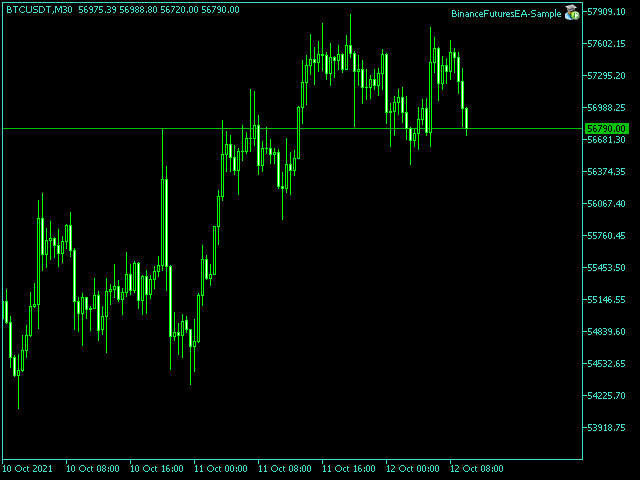
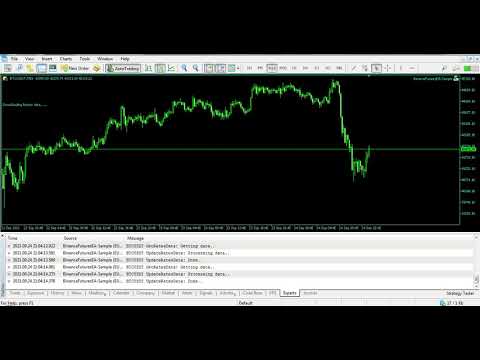
  • Automatically display the chart on the screen

Usage:

1. Open MQL5 demo account

2. Download Header file and EA sample https://drive.google.com/uc?export=download&id=17fWrZFeMZoSvH9-2iv4WDJhcyxG2eW17

  • Copy BinanceFutures.mqh to folder \MQL5\Include
  • Copy BinanceFuturesEA-Sample.mq5 to folder \MQL5\Experts

3. Allow WebRequest from MT5 Tools menu >> Options >> Expert Advisors and add URL:

        https://fapi.binance.com

        https://dapi.binance.com

        https://testnet.binancefuture.com

4. Open any chart and attach BinanceFuturesEA-Sample to the chart


Binance Futures Library Functions:

This function must be called from the OnInit() function

      void init                                 
      (   
         string symbol,                   // symbol name
         string historicalData,           // historicalData: 1W = 1 week, 1M = 1 month, 3M = 3 months, 6M = 6 months, 1Y = 1 year
         string apiKey,                   // binance api key
         string secretKey,                // binance secret key
         bool   testnet = false           // testnet mode
      );


This function must be called from the OnTimer() function

      void getTickData(); 


This function must be called from the OnDeinit() function

      void deinit();                 


The function used to place order, returns orderId if successful, otherwise -1

      long order                      
      (
         ORDERTYPE orderType,             // enum ORDERTYPE: BUY_MARKET, SELL_MARKET, BUY_LIMIT, SELL_LIMIT, BUY_STOP, SELL_STOP, BUY_STOPLIMIT, SELL_STOPLIMIT 
         double    quantity,              // order quantity
         double    limitPrice = 0,     	  // order limitPrice
         double    stopPrice = 0,         // order stopPrice
         double    stopLossPrice = 0,     // stopLoss price
         double    takeProfitPrice = 0,   // takeProfit price
         string    timeInForce = "GTC",   // timeInForce: GTC, IOC, FOK, default GTC
         string    comment = ""           // order comment
      );


Set stoploss and takeprofit, returns true if successful, otherwise false     

      bool setSLTP                        
      (
         SIDE side,                       // enum SIDE: BUY, SELL
         double stopLossPrice,            // stopLoss price
         double takeProfitPrice           // takeprofit price
      );     


Cancel open orders, returns true if successful, otherwise false

      bool cancelOrder                    
      (
         long orderId = -1                // order Id, default -1 cancel all open orders
      );


Close open positions, returns true if successful, otherwise false

      bool closePosition                  
      (
         SIDE side = -1                   // enum SIDE: BUY, SELL, default -1 close all open positions
      );


Get exchange info, returns ExchangeInfo structure if successful

      void getExchangeInfo                
      (
         ExchangeInfo &exchangeInfo       // [out] ExchangeInfo structure
      );


Get orderbook, returns OrderBook structure array if successful

      void getOrderBook                   
      (
         OrderBook &orderBook[],          // [out] OrderBook structure array
         int limit = 5                    // limit: 5, 10, 20, 50, 100, default 5
      );      


Get open orders, returns OpenOrders structure array if successful

      void getOpenOrders                  
      (
         OpenOrders &openOrders[]         // [out] OpenOrders structure array
      );                                 


Get open positions, returns OpenPositions structure array if successful

      void getOpenPositions               
      (                               
         OpenPositions &openPositions[]   // [out] OpenPositions structure array 
      );


Get the number of open orders

      int ordersTotal                     
      (
         ORDERTYPE orderType = -1         // enum ORDERTYPE: BUY_LIMIT, SELL_LIMIT, BUY_STOP, SELL_STOP, BUY_STOPLIMIT, SELL_STOPLIMIT, default -1 the number of all open orders
      );   


Get the number of open positions

      int positionsTotal                  
      (
         SIDE side = -1                   // enum SIDE: BUY, SELL, default -1 the number of all open positions
      );          


Set leverage, returns true if successful, otherwise false

      bool setLeverage   
      (
         int leverage                     // leverage value
      ); 


Get available balance

      double getBalance(); 


Set hedge position mode, returns true if successful, otherwise false

      bool setHedgeMode();               


Set one-way position mode, returns true if successful, otherwise false

      bool setOneWayMode();         


Set isolated margin type, returns true if successful, otherwise false

      bool setIsolatedMargin();          


Set crossed margin type, returns true if successful, otherwise false

      bool setCrossedMargin();            


Example how to call Binance Futures Library from EA

#include <BinanceFutures.mqh>

input string Symbol         = "BTCUSDC"; 
input string HistoricalData = "1W";    
input string ApiKey         = "";      
input string SecretKey      = "";  

BinanceFutures b;

int OnInit()
{          
   b.init(Symbol,HistoricalData,ApiKey,SecretKey);
 
   return 0;
}

void OnTimer()
{
   b.getTickData(); 
}

void OnDeinit(const int reason)
{
   b.deinit();
}

void OnTick()
{ 


   // Place buy market order
   // b.order(BUY_MARKET,0.001);                        

   // Place buy limit order   
   // b.order(BUY_LIMIT,0.001,75000);              
   
   // Place buy stop order   
   // b.order(BUY_STOP,0.001,0,115000);                       
   
   // Place buy stoplimit order   
   // b.order(BUY_STOPLIMIT,0.001,110000,115000);  
 
 
   // Place sell market order 
   // b.order(SELL_MARKET,0.001);                         
   
   // Place sell limit order
   // b.order(SELL_LIMIT,0.001,115000);            
   
   // Place sell stop order
   // b.order(SELL_STOP,0.001,0,75000);                          
   
   // Place sell stoplimit order
   // b.order(SELL_STOPLIMIT,0.001,80000,75000);	


   // Cancel all open orders
   // b.cancelOrder();             			             
  
   // Close all open positions
   // b.closePosition();           			     	   
   
   // Set leverage to 10x
   // b.setLeverage(10);           				  	                     
   
   // Set crossed margin type
   // b.setCrossedMargin();        			     	              
   
   // Set isolated margin type
   // b.setIsolatedMargin();       			     	                 
   
   // Set hedge position Mode
   // b.setHedgeMode();            			     	                   
   
   // Set oneWay position Mode
   // b.setOneWayMode();           			                        
     
   // Get the number of all open orders
   // int ordTotal = b.ordersTotal();
      
   // Get the number of all open positions    
   // int posTotal = b.positionsTotal();

   // Get available balance
   // double balance = b.getBalance();              
      
      
/* // Get exchangeInfo data

   ExchangeInfo exchangeInfo;
   b.getExchangeInfo(exchangeInfo);
   
   double minQty       = exchangeInfo.minQty;
   double maxQty       = exchangeInfo.maxQty;
   double minNotional  = exchangeInfo.minNotional;
   int    qtyDigit     = exchangeInfo.qtyDigit;
   int    priceDigit   = exchangeInfo.priceDigit;
   int    contractSize = exchangeInfo.contractSize;
*/

   
/* // Get orderBook data

   OrderBook orderBook[];
   b.getOrderBook(orderBook);
   
   for(int i = 0; i < ArraySize(orderBook); i++)
   {
      double askPrice = orderBook[i].askPrice;
      double askQty   = orderBook[i].askQty;
      double bidPrice = orderBook[i].bidPrice;
      double bidQty   = orderBook[i].bidQty;
   } 
*/
   
      
/* // Get open orders

   OpenOrders openOrders[];
   b.getOpenOrders(openOrders);
   
   for(int i = 0; i < ArraySize(openOrders); i++)
   {
      bool closePosition = openOrders[i].closePosition;
      
      if(closePosition == false)
      {     
         long   orderId      = openOrders[i].orderId;                  
         string symbol       = openOrders[i].symbol;             
         string side         = openOrders[i].side;             
         string positionSide = openOrders[i].positionSide;    
         string type         = openOrders[i].type;            
         string status       = openOrders[i].status;          
         string timeInForce  = openOrders[i].timeInForce;     
         double price        = openOrders[i].price;           
         double stopPrice    = openOrders[i].stopPrice;       
         double avgPrice     = openOrders[i].avgPrice;        
         double origQty      = openOrders[i].origQty;         
         double executedQty  = openOrders[i].executedQty;
         ulong  time         = openOrders[i].time;     
      }     
   }          
*/  


/* // Get open positions

   OpenPositions openPositions[];
   b.getOpenPositions(openPositions);
   
   for(int i = 0; i < ArraySize(openPositions); i++)
   {
      string symbol           = openPositions[i].symbol;       
      string side             = openPositions[i].side;          
      string positionSide     = openPositions[i].positionSide;  
      double positionAmt      = openPositions[i].positionAmt; 
      double entryPrice       = openPositions[i].entryPrice;    
      double markPrice        = openPositions[i].markPrice;      
      double unRealizedProfit = openPositions[i].unRealizedProfit; 
      double liquidationPrice = openPositions[i].liquidationPrice; 
   }
*/
}     

Önerilen ürünler
A free indicator for those who purchase the full version This indicator is created by this Ai, with your desired settings Artificial Intelligence at your service Have a complete artificial intelligence and use it in your codes This artificial intelligence is trained to tell you on each candle whether the market is moving up or down. In general, artificial intelligence can be used in all markets, all timeframes and all symbols However, due to the increasing complexity and decreasing accuracy of
Hello everyone! I am a professional MQL programmer , Making EAs, Indicators and Trading Tools for my clients all over the world. I build 3-7 programs every week but I seldomly sell any ready-made Robots. Because I am fastidious and good strategy is so few...  this EA is the only one so far I think its good enough to be published here.  As we all know, the Ichimoku indicator has become world popular for decades, but still, only few people knows the right way of using it, and if we check the clo
Pionex API EA Connector for MT5 – MT5 ile Sorunsuz Entegrasyon Genel Bakış Pionex API EA Connector for MT5 , MetaTrader 5 (MT5) ve Pionex API arasında sorunsuz entegrasyon sağlar. Bu güçlü araç, traderların doğrudan MT5 üzerinden işlemler yapmasına, bakiyelerini görüntülemesine ve emir geçmişini takip etmesine olanak tanır. Öne Çıkan Özellikler Hesap ve Bakiye Yönetimi Get_Balance(); – Pionex hesabındaki mevcut bakiyeyi alır. Emir Yönetimi ve Uygulama orderLimit(string symbol, string side,
Introducing Your New Go-To Trading EA! Boost your trading performance with this Bollinger Bands-based Expert Advisor, specially designed for XAU (Gold) and various Forex pairs. Why this EA is a must-have: Clean, user-friendly interface – perfect for all trader levels Built-in Hidden Take Profit & Stop Loss for added strategy security Ideal for both beginners and experienced traders Ready to use out of the box – no complex setup required. Trade smarter, not harder!
AO Core
Andrey Dik
3.67 (3)
AO Core is the core of the optimization algorithm, it is a library built on the author's HMA (hybrid metaheuristic algorithm) algorithm. Pay attention to the MT5 Optimization Booster product , which makes it very easy to manage the regular MT5 optimizer . An example of using AO Core is described in the article: https://www.mql5.com/ru/articles/14183 https://www.mql5.com/en/blogs/post/756510 This hybrid algorithm is based on a genetic algorithm and contains the best qualities and properties of p
Algo Pumping
Ihor Otkydach
4.75 (20)
PUMPING STATION – Kişisel “her şey dahil” stratejiniz Karşınızda PUMPING STATION — forex dünyasında işlem yapma şeklinizi heyecan verici ve etkili bir sürece dönüştürecek devrim niteliğinde bir gösterge. Bu sadece bir yardımcı değil, güçlü algoritmalarla donatılmış tam teşekküllü bir ticaret sistemidir ve daha istikrarlı işlem yapmanıza yardımcı olur. Bu ürünü satın aldığınızda ŞUNLARI ÜCRETSİZ olarak alırsınız: Özel ayar dosyaları: Otomatik kurulum ve maksimum performans için. Adım adım video e
快速关仓,无需任何操作。 当前版本的一键关仓主要针对的是来不及手动关仓的情况,目前是不分交易标的类别,是对所有的持仓进行关仓。 未来可能升级的方向: 1、分类别、分标的关仓。 适用场景:开了多个标的的仓位,并且波动不一,快速频繁的波动影响了整体的判断。 2、增加只关闭盈利仓位、只关闭亏损仓位。 适用场景:持仓较多,趋势发生变化。 个人建议:一般建议选择一键全部关仓,因为如果行情与持仓方向一致,只关闭盈利仓位无形就是扩大了亏损。如果行情方向与持仓方向相反,只关闭亏损仓位,当前已盈利的后面又会变为亏损,盈利无法变现。 3、按照仓位顺序由大到小关仓、按照仓位顺序由小到大关仓。 适用 场景:行情发生波动,对于未来行情判断把握不确定的,可根据自己需求选择仓位关仓顺序,由大到小关仓的话,可以避免亏损的进一步扩大。 4、减小仓位量,保持绝对的安全距离。 适用 场景:对未来趋势相对确定,不想错过当前行情,但是认为当前持仓体量又有点大,想降低仓位。
Key Features: 200+ Fully Implemented Patterns   across all categories Advanced Market Structure Analysis Smart Money Integration   (Wyckoff, Order Blocks, Liquidity) Professional Risk Management Multi-Timeframe Analysis AI-Powered Confidence Scoring Advanced Visualization Real-time Alerts Pattern Categories: Single Candle Patterns (Hammer, Doji, Marubozu, etc.) Multi-Candle Patterns (Engulfing, Stars, Harami, etc.) Chart Patterns (Head & Shoulders, Cup & Handle, Triangles, etc.) Harmonic Pattern
Ajuste BRA50
Claudio Rodrigues Alexandre
4.4 (5)
Este script marca no gráfico do ativo BRA50 da active trades o ponto de ajuste do contrato futuro do Mini Índice Brasileiro (WIN), ***ATENÇÃO***  para este script funcionar é necessário autorizar a URL da BMF Bovespa no Meta Trader. passo a passo: MetaTrader 5 -> Ferramentas -> Opções -> Expert Adivisors * Marque a opção "Relacione no quadro abaixo as URL que deseja permitir a função WebRequest" e no quadro abaixo adicione a URL: https://www2.bmf.com.br/ este indicador usa a seguinte página par
FREE
Magic EA MT5
Kyra Nickaline Watson-gordon
Magic EA is an Expert Advisor based on Scalping, Elliot Waves and with filters such as RSI, Stochastic and 3 other strategies managed and decided with the robot smartly. Large number of inputs and settings are tested and optimized and embedded in the program thus inputs are limited and very simple. Using EA doesn't need any professional information or Forex Trading Knowledge. EA can trade on all symbols and all time frames, using special and unique strategies developed by the author. The EA w
What is SMC Market Structure Pro? SMC Market Structure Pro is an automated trading Expert Advisor for MetaTrader 5 , developed based on Smart Money Concept (SMC) and market structure analysis . The EA is designed to help traders follow the natural flow of the market , focusing on price structure instead of indicators or lagging signals. How Does the EA Work? The EA analyzes market structure changes using pure price action: Detects higher highs & higher lows for bullish structure Detects l
FREE
Goliath Mt5
Nicolokondwani Biscaldi
Goliath MT5 - scalper fully automated Expert Advisor for medium-volatile forex markets P roperties: The Library trades 10 currency pairs (USDCHF, EURCHF, EURGBP, AUDUSD, USDCAD, GBPUSD, EURUSD, NZDUSD, CADCHF, EURAUD, EURCAD, AUDJPY) The Library does not use martingale The Library sets a fixed stop loss and take profit for all orders The Library only trades a user input volume The Library can be installed on any currency pair and any timeframe Recommendations: Before using on a real account, t
GRID for MT5 is a convenient tool for those who trade a grid of orders, designed for quick and comfortable trading in the FOREX financial markets. GRID for MT5 has a customizable panel with all the necessary parameters. Suitable for both experienced traders and beginners. It works with any brokers, including American brokers, requiring FIFO to close primarily previously opened transactions. The grid of orders can be either fixed - orders are opened with a fixed step, or have dynamic levels of op
Bookeepr
Marvellous Peace Kiragu
Bookeepr is an advanced MQL5 trading bookkeeping software that automates trade logging, tracks real-time P&L, and integrates a ledger-style financial system for deposits, withdrawals, and expenses. It supports multi-currency assets , generates detailed performance reports , and provides risk management tools to help traders optimize their strategies. With secure cloud storage, exportable reports, and seamless MetaTrader 5 integration , Bookeepr ensures accurate, transparent, and hassle-free fina
Prime H1 Trader
Phinnustda Warrarungruengskul
Unleash the Power of Precision Trading Prime H1 Trader is a sophisticated, professional-grade EA engineered for the EURUSD currency pair on the H1 timeframe. This expert advisor isn't just another automated system; it's a meticulously crafted trading tool that integrates a powerful technical strategy to pinpoint optimal entry signals with high accuracy. The core of Prime H1 Trader's strategy is its unique dual-indicator approach. It leverages Envelope signals as the primary market trigger , th
FREE
GoldCrusher V2 : Expert Advisor for XAUUSD Breakout Dominance UNMATCHED PERFORMANCE HIGHLIGHTS METRIC LATEST RESULT (V2.47) COMMENTARY Profit Factor (PF) 3.51 Exceptional! Indicates very high profit efficiency relative to losses. Max Drawdown (DD) 2.14% High Capital Stability. Minimal risk exposure thanks to strict management. Winning Trades 77.14% High win rate confirmed by the Dual Filter system. Target R:R 1:3.4 Superior Risk:Reward ratio for aggressive yet controlled growth. BRIEF
Based on the trading model/strategy/system of gold double-position hedging and arbitrage launched by Goodtrade Brokers, problems encountered in daily operations: 1. Account B immediately places an order immediately following account A. 2: After account A places an order, account B will automatically copy the stop loss and take profit. 3: Account A closes the position of Account B and closes the position at the same time. 4: When account B closes the position, account A also closes the position.
Introducing the   Elite Chart Navigator   — your ultimate MetaTrader 5 Expert Advisor designed to revolutionize multi-symbol trading with seamless chart navigation and superior usability. Product Overview The   Elite Chart Navigator EA   is a sophisticated trading utility enabling rapid switching between multiple trading pairs through an intuitive on-chart button interface. Built for professional traders managing numerous instruments, this EA dramatically improves workflow efficiency, ensuring
FREE
Shawrie
Kevin Kipkoech
This Pine Script implements a Gaussian Channel + Stochastic RSI Strategy for TradingView . It calculates a Gaussian Weighted Moving Average (GWMA) and its standard deviation to form an upper and lower channel. A Stochastic RSI is also computed to determine momentum. A long position is entered when the price closes above the upper Gaussian band and the Stoch RSI K-line crosses above D-line . The position is exited when the price falls back below the upper band. The script includes commission, cap
️   Ex-Calibur   EA is Professional Trading Robot with Inside Bar Strategy.   Key Features:   Powerful Inside Bar Strategy - Automatic Inside Bar pattern detection for precise entry points - Colored indicator box visualization for easier analysis - Automated entry system with pending orders to capture breakouts   Advanced Risk Management - Flexible Trailing Stop system to secure profits - Automatic Break Even to protect capital - Adaptive Stop Loss and Take Profit based on market vol
***** Ana ticaret XAUUSD'dir. Teste yaparsa, XAUUSD'e ayarlanma tavsiye ediliyor. Diğer ticaret hedefleri faydallığını garanti edemez****** Teste ihtiyacınız olursa, lütfen bir mesaj bırakın (gördüğüm anda cevap vereceğim). Çalışma sonuçlarını korumak için belirli parametreler girmeli. Sistemin öntanımlı parametreleri ekran fotoğrafında gösterilen etkileri ulaşamaz! Teste ihtiyacınız olursa, lütfen bir mesaj bırakın (gördüğüm anda cevap vereceğim). Çalışma sonuçlarını korumak için belirli par
K Trade Lib5
Kaijun Wang
2 (1)
MT4/5通用交易库(  一份代码通用4和5 ) #import "K Trade Lib5.ex5"    //简单开单    long OrderOpen( int type, double volume, int magic, string symbol= "" , string comment= "" , double opprice= 0 , double sl= 0 , double tp= 0 , int expiration= 0 , bool slsetmode= false , bool tpsetmode= false );    //复杂开单    void SetMagic( int magic, int magic_plus= 0 ); void SetLotsAddMode(int mode=0,double lotsadd=0);    long OrderOpenAdvance( int mode, int type, double volume, int step, int magic, string symbol= "" , string comm
FREE
Our team - @Supremacy_Lab - are glad to introduce our first product - EA_Supremacy_NT - a unique technical solution for day trading, scalping, and trend following. EA_Supremacy_NT is a non-trading version of our core automated advisor, that will be released later. It is a truly innovative product that is based on an unconventional approach to market data processing. The underlying algorithm allows traders to reap the maximum possible profit from short-term price movements. The system uses a si
Scan a fixed list of assets (Ibovespa) in the chosen timeframe (TimeFrame). For each pair and for various periods. Calculate a regression model between the two assets (and, if desired, using the bova11 index as a normalizer). Generate the spread of this relationship, its mean, standard deviation, speculative deviation, and betas (B1 and B2). Apply an ADF test without exclusion (cointegration/stationarity). Calculate the Z-score of the current exclusion (how many standard deviations are away from
Srfire Hedge Position
Javier Antonio Gomez Miranda
SRFire Hedge Position - Automated Trading Strategy SRFire Hedge Position is an Expert Advisor (EA) designed to ensure trades always close in profit using a hedging and scaling technique. Here’s how it works: How It Works: Trade Initiation: The EA opens a Buy position within a predefined channel. Simultaneously, it places a Sell Stop order below the channel with double the lot size of the Buy position. If the Buy position hits the Take Profit (TP), the Sell Stop order is canceled, and the proces
Didi Index
Flavio Javier Jarabeck
4.8 (25)
The famous brazilian trader and analyst Didi Aguiar created years ago a study with the crossing of 3 Simple Moving Averages called "Agulhada do Didi", then later was also named Didi Index, as a separate indicator. The period of those SMAs are 3, 8 and 20. As simple as that, this approach and vision bring an easy analysis of market momentum and trend reversal to those traders looking for objective (and visual) information on their charts. Of course, as always, no indicator alone could be used wit
FREE
Santa Scalping is a fully automated Expert Advisor with no use of martingale. Night scalping strategy. The SMA indicator filter are used for entries. This EA can be run from very small accounts. As small as 50 EUR. General Recommendations The minimum deposit is 50 USD,  default settings reccomend for eurusd m5 gmt +2 . Please use max spread 10 if you will not have orders change it to -1. Use a broker with good execution and with a spread of 2-5 points. A very fast VPS is required, preferably wi
1. 12 ana hesaptan 100 bağımlı hesaba siparişleri kopyalayın. Köle hesapların sayısı 12'den 100'e kadar özelleştirilebilir. 2. MT4'ten MT4'e, MT4'ten MT5'e, MT5'ten MT4'e, MT5'ten MT5'e destek. 3. EURUSD, EURUSDm, EURUSDk gibi farklı platformlardaki alım satım çeşitlerinin eklerini tanımlayabilecektir. 4. XAUUSD=GOLD gibi özel para birimi eşleştirme. 5. Tüm işlemleri kopyalayabilir veya yalnızca AL, SATIŞ, KAPAT komutlarını kopyalayabilir 6. Kârı durdurma ve zararı durdurma arasında seçim yapab
Automated Supply and Demand Tracker MT5. The following videos demonstrate how we use the system for trade setups and analysis.US PPI, Fed Interest Rates, and FOMC Trade Setup Time Lapse: U.S. dollar(DXY) and Australian dollar vs U.S. dollar(AUD/USD)  https://youtu.be/XVJqdEWfv6s  The EUR/USD Trade Setup time lapse 8/6/23.  https://youtu.be/UDrBAbOqkMY . US 500 Cash Trade Setup time lapse 8/6/23  https://youtu.be/jpQ6h9qjVcU .  https://youtu.be/JJanqcNzLGM ,  https://youtu.be/MnuStQGjMyg,&nbsp ;
Bu ürünün alıcıları ayrıca şunları da satın alıyor
The library is dedicated to help manage your trades, calculate lot, trailing, partial close and other functions. Lot Calculation Mode 0: Fixed Lot. Mode 1: Martingale Lot (1,3,5,8,13) you can use it in different way calculate when loss=1 ,when profit=0. Mode 2: Multiplier Lot (1,2,4,8,16) you can use it in different way calculate when loss=1 ,when profit=0. Mode 3: Plus Lot (1,2,3,4,5) you can use it in different way calculate when loss=1 ,when profit=0. Mode 4: SL/Risk Lot calculate based on s
Cryptocurrency analysis has never been easier with Crypto Charts for MetaTrader 5. Now, trading on BitMEX has never been easier with BitMEX Trading API for MetaTrader 5. BitMEX Trading API library was built to be as easy to use as possible. Just include the library into your Expert Advisor or Script, call the corresponding methods and start trading! Features Trade on BitMEX and BitMEX Testnet. Build and automate your strategies. Concern more with the trading strategy logic and less with the co
EA Toolkit
Esteban Thevenon
EA Toolkit   is a library that allows any developer to quickly and easily program Advisor experts. It includes many functions and enumerations such as trailing stop, lot, stop loss management, market trading authorisations, price table updates, trading conditions and many more. Installation + Documentation : You will find all the information to install this library and the documentation of its functions on this GitHub : https://github.com/Venon282/Expert-Advisor-Toolkit WARNING : The installat
Applying these methods, I managed to arrive at a nuanced conclusion that is crucial to understanding the importance of unique strategies in contemporary trading. Although the neural network advisor showed impressive efficiency in the initial stages, it proved to be highly unstable in the long run. Various factors such as market fluctuations, trend changes, external events, etc. cause its operation to be chaotic and eventually lead to instability. With these experiences, I accepted the challenge
Kaseki
Ben Mati Mulatya
The Hybrid Metaheuristic Algorithm (HMA) is a cutting-edge optimization approach that combines the strengths of genetic algorithms with the best features of population-based algorithms. Its high-speed computation ensures unparalleled accuracy and efficient search capabilities, significantly reducing the total time required for optimization while identifying optimal solutions in fewer iterations. HMA outperforms all known population optimization algorithms in both speed and accuracy. Use Cases AO
[Gold Intelligent Trading EA | Risk Control is Steady, Profit Breakthrough] The intelligent trading EA, which is customized for the fluctuation characteristics of gold, takes the hard-core trading system as the core, and each order is derived from the accurate judgment of market trends and supporting pressures by quantitative models, so as to eliminate subjective interference and make trading decisions more objective and efficient. Equipped with multi-dimensional risk control system, dynamic s
Questo Expert Advisor (EA) è stato progettato per offrire un'esperienza di trading automatizzata di alto livello, adatta sia ai trader principianti che a quelli esperti. Utilizzando algoritmi avanzati e tecniche di analisi del mercato, l'EA è in grado di identificare opportunità di trading redditizie con precisione e velocità. L'EA è configurabile per operare su vari strumenti finanziari, tra cui forex, indici e materie prime, garantendo una flessibilità senza pari. Le caratteristiche princip
First contact Telegram - @BerlinOG for more files and installation The   Telegram Signal EA   is a powerful tool designed to bridge your Telegram communications with your MetaTrader 5 (MT5) charts. It enables you to display messages from your Telegram channels, groups, and private chats directly on your MT5 charts as comments. This integration simplifies the process of monitoring trading signals and important messages while you're actively trading. Features Real-time Message Display : View mes
LSTM Library
Thalles Nascimento De Carvalho
LSTM Library - MetaTrader 5 için Gelişmiş Sinir Ağları Algoritmik Trading için Profesyonel Sinir Ağı Kütüphanesi LSTM Library, tekrarlayan sinir ağlarının gücünü MQL5 trading stratejilerinize getirir. Bu profesyonel düzeydeki uygulama, genellikle yalnızca özel makine öğrenimi çerçevelerinde bulunan gelişmiş özelliklere sahip LSTM, BiLSTM ve GRU ağlarını içerir. "Trading için makine öğreniminde başarının sırrı, verilerin uygun şekilde işlenmesindedir. Çöp Girer, Çöp Çıkar – tahminlerinizin kalite
Automatic Replenishment Trading Within a Defined Range The EA operates only within the predefined price range . When an order is closed, filled, or cancelled (reducing the total number of orders), the EA will automatically place new orders to maintain the continuous operation of the trading strategy. This EA is designed for ranging / sideways market conditions . You can control the total number of orders using Max Orders . Example: Max Orders: 8 Active trades: 2 Pending Buy Limit orders: 6 In t
Automatic Replenishment Trading Within a Defined Range The EA operates   only within the predefined price range . When an order is   closed, filled, or cancelled   (reducing the total number of orders), the EA will   automatically place new orders   to maintain the continuous operation of the trading strategy. This EA is   designed for ranging / sideways market conditions . You can control the total number of orders using   Max Orders . Example: Max Orders:   8 Active trades:   2 Pending Sell L
Bu kütüphane, herhangi bir EA'nızı kullanarak işlemleri yönetmenize izin verecektir ve açıklamalarda belirtilen komut dosyası koduyla ve ayrıca tüm süreci gösteren videodaki demo örnekleriyle kendi başınıza yapabileceğiniz herhangi bir EA'ya entegrasyonu çok kolaydır. - Limit Ver, SL Limit Ver ve Kar Al Limit Emirleri - Market, SL-Market, TP-Market siparişlerini verin - Limit emrini değiştirin - Siparişi iptal et - Siparişleri Sorgula - Kaldıraç, marjı değiştir - Pozisyon bilgisini al ve
WalkForwardOptimizer MT5
Stanislav Korotky
3.78 (9)
WalkForwardOptimizer library allows you to perform rolling and cluster walk-forward optimization of expert advisers (EA) in MetaTrader 5. To use the library include its header file WalkForwardOptimizer.mqh into your EA source code, add call provided functions as appropriate. Once the library is embedded into EA, you may start optimization according to the procedure described in the User guide . When it's finished, intermediate results are saved into a CSV file and some special global variables.
MetaCOT 2 CFTC ToolBox is a special library that provides access to CFTC (U.S. Commodity Futures Trading Commission) reports straight from the MetaTrader terminal. The library includes all indicators that are based on these reports. With this library you do not need to purchase each MetaCOT indicator separately. Instead, you can obtain a single set of all 34 indicators including additional indicators that are not available as separate versions. The library supports all types of reports, and prov
Native Websocket
Racheal Samson
5 (6)
An   easy to use, fast,  asynchronous   WebSocket library  for MQL5. It supports: ws://   and   wss://  (Secure "TLS" WebSocket) text   and   binary   data It handles: fragmented message  automatically (large data transfer) ping-pong   frames  automatically (keep-alive handshake) Benefits: No DLL required. No OpenSSL installation required. Up to 128 Web Socket Connections from a single program. Various Log Levels for error tracing Can be synchronized to MQL5 Virtual Hosting . Completely native t
If you're a trader looking to use Binance.com and Binance.us exchanges directly from your MetaTrader 5 terminal, you'll want to check out Binance Library MetaTrader 5. This powerful tool allows you to trade all asset classes on both exchanges, including Spot, USD-M   and COIN-M futures, and includes all the necessary functions for trading activity. Important: you need to have source code to properly implement the library. With Binance Library MetaTrader 5, you can easily add instruments from Bi
The library is dedicated to help manage your trades, calculate lot, trailing, partial close and other functions. Lot Calculation Mode 0: Fixed Lot. Mode 1: Martingale Lot (1,3,5,8,13) you can use it in different way calculate when loss=1 ,when profit=0. Mode 2: Multiplier Lot (1,2,4,8,16) you can use it in different way calculate when loss=1 ,when profit=0. Mode 3: Plus Lot (1,2,3,4,5) you can use it in different way calculate when loss=1 ,when profit=0. Mode 4: SL/Risk Lot calculate based on s
This is a simplified and effective version of the library for walk forward analysis of trading experts. It collects data about the expert's trade during the optimization process in the MetaTrader tester and stores them in intermediate files in the "MQL5\Files" directory. Then it uses these files to automatically build a cluster walk forward report and rolling walk forward reports that refine it (all of them in one HTML file). Using the WalkForwardBuilder MT5 auxiliary script allows building othe
Order Book, known also as Market Book, market depth, Level 2, - is a dynamically updated table with current volumes of orders to buy and to sell specific financial instument at price levels near Bid and Ask. MetaTrader 5 provides the means for receiving market book from your broker, but in real time only, without access to its history. The library OrderBook History Library reads market book state in the past from archive files, created by OrderBook Recorder . The library can be embedded into you
Cryptocurrency analysis has never been easier with Crypto Charts for MetaTrader 5. Now, trading on BitMEX has never been easier with BitMEX Trading API for MetaTrader 5. BitMEX Trading API library was built to be as easy to use as possible. Just include the library into your Expert Advisor or Script, call the corresponding methods and start trading! Features Trade on BitMEX and BitMEX Testnet. Build and automate your strategies. Concern more with the trading strategy logic and less with the co
Teclado trader, é uma BIBLIOTECA que você pode chamar no OnChartEvent para abrir posição de compra/venda/zerar, os botões padrões são: V = venda C = compra Z = zerar posições a mercado S = zerar posições opostas e depois a mercado X = zerar posições opostas Além da função de teclado, é possível mostrar os estados do ExpertAdvisor usando o MagicId, com informação de: lucro mensal, semanal, diario, e posição aberta, para isto use o OnTick, ou qualquer outro evento (OnTimer / OnTrade / OnBookEven
Binance Library
Hadil Mutaqin SE
5 (1)
The library is used to develop automatic trading on Binance Spot Market from MT5 platform. Support all order types: Limit, Market, StopLimit and StopMarket Support Testnet mode Automatically display the chart on the screen Usage: 1. Open MQL5 demo account 2. Download Header   file and EA sample   https://drive.google.com/uc?export=download&id=1kjUX7Hyy02EiwTLgVi8qdaCNvNzazjln Copy Binance.mqh to folder \MQL5\Include Copy  BinanceEA-Sample.mq5 to folder \MQL5\Experts 3. Allow WebRequest from MT5
Gold plucking machine   Gold plucking machine is an Expert Advisor designed specifically for trading gold. The operation is based on opening orders using the Fast and Slow lines indicator, thus the EA works according to the "Trend Follow" strategy, which means following the trend. Use grid strategy to place orders without stop loss operation, so please make sure the account has sufficient funds. magic number      -  is a special number that the EA assigns to its orders. Lot Multiplier        - 
The library is used to develop automatic trading on Binance Futures Market from MT5 platform. Support Binance Futures USD-M and COIN-M Support Testnet mode Support all order types: Limit, Market, StopLimit, StopMarket, StopLoss and TakeProfit Automatically display the chart on the screen Usage: 1. Open MQL5 demo account 2. Download Header file and EA sample https://drive.google.com/uc?export=download&id=17fWrZFeMZoSvH9-2iv4WDJhcyxG2eW17 Copy BinanceFutures.mqh to folder \MQL5\Include Copy  Bina
MT4/5通用交易库(  一份代码通用4和5 ) #ifdef __MQL5__      #define KOD_TICKET ulong      #define KOD_MAGIC   long #else        #define KOD_TICKET long      #define KOD_MAGIC   int #endif class ODLIST; #import "K Trade Lib Pro 5.ex5"       //祝有个美好开始,运行首行加入    void StartGood() ;    //简单开单    long OrderOpen( int type, double volume, int magic, string symbol= "" , string comment= "" , double opprice= 0 , double sl= 0 , double tp= 0 , int expiration= 0 , bool slsetmode= false , bool tpsetmode= false );    //复杂开单
1. What is this The MT5 system comes with very few optimization results. Sometimes we need to study more results. This library allows you to output more results during backtest optimization. It also supports printing more strategy results in a single backtest. 2. Product Features The results of the optimized output are quite numerous. CustomMax can be customized. The output is in the Common folder. It is automatically named according to the name of the EA, and the name of the same EA will be au
T5L Library is necessary to use the EAs from TSU Investimentos, IAtrader and others. It contains all the functions framework needed to Expert Advisors working properly.  ツ - The Expert Advisors from  TSU Investimentos does not work without this library,  the T5L library can have updates during the year - At this Library you will find several funcionalities like order sends, buy and sell, trigger entry points check, candlestick analyses, supply and demmand marking and lines, and much more. 
EA Toolkit
Esteban Thevenon
EA Toolkit   is a library that allows any developer to quickly and easily program Advisor experts. It includes many functions and enumerations such as trailing stop, lot, stop loss management, market trading authorisations, price table updates, trading conditions and many more. Installation + Documentation : You will find all the information to install this library and the documentation of its functions on this GitHub : https://github.com/Venon282/Expert-Advisor-Toolkit WARNING : The installat
Want to get all events like Previous/Forecast/Actual values for each news to analyze/predict it? By this simple library you can do it easily,Just import/integrate the library into your system,then get all possible values for each news   Even In Strategy Tester   . Note: Please add the address " https://www.forexfactory.com/ " of news feed at your MT5 tab > Tools > Options > Expert Advisors > Check Allow web request for listed URL. Since the WebRequest() function can't be called from indicator ba
A Simple Moving Average (SMA) is a statistical indicator used in time series analysis. This indicator represents the arithmetic mean of a sequence of values over a specific period of time. SMA is used to smooth short-term fluctuations in data, helping to highlight the overall trend or direction of changes. This aids analysts and traders in better understanding the general dynamics of the time series and identifying potential trends or changes in direction.  More information you can find in Wiki 
Yazarın diğer ürünleri
Binance Library
Hadil Mutaqin SE
5 (1)
The library is used to develop automatic trading on Binance Spot Market from MT5 platform. Support all order types: Limit, Market, StopLimit and StopMarket Support Testnet mode Automatically display the chart on the screen Usage: 1. Open MQL5 demo account 2. Download Header   file and EA sample   https://drive.google.com/uc?export=download&id=1kjUX7Hyy02EiwTLgVi8qdaCNvNzazjln Copy Binance.mqh to folder \MQL5\Include Copy  BinanceEA-Sample.mq5 to folder \MQL5\Experts 3. Allow WebRequest from MT5
Filtrele:
İnceleme yok
İncelemeye yanıt