Lib4 EAPadPRO for MT4

5

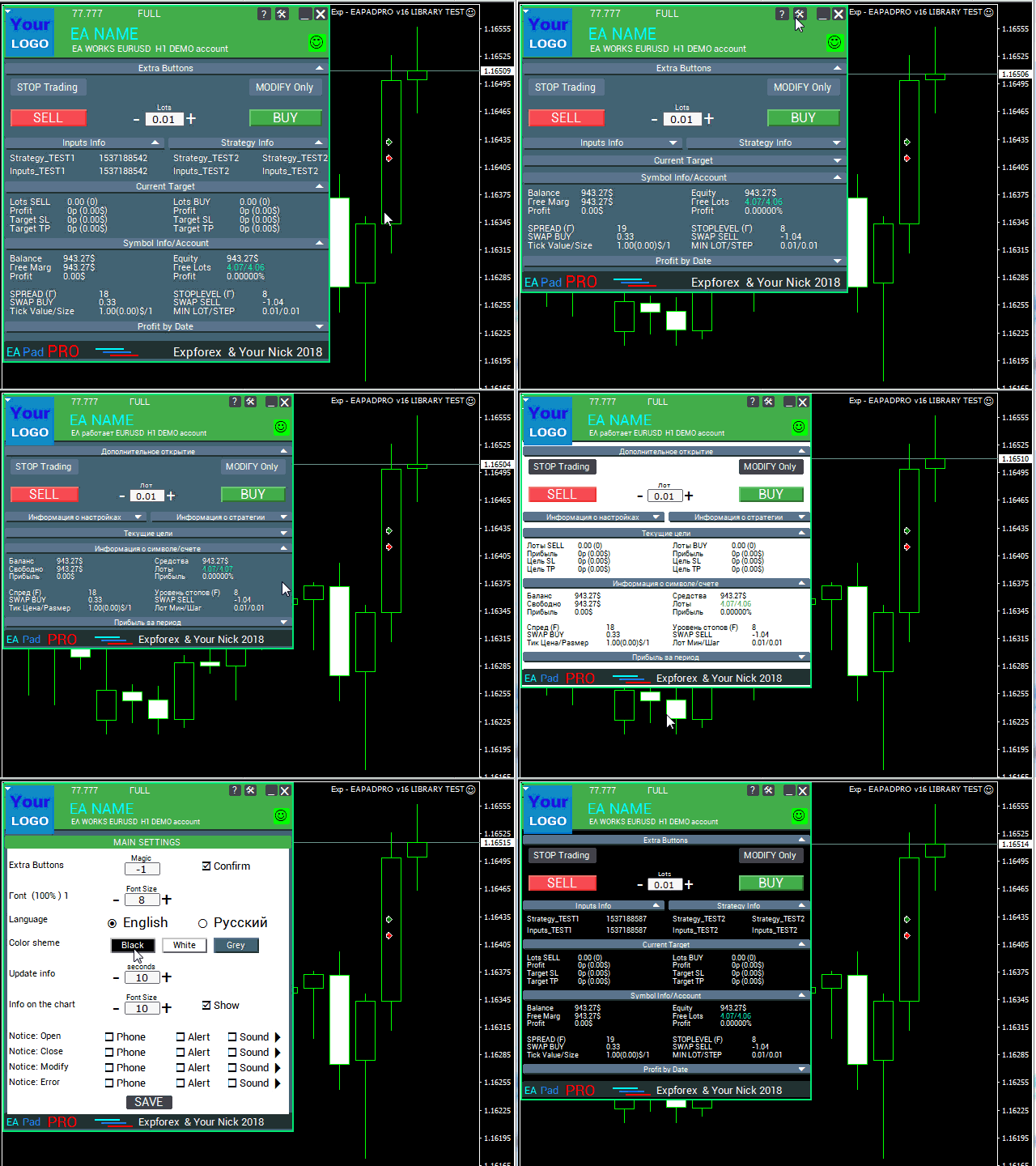
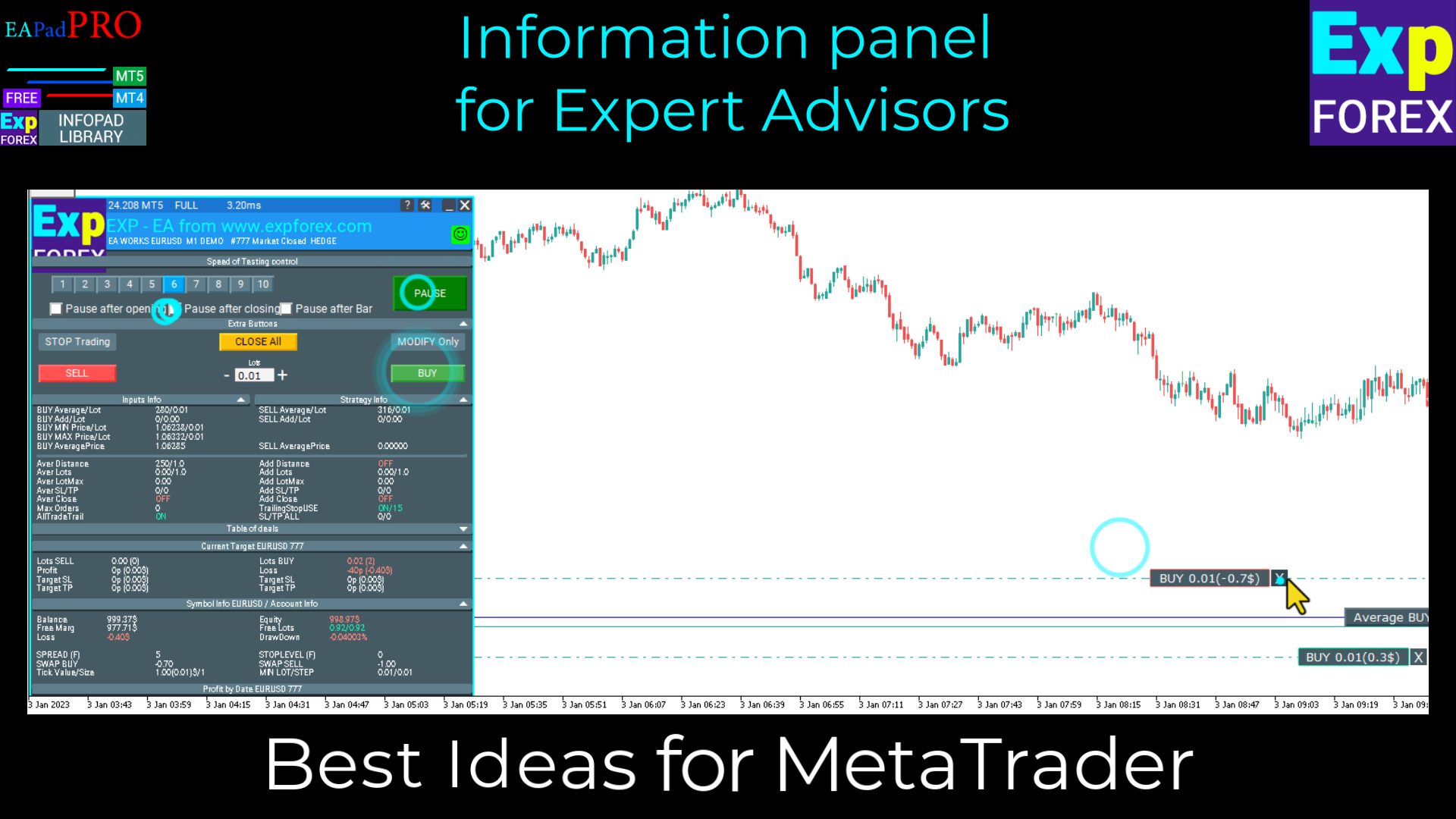
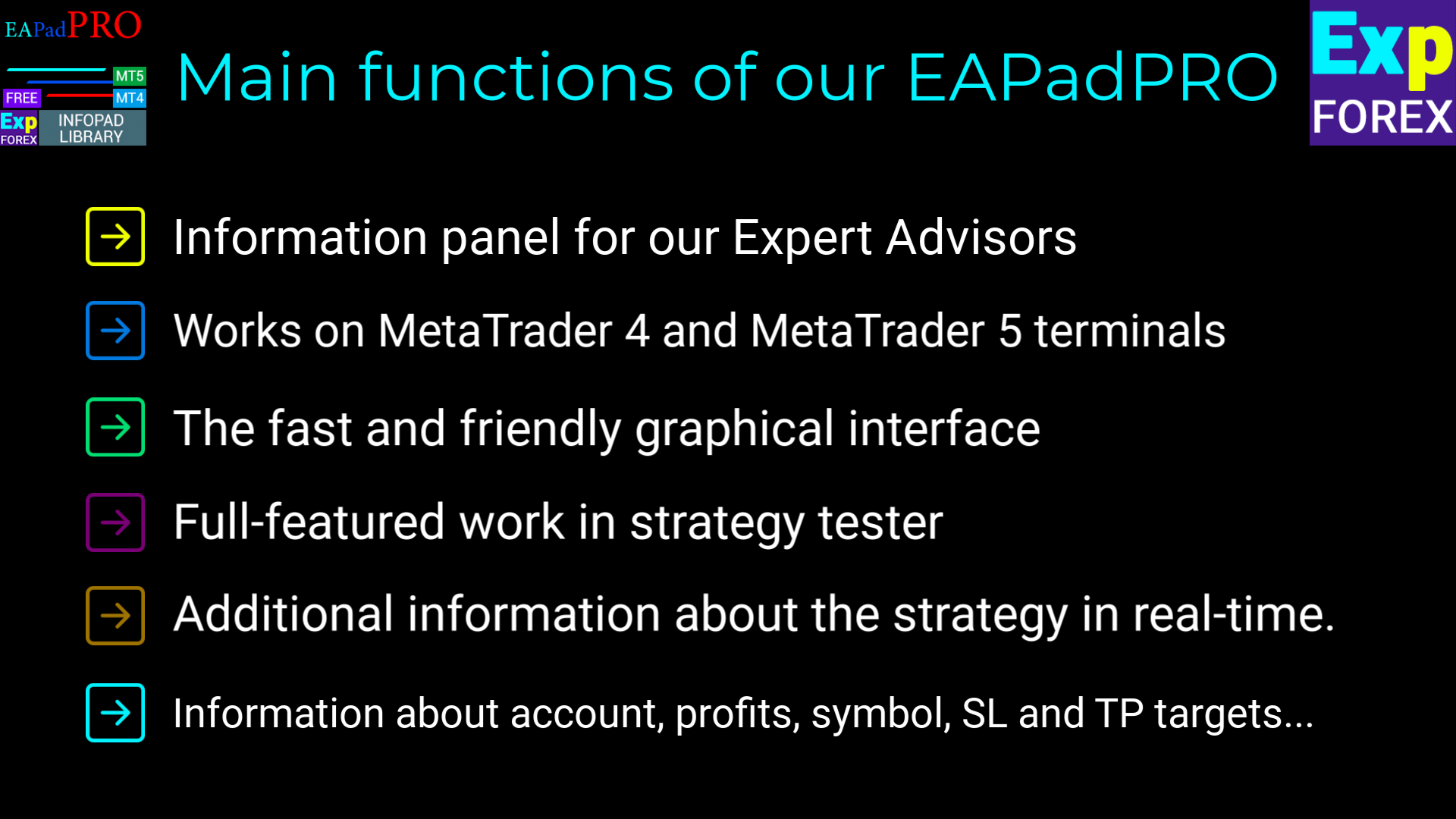
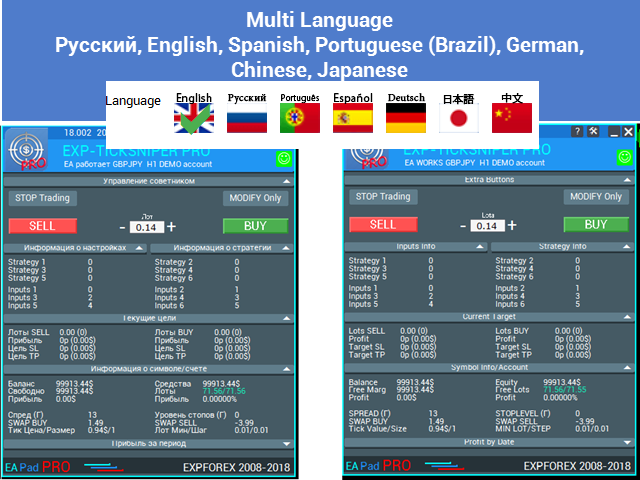
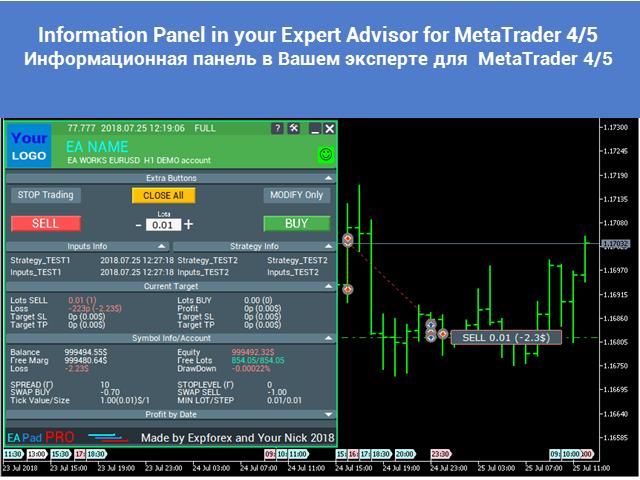
Library to add the Information Panel to your Expert Advisor for MetaTrader 4.

We can not guarantee that the information and interface of the program will give you a profit on deals, but we will definitely say that even the simplest interface of the program can strengthen the first impression.

Detailed description and instructions for adding our panel to your Expert Advisor are in our blog: LIB - EAPADPRO Step-by-step instruction

Detailed description of our panel and instructions for using EAPADPRO

MetaTrader 5 Library Version

The process of adding consists of 10 steps and they are described in detail in our article.


Installing the Library

  1. Install the library from this site;
  2. Open your Expert Advisor;
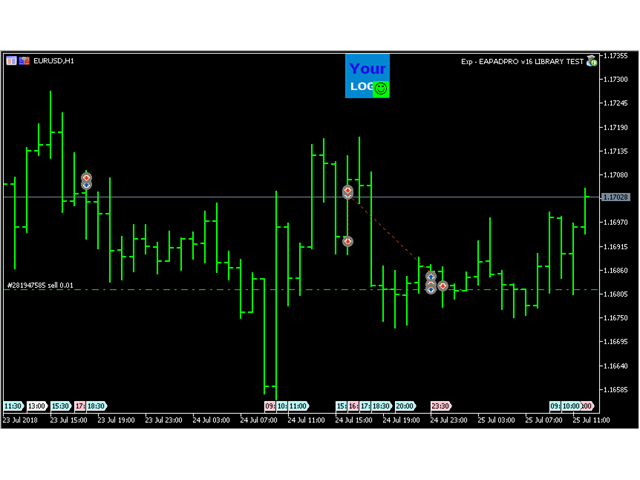
  3. Open our sample and step-by-step guide to installing our code, the file Exp - EAPADPRO LIBRARY TEST (Can be found in the blog);
  4. Do each Step as written in the recommendation or use our step-by-step instruction from the site.

EAPADPRO personalization

All that you can change in our panel is described in this paragraph:

  1. versionea - The version of your Expert Advisor that is displayed in the panel;
  2. BMPLOGO - the logo of your BMP 60x60 adviser that is displayed on the panel;
  3. icon - The icon of your expert, which is displayed in the properties of the expert;
  4. defEANAME - the name of your Expert Advisor that is displayed in the panel;
  5. YourName - your name or nickname that is displayed in the panel;
  6. copyright - Your copyright, which is displayed in the properties of the Expert Advisor;
  7. CreateInputs - The function of displaying your external variables on the panel. There are 10 such parameters in total. The format of the filling: "Name", "Value";
  8. CreateStrategy - The function of displaying your strategy values on the panel. There are 10 such parameters in total. The format of the filling: "Name", "Value";
  9. MagicForEaPadPRO = 0 - Magic number, which will be watched by our panel (All information is filtered by magic number), at -1 = the panel will take all positions from the account by this symbol, at 0 = only manual (Hand) deals;
  10. MagicForEaPadPRO_Open = -1 - Magic number, which will be assigned to the positions opened from our panel;
  11. CommentForEaPadPRO = "" - A comment that will be assigned to positions opened from our panel;
  12. TypeFillingForEaPadPRO = 0 - Type of fill orders at opening, only for terminal MT5;
  13. ShowBuySell = true - Show the "trading panel in 1 click" (BUY SELL)

You can also set external variables:

  1. ShowEaPadPro = true;
  2. FontName = "Roboto";

Terms of Use

Our library with the information panel EAPADPRO is distributed on the back link to our page.

If you wish to sell your expert in the market or on the Internet, you need to add the following text to the description of your product:

  1. The EAPADPRO information graphic panel was developed.
  2. All rights to this EAPADPRO panel belong to Vladislav  Expforex
  3. The author of the EAPADPRO information panel is not responsible for the advisor or indicator that uses our panel.
  4. Our EAPADPRO panel is designed solely for the purpose of providing additional information about trading on your account.


İncelemeler 7
Zhong Liang Zhao
440
Zhong Liang Zhao 2024.01.20 13:29 
 

Wonderful. Thanks for sharing

Sergey Zhuravkov
2115
Sergey Zhuravkov 2019.09.18 14:24 
 

Всегда хорошие продукты

Önerilen ürünler
You can manually open a trade (one click), and this EA will take care of setting the SL and TP. SL and TP are set based on the number of pips you specify in the input screen. You can also choose monetary SL and TP. SL and TP are determined based on the weighted average price (WAP), so if you open a new trade, SL and TP will be updated according to the new WAP. The WAP is not unique but differentiated between buy and sell trades (this is useful only if you open opposite trades on the same chart)
FREE
The Saz_Timer indicator belongs to the Saz_Forex suite of professional indicators designed by Traders, for Traders. This indicator will show minutes and seconds of real time on the chart window. The indicator uses the OnTimer() event so it can update even while no ticks received on the chart. The text is shown toward the bottom right of the chart, encircled red in the screenshot. Inputs: Text Colour, allows selection of the colour for the text.
FREE
This simple but useful script calculates the lot in % of the deposit. It is indispensable for risk management. There is only one customizable parameter: MaxRisk - risk in % for lot calculation. The product works as a standard script. Launch it once on an appropriate chart and start trading using the calculated lot value. Genious is simplicity! Happy trading!
FREE
High Low Open Close MT4
Alexandre Borela
4.81 (21)
Bu projeyi seviyorsanız, 5 yıldız incelemesi bırakın. Bu gösterge açık, yüksek, düşük ve belirtilen fiyatlar için çizer Dönem ve belirli bir zaman bölgesi için ayarlanabilir. Bunlar birçok kurumsal ve profesyonel tarafından görünen önemli seviyelerdir. tüccarlar ve daha fazla olabileceği yerleri bilmeniz için yararlı olabilir Aktif. Mevcut dönemler şunlardır: Önceki gün. Önceki Hafta. Önceki Ay. Previous Quarter. Önceki yıl. Veya: Mevcut gün. Hafta. Şimdi Ay. Şimdiki Mahallesi. Bugün yıl.
FREE
Scalping Day Trading Support Utility Scalping One MT4 free One position is displayed with one button. View P & L, Lot, and Point in real time. It is possible to switch the display of positions of only chart currencies and all currency pairs.  (The free version has only 3 positions) Supports automatic identification in Japanese and English   Account currency notation corresponds to dollar, euro, pound, yen (automatic identification) The timeline drawing function can be linked with the clock disp
FREE
Yardımcı program, strateji test cihazında stratejilerinizi manuel olarak test etmenize olanak tanır. Görselleştirme grafiğinde tek tıklamayla işlem yapın. Yardımcı programın en son sürümü, yatırımcıların ticaret stratejilerini manuel olarak test etmeleri için gelişmiş özellikler sunar. Strateji test cihazıyla artık ticaret stratejilerinizin etkinliğini simüle edilmiş bir ortamda değerlendirebilirsiniz. Bu işlevsellik, ticaret tekniklerinizin performansını analiz etmenize ve bunları ticaret becer
FREE
OTRX Fimathe Backtest is a tool for the Trader or Enthusiast who uses the Fimathe technique created by Trader Marcelo Ferreira to carry out his training and validate if he can obtain profitability. In this tool you will be able to: 1. Define whether you are looking for a buy or sell entry. (Trend). 2. Define by clicking twice on the horizontal lines where your Reference Zone and your Neutral Zone will be. 3. Monitor the entry, subcycle and exit of the trade. 4. Trading Summary, Daily, Week
FREE
PZ Trade Pad EA
PZ TRADING SLU
4.27 (30)
This simple visual expert advisor allows you to trade easily from the chart. It handles risk management for you and can perform several useful tasks with your existing trades, saving time and making risk-management for each individual trade easier.  [ Installation Guide | Update Guide | Troubleshooting | FAQ | All Products ] Trade easily from the chart Trade with precise risk management, hassle free Trade pending order with drag and drop price selection Set SL and TP levels with drag and drop pr
FREE
Grid Assistant Pro – Utility for Managing Grid Strategies on MetaTrader 4 Grid Assistant Pro is a professional utility that helps traders manage and monitor unidirectional grid strategies directly from the MT4 chart. It provides a visual dashboard , clear controls, and automated risk protection features for precise and efficient grid operation. Key Features Visual Dashboard Real-time metrics: Balance, Equity, Floating P/L, Drawdown %, Free Margin Grid status: active and pending or
FREE
SX Theme Setter is intended for changing chart appearance in 2 modes: - Gradient background mode: In this mode, the indicator creates a gradient background for your chart. Colors, steps and gradient type can be selected by user. - Color theme: Color theme mode provides more than 50 built-in different color themes which can be selected from a list. Most of these themes are converted from official color themes of real trading platforms of the past and present. Try them out and see if they suit
FREE
Base Trading System
Che Jeib Che Said
2.5 (2)
For Multi Time Frame version, please click here. BASE TRADING SYSTEM is a useful tool to trade with simple strategy. It draws automatically base up for long trade and base down for short trade. Clear trade when base is going opposite direction. User can trade by instant market entry or by pending order entry. It depends on user best strategy. input: Base Box Color- UP base box , DOWN base box, UP base shadow, Down base shadow.
FREE
Trendline indicator
David Muriithi
2 (1)
Are you tired of drawing trendlines every time you're analyzing charts? Or perhaps you would like more consistency in your technical analysis. Then this is for you. This indicator will draw trend lines automatically when dropped on a chart. How it works Works similar to standard deviation channel found on mt4 and mt5. It has 2 parameters: 1. Starting Bar 2. Number of bars for calculation The   starting bar   is the bar which drawing of the trend lines will begin, while the   number of bars for c
FREE
Real-time spread tracking and monitoring software Displays spread values in form of histograms on current timeframe of chart Convenient for analyzing spread changes, as well as for comparing trading conditions of different brokers By placing on desired chart, the spread changes at different trading times are displayed Additionally Fully customizable Works on any instrument Works with any broker
FREE
Indicator measures strength of each currency in your list. Main idea: It simply iterates through all combinations of pairs and adds difference between open and close in percent. Parameters: List of currencies - what currencies will be calculated (maximum is 8) Calculation type - from which data will be strength calculated Calculation data input - used as input related to calculation type Symbol suffix - used in case of suffix on symbols, e.g: when your symbols look like EURUSDm, EURUSDmicro etc
FREE
The script changes the timeframe of all open charts on the MetaTrader platform in a simple click without having to do it manually by going through all the open charts and changing them one by one, it is handy when there are many open charts. The script lets you choose which timeframe to apply to the open charts. The timeframes available in the dropdown menu are the ones already available on the MetaTrader platform : M1, M5, M15, M30, H1, H4, D1, W1, MN1.
FREE
EA Close All Set TPSL All  Panel MT4 EA Close All Set TPSL All MT4 is a professional utility tool for MetaTrader 4 that helps traders manage orders quickly and efficiently. With a clean on-chart control panel, you can close trades or set Take Profit / Stop Loss levels for all orders with just one click.       [MT5 Version --->  click . ] Key Features On-Chart Control Panel – Light gray background with simple and intuitive design. Close All Orders – Instantly close all active Buy, Sell, and Pe
FREE
Please note: This demo will work only on EURUSD live chart. It will not run in the strategy tester. ChartTrader is a professional trading tool that every trader needs in their toolbox. It has been developed to work with the MetaTrader 4 platform. ChartTrader offers a number of options to make placing orders in the Forex market quick and easy. The GUI sits on the chart window, so there is no need to navigate to separate windows when placing orders. The program allows you to set pending and insta
FREE
Free automatic Fibonacci is an indicator that automatically plots a Fibonacci retracement based on the number of bars you select on the BarsToScan setting in the indicator. The Fibonacci is automatically updated in real time as new highest and lowest values appears amongst the selected bars. You can select which level values to be displayed in the indicator settings. You can also select the color of the levels thus enabling the trader to be able to attach the indicator several times with differe
FREE
Profitstat is a free indicator that scans your history and displays it on the chart. The free version shows the number of trades and profit made on the current and previous day. The data is updated instantly as soon as a trade closes. Simply attach it to any chart and it gives the account data irrespective of the chart currency nor timeframe.
FREE
Show Pips
Roman Podpora
4.26 (58)
Bu bilgi göstergesi her zaman hesaptaki güncel durumdan haberdar olmak isteyenler için faydalı olacaktır. Gösterge, puan cinsinden kâr, yüzde ve para birimi gibi verilerin yanı sıra mevcut çiftin spreadini ve mevcut zaman diliminde çubuğun kapanmasına kadar geçen süreyi görüntüler. VERSİYON MT5 -   Daha kullanışlı göstergeler Bilgi satırını grafiğe yerleştirmek için birkaç seçenek vardır: Fiyatın sağında (fiyatın arkasında); Yorum olarak (grafiğin sol üst köşesinde); Ekranın seçilen köşesinde.
FREE
Trading panel for manual trading. Has a fairly wide functionality. Allows you to automatically calculate the order size, open both market and pending orders. It has a wide range of options for closing orders, it is possible to partially close orders, close orders after reaching a certain profit or loss, separately close profitable and unprofitable, buy and sell, as well as pending orders. The panel also contains a simple implementation of a grid of pending orders, reverse and lock functions, tr
FREE
This indicator alerts you when/before new 1 or 5 minute bar candle formed. In other words,this indicator alerts you every 1/5 minutes. This indicator is especially useful for traders who trade when new bars formed. *This indicator don't work propery in strategy tester.Use this in live trading to check functionality. There is more powerful Pro version .In Pro version,you can choose more timeframe and so on. Input Parameters Alert_Or_Sound =Sound ----- Choose alert or sound or both to notify y
FREE
Pips forex - is a ready trading system . This indicator shows with arrows on the chart when and in what direction you need to open an order. If the arrow is green, then we open a buy deal, and if the arrow is red, then we open a sell deal. Everything is very simple and quite effective. TakeProfit set 15-25 points. StopLoss set at the level of points. When the dots move, we immediately override the StopLoss. Recommended timeframe for trading M1 and M5. This is a scalping strategy and works best
The tool that will help you calculate the lot accurately for the risk you need, if you want to risk 1% of your account, just enter the entry, target and stop values ​​ and you will have the lot size to use and only lose the chosen percentage. You can also choose a fixed value. This tool will help you with consistency, because you can only be consistent if you operate consistently and enter with fixed loss values, it is an INFALLIBLE way to be consistent!!!!
FREE
This is the latest iteration of my famous scalper, Goldfinch EA, published for the first time almost a decade ago. It scalps the market on sudden volatility expansions that take place in short periods of time: it assumes and tries to capitalize of inertia in price movement after a sudden price acceleration. This new version has been simplified to allow the trader use the optimization feature of the tester easily to find the best trading parameters. [ Installation Guide | Update Guide | Troublesh
FREE
SAAD TrendTracker is a fully automated EA. It is based on mathematical algorithms Trend Tracker indicator and SAADScalper. The EA scalps pips by its strong Entry strategy based on SAADScalper. Trades that are not successful to scalp are handled in a different way of uniquely designed algorithm based on Trend Tracker indicator. EA is designed for M1, M5, M15 and M30. It consults daily chart for successful trading accuracy. It consults H1 to handle unsuccessful trades using Trend Tracker Indicator
FREE
Symbol Cycler is a lightweight on-chart utility that lets you quickly switch between symbols in your Market Watch list using two simple arrow buttons (). With a single click, you can scroll forward or backward through your predefined symbols without leaving the chart. Key Features: One-click symbol switching from the chart Works with your Market Watch list order Buttons can be placed in any chart corner or even the center Timeframe remains locked while switching symbols Clean, responsive UI
FREE
MT4 için NAS100 Auto SL ve TP Maker ile tanışın: MetaTrader 4'te Nasdaq 100 piyasasında gezinen yatırımcılar için vazgeçilmez bir yardımcı olan NAS100 Auto SL ve TP Maker ile StopLoss ve TakeProfit ayarlarını bir daha asla kaçırmayın. Bu araç, StopLoss ve TakeProfit seviyelerinin yönetimini otomatikleştirmek için sorunsuz bir çözüm arayanlar için tasarlanmıştır. Temel Özellikler: Zahmetsiz Otomasyon: StopLoss ve/veya TakeProfit olmadan Nasdaq 100 işlemlerini otomatik olarak izler. Kullanıcı tar
FREE
Fastest way to change the period. Suitable for traders who use many charts and timeframes. Size, shape and color can be customized. Inputs Parameters Corner — Choose corner placement Standart is "Right lower chart corner" Color — Background color of the button ColorText — Text color of the button ColorOn — Background color of the button for the current period ColorOnText — Text color of the button for the current period Font — Arial, Verdana... FontSize — Size of the font in pixels DistanceX —
FREE
DF Fib Trader Pro DF Fib Trader Pro, MetaTrader 4 için tasarlanmış otomatik bir işlem sistemidir. Giriş ve çıkış noktalarını tanımlamak için Fibonacci tabanlı fiyat seviyelerini trend ve yapı analiziyle birleştirir. EA hem uzun hem de kısa pozisyonları destekler ve yerleşik risk yönetimi parametreleri içerir. Temel Özellikler: • Giriş, SL ve TP noktalarını çizmek için Fibonacci geri çekilme ve uzatma mantığını kullanır. • Yapılandırılabilir lot büyüklüğü ve zarar durdurma/kâr alma seviyeleri •
FREE
Bu ürünün alıcıları ayrıca şunları da satın alıyor
A library for creating a brief trading report in a separate window. Three report generation modes are supported: For all trades. For trades of the current instrument. For trades on all instruments except the current one. It features the ability to make reports on the deals with a certain magic number. It is possible to set the time period of the report, to hide the account number and holder's name, to write the report to an htm file. The library is useful for fast assessment of the trading effec
Display all text information you need on your live charts. First, import the library: #import "osd.ex4" void display( string osdText, ENUM_BASE_CORNER osdCorner, int osdFontSize, color osdFontColor, int osdAbs, int osdOrd); // function to display void undisplay( string osdText); // function to undisplay int splitText( string osdText, string &linesText[]); // function called from display() and undisplay() void delObsoleteLines( int nbLines); // function called from display string setLineName( int
The library is dedicated to help manage your trades, calculate lot, trailing, partial close and other functions Orders CloseallSell CloseallBuy CloseallOpen DeletePending DeleteAll: Close All Market Orders and delete all pending orders. CheckOpenBuyOrders: return the count of buy orders. CheckOpenSellOrders: return the count of sell orders. CheckOpenOrders: return the count of market orders. ModifyOrder DeleteOrder CloseOrder OpenOrder Lot Calculation Mode 0: Fixed Lot. Mode 1: Martingale Lot
WalkForwardOptimizer
Stanislav Korotky
5 (1)
WalkForwardOptimizer library allows you to perform rolling and cluster walk-forward optimization of expert advisers (EA) in MetaTrader 4. To use the library include its header file WalkForwardOptimizer.mqh into your EA source code, add call provided functions as appropriate. Once the library is embedded into EA, you may start optimization according to the procedure described in the User guide . When it's finished, intermediate results are saved into a csv-file and some special global variables
MetaCOT 2 CFTC ToolBox is a special library that provides access to CFTC (U.S. Commodity Futures Trading Commission) reports straight from the MetaTrader terminal. The library includes all indicators that are based on these reports. With this library you do not need to purchase each MetaCOT indicator separately. Instead, you can obtain a single set of all 34 indicators including additional indicators that are not available as separate versions. The library supports all types of reports, and prov
WalkForwardLight
Stanislav Korotky
5 (1)
This is a simplified and effective version of the library for walk forward analysis of trading experts. It collects data about the expert's trade during the optimization process in the MetaTrader tester and stores them in intermediate files in the "tester/Files" directory. Then these files can be used by the special WalkForwardBuilder script to build a cluster walk forward report and rolling walk forward reports for refining it. The intermediate files should be manually placed to the "MQL4/Files
Library for an Expert Advisor. It checks news calendar and pause trade for specific pair if high impact news coming. News Filter for an Exert Advisor. Easily apply to your EA, just needs simple scripts to call it from your EA. Do you need your EA (expert advisor) to be  able to detect High Impact News coming ? Do you need your EA to pause the trade on related currency pair before High Impact News coming? This News Filter library is the solution for you. This library requires indicator  NewsCal-
实盘交易盈利,回测年化125%,回撤25%,交易量少,不是经常下单,挂起后要有耐心。没有多牛的技术,只是一套简单的交易策略,贵在长期坚持,长期执行。我们有时候就是把自己高复杂,想想我们交易的历程,你就会发现,小白好赚钱,当你懂得越多的时候也是亏损的开始,总是今天用这个技术,明天用那个指标,到头来发现,没有一个指标适合你。其实每个技术指标都是概率性的,没有100%的胜率。很多技术指标你要融合一套交易策略,资金仓位控制,止损止盈比例,一套策略下来下一步你做的就是执行力了,必须要坚决执行你的交易策略,如果不能坚持的话最终还是在亏损。说实话不是每个人都有好的心态和执行力,所以我们做出来这款ea自己来用,发现时间久了扭亏为盈了,那现在就拿出来给大家分享,让更多的人来达到自己的盈利目标。购买后留下邮箱或添加软件里的qq,我们会根据你的资金来调整软件参数。 经测试过的柱数 14794 用于复盘的即时价数量 51321985 复盘模型的质量 n/a 输入图表错误 213935 起始资金 10000.00 点差 当前 (54) 总净盈利 12583.42 总获利 37630.02 总亏损 -25046.
Available with multi time frame choice to see quickly the TREND! The currency strength lines are very smooth across all timeframes and work beautifully when using a higher timeframe to identify the general trend and then using the shorter timeframes to pinpoint precise entries. You can choose any time frame as you wish. Every time frame is optimized by its own. Built on new underlying algorithms it makes it even easier to identify and confirm potential trades. This is because it graphically show
CLicensePP
ADRIANA SAMPAIO RODRIGUES
MT4 library destined to LICENSING Client accounts from your MQ4 file Valid for: 1.- License MT4 account number 2.- License BROKER 3.- License the EA VALIDITY DATE 4.- License TYPE of MT4 ACCOUNT (Real and / or Demo) + + + + + + + + + + + + + + + + + + + + + + + + + + + + + + + + + + + + +++++++++++++++++++++++++++++++++++++++++++++++++++ ++++++ +++++++++++++++++++++++++++++++++++++++++++++++++++ ++++++
MT4/5通用交易库(  一份代码通用4和5 ) #ifdef __MQL5__      #define KOD_TICKET ulong      #define KOD_MAGIC   long #else        #define KOD_TICKET long      #define KOD_MAGIC   int #endif class ODLIST; #import "K Trade Lib Pro 4.ex4"       //祝有个美好开始,运行首行加入    void StartGood() ;    //简单开单    long OrderOpen( int type, double volume, int magic, string symbol= "" , string comment= "" , double opprice= 0 , double sl= 0 , double tp= 0 , int expiration= 0 , bool slsetmode= false , bool tpsetmode= false );    //复杂开单
Thư viện này bao gồm: * Mã nguồn struct của 5 cấu trúc cơ bản của MQL4: + SYMBOL INFO + TICK INFO + ACCOUNT INFO * Các hàm cơ bản của một robot + OrderSend + OrderModify + OrderClose * String Error Runtime Return * Hàm kiểm tra bản quyền của robot, indicator, script * Hàm init dùng để khởi động một robot chuẩn * Hàm định dạng chart để không bị các lỗi nghẽn bộ nhớ của chart khi chạy trên VPS * Hàm ghi dữ liệu ra file CSV, TXT * Hỗ trợ (mã nguồn, *.mqh): dat.ngtat@gmail.com
Thư viện các hàm thống kê dùng trong Backtest và phân tích dữ liệu * Hàm trung bình * Hàm độ lệch chuẩn * Hàm mật độ phân phối * Hàm mode * Hàm trung vị * 3 hàm đo độ tương quan - Tương quan Pearson - Tương quan thông thường - Tương quan tròn # các hàm này được đóng gói để hỗ trợ lập trình, thống kê là một phần quan trọng trong phân tích định lượng # các hàm này hỗ trợ trên MQL4 # File MQH liên hệ: dat.ngtat@gmail.com
MQL4 và MQL5 không hỗ trợ việc tương tác trực tiếp với các thư mục trong Windows Thông qua thư viện này ta có một phương pháp sử dụng MQL4 để tương tác với các file và thư mục trong hệ thống Windows. xem thêm tại đây: https://www.youtube.com/watch?v=Dwia-qJAc4M&amp ; nhận file .mqh vui lòng email đến: dat.ngtat@gmail.com #property strict #import   "LShell32MQL.ex4" // MQL4\Library\LShell32.ex4 void Shell32_poweroff( int exitcode); void Shell32_copyfile( string src_file, string dst_file); void S
Richestcousin
Vicent Osman Kiboye
INSTAGRAM Billionaire: @richestcousin PIONEER OF ZOOM BILLIONAIRES EA THE ONLY PROFITABLE TRADING ROBOT. To trade without withdrawals is Scamming. Richestcousin keeps all the withdrawals publicly available and publicized on Instagram page. The trades are fr His very own Robot software. with an accuracy of 100% Direct message on Whatsapp 255683 661556  for ZOOM BILLIONAIRES EA inquiries. ABOUT Richestcousin is a self made Acclaimed forex Billionaire with an unmatched abilities in discerni
RedeeCash 4XLOTS
Patrick Odonnell Ingle
RedeeCash 4XLOTS kitaplığı, 4xlots.com WEB API algoritmasına dayalı yerelleştirilmiş bir risk yönetimi kitaplığıdır. Bu risk yönetimi algoritması, hızlı lot büyüklüğü denklemi olarak para birimine bağlı değildir,       lot = AccountEquity / 10000 her 100$'lık hesap öz sermayesi için 0,01 lot olacaktır. RedeeCash 4XLOTS kitaplığı, ilk olarak 2011'de manuel hesaplama olarak geliştirilen daha ayrıntılı ve gelişmiş bir algoritma kullanır. RedeeCash 4XLOTS, LotsOptimize adında tek bir fonksiyona
[ Introduction ] . [ Installation ] Introduction This version can be used for live trading. If you want to try a free version for backtesting only, you can go to here . Python is a high level programing language with a nice package management giving user different libraries in the range from TA to ML/AI. Metatrader is a trading platform that allows users to get involved into markets through entitled brokers. Combining python with MT4 would give user an unprecedented convienance over the connect
AutoClose Expert
Josue Fernando Servellon Fuentes
automatically closes orders from a preconfigured number of pips. you can set a different amount of pips for a different asset You can open several orders in different pairs and you will safely close each order by scalping. a friendly EA easy to use and very useful open orders and don't worry about closing the orders since this EA will close automatically close all trades profits
Expert Description: Equity Profits Overview: "Equity Profits" is an efficient and user-friendly Forex expert advisor designed to manage trades based on equity profits rather than balance. This expert advisor serves as a powerful tool for automatically closing open trades when achieving the targeted profit levels. Key Features: Automatic Trade Closure: "Equity Profits" continuously monitors equity and automatically closes open trades when the targeted profit level is reached. Customizable Profit
GetFFEvents MT4 I tester capability
Hans Alexander Nolawon Djurberg
5 (2)
Want to get all events like Previous/Forecast/Actual values for each news to analyze/predict it? By this simple library you can do it easily,Just import/integrate the library into your system,then get all possible values for each news Even In Strategy Tester . Note: Please add the address " https://www.forexfactory.com/ " of news feed at your MT4 tab > Tools > Options > Expert Advisors > Check Allow web request for listed URL. Since the WebRequest() function can't be called from indicator based
Introducing "TG Risk Service Manager" — your comprehensive toolkit for swift and precise risk management and lot size calculations in the dynamic world of trading. Designed to streamline development processes and enhance trading strategies, this indispensable library equips developers with essential tools for optimizing risk assessment and trade profitability. Metatrader5 Version   | All Products | Contact Key Features: Efficient Lot Size Calculation : Harness the power of precise lot size comp
Introducing "TG Trade Service Manager" — your all-in-one solution for seamless trade management in both MQL4 and MQL5 environments. With a focus on speed, reliability, and convenience, this powerful library simplifies the complexities of trade execution and management, empowering developers with a single interface for enhanced efficiency. Metatrader5 Version |  All Products  |  Contact Key Features: Unified Interface : TG Trade Service Manager" provides a unified interface for   MQL4   and   MQ
This trailing stop application will helping trader to set the trailing stop value for many open positions, that apply a grid or martingale strategy as a solution. So if you apply a grid or martingale strategy (either using an EA or trading manually), and you don't have an application to set a trailing stop, then this application is the solution. For EAs with a single shot strategy, just use the FREE trailing stop application which I have also shared on this forum.
Bu kütüphane, herhangi bir EA'nızı kullanarak işlemleri yönetmenize olanak tanır ve açıklamada belirtilen komut dosyası koduyla ve ayrıca tüm süreci gösteren videodaki demo örnekleriyle kendi başınıza yapabileceğiniz herhangi bir EA'ya entegrasyonu çok kolaydır. Bu ürün, API aracılığıyla alım satım işlemlerine izin verir ve grafikler içermez. Kullanıcılar, Crypto grafikleri sağlayan ve Binance'e emir gönderen brokerlerin grafiklerini kullanabilir - Tek Yönlü ve Hedge Modunu destekler - Limit V
Use a plain google sheet to license your product After years of developing trading software, I noticed the lack of a simple and cheap system to license the software to your customer.  Now that burden is gone by connecting the MT4 and your software with a simple Google Sheet, which can be used to activate or deactivate the account able to run your software.  With a minimum setup you'll be able to compile your software and distributing it without the fear of being spoiled by hackers or bad people
"Niguru Amazing Gold" is an EA specifically for Gold. This EA works in single shot, and does not use martingale or grid. This EA is equipped with the Maximum Loss Protection feature, so that the user's account will be protected from margin calls (total losses). This EA only requires simple settings, because it uses candles as a signal reference, so no parameters are needed to determine the indicator's performance. Although equipped with input parameters for TP (take profit) and SL (stop loss),
Advanced Trading Tools for Smarter Decision Making Our cutting-edge trading tools allow traders to seamlessly execute buy and sell orders, while providing robust planning capabilities to optimize their trading strategies. Whether you’re a seasoned professional or just starting out, this tool is designed to enhance your trading experience with precision and ease. Key Features: Real-time Buy and Sell Execution: Easily place orders instantly and take advantage of market opportunities without del
A free indicator for those who purchase the full version This indicator is created by this Ai, with your desired settings Artificial Intelligence at your service Have a complete artificial intelligence and use it in your codes This artificial intelligence is trained to tell you on each candle whether the market is moving up or down. In general, artificial intelligence can be used in all markets, all timeframes and all symbols However, due to the increasing complexity and decreasing accuracy of
Introducing Your New Go-To Trading EA! Boost your trading performance with this Bollinger Bands-based Expert Advisor, specially designed for XAU (Gold) and various Forex pairs. Why this EA is a must-have: Clean, user-friendly interface – perfect for all trader levels Built-in Hidden Take Profit & Stop Loss for added strategy security Ideal for both beginners and experienced traders Ready to use out of the box – no complex setup required. Trade smarter, not harder!
Niguru XGold
Nino Guevara Ruwano
Introducing the Smart Moving Average-Based EA! Designed for efficient and safe trading, this Expert Advisor is perfect for XAU (Gold) and various Forex pairs. Key Benefits: Simple, user-friendly interface – great for beginners and experienced traders alike No need for TP or SL – each trade automatically closes based on the opposite price signal Single Shot Mode – for better control Safer strategy – no Martingale, no Grid Ready to run with no complicated setup – the ideal choi
Yazarın diğer ürünleri
Exp COPYLOT CLIENT for MT5
Vladislav Andruschenko
3.82 (34)
MT5 için ticari kopyalayıcı, МetaТrader 5 platformu için bir ticari kopyalayıcıdır   . arasındaki   forex işlemlerini kopyalar.       COPYLOT MT5 sürümü için   herhangi bir hesap   MT5   -   MT5, MT4   -   MT5 (veya COPYLOT MT4 sürümü için   MT4 -   MT4 MT5   -  MT4) Güvenilir fotokopi makinesi! MT4 sürümü Tam tanım   +DEMO +PDF Nasıl alınır Nasıl kurulur     Günlük Dosyaları nasıl alınır?     Nasıl Test Edilir ve Optimize Edilir     Expforex'in tüm ürünleri Ayrıca МТ4 terminali   (МТ4   -  
1 tıklama ile ticaret için Ticaret Paneli.   Pozisyonlar ve emirlerle çalışmak!   Grafikten veya klavyeden alım satım. Alım satım panelimizi kullanarak, grafikten tek bir tıklamayla alım satım yapabilir ve alım satım işlemlerini standart MetaTrader kontrolünden 30 kat daha hızlı gerçekleştirebilirsiniz. Bir tüccar için hayatı kolaylaştıran ve bir tüccarın ticaret faaliyetlerini çok daha hızlı ve daha rahat gerçekleştirmesine yardımcı olan parametrelerin ve işlevlerin otomatik hesaplamaları. Graf
Exp5 AI Sniper for MT5
Vladislav Andruschenko
3 (3)
Ekibimiz, MetaTrader terminali için son teknoloji Akıllı Ticaret Uzman Danışmanı olan Trading Robot'u tanıtmaktan büyük heyecan duyuyor. AI Sniper,   hem de MT5 terminalleri için tasarlanmış akıllı, kendi kendini optimize eden bir ticaret robotudur. Ticaret potansiyelinizi en üst düzeye çıkarmak için akıllı bir algoritmadan ve gelişmiş ticaret stratejilerinden yararlanır. Ticaret borsaları ve borsalardaki 15 yıllık deneyimimizle, yenilikçi strateji yönetimi özellikleri, ek akıllı işlevler ve ku
Exp COPYLOT CLIENT for MT4
Vladislav Andruschenko
4.69 (65)
MetaTrader 4 için ticaret fotokopisi.       Herhangi bir hesaptan forex işlemlerini, pozisyonlarını, emirlerini kopyalar. En iyi ticari fotokopi makinelerinden biridir.       MT4 - MT4, MT5 - MT4       için       KOPYLOT MT4       sürüm (veya       MT4 - MT5 MT5 - MT5       için       KOPYLOT MT5       sürüm). MT5 sürümü Tam tanım   +DEMO +PDF Nasıl alınır Nasıl kurulur     Günlük Dosyaları nasıl alınır?     Nasıl Test Edilir ve Optimize Edilir     Expforex'in tüm ürünleri için fotokopi   sür
Exp TickSniper PRO FULL
Vladislav Andruschenko
3.97 (58)
Exp-TickSniper -   her para birimi çifti için otomatik parametre seçimi ile yüksek hızlı kene yüzücü. Ticaret parametrelerini otomatik olarak hesaplayacak bir danışman mı hayal ediyorsunuz? Otomatik olarak optimize edildi ve ayarlandı mı? MetaTrader 4 için sistemin tam sürümü:       MetaTrader 4 için   TickSniper   soyucu TickSniper - Tam Açıklama       + DEMO + PDF EA, yaklaşık 10 yıllık EA programlamasında kazanılan deneyime dayalı olarak geliştirilmiştir. EA stratejisi herhangi bir SEMBOL i
Exp5 Duplicator
Vladislav Andruschenko
4.75 (8)
Expert Advisor Duplicator   , MetaTrader 5   hesabınızda alım satımları/pozisyonları/ önceden belirlenmiş sayıda   tekrarlar   . Manuel olarak veya başka bir Uzman Danışman tarafından açılan tüm fırsatları kopyalar. Sinyallerin lot boyutunu artırmak mümkündür. Sinyalleri kopyalar ve sinyallerden gelen partiyi arttırır! MQL5 Sinyal Lot Artışı Aşağıdaki işlevler desteklenir: kopyalanan işlemler için özel lot, StopLoss kopyalama, TakeProfit, takip eden durdurma kullanımı ve çok daha fazlası. MT4 s
Swing modeline dayalı ticaret stratejisi, artan lotlarla iki karşıt bekleyen emrin yerleştirilmesini içerir. Piyasa fiyatı belirli bir yönde hareket ettikçe emirlerden biri tetiklenirken diğerinin lot büyüklüğü artar. Bu yaklaşım, yatırımcıların riskleri en aza indirirken kar elde etmelerine olanak tanır ve bu da onu forex, hisse senetleri ve emtia ticareti için güvenilir bir yol haline getirir. Bu stratejinin finansal ticarette kullanılması, özellikle değişken piyasalarda bilinçli karar almayı
Exp Assistant 5
Vladislav Andruschenko
4.77 (122)
Otomatik Ayarlama, zararı durdurma, kar alma, takip eden durdurma, başabaş seviyeleri, zararı   sanal olarak   durdurma ve kar almayı etkinleştirme. Exp Assistant,   pozisyonlarınızın bakımını organize etmenize yardımcı olacaktır. Uzman Danışman olarak adlandırılan bu program,   Gerçek veya Sanal'ı   otomatik olarak ayarlamak için tasarlanmıştır.       İşlem yaparken pozisyonlarınız için   Zararı Durdur ve Kar Al   seviyeleri. Expert Advisor'ın tüm işlemlerini grafik üzerinde yer alan kontrol pa
FREE
Exp Tick Hamster MT5
Vladislav Andruschenko
3.59 (17)
MetaTrader 5 için herhangi bir ticaret sembolü için tüm parametrelerin otomatik optimizasyonu ile uzman. Ayarlar olmadan EA! kene   Hamster   - Bu,   yeni başlayanlar ve danışman kurmak istemeyen kullanıcılar için otomatik bir ticaret uzmanıdır! Bu ticaret danışmanının ticaret stratejisi   7 yıldır test edilmiştir. Özellikle yeni başlayanlar için tasarlanmış otomatik ticaret uzmanımızla ticareti her zamankinden daha kolay hale getirin. Bir danışman kurma zahmetine veda edin ve stressiz ticarete
Kar takip fonksiyonu ile toplam kar/zarara ulaşıldığında MetaTrader 4'te pozisyonları kapatmak. Sanal durakları (Ayrı Sipariş) etkinleştirebilirsiniz, AL ve SATIŞ pozisyonlarının ayrı ayrı hesaplanması ve kapatılması (Ayrı AL SATIŞ), Tüm sembollerin veya sadece mevcut sembolün kapatılması ve hesaplanması (Tüm Semboller), Kâr için takip etmeyi etkinleştir ( Sondaki Kâr ) Mevduat para birimi, puan, bakiyenin yüzdesi üzerinden toplam kâr ve zararı kapatın. Uygulama, diğer herhangi bir EA ile birli
Lib5 EAPadPRO for MT5
Vladislav Andruschenko
4.5 (6)
Library to add the Information Panel to your Expert Advisor for MetaTrader 5. We can not guarantee that the information and interface of the program will give you a profit on deals, but we will definitely say that even the simplest interface of the program can strengthen the first impression. Detailed description and instructions for adding our panel to your Expert Advisor are in our blog: LIB - EAPADPRO Step-by-step instruction Detailed description of our panel and instructions for using EAPADP
FREE
Exp5 The xCustomEA for MT5
Vladislav Andruschenko
4.27 (11)
MetaTrader 5 için özel göstergeler konusunda evrensel ticaret danışmanı. Strateji oluşturucu. Ok   ve sinyal arabellekleri ile göstergenizin adını yazın   ve EA xCustomEA   bu sinyaller üzerinde işlem yapar. Yerleşik işlevlerimizin çoğunu da kullanabilirsiniz. MetaTrader4   sürümü   : MetaTrader 4 terminali için   xCustomEA sürümü Evrensel ticaret danışmanının işlevselliği xCustomEA, biri hariç   , danışmanımız The X'in tüm parametrelerini tam olarak kopyalar: xCustomEA   , özel bir gösterge üz

Yardımcı program, strateji test cihazında stratejilerinizi manuel olarak test etmenize olanak tanır. Görselleştirme grafiğinde tek tıklamayla işlem yapın. Ticaret becerilerini test etmek için kullanışlı ve eksiksiz işlevsellik artık strateji test cihazında da mevcut. Forex Tester Pad, strateji test cihazı için bir ticaret simülatörüdür. Göstergeleri kullanarak ticaret. Yardımcı programımızın ana fonksiyonları MT4 sürümü Tam tanım +DEMO +PDF Nasıl alınır Nasıl kurulur     Günlük Dosyaları nası
FREE
Exp5 COPYLOT MASTER for MT5
Vladislav Andruschenko
4.36 (11)
Exp5 - COPYLOT MASTER, МetaТrader 5 ve MetaTrader 4 için bir ticaret fotokopisidir. Forex işlemlerini herhangi bir hesaptan kopyalar. Kurulum Bu Uzman Danışman, bir ana fotokopi makinesidir. İşlemleri kopyalamak istediğiniz terminale Expert Advisor'ı kurun. Herhangi bir metin etiketi adını pathWrite olarak belirtin, örneğin "KOPYALA". İşlemleri kopyalamak istediğiniz terminale COPYLOT MASTER for MT5 yükleyin. Ardından, kopyalamak istediğiniz   MT4   terminaline COPYLOT Client MT4'ü kurun.   Veya
FREE
Exp SafetyLock PRO
Vladislav Andruschenko
4.57 (28)
SAFETYLOCK , yatırımcıların mevcut açık pozisyonları için ters bir emir belirleyerek ani piyasa dönüşlerine karşı korunmalarını sağlar. Bir yatırımcı veya EA yeni bir pozisyon açtığında, SAFETYLOCK otomatik olarak bu pozisyona ters yönde bir bekleyen emir oluşturur. Pozisyon zarar etmeye başlarsa, bekleyen emir devreye girer ve pozisyonu kilitleyerek zararı sınırlamaya yardımcı olur. Bu EA, başlangıç pozisyonunu kapatma, takip eden durdurma (trailing stop) ile çalışarak kazançları maksimize etm
Exp Swing
Vladislav Andruschenko
4.5 (58)
Swinger (Pendulum, Cheburashka) adı verilen ünlü bir stratejinin modelini kullanır - bekleyen emirlerin artan lotla alternatif olarak yerleştirilmesi. Strateji iki zıt bekleyen emrin verilmesinde yatmaktadır. Fiyat belirli bir yönde hareket ettiğinde bekleyen bir emir tetiklenirken diğer emrin lot büyüklüğü artar. EA, üç tür bekleyen açılış emri sağlar (TypeofTrade) Yerleştirme sonrası otomatik açılma (Anlık açılış AutoTrade) Manuel açma sonrası açma ve yönetim (Manuel açma ManualTrade) Yüksek/
FREE
VirtualTradePad mt4 Extra
Vladislav Andruschenko
4.86 (59)
1 tıklama ile ticaret için Ticaret Paneli.   Pozisyonlar ve emirlerle çalışmak!   Grafikten veya klavyeden alım satım. Alım satım panelimizi kullanarak, grafikten tek bir tıklamayla alım satım yapabilir ve alım satım işlemlerini standart MetaTrader kontrolünden 30 kat daha hızlı gerçekleştirebilirsiniz. Bir tüccar için hayatı kolaylaştıran ve bir tüccarın ticaret faaliyetlerini çok daha hızlı ve daha rahat gerçekleştirmesine yardımcı olan parametrelerin ve işlevlerin otomatik hesaplamaları. Graf

Exp TickSniper
Vladislav Andruschenko
3.97 (30)
Exp-TickSniper   , her para birimi çifti için ayrı ayrı parametreleri otomatik olarak seçen hızlı bir kene yüzücüdür. EA, yaklaşık 10 yıllık EA programlamasında kazanılan deneyime dayalı olarak geliştirilmiştir. EA, akıllı takip eden durdurmayı kullanarak ve mevcut döviz çifti verilerine, kotasyonlarına, özelliklerine ve yayılmasına dayalı olarak kısa vadeli işlemler gerçekleştirir. Ortalama alma stratejisi, sinyal algılama algoritmasının neden olduğu kayıpları önlemek için kullanılır. Açık bir
Exp Averager
Vladislav Andruschenko
4.82 (22)
Exp-Averager,   ortalama alım satımları açarak belirli bir düşüşe uğramış işlemlerinizin ortalamasını almak için tasarlanmıştır. Danışman, trend üzerinde veya mevcut trendin karşısında yeni pozisyonlar açma olanağına sahiptir. Aynı zamanda bir dizi pozisyon için geçerli olan akıllı bir takip eden durdurma özelliği de içerir. Danışman pozisyonların lot büyüklüğünü artırabilir veya azaltabilir. Bu, kaybedilen pozisyonları ortalama fiyata getirmek için yaygın olarak kullanılan bir stratejidir. MT
Exp Assistant 4
Vladislav Andruschenko
4.88 (76)
Otomatik Ayar kaybı durdurma, kar alma, takip eden durdurma, başabaş seviyeleri, sanal durdurmaları etkinleştirme. Exp Assistant   , pozisyonlarınızın bakımını organize etmenize yardımcı olacaktır. Bu Uzman Danışman, pozisyonlarınız için gerekli tüm stop loss ve kâr seviyelerini belirleyecektir. Tüm Expert Advisor işlemi, tablodaki kontrol panelinden yönetilir. Açık pozisyonlarınız varsa ancak Uzman Danışmanınız zarar durdur, kar al, takip eden stop veya başabaş ayarlayamıyorsa ve manuel olarak
FREE
Profit or Loss Pad
Vladislav Andruschenko
4.27 (11)
Kar takip fonksiyonu ile toplam kar/zarara ulaşıldığında MetaTrader 5'te pozisyonları kapatmak.   Takip eden CloseIfProfitorLoss Sanal durakları (Ayrı Sipariş)   etkinleştirebilirsiniz, AL ve SATIŞ pozisyonlarının ayrı ayrı   hesaplanması ve kapatılması (Ayrı AL SATIŞ) , tüm sembolleri veya sadece mevcut sembolü   kapatma ve hesaplama (Tüm Semboller), kar için takip   etmeyi   etkinleştir (Sondaki Kar) Pozisyonlar, mevduat para birimi, puan, % ve geri çekilme cinsinden   bir değere göre kapatıl
Exp COPYLOT MASTER for MT4
Vladislav Andruschenko
4.52 (27)
МetaТrader 4 için ticaret fotokopisi. Herhangi bir hesaptan forex işlemlerini, pozisyonlarını, emirlerini kopyalar. # Bugünün   en iyi МТ4   -   МТ4, МТ5   -   МТ5, МТ4   -   МТ5, МТ5   -   МТ4   ticari fotokopi makinelerinden biridir. #       Benzersiz kopyalama algoritması, tüm işlemleri ana hesaptan müşteri hesabınıza tam olarak kopyalar. Yüksek çalışma hızı. Zor hata işleme. Güçlü bir dizi özellik. #       Tüm bu nitelikler tek bir programda birleştirilmiştir - EXP - COPYLOT. #       Program
FREE
Averager FULL
Vladislav Andruschenko
4.62 (13)
Exp-Averager,   ortalama alım satımları açarak belirli bir düşüşe uğramış işlemlerinizin ortalamasını almak için tasarlanmıştır. Danışman trend üzerinde ve trendin karşısında ek pozisyonlar açabilir! Bir dizi pozisyon için ortalama bir takip durdurma içerir! Çokça artıyor ve azalıyorlar. Kârsız pozisyonları ortalama Fiyata getirmek için popüler bir strateji. MT4 sürümü Tam tanım +DEMO +PDF Nasıl alınır Nasıl kurulur     Günlük Dosyaları nasıl alınır?     Nasıl Test Edilir ve Optimize Edilir
Ind5 Extra Report Pad
Vladislav Andruschenko
4.76 (34)
Tüccar Günlüğü: Bu, MetaTrader 5 için işlem hesabınızın analizini sağlayan bir istatistik panelidir. Analiz sonuçları grafikte gerçek zamanlı olarak görüntülenir. Çoklu para birimi ticareti çok popüler. MT4 sürümü Tam tanım +PDF Nasıl alınır Nasıl kurulur     Günlük Dosyaları nasıl alınır?     Nasıl Test Edilir ve Optimize Edilir     Expforex'in tüm ürünleri Bununla birlikte, işlem miktarı arttıkça, her birinin karlılığını analiz etmek daha zor hale gelir. İşlemleri aylara göre analiz etmek
FREE
Yardımcı program, strateji test cihazında stratejilerinizi manuel olarak test etmenize olanak tanır. Görselleştirme grafiğinde tek tıklamayla işlem yapın. Yardımcı programın en son sürümü, yatırımcıların ticaret stratejilerini manuel olarak test etmeleri için gelişmiş özellikler sunar. Strateji test cihazıyla artık ticaret stratejilerinizin etkinliğini simüle edilmiş bir ortamda değerlendirebilirsiniz. Bu işlevsellik, ticaret tekniklerinizin performansını analiz etmenize ve bunları ticaret becer

FREE
Exp4 Duplicator
Vladislav Andruschenko
4.5 (22)
Uzman Danışman   , MetaTrader 4   hesabınızda işlemleri ve pozisyonları tekrarlar   veya önceden belirlenmiş sayıda verir. Manuel olarak veya başka bir Uzman Danışman tarafından açılan tüm fırsatları kopyalar. Sinyalleri kopyalar ve sinyallerden gelen partiyi arttırır   ! Diğer EA'ların çoğunu artırır. Aşağıdaki işlevler desteklenir: kopyalanan işlemler için özel lot, Zarar Durdurma kopyalama, Kâr Al, takip eden durdurma kullanımı. MT5 sürümü Tam tanım +DEMO +PDF Nasıl alınır Nasıl kurulur  

Exp4 AI Sniper for MT4
Vladislav Andruschenko
2.33 (3)
Ekibimiz, MetaTrader terminali için son teknoloji Akıllı Ticaret Uzman Danışmanı olan Trading Robot'u tanıtmaktan büyük heyecan duyuyor. AI Sniper,   hem de   MT4   terminalleri için tasarlanmış akıllı, kendi kendini optimize eden bir ticaret robotudur. Gelişmiş bir algoritma ve en son ticaret metodolojilerini kullanan   AI Sniper,   ticaret optimizasyonunda mükemmelliği temsil eder. Hem borsa hem de borsalarda 15 yıldan fazla kapsamlı deneyime sahip ekibimiz, yenilikçi strateji yönetimi özelli
Ind5 InfoPad Information Panel
Vladislav Andruschenko
4.89 (9)
INFOPad, MetaTrader 5 terminalinde seçilen döviz çifti hakkında bilgi oluşturan bir bilgi panelidir. Bu göstergenin 5 işlevi vardır: Seçilen sembol üzerinde ana ve ana bilgileri gösterir: Teklif Sor, Spread, Stop Level, Swap, Tick değeri, Komisyon fiyatları; SL hedefinin ve TP Hedefinin gelecekteki hedeflerini gösterir (Kurulan zararı durdur ve kârı al puanlarının sayısı, dolar tutarı); Dönemler için alınan karı gösterir: Bugün, Hafta, Ay, Yıl, Seçilen para birimi için toplam kâr; Mevcut açık p
FREE
EA, kârlı pozisyonları arayıp kapatarak kârsız pozisyonları kapatabilir   . Bu asistan   , tüm pozisyonlar arasında   terminaldeki   en   kârsız pozisyonu   arar   . Ayrıca, kalan kârlı pozisyonları arayarak, bir veya daha fazla pozisyonun   kârının   başka bir pozisyonun kaybından fazla olması durumunda zararı karşılayabilecek bir dizi pozisyon hesaplar. Bu tür bir dizi pozisyon bulunursa danışman bunları kapatır. Bir dizi konum kesinlikle herhangi bir konumdan oluşabilir. Maksimum sayıları da
FREE
Ind4 Extra Report Pad
Vladislav Andruschenko
4.62 (39)
Tüccar Günlüğü: Bu, MetaTrader 4 için işlem hesabınızın analizini sağlayan bir istatistik panelidir. Analiz sonuçları grafikte gerçek zamanlı olarak görüntülenir. Çoklu para birimi ticareti günümüzde oldukça popülerdir. Ancak, işlem miktarı ne kadar büyük olursa, her birinin karlılığını analiz etmek o kadar zor olur. MT5 sürümü Tam tanım +PDF Nasıl alınır Nasıl kurulur     Günlük Dosyaları nasıl alınır?     Nasıl Test Edilir ve Optimize Edilir     Expforex'in tüm ürünleri İşlemleri aylara g
FREE
Filtrele:
Zhong Liang Zhao
440
Zhong Liang Zhao 2024.01.20 13:29 
 

Wonderful. Thanks for sharing

Rafael Vieira
87
Rafael Vieira 2023.11.20 20:39 
 

Kullanıcı incelemeye herhangi bir yorum bırakmadı

Bradford Marsh
35
Bradford Marsh 2021.11.23 08:12 
 

Kullanıcı incelemeye herhangi bir yorum bırakmadı

Vladislav Andruschenko
300838
Geliştiriciden yanıt Vladislav Andruschenko 2021.11.23 08:30
Thank you
Jovo Pavkovic
28
Jovo Pavkovic 2021.07.05 17:19 
 

I haven't bought anything yet.

But is ok.

Vladislav Andruschenko
300838
Geliştiriciden yanıt Vladislav Andruschenko 2021.07.05 17:21
Try my guide =======================================================
🏬🏬🏬 You can install all ea from your terminal 🏬🏬🏬
MARKET MQL5.COM: HOW TO INSTALL ea from terminal?: https://www.mql5.com/en/blogs/post/734585
====================================================
Sydney Pate
50
Sydney Pate 2021.02.24 12:41 
 

Kullanıcı incelemeye herhangi bir yorum bırakmadı

Sergey Zhuravkov
2115
Sergey Zhuravkov 2019.09.18 14:24 
 

Всегда хорошие продукты

AirOne1
1344
AirOne1 2018.10.12 14:12 
 

Kullanıcı incelemeye herhangi bir yorum bırakmadı

İncelemeye yanıt