Trade Analyzer Panel

Trade Analyzer Panel — MT5 Expert Advisor

Version: 1.20
Platform: MetaTrader 5
Type: Panel EA (analysis + quick close)

Group support: https://www.mql5.com/en/channels/vuongphamtrading
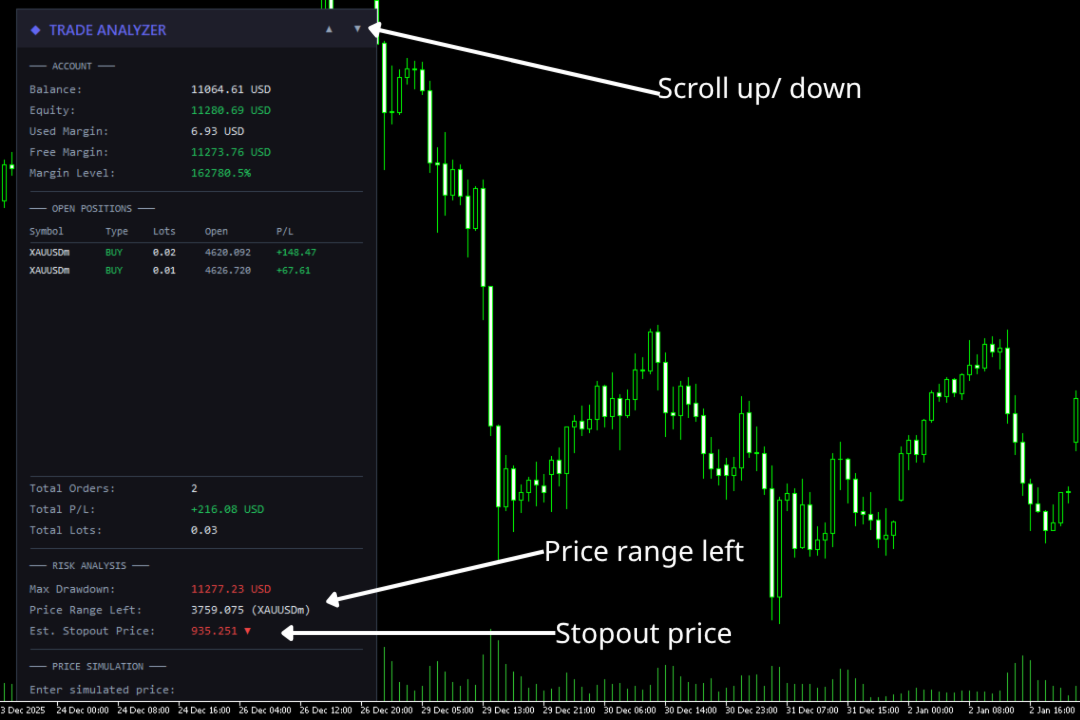
Overview

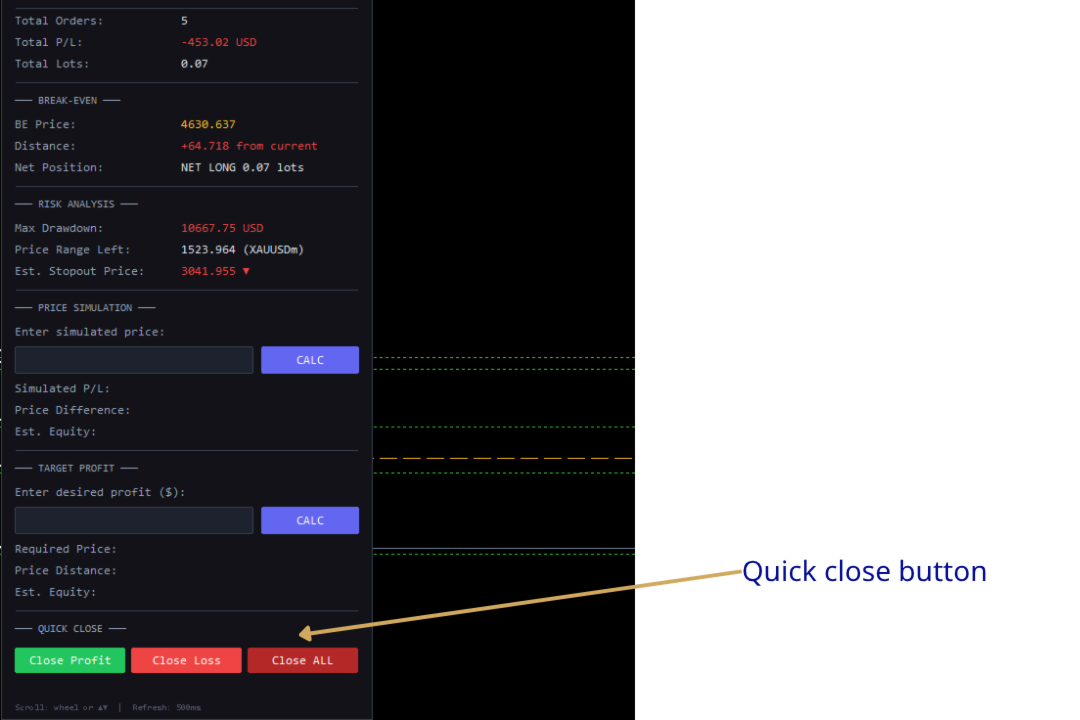
Trade Analyzer Panel is a real-time dashboard EA for MetaTrader 5. It consolidates position monitoring, risk analysis, P/L simulation, target profit planning, break-even visualization, and quick close controls into a single scrollable on-chart panel.

Key Features

Feature Description
Position Scanner Lists all open positions with symbol, direction, lot size, open price, and live P/L
Account Summary Balance, equity, used/free margin, and margin level in real time
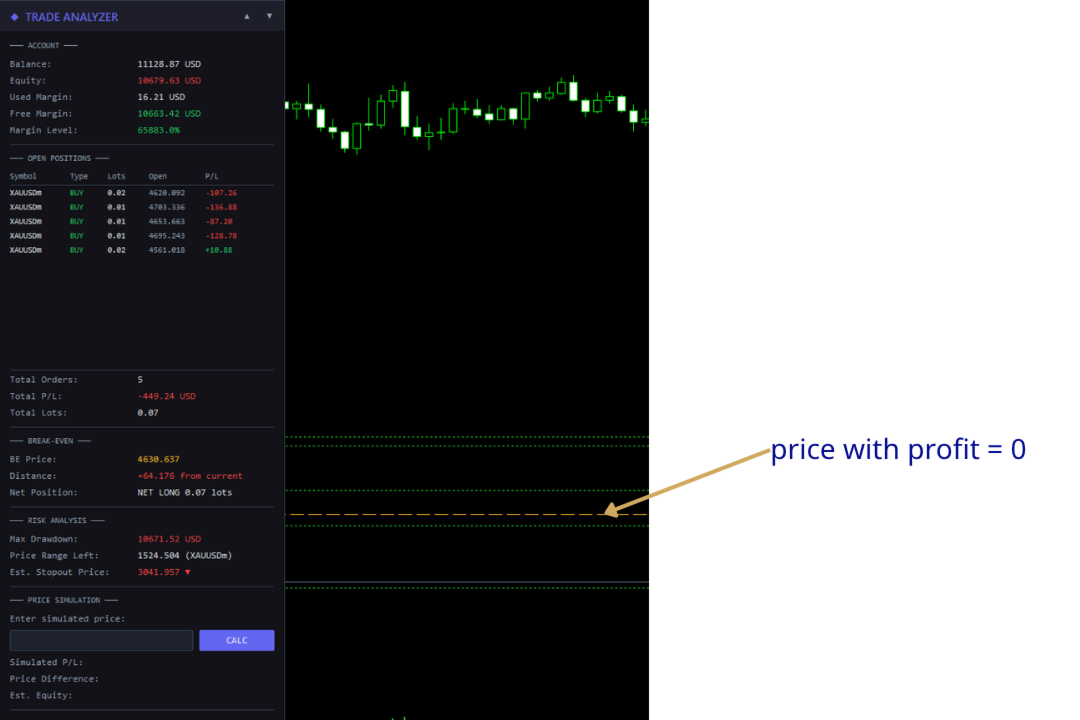
Break-Even Line Draws a horizontal line on the chart at the exact break-even price for the current symbol
Risk Analysis Max drawdown, price range before stop-out, and estimated stop-out price
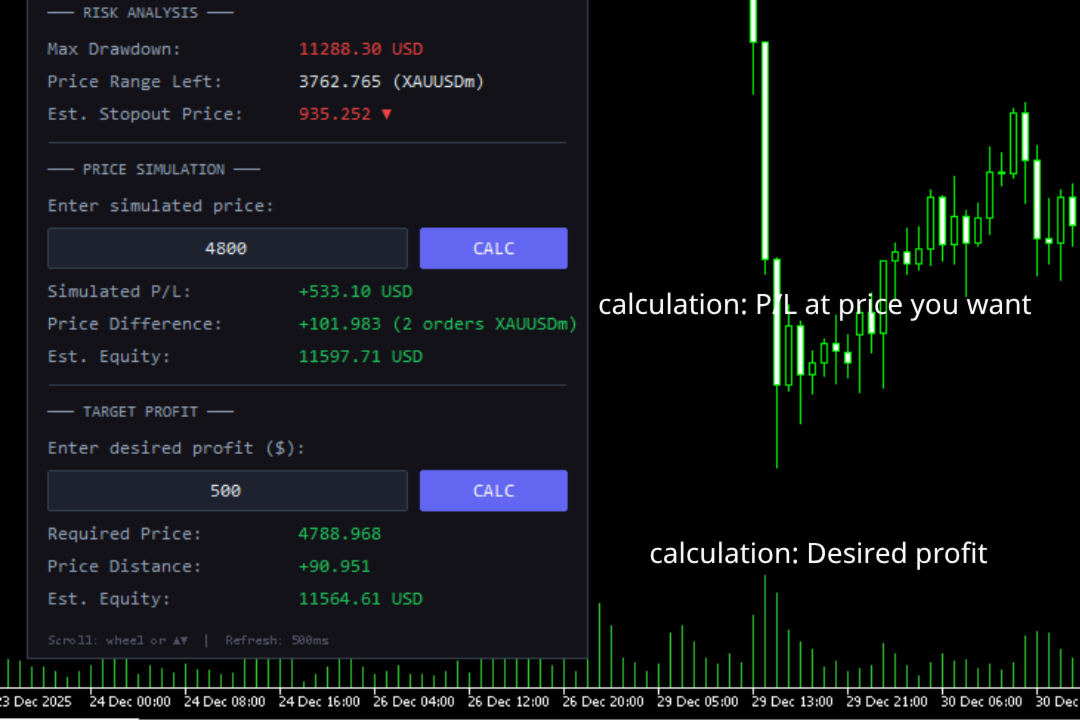
Price Simulator Enter a hypothetical price to see projected P/L across all positions
Target Profit Enter a desired profit and the EA calculates the required price
Quick Close One-click buttons to close profitable, losing, or all positions
Scrollable Panel Mouse wheel and ▲▼ buttons when the panel exceeds chart height

Installation

  1. Copy the file — Place TradeAnalyzerPanel.mq5 into your MT5 data folder:

    [MT5 Data Folder]\MQL5\Experts\

    Find the data folder via MT5 menu: File → Open Data Folder.

  2. Compile — Open the file in MetaEditor and press F7. Ensure zero errors.

  3. Attach to chart — In MT5 Navigator (Ctrl+N), expand Expert Advisors and drag TradeAnalyzerPanel onto any chart.

  4. Enable Algo Trading — The toolbar button must be green. This is required for the Quick Close feature to execute trades.

Important: The Quick Close buttons will send real trade requests. All other features are read-only analysis tools.

Panel Sections

1. Account

Real-time account metrics:

Field Description
Balance Account balance excluding floating P/L
Equity Balance + floating P/L. Green if ≥ balance, red if below
Used Margin Margin locked by open positions
Free Margin Available margin. Green if > used margin
Margin Level Equity / Margin × 100%. Green (>200%), yellow (100–200%), red (<100%)

2. Open Positions

Displays up to 12 positions in a table:

Column Description
Symbol Instrument (truncated to 10 chars)
Type BUY (green) or SELL (red)
Lots Volume
Open Entry price
P/L Profit/loss including swap

Summary rows below show Total Orders, Total P/L, and Total Lots. Unused rows are left blank.

3. Break-Even

Displays break-even information and draws a horizontal line directly on the chart at the price where total P/L for the current symbol equals zero.

Field Description
BE Price The break-even price (displayed in gold/yellow, matching the chart line)
Distance How far the current bid is from break-even. Green if the current price is in profit territory, red if in loss territory
Net Position Shows direction (NET LONG or NET SHORT) and total net lot size

How it works:

  • The EA calculates the weighted average entry across all buy and sell positions on the current chart symbol, accounting for swap.
  • The formula solves for the price at which total P/L = 0:
        BE Price = (-totalSwap × tickSize / tickValue + buyWeightedPrice - sellWeightedPrice) / netLots
    
  • A dashed horizontal line is drawn on the chart at this price, updating in real time as positions or swap change.
  • The line is automatically removed when there are no positions on the chart symbol or when the EA is removed.

Customization: The line appearance can be configured via input parameters: InpBELineColor (default gold), InpBELineStyle (default dashed), and InpBELineWidth (default 1).

4. Risk Analysis

Calculates how much adverse price movement the account can absorb before the broker's stop-out level. Based on positions on the current chart symbol.

Field Description
Max Drawdown Maximum loss before stop-out: Equity - (Margin × StopOut% / 100)
Price Range Left How far price can move against the net position before stop-out
Est. Stopout Price Projected stop-out price with direction arrow (▼ for net-long, ▲ for net-short)

Example: 2.0 lots net-long on XAUUSD, equity $10,000, max drawdown $8,000. If the price range is 400.00 and current price is 2350.00, the estimated stop-out price is 1950.00 ▼.

5. Price Simulator

Enter a hypothetical price to preview P/L if the current chart symbol reaches that level.

Usage: Type a price → press Enter or click CALC.

Field Description
Simulated P/L Projected total profit/loss at the entered price
Price Difference Distance from current bid, plus number of affected orders
Est. Equity Balance + simulated total P/L

The simulation applies to positions on the current chart symbol only. Other symbols keep their live P/L. Updates automatically on each refresh cycle.

6. Target Profit Calculator

Enter a desired profit amount and the EA reverse-calculates the required price.

Usage: Type profit in account currency (e.g., 200 for +$200, -100 for -$100) → press Enter or click CALC.

Field Description
Required Price Price the symbol must reach for total P/L to equal the target
Price Distance Distance from current bid to required price
Est. Equity Balance + target profit

Edge cases:

  • Fully hedged positions (net lots ≈ 0) → shows "Hedged/No [symbol]"
  • Negative required price → shows "Not achievable"

7. Quick Close

Three action buttons for rapid position management:

Button Action
Close Profit (green) Closes all positions currently in profit (P/L + swap > 0)
Close Loss (red) Closes all positions currently in loss (P/L + swap < 0)
Close ALL (gray) Closes every open position on the account

Safety mechanism for Close ALL:

The Close ALL button uses a two-click confirmation to prevent accidental closures:

  1. First click — The button turns bright red and a warning message appears: !! CONFIRM CLOSE ALL !!
  2. Second click — All positions are closed.
  3. Clicking any other button — The confirmation resets and the button returns to its normal state.

Warning: Close Profit and Close Loss execute immediately on a single click. Close ALL is the only button with two-click confirmation.

Note: These buttons close positions across all symbols, not just the current chart symbol.

Scrolling

The panel supports scrolling when content extends beyond the visible chart area.

Method Action
Mouse wheel Hover over the panel and scroll. Each tick moves by the configured step (default 40px)
▲ / ▼ buttons In the header's top-right corner. Each click scrolls 3× the step (120px)

The header stays fixed. Content scrolled above the header is hidden. The background resizes dynamically.

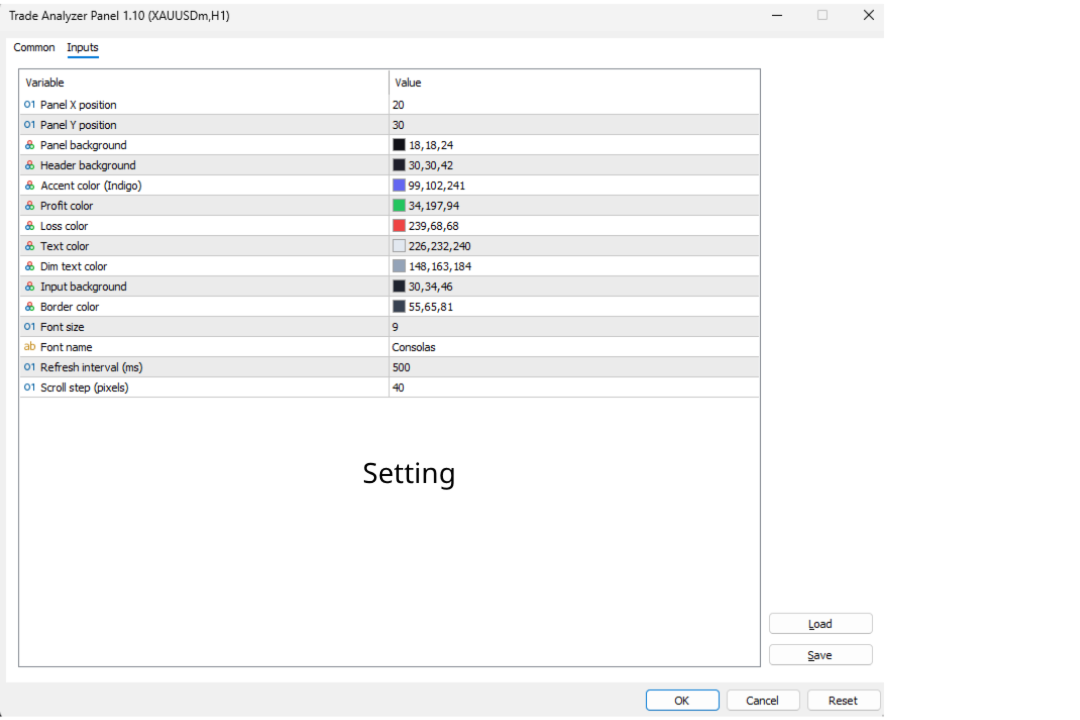
Input Parameters

Position & Layout

Parameter Default Description
InpPanelX 20 Panel X position (px from left)
InpPanelY 30 Panel Y position (px from top)
InpScrollStep 40 Scroll step in pixels

Colors

Parameter Default Description
InpPanelBg C'18,18,24' Panel background
InpHeaderBg C'30,30,42' Header background
InpAccentColor C'99,102,241' Accent (title, calc buttons)
InpProfitColor C'34,197,94' Profit values
InpLossColor C'239,68,68' Loss values
InpTextColor C'226,232,240' Primary text
InpDimText C'148,163,184' Secondary text
InpInputBg C'30,34,46' Input field background
InpBorderColor C'55,65,81' Borders and separators

Break-Even Line

Parameter Default Description
InpBELineColor C'255,193,37' Line color (gold)
InpBELineStyle STYLE_DASH Line style (DASH, SOLID, DOT, DASHDOT, DASHDOTDOT)
InpBELineWidth 1 Line thickness

Quick Close Buttons

Parameter Default Description
InpCloseBtnBg C'55,65,81' Default close button background
InpCloseAllBg C'180,40,40' Close ALL button background

Typography & Performance

Parameter Default Description
InpFontSize 9 Base font size
InpFontName "Consolas" Font family
InpRefreshMs 500 Refresh interval (ms)

Frequently Asked Questions

Q: Does this EA place trades?
A: The analysis features (sections 1–6) are strictly read-only. The Quick Close buttons (section 7) do send trade close requests.

Q: Will Quick Close buttons work if Algo Trading is disabled?
A: No. The MT5 Algo Trading button must be enabled (green) for close operations to execute.

Q: Do Close Profit / Close Loss only affect the current chart symbol?
A: No. They close qualifying positions across all symbols on the account.

Q: Why is the break-even line not showing?
A: The line only appears when there are open positions on the current chart symbol with a non-zero net exposure. If positions are fully hedged (equal buy and sell lots), no break-even line is drawn.

Q: The break-even price doesn't match my manual calculation. Why?
A: The EA includes accumulated swap in its break-even calculation. If you calculate purely from open prices, the result will differ when swap is non-zero.

Q: Why does Risk Analysis show nothing?
A: No open positions, or no positions on the current chart symbol.

Q: Can I use this alongside other EAs?
A: MT5 allows only one EA per chart. Use a separate chart window for the same symbol if needed.

Q: The stop-out price seems inaccurate.
A: It's an approximation using current tick value and assuming static market conditions. Real stop-out may differ due to spread changes, swap, and other symbol movements.

Q: How do I scroll the panel?
A: Mouse wheel over the panel, or click ▲/▼ in the header.

Q: How do I reposition the panel?
A: Change InpPanelX and InpPanelY in EA properties (right-click EA → Properties → Inputs).

Technical Details

  • Refresh: EventSetMillisecondTimer() for tick-independent updates.
  • Max positions displayed: 12 ( MAX_DISPLAY constant).
  • Stop-out level: ACCOUNT_MARGIN_SO_SO , fallback 50%.
  • Break-even line: OBJ_HLINE object named TAP_BreakEvenLine , drawn with OBJPROP_BACK = true so it renders behind candles. Automatically created/removed based on position state.
  • Quick Close: Uses CTrade::PositionClose() . Iterates positions in reverse order to avoid index shifting issues during batch closes.
  • Scroll system: Fixed-size arrays ( MAX_SCROLL_OBJ = 250 ) track object names and base Y positions. Header elements are excluded. Objects above the header are moved to Y=-2000 to hide.
  • Panel objects: Prefix TAP_ , fully cleaned on removal including the break-even line.
  • Dependencies: Trade.mqh , PositionInfo.mqh , AccountInfo.mqh (standard MQL5).

Changelog

v1.20

  • Added Break-Even Line — horizontal line on chart at break-even price with real-time updates, distance display, and net position info
  • Added Quick Close buttons — Close Profit, Close Loss, Close ALL with two-click safety confirmation
  • Added input parameters for break-even line styling and close button colors
  • Panel now has 7 sections (up from 5)

v1.10

  • Added Target Profit Calculator — enter desired profit to find the required price
  • Added scrollable panel with mouse wheel and ▲▼ button support
  • Fixed empty rows showing "Label" text
  • Added InpScrollStep input parameter

v1.00

  • Initial release
  • Account info display (balance, equity, margin, margin level)
  • Open position scanner with live P/L
  • Risk analysis: max drawdown, price range, stop-out estimation
  • Price simulation with projected P/L and equity

Recommended Companion Indicator

Recommended Companion Toolkits

1. One-Click Trade Panel  HIGHLY RECOMMENDED

Why you need it: When a signal fires, speed matters. The indicator shows you the entry price and SL/TP levels, but manually typing lot size, SL, and TP into the order window costs precious seconds — especially on M1–M15 where price moves fast.

2. Trailing Stop & Breakeven Manager  RECOMMENDED

Why you need it: The indicator draws 3 TP levels for a reason — the strategy works best when you scale out gradually. But manually moving SL to breakeven at TP1, then trailing behind swings toward TP2 and TP3, requires constant chart monitoring. This is impractical if you trade multiple pairs or cannot watch the screen non-stop.

3. Trade Journal & Dashboard 📋 NICE TO HAVE

Why you need it: The indicator does not track historical performance — it only shows signals in real time. Without journaling, you have no way to know your actual win rate, average R:R, which signal type performs best, or which sessions/pairs give you the best results.


Önerilen ürünler
Boleta de negociação, adiciona automáticamente as ordens Take Profit e Stop Loss quando excutada uma ordem de compra ou venda. Ao apertar as teclas de atalho (A, D, ou TAB), serão inseridas duas linhas de pre-visualização, representando as futuras ordens de take profit (azul) e stop loss (vermelho), as quais irão manter o distanciamento especificado pelo usuário. Ditas ordens só serão adicionadas ao ser executada a ordem inicial. Ao operar a mercado, as ordens pendentes de take profit, e stop lo
Prizmal Logic
Vladimir Lekhovitser
3.5 (2)
Canlı işlem sinyali İşlem faaliyetlerinin herkese açık gerçek zamanlı takibi: https://www.mql5.com/tr/signals/2353471 Resmî bilgiler Satıcı profili Resmî kanal Kullanıcı kılavuzu Kurulum talimatları ve kullanım yönergeleri: Kullanıcı kılavuzunu aç Bu Expert Advisor kurallara dayalı bir işlem stratejisine dayanır. Strateji, piyasada sürekli aktif olmak yerine belirli piyasa koşullarını tespit etmeye odaklanır. Sistem fiyat davranışını, volatilite özelliklerini ve zaman faktörlerini ana
Kolay Emir Gözlemcisi — Akıllı İşlem İzleme ve Bildirimler Nerede olursanız olun, işlemlerinizin kontrolünü elinizde tutun. Kolay Emir Gözlemcisi, canlı işlemlerinizi izleyen ve pozisyonlarınız önemli kâr veya zarar seviyelerine ulaştığında, kendi özel eşik değerlerinize göre sizi anında bilgilendiren hafif ve güçlü bir Uzman Danışmandır (EA). Ayrıca, gerçek zamanlı teminat seviyesini ve saat diliminize göre ayarlanmış zaman damgalı uyarıları görüntüler. İster masanızdan uzakta olun ister b
Guardian Yield Keeper is a utility Expert Advisor for traders who want real-time exit management and profit protection for open positions on the current symbol. This EA does not open new trades and does not generate entry signals. Its job is simple: monitor existing positions and close them when your profit or risk conditions are met . It is especially suitable for traders using DCA, Grid, Martingale, or basket trading systems and looking for a dedicated management layer that is more flexible th
️ Trade Manager oneclick  ( Reverse Trade,  Partial Close,  Breakeven, Close All Running Trade )   control – Smart Manual Trade Control for MT5 Trade Manager oneclick control is a powerful yet lightweight trade management utility built for manual traders who want precise control over their open positions — directly from the MT5 chart. This EA does not open or close trades automatically based on any strategy. It simply provides one-click management tools to handle your running trades efficient
FREE
EA Emotion   is not a traditional Expert Advisor that places trades automatically – instead, it’s a psychological checkpoint that helps you manage   trading discipline and emotional control . Designed especially for discretionary traders, prop firm challengers, and anyone serious about improving consistency,   EA Emotion   asks a series of custom questions   right after you open a trade , such as: Did you follow your trading plan? Are you in the right mental state? Is this trade part of your set
Binance Spot datalarını anlık olarak Metatrader 5 de görebilir ve üzerinde Metatraderın size sağlamış olduğu tüm özelliklerini kullanmanıza imkan sağlar. Binance Spot listelenen tüm sembollerin datasına ulaşabilirsiniz. Timezone ayarlamayı unutmayın. Binance it's 00:00 UTC. Kendi ülkenize göre düzeltmeniz gerekli Bedava olan Binance Spot Symbol List eklentisini yüklemeniz gerekmekte.  https://www.mql5.com/tr/market/product/83507 Yükleme yaptıktan sonra belirttiğiniz tarihten itibaren piyasa göz
Expert TP SL v04 - Professional Trading Assistant with AI Motivation System Advanced manual trading tool with automatic risk management, overtrading protection, and intelligent psychological support for disciplined trading. PRODUCT OVERVIEW Expert TP SL v04 is a comprehensive trading assistant designed for manual traders who want to maintain emotional discipline while automating risk calculations. This isn't just another order placement tool - it's a complete trading psychology system that pr
Nexus PropSafe FX Scalper – Çoklu Parite Prop Firm EA (MT5) Nexus PropSafe FX Scalper; kontrollü risk ve istikrarlı yürütme ile prop firması değerlendirme aşamalarını geçmek için tasarlanmış profesyonel bir MT5 çoklu sembol ticaret EA'sıdır. Sistem; EURUSD, GBPUSD, AUDUSD ve USDJPY paritelerini tek bir grafik üzerinden eş zamanlı olarak takas ederken, düşük düşüşü (drawdown) ve işlem başına sabit riski katı bir şekilde korur. Gecikmeli göstergeler yerine, tick seviyesindeki fiyat hızına (veloci
Fvg Edge
Ahmad Meftah Abdulsalam Alawwami
5 (2)
FVG Smart Zones – Ücretsiz Sürüm MetaTrader 5 (MT5) için Adil Değer Boşlukları (FVG) Algılama Göstergesi Sadece başka bir rastgele gösterge değil, gerçek bir ticaret aracı mı arıyorsunuz? FVG Smart Zones – Ücretsiz Sürüm , Adil Değer Boşluklarını (FVG) otomatik olarak algılar ve grafiğinizde yüksek olasılıklı ticaret bölgelerini vurgulayarak profesyonel piyasa içgörüsü sağlar. Bu gösterge şu traderlar için tasarlanmıştır: Akıllı Para Konseptleri (SMC) ICT Ticaret Konseptleri Fiyat H
FREE
ALIEN Dashboard
Youssef Esseghaiar
ALIEN DASHBOARD FULL EDITION – Professional ICT & Precision Trading Dashboard for MT5 ( HYBRID ENGINE ) Overview The   Alien Dashboard Full Edition   is a comprehensive, all‑in‑one technical indicator for MetaTrader 5 that merges the most powerful concepts from Inner Circle Trader (ICT) methodology with advanced precision‑entry logic, multi‑timeframe analysis, and an intuitive on‑chart dashboard. Designed for serious traders who want to visualise institutional order flow, identify high‑probabili
Easy Trading Panel: Core Function Summary 1. Visual Trading This is the core selling point of the tool. It abandons the traditional way of placing orders by inputting prices and adopts an intuitive chart line drag-and-drop mode instead: • Drag Entry Line: Directly drag the line on the chart to set the pending order position. • One-click SL/TP Toggle: Quickly enable/disable stop loss and take profit lines via panel buttons. • Synchronous Calculation: When the lines are dragged, the panel will cal
VM Auto SLTP Basic - Intelligent Trade Management for Scalpers Enhance your scalping strategy to a higher level. VM Auto SLTP Basic automatically manages Stop Loss and Take Profit for orders that are opened manually or by other Expert Advisors. This tool does not open trades on its own, allowing you to maintain full control while enjoying precise risk management. Key Features: SL/TP based on ATR or fixed price Automatic SL move to Breakeven Enhanced Breakeven system with 2 modes: Points and R (r
FREE
Signals Executor for Telegram is a Utility that allows you to execute and manage positions from messages sent in Telegram Chats. Chat messages are processed to check for the existence of commands, and the command will be executed if its parameters are valid. You need the Telegram Bot Token and Chat Id to configure the input parameters. It is possible to restrict the sending of commands through the User Id, which must be configured in the input parameters. Valid Commands: Buy and Sell: Market or
EAs Manager
Abdeljalil El Kedmiri
5 (1)
The   Ultimate EAs Manager   is a professional risk management and trade assistance tool designed to monitor, control, and optimize all trading activities on your MT5 account. It acts as a   central command center   that oversees every trade - whether opened by other Expert Advisors or manually by you. How it's work with other EAs : Blog post  MT4 version:  https://www.mql5.com/en/market/product/167007 Only 10 copies will be sold at the early-bird price. After 10 copies, the price jumps directly
VR MultiPrice Analysis is an indicator that determines the strength of a currency in a currency pair. Let's take the EUR / USD pair as an example. How can we determine which currency is currently weak and which is strong? The easiest and most reliable way is to compare the EUR against other currencies, excluding the USD. The variants of power distribution: The EUR is rising against other currencies - this is a sign that the currency has become more attractive to traders and investors, or good ne
CosmiCLab SMC FIBO CosmiCLab SMC FIBO is a professional trading indicator designed for traders who use Smart Money Concepts (SMC), market structure analysis and Fibonacci retracement levels. The indicator automatically detects market swings and builds Fibonacci levels based on the latest impulse movement. It also identifies market structure changes such as BOS (Break of Structure) and CHOCH (Change of Character), helping traders understand the current market direction. CosmiCLab SMC FIBO also pr
Prop Hesaplama Asistanı Kötü matematik yüzünden Prop Firma hesaplarınızı batırmayı bırakın. Riski Asistana bırakın. Prop Hesaplama Asistanı, özellikle fonlama zorluklarını (FTMO, vb.) geçmeye çalışan veya fonlanmış sermayeyi yöneten yatırımcılar için tasarlanmış nihai işlem yönetim panelidir. Zihinsel matematiği ve manuel emir sürüklemeyi, sizi kesinlikle kurallarınızın içinde tutan hassas bir görsel arayüzle değiştirir. Bu, piyasayı tahmin eden otomatik bir işlem botu değildir. Hassasiyet ta
Barak Mega EA
Jorge Jovanny Hernandez Maldonado
BARAK MEGA EA  is a fully automated trading Expert Advisor designed for traders who demand total control, strategic flexibility, and advanced risk management within a single system. This EA functions as a true strategy builder , allowing you to combine multiple technical indicators and custom rules to adapt to any market, asset, or timeframe. Unlike traditional robots with fixed logic, BARAK MEGA EA features a modular architecture where every component can be independently enabled, disabled, and
FREE
Trading Utility for Forex Currency Pairs Only not for Gold  Functions Auto Lot Calculation based on Risk Auto stoploss  Auto TakeProfit Breakeven Auto Close Half % Close in percentage with respect to the PIPs Pending Orders BuyLimit Sell Limit with distances BuyStop Sell Stop    with distances Trading Informations Risk in percentage For Multiple trades Combine Takeprofit and Combine Stoplosses
Order Book, known also as Market Book, market depth, Level 2, - is a dynamically updated table with current volumes of orders to buy and to sell specific financial instument at price levels near Bid and Ask. MetaTrader 5 provides the means for receiving market book from your broker, but in real time only, without access to its history. The indicator OrderBook Cumulative Indicator accumulates market book data online and visualizes them on the chart. In addition, the indicator can show the market
NNArbitrage
Marius Ovidiu Sunzuiana
In a market flooded with lagging indicators and overfit strategies, this utility offers a fresh edge: real-time statistical arbitrage powered by an adaptive neural network , built entirely in MQL5—no DLLs, no external dependencies. Key Advantages Smart Spread Modeling It dynamically calculates a hedge ratio between two correlated instruments (like EURUSD vs GBPUSD), forming a synthetic spread that reflects true relative value. This isn’t just correlation—it’s cointegration-aware logic. Neur
Imagine flying a real aircraft without ever stepping into a flight simulator. That's what trading is like. You have to simulate your strategy before you can take it to a live market. It is good if you can simulate things speedily before even stepping into any live market, or before coming up with an automated system.  People don't have all day to stare at a higher timeframe chart until the entry signal finally arrives. That's why I built this so that you can simulate your strategy with speed. Th
FREE
Gösterge, tarihsel olanlarla karşılaştırılabilecek güncel teklifler oluşturur ve bu temelde bir fiyat hareketi tahmini yapar. Gösterge, istenen tarihe hızlı navigasyon için bir metin alanına sahiptir. Seçenekler: Sembol - göstergenin göstereceği sembolün seçimi; SymbolPeriod - göstergenin veri alacağı dönemin seçimi; GöstergeRenk - gösterge rengi; Ters - doğru tırnakları tersine çevirir, yanlış - orijinal görünüm; Sonraki, tarihi girebileceğiniz ve 'enter' tuşuna basarak hemen atlayab
EA Performance Monitor Açık grafiklerdeki tüm aktif Expert Advisor'ları otomatik olarak tespit eden, her EA'yı ticaret verileriyle eşleştiren ve tek bir panelde gerçek zamanlı olarak drawdown, kâr, kazanma oranı ve açık pozisyon metriklerini gösteren MetaTrader 5 için bir yardımcı program. EA Performance Monitor, MetaTrader 5 için otomatik bir izleme yardımcı programıdır. Yapılandırılabilir bir aralıkta açık tüm grafikleri tarar, sihirli numara ve sembol ile çalışan her Expert Advisor'ı tanımlar
FREE
General Overview This Expert Advisor (EA) is a semi-automatic trading assistant for MetaTrader 5 that provides a graphical user interface (GUI) panel directly on the chart. It allows traders to quickly place pending orders (Buy Limit, Sell Limit, Buy Stop, Sell Stop), set Stop Loss (SL) and Take Profit (TP) levels for all positions, close all open trades, and delete pending orders. Key Features Interactive Control Panel: Displays input boxes, buttons, and labels on the chart. You can manu
SmartRAL
Jemy Yeferson Dimu Ludji
SmartRAL (Smart Risk Auto-Lot EA) SmartRAL: The Ultimate Risk & Lot Management Expert Advisor (EA) SmartRAL is an essential tool for traders who demand precise risk management and automated position sizing in MetaTrader 5. Stop guessing your lot size and let the algorithm handle the calculations. This EA allows you to trade with confidence by guaranteeing your risk exposure on every single trade, while offering absolute flexibility in setting your Stop Loss (SL). Key Features & Benefits Guarante
Little Swinger    (Best choice for passive income lovers) Developed by RobotechTrading   key features: Financial Freedom Back testing results will match with real live trading results Proper TP and SL Controlled Risk Highly Optimized settings Running on our Real Live Accounts Little Risk, Little Drawdown, Little Stress, Little BUT stable income, just set and forget. Strategy: Not Indicator based No Martingale  No Grid  No Repaint strategy Safe and Secure calculation of Live data and than take
King ElChart Manual Trade Panel
Mohammed Maher Al-sayed Mohammed Ahmed Saleh
King Chart – Manual Trading Panel for MetaTrader 5 Overview King Chart is a simple yet powerful manual trading panel built for traders who want speed, precision, and clarity. It enables quick order execution, clear lot control, and real-time account monitoring  all directly on your MT5 chart. Main Features Multi-Lot Trade Execution 3 Buy and 3 Sell buttons for instant execution Each button is tied to a custom lot size field Designed for flexible scaling in or out of trades Position Management D
Are you the type that likes to protect your trades by moving the stop loss to the entry point and also using trail stop? Cool! This EA will help you with that. What's more, it also partially closes the trade when the trail stop is activated. That's it! Beyond all this it shows the stop loss projection (which you can move)   and notify you when it is activated. EA can be used by configuring the default window or by using a custom window , which makes it easy to change settings. You can test
Bu ürünün alıcıları ayrıca şunları da satın alıyor
Trade Assistant MT5
Evgeniy Kravchenko
4.42 (210)
It helps to calculate the risk per trade, the easy installation of a new order, order management with partial closing functions, trailing stop of 7 types and other useful functions. Additional materials and instructions Installation instructions - Application instructions - Trial version of the application for a demo account Line function -   shows on the chart the Opening line, Stop Loss, Take Profit. With this function it is easy to set a new order and see its additional characteristics bef
Trade Manager EA’ye hoş geldiniz! Ticaretin daha sezgisel, hassas ve verimli hale gelmesi için tasarlanmış nihai risk yönetim aracı ile tanışın. Bu sadece bir emir verme aracı değil; ticaret planlaması, pozisyon yönetimi ve risk kontrolü için kapsamlı bir çözüm. İster yeni başlayan bir yatırımcı olun, ister deneyimli bir trader ya da hızlı emir gerektiren bir scalper, Trade Manager EA ihtiyaçlarınıza uyum sağlar ve forex, endeksler, emtialar ve kripto paralar dahil tüm piyasalarda esneklik sunar
Local Trade Copier EA MT5
Juvenille Emperor Limited
4.96 (136)
Local Trade Copier EA MT5   ile olağanüstü hızlı işlem kopyalama deneyimi yaşayın. Kolay 1 dakikalık kurulumuyla bu işlem kopyalayıcısı, aynı Windows bilgisayarda veya Windows VPS'te birden fazla MetaTrader terminali arasında işlemleri kopyalamanıza olanak tanır ve 0.5 saniyenin altındaki şimşek hızında kopyalama hızları sunar. Başlangıç seviyesinde veya profesyonel bir tüccar olsanız da,   Local Trade Copier EA MT5 , spesifik ihtiyaçlarınıza göre özelleştirmek için geniş bir seçenek yelpazesi s
Farmed Hedge Yield Farming | All Markets (Manual - Hybrid - Semi/Automated EA) MULTI-ASSET SUPPORT Trade any asset available on your broker - Forex: Major, Minor, Exotic pairs - Crypto: BTC, ETH, XRP, SOL, BNB - Stocks: Apple, Tesla, Amazon, Google, etc. - Commodities: Gold, Silver, Oil, Gas - Indices: US30, NAS100, SPX500, DAX40 - Any CFD your broker offers VERIFIED TRADING RESULTS - Farmed Hedge Yield Axi Copy:  https://www.mql5.com/en/signals/2356376 - Farmed Hedge Yield Exn Copy:   https:/
TradePanel MT5
Alfiya Fazylova
4.87 (153)
Trade Panel, çok işlevli bir ticaret asistanıdır. Uygulama, manuel ticaret için 50'den fazla ticaret fonksiyonu içerir ve çoğu ticaret görevini otomatikleştirmeyi mümkün kılar. Satın almadan önce demo hesapta demo sürümü test edebilirsiniz. Demo hesap için uygulamanın deneme sürümünü indirin: https://www.mql5.com/en/blogs/post/750865 . Talimatların tamamı buraya . Ticaret. Tek tıklamayla ticaret işlemleri yapmayı sağlar: Risk otomatik hesaplaması ile bekleyen emirleri ve pozisyonları açmak. Bird
Beta Sürümü Telegram to MT5 Signal Trader resmi alfa sürümüne neredeyse hazır. Bazı özellikler hâlâ geliştirilmekte olup küçük hatalarla karşılaşabilirsiniz. Sorun yaşarsanız lütfen bildirin, geri bildiriminiz yazılımın herkes için gelişmesine yardımcı olur. Telegram to MT5 Signal Trader , Telegram kanallarından veya gruplarından gelen işlem sinyallerini otomatik olarak MetaTrader 5 hesabınıza kopyalayan güçlü bir araçtır. Herkese açık ve özel kanalları destekler ve birden fazla sinyal sağlayıc
Power Candles Strateji Tarayıcısı - Kendi Kendini Optimize Eden Çoklu Sembol Kurulum Bulucu Power Candles Strateji Tarayıcısı , Power Candles göstergesini çalıştıran aynı kendinden optimize edici motoru, Piyasa İzleyicinizdeki her sembol üzerinde yan yana çalıştırır. Tek bir panel, şu anda istatistiksel olarak hangi sembollerin işlem yapılabilir olduğunu, her birinde hangi stratejinin kazandığını, en uygun Stop Loss / Take Profit çiftini gösterir ve yeni bir sinyal geldiği anda size bildirim gön
Copy Cat More Trade Copier MT5 (Kopyalayıcı Kedi MT5) , günümüzün ticaret zorluklarına yönelik tasarlanmış yerel bir ticaret kopyalayıcısı ve eksiksiz risk yönetimi ve yürütme çerçevesidir. Prop firması zorluklarından kişisel portföy yönetimine kadar, sağlam yürütme, sermaye koruması, esnek yapılandırma ve gelişmiş ticaret işleme kombinasyonu ile her duruma uyum sağlar. Kopyalayıcı hem Master (gönderici) hem de Slave (alıcı) modunda çalışır, piyasa ve bekleyen emirlerin, ticaret değişikliklerini
Trade Dashboard simplifies how you open, manage, and control your trades, with built-in lot size calculation. It allows you to execute trades, manage risk, and control positions directly on the chart, with tools such as partial close, breakeven, and trailing stop. Designed to reduce manual work and help you stay focused on your trading decisions. A demo version is available for testing. Detailed explanations of features are provided within the MQL5 platform. Installation instructions are include
Bir EA satın almadan önce, gerçekten dayanıklı mı yoksa sadece backtestte şanslı mı göründü, önce bunu kontrol edin. Çoğu robot güzel görünen bir backtest ile satılır. Yukarı giden bir eğri. İyi bir profit factor. Çok az şüphe. Yine de bu EA’lerin çoğu, piyasa o geçmişteki gibi hareket etmeyi bıraktığı anda dağılmaya başlar. Neden? Çünkü bir backtest yalnızca tek bir şeyi kanıtlar: o stratejinin fiyatın belirli bir yolunu izlediği durumda işe yaradığını. Başka yollarda da dayanacağını kanıtlamaz
Timeless Charts
Samuel Manoel De Souza
5 (4)
Timeless Charts , saniye grafikleri / saniye zaman dilimleri, renko grafikleri / renko çubukları, küme grafikleri / footprint grafikleri ve popüler platformlarda bulunan gelişmiş araçlar dahil olmak üzere, özel grafikler / özel zaman dilimleri arayan profesyonel traderlar için tasarlanmış gelişmiş bir grafik çözümüdür. Geleneksel çevrimdışı grafikler veya basit özel göstergelerden farklı olarak, bu çözüm gerçek zaman damgası doğruluğuna (milisaniye düzeyine kadar) sahip tamamen özel çubuklar ol
Exp COPYLOT CLIENT for MT5
Vladislav Andruschenko
3.82 (34)
MetaTrader 5 için profesyonel işlem kopyalayıcı MetaTrader için hızlı, profesyonel ve güvenilir bir işlem kopyalayıcı . COPYLOT , MT4 ve MT5 terminalleri arasında Forex işlemlerini kopyalamanıza olanak tanır ve Hedge ile Netting hesaplarını destekler. COPYLOT MT5 sürümü şunları destekler: - MT5 Hedge → MT5 Hedge - MT5 Hedge → MT5 Netting - MT5 Netting → MT5 Hedge - MT5 Netting → MT5 Netting - MT4 → MT5 Hedge - MT4 → MT5 Netting MT4 sürümü Tam açıklama + DEMO + PDF Nasıl satın alınır Nasıl kurul
Trade copier MT5
Alfiya Fazylova
4.53 (43)
Trade Copier, ticaret hesapları arasındaki işlemleri kopyalamak ve senkronize etmek için tasarlanmış profesyonel bir yardımcı programdır. Kopyalama, tedarikçinin hesabından/terminalinden alıcının aynı bilgisayarda veya vps'de kurulu olan hesabına/terminaline gerçekleşir. KAMPANYA - Eğer zaten "Trade copier MT5" aldıysanız, "Trade copier MT4"ü ücretsiz olarak alabilirsiniz (MT4 > MT5 ve MT4 < MT5 kopyalamalar için). Koşullar hakkında daha fazla bilgi almak için lütfen bizimle özel mesaj yoluyla i
Footprint Chart Pro — Professional OrderFlow EA for MetaTrader 5 Version 6.34 | Professional tool for real traders | Institutional-Grade Visualization DEMO USERS - PLEASE SELECT EVERY TICK / REAL TICK WHEN TESTING AND YOU HAVE DOWNLOADED HISTORICAL DATA. IF YOU SEE A WAITING SCREEN AND IT IS NOT DOWNLOADING, IT MEANS YOU HAVE LOW HISTORICAL DATA. TRY 1 MIN AND 5 MIN FIRST ON 1 DAY DATA. ONE DAY DATA SHOULD BE THE NEWEST AND MOST CURRENT DATE. PLEASE WAIT UNTIL THE MARKET HAS ROLLED OVER PERIOD.
MT5 to Telegram Signal Provider , hesabınızı bir sinyal sağlayıcı haline getirerek belirtilen sinyalleri Telegram'ın sohbetine, kanalına veya grubuna göndermeyi sağlayan kullanımı kolay, tamamen özelleştirilebilir bir araçtır. Rakip ürünlerin çoğunun aksine, DLL içe aktarması yapmaz. [ Demo ] [ Kılavuz ] [ MT4 Versiyonu ] [ Discord Versiyonu ] [ Telegram Kanalı ]  New: [ Telegram To MT5 ] Kurulum Adım adım bir kullanıcı kılavuzu mevcuttur. Telegram API'si hakkında bilgi gerekmemektedir; ihtiyac
HINN MAGIC ENTRY – the ultimate tool for entry and position management! Place orders by selecting a level directly on the chart! full description   ::  demo-version  :: 60-sec-video-description Key features: - Market, limit, and pending orders - Automatic lot size calculation - Automatic spread and commission accounting - Unlimited partitial take-profits  - Breakeven and trailing stop-loss and take-profit  functions - Invalidation leves - Intuitive, adaptive, and customizable interface - Works
Telegram'dan MT5'e:   Nihai Sinyal Kopyalama Çözümü Telegram'dan MT5'e işlemlerinizi basitleştirin, DLL'lere ihtiyaç duymadan işlem sinyallerini doğrudan Telegram kanallarından ve sohbetlerinden MetaTrader 5 platformunuza kopyalayan modern araç. Bu güçlü çözüm hassas sinyal yürütme, kapsamlı özelleştirme seçenekleri sağlar, zamandan tasarruf sağlar ve verimliliğinizi artırır. [ Instructions and DEMO ] Temel Özellikler Doğrudan Telegram API Entegrasyonu Telefon numarası ve güvenli kod ile kimlik
ABQ Visual Risk Sizer
Cristian David Castillo Arrieta
ABQ Visual Risk Sizer - Kurumsal Risk ve Islem Uygulama Kategori: Araclar / Risk Yonetimi Manuel lot hesaplamasi zaman ve para kaybina neden olur. Modern islem dunyasinda, ozellikle fon hesaplari (Prop Firms) yonetirken, lot boyutu hesaplama hatasi veya emir girerken yasanan 5 saniyelik bir gecikme, Gunluk Kayip (Drawdown) kuralinin ihlal edilmesine veya mukemmel giris fiyatinin kacirilmasina neden olabilir. ABQ Visual Risk Sizer , bu sorunu kesin olarak cozmek icin tasarlanmis kurumsal duzeyde
Seconds Chart - MetaTrader 5 için saniye bazlı grafikler oluşturmanıza olanak sağlayan eşsiz bir araçtır. Seconds Chart sayesinde saniye cinsinden zaman dilimleriyle grafik oluşturabilir, standart dakika veya saatlik grafiklerde mümkün olmayan esneklik ve analiz hassasiyetine ulaşabilirsiniz. Örneğin, S15 zaman dilimi 15 saniyelik mum çubuklarını ifade eder. Desteklenen özel sembollerle herhangi bir gösterge ve danışman kullanabilirsiniz. Onlarla çalışmak, standart grafiklerde işlem yapmak kadar
Ultimate Extractor - Professional Trading Analytics for MT5 *****this is the local HTML version of Ultimate Extractor. !!!!!it is not compatible with Cloud!!!! For the online version please reach out to me directly****** Ultimate Extractor transforms your MetaTrader 5 trading history into actionable insights with comprehensive analytics, interactive charts, and real-time performance tracking. What It Does Automatically analyzes your MT5 trading history across all Expert Advisors and generates
News filter, equity guard & session control for all your EAs — one tool, full protection Take a Break has evolved from a basic news filter into a comprehensive account protection solution . It pauses your other Expert Advisors during news events or based on custom filters. When trading resumes, it automatically restores your entire chart setup , including all EA settings. Why traders choose Take a Break One news filter for all your EAs — no more relying on individual built-in filters that may o
Signal TradingView to MT5 Pro Automator TradingView ve MetaTrader 5 arasında anında profesyonel uygulama TradingView alarmları ile MT5'teki gerçek uygulama arasındaki en güçlü iletişim köprüsüyle ticaret stratejinizi otomatikleştirin. Hız, esneklik ve kusursuz risk yönetimi talep eden yatırımcılar için tasarlanan bu Uzman Danışman (Expert Advisor), herhangi bir alarm mesajını hassas bir piyasa (market) veya limit emrine dönüştürür. GÜÇLÜ YÖNLER VE AVANTAJLAR Evrensel Ayrıştırma Motoru (Tescilli)
The core idea: using the user interface, you configure the parameters the chart must meet before entering a position (or positions), choose which entry models to use, and set the rules for when trading and planning should end. Lazy Trader  handles the rest: it  takes over all the routine chart watching and execution! full description  :: 3 key videos [1] ->  [2]   ->  [3] What can it do? - Understands Larry Williams market structure - Understands swing market structure by Michael Huddleston
This EA Utility allows you to manage (with advanced filtering) unlimited open orders (manual or EA) with 16 trailing stop methods: fixed, percent, ATR Exit, Chandelier Exit, Moving Average, Candle High Low Exit, Bollinger Bands, Parabolic, Envelope, Fractal, Ichimoku Kijun-Sen, Alligator, Exit After X Minutes or Bars, RSI and Stochastic. The trailing stop can be either real or virtual, and you can exit fully or with a partial close percent on touch or bar close.  Moreover, you can add (override
FUTURES ORDERFLOW FOOTPRINT CHART Professional OrderFlow EA for MetaTrader 5 Version 1.01| Professional tool for real traders | Institutional-Grade Visualization STRATEGY TESTER USERS - PLEASE SELECT EVERY REAL TICK WHEN TESTING AND YOU HAVE DOWNLOADED HISTORICAL DATA. IF YOU SEE A WAITING SCREEN AND IT IS NOT DOWNLOADING, IT MEANS YOU HAVE LOW HISTORICAL DATA. TRY 1 MIN AND 5 MIN FIRST ON 1 DAY DATA. ONE DAY DATA SHOULD BE THE NEWEST AND MOST CURRENT DATE. PLEASE WAIT UNTIL THE MARKET HAS ROL
Poc Breakout Signal: The Ultimate Institutional Order Flow & Price Action System Elevate your trading with Poc Breakout, a comprehensive technical analysis tool designed to bridge the gap between retail trading and institutional market understanding. This all-in-one system combines powerful Buy/Sell signals, advanced Volume Profile analysis, real-time Order Flow (Depth of Market), and critical macroeconomic data to give you a clear, unambiguous edge in the markets. Poc Breakout Signal decodes c
Anchor: The EA Manager Run your full EA portfolio without conflicts, without stacked risk, and without watching every chart yourself. Anchor coordinates up to 64 Expert Advisors on a single account so only one trades at a time. Attach Anchor to any chart. Type your EA names and magic numbers in one line. Anchor handles the rest. Built for portfolios. Built for discipline. Built for prop firms. The Problem Running multiple EAs on the same account creates risk. Two gold EAs can open opposite posit
MetaTrader 5 için Trading Panel — grafik ve klavyeden profesyonel tek tıkla işlem kontrolü Aktif traderlar için geliştirilmiş güçlü bir Trading Panel; işlemleri standart MetaTrader arayüzüne göre çok daha hızlı açmanıza, yönetmenize ve kapatmanıza yardımcı olur. Bu çözüm; pozisyonları, bekleyen emirleri, toplam kârı ve işlem yürütmesini tek bir profesyonel çalışma alanında kontrol etmek isteyen kullanıcılar için tasarlanmıştır. Bu sadece sıradan bir yardımcı araç değildir. MetaTrader 5 için ger
Cerberus Equity Watcher
Samuel Bandi Roccatello
5 (3)
Cerberus the Equity Watcher , hesap öz sermayenizi sürekli olarak izleyen ve hatalı EA'ların veya isteğe bağlı bir tüccarsanız duygusal davranışınızın neden olduğu büyük düşüşlerden kaçınan bir risk yönetimi aracıdır. Hatalar içerebilecek veya beklenmedik piyasa koşullarında iyi performans göstermeyebilecek EA'lara güvenen sistematik tüccarlar için son derece yararlıdır. Cerberus, bir minimum öz sermaye değeri ve (isteğe bağlı olarak) bir maksimum değer belirlemenize izin verir, bunlardan herhan
The product will copy all telegram signal to MT5 ( which you are member) , also it can work as remote copier.  Easy to set up, copy order instant, can work with almost signal formats, image signal,  s upport to translate other language to English Work with all type of channel or group, even channel have "Restrict Saving Content", work with  multi channel, multi MT5 Work as remote copier: with signal have ticket number, it will copy exactly via ticket number. Support to backtest signal. How to s
Yazarın diğer ürünleri
OneClick Trade Panel v1.0 — MT5 Expert Advisor Professional On-Chart Trading Panel with Built-in Risk Calculator What Is It? Group support:  https://www.mql5.com/en/channels/vuongphamtrading OneClick Trade Panel is an all-in-one trading panel that sits directly on your MT5 chart. It replaces the default MT5 one-click window with a full-featured interface combining: order execution, automatic lot calculation, visual SL/TP planning, position monitoring, and batch close operations. Built for speed.
Scalp Signal with SL TP Indicator — Trading Guide What It Does Scalp Signal with SL TP detects high-probability reversal entries by combining RSI extremes with candlestick patterns. It prints buy/sell arrows on chart with auto-calculated SL and 3 TP levels based on ATR. Built for scalping and intraday trading on MT5. Signal Types The indicator generates 3 types of signals. Each requires RSI to be at an extreme level before triggering. 1. Engulfing (Default: ON) The primary and strongest signal.
Trailing Stop Manager v1.0 — MT5 Expert Advisor Advanced Multi-Mode Trailing Stop for MetaTrader 5 What Is It? Trailing Stop Manager automatically moves your Stop Loss to protect profits as price moves in your favor. Unlike MT5's built-in trailing stop (which only has one mode), this EA offers 4 professional trailing methods that adapt to different trading styles and market conditions. Works on ALL symbols. Attach to any chart and it manages all matching positions. *** Group support:  https://ww
FREE
Trading Guide — Heatmap Volume 1. How the Indicator Works Heatmap Volume measures how many standard deviations the current volume is away from its moving average (SMA) . Core formula: stdbar = (Current Volume - SMA of Volume) / Standard Deviation The higher the stdbar value, the more abnormal the volume — and the more attention it deserves. Threshold Levels Level Default Multiplier Meaning Extra High > 4.0 σ Extremely abnormal volume — very rare High > 2.5 σ Unusually high volume — notewor
FREE
Smart mcd
Minh Vuong Pham
MCD Hot Money visualizes three distinct market participant groups as color-coded histograms in a separate sub-window, all normalized to a 0–20 scale. The indicator uses a sensitivity-weighted, offset-adjusted RSI engine to reveal when large institutional capital is entering or exiting the market. *** Group support:  https://www.mql5.com/en/channels/vuongphamtrading BUFFERS Retailer (Green) — fixed at 20, ceiling reference line Hot Money (Yellow) — short-term institutional flow, based on
FREE
Trendlines with Breaks (TWB) — Trading Guide What Is It? Trendlines with Breaks is an auto-drawn trendline indicator that detects swing pivots, draws dynamic upper/lower trendlines, and fires breakout signals when price closes beyond those lines. No more manually drawing and adjusting trendlines — the indicator does it systematically. *** Group support:  https://www.mql5.com/en/channels/vuongphamtrading Core Settings Parameter Default What It Does Swing Detection Lookback 14 Bars left & right t
Trading Guide — Heatmap Volume BarColor What Is This Indicator? Group support:  https://www.mql5.com/en/channels/vuongphamtrading Heatmap Volume BarColor is a companion indicator that paints your candlesticks directly on the main chart based on volume intensity. It uses the exact same logic as the Heatmap Volume indicator (separate window) but applies the color-coding to the candles themselves. Instead of looking down at the volume window, you can read volume strength at a glance right on the pr
FREE
ICT Concepts Indicator — Trading Guide Overview This MetaTrader 5 indicator implements core Inner Circle Trader (ICT) concepts on a single chart. It identifies institutional price delivery patterns — the footprints that smart money leaves behind — and visualizes them as actionable zones and signals. The indicator includes six modules that work together: Killzones — Session-based time windows where institutional activity peaks Premium / Discount Zones — Whether price is expensive or cheap relativ
ADX Advanced Multi-Timeframe Indicator — User Guide Version 2.00 | MetaTrader 5 Overview The ADX Advanced MTF is a professional-grade indicator for MetaTrader 5 that combines the classic Average Directional Index (ADX) with multi-timeframe analysis and an elegant on-chart information panel. It provides traders with a comprehensive view of trend strength and direction across multiple timeframes simultaneously, enabling faster and more confident trading decisions. Key Highlights Real-time ADX, +DI
FREE
Support Resistance Channels - Trading Guide *** Group support:  https://www.mql5.com/en/channels/vuongphamtrading Overview The Support Resistance Channels indicator automatically identifies and displays the strongest support and resistance zones based on pivot points. Unlike simple horizontal lines, this indicator creates channels (zones) which better represent real market behavior where support and resistance act as areas rather than precise levels. Key Features Automatic Detection : Identifie

FREE
CCI advanded
Minh Vuong Pham
5 (1)
CCI VISUAL ENHANCED - MT5 USER GUIDE INTRODUCTION *** Group support:  https://www.mql5.com/en/channels/vuongphamtrading CCI Visual Enhanced for MetaTrader 5 features: Intuitive visual interface Automatic buy/sell signals Smart alert system Dynamic histogram Strong signal & divergence detection INSTALLATION Method 1: MetaEditor (Recommended) Open MT5 → Press F4 (MetaEditor) File → New → Custom Indicator Program Name: CCI_Visual_Enhanced → Finish Delete sample code, paste .
FREE
# Super Trend Indicator - User Guide *** Group support:  https://www.mql5.com/en/channels/vuongphamtrading **Version:** 1.04 | **Platform:** MetaTrader 5 | **Release:** January 2025 ## OVERVIEW The **Grid Trend Indicator** combines Supertrend with Dual EMA filters to identify high-probability trading opportunities. Unlike standard indicators showing only bullish/bearish signals, this adds a crucial third state: **NO TREND**. ### Key Features **Triple-State System**: UPTREND (Green) / DO
FREE
Daily P/L Limiter v1.0 — MT5 Expert Advisor Automated Daily Loss/Profit Limiter & Max Drawdown Protection Essential for Prop Firm Challenges (FTMO, MFF, TFT, etc.) What Is It? Daily P/L Limiter automatically monitors your account's daily Profit & Loss and takes action when your limits are hit. It tracks both realized (closed trades) and unrealized (open positions) P/L, and can close all positions, disable trading, or send alerts. This is a must-have safety net for prop firm traders, where a sing
FREE
1. Introduction Collective TP Manager v2 is a MetaTrader 5 Expert Advisor designed to automatically manage the collective Take Profit and Stop Loss of multiple open positions on a single symbol. Instead of setting individual TP/SL for each order, this EA monitors the combined profit/loss of all (or filtered) positions and takes action when your targets are reached. *** Group support:  https://www.mql5.com/en/channels/vuongphamtrading 1.1 Why You Need This EA In modern trading, especially scalp

FREE
Breakout Trend Trading Strategy Guide *** Group support:  https://www.mql5.com/en/channels/vuongphamtrading Core Concepts The Breakout Trend Indicator identifies two key market behaviors: Breakouts : Price breaks through support/resistance levels Rejections : Price fails to break through these levels Indicator Calculations Top = Highest high of X candles (excluding current) Top1 = Highest high of X candles (including current) Bottom = Lowest low of X candles (excluding current) Bottom1 = Lowest

FREE
EMA Offset Bands Indicator - Description & Trading Guide *** Group support:  https://www.mql5.com/en/channels/vuongphamtrading Description The EMA Offset Bands indicator is a custom technical analysis tool designed for MetaTrader 5 that displays a central Exponential Moving Average (EMA) line surrounded by percentage-based offset bands. This indicator creates dynamic support and resistance levels that automatically adjust based on the EMA value. Key Features: Central EMA line (default: 200-peri
FREE
RANGE TRADING METHOD GUIDE Using the MultiTF_TopBottom_Bands Indicator *** Group support:  https://www.mql5.com/en/channels/vuongphamtrading 1. INTRODUCTION 1.1. What is Range Trading? Range Trading is a trading method based on identifying the price oscillation zone (range) of the market and utilizing price movements within this zone to trade. 1.2. Basic Principles Top : Resistance zone - where price typically gets pushed down Bottom : Support zone - where price typically gets pushed up Range :
FREE
MACD ADVANCED - BRIEF DESCRIPTION INTRODUCTION MACD Advanced is an enhanced version of the traditional MACD indicator featuring an intelligent 4-color system that helps traders easily identify market trends and momentum. *** Group support:  https://www.mql5.com/en/channels/vuongphamtrading KEY FEATURES 1. Smart 4-Color System Bright Green (Lime) - Strong Bullish: MACD > 0 and MACD > Signal Light Green (DarkSeaGreen) - Weak Bullish: MACD > 0 but MACD < Signal ️ Bright Red (Red)

FREE
1. What It Does OrderByMagic is a display-only Indicator for MT5. It reads all open positions on your account and shows them grouped by Magic Number directly on the chart — updated every 2 seconds. It never opens, closes, or modifies any trade. *** Group support:  https://www.mql5.com/en/channels/vuongphamtrading 2. Why You Need It The Magic Number collision problem Every EA stamps a Magic Number on the orders it opens so it can identify and manage them later. When you run multiple EAs at the
FREE
SMC Complete Indicator v4 - Trading Guide Introduction Group support:  https://www.mql5.com/en/channels/vuongphamtrading The SMC Complete Indicator v4 is a Smart Money Concepts (SMC) trading tool for MetaTrader 5. It automatically identifies institutional trading patterns to help traders align with "smart money" - banks, hedge funds, and market makers. Core Principle: Large institutions need liquidity to fill massive orders. They create predictable patterns: accumulating at key levels, hunting s
Quantum Scalp Momentum— Trading Guide Group support:  https://www.mql5.com/en/channels/vuongphamtrading What This Indicator Does The Scalping Combo is a 4-in-1 confluence indicator for MetaTrader 5. It overlays EMA9 and VWAP on your chart, monitors volume spikes and Stochastic momentum internally, then prints BUY/SELL arrows only when all four components align. A dashboard in the chart corner shows real-time status of every component. Components at a Glance Component Default Role EMA 9 9-period
Trade Journal & Dashboard v1.0 — MT5 Expert Advisor Real-Time Performance Analytics & Trade Journal on Your Chart What Is It? Trade Journal & Dashboard is an on-chart analytics panel that automatically tracks every closed trade and calculates professional performance metrics in real time. No spreadsheets, no external apps — everything you need to evaluate your trading performance lives directly on your MT5 chart. It reads your trade history, computes win rate, profit factor, expectancy, drawdown

Wyckoff Method Indicator — Trading Guide A complete guide to trading with the Wyckoff Method MT5 Indicator. This document explains how to interpret signals, execute trades, manage risk, and avoid common pitfalls. 1. Understanding the Wyckoff Method The Wyckoff Method, developed by Richard D. Wyckoff in the 1920s-1930s, is built on the premise that price moves through four distinct phases driven by institutional money ("Composite Man"): Phase Description What to do Accumulation Smart money quietl



Filtrele:
Değerlendirme yok
Değerlendirmeye yanıt














