Trade Analyzer Panel

Trade Analyzer Panel — MT5 Expert Advisor

Version: 1.20
Platform: MetaTrader 5
Type: Panel EA (analysis + quick close)

Group support: https://www.mql5.com/en/channels/vuongphamtrading
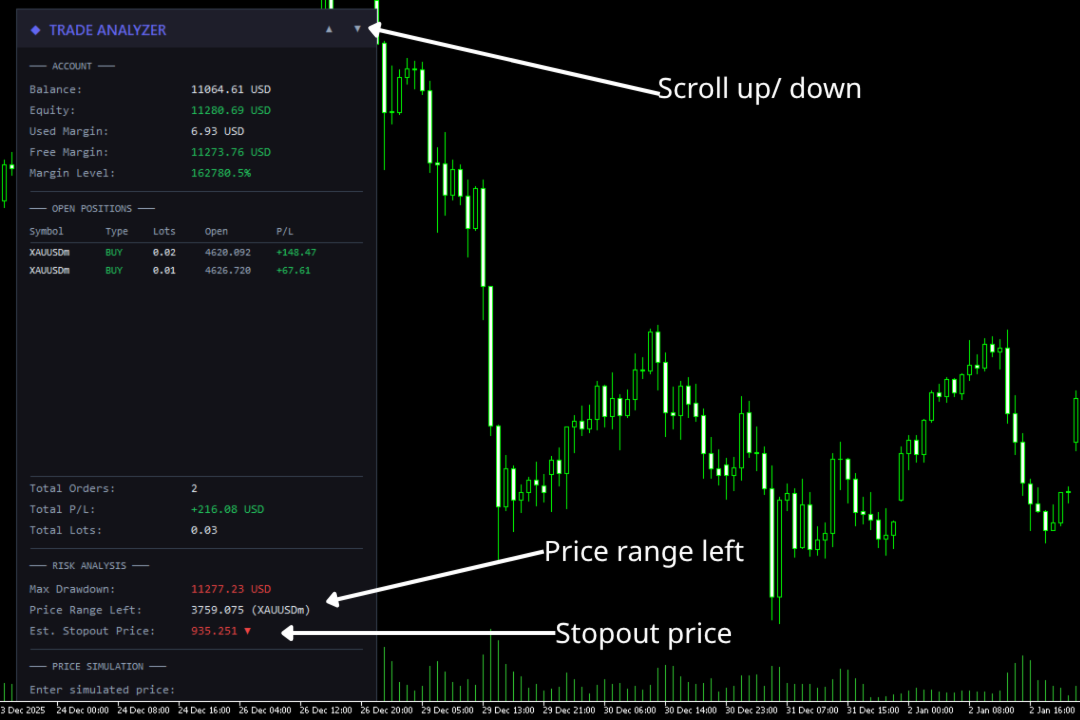
Overview

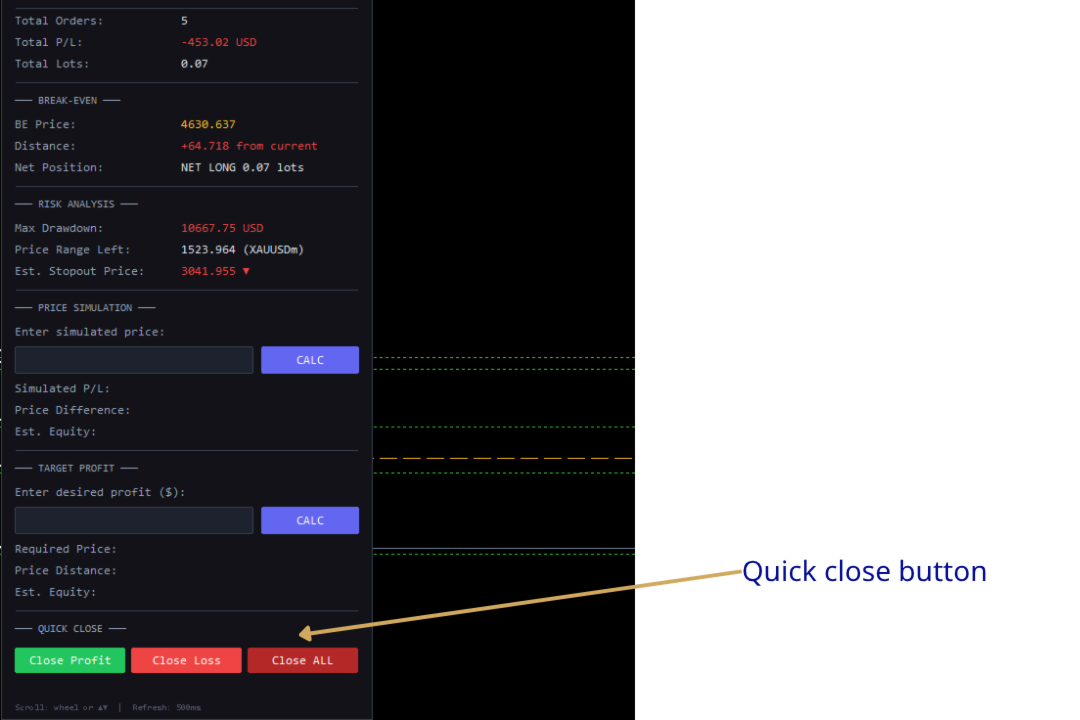
Trade Analyzer Panel is a real-time dashboard EA for MetaTrader 5. It consolidates position monitoring, risk analysis, P/L simulation, target profit planning, break-even visualization, and quick close controls into a single scrollable on-chart panel.

Key Features

Feature Description
Position Scanner Lists all open positions with symbol, direction, lot size, open price, and live P/L
Account Summary Balance, equity, used/free margin, and margin level in real time
Break-Even Line Draws a horizontal line on the chart at the exact break-even price for the current symbol
Risk Analysis Max drawdown, price range before stop-out, and estimated stop-out price
Price Simulator Enter a hypothetical price to see projected P/L across all positions
Target Profit Enter a desired profit and the EA calculates the required price
Quick Close One-click buttons to close profitable, losing, or all positions
Scrollable Panel Mouse wheel and ▲▼ buttons when the panel exceeds chart height

Installation

  1. Copy the file — Place TradeAnalyzerPanel.mq5 into your MT5 data folder:

    [MT5 Data Folder]\MQL5\Experts\

    Find the data folder via MT5 menu: File → Open Data Folder.

  2. Compile — Open the file in MetaEditor and press F7. Ensure zero errors.

  3. Attach to chart — In MT5 Navigator (Ctrl+N), expand Expert Advisors and drag TradeAnalyzerPanel onto any chart.

  4. Enable Algo Trading — The toolbar button must be green. This is required for the Quick Close feature to execute trades.

Important: The Quick Close buttons will send real trade requests. All other features are read-only analysis tools.

Panel Sections

1. Account

Real-time account metrics:

Field Description
Balance Account balance excluding floating P/L
Equity Balance + floating P/L. Green if ≥ balance, red if below
Used Margin Margin locked by open positions
Free Margin Available margin. Green if > used margin
Margin Level Equity / Margin × 100%. Green (>200%), yellow (100–200%), red (<100%)

2. Open Positions

Displays up to 12 positions in a table:

Column Description
Symbol Instrument (truncated to 10 chars)
Type BUY (green) or SELL (red)
Lots Volume
Open Entry price
P/L Profit/loss including swap

Summary rows below show Total Orders, Total P/L, and Total Lots. Unused rows are left blank.

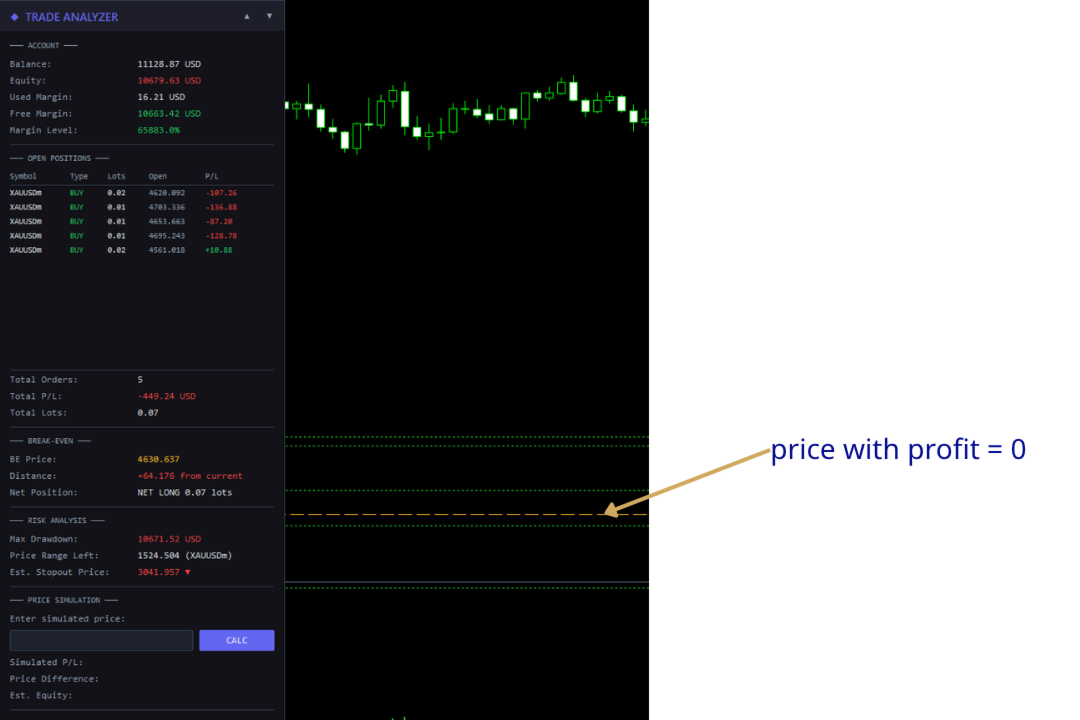
3. Break-Even

Displays break-even information and draws a horizontal line directly on the chart at the price where total P/L for the current symbol equals zero.

Field Description
BE Price The break-even price (displayed in gold/yellow, matching the chart line)
Distance How far the current bid is from break-even. Green if the current price is in profit territory, red if in loss territory
Net Position Shows direction (NET LONG or NET SHORT) and total net lot size

How it works:

  • The EA calculates the weighted average entry across all buy and sell positions on the current chart symbol, accounting for swap.
  • The formula solves for the price at which total P/L = 0:
        BE Price = (-totalSwap × tickSize / tickValue + buyWeightedPrice - sellWeightedPrice) / netLots
    
  • A dashed horizontal line is drawn on the chart at this price, updating in real time as positions or swap change.
  • The line is automatically removed when there are no positions on the chart symbol or when the EA is removed.

Customization: The line appearance can be configured via input parameters: InpBELineColor (default gold), InpBELineStyle (default dashed), and InpBELineWidth (default 1).

4. Risk Analysis

Calculates how much adverse price movement the account can absorb before the broker's stop-out level. Based on positions on the current chart symbol.

Field Description
Max Drawdown Maximum loss before stop-out: Equity - (Margin × StopOut% / 100)
Price Range Left How far price can move against the net position before stop-out
Est. Stopout Price Projected stop-out price with direction arrow (▼ for net-long, ▲ for net-short)

Example: 2.0 lots net-long on XAUUSD, equity $10,000, max drawdown $8,000. If the price range is 400.00 and current price is 2350.00, the estimated stop-out price is 1950.00 ▼.

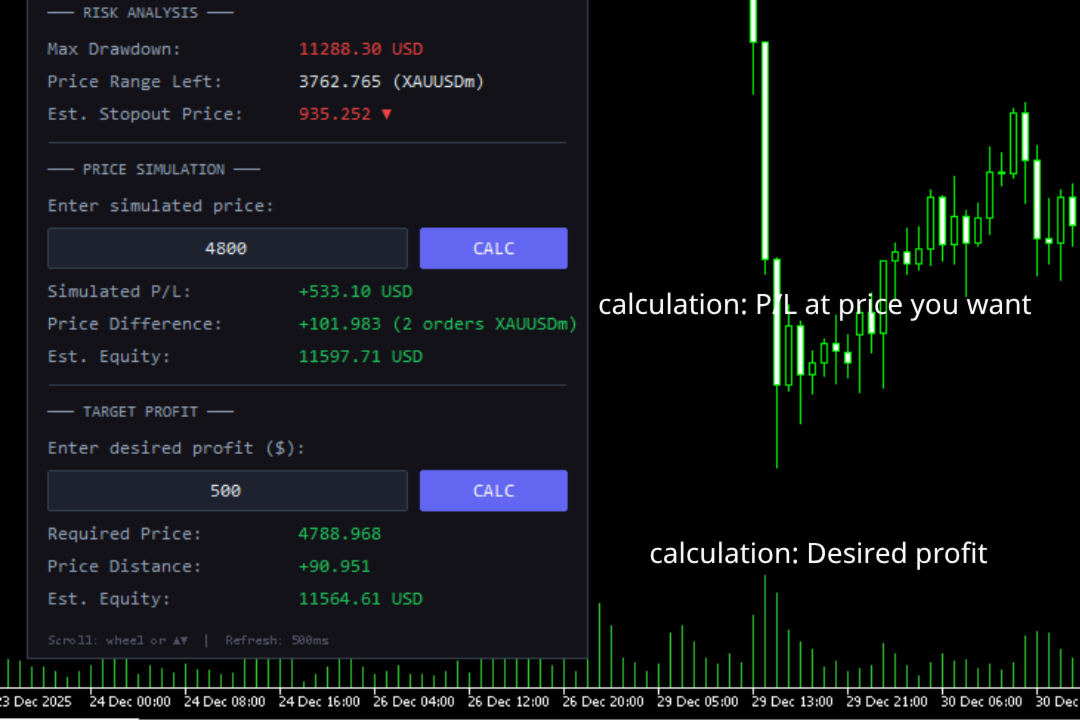
5. Price Simulator

Enter a hypothetical price to preview P/L if the current chart symbol reaches that level.

Usage: Type a price → press Enter or click CALC.

Field Description
Simulated P/L Projected total profit/loss at the entered price
Price Difference Distance from current bid, plus number of affected orders
Est. Equity Balance + simulated total P/L

The simulation applies to positions on the current chart symbol only. Other symbols keep their live P/L. Updates automatically on each refresh cycle.

6. Target Profit Calculator

Enter a desired profit amount and the EA reverse-calculates the required price.

Usage: Type profit in account currency (e.g., 200 for +$200, -100 for -$100) → press Enter or click CALC.

Field Description
Required Price Price the symbol must reach for total P/L to equal the target
Price Distance Distance from current bid to required price
Est. Equity Balance + target profit

Edge cases:

  • Fully hedged positions (net lots ≈ 0) → shows "Hedged/No [symbol]"
  • Negative required price → shows "Not achievable"

7. Quick Close

Three action buttons for rapid position management:

Button Action
Close Profit (green) Closes all positions currently in profit (P/L + swap > 0)
Close Loss (red) Closes all positions currently in loss (P/L + swap < 0)
Close ALL (gray) Closes every open position on the account

Safety mechanism for Close ALL:

The Close ALL button uses a two-click confirmation to prevent accidental closures:

  1. First click — The button turns bright red and a warning message appears: !! CONFIRM CLOSE ALL !!
  2. Second click — All positions are closed.
  3. Clicking any other button — The confirmation resets and the button returns to its normal state.

Warning: Close Profit and Close Loss execute immediately on a single click. Close ALL is the only button with two-click confirmation.

Note: These buttons close positions across all symbols, not just the current chart symbol.

Scrolling

The panel supports scrolling when content extends beyond the visible chart area.

Method Action
Mouse wheel Hover over the panel and scroll. Each tick moves by the configured step (default 40px)
▲ / ▼ buttons In the header's top-right corner. Each click scrolls 3× the step (120px)

The header stays fixed. Content scrolled above the header is hidden. The background resizes dynamically.

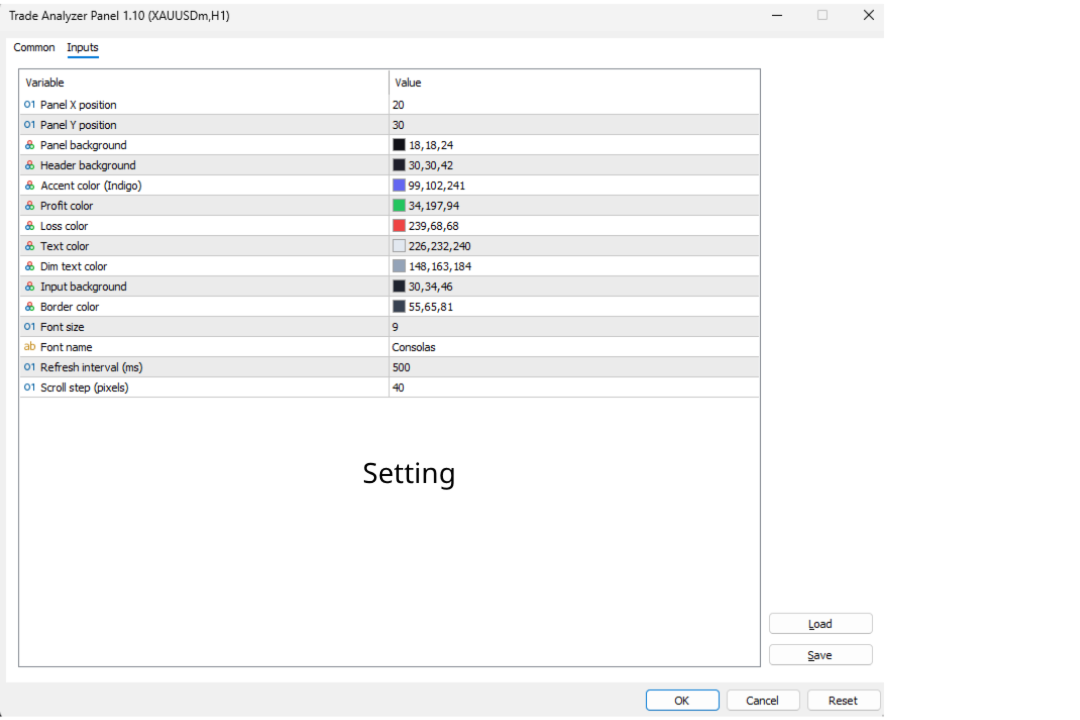
Input Parameters

Position & Layout

Parameter Default Description
InpPanelX 20 Panel X position (px from left)
InpPanelY 30 Panel Y position (px from top)
InpScrollStep 40 Scroll step in pixels

Colors

Parameter Default Description
InpPanelBg C'18,18,24' Panel background
InpHeaderBg C'30,30,42' Header background
InpAccentColor C'99,102,241' Accent (title, calc buttons)
InpProfitColor C'34,197,94' Profit values
InpLossColor C'239,68,68' Loss values
InpTextColor C'226,232,240' Primary text
InpDimText C'148,163,184' Secondary text
InpInputBg C'30,34,46' Input field background
InpBorderColor C'55,65,81' Borders and separators

Break-Even Line

Parameter Default Description
InpBELineColor C'255,193,37' Line color (gold)
InpBELineStyle STYLE_DASH Line style (DASH, SOLID, DOT, DASHDOT, DASHDOTDOT)
InpBELineWidth 1 Line thickness

Quick Close Buttons

Parameter Default Description
InpCloseBtnBg C'55,65,81' Default close button background
InpCloseAllBg C'180,40,40' Close ALL button background

Typography & Performance

Parameter Default Description
InpFontSize 9 Base font size
InpFontName "Consolas" Font family
InpRefreshMs 500 Refresh interval (ms)

Frequently Asked Questions

Q: Does this EA place trades?
A: The analysis features (sections 1–6) are strictly read-only. The Quick Close buttons (section 7) do send trade close requests.

Q: Will Quick Close buttons work if Algo Trading is disabled?
A: No. The MT5 Algo Trading button must be enabled (green) for close operations to execute.

Q: Do Close Profit / Close Loss only affect the current chart symbol?
A: No. They close qualifying positions across all symbols on the account.

Q: Why is the break-even line not showing?
A: The line only appears when there are open positions on the current chart symbol with a non-zero net exposure. If positions are fully hedged (equal buy and sell lots), no break-even line is drawn.

Q: The break-even price doesn't match my manual calculation. Why?
A: The EA includes accumulated swap in its break-even calculation. If you calculate purely from open prices, the result will differ when swap is non-zero.

Q: Why does Risk Analysis show nothing?
A: No open positions, or no positions on the current chart symbol.

Q: Can I use this alongside other EAs?
A: MT5 allows only one EA per chart. Use a separate chart window for the same symbol if needed.

Q: The stop-out price seems inaccurate.
A: It's an approximation using current tick value and assuming static market conditions. Real stop-out may differ due to spread changes, swap, and other symbol movements.

Q: How do I scroll the panel?
A: Mouse wheel over the panel, or click ▲/▼ in the header.

Q: How do I reposition the panel?
A: Change InpPanelX and InpPanelY in EA properties (right-click EA → Properties → Inputs).

Technical Details

  • Refresh: EventSetMillisecondTimer() for tick-independent updates.
  • Max positions displayed: 12 ( MAX_DISPLAY constant).
  • Stop-out level: ACCOUNT_MARGIN_SO_SO , fallback 50%.
  • Break-even line: OBJ_HLINE object named TAP_BreakEvenLine , drawn with OBJPROP_BACK = true so it renders behind candles. Automatically created/removed based on position state.
  • Quick Close: Uses CTrade::PositionClose() . Iterates positions in reverse order to avoid index shifting issues during batch closes.
  • Scroll system: Fixed-size arrays ( MAX_SCROLL_OBJ = 250 ) track object names and base Y positions. Header elements are excluded. Objects above the header are moved to Y=-2000 to hide.
  • Panel objects: Prefix TAP_ , fully cleaned on removal including the break-even line.
  • Dependencies: Trade.mqh , PositionInfo.mqh , AccountInfo.mqh (standard MQL5).

Changelog

v1.20

  • Added Break-Even Line — horizontal line on chart at break-even price with real-time updates, distance display, and net position info
  • Added Quick Close buttons — Close Profit, Close Loss, Close ALL with two-click safety confirmation
  • Added input parameters for break-even line styling and close button colors
  • Panel now has 7 sections (up from 5)

v1.10

  • Added Target Profit Calculator — enter desired profit to find the required price
  • Added scrollable panel with mouse wheel and ▲▼ button support
  • Fixed empty rows showing "Label" text
  • Added InpScrollStep input parameter

v1.00

  • Initial release
  • Account info display (balance, equity, margin, margin level)
  • Open position scanner with live P/L
  • Risk analysis: max drawdown, price range, stop-out estimation
  • Price simulation with projected P/L and equity

Recommended Companion Indicator

Recommended Companion Toolkits

1. One-Click Trade Panel  HIGHLY RECOMMENDED

Why you need it: When a signal fires, speed matters. The indicator shows you the entry price and SL/TP levels, but manually typing lot size, SL, and TP into the order window costs precious seconds — especially on M1–M15 where price moves fast.

2. Trailing Stop & Breakeven Manager  RECOMMENDED

Why you need it: The indicator draws 3 TP levels for a reason — the strategy works best when you scale out gradually. But manually moving SL to breakeven at TP1, then trailing behind swings toward TP2 and TP3, requires constant chart monitoring. This is impractical if you trade multiple pairs or cannot watch the screen non-stop.

3. Trade Journal & Dashboard 📋 NICE TO HAVE

Why you need it: The indicator does not track historical performance — it only shows signals in real time. Without journaling, you have no way to know your actual win rate, average R:R, which signal type performs best, or which sessions/pairs give you the best results.


おすすめのプロダクト
Boleta de negociação, adiciona automáticamente as ordens Take Profit e Stop Loss quando excutada uma ordem de compra ou venda. Ao apertar as teclas de atalho (A, D, ou TAB), serão inseridas duas linhas de pre-visualização, representando as futuras ordens de take profit (azul) e stop loss (vermelho), as quais irão manter o distanciamento especificado pelo usuário. Ditas ordens só serão adicionadas ao ser executada a ordem inicial. Ao operar a mercado, as ordens pendentes de take profit, e stop lo
Prizmal Logic
Vladimir Lekhovitser
3.5 (2)
リアルタイム取引シグナル 取引活動の公開リアルタイム監視: https://www.mql5.com/ja/signals/2353471 公式情報 出品者プロフィール 公式チャンネル ユーザーマニュアル セットアップ手順および使用ガイド: ユーザーマニュアルを開く 本エキスパートアドバイザーは、ルールに基づいた取引戦略に基づいて設計されています。 この戦略は、常に市場に参加するのではなく、特定の市場条件を識別することに重点を置いています。 システムは価格の動き、ボラティリティの特性、時間的要因を分析します。 これらの要素は、現在の市場環境が取引に適しているかどうかを判断するために使用されます。 複数の事前定義された条件が同時に満たされた場合にのみ取引が実行されます。 条件が満たされない場合、エキスパートアドバイザーは非アクティブな状態を維持します。 その結果、取引頻度は一定ではありません。 取引がまったく行われない期間が発生することがあります。 これには、ポジションが一切開かれない日も含まれます。 一方で、市場環境が適している場合には、比較的短時間で複数の
Easy Order Watcher — スマートなトレード監視と通知 どこにいてもトレードをコントロールできます。 Easy Order Watcherは、軽量かつパワフルなエキスパートアドバイザー(EA)です。リアルタイムトレードを追跡し、ポジションが重要な利益または損失レベルに達すると、ユーザーが設定したしきい値に基づいて即座に通知します。また、リアルタイムの証拠金レベルと、ユーザーのタイムゾーンに合わせてタイムスタンプ付きのアラートを表示します。 デスクから離れている場合でも、複数のトレードを管理している場合でも、このEAは、ユーザーの戦略に合わせてカスタマイズされた高精度のアラートで最新情報を提供します。 v1.10の新機能: カスタムタイムゾーンのサポート タイムゾーン(+/-時間)をローカル時間に合わせて調整することで、アラートを確認する際の混乱を解消できます。 ユーザー定義の利益/損失マイルストーン 固定値に縛られることなく、独自のしきい値(例:利益+50ドルごと、損失-100ドルごと)を設定できます。 主な機能: ゼロからプ
Guardian Yield Keeper is a utility Expert Advisor for traders who want real-time exit management and profit protection for open positions on the current symbol. This EA does not open new trades and does not generate entry signals. Its job is simple: monitor existing positions and close them when your profit or risk conditions are met . It is especially suitable for traders using DCA, Grid, Martingale, or basket trading systems and looking for a dedicated management layer that is more flexible th
️ Trade Manager oneclick  ( Reverse Trade,  Partial Close,  Breakeven, Close All Running Trade )   control – Smart Manual Trade Control for MT5 Trade Manager oneclick control is a powerful yet lightweight trade management utility built for manual traders who want precise control over their open positions — directly from the MT5 chart. This EA does not open or close trades automatically based on any strategy. It simply provides one-click management tools to handle your running trades efficient
FREE
EA Emotion   is not a traditional Expert Advisor that places trades automatically – instead, it’s a psychological checkpoint that helps you manage   trading discipline and emotional control . Designed especially for discretionary traders, prop firm challengers, and anyone serious about improving consistency,   EA Emotion   asks a series of custom questions   right after you open a trade , such as: Did you follow your trading plan? Are you in the right mental state? Is this trade part of your set
You can see Binance Spot data instantly in Metatrader 5 and it allows you to use all the features that Metatrader has provided to you. You can access the data of all symbols listed on Binance Futures. Don't forget to set the timezone. Binance it's 00:00 UTC. You need to fix it according to your own country You need to install the free Binance Spot Symbol List plugin. https://www.mql5.com/tr/market/product/83507 After loading, it automatically downloads the data of the cryptos in the market obser
Expert TP SL v04 - Professional Trading Assistant with AI Motivation System Advanced manual trading tool with automatic risk management, overtrading protection, and intelligent psychological support for disciplined trading. PRODUCT OVERVIEW Expert TP SL v04 is a comprehensive trading assistant designed for manual traders who want to maintain emotional discipline while automating risk calculations. This isn't just another order placement tool - it's a complete trading psychology system that pr
Nexus PropSafe FX Scalper – プロップファーム専用マルチ通貨EA (MT5) Nexus PropSafe FX Scalperは、リスクを抑制し一貫した執行を行うことで、プロップファームの評価フェーズを通過するために設計されたMT5用のプロフェッショナルなマルチシンボル取引EAです。このシステムは、1つのチャートからEURUSD、GBPUSD, AUDUSD, USDJPYを同時に取引し、低ドローダウンと1取引あたりの固定リスクを厳格に維持しながら分散投資を行います。遅行指標の代わりに、ティックレベルの価格速度(ベロシティ)に基づいて動作し、確度の高いモメンタムパルスが発生したときにのみエントリーします。 コアロジック 価格速度の検出: リアルタイムの価格速度(ティックスピード)を検出。 動的なボラティリティ基準: 過去のデータから動的なボラティリティの基準線を構築。 パルス実行: モメンタムが基準を超えたとき(高確率パルス)にのみ取引を実行。 市場環境のフィルタリング: 低品質で動きの遅いレンジ相場を回避。 主な特徴 1つのチャートから4通貨ペアを取引(E
Fvg Edge
Ahmad Meftah Abdulsalam Alawwami
5 (2)
FVG Smart Zones – 無料版 MetaTrader 5 (MT5)用 公正価値ギャップ(FVG)検出インジケーター ただのランダムなインジケーターではなく、 本格的なトレーディングツール をお探しですか? FVG Smart Zones – 無料版 は、公正価値ギャップ(FVG)を自動で検出し、チャート上に 高確率トレーディングゾーン をハイライトして、プロフェッショナルな市場の洞察を提供します。 以下のトレーダー向けに設計されています: スマートマネーコンセプト (SMC) ICTトレーディングコンセプト プライスアクション (Price Action) 需給分析 (Supply & Demand) 機関投資家向けトレーディング戦略 このインジケーターは、 価格が反応しやすいゾーン に集中するのを助けます。 主な機能 スマートゾーン検出 上昇・下降FVGの自動検出 クリーンでプロフェッショナルなビジュアルゾーン 弱い、または関連性の低いギャップを除去するインテリジェントフィルター 高度な確認機能 上位時間軸(HTF)
FREE
ALIEN DASHBOARD FULL EDITION – Professional ICT & Precision Trading Dashboard for MT5 ( HYBRID ENGINE ) Overview The   Alien Dashboard Full Edition   is a comprehensive, all‑in‑one technical indicator for MetaTrader 5 that merges the most powerful concepts from Inner Circle Trader (ICT) methodology with advanced precision‑entry logic, multi‑timeframe analysis, and an intuitive on‑chart dashboard. Designed for serious traders who want to visualise institutional order flow, identify high‑probabili
Easy Trading Panel: Core Function Summary 1. Visual Trading This is the core selling point of the tool. It abandons the traditional way of placing orders by inputting prices and adopts an intuitive chart line drag-and-drop mode instead: • Drag Entry Line: Directly drag the line on the chart to set the pending order position. • One-click SL/TP Toggle: Quickly enable/disable stop loss and take profit lines via panel buttons. • Synchronous Calculation: When the lines are dragged, the panel will cal
VM Auto SLTP Basic - Intelligent Trade Management for Scalpers Enhance your scalping strategy to a higher level. VM Auto SLTP Basic automatically manages Stop Loss and Take Profit for orders that are opened manually or by other Expert Advisors. This tool does not open trades on its own, allowing you to maintain full control while enjoying precise risk management. Key Features: SL/TP based on ATR or fixed price Automatic SL move to Breakeven Enhanced Breakeven system with 2 modes: Points and R (r
FREE
Signals Executor for Telegram is a Utility that allows you to execute and manage positions from messages sent in Telegram Chats. Chat messages are processed to check for the existence of commands, and the command will be executed if its parameters are valid. You need the Telegram Bot Token and Chat Id to configure the input parameters. It is possible to restrict the sending of commands through the User Id, which must be configured in the input parameters. Valid Commands: Buy and Sell: Market or
EAs Manager
Abdeljalil El Kedmiri
5 (1)
The   Ultimate EAs Manager   is a professional risk management and trade assistance tool designed to monitor, control, and optimize all trading activities on your MT5 account. It acts as a   central command center   that oversees every trade - whether opened by other Expert Advisors or manually by you. How it's work with other EAs : Blog post  MT4 version:  https://www.mql5.com/en/market/product/167007 Only 10 copies will be sold at the early-bird price. After 10 copies, the price jumps directly
VR MultiPrice Analysisは、通貨ペアの通貨の強さを決定する指標です。例として、EUR / USDのペアを取り上げましょう。現在弱い通貨と強い通貨を判断するにはどうすればよいのか説明します。 最も簡単で信頼性の高い方法は、ユーロを米ドルを除いて、他の通貨と比較することです。 分配の強さオプション EURは他の通貨に対して上昇しています。これは、通貨がトレーダーや投資家にとってより魅力的になったか、良いニュースが出てきたことを示しています。 EURは他の通貨に対して下落しています-これは、ほとんどのトレーダーと投資家がEURを取り除き、他の通貨を購入するか、悪いニュースが出てきたことを示しています。 インジケーターは、通貨ごとに異なる値を示します。EUR通貨の市場における不確実性の兆候です。 EUR通貨については、インジケーターは他の通貨との関係でUSDを分析します。 その結果、VR MultiPrice Analysisを使用して、トレーダーはEUR / USD通貨ペアの総合分析を受け取り、通貨ペア全体の全体像を確認します。 インジケーターは、現在設定されている通貨ペ
CosmiCLab SMC FIBO CosmiCLab SMC FIBO is a professional trading indicator designed for traders who use Smart Money Concepts (SMC), market structure analysis and Fibonacci retracement levels. The indicator automatically detects market swings and builds Fibonacci levels based on the latest impulse movement. It also identifies market structure changes such as BOS (Break of Structure) and CHOCH (Change of Character), helping traders understand the current market direction. CosmiCLab SMC FIBO also pr
以下是为您翻译的日语版本。为了符合日本交易者的使用习惯,我使用了专业且简洁的表达方式,并特别强调了“纪律性”和“精准度”。 同时也考虑到了您将来要加入的“日损限额进度条”和“圆角UI”设计,文字风格偏向现代与高端感。 Prop Calculator Assistant  計算ミスによるプロップファーム口座の失格をゼロに。リスク管理は「アシスタント」に任せましょう。 Prop Calculator Assistant は、FTMOやなどのチャレンジ合格を目指すトレーダーや、プロップ口座を運用するプロトレーダーのために設計された究極のトレード管理パネルです。暗算や手動での注文修正を排除し、独自のビジュアル・インターフェースによって、あなたのルールを厳格に守り抜きます。 これは、相場を予想する自動売買(EA)ではありません。精度を追求する裁量トレーダーのためのプロ仕様**「コックピット」**です。あなたがセットアップを決めれば、アシスタントが瞬時にロット数を計算し、発注からエグジットまでを自動で管理します。 ️ プロップトレーダーに選ばれる理由 ロット計算のミスを完全排除: チャート上の
Barak Mega EA
Jorge Jovanny Hernandez Maldonado
BARAK MEGA EA  is a fully automated trading Expert Advisor designed for traders who demand total control, strategic flexibility, and advanced risk management within a single system. This EA functions as a true strategy builder , allowing you to combine multiple technical indicators and custom rules to adapt to any market, asset, or timeframe. Unlike traditional robots with fixed logic, BARAK MEGA EA features a modular architecture where every component can be independently enabled, disabled, and
FREE
Trading Utility for Forex Currency Pairs Only not for Gold  Functions Auto Lot Calculation based on Risk Auto stoploss  Auto TakeProfit Breakeven Auto Close Half % Close in percentage with respect to the PIPs Pending Orders BuyLimit Sell Limit with distances BuyStop Sell Stop    with distances Trading Informations Risk in percentage For Multiple trades Combine Takeprofit and Combine Stoplosses
Order Book, known also as Market Book, market depth, Level 2, - is a dynamically updated table with current volumes of orders to buy and to sell specific financial instument at price levels near Bid and Ask. MetaTrader 5 provides the means for receiving market book from your broker, but in real time only, without access to its history. The indicator OrderBook Cumulative Indicator accumulates market book data online and visualizes them on the chart. In addition, the indicator can show the market
NNArbitrage
Marius Ovidiu Sunzuiana
In a market flooded with lagging indicators and overfit strategies, this utility offers a fresh edge: real-time statistical arbitrage powered by an adaptive neural network , built entirely in MQL5—no DLLs, no external dependencies. Key Advantages Smart Spread Modeling It dynamically calculates a hedge ratio between two correlated instruments (like EURUSD vs GBPUSD), forming a synthetic spread that reflects true relative value. This isn’t just correlation—it’s cointegration-aware logic. Neur
Imagine flying a real aircraft without ever stepping into a flight simulator. That's what trading is like. You have to simulate your strategy before you can take it to a live market. It is good if you can simulate things speedily before even stepping into any live market, or before coming up with an automated system.  People don't have all day to stare at a higher timeframe chart until the entry signal finally arrives. That's why I built this so that you can simulate your strategy with speed. Th
FREE
インディケータは現在のクオートを作成し、これを過去のものと比較して、これに基づいて価格変動予測を行います。インジケータには、目的の日付にすばやく移動するためのテキスト フィールドがあります。 オプション: シンボル - インジケーターが表示するシンボルの選択; SymbolPeriod - 指標がデータを取る期間の選択; IndicatorColor - インジケータの色; HorisontalShift - 指定されたバー数だけインディケータによって描画されたクオートのシフト; Inverse - true は引用符を逆にします。false - 元のビュー。 ChartVerticalShiftStep - チャートを垂直方向にシフトします (キーボードの上下矢印)。 次は日付を入力できるテキストフィールドの設定で、「Enter」を押すとすぐにジャンプできます。
EA Performance Monitor MetaTrader 5向けのユーティリティで、開いているすべてのチャートでアクティブなExpert Advisorを自動検出し、各EAをその取引データとマッピングし、ドローダウン、損益、勝率、オープンポジションのメトリクスを単一パネルにリアルタイムで表示します。 EA Performance Monitorは、MetaTrader 5向けの自動モニタリングユーティリティです。設定可能な間隔ですべての開いているチャートをスキャンし、マジックナンバーとシンボルで実行中の各Expert Advisorを識別し、チャート上の構造化されたパネルにパフォーマンスデータを表示します。このツールは、クローズ済み取引履歴とライブフローティングポジションの両方を追跡し、単一のアタッチメントポイントからアカウントのすべてのEAアクティビティの統合ビューを提供します。   概要 初期化時に、ユーティリティはアタッチされた時点からアカウントの取引履歴を読み込みます。すべてのオープンポジションをスキャンしてアクティブなマジックナンバーを探し、それぞれをExpert
FREE
General Overview This Expert Advisor (EA) is a semi-automatic trading assistant for MetaTrader 5 that provides a graphical user interface (GUI) panel directly on the chart. It allows traders to quickly place pending orders (Buy Limit, Sell Limit, Buy Stop, Sell Stop), set Stop Loss (SL) and Take Profit (TP) levels for all positions, close all open trades, and delete pending orders. Key Features Interactive Control Panel: Displays input boxes, buttons, and labels on the chart. You can manu
SmartRAL
Jemy Yeferson Dimu Ludji
SmartRAL (Smart Risk Auto-Lot EA) SmartRAL: The Ultimate Risk & Lot Management Expert Advisor (EA) SmartRAL is an essential tool for traders who demand precise risk management and automated position sizing in MetaTrader 5. Stop guessing your lot size and let the algorithm handle the calculations. This EA allows you to trade with confidence by guaranteeing your risk exposure on every single trade, while offering absolute flexibility in setting your Stop Loss (SL). Key Features & Benefits Guarante
Little Swinger    (Best choice for passive income lovers) Developed by RobotechTrading   key features: Financial Freedom Back testing results will match with real live trading results Proper TP and SL Controlled Risk Highly Optimized settings Running on our Real Live Accounts Little Risk, Little Drawdown, Little Stress, Little BUT stable income, just set and forget. Strategy: Not Indicator based No Martingale  No Grid  No Repaint strategy Safe and Secure calculation of Live data and than take
King ElChart Manual Trade Panel
Mohammed Maher Al-sayed Mohammed Ahmed Saleh
King Chart – Manual Trading Panel for MetaTrader 5 Overview King Chart is a simple yet powerful manual trading panel built for traders who want speed, precision, and clarity. It enables quick order execution, clear lot control, and real-time account monitoring  all directly on your MT5 chart. Main Features Multi-Lot Trade Execution 3 Buy and 3 Sell buttons for instant execution Each button is tied to a custom lot size field Designed for flexible scaling in or out of trades Position Management D
Are you the type that likes to protect your trades by moving the stop loss to the entry point and also using trail stop? Cool! This EA will help you with that. What's more, it also partially closes the trade when the trail stop is activated. That's it! Beyond all this it shows the stop loss projection (which you can move)   and notify you when it is activated. EA can be used by configuring the default window or by using a custom window , which makes it easy to change settings. You can test
このプロダクトを購入した人は以下も購入しています
Trade Assistant MT5
Evgeniy Kravchenko
4.42 (210)
取引 ごとのリスクの 計算、新規注文 の 簡単 な 設置、部分的 な 決済機能 を 持 つ 注文管理、 7 種類 のトレーリングストップなど 、便利 な 機能 を 備 えています 。 追加の資料と説明書 インストール手順   -   アプリケーションの手順   -   デモアカウント用アプリケーションの試用版 ライン機能 チャート上にオープニングライン、ストップロス、テイクプロフィットを表示します。この機能により、新規注文を簡単に設定することができ、注文を出す前にその特徴を確認することができます。   リスク計算 リスク計算機能は、設定されたリスクとストップロス注文のサイズを考慮して、新規注文のボリュームを計算します。ストップロスの大きさを自由に設定できると同時に、設定したリスクを守ることができます。 Lot calc ボタン - リスク 計算 を 有効 / 無効 にします 。 Risk フィールドでは 、必要 なリスクの 値 を 0 から 100 までのパーセンテージまたは 預金通貨 で 設定 します 。 設定」 タブで 、 リスク 計算 の 種類 を 選択 します :「 $ 通
Trade Manager EAへようこそ。これは、取引をより直感的、正確、そして効率的にするために設計された究極の リスク管理ツール です。これは単なるオーダー実行ツールではなく、包括的な取引計画、ポジション管理、リスク管理のためのソリューションです。初心者から上級者、迅速な実行を必要とするスキャルパーまで、Trade Manager EAはあらゆるニーズに対応し、為替、指数、商品、暗号通貨などさまざまな市場で柔軟に対応します。 Trade Manager EAを使用すると、複雑な計算が過去のものになります。市場を分析し、エントリーポイント、ストップロス、テイクプロフィットのレベルをチャート上のラインでマークし、リスクを設定するだけで、Trade Managerが最適なポジションサイズを即座に計算し、SLとTPをピップ、ポイント、口座通貨でリアルタイムに表示します。すべての取引が簡単かつ効果的に管理されます。 主な機能: ポジションサイズ計算機 :定義されたリスクに基づいて取引サイズを瞬時に決定します。 簡単な取引計画 :エントリー、ストップロス、テイクプロフィットを設定するためのド
Local Trade Copier EA MT5
Juvenille Emperor Limited
4.96 (136)
Local Trade Copier EA MT5 による、驚くほど高速な取引コピーを体験してください。1分で簡単にセットアップできるこの取引コピー機は、同じWindowsコンピュータまたはWindows VPS上の複数のMetaTrader端末間で取引をコピーすることができ、0.5秒未満の高速コピースピードを実現します。 初心者であろうとプロのトレーダーであろうと、 Local Trade Copier EA MT5 には、あなたの特定のニーズに合わせてカスタマイズするための幅広いオプションが用意されています。これは、利益の可能性を高めたい人にとって究極のソリューションです。 今すぐ試してみて、これが市場で最も速くて簡単なトレードコピー機である理由を理解してください。 ヒント: デモアカウントで Local Trade Copier EA MT5 デモバージョンをダウンロードして試すことができます: ここ ダウンロードした無料のデモ ファイルを MT5 >> ファイル >> データ フォルダを開く >> MQL5 >> Experts フォルダに貼り付けて、ターミナルを再起動しま
Farmed Hedge Yield Farming | All Markets (Manual - Hybrid - Semi/Automated EA) MULTI-ASSET SUPPORT Trade any asset available on your broker - Forex: Major, Minor, Exotic pairs - Crypto: BTC, ETH, XRP, SOL, BNB - Stocks: Apple, Tesla, Amazon, Google, etc. - Commodities: Gold, Silver, Oil, Gas - Indices: US30, NAS100, SPX500, DAX40 - Any CFD your broker offers VERIFIED TRADING RESULTS - Farmed Hedge Yield Axi Copy:  https://www.mql5.com/en/signals/2356376 - Farmed Hedge Yield Exn Copy:   https:/
TradePanel MT5
Alfiya Fazylova
4.87 (153)
Trade Panelは多機能なトレーディングアシスタントです。アプリには手動取引用の50以上のトレーディング機能が搭載されており、ほとんどの取引作業を自動化することができます。 購入前に、デモアカウントでアプリのデモ版をテストすることができます。デモアカウント用のアプリの試用版をダウンロードするには、次のリンクをご利用ください: https://www.mql5.com/en/blogs/post/750865 。 完全な手順 こちら 。 取引。 ワンクリックで取引操作を行うことができます: リスクを自動計算して指値注文やポジションを開く。 複数の注文やポジションをワンクリックで開く。 注文のグリッドを開く。 保留中の注文やポジションをグループごとに閉じる。 ポジションの方向を反転(Buyを閉じてSellを開く、またはSellを閉じてBuyを開く)。 ポジションをブロックする(不足している量のポジションを開くことでBuyとSellのポジション量を等しくする)。 すべてのポジションを部分的にワンクリックで閉じる。 すべてのポジションの利食い(Take Profit)および損切り(Sto
ベータリリース Telegram to MT5 Signal Trader はまもなく正式なアルファ版をリリースします。いくつかの機能はまだ開発中で、小さな不具合に遭遇する可能性があります。問題が発生した場合はぜひご報告ください。皆さまのフィードバックがソフトウェア改善に役立ちます。 Telegram to MT5 Signal Trader は、 Telegram のチャンネルやグループからの取引シグナルを自動的に MetaTrader 5 にコピーする強力なツールです。 パブリックおよびプライベートの両方のチャネルに対応し、複数のシグナル提供元を複数のMT5口座に接続可能です。ソフトウェアは高速で安定し、すべての取引を細かく制御できます。 インターフェースは直感的で、ダッシュボードとチャートは見やすく設計されており、リアルタイムで動作状況をモニターできます。 必要環境 MQL の制限により、EA は Telegram と通信するためのデスクトップアプリが必要です。 インストーラーは公式の インストールガイド にあります。 主な機能 マルチプロバイダー: 複数の Telegram
Power Candles Strategy Scanner - 自動最適化型マルチシンボル設定ファインダー パワーキャンドル・ストラテジー・スキャナーは 、パワーキャンドル・インジケーターを駆動するのと全く同じ自己最適化エンジンを、マーケットウォッチに登録されているすべての銘柄に対して並行して実行します。1つのパネルで、現在統計的に取引可能な銘柄、各銘柄で勝率の高い戦略、最適なストップロス/テイクプロフィットの組み合わせが表示され、新たなシグナルが発生した瞬間に通知が届きます。 このツールは、Stein Investmentsのエコシステムの一部です。  18種類以上のツールをすべて閲覧し、AIを活用したセットアップの推奨を受け取り、  https://stein.investments でコミュニティに参加しましょう 市場動向を網羅。銘柄ごとに3,000件以上の自動最適化。2種類のアラート。ワンクリックでチャートを切り替えて即座にアクション。 なぜこれが必要なのか 多くのマルチ銘柄スキャナーは、 価格の動き (ボラティリティ、変動率、銘柄ごとのRSI)を表示するだけです。それ
Trade Dashboard simplifies how you open, manage, and control your trades, with built-in lot size calculation. It allows you to execute trades, manage risk, and control positions directly on the chart, with tools such as partial close, breakeven, and trailing stop. Designed to reduce manual work and help you stay focused on your trading decisions. A demo version is available for testing. Detailed explanations of features are provided within the MQL5 platform. Installation instructions are include
Footprint Chart Pro — Professional OrderFlow EA for MetaTrader 5 Version 6.34 | Professional tool for real traders | Institutional-Grade Visualization DEMO USERS - PLEASE SELECT EVERY TICK / REAL TICK WHEN TESTING AND YOU HAVE DOWNLOADED HISTORICAL DATA. IF YOU SEE A WAITING SCREEN AND IT IS NOT DOWNLOADING, IT MEANS YOU HAVE LOW HISTORICAL DATA. TRY 1 MIN AND 5 MIN FIRST ON 1 DAY DATA. ONE DAY DATA SHOULD BE THE NEWEST AND MOST CURRENT DATE. PLEASE WAIT UNTIL THE MARKET HAS ROLLED OVER PERIOD.
Trade copier MT5
Alfiya Fazylova
4.53 (43)
Trade Copierは、取引口座間の取引をコピーして同期するように設計された専門的なユーティリティです。 コピーは、同じコンピューターまたはvps にインストールされている、サプライヤーのアカウント/端末から受信者のアカウント/端末に行われます。 キャンペーン - すでに「Trade copier MT5」をご購入の方は、「Trade copier MT4」を無料で入手できます(MT4 → MT5 および MT4 ← MT5 のコピー用)。詳細な条件については、どうぞ個別メッセージでお問い合わせください。 購入する前に、デモ アカウントでデモ バージョンをテストできます。 デモ版 こちら 。 詳細な説明は こちら 。 主な機能と利点: MT5ネッティングアカウントを含む、MT5> MT5、MT4> MT5、MT5> MT4のコピーをサポートします。 高いコピー速度(0.5秒未満)。 ベンダーモードと受信者モードは同じ製品内に実装されています。 チャートから直接リアルタイムでコピーを制御できる、簡単で直感的なインターフェイス。 接続が切断されたり、端末が再起動されたりしても、設定と位
Exp COPYLOT CLIENT for MT5
Vladislav Andruschenko
3.82 (34)
MetaTrader 5 用のプロフェッショナル取引コピー機 MetaTrader 向けの高速・高性能・信頼性の高い 取引コピー機 です。 COPYLOT は、MT4 と MT5 のターミナル間で Forex 取引をコピーでき、 Hedge 口座と Netting 口座の両方に対応しています。 COPYLOT MT5 版の対応構成: - MT5 Hedge → MT5 Hedge - MT5 Hedge → MT5 Netting - MT5 Netting → MT5 Hedge - MT5 Netting → MT5 Netting - MT4 → MT5 Hedge - MT4 → MT5 Netting MT4 版 完全な説明 + DEMO + PDF 購入方法 インストール方法 ログファイルの取得方法 テストと最適化の方法 Expforex のすべての製品 MT4 ターミナルへのコピーも可能です(MT4 → MT4、MT5 → MT4): COPYLOT CLIENT for MT4 COPYLOT は、2台、3台、さらには10台のターミナル間で同時に動作できる、プロフェッ
EA を買う前に、本当に耐えられるのか、それともバックテストでたまたま良く見えただけなのかを確認してください。 ほとんどのロボットは、見栄えのするバックテストと一緒に売られています。 右肩上がりのカーブ。 良い Profit Factor。 ほとんど疑いのない見た目。 それでも、その多くの EA は、市場がその履歴どおりに動かなくなった瞬間に崩れ始めます。 なぜでしょうか。 それは、バックテストが証明するのは一つだけだからです。 その戦略が、ある特定の価格の流れでは機能したということです。 別の流れでも通用することは証明しません。 頑健であることも証明しません。 もちろん、その EA があなたのお金に値することも証明しません。 なぜなら、あなたが EA を買うのは過去のきれいなカーブを眺めるためではないからです。 変化する市場で使うために買うのです。 AntiOverfit PRO がすること AntiOverfit PRO は、MetaTrader 5 の Expert Advisor が本当にしっかりしているのか、それとも特定の過去データにたまたまうまくはまっているだけなのかを確
Timeless Charts
Samuel Manoel De Souza
5 (4)
Timeless Charts is an advanced charting solution designed for professional traders seeking for custom charts / custom timeframes , including seconds charts / seconds timeframe, renko charts / renko bars, cluster charts / footprint charts and advanced tools present in most of the popular platforms. Unlike traditional offline charts or simplistic custom indicators, this solution constructs fully custom bars with true timestamp accuracy , down to miliseconds, allowing for a powerful and precise tr
MT5 to Telegram Signal Provider は、Telegramのチャット、チャンネル、またはグループに 指定された シグナルを送信することができる、完全にカスタマイズ可能な簡単なユーティリティです。これにより、あなたのアカウントは シグナルプロバイダー になります。 競合する製品とは異なり、DLLのインポートは使用していません。 [ デモ ] [ マニュアル ] [ MT4版 ] [ Discord版 ] [ Telegramチャンネル ]  New: [ Telegram To MT5 ] セットアップ ステップバイステップの ユーザーガイド が利用可能です。 Telegram APIの知識は必要ありません。必要な全ては開発者から提供されます。 主な特長 購読者に送信する注文の詳細をカスタマイズする機能 例えば、Bronze、Silver、Goldといった階層型のサブスクリプションモデルを作成できます。Goldサブスクリプションでは、すべてのシグナルが提供されます。 id、シンボル、またはコメントによって注文をフィルターできます 注文が実行されたチャート
Copy Cat More Trade Copier MT5 (コピーキャット MT5) は、今日の取引課題に対応して設計されたローカルトレードコピーシステムと完全なリスク管理・実行フレームワークです。プロップファームのチャレンジから個人ポートフォリオ管理まで、堅牢な実行、資本保護、柔軟な設定、高度な取引処理の組み合わせで、あらゆる状況に適応します。 コピーシステムはマスター(送信側)とスレーブ(受信側)の両方のモードで動作し、成行注文と指値注文、取引修正、部分決済、両建て決済操作のリアルタイム同期を行います。デモ口座とライブ口座、取引ログインまたは投資家ログインの両方に対応し、EA、ターミナル、またはVPSが再起動してもパーシスタント取引メモリシステムを通じて復旧を保証します。複数のマスターとスレーブをユニークIDで同時に管理でき、ブローカー間の違いはプレフィックス/サフィックス調整またはカスタムシンボルマッピングを通じて自動的に処理されます。 マニュアル/設定  | Copy Cat More MT4 | チャンネル  特別機能: 設定が簡単 — わずか30秒で完了(ビデオをご覧
Seconds Chart - MetaTrader 5で秒足チャートを作成するユニークなツールです。 Seconds Chart を使用すると、秒単位のタイムフレームでチャートを構築でき、標準的な分足や時間足チャートでは得られない柔軟性と分析精度を実現します。例えば、 S15 は15秒足を表します。カスタムシンボルをサポートしているインジケーターやEAをすべて使用できます。標準的なチャートと同様に便利に操作できます。 標準的なツールとは異なり、 Seconds Chart は超短期のタイムフレームでも高い精度と遅延なく作業できるように設計されています。 Seconds Chartの利点 1秒から900秒 までのタイムフレームをサポート。 組み込みのティックデータベースにより、ヒストリカルデータを 瞬時にロード 。 リアルタイムでデータが更新され、 遅延やラグなし 。 複数の秒足チャートを同時に作成可能。 Seconds Chartが最適な用途 スキャルピング や高頻度取引。 正確なエントリーとエグジット。 短期タイムフレームでの取引戦略のテスト。 タイムフレームの設定 デフォルトの設
MetaTrader 5 用トレーディングパネル — チャートとキーボードから行うプロフェッショナルなワンクリック取引 アクティブトレーダーのために設計された高機能 Trading Panel。標準の MetaTrader 操作よりも、はるかに速く、直感的に、そして効率的に取引を実行できます。 本パネルは、ポジション管理、未決注文管理、利益コントロール、執行スピードをひとつのプロフェッショナルなワークスペースに集約した実践的なソリューションです。 これは単なる補助ツールではありません。MetaTrader 5 のための本格的な trading cockpit です。チャートから直接操作し、キーボードで素早くコマンドを実行し、自動計算や視覚的なガイドを活用することで、手動トレードをより速く、より明確に、より快適にします。 このパネルを使えば、チャート上からワンクリックで注文を実行でき、標準の MetaTrader コントロールと比べて最大 30 倍速く取引操作を行うことができます。 MT4 バージョン | 完全説明 + DEMO + PDF | 購入方法 | インストール方法 | ログ
TelegramからMT5へ: 究極のシグナルコピーソリューション Telegram to MT5 を使えば、取引がシンプルになります。DLL を必要とせず、Telegram のチャンネルやチャットから MetaTrader 5 プラットフォームに取引シグナルを直接コピーできる最新ツールです。この強力なソリューションは、正確なシグナル実行、豊富なカスタマイズオプション、時間の節約、そして効率性の向上を実現します。 [ Instructions and DEMO ] 主な特徴 直接的なTelegram API統合 電話番号とセキュアコードで認証します。 ユーザーフレンドリーな EXE ブリッジを通じてチャット ID を簡単に管理できます。 複数のチャネル/チャットを追加、削除、更新して、同時に信号をコピーします。 高度なフィルターによる信号解析 例外的な単語 (例: 「レポート」、「結果」) を含む不要な信号をスキップします。 柔軟な SL および TP 形式 (価格、ピップ、ポイント) をサポートします。 価格ではなくポイントを指定するシグナルのエントリ ポイントを自動的に計算します。
ABQ Visual Risk Sizer
Cristian David Castillo Arrieta
ABQ Visual Risk Sizer - Institutional Risk & Trade Execution カテゴリ:ユーティリティ / リスク管理 手動によるロット計算は、時間とコストの浪費につながります。 現代のトレーディング、特にプロップファーム(Prop Firms)の口座を運用する場合、ロット計算の誤りや注文入力のわずか5秒の遅れが、デイリードローダウンルールの違反や絶好のエントリーポイントを逃す原因となります。 ABQ Visual Risk Sizer は、この問題を根本的に解決するために設計された機関投資家レベルのツールです。複雑なリスクの数学的計算を、MetaTrader 5のチャート上で直接、直感的かつ迅速、そして100%正確な視覚的体験へと変貌させます。 外部のカレンダ計算機やExcelシートはもう必要ありません。チャート上のラインをドラッグするだけで、ワンクリックで取引を実行できます。 ABQ Visual Risk Sizer が必要な理由 プロップファームのための完全保護: 各取引で、設定した正確なリスク比率(または金額)を維持します。ゴールド
HINN MAGIC ENTRY – the ultimate tool for entry and position management! Place orders by selecting a level directly on the chart! full description   ::  demo-version  :: 60-sec-video-description Key features: - Market, limit, and pending orders - Automatic lot size calculation - Automatic spread and commission accounting - Unlimited partitial take-profits  - Breakeven and trailing stop-loss and take-profit  functions - Invalidation leves - Intuitive, adaptive, and customizable interface - Works
Ultimate Extractor - Professional Trading Analytics for MT5 *****this is the local HTML version of Ultimate Extractor. !!!!!it is not compatible with Cloud!!!! For the online version please reach out to me directly****** Ultimate Extractor transforms your MetaTrader 5 trading history into actionable insights with comprehensive analytics, interactive charts, and real-time performance tracking. What It Does Automatically analyzes your MT5 trading history across all Expert Advisors and generates
News filter, equity guard & session control for all your EAs — one tool, full protection Take a Break has evolved from a basic news filter into a comprehensive account protection solution . It pauses your other Expert Advisors during news events or based on custom filters. When trading resumes, it automatically restores your entire chart setup , including all EA settings. Why traders choose Take a Break One news filter for all your EAs — no more relying on individual built-in filters that may o
Signal TradingView to MT5 Pro Automator TradingViewとMetaTrader 5間の即時プロフェッショナル実行 TradingViewのシグナル(アラート)とMT5での実際の約定を繋ぐ、最も強固なコミュニケーションブリッジで、取引戦略を自動化します。スピード、柔軟性、そして完璧なリスク管理を求めるトレーダー向けに設計されたこのExpert Advisorは、あらゆるアラートメッセージを正確な成行または指値注文に変換します。 強みと利点 ユニバーサルパーシングエンジン(独自技術): あらゆるアラート形式からデータを自動的に認識し、抽出できる高度なテクノロジー。単一の固定フォーマットに制限されることはありません。システムはシンボル(銘柄)、アクション、価格、SL(ストップロス)、TP(テイクプロフィット)を自動的に理解します。 リアルタイム実行: レイテンシ(遅延)を最小限に抑えるよう最適化された、1秒未満の超高速ポーリング技術。シグナルを受信してから数ミリ秒以内に注文が実行されます。 機関投資家レベルのリスク管理: 以下に基づく自動かつ正確
The core idea: using the user interface, you configure the parameters the chart must meet before entering a position (or positions), choose which entry models to use, and set the rules for when trading and planning should end. Lazy Trader  handles the rest: it  takes over all the routine chart watching and execution! full description  :: 3 key videos [1] ->  [2]   ->  [3] What can it do? - Understands Larry Williams market structure - Understands swing market structure by Michael Huddleston
FUTURES ORDERFLOW FOOTPRINT CHART Professional OrderFlow EA for MetaTrader 5 Version 1.01| Professional tool for real traders | Institutional-Grade Visualization STRATEGY TESTER USERS - PLEASE SELECT EVERY REAL TICK WHEN TESTING AND YOU HAVE DOWNLOADED HISTORICAL DATA. IF YOU SEE A WAITING SCREEN AND IT IS NOT DOWNLOADING, IT MEANS YOU HAVE LOW HISTORICAL DATA. TRY 1 MIN AND 5 MIN FIRST ON 1 DAY DATA. ONE DAY DATA SHOULD BE THE NEWEST AND MOST CURRENT DATE. PLEASE WAIT UNTIL THE MARKET HAS ROL
Poc Breakout Signal: The Ultimate Institutional Order Flow & Price Action System Elevate your trading with Poc Breakout, a comprehensive technical analysis tool designed to bridge the gap between retail trading and institutional market understanding. This all-in-one system combines powerful Buy/Sell signals, advanced Volume Profile analysis, real-time Order Flow (Depth of Market), and critical macroeconomic data to give you a clear, unambiguous edge in the markets. Poc Breakout Signal decodes c
This is exactly what the name says. Visual strategy builder . One of a kind. Turn your trading strategies and ideas into Expert Advisors without writing single line of code. Generate mql source code files with a few clicks and get your fully functional Expert Advisors, which are ready for live execution, strategy tester and cloud optimization. There are very few options for those who have no programming skills and can not create their trading solutions in the MQL language. Now, with Bots Builde
The product will copy all telegram signal to MT5 ( which you are member) , also it can work as remote copier.  Easy to set up, copy order instant, can work with almost signal formats, image signal,  s upport to translate other language to English Work with all type of channel or group, even channel have "Restrict Saving Content", work with  multi channel, multi MT5 Work as remote copier: with signal have ticket number, it will copy exactly via ticket number. Support to backtest signal. How to s
Cerberus Equity Watcher
Samuel Bandi Roccatello
5 (3)
Cerberus the Equity Watcher はリスク管理ツールであり、アカウントの資産を常に監視し、不完全な EA や裁量的なトレーダーの場合は感情的な行動によって引き起こされる大きなドローダウンを回避します。これは、バグを含む可能性のある EA や、予想外の市況でうまく機能しない可能性のある EA に依存するシステマティック トレーダーにとって非常に役立ちます。 Cerberus では、最小エクイティ値と (オプションで) 最大値を設定できます。これらのいずれかに達すると、すべてのポジションがフラットになり、すべての未決注文がクローズされ、すべての EA が「強制終了」されます。すべての位置を平坦化すると、ユーザーの携帯電話に通知が送信され、画面に明確なメッセージが表示されます。 「平坦化」の後、Cerberus は株式価値を監視し続け、再初期化されるまでそれ以上の取引の試みを停止し続けます。 Cerberus によって実行されるすべての操作は、画面に明確に表示され、Expert advisor タブに報告され、通知がユーザーに送信されます。ユーザーのミスを避けるために、
あなたがメンバーである任意のチャネルから(プライベートおよび制限されたものを含む)シグナルを直接あなたのMT5にコピーします。  このツールは、トレードを管理し監視するために必要な多くの機能を提供しながら、ユーザーを考慮して設計されています。 この製品は使いやすく、視覚的に魅力的なグラフィカルインターフェースで提供されています。設定をカスタマイズして、数分で製品を使用を開始できます! ユーザーガイド + デモ  | MT4版 | Discord版 デモを試してみたい場合は、ユーザーガイドにアクセスしてください。 Telegram To MT5 受信機は、ストラテジーテスターで動作しません! Telegram To MT5の特徴 複数のチャネルから一度にシグナルをコピー プライベートおよび制限されたチャネルからシグナルをコピー BotトークンまたはChat IDは必要ありません   (必要に応じて使用することができます) リスク%または固定ロットを使用して取引 特定のシンボルを除外 すべてのシグナルをコピーするか、コピーするシグナルをカスタマイズするかを選択 すべてのシグナルを認
作者のその他のプロダクト
OneClick Trade Panel v1.0 — MT5 Expert Advisor Professional On-Chart Trading Panel with Built-in Risk Calculator What Is It? Group support:  https://www.mql5.com/en/channels/vuongphamtrading OneClick Trade Panel is an all-in-one trading panel that sits directly on your MT5 chart. It replaces the default MT5 one-click window with a full-featured interface combining: order execution, automatic lot calculation, visual SL/TP planning, position monitoring, and batch close operations. Built for speed.
Scalp Signal with SL TP Indicator — Trading Guide What It Does Scalp Signal with SL TP detects high-probability reversal entries by combining RSI extremes with candlestick patterns. It prints buy/sell arrows on chart with auto-calculated SL and 3 TP levels based on ATR. Built for scalping and intraday trading on MT5. Signal Types The indicator generates 3 types of signals. Each requires RSI to be at an extreme level before triggering. 1. Engulfing (Default: ON) The primary and strongest signal.
MCD Hot Money visualizes three distinct market participant groups as color-coded histograms in a separate sub-window, all normalized to a 0–20 scale. The indicator uses a sensitivity-weighted, offset-adjusted RSI engine to reveal when large institutional capital is entering or exiting the market. *** Group support:  https://www.mql5.com/en/channels/vuongphamtrading BUFFERS Retailer (Green) — fixed at 20, ceiling reference line Hot Money (Yellow) — short-term institutional flow, based on
FREE
Trailing Stop Manager v1.0 — MT5 Expert Advisor Advanced Multi-Mode Trailing Stop for MetaTrader 5 What Is It? Trailing Stop Manager automatically moves your Stop Loss to protect profits as price moves in your favor. Unlike MT5's built-in trailing stop (which only has one mode), this EA offers 4 professional trailing methods that adapt to different trading styles and market conditions. Works on ALL symbols. Attach to any chart and it manages all matching positions. *** Group support:  https://ww
FREE
Trading Guide — Heatmap Volume 1. How the Indicator Works Heatmap Volume measures how many standard deviations the current volume is away from its moving average (SMA) . Core formula: stdbar = (Current Volume - SMA of Volume) / Standard Deviation The higher the stdbar value, the more abnormal the volume — and the more attention it deserves. Threshold Levels Level Default Multiplier Meaning Extra High > 4.0 σ Extremely abnormal volume — very rare High > 2.5 σ Unusually high volume — notewor
FREE
Trendlines with Breaks (TWB) — Trading Guide What Is It? Trendlines with Breaks is an auto-drawn trendline indicator that detects swing pivots, draws dynamic upper/lower trendlines, and fires breakout signals when price closes beyond those lines. No more manually drawing and adjusting trendlines — the indicator does it systematically. *** Group support:  https://www.mql5.com/en/channels/vuongphamtrading Core Settings Parameter Default What It Does Swing Detection Lookback 14 Bars left & right t
ICT Concepts Indicator — Trading Guide Overview This MetaTrader 5 indicator implements core Inner Circle Trader (ICT) concepts on a single chart. It identifies institutional price delivery patterns — the footprints that smart money leaves behind — and visualizes them as actionable zones and signals. The indicator includes six modules that work together: Killzones — Session-based time windows where institutional activity peaks Premium / Discount Zones — Whether price is expensive or cheap relativ
Trading Guide — Heatmap Volume BarColor What Is This Indicator? Group support:  https://www.mql5.com/en/channels/vuongphamtrading Heatmap Volume BarColor is a companion indicator that paints your candlesticks directly on the main chart based on volume intensity. It uses the exact same logic as the Heatmap Volume indicator (separate window) but applies the color-coding to the candles themselves. Instead of looking down at the volume window, you can read volume strength at a glance right on the pr
FREE
ADX Advanced Multi-Timeframe Indicator — User Guide Version 2.00 | MetaTrader 5 Overview The ADX Advanced MTF is a professional-grade indicator for MetaTrader 5 that combines the classic Average Directional Index (ADX) with multi-timeframe analysis and an elegant on-chart information panel. It provides traders with a comprehensive view of trend strength and direction across multiple timeframes simultaneously, enabling faster and more confident trading decisions. Key Highlights Real-time ADX, +DI
FREE
Support Resistance Channels - Trading Guide *** Group support:  https://www.mql5.com/en/channels/vuongphamtrading Overview The Support Resistance Channels indicator automatically identifies and displays the strongest support and resistance zones based on pivot points. Unlike simple horizontal lines, this indicator creates channels (zones) which better represent real market behavior where support and resistance act as areas rather than precise levels. Key Features Automatic Detection : Identifie

FREE
CCI VISUAL ENHANCED - MT5 USER GUIDE INTRODUCTION *** Group support:  https://www.mql5.com/en/channels/vuongphamtrading CCI Visual Enhanced for MetaTrader 5 features: Intuitive visual interface Automatic buy/sell signals Smart alert system Dynamic histogram Strong signal & divergence detection INSTALLATION Method 1: MetaEditor (Recommended) Open MT5 → Press F4 (MetaEditor) File → New → Custom Indicator Program Name: CCI_Visual_Enhanced → Finish Delete sample code, paste .
FREE
# Super Trend Indicator - User Guide *** Group support:  https://www.mql5.com/en/channels/vuongphamtrading **Version:** 1.04 | **Platform:** MetaTrader 5 | **Release:** January 2025 ## OVERVIEW The **Grid Trend Indicator** combines Supertrend with Dual EMA filters to identify high-probability trading opportunities. Unlike standard indicators showing only bullish/bearish signals, this adds a crucial third state: **NO TREND**. ### Key Features **Triple-State System**: UPTREND (Green) / DO
FREE
Daily P/L Limiter v1.0 — MT5 Expert Advisor Automated Daily Loss/Profit Limiter & Max Drawdown Protection Essential for Prop Firm Challenges (FTMO, MFF, TFT, etc.) What Is It? Daily P/L Limiter automatically monitors your account's daily Profit & Loss and takes action when your limits are hit. It tracks both realized (closed trades) and unrealized (open positions) P/L, and can close all positions, disable trading, or send alerts. This is a must-have safety net for prop firm traders, where a sing
FREE
1. Introduction Collective TP Manager v2 is a MetaTrader 5 Expert Advisor designed to automatically manage the collective Take Profit and Stop Loss of multiple open positions on a single symbol. Instead of setting individual TP/SL for each order, this EA monitors the combined profit/loss of all (or filtered) positions and takes action when your targets are reached. *** Group support:  https://www.mql5.com/en/channels/vuongphamtrading 1.1 Why You Need This EA In modern trading, especially scalp

FREE
Breakout Trend Trading Strategy Guide *** Group support:  https://www.mql5.com/en/channels/vuongphamtrading Core Concepts The Breakout Trend Indicator identifies two key market behaviors: Breakouts : Price breaks through support/resistance levels Rejections : Price fails to break through these levels Indicator Calculations Top = Highest high of X candles (excluding current) Top1 = Highest high of X candles (including current) Bottom = Lowest low of X candles (excluding current) Bottom1 = Lowest

FREE
EMA Offset Bands Indicator - Description & Trading Guide *** Group support:  https://www.mql5.com/en/channels/vuongphamtrading Description The EMA Offset Bands indicator is a custom technical analysis tool designed for MetaTrader 5 that displays a central Exponential Moving Average (EMA) line surrounded by percentage-based offset bands. This indicator creates dynamic support and resistance levels that automatically adjust based on the EMA value. Key Features: Central EMA line (default: 200-peri
FREE
MACD ADVANCED - BRIEF DESCRIPTION INTRODUCTION MACD Advanced is an enhanced version of the traditional MACD indicator featuring an intelligent 4-color system that helps traders easily identify market trends and momentum. *** Group support:  https://www.mql5.com/en/channels/vuongphamtrading KEY FEATURES 1. Smart 4-Color System Bright Green (Lime) - Strong Bullish: MACD > 0 and MACD > Signal Light Green (DarkSeaGreen) - Weak Bullish: MACD > 0 but MACD < Signal ️ Bright Red (Red)
FREE
RANGE TRADING METHOD GUIDE Using the MultiTF_TopBottom_Bands Indicator *** Group support:  https://www.mql5.com/en/channels/vuongphamtrading 1. INTRODUCTION 1.1. What is Range Trading? Range Trading is a trading method based on identifying the price oscillation zone (range) of the market and utilizing price movements within this zone to trade. 1.2. Basic Principles Top : Resistance zone - where price typically gets pushed down Bottom : Support zone - where price typically gets pushed up Range :

FREE
1. What It Does OrderByMagic is a display-only Indicator for MT5. It reads all open positions on your account and shows them grouped by Magic Number directly on the chart — updated every 2 seconds. It never opens, closes, or modifies any trade. *** Group support:  https://www.mql5.com/en/channels/vuongphamtrading 2. Why You Need It The Magic Number collision problem Every EA stamps a Magic Number on the orders it opens so it can identify and manage them later. When you run multiple EAs at the
FREE
SMC Complete Indicator v4 - Trading Guide Introduction Group support:  https://www.mql5.com/en/channels/vuongphamtrading The SMC Complete Indicator v4 is a Smart Money Concepts (SMC) trading tool for MetaTrader 5. It automatically identifies institutional trading patterns to help traders align with "smart money" - banks, hedge funds, and market makers. Core Principle: Large institutions need liquidity to fill massive orders. They create predictable patterns: accumulating at key levels, hunting s
Quantum Scalp Momentum— Trading Guide Group support:  https://www.mql5.com/en/channels/vuongphamtrading What This Indicator Does The Scalping Combo is a 4-in-1 confluence indicator for MetaTrader 5. It overlays EMA9 and VWAP on your chart, monitors volume spikes and Stochastic momentum internally, then prints BUY/SELL arrows only when all four components align. A dashboard in the chart corner shows real-time status of every component. Components at a Glance Component Default Role EMA 9 9-period
Trade Journal & Dashboard v1.0 — MT5 Expert Advisor Real-Time Performance Analytics & Trade Journal on Your Chart What Is It? Trade Journal & Dashboard is an on-chart analytics panel that automatically tracks every closed trade and calculates professional performance metrics in real time. No spreadsheets, no external apps — everything you need to evaluate your trading performance lives directly on your MT5 chart. It reads your trade history, computes win rate, profit factor, expectancy, drawdown

Wyckoff Method Indicator — Trading Guide A complete guide to trading with the Wyckoff Method MT5 Indicator. This document explains how to interpret signals, execute trades, manage risk, and avoid common pitfalls. 1. Understanding the Wyckoff Method The Wyckoff Method, developed by Richard D. Wyckoff in the 1920s-1930s, is built on the premise that price moves through four distinct phases driven by institutional money ("Composite Man"): Phase Description What to do Accumulation Smart money quietl



フィルタ:
レビューなし
レビューに返信













