Advanced ADX Multi Timeframe

ADX Advanced Multi-Timeframe Indicator — User Guide

Version 2.00 | MetaTrader 5

Overview

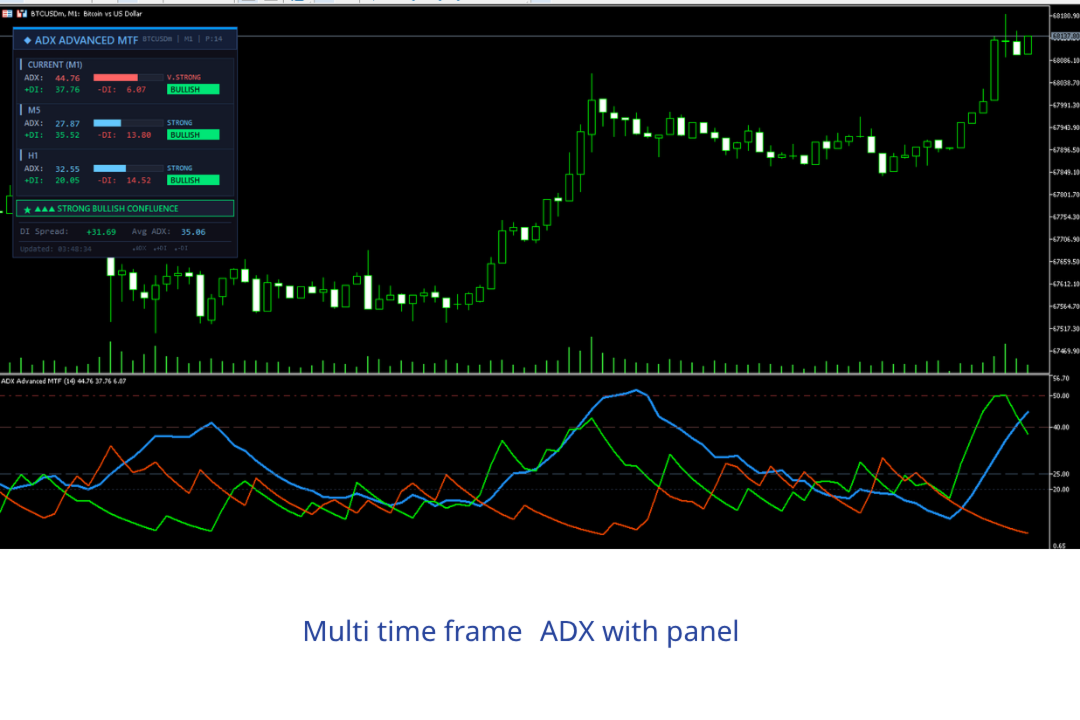
The ADX Advanced MTF is a professional-grade indicator for MetaTrader 5 that combines the classic Average Directional Index (ADX) with multi-timeframe analysis and an elegant on-chart information panel. It provides traders with a comprehensive view of trend strength and direction across multiple timeframes simultaneously, enabling faster and more confident trading decisions.

Key Highlights

  • Real-time ADX, +DI, and -DI plotted in a separate indicator window
  • On-chart panel displaying data from 3 timeframes at once (current + 2 configurable)
  • Color-coded trend strength badges and progress bars
  • Automatic confluence detection across all timeframes
  • Fully customizable panel position, colors, font, and levels
  • Optional alerts on trend direction changes

Installation

  1. Download the file ADX_Advanced_MTF.mq5 .
  2. Open MetaTrader 5 and navigate to File → Open Data Folder.
  3. Go to MQL5/Indicators/ (or any subfolder you prefer).
  4. Paste the .mq5 file into that directory.
  5. Return to MT5, open the Navigator panel (Ctrl+N), right-click Indicators, and select Refresh.
  6. Find ADX_Advanced_MTF in the list, double-click or drag it onto your chart.
  7. MT5 will auto-compile the indicator. If it does not, open MetaEditor (F4), locate the file, and press Compile (F7).

Indicator Window

The indicator draws three lines in a separate sub-window below the main chart:

Line Color Description
ADX Dodger Blue (thick) Overall trend strength — higher means stronger trend regardless of direction
+DI Lime Green Positive Directional Index — measures bullish pressure
-DI Orange Red Negative Directional Index — measures bearish pressure

How to Read the Lines

  • When +DI is above -DI, buyers are dominant → potential bullish trend.
  • When -DI is above +DI, sellers are dominant → potential bearish trend.
  • The ADX line tells you how strong the trend is, not its direction.

  • A rising ADX means the trend (bullish or bearish) is strengthening.
  • A falling ADX means the trend is weakening or the market is entering a range.

Level Lines

Four horizontal reference levels are drawn in the sub-window by default:

Level Value Meaning
Weak 20 Below this, the market is likely ranging — no clear trend
Strong 25 A confirmed trend is developing
Very Strong 40 The trend has significant momentum
Extreme 50 Exceptionally powerful trend — watch for exhaustion

These levels are fully configurable in the input parameters.

On-Chart Information Panel

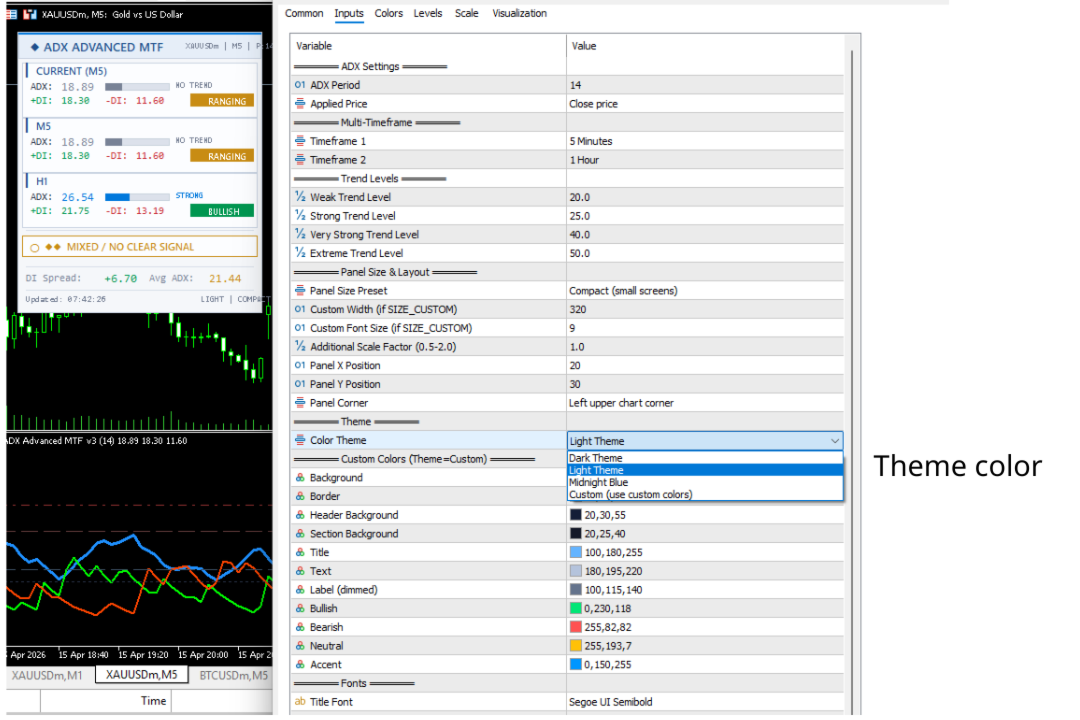
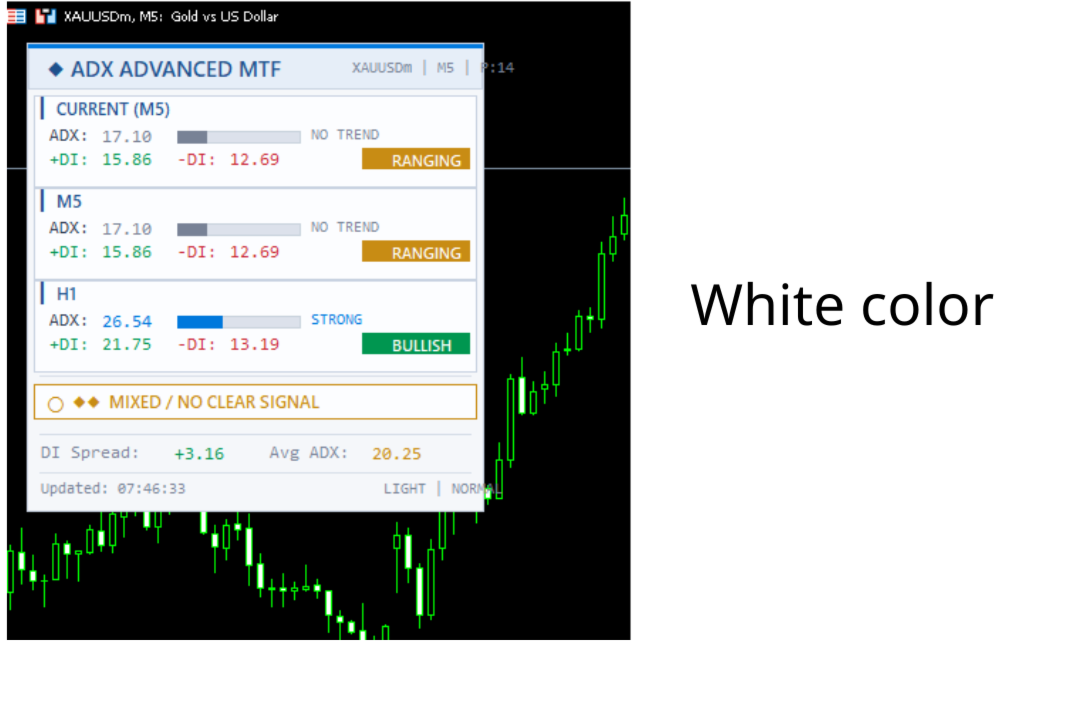
The panel is drawn directly on the main chart window (not the indicator sub-window) and provides a consolidated multi-timeframe dashboard.

Panel Layout

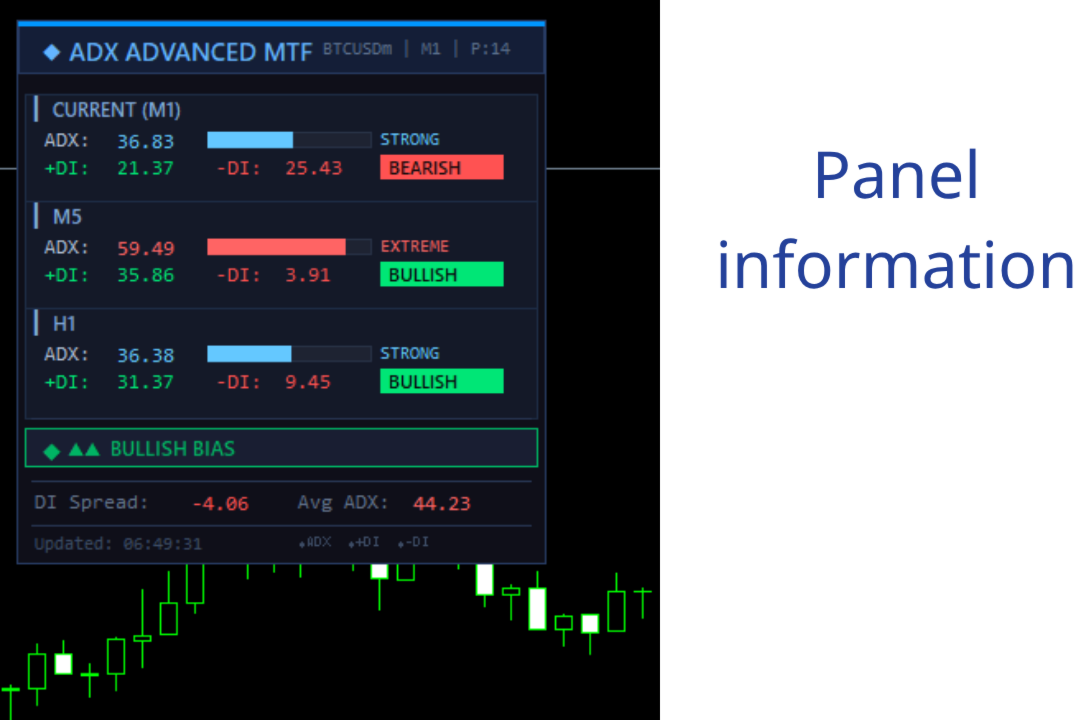
┌─────────────────────────────────────────┐ │ ◆ ADX ADVANCED MTF EURUSD | H4 | P:14 │ ← Header ├─────────────────────────────────────────┤ │ ▎ CURRENT (H4) │ │ ADX: 32.45 ████████░░ STRONG │ ← Current TF │ +DI: 28.10 -DI: 15.30 [BULLISH] │ ├─────────────────────────────────────────┤ │ ▎ M5 │ │ ADX: 18.70 █████░░░░░ NO TREND │ ← Timeframe 1 │ +DI: 14.20 -DI: 16.80 [RANGING] │ ├─────────────────────────────────────────┤ │ ▎ H1 │ │ ADX: 35.60 █████████░ STRONG │ ← Timeframe 2 │ +DI: 30.40 -DI: 12.10 [BULLISH] │ ├─────────────────────────────────────────┤ │ ★ ▲▲ BULLISH BIAS │ ← Confluence Signal ├─────────────────────────────────────────┤ │ DI Spread: +12.80 Avg ADX: 28.92 │ ← Extra Metrics ├─────────────────────────────────────────┤ │ Updated: 14:32:07 ◆ADX ◆+DI ◆-DI │ ← Footer └─────────────────────────────────────────┘

Panel Sections Explained

Header — Shows the indicator name, current symbol, chart timeframe, and ADX period.

Timeframe Blocks (×3) — Each block displays:

  • ADX value with a color-coded progress bar showing strength visually.
  • +DI and -DI values in green and red respectively.
  • Trend badge — a colored label showing BULLISH, BEARISH, or RANGING.

Confluence Signal — Analyzes all three timeframes together:

Signal Condition Meaning
▲▲▲ STRONG BULLISH CONFLUENCE All 3 TFs bullish with ADX ≥ 20 High-confidence long setup
▼▼▼ STRONG BEARISH CONFLUENCE All 3 TFs bearish with ADX ≥ 20 High-confidence short setup
▲▲ BULLISH BIAS 2 of 3 TFs bullish Moderate bullish lean
▼▼ BEARISH BIAS 2 of 3 TFs bearish Moderate bearish lean
◆◆ MIXED / NO CLEAR SIGNAL No majority agreement Stay cautious or wait

Extra Metrics:

  • DI Spread — The difference between +DI and -DI on the current timeframe. A large positive spread confirms strong bullish momentum; a large negative spread confirms bearish momentum.
  • Avg ADX — The average ADX across all three timeframes. Useful for gauging overall market trendiness.

Footer — Displays the last update time and a color legend.

Input Parameters

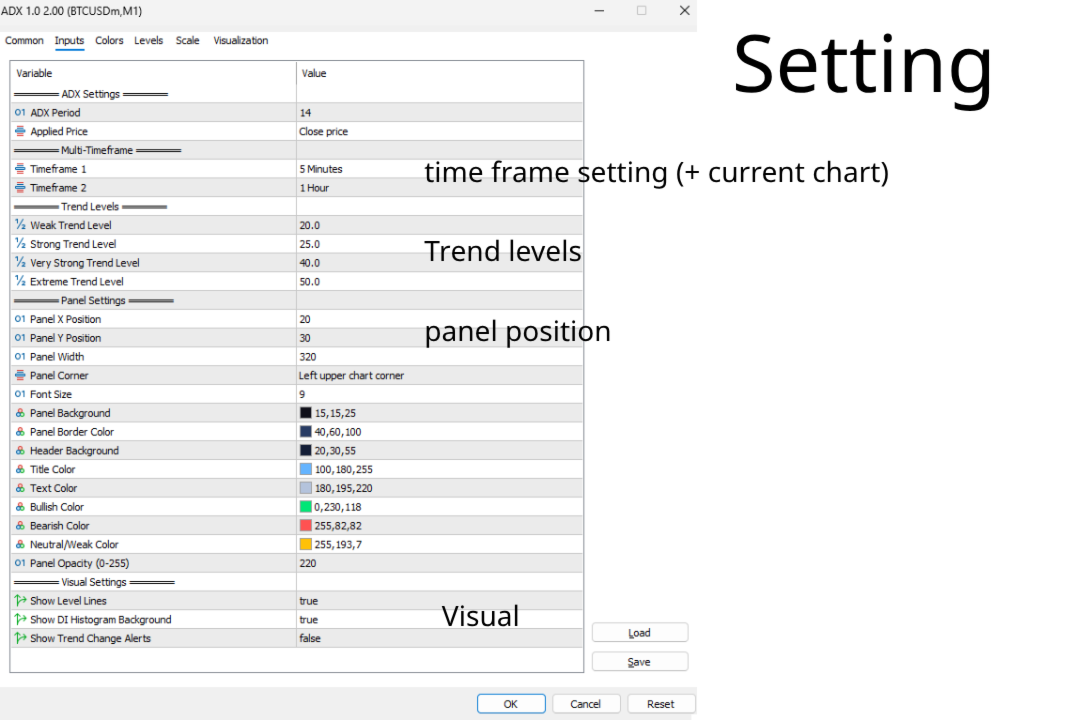
ADX Settings

Parameter Default Description
ADX Period 14 Lookback period for the ADX calculation. Standard is 14. Lower values (e.g., 7–10) react faster but produce more noise. Higher values (e.g., 20–25) are smoother but lag more.
Applied Price Close The price type used for calculations.

Multi-Timeframe

Parameter Default Description
Timeframe 1 M5 First additional timeframe displayed in the panel.
Timeframe 2 H1 Second additional timeframe displayed in the panel.

You can set these to any MT5 timeframe (M1, M5, M15, M30, H1, H4, D1, W1, MN1). The current chart timeframe is always included automatically as the third reference.

Tip: Choose timeframes that complement each other. For example:

  • Scalping: M1 (current) + M5 + M15
  • Intraday: M5 (current) + M15 + H1
  • Swing: H1 (current) + H4 + D1
  • Position: H4 (current) + D1 + W1

Trend Levels

Parameter Default Description
Weak Trend Level 20 ADX below this value indicates no trend (ranging market).
Strong Trend Level 25 ADX above this confirms a trending market.
Very Strong Trend Level 40 Indicates powerful trend momentum.
Extreme Trend Level 50 Extremely rare; often precedes trend exhaustion.

Panel Settings

Parameter Default Description
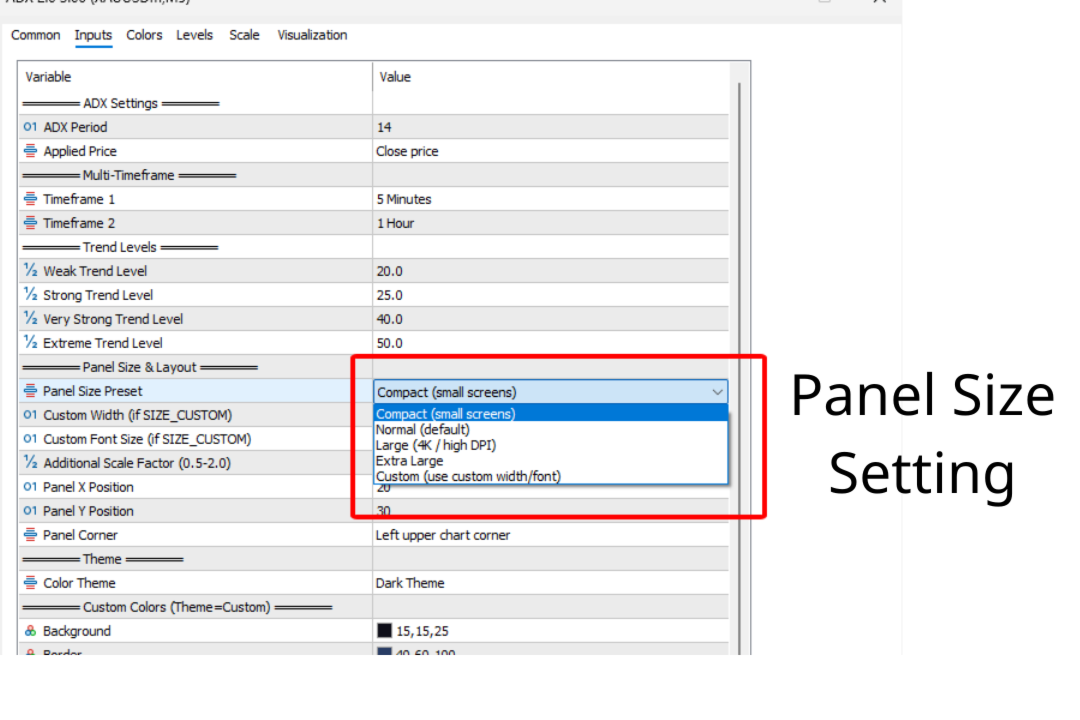
Panel X Position 20 Horizontal offset in pixels from the chosen corner.
Panel Y Position 30 Vertical offset in pixels from the chosen corner.
Panel Width 320 Width of the panel in pixels.
Panel Corner Upper Left Which chart corner the panel anchors to. Options: Upper Left, Upper Right, Lower Left, Lower Right.
Font Size 9 Base font size for panel text.
Panel Opacity 220 Transparency of the panel background (0 = fully transparent, 255 = fully opaque).

Panel Colors

Parameter Default Description
Panel Background Dark navy (15,15,25) Main background color.
Panel Border Muted blue (40,60,100) Border around the panel.
Header Background Deep blue (20,30,55) Header bar fill.
Title Color Light blue (100,180,255) Title text color.
Text Color Light gray (180,195,220) General label color.
Bullish Color Green (0,230,118) Color for bullish elements.
Bearish Color Red (255,82,82) Color for bearish elements.
Neutral Color Amber (255,193,7) Color for weak/neutral states.

Visual Settings

Parameter Default Description
Show Level Lines true Display horizontal ADX strength levels in the sub-window.
Show DI Histogram true Reserved for future histogram background feature.
Show Alerts false Enable pop-up alerts when trend direction changes on TF1 or TF2.

Trading Strategies

Strategy 1 — Confluence Entry

This is the primary strategy the indicator is designed for.

Setup: Wait for the confluence signal to show STRONG BULLISH CONFLUENCE or STRONG BEARISH CONFLUENCE (all 3 timeframes agree).

Entry Rules (Long):

  1. All three timeframes show +DI > -DI.
  2. ADX is above 20 on all three timeframes (confirmed trending).
  3. ADX is rising (trend is strengthening, not fading).
  4. Enter on a pullback to a support level or moving average.

Exit Rules:

  • When any timeframe flips from BULLISH to BEARISH or RANGING.
  • When ADX starts declining on 2 or more timeframes.
  • When the confluence signal downgrades from STRONG to BIAS or MIXED.

Strategy 2 — DI Crossover with Strength Filter

Entry Rules (Long):

  1. +DI crosses above -DI on the current timeframe.
  2. ADX is above 25 (confirming trend strength, not just a temporary cross).
  3. The higher timeframe (TF2) also shows BULLISH direction.

Exit Rules:

  • -DI crosses back above +DI.
  • ADX drops below 20.

Strategy 3 — Trend Exhaustion

Setup: Look for ADX reaching the Extreme level (50+).

Observation:

  1. ADX above 50 indicates a very mature trend.
  2. When ADX begins to decline from extreme levels while DI lines start converging, the trend may be exhausting.
  3. This is not a reversal signal by itself — combine with price action or other indicators.

Tips and Best Practices

Panel position: If the panel overlaps important price action, adjust Panel X Position , Panel Y Position , or change Panel Corner to move it to a less obstructive area. The Upper Right or Lower Right corners often work well.

Avoid low ADX trades: When the confluence signal shows MIXED and the average ADX is below 20, the market is likely choppy. Range-bound strategies (mean reversion, support/resistance bounces) are more appropriate than trend-following.

Combine with price action: The ADX tells you the strength and direction of a trend, but not when to enter. Use candlestick patterns, support/resistance levels, or other confirmation tools for timing entries.

Higher timeframe priority: When TF1 and TF2 disagree, give more weight to the higher timeframe. A bullish signal on H1 with a bearish signal on M5 suggests the M5 move may be a pullback within a larger H1 uptrend.

Alert feature: Enable Show Alerts if you want to be notified when the trend direction changes on your configured timeframes. This is useful for monitoring multiple charts without staring at each one.

ADX period tuning: The default period of 14 works well for most markets. For highly volatile instruments (e.g., crypto, small-cap stocks), consider increasing to 18–21. For slower markets (e.g., major forex pairs on daily charts), 10–12 can provide earlier signals.

Color Coding Reference

Trend Strength Colors

ADX Range Label Color Interpretation
0 – 19.99 NO TREND Gray Market is ranging; avoid trend strategies
20 – 24.99 WEAK Amber Trend is forming but not yet confirmed
25 – 39.99 STRONG Light Blue Confirmed trend with good momentum
40 – 49.99 V.STRONG Light Red Powerful trend; stay with it but watch for signs of exhaustion
50+ EXTREME Light Red Exceptionally strong trend; rare and often unsustainable

Direction Badge Colors

Badge Color Meaning
BULLISH Green +DI > -DI and ADX ≥ 20
BEARISH Red -DI > +DI and ADX ≥ 20
RANGING Amber ADX < 20 regardless of DI positions

Troubleshooting

Panel not visible: Make sure the indicator is attached to the chart (check the sub-window for the ADX lines). The panel is drawn on the main chart window. If it is hidden behind other objects, try changing the Panel Corner or adjusting X/Y positions.

Data shows 0.00 for a timeframe: The requested timeframe may not have enough historical data loaded. Open a chart of that timeframe briefly to force MT5 to download the history, then return to your original chart.

Compilation errors: Ensure you are using MetaTrader 5 (not MT4). The indicator uses MQL5 syntax and is not compatible with MQL4.

Panel overlaps other indicators: Adjust Panel X Position and Panel Y Position , or switch to a different Panel Corner to avoid collisions.

Changelog

Version Changes
2.00 Initial release with MTF panel, confluence detection, progress bars, alerts, and full customization.

This indicator is provided for educational and informational purposes. Always practice proper risk management and test on a demo account before using in live trading.


Yazarın diğer ürünleri
OneClick Trade Panel v1.0 — MT5 Expert Advisor Professional On-Chart Trading Panel with Built-in Risk Calculator What Is It? Group support:  https://www.mql5.com/en/channels/vuongphamtrading OneClick Trade Panel is an all-in-one trading panel that sits directly on your MT5 chart. It replaces the default MT5 one-click window with a full-featured interface combining: order execution, automatic lot calculation, visual SL/TP planning, position monitoring, and batch close operations. Built for speed.
Scalp Signal with SL TP Indicator — Trading Guide What It Does Scalp Signal with SL TP detects high-probability reversal entries by combining RSI extremes with candlestick patterns. It prints buy/sell arrows on chart with auto-calculated SL and 3 TP levels based on ATR. Built for scalping and intraday trading on MT5. Signal Types The indicator generates 3 types of signals. Each requires RSI to be at an extreme level before triggering. 1. Engulfing (Default: ON) The primary and strongest signal.
FREE
SMC Complete Indicator v4 - Trading Guide Introduction Group support:  https://www.mql5.com/en/channels/vuongphamtrading The SMC Complete Indicator v4 is a Smart Money Concepts (SMC) trading tool for MetaTrader 5. It automatically identifies institutional trading patterns to help traders align with "smart money" - banks, hedge funds, and market makers. Core Principle: Large institutions need liquidity to fill massive orders. They create predictable patterns: accumulating at key levels, hunting s
FREE
Trade Journal & Dashboard v1.0 — MT5 Expert Advisor Real-Time Performance Analytics & Trade Journal on Your Chart What Is It? Trade Journal & Dashboard is an on-chart analytics panel that automatically tracks every closed trade and calculates professional performance metrics in real time. No spreadsheets, no external apps — everything you need to evaluate your trading performance lives directly on your MT5 chart. It reads your trade history, computes win rate, profit factor, expectancy, drawdown
FREE
Trendline with break
Minh Vuong Pham
5 (1)
Trendlines with Breaks (TWB) — Trading Guide What Is It? Trendlines with Breaks is an auto-drawn trendline indicator that detects swing pivots, draws dynamic upper/lower trendlines, and fires breakout signals when price closes beyond those lines. No more manually drawing and adjusting trendlines — the indicator does it systematically. *** Group support:  https://www.mql5.com/en/channels/vuongphamtrading Core Settings Parameter Default What It Does Swing Detection Lookback 14 Bars left & right t
FREE
Trading Guide — Heatmap Volume 1. How the Indicator Works Heatmap Volume measures how many standard deviations the current volume is away from its moving average (SMA) . Core formula: stdbar = (Current Volume - SMA of Volume) / Standard Deviation The higher the stdbar value, the more abnormal the volume — and the more attention it deserves. Threshold Levels Level Default Multiplier Meaning Extra High > 4.0 σ Extremely abnormal volume — very rare High > 2.5 σ Unusually high volume — notewor
FREE
Trailing Stop Manager v1.0 — MT5 Expert Advisor Advanced Multi-Mode Trailing Stop for MetaTrader 5 What Is It? Trailing Stop Manager automatically moves your Stop Loss to protect profits as price moves in your favor. Unlike MT5's built-in trailing stop (which only has one mode), this EA offers 4 professional trailing methods that adapt to different trading styles and market conditions. Works on ALL symbols. Attach to any chart and it manages all matching positions. *** Group support:  https://ww
FREE
Trading Guide — Heatmap Volume BarColor What Is This Indicator? Group support:  https://www.mql5.com/en/channels/vuongphamtrading Heatmap Volume BarColor is a companion indicator that paints your candlesticks directly on the main chart based on volume intensity. It uses the exact same logic as the Heatmap Volume indicator (separate window) but applies the color-coding to the candles themselves. Instead of looking down at the volume window, you can read volume strength at a glance right on the pr
FREE
# Super Trend Indicator - User Guide *** Group support:  https://www.mql5.com/en/channels/vuongphamtrading **Version:** 1.04 | **Platform:** MetaTrader 5 | **Release:** January 2025 ## OVERVIEW The **Grid Trend Indicator** combines Supertrend with Dual EMA filters to identify high-probability trading opportunities. Unlike standard indicators showing only bullish/bearish signals, this adds a crucial third state: **NO TREND**. ### Key Features **Triple-State System**: UPTREND (Green) / DO
FREE
CCI advanded
Minh Vuong Pham
5 (1)
CCI VISUAL ENHANCED - MT5 USER GUIDE INTRODUCTION *** Group support:  https://www.mql5.com/en/channels/vuongphamtrading CCI Visual Enhanced for MetaTrader 5 features: Intuitive visual interface Automatic buy/sell signals Smart alert system Dynamic histogram Strong signal & divergence detection INSTALLATION Method 1: MetaEditor (Recommended) Open MT5 → Press F4 (MetaEditor) File → New → Custom Indicator Program Name: CCI_Visual_Enhanced → Finish Delete sample code, paste .
FREE
Support Resistance Channels - Trading Guide *** Group support:  https://www.mql5.com/en/channels/vuongphamtrading Overview The Support Resistance Channels indicator automatically identifies and displays the strongest support and resistance zones based on pivot points. Unlike simple horizontal lines, this indicator creates channels (zones) which better represent real market behavior where support and resistance act as areas rather than precise levels. Key Features Automatic Detection : Identifie
FREE
EMA Offset Bands Indicator - Description & Trading Guide *** Group support:  https://www.mql5.com/en/channels/vuongphamtrading Description The EMA Offset Bands indicator is a custom technical analysis tool designed for MetaTrader 5 that displays a central Exponential Moving Average (EMA) line surrounded by percentage-based offset bands. This indicator creates dynamic support and resistance levels that automatically adjust based on the EMA value. Key Features: Central EMA line (default: 200-peri
FREE
1. Introduction Collective TP Manager v2 is a MetaTrader 5 Expert Advisor designed to automatically manage the collective Take Profit and Stop Loss of multiple open positions on a single symbol. Instead of setting individual TP/SL for each order, this EA monitors the combined profit/loss of all (or filtered) positions and takes action when your targets are reached. *** Group support:  https://www.mql5.com/en/channels/vuongphamtrading 1.1 Why You Need This EA In modern trading, especially scalp
FREE
Daily P/L Limiter v1.0 — MT5 Expert Advisor Automated Daily Loss/Profit Limiter & Max Drawdown Protection Essential for Prop Firm Challenges (FTMO, MFF, TFT, etc.) What Is It? Daily P/L Limiter automatically monitors your account's daily Profit & Loss and takes action when your limits are hit. It tracks both realized (closed trades) and unrealized (open positions) P/L, and can close all positions, disable trading, or send alerts. This is a must-have safety net for prop firm traders, where a sing
FREE
Breakout Trend Trading Strategy Guide *** Group support:  https://www.mql5.com/en/channels/vuongphamtrading Core Concepts The Breakout Trend Indicator identifies two key market behaviors: Breakouts : Price breaks through support/resistance levels Rejections : Price fails to break through these levels Indicator Calculations Top = Highest high of X candles (excluding current) Top1 = Highest high of X candles (including current) Bottom = Lowest low of X candles (excluding current) Bottom1 = Lowest
FREE
Smart mcd
Minh Vuong Pham
MCD Hot Money visualizes three distinct market participant groups as color-coded histograms in a separate sub-window, all normalized to a 0–20 scale. The indicator uses a sensitivity-weighted, offset-adjusted RSI engine to reveal when large institutional capital is entering or exiting the market. *** Group support:  https://www.mql5.com/en/channels/vuongphamtrading BUFFERS Retailer (Green) — fixed at 20, ceiling reference line Hot Money (Yellow) — short-term institutional flow, based on
FREE
MACD ADVANCED - BRIEF DESCRIPTION INTRODUCTION MACD Advanced is an enhanced version of the traditional MACD indicator featuring an intelligent 4-color system that helps traders easily identify market trends and momentum. *** Group support:  https://www.mql5.com/en/channels/vuongphamtrading KEY FEATURES 1. Smart 4-Color System Bright Green (Lime) - Strong Bullish: MACD > 0 and MACD > Signal Light Green (DarkSeaGreen) - Weak Bullish: MACD > 0 but MACD < Signal ️ Bright Red (Red)
FREE
RANGE TRADING METHOD GUIDE Using the MultiTF_TopBottom_Bands Indicator *** Group support:  https://www.mql5.com/en/channels/vuongphamtrading 1. INTRODUCTION 1.1. What is Range Trading? Range Trading is a trading method based on identifying the price oscillation zone (range) of the market and utilizing price movements within this zone to trade. 1.2. Basic Principles Top : Resistance zone - where price typically gets pushed down Bottom : Support zone - where price typically gets pushed up Range :
FREE
1. What It Does OrderByMagic is a display-only Indicator for MT5. It reads all open positions on your account and shows them grouped by Magic Number directly on the chart — updated every 2 seconds. It never opens, closes, or modifies any trade. *** Group support:  https://www.mql5.com/en/channels/vuongphamtrading 2. Why You Need It The Magic Number collision problem Every EA stamps a Magic Number on the orders it opens so it can identify and manage them later. When you run multiple EAs at the
FREE
Quantum Scalp Momentum— Trading Guide Group support:  https://www.mql5.com/en/channels/vuongphamtrading What This Indicator Does The Scalping Combo is a 4-in-1 confluence indicator for MetaTrader 5. It overlays EMA9 and VWAP on your chart, monitors volume spikes and Stochastic momentum internally, then prints BUY/SELL arrows only when all four components align. A dashboard in the chart corner shows real-time status of every component. Components at a Glance Component Default Role EMA 9 9-period

Trade Analyzer Panel — MT5 Expert Advisor Version:   1.20 Platform:   MetaTrader 5 Type:   Panel EA (analysis + quick close) Group support:   https://www.mql5.com/en/channels/vuongphamtrading Overview Trade Analyzer Panel is a real-time dashboard EA for MetaTrader 5. It consolidates position monitoring, risk analysis, P/L simulation, target profit planning, break-even visualization, and quick close controls into a single scrollable on-chart panel. Key Features Feature Description Position Scan
Filtrele:
Nguyen Tho
94
Nguyen Tho 2026.04.01 12:10 
 

Kullanıcı değerlendirmeye herhangi bir yorum bırakmadı

Minh Vuong Pham
4314
Geliştiriciden yanıt Minh Vuong Pham 2026.04.01 14:28
Thanks for your review
Değerlendirmeye yanıt