Orb Strategy X
- Uzmanlar
-
Domantas Juodenis
 Are you looking for a reliable and skilled EA developer who can bring your trading ideas to life with precision and performance?
 - Sürüm: 3.0
- Etkinleştirmeler: 20
ORB Strategy X
(For people who can contact me directly 75% with updates if i do them, discount will be for a month)
This Strategy Was Banned. Now It's Back.
The Opening Range Breakout is not new. Institutional desks have traded it for decades. When it started appearing in automated form on retail platforms, something interesting happened — brokers began quietly restricting accounts that ran it consistently. Requote storms. Artificial slippage on breakout candles. Platform-level execution delays timed precisely to the session open.
The strategy was not broken. The execution was.
ORB Strategy X is the answer to that. Built from scratch with every known broker-side obstruction handled at the code level — freeze zone detection, stop modification conflicts, netting account execution, volume limit enforcement — and tested clean across multiple brokers on live and demo accounts before a single line of marketing was written.
The strategy didn't fail. It was reborn.
What Is the Opening Range Breakout?
The first N minutes of any trading session represent a battle between buyers and sellers establishing the day's reference points. The high and low of that range become a line in the sand. When price breaks out with conviction, institutional order flow typically follows — and that momentum is the edge this EA is built to capture.
Simple in concept. Devastatingly effective when executed with precision and proper risk control.
Risk Management — Built for Every Account Size
This is where ORB Strategy X earns its price. Risk management is not an afterthought — it is the architecture the entire EA is built around.
Small Account — $250 to $500
At this size, capital preservation is the only priority. One bad sequence can end a small account permanently.
Recommended settings:
- Risk Mode: Balance %
- Risk per trade: 0.5% – 1%
- Max trades per day: 1
- SL Mode: Fixed pips (15–20)
- Trailing stop: Disabled (lock in TP instead)
- EOD close: Enabled
With 1% risk on a $300 account, you risk $3 per trade. Position sizing is calculated automatically — no manual lot calculation required. The EA will never risk more than you configure, regardless of spread, volatility, or news events. The focus here is surviving long enough to let compounding do its work.
Medium Account — $800 to $2,800
At this size, you have enough buffer to be systematic and begin building equity with purpose.
Recommended settings:
- Risk Mode: Equity %
- Risk per trade: 1% – 1.5%
- Max trades per day: 1–2
- SL Mode: Auto (ORB boundary) or Fixed pips (20–30)
- TP multiplier: 2.0 – 2.5×
- Trailing stop: Optional — 15–20 pip trail
- EOD close: Enabled or disabled depending on session
Equity-based sizing means the lot size grows as your account grows and shrinks automatically during drawdown — you never need to manually adjust settings as your balance changes. This is the most consistent compounding mode for medium accounts.
Large Account — $5,000 to $10,000+
At this size, protecting capital during losing streaks is as important as maximising returns. Volatility-adjusted sizing becomes the most powerful tool available.
Recommended settings:
- Risk Mode: Volatility-Adjusted (ATR)
- Risk per trade: 0.5% – 1% (lower % because absolute amounts are larger)
- Max trades per day: 1
- SL Mode: Auto (ORB boundary with multiplier)
- TP multiplier: 2.0 – 3.0×
- Trailing stop: Enabled — 20–30 pip trail, 5 pip step
- EOD close: Enabled
- Max lot: Set a hard cap appropriate to your broker
ATR-based sizing automatically reduces exposure during high-volatility periods — news events, market dislocations — and increases it during clean trending conditions. On a $10,000 account at 0.5% risk with a 30-pip SL, you risk $50 per trade. That $50 scales intelligently with the market, not blindly.
The Four Risk Modes Explained
Fixed Lot — Always trades the same lot. Simple and predictable. Best for manual oversight or prop firm challenge phases where consistency matters more than compounding.
Balance % — Risks a fixed percentage of account balance per trade. Grows slowly and safely. Recommended for small accounts where capital preservation is the priority.
Equity % — Risks a fixed percentage of current equity. Automatically adjusts as the account grows or drawdown occurs. The most consistent compounding mode for medium accounts.
Volatility ATR — Scales lot size inversely with ATR. Trades smaller in volatile conditions, larger in clean trending markets. Designed for large accounts and professionals who want dynamic exposure management.
Every mode applies real-time margin checks against the broker's actual margin requirement for the symbol. On high-margin instruments like XAUUSD, in low-leverage environments, or on prop firm accounts near drawdown limits — the EA never sends an order the account cannot afford to open.
Execution — Broker-Proof by Design
This is the engineering that separates ORB Strategy X from every other ORB EA on the market.
The problems brokers create:
- Requoting on breakout candles to induce slippage
- Freeze zones that reject SL/TP modification near market price
- Netting account conflicts where a new order interacts with an existing position's stops
- Volume limits that silently reject orders exceeding broker thresholds
- Filling mode restrictions that vary by broker
How ORB Strategy X handles each one:
Filling mode — auto-detected on initialisation. FOK, IOC, or RETURN selected based on what the broker actually supports.
Freeze zones — price is checked against the freeze level before any order or modification attempt. If frozen, the tick is skipped silently and retried next tick without consuming the session trade slot.
Netting conflicts — existing position SL/TP is stripped before a new order fires. If stripping fails because price is already inside the freeze zone, the order is aborted cleanly.
SL attachment — orders are sent with SL/TP attached. If the broker rejects due to a freeze or netting conflict, the EA automatically falls back to a naked order and attaches stops via PositionModify after fill.
Volume limits — SYMBOL_VOLUME_LIMIT and broker LotsMax are both respected. Lot size is always capped to what the broker will actually accept.
Margin shortfall — if free margin cannot cover the minimum lot, the signal is skipped silently this tick and re-evaluated next tick. No broker rejection. No session flag consumed. No log spam.
Tested clean across: EURUSD H1, M30, M1 — 200+ trades XAUUSD D1 — 275 trades GBPUSD M30 — 213 trades
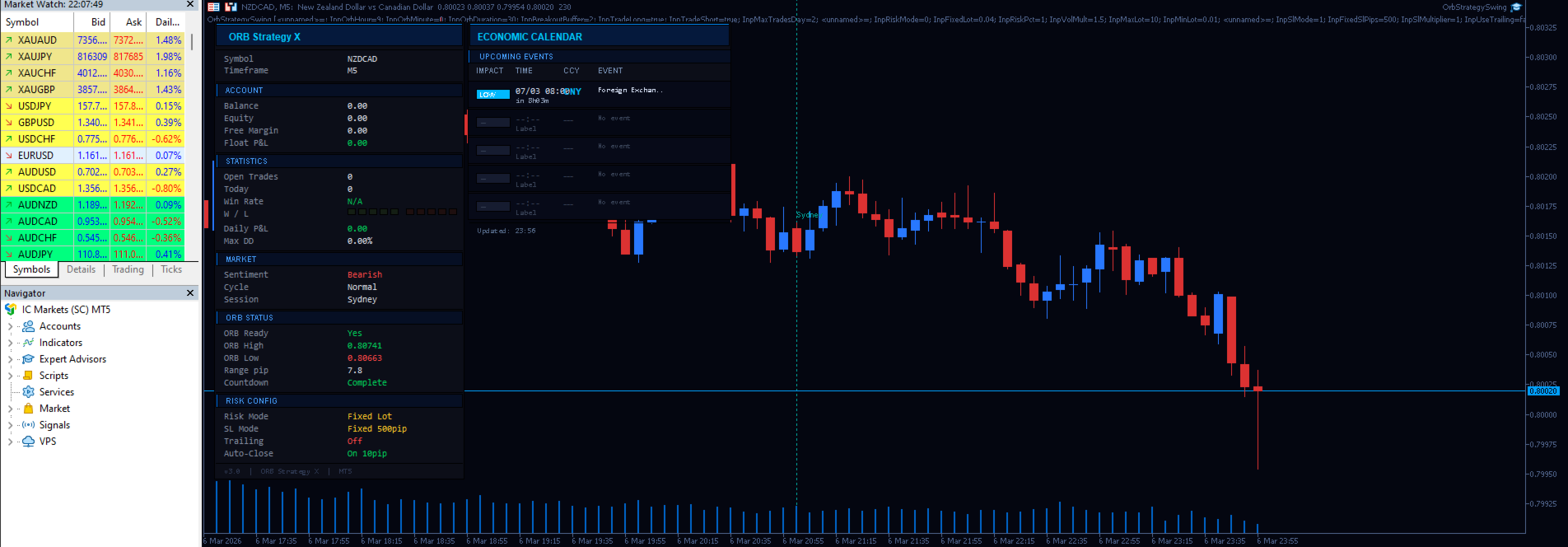
Live On-Chart Dashboard
A professional dark-themed panel gives complete visibility while the EA runs.
Performance panel:
- Session P&L and cumulative P&L
- Win rate and trade count
- Win/loss badge row — last 10 trades visualised as coloured blocks
- Current drawdown vs peak equity
- Market sentiment indicator based on H1 close analysis
- Volatility cycle display: High / Normal / Low based on ATR
Economic calendar panel:
- Upcoming high-impact events for the next 24 hours
- Impact level colour-coded: red (high), amber (medium), blue (low)
- Time-to-event countdown per row
- Live and demo accounts only — clearly labelled in Strategy Tester
Session overlap lines:
- Sydney, Tokyo, London, New York session opens marked on the chart
- Colour-customisable per session
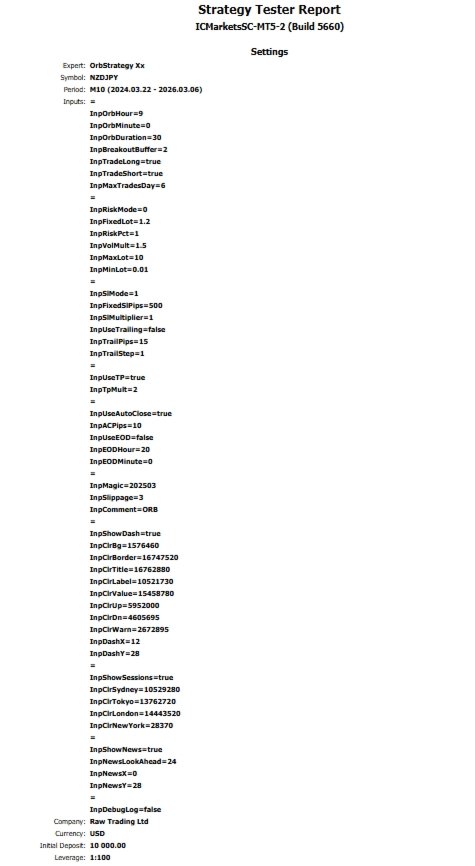
Full Parameter Reference
ORB Core
- Start Hour / Minute — session open in server time
- Duration — length of the opening range window in minutes
- Breakout Buffer — extra pips beyond the boundary to confirm the breakout
- Trade Long / Short — enable or disable each direction independently
- Max Trades Per Day — hard cap on daily order count
Risk Management
- Risk Mode — Fixed Lot / Balance % / Equity % / ATR Volatility
- Fixed Lot — lot size used in fixed mode
- Risk % — percentage of balance or equity risked per trade
- Volatility Multiplier — ATR scaling factor for volatility mode
- Min / Max Lot — absolute floor and ceiling on position size
Stop Loss
- SL Mode — Auto (ORB opposite boundary) or Fixed pips
- Fixed SL Pips — distance from entry for fixed mode
- SL Multiplier — extends the auto SL distance beyond the boundary
Trailing Stop
- Enable — on/off
- Trail Distance — pips behind current price
- Trail Step — minimum movement before the SL is updated
Take Profit
- Enable — on/off
- TP Multiplier — take profit as a multiple of SL distance
Auto-Close
- Pip Profit Target — close position at N pips profit
- EOD Close — close all positions at end of session
- EOD Hour / Minute — configurable close time in server time
Execution
- Magic Number — unique identifier for this EA's orders
- Slippage — maximum allowed slippage in points
- Comment — order comment label
Display
- Dashboard on/off, full colour palette, screen position
- Session lines on/off with per-session colour control
- News panel on/off, look-ahead hours, position
- Debug logging — verbose execution log for troubleshooting
Frequently Asked Questions
Does this work on prop firm accounts? Yes. Netting account support is a core feature. Per-trade risk sizing, daily trade limits, and EOD close are all configurable to meet prop firm challenge rules precisely.
Which broker is recommended? Any regulated ECN broker with tight spreads on your chosen instrument. The EA auto-detects filling mode and adapts to broker execution constraints automatically.
What timeframe should I use? H1 is the primary tested timeframe and the most consistent. M30 works well on GBPUSD. D1 suits XAUUSD swing trading. M1 is supported and requires adequate account funding due to higher minimum lot margin requirements.
Can I run it on multiple symbols simultaneously? Yes. Use a unique Magic Number per instance to keep orders isolated.
Does it repaint or use future data? No. The ORB range is built exclusively from closed bars within the defined session window using only historical data.
Why is it priced at a premium? Because cheap EAs cut corners on execution and risk management — and you pay for that with your account. Every edge case in this EA was found on a live account, diagnosed from real broker logs, and fixed before this version was released.
ORB Strategy X — Professional Opening Range Breakout for MetaTrader 5.