SAFE Robot new
- Uzmanlar
-
Petros Shatakhtsyan
 Specialist in the field of modeling automated systems, combinatorial and optimization problems, dynamic and linear programming.
 - Sürüm: 1.4
- Güncellendi: 19 Ocak 2026
- Etkinleştirmeler: 10
SAFE Robot new is a fully automatic robot that has the level of a professional trader.
Since the robot has a low-drawdown trading mode, it can be used in PROP companies to complete challenge stages.
"SAFE Robot new" underwent detailed optimization using a specialized neural network utility. This work resulted in the creation of universal reference points, as well as neuron weights for operation across different brokerage firms and trading accounts.
The robot underwent extensive testing on these basic points, which resulted in finding optimal points for opening/closing orders, as well as for increasing the lot.
Over a certain period of time, current minimums/maximums, as well as current support/resistance levels, are formed.
The robot implements several trading strategies, including trend-following strategies, range trading strategies, and support/resistance breakout strategies.
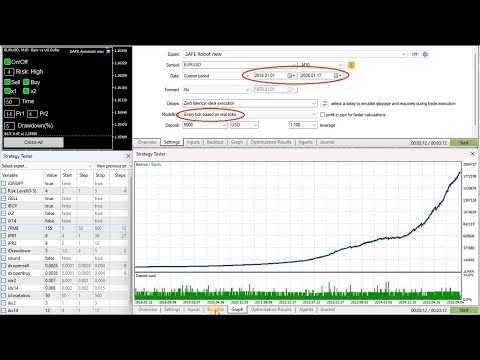
The robot was tested for seven years on real ticks at over 20 brokerage firms. This allows it to show consistent results for EURUSD.
Since real ticks were unavailable at many brokerage firms before 2018, we recommend running tests on real ticks starting in 2018, in the "Every tick based on real ticks" mode.
Two trading modes are used:
- Trading without lot size increase.
- Trading with two-level lot size increase (not Martingale or grid).
In all cases, the lot increase is limited by the "Margin Level", which, if necessary, suspends the increase and also forcibly closes open positions.
Below are the input/output objects that allow you to select the Expert Advisor's operating modes directly on the chart with a single click:
- On/Off: (iONOFF) – button for turning the robot on/off
- Risk Level: 0-No Risk, 1-Very Low, 2-Low, 3-Medium, 4-High, 5-Extreme
- Sell: (iSELL), Buy (iBUY) – by clicking the Sell or Buy buttons, you can enable (green) or disable (red) the opening of a new order (position)
- x1: (iX2) – First lot increase (2-4 times).
- x2: (iX14) – Second lot increase (4-10 times).
- Time: (iTIME) – number of bars (3 – 2000), time interval 5 x Time minutes
- Pr1 (iPR1), Pr2 (iPR2) – minimum standard order closing points (virtual TP, Pr1 – for the minimum lot, Pr2 – for the increased lot)
- Drawdown (iDrawdown) – virtual SL, % of the balance (equity drawdown), at which the order will be closed
- Sound – sound signal to warn of a high lot;
- Close All: Button for manually closing all positions for a given symbol (for Hedging and Netting accounts)
All these operating modes are located as buttons on the left side of the chart, and you can change their values directly on the chart
You don't need to open the list of robot settings. They are used for testing only.
The minimum lot for opening an order is set automatically, depending on the balance size and the selected risk.
Robot Requirements:
- Main symbols: EURUSD, and other pairs with low spreads
- Account currency: USD/EUR
- Timeframe: Any
- Account type: Standard/Pro recommended, no commission
- Minimum deposit: $300 or more. $1000 or more recommended
- Leverage: Starting from 1:30 or more. Recommended: 1:100 - 1:500
Author
Petros Shatakhtsyan is an expert in the development of automated trading systems with over a decade of experience in the Forex market.