Trade Stats Multicurrency

Trade Stats (Expert Advisor for MetaTrader 5) — Detailed Description

1. Overview

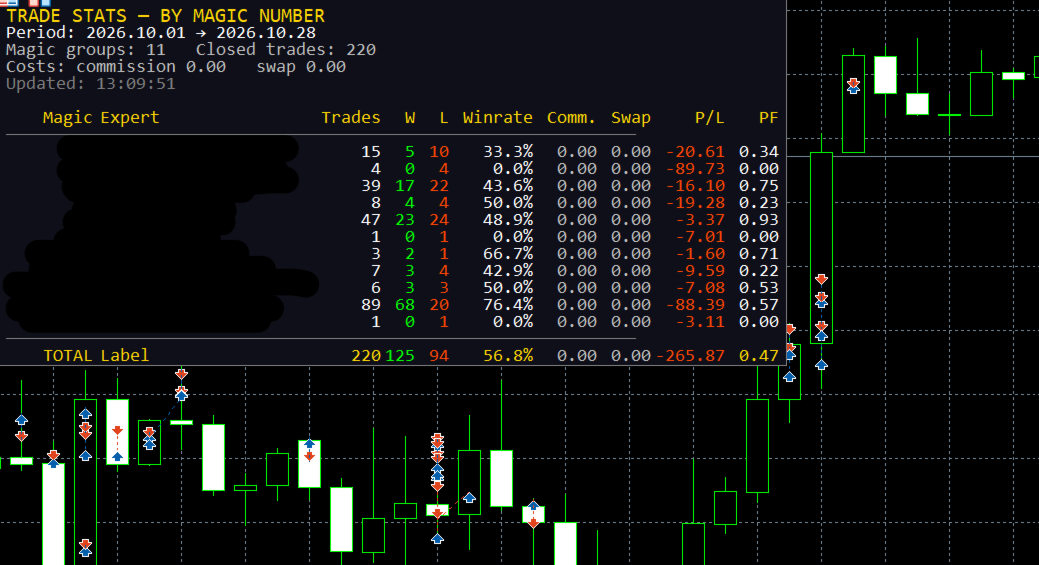
Trade Stats is a non-trading analytics Expert Advisor for MetaTrader 5. It reads the account's closed-deal history, groups every trade by its Magic Number, and renders a compact live statistics table directly on the chart. Its purpose is to answer one question: which Expert Advisor on this account is actually making money, and how much each one costs to run?

It places no orders, modifies nothing, and never touches positions. It only reads history and draws chart labels.

2. What it does not do

  • No trading, no money management, no signals — it cannot open or close anything.
  • No writes to the account, no external network calls, no file uploads.
  • Only chart objects are created, all with the prefix ByMagic_ , and all of them are removed in OnDeinit .

3. How it works

  1. History selection — on each refresh the EA calls HistorySelect(from, to) for the period defined by the period inputs (current month, current week, today, last N days, or custom dates). Server time is used.
  2. Deal filtering — only balance-bearing market deals are counted ( DEAL_TYPE_BUY / DEAL_TYPE_SELL ). Balance operations are ignored. Optional filters: exact Magic number, symbol name, and "hide manual trades" (magic = 0).
  3. Exit deals define a "trade" — a row counter is incremented only for deals that reduce a position: DEAL_ENTRY_OUT , DEAL_ENTRY_OUT_BY , DEAL_ENTRY_INOUT . Entry deals do not inflate the trade count.
  4. Cost accumulation — commission, broker fees, swap and (optionally) an estimated spread are accumulated for all deals, including entries, because brokers book these costs on entry deals.
  5. Net result per deal — profit + commission + fee + swap + spread estimate , where each component is included only if the corresponding switch is enabled. This same value feeds wins/losses, gross profit/loss, P/L, best/worst trade.
  6. Expert name resolution (highest priority first):
    1. explicit user map from InpExpertNames ( magic=Name; );
    2. the most frequently repeated "meaningful" comment of the entry deals for that magic (voting mechanism);
    3. the last meaningful comment;
    4. otherwise the row is shown as — . Broker technical comments are filtered out: strings starting with [ , sl , tp , so: , from # , by # , and comments containing cancelled , canceled , partial , split , timeout , deleted , as well as comments made only of digits and punctuation.
  7. Sorting — by Magic ascending (manual trades always last), or by net P/L, Profit Factor, trade count or Winrate, ascending/descending; ties are resolved by Magic for a stable order.
  8. Rendering — a lightweight label grid is redrawn: column widths are measured with TextSetFont / TextGetSize from the header and the visible cells, so the table auto-sizes to the content in either language.

4. Panel layout

Five information lines above the table:

Line Example (English)
Title TRADE STATS — BY MAGIC NUMBER
Period Period: 2026.10.01 → 2026.10.28
Counters Magic groups: 4 Closed trades: 187
Costs Costs: commission -42.10 swap -3.55 spread* -18.40
Status Updated: 13:20:57 * spread is estimated from ticks

Then the table header, rows, and the TOTAL row. If the number of groups exceeds InpMaxRows , the remainder is reported as ... and N more Magic .

Columns: Magic | Expert | Trades | W | L | Winrate | [Comm.] | [Swap] | [Spread*] | P/L | PF

Comm. , Swap and Spread* appear only when their switches are on. Numeric columns are right-aligned, the expert name is left-aligned and truncated with .. when it exceeds the column width (hard cap 320 px). Colour coding is applied per cell: profit/positive → clrLime , loss/negative → clrOrangeRed , neutral → clrSilver ; the magic of manual trades is shown in silver, program magic numbers in cyan.

5. Metrics and formulas

  • Trades — number of position-closing deals in the period.
  • W / L — closed deals with net result > 0 and < 0; zero-result deals are counted separately (not shown as a column, exported in CSV).
  • Winrate — wins / (wins + losses + zeros) × 100 .
  • Gross profit / gross loss — sums of positive and absolute negative net results.
  • P/L — net result of all deals of the group, including the enabled cost components.
  • PF (Profit Factor) — grossProfit / grossLoss ; when there are no losses but there is profit, it is capped at 99.99 ; otherwise `0.
  • Best / worst trade, average trade, last deal time — computed and exported to CSV (not shown on the panel).
  • TOTAL row — sums across all groups plus a portfolio-level Winrate and Profit Factor.

6. Inputs

Input Default Meaning
InpPeriodMode PERIOD_CURRENT_MONTH Current month / current week / today / last N days / custom dates
InpLastDays 30 Number of days for the "last N days" mode
InpCustomFrom , InpCustomTo 2025.01.01 , 2025.12.31 Custom date range (end date is extended to 23:59:59)
InpMagicFilter 0 Analyse a single magic number (0 = all)
InpShowManual true Include manual trades (magic = 0)
InpSymbolFilter "" Analyse one symbol only ("" = all)
InpShowCommission true Show the commission column and include commission + fees in P/L
InpShowSwap true Show the swap column and include swap in P/L
InpShowSpread false Show the spread column and subtract an estimated spread from P/L
InpSpreadMaxCalc 300 Maximum number of new spread estimations per refresh (0..5000)
InpLanguage LANG_ENGLISH Panel and journal language: English (default) or Russian
InpShowComment true Derive expert names from deal comments
InpCommentLen 20 Maximum length of a derived expert name
InpExpertNames "" Explicit name map, e.g. 20261012=GoldScalperPro;1=ScalperProM30
InpSortMode STATS_SORT_MAGIC Magic / net P/L / Profit Factor / trades / Winrate
InpSortDesc true Descending order (ignored for "by Magic", which is always ascending)
InpRefreshSec 5 Minimum interval between recalculations, seconds (1..3600)
InpPanelX , InpPanelY 10 , 20 Panel offset in pixels
InpTextColor , InpBgColor , InpHeaderColor clrWhite , C'15,15,25' , clrGold Colours
InpFontSize , InpFontName 9 , Consolas Font (size 6..30); a monospaced font keeps the columns aligned
InpMaxRows 30 Maximum visible rows (0 = all)
InpExportCSV false Write a CSV snapshot on every refresh
InpCSVFileName stats_by_magic.csv CSV name, created in the terminal's MQL5\Files sandbox

Invalid inputs (period bounds, font size, comment length, refresh interval, spread budget) abort initialisation with INIT_PARAMETERS_INCORRECT and a journal message.

7. Spread estimation

MT5 does not store the spread in a deal, so when InpShowSpread is enabled the EA estimates it: it copies ticks ±5 seconds around the deal time with CopyTicksRange , takes the tick nearest to the execution moment, and computes

spread_cost = 0.5 × (ask − bid) × volume × contract_size

The value is stored as a negative contribution to the result and cached per deal ticket in a ticket-sorted array with binary search, so a deal is estimated once. Estimations are throttled by InpSpreadMaxCalc per refresh; if no ticks exist for that moment, nothing is cached and the deal is retried on a later refresh. The panel and journal explicitly mark this value as an estimate ( spread* ).

8. CSV export

FILE_WRITE | FILE_CSV | FILE_ANSI , ; delimiter, one row per magic group, always in English:

Magic;Expert;Trades;Wins;Losses;Zeros;Winrate;Commission;Swap;Spread;NetProfit;
GrossProfit;GrossLoss;ProfitFactor;BestTrade;WorstTrade;AvgTrade;LastDeal

The file is written to the terminal data folder ( MQL5\Files\... ), so it can be read by other tools or services.

9. Localization

All runtime text (panel and journal messages) is resolved through the T(ENUM_TXT) helper from a compile-time table of English or another strings. English is the default; switching InpLanguage changes the panel on the next refresh without restarting the EA. The labels in the EA properties dialog are static English strings (MQL5 cannot localize input captions at runtime).

10. Performance notes

  • Recalculation is throttled by InpRefreshSec and driven by both a 1-second timer and OnTick , so the panel stays alive without ticks; the first calculation runs in OnInit .
  • One HistorySelect plus one linear pass over the deals of the period per refresh; grouping is a short linear scan, sorting is insertion sort (the number of groups is small).
  • Chart labels are created once and only updated afterwards; stale row/column objects are deleted by HideUnusedRows , and the background is recreated if it disappears (e.g. after a template change).

11. Limitations and assumptions

  • Only closed deals inside the selected period are analysed; open positions and floating P/L are not included.
  • Trade counts follow the broker's deal structure: partial closes appear as several exits, and DEAL_ENTRY_INOUT (netting reversals) is treated as an exit.
  • Results are shown in the account deposit currency; no currency conversion is performed.
  • Commission is reported exactly as the broker records it; if a broker books commission on entry deals only, that behaviour is preserved.
  • Spread is an estimate by design and is not identical to the broker's actual mark-up.
  • Expert names are heuristics based on comments; use InpExpertNames for exact labelling.
  • The EA is an indicator/analytics tool: it is intended to be attached to any chart and left running.

12. Compatibility and validation

  • MetaTrader 5, MQL5; compiled with 0 errors and 0 warnings on compiler build 6230.
  • The published binary is compiled for X64 Regular so it is accepted by the MQL5 Market (AVX2/AVX512 builds are rejected there).
  • Verify on a demo account or in the Strategy Tester's visual mode that the panel fits the chart, that column widths are correct in both languages, and that exported CSV values match the account history.

13. Risk disclaimer

Trade Stats only reports historical statistics. Past performance of an Expert Advisor does not guarantee future results, and spread estimates and comment-derived names may differ from broker reality. Always validate any decision based on these numbers against your own records.

Рекомендуем также
Atlas Trade Desk MT5 Atlas Trade Desk MT5 is a visual trade panel, risk manager and lot calculator for manual MetaTrader 5 traders. Plan market and pending orders directly on the chart, calculate position size from your selected risk, adjust Entry, Stop Loss and Take Profit visually, and manage open positions from one clean dashboard. The tool is built for discretionary traders who want faster order preparation, clearer risk control and safer position management without switching between multipl
# Ronin Copier - Tactical Prop Sync **Zero-Latency, Zero-DLL Local Trade Copier Built for Serious Prop Traders.** **EARLY ADOPTER PROMOTION (LIMITED COPIES):** - **First 10 copies:** **$59** (Current Stage) - **Next 10 copies:** **$99** - **Final Price:** **$199** *Price increases automatically as review milestones are reached.* --- Managing multiple MT5 accounts across prop firms (FTMO, FundedNext, Alpha Capital, etc.) or private brokers? **Ronin Copier** provides seamless, millisecond-
Keyboard Scalper Pro
Mauricio Eduardo Lara Perez
Keyboard Scalper Pro is a customizable keyboard trading utility for MetaTrader 5. It is designed for traders who want direct manual control of order execution without being limited to a fixed keyboard layout. Every trading hotkey can be configured to match the user's preferred workflow, while the default layout is built around the numeric keypad for fast operation. The utility does not generate signals and does not decide when to trade. The trader chooses the setup, direction and timing. Keyb
Binance Quotes Updater
Andrey Khatimlianskii
5 (1)
Этот сервис предназначен для онлайн трансляции котировок   криптовалют с биржи Binance в Ваш MetaTrader 5. Он подойдет Вам идеально, если Вы хотите видеть цены всех интересующих вас криптовалют в режиме онлайн — в Обзоре рынка и на графиках MetaTrader 5. После запуска сервиса Вы получите полноценные, обновляемые автоматически графики криптовалют. Вы можете применять к ним шаблоны, цветовые схемы, технические индикаторы и любые неторговые утилиты, а также делать любые графические построения. Един
Boleta de negociação, adiciona automáticamente as ordens Take Profit e Stop Loss quando excutada uma ordem de compra ou venda. Ao apertar as teclas de atalho (A, D, ou TAB), serão inseridas duas linhas de pre-visualização, representando as futuras ordens de take profit (azul) e stop loss (vermelho), as quais irão manter o distanciamento especificado pelo usuário. Ditas ordens só serão adicionadas ao ser executada a ordem inicial. Ao operar a mercado, as ordens pendentes de take profit, e stop lo
С легкостью возьмите под контроль свою торговую рутину с революционным менеджером времени сделок. Этот мощный инструмент автоматизирует выполнение ордеров в назначенное время, изменяя ваш подход к торговле. Создавайте персонализированные списки задач для различных торговых действий, от покупки до выставления ордеров, без ручного вмешательства. Руководство по установке и вводу данных Trades Time Manager Если вы хотите получать уведомления о работе советника, добавьте наш URL в терминал MT4/MT5 (с
This Order Risk Control Panel is designed with the core concept of "Simple, Efficient and Accurate Risk Control". Tailor-made for all types of traders, whether they are beginners or experienced professionals, it allows for quick mastery and realization of refined risk management in every trade. The panel deeply integrates risk control logic into the entire order placement process, fundamentally addressing the pain points of "cumbersome risk control settings and delayed operations" in traditiona
VRD Quant estimates how much capital and what lot size each EA on your MT5 account needs, from that EA's own drawdown history. What it does for you Go beyond a single drawdown figure: 2,000 bootstrap resamples of the EA's closed trades give a 95th-percentile drawdown. Get a suggested operating capital (p95 drawdown divided by the 20% warn band) and a fixed lot (the smallest lot observed). See expectancy and p95 drawdown on each EA's Passport card, from 10 closed trades upward. Repeatable results
Product Name: Smart Switch Dashboard STOP WASTING SECONDS. SECONDS COST MONEY. Are you losing trades because you're fumbling through the Market Watch? Is your workspace messy and slowing you down? In trading, Speed is everything. If you aren't organized, you are losing money to traders who are. Smart Switch Dashboard is not just a tool—it is your COMMAND CENTER . Designed for serious Scalpers and Day Traders who demand Speed, Precision, and Zero Lag. DOMINATE YOUR WORKFLOW 1. ULTRA-FAST SY
Telegram to mt5 pro
Janet Abu Khalil
4 (4)
Telegram to MT5 Pro — Расширенный копировщик сигналов Telegram с Auto-Fix, Multi-TP, управлением риском и полным управлением сделками Telegram to MT5 Pro — профессиональный копировщик сигналов Telegram Telegram to MT5 Pro автоматически копирует торговые сигналы из Telegram прямо в ваш аккаунт MetaTrader 5 в реальном времени с полным контролем риска, исполнения и управления сделками. Система состоит из двух компонентов: • Expert Advisor (EA), работающий внутри MetaTrader 5 • Desktop bridge прило
Данный продукт — советник поддержки автоматического закрытия, который помогает трейдерам, торгующим по собственному усмотрению, выполнять уже принятые правила закрытия. Вы можете задавать условия закрытия по заданному времени, подтверждению свечи или пересечению/приближению MA, и использовать TIME, CANDLE и MA CROSS по отдельности или одновременно. Также можно отображать MA таймфреймов 1H, 4H, дневного, недельного и месячного на текущем графике. Это не продукт, автоматизирующий торговые решения
Product Name MT5 Gold & Silver Multi-Language Trading Panel V17.00 Introduction This is a professional trading panel designed specifically for manual gold and silver traders. It supports five languages: English, Chinese, Spanish, Arabic, and German. The panel automatically detects gold and silver symbols, so users do not need to enter symbol codes manually. It is compatible with most brokers worldwide, including standard accounts, zero spread accounts, and raw spread accounts. Users only need t
Welcome to Smart Algo Trade Panel Manager MT5 - the ultimate   risk management tool designed to make trading more effective based on user needs.  It is a comprehensive solution for seamless trade planning, position management, and enhanced control over risk. It does not matter weather you a beginner or an advanced trader, or a scalper needing rapid executions, SmartAlgo Trade Panel  adapts to your needs offering flexibility across all markets of your choice. You can put SL, Lot and TP of choice
MAFX Trading Manager
Mark Anthony Noblefranca Nazarrea
MAFX TRADING MANAGER 6 Управление сделками, торговый журнал и аналитика для MetaTrader 5 MAFX Trading Manager 6 — это единое торговое рабочее пространство для MetaTrader 5, объединяющее ручное и полуавтоматическое управление сделками, визуальное планирование ордеров, инструменты управления рисками, встроенный торговый журнал и подробную торговую аналитику. Программа предназначена для трейдеров, которые предпочитают самостоятельно принимать торговые решения и использовать специальные инструменты
EA Health Monitor is a free indicator for MetaTrader 5 that shows how each Expert Advisor on your account is doing. It groups the account history by magic number. Every EA gets its own row. Manual trades have a row of their own, and a total sits at the bottom. It only reads the account history and open positions. It never opens, changes or closes a trade. Standalone: Everything is built in. You do not need to buy or install any other product named on this page. Quick start Attach EA Health Monit
FREE
Phantom Currency Heatmap Pro Real-Time Currency Heatmap & Trade Recommender for MetaTrader 5 Stop guessing which pairs to trade! The Phantom Currency Heatmap Pro- is an essential visual tool for manual traders. It analyzes the 8 major currencies (USD, EUR, GBP, JPY, AUD, CAD, CHF, NZD) across all 28 major pairs to calculate their true underlying strength in real-time. By pairing the strongest currency against the weakest currency, you give yourself the highest probability of catching a stron
TradeControl Utility Pro — торговая утилита для MetaTrader 5, созданная для трейдеров, которым важeн риск-менеджмент и визуальный порядок на графике. Программа сочетает в себе компактную панель с минималистичным Flat-дизайном и инструменты для виртуального планирования сделок (VRP) и группировки позиций. Примечание: Это утилита для ручной торговли, а не автоматический советник или генератор сигналов. Программа не дает гарантий прибыли. Торговля на финансовых рынках сопряжена с высоким риском.
Профессиональный индикатор НОВОСТЕЙ и Торговых Сессий теперь доступен в MetaTrader 5. Теперь на одном циферблате собрана вся важнейшая рыночная информация! Новости, расположенные на временной шкале. Планировать своё рабочее время ещё никогда не было так просто и удобно... Шкалу новостей можно переключить на день, два, неделю, месяц вперёд или назад (смотрите подробности в коротком видео). Все новости обновляются в реальном времени. Благодаря встроенным фильтрам, можно настроить отображение но
MQL5 Blogs : https://www.mql5.com/en/blogs/post/761446 MT4 Version : https://www.mql5.com/en/market/product/136790 MT5 Version : https://www.mql5.com/en/market/product/136791 Time Wizard is a professional trading assistant built for traders who need speed, timing, and execution control in one clean dashboard. This Expert Advisor is designed for event-based trading, scheduled execution, and fast semi-automatic order management. It allows you to prepare your orders in advance, define the exact
CauCa Client is a smart execution engine built for the Fishing Strategy, a method designed to patiently cast entries, scale positions in layers, and react quickly when market conditions become favorable. It focuses on precision order handling, dynamic layer management, and stable behavior in fast-moving sessions. This Client EA is ideal for traders who want disciplined, rule-based execution without manual stress. It helps maintain consistency in grid expansion, order structure, and timing, while
FREE
Trend Alignment Scanner Pro The Ultimate Volatility Direction Score Dashboard for MetaTrader 5 Are you tired of flipping through dozens of charts just to find a single valid setup? Meet Trend Alignment Scanner Pro , an institutional-grade multi-symbol, multi-timeframe dashboard engineered to detect high-probability market imbalances in real-time. Powered by our proprietary Volatility Direction Score (VDS) Engine , this scanner filters out market noise and ranks the most explosive, trend-aligned
COPYLATOR – MT5 Trade Copier Key Highlights Multi-Sender / Multi-Receiver Trade Replication – supports one-to-many, many-to-one, and many-to-many configurations, with complete real-time copying of market orders, pending orders, SL, and TP. Advanced drawdown protection – closing, blocking, pending-order deletion, manual and automatic reset mechanisms. Automatic symbol mapping – finds correct symbols, alerts if missing, allows manual override. Hedging & Netting support – auto-detected, no manual s
Risk Guardian — Ultimate Equity & Drawdown Protection Protect your capital. Stay disciplined. Trade smarter. Risk Guardian is a powerful utility that helps traders automatically control daily risk and secure profits based on equity. Designed for MetaTrader 5, it’s lightweight, efficient, and extremely easy to use. Key Features: Daily Drawdown Limit (% based) Absolute Equity Target (e.g., stop trading after reaching 110,200 USD) Auto-close All Positions, Orders & Charts Visual Dashboard on C
Quick Trade Panel Pro
Nicolas Olivier Menetrey
5 (1)
Панель торговли в один клик с автоматическим управлением лотом и риском Quick Trade Panel Pro — это интуитивно понятная торговая панель, разработанная для трейдеров, которые хотят быстро исполнять ордера, сохраняя полный контроль над рисками. Основные функции Автоматический расчёт размера лота на основе процента от доступной маржи Настраиваемый Stop Loss в пунктах, автоматически применяемый к каждой сделке Размер лота фиксируется во время серии сделок для обеспечения постоянного размера позиции
FREE
Guardian Yield Keeper is a utility Expert Advisor for traders who want real-time exit management and profit protection for open positions on the current symbol. This EA does not open new trades and does not generate entry signals. Its job is simple: monitor existing positions and close them when your profit or risk conditions are met . It is especially suitable for traders using DCA, Grid, Martingale, or basket trading systems and looking for a dedicated management layer that is more flexible th
News Risk Guard protects the positions you already hold when a scheduled economic release is about to hit. It is a risk tool. It does not predict direction, it does not look for entries of its own, and it makes no claim about profit. The calendar is built into the product: 4,101 releases covering 15 recurring events. No internet permission, no DLL, no file to install, and it behaves the same in the Strategy Tester as it does on a live chart. WHAT IT DOES 1. Event protection window    A confi
ZenTrade Manager MT5
Ian Paolo Lumba Castro
ZenTrade Manager MT5 Stop Computing. Start Trading. Are you tired of missing perfect entries because you were busy calculating pip distances, lot sizes, or monetary risk? Do you overthink your Stop Loss and Take Profit levels, only to watch the market reverse while you're adjusting lines? ZenTrade Manager MT5 removes the mental load of order management, allowing you to focus 100% on what matters: Reading the Market. You handle the high-level analysis and decide when to enter; ZenTrade handles t
Initial Balance Session  The Initial Balance Indicator is a professional-grade tool for MetaTrader 5 traders, designed to enhance your trading by visualizing key price levels during the Australia, Tokyo, London, and US market sessions. This indicator plots the Initial Balance (IB) range—the high, low, and midpoint prices—formed during the first hour of each session, with a customizable box to highlight the range and optional extension levels for advanced analysis. Optimized for smooth, flicker-f
VR MultiPrice Analysis - индикатор определяющий силу валюты в валютной паре. Для примера возьмем пару EUR/USD. Как определить какая валюта в текущий момент слабая а какая сильная? Самый простой и надежный способ это сравнить валюту EUR относительно других валют, исключив валюту USD. Варианты распределения силы: EUR растет против других валют - это признак того что валюта стала более привлекательна для трейдеров и инвесторов или вышли хорошие новости. EUR падает против других валют - это признак
​Notification Spy Protector is a MetaTrader 5 Expert Advisor (Utility) that monitors your trading activity and sends real-time alerts to your mobile device (via MT5 Push) and/or Telegram. Equipped with a solid and reliable Account Protector, this utility is fully compatible and highly recommended for Prop Firm trading to safeguard your accounts from violating drawdown limits. It also provides advanced transaction filters and a clean on-chart dashboard. Never miss a trade. Protect your account f
С этим продуктом покупают
Trade Assistant MT5
Evgeniy Kravchenko
4.43 (216)
Помогает рассчитать риск на сделку, простая установка нового ордера с помощью линий, управление ордерами с функциями частичного закрытия, 7 типов трейлинг-стопа и другие полезные функции. Дополнительные материалы и инструкции Инструкция по установке - Инструкция к приложению Функция Линии   - отображает на графике линию открытия, стоп-лосс, тейк-профит. С помощью этой функции легко установить новый ордер и увидеть его дополнительные характеристики перед открытием. Управление риском   -   функ
Добро пожаловать в Trade Manager EA — лучший инструмент для управления рисками, предназначенный для упрощения, точности и эффективности торговли. Это не просто инструмент для размещения ордеров; это комплексное решение для удобного планирования торгов, управления позициями и усиленного контроля над рисками. Независимо от того, начинающий вы трейдер, опытный специалист или скальпер, нуждающийся в быстром исполнении, Trade Manager EA адаптируется к вашим потребностям и работает с любыми активами:
Local Trade Copier EA MT5
Juvenille Emperor Limited
4.94 (149)
Local Trade Copier EA MT5 — это быстрый и гибкий копировщик сделок для копирования и управления сделками между несколькими счетами MetaTrader 5 на одном компьютере с Windows или Windows VPS. Он сочетает локальную синхронизацию сделок с настройками на стороне Receiver для управления размером лота, рисками, фильтрацией сделок, сопоставлением символов, управлением сделками и защитой счета. Настройте терминалы Transmitter и Receiver примерно за 1 минуту и копируйте ручные сделки или сделки, открыты
Telegram to MT5 Multi-Channel Copier   автоматически копирует торговые сигналы из ваших Telegram- и Discord -каналов прямо в MetaTrader 5. Без ботов, без браузерных расширений, без ручного копирования. Сигнал приходит в Telegram или Discord — и советник открывает сделку в вашем терминале за считанные секунды. А перед тем как копировать канал, встроенный бэктестер покажет, что этот канал сделал бы на вашем счёте. Продукт состоит из двух компонентов: приложения для Windows, которое слушает ваши Te
Strategy Ledger Pro
Abdullah Uygar Tuna
5 (14)
Теперь доступно на русском языке. Strategy Ledger Pro — панель анализа счёта для MetaTrader 5, работающая только на чтение. Она разделяет результаты счёта по советникам, стратегиям, символам и magic-номерам, чтобы было видно, что на самом деле вносит каждый из них. Панель доступна на 11 языках: English, Français, Deutsch, Español, Italiano, Português, Русский, Türkçe, 中文, 日本語 и 한국어. Перед загрузкой демоверсии. Маркет запускает демоверсию любого платного продукта только в тестере стратегий. Эта
TradePanel MT5
Alfiya Fazylova
4.88 (170)
Trade Panel — это многофункциональный торговый помощник. Приложение содержит более 50 торговых функций для ручной торговли и позволяет автоматизировать большинство торговых операций. Инструкция к приложению: https://www.mql5.com/ru/blogs/post/756476 Пробная версия приложения для демо-счета: https://www.mql5.com/ru/blogs/post/750864 Как установить приложение: https://www.mql5.com/ru/blogs/post/750096 Как тестировать приложение в визуальном режиме: https://www.mql5.com/ru/blogs/post/770274 Как уст
Копируйте сигналы из Telegram по своим торговым правилам Telegram to MT5 Signal Trader автоматически копирует текстовые торговые сигналы из открытых и закрытых каналов и групп Telegram в MetaTrader 5. Управляйте несколькими поставщиками сигналов и счетами MT5 из одного приложения для компьютера, задавая индивидуальные параметры риска и торговли для каждого поставщика . Для копирования не нужны бот Telegram и настройка API. Просто войдите в свой аккаунт Telegram по номеру телефона или QR-коду и в
================================================================================ POC BREAKOUT - V20.72. Full Professional Grade Toolkit ================================================================================ POC Breakout is a full MetaTrader 5 trading dashboard for discretionary traders who want breakout signals, Point of Control (POC) context, volume profiles, order flow, market structure, news, alerts, and advanced trade planning in one professional workspace. Attached directly to you
News Trade EA MT5
Konstantin Kulikov
4.55 (11)
Представляю полезного робота, которым пользуюсь сам уже несколько лет. Может использоваться как в полуавтоматическом, так и в полностью автоматическом режиме. >>> Chat <<< Программа содержит гибкие настройки торговли на новостях экономического календаря. В тестере стратегий проверить нельзя. Только реальная работа. В настройках терминала необходимо добавить новостной сайт в список разрешенных URL. Кликните Сервис > Настройки > Советники. Поставьте галочку в "Разрешить WebRequest для следующих U
Dealer's Panel No signal decides anything here — a hand does. One click, and the panel calculates what's underneath: lot size from risk, target from a 30-step balance ladder that remembers exactly how far an account has climbed. Toggle between market and pending without touching an input field. Set a stop, and the take-profit can write itself — a fixed share of the balance, translated into price with no arithmetic left for the trader to get wrong. One trade live at a time; it won't let a seco
Farmed Hedge Yield Farming | All Markets (Manual - Hybrid - Semi/Automated EA) VERIFIED TRADING RESULTS - Farmed Hedge Yield Axi Copy:  https://www.mql5.com/en/signals/2356376 - Farmed Hedge Yield Exn Copy:   https://www.mql5.com/en/signals/2356404 - Farmed Hedge Yield V Copy:  https://www.mql5.com/en/signals/2357156 IMPORTANT NOTICE: FarmedHedge is a MANUAL-FOCUSED TRADING UTILITY ,not a fully automated EA. Results shown on this Signal include manual trades and overall strategic management.
MT5 to Telegram Signal Provider — это простой в использовании полностью настраиваемый инструмент, который позволяет отправлять определённые сигналы в чат, канал или группу Telegram, превращая вашу учётную запись в провайдера сигналов . В отличие от большинства конкурирующих продуктов, он не использует импорт DLL. [ Демо ]   [ Руководство ] [ Версия MT4 ] [ Версия для Discord ] [ Канал в Telegram ]  New: [ Telegram To MT5 ] Настройка Доступно пошаговое руководство пользователя . Никаких знаний A
Следующее обновление — версия 2.52 уже скоро! [НОВОЕ] Приготовьтесь к 4 новым важным функциям, призванным улучшить ваш анализ рынка и торговый процесс. Мы выводим анализ рынка на новый уровень с помощью 4 новых функций, разработанных с учётом ваших потребностей в трейдинге. Представляем: 1. TRADE OVERVIEW DASHBOARD 2. CONFLUENCE AT ZONE 3. STRONG & WEAK HIGH/LOW 4. OTE 1. TRADE OVERVIEW DASHBOARD Панель, которая помогает легче понимать общую картину рынка, предоставляя рекомендации для поддержк
Trade copier MT5
Alfiya Fazylova
4.61 (57)
Trade Copier — это профессиональная утилита, предназначенная для копирования и синхронизации сделок между торговыми счетами. Копирование происходит от счета/терминала поставщика к счету/терминалу получателя, которые установлены на одном компьютере или vps. Перед покупкой вы можете протестировать демо-версию на демо-счете. Демо-версия здесь . Полная инструкция здесь . Основной функционал и преимущества: Русифицированный интерфейс, поддержка на русском языке. Поддерживает копирование МТ5 > МТ5, МТ
Telegram To MT5 Ultra
Mirel Daniel Gheonu
5 (5)
Telegram To MT5 — копировщик сигналов Превратите торговые сигналы из ваших Telegram-каналов в реальные ордера MT5 — автоматически, на любом количестве счетов, с полным контролем над риском и правилами. Telegram To MT5 связывает VIP / сигнальные каналы, на которые вы уже подписаны в Telegram, с вашим терминалом MetaTrader 5. Бесплатное приложение-компаньон для ПК читает сообщения (даже из каналов, которые не допускают ботов), а этот советник исполняет их на вашем счёте — применяя ваши настройки р
VirtualTradePad PRO SE MT5 — профессиональный торговый центр управления для MetaTrader 5 VirtualTradePad PRO SE — это премиальная торговая панель и рабочая среда управления сделками на графике для MetaTrader 5 . Она создана для трейдеров, которым нужны более быстрое исполнение, более понятный контроль позиций, структурированное управление сделками, визуальное планирование уровней и профессиональный рабочий процесс прямо с графика. Это не просто панель BUY / SELL. PRO SE объединяет ручную торговл
RETAILBERG FOOTPRINT CHART PRO — Order-Flow Workspace for MetaTrader 5 Version 7.00  |  Professional System  |  31 tools  |  One chart A full 150-page illustrated User Manual is included. Please read the full manual to understand this feature packed footprint chart elements and ui. https://www.mql5.com/en/blogs/post/777982 DEMO / STRATEGY TESTER — PLEASE READ FIRST
Exp COPYLOT CLIENT for MT5
Vladislav Andruschenko
3.97 (35)
Профессиональный копировщик сделок для MetaTrader 5 Быстрый, профессиональный и надежный копировщик сделок для MetaTrader . COPYLOT позволяет копировать сделки Forex между терминалами MT4 и MT5 с поддержкой счетов Hedge и Netting . Версия COPYLOT для MT5 поддерживает: - MT5 Hedge → MT5 Hedge - MT5 Hedge → MT5 Netting - MT5 Netting → MT5 Hedge - MT5 Netting → MT5 Netting - MT4 → MT5 Hedge - MT4 → MT5 Netting Версия MT4 Полное описание + DEMO + PDF Как купить Как установить Как получить файлы жур
Grid Manual MT5
Alfiya Fazylova
4.73 (22)
Grid Manual — это торговая панель для работы с сеточными стратегиями. Утилита универсальная, имеет гибкие настройки и понятный интерфейс. Работает с сеткой ордеров не только в сторону усреднения убытков, но и в сторону наращивания прибыли. Трейдеру не нужно создавать и сопровождать сетку ордеров, это сделает утилита. Достаточно открыть ордер и Grid manual автоматически создаст ему сетку ордеров и будет сопровождать его до самого закрытия. Полная инструкция и демо-версия здесь . Основные особенно
Anchor Trade Manager
Kalinskie Gilliam
5 (9)
Your EAs cannot see each other, but Anchor can. Anchor gives you one place to coordinate your EAs, manage risk, and decide when trading is allowed. It works alongside the trading bots you already use without any changes to them. The Problem One EA opens a trade. Then another starts trading. The next thing you know, you wake up to multiple grids built across your account. Each EA may be doing exactly what it was designed to do, but together they can place far more risk on your account than you in
The Patch
Mian Rameez Ali
The Patch It never opens a trade. It walks behind the ones that did. Every open position, every pending order — checked twice a second for the one thing that's easy to forget: a stop, a target. Found bare, it doesn't ask. It writes the missing number in, measured in points from wherever the position began, and moves on to the next. No strategy, no opinion on direction. Just the quiet assumption that nothing should ever sit on the market unprotected — not because someone decided it shouldn't,
RS Trade Copier - сверхбыстрый локальный копировщик сделок с полноценным графическим интерфейсом. Хватит вбивать номера счетов вручную. Никаких 200+ непонятных параметров в настройках. Надёжный и гибкий инструмент для копирования торговых операций между несколькими терминалами MT5 и MT4. Подходит как опытным трейдерам и сигнал-сервисам, так и частным инвесторам. Позволяет синхронизировать торговлю от одного или нескольких источников к одному или нескольким приёмникам с высокой точностью и минима
Power Candles Strategy Scanner — самооптимизирующийся инструмент для поиска настроек по нескольким инструментам Power Candles Strategy Scanner использует тот же самооптимизирующийся движок, что и индикатор Power Candles — для всех символов в вашем Market Watch, одновременно. На одной панели отображается информация о том, какие символы в данный момент являются статистически торгуемыми, какая стратегия выигрывает на каждом из них, оптимальная пара Stop Loss / Take Profit, а также отправляется увед
Trader Evolution
Siarhei Vashchylka
5 (7)
"Trader Evolution" - Утилита, предназначенная для трейдеров, которые используют в своей работе волновой и технический анализ. Одна вкладка утилиты способна управлять капиталом и открывать ордера, а другая - помогать в построении волн Эллиотта, уровней поддержки и сопротивления, а также линий тренда. Инструкция/Мануал ( Обязательно читайте перед приобретением ) | Версия для МТ4 Преимущества 1. Торговля в несколько кликов. В панели доступны немедленные и отложенные ордера 2. Управление капиталом
YuClusters
Yury Kulikov
4.93 (43)
Внимание: Ознакомиться с работой программы можно с помощью бесплатной версии  YuClusters DEMO . YuClusters это профессиональная система анализа рынка. Для трейдера открываются уникальные возможности анализа потока ордеров, объемов торговли, движения цены используя различные графики, профили, индикаторы, графические объекты. YuClusters оперирует данными на основе ленты сделок или тиковой информации, в зависимости от того, что доступно в котировках финансового инструмента.  YuClusters позволяет с
Prop Guardian Risk Manager MT5 – Drawdown, Risk & Hedge Protection for Prop Firm and Managed Accounts Prop Guardian Risk Manager is a professional risk-control utility for MetaTrader 5, designed for prop firm traders, money managers and anyone who wants strict account-level risk protection. It does not generate trading signals, strategy entries or trading decisions. Instead, it runs in the background, monitors your account risk and can automatically block new exposure, close managed positions or
The product will copy all telegram signal to MT5 ( which you are member) , also it can work as remote copier.  Easy to set up, copy order instant, can work with almost signal formats, image signal,  s upport to translate other language to English Work with all type of channel or group, even channel have "Restrict Saving Content", work with  multi channel, multi MT5 Work as remote copier: with signal have ticket number, it will copy exactly via ticket number. Support to backtest signal. How to s
Floor Watch
Syed Tauqeer Hussain Shah
Floor Watch One number, watched every thirty seconds: how far equity has fallen since the day began — or since its highest point, if it's told to trail the peak instead of the open. Cross the line and it doesn't argue. Every open position closes, every pending order vanishes, and anything that slips through afterward gets shut the moment it appears. Not asked. Removed. The floor holds until the clock turns 5 AM Pakistan time — then, and only then, does the day start over. One rule. No except
EA Auditor
Stephen J Martret
5 (6)
EA Auditor is an independent analysis tool for traders evaluating Expert Advisors and trading signals on MetaTrader 5. It audits backtest reports, reviews posted developer signals, and cross-verifies the two against each other to help traders assess strategies before committing capital. The MQL5 market offers a wide range of Expert Advisors from many developers, with varying approaches, quality, and transparency. EA Auditor provides a consistent, data-driven framework for reviewing them, answer
Telegram to MT5 Coppy
Sergey Batudayev
5 (10)
Telegram to MT5: Идеальное решение для копирования сигналов Упростите свою торговлю с Telegram to MT5 — современным инструментом, который копирует торговые сигналы прямо из каналов и чатов Telegram на вашу платформу MetaTrader 5, без необходимости использования DLL. Это мощное решение обеспечивает точное исполнение сигналов, широкие возможности настройки, экономит время и повышает вашу эффективность. [ Instructions and DEMO ] [ FAQ ] [ How atach logs properly ] [ Settings descrition ] Ключевые
Фильтр:
Нет отзывов
Ответ на отзыв