Trend Alignment Scanner Pro

Trend Alignment Scanner Pro

The Ultimate Volatility Direction Score Dashboard for MetaTrader 5

Are you tired of flipping through dozens of charts just to find a single valid setup? Meet Trend Alignment Scanner Pro, an institutional-grade multi-symbol, multi-timeframe dashboard engineered to detect high-probability market imbalances in real-time.

Powered by our proprietary Volatility Direction Score (VDS) Engine, this scanner filters out market noise and ranks the most explosive, trend-aligned assets directly at the top of your chart.

🚀 Why Trend Alignment Scanner Pro?

Unlike basic dashboards that only look at simple moving averages, this scanner evaluates market state using a three-dimensional mathematical approach: Trend Strength, Volatility Expansion, and Relative Momentum across 3 critical timeframes (H1, H4, and D1).

1. Proprietary VDS Engine (Max Score: ±100)

The scanner runs a background algorithm on every selected symbol, calculating a unified score based on:

  • Trend Component (ADX): Evaluates structural direction and trend strength (Up to 40 Points).

  • Volatility Component (ATR Ratio): Compares current volatility against historical means to detect breakout expansions (Up to 40 Points).

  • Momentum Component (RSI): Measures immediate velocity to ensure you don’t enter a exhausted market (Up to 20 Points).

2. Dynamic Auto-Ranking & Sorting

The dashboard automatically rearranges itself in real-time. Aset dengan momentum paling kuat dan searah (fully aligned) secara otomatis naik ke baris paling atas, memastikan fokus Anda selalu tertuju pada instrumen yang sedang bergerak aktif.

3. Premium UX & Multi-Screen Ready

  • HiDPI / 4K Scaling Support: Automatically detects your terminal’s screen DPI. Perfect for high-res monitors and multi-screen setups—no overlapping text or broken layouts.

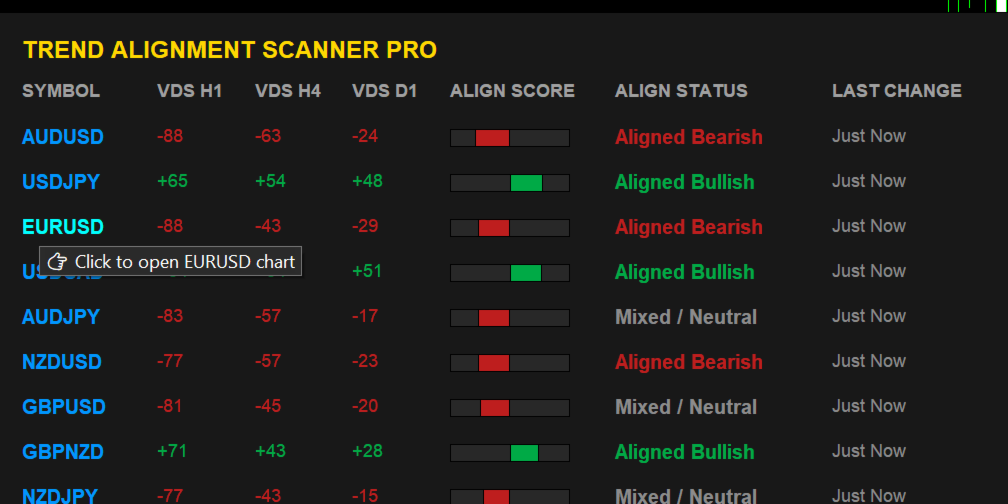
  • Interactive Controls: Hover over a symbol to see actionable tooltips, and Single-Click any symbol row to instantly open its specific chart in a new window.

4. Intelligent Triple-Alert Framework with Session Cooldown

Never miss a major market shift again. Receive alerts via MT5 Terminal Pop-up, Mobile Push Notifications, and direct Telegram Bot messages.

💡 Smart Cooldown Feature: Choose between traditional minute-based cooldowns or Session-Based Cooldowns (Asia/London/NY). This unique feature completely eliminates alert fatigue during tight consolidation phases or low-liquidity sessions.

🛠️ Technical Optimization & Stability

  • Asynchronous History Loader: Built-in ForceLoadHistory safely syncs data with your broker's server in the background. Say goodbye to terminal freezing, memory leaks, or blank dashboards.

  • Zero-Lag Engine: Highly optimized memory allocation handles up to 40 complex symbols simultaneously without putting a strain on your CPU or VPS.

🎛️ Key Input Parameters

  • Scanner Period: Custom lookback period for the mathematical engine (Default: 200).

  • Max Symbols: Safety ceiling to protect your system's memory.

  • Alert Cooldown Mode: Switch between Minute Cooldown or Market Session Cooldown.

  • Telegram Bot Credentials: Easy integration using your HTTP API Bot Token and Chat ID.

  • Interface Customization: Adjust X and Y offsets to perfectly align the dashboard with your existing chart templates or One-Click trading panels.

📌 Trading Recommendations

  1. Fully Bullish (+70 to +100): Look for buying opportunities on lower timeframe pullbacks.

  2. Fully Bearish (-70 to -100): Look for shorting opportunities on lower timeframe bounces.

  3. TF Conflict (Chop): Avoid trading. The asset is currently in a range-bound or rotational market state.

🎁 Limited Introductory Offer

We believe in providing institutional value at a retail price. Trend Alignment Scanner Pro is currently available at a discounted introductory price. The price will increase significantly upon our next major feature update.

Download the free trial version now to test its lightning-fast performance!


USER MANUAL & SETUP GUIDE

Enable WebRequest (Mandatory for Telegram Alerts)

Because this indicator sends real-time HTTP requests to the Telegram API, you must grant MT5 permission to communicate with external servers:

  1. In MT5, go to Tools -> Options (or press Ctrl + O ).

  2. Click on the Expert Advisors tab.

  3. Check the box: "Allow WebRequest for listed URL:"

  4. Double-click the green plus sign + and add this exact URL:

    [https://api.telegram.org]

  5. Click OK.


🚨 Pre-Configuring Your Market Watch (CRITICAL)

The scanning engine reads structural data directly from your terminal's active cache. Please strictly follow this rule:

  • Populate First: You must add all your desired trading assets into your MT5 Market Watch window before dragging the indicator onto the chart. If an asset is not visible in Market Watch, the scanner cannot see or process it.

  • Modifying Assets Later: If you add new pairs or remove existing ones from your Market Watch panel later on, the engine requires a fresh initialization. You must re-attach the indicator to the chart (or simply switch timeframes back and forth) to force the scanner to reload your updated asset list.


⚙️ Core Input Parameters Reference

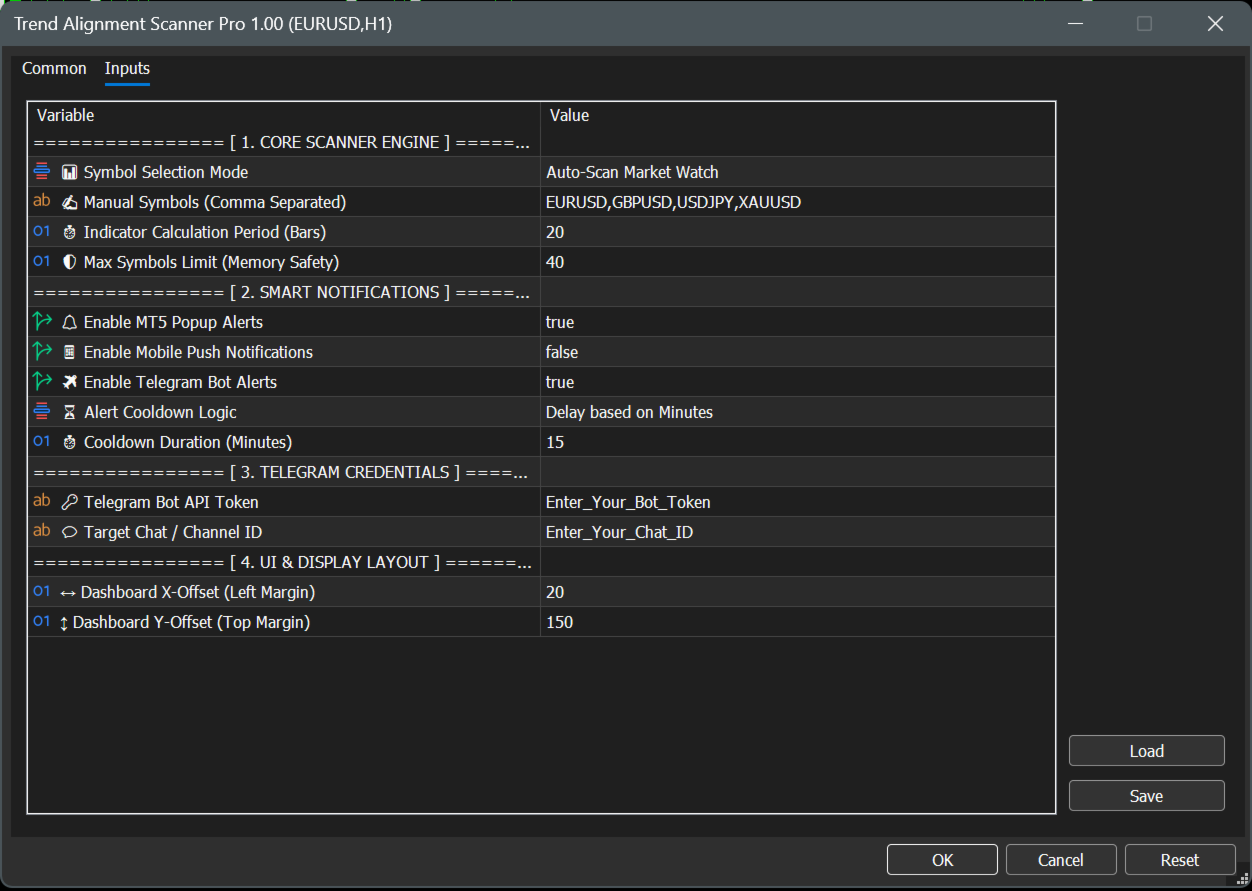
================ [ 1. CORE SCANNER ENGINE ] ================

  • 📊 Symbol Selection Mode

    • Auto-Scan Market Watch : Automatically scans all financial assets currently active and visible inside your MT5 Market Watch window. (Recommended for dynamic setups).

    • Use Manual List Below : Tells the engine to look only at the custom symbols typed in the parameter below.

  • ✍️ Manual Symbols (Comma Separated)

    • Your custom asset text field (Default: EURUSD,GBPUSD,USDJPY,XAUUSD ). Note: Ensure names exactly match your broker's specific naming convention (e.g., XAUUSD.ecn or XAUUSD+).

  • ⏱️ Indicator Calculation Period (Bars)

    • The mathematical lookback window for the underlying ADX, ATR, and RSI calculations. Safely defaulted to 20 bars for highly responsive, lag-free day-trading signal generation.

  • 🛡️ Max Symbols Limit (Memory Safety)

    • Safety ceiling filter (Default: 40 ). Limits the maximum number of concurrent assets being processed to protect your terminal's CPU and memory from overloading on low-spec VPS servers.

================ [ 2. SMART NOTIFICATIONS ] ================

  • 🔔 Enable MT5 Popup Alerts

    • Toggles standard desktop terminal audio alerts and visual pop-up dialog boxes on or off (Default: true ).

  • 📱 Enable Mobile Push Notifications

    • When set to true , sends instant trade signals directly to your iOS or Android MetaTrader mobile app (Requires your personal MetaQuotes ID configured in MT5 options).

  • ✈️ Enable Telegram Bot Alerts

    • Connects the scanning engine directly to your automated Telegram channel or private chat (Default: true ).

  • ⏳ Alert Cooldown Logic

    • Delay based on Minutes : Uses a traditional timeline lockout defined by the parameter below.

    • Based on Market Session : Locks further alerts for that specific asset until the market transitions into the next global trading session (Asia, London, or New York) to eliminate choppy market noise.

  • ⏱️ Cooldown Duration (Minutes)

    • Sets the exact duration lock (Default: 15 minutes) when Delay based on Minutes is selected.

================ [ 3. TELEGRAM CREDENTIALS ] ================

  • 🔑 Telegram Bot API Token

    • The secure HTTP API token obtained from Telegram's @BotFather used to authorize and authenticating your custom bot.

  • 💬 Target Chat / Channel ID

    • The unique target identification number of your personal private chat window or public/private Telegram channel destination.

================ [ 4. UI & DISPLAY LAYOUT ] ================

  • ↔️ Dashboard X-Offset (Left Margin)

    • Sets the exact horizontal starting pixel coordinates from the left border of your chart screen (Default: 20 ).

  • ↕️ Dashboard Y-Offset (Top Margin)

    • Sets the exact vertical starting pixel coordinates. Defaulted to 150 to guarantee the graphical user interface completely clears the built-in MetaTrader One-Click Trading terminal buttons.

🤖 3. Step-by-Step Telegram Bot Integration

To receive automated market alerts directly onto your phone or channel, follow these steps:

  1. Create a Bot: Open Telegram, search for @BotFather , and send the command /newbot . Follow the prompts to name your bot and copy the HTTP API Token provided.

  2. Paste Token: Paste this token into the exact 🔑 Telegram Bot API Token input field.

  3. Get Your Chat ID: Search for @userinfobot on Telegram and send any message. It will immediately reply with your unique Id.

  4. Paste Chat ID: Paste this number into the exact 💬 Target Chat / Channel ID field.

  5. Note: If sending to a Telegram Group/Channel, add your bot to the group as an Administrator and use the group’s Chat ID instead (usually starts with a minus sign, e.g., -100xxxxxxxxx ).

📊 4. Understanding the User Interface

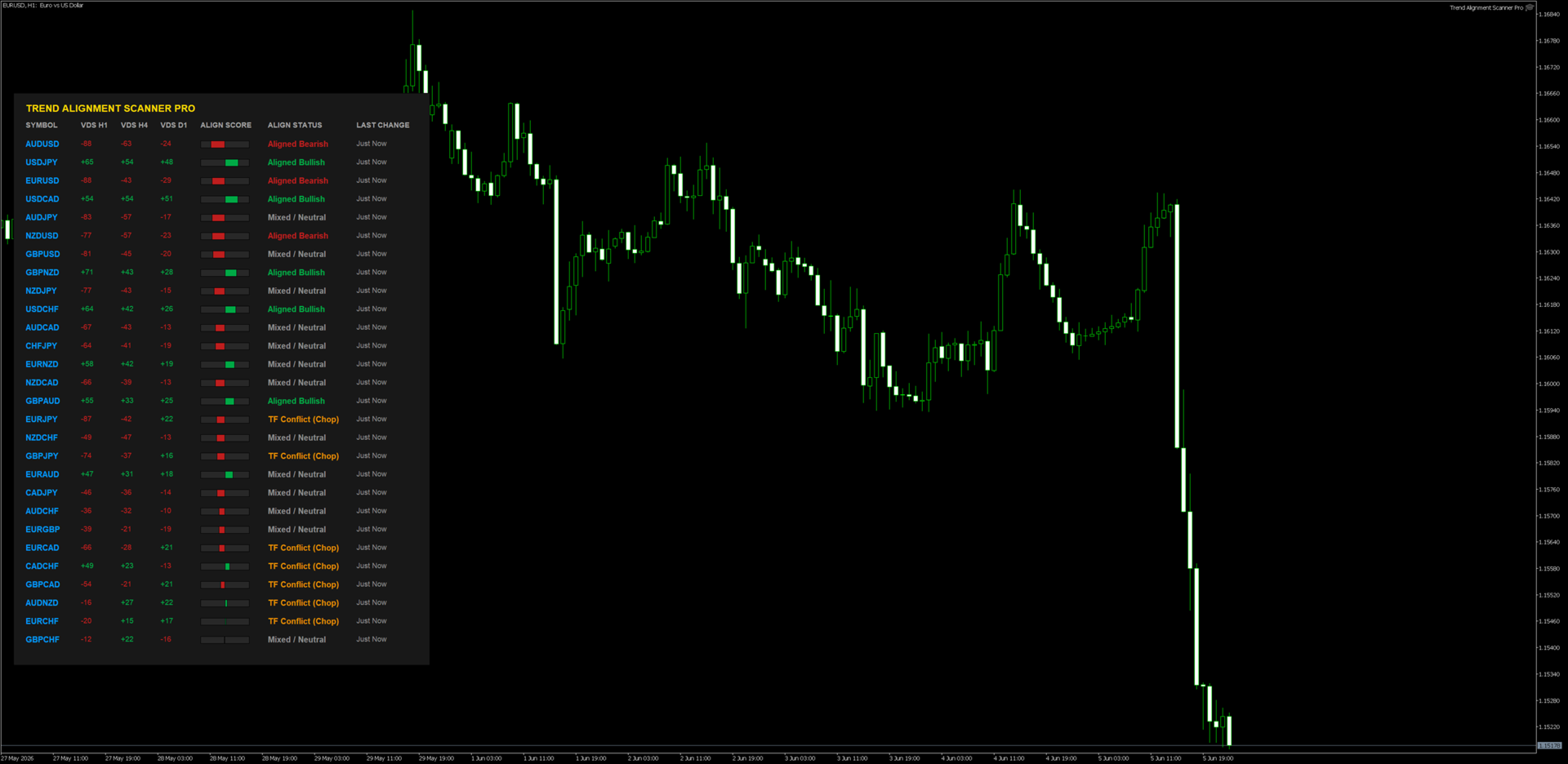
When you drag the indicator onto a clean chart window, you will see a beautifully rendered HUD (Heads-Up Display) with the following components:

  • VDS (Volatility Direction Score): Displays individual scores for H1, H4, and D1 timeframes ranging from -100 to +100.

  • Align Score (The Visual Gauge): A real-time graphic indicator representing the composite average of all three timeframes combined.

  • Dynamic Sorting: The scanner shifts rows instantaneously. The pairs with the highest absolute market momentum always float to the top automatically.

  • Interactive Controls: * Hover Feature: Moving your mouse over any symbol changes its color and displays an analytical tooltip.

    • Single-Click Chart Open: Click directly on any symbol name, and a brand-new chart window for that asset will seamlessly load instantly.

📈 5. Professional Trading Workflows

Strategy A: The Institutional Confluence (Trend Following)

  • Condition: Look for assets flagged as "Fully Bullish" (Score +70 to +100) or "Fully Bearish" (Score -70 to -100).

  • Execution: 1. Identify a "Fully Bullish" asset on the dashboard. 2. Click the symbol to open its chart. 3. Drop down to a lower execution timeframe (e.g., M5 or M15). 4. Only take long positions on structural demand zones or moving average pullbacks.

  • Why it works: You are trading with the combined structural wind of H1, H4, and D1 market participants behind you.

Strategy B: The Conflict Avoidance Filter (Chop Filter)

  • Condition: Dashboard displays "TF Conflict (Chop)".

  • Execution: Do not open any active positions on this asset. Keep away from grid or breakout strategies on pairs marked with this status.

  • Why it works: This state means timeframes are actively fighting each other (e.g., H1 is crashing while D1 is strongly bullish). The asset is highly likely to range or whip-saw retail accounts.

Troubleshooting FAQ

  • Q: Why does it say "Syncing..." or "Syncing History..."?

    • A: This is a built-in safety protocol. It means the indicator is forcing your MT5 terminal to pull historic price data from your broker's database. It will automatically resolve and render the dashboard within a few seconds.

  • Q: I enabled Telegram Alerts but I am not receiving messages.

    • A: Double check Step 2 of this manual. 99% of failed Telegram integrations occur because the user forgot to add https://api.telegram.org to the MT5 WebRequest allowed list.

  • Q: I updated my Market Watch but the dashboard layout didn't change.

    • A: MT5 indicators do not dynamically listen to core layout modifications. Simply delete the indicator and put it back on the chart, or cycle the chart timeframe once to push an unconditional structural reload.


⚠️ RISK DISCLAIMER & LEGAL NOTICE

High-Risk Investment Warning

Trading foreign exchange (Forex), Contracts for Difference (CFDs), commodities, and cryptocurrencies on margin carries a high level of risk and may not be suitable for all investors. The high degree of leverage can work against you as well as for you. Before deciding to trade or utilize any automated scanning software, you should carefully consider your investment objectives, level of experience, and risk appetite. The possibility exists that you could sustain a loss of some or all of your initial investment; therefore, you should not invest money that you cannot afford to lose.

No Financial or Investment Advice

Trend Alignment Scanner Pro is an analytical, mathematical software tool designed solely for informational and educational purposes. The developer does not provide financial, investment, tax, or legal advice. All data, visualization scores (VDS), and alerts generated by this software are generic market metrics and should not be construed as an explicit buy/sell recommendation or a guarantee of market direction. Any trading decisions you make are entirely at your own risk.

Hypothetical and Past Performance Disclaimer

Past performance results are not necessarily indicative of future performance. Hypothetical or simulated performance results have certain inherent limitations. Unlike an actual performance record, simulated results do not represent actual trading. Also, since the trades have not actually been executed, the results may have under- or over-compensated for the impact, if any, of certain market factors, such as lack of liquidity or broker slippage. No representation is being made that any accou nt will or is likely to achieve profits or losses similar to those shown

Limitation of Liability

Under no circumstances shall the developer or any associated parties be held liable to any user, purchaser, or third party for any direct, indirect, incidental, consequential, special, or exemplary damages, including but not limited to trading losses, loss of profits, system downtime, or data corruption arising out of the use or inability to use this software, even if advised of the possibility of such damages. By downloading and utilizing this product, you explicitly acknowledge and agree to these terms.
Рекомендуем также
Atlas Trade Desk MT5 Atlas Trade Desk MT5 is a visual trade panel, risk manager and lot calculator for manual MetaTrader 5 traders. Plan market and pending orders directly on the chart, calculate position size from your selected risk, adjust Entry, Stop Loss and Take Profit visually, and manage open positions from one clean dashboard. The tool is built for discretionary traders who want faster order preparation, clearer risk control and safer position management without switching between multipl
​Notification Spy Protector is a MetaTrader 5 Expert Advisor (Utility) that monitors your trading activity and sends real-time alerts to your mobile device (via MT5 Push) and/or Telegram. Equipped with a solid and reliable Account Protector, this utility is fully compatible and highly recommended for Prop Firm trading to safeguard your accounts from violating drawdown limits. It also provides advanced transaction filters and a clean on-chart dashboard. Never miss a trade. Protect your account f
TRILLION PIPS ELITE PRO INDICATOR Advanced Wave-Based Auto Trend System Built with 12+ Years of Real Market Experience, this is not just an indicator — it is a complete market intelligence system designed to help traders identify key levels, understand auto trend direction, and read market movement with confidence. UNIQUE POWER OF THIS INDICATOR Proprietary Strategy – Only from Trillion Pips Advanced Wave-Based Market Structure Engine Auto Trend Detection System Built-in Trend Decider Log
This Order Risk Control Panel is designed with the core concept of "Simple, Efficient and Accurate Risk Control". Tailor-made for all types of traders, whether they are beginners or experienced professionals, it allows for quick mastery and realization of refined risk management in every trade. The panel deeply integrates risk control logic into the entire order placement process, fundamentally addressing the pain points of "cumbersome risk control settings and delayed operations" in traditiona
Just Copier MT5
Agung Imaduddin
4.75 (4)
"Just copier" is designed to copy trading without any complicated settings. The copy can be done in one PC. One EA can be set as master (provider) or slave (receiver). The receiver lot can be set to multiple providers lots. Please also check this product at fxina.hostingerapp.com.  Any type of copy is available. MT4 -> MT5 MT4 -> MT4 MT5 -> MT5 MT5 -> MT4 If you want to copy MT4 -> MT5 or MT5 -> MT4, please purchase "Just copier" for MT4 and "Just copier" for MT5 separately. Just Copier can copy
MQL5 Blogs : https://www.mql5.com/en/blogs/post/761446 MT4 Version : https://www.mql5.com/en/market/product/136790 MT5 Version : https://www.mql5.com/en/market/product/136791 Time Wizard is a professional trading assistant built for traders who need speed, timing, and execution control in one clean dashboard. This Expert Advisor is designed for event-based trading, scheduled execution, and fast semi-automatic order management. It allows you to prepare your orders in advance, define the exact
- Download historical rates via `CopyRates()` for many symbols and timeframes. - Works with Market Watch symbols or explicit symbol list. - Optional CSV export into the terminal `Files` folder (per symbol/timeframe). - Configurable retries, pause and exponential backoff. - Verbose logging and progress comments for convenience. ## Usage 1. Copy `AutoHistoryDownloader_mq5.mq5` into `MQL5/Scripts` or open in MetaEditor. 2. Attach / run the script from the Navigator (Scripts). 3. Configure inputs:
FREE
Telegram to MT5 Coppy
Sergey Batudayev
5 (10)
Telegram to MT5: Идеальное решение для копирования сигналов Упростите свою торговлю с Telegram to MT5 — современным инструментом, который копирует торговые сигналы прямо из каналов и чатов Telegram на вашу платформу MetaTrader 5, без необходимости использования DLL. Это мощное решение обеспечивает точное исполнение сигналов, широкие возможности настройки, экономит время и повышает вашу эффективность. [ Instructions and DEMO ] [ FAQ ] [ How atach logs properly ] [ Settings descrition ] Ключевые
Welcome to Smart Algo Trade Panel Manager MT5 - the ultimate   risk management tool designed to make trading more effective based on user needs.  It is a comprehensive solution for seamless trade planning, position management, and enhanced control over risk. It does not matter weather you a beginner or an advanced trader, or a scalper needing rapid executions, SmartAlgo Trade Panel  adapts to your needs offering flexibility across all markets of your choice. You can put SL, Lot and TP of choice
Phantom Correlation Shield Institutional Over-Exposure & Correlation Guard for MetaTrader 5 Are you running multiple EAs or trading multiple currency pairs at the same time? Then you are almost certainly **over-exposed** without knowing it. When you Buy EUR/USD and Buy GBP/USD at the same time, you are essentially doubling your risk on the same trade — because these two pairs move together with a correlation above 0.85. If one trade loses, the other will lose too. Your account takes double th
Мощный трендовый индикатор, снабженный всем необходимым для торговли и при этом очень прост в использовании. Могу поспорить, что вы сталкивались с индикатором или советником, содержащим множество входных параметров и сложных инструкций. Индикатор полностью оправдывает свое название: входные параметры интуитивно просты и подбирать ничего не нужно — за вас все сделает нейронная сеть. Отличия от классической версии Добавлена мультитаймфреймовая панель, чтобы вы могли проверять тренд на других тайм
Aegis Gold Dashboard
Ayman Ishaq Jundi Tawadros
Aegis Gold Dashboard is a free, lightweight visual indicator created to help traders monitor key market conditions in a clean and professional way. This indicator is designed as a visual companion to automated or discretionary trading systems and does not execute any trades. Features: • Informational signal overview (non-executable) • ATR-based volatility display • Market session open / closed status • Real-time spread monitoring • Last closed trade overview • Simple market condition tips De
FREE
Сообщения в Telegram из MT5 о торговых событиях: Открытие/закрытие сделок; Выставление/удаление отложенных ордеров. Версия утилиты для MT4 здесь: https://mql5.com/8bjjy Настройки  Telegram: Создайте своего бота. Для этого напишите для пользователя  @BotFather команду  /newbot , и следуйте инструкциям. В результате вы получите Token бота, примерно такой:   1245680170:BBGuDFVkTYIPtjSaXMgQEhdfg7BOQ6rl8xI.  Узнайте свой ID в  Telegram, для этого напишите пользователю  @userinfobot любое сообщение.
Добро пожаловать в индикатор EPo-CreW Forex Super ORB-H4! Это руководство научит вас использовать этот мощный инструмент для определения торговых возможностей с высокой вероятностью на основе первого 4-часового диапазона открытия рынка. Независимо от того, новичок вы или опытный трейдер, эта система поможет вам торговать с большей уверенностью и стабильностью. ЭТО ДЕМО-ПРОДУКТ. СРОК ДЕЙСТВИЯ ИСТЕКАЕТ ЧЕРЕЗ 30 ДНЕЙ С ДНЯ УСТАНОВКИ. Полная версия доступна здесь: https://www.mql5.com/en/market/prod
FREE
Overview : The Advanced News Trading Panel is a versatile tool designed for traders who rely on news-based trading strategies. This Expert Advisor (EA) provides an intuitive graphical interface that allows users to quickly set up pending orders and manage risk with ease. With the ability to automatically place Buy/Sell Stop orders based on your pre-set stop order distance from the bid/ask price, stop-loss and take-profit levels, the EA allows for precision trading during high-volatility news eve
С легкостью возьмите под контроль свою торговую рутину с революционным менеджером времени сделок. Этот мощный инструмент автоматизирует выполнение ордеров в назначенное время, изменяя ваш подход к торговле. Создавайте персонализированные списки задач для различных торговых действий, от покупки до выставления ордеров, без ручного вмешательства. Руководство по установке и вводу данных Trades Time Manager Если вы хотите получать уведомления о работе советника, добавьте наш URL в терминал MT4/MT5 (с
"Support or Resistance Alert Broken" is a simple and very intuitive tool that allows you to create or eliminate horizontal and trend supports and / or resistances with a simple click. When the support or resistance line is broken by the closing price at the end of the current candle, the "Support or Resistance Alert Broken" tool will send an alert with sound, as well as a notification to the MT4 or MT5 mobile application. This tool can send alerts from multiple pairs at the same time. Utility
CopyTrader Pro FAST MT5 — FREE Real-Time Trade Copier | MT4 ↔ MT5 Cross-Platform | 20ms Latency CopyTrader Pro FAST is a professional trade copier Expert Advisor that copies trades between MetaTrader terminals in real time using a high-speed file-based communication system. No VPS, no network setup, no DLL — just attach and copy. FREE VERSION : Copies up to 1 trade at a time. Upgrade to Full version for unlimited copying. Key Features 20ms refresh rate — independent of tick arrival, uses
FREE
Telegram to mt5 pro
Janet Abu Khalil
4 (4)
Telegram to MT5 Pro — Расширенный копировщик сигналов Telegram с Auto-Fix, Multi-TP, управлением риском и полным управлением сделками Telegram to MT5 Pro — профессиональный копировщик сигналов Telegram Telegram to MT5 Pro автоматически копирует торговые сигналы из Telegram прямо в ваш аккаунт MetaTrader 5 в реальном времени с полным контролем риска, исполнения и управления сделками. Система состоит из двух компонентов: • Expert Advisor (EA), работающий внутри MetaTrader 5 • Desktop bridge прило
Smart FVG Stats
- Md Rashidul Hasan
5 (1)
The  Smart FVG Statistics Indicator  is a powerful MetaTrader 5 tool designed to automatically identify, track, and analyze Fair Value Gaps (FVGs) on your charts. Love it? Hate it? Let me know in a review! Feature requests and ideas for new tools are highly appreciated. :) Try "The AUDCAD Trader": https://www.mql5.com/en/market/product/151841 Key Features Advanced  Fair Value Gap  Detection Automatic Identification : Automatically scans for both bullish and bearish FVGs across specified histo
FREE
AlgoDevMT5 Trade Manager Pro AlgoDevMT5 Trade Manager Pro is a professional trade management and risk control utility for MetaTrader 5. Designed for discretionary traders and funded account traders, this utility helps traders plan trades visually, calculate position size instantly, and manage risk with precision. Trade Manager Pro does not generate trading signals, open trades automatically, or provide investment advice. It is a trader-assistance utility designed to improve consistency and risk
Risk Guardian — Ultimate Equity & Drawdown Protection Protect your capital. Stay disciplined. Trade smarter. Risk Guardian is a powerful utility that helps traders automatically control daily risk and secure profits based on equity. Designed for MetaTrader 5, it’s lightweight, efficient, and extremely easy to use. Key Features: Daily Drawdown Limit (% based) Absolute Equity Target (e.g., stop trading after reaching 110,200 USD) Auto-close All Positions, Orders & Charts Visual Dashboard on C
Martingale panel MT5
Mohammadbagher Ramezan Akbari
In this article, we would like to introduce the trade panel product with the Martingale panel. This panel is made in such a way that it can meet the needs of traders to a great extent. This trade panel actually consists of two trade panels at the same time, with the first one you can take positions with certain profit and loss limits, and with the second one, you can have positions with profit limits but without loss limits. When positions lose, a new position will be added based on the settings
Trade2Telegram
Strifor (Mauritius) Ltd
5 (8)
Trade2Telegram — плагин для автоматической отправки торговых уведомлений из MetaTrader в Telegram. Инструмент предназначен для трейдеров, управляющих капиталом, ведущих сигнальные каналы или обучающие сообщества. Плагин копирует все торговые операции из терминала и публикует их в выбранный чат, группу или канал Telegram. Сообщения отправляются автоматически при открытии и закрытии позиций, изменении уровней стоп-лосса и тейк-профита, срабатывании отложенных ордеров или частичном закрытии сделки.
FREE
MT5 to Telegram bot
Maksim Plotnikov
5 (1)
MT5 к сигналам Telegram Эта утилита проста в использовании и поддерживает широкий спектр настроек: Выберите желаемую группу Telegram и введите токен бота и идентификатор чата. Получайте уведомления, когда заказы размещаются, изменяются, выполняются, закрываются... или любые комбинации состояний. Соедините свой брокерский аккаунт с Telegram и перестаньте пропускать важные уведомления. Хотите получать уведомления в Telegram? Ищете простой способ делиться торговыми сигналами с вашими подписчиками?
FREE
"Quick Copier" is designed to copy trading without any complicated settings. It copies master orders faster than "Just Copier" (https://www.mql5.com/en/market/product/20920). Please also check this product at fxina.hostingerapp.com.  The copy can be done in one PC. One EA can be set as master (provider) or slave (receiver). The receiver lot can be set to multiple providers lots. Any type of copy is available. MT4 -> MT5 MT4 -> MT4 MT5 -> MT5 MT5 -> MT4 If you want to copy MT4 -> MT5 or MT5 -> MT
Trade Copier Simple Guide Trade Copier is an Expert Advisor (EA) for MetaTrader 5 (MT5) that lets you automatically copy trades from one account (the "Master") to another (the "Receiver"). It's designed for users who want to duplicate trading strategies across multiple accounts on the  same computer . No internet or external servers are needed—it uses a shared file on your machine to transfer trade info securely and quickly. How It Works Master Mode : Attach the EA to a chart on your main tradin
Ping-Monitor — Never Miss a Tick Again! Do you run EAs and worry about silent chart freezes or data feed stalls ?  This utility is your ultimate watchdog, alerting you the moment your charts stop receiving updates. Ping-Monitor is designed to detect when a chart freezes or the data feed stalls, even if MT5 still shows that the connection is active. It works by tracking the time of the last incoming tick. Every time the chart receives a new price update, the EA records the timestamp. Then, on a
GDS RiskLab TradeDesk Renko Pro - Professional Manual Trading Panel for Renko Traders in MetaTrader 5 GDS RiskLab TradeDesk Renko Pro is a professional manual trading panel for MetaTrader 5, designed for traders who use Renko charts and want a more controlled workflow for execution, position awareness and risk discipline. This is not an automated trading strategy and not a signal system. The trader remains fully responsible for market analysis, risk decisions and execution. TradeDesk Renko Pro i
Trade Assistant 38 in 1
Makarii Gubaydullin
4.91 (23)
Многофункциональная утилита: калькулятор лота, сеточные ордера, индикатор Price Action, менеджер ордеров, рассчёт R/R, и многое другое Демо-веpсия  |   Инструкция  |   Версия для MT4 Утилита не работает в тестере стратегий: вы можете скачать демо-версию ЗДЕСЬ , чтобы протестировать продукт перед покупкой. Напишите мне  если есть вопросы / идеи по улучшению / в случае найденного бага Упроситите и сделайте вашу торговлю быстрее, при этом расширяя стандартные возможности терминала. 1. Открытие но
С этим продуктом покупают
Trade Assistant MT5
Evgeniy Kravchenko
4.43 (214)
Помогает рассчитать риск на сделку, простая установка нового ордера с помощью линий, управление ордерами с функциями частичного закрытия, 7 типов трейлинг-стопа и другие полезные функции. Дополнительные материалы и инструкции Инструкция по установке - Инструкция к приложению - Пробная версия приложения для демо счета Функция Линии   - отображает на графике линию открытия, стоп-лосс, тейк-профит. С помощью этой функции легко установить новый ордер и увидеть его дополнительные характеристики пе
Добро пожаловать в Trade Manager EA — лучший инструмент для управления рисками, предназначенный для упрощения, точности и эффективности торговли. Это не просто инструмент для размещения ордеров; это комплексное решение для удобного планирования торгов, управления позициями и усиленного контроля над рисками. Независимо от того, начинающий вы трейдер, опытный специалист или скальпер, нуждающийся в быстром исполнении, Trade Manager EA адаптируется к вашим потребностям и работает с любыми активами:
Бета-версия Telegram to MT5 Signal Trader почти готов к официальному альфа-релизу. Некоторые функции все еще находятся в разработке, и вы можете столкнуться с небольшими ошибками. Если вы заметите проблемы, пожалуйста, сообщите о них, ваша обратная связь помогает улучшать программное обеспечение для всех. Telegram to MT5 Signal Trader — мощный инструмент, который автоматически копирует торговые сигналы из каналов и групп Telegram прямо в ваш счёт MetaTrader 5 . Поддерживаются как публичные, так
TradePanel MT5
Alfiya Fazylova
4.88 (162)
Trade Panel — это многофункциональный торговый помощник. Приложение содержит более 50 торговых функций для ручной торговли и позволяет автоматизировать большинство торговых операций. Перед покупкой вы можете протестировать демоверсию на демо-счете. Скачать пробную версию приложения для демонстрационного аккаунта: https://www.mql5.com/ru/blogs/post/750864 . Полная инструкция здесь . Торговля. Позволяет совершать торговые операции в один клик: Открыть отложенные ордера и позиции с автоматическим р
Farmed Hedge Yield Farming | All Markets (Manual - Hybrid - Semi/Automated EA) MULTI-ASSET SUPPORT Trade any asset available on your broker - Forex: Major, Minor, Exotic pairs - Crypto: BTC, ETH, XRP, SOL, BNB - Stocks: Apple, Tesla, Amazon, Google, etc. - Commodities: Gold, Silver, Oil, Gas - Indices: US30, NAS100, SPX500, DAX40 - Any CFD your broker offers VERIFIED TRADING RESULTS - Farmed Hedge Yield Axi Copy:  https://www.mql5.com/en/signals/2356376 - Farmed Hedge Yield Exn Copy:   https:/
Power Candles Strategy Scanner — самооптимизирующийся инструмент для поиска настроек по нескольким инструментам Power Candles Strategy Scanner использует тот же самооптимизирующийся движок, что и индикатор Power Candles — для всех символов в вашем Market Watch, одновременно. На одной панели отображается информация о том, какие символы в данный момент являются статистически торгуемыми, какая стратегия выигрывает на каждом из них, оптимальная пара Stop Loss / Take Profit, а также отправляется увед
================================================================================ POC BREAKOUT - V20.72. Full Professional Grade Toolkit ================================================================================ POC Breakout is a full MetaTrader 5 trading dashboard for discretionary traders who want breakout signals, Point of Control (POC) context, volume profiles, order flow, market structure, news, alerts, and advanced trade planning in one professional workspace. Attached directly to you
Anchor Trade Manager
Kalinskie Gilliam
5 (5)
Anchor: The EA Manager Run your full EA portfolio without conflicts, without stacked risk, and without watching every chart yourself. Anchor coordinates up to 64 Expert Advisors on a single account, including daily loss protection built for prop firm rules. Attach Anchor to any chart. Type your EA names and magic numbers in one line. Click OK. Anchor begins coordinating immediately. Built for portfolios. Built for prop firms. Built for discipline. The Problem Running multiple EAs on the same acc
Footprint Chart Pro — Professional OrderFlow EA for MetaTrader 5 Version 6.34 | Professional tool for real traders | Institutional-Grade Visualization DEMO USERS - PLEASE SELECT EVERY TICK / REAL TICK WHEN TESTING AND YOU HAVE DOWNLOADED HISTORICAL DATA. IF YOU SEE A WAITING SCREEN AND IT IS NOT DOWNLOADING, IT MEANS YOU HAVE LOW HISTORICAL DATA. TRY 1 MIN AND 5 MIN FIRST ON 1 DAY DATA. ONE DAY DATA SHOULD BE THE NEWEST AND MOST CURRENT DATE. PLEASE WAIT UNTIL THE MARKET HAS ROLLED OVER PERIOD.
EasyInsight AIO MT5
Alain Verleyen
4.92 (12)
EASY Insight AIO – Всё-в-одном для умного и простого трейдинга Обзор Представьте, что вы можете просканировать весь рынок — Форекс, золото, криптовалюты, индексы и даже акции — всего за несколько секунд, без ручного просмотра графиков, сложной установки или настройки индикаторов. EASY Insight AIO — это ваш идеальный инструмент экспорта для трейдинга с поддержкой искусственного интеллекта. Он предоставляет полный снимок рынка в одном аккуратном CSV-файле — готовом к мгновенному анализу в ChatGP
The product will copy all telegram signal to MT5 ( which you are member) , also it can work as remote copier.  Easy to set up, copy order instant, can work with almost signal formats, image signal,  s upport to translate other language to English Work with all type of channel or group, even channel have "Restrict Saving Content", work with  multi channel, multi MT5 Work as remote copier: with signal have ticket number, it will copy exactly via ticket number. Support to backtest signal. How to s
Premium Trade Manager - Торговая панель со встроенным коучем Premium Trade Manager помещает торгового коуча прямо в ваш график, а под ним работает полноценный движок исполнения. Настройте сделку так, как вы всегда это делаете, затем позвольте Max, вашему ИИ-наставнику по трейдингу, прочитать именно эту настройку с учётом вашего живого счёта и дать чёткое заключение до того, как вы входите: соответствует ли стоп дисциплинированному подходу, разумен ли риск, не выходит ли высоковолатильный релиз ч
Trade Manager DaneTrades
Levi Dane Benjamin
4.28 (29)
Trade Manager, который поможет вам быстро входить и выходить из сделок, автоматически рассчитывая риск. Включает функции, которые помогут предотвратить чрезмерную торговлю, торговлю из мести и эмоциональную торговлю. Сделками можно управлять автоматически, а показатели эффективности счета можно визуализировать в виде графика. Эти функции делают эту панель идеальной для всех трейдеров, занимающихся ручной торговлей, и помогают улучшить платформу MetaTrader 5. Многоязычная поддержка. Версия для МТ
EA Auditor
Stephen J Martret
5 (4)
EA Auditor is an independent analysis tool for traders evaluating Expert Advisors and trading signals on MetaTrader 5. It audits backtest reports, reviews posted developer signals, and cross-verifies the two against each other to help traders assess strategies before committing capital. The MQL5 market offers a wide range of Expert Advisors from many developers, with varying approaches, quality, and transparency. EA Auditor provides a consistent, data-driven framework for reviewing them, answer
ВРЕМЕННАЯ СКИДКА  -40% ! Всего  $470 вместо $790!  Максимальный реальный дисконт! ТОЛЬКО ДО 22.08 Суть: используя юзер-интерфейс вы настраиваете параметры, которым должен соответствовать график до входа в позицию(позиции), настраиваете какие входные модели использовать, настраиваете правила по которым надо завершать торговлю и планирование. А всю рутину по наблюдению за графиком и исполнению Lazy Trader берет на себя. полное описание  :: 3 ключевых видео [1] -> [2] -> [3]  :: [ ДЕМО-ВЕРСИЯ ] Чт
Welcome to ENTRY IN THE ZONE WITH SMC MULTI TIMEFRAME Entry In The Zone with  SMC Multi Timeframe  is a professional trading indicator built on Smart Money Concepts (SMC), combining market structure analysis with a No Repaint BUY / SELL signal system in a single indicator. It helps traders understand market structure more clearly, identify key price zones, and focus on higher-quality trading opportunities. By combining Multi-Timeframe Analysis, Points of Interest (POIs), and real-time signals, t
Quant AI Agents
Ho Tuan Thang
5 (1)
Quant AI Agents are independent trading Expert Advisors. Instead of trading using a fixed strategy like other conventional EAs, Quant AI Agents   is a   multi-agent AI trading framework   that turns natural-language strategy prompts into live.  WANT THE SAME RESULTS AS MY LIVE SIGNAL?   Use the exact same brokers I do:   IC MARKETS , IC TRADING   .  Unlike the centralized stock market, Forex has no single, unified price feed.  Every broker sources liquidity from different providers, creating un
The News Filter MT5
Leolouiski Gan
4.78 (23)
Этот продукт фильтрует всех экспертных советников и ручные графики во время новостей, так что вам не нужно беспокоиться о внезапных скачках цены, которые могут разрушить ваши ручные торговые настройки или сделки, введенные другими экспертными советниками. Этот продукт также поставляется с полной системой управления ордерами, которая может обрабатывать ваши открытые позиции и ордера на ожидание перед выпуском новостей. После покупки   The News Filter   вам больше не придется полагаться на встроен
Trader Evolution
Siarhei Vashchylka
5 (7)
"Trader Evolution" - Утилита, предназначенная для трейдеров, которые используют в своей работе волновой и технический анализ. Одна вкладка утилиты способна управлять капиталом и открывать ордера, а другая - помогать в построении волн Эллиотта, уровней поддержки и сопротивления, а также линий тренда. Инструкция/Мануал ( Обязательно читайте перед приобретением ) | Версия для МТ4 Преимущества 1. Торговля в несколько кликов. В панели доступны немедленные и отложенные ордера 2. Управление капиталом
YuClusters
Yury Kulikov
4.93 (43)
Внимание: Ознакомиться с работой программы можно с помощью бесплатной версии  YuClusters DEMO . YuClusters это профессиональная система анализа рынка. Для трейдера открываются уникальные возможности анализа потока ордеров, объемов торговли, движения цены используя различные графики, профили, индикаторы, графические объекты. YuClusters оперирует данными на основе ленты сделок или тиковой информации, в зависимости от того, что доступно в котировках финансового инструмента.  YuClusters позволяет с
FUTURES ORDERFLOW FOOTPRINT CHART Professional OrderFlow EA for MetaTrader 5 Version 1.01| Professional tool for real traders | Institutional-Grade Visualization STRATEGY TESTER USERS - PLEASE SELECT EVERY REAL TICK WHEN TESTING AND YOU HAVE DOWNLOADED HISTORICAL DATA. IF YOU SEE A WAITING SCREEN AND IT IS NOT DOWNLOADING, IT MEANS YOU HAVE LOW HISTORICAL DATA. TRY 1 MIN AND 5 MIN FIRST ON 1 DAY DATA. ONE DAY DATA SHOULD BE THE NEWEST AND MOST CURRENT DATE. PLEASE WAIT UNTIL THE MARKET HAS ROL
Telegram To MT5 Receiver
Levi Dane Benjamin
4.53 (15)
Копируйте сигналы из любого канала, участником которого вы являетесь (в том числе частного и ограниченного), прямо на свой MT5. Этот инструмент был разработан с учетом потребностей пользователей и предлагает множество функций, необходимых для управления и мониторинга сделок. Этот продукт представлен в простом в использовании и визуально привлекательном графическом интерфейсе. Настройте свои параметры и начните использовать продукт в течение нескольких минут! Руководство пользователя + Демо  |
Советник Auto Trade Copier предназначен для копирования сделок на нескольких счетах/терминалах MetaTrader 4/MetaTrader 5 со 100% точностью. С помощью этого инструмента вы можете выступать как в роли поставщика (источник), так и получателя (назначение). Все торговые действия будут скопированы от поставщика к получателю без задержки. Ссылки: Если копирование производится через Интернет, посмотрите продукт Trade Copier Pro MT5 по ссылке: https://www.mql5.com/ru/market/product/5531 Если копирование
AlgoRadar
Stephen J Martret
5 (4)
AlgoRadar is an on-chart analytics dashboard for MT5 that aggregates Expert Advisor performance across multiple accounts, brokers, and platforms, including both MT4 and MT5 data, into a single live view on your MT5 chart. All analysis runs from the chart interface, with no external applications or manual report processing required. EA Analysis and Ranking For traders running multiple Expert Advisors, AlgoRadar provides a consolidated view of each EA's performance across accounts. Active EAs a
AI Agent Supervisor is NOT an Expert Advisor. AI Agent Supervisor   is a   multi-agent AI risk & portfolio supervisor   that watches every EA on your account and intervenes in real time.  WANT AN AI PORTFOLIO MANAGER WATCHING YOUR FLEET 24/7?   Run your fleet on the same brokers I do:   IC MARKETS , IC TRADING   .  Unlike the centralized stock market, Forex has no single, unified price feed.  Every broker sources liquidity from different providers, creating unique data streams. The Supervisor r
Trade Manager DashPlus
Henry Lyubomir Wallace
4.85 (13)
DashPlus – это продвинутое средство для управления торговлей, разработанное для повышения эффективности и результативности торговли на платформе MetaTrader 5. Оно предлагает широкий набор функций, включая расчет рисков, управление ордерами, продвинутые системы сеток, инструменты на основе графиков и аналитику производительности. Основные функции Восстановительная Сетка Внедряет систему усреднения и гибкую сетку для управления сделками в неблагоприятных рыночных условиях. Позволяет стратегически
This is a multi-currency converter script that can convert the currency of the account history to another currency and output it. Since it supports multiple currencies, it is possible to exchange USD, EUR mutual conversion, JPY, GBP, AUD, or other minor currencies. Currency Exchanger can be converted to other currencies immediately by executing it once, so anyone can easily exchange currency. Let Currency Exchanger do the tedious work! The exchange result from the account history can be output a
Grid Manual MT5
Alfiya Fazylova
4.73 (22)
Grid Manual — это торговая панель для работы с сеточными стратегиями. Утилита универсальная, имеет гибкие настройки и понятный интерфейс. Работает с сеткой ордеров не только в сторону усреднения убытков, но и в сторону наращивания прибыли. Трейдеру не нужно создавать и сопровождать сетку ордеров, это сделает утилита. Достаточно открыть ордер и Grid manual автоматически создаст ему сетку ордеров и будет сопровождать его до самого закрытия. Полная инструкция и демо-версия здесь . Основные особенно
Trade Cockpit Pilot
Tshilidzi Enocent Munyai
Trade Cockpit Pilot — Signal Scanner + Position Sizing + Trade Management in a Tabbed Panel Trade Cockpit Pilot is a   Utility-category Expert Advisor   with a minimal, purpose-driven design. It brings together a multi-timeframe signal confluence scanner, a precise position size calculator, one-click trade execution, and post-trade management — all organized in a clean, tabbed panel on your chart. No clutter. Only what matters. Three tabs. One panel. Everything you need:   what to trade   (signa
Signal TradingView to MT5 Pro Automator Мгновенное профессиональное исполнение между TradingView и MetaTrader 5 Автоматизируйте свою торговую стратегию с помощью самого надежного моста связи между алертами TradingView и реальным исполнением в MT5. Разработанный для трейдеров, которым требуются скорость, гибкость и безупречное управление рисками, этот советник (Expert Advisor) превращает любое сообщение с алертом в точный рыночный или лимитный ордер. ПРЕИМУЩЕСТВА И СИЛЬНЫЕ СТОРОНЫ Универсальный д
Другие продукты этого автора
Universal Asset Meter (MT5) Universal Asset Meter  is a next-generation, high-performance matrix engine designed to decode real-time currency and asset strength directly on your Metatrader 5 platform. Unlike traditional currency meters that are restricted to fixed major pairs, this commercial-grade tool provides a fully customizable, cross-asset analytics dashboard built for professional traders. Engineered with asynchronous processing and advanced data encapsulation, it scans the entire market
FREE
Trend Alignment Scanner Lite The Essential Volatility Direction Tool for MetaTrader 5 Looking for a reliable way to gauge market direction without cluttering your charts? Trend Alignment Scanner Lite delivers our core, powerful mathematical engine to your terminal for free. This version is designed for retail day-traders who want to experience the accuracy of our Volatility Direction Score (VDS) on major pairs before scaling up to institutional-grade multi-asset scanning. Pro vs. Lite Compari
FREE
Фильтр:
Нет отзывов
Ответ на отзыв