Trade Stats Multicurrency

Trade Stats (Expert Advisor for MetaTrader 5) — Detailed Description

1. Overview

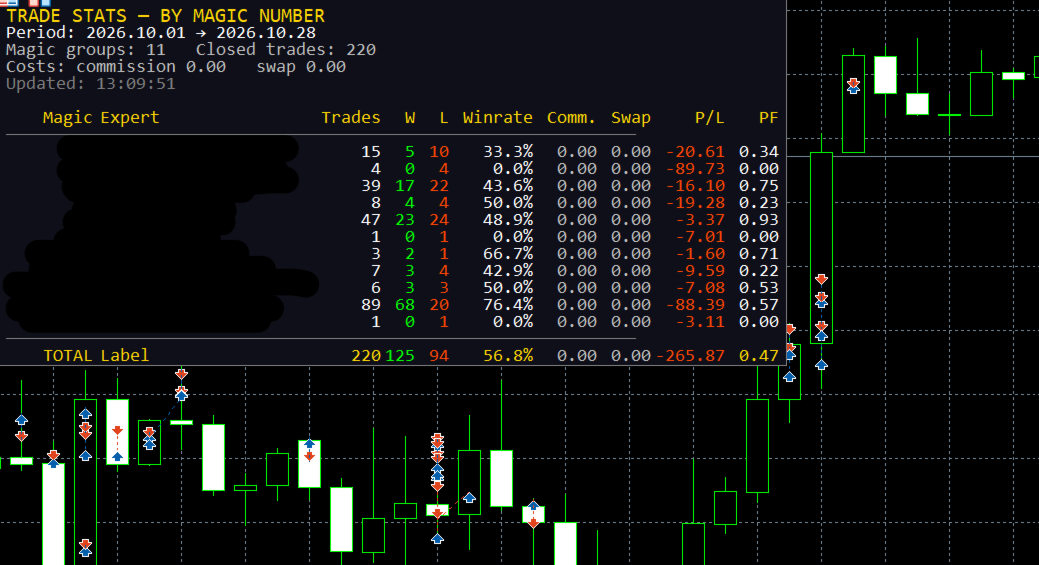
Trade Stats is a non-trading analytics Expert Advisor for MetaTrader 5. It reads the account's closed-deal history, groups every trade by its Magic Number, and renders a compact live statistics table directly on the chart. Its purpose is to answer one question: which Expert Advisor on this account is actually making money, and how much each one costs to run?

It places no orders, modifies nothing, and never touches positions. It only reads history and draws chart labels.

2. What it does not do

  • No trading, no money management, no signals — it cannot open or close anything.
  • No writes to the account, no external network calls, no file uploads.
  • Only chart objects are created, all with the prefix ByMagic_ , and all of them are removed in OnDeinit .

3. How it works

  1. History selection — on each refresh the EA calls HistorySelect(from, to) for the period defined by the period inputs (current month, current week, today, last N days, or custom dates). Server time is used.
  2. Deal filtering — only balance-bearing market deals are counted ( DEAL_TYPE_BUY / DEAL_TYPE_SELL ). Balance operations are ignored. Optional filters: exact Magic number, symbol name, and "hide manual trades" (magic = 0).
  3. Exit deals define a "trade" — a row counter is incremented only for deals that reduce a position: DEAL_ENTRY_OUT , DEAL_ENTRY_OUT_BY , DEAL_ENTRY_INOUT . Entry deals do not inflate the trade count.
  4. Cost accumulation — commission, broker fees, swap and (optionally) an estimated spread are accumulated for all deals, including entries, because brokers book these costs on entry deals.
  5. Net result per deal — profit + commission + fee + swap + spread estimate , where each component is included only if the corresponding switch is enabled. This same value feeds wins/losses, gross profit/loss, P/L, best/worst trade.
  6. Expert name resolution (highest priority first):
    1. explicit user map from InpExpertNames ( magic=Name; );
    2. the most frequently repeated "meaningful" comment of the entry deals for that magic (voting mechanism);
    3. the last meaningful comment;
    4. otherwise the row is shown as — . Broker technical comments are filtered out: strings starting with [ , sl , tp , so: , from # , by # , and comments containing cancelled , canceled , partial , split , timeout , deleted , as well as comments made only of digits and punctuation.
  7. Sorting — by Magic ascending (manual trades always last), or by net P/L, Profit Factor, trade count or Winrate, ascending/descending; ties are resolved by Magic for a stable order.
  8. Rendering — a lightweight label grid is redrawn: column widths are measured with TextSetFont / TextGetSize from the header and the visible cells, so the table auto-sizes to the content in either language.

4. Panel layout

Five information lines above the table:

Line Example (English)
Title TRADE STATS — BY MAGIC NUMBER
Period Period: 2026.10.01 → 2026.10.28
Counters Magic groups: 4 Closed trades: 187
Costs Costs: commission -42.10 swap -3.55 spread* -18.40
Status Updated: 13:20:57 * spread is estimated from ticks

Then the table header, rows, and the TOTAL row. If the number of groups exceeds InpMaxRows , the remainder is reported as ... and N more Magic .

Columns: Magic | Expert | Trades | W | L | Winrate | [Comm.] | [Swap] | [Spread*] | P/L | PF

Comm. , Swap and Spread* appear only when their switches are on. Numeric columns are right-aligned, the expert name is left-aligned and truncated with .. when it exceeds the column width (hard cap 320 px). Colour coding is applied per cell: profit/positive → clrLime , loss/negative → clrOrangeRed , neutral → clrSilver ; the magic of manual trades is shown in silver, program magic numbers in cyan.

5. Metrics and formulas

  • Trades — number of position-closing deals in the period.
  • W / L — closed deals with net result > 0 and < 0; zero-result deals are counted separately (not shown as a column, exported in CSV).
  • Winrate — wins / (wins + losses + zeros) × 100 .
  • Gross profit / gross loss — sums of positive and absolute negative net results.
  • P/L — net result of all deals of the group, including the enabled cost components.
  • PF (Profit Factor) — grossProfit / grossLoss ; when there are no losses but there is profit, it is capped at 99.99 ; otherwise `0.
  • Best / worst trade, average trade, last deal time — computed and exported to CSV (not shown on the panel).
  • TOTAL row — sums across all groups plus a portfolio-level Winrate and Profit Factor.

6. Inputs

Input Default Meaning
InpPeriodMode PERIOD_CURRENT_MONTH Current month / current week / today / last N days / custom dates
InpLastDays 30 Number of days for the "last N days" mode
InpCustomFrom , InpCustomTo 2025.01.01 , 2025.12.31 Custom date range (end date is extended to 23:59:59)
InpMagicFilter 0 Analyse a single magic number (0 = all)
InpShowManual true Include manual trades (magic = 0)
InpSymbolFilter "" Analyse one symbol only ("" = all)
InpShowCommission true Show the commission column and include commission + fees in P/L
InpShowSwap true Show the swap column and include swap in P/L
InpShowSpread false Show the spread column and subtract an estimated spread from P/L
InpSpreadMaxCalc 300 Maximum number of new spread estimations per refresh (0..5000)
InpLanguage LANG_ENGLISH Panel and journal language: English (default) or Russian
InpShowComment true Derive expert names from deal comments
InpCommentLen 20 Maximum length of a derived expert name
InpExpertNames "" Explicit name map, e.g. 20261012=GoldScalperPro;1=ScalperProM30
InpSortMode STATS_SORT_MAGIC Magic / net P/L / Profit Factor / trades / Winrate
InpSortDesc true Descending order (ignored for "by Magic", which is always ascending)
InpRefreshSec 5 Minimum interval between recalculations, seconds (1..3600)
InpPanelX , InpPanelY 10 , 20 Panel offset in pixels
InpTextColor , InpBgColor , InpHeaderColor clrWhite , C'15,15,25' , clrGold Colours
InpFontSize , InpFontName 9 , Consolas Font (size 6..30); a monospaced font keeps the columns aligned
InpMaxRows 30 Maximum visible rows (0 = all)
InpExportCSV false Write a CSV snapshot on every refresh
InpCSVFileName stats_by_magic.csv CSV name, created in the terminal's MQL5\Files sandbox

Invalid inputs (period bounds, font size, comment length, refresh interval, spread budget) abort initialisation with INIT_PARAMETERS_INCORRECT and a journal message.

7. Spread estimation

MT5 does not store the spread in a deal, so when InpShowSpread is enabled the EA estimates it: it copies ticks ±5 seconds around the deal time with CopyTicksRange , takes the tick nearest to the execution moment, and computes

spread_cost = 0.5 × (ask − bid) × volume × contract_size

The value is stored as a negative contribution to the result and cached per deal ticket in a ticket-sorted array with binary search, so a deal is estimated once. Estimations are throttled by InpSpreadMaxCalc per refresh; if no ticks exist for that moment, nothing is cached and the deal is retried on a later refresh. The panel and journal explicitly mark this value as an estimate ( spread* ).

8. CSV export

FILE_WRITE | FILE_CSV | FILE_ANSI , ; delimiter, one row per magic group, always in English:

Magic;Expert;Trades;Wins;Losses;Zeros;Winrate;Commission;Swap;Spread;NetProfit;
GrossProfit;GrossLoss;ProfitFactor;BestTrade;WorstTrade;AvgTrade;LastDeal

The file is written to the terminal data folder ( MQL5\Files\... ), so it can be read by other tools or services.

9. Localization

All runtime text (panel and journal messages) is resolved through the T(ENUM_TXT) helper from a compile-time table of English or another strings. English is the default; switching InpLanguage changes the panel on the next refresh without restarting the EA. The labels in the EA properties dialog are static English strings (MQL5 cannot localize input captions at runtime).

10. Performance notes

  • Recalculation is throttled by InpRefreshSec and driven by both a 1-second timer and OnTick , so the panel stays alive without ticks; the first calculation runs in OnInit .
  • One HistorySelect plus one linear pass over the deals of the period per refresh; grouping is a short linear scan, sorting is insertion sort (the number of groups is small).
  • Chart labels are created once and only updated afterwards; stale row/column objects are deleted by HideUnusedRows , and the background is recreated if it disappears (e.g. after a template change).

11. Limitations and assumptions

  • Only closed deals inside the selected period are analysed; open positions and floating P/L are not included.
  • Trade counts follow the broker's deal structure: partial closes appear as several exits, and DEAL_ENTRY_INOUT (netting reversals) is treated as an exit.
  • Results are shown in the account deposit currency; no currency conversion is performed.
  • Commission is reported exactly as the broker records it; if a broker books commission on entry deals only, that behaviour is preserved.
  • Spread is an estimate by design and is not identical to the broker's actual mark-up.
  • Expert names are heuristics based on comments; use InpExpertNames for exact labelling.
  • The EA is an indicator/analytics tool: it is intended to be attached to any chart and left running.

12. Compatibility and validation

  • MetaTrader 5, MQL5; compiled with 0 errors and 0 warnings on compiler build 6230.
  • The published binary is compiled for X64 Regular so it is accepted by the MQL5 Market (AVX2/AVX512 builds are rejected there).
  • Verify on a demo account or in the Strategy Tester's visual mode that the panel fits the chart, that column widths are correct in both languages, and that exported CSV values match the account history.

13. Risk disclaimer

Trade Stats only reports historical statistics. Past performance of an Expert Advisor does not guarantee future results, and spread estimates and comment-derived names may differ from broker reality. Always validate any decision based on these numbers against your own records.

Produtos recomendados
Atlas Trade Desk
Bernhard Wurzlbauer
Atlas Trade Desk MT5 Atlas Trade Desk MT5 is a visual trade panel, risk manager and lot calculator for manual MetaTrader 5 traders. Plan market and pending orders directly on the chart, calculate position size from your selected risk, adjust Entry, Stop Loss and Take Profit visually, and manage open positions from one clean dashboard. The tool is built for discretionary traders who want faster order preparation, clearer risk control and safer position management without switching between multipl
# Ronin Copier - Tactical Prop Sync **Zero-Latency, Zero-DLL Local Trade Copier Built for Serious Prop Traders.** **EARLY ADOPTER PROMOTION (LIMITED COPIES):** - **First 10 copies:** **$59** (Current Stage) - **Next 10 copies:** **$99** - **Final Price:** **$199** *Price increases automatically as review milestones are reached.* --- Managing multiple MT5 accounts across prop firms (FTMO, FundedNext, Alpha Capital, etc.) or private brokers? **Ronin Copier** provides seamless, millisecond-
Keyboard Scalper Pro
Mauricio Eduardo Lara Perez
Keyboard Scalper Pro is a customizable keyboard trading utility for MetaTrader 5. It is designed for traders who want direct manual control of order execution without being limited to a fixed keyboard layout. Every trading hotkey can be configured to match the user's preferred workflow, while the default layout is built around the numeric keypad for fast operation. The utility does not generate signals and does not decide when to trade. The trader chooses the setup, direction and timing. Keyb
Binance Quotes Updater
Andrey Khatimlianskii
5 (1)
This service is designed to stream online cryptocurrency quotes   from the Binance exchange to your MetaTrader 5 terminal. You will find it perfectly suitable if you want to see the quotes of cryptocurrencies in real time — in the Market watch window and on the MetaTrader 5 charts. After running the service, you will have fully featured and automatically updated  cryptocurrency charts in your MetaTrader 5. You can apply templates, color schemes, technical indicators and any non-trading tools to
Boleta de negociação, adiciona automáticamente as ordens Take Profit e Stop Loss quando excutada uma ordem de compra ou venda. Ao apertar as teclas de atalho (A, D, ou TAB), serão inseridas duas linhas de pre-visualização, representando as futuras ordens de take profit (azul) e stop loss (vermelho), as quais irão manter o distanciamento especificado pelo usuário. Ditas ordens só serão adicionadas ao ser executada a ordem inicial. Ao operar a mercado, as ordens pendentes de take profit, e stop lo
Assuma o controle de sua rotina de negociação sem esforço com o revolucionário Trades Time Manager. Essa ferramenta potente automatiza a execução de ordens em horários designados, transformando sua abordagem de negociação. Crie listas de tarefas personalizadas para diversas ações de negociação, desde a compra até a definição de pedidos, tudo sem intervenção manual. Guia de instalação e entradas do Trades Time Manager Se você deseja receber notificações sobre o EA, adicione nosso URL ao terminal
This Order Risk Control Panel is designed with the core concept of "Simple, Efficient and Accurate Risk Control". Tailor-made for all types of traders, whether they are beginners or experienced professionals, it allows for quick mastery and realization of refined risk management in every trade. The panel deeply integrates risk control logic into the entire order placement process, fundamentally addressing the pain points of "cumbersome risk control settings and delayed operations" in traditiona
VRD Quant estimates how much capital and what lot size each EA on your MT5 account needs, from that EA's own drawdown history. What it does for you Go beyond a single drawdown figure: 2,000 bootstrap resamples of the EA's closed trades give a 95th-percentile drawdown. Get a suggested operating capital (p95 drawdown divided by the 20% warn band) and a fixed lot (the smallest lot observed). See expectancy and p95 drawdown on each EA's Passport card, from 10 closed trades upward. Repeatable results
Product Name: Smart Switch Dashboard STOP WASTING SECONDS. SECONDS COST MONEY. Are you losing trades because you're fumbling through the Market Watch? Is your workspace messy and slowing you down? In trading, Speed is everything. If you aren't organized, you are losing money to traders who are. Smart Switch Dashboard is not just a tool—it is your COMMAND CENTER . Designed for serious Scalpers and Day Traders who demand Speed, Precision, and Zero Lag. DOMINATE YOUR WORKFLOW 1. ULTRA-FAST SY
Telegram to mt5 pro
Janet Abu Khalil
4 (4)
Telegram to MT5 Pro — Copiador avançado de sinais do Telegram com Auto-Fix, Multi-TP, controlo de risco e gestão completa de operações Telegram to MT5 Pro — Copiador profissional de sinais do Telegram Telegram to MT5 Pro copia automaticamente sinais de trading do Telegram diretamente para a sua conta MetaTrader 5 em tempo real, com controlo total de risco, execução e gestão de operações. O sistema é composto por dois componentes: • Expert Advisor (EA) dentro do MetaTrader 5 • Aplicação bridge q
Este produto é um EA de apoio ao fechamento automático que ajuda traders discricionários a executar as regras de fechamento que já decidiram. Você pode configurar condições de fechamento com base em um horário especificado, confirmação de candle ou cruzamento/aproximação de MA, e usar TIME, CANDLE e MA CROSS separadamente ou ao mesmo tempo. Também é possível exibir as MA de 1H, 4H, diário, semanal e mensal no gráfico atual. Não é um produto que automatiza decisões de negociação ou a abertura de
Product Name MT5 Gold & Silver Multi-Language Trading Panel V17.00 Introduction This is a professional trading panel designed specifically for manual gold and silver traders. It supports five languages: English, Chinese, Spanish, Arabic, and German. The panel automatically detects gold and silver symbols, so users do not need to enter symbol codes manually. It is compatible with most brokers worldwide, including standard accounts, zero spread accounts, and raw spread accounts. Users only need t
Welcome to Smart Algo Trade Panel Manager MT5 - the ultimate   risk management tool designed to make trading more effective based on user needs.  It is a comprehensive solution for seamless trade planning, position management, and enhanced control over risk. It does not matter weather you a beginner or an advanced trader, or a scalper needing rapid executions, SmartAlgo Trade Panel  adapts to your needs offering flexibility across all markets of your choice. You can put SL, Lot and TP of choice
MAFX Trading Manager
Mark Anthony Noblefranca Nazarrea
MAFX TRADING MANAGER 6 Gestão de operações, diário de trading e análises para MetaTrader 5 O MAFX Trading Manager 6 é um ambiente de trading integrado para MetaTrader 5 que combina a gestão manual e semiautomatizada de operações com planejamento visual de ordens, ferramentas de gestão de risco, um diário de trading integrado e análises detalhadas das operações. Foi desenvolvido para traders que preferem tomar suas próprias decisões, utilizando ferramentas específicas para planejar ordens, geren
EA Health Monitor
Allan Aparece Ninal
EA Health Monitor is a free indicator for MetaTrader 5 that shows how each Expert Advisor on your account is doing. It groups the account history by magic number. Every EA gets its own row. Manual trades have a row of their own, and a total sits at the bottom. It only reads the account history and open positions. It never opens, changes or closes a trade. Standalone: Everything is built in. You do not need to buy or install any other product named on this page. Quick start Attach EA Health Monit
FREE
Phantom Currency Heatmap Pro Real-Time Currency Heatmap & Trade Recommender for MetaTrader 5 Stop guessing which pairs to trade! The Phantom Currency Heatmap Pro- is an essential visual tool for manual traders. It analyzes the 8 major currencies (USD, EUR, GBP, JPY, AUD, CAD, CHF, NZD) across all 28 major pairs to calculate their true underlying strength in real-time. By pairing the strongest currency against the weakest currency, you give yourself the highest probability of catching a stron
TradeControl Utility Pro is a trading utility for MetaTrader 5 designed for traders who prioritize risk management and visual organization on the chart. The program combines a compact panel with a minimalist flat design and tools for virtual trade planning (VRP) and position grouping. Note: This is a utility for manual trading, not an automated expert advisor or signal generator. The program does not guarantee profits. Trading in financial markets involves high risk. Who is this utility for?
The professional browser of News and Trading Sessions is now available in MetaTrader 5. Now all the most important market information is collected on one dial! News located on the Time scale. Planning your working time has never been so easy and convenient ... The news scale can be switched a day, two, a week, a month forward or backward (see the details in the short video). All news updates in real time. Thanks to the built-in filters, you can configure the display of news by importance, cou
Blogs do MQL5: https://www.mql5.com/en/blogs/post/761446 Versão MT4: https://www.mql5.com/en/market/product/136790 Versão MT5: https://www.mql5.com/en/market/product/136791 O Time Wizard é um assistente de trading profissional desenvolvido para traders que necessitam de velocidade, precisão e controlo de execução num painel de controlo intuitivo. Este Expert Advisor foi concebido para negociação baseada em eventos, execução programada e gestão rápida de ordens semiautomáticas. Permite-lhe pre
CauCa Client is a smart execution engine built for the Fishing Strategy, a method designed to patiently cast entries, scale positions in layers, and react quickly when market conditions become favorable. It focuses on precision order handling, dynamic layer management, and stable behavior in fast-moving sessions. This Client EA is ideal for traders who want disciplined, rule-based execution without manual stress. It helps maintain consistency in grid expansion, order structure, and timing, while
FREE
Trend Alignment Scanner Pro The Ultimate Volatility Direction Score Dashboard for MetaTrader 5 Are you tired of flipping through dozens of charts just to find a single valid setup? Meet Trend Alignment Scanner Pro , an institutional-grade multi-symbol, multi-timeframe dashboard engineered to detect high-probability market imbalances in real-time. Powered by our proprietary Volatility Direction Score (VDS) Engine , this scanner filters out market noise and ranks the most explosive, trend-aligned
COPYLATOR – MT5 Trade Copier Key Highlights Multi-Sender / Multi-Receiver Trade Replication – supports one-to-many, many-to-one, and many-to-many configurations, with complete real-time copying of market orders, pending orders, SL, and TP. Advanced drawdown protection – closing, blocking, pending-order deletion, manual and automatic reset mechanisms. Automatic symbol mapping – finds correct symbols, alerts if missing, allows manual override. Hedging & Netting support – auto-detected, no manual s
Risk Guardian — Ultimate Equity & Drawdown Protection Protect your capital. Stay disciplined. Trade smarter. Risk Guardian is a powerful utility that helps traders automatically control daily risk and secure profits based on equity. Designed for MetaTrader 5, it’s lightweight, efficient, and extremely easy to use. Key Features: Daily Drawdown Limit (% based) Absolute Equity Target (e.g., stop trading after reaching 110,200 USD) Auto-close All Positions, Orders & Charts Visual Dashboard on C
Quick Trade Panel Pro
Nicolas Olivier Menetrey
5 (1)
Painel de trading one-click com gestão automática de lote e risco Quick Trade Panel Pro é um painel de trading intuitivo projetado para traders que querem executar ordens rapidamente mantendo controle total sobre seu risco. Funcionalidades principais Cálculo automático do tamanho do lote baseado em uma porcentagem da sua margem disponível Stop Loss configurável em pontos, aplicado automaticamente a cada trade Tamanho do lote bloqueado durante uma série de trades para garantir tamanho de posição
FREE
Guardian Yield Keeper is a utility Expert Advisor for traders who want real-time exit management and profit protection for open positions on the current symbol. This EA does not open new trades and does not generate entry signals. Its job is simple: monitor existing positions and close them when your profit or risk conditions are met . It is especially suitable for traders using DCA, Grid, Martingale, or basket trading systems and looking for a dedicated management layer that is more flexible th
News Risk Guard protects the positions you already hold when a scheduled economic release is about to hit. It is a risk tool. It does not predict direction, it does not look for entries of its own, and it makes no claim about profit. The calendar is built into the product: 4,101 releases covering 15 recurring events. No internet permission, no DLL, no file to install, and it behaves the same in the Strategy Tester as it does on a live chart. WHAT IT DOES 1. Event protection window    A confi
ZenTrade Manager MT5
Ian Paolo Lumba Castro
ZenTrade Manager MT5 Stop Computing. Start Trading. Are you tired of missing perfect entries because you were busy calculating pip distances, lot sizes, or monetary risk? Do you overthink your Stop Loss and Take Profit levels, only to watch the market reverse while you're adjusting lines? ZenTrade Manager MT5 removes the mental load of order management, allowing you to focus 100% on what matters: Reading the Market. You handle the high-level analysis and decide when to enter; ZenTrade handles t
Initial Balance Session  The Initial Balance Indicator is a professional-grade tool for MetaTrader 5 traders, designed to enhance your trading by visualizing key price levels during the Australia, Tokyo, London, and US market sessions. This indicator plots the Initial Balance (IB) range—the high, low, and midpoint prices—formed during the first hour of each session, with a customizable box to highlight the range and optional extension levels for advanced analysis. Optimized for smooth, flicker-f
VR MultiPrice Analysis é um indicador que determina a força de uma moeda num par cambial. Por exemplo, vamos dar uma olhada no par EUR/USD. Como descobrir qual moeda nesse par atualmente é fraca, e qual é forte? A maneira mais simples e confiável de fazer isso é comparar a moeda EUR (euro) em relação a outras moedas, excluindo a moeda USD (dólar americano). Distribuição de forças: Se o euro (EUR) está crescendo em comparação com outras moedas, então isso significa que essa moeda se tornou mais a
​Notification Spy Protector is a MetaTrader 5 Expert Advisor (Utility) that monitors your trading activity and sends real-time alerts to your mobile device (via MT5 Push) and/or Telegram. Equipped with a solid and reliable Account Protector, this utility is fully compatible and highly recommended for Prop Firm trading to safeguard your accounts from violating drawdown limits. It also provides advanced transaction filters and a clean on-chart dashboard. Never miss a trade. Protect your account f
Os compradores deste produto também adquirem
Trade Assistant MT5
Evgeniy Kravchenko
4.43 (216)
Ajuda a calcular o risco por comércio, a fácil instalação de uma nova encomenda, gestão de encomendas com funções de fecho parcial, trailing stop de 7 tipos e outras funções úteis. Materiais e instruções adicionais Instruções de instalação   -   Instruções para a aplicação   Função de linha Mostra no gráfico a linha de Abertura, Stop Loss, Take Profit. Com esta função é fácil definir uma nova ordem e ver as suas características adicionais antes da abertura.   Gestão de risco A função de cálcul
Bem-vindo ao Trade Manager EA—uma ferramenta de gestão de risco criada para tornar o trading mais intuitivo, preciso e eficiente. Não é apenas uma ferramenta para executar ordens, mas uma solução abrangente para planejamento de operações, gerenciamento de posições e controle de risco. Seja você um iniciante, trader avançado ou scalper que precisa de execução rápida, o Trade Manager EA adapta-se às suas necessidades, oferecendo flexibilidade em todos os mercados, desde forex e índices até commodi
Local Trade Copier EA MT5
Juvenille Emperor Limited
4.94 (149)
Local Trade Copier EA MT5 é um copiador de operações rápido e flexível para copiar e gerenciar operações entre várias contas MetaTrader 5 no mesmo computador Windows ou Windows VPS. Ele combina a sincronização local de operações com controles no lado do Receiver para tamanho de lote, gerenciamento de risco, filtragem de operações, mapeamento de símbolos, gerenciamento de operações e proteção da conta. Configure seus terminais Transmitter e Receiver em aproximadamente 1 minuto e copie operações
O Telegram to MT5 Multi-Channel Copier copia automaticamente os sinais de trading dos seus canais de Telegram e Discord diretamente para o MetaTrader 5. Sem bots, sem extensões de navegador, sem copiar à mão. O sinal chega ao Telegram ou ao Discord e o EA abre a operação no seu terminal em poucos segundos. E antes de copiar um canal, o backtester integrado mostra o que esse canal teria feito na sua conta. O produto inclui dois componentes: um aplicativo de Windows que escuta os seus canais de Te
Strategy Ledger Pro
Abdullah Uygar Tuna
5 (14)
Agora disponível em português. Strategy Ledger Pro é um painel de análise de conta somente leitura para o MetaTrader 5. Ele separa os resultados da conta por Expert Advisor, estratégia, símbolo e número mágico, para que você veja o que cada um realmente contribui. O painel está disponível em 11 idiomas: English, Français, Deutsch, Español, Italiano, Português, Русский, Türkçe, 中文, 日本語 e 한국어. Antes de baixar a demo. O Market executa a demo de qualquer produto pago somente no Testador de Estratég
TradePanel MT5
Alfiya Fazylova
4.88 (170)
Trade Panel é um assistente de negociação multifuncional. O aplicativo contém mais de 50 funções de negociação para trading manual e permite automatizar a maioria das tarefas de negociação. Instruções para o aplicativo: https://www.mql5.com/pt/blogs/post/762435 Versão de teste do aplicativo para conta demo: https://www.mql5.com/pt/blogs/post/762547 Como instalar o aplicativo: https://www.mql5.com/pt/blogs/post/762548 Como testar o aplicativo no modo visual: https://www.mql5.com/pt/blogs/post/770
Copie sinais do Telegram com suas próprias regras de negociação Telegram to MT5 Signal Trader copia automaticamente sinais de negociação em texto de canais e grupos públicos e privados do Telegram para o MetaTrader 5. Gerencie vários provedores e contas MT5 em um único aplicativo para desktop, com configurações individuais de risco e de negociação para cada provedor . Você não precisa de um bot do Telegram nem configurar uma API para copiar sinais. Basta entrar com sua própria conta do Telegram
================================================================================ POC BREAKOUT - V20.72. Full Professional Grade Toolkit ================================================================================ POC Breakout is a full MetaTrader 5 trading dashboard for discretionary traders who want breakout signals, Point of Control (POC) context, volume profiles, order flow, market structure, news, alerts, and advanced trade planning in one professional workspace. Attached directly to you
News Trade EA MT5
Konstantin Kulikov
4.55 (11)
Apresento um robô útil que eu mesmo uso há vários anos. Pode ser usado nos modos semiautomático e totalmente automático. >>> Chat <<< O programa contém configurações flexíveis para negociação nas notícias do calendário econômico. Não pode ser verificado no testador de estratégia. Somente trabalho real. Nas configurações do terminal, você precisa adicionar o site de notícias à lista de URLs permitidos. Clique em Serviço > Opções > Conselheiros. Marque com V a caixa "Permitir WebRequest para os
Dealer's Panel No signal decides anything here — a hand does. One click, and the panel calculates what's underneath: lot size from risk, target from a 30-step balance ladder that remembers exactly how far an account has climbed. Toggle between market and pending without touching an input field. Set a stop, and the take-profit can write itself — a fixed share of the balance, translated into price with no arithmetic left for the trader to get wrong. One trade live at a time; it won't let a seco
Farmed Hedge Yield Farming | All Markets (Manual - Hybrid - Semi/Automated EA) VERIFIED TRADING RESULTS - Farmed Hedge Yield Axi Copy:  https://www.mql5.com/en/signals/2356376 - Farmed Hedge Yield Exn Copy:   https://www.mql5.com/en/signals/2356404 - Farmed Hedge Yield V Copy:  https://www.mql5.com/en/signals/2357156 IMPORTANT NOTICE: FarmedHedge is a MANUAL-FOCUSED TRADING UTILITY ,not a fully automated EA. Results shown on this Signal include manual trades and overall strategic management.
MT5 to Telegram Signal Provider é uma utilidade fácil de usar e totalmente personalizável que permite o envio de sinais especificados para o chat, canal ou grupo do Telegram, tornando sua conta um fornecedor de sinais . Ao contrário da maioria dos produtos concorrentes, ele não usa importações de DLL. [ Demonstração ] [ Manual ] [ Versão MT4 ] [ Versão Discord ] [ Canal do Telegram ]  New: [ Telegram To MT5 ] Configuração Um guia do usuário passo a passo está disponível. Não é necessário conhec
Próxima Atualização — Versão 2.52 em Breve! [NOVO] Prepare-se para 4 Grandes Novos Recursos Projetados para Aprimorar sua Análise de Mercado e seu Fluxo de Trabalho de Trading Estamos levando a análise de mercado a um novo nível com 4 novos recursos desenvolvidos para atender às suas necessidades de trading. Apresentamos: 1. TRADE OVERVIEW DASHBOARD 2. CONFLUENCE AT ZONE 3. STRONG & WEAK HIGH/LOW 4. OTE 1. TRADE OVERVIEW DASHBOARD Um painel que ajuda você a compreender mais facilmente o panoram
Trade copier MT5
Alfiya Fazylova
4.61 (57)
Trade Copier é um utilitário profissional projetado para copiar e sincronizar negociações entre contas de negociação. A cópia ocorre da conta / terminal do fornecedor para a conta / terminal do destinatário, instalada no mesmo computador ou vps. Antes de comprar, você pode testar a versão demo em uma conta demo. Versão de demonstração aqui . Instruções completas aqui . Principais funcionalidades e benefícios: Suporta a cópia de MT5> MT5, MT4> MT5, MT5> MT4, incluindo contas "MT5 netting". Os mod
Telegram To MT5 Ultra
Mirel Daniel Gheonu
5 (5)
Telegram To MT5 — Copiador de sinais Transforme as chamadas de trading dos seus canais do Telegram em ordens reais no MT5 — automaticamente, em quantas contas quiser, com o risco e as regras totalmente sob o seu controlo. O Telegram To MT5 liga os canais VIP / de sinais que já segue no Telegram ao seu terminal MetaTrader 5. Um aplicativo de desktop complementar gratuito lê as mensagens (mesmo de canais que bloqueiam bots), e este Expert Advisor executa-as na sua conta — aplicando as suas própria
VirtualTradePad PRO SE MT5 — centro profissional de controle de trading para MetaTrader 5 VirtualTradePad PRO SE é um painel de trading premium baseado no gráfico e um ambiente de gerenciamento de operações para MetaTrader 5 . Ele foi desenvolvido para traders que desejam execução mais rápida, controle de posições mais claro, gerenciamento de trades estruturado, planejamento visual de níveis e um fluxo de trabalho profissional diretamente no gráfico. Não é apenas um painel de COMPRA / VENDA. O P
RETAILBERG FOOTPRINT CHART PRO — Order-Flow Workspace for MetaTrader 5 Version 7.00  |  Professional System  |  31 tools  |  One chart A full 150-page illustrated User Manual is included. Please read the full manual to understand this feature packed footprint chart elements and ui. https://www.mql5.com/en/blogs/post/777982 DEMO / STRATEGY TESTER — PLEASE READ FIRST
Exp COPYLOT CLIENT for MT5
Vladislav Andruschenko
3.97 (35)
Copiador profissional de operações para MetaTrader 5 Um copiador de operações rápido, profissional e confiável para MetaTrader . COPYLOT permite copiar operações de Forex entre terminais MT4 e MT5 com suporte para contas Hedge e Netting . A versão MT5 do COPYLOT oferece suporte a: - MT5 Hedge → MT5 Hedge - MT5 Hedge → MT5 Netting - MT5 Netting → MT5 Hedge - MT5 Netting → MT5 Netting - MT4 → MT5 Hedge - MT4 → MT5 Netting Versão MT4 Descrição completa + DEMO + PDF Como comprar Como instalar Como
Grid Manual MT5
Alfiya Fazylova
4.73 (22)
"Grid Manual" é um painel comercial para trabalhar com uma grade de ordens. O utilitário é universal, possui configurações flexíveis e uma interface intuitiva. Ele trabalha com uma grade de ordens não apenas na direção da média das perdas, mas também na direção do aumento dos lucros. O trader não precisa criar e manter uma grade de ordens, tudo será feito pelo ""Grid Manual". Basta abrir um orden e o "Grid manual" criará automaticamente uma grade de ordens para ele e trabalhará com ele até que s
Anchor Trade Manager
Kalinskie Gilliam
5 (9)
Your EAs cannot see each other, but Anchor can. Anchor gives you one place to coordinate your EAs, manage risk, and decide when trading is allowed. It works alongside the trading bots you already use without any changes to them. The Problem One EA opens a trade. Then another starts trading. The next thing you know, you wake up to multiple grids built across your account. Each EA may be doing exactly what it was designed to do, but together they can place far more risk on your account than you in
The Patch
Mian Rameez Ali
The Patch It never opens a trade. It walks behind the ones that did. Every open position, every pending order — checked twice a second for the one thing that's easy to forget: a stop, a target. Found bare, it doesn't ask. It writes the missing number in, measured in points from wherever the position began, and moves on to the next. No strategy, no opinion on direction. Just the quiet assumption that nothing should ever sit on the market unprotected — not because someone decided it shouldn't,
RS Trade Copier - o local trade copier ultrarrápido com uma interface gráfica verdadeira . Pare de digitar números de conta manualmente. Chega daquela lista enorme de 200+ parâmetros de entrada incompreensíveis. Uma ferramenta confiável e flexível para cópia de operações comerciais entre múltiplos terminais MT5 e MT4. Atende tanto traders experientes e serviços de sinais quanto investidores individuais. Permite sincronizar negociações de um ou múltiplos Provedores para um ou múltiplos Clientes c
Power Candles Strategy Scanner - Localizador de configurações multissímbolo com auto-otimização O Power Candles Strategy Scanner utiliza o mesmo motor de auto-otimização que alimenta o indicador Power Candles — em todos os símbolos da sua lista de observação, lado a lado. Um painel indica-lhe quais os símbolos que são estatisticamente negociáveis neste momento, qual a estratégia vencedora para cada um, o par ideal de Stop Loss / Take Profit, e avisa-o assim que um novo sinal é emitido. Esta ferr
Trader Evolution
Siarhei Vashchylka
5 (7)
" Trader Evolution " - A utility designed for traders who use wave and technical analysis in their work. One tab of the utility is capable of money management and opening orders, and the other can help in making Elliott wave and technical analysis. Manual (Be sure to read before purchasing) | Version for MT4 Advantages 1. Trading in a few clicks. Immediate and pending orders are available in the panel 2. Money management. The program automatically selects the appropriate lot size 3. Simplifies
YuClusters
Yury Kulikov
4.93 (43)
Atenção: A versão demo para revisão e teste está aqui . YuClusters é um sistema profissional de análise de mercado. O trader tem oportunidades únicas para analisar o fluxo de pedidos, volumes de negociação, movimentos de preços usando vários gráficos, perfis, indicadores e objetos gráficos. O YuClusters opera com base em dados de Tempos e Negócios ou informações de ticks, dependendo do que está disponível nas cotações de um instrumento financeiro. O YuClusters permite que você crie gráficos com
Prop Guardian Risk Manager MT5 – Drawdown, Risk & Hedge Protection for Prop Firm and Managed Accounts Prop Guardian Risk Manager is a professional risk-control utility for MetaTrader 5, designed for prop firm traders, money managers and anyone who wants strict account-level risk protection. It does not generate trading signals, strategy entries or trading decisions. Instead, it runs in the background, monitors your account risk and can automatically block new exposure, close managed positions or
The product will copy all telegram signal to MT5 ( which you are member) , also it can work as remote copier.  Easy to set up, copy order instant, can work with almost signal formats, image signal,  s upport to translate other language to English Work with all type of channel or group, even channel have "Restrict Saving Content", work with  multi channel, multi MT5 Work as remote copier: with signal have ticket number, it will copy exactly via ticket number. Support to backtest signal. How to s
Floor Watch
Syed Tauqeer Hussain Shah
Floor Watch One number, watched every thirty seconds: how far equity has fallen since the day began — or since its highest point, if it's told to trail the peak instead of the open. Cross the line and it doesn't argue. Every open position closes, every pending order vanishes, and anything that slips through afterward gets shut the moment it appears. Not asked. Removed. The floor holds until the clock turns 5 AM Pakistan time — then, and only then, does the day start over. One rule. No except
EA Auditor
Stephen J Martret
5 (6)
EA Auditor is an independent analysis tool for traders evaluating Expert Advisors and trading signals on MetaTrader 5. It audits backtest reports, reviews posted developer signals, and cross-verifies the two against each other to help traders assess strategies before committing capital. The MQL5 market offers a wide range of Expert Advisors from many developers, with varying approaches, quality, and transparency. EA Auditor provides a consistent, data-driven framework for reviewing them, answer
Telegram to MT5 Coppy
Sergey Batudayev
5 (10)
Telegram para MT5:   A solução definitiva para cópia de sinais Simplifique suas negociações com o Telegram para MT5, a ferramenta moderna que copia sinais de negociação diretamente dos canais e chats do Telegram para a sua plataforma MetaTrader 5, sem a necessidade de DLLs. Esta solução poderosa garante execução precisa dos sinais, amplas opções de personalização, economiza tempo e aumenta sua eficiência. [ Instructions and DEMO ] Principais características Integração direta da API do Telegram A
Filtro:
Sem comentários
Responder ao comentário