Trade Stats Multicurrency

Trade Stats (Expert Advisor for MetaTrader 5) — Detailed Description

1. Overview

Trade Stats is a non-trading analytics Expert Advisor for MetaTrader 5. It reads the account's closed-deal history, groups every trade by its Magic Number, and renders a compact live statistics table directly on the chart. Its purpose is to answer one question: which Expert Advisor on this account is actually making money, and how much each one costs to run?

It places no orders, modifies nothing, and never touches positions. It only reads history and draws chart labels.

2. What it does not do

  • No trading, no money management, no signals — it cannot open or close anything.
  • No writes to the account, no external network calls, no file uploads.
  • Only chart objects are created, all with the prefix ByMagic_ , and all of them are removed in OnDeinit .

3. How it works

  1. History selection — on each refresh the EA calls HistorySelect(from, to) for the period defined by the period inputs (current month, current week, today, last N days, or custom dates). Server time is used.
  2. Deal filtering — only balance-bearing market deals are counted ( DEAL_TYPE_BUY / DEAL_TYPE_SELL ). Balance operations are ignored. Optional filters: exact Magic number, symbol name, and "hide manual trades" (magic = 0).
  3. Exit deals define a "trade" — a row counter is incremented only for deals that reduce a position: DEAL_ENTRY_OUT , DEAL_ENTRY_OUT_BY , DEAL_ENTRY_INOUT . Entry deals do not inflate the trade count.
  4. Cost accumulation — commission, broker fees, swap and (optionally) an estimated spread are accumulated for all deals, including entries, because brokers book these costs on entry deals.
  5. Net result per deal — profit + commission + fee + swap + spread estimate , where each component is included only if the corresponding switch is enabled. This same value feeds wins/losses, gross profit/loss, P/L, best/worst trade.
  6. Expert name resolution (highest priority first):
    1. explicit user map from InpExpertNames ( magic=Name; );
    2. the most frequently repeated "meaningful" comment of the entry deals for that magic (voting mechanism);
    3. the last meaningful comment;
    4. otherwise the row is shown as — . Broker technical comments are filtered out: strings starting with [ , sl , tp , so: , from # , by # , and comments containing cancelled , canceled , partial , split , timeout , deleted , as well as comments made only of digits and punctuation.
  7. Sorting — by Magic ascending (manual trades always last), or by net P/L, Profit Factor, trade count or Winrate, ascending/descending; ties are resolved by Magic for a stable order.
  8. Rendering — a lightweight label grid is redrawn: column widths are measured with TextSetFont / TextGetSize from the header and the visible cells, so the table auto-sizes to the content in either language.

4. Panel layout

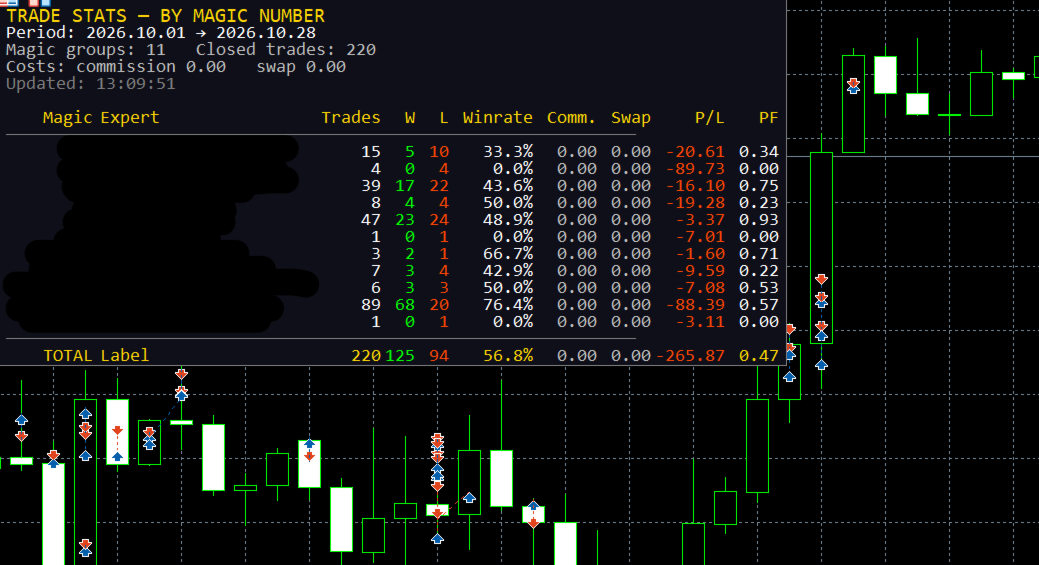
Five information lines above the table:

Line Example (English)
Title TRADE STATS — BY MAGIC NUMBER
Period Period: 2026.10.01 → 2026.10.28
Counters Magic groups: 4 Closed trades: 187
Costs Costs: commission -42.10 swap -3.55 spread* -18.40
Status Updated: 13:20:57 * spread is estimated from ticks

Then the table header, rows, and the TOTAL row. If the number of groups exceeds InpMaxRows , the remainder is reported as ... and N more Magic .

Columns: Magic | Expert | Trades | W | L | Winrate | [Comm.] | [Swap] | [Spread*] | P/L | PF

Comm. , Swap and Spread* appear only when their switches are on. Numeric columns are right-aligned, the expert name is left-aligned and truncated with .. when it exceeds the column width (hard cap 320 px). Colour coding is applied per cell: profit/positive → clrLime , loss/negative → clrOrangeRed , neutral → clrSilver ; the magic of manual trades is shown in silver, program magic numbers in cyan.

5. Metrics and formulas

  • Trades — number of position-closing deals in the period.
  • W / L — closed deals with net result > 0 and < 0; zero-result deals are counted separately (not shown as a column, exported in CSV).
  • Winrate — wins / (wins + losses + zeros) × 100 .
  • Gross profit / gross loss — sums of positive and absolute negative net results.
  • P/L — net result of all deals of the group, including the enabled cost components.
  • PF (Profit Factor) — grossProfit / grossLoss ; when there are no losses but there is profit, it is capped at 99.99 ; otherwise `0.
  • Best / worst trade, average trade, last deal time — computed and exported to CSV (not shown on the panel).
  • TOTAL row — sums across all groups plus a portfolio-level Winrate and Profit Factor.

6. Inputs

Input Default Meaning
InpPeriodMode PERIOD_CURRENT_MONTH Current month / current week / today / last N days / custom dates
InpLastDays 30 Number of days for the "last N days" mode
InpCustomFrom , InpCustomTo 2025.01.01 , 2025.12.31 Custom date range (end date is extended to 23:59:59)
InpMagicFilter 0 Analyse a single magic number (0 = all)
InpShowManual true Include manual trades (magic = 0)
InpSymbolFilter "" Analyse one symbol only ("" = all)
InpShowCommission true Show the commission column and include commission + fees in P/L
InpShowSwap true Show the swap column and include swap in P/L
InpShowSpread false Show the spread column and subtract an estimated spread from P/L
InpSpreadMaxCalc 300 Maximum number of new spread estimations per refresh (0..5000)
InpLanguage LANG_ENGLISH Panel and journal language: English (default) or Russian
InpShowComment true Derive expert names from deal comments
InpCommentLen 20 Maximum length of a derived expert name
InpExpertNames "" Explicit name map, e.g. 20261012=GoldScalperPro;1=ScalperProM30
InpSortMode STATS_SORT_MAGIC Magic / net P/L / Profit Factor / trades / Winrate
InpSortDesc true Descending order (ignored for "by Magic", which is always ascending)
InpRefreshSec 5 Minimum interval between recalculations, seconds (1..3600)
InpPanelX , InpPanelY 10 , 20 Panel offset in pixels
InpTextColor , InpBgColor , InpHeaderColor clrWhite , C'15,15,25' , clrGold Colours
InpFontSize , InpFontName 9 , Consolas Font (size 6..30); a monospaced font keeps the columns aligned
InpMaxRows 30 Maximum visible rows (0 = all)
InpExportCSV false Write a CSV snapshot on every refresh
InpCSVFileName stats_by_magic.csv CSV name, created in the terminal's MQL5\Files sandbox

Invalid inputs (period bounds, font size, comment length, refresh interval, spread budget) abort initialisation with INIT_PARAMETERS_INCORRECT and a journal message.

7. Spread estimation

MT5 does not store the spread in a deal, so when InpShowSpread is enabled the EA estimates it: it copies ticks ±5 seconds around the deal time with CopyTicksRange , takes the tick nearest to the execution moment, and computes

spread_cost = 0.5 × (ask − bid) × volume × contract_size

The value is stored as a negative contribution to the result and cached per deal ticket in a ticket-sorted array with binary search, so a deal is estimated once. Estimations are throttled by InpSpreadMaxCalc per refresh; if no ticks exist for that moment, nothing is cached and the deal is retried on a later refresh. The panel and journal explicitly mark this value as an estimate ( spread* ).

8. CSV export

FILE_WRITE | FILE_CSV | FILE_ANSI , ; delimiter, one row per magic group, always in English:

Magic;Expert;Trades;Wins;Losses;Zeros;Winrate;Commission;Swap;Spread;NetProfit;
GrossProfit;GrossLoss;ProfitFactor;BestTrade;WorstTrade;AvgTrade;LastDeal

The file is written to the terminal data folder ( MQL5\Files\... ), so it can be read by other tools or services.

9. Localization

All runtime text (panel and journal messages) is resolved through the T(ENUM_TXT) helper from a compile-time table of English or another strings. English is the default; switching InpLanguage changes the panel on the next refresh without restarting the EA. The labels in the EA properties dialog are static English strings (MQL5 cannot localize input captions at runtime).

10. Performance notes

  • Recalculation is throttled by InpRefreshSec and driven by both a 1-second timer and OnTick , so the panel stays alive without ticks; the first calculation runs in OnInit .
  • One HistorySelect plus one linear pass over the deals of the period per refresh; grouping is a short linear scan, sorting is insertion sort (the number of groups is small).
  • Chart labels are created once and only updated afterwards; stale row/column objects are deleted by HideUnusedRows , and the background is recreated if it disappears (e.g. after a template change).

11. Limitations and assumptions

  • Only closed deals inside the selected period are analysed; open positions and floating P/L are not included.
  • Trade counts follow the broker's deal structure: partial closes appear as several exits, and DEAL_ENTRY_INOUT (netting reversals) is treated as an exit.
  • Results are shown in the account deposit currency; no currency conversion is performed.
  • Commission is reported exactly as the broker records it; if a broker books commission on entry deals only, that behaviour is preserved.
  • Spread is an estimate by design and is not identical to the broker's actual mark-up.
  • Expert names are heuristics based on comments; use InpExpertNames for exact labelling.
  • The EA is an indicator/analytics tool: it is intended to be attached to any chart and left running.

12. Compatibility and validation

  • MetaTrader 5, MQL5; compiled with 0 errors and 0 warnings on compiler build 6230.
  • The published binary is compiled for X64 Regular so it is accepted by the MQL5 Market (AVX2/AVX512 builds are rejected there).
  • Verify on a demo account or in the Strategy Tester's visual mode that the panel fits the chart, that column widths are correct in both languages, and that exported CSV values match the account history.

13. Risk disclaimer

Trade Stats only reports historical statistics. Past performance of an Expert Advisor does not guarantee future results, and spread estimates and comment-derived names may differ from broker reality. Always validate any decision based on these numbers against your own records.

推荐产品
Atlas Trade Desk
Bernhard Wurzlbauer
Atlas Trade Desk MT5 Atlas Trade Desk MT5 is a visual trade panel, risk manager and lot calculator for manual MetaTrader 5 traders. Plan market and pending orders directly on the chart, calculate position size from your selected risk, adjust Entry, Stop Loss and Take Profit visually, and manage open positions from one clean dashboard. The tool is built for discretionary traders who want faster order preparation, clearer risk control and safer position management without switching between multipl
# Ronin Copier - Tactical Prop Sync **专为硬核自营交易员打造 · 零延迟 · 零DLL 本地多账户跟单系统** **早期支持者专属特惠(限量名额):** - **前10份:** **$59**(当前阶段) - **后续10份:** **$99** - **最终售价:** **$199** *※价格将随着评价数量和里程碑自动上调。* --- 您是否同时在多家自营交易公司(FTMO、FundedNext、Alpha Capital 等)或不同私人经纪商管理多个 MT5 账户?   **Ronin Copier** 可在单台电脑或 Windows VPS 上实现多个 MT5 终端之间的毫秒级极速跟单同步。无需复杂的局域网设置、无需开启 WebRequest、更无高风险外部 DLL 注入。 系统采用状态对齐(State Reconciliation)底层架构与极简战术 HUD 面板,彻底解决漏单、执行延迟以及浮动净值重算导致的手数错误。 --- ### 核心优势与机制 - **100% 原生架构 · 零 DLL 依赖**: 完全基于
Keyboard Scalper Pro
Mauricio Eduardo Lara Perez
Keyboard Scalper Pro is a customizable keyboard trading utility for MetaTrader 5. It is designed for traders who want direct manual control of order execution without being limited to a fixed keyboard layout. Every trading hotkey can be configured to match the user's preferred workflow, while the default layout is built around the numeric keypad for fast operation. The utility does not generate signals and does not decide when to trade. The trader chooses the setup, direction and timing. Keyb
Binance Quotes Updater
Andrey Khatimlianskii
5 (1)
This service is designed to stream online cryptocurrency quotes   from the Binance exchange to your MetaTrader 5 terminal. You will find it perfectly suitable if you want to see the quotes of cryptocurrencies in real time — in the Market watch window and on the MetaTrader 5 charts. After running the service, you will have fully featured and automatically updated  cryptocurrency charts in your MetaTrader 5. You can apply templates, color schemes, technical indicators and any non-trading tools to
Boleta de negociação, adiciona automáticamente as ordens Take Profit e Stop Loss quando excutada uma ordem de compra ou venda. Ao apertar as teclas de atalho (A, D, ou TAB), serão inseridas duas linhas de pre-visualização, representando as futuras ordens de take profit (azul) e stop loss (vermelho), as quais irão manter o distanciamento especificado pelo usuário. Ditas ordens só serão adicionadas ao ser executada a ordem inicial. Ao operar a mercado, as ordens pendentes de take profit, e stop lo
使用革命性的交易时间管理器轻松控制您的交易程序。这个强大的工具可以在指定时间自动执行订单,从而改变您的交易方式。 为不同的交易行为(从购买到设置订单)制定个性化任务列表,所有这些都无需人工干预。 交易时间管理器安装和输入指南 如果您想获取有关 EA 的通知,请将我们的 URL 添加到 MT4/MT5 终端(参见屏幕截图)。 MT4版本     https://www.mql5.com/en/market/product/103716 MT5版本     https://www.mql5.com/en/market/product/103715 告别人工监控,拥抱精简效率。直观的界面允许您设置精确的参数,包括交易品种、执行时间、价格、止损 (SL)、止盈 (TP) 点和手数大小。 该工具的灵活性通过与市场行为相匹配的适应性重复选项来凸显。通过视觉主题个性化您的体验,并减少长时间交易期间的眼睛疲劳。 摆脱手动交易程序,拥抱“交易时间管理器”的强大功能。提高交易的准确性、组织性和自由度。简化您的日常工作并重新体验交易。 主要特点: 自动订单执行:按指定时间间隔无缝自动执行订单,从而节省您的
这款下单风控面板以“简单高效、精准控险”为核心设计理念,专为各类交易者打造,无论是新手入门还是资深玩家,都能快速上手并实现对交易风险的精细化管理。面板将风控逻辑深度融入下单全流程,从根源上解决了传统交易中“风控设置繁琐、操作滞后”的痛点,让每一笔交易都自带安全屏障。     在核心风控功能上,面板支持下单环节同步预设止盈止损参数,无需额外跳转操作,交易者可根据行情波动规律、自身风险承受能力精准设定点位。当交易标的达到预设条件时,系统将自动执行止盈或止损指令,既避免了因人工盯盘疲劳导致的收益流失,又能有效规避行情突变带来的大额亏损,尤其适用于波动剧烈的交易场景。     针对突发行情下的应急操作,面板贴心配备一键平仓与一键减仓功能。当需要快速离场规避风险,或想要部分减持锁定部分收益时,只需点击对应按钮,系统便会以最优价格完成交易指令,相比传统分步操作大幅缩短响应时间,减少滑点损失。整体界面简洁明了,功能分区清晰,将复杂的风控逻辑转化为直观易懂的操作,真正实现“风控不复杂,交易更安心”。
VRD Quant estimates how much capital and what lot size each EA on your MT5 account needs, from that EA's own drawdown history. What it does for you Go beyond a single drawdown figure: 2,000 bootstrap resamples of the EA's closed trades give a 95th-percentile drawdown. Get a suggested operating capital (p95 drawdown divided by the 20% warn band) and a fixed lot (the smallest lot observed). See expectancy and p95 drawdown on each EA's Passport card, from 10 closed trades upward. Repeatable results
Product Name: Smart Switch Dashboard STOP WASTING SECONDS. SECONDS COST MONEY. Are you losing trades because you're fumbling through the Market Watch? Is your workspace messy and slowing you down? In trading, Speed is everything. If you aren't organized, you are losing money to traders who are. Smart Switch Dashboard is not just a tool—it is your COMMAND CENTER . Designed for serious Scalpers and Day Traders who demand Speed, Precision, and Zero Lag. DOMINATE YOUR WORKFLOW 1. ULTRA-FAST SY
Telegram to mt5 pro
Janet Abu Khalil
4 (4)
Telegram to MT5 Pro — 高级 Telegram 信号复制器(Auto-Fix,多TP,风险控制,完整交易管理) Telegram to MT5 Pro — 专业 Telegram 信号复制系统 Telegram to MT5 Pro 可将来自 Telegram 的交易信号实时复制到您的 MetaTrader 5 账户,并提供完整的风险控制、执行管理与交易管理功能。 系统由两个组件组成: • 运行在 MetaTrader 5 内的 Expert Advisor(EA) • 连接 Telegram 并将信号发送到 EA 的桌面桥接程序 两个组件必须在同一台电脑运行。由于 MQL5 限制,EA 无法直接连接 Telegram。 支持与安装 提供完整 PDF 安装指南。 支持内容: • 完整 PDF 使用手册 • 分步安装指导 • 在线聊天支持 • 交易商设置帮助(前缀、后缀、符号映射) 功能说明 • 读取任意 Telegram 群组或频道信号 • 自动解析交易品种、方向、入场、止损、止盈 • 秒级执行交易 • 管理交易(移动止损、保本、部分平仓) • 支持多账户与多信号
本产品是自动平仓支持EA,帮助自由裁量交易者更容易执行自己已经决定的平仓规则。您可以设置基于指定时间、K线确认或MA交叉/接近的平仓条件,并可单独或同时使用TIME、CANDLE、MA CROSS。同时还可在当前图表上显示1小时、4小时、日线、周线、月线的MA。 本产品并非自动完成交易判断或开仓的产品,而是帮助您执行自己已经决定的平仓规则,从条件设置到监控、执行均可获得支持。 功能 在指定时间自动平仓(如财经数据公布前、睡前等) 在指定周期的阳线/阴线确认时自动平仓 在指定MA交叉,或价格接近至指定距离时自动平仓 可单独设置TIME、CANDLE、MA CROSS并同时监控 以上任一条件均可仅设置为提醒通知,不进行平仓 在当前图表上显示1小时、4小时、日线、周线、月线的MA(支持仅在价格接近时显示、闪烁显示) 适用场景 即使已经决定好平仓规则,眼前的浮盈或浮亏也可能改变判断,而工作、睡眠或外出等无法查看图表的情况,也可能导致无法按计划平仓。本产品并非代替您做判断,而是帮助您执行自己已经决定的平仓条件。 裁量入场与规则平仓结合 当您希望自行判断入场,同时按照预先设定的时间、K线或MA条件
产品名称 MT5 黄金白银多语言交易面板 V17.00 产品简介 这是一款专为黄金和白银手动交易者设计的专业交易面板,支持中文、英文、西班牙语、阿拉伯语、德语五种语言。面板能够自动识别黄金与白银品种,无需手动输入代码,适用于全球绝大多数券商的账户类型,包括标准账户、零点账户以及原始点差账户。用户只需将面板加载到对应的黄金或白银图表上,即可快速完成下单、移动止损、自动保护、价格预警、订单管理等操作。 本产品经过长期实盘测试与细节优化,力求让交易者在使用过程中减少重复操作,避免人为失误,将更多精力放在行情判断和交易决策上。 产品优势 全球品种自动识别 面板会自动搜索并识别黄金和白银相关品种,支持常见的品种代码以及带有不同后缀的代码形式,例如 XAUUSD、GOLD、XAGUSD、SILVER,以及 XAUUSDm、XAUUSDz、XAGUSDm、XAGUSDz 等。用户不需要手动填写品种代码,也不需要担心因为经纪商代码不同而无法使用。 美元价格距离移动止损 移动止损的启动距离、追踪距离、步长全部采用美元价格距离,与交易手数无关。无论用户交易 1 手还是 100 手,设置的美元距离
Welcome to Smart Algo Trade Panel Manager MT5 - the ultimate   risk management tool designed to make trading more effective based on user needs.  It is a comprehensive solution for seamless trade planning, position management, and enhanced control over risk. It does not matter weather you a beginner or an advanced trader, or a scalper needing rapid executions, SmartAlgo Trade Panel  adapts to your needs offering flexibility across all markets of your choice. You can put SL, Lot and TP of choice
MAFX Trading Manager
Mark Anthony Noblefranca Nazarrea
MAFX TRADING MANAGER 6 适用于 MetaTrader 5 的交易管理、交易日志和分析工具 MAFX Trading Manager 6 是适用于 MetaTrader 5 的一体化交易工作区,将手动及半自动交易管理与可视化订单规划、风险管理工具、内置交易日志和详细的交易分析相结合。 它适合希望自主作出交易决策,同时借助专用工具直接在 MetaTrader 5 内规划订单、管理持仓、查看交易历史、记录观察结果及分析交易表现的交易者。 MAFX Trading Manager 6 不生成交易信号,也不会自动决定何时入场。市场分析、交易方向、入场及风险决策仍由交易者负责。 第6版在原版 MAFX Trading Manager 的基础上进行了重大扩展,提供重新设计的交易工作区,并增加了交易规划、持仓管理、日志记录、分析及表现回顾工具。 集成交易日志 内置交易日志使交易者无需离开 MetaTrader 5,即可查看交易活动并维护日志信息。 交易日志将历史交易数据与单个交易日回顾工具相结合,并支持记录关于交易活动的补充观察。 它包含四个主要区域: 盈亏日历、每日交易日志、
EA Health Monitor
Allan Aparece Ninal
EA Health Monitor is a free indicator for MetaTrader 5 that shows how each Expert Advisor on your account is doing. It groups the account history by magic number. Every EA gets its own row. Manual trades have a row of their own, and a total sits at the bottom. It only reads the account history and open positions. It never opens, changes or closes a trade. Standalone: Everything is built in. You do not need to buy or install any other product named on this page. Quick start Attach EA Health Monit
FREE
Phantom Currency Heatmap Pro Real-Time Currency Heatmap & Trade Recommender for MetaTrader 5 Stop guessing which pairs to trade! The Phantom Currency Heatmap Pro- is an essential visual tool for manual traders. It analyzes the 8 major currencies (USD, EUR, GBP, JPY, AUD, CAD, CHF, NZD) across all 28 major pairs to calculate their true underlying strength in real-time. By pairing the strongest currency against the weakest currency, you give yourself the highest probability of catching a stron
TradeControl Utility Pro is a trading utility for MetaTrader 5 designed for traders who prioritize risk management and visual organization on the chart. The program combines a compact panel with a minimalist flat design and tools for virtual trade planning (VRP) and position grouping. Note: This is a utility for manual trading, not an automated expert advisor or signal generator. The program does not guarantee profits. Trading in financial markets involves high risk. Who is this utility for?
The professional browser of News and Trading Sessions is now available in MetaTrader 5. Now all the most important market information is collected on one dial! News located on the Time scale. Planning your working time has never been so easy and convenient ... The news scale can be switched a day, two, a week, a month forward or backward (see the details in the short video). All news updates in real time. Thanks to the built-in filters, you can configure the display of news by importance, cou
MQL5 博客: https://www.mql5.com/en/blogs/post/761446 MT4 版本: https://www.mql5.com/en/market/product/136790 MT5 版本: https://www.mql5.com/en/market/product/136791 Time Wizard 是一款专业的交易助手,专为需要在简洁的控制面板上实现速度、时机和执行控制的交易者而设计。 这款智能交易系统 (EA) 专为事件驱动交易、定时执行和快速半自动订单管理而设计。它允许您提前准备订单、定义精确的执行时间、设置分层挂单、通过止损和止盈管理风险,并通过图表上的简洁界面监控所有信息。 无论您是围绕经济事件、开盘、突破点还是您自己的自定义计划进行交易,Time Wizard 都能帮助您以结构化和纪律性的方式执行交易。 主要功能 1. 基于时间的订单执行 设置具体的执行日期和时间,EA 即可在需要时精准下单。 此功能非常适合: 新闻交易 突破交易设置 预先计划的市场执行 定时下单 2. 挂单阶梯 创建多层挂单,层间距和
CauCa Client is a smart execution engine built for the Fishing Strategy, a method designed to patiently cast entries, scale positions in layers, and react quickly when market conditions become favorable. It focuses on precision order handling, dynamic layer management, and stable behavior in fast-moving sessions. This Client EA is ideal for traders who want disciplined, rule-based execution without manual stress. It helps maintain consistency in grid expansion, order structure, and timing, while
FREE
Trend Alignment Scanner Pro The Ultimate Volatility Direction Score Dashboard for MetaTrader 5 Are you tired of flipping through dozens of charts just to find a single valid setup? Meet Trend Alignment Scanner Pro , an institutional-grade multi-symbol, multi-timeframe dashboard engineered to detect high-probability market imbalances in real-time. Powered by our proprietary Volatility Direction Score (VDS) Engine , this scanner filters out market noise and ranks the most explosive, trend-aligned
COPYLATOR – MT5 Trade Copier Key Highlights Multi-Sender / Multi-Receiver Trade Replication – supports one-to-many, many-to-one, and many-to-many configurations, with complete real-time copying of market orders, pending orders, SL, and TP. Advanced drawdown protection – closing, blocking, pending-order deletion, manual and automatic reset mechanisms. Automatic symbol mapping – finds correct symbols, alerts if missing, allows manual override. Hedging & Netting support – auto-detected, no manual s
Risk Guardian — Ultimate Equity & Drawdown Protection Protect your capital. Stay disciplined. Trade smarter. Risk Guardian is a powerful utility that helps traders automatically control daily risk and secure profits based on equity. Designed for MetaTrader 5, it’s lightweight, efficient, and extremely easy to use. Key Features: Daily Drawdown Limit (% based) Absolute Equity Target (e.g., stop trading after reaching 110,200 USD) Auto-close All Positions, Orders & Charts Visual Dashboard on C
Quick Trade Panel Pro
Nicolas Olivier Menetrey
5 (1)
一键交易面板,自动管理手数和风险 Quick Trade Panel Pro 是一款直观的交易面板,专为希望快速执行订单同时完全控制风险的交易者设计。 主要功能 根据可用保证金百分比自动计算手数 以点数配置止损,自动应用于每笔交易 在一系列交易中锁定手数,确保持仓规模一致 智能对冲系统 对冲模式允许开立与现有交易相反方向的头寸 独立对冲百分比(50%、100%、200%或更多) 按方向限制交易数量,精确控制 自动利润保护 Auto Secure :达到一定利润后将止损移至盈亏平衡点 Trailing Stop :跟随价格保护收益,同时让盈利交易继续运行 两个系统可以协同工作以获得最佳保护 现代、简洁、专业的界面 实时显示:最大手数、最终手数和对冲手数 达到限制时BUY/SELL按钮自动禁用 设置按交易品种和魔术号自动保存 可配置参数 Lot % 使用的可用保证金百分比 SL (points) 止损距离 Max Trades 同方向最大持仓数 Allow Hedge 启用/禁用对冲模式 Hedge % 对冲手数相对于主手数的比例 Max Hedge 最大反向持仓数 Auto S
FREE
Guardian Yield Keeper is a utility Expert Advisor for traders who want real-time exit management and profit protection for open positions on the current symbol. This EA does not open new trades and does not generate entry signals. Its job is simple: monitor existing positions and close them when your profit or risk conditions are met . It is especially suitable for traders using DCA, Grid, Martingale, or basket trading systems and looking for a dedicated management layer that is more flexible th
News Risk Guard protects the positions you already hold when a scheduled economic release is about to hit. It is a risk tool. It does not predict direction, it does not look for entries of its own, and it makes no claim about profit. The calendar is built into the product: 4,101 releases covering 15 recurring events. No internet permission, no DLL, no file to install, and it behaves the same in the Strategy Tester as it does on a live chart. WHAT IT DOES 1. Event protection window    A confi
ZenTrade Manager MT5
Ian Paolo Lumba Castro
ZenTrade Manager MT5 Stop Computing. Start Trading. Are you tired of missing perfect entries because you were busy calculating pip distances, lot sizes, or monetary risk? Do you overthink your Stop Loss and Take Profit levels, only to watch the market reverse while you're adjusting lines? ZenTrade Manager MT5 removes the mental load of order management, allowing you to focus 100% on what matters: Reading the Market. You handle the high-level analysis and decide when to enter; ZenTrade handles t
Initial Balance Session  The Initial Balance Indicator is a professional-grade tool for MetaTrader 5 traders, designed to enhance your trading by visualizing key price levels during the Australia, Tokyo, London, and US market sessions. This indicator plots the Initial Balance (IB) range—the high, low, and midpoint prices—formed during the first hour of each session, with a customizable box to highlight the range and optional extension levels for advanced analysis. Optimized for smooth, flicker-f
VR MultiPrice Analysis (VR多元价格分析) - 货币对中货币力量强度的指示器以欧元/美元为例。如何确定这一货币对中哪种货币是弱的,哪种货币是强的? 最简单、最可靠的方法是将欧元与除美元以外的其他货币进行比较。 力量分布选项: 欧元兑其他货币升值——这种迹象表明,欧元对交易员和投资者更具吸引力,或有好消息传出。 欧元兑其他货币贬值——这种迹象表明,大多数交易者和投资者正在出手欧元并购买其他货币,或有坏消息传出。 该指示器根据不同的货币显示不同的值——这表明欧元货币市场存在不确定性。 对于欧元货币力量强度,该指标会分析美元与其他货币的关系。 因此,通过VR MultiPrice Analysis (VR多元价格分析),交易者获得了对欧元/美元货币对的综合分析,并看到了这一货币对的全貌。 这款指示器可以分析设置的货币对,或设置中指定的货币对。 借助这款指示器,您可以在某种货币强劲走势开始时提高精准入场的机会。 您可以分析历史上的货币力量走势。为此,您需要设定两条垂直线,即开始日期和结束日期。 指示器的所有管理都在图表上完成,您可以选择需要分析的货币对中的第一种货币和分
​Notification Spy Protector is a MetaTrader 5 Expert Advisor (Utility) that monitors your trading activity and sends real-time alerts to your mobile device (via MT5 Push) and/or Telegram. Equipped with a solid and reliable Account Protector, this utility is fully compatible and highly recommended for Prop Firm trading to safeguard your accounts from violating drawdown limits. It also provides advanced transaction filters and a clean on-chart dashboard. Never miss a trade. Protect your account f
该产品的买家也购买
Trade Assistant MT5
Evgeniy Kravchenko
4.43 (216)
它有助于计算每笔交易的风险,容易安装新的订单,具有部分关闭功能的订单管理, 7 种类型的追踪止损和其他有用的功能。   附加材料和说明 安装说明   -   应用程序说明 线条功能  - 在图表上显示开仓线、止损线、止盈线。 有了这个功能,就可以很容易地设置一个新的订单,并在开仓前看到它的附加特性。   风险管理  - 风险计算功能在考虑到设定的风险和止损单的大小的情况下,计算新订单的成交量。它允许你设置任何大小的止损,同时观察设定的风险。 批量计算按钮 - 启用 / 禁用风险计算。 在 " 风险 " 一栏中设置必要的风险值,从 0 到 100 的百分比或存款的货币。 在 " 设置 " 选项卡上选择风险计算的变量: $ 货币, % 余额, % 资产, % 自由保证金, % 自定义, %AB 前一天, %AB 前一周, %AB 前一个月。   R/TP 和 R/SL - 设置止盈和止损的关系。 这允许你设置相对于损失的利润大小。 例如, 1 : 1 - 这决定了 TP = SL 的大小。 2 : 1 - 这意味着 TP 是 SL 的两倍。 RR - 它禁用比率。   订单管理 该面板支
欢迎来到 Trade Manager EA——这是一个终极风险管理工具,旨在使交易变得更直观、精准和高效。它不仅仅是一个下单工具,而是一个用于无缝交易计划、仓位管理和风险控制的全面解决方案。不论您是新手交易员、资深交易员,还是需要快速执行的剥头皮交易员,Trade Manager EA 都可以满足您的需求,适用于外汇、指数、大宗商品、加密货币等各种市场。 借助 Trade Manager EA,复杂的计算已成过去。只需分析市场,在图表上用水平线标记入场、止损和止盈,设置您的风险水平,Trade Manager 就会立即计算出理想的头寸规模,并实时显示以点、账户货币计价的止损和止盈。每笔交易都得以轻松管理。 主要功能: 头寸规模计算器 :根据定义的风险瞬间确定交易规模。 简单的交易计划 :在图表上用可拖动的水平线直接计划交易,设置入场、止损和止盈。 实时显示 SL 和 TP :以账户货币、点或分显示止损和止盈,便于分析。 高级保护工具 盈亏平衡选项 : 基本盈亏平衡 :当您的交易达到设定水平时自动保护利润。 多级盈亏平衡 :设置多达 4 个级别以逐步保护利润。 尾随止损选项 : 基本尾随
Local Trade Copier EA MT5
Juvenille Emperor Limited
4.94 (149)
Local Trade Copier EA MT5 是一款快速、灵活的交易复制工具,用于在同一台 Windows 电脑或 Windows VPS 上的多个 MetaTrader 5 账户之间复制和管理交易。 它将本地交易同步与 Receiver 端的手数管理、风险管理、交易过滤、品种映射、交易管理和账户保护功能结合在一起。 只需约 1 分钟 即可完成 Transmitter 和 Receiver 终端的设置,并可在同一经纪商或不同经纪商的账户之间复制手动交易或 EA 交易。在合适的条件下,本地 MetaTrader 终端之间的交易信息可以在 0.5 秒以内 完成同步。实际交易执行速度取决于经纪商延迟、网络状况、电脑/VPS 性能以及终端负载。 购买前先试用免费演示版 您可以在 MT5 模拟账户上测试 功能完整的 Local Trade Copier EA MT5 免费演示版 ,每次可使用 4 小时 : 下载 Local Trade Copier EA MT5 免费演示版 将下载的文件放入: MT5 → 文件 → 打开数据文件夹 → MQL5 → Experts 然后重新启动 MT
Telegram to MT5 Multi-Channel Copier   可将您 Telegram 和 Discord 频道中的交易信号自动复制到 MetaTrader 5。无需机器人、无需浏览器扩展、无需手动复制。信号一到 Telegram 或 Discord,EA 几秒内就在您的终端开仓。 在复制某个频道之前,内置回测器还能告诉您该频道在您的账户上会有怎样的表现。 产品包含两个组件:一个监听您 Telegram 频道的 Windows 应用程序,以及在 MT5 终端执行信号的本 EA。同时提供 MT4 版本   点此 . 设置指南与应用下载:   https://www.mql5.com/en/blogs/post/768988 了解如何 回测任何 Telegram 信号频道 。 当前价格将来会上调。 工作原理 应用通过您自己的 Telegram 账号连接,因此能看到您关注的所有频道、群组、话题和机器人,包括私密和 VIP 频道。信号到达时,应用读取它,EA 按您的手数和设置在终端中开仓。 整个过程全自动,无需守在电脑前。专为 24/7 无人值守运行设计:Telegram 连接
Strategy Ledger Pro
Abdullah Uygar Tuna
5 (14)
现已支持中文。 Strategy Ledger Pro 是一款适用于 MetaTrader 5 的只读账户分析面板。它按智能交易系统(EA)、策略、品种和魔术号拆分账户结果,让您看清每一个的真实贡献。 面板支持 11 种语言:English、Français、Deutsch、Español、Italiano、Português、Русский、Türkçe、中文、日本語 和 한국어。 下载演示版之前请注意。 Market 仅在策略测试器中运行任何付费产品的演示版。本面板分析的是您自己账户上的交易,而策略测试器中没有可读取的账户历史,因此演示版会打开一个空面板并加以说明。这是演示机制的工作方式,并非产品的限制。 本描述中的视频展示了面板在真实账户上的运行效果。 详细的 使用手册 (英文)介绍了每项功能, AureusAI Trading Suite 群组欢迎交流讨论并发布公告。 MetaTrader 对整个账户只显示一个余额。当多个 EA 同时交易时,这个余额无法说明每个 EA 的贡献。Strategy Ledger Pro 读取账户历史,重建已平仓头寸,将其归入各个策略,并在一个
TradePanel MT5
Alfiya Fazylova
4.88 (170)
交易面板是一款多功能交易助手。该应用包含超过50种手动交易功能,并允许您自动执行大多数交易任务。 应用程序说明 : https://www.mql5.com/zh/blogs/post/761102 用于模拟账户的应用程序试用版: https://www.mql5.com/zh/blogs/post/762579 如何安装应用程序: https://www.mql5.com/zh/blogs/post/762580 如何在可视化模式下测试应用程序: https://www.mql5.com/zh/blogs/post/770278 如何在VPS MetaTrader上安装应用程序: https://www.mql5.com/zh/blogs/post/770196 贸易. 只需单击一下即可执行交易操作: 打開掛單和頭寸,並自動計算風險。 一鍵打開多個訂單和頭寸。 打開訂單網格。 按組別關閉掛單和頭寸。 反轉頭寸方向(關閉買入>打開賣出,關閉賣出>打開買入)。 鎖定頭寸(通過開啟缺少的頭寸,使買入和賣出頭寸的數量相等)。 一鍵部分關閉所有頭寸。 將所有頭寸的止盈和止損設置在同一價格水平。
按照自己的交易规则复制 Telegram 信号 Telegram to MT5 Signal Trader 可将 Telegram 公开及私密频道和群组中的文字交易信号自动复制到 MetaTrader 5。通过一个桌面应用管理多个信号提供者和 MT5 账户,并为 每个提供者单独设置风险和交易参数 。 复制信号无需 Telegram 机器人,也无需配置 API。 只需通过手机号或二维码登录您自己的 Telegram 账户,然后选择您已加入的频道或群组。您无需创建机器人,也无需提供 Telegram API 令牌、API ID 或 API hash。 自行选择仓位大小,将平仓分配到多个止盈价位,并自动执行保本止损和移动止损。在跟随信号提供者的同时,掌握信号的实际交易方式。 本产品由这款 MT5 EA 和必须配合使用的 Windows 桌面应用组成。请参阅 安装指南及应用下载 。 管理多个信号提供者和账户 为每个提供者单独设置: 为每个频道设置专属的仓位计算方式、入场规则、止损、止盈和交易管理参数。 灵活分配至不同账户: 将同一提供者的信号复制到多个已连接的 MT5 账户,并为每个账户使用不
================================================================================ POC BREAKOUT - V20.72. Full Professional Grade Toolkit ================================================================================ POC Breakout is a full MetaTrader 5 trading dashboard for discretionary traders who want breakout signals, Point of Control (POC) context, volume profiles, order flow, market structure, news, alerts, and advanced trade planning in one professional workspace. Attached directly to you
News Trade EA MT5
Konstantin Kulikov
4.55 (11)
在此向大家介绍一款我本人使用多年的机器人。该产品支持半自动和全自动交易模式。 >>> Chat <<< 本程序包含基于经济日历新闻的灵活交易设置功能。不支持策略测试器检验。仅可进行实际操作。需在终端设置允许URL 列表中添加新闻网站。点击服务 > 设置 > 智能交易系统。选中“允许WebRequest对下列URL发出请求:”。添加下列(删除空格):https://  nfs.faireconomy.media 下載最新的設定檔: https://www.mql5.com/en/blogs/post/747929 訊號監控: https://www.mql5.com/en/signals/author/test-standart 请参考博客中各类参数说明自行实现个性化设置   : https://www.mql5.com/en/blogs/post/748545   。 主要默认设置说明 单一图表英镑/GBP(英镑美元/GBPUSD、欧元英镑/EURGBP、英镑日元/GBPJPY、英镑加拿大元/GBPCAD、英镑澳大利亚元/GBPAUD、英镑瑞士法郎/GBPCHF)货币对操作。英镑/
Dealer's Panel No signal decides anything here — a hand does. One click, and the panel calculates what's underneath: lot size from risk, target from a 30-step balance ladder that remembers exactly how far an account has climbed. Toggle between market and pending without touching an input field. Set a stop, and the take-profit can write itself — a fixed share of the balance, translated into price with no arithmetic left for the trader to get wrong. One trade live at a time; it won't let a seco
Farmed Hedge Yield Farming | All Markets (Manual - Hybrid - Semi/Automated EA) VERIFIED TRADING RESULTS - Farmed Hedge Yield Axi Copy:  https://www.mql5.com/en/signals/2356376 - Farmed Hedge Yield Exn Copy:   https://www.mql5.com/en/signals/2356404 - Farmed Hedge Yield V Copy:  https://www.mql5.com/en/signals/2357156 IMPORTANT NOTICE: FarmedHedge is a MANUAL-FOCUSED TRADING UTILITY ,not a fully automated EA. Results shown on this Signal include manual trades and overall strategic management.
MT5 to Telegram Signal Provider 是一个易于使用且完全可自定义的工具,它允许向 Telegram 的聊天室、频道或群组发送 指定 的信号,将您的账户变为一个 信号提供商 。 与大多数竞争产品不同,它不使用 DLL 导入。 [ 演示 ] [ 手册 ] [ MT4 版本 ] [ Discord 版本 ] [ Telegram 频道 ]  New: [ Telegram To MT5 ] 设置 提供了逐步的 用户指南 。 不需要了解 Telegram API;开发者提供了您所需的一切。 关键特性 能够自定义发送给订阅者的订单详情 您可以创建分层的订阅模型,例如铜、银、金。其中金订阅获得所有信号等。 通过 id、符号或评论过滤订单 包括执行订单的图表截图 在发送的截图上绘制已关闭的订单,以便额外核实 延迟发送新订单消息的可能性,以便在发送前对位置进行调整 订单详情完全透明: 新的市场订单*带截图 订单修改(止损、获利) 已关闭的订单*带截图 部分关闭的订单** 新的挂单 修改的挂单(进场价格) 挂单激活(作为新的市场订单附加) 已删除的挂单 历史订单报告
下一次更新 — 版本 2.52 即将推出![全新功能] 准备迎接 4 项重大新功能,全面提升您的市场分析能力与交易流程! 我们将通过 4 项全新功能,进一步提升市场分析水平,满足您的交易需求。现为您介绍: 1. TRADE OVERVIEW DASHBOARD 2. CONFLUENCE AT ZONE 3. STRONG & WEAK HIGH/LOW 4. OTE 1. TRADE OVERVIEW DASHBOARD 一个帮助您更轻松地了解整体市场状况的仪表盘,为您的交易决策提供参考指引,帮助您系统地分析市场并规划交易,所有信息尽在一个屏幕中。 多时间周期市场概览(Multi-Timeframe Market Overview) 更清晰地了解市场方向与价格结构 快速查看市场状况 为系统化市场分析和入场规划提供指引。 2. CONFLUENCE AT ZONE 当价格进入关键区域时……您将了解有多少项支持因素相互吻合。 关键区域是交易决策至关重要的地方。但仅仅是价格进入某个区域还不够。此功能可帮助您在入场交易前,识别相互吻合的因素,包括信号及其他相关因素,从而进行更全面的分析,并
Trade copier MT5
Alfiya Fazylova
4.61 (57)
Trade Copier 是一种专业实用程序,旨在复制和同步交易账户之间的交易。 复制发生从供应商的帐户/终端到收件人的帐户/终端,安装在同一台计算机或 vps 上。 在购买之前,您可以在演示帐户上测试演示版本。 演示 这里 。 完整说明 这里 。 主要功能和优点: 支持复制MT5>MT5、MT4>MT5、MT5>MT4,包括МТ5 netting账户。 供应商和收件人模式在同一产品中实现。 简单直观的界面,允许您直接从图表中实时控制复制。 连接中断或终端重新启动时不会丢失设置和位置。 允许您选择要复制的符号,也可以替换接收者的符号,例如 EURUSD> USDJPY。 允许为每个符号设置个性化的复制设置。 支持回拷贝。 能够仅复制某些订单。 允许您设置开仓交易价格的最大差异和最大时间延迟。 正确复制部分订单关闭的执行。 计算复制手数的几种方法。 同步止盈和止损。有几种方法可以计算它们的位置。 支持通过执行在“Market account”上工作,其中 SL / TP 仅在开仓后设置。 如何使用简单的设置复制交易 将供应商终端和接收终端安装在同一台计算机或 VPS 上。 在供应商终端上
Telegram To MT5 Ultra
Mirel Daniel Gheonu
5 (5)
Telegram To MT5 — 信号复制器 将您的 Telegram 频道中的交易信号变成真实的 MT5 订单 — 自动执行,可用于任意数量的账户,风险与规则完全由您掌控。 Telegram To MT5 将您已在 Telegram 关注的 VIP / 信号频道连接到您的 MetaTrader 5 终端。一个免费的配套桌面应用读取消息(即使是禁止机器人的频道),而本 EA 在您的账户上执行这些信号 — 应用您自己的风险设置、品种映射、止盈处理、交易时段与新闻过滤。 它是一个信号复制器,而非黑箱策略:由您决定信任哪些频道,以及每笔交易如何计算手数和管理。 分步设置与配套应用安装指南 工作原理 [您的 Telegram 频道] -> [配套桌面应用] -> [MT5 + 本 EA] -> 订单 配套桌面应用(免费,已包含)使用您的 Telegram 账户登录并监视您所选择的频道。即使是禁止机器人的 VIP 频道也能正常工作,它通过一个私有、加密的本地桥接转发每条消息。 本 EA 挂在一个图表上,在 MT5 接收这些信号,并按照您的规则开仓 / 管理交易。 应用与 EA 之间的连接是位于
VirtualTradePad PRO SE MT5 — MetaTrader 5 专业交易控制中心 VirtualTradePad PRO SE 是一款基于图表的高级交易面板,也是适用于 MetaTrader 5 的交易管理工作区。它专为希望获得更快执行、更清晰持仓控制、结构化交易管理、可视化价位规划,以及直接在图表上完成专业交易流程的交易者而设计。 这不仅仅是一个 BUY / SELL 面板。PRO SE 将手动交易、挂单、持仓管理、部分平仓、篮子利润/亏损控制、加仓均价层级、ATM 规则、信号监控、实时市场信息、策略测试器 (Strategy Tester) 流程以及面向 VPS 的运行方式整合到一个互相关联的界面中。 MT4 版本 | 完整说明和截图 | 如何购买 | 如何安装 | 如何获取日志文件 | 如何测试与优化 | Expforex 的所有产品 为什么交易者会选择这套面板 图表一键交易 ,并支持键盘快速操作 快速完成开仓、平仓、修改、反转、锁仓与部分平仓 深度控制仓位、挂单、总利润与风控逻辑 自动参数计算,减少手动输入与重复劳动 为什么 PRO SE 比标准手动交易更高
RETAILBERG FOOTPRINT CHART PRO — Order-Flow Workspace for MetaTrader 5 Version 7.00  |  Professional System  |  31 tools  |  One chart A full 150-page illustrated User Manual is included. Please read the full manual to understand this feature packed footprint chart elements and ui. https://www.mql5.com/en/blogs/post/777982 DEMO / STRATEGY TESTER — PLEASE READ FIRST
Exp COPYLOT CLIENT for MT5
Vladislav Andruschenko
3.97 (35)
适用于 MetaTrader 5 的专业交易复制器 快速、专业、稳定可靠的 交易复制器 ,适用于 MetaTrader 。 COPYLOT 可在 MT4 和 MT5 终端之间复制 Forex 交易,并支持 Hedge 和 Netting 账户。 COPYLOT 的 MT5 版本支持: - MT5 Hedge → MT5 Hedge - MT5 Hedge → MT5 Netting - MT5 Netting → MT5 Hedge - MT5 Netting → MT5 Netting - MT4 → MT5 Hedge - MT4 → MT5 Netting MT4 版本 完整说明 + DEMO + PDF 如何购买 如何安装 如何获取日志文件 如何测试和优化 Expforex 的所有产品 您也可以将交易复制到 MT4 终端(MT4 → MT4,MT5 → MT4): COPYLOT CLIENT for MT4 COPYLOT 是一款专业的交易和持仓复制器,可同时与 2、3 甚至 10 个终端协同工作。 支持从 模拟账户和投资者账户 复制,也支持同时在多个终端上运行。 您可以使
Grid Manual MT5
Alfiya Fazylova
4.73 (22)
Grid Manual是一个交易面板,用于处理订单网格。 该实用程序是通用的,具有灵活的设置和直观的界面。 它不仅可以在亏损方向上设置订单网格,还可以在盈利方向上设置订单网格。 交易者不需要创建和维护订单网格,实用程序会这样做。 打开一个订单就足够了,Grid manual会自动为它创建一个订单网格,并伴随它直到非常关闭。 完整说明和演示版 此處 。 该实用程序的主要特性和功能: 伴隨以任何方式打開的訂單,包括從移動終端打開的訂單。 適用於兩種類型的網格:“限制”和“停止”。 使用兩種方法計算網格間距:固定和動態(基於 ATR 指標)。 允許您更改未結訂單網格的設置。 顯示圖表上每個網格的盈虧平衡水平。 顯示每個網格的利潤率。 允許您一鍵關閉網格中的盈利訂單。 讓您一鍵關閉每個訂單網格。 允許您對訂單網格應用追踪止損功能。 允許您在訂單網格上應用將訂單網格的止損轉移到盈虧平衡水平的功能。 相對於訂單網格的盈虧平衡水平自動重新排列止盈(僅在限價網格模式下,距離取決於所選的計算類型:“保守”或“激進”)。 最多可管理 20 個訂單網格,每個網格最多可包含 100 個訂單。 計算初始手數時,
Anchor Trade Manager
Kalinskie Gilliam
5 (9)
Your EAs cannot see each other, but Anchor can. Anchor gives you one place to coordinate your EAs, manage risk, and decide when trading is allowed. It works alongside the trading bots you already use without any changes to them. The Problem One EA opens a trade. Then another starts trading. The next thing you know, you wake up to multiple grids built across your account. Each EA may be doing exactly what it was designed to do, but together they can place far more risk on your account than you in
The Patch
Mian Rameez Ali
The Patch It never opens a trade. It walks behind the ones that did. Every open position, every pending order — checked twice a second for the one thing that's easy to forget: a stop, a target. Found bare, it doesn't ask. It writes the missing number in, measured in points from wherever the position began, and moves on to the next. No strategy, no opinion on direction. Just the quiet assumption that nothing should ever sit on the market unprotected — not because someone decided it shouldn't,
RS Trade Copier - 超快 本地跟单系统,配备 真正的 图形界面。别再手动输入账号了。告别200多个晦涩的参数设置。 一款可靠且灵活的工具,用于在 MT5 和 MT4 多个终端之间复制交易操作。适合专业交易员、信号服务商以及个人投资者使用。能够以高精度和低延迟将一个或多个信号源(Provider)的 交易操作同步 到一个或多个接收端(Client)。支持简单自动配置和高级手动设置。不会干扰手动或其他 EA 开的订单。完全 在 MT5 本地运行 ,无需第三方服务器。 RS Trade Copier 与其他解决方案的对比 RS Trade Copier 其他解决方案 设置 可视化分步向导。 设置大约需要 1 分钟。 200 多个晦涩的输入参数。 设置大约需要 20 分钟。 速度 异步交易操作。 批量平仓 50 个头寸仅需 ~1 秒。 缓慢的顺序执行。 批量平仓 50 个头寸需要约 25 秒。 界面 真正的图形界面,支持 11 种语言的工具提示。 无需手册即可上手。 EA 属性中“输入参数”选项卡下的长长参数列表。 需要阅读所有文档。 批量操作 完全支持。 接收端上的批量平仓瞬
Power Candles 策略扫描器——自优化多符号设置查找器 Power Candles策略扫描器 采用与Power Candles指标相同的自优化引擎,可同时扫描您“市场观察”中的所有交易品种。一个面板即可显示当前哪些品种在统计上具备交易价值、每种策略的最佳应用方向、最优止损/止盈组合,并在新信号触发时立即向您发送提醒。 本工具是 Stein Investments 生态系统的一部分 - 18+ 款工具,加上 Max,您的一对一 AI 交易导师。  随时在线,深入了解每一款指标,在您需要梳理思路的那一刻就在那里。  立即认识他: https://stein.investments 您的全面市场监控。每个交易品种超过3,000次自动优化。2种警报类型。一键切换图表并采取行动。 为何您需要此工具 大多数多标的扫描器仅展示价格 波动 。每只股票的波动率、百分比变化、RSI。您仍需自行摸索正确的策略、合适的止损位以及理想的入场阈值。Power Candles策略扫描器针对每只股票自动解答这些问题,仅在数学验证过的交易设置中触发实际入场信号时才会向您发出提示。这就是全部卖点。 自动
Trader Evolution
Siarhei Vashchylka
5 (7)
" Trader Evolution " - A utility designed for traders who use wave and technical analysis in their work. One tab of the utility is capable of money management and opening orders, and the other can help in making Elliott wave and technical analysis. Manual (Be sure to read before purchasing) | Version for MT4 Advantages 1. Trading in a few clicks. Immediate and pending orders are available in the panel 2. Money management. The program automatically selects the appropriate lot size 3. Simplifies
YuClusters
Yury Kulikov
4.93 (43)
Attention: You can view the program operation in the free version  YuClusters DEMO .  YuClusters is a professional market analysis system. The trader has unique opportunities to analyze the flow of orders, trade volumes, price movements using various charts, profiles, indicators, and graphical objects. YuClusters operates on data based on Time&Sales or ticks information, depending on what is available in the quotes of a financial instrument. YuClusters allows you to build graphs by combining da
Prop Guardian Risk Manager MT5 – Drawdown, Risk & Hedge Protection for Prop Firm and Managed Accounts Prop Guardian Risk Manager is a professional risk-control utility for MetaTrader 5, designed for prop firm traders, money managers and anyone who wants strict account-level risk protection. It does not generate trading signals, strategy entries or trading decisions. Instead, it runs in the background, monitors your account risk and can automatically block new exposure, close managed positions or
The product will copy all telegram signal to MT5 ( which you are member) , also it can work as remote copier.  Easy to set up, copy order instant, can work with almost signal formats, image signal,  s upport to translate other language to English Work with all type of channel or group, even channel have "Restrict Saving Content", work with  multi channel, multi MT5 Work as remote copier: with signal have ticket number, it will copy exactly via ticket number. Support to backtest signal. How to s
Floor Watch
Syed Tauqeer Hussain Shah
Floor Watch One number, watched every thirty seconds: how far equity has fallen since the day began — or since its highest point, if it's told to trail the peak instead of the open. Cross the line and it doesn't argue. Every open position closes, every pending order vanishes, and anything that slips through afterward gets shut the moment it appears. Not asked. Removed. The floor holds until the clock turns 5 AM Pakistan time — then, and only then, does the day start over. One rule. No except
EA Auditor
Stephen J Martret
5 (6)
EA Auditor is an independent analysis tool for traders evaluating Expert Advisors and trading signals on MetaTrader 5. It audits backtest reports, reviews posted developer signals, and cross-verifies the two against each other to help traders assess strategies before committing capital. The MQL5 market offers a wide range of Expert Advisors from many developers, with varying approaches, quality, and transparency. EA Auditor provides a consistent, data-driven framework for reviewing them, answer
Telegram to MT5 Coppy
Sergey Batudayev
5 (10)
Telegram 到 MT5: 终极信号复制解决方案 使用 Telegram 到 MT5 简化您的交易,这款现代化工具可直接从 Telegram 频道和聊天室复制交易信号到您的 MetaTrader 5 平台,无需 DLL 文件。这款强大的解决方案可确保精准的信号执行、丰富的自定义选项,节省时间并提高您的效率。 [ Instructions and DEMO ] 主要特点 直接 Telegram API 集成 通过电话号码和安全码进行身份验证。 通过用户友好的 EXE 桥轻松管理聊天 ID。 添加、删除和刷新多个频道/聊天以同时复制信号。 使用高级过滤器进行信号解析 跳过包含异常词(例如“报告”、“结果”)的不需要的信号。 支持灵活的 SL 和 TP 格式:价格、点数或点数。 自动计算指定点而不是价格的信号的切入点。 订单定制和灵活性 使用多种模式配置订单大小:固定手数、动态手数(% 风险)或特定符号手数。 使用信号数据或自定义参数调整 SL/TP。 设置滑点限制、挂单到期时间和重试参数,以实现无缝执行。 综合符号管理 排除特定符号或映射到特定经纪人的符号。 自定义信号和经纪商符号之间
筛选:
无评论
回复评论