Trade Stats Multicurrency

Trade Stats (Expert Advisor for MetaTrader 5) — Detailed Description

1. Overview

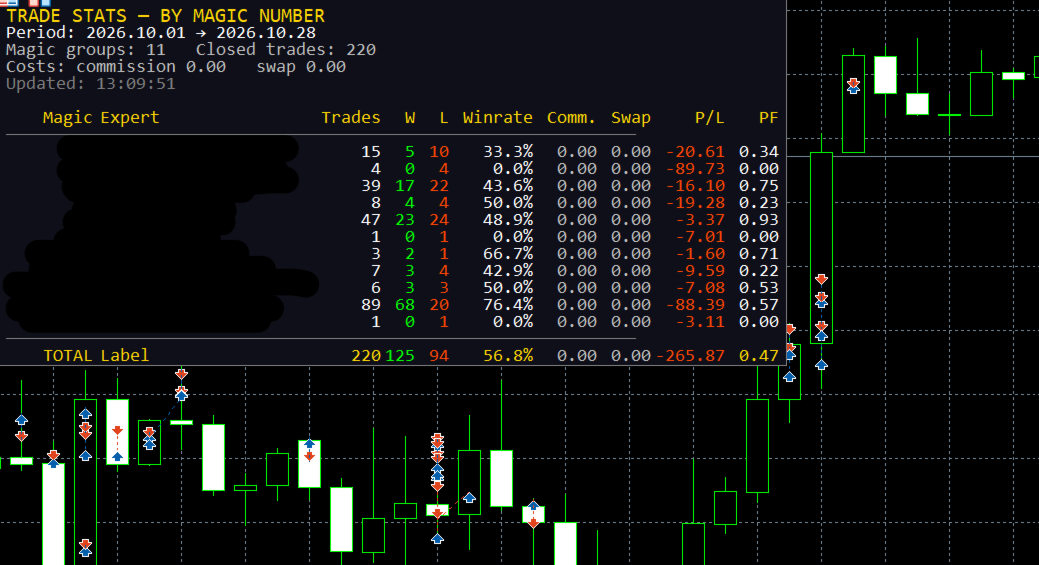
Trade Stats is a non-trading analytics Expert Advisor for MetaTrader 5. It reads the account's closed-deal history, groups every trade by its Magic Number, and renders a compact live statistics table directly on the chart. Its purpose is to answer one question: which Expert Advisor on this account is actually making money, and how much each one costs to run?

It places no orders, modifies nothing, and never touches positions. It only reads history and draws chart labels.

2. What it does not do

  • No trading, no money management, no signals — it cannot open or close anything.
  • No writes to the account, no external network calls, no file uploads.
  • Only chart objects are created, all with the prefix ByMagic_ , and all of them are removed in OnDeinit .

3. How it works

  1. History selection — on each refresh the EA calls HistorySelect(from, to) for the period defined by the period inputs (current month, current week, today, last N days, or custom dates). Server time is used.
  2. Deal filtering — only balance-bearing market deals are counted ( DEAL_TYPE_BUY / DEAL_TYPE_SELL ). Balance operations are ignored. Optional filters: exact Magic number, symbol name, and "hide manual trades" (magic = 0).
  3. Exit deals define a "trade" — a row counter is incremented only for deals that reduce a position: DEAL_ENTRY_OUT , DEAL_ENTRY_OUT_BY , DEAL_ENTRY_INOUT . Entry deals do not inflate the trade count.
  4. Cost accumulation — commission, broker fees, swap and (optionally) an estimated spread are accumulated for all deals, including entries, because brokers book these costs on entry deals.
  5. Net result per deal — profit + commission + fee + swap + spread estimate , where each component is included only if the corresponding switch is enabled. This same value feeds wins/losses, gross profit/loss, P/L, best/worst trade.
  6. Expert name resolution (highest priority first):
    1. explicit user map from InpExpertNames ( magic=Name; );
    2. the most frequently repeated "meaningful" comment of the entry deals for that magic (voting mechanism);
    3. the last meaningful comment;
    4. otherwise the row is shown as — . Broker technical comments are filtered out: strings starting with [ , sl , tp , so: , from # , by # , and comments containing cancelled , canceled , partial , split , timeout , deleted , as well as comments made only of digits and punctuation.
  7. Sorting — by Magic ascending (manual trades always last), or by net P/L, Profit Factor, trade count or Winrate, ascending/descending; ties are resolved by Magic for a stable order.
  8. Rendering — a lightweight label grid is redrawn: column widths are measured with TextSetFont / TextGetSize from the header and the visible cells, so the table auto-sizes to the content in either language.

4. Panel layout

Five information lines above the table:

Line Example (English)
Title TRADE STATS — BY MAGIC NUMBER
Period Period: 2026.10.01 → 2026.10.28
Counters Magic groups: 4 Closed trades: 187
Costs Costs: commission -42.10 swap -3.55 spread* -18.40
Status Updated: 13:20:57 * spread is estimated from ticks

Then the table header, rows, and the TOTAL row. If the number of groups exceeds InpMaxRows , the remainder is reported as ... and N more Magic .

Columns: Magic | Expert | Trades | W | L | Winrate | [Comm.] | [Swap] | [Spread*] | P/L | PF

Comm. , Swap and Spread* appear only when their switches are on. Numeric columns are right-aligned, the expert name is left-aligned and truncated with .. when it exceeds the column width (hard cap 320 px). Colour coding is applied per cell: profit/positive → clrLime , loss/negative → clrOrangeRed , neutral → clrSilver ; the magic of manual trades is shown in silver, program magic numbers in cyan.

5. Metrics and formulas

  • Trades — number of position-closing deals in the period.
  • W / L — closed deals with net result > 0 and < 0; zero-result deals are counted separately (not shown as a column, exported in CSV).
  • Winrate — wins / (wins + losses + zeros) × 100 .
  • Gross profit / gross loss — sums of positive and absolute negative net results.
  • P/L — net result of all deals of the group, including the enabled cost components.
  • PF (Profit Factor) — grossProfit / grossLoss ; when there are no losses but there is profit, it is capped at 99.99 ; otherwise `0.
  • Best / worst trade, average trade, last deal time — computed and exported to CSV (not shown on the panel).
  • TOTAL row — sums across all groups plus a portfolio-level Winrate and Profit Factor.

6. Inputs

Input Default Meaning
InpPeriodMode PERIOD_CURRENT_MONTH Current month / current week / today / last N days / custom dates
InpLastDays 30 Number of days for the "last N days" mode
InpCustomFrom , InpCustomTo 2025.01.01 , 2025.12.31 Custom date range (end date is extended to 23:59:59)
InpMagicFilter 0 Analyse a single magic number (0 = all)
InpShowManual true Include manual trades (magic = 0)
InpSymbolFilter "" Analyse one symbol only ("" = all)
InpShowCommission true Show the commission column and include commission + fees in P/L
InpShowSwap true Show the swap column and include swap in P/L
InpShowSpread false Show the spread column and subtract an estimated spread from P/L
InpSpreadMaxCalc 300 Maximum number of new spread estimations per refresh (0..5000)
InpLanguage LANG_ENGLISH Panel and journal language: English (default) or Russian
InpShowComment true Derive expert names from deal comments
InpCommentLen 20 Maximum length of a derived expert name
InpExpertNames "" Explicit name map, e.g. 20261012=GoldScalperPro;1=ScalperProM30
InpSortMode STATS_SORT_MAGIC Magic / net P/L / Profit Factor / trades / Winrate
InpSortDesc true Descending order (ignored for "by Magic", which is always ascending)
InpRefreshSec 5 Minimum interval between recalculations, seconds (1..3600)
InpPanelX , InpPanelY 10 , 20 Panel offset in pixels
InpTextColor , InpBgColor , InpHeaderColor clrWhite , C'15,15,25' , clrGold Colours
InpFontSize , InpFontName 9 , Consolas Font (size 6..30); a monospaced font keeps the columns aligned
InpMaxRows 30 Maximum visible rows (0 = all)
InpExportCSV false Write a CSV snapshot on every refresh
InpCSVFileName stats_by_magic.csv CSV name, created in the terminal's MQL5\Files sandbox

Invalid inputs (period bounds, font size, comment length, refresh interval, spread budget) abort initialisation with INIT_PARAMETERS_INCORRECT and a journal message.

7. Spread estimation

MT5 does not store the spread in a deal, so when InpShowSpread is enabled the EA estimates it: it copies ticks ±5 seconds around the deal time with CopyTicksRange , takes the tick nearest to the execution moment, and computes

spread_cost = 0.5 × (ask − bid) × volume × contract_size

The value is stored as a negative contribution to the result and cached per deal ticket in a ticket-sorted array with binary search, so a deal is estimated once. Estimations are throttled by InpSpreadMaxCalc per refresh; if no ticks exist for that moment, nothing is cached and the deal is retried on a later refresh. The panel and journal explicitly mark this value as an estimate ( spread* ).

8. CSV export

FILE_WRITE | FILE_CSV | FILE_ANSI , ; delimiter, one row per magic group, always in English:

Magic;Expert;Trades;Wins;Losses;Zeros;Winrate;Commission;Swap;Spread;NetProfit;
GrossProfit;GrossLoss;ProfitFactor;BestTrade;WorstTrade;AvgTrade;LastDeal

The file is written to the terminal data folder ( MQL5\Files\... ), so it can be read by other tools or services.

9. Localization

All runtime text (panel and journal messages) is resolved through the T(ENUM_TXT) helper from a compile-time table of English or another strings. English is the default; switching InpLanguage changes the panel on the next refresh without restarting the EA. The labels in the EA properties dialog are static English strings (MQL5 cannot localize input captions at runtime).

10. Performance notes

  • Recalculation is throttled by InpRefreshSec and driven by both a 1-second timer and OnTick , so the panel stays alive without ticks; the first calculation runs in OnInit .
  • One HistorySelect plus one linear pass over the deals of the period per refresh; grouping is a short linear scan, sorting is insertion sort (the number of groups is small).
  • Chart labels are created once and only updated afterwards; stale row/column objects are deleted by HideUnusedRows , and the background is recreated if it disappears (e.g. after a template change).

11. Limitations and assumptions

  • Only closed deals inside the selected period are analysed; open positions and floating P/L are not included.
  • Trade counts follow the broker's deal structure: partial closes appear as several exits, and DEAL_ENTRY_INOUT (netting reversals) is treated as an exit.
  • Results are shown in the account deposit currency; no currency conversion is performed.
  • Commission is reported exactly as the broker records it; if a broker books commission on entry deals only, that behaviour is preserved.
  • Spread is an estimate by design and is not identical to the broker's actual mark-up.
  • Expert names are heuristics based on comments; use InpExpertNames for exact labelling.
  • The EA is an indicator/analytics tool: it is intended to be attached to any chart and left running.

12. Compatibility and validation

  • MetaTrader 5, MQL5; compiled with 0 errors and 0 warnings on compiler build 6230.
  • The published binary is compiled for X64 Regular so it is accepted by the MQL5 Market (AVX2/AVX512 builds are rejected there).
  • Verify on a demo account or in the Strategy Tester's visual mode that the panel fits the chart, that column widths are correct in both languages, and that exported CSV values match the account history.

13. Risk disclaimer

Trade Stats only reports historical statistics. Past performance of an Expert Advisor does not guarantee future results, and spread estimates and comment-derived names may differ from broker reality. Always validate any decision based on these numbers against your own records.

おすすめのプロダクト
Atlas Trade Desk MT5 Atlas Trade Desk MT5 is a visual trade panel, risk manager and lot calculator for manual MetaTrader 5 traders. Plan market and pending orders directly on the chart, calculate position size from your selected risk, adjust Entry, Stop Loss and Take Profit visually, and manage open positions from one clean dashboard. The tool is built for discretionary traders who want faster order preparation, clearer risk control and safer position management without switching between multipl
# Ronin Copier - Tactical Prop Sync **プロップトレーダーのための完全ローカル・DLL不要・超低遅延コピーツール** **アーリーアダプター特別価格(数量限定):** - **先着10本:** **$59**(現在のステージ) - **次の10本:** **$99** - **定価:** **$199** *※レビューおよび販売マイルストーン達成ごとに自動で値上げされます。* --- 複数のプロップファーム(FTMO、FundedNext、Alpha Capital等)やプライベートブローカー口座を運用していませんか?   **Ronin Copier** は、同一PCまたはWindows VPS上の複数のMT5ターミナル間で、複雑なネットワーク設定、WebRequest、危険な外部DLLを一切使わずにミリ秒レベルの高速トレード同期を実現します。 状態整合(State Reconciliation)アーキテクチャと極薄のタクティカルHUDを搭載し、注文の取りこぼし、実行遅延、証拠金変動によるロット再計算エラーを徹底的に排除しました。
Keyboard Scalper Pro
Mauricio Eduardo Lara Perez
Keyboard Scalper Pro is a customizable keyboard trading utility for MetaTrader 5. It is designed for traders who want direct manual control of order execution without being limited to a fixed keyboard layout. Every trading hotkey can be configured to match the user's preferred workflow, while the default layout is built around the numeric keypad for fast operation. The utility does not generate signals and does not decide when to trade. The trader chooses the setup, direction and timing. Keyb
This service is designed to stream online cryptocurrency quotes   from the Binance exchange to your MetaTrader 5 terminal. You will find it perfectly suitable if you want to see the quotes of cryptocurrencies in real time — in the Market watch window and on the MetaTrader 5 charts. After running the service, you will have fully featured and automatically updated  cryptocurrency charts in your MetaTrader 5. You can apply templates, color schemes, technical indicators and any non-trading tools to
Boleta de negociação, adiciona automáticamente as ordens Take Profit e Stop Loss quando excutada uma ordem de compra ou venda. Ao apertar as teclas de atalho (A, D, ou TAB), serão inseridas duas linhas de pre-visualização, representando as futuras ordens de take profit (azul) e stop loss (vermelho), as quais irão manter o distanciamento especificado pelo usuário. Ditas ordens só serão adicionadas ao ser executada a ordem inicial. Ao operar a mercado, as ordens pendentes de take profit, e stop lo
革新的な Trades Time Manager を使用して、取引ルーチンを簡単に管理できます。この強力なツールは、指定された時間に注文執行を自動化し、取引アプローチを変革します。 購入から注文の設定まで、すべて手動介入なしで、さまざまな取引アクションのためのパーソナライズされたタスク リストを作成します。 Trades Time Manager のインストールと入力ガイド EA に関する通知を受け取りたい場合は、MT4/MT5 ターミナルに URL を追加してください (スクリーンショットを参照)。 MT4のバージョン     https://www.mql5.com/en/market/product/103716 MT5のバージョン     https://www.mql5.com/en/market/product/103715 手動監視に別れを告げ、合理化された効率を採用します。直感的なインターフェイスにより、シンボル、約定時間、価格、ストップロス (SL)、テイクプロフィット (TP) ポイント、ロットサイズなどの正確なパラメーターを設定できます。 このツールの柔軟性は、市
This Order Risk Control Panel is designed with the core concept of "Simple, Efficient and Accurate Risk Control". Tailor-made for all types of traders, whether they are beginners or experienced professionals, it allows for quick mastery and realization of refined risk management in every trade. The panel deeply integrates risk control logic into the entire order placement process, fundamentally addressing the pain points of "cumbersome risk control settings and delayed operations" in traditiona
VRD Quant estimates how much capital and what lot size each EA on your MT5 account needs, from that EA's own drawdown history. What it does for you Go beyond a single drawdown figure: 2,000 bootstrap resamples of the EA's closed trades give a 95th-percentile drawdown. Get a suggested operating capital (p95 drawdown divided by the 20% warn band) and a fixed lot (the smallest lot observed). See expectancy and p95 drawdown on each EA's Passport card, from 10 closed trades upward. Repeatable results
Product Name: Smart Switch Dashboard STOP WASTING SECONDS. SECONDS COST MONEY. Are you losing trades because you're fumbling through the Market Watch? Is your workspace messy and slowing you down? In trading, Speed is everything. If you aren't organized, you are losing money to traders who are. Smart Switch Dashboard is not just a tool—it is your COMMAND CENTER . Designed for serious Scalpers and Day Traders who demand Speed, Precision, and Zero Lag. DOMINATE YOUR WORKFLOW 1. ULTRA-FAST SY
Telegram to MT5 Pro — 高度なTelegramシグナルコピー機(自動修正・マルチTP・リスク管理・完全トレード管理) Telegram to MT5 Pro — プロフェッショナル Telegram シグナルコピーツール Telegram to MT5 Pro は、TelegramのシグナルをMetaTrader 5アカウントへ自動で直接実行する高性能トレードコピーシステムです。リスク管理、執行、トレード管理を完全に制御できます。 本システムは2つのコンポーネントで構成されています: • MetaTrader 5内で動作するExpert Advisor(EA) • Telegramと接続しシグナルをローカルでEAへ送信するコンパニオンデスクトップアプリ 両方は同じPC上で動作する必要があります。MQL5の制限によりEAはTelegramへ直接接続できません。ブリッジがTelegram処理を担当し、EAが取引を実行します。 サポートとインストール支援 完全なPDFインストール&ユーザーガイドが提供されます。 サポート内容: • 完全PDFユーザーガイド(全設定説明)
本製品は、裁量トレーダーが自分で決めた決済ルールを実行しやすくするための自動決済支援EAです。指定時刻、ローソク足確定、MAクロスまたはMA接近による決済条件を設定でき、TIME・CANDLE・MA CROSSを個別または同時に使用できます。あわせて、1H・4H・日足・週足・月足のMAを現在のチャートへ表示できます。 売買判断やエントリーを自動化する製品ではありません。トレーダー自身が決めた決済ルールを、条件設定から監視・実行まで支援します。 できること 指定時刻で自動決済(指標発表前・就寝前など) 指定した時間足の陽線・陰線確定で自動決済 指定したMAクロス、または指定距離まで価格が接近した場合に自動決済 TIME・CANDLE・MA CROSSを個別に設定し、同時に監視可能 いずれの条件も、自動決済ではなくアラート通知のみの設定が可能 1H・4H・日足・週足・月足のMAを現在のチャートへ表示(価格接近時のみ表示・点滅表示に対応) この製品が役立つ場面 決済ルールを決めていても、含み益や含み損を目の前にすると判断が変わったり、仕事中・就寝中・外出中などでチャートを確認できず、予定どお
Product Name MT5 Gold & Silver Multi-Language Trading Panel V17.00 Introduction This is a professional trading panel designed specifically for manual gold and silver traders. It supports five languages: English, Chinese, Spanish, Arabic, and German. The panel automatically detects gold and silver symbols, so users do not need to enter symbol codes manually. It is compatible with most brokers worldwide, including standard accounts, zero spread accounts, and raw spread accounts. Users only need t
Welcome to Smart Algo Trade Panel Manager MT5 - the ultimate   risk management tool designed to make trading more effective based on user needs.  It is a comprehensive solution for seamless trade planning, position management, and enhanced control over risk. It does not matter weather you a beginner or an advanced trader, or a scalper needing rapid executions, SmartAlgo Trade Panel  adapts to your needs offering flexibility across all markets of your choice. You can put SL, Lot and TP of choice
MAFX Trading Manager
Mark Anthony Noblefranca Nazarrea
MAFX TRADING MANAGER 6 MetaTrader 5向け取引管理・トレード日誌・分析ツール MAFX Trading Manager 6は、MetaTrader 5用の統合型取引ワークスペースです。手動・半自動の取引管理に、視覚的な注文計画、リスク管理ツール、内蔵トレード日誌、詳細な取引分析を組み合わせています。 自分で取引を判断しながら、専用ツールを使って注文の計画、ポジション管理、履歴の確認、所見の記録、パフォーマンス分析をMetaTrader 5内で行いたいトレーダー向けに設計されています。 MAFX Trading Manager 6は取引シグナルを生成せず、市場に参入するタイミングを自動決定しません。市場分析、売買方向、エントリー、リスクに関する判断はトレーダー自身が行います。 バージョン6は、従来のMAFX Trading Managerを大幅に拡張したものです。再設計されたワークスペースと、取引計画、ポジション管理、日誌、分析、パフォーマンスの振り返りに役立つ追加ツールを提供します。 統合トレード日誌 内蔵トレード日誌では、MetaTrader 5を離
EA Health Monitor is a free indicator for MetaTrader 5 that shows how each Expert Advisor on your account is doing. It groups the account history by magic number. Every EA gets its own row. Manual trades have a row of their own, and a total sits at the bottom. It only reads the account history and open positions. It never opens, changes or closes a trade. Standalone: Everything is built in. You do not need to buy or install any other product named on this page. Quick start Attach EA Health Monit
FREE
Phantom Currency Heatmap Pro Real-Time Currency Heatmap & Trade Recommender for MetaTrader 5 Stop guessing which pairs to trade! The Phantom Currency Heatmap Pro- is an essential visual tool for manual traders. It analyzes the 8 major currencies (USD, EUR, GBP, JPY, AUD, CAD, CHF, NZD) across all 28 major pairs to calculate their true underlying strength in real-time. By pairing the strongest currency against the weakest currency, you give yourself the highest probability of catching a stron
TradeControl Utility Pro is a trading utility for MetaTrader 5 designed for traders who prioritize risk management and visual organization on the chart. The program combines a compact panel with a minimalist flat design and tools for virtual trade planning (VRP) and position grouping. Note: This is a utility for manual trading, not an automated expert advisor or signal generator. The program does not guarantee profits. Trading in financial markets involves high risk. Who is this utility for?
The professional browser of News and Trading Sessions is now available in MetaTrader 5. Now all the most important market information is collected on one dial! News located on the Time scale. Planning your working time has never been so easy and convenient ... The news scale can be switched a day, two, a week, a month forward or backward (see the details in the short video). All news updates in real time. Thanks to the built-in filters, you can configure the display of news by importance, cou
MQL5ブログ: https://www.mql5.com/en/blogs/post/761446 MT4版: https://www.mql5.com/en/market/product/136790 MT5版: https://www.mql5.com/en/market/product/136791 Time Wizardは、スピード、タイミング、そして執行コントロールを一つの洗練されたダッシュボードで実現したいトレーダーのために開発された、プロフェッショナルなトレーディングアシスタントです。 このエキスパートアドバイザーは、イベントベースのトレーディング、スケジュール執行、そして高速な半自動注文管理のために設計されています。注文を事前に準備し、正確な執行時間を設定し、複数の指値注文を発注し、ストップロスとテイクプロフィットでリスクを管理し、チャート上のコンパクトなインターフェースからすべてを監視できます。 経済イベント、セッション開始、ブレイクアウト、あるいは独自のカスタムスケジュールなど、どのようなタイミングで取引を行う場合でも、Time Wizardは構造と規律に
CauCa Client is a smart execution engine built for the Fishing Strategy, a method designed to patiently cast entries, scale positions in layers, and react quickly when market conditions become favorable. It focuses on precision order handling, dynamic layer management, and stable behavior in fast-moving sessions. This Client EA is ideal for traders who want disciplined, rule-based execution without manual stress. It helps maintain consistency in grid expansion, order structure, and timing, while
FREE
Trend Alignment Scanner Pro The Ultimate Volatility Direction Score Dashboard for MetaTrader 5 Are you tired of flipping through dozens of charts just to find a single valid setup? Meet Trend Alignment Scanner Pro , an institutional-grade multi-symbol, multi-timeframe dashboard engineered to detect high-probability market imbalances in real-time. Powered by our proprietary Volatility Direction Score (VDS) Engine , this scanner filters out market noise and ranks the most explosive, trend-aligned
COPYLATOR – MT5 Trade Copier Key Highlights Multi-Sender / Multi-Receiver Trade Replication – supports one-to-many, many-to-one, and many-to-many configurations, with complete real-time copying of market orders, pending orders, SL, and TP. Advanced drawdown protection – closing, blocking, pending-order deletion, manual and automatic reset mechanisms. Automatic symbol mapping – finds correct symbols, alerts if missing, allows manual override. Hedging & Netting support – auto-detected, no manual s
Risk Guardian — Ultimate Equity & Drawdown Protection Protect your capital. Stay disciplined. Trade smarter. Risk Guardian is a powerful utility that helps traders automatically control daily risk and secure profits based on equity. Designed for MetaTrader 5, it’s lightweight, efficient, and extremely easy to use. Key Features: Daily Drawdown Limit (% based) Absolute Equity Target (e.g., stop trading after reaching 110,200 USD) Auto-close All Positions, Orders & Charts Visual Dashboard on C
Quick Trade Panel Pro
Nicolas Olivier Menetrey
5 (1)
自動ロット・リスク管理付きワンクリック取引パネル Quick Trade Panel Pro は、リスクを完全にコントロールしながら素早く注文を執行したいトレーダーのために設計された直感的な取引パネルです。 主な機能 利用可能証拠金の割合に基づいてロットサイズを自動計算 ポイント単位で設定可能なストップロス、各取引に自動適用 一連の取引中はロットサイズをロックし、一貫したポジションサイズを確保 スマートヘッジシステム ヘッジモードで既存取引と反対方向のポジションを開くことが可能 独立したヘッジ割合(50%、100%、200%以上) 方向ごとの取引制限で精密なコントロール 自動利益保護 Auto Secure :一定の利益に達するとストップロスを損益分岐点に移動 Trailing Stop :価格を追従して利益を保護しながら、勝ちトレードを伸ばす 両システムを併用して最適な保護が可能 モダンでシンプル、プロフェッショナルなインターフェース リアルタイム表示:最大ロット、最終ロット、ヘッジロット 制限に達するとBUY/SELLボタンが自動的に無効化 シンボルとマジックナンバーごとに
FREE
Guardian Yield Keeper is a utility Expert Advisor for traders who want real-time exit management and profit protection for open positions on the current symbol. This EA does not open new trades and does not generate entry signals. Its job is simple: monitor existing positions and close them when your profit or risk conditions are met . It is especially suitable for traders using DCA, Grid, Martingale, or basket trading systems and looking for a dedicated management layer that is more flexible th
News Risk Guard は、経済指標の発表が近づいたときに、すでに持っている建玉を 守るためのリスク管理ツールです。方向を予測しません。自分から仕掛けません。 利益の主張も一切しません。 日程は商品に内蔵しています (15指標・4,101件)。インターネット許可も DLL も 外部ファイルも不要で、ストラテジーテスターでも実チャートでも同じに動きます。 できること 1. 保護窓    発表の指定秒前に、管理対象の建玉を引き取り、発表後に返します。動作は選べます    — 警告のみ / 建値へ移動 / ストップを詰める / 数量を割合で減らす / 決済。    本ツールが動かしたストップは、窓が閉じるときに元の位置へ戻します。 2. ストップの無い建玉    発表を無防備で迎える建玉は、口座が抱える最大の単一リスクです。ATR から算出した    緊急ストップを自動で付けます。戦略ではなくシートベルトです。 3. ロットの自動計算    数量ではなくリスクを入力します。ロットは「失ってよい金額」と「ストップまでの    距離」から、ブローカーが実際に返す tick v
ZenTrade Manager MT5 Stop Computing. Start Trading. Are you tired of missing perfect entries because you were busy calculating pip distances, lot sizes, or monetary risk? Do you overthink your Stop Loss and Take Profit levels, only to watch the market reverse while you're adjusting lines? ZenTrade Manager MT5 removes the mental load of order management, allowing you to focus 100% on what matters: Reading the Market. You handle the high-level analysis and decide when to enter; ZenTrade handles t
Initial Balance Session  The Initial Balance Indicator is a professional-grade tool for MetaTrader 5 traders, designed to enhance your trading by visualizing key price levels during the Australia, Tokyo, London, and US market sessions. This indicator plots the Initial Balance (IB) range—the high, low, and midpoint prices—formed during the first hour of each session, with a customizable box to highlight the range and optional extension levels for advanced analysis. Optimized for smooth, flicker-f
VR MultiPrice Analysisは、通貨ペアの通貨の強さを決定する指標です。例として、EUR / USDのペアを取り上げましょう。現在弱い通貨と強い通貨を判断するにはどうすればよいのか説明します。 最も簡単で信頼性の高い方法は、ユーロを米ドルを除いて、他の通貨と比較することです。 分配の強さオプション EURは他の通貨に対して上昇しています。これは、通貨がトレーダーや投資家にとってより魅力的になったか、良いニュースが出てきたことを示しています。 EURは他の通貨に対して下落しています-これは、ほとんどのトレーダーと投資家がEURを取り除き、他の通貨を購入するか、悪いニュースが出てきたことを示しています。 インジケーターは、通貨ごとに異なる値を示します。EUR通貨の市場における不確実性の兆候です。 EUR通貨については、インジケーターは他の通貨との関係でUSDを分析します。 その結果、VR MultiPrice Analysisを使用して、トレーダーはEUR / USD通貨ペアの総合分析を受け取り、通貨ペア全体の全体像を確認します。 インジケーターは、現在設定されている通貨ペ
​Notification Spy Protector is a MetaTrader 5 Expert Advisor (Utility) that monitors your trading activity and sends real-time alerts to your mobile device (via MT5 Push) and/or Telegram. Equipped with a solid and reliable Account Protector, this utility is fully compatible and highly recommended for Prop Firm trading to safeguard your accounts from violating drawdown limits. It also provides advanced transaction filters and a clean on-chart dashboard. Never miss a trade. Protect your account f
このプロダクトを購入した人は以下も購入しています
Trade Assistant MT5
Evgeniy Kravchenko
4.43 (216)
取引 ごとのリスクの 計算、新規注文 の 簡単 な 設置、部分的 な 決済機能 を 持 つ 注文管理、 7 種類 のトレーリングストップなど 、便利 な 機能 を 備 えています 。 追加の資料と説明書 インストール手順   -   アプリケーションの手順   ライン機能 チャート上にオープニングライン、ストップロス、テイクプロフィットを表示します。この機能により、新規注文を簡単に設定することができ、注文を出す前にその特徴を確認することができます。   リスク計算 リスク計算機能は、設定されたリスクとストップロス注文のサイズを考慮して、新規注文のボリュームを計算します。ストップロスの大きさを自由に設定できると同時に、設定したリスクを守ることができます。 Lot calc ボタン - リスク 計算 を 有効 / 無効 にします 。 Risk フィールドでは 、必要 なリスクの 値 を 0 から 100 までのパーセンテージまたは 預金通貨 で 設定 します 。 設定」 タブで 、 リスク 計算 の 種類 を 選択 します :「 $ 通貨」、「 % 残高」、「 % エクイティ 」、「
Trade Manager EAへようこそ。これは、取引をより直感的、正確、そして効率的にするために設計された究極の リスク管理ツール です。これは単なるオーダー実行ツールではなく、包括的な取引計画、ポジション管理、リスク管理のためのソリューションです。初心者から上級者、迅速な実行を必要とするスキャルパーまで、Trade Manager EAはあらゆるニーズに対応し、為替、指数、商品、暗号通貨などさまざまな市場で柔軟に対応します。 Trade Manager EAを使用すると、複雑な計算が過去のものになります。市場を分析し、エントリーポイント、ストップロス、テイクプロフィットのレベルをチャート上のラインでマークし、リスクを設定するだけで、Trade Managerが最適なポジションサイズを即座に計算し、SLとTPをピップ、ポイント、口座通貨でリアルタイムに表示します。すべての取引が簡単かつ効果的に管理されます。 主な機能: ポジションサイズ計算機 :定義されたリスクに基づいて取引サイズを瞬時に決定します。 簡単な取引計画 :エントリー、ストップロス、テイクプロフィットを設定するためのド
Local Trade Copier EA MT5
Juvenille Emperor Limited
4.94 (149)
Local Trade Copier EA MT5 は、同一の Windows PC または Windows VPS 上で稼働する複数の MetaTrader 5 口座間で、取引をコピーおよび管理するための高速で柔軟なトレードコピーツールです。 ローカルでの取引同期に加え、Receiver 側でロットサイズ、リスク管理、取引フィルター、シンボルマッピング、取引管理、口座保護を個別に設定できます。 Transmitter と Receiver のターミナルは約 1分 で設定でき、同一ブローカーまたは異なるブローカーの口座間で、手動取引や EA による取引をコピーできます。適切な条件下では、ローカルの MetaTrader ターミナル間で取引情報を 0.5秒未満 で同期できます。実際の約定速度は、ブローカーのレイテンシー、ネットワーク状況、PC/VPS の性能、ターミナルの負荷によって異なります。 ご購入前に無料デモをお試しください Local Trade Copier EA MT5 の完全機能版無料デモ を、MT5 デモ口座で 1回につき4時間 テストできます。 Local Trad
Telegram to MT5 Multi-Channel Copier   は、 Telegram と Discord チャンネルのトレードシグナルを MetaTrader 5 へ自動コピーします。ボット不要、ブラウザ拡張不要、手動コピー不要。Telegram や Discord にシグナルが届くと、EA が数秒であなたのターミナルに注文を出します。 さらに、チャンネルをコピーする前に、内蔵バックテスターでそのチャンネルがあなたの口座でどう動いたかを確認できます。 製品は 2 つのコンポーネントで構成されます:Telegram チャンネルを監視する Windows アプリと、MT5 ターミナルでシグナルを執行する本 EA です。MT4 版もあります   こちら . セットアップガイドとアプリのダウンロード:   https://www.mql5.com/en/blogs/post/768988 Telegramのシグナルチャンネルをバックテストする方法 をご覧ください。 現在の価格は今後値上げされます。 仕組み アプリはあなた自身の Telegram アカウントで接続するため、フォロ
Strategy Ledger Pro
Abdullah Uygar Tuna
5 (14)
日本語に対応しました。 Strategy Ledger Pro は、MetaTrader 5 用の読み取り専用の口座分析パネルです。口座の成績をエキスパートアドバイザー(EA)、戦略、銘柄、マジックナンバーごとに分け、それぞれが実際にどれだけ貢献しているかを明らかにします。 パネルは 11 言語に対応しています:English、Français、Deutsch、Español、Italiano、Português、Русский、Türkçe、中文、日本語、한국어。 デモをダウンロードする前に。 Market では、有料製品のデモはストラテジーテスター内でのみ実行されます。このパネルはご自身の口座の取引を分析しますが、ストラテジーテスターには読み取る口座履歴がないため、デモは空のパネルで起動し、その旨を表示します。これはデモの仕組みによるもので、製品の制限ではありません。 この説明内の動画では、実口座でのパネルの動作をご覧いただけます。 すべての機能を解説した詳しい マニュアル (英語)と、情報交換やお知らせのための AureusAI Trading Suite グループをご用意し
TradePanel MT5
Alfiya Fazylova
4.88 (170)
Trade Panelは多機能なトレーディングアシスタントです。アプリには手動取引用の50以上のトレーディング機能が搭載されており、ほとんどの取引作業を自動化することができます。 アプリの説明書: https://www.mql5.com/en/blogs/post/756482 デモ口座用アプリの試用版: https://www.mql5.com/en/blogs/post/750865 アプリのインストール方法: https://www.mql5.com/en/blogs/post/756239 アプリをビジュアルモードでテストする方法: https://www.mql5.com/en/blogs/post/770277 VPSのMetaTraderにアプリをインストールする方法: https://www.mql5.com/en/blogs/post/770190 取引。 ワンクリックで取引操作を行うことができます: リスクを自動計算して指値注文やポジションを開く。 複数の注文やポジションをワンクリックで開く。 注文のグリッドを開く。 保留中の注文やポジションをグループごとに閉じる
自分の取引ルールで Telegram のシグナルをコピー Telegram to MT5 Signal Trader は、Telegram の公開・非公開チャンネルやグループから、テキスト形式の取引シグナルを MetaTrader 5 へ自動でコピーします。1つのデスクトップアプリで複数の配信者と MT5 口座を管理し、 配信者ごとにリスクと取引設定を個別に指定 できます。 シグナルのコピーに Telegram ボットや API 設定は必要ありません。 電話番号または QR コードでご自身の Telegram アカウントにログインし、すでに参加しているチャンネルやグループを選ぶだけです。ボットの作成や、Telegram API トークン、API ID、API hash の入力は不要です。 ポジションサイズを選び、複数の利確水準に分けて決済し、建値へのストップ移動やトレーリングストップを自動化できます。配信者のシグナルを受け取りながら、実際の取引方法は自分で管理できます。 本製品は、この MT5 エキスパートアドバイザ(EA)と、必須の Windows 連携アプリで構成されます。 インス
================================================================================ POC BREAKOUT - V20.72. Full Professional Grade Toolkit ================================================================================ POC Breakout is a full MetaTrader 5 trading dashboard for discretionary traders who want breakout signals, Point of Control (POC) context, volume profiles, order flow, market structure, news, alerts, and advanced trade planning in one professional workspace. Attached directly to you
News Trade EA MT5
Konstantin Kulikov
4.55 (11)
僕自身が数年間使っている便利なロボットをご紹介します。半自動モードでも完全自動モードでもお使いいただけます。 >>> Chat <<< 当プログラムは経済指標カレンダーで発表されるニュースをもとにした取引の柔軟な設定が可能です。戦略テスターでは確認不可です。実際の取引のみです。端末の設定メニューを開いて許可URLリストにニュースサイトを追加する必要があります。サービス > 設定 > エキスパート・アドバイザーをクリックしてください。”次のURLの WebRequestを許可する:"にチェックを入れてください。次のURLを追加してください(空白は削除します): https://  nfs.faireconomy.media 最新の設定アーカイブをダウンロードしてください: https://www.mql5.com/en/blogs/post/747929 シグナルモニタリング: https://www.mql5.com/en/signals/author/test-standart 当該エキスパート・アドバイザーのためのカスタマイズ設定セットを作る場合は、ブログの全パラメータの説明
Dealer's Panel No signal decides anything here — a hand does. One click, and the panel calculates what's underneath: lot size from risk, target from a 30-step balance ladder that remembers exactly how far an account has climbed. Toggle between market and pending without touching an input field. Set a stop, and the take-profit can write itself — a fixed share of the balance, translated into price with no arithmetic left for the trader to get wrong. One trade live at a time; it won't let a seco
Farmed Hedge Yield Farming | All Markets (Manual - Hybrid - Semi/Automated EA) VERIFIED TRADING RESULTS - Farmed Hedge Yield Axi Copy:  https://www.mql5.com/en/signals/2356376 - Farmed Hedge Yield Exn Copy:   https://www.mql5.com/en/signals/2356404 - Farmed Hedge Yield V Copy:  https://www.mql5.com/en/signals/2357156 IMPORTANT NOTICE: FarmedHedge is a MANUAL-FOCUSED TRADING UTILITY ,not a fully automated EA. Results shown on this Signal include manual trades and overall strategic management.
MT5 to Telegram Signal Provider は、Telegramのチャット、チャンネル、またはグループに 指定された シグナルを送信することができる、完全にカスタマイズ可能な簡単なユーティリティです。これにより、あなたのアカウントは シグナルプロバイダー になります。 競合する製品とは異なり、DLLのインポートは使用していません。 [ デモ ] [ マニュアル ] [ MT4版 ] [ Discord版 ] [ Telegramチャンネル ]  New: [ Telegram To MT5 ] セットアップ ステップバイステップの ユーザーガイド が利用可能です。 Telegram APIの知識は必要ありません。必要な全ては開発者から提供されます。 主な特長 購読者に送信する注文の詳細をカスタマイズする機能 例えば、Bronze、Silver、Goldといった階層型のサブスクリプションモデルを作成できます。Goldサブスクリプションでは、すべてのシグナルが提供されます。 id、シンボル、またはコメントによって注文をフィルターできます 注文が実行されたチャート
次回アップデート — バージョン 2.52 近日公開!【新機能】 市場分析とトレードワークフローを強化する、4つの主要な新機能にご期待ください 皆様のトレードニーズに応える4つの新機能により、市場分析を次のレベルへと引き上げます。新機能をご紹介します: 1. TRADE OVERVIEW DASHBOARD 2. CONFLUENCE AT ZONE 3. STRONG & WEAK HIGH/LOW 4. OTE 1. TRADE OVERVIEW DASHBOARD 市場全体の状況をより簡単に把握できるダッシュボードです。トレード判断をサポートするガイダンスを提供し、市場分析とトレード計画を体系的に行えるよう支援します。すべてを1つの画面で確認できます。 マルチタイムフレーム市場概要(Multi-Timeframe Market Overview) 市場の方向性と価格構造をより明確に把握 市場状況をすばやく確認 体系的な市場分析とエントリー計画のためのガイダンス 2. CONFLUENCE AT ZONE 価格が重要なゾーンに入るとき…いくつのサポート要因が一致しているかを確認で
Trade copier MT5
Alfiya Fazylova
4.61 (57)
Trade Copierは、取引口座間の取引をコピーして同期するように設計された専門的なユーティリティです。 コピーは、同じコンピューターまたはvps にインストールされている、サプライヤーのアカウント/端末から受信者のアカウント/端末に行われます。 購入する前に、デモ アカウントでデモ バージョンをテストできます。 デモ版 こちら 。 詳細な説明は こちら 。 主な機能と利点: MT5ネッティングアカウントを含む、MT5> MT5、MT4> MT5、MT5> MT4のコピーをサポートします。 高いコピー速度(0.5秒未満)。 ベンダーモードと受信者モードは同じ製品内に実装されています。 チャートから直接リアルタイムでコピーを制御できる、簡単で直感的なインターフェイス。 接続が切断されたり、端末が再起動されたりしても、設定と位置が失われることはありません。 コピーするシンボルを選択できます。また、受信者のシンボルを置き換えることもできます(例:EURUSD> USDJPY)。 各シンボルごとにコピーの個別設定を行うことができます。 バックコピーをサポートします。 特定の注文のみのコピー
Telegram To MT5 — シグナルコピア Telegram チャンネルのトレードコールを、実際の MT5 注文に変換します — 自動で、好きなだけの口座に対応し、リスクとルールは完全にあなたの管理下に置けます。 Telegram To MT5 は、あなたが Telegram で既にフォローしている VIP / シグナルチャンネルを MetaTrader 5 端末に接続します。無料の付属デスクトップアプリがメッセージを読み取り(ボットを禁止しているチャンネルでも可能)、この EA があなたの口座でそれらを執行します — あなた自身のリスク設定、シンボルマッピング、テイクプロフィット処理、セッションおよびニュースフィルターを適用します。 これはシグナルコピアであり、ブラックボックス戦略ではありません。どのチャンネルを信頼するか、各トレードのロットと管理方法をあなたが決めます。 ステップバイステップの設定と付属アプリのインストールガイド 仕組み [あなたの Telegram チャンネル] -> [付属デスクトップアプリ] -> [MT5 + この EA] -> 注文 付属デスクトッ
VirtualTradePad PRO SE MT5 — MetaTrader 5向けプロフェッショナル取引コントロールセンター VirtualTradePad PRO SE は、 MetaTrader 5 向けのプレミアムなチャートベースの取引パネルであり、トレード管理ワークスペースです。より速い執行、明確なポジション管理、構造化されたトレード管理、視覚的なレベル計画、そしてチャート上で完結するプロフェッショナルなワークフローを求めるトレーダー向けに設計されています。 これは単なる BUY / SELL パネルではありません。PRO SE は、手動取引、予約注文、ポジション管理、部分決済、バスケット損益管理、平均化レベル、ATMルール、シグナル監視、リアルタイム市場情報、ストラテジーテスター (Strategy Tester) ワークフロー、VPS向け運用を、1つの連携されたインターフェースに統合します。 MT4版 | 完全な説明とスクリーンショット | 購入方法 | インストール方法 | ログファイルの取得方法 | テストと最適化の方法 | Expforex のすべての製品 PRO
RETAILBERG FOOTPRINT CHART PRO — Order-Flow Workspace for MetaTrader 5 Version 7.00  |  Professional System  |  31 tools  |  One chart A full 150-page illustrated User Manual is included. Please read the full manual to understand this feature packed footprint chart elements and ui. https://www.mql5.com/en/blogs/post/777982 DEMO / STRATEGY TESTER — PLEASE READ FIRST
Exp COPYLOT CLIENT for MT5
Vladislav Andruschenko
3.97 (35)
MetaTrader 5 用のプロフェッショナル取引コピー機 MetaTrader 向けの高速・高性能・信頼性の高い 取引コピー機 です。 COPYLOT は、MT4 と MT5 のターミナル間で Forex 取引をコピーでき、 Hedge 口座と Netting 口座の両方に対応しています。 COPYLOT MT5 版の対応構成: - MT5 Hedge → MT5 Hedge - MT5 Hedge → MT5 Netting - MT5 Netting → MT5 Hedge - MT5 Netting → MT5 Netting - MT4 → MT5 Hedge - MT4 → MT5 Netting MT4 版 完全な説明 + DEMO + PDF 購入方法 インストール方法 ログファイルの取得方法 テストと最適化の方法 Expforex のすべての製品 MT4 ターミナルへのコピーも可能です(MT4 → MT4、MT5 → MT4): COPYLOT CLIENT for MT4 COPYLOT は、2台、3台、さらには10台のターミナル間で同時に動作できる、プロフェッ
Grid Manual MT5
Alfiya Fazylova
4.73 (22)
「Grid Manual」は、注文のグリッドを操作するための取引パネルです。 ユーティリティはユニバーサルで、柔軟な設定と直感的なインターフェイスを備えています。 それは、損失を平均化する方向だけでなく、利益を増やす方向でも注文のグリッドで機能します。 トレーダーは注文のグリッドを作成して維持する必要はありません。 すべてが「Grid Manual」によって行われます。 注文を開くだけで十分であり、「Grid Manual」は注文のグリッドを自動的に作成し、非常に閉じるまでそれに付随します。 完全な説明とデモバージョン ここ。 ユーティリティの主な機能と機能 ユーティリティは、モバイル端末から開かれた注文を含め、あらゆる方法で開かれた注文を処理します。 「制限」と「停止」の2種類のグリッドで機能します。 グリッド間隔の計算には、固定と動的(ATRインジケーターに基づく)の2つの方法で機能します。 オープンオーダーグリッドの設定を変更できます。 チャート上の各注文グリッドの損益分岐点を表示します。 各注文グリッドの利益率を表示します。 ワンクリックでグリッドから収益性の高い注文を閉じるこ
Your EAs cannot see each other, but Anchor can. Anchor gives you one place to coordinate your EAs, manage risk, and decide when trading is allowed. It works alongside the trading bots you already use without any changes to them. The Problem One EA opens a trade. Then another starts trading. The next thing you know, you wake up to multiple grids built across your account. Each EA may be doing exactly what it was designed to do, but together they can place far more risk on your account than you in
The Patch It never opens a trade. It walks behind the ones that did. Every open position, every pending order — checked twice a second for the one thing that's easy to forget: a stop, a target. Found bare, it doesn't ask. It writes the missing number in, measured in points from wherever the position began, and moves on to the next. No strategy, no opinion on direction. Just the quiet assumption that nothing should ever sit on the market unprotected — not because someone decided it shouldn't,
RS Trade Copier - 超高速 で動作するローカルトレードコピー機。 真の グラフィカルインターフェース搭載。口座番号の手動入力はもう終わりです。200項目を超える長大なパラメータリストとも、これでおさらばです。 複数のMT5とMT4ターミナル間で取引操作をコピーするための、信頼性が高く柔軟なツールです。経験豊富なトレーダーやシグナルサービス、個人投資家に適しています。1つまたは複数のシグナルソース(Provider)から1つまたは複数のレシーバー(Client)へ、高い精度と最小限の遅延で 取引を同期 します。シンプルな自動設定と高度な手動設定の両方をサポートしています。手動または他のEAで開かれた注文に干渉しません。すべての処理は MT5内でローカルに 行われ、サードパーティサーバーを使用しません。 RS Trade Copierと他のソリューションの比較 RS Trade Copier 他のソリューション 設定 ビジュアルステップバイステップウィザード。 設定時間は約1分。 200以上の分かりにくい入力パラメータ。 設定時間は約20分。 速度 非同期トレード操作。 5
Power Candles Strategy Scanner - 自動最適化型マルチシンボル設定ファインダー パワーキャンドル・ストラテジー・スキャナーは 、パワーキャンドル・インジケーターを駆動するのと全く同じ自己最適化エンジンを、マーケットウォッチに登録されているすべての銘柄に対して並行して実行します。1つのパネルで、現在統計的に取引可能な銘柄、各銘柄で勝率の高い戦略、最適なストップロス/テイクプロフィットの組み合わせが表示され、新たなシグナルが発生した瞬間に通知が届きます。 このツールは、Stein Investmentsのエコシステムの一部です。  18種類以上のツールをすべて閲覧し、AIを活用したセットアップの推奨を受け取り、  https://stein.investments でコミュニティに参加しましょう 市場動向を網羅。銘柄ごとに3,000件以上の自動最適化。2種類のアラート。ワンクリックでチャートを切り替えて即座にアクション。 なぜこれが必要なのか 多くのマルチ銘柄スキャナーは、 価格の動き (ボラティリティ、変動率、銘柄ごとのRSI)を表示するだけです。それ
Trader Evolution
Siarhei Vashchylka
5 (7)
" Trader Evolution " - A utility designed for traders who use wave and technical analysis in their work. One tab of the utility is capable of money management and opening orders, and the other can help in making Elliott wave and technical analysis. Manual (Be sure to read before purchasing) | Version for MT4 Advantages 1. Trading in a few clicks. Immediate and pending orders are available in the panel 2. Money management. The program automatically selects the appropriate lot size 3. Simplifies
YuClusters
Yury Kulikov
4.93 (43)
Attention: You can view the program operation in the free version  YuClusters DEMO .  YuClusters is a professional market analysis system. The trader has unique opportunities to analyze the flow of orders, trade volumes, price movements using various charts, profiles, indicators, and graphical objects. YuClusters operates on data based on Time&Sales or ticks information, depending on what is available in the quotes of a financial instrument. YuClusters allows you to build graphs by combining da
Prop Guardian Risk Manager MT5 – Drawdown, Risk & Hedge Protection for Prop Firm and Managed Accounts Prop Guardian Risk Manager is a professional risk-control utility for MetaTrader 5, designed for prop firm traders, money managers and anyone who wants strict account-level risk protection. It does not generate trading signals, strategy entries or trading decisions. Instead, it runs in the background, monitors your account risk and can automatically block new exposure, close managed positions or
The product will copy all telegram signal to MT5 ( which you are member) , also it can work as remote copier.  Easy to set up, copy order instant, can work with almost signal formats, image signal,  s upport to translate other language to English Work with all type of channel or group, even channel have "Restrict Saving Content", work with  multi channel, multi MT5 Work as remote copier: with signal have ticket number, it will copy exactly via ticket number. Support to backtest signal. How to s
Floor Watch
Syed Tauqeer Hussain Shah
Floor Watch One number, watched every thirty seconds: how far equity has fallen since the day began — or since its highest point, if it's told to trail the peak instead of the open. Cross the line and it doesn't argue. Every open position closes, every pending order vanishes, and anything that slips through afterward gets shut the moment it appears. Not asked. Removed. The floor holds until the clock turns 5 AM Pakistan time — then, and only then, does the day start over. One rule. No except
EA Auditor
Stephen J Martret
5 (6)
EA Auditor is an independent analysis tool for traders evaluating Expert Advisors and trading signals on MetaTrader 5. It audits backtest reports, reviews posted developer signals, and cross-verifies the two against each other to help traders assess strategies before committing capital. The MQL5 market offers a wide range of Expert Advisors from many developers, with varying approaches, quality, and transparency. EA Auditor provides a consistent, data-driven framework for reviewing them, answer
TelegramからMT5へ: 究極のシグナルコピーソリューション Telegram to MT5 を使えば、取引がシンプルになります。DLL を必要とせず、Telegram のチャンネルやチャットから MetaTrader 5 プラットフォームに取引シグナルを直接コピーできる最新ツールです。この強力なソリューションは、正確なシグナル実行、豊富なカスタマイズオプション、時間の節約、そして効率性の向上を実現します。 [ Instructions and DEMO ] 主な特徴 直接的なTelegram API統合 電話番号とセキュアコードで認証します。 ユーザーフレンドリーな EXE ブリッジを通じてチャット ID を簡単に管理できます。 複数のチャネル/チャットを追加、削除、更新して、同時に信号をコピーします。 高度なフィルターによる信号解析 例外的な単語 (例: 「レポート」、「結果」) を含む不要な信号をスキップします。 柔軟な SL および TP 形式 (価格、ピップ、ポイント) をサポートします。 価格ではなくポイントを指定するシグナルのエントリ ポイントを自動的に計算します。
フィルタ:
レビューなし
レビューに返信