Trader MarketWatch

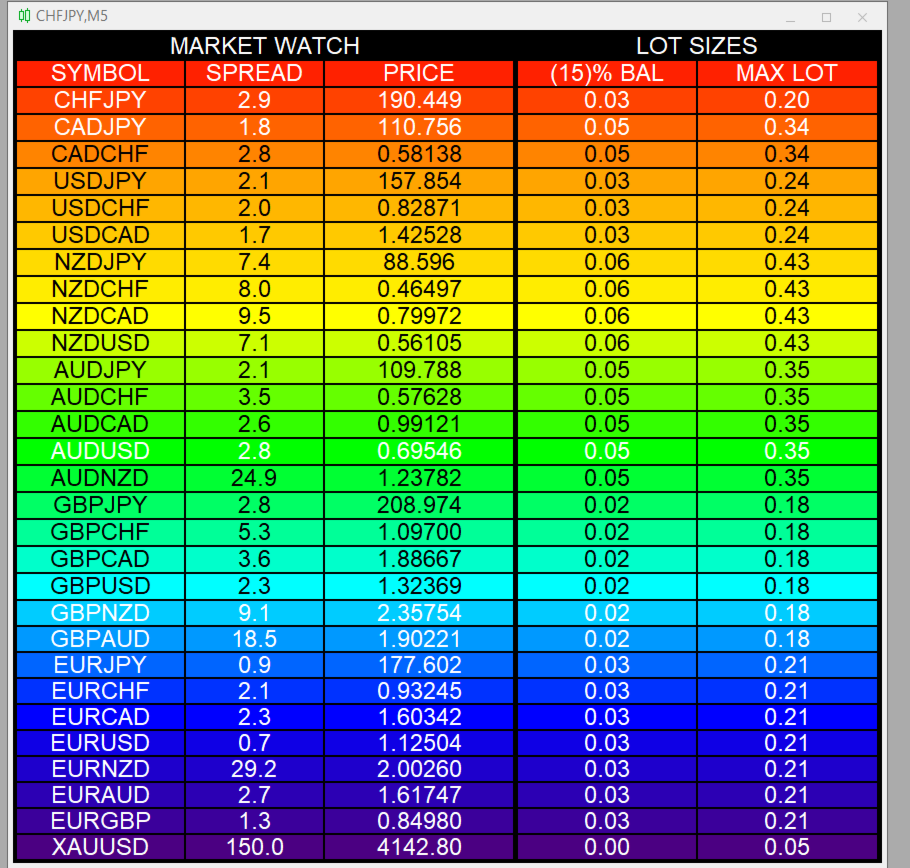
  Market Watch's Symbols, Lot Sizing choice, Spread, & Price are shown. The app is visually customizable. Click on any Symbol for interaction with its chart!


  Trader Market Watch is a display-only MetaTrader 5 board. It fills the chart tab with the symbols already in Market Watch and does not place or modify orders. Each row shows the symbol, the spread in pips, and the price. Two lot columns sit beside them: the lot size that uses your chosen percent of balance as margin, and the largest lot the balance can margin at that symbol’s current price. The percent is printed in the header, for example (15.00)% BAL. So this means you, the user can change the % risked and the application will automatically show you every symbol's % size!

Each symbol row uses its own step of the color fade, so neighboring symbols stay easy to separate. Click a symbol name to open that symbol’s chart on the current timeframe. Title colors stay fixed, and the body palette can be a built-in set or a straight blend from a custom start color to a custom end color. Removing the EA restores the chart.


Рекомендуем также
TradeHistoryParsing — утилита для работы с торговой историей, полученной из терминала MetaTrader5. Продукт разработан на основе библиотеки RegularExpressions для MQL5 и позволяет быстро получить интересующие данные по вашей торговой истории. Результат фильтрации отображается в виде таблицы, под которой приводится сводка математической статистики. Работа с утилитой Сохраните отчет по торговле в виде .html файла и поместите его в "песочницу". Затем при запуске советника укажите имя этого файла во
FREE
Fundamental Heat Map MT5 — бесплатная автоматическая макроэкономическая панель для MetaTrader 5. Инструмент использует встроенный экономический календарь MetaTrader и анализирует данные для 8 основных валют: USD, EUR, GBP, JPY, CHF, CAD, AUD и NZD. Сравниваются значения Actual и Forecast. Данные разделяются на четыре категории: Инфляция Экономический рост Рынок труда Денежно-кредитная политика Каждая валюта получает автоматический макроэкономический рейтинг с учетом экономических сюрпризов, важн
FREE
Try Before You Buy: You can download and test the Multi Tp Ladder  free demo version  on a demo account before purchasing. For MetaTrader 5: Download:   MultiTP ladder     How to install the trial: Download the       MultiTP ladder     file above. In MetaTrader:   File → Open Data Folder →   MQL5/Experts Paste the trial file into that folder, then   restart MetaTrader . The trial is fully functional for 12  hours per demo account . To reset the trial period   (demo accounts only): MetaTrader →
- وصف المنتج - مؤشر احترافي متكامل لا يعد KING Fusion MACD-Vol من KING TRADING EA مجرد MACD آخر — فهو عبارة عن مجموعة أدوات تداول كاملة تجمع بين مؤشرات احترافية متعددة في نافذة فرعية واحدة أنيقة. لم تعد بحاجة إلى تحميل مخططك بأدوات منفصلة. يجمع هذا المؤشر بين: MACD مع خطوط مزدوجة ورسم بياني مكبر رسم بياني ملون ومثبت بالحجم ملصقات ديناميكية مع قيم المؤشرات في الوقت الفعلي (ATR، ADX، RSI، Volume) عداد تنازلي للبار التنبيهات المتقاطعة (مرئية + صوتية) كل ما تحتاجه من الوضوح والسرعة والدقة -
FREE
ZoomIN MT5
Maxim Polishchuk
Индикатор ZoomIN MT5 предназначен для быстрого просмотра выбранного бара на младших таймфреймах во всплывающем окне. После запуска индикатор работает в фоновом режиме, не занимает места на графике и не потребляет ресурсы системы. При активации индикатора комбинацией Shift + i (есть возможность изменить в настройках), создается всплывающее окно с графиком младшего таймфрейма. Отображаемый таймфрейм можно изменить щелчком левой кнопки мыши по значку лупы. Чтобы скрыть всплывающее окно, достаточно
FREE
Signalator Trade Summary Panel MT5 — бесплатная локальная утилита для MetaTrader 5, которая показывает прямо на графике понятную сводку по счёту, позициям, символам и риску. Она является частью экосистемы Signalator Trading and Analysis — развивающегося набора практических инструментов MetaTrader для мониторинга счёта, анализа рынка, сканирования символов, оповещений и улучшения рабочего процесса трейдера. Панель объединяет мониторинг счёта и позиций со встроенными Symbol Inspector и калькулятор
FREE
FiT Panel Pro
Thonglak Janyakorn
Overview FiT Panel Pro is a professional-grade trade management panel designed for MetaTrader 5 traders who demand speed, precision, and full control over their trades. Built with a modern dark-theme UI, it combines one-click execution with advanced risk management, visual SL/TP drag lines, automatic Fibonacci-based levels, and comprehensive order management — all in a single, compact panel. Whether you are a scalper, day trader, or swing trader, FiT Panel Pro gives you the edge you need to exec
FREE
NINJA MT5 DOCTOR ОБЗОР NINJA MT5 Doctor — это бесплатная утилита MT5, работающая только в режиме чтения и создающая разовый диагностический снимок терминала, счета, открытых графиков, выбранной истории и символа текущего графика, на котором она запущена. Это утилита в формате Expert Advisor, а не торговый EA и не индикатор. Названия элементов панели и входных параметров указаны на английском языке. ЧТО ОНА ПРОВЕРЯЕТ Она проверяет соединение с сервером брокера, разрешения на торговлю в терминале
FREE
Strifor Chart Sync
Strifor (Mauritius) Ltd
5 (3)
Strifor Chart Sync — синхронизация графиков и технического анализа в MetaTrader 5 Strifor Chart Sync — эксперт для MetaTrader 5, предназначенный для синхронизации нескольких графиков и упрощения мультитаймфреймового анализа одного инструмента. Вместо того чтобы вручную менять символ на каждом открытом графике, достаточно изменить инструмент на Master-графике . Все связанные Slave-графики автоматически переключатся на тот же символ, сохранив свои индивидуальные таймфреймы. Например, можно одновре
FREE
MultiTradeNews
Leeank Andres Fernandez Molano
Этот скрипт предназначен для трейдеров, которым необходимо быстро открывать сделки по нескольким валютным парам во время важных экономических новостей, когда каждая секунда имеет значение. С помощью этого инструмента вы можете заранее выбрать валютные пары и задать индивидуальный объем для каждой из них. Когда выходит важная новость, такая как данные по занятости вне сельского хозяйства (NFP) или индексы деловой активности (PMI), скрипт позволяет мгновенно выполнить все сделки, не тратя время на
FREE
Утилита TradeKeeper Lite (хранитель сделок, простая версия) умеет не только показывать прибыль за разные периоды, но и оповещать звуковым сигналом при достижении заданного значения прибыли. Щелкните рисунок тахометра, чтобы переключиться на следующий период подсчета прибыли. Всего их 5: текущий день (This Day), текущая неделя (This Week), текущий месяц (This Month), последние 90 дней (Last 90 Days) и за все время (All I Made). Утилита TradeKeeper Pro , доступная по этой ссылке , позволяет также
FREE
TRADE COMMANDER ULTIMATE MT5 Professional Trading, Risk Management and Account Protection Panel Trade Commander Ultimate MT5 is an all-in-one utility designed to help manual traders and Expert Advisor users execute, manage and protect trades from one professional black dashboard. It does not provide trading signals. It focuses on disciplined execution, position management and account-level risk control. IMPORTANT BEFORE USING ACCOUNT PROTECTION The Daily Profit Target and Daily Loss Limit must
FREE
Trade Notifications
Konstantinos Kalaitzidis
5 (5)
«Торговые уведомления» — это служебный инструмент, предназначенный для информирования вас с помощью   мобильных уведомлений или оповещений терминала   о каждой открытой или закрытой сделке, а также о результате прибыли/убытка в долларах США по каждой сделке. Это инструмент, которым я пользуюсь уже долгое время, и решил поделиться им бесплатно! Входные параметры: (каждый ввод имеет  тип   true/false   ,     дважды щелкните его, чтобы изменить его значение) Уведомлять о закрытых позициях PnL   :
FREE
ChartColorMT5
Thomas Pierre Maurice Moine
Customize your charts with this simple utility. Choose in the 24 pre-built color sets, or use your own colors, save them to re-use them later. You can also add a text label on your chart. --- Chart Colors-- Color Set : 24 prebuilt color sets (select "Custom" to use colors below) Background color Foreground color Grid color Chart Up color Chart Down color Candle Bull color Candle Bear color  Line color Volumes color --- Label--- Text Label : Type the text you want to appear on the chart Label P
FREE
Aegis Gold Dashboard
Ayman Ishaq Jundi Tawadros
Aegis Gold Dashboard is a free, lightweight visual indicator created to help traders monitor key market conditions in a clean and professional way. This indicator is designed as a visual companion to automated or discretionary trading systems and does not execute any trades. Features: • Informational signal overview (non-executable) • ATR-based volatility display • Market session open / closed status • Real-time spread monitoring • Last closed trade overview • Simple market condition tips De
FREE
DashXpert
Steve Rosenstock
5 (1)
ПОСМОТРЕТЬ ВСЕ МОИ БЕСПЛАТНЫЕ ПРОДУКТЫ DashXpert это полностью бесплатная, мощная панель для MetaTrader 5 , отображающая все ключевые рыночные данные, информацию о счёте и статистику эффективности прямо на вашем графике. Вместо переключения между окнами и вкладками, DashXpert предоставляет централизованный, интеллектуальный обзор - оптимизированный для максимальной ясности, минимального отвлечения и профессионального внешнего вида. Он обеспечивает чёткий обзор в реальном времени ваших открытых
FREE
### MQL5 Marketplace Product Description   FX Currency Strength Matrix – Professional MT5 Indicator   #### Overview   The FX Currency Strength Matrix is a powerful, real-time visual tool that instantly reveals the true strength and weakness of all 8 major currencies in a clean, color-coded matrix format.   No more guessing which currency is driving the pair – see the complete strength hierarchy at a glance and trade with institutional-level clarity. #### Key Features   - True 8×8 Currency
FREE
The Candle Countdown Timer for MetaTrader 4 (also available for MT5) is a vital indicator designed to help you manage your trading time effectively. It keeps you updated about market open and close times by displaying the remaining time before the current candle closes and a new one forms. This powerful tool enables you to make well-informed trading decisions. Key Features: Asia Range: Comes with an option to extend the range. Broker Time, New York, London Time: Displays the current broker time
FREE
Trade Assistant – Position & History Overview Streamline your trading workflow with a powerful all-in-one panel for MetaTrader 5. Trade Assistant is a professional EA panel that gives you full control over your trades — from order execution to real-time position monitoring — all within a clean, intuitive on-chart interface. Key Features One-Click Order Execution Instant   Market Orders   (Buy / Sell) with configurable Lot, SL and TP Full   Pending Order   support: Buy/Sell Limit & Buy/Se
FREE
Smart Pip Meter MT5
Christianiel Robles Faustino
See Your Key Trading Measurements at a Glance Smart Pips Meter  is a free utility that displays important market measurements directly on your chart—so you can make faster trading decisions without manually calculating pip distances. WHAT IT SHOWS   ADR (Average Daily Range) See the current ADR pip value directly on your chart.   Current Candle Size Instantly see the size of the current candle in pips.   Previous Candle Size Quickly check the size of the last completed candle.  
FREE
Order Book, известный также как Market Book, глубина рынка, стакан цен, Level 2, - это предоставляемая брокером динамически обновляемая таблица с данными по текущим объемам торговых заявок на покупку и продажу для различных уровней цен вблизи Bid и Ask конкретного финансового инструмента. MetaTrader 5 предоставляет возможность трансляции стакана цен в реальном времени. Данный эксперт OrderBook Recorder позволяет записывать все события об изменении стакана и сохранять их в файлы для дальнейшего и
FREE
Хотите перенести данные MetaTrader 5 в Excel, Python, внешний бэктестинг или machine learning, не тратя время на неудобные экспорты? Candle History Exporter создан для того, чтобы превращать историю свечей текущего символа в понятные, настраиваемые CSV-файлы, готовые для research, автоматизации и количественного анализа. Скрипт позволяет экспортировать один или несколько таймфреймов в выбранном диапазоне дат, с возможностью автоматически использовать текущее серверное время как дату окончания п
FREE
LIMITED TIME OFFER to download for FREE for Unlimited use license ================================================================ QuantView Analytics Master Advanced On-Chart Portfolio Diagnostics & Equity Forensics for MetaTrader 5 Standard MT5 history reports simply show you how much money was made or lost. QuantView Analytics Master is designed to answer the "Why" and the "How." By segmenting your trading history across four distinct analytical dimensions, this institutional-grade terminal
FREE
Account Info EA It is a tool that presents on the graph all the positions of the account, and specific information concerning the positions, but also the account. It enables the user to have an image of his account at a glance. Use like any expert advisor. You can't attach it in the same chart with other expert advisor. It does not have the ability to open or manage positions. You can attach it on any chart and any timeframe.
FREE
SG InfoBox MT5
Hleb Smoliar
3.5 (2)
The   "InfoBox"   utility is designed to display the presence of open orders, the number of lots, current profit and much more in one window. The version for the MT4 platform is here . You've probably encountered a situation where you have an advisor that works on a currency pair, but information about its operation: - orders and their number, the size of the spread for the instrument, the volume of lots on the market, drawdown and much more - are scattered in different places of the terminal an
FREE
QuickTrade Manager for MT5 Professional One-Click Trade Execution & Management Panel for MetaTrader 5 Trade faster. Manage smarter. Execute with precision. QuickTrade Manager is a powerful chart-side trading panel built for traders who want instant execution, cleaner workflow, and precise control over every position directly from the chart. No more slow manual adjustments. No more cluttered order management. Everything you need is in one professional panel . NEW IN THIS VERSION Modern Profession
FREE
This non-trading expert utilizes so called custom symbols feature to build custom charts based on history of real ticks of selected standard symbol. New charts imitate one of well-known graphic structures: Point-And-Figure (PnF) or Kagi. The result is not exactly PnF's X/O columns or rectangular waves of Kagi. Instead it consists of bars, calculated from and denoting stable unidirectional price moves (as multiples of the box size), which is equivalent to XO columns or polygonal lines. These Poi
FREE
This Tradepanel is an Utility for Traders Who want ot use Basic MoneyManagement for Calculation of Lotsize  I have created the basic edition only to give an Overview with Limited Functionality Full Features are available with  Auto TradePanel  Pro. (This is Only Because it can not be Tested in Strategy Tester ).  Complete Description is available at  "Auto TradePanel Pro".  in This Version Basic Functionality ( Calculation of Lotsize ) open /close Positions is working in the same way as in Pro
FREE
Order Book, известный также как Market Book, глубина рынка, стакан цен, Level 2, - это предоставляемая брокером динамически обновляемая таблица с данными по текущим объемам торговых заявок на покупку и продажу для различных уровней цен вблизи Bid и Ask конкретного финансового инструмента. MetaTrader 5 предоставляет возможность трансляции стакана цен , но только в реальном времени. Данный эксперт OrderBook History Playback позволяет воспроизводить события стакана на истории из предварительно сохр
FREE
BTD2 Market Data Exporter for MT5 BTD2 Market Data Exporter is a high-performance utility script designed to extract M1 historical bar data, symbol properties, and daily reset schedules from MetaTrader 5 into optimized binary files ( .btd ). Built specifically for quantitative research, backtesting engines, and custom analytics pipelines. Key Features UTC+0 Timestamp Standardization: Automatically normalizes server time candles to UTC+0 end-label timestamps, eliminating broker server timezone sh
FREE
С этим продуктом покупают
Trade Assistant MT5
Evgeniy Kravchenko
4.43 (216)
Помогает рассчитать риск на сделку, простая установка нового ордера с помощью линий, управление ордерами с функциями частичного закрытия, 7 типов трейлинг-стопа и другие полезные функции. Дополнительные материалы и инструкции Инструкция по установке - Инструкция к приложению - Пробная версия приложения для демо счета Функция Линии   - отображает на графике линию открытия, стоп-лосс, тейк-профит. С помощью этой функции легко установить новый ордер и увидеть его дополнительные характеристики пе
Добро пожаловать в Trade Manager EA — лучший инструмент для управления рисками, предназначенный для упрощения, точности и эффективности торговли. Это не просто инструмент для размещения ордеров; это комплексное решение для удобного планирования торгов, управления позициями и усиленного контроля над рисками. Независимо от того, начинающий вы трейдер, опытный специалист или скальпер, нуждающийся в быстром исполнении, Trade Manager EA адаптируется к вашим потребностям и работает с любыми активами:
Local Trade Copier EA MT5
Juvenille Emperor Limited
4.94 (149)
Local Trade Copier EA MT5 — это быстрый и гибкий копировщик сделок для копирования и управления сделками между несколькими счетами MetaTrader 5 на одном компьютере с Windows или Windows VPS. Он сочетает локальную синхронизацию сделок с настройками на стороне Receiver для управления размером лота, рисками, фильтрацией сделок, сопоставлением символов, управлением сделками и защитой счета. Настройте терминалы Transmitter и Receiver примерно за 1 минуту и копируйте ручные сделки или сделки, открыты
================================================================================ POC BREAKOUT - V20.72. Full Professional Grade Toolkit ================================================================================ POC Breakout is a full MetaTrader 5 trading dashboard for discretionary traders who want breakout signals, Point of Control (POC) context, volume profiles, order flow, market structure, news, alerts, and advanced trade planning in one professional workspace. Attached directly to you
Telegram to MT5 Multi-Channel Copier   автоматически копирует торговые сигналы из ваших Telegram-каналов прямо в MetaTrader 5. Без ботов, без браузерных расширений, без ручного копирования. Сигнал приходит в Telegram — и советник открывает сделку в вашем терминале за считанные секунды. А перед тем как копировать канал, встроенный бэктестер покажет, что этот канал сделал бы на вашем счёте. Продукт состоит из двух компонентов: приложения для Windows, которое слушает ваши Telegram-каналы, и этого с
Strategy Ledger Pro
Abdullah Uygar Tuna
5 (7)
Теперь доступно на русском языке. Strategy Ledger Pro — панель анализа счёта для MetaTrader 5, работающая только на чтение. Она разделяет результаты счёта по советникам, стратегиям, символам и magic-номерам, чтобы было видно, что на самом деле вносит каждый из них. Панель доступна на 11 языках: English, Français, Deutsch, Español, Italiano, Português, Русский, Türkçe, 中文, 日本語 и 한국어. Перед загрузкой демоверсии. Маркет запускает демоверсию любого платного продукта только в тестере стратегий. Эта
TradePanel MT5
Alfiya Fazylova
4.88 (170)
Trade Panel — это многофункциональный торговый помощник. Приложение содержит более 50 торговых функций для ручной торговли и позволяет автоматизировать большинство торговых операций. Инструкция к приложению: https://www.mql5.com/ru/blogs/post/756476 Пробная версия приложения для демо-счета: https://www.mql5.com/ru/blogs/post/750864 Как установить приложение: https://www.mql5.com/ru/blogs/post/750096 Как тестировать приложение в визуальном режиме: https://www.mql5.com/ru/blogs/post/770274 Как уст
Копируйте сигналы из Telegram по своим торговым правилам Telegram to MT5 Signal Trader автоматически копирует текстовые торговые сигналы из открытых и закрытых каналов и групп Telegram в MetaTrader 5. Управляйте несколькими поставщиками сигналов и счетами MT5 из одного приложения для компьютера, задавая индивидуальные параметры риска и торговли для каждого поставщика . Для копирования не нужны бот Telegram и настройка API. Просто войдите в свой аккаунт Telegram по номеру телефона или QR-коду и в
Grid Manual MT5
Alfiya Fazylova
4.73 (22)
Grid Manual — это торговая панель для работы с сеточными стратегиями. Утилита универсальная, имеет гибкие настройки и понятный интерфейс. Работает с сеткой ордеров не только в сторону усреднения убытков, но и в сторону наращивания прибыли. Трейдеру не нужно создавать и сопровождать сетку ордеров, это сделает утилита. Достаточно открыть ордер и Grid manual автоматически создаст ему сетку ордеров и будет сопровождать его до самого закрытия. Полная инструкция и демо-версия здесь . Основные особенно
Power Candles Strategy Scanner — самооптимизирующийся инструмент для поиска настроек по нескольким инструментам Power Candles Strategy Scanner использует тот же самооптимизирующийся движок, что и индикатор Power Candles — для всех символов в вашем Market Watch, одновременно. На одной панели отображается информация о том, какие символы в данный момент являются статистически торгуемыми, какая стратегия выигрывает на каждом из них, оптимальная пара Stop Loss / Take Profit, а также отправляется увед
Trade copier MT5
Alfiya Fazylova
4.61 (56)
Trade Copier — это профессиональная утилита, предназначенная для копирования и синхронизации сделок между торговыми счетами. Копирование происходит от счета/терминала поставщика к счету/терминалу получателя, которые установлены на одном компьютере или vps. Перед покупкой вы можете протестировать демо-версию на демо-счете. Демо-версия здесь . Полная инструкция здесь . Основной функционал и преимущества: Русифицированный интерфейс, поддержка на русском языке. Поддерживает копирование МТ5 > МТ5, МТ
Footprint Chart Pro — Professional OrderFlow EA for MetaTrader 5 Version 6.34 | Professional tool for real traders | Institutional-Grade Visualization DEMO USERS - PLEASE SELECT EVERY TICK / REAL TICK WHEN TESTING AND YOU HAVE DOWNLOADED HISTORICAL DATA. IF YOU SEE A WAITING SCREEN AND IT IS NOT DOWNLOADING, IT MEANS YOU HAVE LOW HISTORICAL DATA. TRY 1 MIN AND 5 MIN FIRST ON 1 DAY DATA. ONE DAY DATA SHOULD BE THE NEWEST AND MOST CURRENT DATE. PLEASE WAIT UNTIL THE MARKET HAS ROLLED OVER PERIOD.
Exp COPYLOT CLIENT for MT5
Vladislav Andruschenko
3.97 (35)
Профессиональный копировщик сделок для MetaTrader 5 Быстрый, профессиональный и надежный копировщик сделок для MetaTrader . COPYLOT позволяет копировать сделки Forex между терминалами MT4 и MT5 с поддержкой счетов Hedge и Netting . Версия COPYLOT для MT5 поддерживает: - MT5 Hedge → MT5 Hedge - MT5 Hedge → MT5 Netting - MT5 Netting → MT5 Hedge - MT5 Netting → MT5 Netting - MT4 → MT5 Hedge - MT4 → MT5 Netting Версия MT4 Полное описание + DEMO + PDF Как купить Как установить Как получить файлы жур
HINN MAGIC ENTRY - лучший инструмент для входа и менеджмента позиций! ПРОСТО. БЫСТРО. ИНТУИТИВНО. МАКСИМАЛЬНО АВТОМАТИЗИРОВАНО. Выставляет ордера через выбор уровня на графике! полное описание    ::    demo-версия    ::   60-sec-video-description Основные функции: - Рыночные, лимитные и отложенные ордера -  Автоматический подсчет лоттажа  -  Автоматический учет спреда и комиссий -  Неограниченное количество промежуточных тейков для позиций - Перевод в безубыток и трейл стоп-лосса и тейк-проф
Signal TradingView to MT5 Pro Automator Мгновенное профессиональное исполнение между TradingView и MetaTrader 5 Автоматизируйте свою торговую стратегию с помощью самого надежного моста связи между алертами TradingView и реальным исполнением в MT5. Разработанный для трейдеров, которым требуются скорость, гибкость и безупречное управление рисками, этот советник (Expert Advisor) превращает любое сообщение с алертом в точный рыночный или лимитный ордер. ПРЕИМУЩЕСТВА И СИЛЬНЫЕ СТОРОНЫ Универсальный д
MT5 to Telegram Signal Provider — это простой в использовании полностью настраиваемый инструмент, который позволяет отправлять определённые сигналы в чат, канал или группу Telegram, превращая вашу учётную запись в провайдера сигналов . В отличие от большинства конкурирующих продуктов, он не использует импорт DLL. [ Демо ]   [ Руководство ] [ Версия MT4 ] [ Версия для Discord ] [ Канал в Telegram ]  New: [ Telegram To MT5 ] Настройка Доступно пошаговое руководство пользователя . Никаких знаний A
Farmed Hedge Yield Farming | All Markets (Manual - Hybrid - Semi/Automated EA) VERIFIED TRADING RESULTS - Farmed Hedge Yield Axi Copy:  https://www.mql5.com/en/signals/2356376 - Farmed Hedge Yield Exn Copy:   https://www.mql5.com/en/signals/2356404 - Farmed Hedge Yield V Copy:  https://www.mql5.com/en/signals/2357156 IMPORTANT NOTICE: FarmedHedge is a MANUAL-FOCUSED TRADING UTILITY ,not a fully automated EA. Results shown on this Signal include manual trades and overall strategic management.
Telegram To MT5 Ultra
Mirel Daniel Gheonu
5 (5)
Telegram To MT5 — копировщик сигналов Превратите торговые сигналы из ваших Telegram-каналов в реальные ордера MT5 — автоматически, на любом количестве счетов, с полным контролем над риском и правилами. Telegram To MT5 связывает VIP / сигнальные каналы, на которые вы уже подписаны в Telegram, с вашим терминалом MetaTrader 5. Бесплатное приложение-компаньон для ПК читает сообщения (даже из каналов, которые не допускают ботов), а этот советник исполняет их на вашем счёте — применяя ваши настройки р
Copy your MT5 trades to Interactive Brokers You keep using MT5. Every order you open or close is sent to your IB account. In real time. No coding. No changes to your strategy or EA. Try it first Rent 1 month: $30. Test on a live or paper account. What it does Real-time copying: same direction, reverse, or one side only. Map any MT5 symbol to any IB symbol. Set a lot ratio for each. Forex, Futures, Stocks, CFDs, Metals and Crypto. Position sync: both accounts checked, any difference fixed. Optio
Trading Chaos Expert
Hennadii Stanilevych
5 (11)
Этот программный продукт не имеет аналогов в мире, поскольку он является универсальным "пультом управления" торговых операций, начиная от получения торговых сигналов, автоматизации входа в позиции, установки стоп-лоссов и тейк-профитов, а также трейлинга прибыли одновременно по множеству сделок в одном открытом окне. Интуитивно понятное управление экспертом в "три клика" на экране монитора позволяет полноценно использовать все его функции на разного рода компьютерах, включая планшетные. Взаимоде
Anchor Trade Manager
Kalinskie Gilliam
5 (9)
Your EAs cannot see each other, but Anchor can. Anchor gives you one place to coordinate your EAs, manage risk, and decide when trading is allowed. It works alongside the trading bots you already use without any changes to them. The Problem One EA opens a trade. Then another starts trading. The next thing you know, you wake up to multiple grids built across your account. Each EA may be doing exactly what it was designed to do, but together they can place far more risk on your account than you in
The News Filter MT5
Leolouiski Gan
4.78 (23)
Этот продукт фильтрует всех экспертных советников и ручные графики во время новостей, так что вам не нужно беспокоиться о внезапных скачках цены, которые могут разрушить ваши ручные торговые настройки или сделки, введенные другими экспертными советниками. Этот продукт также поставляется с полной системой управления ордерами, которая может обрабатывать ваши открытые позиции и ордера на ожидание перед выпуском новостей. После покупки   The News Filter   вам больше не придется полагаться на встроен
Сохраните индикатор, которому доверяете. Автоматизируйте работу с его сигналами. У вас уже есть индикатор MT5, которому вы доверяете, но всё ещё приходится следить за графиком, ждать сигнала, рассчитывать лот, открывать сделки и управлять каждой позицией вручную? Stratiora Signal Engine MT5 создан, чтобы объединить эти действия. Он превращает совместимые сигналы буферов Buy и Sell в автоматизированный процесс: вход, расчёт объёма, Stop Loss, Take Profit, фильтры, управление позициями и защиту с
Trade Copier Ultimate
Janitha Sandaruwan Amaradasa Wickramasingha Arachchilage
5 (5)
Trade Copier Ultimate - Telegram to MT5 Signal Copier Trade Copier Ultimate automatically copies Telegram trading signals into MetaTrader 5. The EA can read signal messages, detect the symbol, order type, entry price, Stop Loss, Take Profit levels and selected update commands, then execute or manage the trade in MT5 using your lot and risk settings. It is more than a basic Telegram to MT5 copier. TCU also supports Bot API and user-account Bridge workflows, Discord signal routing, local MT5 to MT
EA Overfitter
Stephen J Martret
5 (1)
Бэктест выглядит отлично. Но будет ли советник зарабатывать завтра, через неделю, через месяц? EA Overfitter прогоняет вашего советника по 100 историям цены, которых он никогда не видел. Одна оценка показывает, реально ли преимущество. Бэктест показывает, что советник сделал на одной истории цены — на той, которая случайно произошла. Из него невозможно понять, какая часть результата была заслугой стратегии, а какая — конкретного пути цены. EA Overfitter отвечает на этот вопрос. Он строит до 10
Trade Indicator Assistant   is a powerful MT5 utility designed to turn indicators into automated trading systems. Its main feature is the ability to automatically detect an indicator’s   BUY and SELL signal buffers , without requiring you to know the buffer numbers, search through indicator settings, or modify the indicator source code. Bonus Indicator:   After purchasing Trade Indicator Assistant, contact me to receive   Trade Signal Pro   completely free as a bonus indicator. [Download Demo V
Welcome to ENTRY IN THE ZONE AND SMC MULTI TIMEFRAME  SPECIAL BENEFIT / FOR OUR MQL5 CUSTOMERS FREE ACCESS TO THE NEW TOOL  — COMING SOON — Learn more on our official website  : https://www.fableedge.net Entry In The Zone and SMC Multi Timeframe is a real-time market analysis tool based on Smart Money Concepts (SMC), designed to analyze market structure, price direction, and key trading zones. It supports both Single-Timeframe Analysis and Multi-Timeframe Analysis, providing a clearer view of th
Quant Panel
Kevin Craig E Gittins
Количественная Панель Pro Идеальная Мульти-ЭА Панель Мониторинга для Квантовых Трейдеров Хватит переключаться между графиками и внешними инструментами для отслеживания алгоритмических стратегий! Quant Panel Pro предоставляет профессиональный мониторинг портфеля в одном стильном и удобном интерфейсе. Ключевые Возможности Количественная Аналитика Под Рукой Агрегирование прибыли и убытков (P&L) в реальном времени для всех советников Статистический анализ процента выигрышных сделок и частоты торговл
Trade Manager Panel Pro MT5
VividMind Digital Solutions
5 (6)
Напишите мне после покупки, чтобы получить полный комплект руководств + 3-дневный пробный доступ к API OpenAI для тестирования функций ИИ + ещё один бонусный подарок Текущая цена — ограниченная скидка в рамках августовского обновления и повторного запуска — успейте приобрести свою версию до повышения цены. Следующая цена: $340 Это совершенно не похоже ни на одну торговую панель, которую вы пробовали или видели на рынке. Это одна из самых инновационных торговых панелей с поддержкой ИИ, доступных
YuClusters
Yury Kulikov
4.93 (43)
Внимание: Ознакомиться с работой программы можно с помощью бесплатной версии  YuClusters DEMO . YuClusters это профессиональная система анализа рынка. Для трейдера открываются уникальные возможности анализа потока ордеров, объемов торговли, движения цены используя различные графики, профили, индикаторы, графические объекты. YuClusters оперирует данными на основе ленты сделок или тиковой информации, в зависимости от того, что доступно в котировках финансового инструмента.  YuClusters позволяет с
Другие продукты этого автора
Automated Timeframe cycling with Symbols centered.  Force every timeframe onto one clock window, so the story you see on Daily is the same story you are slicing on H4, H1, and M1.  Traders usually flip timeframes and lose the span. A Daily chart shows a few weeks, then M15 shows a few hours, and the eye treats them as different markets. TASSERACT locks the window to N bars of the highest enabled timeframe — default 10 Daily — and maps every lower timeframe to that same stretch. You stay inside o
FREE
Displays broker-provided LONG and SHORT swap values for selected instruments in a full-chart, dynamically sized table. The Swaps Monitor Table provides a simple way to view the swap rates supplied by your broker for multiple trading instruments at once. The table can display instruments from Market Watch, all available instruments, or a manually selected list , allowing traders to monitor swap costs without opening each symbol individually. The indicator automatically adjusts the table cells an
FREE
visual trade planner for MetaTrader 5. It draws multi-timeframe ATR reward and stop zones on the chart so you can judge distance and payoff before you place the trade yourself. It does not send, modify, or close orders. Motive A single ATR on the chart timeframe often hides the larger and smaller ranges a trade is actually working against. This EA stacks three take-profit slices, each from its own timeframe, period, and multiplier, then places an ATR stop and an optional fixed stop beside them.
FREE
is designed to enhance the visual representation of financial charts in MetaTrader 4 by dynamically altering the colors of various chart elements, including candlesticks, bars, line charts, and volume bars. Its primary purpose is to improve trader intuition and engagement during market analysis by introducing smooth, cyclical color transitions that can highlight momentum shifts, trends, or volatility without overwhelming the display. This functionality is particularly beneficial for traders who
FREE
A Market Watch multi-timeframe ATR dashboard that turns a chart into a full-screen table showing each selected symbol’s recent volatility across multiple timeframes. It calculates ATR for the symbols visible in Market Watch, then displays the result in pips, points, or raw price units. Its practical use is volatility scanning, quickly finding instruments and timeframes that are moving enough—or quietly enough—for your trading style.                                Period that is worth using Sty
FREE
Market Watch's Symbols,  Lot Sizing choice,  Spread, & Price are shown. The app is visually customizable. Click on any Symbol for interaction with its chart!   Trader Market Watch is a display-only MetaTrader 4 board. It fills the chart tab with the symbols already in Market Watch and does not place or modify orders. Each row shows the symbol, the spread in pips, and the price. Two lot columns sit beside them: the lot size that uses your chosen percent of balance as margin, and the largest
FREE
is a user-friendly MetaTrader 4 indicator that creates a centralized dashboard for traders to oversee market symbols simultaneously across different timeframes, presenting price movements through simple dots or miniature candlestick charts, complemented by volume indicators to facilitate quick assessments of market trends and fluctuations. It automatically resizes grid cells according to the number of bars shown per timeframe for better use of screen space, features adjustable color schemes fo
FREE
Grid MATR is designed to map price against dynamically measured or fixed ranges so traders can better visualize volatility, market extension, and session-based price behavior—while requiring independent analysis for direction and trade decisions.  The motive is to turn market volatility and selected time/session reference points into a visual price grid.  Instead of claiming to predict price direction, it gives the trader a structured way to judge where current price sits relative to ATR-deriv
FREE
It computes BUY and SELL lot sizing in either % of balance or in fixed intervals. In market orders, this EA contains the adaptive slippage, logs tickets for instant confirmation of opening trades, and contains every market symbol at a glance. Real-time balance/equity display keeps margin health in view without tab-switching, toggling spread if needed for liquidity checks. Compact left-panel layout minimizes screen real estate, empowering blind trades where speed trumps overanalyze—perfect for
FREE
is an on-chart pre-trade planner for the symbol on that chart. It clears the price and time scales and fills the tab with a live reading of this account against this symbol: spread, pip value, point value, an ATR stop, three ATR targets, and ten lot sizes sized from a percent of balance. Targets are reduced by the live spread. The stop is increased by it. Commission and planned swap are then applied, so the money and percent figures are net of those costs before a buy or sell. It does not place
FREE
Bigger chart labels would allow the user to be entirely aware of which chart he/she is on. Each chart window is unique, containing different patterns and economic motives so acknowledging the chart window would be absolutely essential! There are well known Economic Time Zones included in clear view, by choice!    Simple does it! Use your computing mouse scroller, clicking with the right finger on the label, in order to customize the label properties. From there, choose your preferred color, fon
FREE
This script paces itself to zoom into the deepest setting of ZOOM +     You may be in tune to know a few keyboard easter eggs. Pressing the  minus <->  button has the capability to Zoom the Chart Outward! Interesting to see the price reevaluate itself in perspective. This we could see is quite contagiously useful if we wanted to be quick with analyzing, examining through your tools, in your plans and such. So, if you ever wanted to zoom IN and OUT, here is Your play around with the chart poin
FREE
Symbol Cycler is a lightweight on-chart utility that lets you quickly switch between symbols in your Market Watch list using two simple arrow buttons (). With a single click, you can scroll forward or backward through your predefined symbols without leaving the chart. Key Features: One-click symbol switching from the chart Works with your Market Watch list order Buttons can be placed in any chart corner or even the center Timeframe remains locked while switching symbols Clean, responsive UI

FREE
Its primary motive is to overlay horizontal lines spaced according to multiples of the Average True Range (ATR), centered on a reference price from defined periods such as trading sessions, candlestick counts, or 12-hour intervals. This facilitates the identification of potential support and resistance levels or expected price ranges. Additionally, it marks major forex trading sessions (Sydney, Tokyo, London, and New York) with arrows to provide contextual awareness of market hours, enhancing d
FREE
Predetermination
Abraham Correa
5 (1)
Predetermination is an exit manager for trades you open yourself. It does not open positions and it does not send signals. After a manual buy or sell, it gives that trade a stop and up to six exit stages based on volatility. Three stages come from Average True Range, each with its own timeframe. Three come from completed range: daily (ADR), weekly (AWR), and monthly (AMR). Each stage can be switched on or off. Enabled stages are sorted by distance. Nearer stages trail the stop. The
FREE
Designed to mark a specific price and time point on an MT4 chart based on a single mouse click, synchronizing this data across all timeframes for the same symbol. Its primary purpose is to help traders pinpoint and track critical levels or events (e.g., support/resistance or entry points) with persistent visual markers. The indicator uses dashed lines for price and time crosshairs, accompanied by labels that dynamically adjust to stay within chart boundaries, ensuring clarity regardless of win
FREE
An on‑chart, data‑driven pre‑trade planner that turns your broker’s live market properties into clear, actionable numbers. It consolidates spread, commission, swaps, ATR‑based stop/targets, pip/point value and 10 risk‑profile lot sizes into one compact panel that auto‑scales to any chart size. The display is direction‑agnostic (no LONG/SHORT duplication) and emphasizes total trade cost and true risk/reward before you click “Buy/Sell.” What it shows (at a glance) Time & price context  (Local/Serv
FREE
The SyncAllCharts indicator streamlines trading by automatically aligning all open MetaTrader 4 charts to the symbol of the chart where it’s applied, saving traders time and effort when analyzing a single asset across multiple timeframes or setups. With a customizable "Main Sync" label to identify the lead chart, it ensures a clear, clutter-free workspace, enhancing workflow efficiency and consistency for traders monitoring one currency pair or symbol.
FREE
The SymbolicTimeFramingUniverse indicator for MetaTrader 4 (MT4) is designed to enhance chart navigation by displaying the current symbol and timeframe as stacked labels directly on the chart window. It provides precise alignment and customization options, including positioning in the center or corners, adjustable offsets, font styling, and layer controls for visibility (such as background placement or color flashing). This tool supports professional trading workflows by ensuring quick identific
FREE
Адаптируясь к волатильности, потенциальный риск для вознаграждения торговых позиций отображается на основе среднего истинного диапазона. Поля "Риск-вознаграждение" отображаются при нажатии кнопки "Купить или продать"! Полезность расчета ATR, радуйтесь вопросу, который не является частью сложного решения о том, когда закрывать сделку. Этот вопрос поможет вам принять решение по управлению рисками.  Технические характеристики Средний истинный диапазон - это обычно используемый индикатор, который и
FREE
Labels
Abraham Correa
Prints  ALL current chart's symbol and timeframe as customizable labels, ensuring precise anchoring and automatic repositioning during window resizes, timeframe switches, or other chart events. It supports layered display options (background, forefront, or combined color modes) for enhanced visibility without obstructing price data. The accompanying script facilitates global application by attaching or updating the indicator across all open charts in a single execution, promoting efficiency in m
FREE
Analyze volatility by clicking on a specific candlestick, which triggers the display of horizontal grid lines centered around the candlestick’s closing price, spaced by multiples of the calculated ATR. A vertical line highlights the selected candlestick, and an optional text label can display the ATR value in pips above the candlestick. The indicator is lightweight, using no buffers, and relies on chart objects for visualization. It includes error handling for invalid candlestick selections and
FREE
Activation initiates the sequence from the initial symbol in the Market Watch roster, forming a perpetual loop that continues until deactivation. The system employs global terminal variables to sustain operational continuity amid symbol-induced reinitializations, thereby ensuring uninterrupted performance. This EA should not be checked off as 'Allowed live Trading' and is functional with that checkmark box, when uploading the EA. Principal advantages encompass augmented productivity in overseein
FREE
Designed to revolutionize trading efficiency, this app enables traders to seamlessly cycle through Market Watch symbols using intuitive keyboard arrow keys or dynamically positioned on-chart buttons, minimizing navigation time and enhancing focus on market analysis. Potential : This lightweight MetaTrader 4 tool unlocks rapid symbol switching for comparative analysis across assets, supports wrap-around navigation for uninterrupted workflows, and adapts button placement to stay within chart
FREE
A versatile on-chart tool displaying real-time ATR values across up to 10 timeframes (M1 to MN1) in numerical format, bypassing subwindow charts for cleaner analysis. Key features: Toggle per-timeframe visibility, decimal/pips mode, customizable multiplier (e.g., for scaled stops), font/size/color adjustments, and corner/center positioning. Ideal for volatility-based trading—compute position sizes or filters instantly without manual math. Free download; compatible with MT4 Build 600+. Enhances m
FREE
Shutdown
Abraham Correa
Ever needed to declutter your entire POV of the platform? Have the choice to delete ever chart window! When attaching this script, permission is required to close every chart window, no matter the symbol, timeframe, or amount of indications or EA's, ACTIVE. The autonomy of nullifying every chart and to be on the gray screen, happens with this script, essentially. I could go ahead and tell you, the Market Watch List of Symbols has always remained opportune to the traders of the internet, so car
FREE
is an exit manager for trades you open yourself. It does not open positions and it does not send signals. After a manual buy or sell, it gives that trade a stop and up to six exit stages based on volatility. Three stages come from Average True Range, each with its own timeframe. Three come from completed range: daily (ADR), weekly (AWR), and monthly (AMR). Each stage can be switched on or off. Enabled stages are sorted by distance. Nearer stages trail the stop. The furthest is posted as the take
FREE
Фильтр:
Нет отзывов
Ответ на отзыв