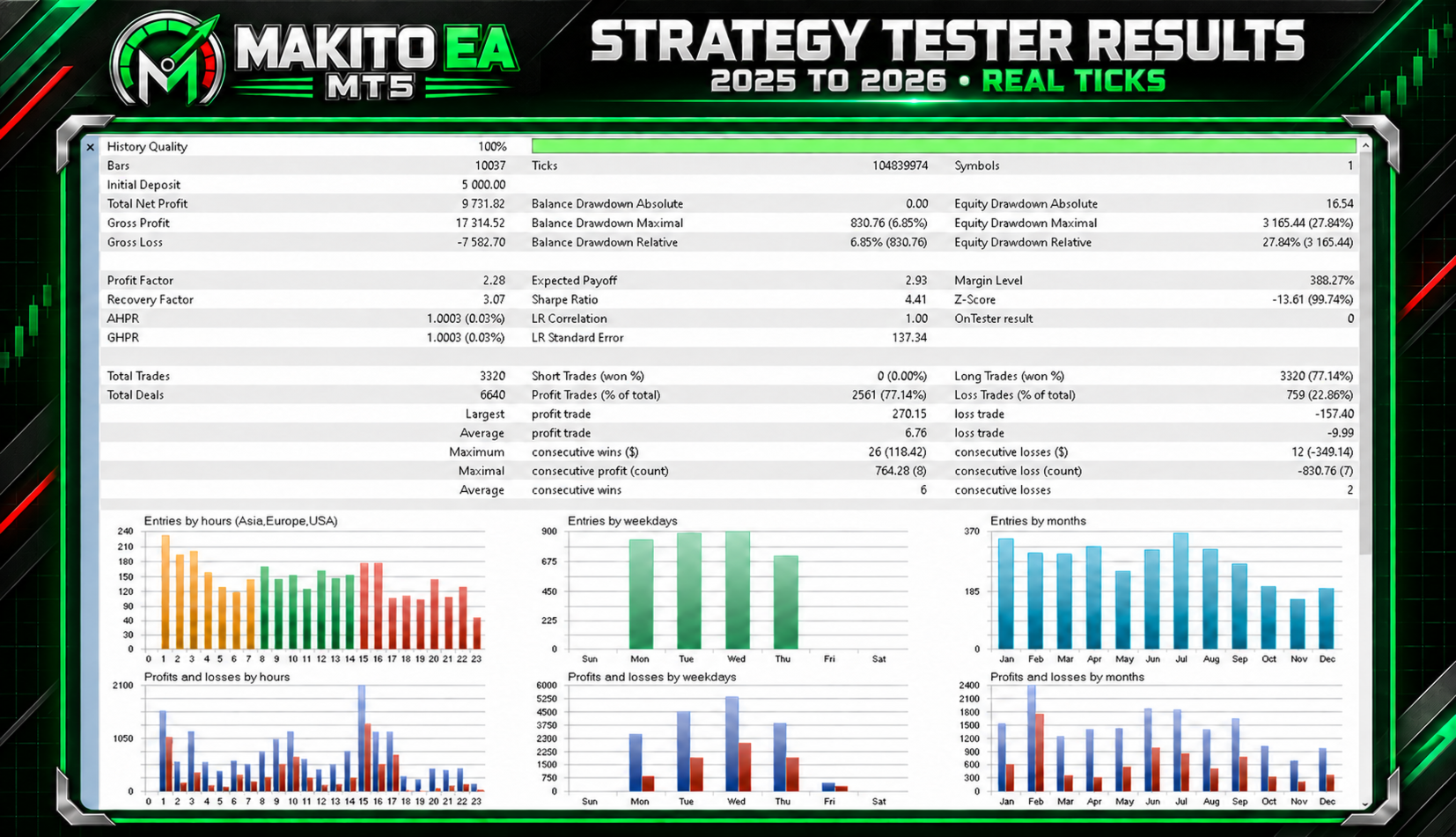
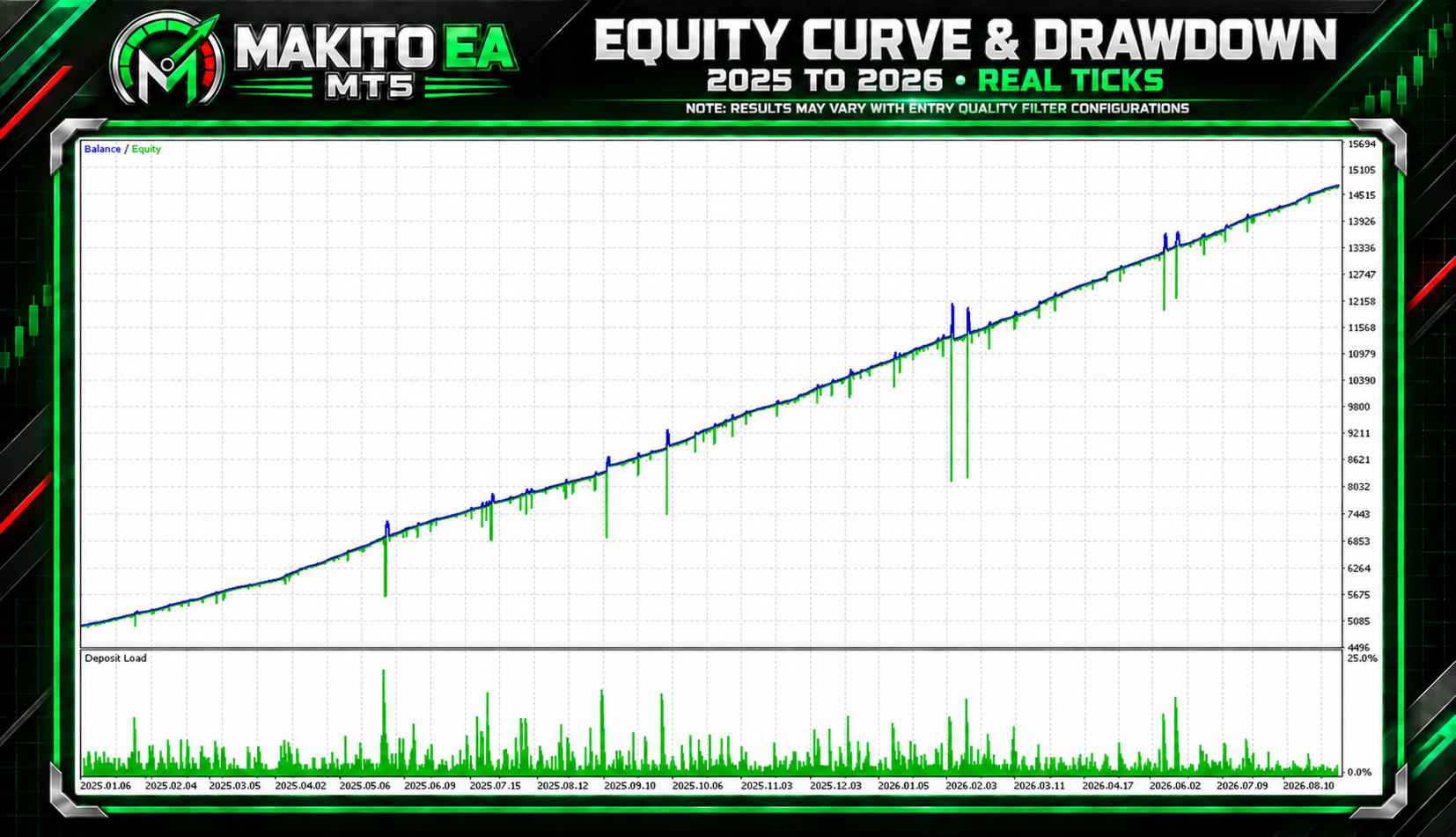
Makito EA MT5
- Эксперты
- Версия: 1.10
- Обновлено: 14 сентября 2026
- Активации: 20

Makito EA is an automated trading and adaptive-grid recovery system for MetaTrader 5, powered by the signal logic of Makito Gauge.
The EA uses Makito Gauge’s internally calculated market-direction, momentum, strength, and confirmation measurements to identify potential BUY and SELL opportunities. The complete Makito Gauge logic is built directly into the EA, so no separate indicator installation is required.
Before opening a seed trade, Makito EA can apply multiple optional entry-quality filters. After a trade or basket becomes active, the EA automatically manages recovery positions, profit protection, trailing exits, and configured risk limits.
Grid recovery can also be disabled. In this configuration, the EA trades a single seed position using optional fixed ATR-based stop-loss and take-profit levels while retaining basket trailing and risk protection.
Makito EA is fully customizable, allowing users to independently configure its entry-quality filters, trade direction, grid recovery, position sizing, ATR-based protection, basket management, daily risk limits, chart display, and Manual Trade Assist Mode. Features can be enabled or disabled to create a setup appropriate for different brokers, market conditions, and risk preferences.Introductory Offer
Get Makito EA for only $100, limited to the first 100 copies sold. The product price may increase after the introductory allocation has been reached.
⚠️ Warning: Makito EA is still in its early stages, and results may vary significantly between settings, brokers, symbols, and market periods.
Always backtest the EA thoroughly before using it on a live account.
Recommended Lot Size
-
0.01 lot per $10,000 account balance
Recommended set files:
https://drive.google.com/drive/folders/1OrMliZt0_5Icu4vSftqoIDy_E7AXdFwn?usp=sharing
Recommended Setup
-
Symbol: XAUUSD (Gold)
-
Chart timeframe: H1
-
Account leverage: 1:500
-
Account type: Hedging
-
Initial lot size: Use a conservative size appropriate for the account balance
-
Risk protection: Always configure a maximum daily drawdown and basket stop-loss limit
Broker symbol names and trading conditions may vary. Confirm that the EA is attached to the broker’s correct XAUUSD symbol and test the selected settings on a demo account before using real funds.
Key Features
-
Powered by internal Makito Gauge signal logic
-
Optional adaptive-grid recovery
-
Optional single-position trading without grid recovery
-
Optional fixed ATR-based stop loss
-
Optional fixed ATR-based take profit
-
Optional BUY-only or SELL-only operation
-
Signal debounce with live countdown
-
Acceleration filter
-
Maximum signal-separation filter
-
Multi-timeframe candlestick confirmation
-
RSI extreme-zone protection
-
ADX entry-quality filter
-
Volatility-quality filtering
-
Extended-candle protection
-
Spread filter
-
Economic news filter
-
Optional Friday trading restriction
-
ATR-based virtual basket target
-
Basket trailing-exit system
-
Optional basket stop loss
-
Maximum daily drawdown protection
-
Manual Trade Assist Mode
-
Professional on-chart information panel
-
Optional fixed ATR SL/TP chart zones
Makito Gauge Entry System
Makito EA evaluates the proprietary directional conditions generated by Makito Gauge before allowing a new automated trade or basket to begin.
A seed entry is permitted only when:
-
Makito Gauge detects a valid directional setup
-
The selected BUY or SELL direction is enabled
-
All enabled entry-quality filters pass
-
No active strategy basket already exists
-
Trading is not restricted by spread, news, Friday, cooldown, or daily protection
BUY and SELL trading can be enabled independently, allowing the EA to operate in both directions, BUY only, or SELL only.
Only one seed entry can begin a basket. While an existing basket remains open, the EA will not create another automated seed. When grid recovery is enabled, any additional positions are treated exclusively as recovery entries.
Entry-Quality Filters
Every entry-quality filter is optional and can be configured independently.
Available filters include:
-
Acceleration confirmation
-
Maximum signal separation
-
Directional candle confirmation
-
Extended-candle avoidance
-
Volatility-quality window
-
RSI extreme-zone protection
-
ADX strength confirmation
-
Multi-day Daily candle confirmation
-
Individual multi-timeframe candlestick gates
-
Maximum spread restriction
-
Economic news restriction
-
Friday entry restriction
-
Signal debounce
When multiple quality filters are enabled, all enabled conditions must pass before the EA can open a new automated seed position.
Bullish candlestick gates apply to BUY setups, while mirrored bearish conditions apply to SELL setups. Each supported timeframe gate can be configured to evaluate either the forming candle or the most recently closed candle.
Different combinations of entry filters can produce substantially different results. Users should backtest each intended configuration instead of assuming that enabling every filter will automatically improve performance.
Optional Adaptive Grid Recovery
After a Makito Gauge signal opens a seed trade, Makito EA can use ATR-based adaptive spacing to manage recovery positions.
The distance between recovery entries adjusts according to current market volatility instead of relying exclusively on permanently fixed spacing.
A recovery entry is considered only when:
-
Grid recovery is enabled
-
An active basket exists
-
Price reaches the required adaptive distance
-
The required recovery conditions are satisfied
-
The maximum basket-layer limit has not been reached
-
No enabled safety restriction is blocking recovery
The recovery system supports configurable lot progression, maximum lot limits, maximum lot multipliers, and a maximum number of basket layers.
The maximum-layer setting is a safety ceiling. It should not be interpreted as a recommended number of positions.
Optional Single-Position Mode
Grid recovery can be disabled through the EA inputs.
When grid recovery is disabled:
-
The EA can open one seed position
-
No recovery positions are added
-
Optional fixed ATR stop loss remains available
-
Optional fixed ATR take profit remains available
-
Basket trailing can continue managing the seed position
-
Basket stop-loss protection remains available
-
Optional SL and TP zones can be displayed on the chart
The green chart zone represents the active position’s actual broker take-profit range. The red chart zone represents its actual broker stop-loss range. These zones are visual aids only and do not independently control or modify trades.
Basket Exit Management
When grid recovery is enabled, strategy positions are managed together as one basket.
Available basket controls include:
-
ATR-based virtual basket take profit
-
Basket trailing-exit activation
-
Configurable trailing distance
-
Configurable trailing step
-
Optional basket stop loss in account currency
-
Optional fixed ATR SL and TP for individual positions
The basket trailing system uses fixed point-based activation, distance, and step settings. The virtual basket take profit remains ATR-based.
The active virtual basket trailing-stop level may be displayed on the chart when enabled. Virtual exit levels are managed internally and are not broker-side stop orders.
Risk Management
Makito EA includes configurable protection mechanisms:
-
Fixed-lot position sizing
-
Risk-based position sizing
-
Maximum allowed lot size
-
Maximum basket layers
-
Maximum grid lot multiplier
-
Optional fixed ATR stop loss
-
Optional fixed ATR take profit
-
Optional basket stop loss in account currency
-
Maximum daily drawdown in money or percentage
-
Floating profit and loss included in daily drawdown
-
Close and pause until the next trading day
-
Close and continue trading
When the pause-until-next-day action is selected, the EA resumes trading automatically after the daily reset.
Economic News Filter
The optional news filter can prevent new automated seed and recovery entries for a configurable number of minutes before and after relevant economic events.
Calendar availability depends on the MetaTrader terminal, broker, connection, testing environment, and available historical calendar data.
Manual Trade Assist Mode
Manual Trade Assist Mode allows the user to start and control trades from the on-chart panel while retaining the EA’s basket-management features.
Available panel controls include:
-
BUY: Opens a manual BUY seed
-
SELL: Opens a manual SELL seed
-
CLOSE ALL: Closes the active strategy basket
-
FLIP: Closes the current basket and opens a new seed in the opposite direction
-
AUTO / TRADE ASSIST: Switches between automated operation and Manual Trade Assist Mode
When Manual Trade Assist Mode is active:
-
Automatic seed generation is disabled
-
BUY and SELL buttons are not blocked by automated entry-quality gates
-
Grid recovery may remain active
-
Basket trailing remains active
-
The virtual basket take profit is disabled
-
A basket stop-loss amount is mandatory
-
The FLIP button does nothing when no active basket exists
Manual Trade Assist Mode does not remove trading risk. Users remain responsible for manually initiated entries and selected risk settings.
Professional Information Panel
The on-chart panel displays essential operating information without revealing the strategy’s proprietary calculations.
Displayed information may include:
-
Automated-trading status
-
BUY and SELL permission
-
Current Makito Gauge condition
-
Entry-quality result
-
Entry-access status
-
Signal-debounce countdown
-
Current spread
-
News-filter status
-
Basket layer count
-
Grid recovery status
-
Adaptive grid-spacing mode
-
Floating basket result
-
Basket-management status
-
Daily performance and protection status
-
Manual Trade Assist controls
Debug Mode can replace selected panel information with additional entry-quality filter details for testing and configuration.
Recommended Testing Procedure
Makito EA should be thoroughly tested before being used on a live account.
For a more reliable evaluation:
-
Use high-quality real-tick data.
-
Test using the symbol specifications of the intended broker.
-
Include realistic spread and commission settings.
-
Test multiple market periods, including volatile and trending conditions.
-
Perform forward testing on a demo account.
-
Begin with a conservative fixed lot size.
-
Configure basket and daily risk limits before enabling automated trading.
-
Backtest each intended combination of entry-quality filters.
-
Confirm that the EA behaves correctly with the broker’s XAUUSD symbol suffix and contract specifications.
Results may vary between brokers, account types, symbols, spreads, execution conditions, entry-filter combinations, and market periods.
Important Notice
Makito EA can use an adaptive-grid recovery system. Grid trading may open multiple positions and can produce substantial floating drawdown during prolonged one-directional market movements.
Always configure a maximum daily drawdown limit and an appropriate basket stop-loss limit before enabling automated trading.
Use conservative lot sizes, recovery progression, and basket-layer limits appropriate for your account balance and risk tolerance.
No Expert Advisor can guarantee profits or eliminate trading risk. Historical performance, screenshots, simulations, optimization results, and backtests do not guarantee future results.
Risk Disclaimer
Makito EA is a trading tool intended to assist with automated trade execution, manual trade assistance, and basket management. It does not provide financial advice and does not guarantee profits or protection against losses.
Trading involves substantial risk. Grid-based strategies may open multiple positions and experience significant floating drawdown during prolonged market movements.
By using this Expert Advisor, the user accepts full responsibility for all trading decisions, settings, account activity, profits, and losse