MT5 Trade Manager Pro

Product Description

Introduction

Trade Manager Pro is a comprehensive, all-in-one trade management dashboard for MetaTrader 5 that puts every essential trading tool at your fingertips. Designed for both beginners and experienced traders, this professional-grade indicator transforms your chart into a powerful command center where you can execute trades, manage positions, monitor risk, and analyze your performance — all from a single, elegantly designed panel.


Unlike cluttered, feature-heavy tools that overwhelm you with unnecessary complexity, Trade Manager Pro focuses on what truly matters: speed, precision, and control. Every feature has been carefully engineered to help you make faster decisions, protect your capital with intelligent risk management, and maintain full visibility over your trading activity across multiple symbols and sessions. Whether you are scalping on the M1 timeframe or swing trading on H4, this tool adapts to your style seamlessly.

Key Features at a Glance

The following table provides a high-level overview of the core feature categories included in Trade Manager Pro. Each section is accessible via the tabbed navigation panel and has been designed for rapid interaction with minimal clicks.

Category

Capabilities

Trade Execution

One-click Buy/Sell, custom lot sizes, SL/TP in pips, comment field, smart 

Trade Manager Pro  |  Product Description

Category

Capabilities

lot calculator, trade confirmation dialog, pending order management (Buy Stop, Sell Stop, Buy Limit, Sell Limit)

Position Management

Real-time position list with ticket tracking, floating P/L display, individual close, partial close, close all, scroll through positions, position type badges

Risk Management

Trailing stop automation, break-even automation, daily loss limit, max spread protection, trade execution blocking during high spread, max open positions limit

Session Analytics

Asian/London/New York session P/L breakdown, daily P/L tracking, floating P/L summary, win rate calculation, total trade count

Watchlist

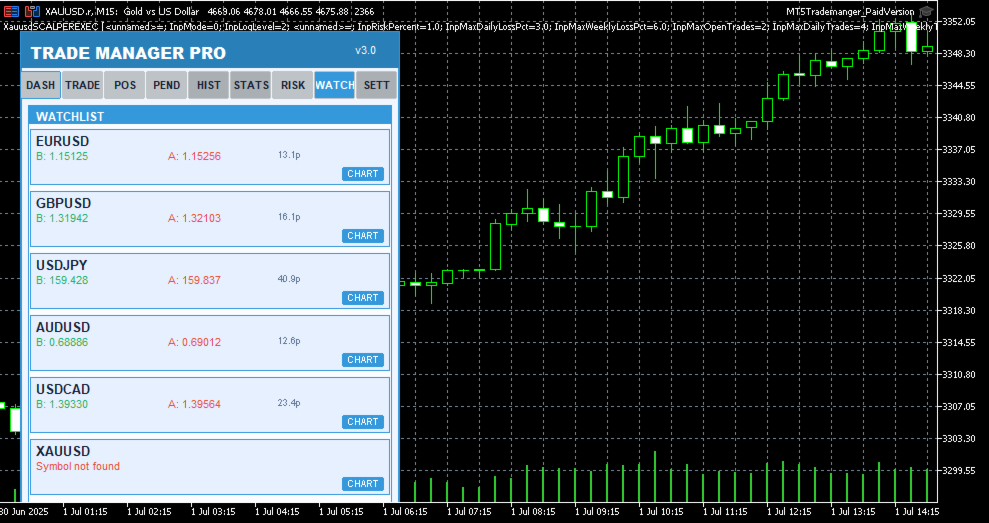
Multi-symbol price monitoring (6 symbols), one-click chart switching, real-time bid/ask display, spread visualization

Performance Stats

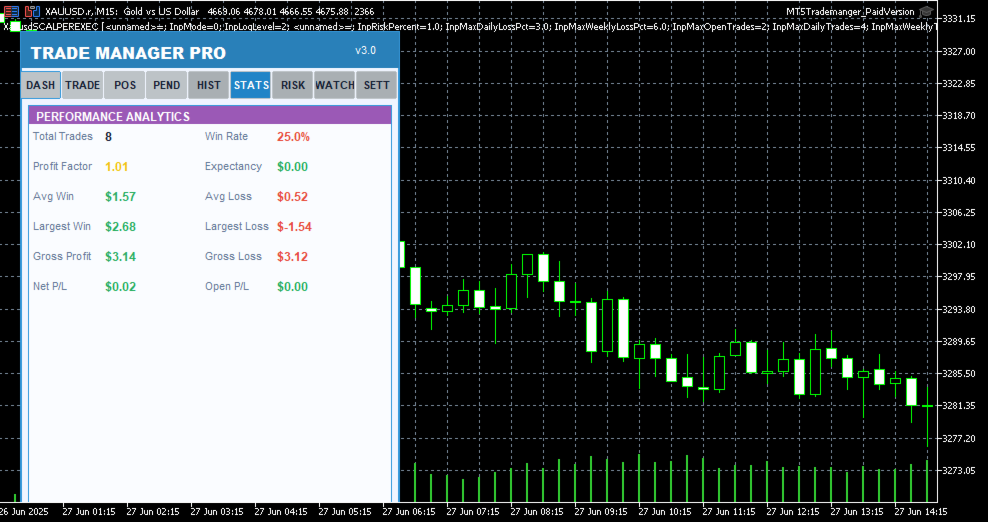
Win rate, total trades, winning trades, profit factor tracking, floating P/L across all positions

Trading Schedule

Customizable trading hours per day, weekday selection, auto block trades outside schedule, visual market closed indicator

UI / Themes

4 color themes (Light, Dark, Midnight, Forest), draggable panel, resizable layout, card-based sections, confirmation dialogs, status bar alerts

Table 1: Core Feature Categories

Detailed Feature Breakdown

One-Click Trade Execution

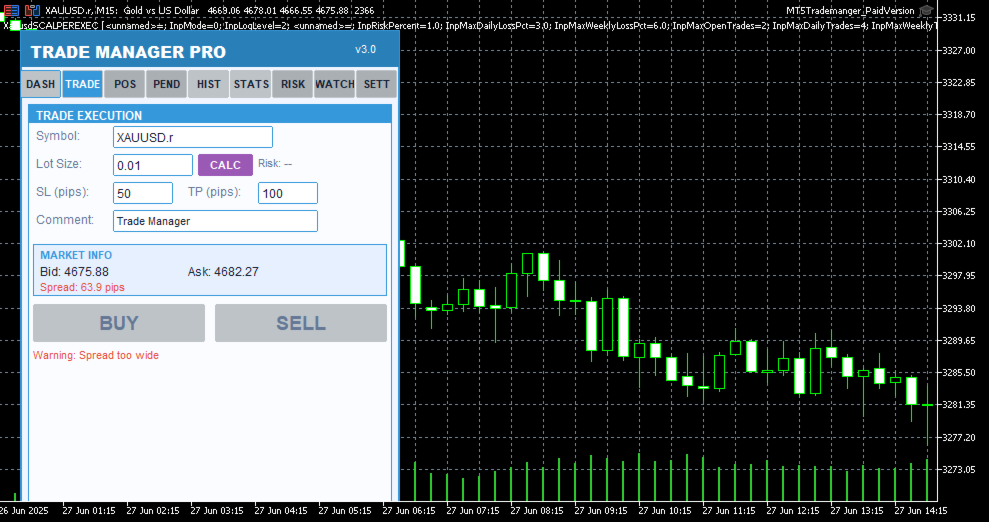
The Trade Execution page provides everything you need to open and manage trades rapidly. Enter your symbol, lot size, stop-loss in pips, take-profit in pips, and an optional comment — then hit Buy or Sell with a single click. The built-in smart lot calculator automatically determines the optimal lot size based on your risk percentage, account equity, and stop-loss distance, ensuring you never risk more than you intend to on any single trade. Before every execution, a confirmation dialog displays the trade details so you can verify your parameters before committing capital.

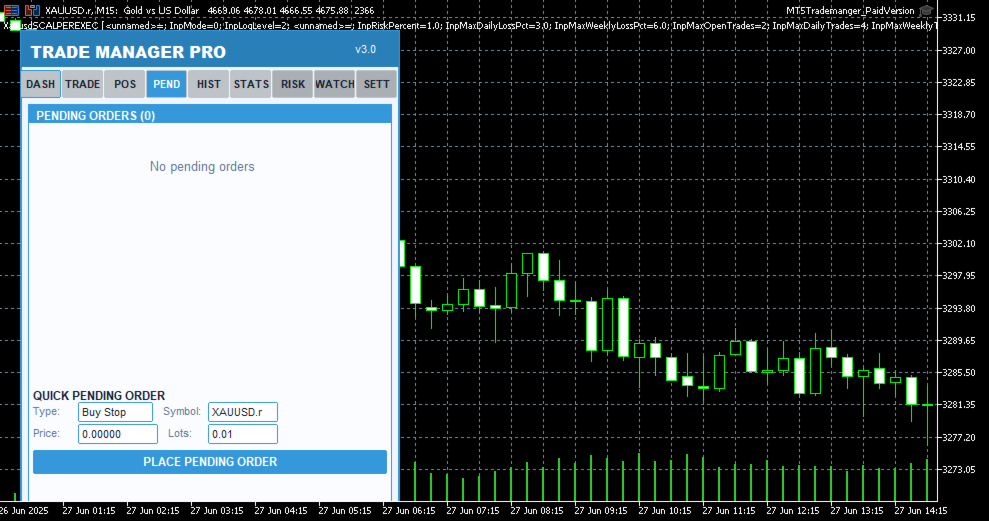
Pending order support is also included, allowing you to set up Buy Stop, Sell Stop, Buy Limit, and Sell Limit orders directly from the panel. Each pending order appears in a dedicated tab where you can monitor its status, view entry price, SL/TP levels, and delete orders that are no longer needed. The 

Trade Manager Pro  |  Product Description

real-time market info section shows current bid, ask, and spread values so you always have full context before placing a trade.

Intelligent Risk Management

Risk management is the cornerstone of consistent profitability, and Trade Manager Pro delivers a comprehensive suite of automated risk controls that work silently in the background to protect your account. The trailing stop feature automatically adjusts your stop-loss as the market moves in your favor, locking in profits while giving your trades room to breathe. You configure the trigger distance and step size, and the system handles the rest on every tick.

The break-even automation moves your stop-loss to the entry price (plus a configurable profit buffer) once the price reaches your specified trigger level, effectively eliminating risk on the trade. The daily loss limit automatically blocks all new trade executions once your cumulative daily losses exceed your predefined threshold, preventing emotional revenge trading. Additionally, the spread monitor warns you when the current spread exceeds your maximum allowed level and can block trade execution entirely during periods of high spread, protecting you from entering trades with unfavorable execution conditions.

All risk management features can be toggled on or off individually via the Settings page, and your preferences are saved across sessions using GlobalVariables. This means your configuration persists even after restarting MetaTrader or switching between charts.

Session-Based Analytics

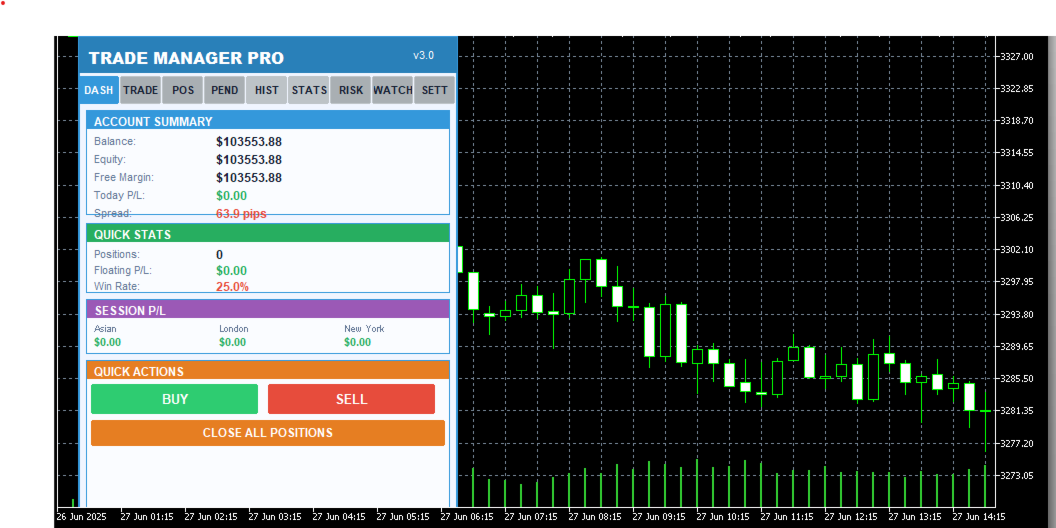
Understanding which trading sessions are most profitable for your strategy is essential for long-term improvement. Trade Manager Pro automatically tracks your closed-trade profit and loss across three major forex sessions: Asian (00:00–08:00 server time), London (08:00–16:00), and New York (13:00–22:00). The session P/L breakdown is displayed on the Dashboard page, giving you an instant snapshot of where your edge lies.

The dashboard also displays your account balance, equity, free margin, daily P/L, total open positions, floating P/L, and win rate. All values update in real time, providing you with a comprehensive overview of your account health without needing to switch between multiple terminal windows or external tools.

Multi-Symbol Watchlist

The Watchlist page lets you monitor up to six symbols simultaneously, displaying real-time bid and ask prices along with the current spread for each instrument. One-click chart switching allows you to instantly navigate to any watched symbol on your current chart, eliminating the need to manually search through the Market Watch window. Default symbols include EURUSD, GBPUSD, USDJPY, AUDUSD, USDCAD, and XAUUSD, covering the most popular forex pairs and gold.

Professional Themes & UI

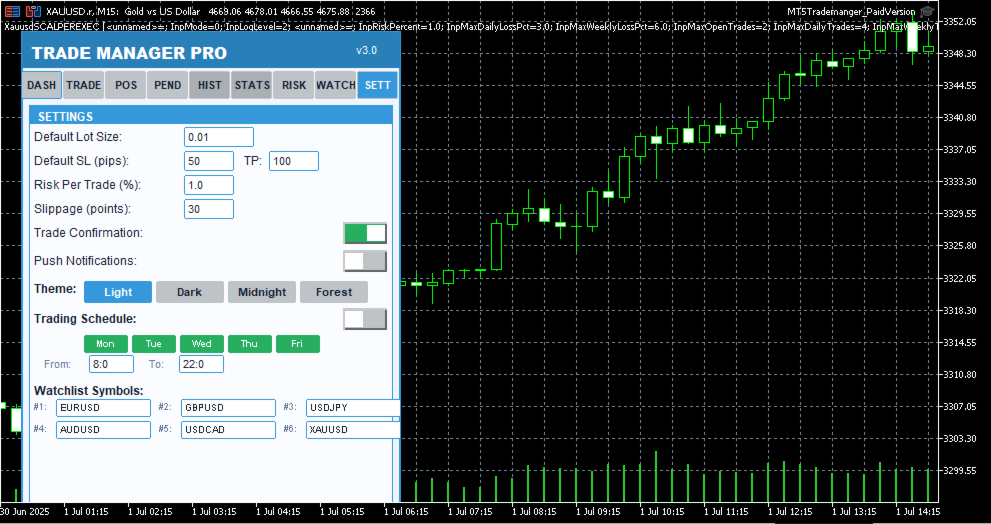
Trade Manager Pro includes four professionally designed color themes that you can switch between instantly from the Settings page: Light (clean blue tones for daytime trading), Dark (low-contrast dark theme to reduce eye strain during extended sessions), Midnight (deep navy tones inspired by 

Trade Manager Pro  |  Product Description

nighttime charting), and Forest (green-toned natural palette). Your theme preference is saved across sessions and applies to every element of the panel, including cards, buttons, labels, and status indicators.

The panel is fully draggable — click and drag the header to reposition it anywhere on your chart. All UI elements use card-based layouts with color-coded sections, making it easy to scan information at a glance. The status bar at the bottom provides real-time feedback for every action, including trade confirmations, error messages, and risk alerts, with color-coded messages that fade after five seconds to keep your workspace clean.

Why Traders Choose Trade Manager Pro

There are many trade management tools available on the MetaTrader Market, but Trade Manager Pro stands out for several reasons that directly impact your trading performance and daily workflow:

Everything in One Panel: No more juggling between multiple indicators, EAs, and scripts. Trade Manager Pro consolidates trade execution, position management, risk controls, analytics, and watchlist monitoring into a single, compact dashboard that sits cleanly on your chart. This reduces cognitive load and decision latency, especially during fast-moving market conditions where every second counts.

Battle-Tested Risk Controls: The automated trailing stop, break-even, daily loss limit, and spread monitor work together to create a safety net around your account. These features are not theoretical — they are the exact same risk management tools used by professional fund managers and proprietary trading desks, now accessible to retail traders in a simple, configurable interface.

Zero Learning Curve: Despite its extensive feature set, Trade Manager Pro is designed for immediate usability. The tabbed interface is intuitive, every button is clearly labeled, and all settings come pre-configured with sensible defaults. You can be up and running in under two minutes, and the confirmation dialogs ensure you never execute a trade by accident.

Session-Persistent Settings: Your theme preference, risk management toggles, trailing stop parameters, break-even settings, and daily loss limits are all saved using MetaTrader GlobalVariables. This means your configuration survives chart restarts, terminal restarts, and even computer reboots. Set it up once, and it stays configured until you decide to change it.

Lightweight & Non-Intrusive: Trade Manager Pro runs as an indicator (not an Expert Advisor), which means it does not interfere with your existing EAs, does not require special execution permissions, and uses minimal CPU and memory resources. The panel occupies a fixed, compact area on your chart and can be repositioned by dragging the header.

How to Get Started

Getting started with Trade Manager Pro takes less than two minutes. Follow these simple steps to 

Trade Manager Pro  |  Product Description

begin using the panel on your charts:

Purchase and download Trade Manager Pro from the MetaTrader Market. The file will be automatically installed to your MetaTrader 5 terminal.

Open any chart in MetaTrader 5. From the Navigator panel, find Trade Manager Pro under the Indicators section and drag it onto your chart.

Configure your input parameters when prompted: set your default lot size, SL/TP in pips, magic number, risk percentage, and preferred theme. All values come pre-configured with sensible defaults.

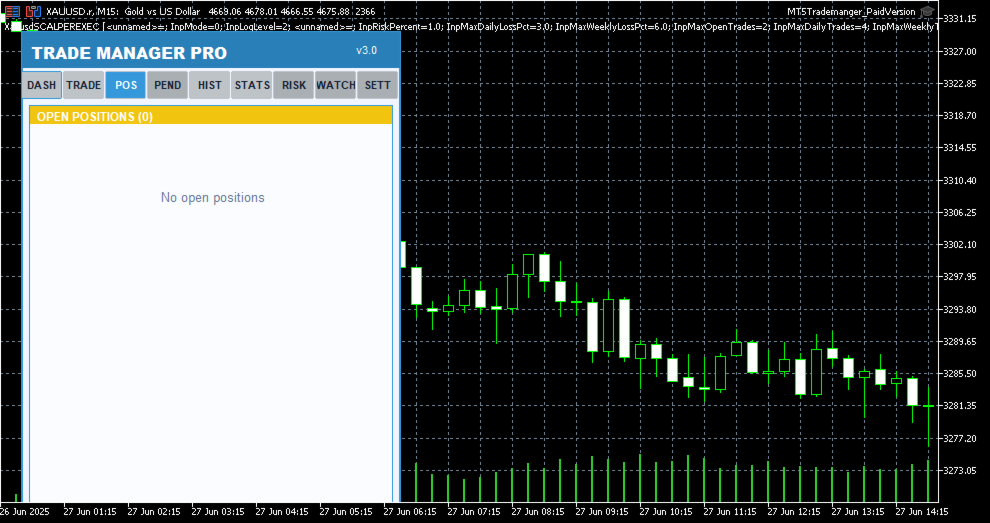
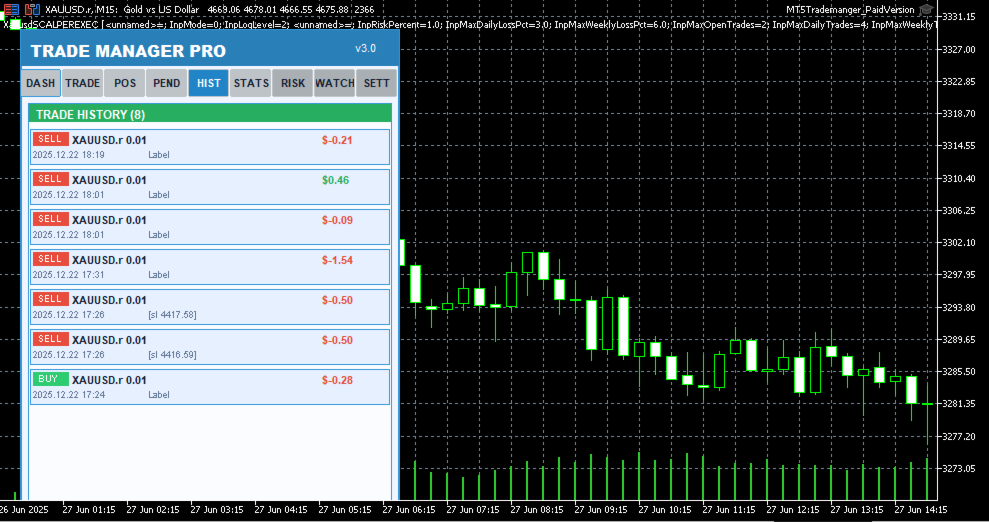
The Trade Manager Pro panel will appear on your chart. Use the tabbed navigation to access Dashboard, Trade, Positions, Pending, History, Stats, Risk, Watchlist, and Settings pages.

Customize your risk management settings on the Settings page and toggle features on or off as needed. Your preferences are saved automatically.

Start trading! Use the one-click Buy/Sell buttons, manage positions from the Positions tab, and monitor your performance from the Dashboard.

Input Parameters

Trade Manager Pro provides a comprehensive set of input parameters organized into logical groups. The following table lists all configurable options along with their default values and descriptions. All runtime-changeable settings (risk toggles, theme, schedule) can also be modified via the Settings page without needing to reattach the indicator.

Parameter

Default

Description

DefaultLotSize

0.01

Default lot size for trade execution

DefaultSL

50

Default stop-loss in pips

DefaultTP

100

Default take-profit in pips

Slippage

30

Maximum allowed slippage in points

MagicNumber

123456

Expert advisor magic number for position filtering

RiskPercentPerTrade

1.0

Risk percentage per trade for smart lot calculator

UseAutoStopLoss

true

Automatically set stop-loss on trade execution

UseAutoTakeProfit

true

Automatically set take-profit on trade execution

UseTrailingStop

false

Enable automated trailing stop management

TrailingStopDistance

30

Trailing stop activation distance in pips

Trade Manager Pro  |  Product Description

Parameter

Default

Description

TrailingStopStep

10

Trailing stop step size in pips

UseBreakEven

true

Enable break-even automation

BreakEvenTrigger

30

Break-even trigger distance in pips

BreakEvenProfit

10

Break-even profit buffer in pips

UseMaxDailyLoss

true

Enable daily loss limit protection

MaxDailyLoss

500.0

Maximum allowed daily loss in account currency

MaxSpreadPips

30.0

Maximum allowed spread in pips (execution blocked above)

MaxOpenPositions

20

Maximum number of simultaneous open positions

StartTheme

THEME_LIGHT

Initial color theme (Light/Dark/Midnight/Forest)

PanelCorner

0

Panel anchor corner (0=top-left, 1=top-right, etc.)

PanelOffsetX

20

Horizontal offset from anchor corner in pixels

PanelOffsetY

30

Vertical offset from anchor corner in pixels

Table 2: Input Parameters Reference

System Requirements

Trade Manager Pro has been designed to run on any system that supports MetaTrader 5. The following are the minimum requirements for smooth operation:

MetaTrader 5 build 2361 or higher (recommended: latest build)

Windows 7 / 8 / 10 / 11, or MetaTrader 5 for macOS / Linux

Any internet connection sufficient for trading (trade execution requires broker connectivity)

Minimum screen resolution of 1280x720 (recommended: 1920x1080 or higher for optimal panel visibility)

Allow DLL imports and automated trading enabled in terminal settings

Version History

Trade Manager Pro  |  Product Description

Trade Manager Pro is actively maintained and updated based on trader feedback. Below is the changelog for recent versions:
Рекомендуем также
Key Features: 200+ Fully Implemented Patterns   across all categories Advanced Market Structure Analysis Smart Money Integration   (Wyckoff, Order Blocks, Liquidity) Professional Risk Management Multi-Timeframe Analysis AI-Powered Confidence Scoring Advanced Visualization Real-time Alerts Pattern Categories: Single Candle Patterns (Hammer, Doji, Marubozu, etc.) Multi-Candle Patterns (Engulfing, Stars, Harami, etc.) Chart Patterns (Head & Shoulders, Cup & Handle, Triangles, etc.) Harmonic Pattern
FREE
Grid Manual MT5
Alfiya Fazylova
4.9 (21)
Grid Manual — это торговая панель для работы с сеточными стратегиями. Утилита универсальная, имеет гибкие настройки и понятный интерфейс. Работает с сеткой ордеров не только в сторону усреднения убытков, но и в сторону наращивания прибыли. Трейдеру не нужно создавать и сопровождать сетку ордеров, это сделает утилита. Достаточно открыть ордер и Grid manual автоматически создаст ему сетку ордеров и будет сопровождать его до самого закрытия. Полная инструкция и демо-версия здесь . Основные особенно
Bneu Trade Manager Pro
Marvinson Salavia Caballero
**Bneu Trade Manager Pro** is an advanced trading utility Expert Advisor for MetaTrader 5 that extends the functionality of the free version with automated trade management features, risk protection systems, and compliance tools for proprietary trading firm challenges. **All Free Version Features Included** All features from the free version are included in the PRO version. This includes visual trade management with drag-and-drop lines, risk-based position sizing, one-click order execution, p
Advanced MT5 Indicator: Precision-Powered with Pivot Points, MAs & Multi-Timeframe Logic Unlock the full potential of your trading strategy with this precision-engineered MetaTrader 5 indicator —an advanced tool that intelligently blends Pivot Points , Adaptive Moving Averages , and Multi-Timeframe Analysis to generate real-time Buy and Sell signals with high accuracy.    If you want to test on Real Market, Let me know. I will give the Demo file to run on Real Account.    Whether you're a scal
The only EA for TRADING PSYCHOLOGY:Discipline, Mindset Training & Risk Control  Checklist-Enforced Trading (No trades allowed until  strategy checklist is met)  1-Click Revenge Trade Blocker (Auto-freezes account after losses)  Overtrading Circuit Breaker (Hard daily trade limits enforced)  Neuroplasticity Training (Rewires retail habits into institutional discipline)  Institutional Risk Protocols (Auto SL/TP, position sizing, daily loss cutoffs)  Prop Firm  and account Safeguard (Preve
Ever took a trade and when you come back to the termainal to check on the status of the position, you realized the market has gone so far in the opposite direction or it has hit your stoploss. Well this system is here to help manage those moments price doesn't go in your desired direction. Consider this to be the insurance your account needs for your trading business. This tool manages manual trades and e.a. triggered trades. However be aware that some e.a.s are programmed to override other e.a.
PANHA SCALPING EA MT5 PANHA SCALPING EA MT5 is a professional automated scalping system designed to trade fast-moving forex markets using real-time market direction and advanced position control. The EA focuses on precise entries, controlled exposure, and intelligent basket-level profit and risk management, making it suitable for traders who want structured, automated scalping without complex configuration. Strategy Overview Market-direction based scalping Designed for fast-moving forex symbo
FREE
Привет, друзья. Эту утилиту я написал специально для использования в своем профиле с большим количеством экспертов и сетов ("Joint_profiles_from_grid_sets"   https://www.mql5.com/en/blogs/post/747929 ).  Теперь, чтобы ограничить убытки на счёте, нет необходимости менять параметр "Close_positions_at_percentage_of_loss" на каждом чарте. Просто откройте   один   дополнительный чарт, прикрепите данную утилиту и настройте желаемый процент по закрытию всех сделок на счёте. Утилита имеет следующий фун
AurumAlert
Samuel Yip Jing Han
AurumAlert — CCI Gold Swing EA v6 A fully automated MetaTrader 5 Expert Advisor for swing trading XAUUSD (Gold) on the H1 timeframe . AurumAlert combines a dual-CCI crossover system with divergence detection, an ADX trend filter, and an H1 RSI confirmation layer to identify high-probability trend-following entries on Gold. The ATR trailing stop rides extended moves and locks in profit progressively. Technical support is provided for XAUUSD H1 only. Hedging account required.Full documentation fil
Imagine flying a real aircraft without ever stepping into a flight simulator. That's what trading is like. You have to simulate your strategy before you can take it to a live market. It is good if you can simulate things speedily before even stepping into any live market, or before coming up with an automated system.  People don't have all day to stare at a higher timeframe chart until the entry signal finally arrives. That's why I built this so that you can simulate your strategy with speed. Th
FREE
Bober Real MT5
Arnold Bobrinskii
4.76 (17)
Bober Real MT5 — полностью автоматический советник для торговли на рынке Forex. Робот создан в 2014 году и за этот период сделал множество прибыльных сделок, показав более 7000% прироста депозита на моем личном счете. Было выпущено много обновлений, но версия 2019 года считается самой стабильной и прибыльной. Робот можно запускать на любых инструментах, но лучшие результаты достигаются на EURGBP , GBPUSD , таймфрейм M5 . Робот не покажет хорошие результаты в тестере или на реальном счете, если
Устанавливайте TP и SL по Цене – Автоматический модификатор ордеров для MT5 Автоматически устанавливает точные уровни TP и SL по цене сделки ️ Работает со всеми парами и советниками, фильтрация по символу или Magic Number Этот советник позволяет задавать точные уровни Take Profit (TP) и Stop Loss (SL) по ценовым значениям (например, 1.12345 на EURUSD). Без пунктов, без пипсов. Только точное и чистое управление сделками для всех ордеров или по выбранному символу или Magic Number. Основны
SPECIAL LAUNCH OFFER: $30 (1-Month Rent) Limited time offer to build our community and gather feedback! AmbM GOLD Institutional Scalper A high-precision M5 algorithm for XAUUSD (Gold) , engineered to trade exclusively at Institutional Liquidity Levels ($5/$10 psychological marks). PERFORMANCE DATA (BUY ONLY) • Win Rate: 87.09%. • Safe Growth: +$4,113 profit on $10k (13.75% Max Drawdown). • Extreme Stress Test: Successfully generated +$22,997 in a 5-year stress test (2020-2026), proving
PROMO: ONLY 10 LEFT AT $90! Next price:        $199 Price will be kept high to limit number of users for this strategy. This EA starts trading at the open of   London (UK) Session . It is based on analysis of advanced statistical distributions combined with short to medium term reversal patterns which have mean-reversion attributes. The EA includes several smart features and allows you to trade with a fixed or automatic lot size. The EA is not sensitive to spreads but can be backtested on both
SL TP Manager Utility MT5
AL MOOSAWI ABDULLAH JAFFER BAQER
SL-TP Manager Utility for MT5 - Professional Risk Management Tool Advanced Position Protection & Profit Management SL-TP Manager Utility is a powerful, intuitive tool designed for traders who want precise control over their risk management. This utility provides a sleek interface for setting, modifying, and managing your Stop Loss, Take Profit, and Trailing Stop levels with just a few clicks. Key Features: Dual Mode Operation: Set values in pips or absolute price with a simple toggle Independent
Talents ATR Scalper Utility (MT5) The Talents ATR Scalper Utility is a professional-grade trade execution and management tool built for MetaTrader 5. Inspired by the Biblical Parable of the Talents , this utility is designed to help traders multiply their potential with precision risk control, one-click simplicity, and advanced automation. Whether you’re scalping forex, gold, or indices, this tool delivers speed, consistency, and confidence. Key Features One-Click Trade Preview Click below price
Fuzzy Predictor EA is based on fuzzy logic strategy based on candlestick analysis , according to number of consecutives long or short candles, percent of long or short candles on a fixed candlestick sample, percent of shadow on this sample or upper and lower shadows on reversal candlesticks for reversal analysis. When the EA analysis all this parameters, it decides, based on its fuzzy strategy, which trade will be better: trend or reversal. Takeprofit and Stoploss is based on candlesticks sample
This PORTFOLIO of 3 strategies has been developed, tested and traded live on DAX H1 timeframe. Multiple EAs traded together will lead to a BIGGER PROFITS and SMOOTHER EQUITY CURVE. 3 not correlated EAs logics for DAX H1 timeframe merged to a single strategy. Very SIMPLE STRATEGIES with only FEW PARAMETERS.  Every trade has his own logic for STOP LOSS. To catch the profits every strategy uses different approach - some has TAKE PROFIT, some uses TIME BASED EXITS or PROFIT TRAILING. EA has been b
This PORTFOLIO of 3 strategies has been developed, tested and traded live on DAX M30 timeframe. Multiple EAs traded together will lead to a BIGGER PROFITS and SMOOTHER EQUITY CURVE. 3 not correlated EAs logics for DAX M30 timeframe merged to a single strategy. Very SIMPLE STRATEGIES with only FEW PARAMETERS.  Every trade has his own logic for STOP LOSS. To catch the profits every strategy uses different approach - some has TAKE PROFIT, some uses TIME BASED EXITS or PROFIT TRAILING. EA has been
This is the HFT Flame Ea....This is a complex Expert Advisor that basically pick trades from price movements, it is also a none-martingale mechanism with netting strategy that makes this Ea more interested and profitable throughout your trading journey. The HFT Flame EA can be super consistent on profits depending on the inputs selected for your style of trading. This is a hand free trading robot that can trade your way to success while you are away from the charts, another perfect advantage abo
It Will Close Your All Trade   in Half of second  no matter you open 100 plus trade open it will close all trade half of second  . it good work for 1 -5 min scalping   this Ea have  many function see the pic i uploaded   there  . ea that have function close all trade , close all lossing trade , close all profit trade . also have lot system where you can put your  expected lot and buy sell button and it can close 100 trade in 1 second  
BTC Master Pro
Farzad Saadatinia
4.58 (12)
BTC Master Pro — ваш надежный инструмент для дисциплинированной торговли Bitcoin. Новая версия теперь усилена искусственным интеллектом OpenAI , обеспечивая более точное исполнение сделок и улучшенную фильтрацию торговых сигналов в условиях высокой волатильности крипторынка. Этот профессиональный торговый робот разработан специально для торговли Bitcoin (BTCUSD) на платформе MetaTrader 5 , с акцентом на структурированное исполнение, контролируемую нагрузку на депозит и интеллектуальное управлени
Fractal Trend Master — один из самых мощных и сложных советников на рынке, разработанный для защиты капитала трейдеров при максимизации возможностей для получения прибыли. Базирующийся на знаменитой методологии Билла Вильямса , этот EA использует три важнейших инструмента технического анализа: индикатор Alligator , фракталы и Gator Oscillator , создавая прочную и точную структуру для идентификации и следования рыночным трендам. Этот EA был разработан с акцентом на управление рисками и сохранени
Exclusive EA for FOREX HEDGE account The EA (FuzzyLogicTrendEA) is based on fuzzy logic strategies based on the analysis of a set of 5 indicators and filters. Each indicator and filter has a weight in the calculation and, when the fuzzy logic result reaches the value defined in the EA parameter, a negotiation is opened seeking a pre-defined gain. As additional functions it is possible to define maximum spread, stop loss and so on . Recommended Symbol: EURUSD, AUDUSD, GBPUSD, NZDUSD, USDCAD, AUD
NeoPips Engine EA — настоящая торговая революция уже наступила! «Настоящая сила торговли заключается в том, чтобы видеть то, что упускают другие. NeoPips Engine не следует за рынком — он им управляет». О NeoPips Engine EA: ваш интеллектуальный торговый союзник NeoPips Engine EA — это не обычный торговый робот. Это многомерный, оптимизированный для ИИ экспертный советник, созданный для трейдеров, которым нужна точность, адаптивность и долгосрочная эффективность. В отличие от устаревших
PipFinite EA Trend PRO MT5
Karlo Wilson Vendiola
3.67 (9)
The Official Automated Version of the Powerful Indicator PipFinite Trend PRO EA Trend PRO trades the signal of PipFinite Trend PRO and manages the trade depending on the user's preference. The EA includes many customizable features that can further enhance the Trend PRO trading strategy. Features like Entry and Exit Filters, Higher Timeframe Filter, Stoploss, Takeprofit, Breakeven, Trailing Stop, News Filter and MORE! The Innovative Solution EA Trend PRO was created to make your trading more
Gold Crazy EA   is an Expert Advisor designed specifically for trading Gold H1/ EU M15. It use some indicators to find the good Entry. And you can set SL or you can DCA if you want. It can be an Scalping or an Grid/ Martingale depend yours setting. This EA can Auto lot by Balance, set risk per trade. You also can set TP/ SL for earch trade or for basket of trade. - RSI_PERIOD - if = -1, then the default strategy works, if >0, then the RSI strategy works - MAX_ORDERS - to trade with only 1 order,
The Gold Scalping Auto Entry is an automated trading system developed specifically for the XAUUSD instrument. The Expert Advisor operates by analyzing structural price action, volume, and momentum across multiple timeframes to identify and execute trades. The system does not use grid or martingale strategies. Every trade is executed with a predefined stop loss and relies on calculated risk management parameters. The Expert Advisor is written in pure MQL5, contains no DLL calls, and requires no
FREE
Финансовый Робот SolarTrade Suite: LaunchPad Market Expert - предназначенный для открытия торговых сделок! Это торговый робот, который использует особые инновационные и передовые алгоритмы для рассчета своих значений, Ваш Помошник в Мире Финансовых Рынков. Испольуйте наш набор индикаторов из серии SolarTrade Suite чтобы лучше выбрать момент для запуска этого робота. Проверьте другие наши продукты из серии SolarTrade Suite внизу описания. Хотите уверенно ориентироваться в мире инвестиций и фи
Fvg Edge
Ahmad Meftah Abdulsalam Alawwami
5 (2)
FVG Smart Zones – Бесплатная версия Индикатор обнаружения гэпов справедливой стоимости для MetaTrader 5 (MT5)   Ищете настоящий торговый инструмент, а не просто очередной случайный индикатор? FVG Smart Zones – Бесплатная версия дает вам профессиональное понимание рынка, автоматически обнаруживая гэпы справедливой стоимости (FVG) и выделяя зоны с высокой вероятностью торговли прямо на вашем графике.   Создано для трейдеров, следующих: Концепции умных денег (SMC) Концепции торговли I
FREE
С этим продуктом покупают
Trade Assistant MT5
Evgeniy Kravchenko
4.42 (207)
Помогает рассчитать риск на сделку, простая установка нового ордера с помощью линий, управление ордерами с функциями частичного закрытия, 7 типов трейлинг-стопа и другие полезные функции. Дополнительные материалы и инструкции Инструкция по установке - Инструкция к приложению - Пробная версия приложения для демо счета Функция Линии   - отображает на графике линию открытия, стоп-лосс, тейк-профит. С помощью этой функции легко установить новый ордер и увидеть его дополнительные характеристики пе
VERIFIED TRADING RESULTS - Farmed Hedge Yield Axi Copy:  https://www.mql5.com/en/signals/2356376 - Farmed Hedge Yield Exn Copy:   https://www.mql5.com/en/signals/2356404 - Farmed Hedge Yield V Copy:  https://www.mql5.com/en/signals/2357156 Contact me via private message to receive the User Manual and Setup. * Thai Lauguage Support Available Farmed Hedge Yield Farming - Professional Pair Trading Dashboard (Manual - Hybrid - Semi/Automated EA) VERSION 3 - WILD HARVEST UPDATE Trading Approac
Суть: используя юзер-интерфейс вы настраиваете параметры, которым должен соответствовать график до входа в позицию(позиции), настраиваете какие входные модели использовать, настраиваете правила по которым надо завершать торговлю и планирование. А всю рутину по наблюдению за графиком и исполнению  Lazy Trader  берет на себя. полное описание  :: 3 ключевых видео [1] -> [2] -> [3] Что он умеет? - Понимает структуру рынка по Ларри Вильямсу - Понимает Swing-структуру рынка по Майклу Хадлстону (ICT
The product will copy all telegram signal to MT5 ( which you are member) , also it can work as remote copier.  Easy to set up, copy order instant, can work with almost signal formats, image signal,  s upport to translate other language to English Work with all type of channel or group, even channel have "Restrict Saving Content", work with  multi channel, multi MT5 Work as remote copier: with signal have ticket number, it will copy exactly via ticket number. Support to backtest signal. How to s
Crypto Charting
Rajesh Kumar Nait
5 (5)
Crypto Charting for MT5 – Интеграция криптовалютных графиков в MetaTrader 5 Обзор Crypto Charting for MT5 предоставляет графики OHLC в реальном времени для криптовалют через WebSocket. Поддерживается автоматическое обновление истории с различных бирж прямо в MetaTrader 5. Функции Графики в реальном времени через WebSocket Автоматическое обновление исторических данных Запланированные обновления при перебоях с интернетом Поддержка всех таймфреймов MT5 OHLCV данные (Открытие, Максимум, Минимум, За
Footprint Chart Pro — Professional OrderFlow EA for MetaTrader 5 Version 6.34 | Professional tool for real traders | Institutional-Grade Visualization DEMO USERS - PLEASE SELECT EVERY TICK / REAL TICK WHEN TESTING AND YOU HAVE DOWNLOADED HISTORICAL DATA. IF YOU SEE A WAITING SCREEN AND IT IS NOT DOWNLOADING, IT MEANS YOU HAVE LOW HISTORICAL DATA. TRY 1 MIN AND 5 MIN FIRST ON 1 DAY DATA. ONE DAY DATA SHOULD BE THE NEWEST AND MOST CURRENT DATE. PLEASE WAIT UNTIL THE MARKET HAS ROLLED OVER PERIOD.
Ultimate Extractor - Professional Trading Analytics for MT5 *****this is the local HTML version of Ultimate Extractor. For the online version please reach out to me directly****** Ultimate Extractor transforms your MetaTrader 5 trading history into actionable insights with comprehensive analytics, interactive charts, and real-time performance tracking. What It Does Automatically analyzes your MT5 trading history across all Expert Advisors and generates detailed HTML reports with interactive vi
YuClusters
Yury Kulikov
4.93 (43)
Внимание: Ознакомиться с работой программы можно с помощью бесплатной версии  YuClusters DEMO . YuClusters это профессиональная система анализа рынка. Для трейдера открываются уникальные возможности анализа потока ордеров, объемов торговли, движения цены используя различные графики, профили, индикаторы, графические объекты. YuClusters оперирует данными на основе ленты сделок или тиковой информации, в зависимости от того, что доступно в котировках финансового инструмента.  YuClusters позволяет с
Telegram To MT5 Receiver
Levi Dane Benjamin
4.31 (16)
Копируйте сигналы из любого канала, участником которого вы являетесь (в том числе частного и ограниченного), прямо на свой MT5. Этот инструмент был разработан с учетом потребностей пользователей и предлагает множество функций, необходимых для управления и мониторинга сделок. Этот продукт представлен в простом в использовании и визуально привлекательном графическом интерфейсе. Настройте свои параметры и начните использовать продукт в течение нескольких минут! Руководство пользователя + Демо  |
This Expert Advisor is applicable to plot wave charts as per the NeoWave  method (Neely Extension of Wave Theory).  NeoWave is a scientific, objective and revolutionary style of Elliott Wave Theory that was invented by Glenn Neely in 1990 in the “Mastering Elliott Wave” book. To start analyzing with this method, we need a particular chart called the Wave Chart or Cash Data chart . This is the first step for a good wave analysis. To draw this chart, Highs and Lows should be plotted in the order t
Custom Timeframe Manager Pro: неограниченные таймфреймы в MetaTrader 5 Стандартные настройки терминала часто скрывают важные детали движения цены. Ограничивая анализ только классическими периодами, трейдер рискует упустить моменты зарождения тренда и истинные уровни волатильности. Custom Timeframe Manager Pro — это профессиональное решение, которое снимает любые ограничения на построение графиков. Создавайте любые собственные периоды, включая дробные и экзотические, которые мгновенно появляются
EasyInsight AIO MT5
Alain Verleyen
4.92 (12)
EASY Insight AIO – Всё-в-одном для умного и простого трейдинга Обзор Представьте, что вы можете просканировать весь рынок — Форекс, золото, криптовалюты, индексы и даже акции — всего за несколько секунд, без ручного просмотра графиков, сложной установки или настройки индикаторов. EASY Insight AIO — это ваш идеальный инструмент экспорта для трейдинга с поддержкой искусственного интеллекта. Он предоставляет полный снимок рынка в одном аккуратном CSV-файле — готовом к мгновенному анализу в ChatGP
Signal TradingView to MT5 Pro Automator Мгновенное профессиональное исполнение между TradingView и MetaTrader 5 Автоматизируйте свою торговую стратегию с помощью самого надежного моста связи между алертами TradingView и реальным исполнением в MT5. Разработанный для трейдеров, которым требуются скорость, гибкость и безупречное управление рисками, этот советник (Expert Advisor) превращает любое сообщение с алертом в точный рыночный или лимитный ордер. ПРЕИМУЩЕСТВА И СИЛЬНЫЕ СТОРОНЫ Универсальный д
Unlimited Trade Copier Pro - это мощный инструмент для удаленного копирования сделок между несколькими счетами MetaTrader 4/MetaTrader 5, расположенными удаленно друг от друга, по сети интернет. Это идеальное решение для провайдеров сигналов, которые хотят поделиться своей торговлей с другими трейдерами по всему миру. Один поставщик может копировать сделки на неограниченное количество счетов-получателей, а один получатель также может копировать сделки неограниченного количества провайдеров. Пост
ManHedger MT5
Peter Mueller
4.83 (6)
THIS EA IS A SEMI-AUTO EA, IT NEEDS USER INPUT. Manual & Test Version Please TEST this product before BUYING  and watch my video about it. The price of the ManHedger will increase to 250$ after 20 copies sold. Contact me for user support or bug reports or if you want the MT4 version! MT4 Version  I do not guarantee any profits or financial success using this EA. With this Expert Advisor, you can: Implement your own Zone Recovery strategy to capitalize on trending markets. Create Grid trading s
The product is used to trade base on any Alert signal in MT5 Easy to setup, simple format with custom keyword All option to management orders as trailing stop, breakeen, partial close, time filter, news filter ... Option to auto open grid orders How to setup and guide: Let read all details about setup and download indicator for auto get   Alert Signal   here Do not buy if you even can not install demo EA to your VPS ( some VPS block download EA from mql5 market) We always bring customers high q
Custom Alerts AIO: Универсальный сканер рынка — Без настройки Обзор Custom Alerts AIO — это самый быстрый и простой способ отслеживать рыночные сигналы в реальном времени на множестве инструментов без дополнительной настройки и без необходимости покупать другие продукты. В состав входят все необходимые индикаторы от Stein Investments, что делает этот инструмент идеальным решением «всё в одном» для трейдеров, ценящих простоту и эффективность. Просто установите на график и сразу получайте сигнал
Торгуйте на Binance в МТ5! GRat_Binance  — это инструмент для ручной и автоматической торговли, в т.ч ЛЮБЫМИ имеющимися советниками, ЛЮБОЙ криптовалютой на самой популярной криптобирже Binance в привычной среде MT5 в режиме 24/7. Возможности 1. Доступны ВСЕ инструменты 5 наиболее популярной криптобиржи  Binance . 2. Возможность выставлять ЛЮБЫЕ доступные в MT5 типы ордеров, как рыночные, так и отложенные, модифицировать ордера и позиции, удалять ордера и закрывать позиции (в т.ч. частично), уст
Features   With MT5 to Interactive Brokers(IB) Trader, you can: 1. Load chart data from IB to MT5, and Analyze with all standard or customer Indicators. 2. Place Orders to IB Account Directly in MT5. 3. Make your Own EAs upon IB Securities by only making minus changes of the trading function. Usage 1) Installation Copy the "Mt5ToIBTraderEn.ex4" and sample files to [MT5 Data Folder]->MQL5->Experts.  2)  MT5 Settings Add the IP Address to the MT5 Allowed URLs in 'Tools->Options->Expert Adviso
******************************* ***************** ********************** ***************** ********************** ************************* GoldMine Train — советник по стратегии трендовой торговли для золота. Оператор определяет основное направление тренда и дает команду поезду двигаться. Поезд будет непрерывно КУПИТЬ/ПРОДАТЬ в этом направлении. Объем лота будет зависеть от баланса счета и заданного коэффициента кредитного плеча. Когда оператор меняет направление тренда, поезд останавливае
The Expert Advisor will help you forward all alert from  MetaTrader 5 to Telegram channel/ group.  All alert must save to folder <Data folder>MQL5\Files\Alerts\ , text file with format *.txt and screenshot with format *.gif or *.png. Parameters: - Telegram Bot Token: - create bot on Telegram and get token. - Telegram Chat ID:  - input your Telegram user ID,  group / channel ID - Forward Alert: - default true, to forward alert. - Send message as caption of Screenshot: - default false, set true t
FuturesGate
Laurent Xavier Richer
MT5 → Futures API Bridge Mirror your MT5 trades into an external futures platform in real time—perfect for running your favorite Expert Advisor (EA) on MT5 while executing on supported external futures accounts. NEW in v2.0: Multi-Symbol Support (Trade Nasdaq, S&P, and Dow from one chart), List-Based Filtering. Click here to read the Full Manual & Setup Guide Key Features Multi-Symbol Control: Manage trades for multiple instruments simultaneously from a single chart instance using the new "
Представляем последнюю версию Dynamic Fibonacci Grid Dashboard для MT5. Теперь с множеством новых функций, этот обновлённый дашборд полностью меняет ваш торговый опыт и позволяет увидеть рынок и ценовое движение с совершенно иной перспективы. Откройте новые возможности благодаря одновременному анализу нескольких таймфреймов и множества инструментов. Удобный интерфейс для ручной торговли и управления позициями, а также расширенные возможности применения предопределённых автоматических стратегий.
The product will copy all  Discord  signal   to MT5   ( which you are member  ) , also it can work as remote copier.  Easy to set up. Work with almost signal formats, support to translate other language to English Work with multi channel, multi MT5. Work with Image signal. Copy order instant, auto detect symbol. Work as remote copier: with signal have ticket number, it will copy exactly via ticket number. How to setup and guide: Let read all details about setup and download Discord To MetaTrader
Mt5 To InterativeBrokers Copier allows you to copy deals from MT5 account to Interactive Brokers. With this, you can run your EA strategy on a MT5 Demo/Real Account, then copy all the deals to Interactive Brokers account real time. Features: 1. Copy or Invert-Copy deals Realtime from MT5 to IB Account. 2. Synchronizing positions of both accounts periodicaly, in case any missing copying. 3. You can choose only Buy position or Sell position. Symbols Setup: General Format:  {MT Symbol} -> {IB S
Mentfx Mmanage mt5
Anton Jere Calmes
4.25 (8)
The added video will showcase all functionality, effectiveness, and uses of the trade manager. Drag and Drop Trade Manager. Draw your entry and have the tool calculate the rest. Advanced targeting and close portions of a trade directly available in tool (manage trades while you sleep). Market order or limit order on either side with factored spread. Just draw the entry, the tool does the rest. Hotkey setup to make it simple. Draw where you want to enter, and the stop loss, the tool calculates al
Ultimate Trailing Stop EA MT5
BLAKE STEVEN RODGER
4.13 (8)
This EA Utility allows you to manage (with advanced filtering) unlimited open orders (manual or EA) with 16 trailing stop methods: fixed, percent, ATR Exit, Chandelier Exit, Moving Average, Candle High Low Exit, Bollinger Bands, Parabolic, Envelope, Fractal, Ichimoku Kijun-Sen, Alligator, Exit After X Minutes or Bars, RSI and Stochastic. The trailing stop can be either real or virtual, and you can exit fully or with a partial close percent on touch or bar close.  Moreover, you can add (override
Trade Copier Pro - это мощный инструмент для удаленного копирования сделок между несколькими счетами MetaTrader 4/MetaTrader 5, расположенными в разных местах, по сети интернет. Это идеальное решение для провайдеров сигналов, которые хотят поделиться своей торговлей с другими трейдерами по всему миру. Один поставщик может копировать сделки на множество счетов-получателей, а один получатель может копировать торговлю множества провайдеров. Поставщик также может установить время истечения подписки
GRat Crypto
Ivan Titov
4.5 (2)
Торгуйте на криптобиржах в МТ5! GRat_Crypto — это инструмент для ручной и автоматической торговли, в т.ч ЛЮБЫМИ имеющимися советниками, ЛЮБОЙ криптовалютой на самых популярных криптобиржах в привычной среде MT5 в режиме 24/7. Возможности 1. Доступны ВСЕ инструменты 9 наиболее популярных криптобирж: Binance, BingX, Bybit, Coinbase, CoinEx, Kraken, KuCoin, MEXC  и OKX . 2. Возможность выставлять ЛЮБЫЕ доступные в MT5 типы ордеров, как рыночные, так и отложенные, модифицировать ордера и позиции, у
PineChart
Muhammad Minhas Qamar
Developed by MMQ —  PineChart: Run PineScript Inside MT5 With A Modern Charting Experience An MQL5 Expert Advisor that runs Pine Script indicators and strategies directly inside MetaTrader 5. PineChart includes a full Pine Script interpreter so you can use your existing Pine Script v5/v6 source code without manually rewriting anything in MQL5. Links [  Website  |  Documentation  |  Demo ] NOTE: Downloading demo through MQL5 will give you limited functionality. To experience PineChart fully, dow
Другие продукты этого автора
Ultimate Gold Breakout Professional XAUUSD Breakout Expert Advisor Ultimate Gold Breakout is a systematic Expert Advisor designed to trade daily breakout movements on Gold (XAUUSD) using clearly defined price levels and structured risk management. It is built for ECN and prop trading environments where execution quality and capital protection are critical. Strategy Overview The EA identifies the previous day’s high and low and prepares trades for potential breakout moves from these levels. Trade
MT5 Trade Manager
Anthony Dewayne Wasome
MT5 Trade Manager - Multi-Page Dashboard Professional Trading Panel with Advanced Risk Management Transform your MetaTrader 5 trading experience with this comprehensive trade management system featuring a sleek, multi-page dashboard that gives you complete control while maintaining maximum chart visibility. Key Features 6 Interactive Pages DASHBOARD - Quick overview with real-time balance, equity, margin, and today's P/L. One-click BUY/SELL buttons and emergency close all positions. TRADE - Adva
FREE
Фильтр:
Нет отзывов
Ответ на отзыв