Quantum Platin
- Эксперты
- Версия: 1.24

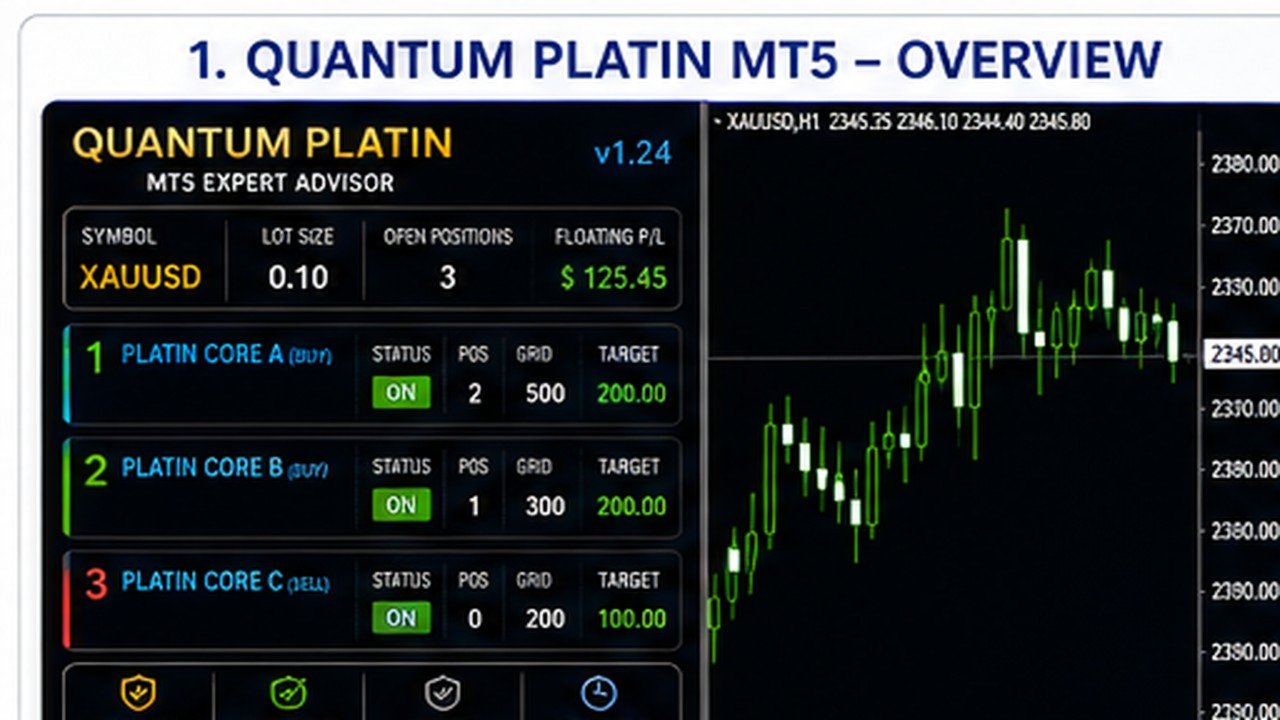
Quantum Platin MT5 is a multi-strategy Expert Advisor for MetaTrader 5 designed to combine three independent trading profiles within one automated trading system.
The EA uses separate BUY and SELL strategy logic together with grid-based position management, basket profit targets, automatic lot sizing and account protection controls.
Quantum Platin is designed for traders who want an automated multi-strategy EA with a clear chart dashboard and configurable risk management.
Main Features
-
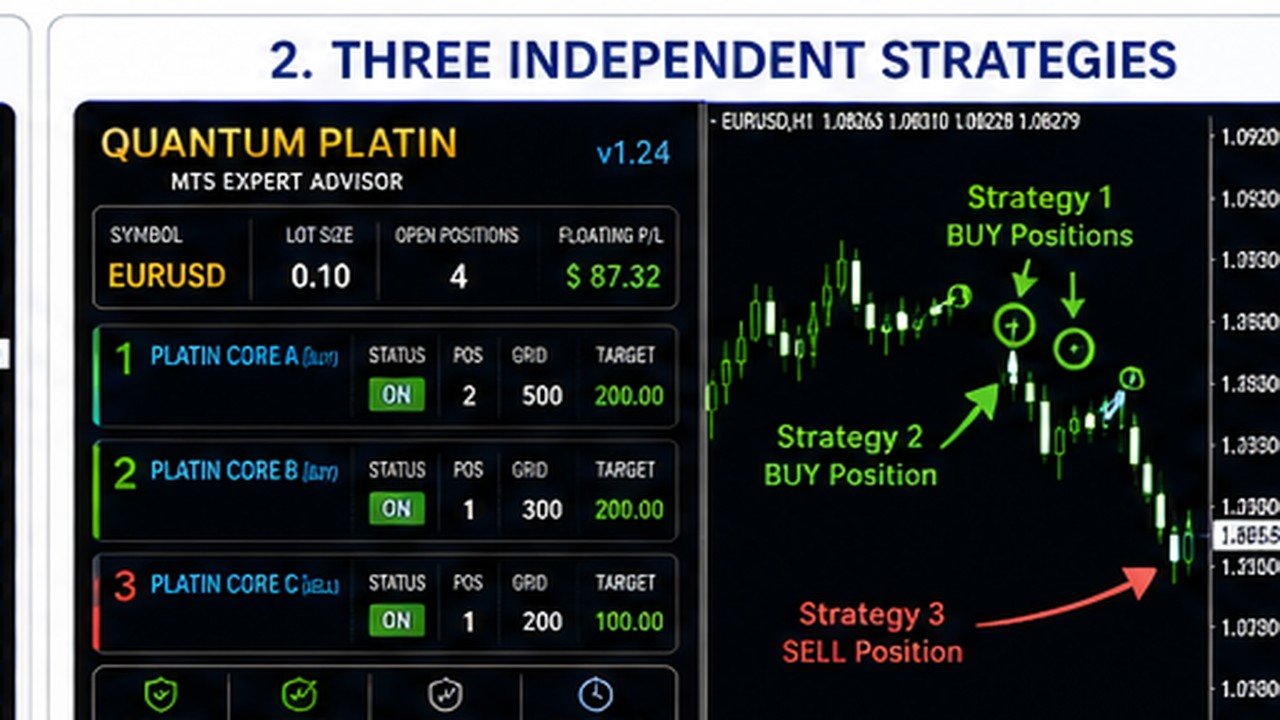
3 independent trading strategies
-
2 BUY strategies and 1 SELL strategy
-
Independent strategy activation controls
-
Separate grid distance for each strategy
-
Separate basket profit target for each strategy
-
Fixed lot and automatic lot sizing modes
-
Balance-based automatic lot calculation
-
Maximum lot protection
-
Maximum position control
-
Drawdown protection
-
Margin-level protection
-
Broker volume-limit protection
-
Trading-session protection
-
Automatic basket management
-
Clear on-chart trading dashboard
-
Four dashboard size options
-
Designed for MetaTrader 5
Three-Strategy Architecture
Quantum Platin contains three trading profiles that can operate independently.
Strategy 1 — Platin Core A
Direction: BUY
Strategy 1 searches for its own BUY conditions and manages its positions as an independent basket.
It has dedicated settings for:
-
Entry conditions
-
Trading hours
-
Grid distance
-
Basket profit target
-
Maximum positions
Strategy 2 — Platin Core B
Direction: BUY
Strategy 2 provides a second BUY profile with different trading characteristics.
It operates independently from Strategy 1 and maintains its own grid and basket-management parameters.
Strategy 3 — Platin Core C
Direction: SELL
Strategy 3 is the SELL component of Quantum Platin.
It searches for bearish trading conditions and manages SELL positions using its own grid spacing and basket profit target.
Each strategy can be enabled or disabled individually.
Grid and Basket Management
Quantum Platin uses basket-based trade management.
When a strategy has an active position, additional positions may be opened according to the configured grid distance and trading conditions.
Each strategy maintains its own:
-
Trade direction
-
Grid spacing
-
Position count
-
Basket profit calculation
-
Basket closing target
When the configured basket target is reached, the EA attempts to close the positions belonging to that strategy.
Grid trading can significantly increase market exposure. Users should select lot sizes and risk settings appropriate for their account.
Automatic Lot Sizing
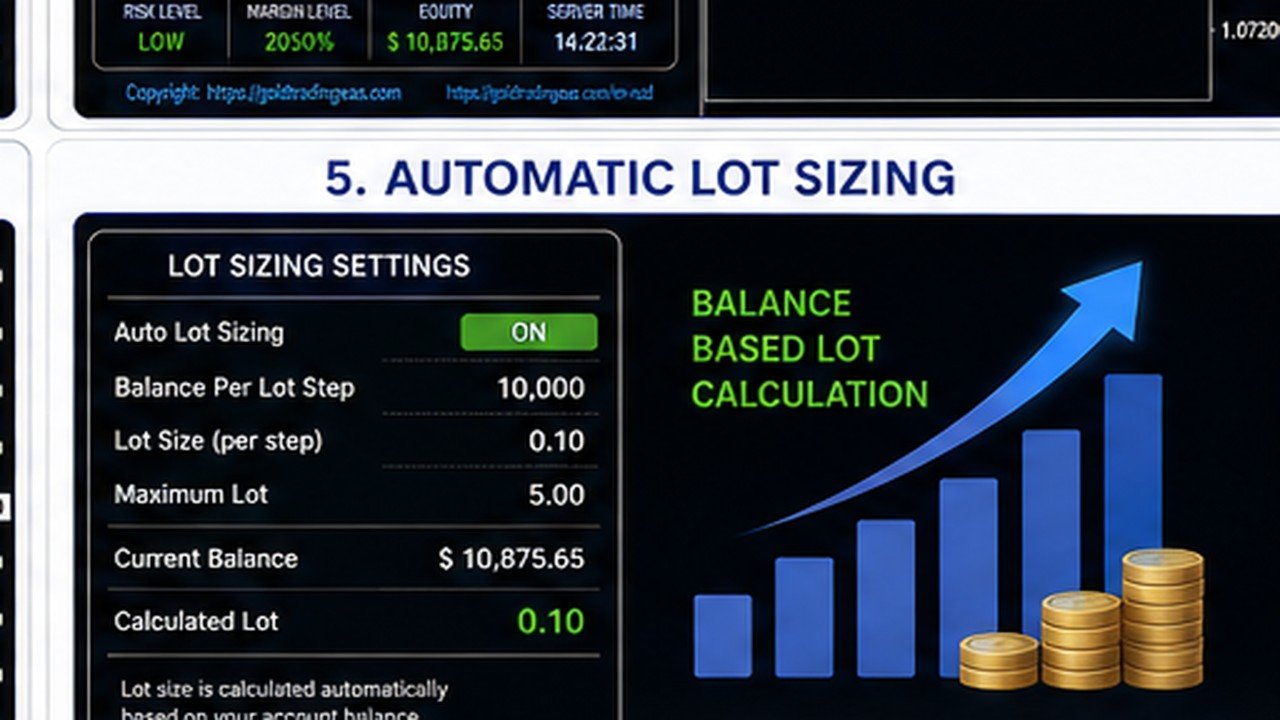
Quantum Platin supports both fixed and balance-based lot sizing.
With automatic lot sizing enabled, trading volume is calculated according to the configured balance step.
For example, the user can define a specified lot size for each specified amount of account balance.
A maximum lot setting provides an additional limit on calculated trading volume.
Risk and Broker Protection
Quantum Platin includes several protection mechanisms designed to reduce excessive account and broker-level exposure.
Protection features include:
-
Maximum position limits
-
Drawdown monitoring
-
Minimum margin-level control
-
Projected margin checks before new orders
-
Emergency margin protection
-
Emergency equity protection
-
Broker maximum-volume checks
-
Directional volume-limit checks
-
Trading-session checks
Before submitting an order, the EA checks whether the requested trading volume complies with the symbol's available volume limits.
If the requested volume exceeds the remaining permitted directional volume, Quantum Platin can reduce or reject the new order rather than repeatedly submitting an invalid trading request.
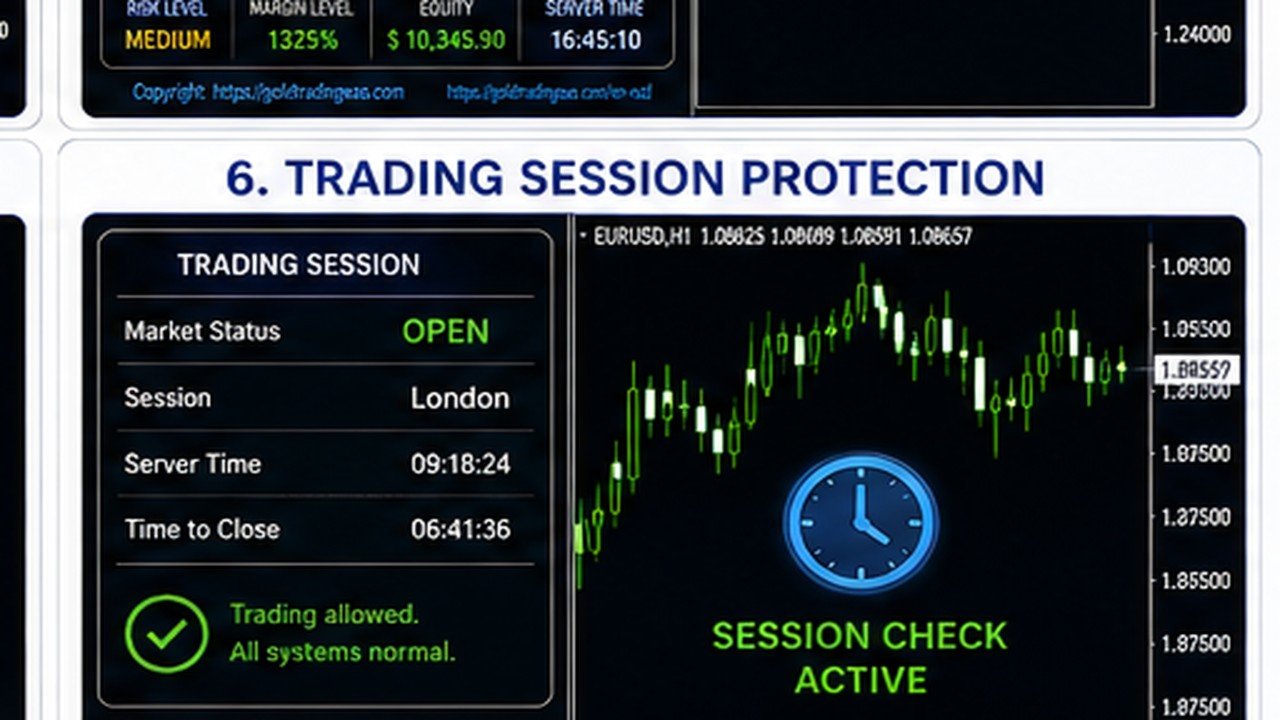
Market Session Protection
Quantum Platin checks symbol trading availability before submitting trading operations.
If the market is temporarily closed, the EA avoids repeatedly sending orders that cannot be executed.
Basket management resumes when trading becomes available again.
This is particularly useful for instruments that have daily trading breaks.
Chart Dashboard
Quantum Platin includes a clean chart interface showing important EA information directly on the MetaTrader 5 chart.
The dashboard displays information such as:
-
Trading symbol
-
Current lot size
-
Open positions
-
Floating profit/loss
-
Strategy 1 status
-
Strategy 2 status
-
Strategy 3 status
-
BUY/SELL direction
-
Position count
-
Grid settings
-
Basket targets
-
Risk-control status
Four panel-size options are available:
-
25%
-
50%
-
75%
-
100%
The default dashboard size is 75%.
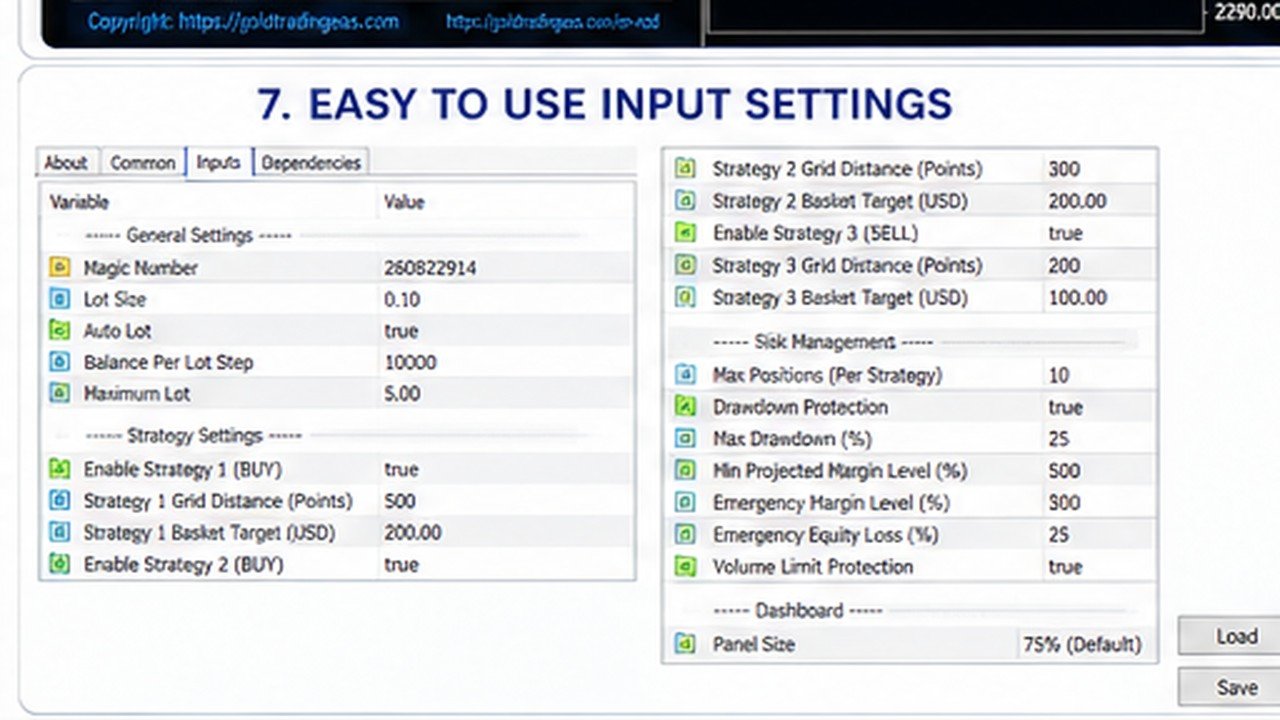
Main Input Parameters
General Settings
Magic Number
Unique identifier used by the EA to manage its trading operations.
Lot Size
Fixed trading volume used when automatic lot sizing is disabled.
Auto Lot
Enables or disables balance-based automatic lot calculation.
Balance Per Lot Step
Defines the balance amount used for automatic lot scaling.
Maximum Lot
Limits the maximum trading volume calculated by the EA.
Strategy Controls
Strategy 1
Enables or disables Platin Core A.
Strategy 2
Enables or disables Platin Core B.
Strategy 3
Enables or disables Platin Core C.
Grid Settings
Strategy 1 Grid Distance
Controls the minimum distance used for additional Strategy 1 positions.
Strategy 2 Grid Distance
Controls the minimum distance used for additional Strategy 2 positions.
Strategy 3 Grid Distance
Controls the minimum distance used for additional Strategy 3 positions.
Basket Targets
Strategy 1 Basket Target
Profit target used for the Strategy 1 basket.
Strategy 2 Basket Target
Profit target used for the Strategy 2 basket.
Strategy 3 Basket Target
Profit target used for the Strategy 3 basket.
Position Protection
Maximum Positions
Limits the number of positions that the EA can maintain according to its configured trading rules.
Drawdown Protection
Enables account drawdown monitoring.
Maximum Drawdown
Defines the configured drawdown protection threshold.
Margin Safety
Minimum Projected Margin Level
Minimum projected account margin level required before a new position can be opened.
Emergency Margin Level
Defines the margin level at which emergency protection can be activated.
Emergency Equity Loss
Defines the equity-loss threshold used by the emergency account protection system.
Dashboard
Panel Size
Controls the size of the Quantum Platin chart interface.
Available options:
-
25%
-
50%
-
75%
-
100%
Default: 75%
Recommended Setup
Platform: MetaTrader 5
Product Type: Expert Advisor
Trading Style: Multi-strategy / Grid / Basket management
Operation: Automated trading
VPS: Recommended for continuous operation
Because symbol specifications, spreads, leverage, trading sessions and execution conditions differ between brokers, users should test Quantum Platin with their broker before using it on a live account.
Important Risk Information
Quantum Platin uses grid-based position management.
Grid systems can accumulate multiple positions and may experience substantial floating drawdown during prolonged or strongly directional market movements.
Increasing the lot size, reducing grid distance or allowing more positions can significantly increase risk.
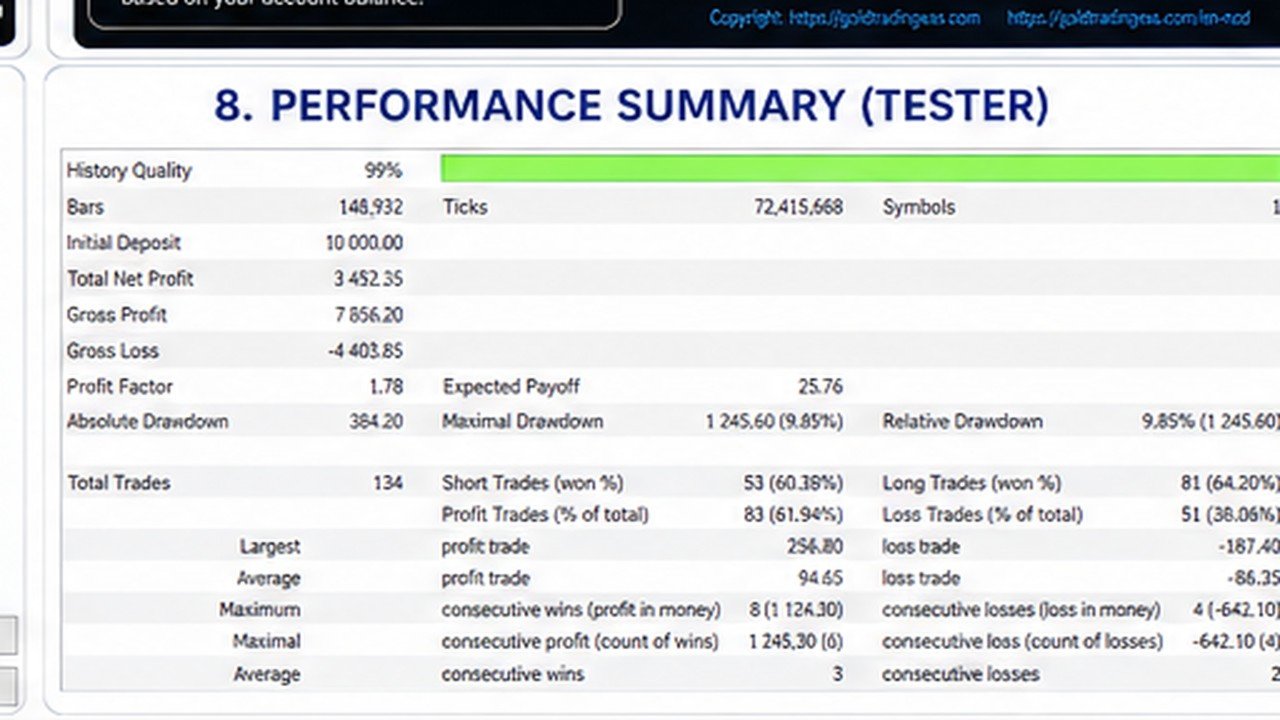
Historical testing does not guarantee future results.
Before live trading, users should test the EA in the MetaTrader 5 Strategy Tester and on a demo account using conditions similar to their intended trading environment.