APEX Terminal
- Утилиты
- Версия: 1.0
- Активации: 5
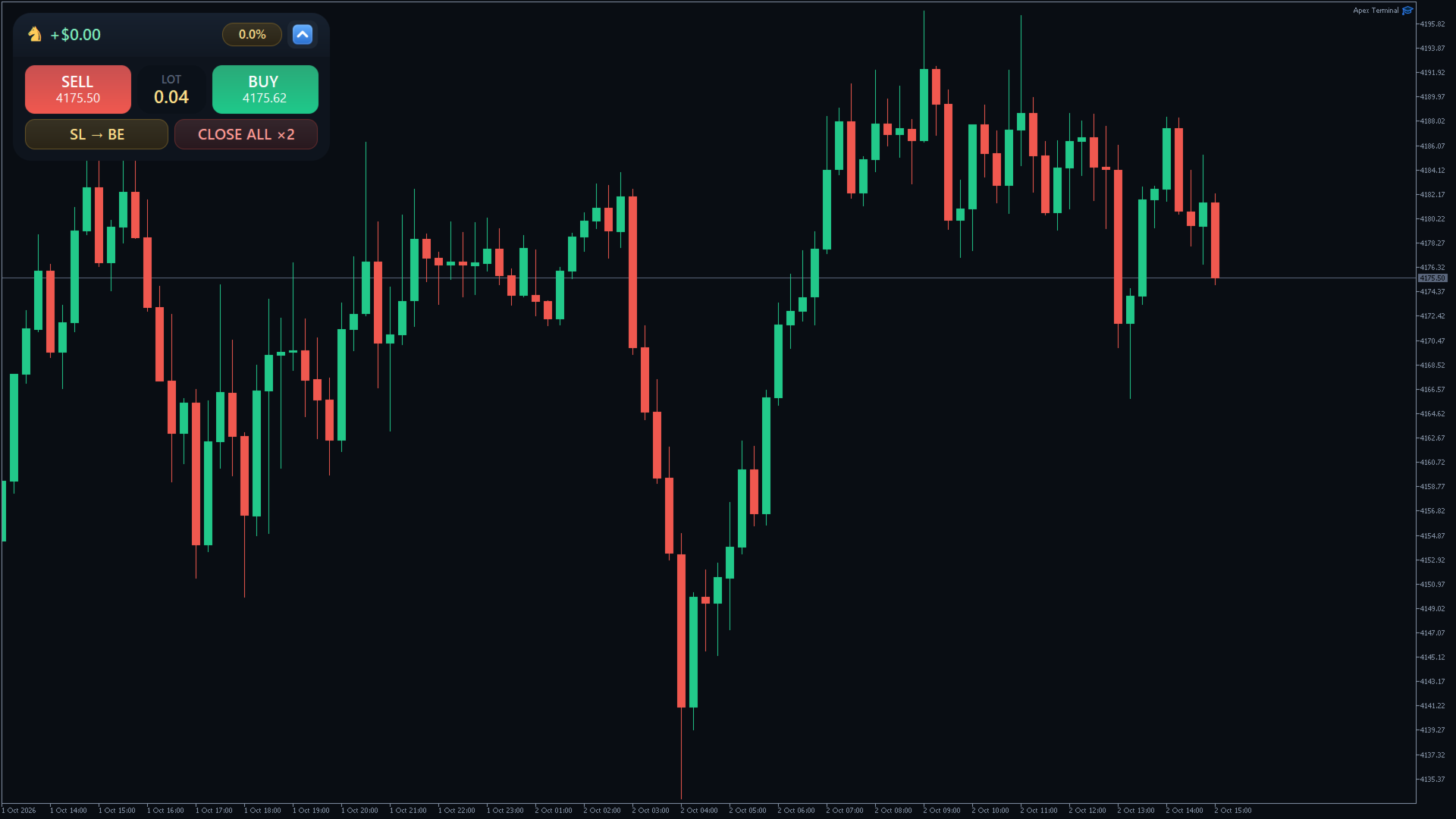
APEX TERMINAL — Professional Trading Desk for MetaTrader 5
Risk management, multi-level Take Profits, a drag-and-drop order builder and Smart Grid — all in one window.

APEX Terminal is a utility panel, not an auto-trader. You decide when to enter. The panel handles the mathematics: lot size from risk, a full TP ladder, break-even, trailing, zone entries and account statistics.
Nothing “big” happens on a single click. Closing everything requires two-click confirmation. SIZER orders are confirmed with OK. Strategy presets are locked against accidental edits.
WHAT YOU GET
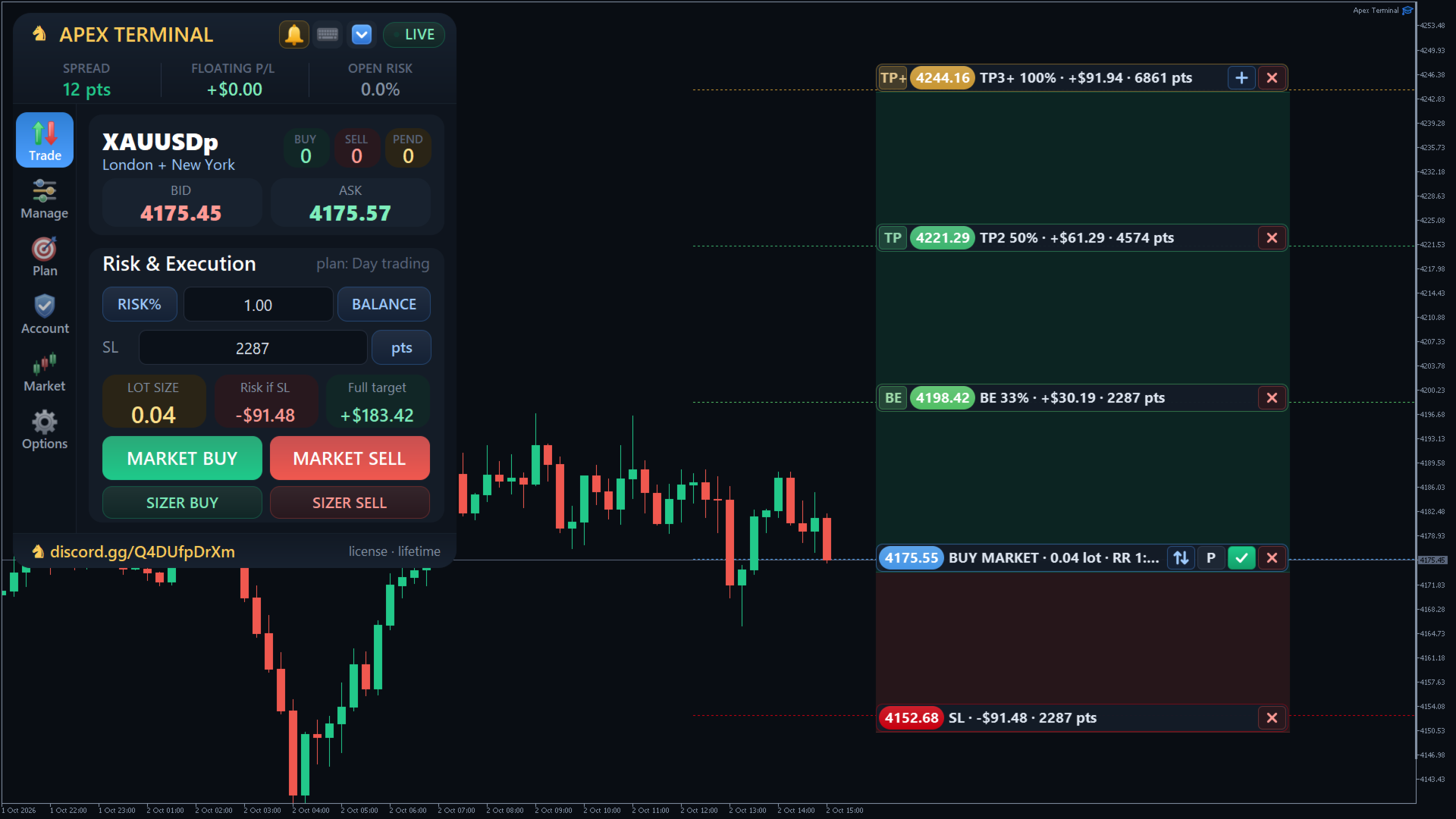
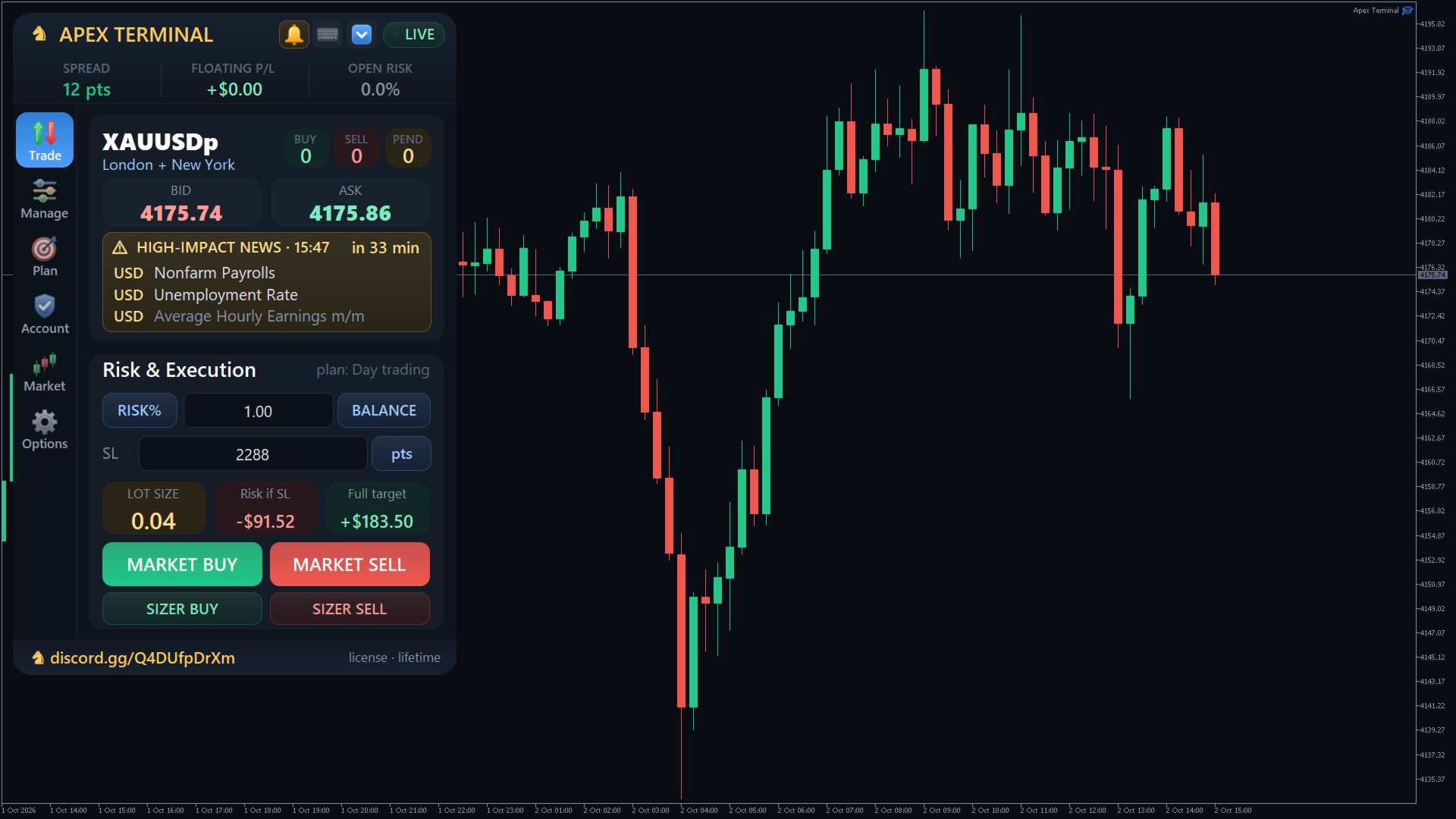
1. TRADE — Risk & Execution
• Three sizing modes: LOT / RISK% / RISK$ (balance or equity as the base)
• Live preview: lot size, money at risk if SL is hit, and full-ladder target
• MARKET BUY / SELL — instant entry with the active TP plan applied automatically
• SIZER BUY / SELL — plan the trade visually on the chart instead of typing numbers
• Recommended workflow: set RISK% → set SL distance → check “Risk if SL” → execute
Take Profit levels are not typed on the Trade tab on purpose. They come from the active plan (e.g. “plan: NOVA”). You switch and edit plans on the Plan tab.
2. MANAGE — Position Control
• Close 10–100% of each position (stepper)
• Selective close: PROFIT only, LOSS only, CLOSE BUY, CLOSE SELL
• SL → BE for BUY or SELL — positions that cannot move to break-even safely are skipped (“BE skipped”). Nothing is closed at a loss by force
• Delete pendings: BUY / SELL / ALL
• Trailing stop: OFF / INDIVIDUAL / GROUP ALL / GROUP SIDE, with Start, Offset and Step in points
• Emergency CLOSE ALL — two-click arm (5-second countdown). ESC or timeout cancels. Treat it as a fire extinguisher, not a regular button
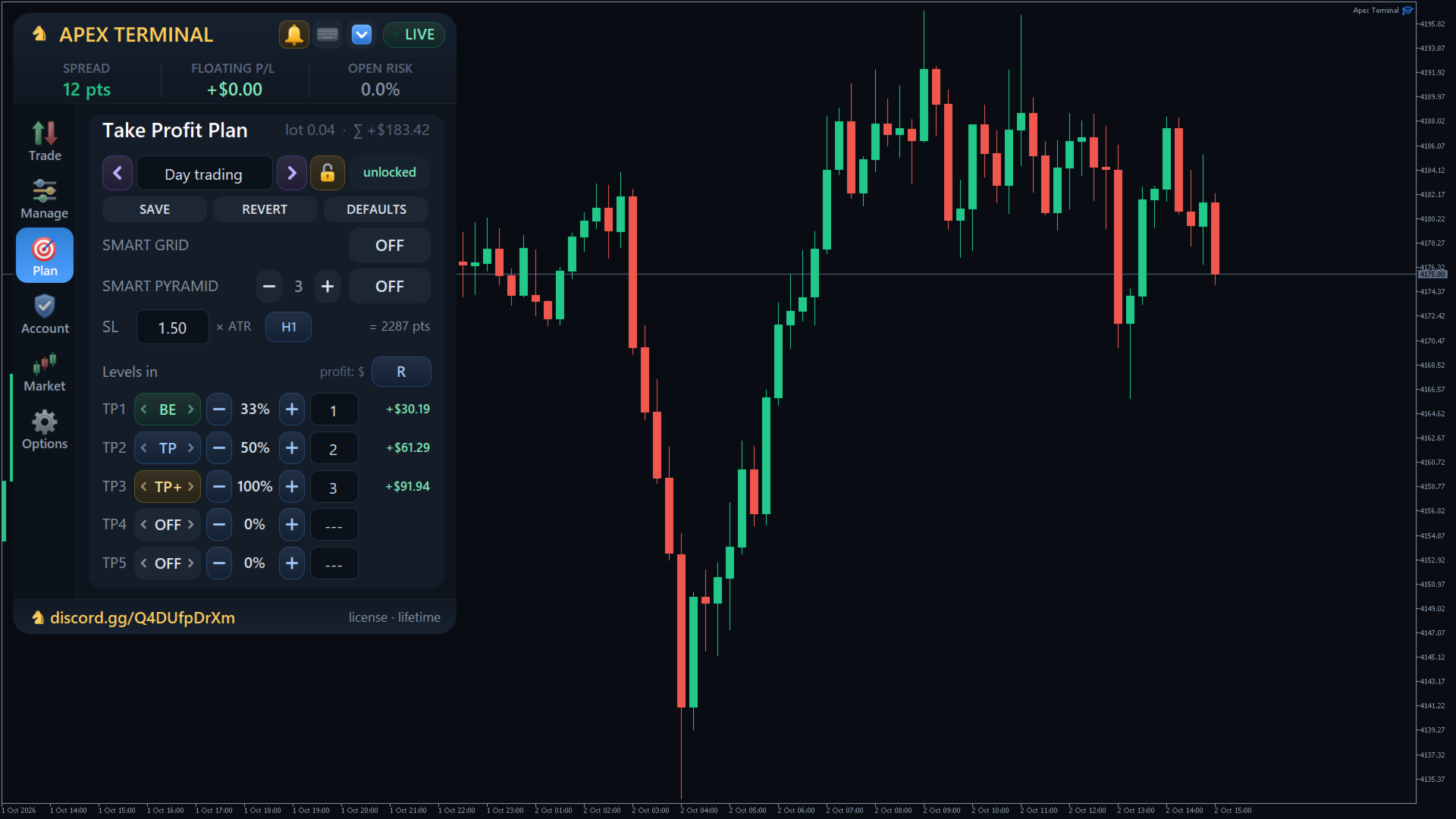
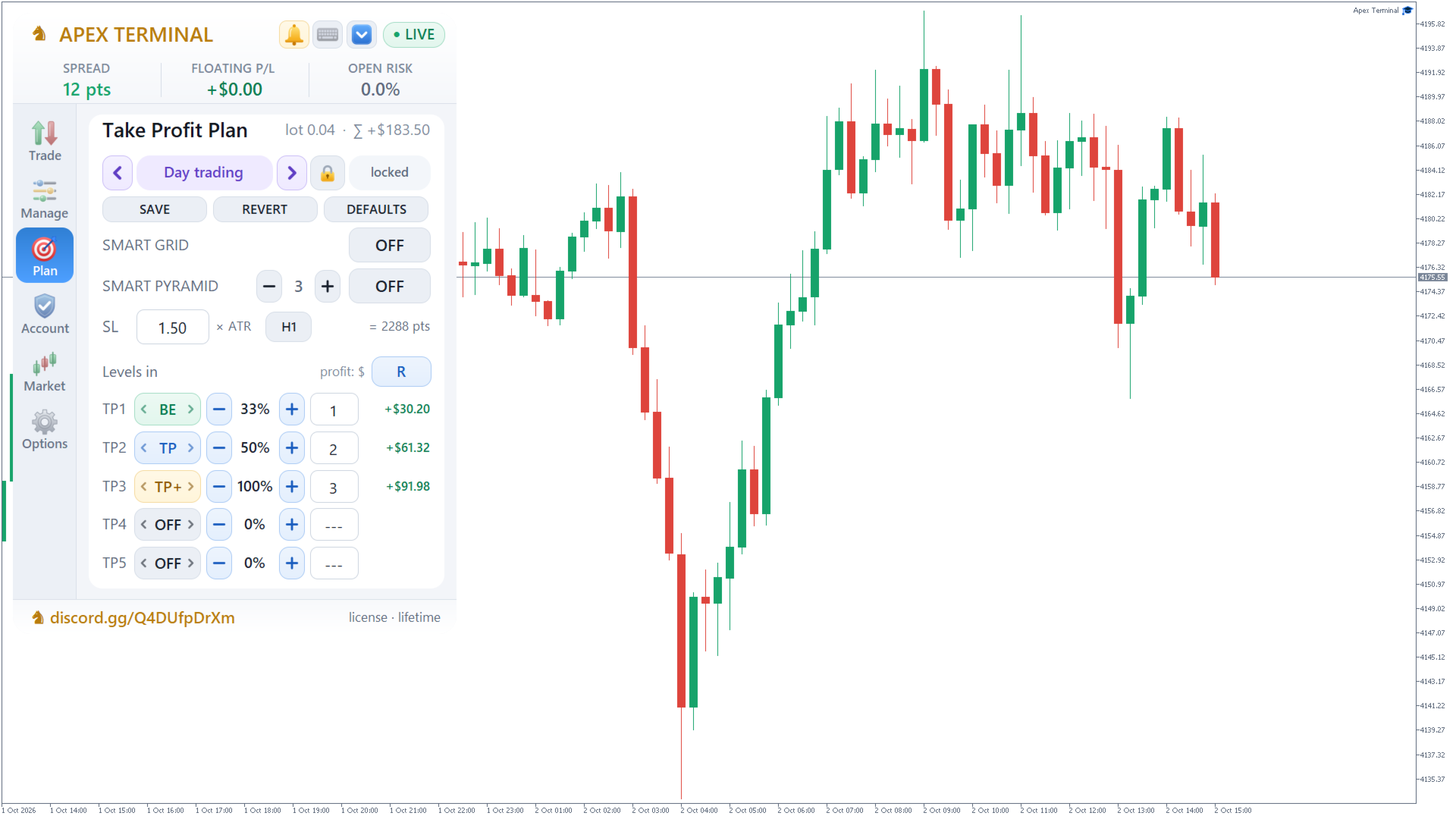
3. PLAN — Take Profit Ladder
A reusable template applied to every new MARKET, SIZER and Smart Grid entry.
• Up to 5 TP levels, each with its own distance, close % and action
• Modes per level:
– TP — close the set % and nothing else
– BE — close % and move SL of the remainder to break-even
– TP+ — close % and trail SL to the previous TP (stepped profit lock)
– OFF — level disabled
• Shared unit switch: points or absolute price for SL and the whole ladder
• If the last active level is below 100%, the remainder stays as a runner, protected by SL / BE / trailing
Live edit: click a position or pending line on the chart and Plan becomes an editor for that ticket. Change SL, TP modes and close %. Confirm with APPLY (or OK on the chart line). Unsaved edits cannot be abandoned silently.
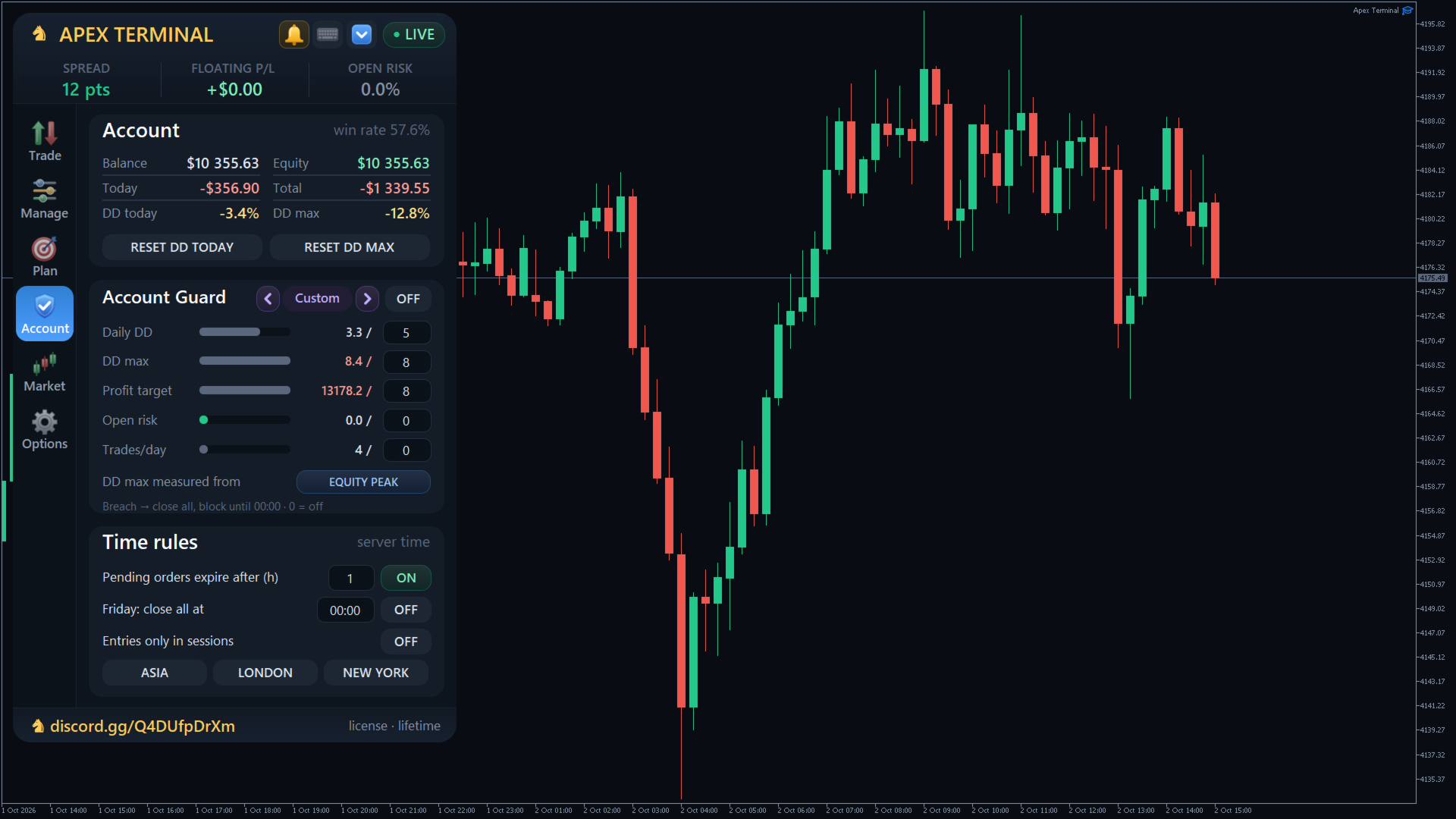
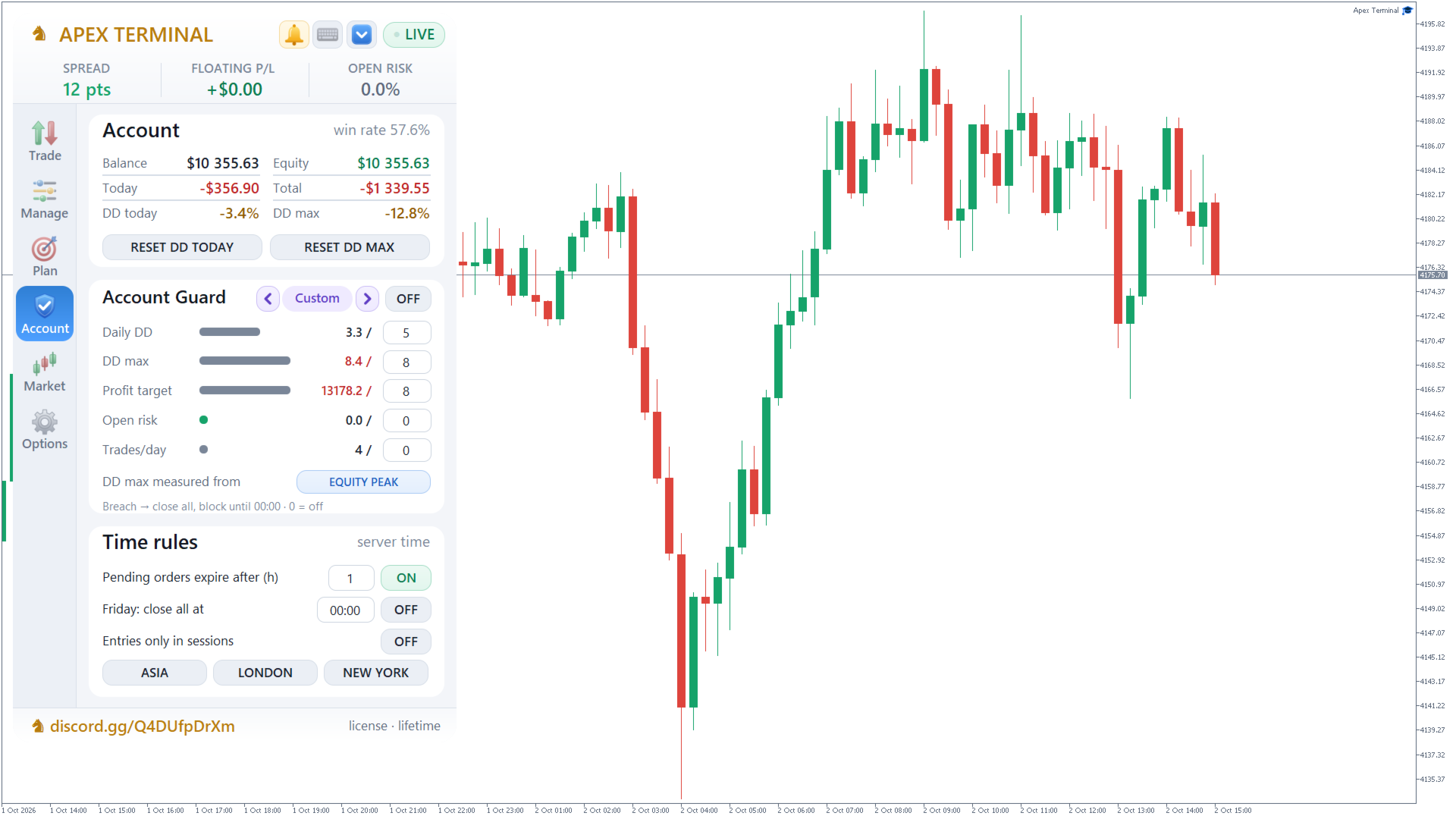
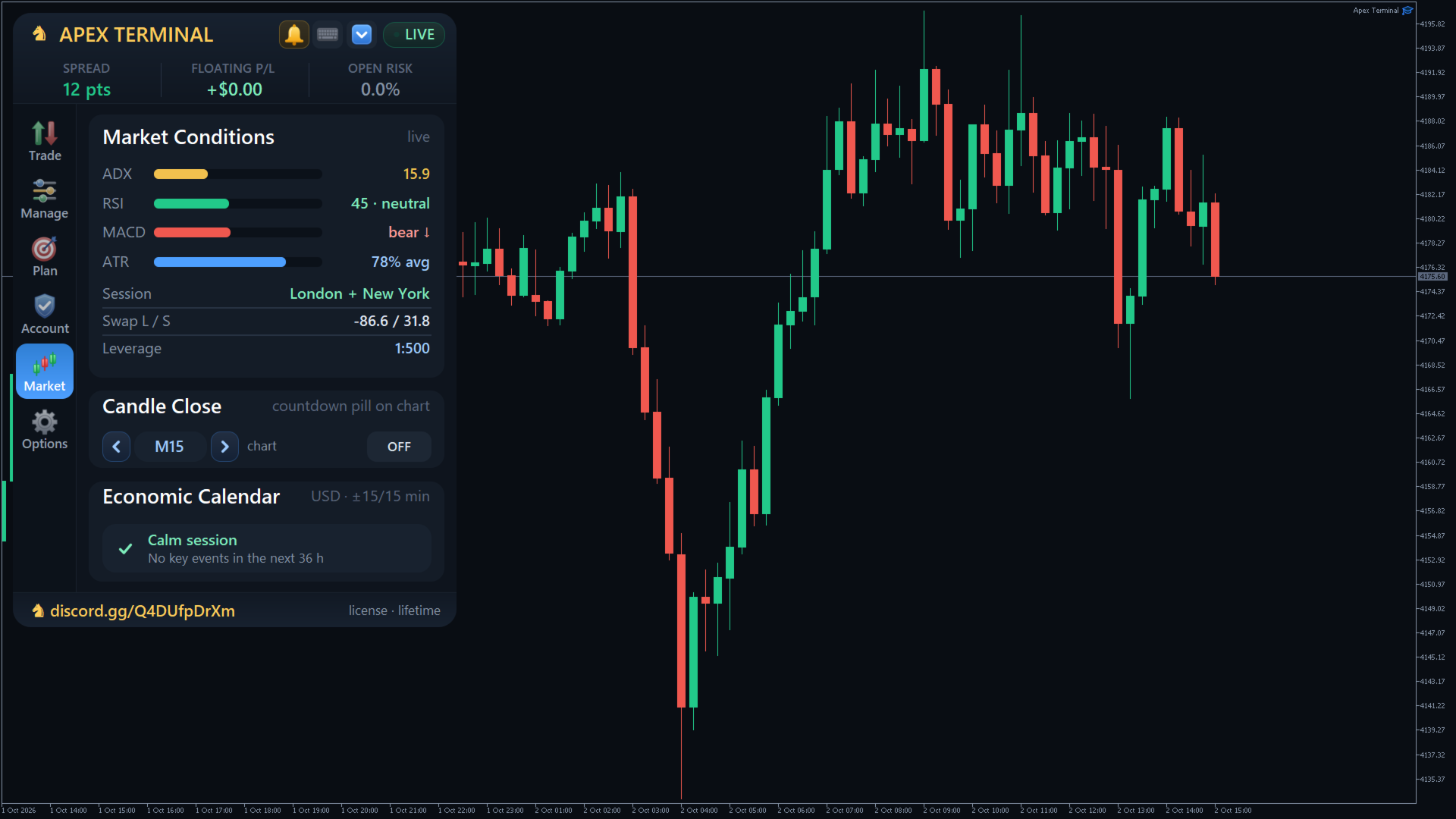
4. INTEL — Account, Market, Candle Clock
Nothing here opens or closes trades (except DD reset).
• Balance, equity, total profit, today P/L, DD TODAY and DD MAX
• Win rate for this symbol and magic number
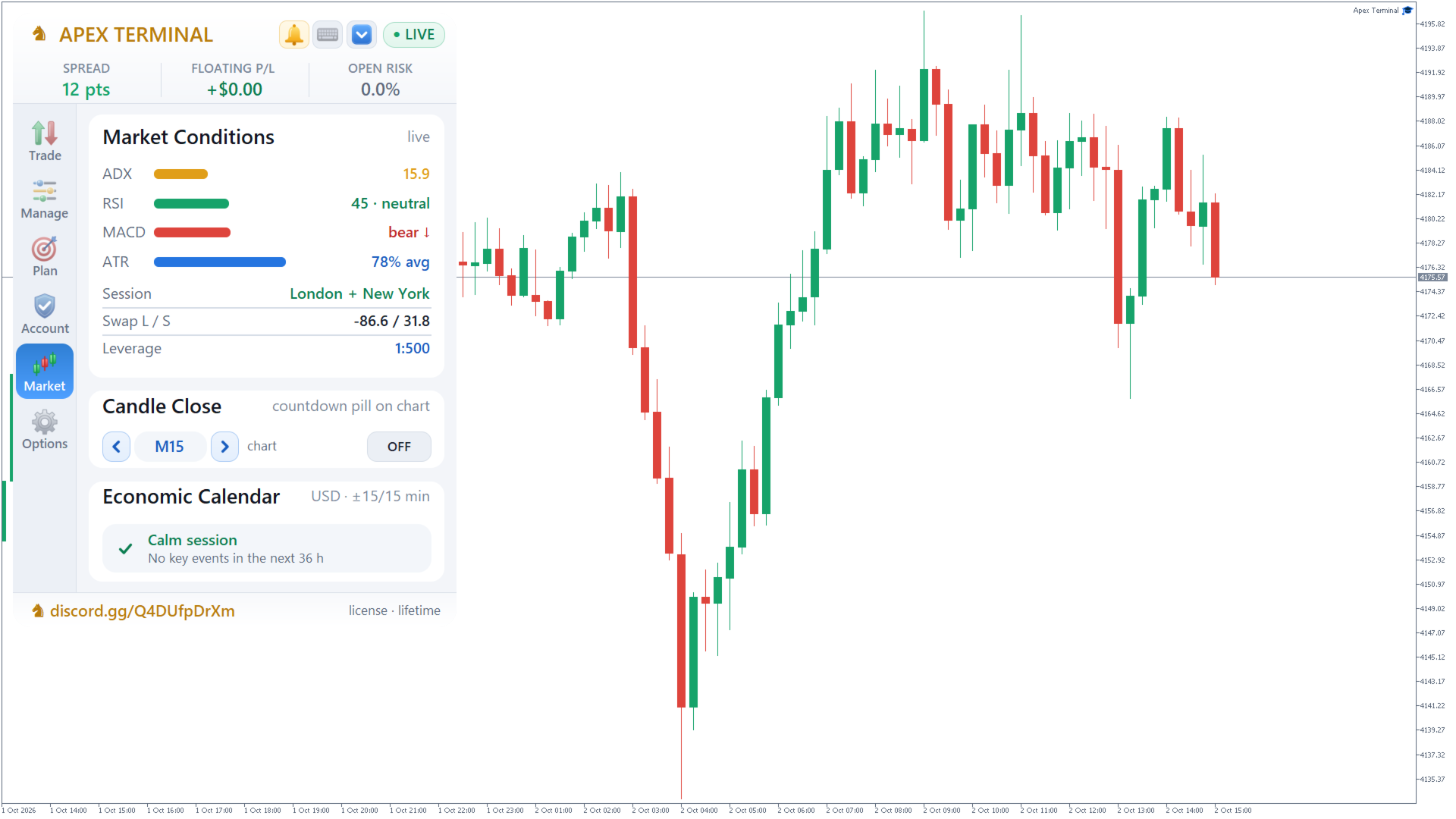
• Live market: ADX, RSI, MACD, ATR, session, swaps, leverage
• Candle-close timer across 22 timeframes (M1…MN1, plus CURRENT)
• PIN — a countdown bubble on the price line, so you see time-to-close without looking at the panel
5. SIZER — Drag-and-Drop Order Builder
Click SIZER BUY or SIZER SELL. Entry (white), SL (red) and TP (blue) lines appear from the active plan. Drag them — lot, risk and reward recalculate live. Double-click a row to type an exact price. Confirm with OK on the Entry line.
• U / L lock: Unlocked = pending at the drawn price; Locked = Entry sticks to market and OK opens immediately
• Three modes: compose a new order · manage an open position · edit a pending
• After fill, discreet level lines stay on the chart — click one to manage
6. SMART GRID — Zone Entry
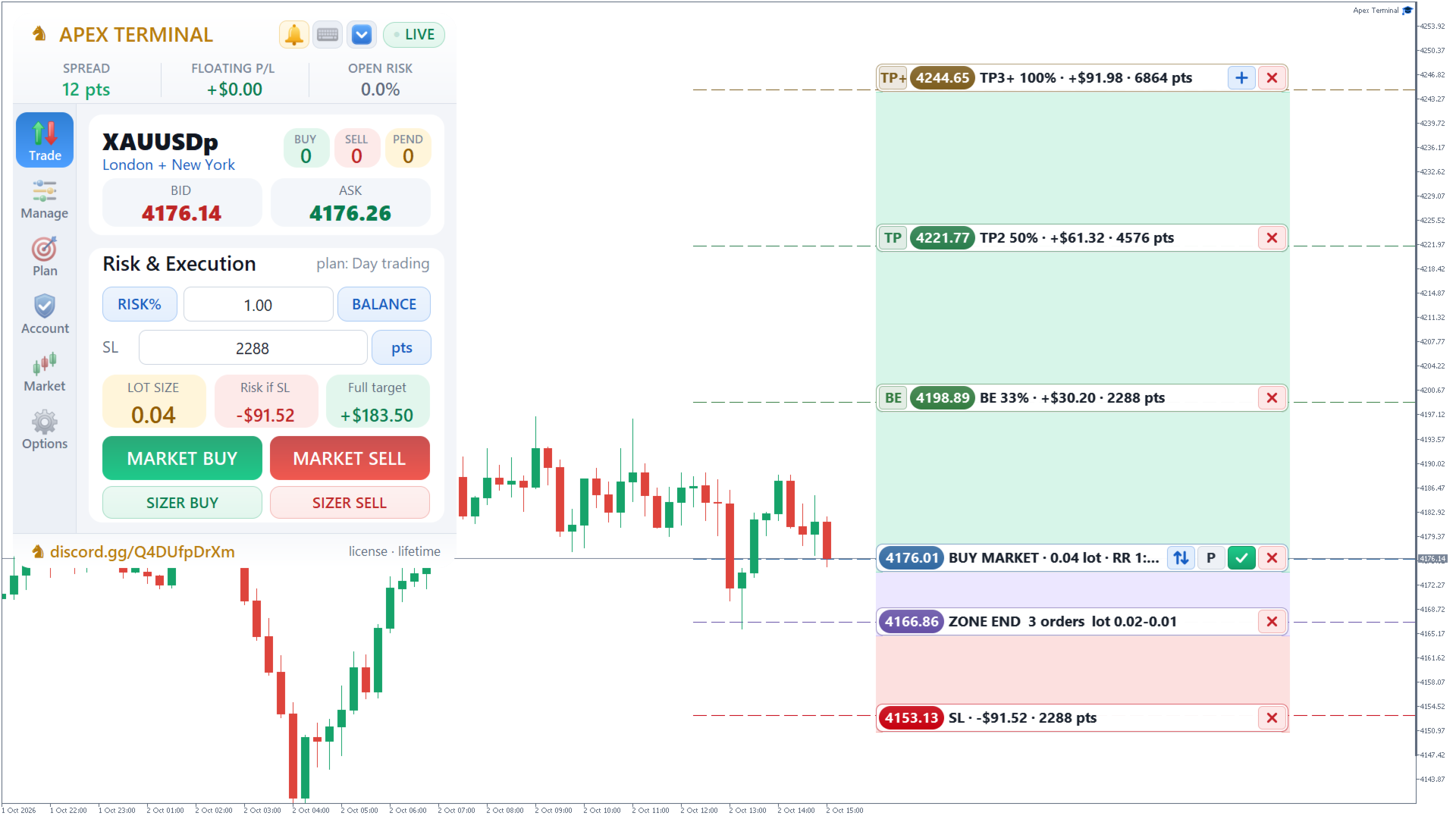
When a signal is a zone, not a single price (“buy 3345.2–3342.7”), Smart Grid builds N+1 orders: Entry 1 plus N add-ons spaced evenly across the zone. Shared SL. Shared TP ladder.
• Combined risk of the whole zone equals the Trade-tab budget (e.g. 1%). Entry leg takes a set share (default 50%); add-ons split the rest. Lot sum never exceeds the budget — on small accounts the panel reduces the number of legs instead of inflating risk
• TP prices are calculated once from Entry 1. Every leg aims at the same chart levels
• Basket TP closes the set % of total zone volume, starting from the leg nearest to TP
• BE from a BE-mode TP places one defence line above Entry 1 for all legs — cheaper add-ons then sit in profit. Once placed, that line is never pulled back
• Any leg hitting SL invalidates the zone (remaining pendings deleted, open legs closed). A winning TP or a manual close in profit cancels leftover pendings
• Drag the main-leg SL — the new line propagates to every leg and pending in the zone
Open a zone from SIZER, from MARKET (if the active plan has grid on), or from a mobile trade if adoption is enabled.
SAFETY — BUILT-IN BREAKERS
• Pre-trade validation: market open, margin, SL/TP distance, broker lot limits — rejection always comes with a clear log message, never silent failure
• Daily loss limit — new entries lock until the next day or RESET DD TODAY; managing open positions still works
• Spread filter and hard max-lot cap
• Emergency two-click + ESC
• 1.5 s anti-double-click between trades
• Edit lock: “Apply or close current edit first”
• State persistence: multi-TP tracks, zones and stats survive a terminal restart
IMPORTANT
• One instance per account per symbol. A second copy on the same instrument will not start. Separate symbols can run side by side
• LIVE requires Algo Trading enabled in MT5 and “Allow Algo Trading” in EA settings. OFF = display only, no execution
• Virtual TP, trailing, Smart Grid baskets and BE are executed by the running panel. A closed terminal leaves only the hard broker SL (and broker TP if you use REAL mode). For longer breaks, use a VPS
• The panel manages only its own magic number, plus adopted manual/mobile trades if you enable that option
• Start on demo. Spend 30 minutes clicking through with this workflow before going live
Hover any button for ~1 second — every control has a tooltip.
You decide. The panel keeps the math honest.
Risk management, multi-level Take Profits, a drag-and-drop order builder and Smart Grid — all in one window.
APEX Terminal is a utility panel, not an auto-trader. You decide when to enter. The panel handles the mathematics: lot size from risk, a full TP ladder, break-even, trailing, zone entries and account statistics.
Nothing “big” happens on a single click. Closing everything requires two-click confirmation. SIZER orders are confirmed with OK. Strategy presets are locked against accidental edits.
WHAT YOU GET
1. TRADE — Risk & Execution
• Three sizing modes: LOT / RISK% / RISK$ (balance or equity as the base)
• Live preview: lot size, money at risk if SL is hit, and full-ladder target
• MARKET BUY / SELL — instant entry with the active TP plan applied automatically
• SIZER BUY / SELL — plan the trade visually on the chart instead of typing numbers
• Recommended workflow: set RISK% → set SL distance → check “Risk if SL” → execute
Take Profit levels are not typed on the Trade tab on purpose. They come from the active plan (e.g. “plan: NOVA”). You switch and edit plans on the Plan tab.
2. MANAGE — Position Control
• Close 10–100% of each position (stepper)
• Selective close: PROFIT only, LOSS only, CLOSE BUY, CLOSE SELL
• SL → BE for BUY or SELL — positions that cannot move to break-even safely are skipped (“BE skipped”). Nothing is closed at a loss by force
• Delete pendings: BUY / SELL / ALL
• Trailing stop: OFF / INDIVIDUAL / GROUP ALL / GROUP SIDE, with Start, Offset and Step in points
• Emergency CLOSE ALL — two-click arm (5-second countdown). ESC or timeout cancels. Treat it as a fire extinguisher, not a regular button
3. PLAN — Take Profit Ladder
A reusable template applied to every new MARKET, SIZER and Smart Grid entry.
• Up to 5 TP levels, each with its own distance, close % and action
• Modes per level:
– TP — close the set % and nothing else
– BE — close % and move SL of the remainder to break-even
– TP+ — close % and trail SL to the previous TP (stepped profit lock)
– OFF — level disabled
• Shared unit switch: points or absolute price for SL and the whole ladder
• If the last active level is below 100%, the remainder stays as a runner, protected by SL / BE / trailing
Live edit: click a position or pending line on the chart and Plan becomes an editor for that ticket. Change SL, TP modes and close %. Confirm with APPLY (or OK on the chart line). Unsaved edits cannot be abandoned silently.
4. INTEL — Account, Market, Candle Clock
Nothing here opens or closes trades (except DD reset).
• Balance, equity, total profit, today P/L, DD TODAY and DD MAX
• Win rate for this symbol and magic number
• Live market: ADX, RSI, MACD, ATR, session, swaps, leverage
• Candle-close timer across 22 timeframes (M1…MN1, plus CURRENT)
• PIN — a countdown bubble on the price line, so you see time-to-close without looking at the panel
5. SIZER — Drag-and-Drop Order Builder
Click SIZER BUY or SIZER SELL. Entry (white), SL (red) and TP (blue) lines appear from the active plan. Drag them — lot, risk and reward recalculate live. Double-click a row to type an exact price. Confirm with OK on the Entry line.
• U / L lock: Unlocked = pending at the drawn price; Locked = Entry sticks to market and OK opens immediately
• Three modes: compose a new order · manage an open position · edit a pending
• After fill, discreet level lines stay on the chart — click one to manage
6. SMART GRID — Zone Entry
When a signal is a zone, not a single price (“buy 3345.2–3342.7”), Smart Grid builds N+1 orders: Entry 1 plus N add-ons spaced evenly across the zone. Shared SL. Shared TP ladder.
• Combined risk of the whole zone equals the Trade-tab budget (e.g. 1%). Entry leg takes a set share (default 50%); add-ons split the rest. Lot sum never exceeds the budget — on small accounts the panel reduces the number of legs instead of inflating risk
• TP prices are calculated once from Entry 1. Every leg aims at the same chart levels
• Basket TP closes the set % of total zone volume, starting from the leg nearest to TP
• BE from a BE-mode TP places one defence line above Entry 1 for all legs — cheaper add-ons then sit in profit. Once placed, that line is never pulled back
• Any leg hitting SL invalidates the zone (remaining pendings deleted, open legs closed). A winning TP or a manual close in profit cancels leftover pendings
• Drag the main-leg SL — the new line propagates to every leg and pending in the zone
Open a zone from SIZER, from MARKET (if the active plan has grid on), or from a mobile trade if adoption is enabled.
SAFETY — BUILT-IN BREAKERS
• Pre-trade validation: market open, margin, SL/TP distance, broker lot limits — rejection always comes with a clear log message, never silent failure
• Daily loss limit — new entries lock until the next day or RESET DD TODAY; managing open positions still works
• Spread filter and hard max-lot cap
• Emergency two-click + ESC
• 1.5 s anti-double-click between trades
• Edit lock: “Apply or close current edit first”
• State persistence: multi-TP tracks, zones and stats survive a terminal restart
IMPORTANT
• One instance per account per symbol. A second copy on the same instrument will not start. Separate symbols can run side by side
• LIVE requires Algo Trading enabled in MT5 and “Allow Algo Trading” in EA settings. OFF = display only, no execution
• Virtual TP, trailing, Smart Grid baskets and BE are executed by the running panel. A closed terminal leaves only the hard broker SL (and broker TP if you use REAL mode). For longer breaks, use a VPS
• The panel manages only its own magic number, plus adopted manual/mobile trades if you enable that option
• Start on demo. Spend 30 minutes clicking through with this workflow before going live
Hover any button for ~1 second — every control has a tooltip.
You decide. The panel keeps the math honest.