VortexLab Trade Manager MT5

VortexLab Trade Manager MT5

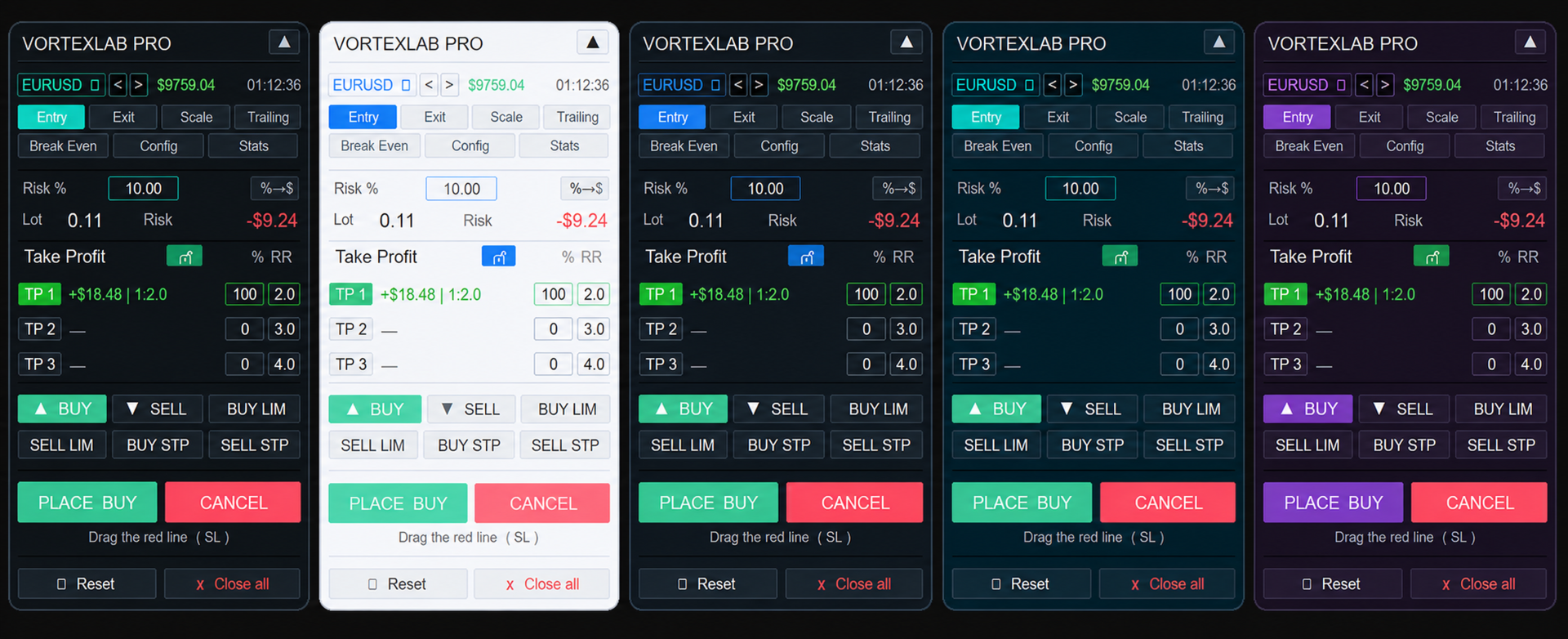
VortexLab Trade Manager MT5 is a visual utility for calculating risk, preparing trades, executing orders, and managing positions directly from a MetaTrader 5 chart.

The product runs as an Expert Advisor, but it does not analyze the market, generate trading signals. The user remains responsible for choosing the direction, entry, protective levels, and closing conditions of every trade.

The panel combines position-size calculation, multi-target execution, Break Even, Trailing Stop, partial closes, pending-order management, safety limits, account statistics, and visual customization in one interface.

Basic use

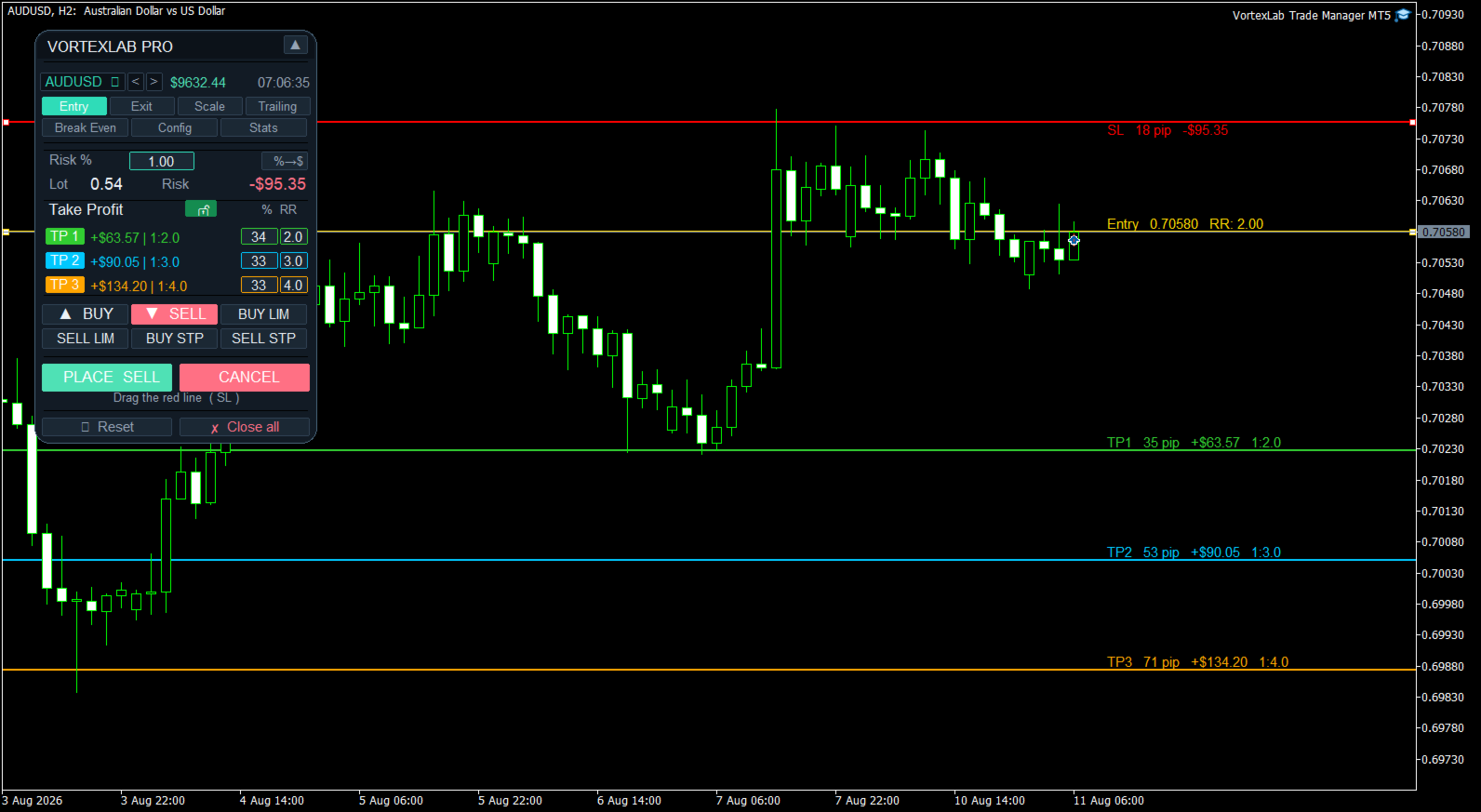
To prepare a trade:

1. Attach VortexLab Trade Manager MT5 to a chart.
2. Enable algorithmic trading in MetaTrader 5.
3. Select the symbol you want to trade.
4. Choose Buy, Sell, or a pending-order type.
5. Set the risk as a percentage or a fixed monetary amount.
6. Move the Stop Loss line to the required level.
7. Enable one, two, or three Take Profit targets.
8. Configure the volume percentage and risk-to-reward ratio of each target.
9. Review the calculated volume and estimated risk.
10. Press Place to send the orders.

The chart lines make it possible to review the complete trade structure before execution.

Automatic position-size calculation

The panel calculates the trading volume using:

- The selected risk.
- The entry price.
- The distance to the Stop Loss.
- The symbol calculation model.
- Tick size and tick value.
- Contract size.
- Minimum and maximum volume.
- Volume step.
- The symbol properties supplied by the broker.

The calculation first uses the profit-and-loss model provided by MetaTrader 5. This helps adapt the volume calculation to instruments whose specifications differ from standard Forex symbols.

The volume is recalculated whenever the user moves the entry price or Stop Loss.

If the requested risk cannot be achieved without exceeding the broker's minimum volume, the panel does not round the volume upward. The entry is blocked instead of opening a trade with a considerably larger risk than requested.

Risk calculation methods

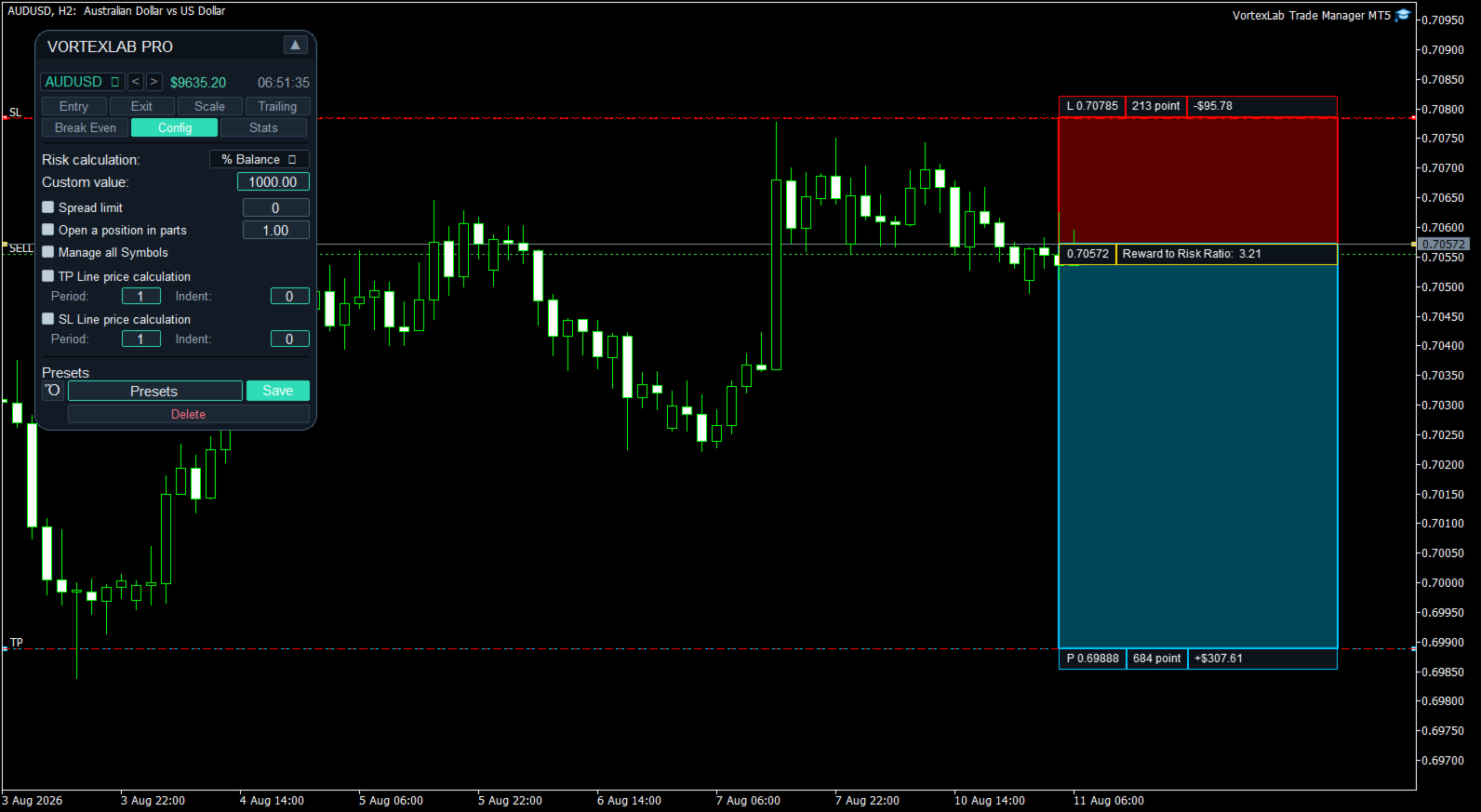
Risk can be configured as a fixed monetary amount or as a percentage of different account values.

- Fixed amount in the account currency.
- Percentage of the current balance.
- Percentage of the current equity.
- Percentage of the free margin.
- Percentage of a custom value.
- Percentage of the balance recorded at the start of the day.
- Percentage of the balance recorded at the start of the week.
- Percentage of the balance recorded at the start of the month.

The risk-mode button allows the user to switch quickly between percentage risk and fixed monetary risk.

Market compatibility

The panel can be used with Forex, stock indices, synthetic indices, metals, energies, cryptocurrencies, stocks, futures, CFDs, and custom broker symbols.

Calculation accuracy depends on the broker supplying valid contract size, tick value, tick size, and volume rules for the selected symbol.

On instruments with a large minimum volume, some small risk amounts may not be executable. The panel displays zero volume or blocks the entry when the selected risk cannot be respected without using a larger lot.

Visual entry and Stop Loss

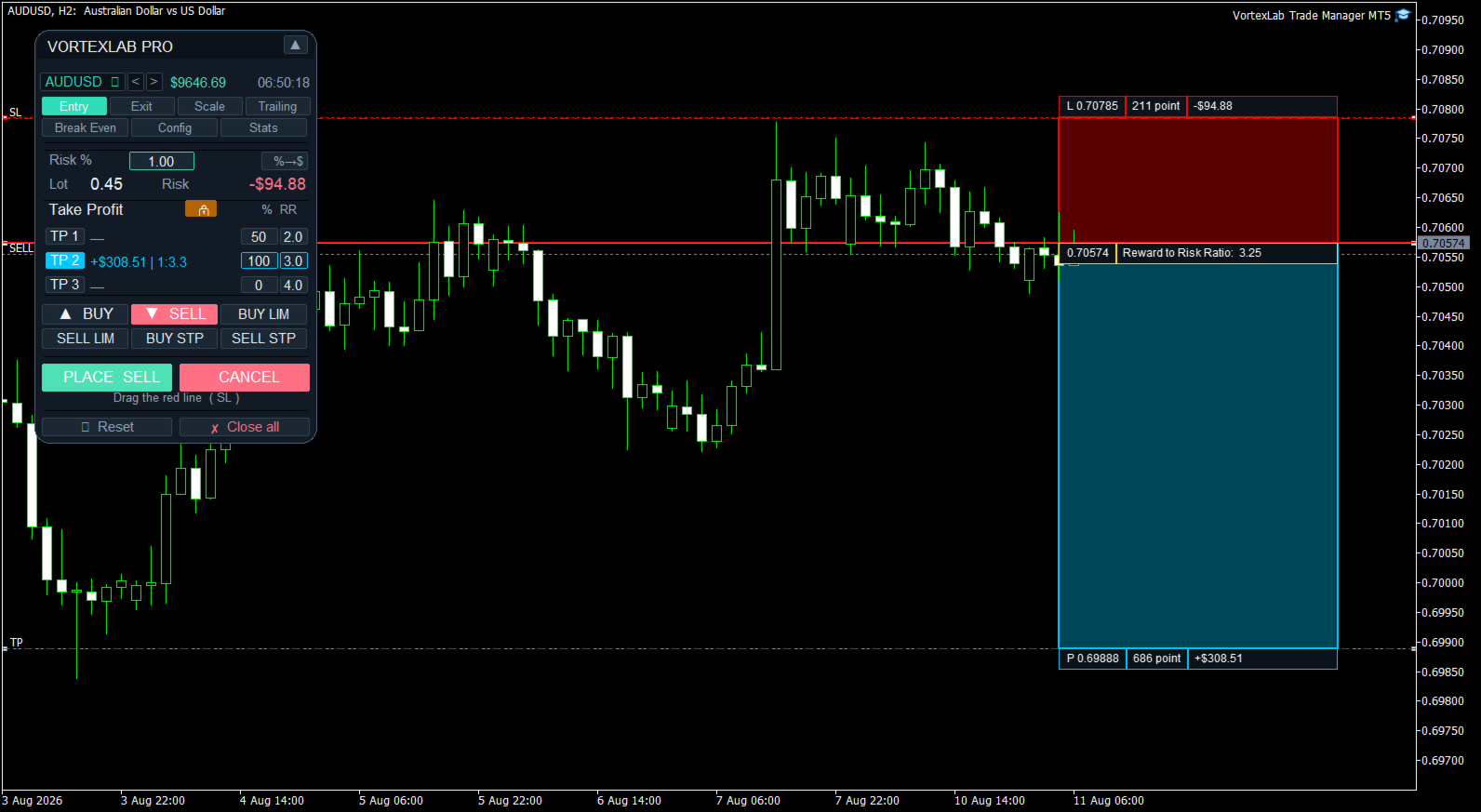
When an order type is selected, the panel creates the required chart lines. The entry line represents the current price for market orders or the requested activation price for pending orders.

The Stop Loss line can be moved manually. Every movement updates the Stop Loss distance, calculated volume, estimated monetary risk, dynamic Take Profit levels, risk-to-reward ratios, and estimated profit for each target.

The Stop Loss must be placed on the correct side of the market. A Buy is blocked if its Stop Loss is above the entry price, and a Sell is blocked if its Stop Loss is below the entry price.

Three Take Profit targets

Up to three Take Profit targets can be enabled. Each target has an independent volume percentage, risk-to-reward ratio, target price, and visual color.

When one target is enabled, it receives 100 percent of the volume. With two targets, the initial distribution can be 50 and 50 percent. With three targets, the initial distribution is 34, 33, and 33 percent. These percentages can be changed before execution.

The panel checks whether the requested distribution can be converted into volumes that respect the broker's minimum volume and volume step.

Dynamic and fixed Take Profit

The Take Profit lock button changes how the targets are controlled.

In dynamic mode, target prices are calculated from their risk-to-reward ratios and are updated when the entry or Stop Loss changes.

In locked mode, targets can remain at specific prices selected directly on the chart. This allows the user to choose between automatic ratios such as 1:1, 1:2, or 1:3 and manually selected technical price levels.

Visual styles

- Lines: displays horizontal entry, Stop Loss, and Take Profit lines.
- Boxes: displays colored risk and reward zones with information boxes.

The chart information can include price, distance in points, monetary risk, estimated profit, volume, and risk-to-reward ratio. Entry, Stop Loss, and Take Profit colors can be customized, together with the line width.

Supported order types

- Market Buy.
- Market Sell.
- Buy Limit.
- Sell Limit.
- Buy Stop.
- Sell Stop.

Before sending a request, the panel checks the symbol's trading permissions, minimum and maximum volume, volume step, actual tick size, Stops Level, Freeze Level, Stop Loss and Take Profit placement, supported execution mode, spread limit, and configured risk limits.

The supported filling mode is detected automatically between RETURN, IOC, and FOK when the symbol properties allow it. Prices are aligned to the actual tick size, which is not always equal to Point.

Splitting an entry into smaller orders

Open a position in parts allows a large entry to be divided into smaller orders.

The user defines the maximum volume for each part. If the calculated volume exceeds this value, the panel sends the required number of parts without changing the planned total volume. The Place button shows in advance how many orders will be sent.

This function can be combined with the three Take Profit targets. Volume is first allocated to each target, and each target allocation can then be divided into smaller broker-valid orders.

Custom order comments

The product can add a custom comment to submitted orders. The user can enable or disable comments, define a base text, and append the target number automatically to identify TP1, TP2, and TP3 orders.

Spread limit

Spread Limit blocks a new entry when the current spread is greater than the configured maximum. This check is performed before sending orders and does not modify positions that are already open.

Safety limits

The following protections can be configured in the input parameters:

- Maximum total volume per entry.
- Maximum risk as a percentage of current equity.
- Daily loss limit in the account currency.
- Blocking of new entries after the daily loss limit is reached.
- Optional closing of positions and cancellation of orders belonging to the configured Magic Number when the daily limit is reached.
- Management restricted to the product's Magic Number.
- Optional restriction of symbol changes from the panel.

The daily protection uses the equity recorded at the beginning of the broker's server day. A value of zero disables the corresponding limit.

Magic Number management

Every order sent by the panel receives the configured Magic Number. Manage only this EA's Magic Number prevents the management functions from modifying manual trades or positions belonging to other systems. This protection is enabled by default.

If management of other identifiers is deliberately enabled, the active filters should be checked carefully before closing positions or deleting orders.

Close panel

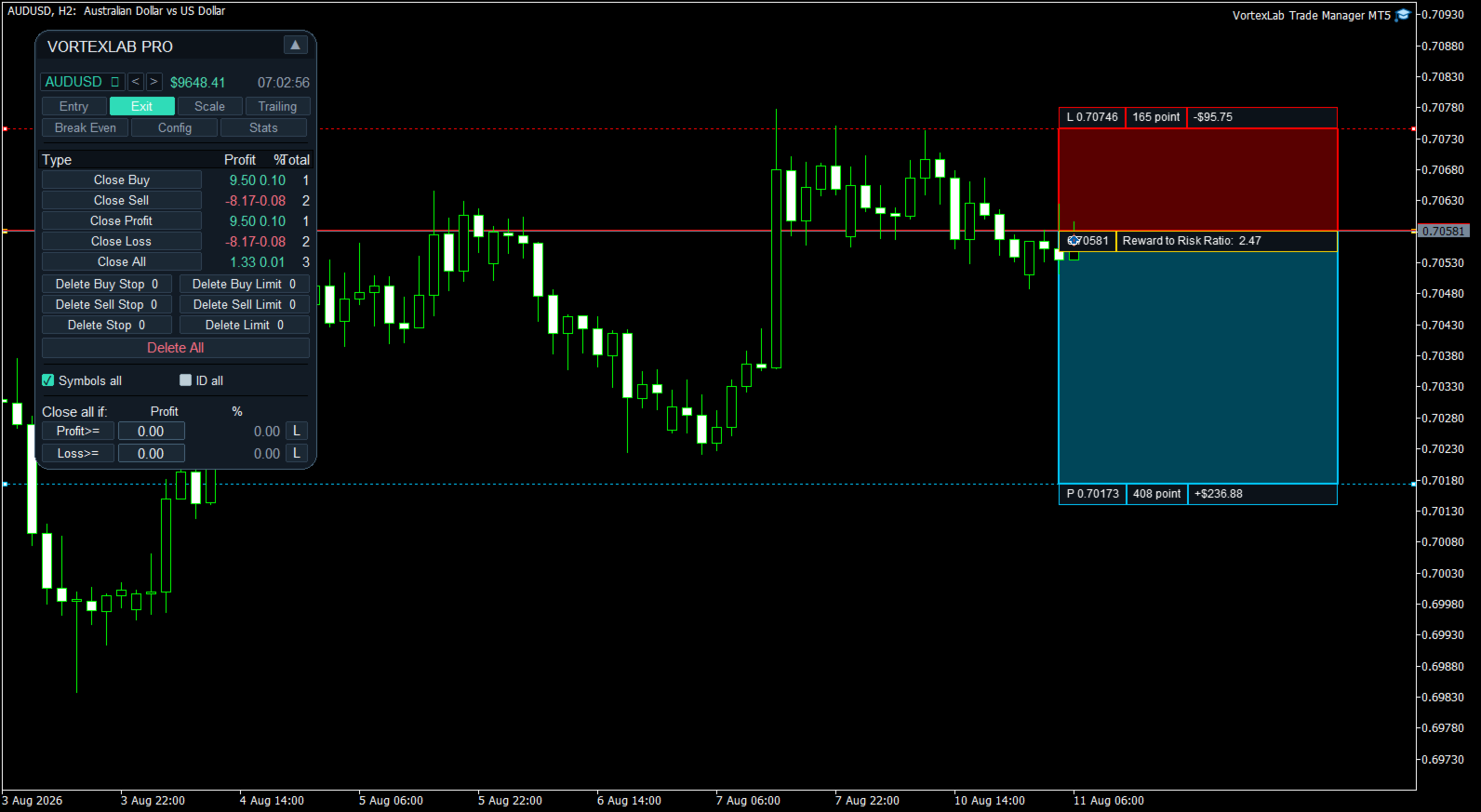
The Close tab manages open positions and pending orders.

- Close Buy: closes Buy positions.
- Close Sell: closes Sell positions.
- Close Profit: closes positions with a positive floating result.
- Close Loss: closes positions with a negative floating result.
- Close All: closes all positions included by the active filters.

For each group, the table displays floating profit or loss, its percentage of the account balance, and the total number of matching positions.

Deleting pending orders

Pending orders can be deleted by type using Delete Buy Stop, Delete Sell Stop, Delete Stop, Delete Buy Limit, Delete Sell Limit, Delete Limit, and Delete All.

The panel displays how many orders match each category. Delete All requests confirmation before deleting the orders included by the active filters.

Closing filters

Symbols All allows the closing functions to include other symbols. ID All allows other Magic Numbers to be included when the protection configured in the inputs permits it.

When both filters are disabled, management is concentrated on the current symbol and the product's Magic Number. Check these filters before using Close All or Delete All.

Confirmation dialogs

Close All and Delete All require confirmation. The dialog allows the user to confirm or cancel the action.

Selective actions such as Close Buy, Close Sell, Close Profit, and Close Loss are executed directly. They should only be used after checking the active filters.

Automatic closing by profit or loss

Close all if monitors the combined floating result of the selected positions.

The panel can close the selected positions when their combined profit reaches a configured amount or when their combined loss reaches a configured limit. The condition is monitored in real time while MetaTrader 5 remains open and connected.

The panel also displays the configured amount as an approximate percentage of the account balance.

The L buttons can place broker-side protection levels on positions of the current symbol. This serves as a backup for local monitoring. With mixed Buy and Sell exposure, the combined result may be approximate because every position has its own level.

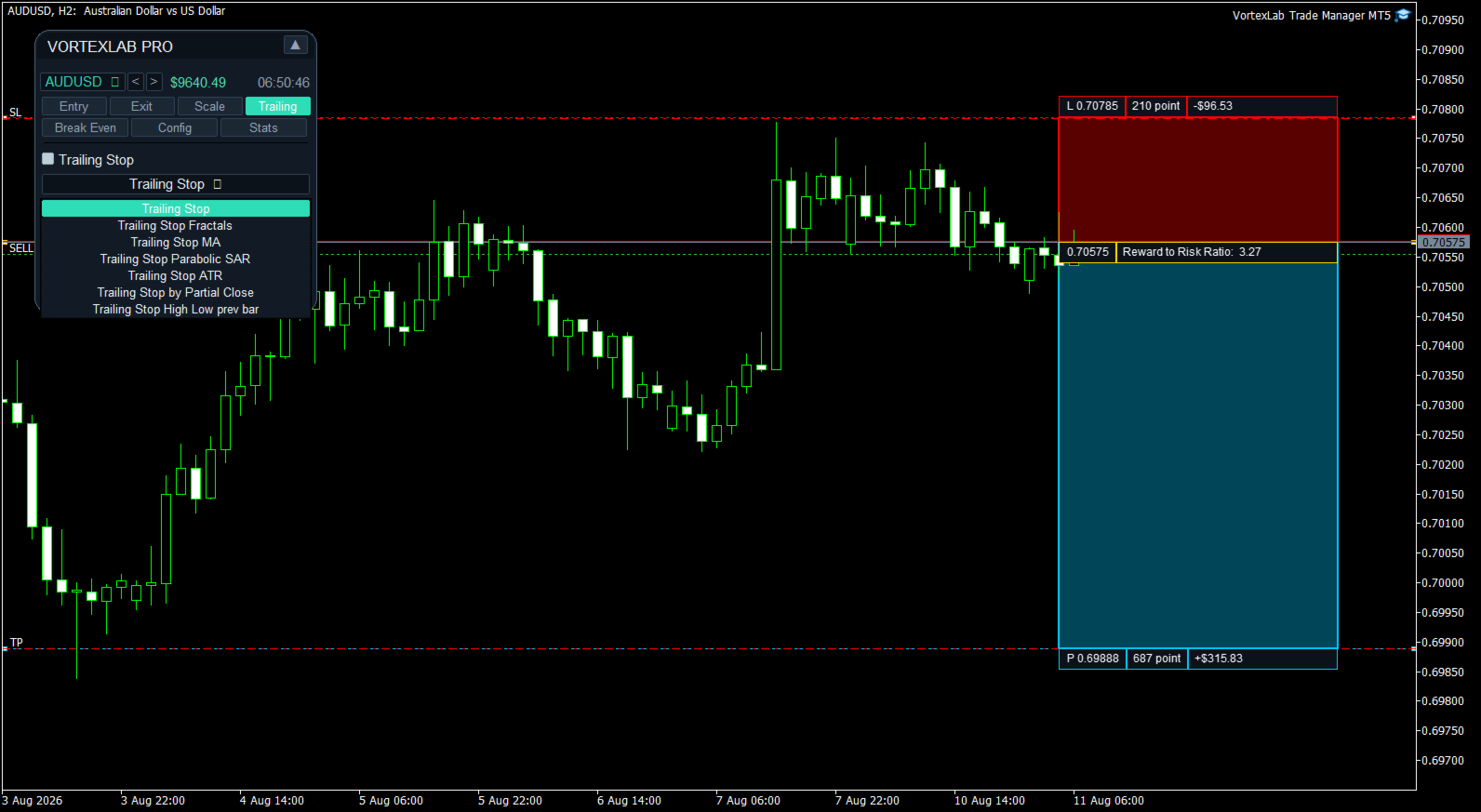
Trailing Stop

The Trailing tab includes seven management methods.

Classic Trailing Stop

Uses Start, Distance, and Step. The Stop Loss begins following the market after the minimum profit is reached and only moves in the protective direction.

Fractals Trailing Stop

Uses symbol fractals to update the Stop Loss. The activation distance, timeframe, and number of scanned bars can be configured. A lower fractal is used for Buy positions and an upper fractal for Sell positions.

Moving Average Trailing Stop

Places the Stop Loss using a moving average. The activation distance, timeframe, period, calculation method, and applied price can be configured.

Available methods are Simple, Exponential, Smoothed, and Linear Weighted. The moving average can be applied to Close, Open, High, or Low.

Parabolic SAR Trailing Stop

Updates the Stop Loss using Parabolic SAR. The activation distance, timeframe, Step, and Maximum can be configured.

ATR Trailing Stop

Calculates the trailing distance using Average True Range. The activation distance, timeframe, ATR period, coefficient, and optional use of the previous candle's High or Low as the base price can be configured.

Trailing Stop after a partial close

Detects a reduction in the position volume. After the first partial close, it can move the Stop Loss to the position's opening price.

Previous High or Low Trailing Stop

Uses the previous closed candle's Low for Buy positions and High for Sell positions. The activation distance, timeframe, and additional distance in points can be configured.

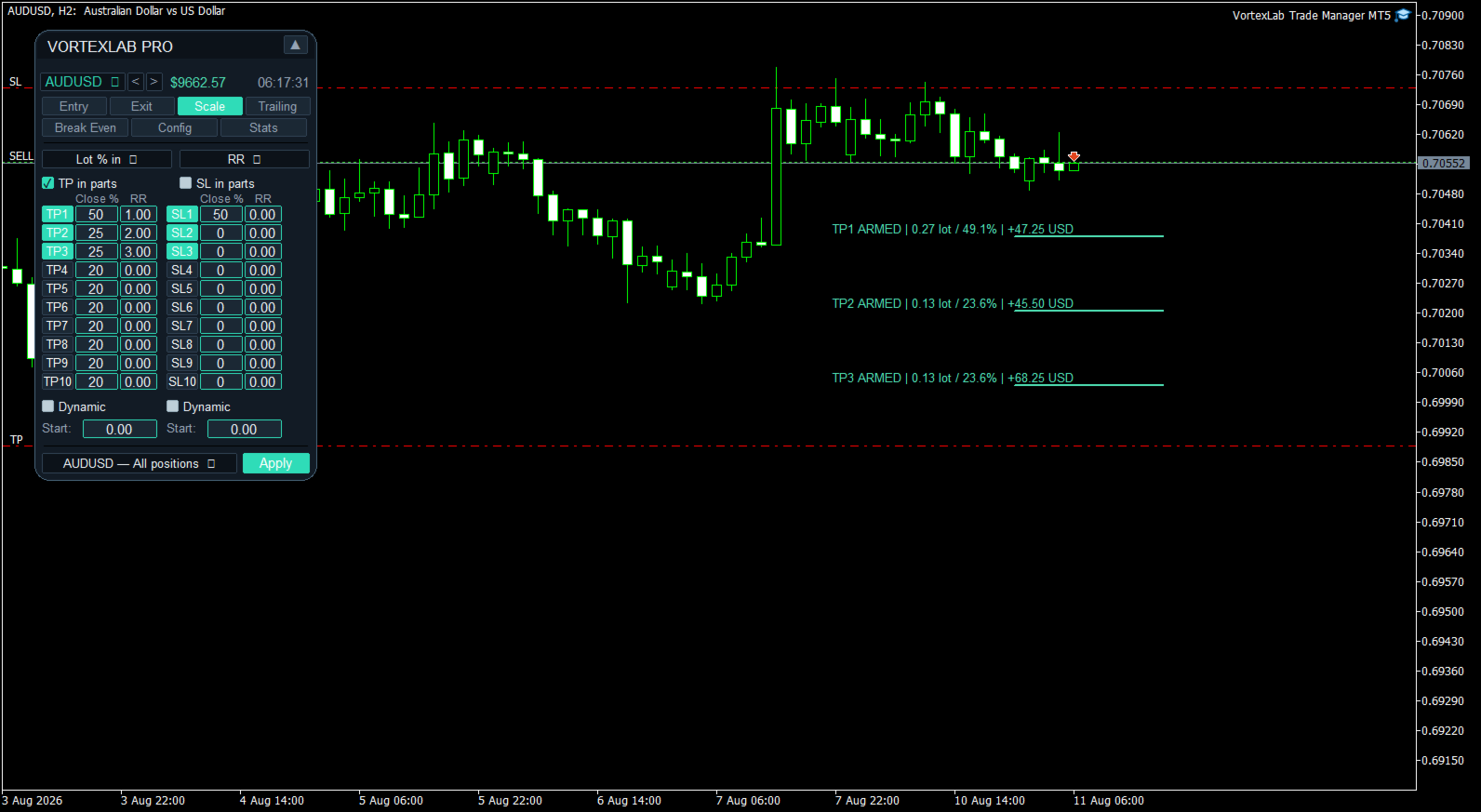
Scale: multi-level partial closes

The Scale tab can program up to ten partial Take Profit levels and ten partial Stop Loss levels.

Every level can be enabled or disabled independently. The volume to close can be defined as:

- A percentage of the initial position volume.
- A percentage of the current position volume.
- A fixed lot amount.

Price levels can be defined using:

- Automatic distribution.
- Distance in points.
- Exact price.
- Risk-to-reward ratio.
- Percentage price change.

The configuration can be applied to all compatible positions on the symbol or to one position selected by ticket.

Visual lines show Armed for a prepared level, Wait while waiting for dynamic activation, and Done after a partial close has been executed. They also show the planned volume and estimated monetary result.

Dynamic Scale

Partial Take Profit and Stop Loss levels can use a dynamic anchor. The system records the best price reached by the position and can recalculate the levels from that reference. Start defines when dynamic management begins.

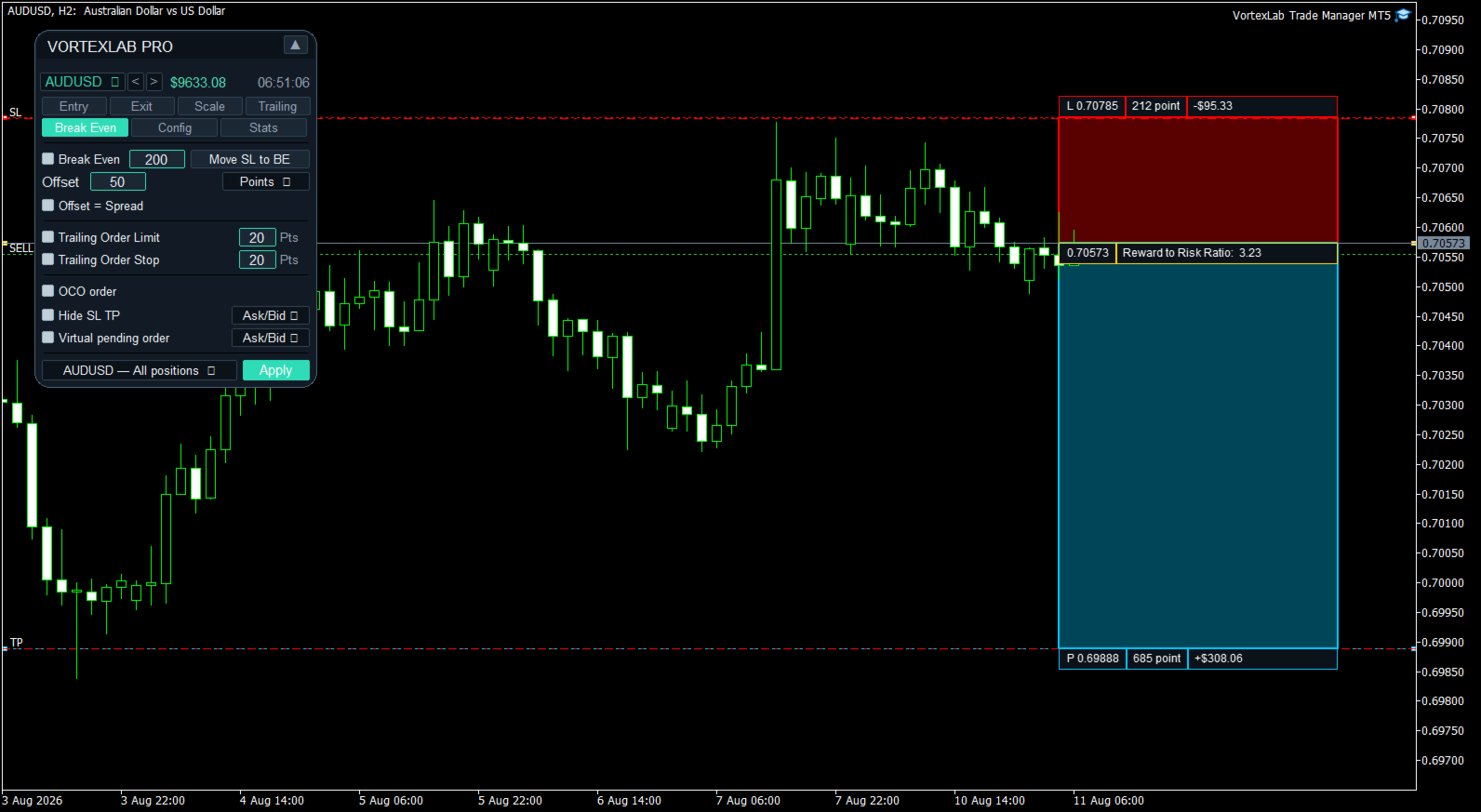
Automatic Break Even

Break Even moves the Stop Loss to a protective level when the configured activation condition is reached.

The activation can be expressed as:

- Points.
- Risk-to-reward ratio.
- Percentage price change.
- Percentage of the distance to Take Profit.

Offset can place the Stop Loss exactly at entry, above entry for a Buy, below entry for a Sell, or at a distance based on the current spread. The Stop Loss is changed only if the new level improves existing protection.

Visual Break Even line

When Break Even is enabled, the product draws a visual line for every managed position. The line shows the price that will activate Break Even, the new Stop Loss price, and whether the condition is still pending or has been reached.

The initial Stop Loss and Take Profit references are preserved so that calculations based on RR or a percentage of Take Profit remain stable after other tools modify the current Stop Loss.

Manual Break Even

Move SL to BE immediately applies the configured Offset without waiting for the activation price. It can be used to protect all compatible positions on the symbol.

The RR mode requires an initial Stop Loss. The percentage-of-TP mode requires an initial Take Profit.

Trailing pending orders

Trailing Order Limit and Trailing Order Stop can move pending orders while maintaining a configured distance from the current market price.

The function respects Stops Level, Freeze Level, Stop Loss, and Take Profit. It only manages orders belonging to the corresponding symbol and Magic Number.

OCO orders

OCO can be used with pending orders placed on opposite sides of the market. When one pending order is actually filled, the panel cancels pending orders on the opposite side.

Same-side orders used for multiple Take Profit allocations are preserved. Manual deletion or expiration does not trigger OCO cancellation.

Hidden Stop Loss and Take Profit

Hide SL TP converts the current protective levels of a position into virtual levels.

When applied, the panel records the existing Stop Loss and Take Profit, removes them from the broker server, monitors the selected price reference, and closes the position at market when a virtual level is reached.

Available reference prices are Ask/Bid, Ask, Bid, Mid, and Close. The function can be applied to all compatible positions or to a selected position.

Hidden levels depend completely on local operation. MetaTrader 5 must remain open, connected, and authorized for algorithmic trading.

Virtual pending orders

Virtual Pending Order prepares a pending order without sending it immediately to the broker server.

The panel stores the order type, trigger price, Stop Loss, Take Profit targets, and volume distribution locally. When the selected reference price reaches the level, the panel sends a market order.

Available references are Ask/Bid, Ask, Bid, Mid, and Close. One virtual pending order can be armed per panel instance.

The virtual order does not exist on the broker server. It cannot be triggered while MetaTrader 5 is closed, disconnected, or after the product has been removed from the chart.

Automatic chart-range levels

The panel can calculate technical levels from closed candles on the current timeframe.

For Stop Loss, it uses the selected period's lowest Low for a Buy and highest High for a Sell. For Take Profit 1, it uses the highest High for a Buy and lowest Low for a Sell. An additional distance in points can be applied.

Presets

Presets can save, load, and delete the main panel configurations, including risk basis, percentage and fixed risk, custom value, spread limit, order splitting, symbol management, automatic chart-range levels, and the configuration of the three Take Profit targets.

Account and symbol statistics

The Stats tab displays:

- Balance and equity.
- Used margin and free margin.
- Margin level and leverage.
- Account currency.
- Spread, Swap Long, and Swap Short.
- Contract size.
- Minimum, maximum, and step volume.
- Stops Level and symbol digits.
- Result for the current day, week, and month.
- Product version and Magic Number.
- Current symbol, timeframe, and server time.

Alerts

The product can use MetaTrader 5 alerts, sounds, and push notifications. Push notifications require a valid MetaQuotes ID configured in MetaTrader 5.

Languages

The interface includes English, Spanish, Portuguese, French, German, Russian, Arabic, Simplified Chinese, Hindi, and Japanese. English is the default language and another language can be selected in the input parameters.

Visual themes

The panel includes Dark, Light, Midnight, Charcoal, Ocean, Forest, Sunset, Purple, Gold, Slate, Sky, Ice, Mint, and Vortex themes.

Movable and minimizable panel

The panel can be moved by dragging its header. It can also be minimized so that only the top bar remains visible. The selected position is stored to preserve the workspace arrangement after a restart.

Account-mode compatibility

The product is designed for MetaTrader 5 and can be used on Hedging and Netting accounts.

On a Hedging account, each entry can remain as a separate position. On a Netting account, trades on the same symbol are combined into one net position, and the broker maintains one Stop Loss and one Take Profit for that position.

Test multi-target execution with the broker and account mode that will be used.

Functions that require MetaTrader 5 to remain open

The following functions run locally and require MetaTrader 5 to remain open, connected, and authorized for algorithmic trading:

- Automatic closing by combined profit or loss.
- Automatic Break Even.
- Trailing Stop.
- Scale partial closes.
- Trailing pending orders.
- OCO management.
- Hidden Stop Loss and Take Profit.
- Virtual pending orders.
- Alerts and push notifications.

A MetaTrader 5 compatible VPS can be used for continuous operation.

VortexLab Trade Manager MT5 is a calculation, execution, and trade-management utility. It does not provide financial advice, generate signals, or guarantee profits. The user is responsible for reviewing every order and testing the product on a demo account before using it on a live account.
Рекомендуем также
HedgeSafe Trade Assistant Торговая панель для MetaTrader 5 с приоритетом контроля риска. HedgeSafe помогает подготовить, проверить и сопровождать ручную сделку прямо на графике до нажатия BUY или SELL. HedgeSafe не является сервисом сигналов, прогнозным инструментом, AI-ботом или автоматической стратегией. Продукт не выбирает направление сделки и не обещает прибыль. Каждое торговое решение остаётся за трейдером. Основные возможности Расчёт лота от процента баланса или фиксированной суммы в валют
Менеджер символов или Сеточный менеджер, разработан для группировки ордеров в одну позицию (по символу и по направлению). Эта утилита будет полезна сеточникам и мультивалютникам, тем у кого может быть открыто множество ордеров по нескольким парам. Вы сможете видеть общее количество лотов, общую прибыль, и устанавливать виртуальные стоплосс и тейкпрфит. Для установки реального ТП (или СЛ) необходимо сначала задать виртуальное значение, а затем ввести в этой ячейке команду: "set". Если вы хотите
Trade Panel Pro — Профессиональный терминал управления рисками и исполнения ордеров для MetaTrader 5 Trade Panel Pro — это продвинутая и универсальная утилита для MetaTrader 5, созданная для активных дейтрейдеров и профессионалов. Она объединяет в себе точный расчет рисков и молниеносное исполнение ордеров, помогая защищать капитал и легко управлять сделками с несколькими целями. Главные преимущества и ключевые особенности Автоматический расчет лота: Забудьте о ручных расчетах объема! Панел
RiskCopilot
Carlos Adrian Feged Zapata
RiskCopilot Utility - Descripciones Multiidioma РУССКИЙ RiskCopilot Utility - Ваш Интеллектуальный Торговый Помощник "Видьте Свой Риск. Овладейте Торговлей." RiskCopilot Utility - это комплексное решение для управления рисками и расчета размера позиций в MetaTrader 5. Этот всеобъемлющий торговый помощник предоставляет вычисления в реальном времени, продвинутые инструменты оценки рисков и профессиональную торговую аналитику, не контролируя ваши торговые решения. Идеально подходит как для но
Visual Dolphin Indicator
AL MOOSAWI ABDULLAH JAFFER BAQER
Visual Dolphin Indicator Unlock the rhythm of the market with the Visual Dolphin Indicator, your ultimate tool for identifying and capitalizing on market trends with clarity and confidence. Designed for both novice and experienced traders, this indicator eliminates the noise and guesswork, providing crystal-clear buy and sell signals directly on your chart. The Logic Behind the Waves The core of the Visual Dolphin Indicator is a sophisticated yet intuitive dual-wave system based on moving avera
Breakevan Utility
Jose Luis Thenier Villa
BreakEvan Utility  Is a simple tool in a panel with this utilities: This utility will draw a Golden Line in the chart applied showing the breakeven price, considering all the positions opened for that specific symbol. Also the information panel shows: Balance Breakeven Price for that chart Force Breakeven (for that symbol) as ON/OFF Force Breakeven Global (takes into account all trades opened) as ON/OFF Total Lots opened for Symbol Total Lots opened Global And two buttons: Force Breakeven: Whe
Trade Panel by RWBTradeLab — The Ultimate Trade & Risk Management Utility Take full control of your MetaTrader 5 trading with the   Trade Panel by RWBTradeLab ! Designed by RWBTradeLab, this all-in-one utility is built for both professional and beginner traders who want to execute trades faster, manage risk perfectly, and analyse their account performance in real-time. Say goodbye to manual lot calculations and slow trade execution. With a sleek, draggable, and highly intuitive User Interfa
Click Trading
Jawad Tauheed
5 (2)
One Click Trading – Auto TP SL Developer TraderLinkz Version 1.00 Category Utility What it does Adds missing TP and SL to your manual trades and pending orders Sets them once per ticket Lets you move TP and SL afterward Works on hedging and netting accounts Scans on every tick and reacts on trade events Why you want it You place faster entries You get consistent risk and exit targets You reduce fat finger errors You keep full manual control Quick start Attach the EA to any chart Keep TP and SL e
FREE
ZyloFx Position Size Calculator MT5 is a free risk management utility for MetaTrader 5 designed to help traders calculate the appropriate position size based on account risk and stop loss distance. This tool helps traders determine how many lots to trade before entering a position, supporting more consistent risk management and better trading discipline. Main Features Automatic position size calculation Risk percentage mode Fixed money risk mode Balance and equity-based calculations Suggested lo
DR Trade and Risk Manager: Фундаментальная консоль алгоритмического риск-менеджмента для MT5 Для дискреционного трейдера величайший противник — не рынок, а недисциплинированное "я". У вас есть надежная стратегия, но в моменты высокого давления, следуете ли вы своим правилам с идеальной последовательностью? Режете ли вы убытки без колебаний? Даете ли вы прибыли расти, не обрывая ее преждевременно из-за страха? Для большинства ответ — нет. Именно в этом разрыве между стратегией и исполнением теряе
OpenAllSymbolsSafe.mq5 — Умный скрипт для MetaTrader 5 Назначение: Автоматически открывает графики всех символов из Обзора рынка с применением шаблона default.tpl на текущем таймфрейме (TF) , предварительно закрывая все открытые графики (кроме текущего). Идеален для быстрого анализа множества инструментов без рутинных действий! Особенности: Автоматизация: Экономит время — открытие десятков графиков в один клик. Безопасность: Аккуратно закрывает лишние графики, сохраняя текущий акти
FREE
Turbo Close All is a powerful and versatile script designed to help traders quickly and efficiently manage their trading positions and pending orders on MetaTrader 5. With its advanced features and customizable settings, this script is an essential tool for traders who want to streamline their trading process and maintain control over their positions and orders. Key Features: Comprehensive Closing Options: Turbo Close All allows you to close all market positions and/or delete pending orders bas
Easy Trade Executor — инструмент для быстрого расчета лота, открытия и сопровождения сделок в MT5. Размещайте уровни Open Price, Stop Loss и Take Profit прямо на графике, получайте автоматический расчет объема позиции и открывайте сделки с контролируемым риском всего за несколько кликов. Почему Easy Trade Executor? Easy Trade Executor создан для трейдеров, которые хотят не только рассчитывать риск, но и быстро управлять сделками на графике. Инструмент объединяет расчет позиции, открытие ордеро
JMM Trade Panel MT5 JMM Trade Panel MT5 — это удобный торговый инструмент для MetaTrader 5, работающий непосредственно на графике. Открывайте сделки Buy и Sell, быстро изменяйте отображаемый размер лота, контролируйте прибыль корзин и управляйте сделками с помощью настраиваемого Magic Number и правил выбора символов. Полное руководство пользователя:   Скачать Основные возможности Кнопки Buy, Sell и Close All прямо на графике. Закрытие всех сделок, которыми управляет советник, одним нажатием.
Trading Co-Pilot для MetaTrader 5 Профессиональный менеджер позиций для ручной торговли Trading Co-Pilot — это интеллектуальный помощник для управления позициями, созданный для трейдеров, которые открывают сделки вручную и хотят автоматизировать контроль риска и прибыли. Он не открывает сделки. Он профессионально управляет ими. Вы отвечаете за вход. Co-Pilot отвечает за защиту и выход. Принцип работы После открытия ручной позиции советник автоматически: • Устанавливает Stop Loss • Выставляет Tak
FREE
Grid Manager — Manual Multi-Basket Grid Assistant for MT5 Grid Manager is a hands-on control panel for building and managing grid "baskets" directly on your chart. You decide the direction and the moment; the tool opens the grid, manages every leg, and protects the position with money-based risk controls, on-chart breakeven/SL/TP lines, and one-click actions. It is an execution and management assistant — fast, visual, and fully under your control. What it is — and what it is not Grid Manager is
SL TP Panel
Mikhail Ostashov
SL TP Panel — визуальная торговая панель для MT5 Удобная торговая панель, которая позволяет выставлять отложенные ордера простым перетаскиванием линий прямо на графике. Стоп-лосс, тейк-профит, тип ордера и размер лота — всё управляется мышкой за пару секунд. Для кого этот инструмент Панель создана для трейдеров, которые торгуют вручную и ценят скорость входа в рынок. Вместо того чтобы открывать окно ордера, заполнять поля и считать уровни — просто перетащите линию на нужную цену и нажмите одн
Trade assistant pro v8
Ahmed Mohammed Bakr Bakr
FREE FREE FREE Trade Assistant MT5 – Professional Trading & Risk Management Panel Trade Assistant MT5 is an advanced trading panel designed to help traders execute orders faster, safer, and more professionally . It simplifies manual trading by combining smart order management , precise risk control , and one-click execution , making it ideal for both beginners and advanced traders. This tool does not trade automatically . Instead, it empowers you with full control while applying professional-gra
FREE
Expert Trade Panel — Профессиональная панель ручной торговли и управления рисками **Expert Trade Panel** — это мощный и интуитивно понятный торговый терминал прямо на вашем графике MetaTrader 5. Панель разработана для трейдеров, которым необходим полный контроль над позициями, быстрое исполнение ордеров, автоматический расчет бесубытка и визуальный контроль уровней усреднения. ---   Ключевые возможности  1. Управление в один клик и каскадный Тейк-Профит * **Исполнение сделок:** Мгновенный вх
This EA will provide you with the amount of points once you open a position, being a sell or a buy. I use it instead of the profit, as this plays some tricks in my mind. You can also set up a Take Profit and/or a Stop Loss in the settings of the EA. The point calculation will only work with manual trade. Magic number is 0. You also have the possibility to create labels for + Haut, - Haut, - Bas, + Bas and some trendlines at a 45 or - 45 degree angle. Here are the settings : Settings  Choices
Trade Copilot - полуавтоматическая панель управления рисками для золота (XAUUSD) и любого инструмента Trade Copilot - это полуавтоматическая торговая панель для трейдеров, которые хотят дисциплину советника, не теряя контроль над собственными входами в рынок. Вы выбираете направление и уровень - панель автоматически рассчитывает размер риска, устанавливает стоп-лосс, управляет тейк-профитом и защищает сделку. ОСНОВНЫЕ ФУНКЦИИ - Расчёт лота по риску - выберите Risk %, Risk $ или фиксированный
Account Monitor Pro — Ваш личный финансовый диспетчер Account Monitor Pro — это профессиональный информационный индикатор, разработанный для трейдеров, которые одновременно используют торговых роботов (EA) и ручную торговлю. Индикатор в реальном времени разделяет статистику по вашему Magic Number, позволяя четко видеть, кто приносит прибыль: алгоритм или вы. Основные возможности: Раздельный мониторинг: Мгновенное разделение позиций на "Роботизированные" (по Magic Number) и "Ручные". Мультиязычно
FREE
DDKiller Pro
Njaratahiry Michael Randrianiaina
Stop Blowing Your Account. Once and For All. DDKiller Pro is the MT5 risk guardian that runs silently on your chart and shuts down trading the moment you hit a limit — whether you're grinding a prop firm challenge or managing your own CFD account. The problem every trader knows: You set your rules. You break them anyway. One revenge trade. One overleveraged position. One session that erases a month of gains. DDKiller Pro removes that decision from your hands entirely. What it does: The second yo
Margin Call Shield – Defend Your Margin on Your Terms Margin Call Shield is a tool for MetaTrader 5 traders who want to decide for themselves which open positions are closed during margin call situations before the platform does so automatically based on its internal rules. By default, the broker or platform decides which positions to close, often using undisclosed algorithms. Margin Call Shield lets you set this order according to your own strategy. Why Was Margin Call Shield Created? In a mar
BulkOp Trade Manager
Ahmed Jumaa Saif Ali Almheiri
BulkOp Trade Manager Торгуйте быстрее. Управляйте умнее. Закрывайте сделки увереннее. BulkOp Trade Manager — это мощный торговый помощник для MT5, созданный для трейдеров, которым нужны скорость, контроль и удобное управление сделками прямо с графика. Он разработан для активных ручных трейдеров, скальперов, трейдеров по золоту и всех, кто хочет управлять несколькими позициями быстрее и с меньшим количеством кликов. Почему BulkOp? Ультрабыстрое открытие Buy и Sell Закрытие прибыли одним кликом З
Size Bars – индикатор отображает на графике максимальный, минимальный, текущий и средний размер баров (свечей) за выбранный период. Отображаемые параметры индикатора Size Bars: 1)       Текущий размер бара в писах (по максимум/минимум, тело бара). 2)       Максимальный, минимальный и средний размер свечей BUY . 3)       Максимальный, минимальный, средний размер свечей SELL . 4)       Количество свечей BUY и количество свечей SELL . 5)       Среднее количество свечей подряд BUY и SELL . 6)     
Core function Intelligent transaction management one-click opening and closing operation, which supports user-defined lots to set multiple closing modes: all closing, closing by direction and closing by profit and loss status. Professional risk control, real-time risk monitoring and spread control to avoid high-cost trading environment. Visual control panel has an intuitive graphical interface, and all functions can be operated with one button to display position information, profit and loss sta

FREE
Local Copy Trader Utility - Professional Copy Trading System Overview Local Copy Trader Utility is the complete solution for mirroring trades between MetaTrader 5 accounts. With both Master and Slave functionality in one powerful Expert Advisor, it delivers reliable, lightning-fast trade copying with zero external dependencies. Perfect for managing multiple accounts, following trading signals, or transferring trades between brokers, this system ensures your positions stay perfectly synchronized
When executing an order, whether through the Metatrader ticket on a computer or the Metatrader app on a mobile device, either manual or pending, Easy Trade will automatically set the take profit and stop loss levels, as well as a limit order with its respective take profit and stop loss levels. It follows the trading strategy for market open (US30, US100, US500), but it can be applied to any market asset.

TP SL Bot MT5
Ruslan Brezovskiy
5 (1)
TP SL Bot – утилита, которая автоматически устанавливает Stop Loss и Take Profit по вновь открытым ордерам различными способам по вашим указаниям. Также предусмотрена функция расчета объема, c которым нужно открыть сделку, чтобы получить желаемую сумму при указанном размере Stop Loss / Take Profit .   Есть несколько вариантов расчета размера и установки параметров: 1. Установки исходя из суммы, заданной пользователем в процентах от текущего остатка депозита 2. Установка исходя из введенной польз

С этим продуктом покупают
Trade Assistant MT5
Evgeniy Kravchenko
4.41 (215)
Помогает рассчитать риск на сделку, простая установка нового ордера с помощью линий, управление ордерами с функциями частичного закрытия, 7 типов трейлинг-стопа и другие полезные функции. Дополнительные материалы и инструкции Инструкция по установке - Инструкция к приложению - Пробная версия приложения для демо счета Функция Линии   - отображает на графике линию открытия, стоп-лосс, тейк-профит. С помощью этой функции легко установить новый ордер и увидеть его дополнительные характеристики пе
Добро пожаловать в Trade Manager EA — лучший инструмент для управления рисками, предназначенный для упрощения, точности и эффективности торговли. Это не просто инструмент для размещения ордеров; это комплексное решение для удобного планирования торгов, управления позициями и усиленного контроля над рисками. Независимо от того, начинающий вы трейдер, опытный специалист или скальпер, нуждающийся в быстром исполнении, Trade Manager EA адаптируется к вашим потребностям и работает с любыми активами:
Local Trade Copier EA MT5
Juvenille Emperor Limited
4.97 (144)
Опыт экстремально быстрого копирования сделок с помощью Local Trade Copier EA MT5 . Благодаря простой установке в течение 1 минуты этот копировщик сделок позволяет вам копировать сделки между несколькими терминалами MetaTrader на одном компьютере с Windows или на Windows VPS с крайне быстрыми скоростями копирования менее 0.5 секунды. Независимо от того, новичок вы или профессиональный трейдер, Local Trade Copier EA MT5 предлагает широкий спектр опций, чтобы настроить его под ваши конкретные по
================================================================================ POC BREAKOUT - V20.72. Full Professional Grade Toolkit ================================================================================ POC Breakout is a full MetaTrader 5 trading dashboard for discretionary traders who want breakout signals, Point of Control (POC) context, volume profiles, order flow, market structure, news, alerts, and advanced trade planning in one professional workspace. Attached directly to you
TradePanel MT5
Alfiya Fazylova
4.88 (166)
Trade Panel — это многофункциональный торговый помощник. Приложение содержит более 50 торговых функций для ручной торговли и позволяет автоматизировать большинство торговых операций. Перед покупкой вы можете протестировать демоверсию на демо-счете. Скачать пробную версию приложения для демонстрационного аккаунта: https://www.mql5.com/ru/blogs/post/750864 . Полная инструкция здесь . Торговля. Позволяет совершать торговые операции в один клик: Открыть отложенные ордера и позиции с автоматическим р
Бета-версия Telegram to MT5 Signal Trader почти готов к официальному альфа-релизу. Некоторые функции все еще находятся в разработке, и вы можете столкнуться с небольшими ошибками. Если вы заметите проблемы, пожалуйста, сообщите о них, ваша обратная связь помогает улучшать программное обеспечение для всех. Telegram to MT5 Signal Trader — мощный инструмент, который автоматически копирует торговые сигналы из каналов и групп Telegram прямо в ваш счёт MetaTrader 5 . Поддерживаются как публичные, так
Farmed Hedge Yield Farming | All Markets (Manual - Hybrid - Semi/Automated EA) MULTI-ASSET SUPPORT Trade any asset available on your broker - Forex: Major, Minor, Exotic pairs - Crypto: BTC, ETH, XRP, SOL, BNB - Stocks: Apple, Tesla, Amazon, Google, etc. - Commodities: Gold, Silver, Oil, Gas - Indices: US30, NAS100, SPX500, DAX40 - Any CFD your broker offers VERIFIED TRADING RESULTS - Farmed Hedge Yield Axi Copy:  https://www.mql5.com/en/signals/2356376 - Farmed Hedge Yield Exn Copy:   https:/
Exp COPYLOT CLIENT for MT5
Vladislav Andruschenko
3.97 (35)
Профессиональный копировщик сделок для MetaTrader 5 Быстрый, профессиональный и надежный копировщик сделок для MetaTrader . COPYLOT позволяет копировать сделки Forex между терминалами MT4 и MT5 с поддержкой счетов Hedge и Netting . Версия COPYLOT для MT5 поддерживает: - MT5 Hedge → MT5 Hedge - MT5 Hedge → MT5 Netting - MT5 Netting → MT5 Hedge - MT5 Netting → MT5 Netting - MT4 → MT5 Hedge - MT4 → MT5 Netting Версия MT4 Полное описание + DEMO + PDF Как купить Как установить Как получить файлы жур
Anchor Trade Manager
Kalinskie Gilliam
5 (6)
Anchor: The EA Manager Your EAs manage their own trades. Anchor manages the account around them. Anchor gives you one place to control your EAs, manage risk and decide when trading is allowed. Any EA, any vendor, any broker or symbol. No source-code changes required. The Problem Most EAs only know what they are doing. They cannot see when another EA is already trading, when several EAs open and are stacking risk or when the account has reached your loss limit. Even using just one EA, it may not
Telegram to MT5 Multi-Channel Copier автоматически копирует торговые сигналы из ваших Telegram-каналов напрямую в MetaTrader 5. Никаких ботов, никаких браузерных расширений, никакого ручного копирования. Вы получаете сигнал в Telegram, и советник открывает сделку на вашем терминале за несколько секунд. Продукт включает два компонента: приложение для Windows, которое слушает ваши Telegram-каналы, и этот советник, который исполняет сигналы на терминале MT5. Также доступна версия для MT4. Руководст
Footprint Chart Pro — Professional OrderFlow EA for MetaTrader 5 Version 6.34 | Professional tool for real traders | Institutional-Grade Visualization DEMO USERS - PLEASE SELECT EVERY TICK / REAL TICK WHEN TESTING AND YOU HAVE DOWNLOADED HISTORICAL DATA. IF YOU SEE A WAITING SCREEN AND IT IS NOT DOWNLOADING, IT MEANS YOU HAVE LOW HISTORICAL DATA. TRY 1 MIN AND 5 MIN FIRST ON 1 DAY DATA. ONE DAY DATA SHOULD BE THE NEWEST AND MOST CURRENT DATE. PLEASE WAIT UNTIL THE MARKET HAS ROLLED OVER PERIOD.
VirtualTradePad PRO SE MT5 — профессиональный торговый центр управления для MetaTrader 5 VirtualTradePad PRO SE — это премиальная торговая панель и рабочая среда управления сделками на графике для MetaTrader 5 . Она создана для трейдеров, которым нужны более быстрое исполнение, более понятный контроль позиций, структурированное управление сделками, визуальное планирование уровней и профессиональный рабочий процесс прямо с графика. Это не просто панель BUY / SELL. PRO SE объединяет ручную торговл
Trade copier MT5
Alfiya Fazylova
4.57 (51)
Trade Copier — это профессиональная утилита, предназначенная для копирования и синхронизации сделок между торговыми счетами. Копирование происходит от счета/терминала поставщика к счету/терминалу получателя, которые установлены на одном компьютере или vps. АКЦИЯ - Если вы уже приобрели "Trade copier MT5", вы можете получить "Trade copier MT4" бесплатно (для копирования MT4 > MT5 и MT4 < MT5). Для получения более подробной информации об условиях, пожалуйста, свяжитесь с нами через личные сообщени
Premium Trade Manager - Торговая панель со встроенным коучем Premium Trade Manager помещает торгового коуча прямо в ваш график, а под ним работает полноценный движок исполнения. Настройте сделку так, как вы всегда это делаете, затем позвольте Max, вашему ИИ-наставнику по трейдингу, прочитать именно эту настройку с учётом вашего живого счёта и дать чёткое заключение до того, как вы входите: соответствует ли стоп дисциплинированному подходу, разумен ли риск, не выходит ли высоковолатильный релиз ч
Power Candles Strategy Scanner — самооптимизирующийся инструмент для поиска настроек по нескольким инструментам Power Candles Strategy Scanner использует тот же самооптимизирующийся движок, что и индикатор Power Candles — для всех символов в вашем Market Watch, одновременно. На одной панели отображается информация о том, какие символы в данный момент являются статистически торгуемыми, какая стратегия выигрывает на каждом из них, оптимальная пара Stop Loss / Take Profit, а также отправляется увед
Timeless Charts
Samuel Manoel De Souza
5 (7)
Timeless Charts is an all-in-one trading utility for professional traders. It combines custom chart types such as Seconds Charts and Renko with advanced order flow analysis using Footprints , Clusters , Volume Profiles , VWAP studies, and anchored analysis tools for deeper market insight. Trading and position management are handled directly from the chart through an integrated trade management panel , while Market Replay and Virtual Accounts provide environments for practicing trading skills and
YuClusters
Yury Kulikov
4.93 (43)
Внимание: Ознакомиться с работой программы можно с помощью бесплатной версии  YuClusters DEMO . YuClusters это профессиональная система анализа рынка. Для трейдера открываются уникальные возможности анализа потока ордеров, объемов торговли, движения цены используя различные графики, профили, индикаторы, графические объекты. YuClusters оперирует данными на основе ленты сделок или тиковой информации, в зависимости от того, что доступно в котировках финансового инструмента.  YuClusters позволяет с
Telegram To MT5 Ultra
Mirel Daniel Gheonu
5 (3)
Telegram To MT5 — копировщик сигналов Превратите торговые сигналы из ваших Telegram-каналов в реальные ордера MT5 — автоматически, на любом количестве счетов, с полным контролем над риском и правилами. Telegram To MT5 связывает VIP / сигнальные каналы, на которые вы уже подписаны в Telegram, с вашим терминалом MetaTrader 5. Бесплатное приложение-компаньон для ПК читает сообщения (даже из каналов, которые не допускают ботов), а этот советник исполняет их на вашем счёте — применяя ваши настройки р
Welcome to ENTRY IN THE ZONE WITH SMC MULTI TIMEFRAME Entry In The Zone and SMC Multi Timeframe is a real-time market analysis tool based on Smart Money Concepts (SMC), designed to analyze market structure, price direction, and key trading zones. It supports both Single-Timeframe Analysis and Multi-Timeframe Analysis, providing a clearer view of the overall market structure across multiple timeframes, with real-time BUY / SELL signals that do not repaint. It is designed to help filter trading op
Trade Dashboard MT5
Fatemeh Ameri
4.95 (132)
Trade Dashboard simplifies how you open, manage, and control your trades, with built-in lot size calculation. It allows you to execute trades, manage risk, and control positions directly on the chart, with tools such as partial close, breakeven, and trailing stop. Designed to reduce manual work and help you stay focused on your trading decisions. A demo version is available for testing. Detailed explanations of features are provided within the MQL5 platform. Installation instructions are include
EA Auditor
Stephen J Martret
5 (4)
EA Auditor is an independent analysis tool for traders evaluating Expert Advisors and trading signals on MetaTrader 5. It audits backtest reports, reviews posted developer signals, and cross-verifies the two against each other to help traders assess strategies before committing capital. The MQL5 market offers a wide range of Expert Advisors from many developers, with varying approaches, quality, and transparency. EA Auditor provides a consistent, data-driven framework for reviewing them, answer
Скачать рабочую демо-версию Copy Cat More (Копи Кэт Мор) — копировщик сделок (Trade Copier) MT5 — это локальный копировщик сделок и полноценная система управления рисками и исполнения, созданная для современных торговых задач. От челленджей проп-фирм (prop firm) до управления личным портфелем — он адаптируется к любой ситуации благодаря сочетанию надёжного исполнения, защиты капитала, гибкой настройки и продвинутой обработки сделок. Копировщик работает в обоих режимах — Мастер (Master, отправи
Trade Command Center
Nguyen Thanh Trieu
5 (2)
Дополнительные материалы и инструкции Инструкция по установке - Демо-версия приложения для тренировочного счета ; Официальная информация Официальный канал Профиль продавца Trade Command Center — Профессиональная панель управления ордерами и контроля рисков Risk Guard в реальном времени Trade Command Center — это высокопроизводительная визуальная торговая панель, калькулятор лота и утилита управления рисками для платформы MetaTrader 5. Она разработана специально для трейдеров, которым треб
Торговая панель для MetaTrader 5 — профессиональная торговля в один клик с графика и клавиатуры Мощная торговая панель для активного ручного трейдинга, которая позволяет открывать, сопровождать и закрывать сделки значительно быстрее и удобнее, чем стандартными средствами MetaTrader. Панель создана для тех, кто хочет получить полный контроль над позициями, ордерами, прибылью и торговыми сценариями в одном рабочем пространстве. Это не просто вспомогательная утилита. Это полноценный торговый интер
Улучшите свои торговые сигналы с нашим продвинутым Telegram Bridge EA Пора захватить аудиторию обновлениями торговли в реальном времени — профессиональными и визуально привлекательными. Свяжитесь со мной, чтобы увидеть демо и получить пробную версию Мы значительно инвестировали в удобные функции, которые создают уникальный опыт для клиентов и провайдеров.  SIGNAL BRIDGE способен доставлять на 100% КОПИР-СОВМЕСТИМЫЕ СИГНАЛЫ для всех бизнес-кейсов, даже обходя логику Metatrader там, где другие EA
Quant AI Agents
Ho Tuan Thang
5 (1)
Quant AI Agents are independent trading Expert Advisors. Instead of trading using a fixed strategy like other conventional EAs, Quant AI Agents   is a   multi-agent AI trading framework   that turns natural-language strategy prompts into live.  WANT THE SAME RESULTS AS MY LIVE SIGNAL?   Use the exact same brokers I do:   IC MARKETS , IC TRADING   .  Unlike the centralized stock market, Forex has no single, unified price feed.  Every broker sources liquidity from different providers, creating un
Trade Manager DaneTrades
Levi Dane Benjamin
4.23 (30)
Trade Manager, который поможет вам быстро входить и выходить из сделок, автоматически рассчитывая риск. Включает функции, которые помогут предотвратить чрезмерную торговлю, торговлю из мести и эмоциональную торговлю. Сделками можно управлять автоматически, а показатели эффективности счета можно визуализировать в виде графика. Эти функции делают эту панель идеальной для всех трейдеров, занимающихся ручной торговлей, и помогают улучшить платформу MetaTrader 5. Многоязычная поддержка. Версия для МТ
Equity Protect Pro: Ваш эксперт по комплексной защите счетов для спокойной торговли Если вы ищете такие функции, как защита счета, защита капитала, защита портфеля, защита мультистратегий, защита прибыли, сбор прибыли, безопасность торговли, программы контроля рисков, автоматический контроль рисков, автоматическая ликвидация, условная ликвидация, запланированная ликвидация, динамическая ликвидация, скользящий стоп-лосс, закрытие в один клик, ликвидация в один клик и восстановление в один клик,
The product will copy all telegram signal to MT5 ( which you are member) , also it can work as remote copier.  Easy to set up, copy order instant, can work with almost signal formats, image signal,  s upport to translate other language to English Work with all type of channel or group, even channel have "Restrict Saving Content", work with  multi channel, multi MT5 Work as remote copier: with signal have ticket number, it will copy exactly via ticket number. Support to backtest signal. How to s
Seconds Chart MT5
Boris Sedov
4.61 (18)
Seconds Chart - уникальный инструмент для создания секундных графиков в MetaTrader 5 . С помощью Seconds Chart вы можете построить график с таймфреймом, заданным в секундах, получая идеальную гибкость и точность анализа, недоступную на стандартных минутных или часовых графиках. Например, таймфрейм S15 обозначает график со свечами продолжительностью 15 секунд. Вы можете использовать любые индикаторы и советники с поддержкой пользовательских символов. Работать с ними так же удобно, как и на станда
Другие продукты этого автора
Risk Calculator VortexLab for MetaTrader 5 Risk Calculator VortexLab is a risk calculation, visual trade planning, and manual order execution tool for MetaTrader 5. The EA automatically calculates the trade volume using the configured risk, entry price, and distance to the Stop Loss. It also displays the planned trade directly on the chart and distributes the total volume across up to three Take Profit targets. This tool does not generate trading signals or automatically open trades based on
FREE
Фильтр:
Нет отзывов
Ответ на отзыв