VortexLab Trade Manager MT5

VortexLab Trade Manager MT5

VortexLab Trade Manager MT5 is a visual utility for calculating risk, preparing trades, executing orders, and managing positions directly from a MetaTrader 5 chart.

The product runs as an Expert Advisor, but it does not analyze the market, generate trading signals. The user remains responsible for choosing the direction, entry, protective levels, and closing conditions of every trade.

The panel combines position-size calculation, multi-target execution, Break Even, Trailing Stop, partial closes, pending-order management, safety limits, account statistics, and visual customization in one interface.

Basic use

To prepare a trade:

1. Attach VortexLab Trade Manager MT5 to a chart.
2. Enable algorithmic trading in MetaTrader 5.
3. Select the symbol you want to trade.
4. Choose Buy, Sell, or a pending-order type.
5. Set the risk as a percentage or a fixed monetary amount.
6. Move the Stop Loss line to the required level.
7. Enable one, two, or three Take Profit targets.
8. Configure the volume percentage and risk-to-reward ratio of each target.
9. Review the calculated volume and estimated risk.
10. Press Place to send the orders.

The chart lines make it possible to review the complete trade structure before execution.

Automatic position-size calculation

The panel calculates the trading volume using:

- The selected risk.
- The entry price.
- The distance to the Stop Loss.
- The symbol calculation model.
- Tick size and tick value.
- Contract size.
- Minimum and maximum volume.
- Volume step.
- The symbol properties supplied by the broker.

The calculation first uses the profit-and-loss model provided by MetaTrader 5. This helps adapt the volume calculation to instruments whose specifications differ from standard Forex symbols.

The volume is recalculated whenever the user moves the entry price or Stop Loss.

If the requested risk cannot be achieved without exceeding the broker's minimum volume, the panel does not round the volume upward. The entry is blocked instead of opening a trade with a considerably larger risk than requested.

Risk calculation methods

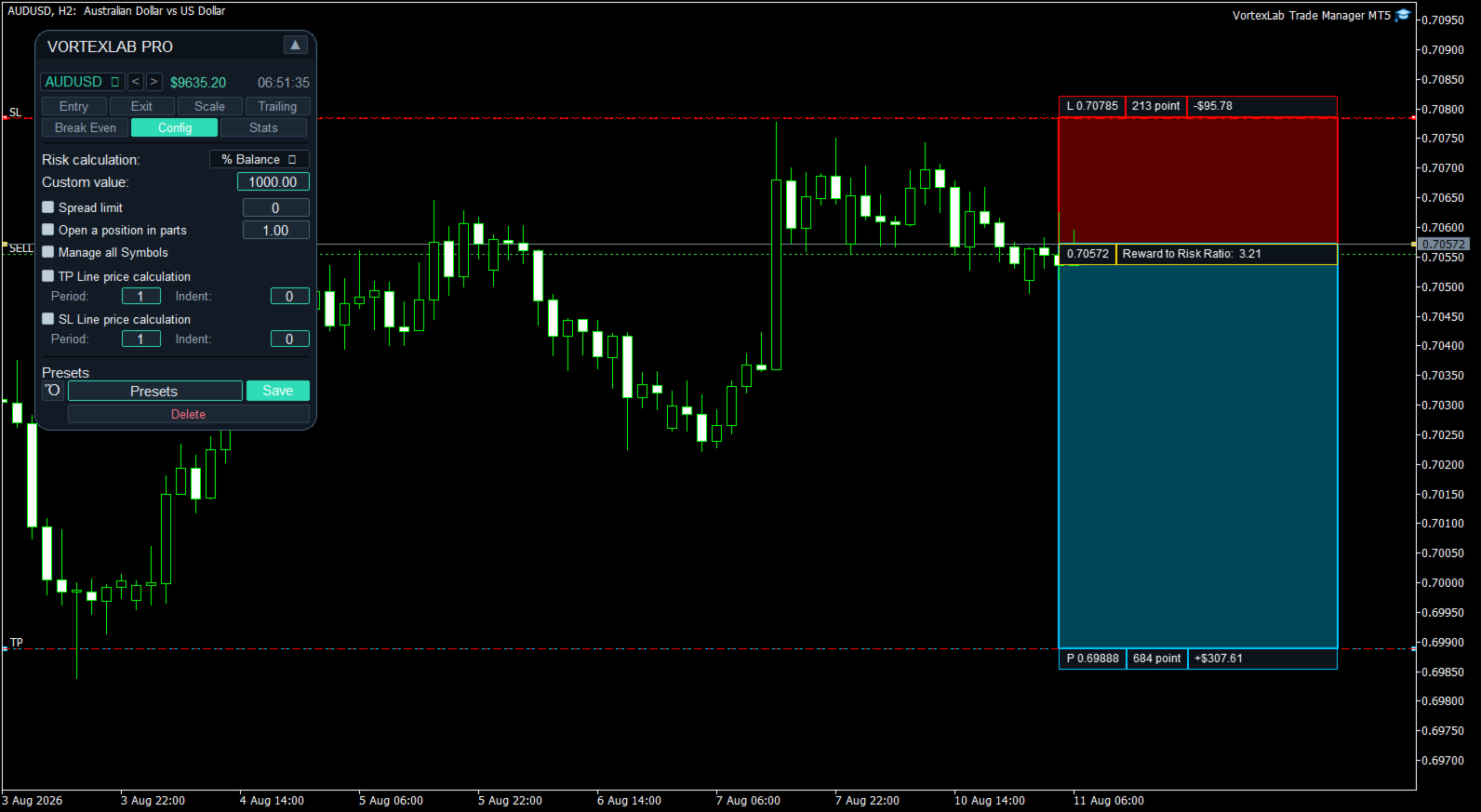
Risk can be configured as a fixed monetary amount or as a percentage of different account values.

- Fixed amount in the account currency.
- Percentage of the current balance.
- Percentage of the current equity.
- Percentage of the free margin.
- Percentage of a custom value.
- Percentage of the balance recorded at the start of the day.
- Percentage of the balance recorded at the start of the week.
- Percentage of the balance recorded at the start of the month.

The risk-mode button allows the user to switch quickly between percentage risk and fixed monetary risk.

Market compatibility

The panel can be used with Forex, stock indices, synthetic indices, metals, energies, cryptocurrencies, stocks, futures, CFDs, and custom broker symbols.

Calculation accuracy depends on the broker supplying valid contract size, tick value, tick size, and volume rules for the selected symbol.

On instruments with a large minimum volume, some small risk amounts may not be executable. The panel displays zero volume or blocks the entry when the selected risk cannot be respected without using a larger lot.

Visual entry and Stop Loss

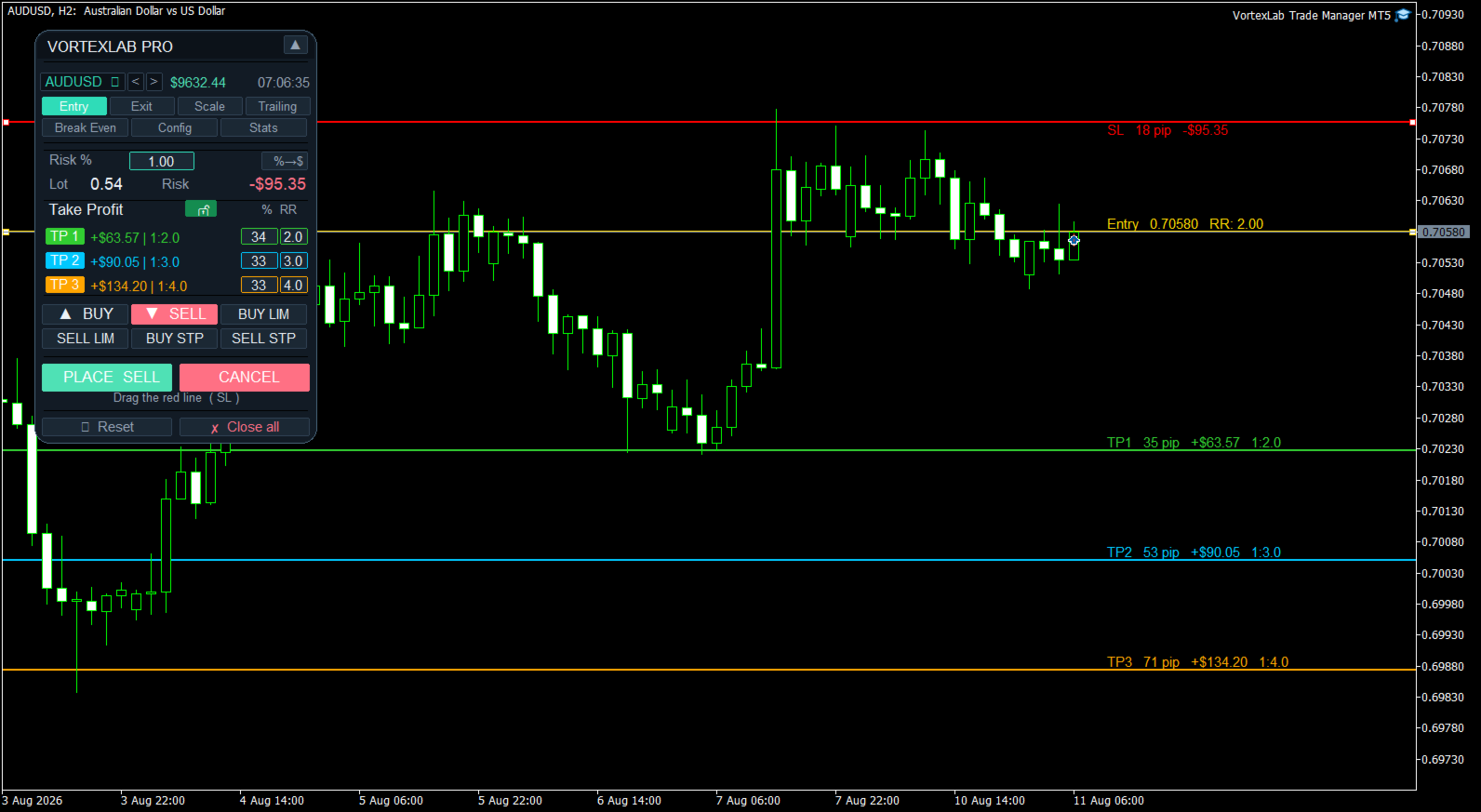
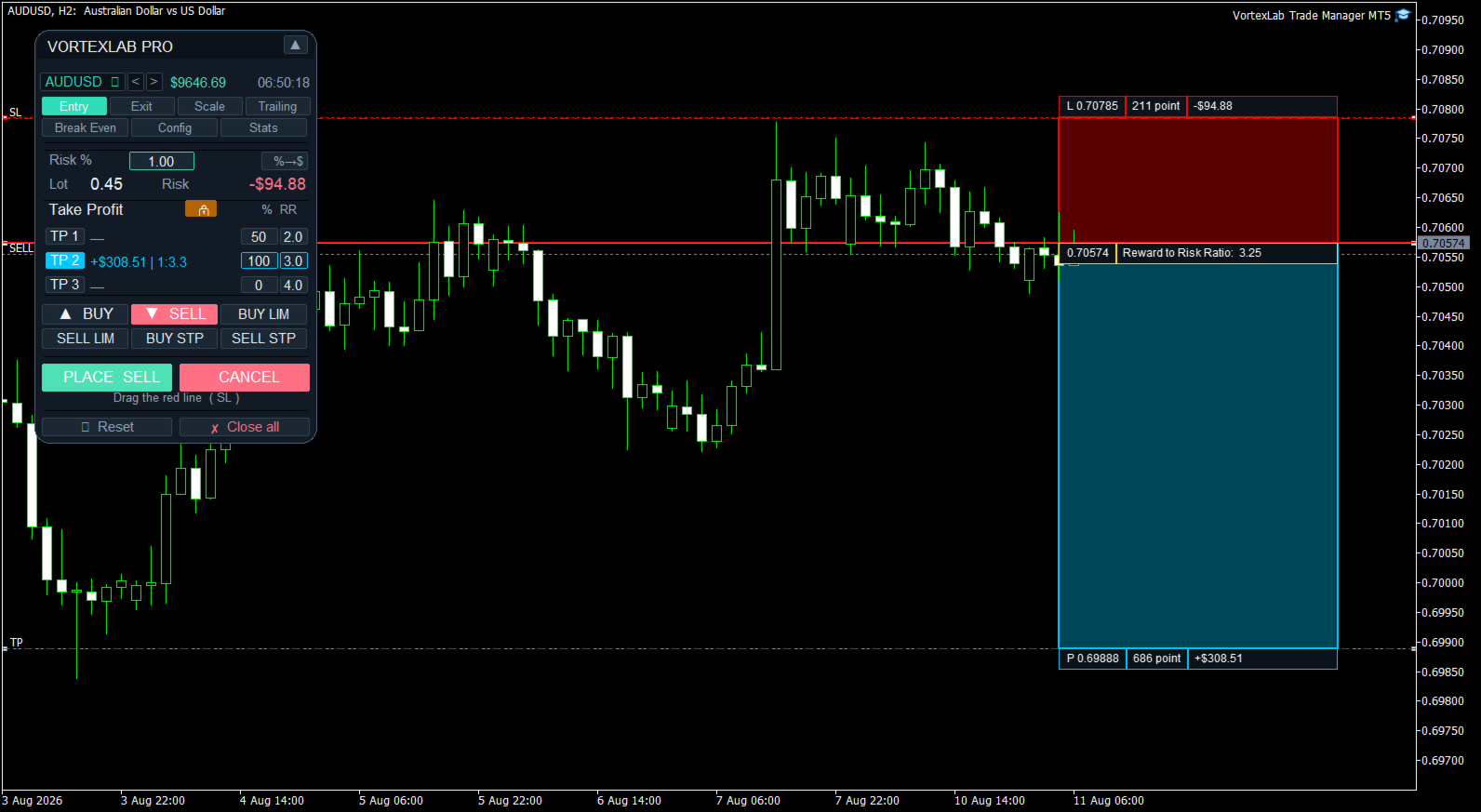
When an order type is selected, the panel creates the required chart lines. The entry line represents the current price for market orders or the requested activation price for pending orders.

The Stop Loss line can be moved manually. Every movement updates the Stop Loss distance, calculated volume, estimated monetary risk, dynamic Take Profit levels, risk-to-reward ratios, and estimated profit for each target.

The Stop Loss must be placed on the correct side of the market. A Buy is blocked if its Stop Loss is above the entry price, and a Sell is blocked if its Stop Loss is below the entry price.

Three Take Profit targets

Up to three Take Profit targets can be enabled. Each target has an independent volume percentage, risk-to-reward ratio, target price, and visual color.

When one target is enabled, it receives 100 percent of the volume. With two targets, the initial distribution can be 50 and 50 percent. With three targets, the initial distribution is 34, 33, and 33 percent. These percentages can be changed before execution.

The panel checks whether the requested distribution can be converted into volumes that respect the broker's minimum volume and volume step.

Dynamic and fixed Take Profit

The Take Profit lock button changes how the targets are controlled.

In dynamic mode, target prices are calculated from their risk-to-reward ratios and are updated when the entry or Stop Loss changes.

In locked mode, targets can remain at specific prices selected directly on the chart. This allows the user to choose between automatic ratios such as 1:1, 1:2, or 1:3 and manually selected technical price levels.

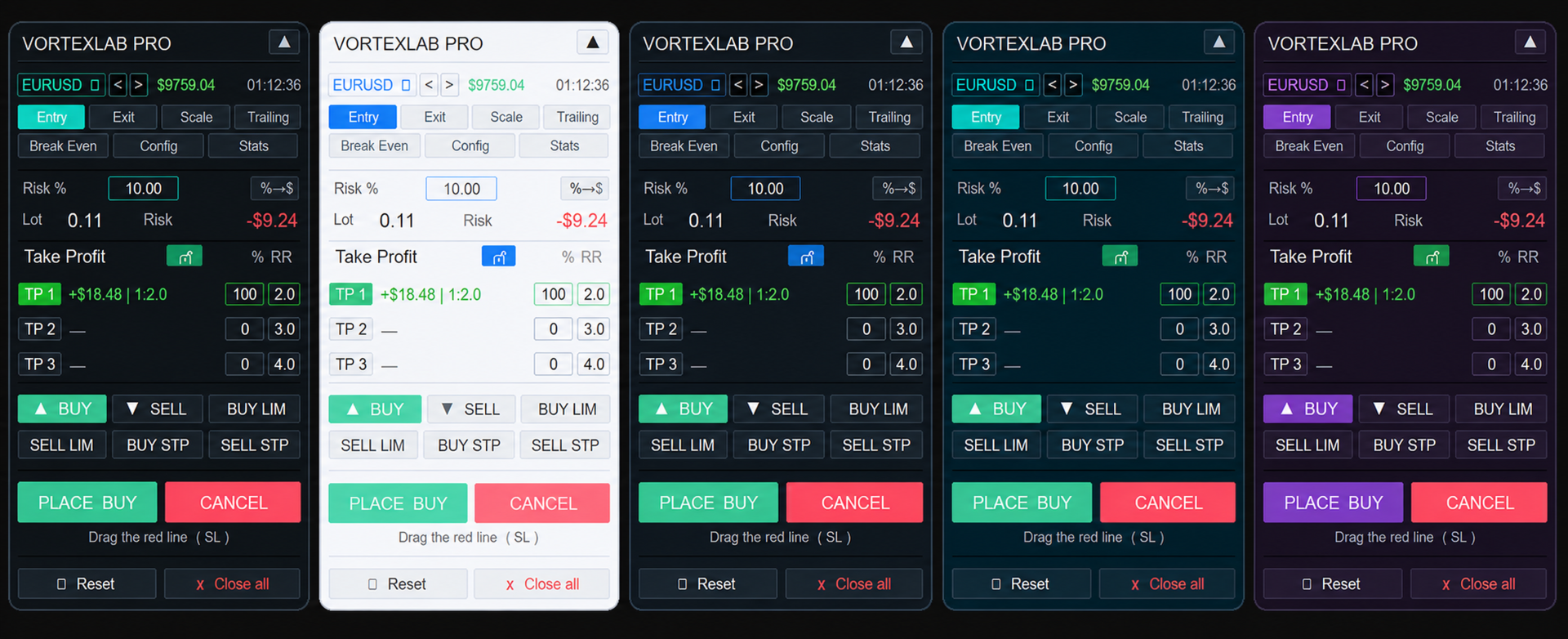
Visual styles

- Lines: displays horizontal entry, Stop Loss, and Take Profit lines.
- Boxes: displays colored risk and reward zones with information boxes.

The chart information can include price, distance in points, monetary risk, estimated profit, volume, and risk-to-reward ratio. Entry, Stop Loss, and Take Profit colors can be customized, together with the line width.

Supported order types

- Market Buy.
- Market Sell.
- Buy Limit.
- Sell Limit.
- Buy Stop.
- Sell Stop.

Before sending a request, the panel checks the symbol's trading permissions, minimum and maximum volume, volume step, actual tick size, Stops Level, Freeze Level, Stop Loss and Take Profit placement, supported execution mode, spread limit, and configured risk limits.

The supported filling mode is detected automatically between RETURN, IOC, and FOK when the symbol properties allow it. Prices are aligned to the actual tick size, which is not always equal to Point.

Splitting an entry into smaller orders

Open a position in parts allows a large entry to be divided into smaller orders.

The user defines the maximum volume for each part. If the calculated volume exceeds this value, the panel sends the required number of parts without changing the planned total volume. The Place button shows in advance how many orders will be sent.

This function can be combined with the three Take Profit targets. Volume is first allocated to each target, and each target allocation can then be divided into smaller broker-valid orders.

Custom order comments

The product can add a custom comment to submitted orders. The user can enable or disable comments, define a base text, and append the target number automatically to identify TP1, TP2, and TP3 orders.

Spread limit

Spread Limit blocks a new entry when the current spread is greater than the configured maximum. This check is performed before sending orders and does not modify positions that are already open.

Safety limits

The following protections can be configured in the input parameters:

- Maximum total volume per entry.
- Maximum risk as a percentage of current equity.
- Daily loss limit in the account currency.
- Blocking of new entries after the daily loss limit is reached.
- Optional closing of positions and cancellation of orders belonging to the configured Magic Number when the daily limit is reached.
- Management restricted to the product's Magic Number.
- Optional restriction of symbol changes from the panel.

The daily protection uses the equity recorded at the beginning of the broker's server day. A value of zero disables the corresponding limit.

Magic Number management

Every order sent by the panel receives the configured Magic Number. Manage only this EA's Magic Number prevents the management functions from modifying manual trades or positions belonging to other systems. This protection is enabled by default.

If management of other identifiers is deliberately enabled, the active filters should be checked carefully before closing positions or deleting orders.

Close panel

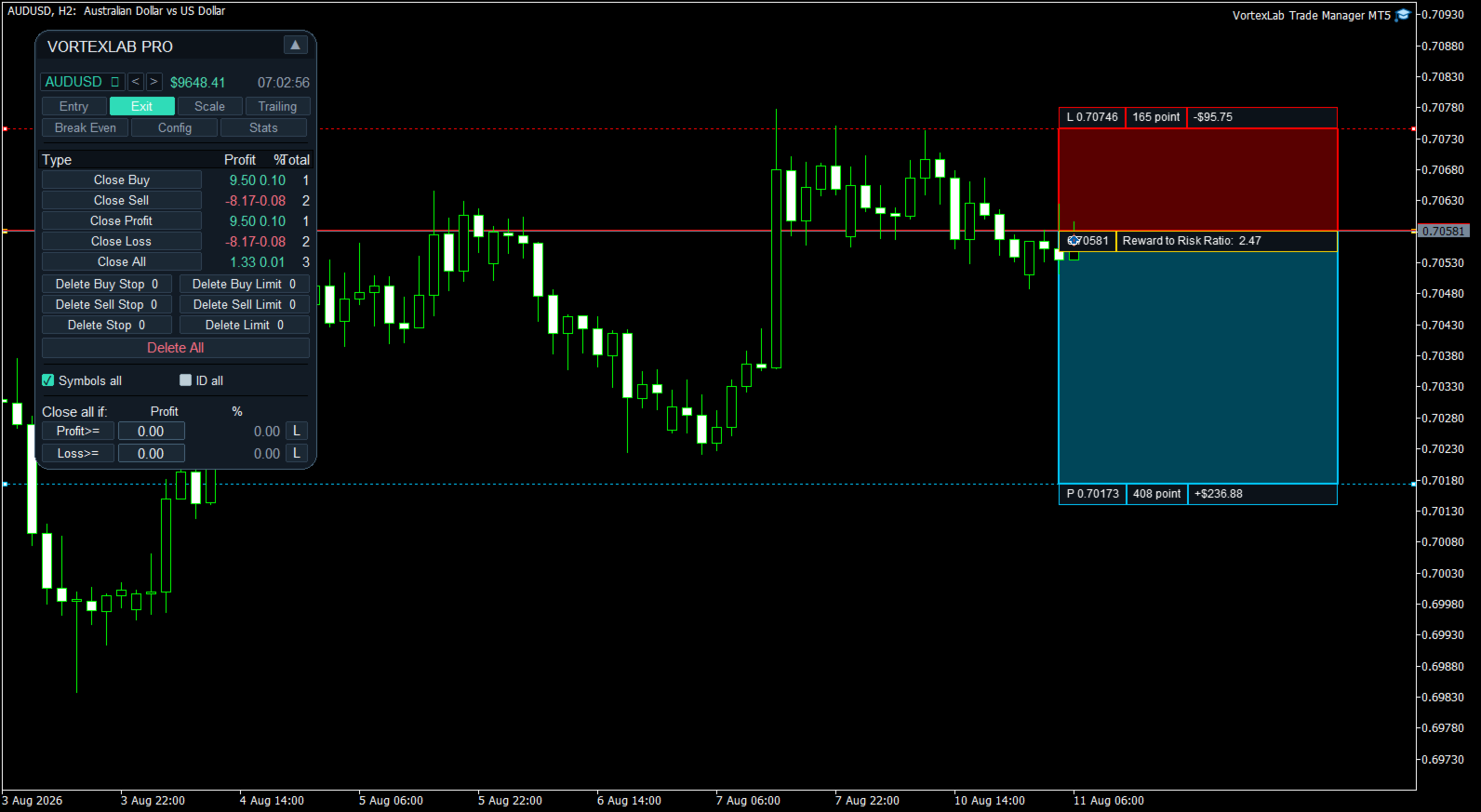
The Close tab manages open positions and pending orders.

- Close Buy: closes Buy positions.
- Close Sell: closes Sell positions.
- Close Profit: closes positions with a positive floating result.
- Close Loss: closes positions with a negative floating result.
- Close All: closes all positions included by the active filters.

For each group, the table displays floating profit or loss, its percentage of the account balance, and the total number of matching positions.

Deleting pending orders

Pending orders can be deleted by type using Delete Buy Stop, Delete Sell Stop, Delete Stop, Delete Buy Limit, Delete Sell Limit, Delete Limit, and Delete All.

The panel displays how many orders match each category. Delete All requests confirmation before deleting the orders included by the active filters.

Closing filters

Symbols All allows the closing functions to include other symbols. ID All allows other Magic Numbers to be included when the protection configured in the inputs permits it.

When both filters are disabled, management is concentrated on the current symbol and the product's Magic Number. Check these filters before using Close All or Delete All.

Confirmation dialogs

Close All and Delete All require confirmation. The dialog allows the user to confirm or cancel the action.

Selective actions such as Close Buy, Close Sell, Close Profit, and Close Loss are executed directly. They should only be used after checking the active filters.

Automatic closing by profit or loss

Close all if monitors the combined floating result of the selected positions.

The panel can close the selected positions when their combined profit reaches a configured amount or when their combined loss reaches a configured limit. The condition is monitored in real time while MetaTrader 5 remains open and connected.

The panel also displays the configured amount as an approximate percentage of the account balance.

The L buttons can place broker-side protection levels on positions of the current symbol. This serves as a backup for local monitoring. With mixed Buy and Sell exposure, the combined result may be approximate because every position has its own level.

Trailing Stop

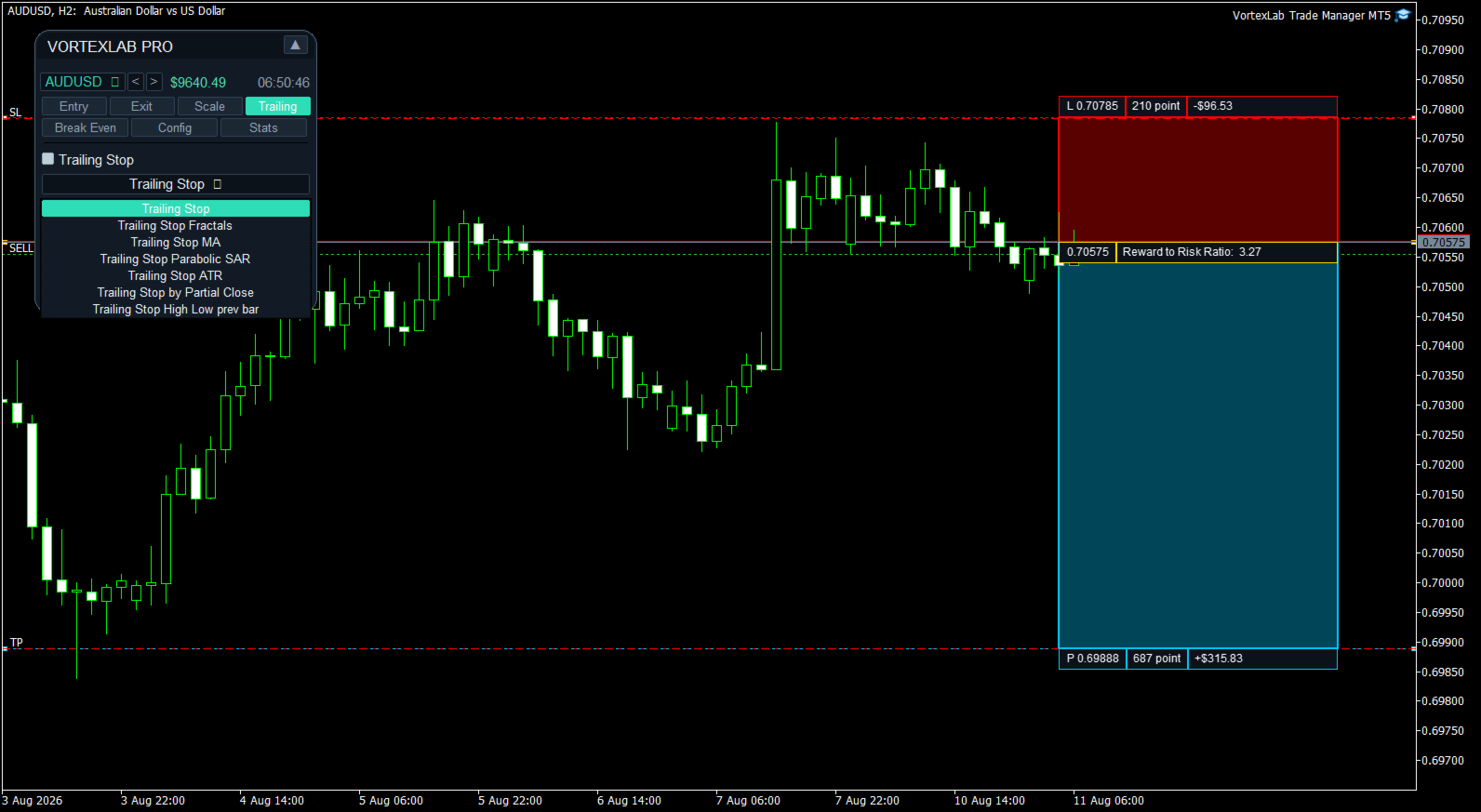
The Trailing tab includes seven management methods.

Classic Trailing Stop

Uses Start, Distance, and Step. The Stop Loss begins following the market after the minimum profit is reached and only moves in the protective direction.

Fractals Trailing Stop

Uses symbol fractals to update the Stop Loss. The activation distance, timeframe, and number of scanned bars can be configured. A lower fractal is used for Buy positions and an upper fractal for Sell positions.

Moving Average Trailing Stop

Places the Stop Loss using a moving average. The activation distance, timeframe, period, calculation method, and applied price can be configured.

Available methods are Simple, Exponential, Smoothed, and Linear Weighted. The moving average can be applied to Close, Open, High, or Low.

Parabolic SAR Trailing Stop

Updates the Stop Loss using Parabolic SAR. The activation distance, timeframe, Step, and Maximum can be configured.

ATR Trailing Stop

Calculates the trailing distance using Average True Range. The activation distance, timeframe, ATR period, coefficient, and optional use of the previous candle's High or Low as the base price can be configured.

Trailing Stop after a partial close

Detects a reduction in the position volume. After the first partial close, it can move the Stop Loss to the position's opening price.

Previous High or Low Trailing Stop

Uses the previous closed candle's Low for Buy positions and High for Sell positions. The activation distance, timeframe, and additional distance in points can be configured.

Scale: multi-level partial closes

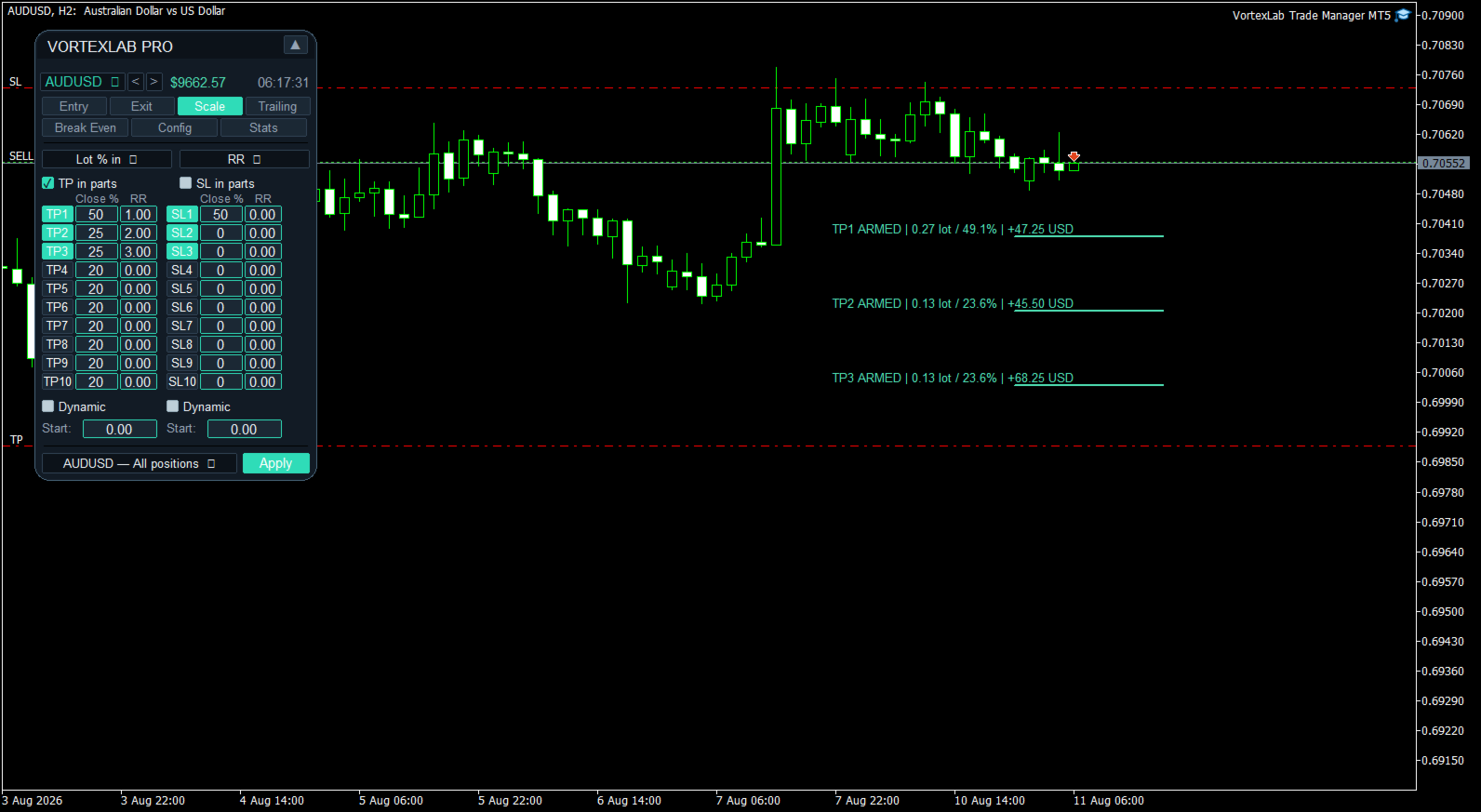
The Scale tab can program up to ten partial Take Profit levels and ten partial Stop Loss levels.

Every level can be enabled or disabled independently. The volume to close can be defined as:

- A percentage of the initial position volume.
- A percentage of the current position volume.
- A fixed lot amount.

Price levels can be defined using:

- Automatic distribution.
- Distance in points.
- Exact price.
- Risk-to-reward ratio.
- Percentage price change.

The configuration can be applied to all compatible positions on the symbol or to one position selected by ticket.

Visual lines show Armed for a prepared level, Wait while waiting for dynamic activation, and Done after a partial close has been executed. They also show the planned volume and estimated monetary result.

Dynamic Scale

Partial Take Profit and Stop Loss levels can use a dynamic anchor. The system records the best price reached by the position and can recalculate the levels from that reference. Start defines when dynamic management begins.

Automatic Break Even

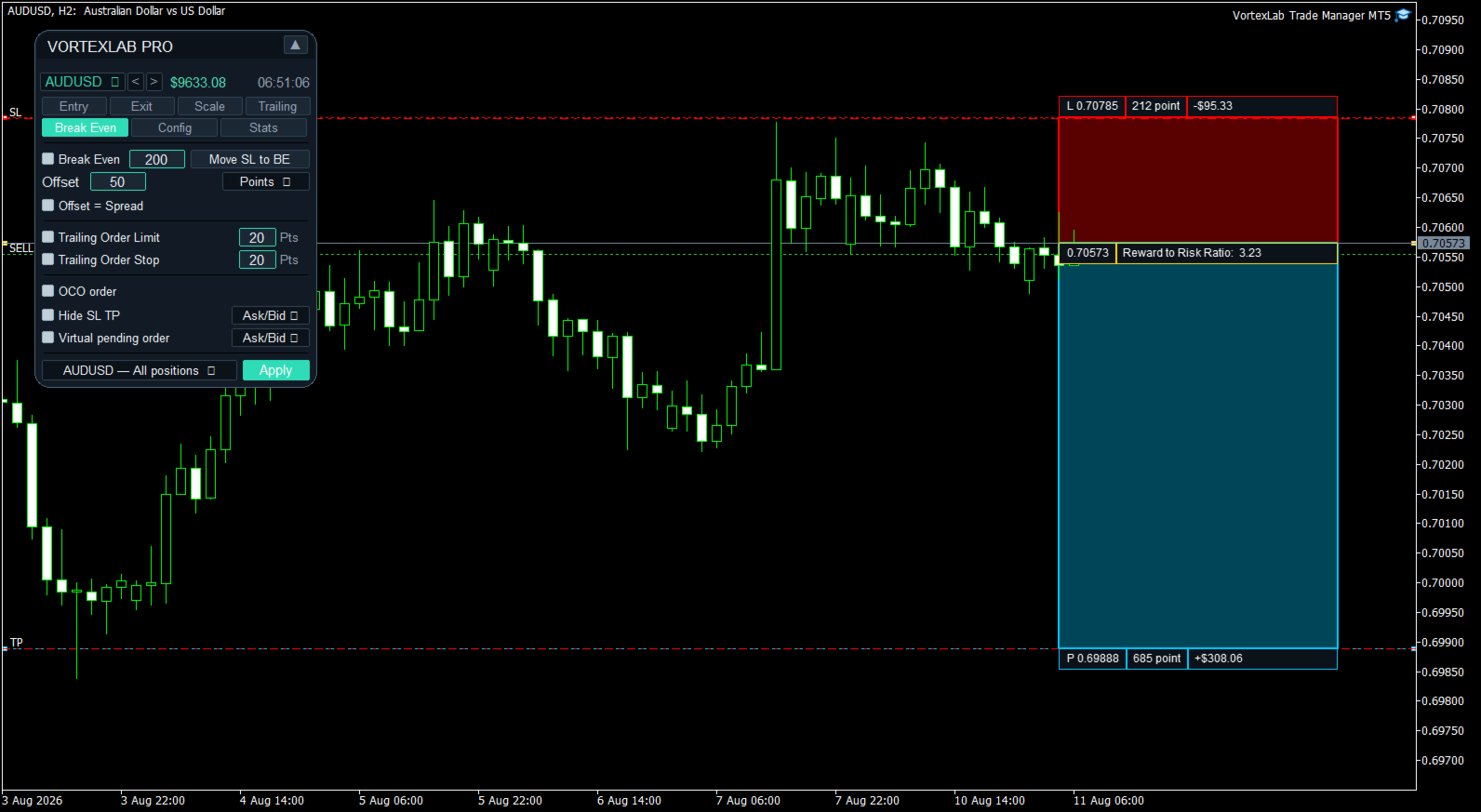
Break Even moves the Stop Loss to a protective level when the configured activation condition is reached.

The activation can be expressed as:

- Points.
- Risk-to-reward ratio.
- Percentage price change.
- Percentage of the distance to Take Profit.

Offset can place the Stop Loss exactly at entry, above entry for a Buy, below entry for a Sell, or at a distance based on the current spread. The Stop Loss is changed only if the new level improves existing protection.

Visual Break Even line

When Break Even is enabled, the product draws a visual line for every managed position. The line shows the price that will activate Break Even, the new Stop Loss price, and whether the condition is still pending or has been reached.

The initial Stop Loss and Take Profit references are preserved so that calculations based on RR or a percentage of Take Profit remain stable after other tools modify the current Stop Loss.

Manual Break Even

Move SL to BE immediately applies the configured Offset without waiting for the activation price. It can be used to protect all compatible positions on the symbol.

The RR mode requires an initial Stop Loss. The percentage-of-TP mode requires an initial Take Profit.

Trailing pending orders

Trailing Order Limit and Trailing Order Stop can move pending orders while maintaining a configured distance from the current market price.

The function respects Stops Level, Freeze Level, Stop Loss, and Take Profit. It only manages orders belonging to the corresponding symbol and Magic Number.

OCO orders

OCO can be used with pending orders placed on opposite sides of the market. When one pending order is actually filled, the panel cancels pending orders on the opposite side.

Same-side orders used for multiple Take Profit allocations are preserved. Manual deletion or expiration does not trigger OCO cancellation.

Hidden Stop Loss and Take Profit

Hide SL TP converts the current protective levels of a position into virtual levels.

When applied, the panel records the existing Stop Loss and Take Profit, removes them from the broker server, monitors the selected price reference, and closes the position at market when a virtual level is reached.

Available reference prices are Ask/Bid, Ask, Bid, Mid, and Close. The function can be applied to all compatible positions or to a selected position.

Hidden levels depend completely on local operation. MetaTrader 5 must remain open, connected, and authorized for algorithmic trading.

Virtual pending orders

Virtual Pending Order prepares a pending order without sending it immediately to the broker server.

The panel stores the order type, trigger price, Stop Loss, Take Profit targets, and volume distribution locally. When the selected reference price reaches the level, the panel sends a market order.

Available references are Ask/Bid, Ask, Bid, Mid, and Close. One virtual pending order can be armed per panel instance.

The virtual order does not exist on the broker server. It cannot be triggered while MetaTrader 5 is closed, disconnected, or after the product has been removed from the chart.

Automatic chart-range levels

The panel can calculate technical levels from closed candles on the current timeframe.

For Stop Loss, it uses the selected period's lowest Low for a Buy and highest High for a Sell. For Take Profit 1, it uses the highest High for a Buy and lowest Low for a Sell. An additional distance in points can be applied.

Presets

Presets can save, load, and delete the main panel configurations, including risk basis, percentage and fixed risk, custom value, spread limit, order splitting, symbol management, automatic chart-range levels, and the configuration of the three Take Profit targets.

Account and symbol statistics

The Stats tab displays:

- Balance and equity.
- Used margin and free margin.
- Margin level and leverage.
- Account currency.
- Spread, Swap Long, and Swap Short.
- Contract size.
- Minimum, maximum, and step volume.
- Stops Level and symbol digits.
- Result for the current day, week, and month.
- Product version and Magic Number.
- Current symbol, timeframe, and server time.

Alerts

The product can use MetaTrader 5 alerts, sounds, and push notifications. Push notifications require a valid MetaQuotes ID configured in MetaTrader 5.

Languages

The interface includes English, Spanish, Portuguese, French, German, Russian, Arabic, Simplified Chinese, Hindi, and Japanese. English is the default language and another language can be selected in the input parameters.

Visual themes

The panel includes Dark, Light, Midnight, Charcoal, Ocean, Forest, Sunset, Purple, Gold, Slate, Sky, Ice, Mint, and Vortex themes.

Movable and minimizable panel

The panel can be moved by dragging its header. It can also be minimized so that only the top bar remains visible. The selected position is stored to preserve the workspace arrangement after a restart.

Account-mode compatibility

The product is designed for MetaTrader 5 and can be used on Hedging and Netting accounts.

On a Hedging account, each entry can remain as a separate position. On a Netting account, trades on the same symbol are combined into one net position, and the broker maintains one Stop Loss and one Take Profit for that position.

Test multi-target execution with the broker and account mode that will be used.

Functions that require MetaTrader 5 to remain open

The following functions run locally and require MetaTrader 5 to remain open, connected, and authorized for algorithmic trading:

- Automatic closing by combined profit or loss.
- Automatic Break Even.
- Trailing Stop.
- Scale partial closes.
- Trailing pending orders.
- OCO management.
- Hidden Stop Loss and Take Profit.
- Virtual pending orders.
- Alerts and push notifications.

A MetaTrader 5 compatible VPS can be used for continuous operation.

VortexLab Trade Manager MT5 is a calculation, execution, and trade-management utility. It does not provide financial advice, generate signals, or guarantee profits. The user is responsible for reviewing every order and testing the product on a demo account before using it on a live account.
추천 제품
HedgeSafe Trade Assistant 위험 관리를 우선하는 MetaTrader 5용 수동 매매 패널입니다. HedgeSafe는 BUY 또는 SELL을 누르기 전에 차트에서 거래를 준비하고 검증하며 관리할 수 있도록 돕습니다. HedgeSafe는 신호 서비스, 시장 예측 도구, AI 봇 또는 자동매매 전략이 아닙니다. 거래 방향을 선택하거나 수익을 보장하지 않습니다. 모든 거래 결정은 트레이더의 책임입니다. 주요 기능 계좌 잔액 비율 또는 계좌 통화의 고정 금액으로 랏 계산. Stop Loss를 포인트 또는 가격으로, Take Profit을 포인트, 가격 또는 R 배수로 설정. 금액 위험, 예상 보상, 거래량 및 위험/보상 비율 미리 보기. Entry, Stop Loss, Take Profit 차트 라인을 패널 값과 동기화. BUY와 SELL 준비 상태를 별도로 표시하고 실행 직전에 방향별 검증 수행. 최소/최대 거래량, 거래량 단계, tick size, tick value,
Symbol Manager for MT5
Taras Slobodyanik
5 (3)
Symbol Manager or Grid Manager, designed to group orders into one position (by Symbol or by Magic Number). This utility will be useful to multi-currency traders (many EAs), who can have multiple orders on several pairs. You will be able to see the total number of lots, the total profit, and set virtual stop loss and virtual take profit. To set a real TP (or SL), you must first set the virtual value, and then enter the command in this cell: "set". If you want to set real TP/SL for all orders at
Вот профессиональный перевод на английский язык, адаптированный под стандарты MQL5 Market: Trade Panel Pro — Professional Risk Management & Order Execution Terminal for MetaTrader 5 Trade Panel Pro is an advanced, all-in-one utility for MetaTrader 5, designed for active day traders and professionals. It combines precise risk calculation with lightning-fast order execution, helping you protect your capital and manage multi-target trades with ease. Main Advantages and Key Features Automated L
RiskCopilot
Carlos Adrian Feged Zapata
한국어 RiskCopilot Utility - 당신의 지능형 거래 어시스턴트 "위험을 보고, 거래를 마스터하세요." RiskCopilot Utility는 MetaTrader 5를 위한 궁극적인 위험 관리 및 포지션 사이징 솔루션입니다. 이 포괄적인 거래 어시스턴트는 실시간 계산, 고급 위험 평가 도구, 전문적인 거래 분석을 제공하면서 귀하의 거래 결정을 통제하지 않습니다. 모든 자산 클래스에서 정확한 위험 관리를 추구하는 초보자와 전문 트레이더 모두에게 완벽합니다. 당신은 전략에 집중하고, 우리는 계산을 처리합니다. 주요 기능: 지능형 포지션 사이징 : 사용자 정의 가능한 위험 비율과 계좌 잔액을 기반으로 한 자동 계산 다중 통화 지원 : USD, EUR, GBP, JPY, AUD, CAD, CHF 및 기타 주요 통화 스프레드 모니터링 시스템 : 다양한 상품에 대한 적응형 한계를 가진 지능형 필터링 실시간 시장 정보 : 캔들 타이머, 시장 상태, 현지 시간 및 서버 시간
Visual Dolphin Indicator
AL MOOSAWI ABDULLAH JAFFER BAQER
Visual Dolphin Indicator Unlock the rhythm of the market with the Visual Dolphin Indicator, your ultimate tool for identifying and capitalizing on market trends with clarity and confidence. Designed for both novice and experienced traders, this indicator eliminates the noise and guesswork, providing crystal-clear buy and sell signals directly on your chart. The Logic Behind the Waves The core of the Visual Dolphin Indicator is a sophisticated yet intuitive dual-wave system based on moving avera
Breakevan Utility
Jose Luis Thenier Villa
BreakEvan Utility  Is a simple tool in a panel with this utilities: This utility will draw a Golden Line in the chart applied showing the breakeven price, considering all the positions opened for that specific symbol. Also the information panel shows: Balance Breakeven Price for that chart Force Breakeven (for that symbol) as ON/OFF Force Breakeven Global (takes into account all trades opened) as ON/OFF Total Lots opened for Symbol Total Lots opened Global And two buttons: Force Breakeven: Whe
Trade Panel by RWBTradeLab — The Ultimate Trade & Risk Management Utility Take full control of your MetaTrader 5 trading with the   Trade Panel by RWBTradeLab ! Designed by RWBTradeLab, this all-in-one utility is built for both professional and beginner traders who want to execute trades faster, manage risk perfectly, and analyse their account performance in real-time. Say goodbye to manual lot calculations and slow trade execution. With a sleek, draggable, and highly intuitive User Interfa
Click Trading
Jawad Tauheed
5 (2)
One Click Trading – Auto TP SL Developer TraderLinkz Version 1.00 Category Utility What it does Adds missing TP and SL to your manual trades and pending orders Sets them once per ticket Lets you move TP and SL afterward Works on hedging and netting accounts Scans on every tick and reacts on trade events Why you want it You place faster entries You get consistent risk and exit targets You reduce fat finger errors You keep full manual control Quick start Attach the EA to any chart Keep TP and SL e
FREE
ZyloFx Position Size Calculator MT5 is a free risk management utility for MetaTrader 5 designed to help traders calculate the appropriate position size based on account risk and stop loss distance. This tool helps traders determine how many lots to trade before entering a position, supporting more consistent risk management and better trading discipline. Main Features Automatic position size calculation Risk percentage mode Fixed money risk mode Balance and equity-based calculations Suggested lo
DR Trade and Risk Manager: The Foundational Algorithmic Risk Console for MT5 For the discretionary trader, the greatest adversary is not the market; it is the undisciplined self. You have a solid strategy, but in moments of high pressure, do you follow your rules with perfect consistency? Do you cut losses without hesitation? Do you let winners run without cutting them short out of fear? For most, the answer is no. This gap between strategy and execution is where profits are lost. DR Trade and R
목적: 마켓 워치 의 모든 심볼을 현재 시간 간격(TF)에 맞춰 default.tpl 템플릿으로 자동으로 열고, 현재 활성 차트를 제외한 모든 차트를 닫습니다. 수동 작업 없이 여러 종목을 빠르게 분석하기에 이상적입니다! 주요 기능: 자동화: 클릭 한 번으로 수십 개 차트를 열 수 있습니다. 안전성: 불필요한 차트를 닫고 현재 차트를 유지합니다. 유연성: 사용자 정의 default.tpl 템플릿 사용(사전 설정 필요!). 현재 시간 간격: 스크립트 실행 시 활성 차트의 TF와 동일하게 차트가 열립니다. 설치 방법: OpenAllSymbolsSafe.mq5 파일을 MetaTrader 5 터미널의 MQL5/Scripts 폴더에 복사합니다. 터미널을 재시작하거나 스크립트 목록을 새로 고칩니다(마우스 오른쪽 버튼 → 새로 고침 ). ️ 주의사항: default.tpl 이 MQL5/Profiles/Template/ 폴더에 있는지 확인하세요. 현재 차트를 제외
FREE
Turbo Close All is a powerful and versatile script designed to help traders quickly and efficiently manage their trading positions and pending orders on MetaTrader 5. With its advanced features and customizable settings, this script is an essential tool for traders who want to streamline their trading process and maintain control over their positions and orders. Key Features: Comprehensive Closing Options: Turbo Close All allows you to close all market positions and/or delete pending orders bas
Easy Trade Executor는 MT5용 빠른 포지션 크기 계산, 주문 실행 및 거래 관리 도구입니다. Open Price, Stop Loss 및 Take Profit 레벨을 차트에 직접 배치하고, 포지션 크기를 자동으로 계산한 후 몇 번의 클릭만으로 리스크를 관리하면서 거래를 실행할 수 있습니다. 왜 Easy Trade Executor를 선택해야 할까요? Easy Trade Executor는 단순히 리스크를 계산하는 것을 넘어, 차트에서 직접 빠르고 효율적으로 거래를 관리하고자 하는 트레이더를 위해 설계되었습니다. 이 도구는 포지션 크기 계산, 주문 실행 및 거래 관리를 하나의 워크플로우로 통합하여 수동 계산이나 여러 터미널 창 사이를 오가는 대신 거래 자체에 집중할 수 있도록 도와줍니다. Easy Trade Executor의 주요 기능: 리스크 기반 자동 포지션 크기 계산; 차트에서 직접 Market Order 및 Pending Order 실행; 자동 거래 관리를 위한 T
JMM Trade Panel MT5 JMM Trade Panel MT5는 MetaTrader 5용 차트 기반 거래 관리 도구입니다. 차트에서 직접 Buy와 Sell 주문을 실행하고, 패널에서 로트를 빠르게 조정하며, 바스켓별 손익과 관리 상태를 확인할 수 있습니다. 전체 사용자 설명서:  다운로드 주요 기능 차트 내 Buy, Sell 및 Close All 버튼. EA가 관리하는 모든 포지션을 한 번에 청산. Magic Number와 관계없이 계좌의 모든 오픈 포지션을 관리하는 옵션. 현재 차트 심볼만 관리하거나 계좌의 모든 심볼을 관리. 패널을 통한 수동 로트 설정. +0.01, +0.10, +1.00, -0.01, -0.10, -1.00 로트 조정 버튼. 계좌 자본 비율과 예상 증거금을 기준으로 로트를 자동 계산하는 옵션. Buy 및 Sell 바스켓 정보 개별 표시. 바스켓 손익을 계좌 통화와 핍으로 표시. 전체 관리 손익을 계좌 통화와 핍으로 표시. Buy 및 Sell 바스켓
TradingCoPilot
Viktor Mitrofanov
Trading Co-Pilot for MetaTrader 5 Advanced Position Management for Manual Traders Trading Co-Pilot is a professional trade management assistant designed for traders who open positions manually and want precise, automated control over risk and profit handling. It does not open trades. It manages them intelligently. You focus on entries. The Co-Pilot protects and optimizes the exit. How It Works Once you open a manual position, Trading Co-Pilot automatically: • Applies Stop Loss • Sets Take Profit
FREE
Grid Manager — Manual Multi-Basket Grid Assistant for MT5 Grid Manager is a hands-on control panel for building and managing grid "baskets" directly on your chart. You decide the direction and the moment; the tool opens the grid, manages every leg, and protects the position with money-based risk controls, on-chart breakeven/SL/TP lines, and one-click actions. It is an execution and management assistant — fast, visual, and fully under your control. What it is — and what it is not Grid Manager is
SL TP Panel
Mikhail Ostashov
SL TP Panel — Visual Trading Panel for MT5 A convenient trading panel that lets you place pending orders by simply dragging lines on the chart. Stop Loss, Take Profit, order type, and lot size — everything is controlled with your mouse in seconds. Who is this for This panel is designed for manual traders who value speed of execution. Instead of opening the order window, filling in fields, and calculating levels — just drag a line to the desired price and click one button. Key Features Visua
Trade assistant pro v8
Ahmed Mohammed Bakr Bakr
FREE FREE FREE Trade Assistant MT5 – Professional Trading & Risk Management Panel Trade Assistant MT5 is an advanced trading panel designed to help traders execute orders faster, safer, and more professionally . It simplifies manual trading by combining smart order management , precise risk control , and one-click execution , making it ideal for both beginners and advanced traders. This tool does not trade automatically . Instead, it empowers you with full control while applying professional-gra
FREE
Expert Trade Panel — Профессиональная панель ручной торговли и управления рисками **Expert Trade Panel** — это мощный и интуитивно понятный торговый терминал прямо на вашем графике MetaTrader 5. Панель разработана для трейдеров, которым необходим полный контроль над позициями, быстрое исполнение ордеров, автоматический расчет бесубытка и визуальный контроль уровней усреднения. ---   Ключевые возможности  1. Управление в один клик и каскадный Тейк-Профит * **Исполнение сделок:** Мгновенный вх
This EA will provide you with the amount of points once you open a position, being a sell or a buy. I use it instead of the profit, as this plays some tricks in my mind. You can also set up a Take Profit and/or a Stop Loss in the settings of the EA. The point calculation will only work with manual trade. Magic number is 0. You also have the possibility to create labels for + Haut, - Haut, - Bas, + Bas and some trendlines at a 45 or - 45 degree angle. Here are the settings : Settings  Choices
Trade Copilot - 금(XAUUSD) 및 모든 상품을 위한 반자동 리스크 관리 패널 Trade Copilot는 자신의 진입 결정권을 유지하면서도 EA와 같은 규율을 원하는 재량 트레이더를 위해 설계된 반자동 트레이딩 패널입니다. 방향과 가격대는 사용자가 결정하고, 리스크 사이징, 손절 설정, 익절 관리, 포지션 보호는 패널이 자동으로 처리합니다. 주요 기능 - 리스크 기반 로트 계산 - Risk %, Risk $, 고정 로트 중 선택 가능; 손절 거리에 따라 패널이 포지션 크기를 자동 계산 - 3가지 손절 모드 - ATR 배수, 고정 포인트, 고정 $ 거리 - 원클릭 시장가/예약 주문(Buy/Sell Now, Pending Buy/Sell), 드래그 가능한 진입가/SL/TP 라인 - 그리드 트레이딩 - 가격 범위에 걸쳐 벨커브 로트 분배로 다수의 예약 주문 배치(마틴게일이 아님 - 로트 크기는 중심으로부터의 거리로 고정되며 손실 시 절대 두 배로 늘어나지 않음) -
Account Monitor Pro — Your Ultimate Trade Statistics Hub Account Monitor Pro is a professional information dashboard designed for traders who combine Expert Advisors (EAs) and manual trading. The indicator separates statistics in real-time based on your Magic Number, allowing you to clearly see who is driving the profit: the algorithm or yourself. Key Features: Split Monitoring: Instant separation of "Robot" positions (by Magic Number) and "Manual" trades. Multi-language Support: 11 languages in
FREE
DDKiller Pro
Njaratahiry Michael Randrianiaina
Stop Blowing Your Account. Once and For All. DDKiller Pro is the MT5 risk guardian that runs silently on your chart and shuts down trading the moment you hit a limit — whether you're grinding a prop firm challenge or managing your own CFD account. The problem every trader knows: You set your rules. You break them anyway. One revenge trade. One overleveraged position. One session that erases a month of gains. DDKiller Pro removes that decision from your hands entirely. What it does: The second yo
Margin Call Shield – Defend Your Margin on Your Terms Margin Call Shield is a tool for MetaTrader 5 traders who want to decide for themselves which open positions are closed during margin call situations before the platform does so automatically based on its internal rules. By default, the broker or platform decides which positions to close, often using undisclosed algorithms. Margin Call Shield lets you set this order according to your own strategy. Why Was Margin Call Shield Created? In a mar
BulkOp Trade Manager
Ahmed Jumaa Saif Ali Almheiri
BulkOp Trade Manager Trade faster. Manage smarter. Close with confidence. BulkOp Trade Manager is a powerful MT5 utility EA built for traders who need speed, control, and clean execution directly from the chart. It is designed for active manual traders, scalpers, gold traders, and anyone who wants to manage multiple positions with less delay and fewer clicks. Why BulkOp? Ultra-fast Buy and Sell execution One-click Bulk Close Profit One-click Bulk Close Loss Keyboard trading control Bulk order e
Size Bars
Viktor Loginov
Size Bars – индикатор отображает на графике максимальный, минимальный, текущий и средний размер баров (свечей) за выбранный период. Отображаемые параметры индикатора Size Bars: 1)       Текущий размер бара в писах (по максимум/минимум, тело бара). 2)       Максимальный, минимальный и средний размер свечей BUY . 3)       Максимальный, минимальный, средний размер свечей SELL . 4)       Количество свечей BUY и количество свечей SELL . 5)       Среднее количество свечей подряд BUY и SELL . 6)     
Core function Intelligent transaction management one-click opening and closing operation, which supports user-defined lots to set multiple closing modes: all closing, closing by direction and closing by profit and loss status. Professional risk control, real-time risk monitoring and spread control to avoid high-cost trading environment. Visual control panel has an intuitive graphical interface, and all functions can be operated with one button to display position information, profit and loss sta

FREE
Local Copy Trader Utility - Professional Copy Trading System Overview Local Copy Trader Utility is the complete solution for mirroring trades between MetaTrader 5 accounts. With both Master and Slave functionality in one powerful Expert Advisor, it delivers reliable, lightning-fast trade copying with zero external dependencies. Perfect for managing multiple accounts, following trading signals, or transferring trades between brokers, this system ensures your positions stay perfectly synchronized
When executing an order, whether through the Metatrader ticket on a computer or the Metatrader app on a mobile device, either manual or pending, Easy Trade will automatically set the take profit and stop loss levels, as well as a limit order with its respective take profit and stop loss levels. It follows the trading strategy for market open (US30, US100, US500), but it can be applied to any market asset.

TP SL Bot MT5
Ruslan Brezovskiy
5 (1)
TP SL Bot is a utility that automatically sets Stop Loss and Take Profit for newly opened orders in several ways. There is also a function for calculating the volume that you need to open the trade to get the desired amount with the specified Stop Loss / Take Profit size. There are several options for calculating the size and setting parameters: 1. Setting based on the amount specified by the user as a percentage of the current deposit balance. 2. Setting as the amount entered by the user. 3. Se

이 제품의 구매자들이 또한 구매함
Trade Assistant MT5
Evgeniy Kravchenko
4.41 (215)
거래당 위험 계산, 라인을 사용한 손쉬운 신규 주문, 부분 청산 기능을 통한 주문 관리, 7가지 유형의 트레일링 스탑 및 기타 유용한 기능을 제공합니다. 추가 자료 및 지침 설치 지침   -   애플리케이션 지침   -   데모 계정용 애플리케이션 평가판 라인 기능       - 차트에 개시선, 손절매, 차익실현을 표시합니다. 이 기능을 사용하면 새로운 주문을 쉽게 하고 개봉 전에 추가 특성을 볼 수 있습니다. 위기 관리       -       위험 계산 기능은 설정된 위험과 손절매 주문의 크기를 고려하여 새 주문의 볼륨을 계산합니다. 이를 통해 손절매 크기를 설정하고 동시에 설정된 위험을 존중할 수 있습니다. 로트 계산 버튼 - 위험 계산을 활성화/비활성화합니다. 필요한 위험 값은 위험 필드에 0에서 100 사이의 백분율 또는 예금 통화로 설정됩니다. 설정 탭에서 위험 계산 옵션을 선택합니다. $ 통화, % 잔액, % 지분, % 자유 마진, % 사용자 정의, % AB 이전
Trade Manager EA에 오신 것을 환영합니다. 이 도구는 거래를 보다 직관적이고 정확하며 효율적으로 만들기 위해 설계된 궁극적인 리스크 관리 도구 입니다. 단순한 주문 실행 도구가 아닌, 원활한 거래 계획, 포지션 관리 및 리스크 제어를 위한 종합 솔루션입니다. 초보자부터 고급 트레이더, 빠른 실행이 필요한 스캘퍼에 이르기까지 Trade Manager EA는 외환, 지수, 상품, 암호화폐 등 다양한 시장에서 유연성을 제공합니다. Trade Manager EA를 사용하면 복잡한 계산은 이제 과거의 일이 됩니다. 시장을 분석하고 진입, 손절 및 익절 수준을 차트의 수평선으로 표시한 후 리스크를 설정하면, Trade Manager가 이상적인 포지션 크기를 즉시 계산하고 SL 및 TP 값을 실시간으로 표시합니다. 모든 거래가 간편하게 관리됩니다. 주요 기능: 포지션 크기 계산기 : 정의된 리스크에 따라 거래 크기를 즉시 결정합니다. 간단한 거래 계획 : 진입, 손절, 익절을 위한
Local Trade Copier EA MT5
Juvenille Emperor Limited
4.97 (144)
Local Trade Copier EA MT5 를 사용하여 매우 빠른 거래 복사 경험을 해보세요. 1분 안에 간편하게 설정할 수 있으며, 이 거래 복사기를 사용하면 Windows 컴퓨터 또는 Windows VPS에서 여러 개의 MetaTrader 터미널 간에 거래를 0.5초 미만의 초고속 복사 속도로 복사할 수 있습니다. 초보자든 전문가든   Local Trade Copier EA MT5 는 다양한 옵션을 제공하여 사용자의 특정 요구에 맞게 맞춤 설정할 수 있습니다. 이는 수익 잠재력을 높이려는 모든 사람을 위한 최고의 솔루션입니다. 지금 사용해보시고 이것이 왜 시장에서 가장 빠르고 쉬운 무역용 복사기인지 알아보세요! 팁: 여기 에서 데모 계정에서 Local Trade Copier EA MT5 데모 버전을 다운로드하여 사용해 볼 수 있습니다. 다운로드한 무료 데모 파일을 MT5 >> File >> Open Data Folder >> MQL5 >> Experts 폴더에 붙여넣고 터
================================================================================ POC BREAKOUT - V20.72. Full Professional Grade Toolkit ================================================================================ POC Breakout is a full MetaTrader 5 trading dashboard for discretionary traders who want breakout signals, Point of Control (POC) context, volume profiles, order flow, market structure, news, alerts, and advanced trade planning in one professional workspace. Attached directly to you
TradePanel MT5
Alfiya Fazylova
4.88 (166)
Trade Panel은 다기능 거래 도우미입니다. 이 애플리케이션에는 50개 이상의 수동 거래 기능이 포함되어 있으며 대부분의 거래 작업을 자동화할 수 있습니다. 구매하기 전에 데모 계정에서 데모 버전을 테스트할 수 있습니다. 데모 계정용 애플리케이션 체험판 다운로드: https://www.mql5.com/en/blogs/post/750865 . 전체 지침 여기 . 거래. 한 번의 클릭으로 거래를 수행할 수 있습니다: 리스크 자동 계산과 함께 예약 주문 및 포지션 열기. 한 번의 클릭으로 여러 주문 및 포지션 열기. 주문 그리드 열기. 예약 주문 및 포지션을 그룹별로 닫기. 포지션 방향 전환 (Buy 닫기 > Sell 열기, Sell 닫기 > Buy 열기). 포지션 잠금 (부족한 포지션을 열어 Buy와 Sell 포지션의 수량을 동일하게 만들기). 모든 포지션 한 번의 클릭으로 부분적으로 닫기. 모든 포지션의 테이크 프로핏과 스톱로스를 같은 가격 수준에 설정. 모든 포지션의 스톱로스를
베타 출시 Telegram to MT5 Signal Trader 는 곧 공식 알파 버전을 출시할 예정입니다. 일부 기능은 아직 개발 중이며, 작은 버그가 발생할 수 있습니다. 문제가 있으면 꼭 보고해 주세요. 여러분의 피드백은 소프트웨어 개선에 도움이 됩니다. Telegram to MT5 Signal Trader 는 Telegram 채널 또는 그룹의 거래 신호를 자동으로 MetaTrader 5 계정으로 복사하는 강력한 도구입니다. 공개 및 비공개 채널을 모두 지원하며, 여러 신호 제공자를 여러 MT5 계정에 연결할 수 있습니다. 소프트웨어는 빠르고 안정적으로 동작하며, 복사된 거래를 완벽히 제어할 수 있습니다. 인터페이스는 깔끔하며 대시보드와 차트가 시각적으로 구성되어 있고, 직관적인 네비게이션이 가능합니다. 여러 Signal Account를 관리하고, 공급자별 설정을 세밀하게 조정하며, 모든 동작을 실시간으로 모니터링할 수 있습니다. 필수 조건 MQL의 제한으로 인해 EA는 Te
Farmed Hedge Yield Farming | All Markets (Manual - Hybrid - Semi/Automated EA) MULTI-ASSET SUPPORT Trade any asset available on your broker - Forex: Major, Minor, Exotic pairs - Crypto: BTC, ETH, XRP, SOL, BNB - Stocks: Apple, Tesla, Amazon, Google, etc. - Commodities: Gold, Silver, Oil, Gas - Indices: US30, NAS100, SPX500, DAX40 - Any CFD your broker offers VERIFIED TRADING RESULTS - Farmed Hedge Yield Axi Copy:  https://www.mql5.com/en/signals/2356376 - Farmed Hedge Yield Exn Copy:   https:/
Exp COPYLOT CLIENT for MT5
Vladislav Andruschenko
3.97 (35)
MetaTrader 5용 전문 트레이드 복사기 MetaTrader 용 빠르고 전문적이며 신뢰할 수 있는 트레이드 복사기 입니다. COPYLOT 은 MT4와 MT5 터미널 간의 Forex 거래 복사를 지원하며, Hedge 및 Netting 계좌를 모두 지원합니다. COPYLOT MT5 버전 지원 구성: - MT5 Hedge → MT5 Hedge - MT5 Hedge → MT5 Netting - MT5 Netting → MT5 Hedge - MT5 Netting → MT5 Netting - MT4 → MT5 Hedge - MT4 → MT5 Netting MT4 버전 전체 설명 + DEMO + PDF 구매 방법 설치 방법 로그 파일 확인 방법 테스트 및 최적화 방법 Expforex의 모든 제품 MT4 터미널로도 거래를 복사할 수 있습니다(MT4 → MT4, MT5 → MT4): COPYLOT CLIENT for MT4 COPYLOT은 2개, 3개, 심지어 10개의 터미널과 동시에 작동할
Anchor Trade Manager
Kalinskie Gilliam
5 (6)
Anchor: The EA Manager Your EAs manage their own trades. Anchor manages the account around them. Anchor gives you one place to control your EAs, manage risk and decide when trading is allowed. Any EA, any vendor, any broker or symbol. No source-code changes required. The Problem Most EAs only know what they are doing. They cannot see when another EA is already trading, when several EAs open and are stacking risk or when the account has reached your loss limit. Even using just one EA, it may not
Telegram to MT5 Multi-Channel Copier 는 Telegram 채널의 트레이딩 신호를 자동으로 MetaTrader 5로 직접 복사합니다. 봇도, 브라우저 확장 프로그램도, 수동 복사도 필요 없습니다. Telegram에서 신호를 받으면 EA가 몇 초 안에 터미널에서 거래를 엽니다. 본 제품은 두 가지 구성 요소로 구성되어 있습니다: Telegram 채널을 감시하는 Windows 애플리케이션과 MT5 터미널에서 신호를 실행하는 이 Expert Advisor입니다. MT4 버전도 제공됩니다. 설정 가이드 및 애플리케이션 다운로드: https://www.mql5.com/en/blogs/post/768988 작동 방식 Windows 애플리케이션은 봇이 아닌 사용자 자신의 API 자격 증명을 사용하여 Telegram에 연결됩니다. 이는 프라이빗 및 VIP 채널을 포함하여 구독 중인 모든 채널, 그룹 또는 주제를 읽을 수 있음을 의미합니다. 신호를 감지하면 이를 파싱하여
Footprint Chart Pro — Professional OrderFlow EA for MetaTrader 5 Version 6.34 | Professional tool for real traders | Institutional-Grade Visualization DEMO USERS - PLEASE SELECT EVERY TICK / REAL TICK WHEN TESTING AND YOU HAVE DOWNLOADED HISTORICAL DATA. IF YOU SEE A WAITING SCREEN AND IT IS NOT DOWNLOADING, IT MEANS YOU HAVE LOW HISTORICAL DATA. TRY 1 MIN AND 5 MIN FIRST ON 1 DAY DATA. ONE DAY DATA SHOULD BE THE NEWEST AND MOST CURRENT DATE. PLEASE WAIT UNTIL THE MARKET HAS ROLLED OVER PERIOD.
VirtualTradePad PRO SE MT5 — MetaTrader 5용 전문 트레이딩 컨트롤 센터 VirtualTradePad PRO SE 는 MetaTrader 5 용 프리미엄 차트 기반 트레이딩 패널이자 거래 관리 워크스페이스입니다. 더 빠른 주문 실행, 더 명확한 포지션 관리, 구조화된 거래 관리, 시각적인 레벨 계획, 그리고 차트에서 직접 작업하는 전문적인 워크플로를 원하는 트레이더를 위해 설계되었습니다. 이 제품은 단순한 BUY / SELL 패널이 아닙니다. PRO SE는 수동 트레이딩, 예약 주문, 포지션 관리, 부분 청산, 바스켓 손익 관리, 평균가 레벨, ATM 규칙, 신호 모니터링, 실시간 시장 정보, 전략 테스터 (Strategy Tester) 워크플로, VPS 중심 운용을 하나의 연결된 인터페이스로 통합합니다. MT4 버전 | 전체 설명 및 스크린샷 | 구입 방법 | 설치 방법 | 로그 파일을 얻는 방법 | 테스트 및 최적화 방법 | Expforex의 모든
Trade copier MT5
Alfiya Fazylova
4.57 (51)
Trade Copier는 거래 계정 간의 거래를 복사하고 동기화하도록 설계된 전문 유틸리티입니다. 복사는 공급자의 계정/단말기에서 동일한 컴퓨터 또는 vps에 설치된 수신자의 계정/단말기로 발생합니다. 프로모션 - 이미 "Trade copier MT5"를 구매하셨다면, "Trade copier MT4"를 무료로 받으실 수 있습니다 (MT4 → MT5 및 MT4 ← MT5 복사용). 조건에 대한 자세한 정보를 원하시면, 개인 메시지를 통해 저희에게 문의해 주시기 바랍니다! 구매하기 전에 데모 계정에서 데모 버전을 테스트할 수 있습니다. 데모 버전 여기 . 전체 지침 여기 . 주요 기능 및 이점: 복사기는 "МТ5> МТ5", "МТ4> МТ5", "МТ5> МТ4" 복사를 지원합니다. 복사기는 데모 계정 > 실 계정, 실 계정 > 데모 계정, 데모 계정 > 데모 계정 및 실제 계정 > 실 계정 복사를 지원합니다. 복사기는 읽기 전용 암호가 적용된 투자자 계정에서 복사를 지원합니다. 하
Premium Trade Manager - 코치가 내장된 트레이딩 패널 Premium Trade Manager 는 차트 안에 트레이딩 코치를 심어놓은 도구입니다. 주문을 확정하기 전에, AI 트레이딩 코치 Max가 설정된 거래를 직접 읽고 명확한 판단을 내려줍니다. 스톱이 규율 있는 접근 방식에 맞는지, 리스크 크기가 합리적인지, 고영향 뉴스 이벤트가 몇 분 후에 있는지, 프롭 펌 한도에 근접했는지. 그 아래에는 완전한 실행 엔진이 있습니다. 원클릭 리스크 기반 진입, 차트에서 드래그로 세우고 거래가 진행되는 동안에도 계속 움직일 수 있는 플랜, 최대 4단계 분할 익절, 7가지 트레일링 방식, 실시간 프롭 펌 컴플라이언스, 뉴스 가드, 그리고 자체 비용을 평가하는 스프레드까지. 결정은 당신이 내립니다. Max가 두 번째 시선으로 확인합니다. 패널이 그 이후의 모든 것을 처리합니다. 구매 전에 직접 체험해 보세요. 브라우저에서 라이브 패널을 직접 클릭해볼 수 있습니다. 구매 전에 실제
파워 캔들 전략 스캐너 - 자체 최적화 다중 종목 설정 찾기 도구 파워 캔들 전략 스캐너는 마켓 워치에 등록된 모든 종목에 대해 파워 캔들 지표와 동일한 자체 최적화 엔진을 동시에 실행합니다. 하나의 패널에서 현재 통계적으로 거래 가능한 종목, 각 종목별 최적의 전략, 최적의 손절매/익절 조합을 알려주며, 새로운 신호가 발생하면 즉시 알림을 전송합니다. 이 도구는 Stein Investments 에코시스템의 일부입니다. 18개 이상의 도구와 함께 당신의 1대1 AI 트레이딩 멘토 Max.  항상 대기 중, 모든 인디케이터를 깊이 있게 이해, 무언가를 차근차근 생각해보고 싶은 순간에 도움을 줍니다.  https://stein.investments 에서 만나보세요 완벽한 시장 모니터링. 종목당 3,000건 이상의 자동 최적화. 2가지 알림 유형. 한 번의 클릭으로 차트를 전환하고 바로 거래하세요. 이 도구가 필요한 이유 대부분의 다중 종목 스캐너는 가격 변동만 보여줍니다. 티커별
Timeless Charts
Samuel Manoel De Souza
5 (7)
Timeless Charts is an all-in-one trading utility for professional traders. It combines custom chart types such as Seconds Charts and Renko with advanced order flow analysis using Footprints , Clusters , Volume Profiles , VWAP studies, and anchored analysis tools for deeper market insight. Trading and position management are handled directly from the chart through an integrated trade management panel , while Market Replay and Virtual Accounts provide environments for practicing trading skills and
YuClusters
Yury Kulikov
4.93 (43)
Attention: You can view the program operation in the free version  YuClusters DEMO .  YuClusters is a professional market analysis system. The trader has unique opportunities to analyze the flow of orders, trade volumes, price movements using various charts, profiles, indicators, and graphical objects. YuClusters operates on data based on Time&Sales or ticks information, depending on what is available in the quotes of a financial instrument. YuClusters allows you to build graphs by combining da
Telegram To MT5 Ultra
Mirel Daniel Gheonu
5 (3)
Telegram To MT5 — 시그널 카피어 텔레그램 채널의 트레이딩 콜을 실제 MT5 주문으로 바꿔 드립니다 — 자동으로, 원하는 만큼의 계좌에서, 리스크와 규칙을 완전히 당신의 통제 아래 둡니다. Telegram To MT5는 이미 텔레그램에서 팔로우하고 있는 VIP / 시그널 채널을 당신의 MetaTrader 5 터미널에 연결합니다. 무료 동반 데스크톱 앱이 메시지를 읽고(봇을 차단하는 채널에서도 가능), 이 EA가 당신의 계좌에서 이를 실행합니다 — 당신만의 리스크 설정, 심볼 매핑, 익절(TP) 처리, 세션 및 뉴스 필터를 적용합니다. 이것은 블랙박스 전략이 아니라 시그널 카피어입니다. 어떤 채널을 신뢰할지, 각 거래의 수량과 관리 방식을 당신이 결정합니다. 단계별 설정 및 동반 앱 설치 가이드 작동 방식 [당신의 텔레그램 채널] -> [동반 데스크톱 앱] -> [MT5 + 이 EA] -> 주문 동반 데스크톱 앱(무료, 포함)은 당신의 텔레그램 계정으로 로그인하여 선택한
Welcome to ENTRY IN THE ZONE WITH SMC MULTI TIMEFRAME Entry In The Zone and SMC Multi Timeframe is a real-time market analysis tool based on Smart Money Concepts (SMC), designed to analyze market structure, price direction, and key trading zones. It supports both Single-Timeframe Analysis and Multi-Timeframe Analysis, providing a clearer view of the overall market structure across multiple timeframes, with real-time BUY / SELL signals that do not repaint. It is designed to help filter trading op
Trade Dashboard MT5
Fatemeh Ameri
4.95 (132)
Trade Dashboard simplifies how you open, manage, and control your trades, with built-in lot size calculation. It allows you to execute trades, manage risk, and control positions directly on the chart, with tools such as partial close, breakeven, and trailing stop. Designed to reduce manual work and help you stay focused on your trading decisions. A demo version is available for testing. Detailed explanations of features are provided within the MQL5 platform. Installation instructions are include
EA Auditor
Stephen J Martret
5 (4)
EA Auditor is an independent analysis tool for traders evaluating Expert Advisors and trading signals on MetaTrader 5. It audits backtest reports, reviews posted developer signals, and cross-verifies the two against each other to help traders assess strategies before committing capital. The MQL5 market offers a wide range of Expert Advisors from many developers, with varying approaches, quality, and transparency. EA Auditor provides a consistent, data-driven framework for reviewing them, answer
작동 데모 다운로드 Copy Cat More (카피캣) MT5 트레이드 카피어 (Trade Copier) 는 로컬 트레이드 카피어이자, 오늘날의 트레이딩 과제를 위해 설계된 완전한 리스크 관리 및 실행 프레임워크입니다. 프롭 펌 (prop firm) 챌린지부터 개인 포트폴리오 관리까지, 견고한 실행, 자본 보호, 유연한 설정, 고급 트레이드 처리의 조합으로 모든 상황에 적응합니다. 이 카피어는 마스터 (Master, 송신측) 와 슬레이브 (Slave, 수신측) 두 모드 모두에서 작동하며, 시장가 주문과 대기 주문, 트레이드 수정, 부분 청산, 상호 청산 (Close By) 작업을 실시간으로 동기화합니다. 데모 및 실거래 계좌, 트레이딩 또는 인베스터 로그인 모두와 호환되며, EA·터미널·VPS가 재시작되더라도 영구 트레이드 메모리 (Persistent Trade Memory) 시스템을 통해 복구를 보장합니다. 고유 ID로 여러 마스터와 슬레이브를 동시에 관리할 수 있으며, 브로커
Trade Command Center
Nguyen Thanh Trieu
5 (2)
추가 자료 및 안내서 설치 안내서 - 데모 계좌용 체험 버전 ; 공식 정보 공식 채널 판매자 프로필 Trade Command Center — 전문 주문 실행 및 실시간 Risk Guard 관리 패널 Trade Command Center 는 MetaTrader 5용 고성능 비주얼 주문 실행, 랏 수 계산 및 리스크 관리 유틸리티입니다. 일일 손실 및 최대 드로우다운 제한이 있는 자금 관리 계좌나 라이브 포트폴리오에서 엄격한 리스크 통제, 자본 보호, 실시간 드로우다운 모니터링을 필요로 하는 수동 트레이더들을 위해 특별히 설계되었습니다. 단일 차트 패널에 통합된 5가지 기능 탭을 통해 외부 DLL이나 네트워크 의존 없이 기관급 리스크 관리, 자동화된 포지션 제어, 정밀한 주문 계획 도구를 제공합니다. 인터페이스 및 모듈 아키텍처 컨트롤 패널은 원활한 조작과 효율적인 차트 공간 활용을 위해 5개의 전용 탭으로 구성되어 있습니다: 탭 / 모듈 핵심 기능 화면 제어 및 표시 지표
MetaTrader 5용 트레이딩 패널 — 차트와 키보드에서 실행하는 프로페셔널 원클릭 트레이딩 활동적인 트레이더를 위해 설계된 고급 Trading Panel로, MetaTrader 기본 인터페이스보다 훨씬 빠르고 직관적으로 포지션과 주문을 열고, 관리하고, 종료할 수 있습니다. 이 패널은 포지션 관리, 대기 주문 제어, 총수익 관리, 체결 속도를 하나의 전문적인 작업 공간에 통합하고 싶은 트레이더를 위한 솔루션입니다. 이것은 단순한 보조 유틸리티가 아닙니다. MetaTrader 5를 위한 진정한 trading cockpit입니다. 차트에서 직접 거래하고, 키보드로 빠르게 명령을 실행하며, 자동 계산과 시각적 가이드를 통해 수동 트레이딩을 더 빠르고, 더 명확하고, 더 편리하게 만들어 줍니다.  이 패널을 사용하면 차트에서 단 한 번의 클릭으로 거래를 실행할 수 있으며, 표준 MetaTrader 컨트롤보다 최대 30배 빠르게 거래 작업을 수행할 수 있습니다. 새로운 프리미엄 버전
고급 Telegram Bridge EA로 거래 신호를 향상시키세요 전문적이고 시각적으로 매력적인 실시간 거래 업데이트로 청중을 사로잡을 시간입니다. 데모를 보고 체험판을 받으려면 저에게 연락하세요 우리는 고객과 제공업체에 독특한 경험을 만드는 사용자 친화적인 기능에 상당한 투자를 했습니다.  SIGNAL BRIDGE는 다른 EA가 어려움을 겪는 Metatrader 로직을 우회하면서도 모든 비즈니스 케이스에 대해 100% 복사기 친화적인 신호를 전달할 수 있습니다! 우리의 Telegram Bridge EA는 자동화된 신호, 차트 스냅샷, 상세한 성과 보고서를 손가락 하나 까딱하지 않고도 Telegram 그룹에 직접 전달합니다. 기능 입력에 대한 자세한 설명이 포함된 매뉴얼은 여기를 확인하세요! 주요 기능 및 장점 포괄적인 거래 데이터 각 메시지에 표시할 내용을 결정하세요: 핍, 진입가, SL, TP, 랏, 위험 및 RR. 팔로워에게 완전한 투명성을 제공하세요. 새 주문 보내기,
Quant AI Agents
Ho Tuan Thang
5 (1)
Quant AI Agents are independent trading Expert Advisors. Instead of trading using a fixed strategy like other conventional EAs, Quant AI Agents   is a   multi-agent AI trading framework   that turns natural-language strategy prompts into live.  WANT THE SAME RESULTS AS MY LIVE SIGNAL?   Use the exact same brokers I do:   IC MARKETS , IC TRADING   .  Unlike the centralized stock market, Forex has no single, unified price feed.  Every broker sources liquidity from different providers, creating un
Trade Manager DaneTrades
Levi Dane Benjamin
4.23 (30)
거래 관리자는 위험을 자동으로 계산하는 동시에 거래를 빠르게 시작하고 종료하는 데 도움을 줍니다. 과잉 거래, 복수 거래 및 감정 거래를 방지하는 데 도움이 되는 기능이 포함되어 있습니다. 거래를 자동으로 관리할 수 있으며 계정 성과 지표를 그래프로 시각화할 수 있습니다. 이러한 기능은 이 패널을 모든 수동 거래자에게 이상적으로 만들고 MetaTrader 5 플랫폼을 향상시키는 데 도움이 됩니다. 다중 언어 지원. MT4 버전  |  사용자 가이드 + 데모 트레이드 매니저는 전략 테스터에서 작동하지 않습니다. 데모를 보려면 사용자 가이드로 이동하세요. 위기 관리 % 또는 $를 기준으로 위험 자동 조정 고정 로트 크기 또는 거래량과 핍을 기반으로 한 자동 로트 크기 계산을 사용하는 옵션 RR, Pips 또는 Price를 사용한 손익분기점 손실 설정 추적 중지 손실 설정 목표 달성 시 모든 거래를 자동으로 마감하는 최대 일일 손실률(%)입니다. 과도한 손실로부터 계정을 보호하고 과도한
Equity Protect Pro: 안심 거래를 위한 종합 계좌 보호 전문가 계좌 보호, 자산 보호, 포트폴리오 보호, 다중 전략 보호, 수익 보호, 수익 확보, 거래 보안, 위험 관리 프로그램, 자동 위험 관리, 자동 청산, 조건부 청산, 예약 청산, 동적 청산, 추적 손절매, 원클릭 종료, 원클릭 청산, 원클릭 복원 등의 기능을 찾고 있다면 Equity Protect Pro가 바로 필요한 프로그램입니다. 설정이 간편하고 사전 설정된 조건이 충족되면 모든 차트를 닫을 수 있으며 신호 구독 취소도 지원합니다(이는 모든 거래 프로그램도 중지됨을 의미합니다). 이 시점에서 새로운 주문이 생성되지 않으며 최종적으로 모든 주문이 종료되어 예상치 못한 손실을 효과적으로 방지하고 안심하고 거래할 수 있습니다. Equity Protect Pro (Technical Manual) Equity Protect Pro Demo Version for yo u to test   Equity Protect
The product will copy all telegram signal to MT5 ( which you are member) , also it can work as remote copier.  Easy to set up, copy order instant, can work with almost signal formats, image signal,  s upport to translate other language to English Work with all type of channel or group, even channel have "Restrict Saving Content", work with  multi channel, multi MT5 Work as remote copier: with signal have ticket number, it will copy exactly via ticket number. Support to backtest signal. How to s
Seconds Chart MT5
Boris Sedov
4.61 (18)
Seconds Chart - MetaTrader 5에서 초 단위 차트를 생성하는 독특한 도구입니다. Seconds Chart 를 사용하면 초 단위로 설정된 타임프레임으로 차트를 작성할 수 있어, 표준 분 또는 시간 단위 차트에서는 불가능한 유연성과 정밀한 분석이 가능합니다. 예를 들어, S15 타임프레임은 15초 동안의 캔들로 구성된 차트를 의미합니다. 사용자 정의 심볼을 지원하는 모든 인디케이터와 전문가 어드바이저를 사용할 수 있습니다. 이를 사용하는 것은 표준 차트에서 거래하는 것만큼 편리합니다. 표준 도구와 달리, Seconds Chart 는 초고속 타임프레임에서도 높은 정확도와 지연 없이 작업할 수 있도록 지원합니다. 무료 데모: Seconds Chart v2.29 Demo.ex5 무료 데모를 다운로드하고 직접 확인하십시오: 완전한 기능 - 모든 기능 사용 가능 24시간 테스트 - 정확성과 편리성을 평가하기에 충분한 시간 데모 계정만 - 대부분의 브로커에서 쉽게 개설 가능
제작자의 제품 더 보기
Risk Calculator VortexLab
Jose Luis Heredia Padilla
Risk Calculator VortexLab for MetaTrader 5 Risk Calculator VortexLab is a risk calculation, visual trade planning, and manual order execution tool for MetaTrader 5. The EA automatically calculates the trade volume using the configured risk, entry price, and distance to the Stop Loss. It also displays the planned trade directly on the chart and distributes the total volume across up to three Take Profit targets. This tool does not generate trading signals or automatically open trades based on
FREE
필터:
리뷰 없음
리뷰 답변