PnL Manager Pro

═══════════════════════════════════════════════════════
PNL MANAGER PRO —  Automatic Exit Manager with Smart Risk Control
═══════════════════════════════════════════════════════


Set your entry, walk away. PNL Manager Pro sets your stop loss and take-profits automatically, locks in profit in stages, moves you to breakeven, and trails the rest — all while keeping your risk inside the limit you set.


Try Before You Buy:

You can download and test the Pnl MANAGER free demo version on a demo account before purchasing.

For MetaTrader 5:
Download: / PnL Manager /  

How to install the trial:

  1. Download the  / PnL Manager /  file above.
  2. In MetaTrader: File → Open Data Folder → MQL5/Experts
  3. Paste the trial file into that folder, then restart MetaTrader.
  4. The trial is fully functional for 96 hours per demo account.

To reset the trial period (demo accounts only):
MetaTrader → Tools → Global Variables → Ctrl+A → Delete.
Important: Only do this on a non-critical demo account. Never delete global variables on a live or prop firm challenge account — other EAs may rely on them.

The trial version will refuse to run on a live or prop account. To use PROP FIRM RULES MANAGER on a real account, please purchase the full version above.

Contact  support:  MQL5  || For your Comprehensive Installation & User Guide 

────────────────────────────────────────────────────────


─────────────────────────────────────────────────────

FULL DESCRIPTION
─────────────────────────────────────────────────────

You take a trade. You set your stop loss. You set your target. And then comes the hard part — sitting there, watching it, deciding when to take some profit, when to move your stop to breakeven, when to let it run and when to get out.

Most traders don't lose because they pick the wrong trades. They lose because they manage the right trades badly — closing too early out of fear, holding too long out of greed, or forgetting to move their stop loss until it's too late.

PNL Manager Pro does all of that for you, automatically, the moment you open a trade.

─────────────────────────────────────────────────────
WHAT IT DOES
─────────────────────────────────────────────────────

OPENS A TRADE WITHOUT A STOP LOSS OR TARGET? IT SETS THEM FOR YOU.
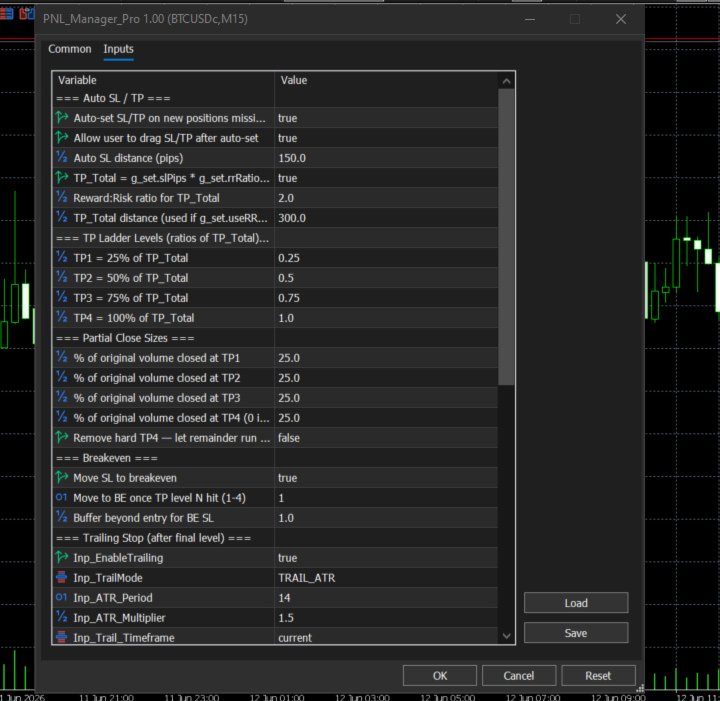
The moment you place a manual trade, if it's missing a stop loss or take-profit, PNL Manager Pro fills them in based on your settings — a fixed distance, or a reward-to-risk ratio you choose (for example, risk $1 to make $2).

TAKES PROFIT IN STAGES — NOT ALL AT ONCE.
Instead of one single take-profit, your trade has up to four profit levels (TP1, TP2, TP3, TP4). As price reaches each one, the EA closes a portion of your position automatically. You bank profit on the way up, while letting the rest of the trade keep working.

MOVES YOUR STOP TO BREAKEVEN — AUTOMATICALLY.
Once price reaches a profit level you choose, your stop loss moves to your entry price. From that point on, the trade cannot lose money. You choose exactly which level triggers this.

TRAILS THE REST OF THE TRADE.
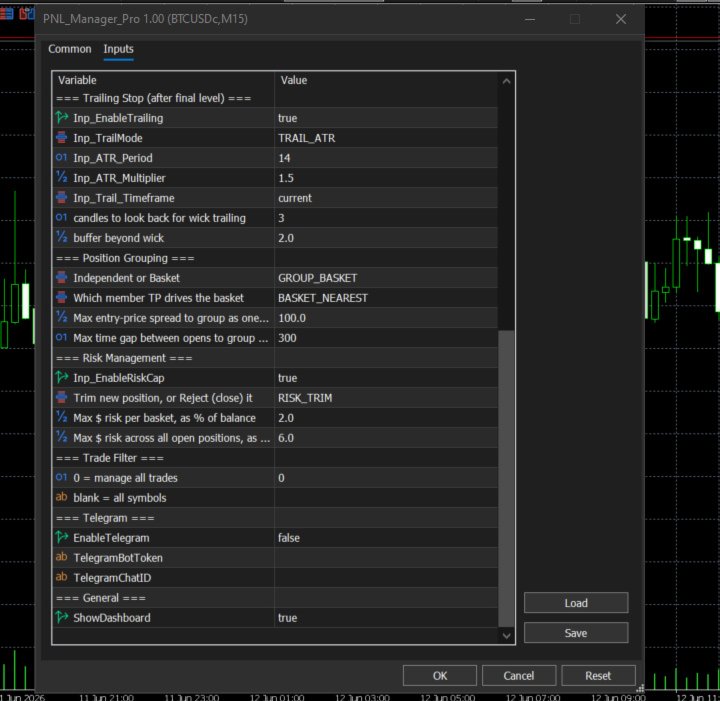
After your final profit level is hit, the EA switches to trailing mode — following the price using either a volatility-based trail (ATR) or recent candle highs/lows. Your stop only ever moves in your favour, locking in more profit as the trade continues.

LET IT RUN — NO HARD CEILING.
If you'd rather not cap your profit at all, turn off the final take-profit and let the trailing stop alone decide when the trade ends. Profit can keep growing for as long as the trend continues.

WORKS ON GROUPS OF TRADES TOGETHER (BASKET MODE).
Open several positions on the same pair, in the same direction, around the same time? PNL Manager Pro can treat them as one group. When the group's first profit target is hit, ALL of those trades take partial profit and move to breakeven together — not just the one that happened to reach its own target first.

KEEPS YOUR RISK UNDER CONTROL.
Set a maximum percentage of your account you're willing to risk — per group of trades, and across your whole account. If a new trade would push you over that limit, PNL Manager Pro automatically trims it down to a safe size, so you never have more on the line than you decided was acceptable. (A stricter "reject" mode is also available, which closes the oversized trade entirely instead.)

─────────────────────────────────────────────────────
THE CONTROL PANEL
─────────────────────────────────────────────────────

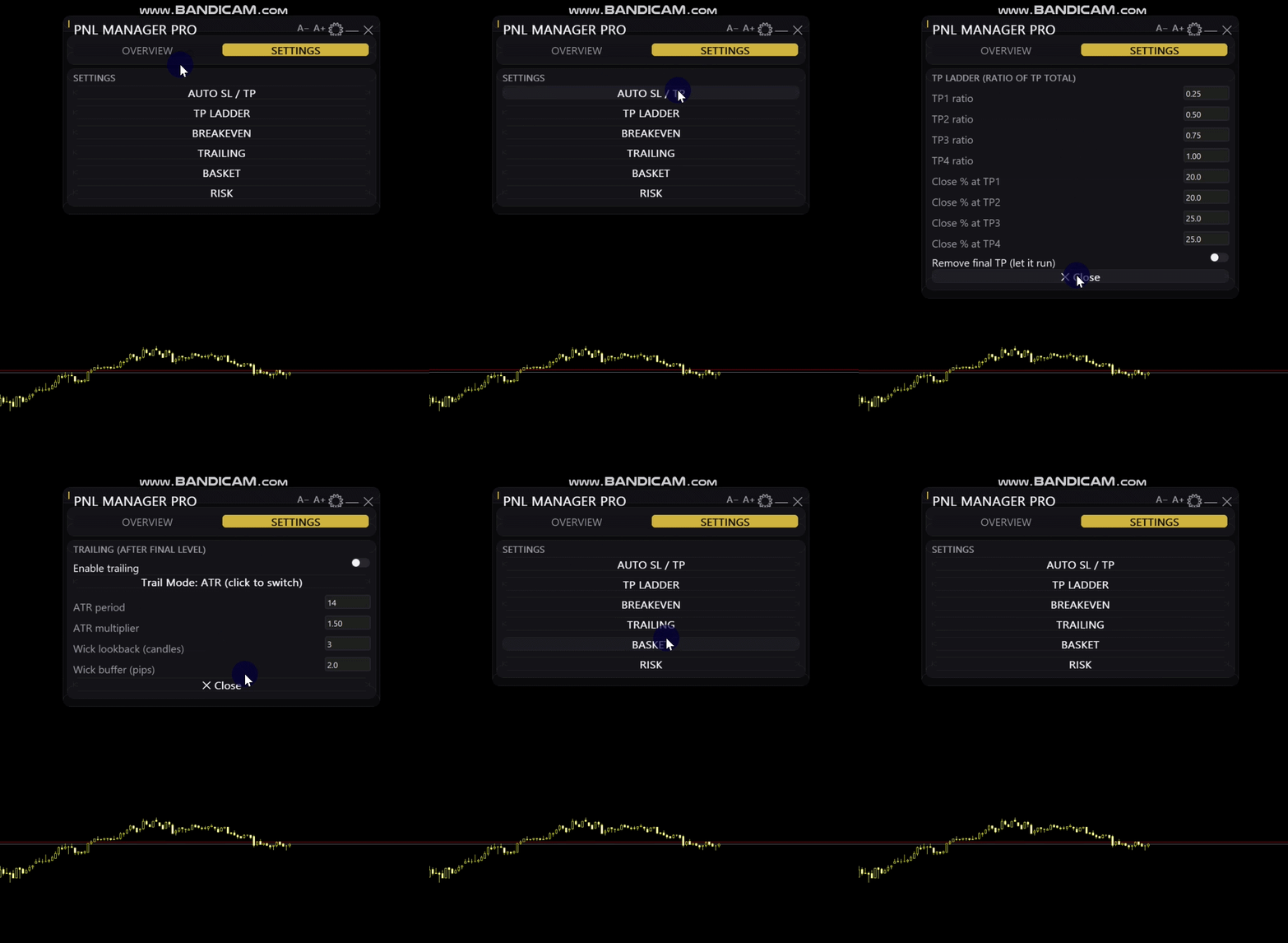
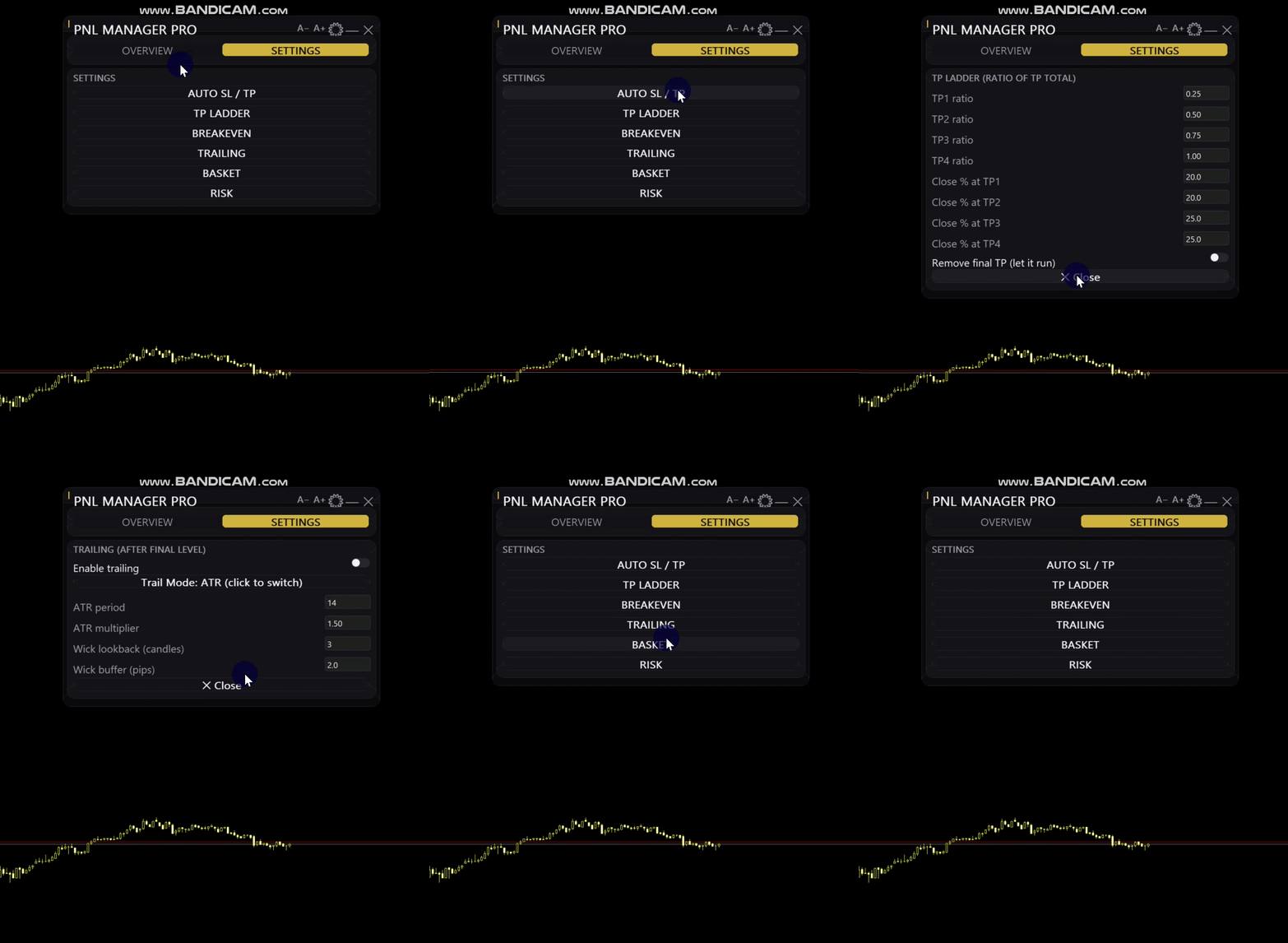
Everything is controlled from a clean on-screen panel — no digging through input boxes.

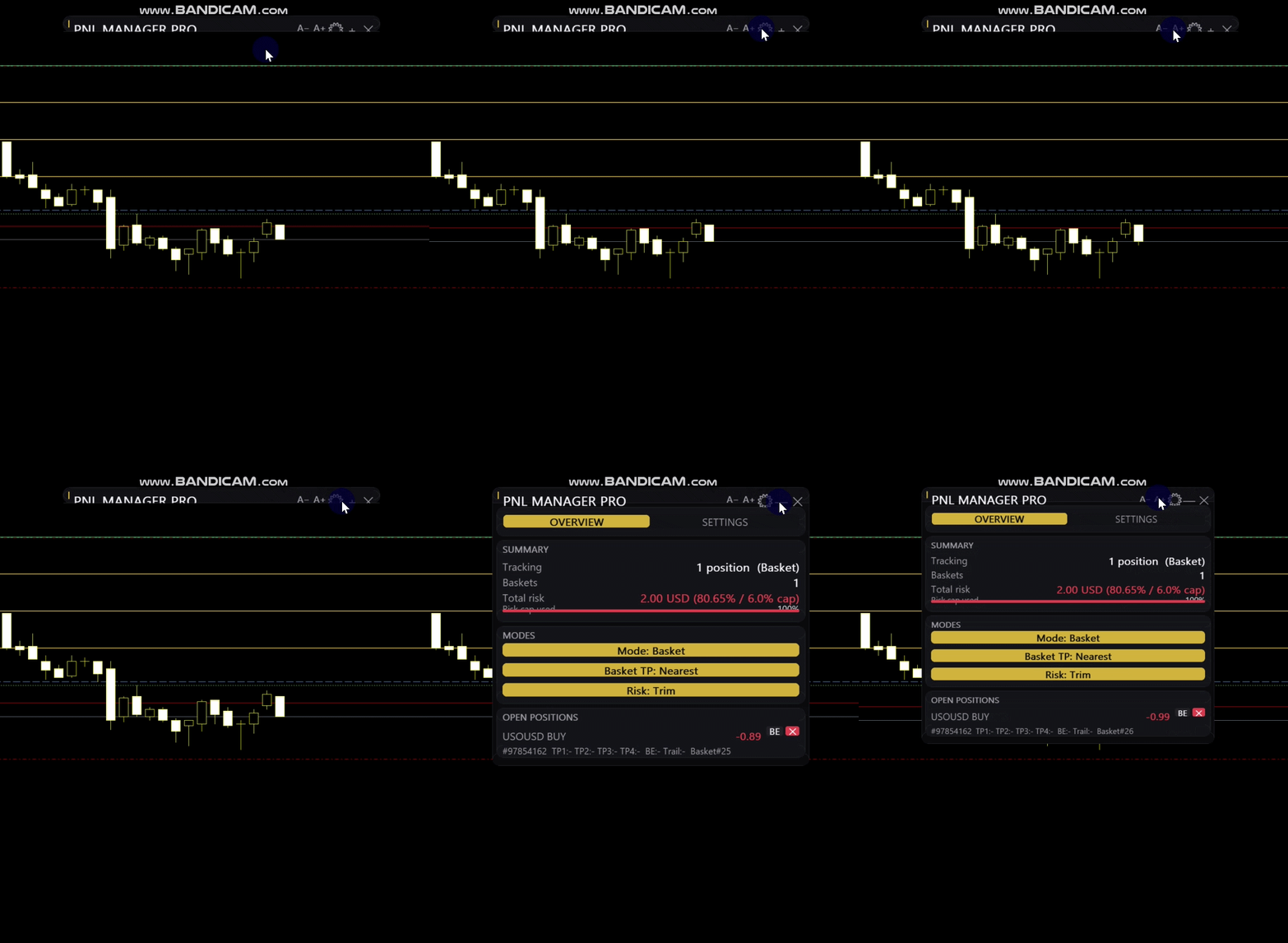
OVERVIEW TAB
See every open trade at a glance: which profit levels have been hit, whether breakeven has moved, whether trailing is active, and your live profit/loss. See your total risk against your limit in real time.

SETTINGS TAB
Every setting can be adjusted live, with simple + and − buttons. Change a value and it applies to your next trade immediately — no need to remove and re-add the EA.

TWO LOOKS TO MATCH YOUR CHARTS
Switch between a Dark theme (black background, red highlights) and a Light theme (white background, blue highlights) with one click.

─────────────────────────────────────────────────────
WORKS ON ANY INSTRUMENT
─────────────────────────────────────────────────────

PNL Manager Pro automatically adjusts its distance calculations for the instrument you're trading — forex pairs, gold and silver, indices, and cryptocurrencies like Bitcoin all use sensible, correctly-scaled distances. A "150 pip" stop means something appropriate whether you're trading EURUSD or BTCUSD.

─────────────────────────────────────────────────────
WHO THIS IS FOR
─────────────────────────────────────────────────────

Traders who enter manually but want professional, consistent exit management
Traders who know they're too emotional about exits and want a system to remove that
Anyone running multiple positions on the same pair who wants them managed as a group
Traders who want a built-in safety net that stops position sizes from quietly growing too large

This EA does not find trades for you and does not predict market direction. It manages the trade after you've opened it — turning your entry into a fully managed position with no further input needed.

─────────────────────────────────────────────────────
WHAT'S INCLUDED
─────────────────────────────────────────────────────
Full user guide with setup walkthrough
Lifetime updates
Support via MQL5 messages

═══════════════════════════════════════════════════════
Рекомендуем также
Expert TP SL v04 - Профессиональный торговый помощник с ИИ-системой мотивации Продвинутый инструмент для ручной торговли с автоматическим управлением рисками, защитой от переторговли и интеллектуальной психологической поддержкой для дисциплинированной торговли. ОБЗОР ПРОДУКТА Expert TP SL v04 - это комплексный торговый помощник, разработанный для трейдеров, которые предпочитают ручную торговлю, но хотят сохранить эмоциональную дисциплину и автоматизировать расчет рисков. Это не просто инструм
Order Type Ledger считывает историю ордеров этого счёта - не историю сделок - и подсчитывает, что произошло с каждым выставленным ордером. Инструмент ничего не прогнозирует и не даёт советов. Он никогда не смотрит на торговые результаты; он лишь считает исходы: исполнен, отменён, истёк, отклонён. Зачем это нужно: большинство торговых инструментов оглядываются назад только на сделки, которые были исполнены. Лимитный ордер, истёкший так и не тронутым, стоп-ордер, который был отклонён, ордер, ожид
Trading Utility for Forex Currency Pairs Only not for Gold  Functions Auto Lot Calculation based on Risk Auto stoploss  Auto TakeProfit Breakeven Auto Close Half % Close in percentage with respect to the PIPs Pending Orders BuyLimit Sell Limit with distances BuyStop Sell Stop    with distances Trading Informations Risk in percentage For Multiple trades Combine Takeprofit and Combine Stoplosses
BTC Trading Assistant EA (MT5) Manual trading assistant that helps place and manage trades with automated risk and stop management. Overview BTC Trading Assistant EA is a utility Expert Advisor for MetaTrader 5 intended for manual traders. It provides a chart interface to execute BUY/SELL/CLOSE actions and automates selected trade management functions such as position sizing, initial SL/TP placement, break-even, trailing stop and optional partial profit taking. This EA does not generate trade si
TradePilotmt5
Hossein Khalil Alishir
TradePilot Expert Advisor (EA) for MetaTrader 5 TradePilot is a professional and user-friendly Expert Advisor (EA) for MetaTrader 5 (MT5) . It simplifies automated trading , risk management , and trade execution with a smart trading panel . Perfect for beginners and experienced traders looking for a reliable trade manager EA with automated lot size calculation and smart position management. Key Advantages User-Friendly Trading Panel: Customizable panel with buttons and hotkeys for fast ex
Ultimate Trailing Stop EA MT5
BLAKE STEVEN RODGER
4.13 (8)
This EA Utility allows you to manage (with advanced filtering) unlimited open orders (manual or EA) with 16 trailing stop methods: fixed, percent, ATR Exit, Chandelier Exit, Moving Average, Candle High Low Exit, Bollinger Bands, Parabolic, Envelope, Fractal, Ichimoku Kijun-Sen, Alligator, Exit After X Minutes or Bars, RSI and Stochastic. The trailing stop can be either real or virtual, and you can exit fully or with a partial close percent on touch or bar close.  Moreover, you can add (override
Trading Assistent - это многофункциональная торговая панель, которая объединяет все необходимые инструменты для профессиональной торговли. Панель предоставляет полный контроль над позициями, углубленный анализ рисков и быстрое исполнение ордеров. ОСНОВНЫЕ ФУНКЦИОНАЛЬНЫЕ БЛОКИ Управление позициями: - Просмотр всех открытых позиций в реальном времени - Сортировка по символу, прибыли, объему и типу - Визуальная индикация прибыльных и убыточных позиций - Групповые операции закрытия - Функция Brea
Free Access for the First 10 Downloads! I'm giving away this panel completely free to the first 10 traders who download it. After that, a price will be added. If you're one of the lucky first 10, please leave an honest review and any questions you have – your feedback means the world to me. Thank you in advance! Overview Peril Trader is a trading panel designed to assist with the execution of a dual pending order breakout strategy. The panel places a Buy Stop order above the current market
FREE
Pro Order Lot Size Calculator Pro Order Lot Size Calculator is a simple and practical tool designed to help you calculate the appropriate lot size based on the amount of risk you want to take . With this tool, you can easily calculate your trading risk directly from the panel according to the amount of money available in your account. Easy Risk & Lot Calculation The panel is designed to be very simple and easy to use. You can choose how you want to define your risk: Enter your desired risk amoun
Tick Volume Chart - уникальный инструмент для создания графиков на основе тиковых объёмов в MetaTrader 5 . С помощью Tick Volume Chart вы можете строить графики, где каждая свеча формируется не по времени, а по заданному количеству тиков. Это дает вам идеальную точность анализа рыночной активности, недоступную на стандартных временных графиках. Вы можете использовать любые индикаторы и советники с поддержкой пользовательских символов. Работать с полученными графиками так же удобно, как и со стан
Here   our more valuable tools SMC Trend Trading   ,  Easy SMC Trading  ,  Institutional SMC Architect Volume Analysis Tools  ,  Volume flow Profile  ,  Market volume profile  , FVG with Volume  , Liquidity Heatmap Profile  ,  Volume Spread Analysis Key Features 1.  Total Immersion UI (The "Blackout") Chart Masking:   Upon loading, the tool turns the background, grid, and candles pitch black. This hides the noise of the market ticks, allowing you to focus purely on your performance data withou
Trade History By Magic Indicator Unlock Your Trading Insights with Trade History By Magic! Enhance your MetaTrader 5 experience with this powerful indicator designed for traders who demand precision and clarity. Trade History By Magic provides a clear, real-time display of your trading history, organized by magic numbers, directly on your chart. Perfect for both automated and manual traders, this tool helps you track performance effortlessly. Key Features: Organized Trade Tracking : Displays tra
Советник  Auto SLTP Maker MT5  призван помочь тем, кто забывает устанавливать в сделках параметры StopLoss и/или TakeProfit, либо торгуют на слишком быстром рынке, чтобы успевать это сделать вовремя. Он автоматически отслеживает сделки без уровней StopLoss и/или TakeProfit и проверяет, какой их уровень, согласно настройкам, необходимо установить для сделок. Данный продукт работает как с рыночными ордерами, так и с отложенными. Тип ордеров, на которые он будет реагировать можно выбрать в настройк
TradeControl Pro – Расширенный менеджер сделок для MetaTrader TradeControl Pro — это инструмент управления сделками для MetaTrader, обеспечивающий структурированное и эффективное управление торговыми позициями непосредственно на графике. Приложение сочетает в себе понятный интерфейс, автоматические расчёты и гибкие настройки для различных торговых подходов. Встроенная панель на графике имеет табличную структуру и разделена на три основных вкладки: Execution , Close и Info . Интерфейс ориентирова
TradePad
Ruslan Khasanov
5 (1)
TradePad - это инструмент как для ручной, так и алгоритмической торговли.  Представляем вам простое решение для быстрых торговых операций и контроля позиций на нескольких торговых инструментах. Внимание, приложение не работает в тестере стратегий! Пробная версия приложения для демо-счета и описание всех инструментов Интерфейс приложения адаптирован для мониторов с высоким разрешением, прост и интуитивно понятен. Для комфортной работы, трейдеру предлагается следующий набор инструментов: менеджер
Capital Management EA – Smart Risk Management & Profit Optimization for MT5 Take control of your trading capital with smart, automated strategies — fully optimized for MetaTrader 5 (MT5). Looking to protect your capital and maximize profits through automated money management strategies ? Capital Management EA is the all-in-one Expert Advisor for MetaTrader 5 (MT5) that helps you trade smarter, not harder. Core Features: 5-in-1 Capital Management Strategies – Built-in versatility Gr
Easy Trade Executor — инструмент для быстрого расчета лота, открытия и сопровождения сделок в MT5. Размещайте уровни Open Price, Stop Loss и Take Profit прямо на графике, получайте автоматический расчет объема позиции и открывайте сделки с контролируемым риском всего за несколько кликов. Почему Easy Trade Executor? Easy Trade Executor создан для трейдеров, которые хотят не только рассчитывать риск, но и быстро управлять сделками на графике. Инструмент объединяет расчет позиции, открытие ордеро
Demo version T Position Size Calculator   doesn't work in the strategy tester. The Strategy Tester does not support the processing of ChartEvent. It does not support most of the panel's functionality. Contact me for any questions or ideas for improvement or in case of a bug found. Control and manage your trading like a professional trader with T Position Size Calculator. T Position Size Calculator – an MT5 Expert Adviser, is a user-friendly custom tools (Dialog Panel and Three Lines, Order Line
Garner Trade Pad EA is an MT5 Expert Advisor that brings trade planning and position sizing directly onto your chart. Position your Stop Loss and Take Profit, choose the amount you want to risk, and view the calculated lot size before placing an order.TP1 buy The dark navy panel with blue accents provides a clear view of your proposed trade. It is a manually operated calculator and order-entry tool: you choose the direction, levels and timing of every trade. ## Movable chart panel - Drag t
Margin Call Shield – Defend Your Margin on Your Terms Margin Call Shield is a tool for MetaTrader 5 traders who want to decide for themselves which open positions are closed during margin call situations before the platform does so automatically based on its internal rules. By default, the broker or platform decides which positions to close, often using undisclosed algorithms. Margin Call Shield lets you set this order according to your own strategy. Why Was Margin Call Shield Created? In a mar
Trade Analyzer Panel is a real-time dashboard utility for MetaTrader 5. It brings position monitoring, risk analysis, profit/loss simulation, target planning, break-even visualization and quick-close controls into a single scrollable on-chart panel. Features Position scanner: lists every open position with symbol, direction, lot size, open price and live profit/loss. Account summary: balance, equity, used and free margin, and margin level updated in real time. Break-even visualization: draws a l
TradeArchitect Grid Manager  is a chart-based manual trading utility for MetaTrader 5. It combines visual trade planning, risk-based position sizing, market and pending order execution, position management, and optional martingale or anti-martingale progression. The utility does not generate trading signals and does not decide when to buy or sell. The trader chooses the direction, Entry, Stop Loss and Take Profit. GridPlan Trade Manager performs the calculations, checks the plan and manages th
TradeGuard Capital Protection Professional Risk, Exposure & Trade Manager for MetaTrader 5 This utility acts as a professional insurance system for your trading account. TradeGuard Capital Protection is a professional-grade risk & money management utility designed to protect your trading account from excessive losses, emotional trading, and uncontrolled exposure. This tool does NOT open trades . It strictly manages risk, drawdown, exposure, and safety protections . Perfect for manual traders, EA
Grid Builder 5
Oleg Remizov
5 (1)
Утилита   Grid Builder MT5   предназначена для размещения сети отложенных ордеров любой сложности и будет отличным инструментом в руках трейдера, торгующего сеточные торговые стратегии.  Инструмент обладает многочисленными настройками, благодаря которым можно быстро и просто построить сеть из ордеров с заданными параметрами. Поддерживаются все типы отложенных ордеров: Buy Stop; Buy Limit; Sell Stop; Sell Limit. Также скрипт позволяет в один клик удалить ранее размещённую сеть ордеров. Если парам
Supply demand arrows
Smaylle Rafael Coelho Mariano
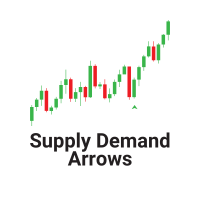
The   "Supply Demand Arrows"   indicator for MetaTrader 5 (MT5) is a powerful trading tool designed to help traders identify critical supply and demand zones in the market. By visually marking these zones with arrows, the indicator enhances trading precision and decision-making. Key Features Identification of Supply and Demand Zones : The indicator effectively highlights key supply and demand zones on the price chart, allowing traders to see where significant buying or selling pressure exists. T
FREE
CosmiCLab SMC FIBO CosmiCLab SMC FIBO — это профессиональный торговый индикатор, основанный на концепциях Smart Money Concepts (SMC), анализе структуры рынка и уровнях Fibonacci. Индикатор автоматически определяет свинги рынка и строит уровни Fibonacci по последнему импульсному движению. Также индикатор определяет ключевые изменения структуры рынка: BOS — Break Of Structure CHOCH — Change Of Character Дополнительно отображаются сигнальные стрелки BUY / SELL при пробое структуры. Индикатор подход
Одна из числовых последовательностей носит название - "Последовательность лесного пожара". Она была признана одной из самых красивых новых последовательностей. Её главная особенность заключается в том, что эта последовательность избегает линейных трендов, даже самых кратковременных. Именно это свойство легло в основу этого индикатора. При анализе финансового временного ряда этот индикатор старается отбросить все возможные варианты тренда. И только если это ему не удается, то он признает наличие
Trade Manger
Israr Hussain Shah
Here   our more valuable tools SMC Trend Trading   ,  Easy SMC Trading  ,  Institutional SMC Architect Volume Analysis Tools  ,  Volume flow Profile  ,  Market volume profile  , FVG with Volume  , Liquidity Heatmap Profile  ,  Volume Spread Analysis You Give an Instruction: When you run the script, a window pops up with a dropdown menu. You choose exactly what you want it to do from the list (e.g., "Close Profit Only" or "Delete Pending Orders"). It Scans Your Positions: The script then reads
CYGNIX RISK GLADIATOR — Professional Trade Manager & Risk Guardian for MT5 Guard every position. Manage every trade. Sleep at night. Cygnix Risk Gladiator is a professional-grade position management Expert Advisor that watches every open trade on your account and automatically applies institutional-level risk controls in real time. It does not generate signals — it protects, manages, and exits trades opened by you, your strategies, or any other EA. Built for IC Markets and fully compatible w

SL Risk Manager Auto SL System SL Risk Manager Auto SL System is a practical and easy-to-use tool designed to help you manage your Stop Loss levels before and after opening a trade . With this tool, you can set your Stop Loss level before entering a position . Especially when trading Gold (XAU), you can easily define your Stop Loss based on a specific dollar amount , giving you better control over the risk of each trade. You can also use the panel to automatically open trades according to the ra
С этим продуктом покупают
Trade Assistant MT5
Evgeniy Kravchenko
4.43 (216)
Помогает рассчитать риск на сделку, простая установка нового ордера с помощью линий, управление ордерами с функциями частичного закрытия, 7 типов трейлинг-стопа и другие полезные функции. Дополнительные материалы и инструкции Инструкция по установке - Инструкция к приложению Функция Линии   - отображает на графике линию открытия, стоп-лосс, тейк-профит. С помощью этой функции легко установить новый ордер и увидеть его дополнительные характеристики перед открытием. Управление риском   -   функ
Добро пожаловать в Trade Manager EA — лучший инструмент для управления рисками, предназначенный для упрощения, точности и эффективности торговли. Это не просто инструмент для размещения ордеров; это комплексное решение для удобного планирования торгов, управления позициями и усиленного контроля над рисками. Независимо от того, начинающий вы трейдер, опытный специалист или скальпер, нуждающийся в быстром исполнении, Trade Manager EA адаптируется к вашим потребностям и работает с любыми активами:
Farmed Hedge Yield Farming | All Markets (Manual - Hybrid - Semi/Automated EA) VERIFIED TRADING RESULTS - Farmed Hedge Yield Axi Copy:  https://www.mql5.com/en/signals/2356376 - Farmed Hedge Yield Exn Copy:   https://www.mql5.com/en/signals/2356404 - Farmed Hedge Yield V Copy:  https://www.mql5.com/en/signals/2357156 IMPORTANT NOTICE: FarmedHedge is a MANUAL-FOCUSED TRADING UTILITY ,not a fully automated EA. Results shown on this Signal include manual trades and overall strategic management.
Telegram to MT5 Multi-Channel Copier   автоматически копирует торговые сигналы из ваших Telegram- и Discord -каналов прямо в MetaTrader 5. Без ботов, без браузерных расширений, без ручного копирования. Сигнал приходит в Telegram или Discord — и советник открывает сделку в вашем терминале за считанные секунды. А перед тем как копировать канал, встроенный бэктестер покажет, что этот канал сделал бы на вашем счёте. Продукт состоит из двух компонентов: приложения для Windows, которое слушает ваши Te
Копируйте сигналы из Telegram по своим торговым правилам Telegram to MT5 Signal Trader автоматически копирует текстовые торговые сигналы из открытых и закрытых каналов и групп Telegram в MetaTrader 5. Управляйте несколькими поставщиками сигналов и счетами MT5 из одного приложения для компьютера, задавая индивидуальные параметры риска и торговли для каждого поставщика . Для копирования не нужны бот Telegram и настройка API. Просто войдите в свой аккаунт Telegram по номеру телефона или QR-коду и в
TradePanel MT5
Alfiya Fazylova
4.88 (170)
Trade Panel — это многофункциональный торговый помощник. Приложение содержит более 50 торговых функций для ручной торговли и позволяет автоматизировать большинство торговых операций. Инструкция к приложению: https://www.mql5.com/ru/blogs/post/756476 Пробная версия приложения для демо-счета: https://www.mql5.com/ru/blogs/post/750864 Как установить приложение: https://www.mql5.com/ru/blogs/post/750096 Как тестировать приложение в визуальном режиме: https://www.mql5.com/ru/blogs/post/770274 Как уст
================================================================================ POC BREAKOUT - V20.72. Full Professional Grade Toolkit ================================================================================ POC Breakout is a full MetaTrader 5 trading dashboard for discretionary traders who want breakout signals, Point of Control (POC) context, volume profiles, order flow, market structure, news, alerts, and advanced trade planning in one professional workspace. Attached directly to you
MT5 to Telegram Signal Provider — это простой в использовании полностью настраиваемый инструмент, который позволяет отправлять определённые сигналы в чат, канал или группу Telegram, превращая вашу учётную запись в провайдера сигналов . В отличие от большинства конкурирующих продуктов, он не использует импорт DLL. [ Демо ]   [ Руководство ] [ Версия MT4 ] [ Версия для Discord ] [ Канал в Telegram ]  New: [ Telegram To MT5 ] Настройка Доступно пошаговое руководство пользователя . Никаких знаний A
VirtualTradePad PRO SE MT5 — профессиональный торговый центр управления для MetaTrader 5 VirtualTradePad PRO SE — это премиальная торговая панель и рабочая среда управления сделками на графике для MetaTrader 5 . Она создана для трейдеров, которым нужны более быстрое исполнение, более понятный контроль позиций, структурированное управление сделками, визуальное планирование уровней и профессиональный рабочий процесс прямо с графика. Это не просто панель BUY / SELL. PRO SE объединяет ручную торговл
REVDEN AI Desk: ведите свою торговлю в одном разговоре с собственным ИИ на рыночном контексте REVDEN Представьте, что вся ваша торговля ведётся в одном разговоре. REVDEN AI Desk переносит это в MetaTrader 5: вы спрашиваете собственный ИИ, как он читает рынок, и он отвечает на основе полного контекста REVDEN по символам, которыми вы торгуете, с их состоянием, картиной риска и предстоящими релизами. Его предложения приходят с входом, стопом, целью и риском, и вы одобряете те, что вам подходят. Ваш
News Trade EA MT5
Konstantin Kulikov
4.55 (11)
Представляю полезного робота, которым пользуюсь сам уже несколько лет. Может использоваться как в полуавтоматическом, так и в полностью автоматическом режиме. >>> Chat <<< Программа содержит гибкие настройки торговли на новостях экономического календаря. В тестере стратегий проверить нельзя. Только реальная работа. Скачайте последний архив настроек: https://www.mql5.com/en/blogs/post/747929 Мониторинг сигналов: https://www.mql5.com/ru/signals/author/test-standart При создании своих собственных
RETAILBERG FOOTPRINT CHART PRO — Order-Flow Workspace for MetaTrader 5 Version 7.00  |  Professional System  |  31 tools  |  One chart A full 150-page illustrated User Manual is included. Please read the full manual to understand this feature packed footprint chart elements and ui. https://www.mql5.com/en/blogs/post/777982 DEMO / STRATEGY TESTER — PLEASE READ FIRST
The Patch
Mian Rameez Ali
The Patch It never opens a trade. It walks behind the ones that did. Every open position, every pending order — checked twice a second for the one thing that's easy to forget: a stop, a target. Found bare, it doesn't ask. It writes the missing number in, measured in points from wherever the position began, and moves on to the next. No strategy, no opinion on direction. Just the quiet assumption that nothing should ever sit on the market unprotected — not because someone decided it shouldn't,
Следующее обновление — версия 2.52 уже скоро! [НОВОЕ] Приготовьтесь к 4 новым важным функциям, призванным улучшить ваш анализ рынка и торговый процесс. Мы выводим анализ рынка на новый уровень с помощью 4 новых функций, разработанных с учётом ваших потребностей в трейдинге. Представляем: 1. TRADE OVERVIEW DASHBOARD 2. CONFLUENCE AT ZONE 3. STRONG & WEAK HIGH/LOW 4. OTE 1. TRADE OVERVIEW DASHBOARD Панель, которая помогает легче понимать общую картину рынка, предоставляя рекомендации для поддержк
Grid Manual MT5
Alfiya Fazylova
4.73 (22)
Grid Manual — это торговая панель для работы с сеточными стратегиями. Утилита универсальная, имеет гибкие настройки и понятный интерфейс. Работает с сеткой ордеров не только в сторону усреднения убытков, но и в сторону наращивания прибыли. Трейдеру не нужно создавать и сопровождать сетку ордеров, это сделает утилита. Достаточно открыть ордер и Grid manual автоматически создаст ему сетку ордеров и будет сопровождать его до самого закрытия. Полная инструкция и демо-версия здесь . Основные особенно
Anchor Trade Manager
Kalinskie Gilliam
5 (8)
Your EAs cannot see each other, but Anchor can. Anchor gives you one place to coordinate your EAs, manage risk, and decide when trading is allowed. It works alongside the trading bots you already use without any changes to them. The Problem One EA opens a trade. Then another starts trading. The next thing you know, you wake up to multiple grids built across your account. Each EA may be doing exactly what it was designed to do, but together they can place far more risk on your account than you in
EA Portfolio Control & Cloud Monitoring for MetaTrader 5 Your EAs manage trades. KONTROL_01 manages your EAs. A control system for traders running multiple Expert Advisors on the same account. Coordinate EA activity, manage trading risks and monitor your setup remotely. A detailed User Manual is available via DM after purchase. IN PRACTICE Multiple EAs. No coordination. Your EAs trade independently, unaware of each other's activity. KONTROL_01 coordinates them, limits simultaneous activity a
The product will copy all telegram signal to MT5 ( which you are member) , also it can work as remote copier.  Easy to set up, copy order instant, can work with almost signal formats, image signal,  s upport to translate other language to English Work with all type of channel or group, even channel have "Restrict Saving Content", work with  multi channel, multi MT5 Work as remote copier: with signal have ticket number, it will copy exactly via ticket number. Support to backtest signal. How to s
Astro Trade MT5
Indra Maulana
5 (8)
25% discount on the release of the tool: only for the next 3 buyers Send a message to receive a demo version. AstroTrade Trading Assistant AstroTrade is a comprehensive multi-functional trading utility developed for the MetaTrader 5 platform. It integrates essential tools for trade execution, risk management, and technical monitoring into a single unified interface. The application is designed to assist traders in managing their daily operations through a visual and structured environment. Vi
Floor Watch
Syed Tauqeer Hussain Shah
Floor Watch One number, watched every thirty seconds: how far equity has fallen since the day began — or since its highest point, if it's told to trail the peak instead of the open. Cross the line and it doesn't argue. Every open position closes, every pending order vanishes, and anything that slips through afterward gets shut the moment it appears. Not asked. Removed. The floor holds until the clock turns 5 AM Pakistan time — then, and only then, does the day start over. One rule. No except
Power Candles Strategy Scanner — самооптимизирующийся инструмент для поиска настроек по нескольким инструментам Power Candles Strategy Scanner использует тот же самооптимизирующийся движок, что и индикатор Power Candles — для всех символов в вашем Market Watch, одновременно. На одной панели отображается информация о том, какие символы в данный момент являются статистически торгуемыми, какая стратегия выигрывает на каждом из них, оптимальная пара Stop Loss / Take Profit, а также отправляется увед
Trader Evolution
Siarhei Vashchylka
5 (7)
"Trader Evolution" - Утилита, предназначенная для трейдеров, которые используют в своей работе волновой и технический анализ. Одна вкладка утилиты способна управлять капиталом и открывать ордера, а другая - помогать в построении волн Эллиотта, уровней поддержки и сопротивления, а также линий тренда. Инструкция/Мануал ( Обязательно читайте перед приобретением ) | Версия для МТ4 Преимущества 1. Торговля в несколько кликов. В панели доступны немедленные и отложенные ордера 2. Управление капиталом
MT5 Professional Copy Trading System (Версия MT5) MT5 Professional Copy Trading System — это промышленный сверхбыстрый LOCAL копировщик сделок , разработанный для профессиональных трейдеров, поставщиков сигналов и институционального управления несколькими счетами. В отличие от типичных розничных или облачных решений, данная система построена на LOCAL-архитектуре, оптимизированной для работы нескольких терминалов в одной среде Windows. Промышленная LOCAL-архитектура LOCAL-дизайн позволяет термин
Trade Manager DaneTrades
Levi Dane Benjamin
4.13 (31)
Trade Manager, который поможет вам быстро входить и выходить из сделок, автоматически рассчитывая риск. Включает функции, которые помогут предотвратить чрезмерную торговлю, торговлю из мести и эмоциональную торговлю. Сделками можно управлять автоматически, а показатели эффективности счета можно визуализировать в виде графика. Эти функции делают эту панель идеальной для всех трейдеров, занимающихся ручной торговлей, и помогают улучшить платформу MetaTrader 5. Многоязычная поддержка. Версия для МТ
Trade Manager DashPlus
Henry Lyubomir Wallace
4.85 (13)
DashPlus – это продвинутое средство для управления торговлей, разработанное для повышения эффективности и результативности торговли на платформе MetaTrader 5. Оно предлагает широкий набор функций, включая расчет рисков, управление ордерами, продвинутые системы сеток, инструменты на основе графиков и аналитику производительности. Основные функции Восстановительная Сетка Внедряет систему усреднения и гибкую сетку для управления сделками в неблагоприятных рыночных условиях. Позволяет стратегически
EA Auditor
Stephen J Martret
5 (6)
EA Auditor is an independent analysis tool for traders evaluating Expert Advisors and trading signals on MetaTrader 5. It audits backtest reports, reviews posted developer signals, and cross-verifies the two against each other to help traders assess strategies before committing capital. The MQL5 market offers a wide range of Expert Advisors from many developers, with varying approaches, quality, and transparency. EA Auditor provides a consistent, data-driven framework for reviewing them, answer
YuClusters
Yury Kulikov
4.93 (43)
Внимание: Ознакомиться с работой программы можно с помощью бесплатной версии  YuClusters DEMO . YuClusters это профессиональная система анализа рынка. Для трейдера открываются уникальные возможности анализа потока ордеров, объемов торговли, движения цены используя различные графики, профили, индикаторы, графические объекты. YuClusters оперирует данными на основе ленты сделок или тиковой информации, в зависимости от того, что доступно в котировках финансового инструмента.  YuClusters позволяет с
DrawDown Limiter
Haidar Lionel Haj Ali
5 (23)
DrawDown Limiter v5.0 — Расширенный контроллер защиты торгового счёта DrawDown Limiter v5.0 — это клиентский контроллер защиты торгового счёта, предназначенный для мониторинга вашей торговли и автоматической реакции при достижении настроенных лимитов риска, прибыли, новостей, расписания, ролловера или количества позиций. Он может контролировать ручные сделки, автоматические стратегии, несколько советников, отложенные ордера и открытые позиции с одного отдельного графика. Он может защищать весь т
Master Your Trading Discipline   Stop losing your hard-earned gains to overtrading and emotional decisions. The Discipline Tool is your ultimate trading assistant, ensuring strict risk management in real-time. Key Protection Features: Advanced Drawdown Defense : Automatically halts trading if your daily drawdown exceeds a preset threshold (percentage or dollar amount). Real-Time Equity Lock : Safeguard profits by referencing peak equity, ensuring drawdown stays within control. Hard Profit Target
Dealer's Panel No signal decides anything here — a hand does. One click, and the panel calculates what's underneath: lot size from risk, target from a 30-step balance ladder that remembers exactly how far an account has climbed. Toggle between market and pending without touching an input field. Set a stop, and the take-profit can write itself — a fixed share of the balance, translated into price with no arithmetic left for the trader to get wrong. One trade live at a time; it won't let a seco
Другие продукты этого автора
SMC OrderBlock Entry Engine The SMC OrderBlock Entry Engine is a Smart Money Concepts indicator for MetaTrader 5 that identifies valid institutional order blocks, confirms them with a Break of Structure, and fires a non-repainting entry signal only after a strict four-step confirmation sequence. Every signal on the chart has passed all four validation rules before appearing. An order block is the last opposing candle before a strong impulsive move that breaks market structure. These zones repre
FREE
SMC Multi EMA TrendLines SMC Multi EMA TrendLines is a MetaTrader 5 indicator that draws up to ten independent moving average lines on the current chart timeframe, displays a live alignment dashboard, and fires alerts when significant EMA events occur. Version 1.11 introduces a complete alert system including EMA crossovers, price crossing an EMA, price approaching an EMA before a cross happens, and full stack alignment detection. Alerts are delivered via MT5 popup, MT5 push notification to you
FREE
Smc Session Killzone and Breakout The Smc Session Killzone and Breakout indicator automates the institutional session trading model for MetaTrader 5. It draws the Asian, London, and New York session ranges as labelled boxes on the chart, detects when price sweeps beyond the Asian session high or low, and fires a non-repainting entry signal after a Market Structure Shift is confirmed. All signals are based on closed bars and do not repaint. The underlying model follows the sequence that institut
FREE
Smc Trend Heatmap The Smc Trend Heatmap is a free multi-timeframe bias dashboard for MetaTrader 5. It scans five timeframes simultaneously - M5, M15, M30, H1, and H4 - and shows the current trend direction on each using a three-condition EMA logic. The dashboard updates continuously in a corner panel and provides an overall bias summary across all active timeframes. The indicator does not draw lines or arrows on the price chart. It operates entirely as a panel and can be placed on any chart rega
FREE
PROP FIRM READY AUTOPILOT TRADE COPIER — by E.A VICTOR MT5→MT5  |  MT5→MT4  ||  MT4→MT4  |  MT4→MT5 Two files. Four directions. Unlimited accounts.  Try Before You Buy You can download and test the AutoPilot Trade Copier free demo version on a demo account before purchasing. For MetaTrader 5 Download:  AutoPilot MT5 TRADE COPIER (TRIAL).ex5 For MetaTrader 4: Download:  AutoPilot MT4 TRADE COPIER (TRIAL).ex4 How to install the trial: Download the   AutoPilot MT4 TRADE COPIER (TRIAL) .ex4 or  Au
PROP FIRM READY  AUTOPILOT TRADE COPIER — by E.A VICTOR MT5→MT5  |  MT5→MT4  ||  MT4→MT4  |  MT4→MT5 Two files. Four directions. Unlimited accounts. Try Before You Buy: You can download and test the AutoPilot Trade Copier free demo version on a demo account before purchasing. For MetaTrader 5: Download: AutoPilot MT5 TRADE COPIER (TRIAL).ex5 For MetaTrader 4: Download: AutoPilot MT4 TRADE COPIER (TRIAL).ex4 How to install the trial: Download the   AutoPilot MT4 TRADE COPIER (TRIAL) .ex4 or Au
Try Before You Buy: You can download and test the DisciplineGuard Pro  free demo version on a demo account before purchasing. For MetaTrader 5: Download:   /   DisciplineGuard Pro   /   How to install the trial: Download the  /   DisciplineGuard Pro   /      file above. In MetaTrader:   File → Open Data Folder →   MQL5/Experts Paste the trial file into that folder, then   restart MetaTrader. The trial is fully functional for 4 hours per demo account. To reset the trial period   (demo accounts o
PROP FIRM RULES MANAGER — Complete Challenge Rule Enforcement for MT5 Monitors every prop firm rule in real-time. Daily loss, max drawdown, profit targets, consistency, EOD rules and more. 5 firm presets built in. Try Before You Buy: You can download and test the PROP FIRM RULES MANAGER  free demo version  on a demo account before pu
Try Before You Buy: You can download and test the Multi Tp Ladder  free demo version  on a demo account before purchasing. For MetaTrader 5: Download:   MultiTP ladder     How to install the trial: Download the       MultiTP ladder     file above. In MetaTrader:   File → Open Data Folder →   MQL5/Experts Paste the trial file into that folder, then   restart MetaTrader . The trial is fully functional for 12  hours per demo account . To reset the trial period   (demo accounts only): MetaTrader →
Фильтр:
Нет отзывов
Ответ на отзыв