TradeDefender Pro
- Эксперты
- Версия: 1.0
- Активации: 5

TradeDefender Pro - Advanced Position & Partial Profit Assistant
TradeDefender Pro is a highly robust, semi-automated trade management utility designed to take the emotion out of your trading. Whether you are a manual scalper or you want to manage positions opened by other EAs, this tool automatically takes over your trades the moment they are placed, handling Break Evens, 4-tier partial profit taking, and dynamic trailing stops.
Built with a bulletproof POSITION_IDENTIFIER tracking architecture, this manager flawlessly survives broker ticket-number changes during partial closes—a common issue where lesser managers fail.
⚠️ CRITICAL: UNDERSTANDING THE MATH (ABSOLUTE RAW PRICE) ⚠️ Unlike traditional EAs that use confusing Points or Pips, TradeDefender Pro is designed for precision and operates on Absolute / Raw Price movement.
-
Example on XAUUSD (Gold): An input of 3.0 means exactly a $3.00 move in the price of Gold.
-
Example on EURUSD: An input of 0.0050 means a move of 50 pips.
-
Always input your triggers and distances based on the actual price chart values of the asset you are trading.
✨ KEY FEATURES
-
Smart 4-Tier Partial Take Profits: Scale out of your winning trades smoothly. You can set 4 different trigger levels and define exactly what percentage of the remaining volume to close at each step. (Includes built-in micro-lot safety to prevent broker errors).
-
Break Even with Profit Buffer: Don't just move your stop to zero. Set a custom BE Buffer (e.g., 0.50 ) to lock your Stop Loss slightly into profit, covering your spreads and commissions.
-
Dynamic Trailing Stop: Lock in profits as the trend runs in your favor.
-
Bulletproof Tracking: Uses MT5 Position Identifiers. If your broker changes the ticket number or wipes the comment after a partial close, TradeDefender Pro never loses track of the remaining volume.
-
Live On-Chart Dashboard: Instantly view your active settings, filters, and how many positions the EA is currently tracking right on your chart.
-
Broker STOPS_LEVEL Protection: Automatically warns you upon initialization if your Break Even or Trailing distances violate your broker's minimum stop-loss rules.
🎯 HOW THE FILTERS WORK (Magic Number & Comment)
You have total control over which trades the EA manages using a combination of Magic Numbers and Comments:
1. The Magic Number Filter ( InpMagicNumber ):
-
Set to 0 : Manages Manual Trades only.
-
Set to a specific number (e.g., 12345 ): Manages trades opened by another EA using that specific magic number.
-
Set to -1 : Bypasses this check and manages ALL trades on the account.
2. The Comment Filter ( sCommentToManage ):
-
Left Empty ( "" ): Only manages trades that have no comment.
-
Specific Text (e.g., "Scalp" ): Only manages trades where the exact comment "Scalp" is present.
Example Use Case: If you set Magic to 0 and Comment to "" , the EA will act as your personal assistant, managing every standard manual trade you place on that chart.
⚙️ PARAMETER OVERVIEW
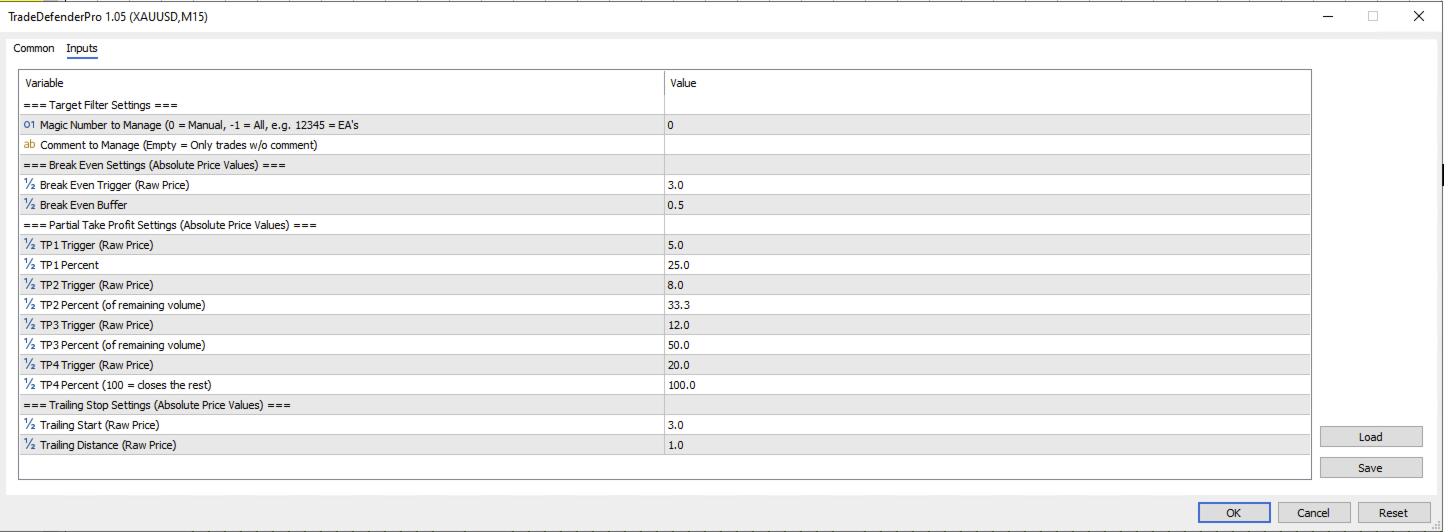
Target Filter Settings
-
Magic Number to Manage: Define the origin of the trades (0 = Manual, -1 = All).
-
Comment to Manage: The exact comment the EA should look for to begin tracking.
Break Even Settings
-
Break Even Trigger: The absolute price distance required to move the Stop Loss.
-
Break Even Buffer: The absolute price amount to lock into profit (e.g., 0.5 = $0.50 into profit).
Partial Take Profit Settings
-
TP 1-4 Triggers: The absolute price moves required to trigger the partial closures.
-
TP 1-4 Percent: The percentage of the current remaining volume to close. (Tip: Set TP4 to 100.0 to close the final remaining piece of the trade completely).
Trailing Stop Settings
-
Trailing Start: The absolute price distance in profit required to begin trailing.
-
Trailing Distance: How far behind the current price (in absolute value) the Stop Loss will trail.