Auric Flow MT5
- Эксперты
-
Kestutis Balciunas
 Обладая более чем 16-летним активным опытом на финансовых рынках, я специализируюсь на разработке высокоэффективных торговых стратегий для форекс, технических индикаторов и автоматизированных советников (Expert Advisors) для MT4/MT5. Моя работа охватывает точно разработанные торговые системы
 - Версия: 3.0
- Обновлено: 12 сентября 2026
- Активации: 10
Auric Flow is a single-position Expert Advisor for gold with a prop firm rule guard built in. It reads the trend on the hourly chart and enters on a one-minute pullback against it - an RSI dip while the hourly trend points up, the mirror image while it points down - and it holds one position at a time. Every ticket is opened with a hard stop and a target already attached, the stop moves to break-even once the trade is ahead by half an hourly range and then trails behind price. The guard takes the daily-loss floor, total-loss floor, profit target, reset clock, minimum trading days and consistency rule of whichever firm programme you select from a dropdown, and stops trading inside those lines rather than on them.
WHAT CHANGED IN VERSION 3.00
Version 3.00 replaces the trading engine. Auric Flow 1.x placed several orders at Fibonacci-spaced levels and managed them as a basket, with a recovery mode. This version holds one position at a time, puts a hard stop and a target on every ticket, and never adds to a losing trade: no grid, no averaging down, no recovery mode. The change was made so the EA can be run on a prop firm evaluation, where a grid is usually a breach of the rules whatever it earns.
If you own 1.x, three things matter. Your old presets will not work, because the settings they name no longer exist - take one for your firm and phase from the setup guide instead. Close or let finish anything the old version has open; this build uses a different magic number, so it will not touch those positions and will not manage them either. And if the grid is what you wanted, the 1.x binary you already downloaded keeps working; it is simply no longer the version being updated.
HOW IT WORKS
- Entry: a seven-period RSI on the one-minute chart has to dip into its oversold zone while price sits above the trend EMA on the hourly chart, or the reverse for a sell. The trend filter and the pullback are on different timeframes on purpose: the slower one decides direction, the faster one decides the moment.
- Exit: a hard stop placed with the broker on every ticket, a target at a multiple of the hourly range, a move to break-even once the trade is ahead, then a trailing stop. Most exits are the trail rather than the target, which is worth knowing before you judge the win rate.
- Stop distance: typed in points and clamped to a fraction of the hourly range, so the same settings behave sensibly whether gold is at 1,800 or 3,400, and on a three-digit quote the floors are read in cents rather than being silently divided by ten.
- Position policy: one position at a time, no second entry while one is open, no adding to a loser, and a minimum holding time where a firm requires one. Protective stops are exempt from that, by design.
- Volume: sized from the risk percentage and the stop distance, then fitted to what the broker will actually accept - the symbol's volume limit, its step, its minimum, and the free margin - before anything is sent. Where the fit cannot be made the trade is skipped and the reason is logged once, rather than a request being sent that the server will refuse.
- Guard: daily-loss floor, total-loss floor, profit-target latch, minimum trading days, profitable-day counting, consistency gate and a reset clock, all read from the firm profile. The state is saved, so a daily stop stays stopped across a terminal restart.
- Execution and filters: a spread ceiling, session windows, a pad around the daily rollover, a daily entry cap, and a news filter read from the terminal's own economic calendar. Nothing has to be added to the terminal's allowed addresses.
FIRM RULE PROFILES
One dropdown fills the rule numbers for the programme you are trading. It sets the profit target, the daily and total loss limits, whether the floor is measured from the starting balance or trails an equity high, the reset clock, the minimum trading days and the consistency rule. It does not check your account, restrict your broker, block any symbol or change how the EA enters a trade.
Included: FTMO 2-Step, 1-Step and Funded / Swing. FundedNext Stellar 2-Step, 1-Step, Lite and Instant. Blueberry Funded 1-Step, 2-Step, Prime and Instant Elite. The5ers High Stakes, Hyper Growth, Pro Growth and Instant Funding. Eightcap One Phase and Two Phase. Funded Trading Plus 1-Step Express, 2-Step Classic and Instant. Manual lets you enter any other firm's rules by hand. Twenty programmes across six firms.
Firms change their rules, and some set limits per account rather than per programme. The EA prints the numbers it is enforcing in the Experts log when it starts - read that line and check it against your own firm dashboard before the first trade. Treat a profile as a starting point that is right today, not as an authority.
KEY FEATURES
- Stops before the line, not at it. Every floor keeps a buffer, so slippage on the closing trade cannot turn a guard stop into a breach.
- The daily stop is a stop. It halts the day at the daily floor and stays halted until the firm's own reset clock, rather than resuming after the next bar.
- That state survives a restart. A daily stop stays stopped even if the terminal is closed and reopened, which on a funded account is the difference between a pause and a breach.
- Target latch: when the programme's target is reached the EA stops and stays stopped instead of trading on and giving it back.
- Minimum trading days counted, and where a firm requires it, only the days that closed in profit.
- It says why it is not trading. One line in the Experts log per reason per day - trend against, spread too wide, outside the session, guard halted - so a quiet EA can be told from a broken one.
- Nothing it cannot send is sent. The volume fit, the stop and freeze distances and the session check happen before the request, so the journal stays readable and the server is not asked twice for something it already refused.
- An on-chart panel: the day against its floor, the total against the starting balance, days counted against the minimum, the guard state and what the engine is currently reading. It draws nothing during a backtest.
WHAT THE TESTING SHOWED
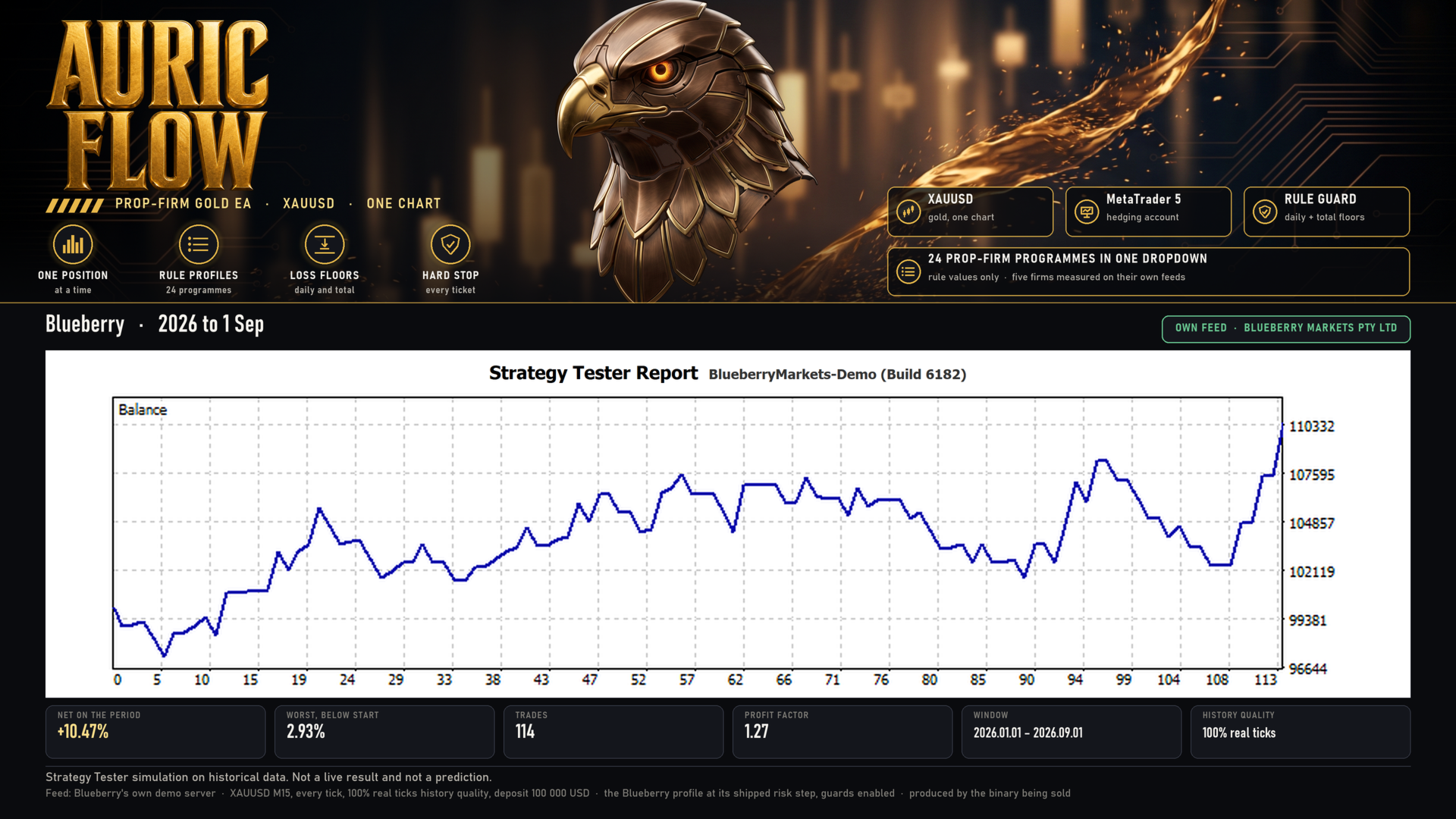
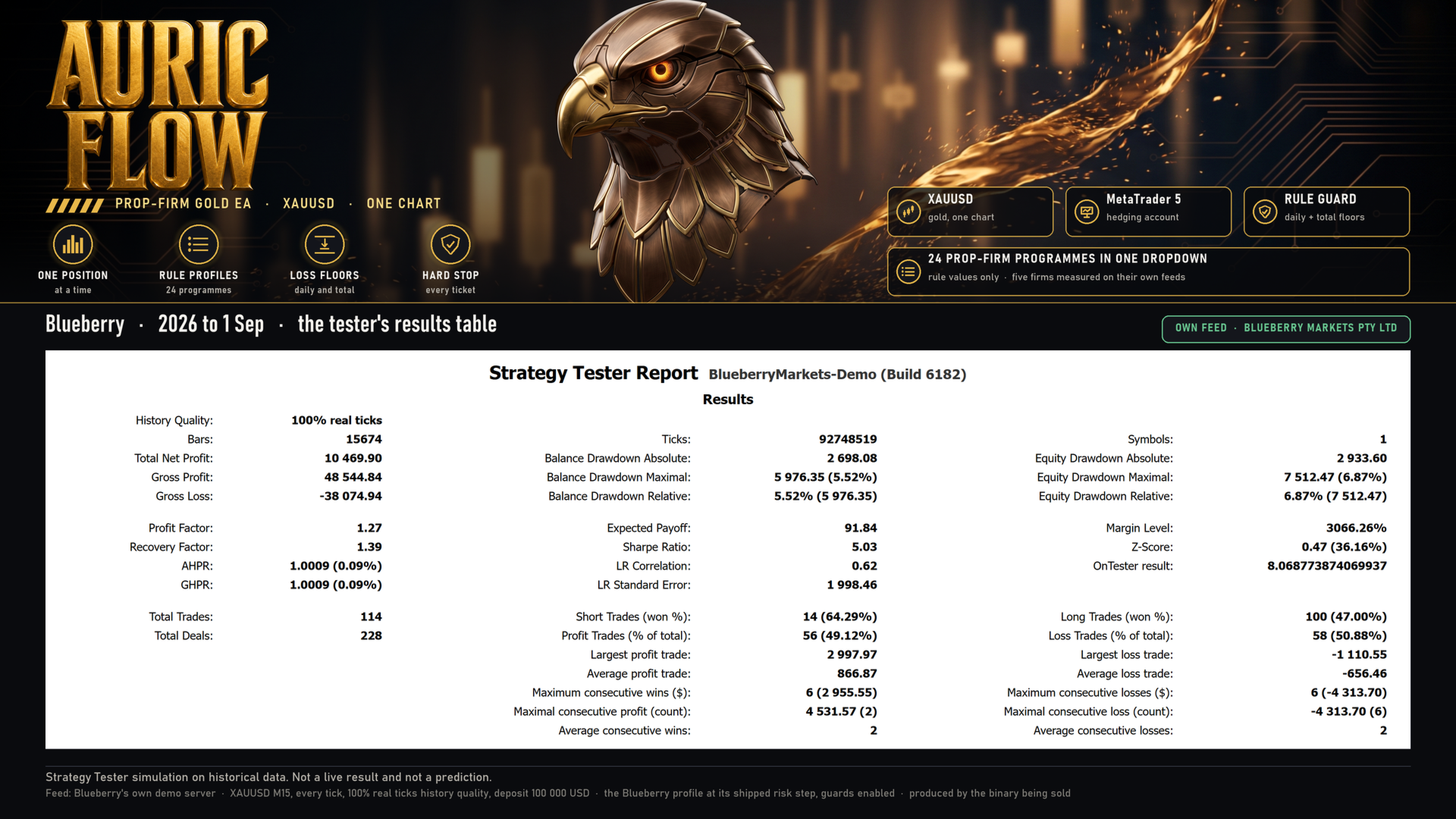
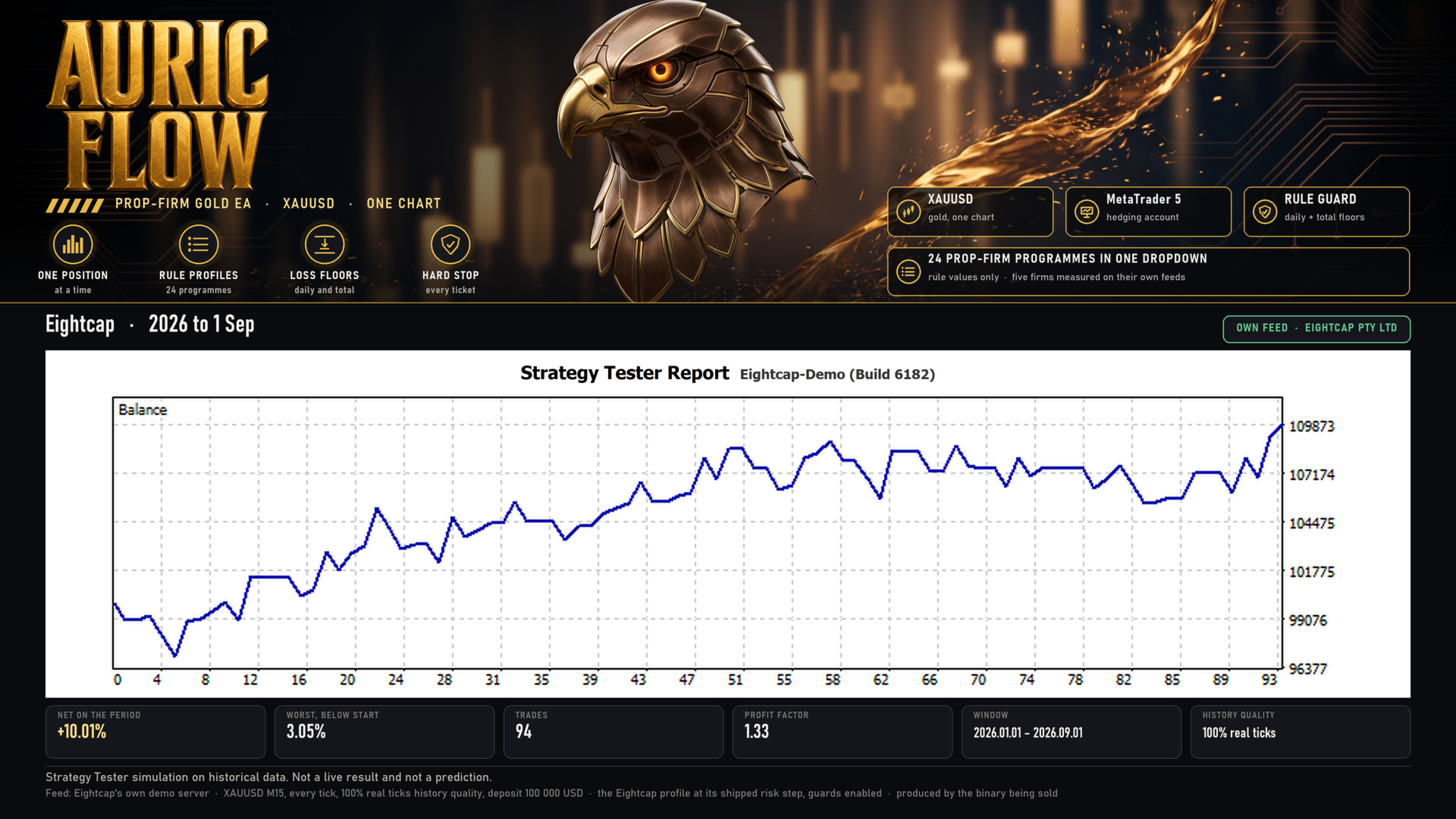
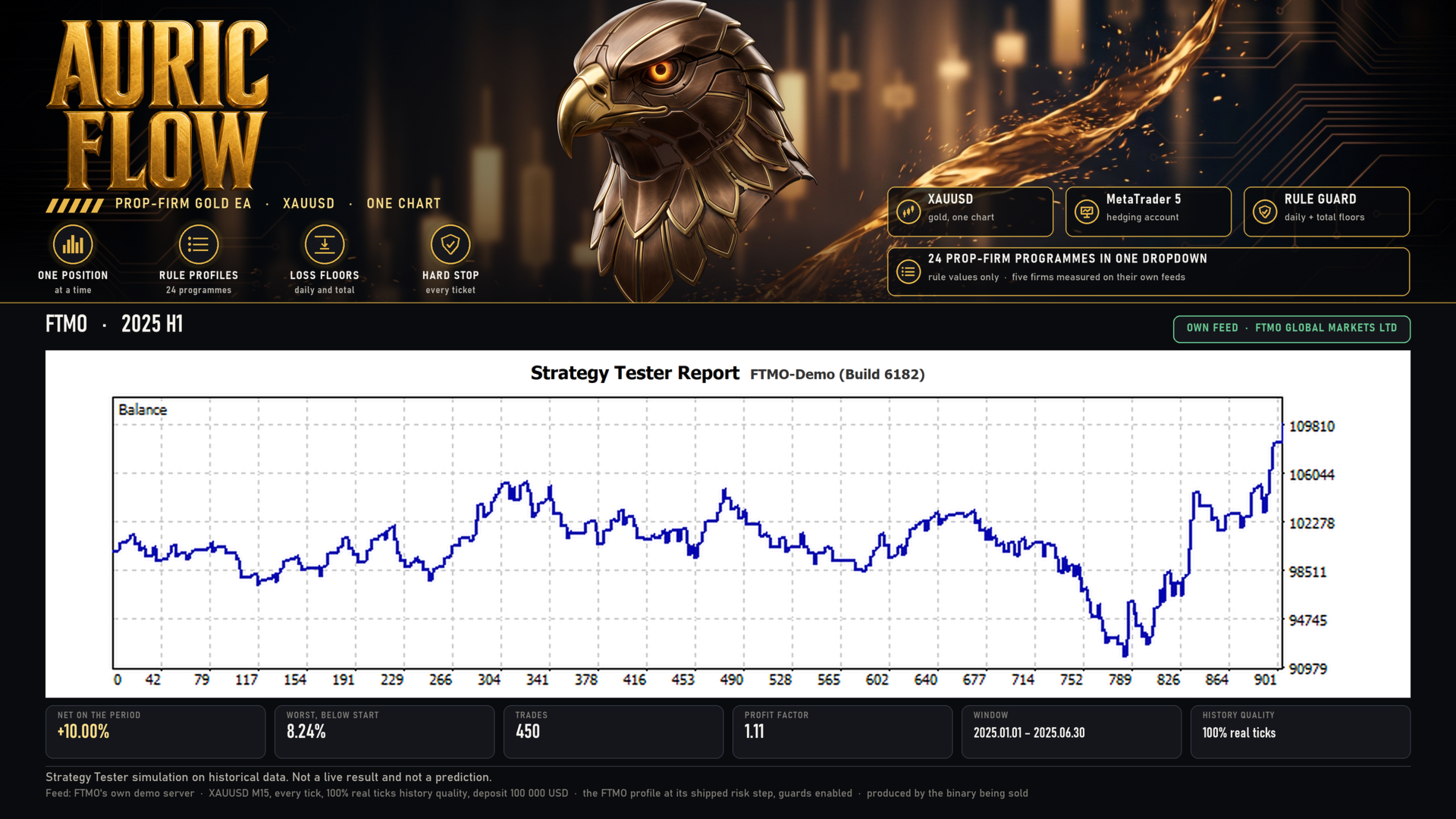
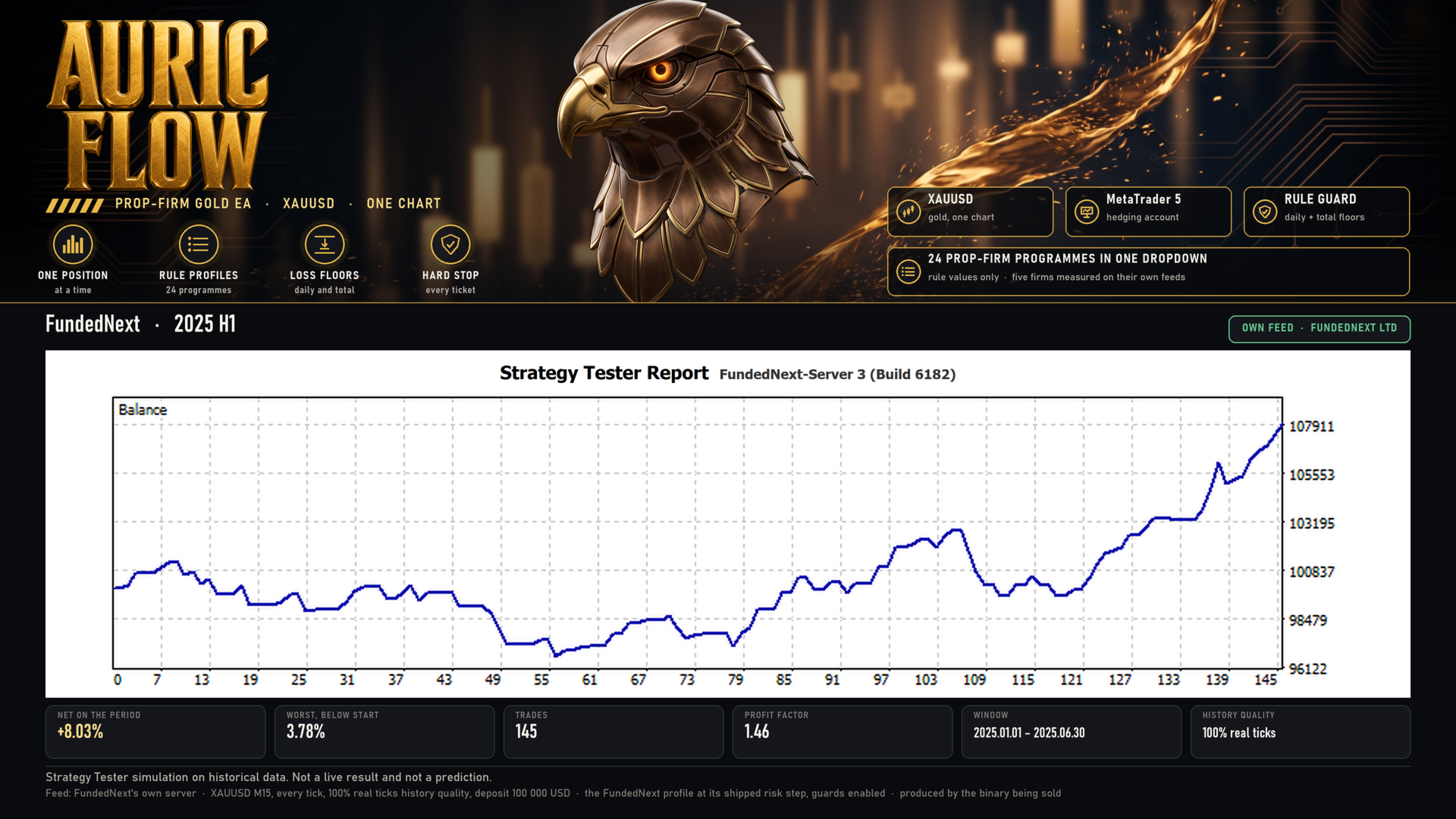
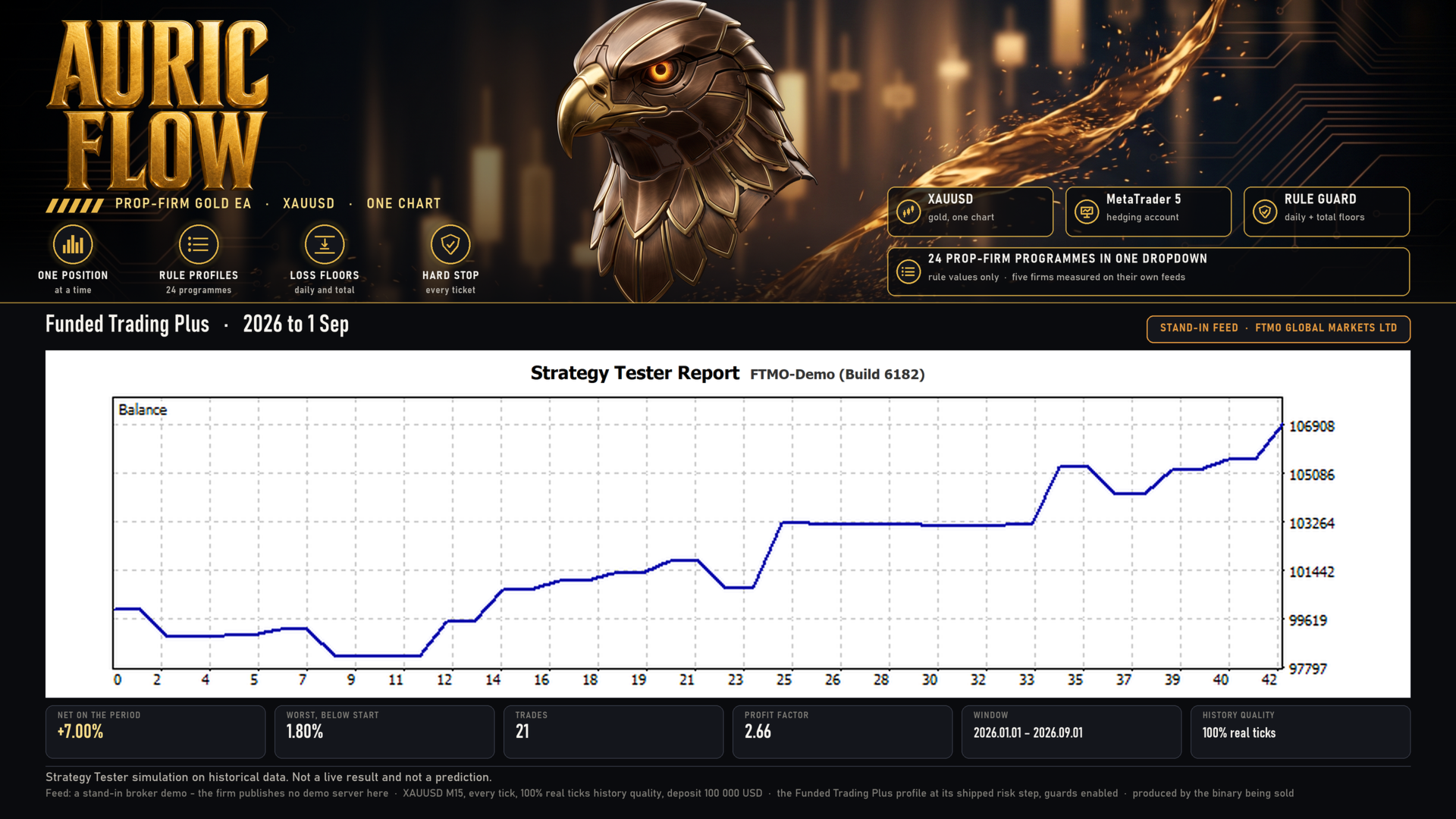
These are Strategy Tester results on historical data, not live trading results, and they are not a prediction. Every figure below comes from a run of the exact file you are buying, on gold, at one percent risk per trade on a 100,000 account, with the firm profile set and the preset that ships with it.
-
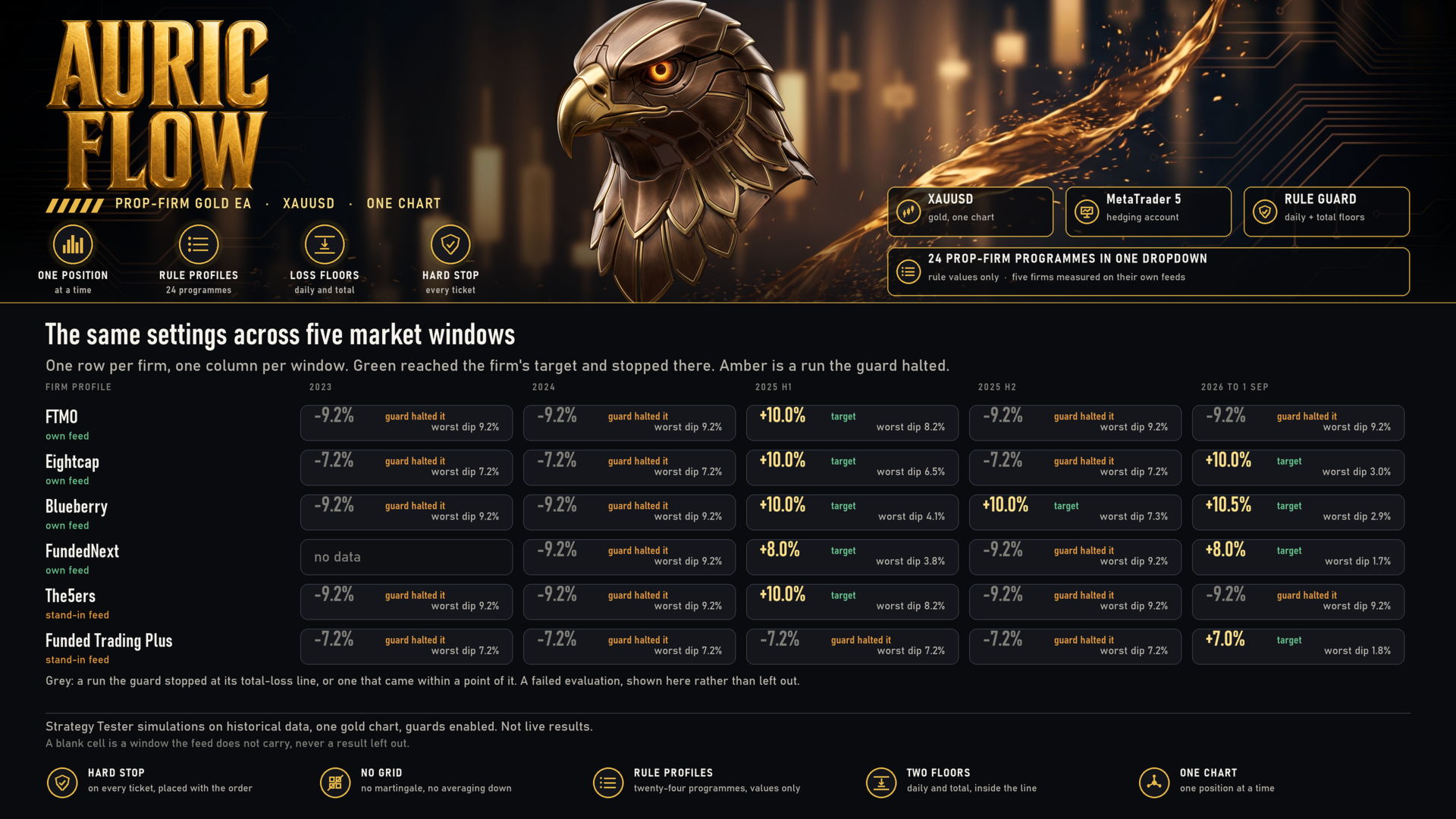
Five windows on each of six firms, 29 runs in all: 2023, 2024, the first half of 2025, the second half of 2025 and 2026 to the first of September. One of the 30 firm-and-window pairs carries no figure, because that feed's gold history does not reach that far back; a missing window is left missing rather than filled from another firm's prices. Every one of them on REAL TICKS from the broker's own server, which matters for this engine: it reads the forming one-minute bar and moves the stop tick by tick, so the order of prices inside a bar decides both the entry and the exit. A run that assumes that order rather than measuring it is an upper bound, and none of these are.
-
Nineteen of those 29 runs were stopped by the guard at the total-loss line, and 10 reached the programme's profit target and stopped there. Not one breached a floor. The guard halts a fixed distance inside the line rather than on it, which is why every stopped run ended between 7.20 and 9.23 percent below its starting balance against floors of 8 and 10 percent.
-
A stopped run and a finished one do not mean the same thing, and the number alone will not tell you which you are looking at. When a run reaches the target the guard latches and stays stopped, so its result IS the target and not a return over the window - a run given eight months can be finished in the third week. When the guard stops a run at the loss line, that is where the figure comes from too. Neither is a yearly return.
-
The split is a regime, not a coin toss. Counting the firms that reached a target: in the first half of 2025, 5 of 6; in the second half of 2025, 1 of 6; in 2026 to the first of September, 4 of 6. In 2023 and 2024, none of the 11 runs did. Gold trended in the first half of 2025 and 2026 to the first of September and did not in 2023, 2024 and the second half of 2025. This engine needs a trend; when there is none it hands the account back to the guard rather than grinding it away, and that is the behaviour being sold.
-
All six firms reached a target in at least one window, and all six were stopped in at least one. No firm's profile is the lucky one.
-
Feeds differ, and every figure says which one produced it. Blueberry, Eightcap, FTMO and FundedNext were measured on those firms' own demo servers. Funded Trading Plus and The5ers publish no demo server reachable from here, so 10 of the runs used a stand-in feed: the RULES are that firm's, the PRICES are not. The setup guide names the feed behind every number.
-
Trade counts ran from 21 to 511 per window. The quiet windows are the trend filter and the session gate declining to trade, not a fault. Forcing frequency is how evaluation accounts are usually lost.
-
The window-by-window table - every firm, every window, trades, result, worst dip below the starting balance and the floor it was measured against - is in the setup guide, along with the feed and the tick model for each row. Nothing in it is left out of this summary; the runs the guard stopped are the majority of it.
WHAT THIS EA DOES NOT DO
- It does not promise to pass an evaluation. No setting can make a market move.
- It does not grid, martingale, average down or run a recovery mode. There is no series code in it.
- It does not open a position without a broker-side stop loss, in any mode.
- It does not know your firm's rules better than your firm does.
- It contains no account, server, broker, symbol or date restriction. It is built and tested on gold, and every recommendation here is a recommendation.
RECOMMENDED SETUP
- One gold chart, one instance. Attaching it twice runs it twice. Any chart timeframe works, because the signal is read from the one-minute and hourly series whatever chart it sits on.
- Choose your firm programme and phase, then load the preset for that programme from the setup guide and change nothing else until you have watched it run. Never change the account size mid-phase.
- One percent risk per trade is what the measurements above were made at. Higher does not pass faster; it reaches the floor sooner.
- Check your broker's symbol name. Several feeds name gold with a suffix, and the EA detects gold from the symbol rather than from a hardcoded name.
- A hedging account is recommended. A netting account also works, because the engine holds one position at a time in any case.
- A VPS is recommended, so the guard keeps counting days and tracking floors while your own machine is off.
INPUTS
81 inputs, grouped as: prop firm profile, general, entry engine, entry refinements, trend filter, stops and targets, trailing, money management, safety and risk controls, trading hours, news filter, and the compliance and challenge guard. The firm profile sits at the top, because it is the only one most buyers need to change.
REQUIREMENTS
- MetaTrader 5, and a gold symbol on an account your broker will let you trade 0.01 lots on.
- The hard stop is 1,500 points, so the smallest position a broker accepts risks roughly 15 units of your account currency however low you set the risk percentage. Below about 1,500 in account currency the default one percent per trade is not reachable; the EA says so once and then either trades the minimum lot or skips the trade, according to one input.
- Some firms charge a separate fee to run an Expert Advisor, or do not permit one on a trial or competition account. Check before you start.
- Some firms quote gold at reduced leverage, and some charge commission per lot. Commission is not inside the figures above; the setup guide says which firms it applies to.
- The news filter reads the terminal's built-in economic calendar. Nothing has to be added to the terminal's allowed addresses, and the filter does nothing inside the Strategy Tester.
- The account number is used only to keep the guard's saved state separate between accounts in one terminal. Nothing in the EA branches on it.
- A MetaTrader 4 version is listed separately, and the two are not interchangeable - neither are their presets.
SETUP GUIDE, PRESETS AND SUPPORT
The presets are not on this page. The Market does not allow a file download on a product page, so they are attached to the setup guide instead, together with the full results table and the guard reference:
SETUP GUIDE & PRESETS
That page carries 86 presets for MetaTrader 5 and 86 for MetaTrader 4, one per firm, programme, phase and risk tier, each stating every input so loading one puts the EA in a known state.
Support is through the Comments tab of this product. Please use it rather than another channel, so the answer stays next to the product where the next buyer can find it. - Kestutis Balciunas
RISK WARNING
Trading carries substantial risk and you can lose money. Past performance does not indicate future results, and a historical test is not a prediction of future results: it shows what an engine did on data that has already happened. Never risk capital you cannot afford to lose, and test on a demo account first.