
Auric Flow EA Manual: a prop firm gold EA for FTMO, FundedNext, Blueberry, Eightcap, The5ers and Funded Trading Plus

An expert advisor cannot make a prop firm evaluation pass faster than the market allows. What it can do is refuse to break the rules while it waits, count the things the firm counts, and stop before a line instead of after it. That is the whole job, and most evaluation accounts are lost because something on that list was missing rather than because the entries were bad.
This is the settings manual for Auric Flow 3.00, a gold EA that trades one position at a time with a prop firm rule guard built in. It covers what each firm profile applies, every input and when to change it, how to set it up, and what the testing did and did not show - including the windows where the guard stopped the account rather than the ones where it reached a target.
- MetaTrader 5: Auric Flow MT5
- MetaTrader 4: Auric Flow MT4
What changed in version 3.00
Version 3.00 replaces the trading engine. Auric Flow 1.x placed several orders at Fibonacci-spaced levels and managed them as a basket, with a recovery mode. This version holds one position at a time, puts a hard stop and a target on every ticket, and never adds to a losing trade: no grid, no averaging down, no recovery mode. The change was made so the EA can be run on a prop firm evaluation, where a grid is usually a breach of the rules whatever it earns.
If you own version 1.x
You receive 3.00 as a free update, automatically, and three things follow from that.
- Your old presets will not work. They name settings that no longer exist, and MetaTrader keeps its previous value for any setting a preset does not mention - so a 1.x preset half-applies, which is worse than one that is refused. Take the preset for your firm and phase from the download below instead.
- Close or let finish anything 1.x has open. Version 3.00 uses a different magic number, so it will neither touch those positions nor manage them.
- Then detach the EA, load a 3.00 preset, and re-attach it.
If the grid is what you wanted, the 1.x binary you already downloaded keeps working. It is simply no longer the version being updated or supported.
What a prop firm EA can and cannot do
An evaluation has two clocks. One is the profit target. The other is the set of limits that end the account: a daily loss cap, a total loss cap, and on many programmes a consistency rule and a minimum number of trading days. Only the second clock is under a robot's control. An EA can be exact about those limits in a way a person cannot, because it never gets bored, never rounds a number in its own favour, and never decides that today is different.
So this EA is precise about the half it controls and honest about the half it does not. It cannot make gold trend. Nothing here predicts whether you will pass, and the table further down publishes the windows where this engine did not, beside the ones where it did.
How long a phase takes is a property of the market, not of the EA
Of the 29 windows measured for this build, 10 reached the programme's profit target. The earliest got there inside the first month of its window and the slowest took most of a quarter, on identical settings - the difference was gold, not the configuration. Any number of days quoted as a pass time is a statement about one past window, which is why there is not one anywhere in this manual or in either listing.
What you can control is not losing the account while you wait. That is what the guard is for.
How the engine trades gold
One symbol, one position, two timeframes. The slower one decides direction and the faster one decides the moment.
The trend filter
An exponential moving average on the hourly chart decides which way the market is pointing. Above it, only buys are considered; below it, only sells. The filter is read from the hourly series whatever chart the EA is attached to, so a D1 or M30 chart trades exactly like an H1 one.
When the platform will not serve those series
A timeframe you configure is a request, not a fact. Some MetaTrader 4 testers and a few brokers carry no one-minute history for a symbol, and an engine that insists on it reads nothing and trades nothing - silently, for the whole run. Version 3.00 of the MetaTrader 4 build was refused by the Market's own validator for exactly that, on four test cases out of four.
The MetaTrader 4 build now resolves each series it reads to the nearest timeframe at or above the one configured that the platform will actually serve, and prints which ones it settled on. Where the one-minute series is served - every live terminal, and any tester with the history - nothing changes at all. Where it is not, the engine reads the tested timeframe instead of reading zeros.
The entry
With the trend pointing up, a short-period RSI on the one-minute chart has to dip into its oversold zone - a pullback against the move, not a breakout with it. The mirror image applies for a sell. There is no second entry while a position is open, and no entry at all outside the sessions you allow or while the spread is above its ceiling.
The stop, and why it is scaled
A hard stop goes on the ticket with the order, placed with the broker, so a dropped connection or a closed terminal cannot leave a trade unprotected. The distance is typed in points and then clamped to a fraction of the hourly range, which is what makes the same settings behave sensibly whether gold is at 1,800 or 3,400. On a three-digit gold quote the floors are read in cents rather than being silently divided by ten - the fault that produces a stop a tenth of the size you meant, and a position ten times larger than you meant.
The exits, and what that does to the win rate
A target sits on the ticket at a multiple of the hourly range. The stop moves to break-even once the trade is ahead, and then trails behind price. Most exits are the trail rather than the target. That is worth knowing before you judge the win rate or try to reason about a reward-to-risk figure from the settings: the realised ratio is not the configured one, and the configured one is not a claim.
Volume, fitted before it is sent
The lot is sized from your risk percentage and the stop distance, then fitted to what the broker will actually accept: the symbol's volume limit, its step, its minimum, and your free margin. Where the fit cannot be made the trade is skipped and the reason is logged once, rather than a request going out that the server will refuse. On a small account that matters - the smallest position most brokers accept on gold risks about fifteen units of account currency with this stop, whatever you set the risk to.
The prop firm guard, rule by rule
Select your firm and phase from the dropdown and the guard takes that programme's numbers. It does not check your account, restrict your broker, block a symbol or change how the EA enters a trade - it decides when the EA must stop.
The daily loss floor
Trading halts for the rest of the firm's day when the day's loss reaches the floor, with a buffer - the halt is a fixed distance inside the line, so slippage on the closing trade cannot turn a guard stop into a breach. It does not resume after the next bar; it stays halted until the firm's own reset clock.

Firms measure the day from different places. Most measure it from where the day's equity started; FTMO measures it against the initial balance. The profile carries which, because getting it wrong makes the EA stop too early on a good day or too late on a bad one.
The total loss floor, static or trailing
The same buffer logic on the account's whole life. Where a firm trails the floor behind an equity or end-of-day high, the profile trails it the way that firm measures it; where a firm locks the floor at your starting balance once profit reaches a level, the profile carries the level. When this one is hit the EA stops altogether and stays stopped.
The reset clock
A daily floor is meaningless without knowing when the day ends, and no two firms agree. Four clocks are implemented: 0 = a fixed GMT hour; 1 = midnight central European time (CET/CEST); 2 = 17:00 US Eastern (ET); 3 = midnight on an eastern European server (EET). The zones that follow daylight saving do so; the fixed GMT hour does not, deliberately, because that is how the firms that use it describe it.

The target latch
When the programme's profit target is reached the EA stops and stays stopped. It does not trade on and give it back. This is also why a result in the table below can equal the target exactly: the run finished there and the rest of the window is flat by design.
Minimum trading days, and days that count
Days on which the EA traded are counted, and where a firm requires it, only the days that closed in profit are counted. Both are in the profile, because a programme that needs a minimum number of profitable days is a different problem from one that needs a minimum number of active days.
Consistency, as a gate rather than a block
Several firms refuse a payout if one day is too large a share of the total profit. The guard treats that as a gate on finishing the phase, not as a block on entries. Blocking entries would deadlock the account after the first good day; the gate instead keeps the phase open until the share is inside the rule.
The size ratchet and the minimum hold
Some firms treat any increase in size after a loss as a progression they do not allow. Where a profile says so, size never increases after a losing trade. Where a firm requires a minimum holding time, the EA respects it on its own exits - protective stops are exempt, by design, because a stop that waits out a timer is not a stop.
It says why it is not trading
One line in the Experts log per reason per day: trend against, spread too wide, outside the session, guard halted for the day, target reached. A quiet EA and a broken EA look identical without this, and the difference matters most on the day you are watching an evaluation account do nothing.
It also prints the numbers it is enforcing when it starts. Read that line. It is the only place that tells you what the guard actually resolved to, and firms change their rules - check it against your own dashboard before the first trade.
Table A: every programme in the dropdown, and the numbers it applies
Phase 1 values. A later phase usually keeps the floors and lowers the target; the funded phase has no target at all, which is why the EA stops counting towards one and simply keeps the account inside its limits.
| Programme | Target | Daily floor | Total floor | Trailing | Min days | Reset clock |
|---|---|---|---|---|---|---|
| FTMO 2-Step | 10% | 5% | 10% | no | 4 | midnight central European time (CET/CEST) |
| FTMO 1-Step | 10% | 3% | 10% | yes | - | midnight central European time (CET/CEST) |
| FTMO Funded / Swing | off | 5% | 10% | no | - | midnight central European time (CET/CEST) |
| FundedNext Stellar 2-Step | 8% | 5% | 10% | no | 5 | 21:00 GMT |
| FundedNext Stellar 1-Step | 10% | 3% | 6% | no | 2 | 21:00 GMT |
| FundedNext Stellar Lite | 8% | 4% | 8% | no | 5 | 21:00 GMT |
| FundedNext Stellar Instant | off | 3% | 6% | yes | - | 21:00 GMT |
| Blueberry Funded 1-Step | 10% | 4% | 6% | no | 3 | 17:00 US Eastern (ET) |
| Blueberry Funded 2-Step | 10% | 5% | 10% | no | 3 | 17:00 US Eastern (ET) |
| Blueberry Funded Prime | 8% | 4% | 10% | no | 5 | 17:00 US Eastern (ET) |
| Blueberry Funded Instant Elite | off | 4% | 10% | yes | - | 17:00 US Eastern (ET) |
| The5ers High Stakes | 10% | 5% | 10% | no | 3, profitable | 21:00 GMT |
| The5ers Hyper Growth | 10% | 3% | 6% | no | - | 21:00 GMT |
| The5ers Pro Growth | 10% | 3% | 6% | no | 3, profitable | 21:00 GMT |
| The5ers Instant Funding | off | off | 6% | no | - | 21:00 GMT |
| Eightcap One Phase | 10% | 4% | 8% | no | 5 | 21:00 GMT |
| Eightcap Two Phase | 9% | 5% | 10% | no | 3 | 21:00 GMT |
| Funded Trading Plus 1-Step Express | 10% | 3% | 6% | yes | - | 17:00 US Eastern (ET) |
| Funded Trading Plus 2-Step Classic | 7% | 3% | 8% | no | - | 17:00 US Eastern (ET) |
| Funded Trading Plus Instant | off | 3% | 6% | yes | - | 17:00 US Eastern (ET) |
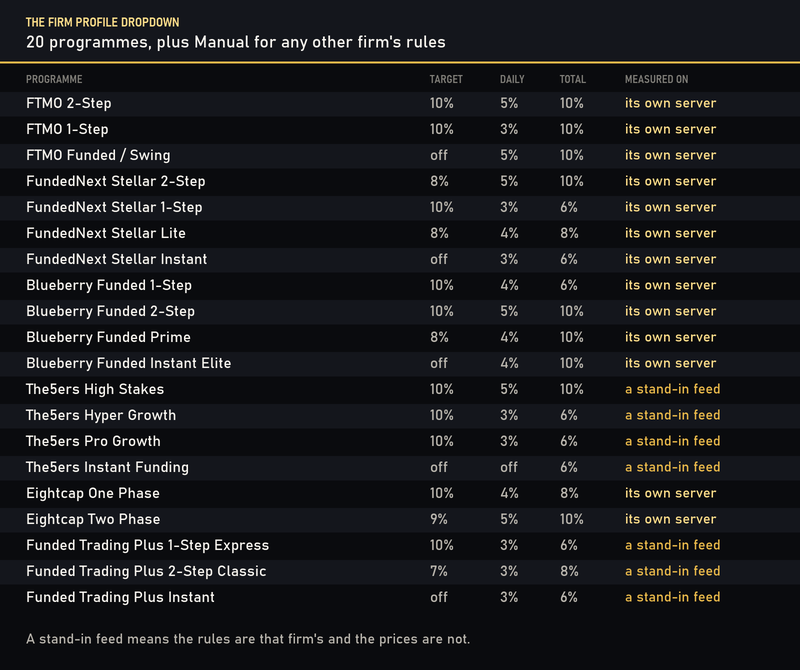
A dash means the programme does not set that rule. Manual is the twenty-first entry in the dropdown: it applies none of this and lets you type any other firm's numbers yourself.
Table B: what the testing showed, every window
Strategy Tester, gold, one percent risk per trade on a 100,000 account, the firm profile set and the preset that ships with it. These are historical results, not live trading, and not a prediction.
29 runs. 19 were stopped by the guard at the total-loss line; 10 reached the profit target and stopped there. None breached a floor.
| Firm | Window | Trades | Result % | Target % | Worst dip below start | Floor % | Ended |
|---|---|---|---|---|---|---|---|
| Blueberry | 2023 | 475 | -9.21 | 10.00 | 9.21 | 10.00 | guard stopped it |
| Blueberry | 2024 | 372 | -9.20 | 10.00 | 9.20 | 10.00 | guard stopped it |
| Blueberry | 2025 H1 | 440 | 10.00 | 10.00 | 4.11 | 10.00 | target reached |
| Blueberry | 2025 H2 | 266 | 10.00 | 10.00 | 7.33 | 10.00 | target reached |
| Blueberry | 2026 to 1 Sep | 114 | 10.47 | 10.00 | 2.93 | 10.00 | target reached |
| Eightcap | 2023 | 511 | -7.23 | 10.00 | 7.23 | 8.00 | guard stopped it |
| Eightcap | 2024 | 358 | -7.20 | 10.00 | 7.20 | 8.00 | guard stopped it |
| Eightcap | 2025 H1 | 457 | 10.00 | 10.00 | 6.52 | 8.00 | target reached |
| Eightcap | 2025 H2 | 41 | -7.20 | 10.00 | 7.20 | 8.00 | guard stopped it |
| Eightcap | 2026 to 1 Sep | 94 | 10.01 | 10.00 | 3.05 | 8.00 | target reached |
| FTMO | 2023 | 493 | -9.20 | 10.00 | 9.20 | 10.00 | guard stopped it |
| FTMO | 2024 | 187 | -9.20 | 10.00 | 9.20 | 10.00 | guard stopped it |
| FTMO | 2025 H1 | 450 | 10.00 | 10.00 | 8.24 | 10.00 | target reached |
| FTMO | 2025 H2 | 70 | -9.20 | 10.00 | 9.20 | 10.00 | guard stopped it |
| FTMO | 2026 to 1 Sep | 151 | -9.23 | 10.00 | 9.23 | 10.00 | guard stopped it |
| FundedNext | 2024 | 141 | -9.21 | 8.00 | 9.21 | 10.00 | guard stopped it |
| FundedNext | 2025 H1 | 145 | 8.03 | 8.00 | 3.78 | 10.00 | target reached |
| FundedNext | 2025 H2 | 58 | -9.20 | 8.00 | 9.20 | 10.00 | guard stopped it |
| FundedNext | 2026 to 1 Sep | 46 | 8.00 | 8.00 | 1.73 | 10.00 | target reached |
| FundedTradingPlus | 2023 | 477 | -7.20 | 7.00 | 7.20 | 8.00 | guard stopped it |
| FundedTradingPlus | 2024 | 164 | -7.20 | 7.00 | 7.20 | 8.00 | guard stopped it |
| FundedTradingPlus | 2025 H1 | 384 | -7.20 | 7.00 | 7.20 | 8.00 | guard stopped it |
| FundedTradingPlus | 2025 H2 | 54 | -7.20 | 7.00 | 7.20 | 8.00 | guard stopped it |
| FundedTradingPlus | 2026 to 1 Sep | 21 | 7.00 | 7.00 | 1.80 | 8.00 | target reached |
| The5ers | 2023 | 487 | -9.20 | 10.00 | 9.20 | 10.00 | guard stopped it |
| The5ers | 2024 | 187 | -9.20 | 10.00 | 9.20 | 10.00 | guard stopped it |
| The5ers | 2025 H1 | 450 | 10.00 | 10.00 | 8.24 | 10.00 | target reached |
| The5ers | 2025 H2 | 70 | -9.20 | 10.00 | 9.20 | 10.00 | guard stopped it |
| The5ers | 2026 to 1 Sep | 146 | -9.23 | 10.00 | 9.23 | 10.00 | guard stopped it |
How to read that table
A result that equals the target is not a window return. The guard latches at the target and stays stopped, so a run given eight months can be finished in its third week and flat afterwards. A negative result is where the guard stopped, not where the market took the account: every stopped run ends a fixed distance inside its floor, which is why those figures cluster just short of it.
Table C: which feed produced which number
A figure is only as good as the prices under it, so every row says where it came from and how the ticks were obtained.
| Firm | Feed | Tick model | Windows |
|---|---|---|---|
| Blueberry | Blueberry Markets Pty Ltd | real ticks from the server | 2023, 2024, 2025 H1, 2025 H2, 2026 to 1 Sep |
| Eightcap | Eightcap Pty Ltd | real ticks from the server | 2023, 2024, 2025 H1, 2025 H2, 2026 to 1 Sep |
| FTMO | FTMO Global Markets Ltd | real ticks from the server | 2023, 2024, 2025 H1, 2025 H2, 2026 to 1 Sep |
| FundedNext | FundedNext Ltd | real ticks from the server | 2024, 2025 H1, 2025 H2, 2026 to 1 Sep |
| Funded Trading Plus | FTMO Global Markets Ltd (stand-in, not this firm's own server) | real ticks from the server | 2023, 2024, 2025 H1, 2025 H2, 2026 to 1 Sep |
| The5ers | FTMO Global Markets Ltd (stand-in, not this firm's own server) | real ticks from the server | 2023, 2024, 2025 H1, 2025 H2, 2026 to 1 Sep |
| Blueberry, MetaTrader 4 | BlueberryMarkets-Demo (Build 1479) | generated from one-minute bars | 2025 H2, 2026 to 1 Sep |
A stand-in feed means the rules are that firm's and the prices are not. Two of the firms in the dropdown publish no demo server reachable from here, so their runs were measured on another firm's gold prices with their own rule numbers applied. That is disclosed on every surface rather than averaged into the others.
What could not be tested
- Commission. Two of these firms charge a per-lot commission that is not inside the figures above. On a gold strategy that trades this often, that is not a rounding error; price it before you choose a programme.
- The firms' own execution. A demo server is not a funded server. Slippage, requotes and weekend gaps on a live evaluation account are the firm's, not the tester's.
- MetaTrader 4 tick quality. The MetaTrader 4 runs use ticks generated from one-minute bars, because no tick history is served for that period. This engine moves its stop inside the bar, so those runs are an upper bound rather than a measurement, and the two platforms' figures are not comparable.
- The daily floor, by a report. A tester report's summary has no per-day equity, so the daily rule cannot be checked from it. It is checked by running each shipped preset and reading back the guard line the EA prints; that record is in the repository rather than here.
What is deliberately not in this build
- No grid, no martingale, no averaging into a loss, no recovery mode. There is no series code in it at all.
- No second position. One at a time, so the open risk is always one stop.
- No account, server, broker, symbol or date restriction. Everything in this manual is a recommendation, not a lock.
- No file writing and no internet access. The news filter reads the terminal's own economic calendar; nothing has to be added to the terminal's allowed addresses.
- No claim about your firm's rules being current. The profiles were right when this version was built. Your dashboard is the authority.
Download the presets
86 presets for MetaTrader 5 and 86 for MetaTrader 4 - one per firm, programme, phase and risk tier. Each one sets every input, so loading a preset puts the EA in a fully known state rather than patching whatever was in the dialogue before.
- AuricFlow_Presets_MT4_v3.00.zip
- AuricFlow_Presets_MT5_v3.00.zip
The two archives are not interchangeable: a MetaTrader 5 preset names settings the MetaTrader 4 build does not have, and the timeframe constants are numbered differently on the two platforms, so a cross-loaded preset does not fail loudly - it quietly sets a timeframe nobody meant. Each archive carries a README saying which platform it is for.
Preset names read AF_<Firm>_<Programme>_<Phase>_<Tier>_<Platform>.set , so the one you want is the one whose name matches the programme on your dashboard.
Setting it up, in five steps
- Install from the MQL5 Market and let MetaTrader put it in Experts .
- Open one gold chart. Any timeframe - the signal is read from the one-minute and hourly series whatever chart it sits on. Check the symbol name: several feeds add a suffix, and the EA detects gold from the symbol rather than from a hardcoded name.
- Load the preset for your firm, programme and phase from the download above.
- Read the line the EA prints when it starts. It names the programme and the numbers the guard resolved to. Check them against your own dashboard before the first trade.
- Change nothing else until you have watched it run. One chart, one instance, one position. Attaching it to two charts runs two copies, and they do not know about each other.
A hedging account is recommended; a netting account also works, because the engine holds one position at a time in any case. A VPS is recommended so the guard keeps counting days and tracking floors while your own machine is off - and the guard's state survives a restart, so closing the terminal does not reset a daily stop.
Never change the account size mid-phase. The floors are percentages of it, and moving it moves every line the guard is watching.
Input reference, MetaTrader 5
81 inputs in 13 groups. The Default column is read out of the shipped source, so it is what the binary actually starts with. A preset overrides all of them.
Money Management
- InpAutoMoney = true - Auto Money (risk-based lot sizing)
- InpLots = 0.01 - Lots (when Auto Money is OFF)
- InpMaxLots = 50.0 - Max Lots
- InpMaxSlippage = 15 - Max Slippage
- InpMaxSpread = 200 - Max spread in points. Gold spreads widen at the open and around news
- InpPercentRisk = 10.0 - Percent risk
Set trade time per day
- InpAllowSydney = false - Allow Sydney session trading (21h-7h GMT)
- InpAllowTokyo = false - Allow Tokyo session trading (23h-8h GMT)
- InpAllowLondon = true - Allow London session trading (7h-17h GMT)
- InpAllowNewYork = true - Allow NewYork session trading (12h-22h GMT)
- InpFridayExitHour = 20 - Exit Hour on Friday (Time GMT; 20=close ~1h before weekend)
- InpFridayExitMinute = 0 - Exit Minute on Friday (Time GMT)
- InpBrokerGMTOffset = -98 - Broker server GMT offset in hours (-98 = detect EET automatically, -99 = use the PC clock)
General
- InpComment = "AuricFlow" - Order comment
- InpMagicNumber = 20260900 - Magic Number
Trend Filter
- InpHTFPeriod = PERIOD_H1 - Higher Timeframe
- InpHTFEMAPeriod = 200 - HTF EMA Period (trend filter)
- InpUseHTFTrendFilter = true - Require EMA trend confirmation
- InpADXPeriod = 14 - ADX Period (on HTF)
Stops, Targets and Trailing
- InpATRPeriod = 14 - ATR Period (on HTF)
- InpTPATRMult = 1.2 - Base TP ATR Multiplier (for 1 order)
- InpTPDepthDecay = 0.6 - TP depth decay (deeper basket -> easier TP)
- InpMinTPATRMult = 0.25 - Min TP ATR Multiplier (floor over spread+commission)
- InpVirtualSLATRMult = 2.0 - Virtual Grid SL ATR Multiplier (basket stop distance)
- InpRiskPercent = 1.0 - Risk Per Grid (% of balance)
- InpMaxConsecutiveLosses = 999 - Max consecutive losing grids per day (guard handles risk)
Trailing
- InpTrailAll = true - Enable Trailing
- InpTrailATRMult = 0.5 - Trail Step ATR Multiplier
News Filter
- InpUseNewsFilter = true - Use News Filter
- InpNewsBeforeMins = 50 - Pause Before News (mins)
- InpNewsAfterMins = 120 - Start After News (mins)
- InpNewsCurrencies = "USD" - Currencies
News Filter: which releases
- InpHighImpact = true - High Impact
- InpMedImpact = false - Medium Impact
- InpLowImpact = false - Low Impact
Safety & Risk Controls
- InpMaxEquityDrawdownPct = 15.0 - Max Equity Drawdown (%) - EMERGENCY close all
- InpVirtualGridSL = 0 - Virtual Grid SL override (points, 0=ATR-based)
- InpMaxDailyLossPct = 4.0 - Max Daily Loss (%) - stop trading for day
- InpMaxBasketLossPct = 1.25 - Max Basket Loss (% balance) - hard $ stop on open grid
- InpLossCooldownMins = 60 - Cooldown after loss (minutes, 0=disabled)
- InpMaxATRMultiplier = 2.0 - Max ATR volatility multiplier (0=disabled)
Prop Firm Profile
- InpFirmProfile = AF_FIRM_MANUAL - Firm programme (fills the guard numbers below)
- InpFirmPhase = AF_PHASE_1 - Which phase you are trading
- InpShowDashboard = true - Draw the on-chart panel (never in the tester)
Compliance & Challenge Guard
- AF_Enable = true - Enable the prop firm challenge guard
- AF_InitialBalance = 0 - Initial simulated capital (0 = auto-capture at init)
- AF_ProfitTargetPct = 0.0 - Profit target % (0 = no target; a firm profile supplies its own)
- AF_StopAfterTarget = true - Pause EA once target reached (challenge pass)
- AF_MaxDailyLossPct = 5.0 - Max daily loss % of the AF_DailyBasis snapshot. The firm profile sets this
- AF_DailyBufferPct = 0.8 - Daily guard safety buffer %
- AF_MaxLossPct = 10.0 - Max total loss % of the initial balance. The firm profile sets this
- AF_MLBufferPct = 0.8 - Max-loss guard safety buffer %
- AF_TrailingML = false - Max loss TRAILS the running high. The firm profile sets this; most programmes are static
- AF_DailyResetZone = 3 - Daily reset clock: 0=fixed AF_DailyResetHourGMT, 1=CE(S)T, 2=17:00 US-Eastern, 3=EET server midnight. The firm profile sets this; UTC midnight is 0 with hour 0
- AF_DailyResetHourGMT = 0 - Daily reset hour GMT when zone=0 (0 = midnight UTC)
- AF_TrailBasis = 0 - Trailing basis: 0=EOD balance high, 1=intraday equity high. Only used when the max loss trails
- AF_BalanceProtectAt = 0.0 - Lock max-loss floor to initial once profit >= this % (0=never)
- AF_MinTradingDays = 3 - Min trading days before the pass latch. The firm profile sets this
- AF_BestDayRule = false - Consistency: cap the best day against the sum of positive days. The firm profile sets this
- AF_BestDayCapPct = 50.0 - Best day max % of the positive trading days' profit sum. Only used when the consistency rule is on
- AF_DailyBasis = 0 - Daily-loss basis: 0=previous-EOD EQUITY, 1=previous-EOD BALANCE (closed trades only), 2=% of INITIAL (legacy)
- AF_DailyProfitCapPct = 0.0 - Daily profit cap % of initial: no new entries once reached (0=off; Swift eval=3, Start P1/P2/P3=0.8/1.2/2.4, Start funded=1)
- AF_DailyCapFlatten = false - Close the open position too once closed+floating day profit reaches the cap
- AF_MinDaysProfitable = false - Count a day only if its closed profit is at least 0.5% of the initial balance
- AF_MaxOpenRiskPct = 3.0 - Max risk carried by open trades, % of the initial balance (0 = off)
Entry Engine
- AF_RSI_Period = 7 - RSI period (on RSI timeframe)
- AF_RSI_TF = PERIOD_M1 - RSI timeframe
- AF_RSI_Up = 65.0 - Sell when RSI above this (in a downtrend)
- AF_RSI_Down = 35.0 - Buy when RSI below this (in an uptrend)
- AF_TrendEMA_Period = 100 - Trend EMA period (filter)
- AF_TrendEMA_TF = PERIOD_H1 - Trend EMA timeframe
- AF_TP_ATRMult = 2.0 - Take profit = this x H1 ATR (large, runner)
- AF_HardSL_Points = 1500 - Hard SL in points (gold 1500 = $15.00)
- AF_EntryCooldownBars = 1 - Min M1 bars between entries (robust engine)
Entry Refinements
- AF_UseRSITurn = false - Enter on RSI turning UP from oversold (not just below)
- AF_UseADXGate = false - Only trade when H1 ADX >= AF_ADX_Min (skip chop)
- AF_ADX_Min = 22.0 - Minimum ADX for entry
- AF_UseTrail = true - Breakeven + ATR trailing stop (protect winners) [v2 default ON]
- AF_BE_ATR = 0.5 - Move SL to breakeven after +this x H1 ATR profit
- AF_TrailStart_ATR = 0.8 - Start trailing after +this x H1 ATR profit
- AF_Trail_ATR = 0.8 - Trail distance = this x H1 ATR
Input reference, MetaTrader 4
49 inputs in 4 groups. The Default column is read out of the shipped source, so it is what the binary actually starts with. A preset overrides all of them.
Prop Firm Profile
- InpFirmProfile = AF_FIRM_MANUAL - Firm programme (fills the guard numbers below)
- InpFirmPhase = AF_PHASE_1 - Which phase you are trading
Engine (AuricFlow RSI-pullback)
- AF_RSI_Period = 7 - RSI period
- AF_RSI_TF = PERIOD_M1 - RSI timeframe
- AF_RSI_Up = 65.0 - Sell when RSI above this (in a downtrend)
- AF_RSI_Down = 35.0 - Buy when RSI below this (in an uptrend)
- AF_TrendEMA_Period = 100 - Trend EMA period
- AF_TrendEMA_TF = PERIOD_H1 - Trend EMA timeframe
- AF_ATR_Period = 14 - ATR period (trend TF) for TP/trail
- AF_TP_ATRMult = 2.0 - Take profit = this x TrendTF ATR
- AF_HardSL_Points = 1500 - Hard SL in points (gold 1500 = $15.00 on 2-digit)
- AF_EntryCooldownBars = 1 - Min bars between entries
- AF_UseTrail = true - Breakeven + ATR trailing stop
- AF_BE_ATR = 0.5 - Move SL to breakeven after +this x ATR profit
- AF_TrailStart_ATR = 0.8 - Start trailing after +this x ATR profit
- AF_Trail_ATR = 0.8 - Trail distance = this x ATR
Challenge Guard
- AF_Enable = true - Enable the challenge guard
- AF_InitialBalance = 0 - Initial simulated capital (0 = auto-capture)
- AF_ProfitTargetPct = 0.0 - Profit target % (0 = no target; a firm profile supplies its own)
- AF_StopAfterTarget = true - Pause EA once target reached (challenge pass)
- AF_MaxDailyLossPct = 5.0 - Max daily loss % of the AF_DailyBasis snapshot. The firm profile sets this
- AF_DailyBufferPct = 0.8 - Daily guard safety buffer %
- AF_MaxLossPct = 10.0 - Max total loss % of the initial balance. The firm profile sets this
- AF_MLBufferPct = 0.8 - Max-loss guard safety buffer %
- AF_TrailingML = false - Max loss TRAILS EOD balance high (Instant)
- AF_DailyResetZone = 3 - 0=fixed GMT hour, 1=CE(S)T, 2=17:00 US-Eastern, 3=EET server midnight. The firm profile sets this; UTC midnight is 0 with hour 0
- AF_DailyResetHourGMT = 0 - Daily reset hour GMT (only used when zone=0; 0 = midnight UTC)
- AF_MinTradingDays = 3 - Min trading days before the pass latch (0 = off). The firm profile sets this
- AF_BestDayRule = false - Consistency: cap best day vs positive-days sum
- AF_BestDayCapPct = 50.0 - Best day max % of the positive days' profit sum. Only used when the consistency rule is on
- AF_DailyBasis = 0 - Daily-loss basis: 0=prev-EOD EQUITY, 1=prev-EOD BALANCE (closed trades only), 2=% of INITIAL
- AF_DailyProfitCapPct = 0.0 - Daily profit cap % of initial: no new entries once reached (0=off; Swift eval=3, Start 0.8/1.2/2.4, Start funded=1)
- AF_DailyCapFlatten = false - Close the open position too once closed+floating day profit reaches the cap
- AF_MinDaysProfitable = false - Count a day only if its closed profit is at least 0.5% of the initial balance
- AF_MaxOpenRiskPct = 3.0 - Max risk carried by open trades, % of the initial balance (0 = off)
Risk / Session / Execution
- InpAutoMoney = true - Risk-based lot sizing
- InpRiskPercent = 1.0 - Risk per trade (% of balance)
- InpLots = 0.01 - Fixed lots (when AutoMoney off)
- InpMaxLots = 50.0 - Max lots cap
- InpBrokerGMTOffset = -98 - Broker server GMT offset (-98 = detect EET automatically, -99 = use the PC clock)
- InpAllowLondon = true - London session 07-17 GMT
- InpAllowNewYork = true - New York session 12-22 GMT
- InpFridayExitHour = 20 - Friday flatten hour GMT (24 = hold over the weekend)
- InpFridayExitMinute = 0 - Friday flatten minute
- InpMaxSpread = 200 - Max spread (points; 0 = no limit)
- InpSlippage = 30 - Slippage (points)
- InpMagicNumber = 20260900 - Magic number
- InpComment = "AuricFlow" - Order comment
- ShowPanel = true - On-chart status panel
Troubleshooting, permissions first
Nine times out of ten an EA that does nothing is an EA that is not allowed to do anything. Work down this list in order before changing a setting.
| Symptom | First thing to check |
|---|---|
| No trades at all, no messages | Algo Trading is off in the terminal toolbar, or the chart's own Expert Advisor permission is off. The smiley face in the corner tells you which. |
| No trades, and the log says why | Read the reason it gives. Trend against, spread above the ceiling, outside the allowed sessions and guard halted are all normal states, not faults. |
| It stopped mid-day and will not start | The daily floor was reached. That is the guard doing its job; it resumes at the firm's own reset clock. |
| It stopped and never resumed | Either the total-loss floor or the profit target. Both latch on purpose. The start-up line tells you which numbers are in force. |
| "Invalid volume" or "no money" | Your account is too small for the configured risk with this stop distance, or the symbol's minimum lot is larger than the risk-sized one. The EA says so once; lower nothing, it is already fitting what it can. |
| Wrong numbers in the start-up line | The preset is for another programme, or the dropdown was changed after loading it. Reload the preset. |
| Nothing happens on a fresh install | The symbol has a suffix and you opened the wrong chart, or the terminal has no hourly history for gold yet. Let it download. |
| It traded on a symbol you did not mean | It is not restricted to a symbol, by Market rule. Only attach it to the chart you mean. |
Same entry and same guard, smaller build: it reads raw bars rather than indicator handles, and it has no news filter and no chart panel. MetaTrader 4 has no economic calendar, so the filter is absent rather than substituted. If you have a choice of platform, the MetaTrader 5 build is the fuller product.
Closing
The engine in this version is the simplest thing that can be run on an evaluation account without breaking its rules: one position, a stop on every ticket, and a guard that stops before a line rather than after it. It reaches a target when gold trends and hands the account back when it does not, and both of those outcomes are in the table above rather than only the first.
- MetaTrader 5: Auric Flow MT5
- MetaTrader 4: Auric Flow MT4
Questions go in the Comments tab of either product, so the answer stays next to the product where the next reader can find it.
Risk disclaimer
Trading carries substantial risk and you can lose money. Past performance does not indicate future results, and a historical test is not a prediction: it shows what an engine did on data that has already happened. Prop firm rules change without notice and your own dashboard is the authority on them. Never risk capital you cannot afford to lose, and test on a demo account first.




