Quantropy
- Утилиты
- Версия: 5.0

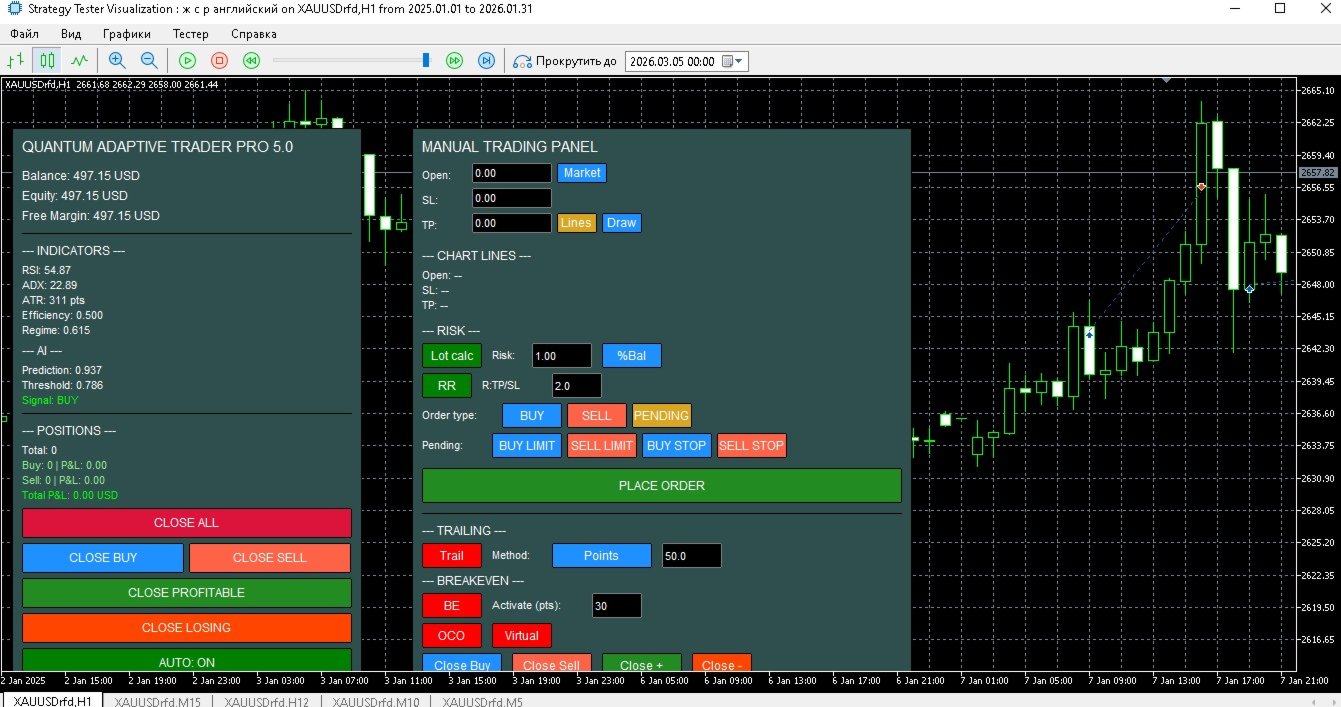
Quantropy is a hybrid trading system that combines a powerful manual control panel and an intelligent, AI-powered Expert Advisor. You retain full control, while the AI assists with signals, manages risks, and automates routine tasks. It is suitable for manual trading, automatic trading, or a combination of both.
1. Manual Panel – Full Control Over Every Trade
The manual panel contains all the necessary tools for quick and safe market entry.
1.1. Price Input and Visualization
The Open, SL, TP fields – you can enter prices manually or use the buttons:
-
Market – inserts the current Ask price (for Buy) or Bid price (for Sell).
-
Lines – reads prices from horizontal lines drawn on the chart (names: Manual_LineOpenObj , Manual_LineSLObj , Manual_LineTPObj ).
-
Draw – draws lines on the chart based on the values in the fields (blue – Open, red dotted – SL, green dotted – TP).
1.2. Risk Management (Lot Calc)
-
Lot Calc (on/off): Automatically calculates the lot size so that the loss when SL is triggered matches the specified risk.
-
Risk Modes (cyclic switching):
-
$ – Fixed amount in the deposit currency.
-
%Bal – Percentage of the Balance.
-
%Equ – Percentage of the Equity.
-
%Free – Percentage of Free Margin.
-
%Cust – Custom (defaults to %Bal ).
-
-
Lot Calculation: (RiskAmount) / (distance to SL in pips * pip value) rounded to the allowed volume step.
1.3. Risk/Reward Ratio (RR)
-
RR (on/off) – Automatically calculates TP as the distance to SL multiplied by a specified coefficient.
-
RR value field – The coefficient (e.g., 2.0 for a 2:1 ratio).
1.4. Trailing Stop (7 Methods)
-
Trail – Enables trailing for all manual positions.
-
Method – Selects the method (cyclic):
-
Points – Fixed distance in pips.
-
ATR – Multiplier of ATR (adaptive to volatility).
-
Fractals – Stop behind the last fractal.
-
MA – Stop behind the moving average (EMA 20).
-
Parabolic – Stop by Parabolic SAR.
-
High/Low – Stop behind the high/low of the last N candles.
-
Partial Close – Partially closes (half of the position) when a specified profit in pips is reached.
-
-
TrailParam – Parameter for the method (pips, ATR multiplier, number of candles, etc.).
1.5. Breakeven
-
BE (on/off) – When a specified profit in pips is reached ( Activate pts ), the stop is moved to the opening price.
1.6. Virtual Stop Loss and Take Profit
-
Virtual (on/off) – Orders are sent without real SL/TP levels; the levels are stored in the terminal's memory. When a virtual level is touched, the position is closed automatically. The broker does not see your stops.
1.7. OCO Orders (One Cancels Other)
-
OCO (on/off) – When enabled, each new order is added to a group. If one order in the group is executed, the others are automatically deleted.
1.8. Hotkeys
-
Hotkeys (on/off) – Activates Ctrl+ combinations:
-
B – Buy Market.
-
S – Sell Market.
-
C – Close all manual positions.
-
P – Place a pending order (of the current type).
-
L – Copy prices from chart lines into the fields.
-
T – Toggle AutoTrading on the main panel.
-
1.9. Notifications and Screenshots
-
Screenshot – Automatic chart screenshot when a manual trade is opened.
1.10. Alert Line
-
Alert – Draws a yellow horizontal line at the current price. When the price crosses the line, a notification is received, and the line is deleted.
1.11. Mass Close Buttons (Manual Positions)
-
Close Buy, Close Sell, Close +, Close - – Closes respectively all Buy, all Sell, all profitable, or all losing manual positions (using the magic number InpMagicManual ).
2. Main Panel – Monitoring and Auto-Trading
The main panel displays key information and allows you to manage the automatic mode.
2.1. Information Fields
-
Balance, Equity, Free Margin – Account status.
-
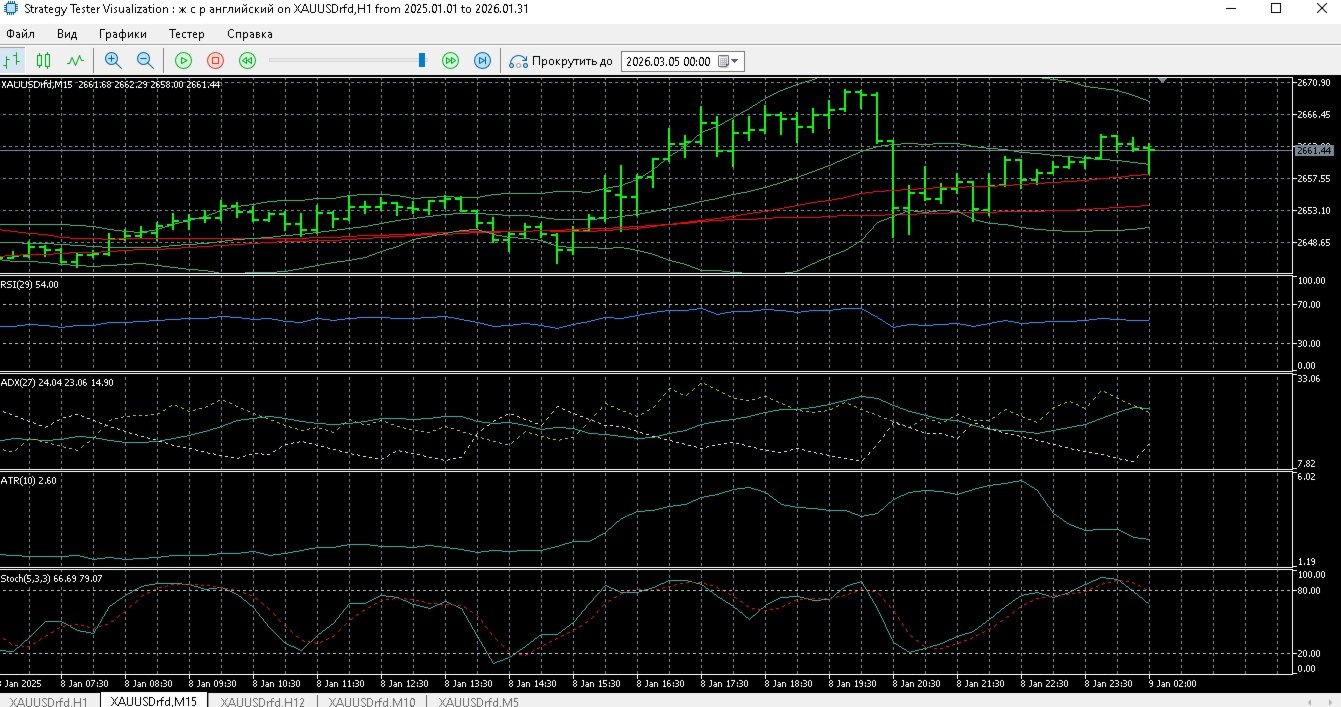
RSI, ADX, ATR (in pips) – Indicator values on the current timeframe.
-
Efficiency Ratio (ER) – A measure of trendiness (0..1).
-
Market Regime – Price position within Bollinger Bands (0..1).
-
AI Prediction – The AI's forecast (a number).
-
Threshold – An adaptive threshold; signals above it are considered significant.
-
Signal – BUY (green), SELL (red), or NONE (grey).
-
Positions info – Number of the EA's positions, their profit/loss by type, and total P&L.
2.2. Control Buttons
-
CLOSE ALL, CLOSE BUY, CLOSE SELL, CLOSE PROFITABLE, CLOSE LOSING – Closes positions opened by the EA (magic number InpMagic ).
-
AUTO: ON/OFF – The main switch for automatic trading.
3. Automatic Trading – Operating Principle
3.1. AI Signal Generation
On each new bar, a vector of 5 normalized features is formed:
-
RSI, ADX, fast and slow MA difference, Efficiency Ratio, Market Regime.
-
Normalization: (current value - moving average) / standard deviation (updated incrementally).
-
A linear model with 6 weights (5 for features + bias). Prediction = weighted sum of features, considering modular weights (e.g., RSIWeight ).
-
A history of predictions over the LearningPeriod bars is used to calculate an adaptive threshold: mean + AdaptiveThreshold * std .
-
Signal: BUY if prediction > threshold; SELL if prediction < -threshold; otherwise NONE.
3.2. Signal Filters
Even when a signal is present, additional conditions are checked (enabled/disabled in settings):
-
Time Filter – Trade only during specified hours.
-
Spread Filters:
-
Maximum absolute spread ( MaxSpreadPips ).
-
Percentile filter based on spread history ( SpreadLowPercentile / SpreadHighPercentile ).
-
Adaptive average spread (over last N bars) – prohibits trading if current spread exceeds the average by more than MaxSpreadRatio times.
-
ATR-normalized spread – prohibits trading if exceeding MaxSpreadAtrRatio .
-
-
ATR Filter – Minimum ATR ( MinAtrPips ).
-
Divergence – Searches for bullish/bearish divergence between price and a selected indicator (RSI, MACD, Stochastic). The signal is rejected if divergence is not found.
-
Trend Filter – On a higher timeframe, the price must be above/below a trend MA.
-
MTF Confirmation – On an additional timeframe, the price must be on the opposite side of its MA (a counter-trend condition).
3.3. Opening a Position
If all filters are passed and the number of open EA positions is less than InpMaxPositions :
-
SL and TP Calculation based on ATR, considering the market regime and trend strength (ADX). Multipliers are adjusted: in a strong trend, TP increases, SL tightens.
-
Lot Calculation: Uses the current risk ( currentRisk = baseRisk * riskMultiplier * (ER * 0.5 + 0.5) ), where riskMultiplier depends on the win/loss series. The lot is calculated using the same formula as in the manual panel.
-
Margin and minimum stop distances check.
-
Order placement. After opening, the position is stored in an internal array with its features saved for learning.
3.4. Adaptive Management of Open Positions
On each new bar, for each EA position:
-
Recalculation of optimal SL and TP based on current ATR and regime. If new levels are better than current ones, a modification is attempted (respecting the minimum interval between modifications).
-
Closing based on conditions:
-
If UseAdaptiveClose is enabled: close if RSI is overbought (>70 for Buy, <30 for Sell).
-
If UseAISignalForClose is enabled: close if the AI signal switches to the opposite direction.
-
-
Trailing (ATR-based): When profit in ATR exceeds TrailActivationProfitATR , the stop is moved to TrailStopATR from the current price.
-
All modifications are safe: if a request fails, it is retried up to 3 times with a 5-second interval.
3.5. Risk Management and Daily Limits
-
riskMultiplier changes after each closed trade:
-
A winning streak increases the multiplier by RiskIncreaseFactor .
-
A losing streak decreases it by RiskDecreaseFactor .
-
The multiplier is capped within the range [0.1, 5.0].
-
-
Daily Loss Limit: If the drawdown from the day's peak exceeds DailyLossLimit , new trades are not opened until the next day.
3.6. AI Learning
-
Online Update after each closed trade: Weights are adjusted using gradient descent based on the prediction error. Target value: +1 for a profitable trade in the signal's direction, -1 for a losing trade, 0 for a breakeven trade. The learning rate decays over time.
-
Batch Learning (every BatchUpdateFrequency bars): On accumulated examples (up to 1000), several epochs of stochastic gradient descent are performed with a fixed, small learning rate.
-
Weights are saved to a file on unload and loaded on startup.
3.7. Additional Adaptive Mechanisms
-
Adaptive ADX Threshold: If enabled, ADX history is collected, and the threshold is set as the specified percentile ( AdxPercentile ). A signal is generated only if ADX ≥ this threshold.
-
Percentile Spread Filter is updated every SpreadStatBars on the selected timeframe.
4. Usage Scenarios
Scenario 1: Pure Manual Trading with AI Hints
-
Auto-trading is off ( AUTO: OFF ).
-
You observe the AI signals on the main panel and, if you agree, open a trade manually using the manual panel.
-
You use trailing, breakeven, virtual levels at your discretion.
Scenario 2: Fully Automatic
-
Auto-trading is on ( AUTO: ON ).
-
Quantropy independently analyzes the market, opens, and manages positions according to the settings.
-
You only monitor the process and can intervene using the close buttons.
-
The panel starts with auto-trading enabled. If you do not plan to trade automatically, turn it off immediately, or configure it to your taste and needs.
Scenario 3: Hybrid – Automatic Entries + Manual Management
-
Auto-trading is on, but you can modify the parameters of open positions or add manual trades (with a different magic number) in parallel.
Scenario 4: Manual Panel Only, without AI
-
Disable all AI modules in the input parameters and do not turn on auto-trading. The manual panel works independently, providing all its functions.
5. Conclusion
Quantropy is a unique solution that combines the power of manual trading with intelligent automation. You get:
-
A full set of tools for fast and safe market entry.
-
An adaptive AI advisor that learns from your trades.
-
Flexible risk settings to control drawdowns.
-
Transparency and the ability to intervene at any moment.
Quantropy is suitable for traders of all levels – from beginners to professionals. Try it and see for yourself!