

Working with ONNX Models in MQL5 (Part 1): Decoding the Model File with a Protobuf Parser
 785
785
 0
0

Introduction
MetaTrader 5 can load a trained neural network and run it. Pass the model file path to the ONNX (Open Neural Network Exchange) API, feed a tensor, and receive predictions. The terminal does not reveal what the ONNX file contains: the layer count, required input shape, or which weights were saved. When outputs look wrong, you cannot quickly tell whether the issue is in the features, tensor shapes, or the file itself, because the model is treated as an opaque binary. This article targets MetaQuotes Language 5 (MQL5) developers and algorithmic traders who train models elsewhere and want to inspect them inside the terminal, without leaving MetaTrader 5 and without a single external library.
The obstacle is the file format. ONNX stores models in Protocol Buffers, a binary encoding designed by Google for compact machine-to-machine data exchange. There is no MQL5 library that reads it, and the format carries no readable text markers to search for. So we write the decoder ourselves. We start with a Python script that builds a small classification network and saves it to disk, then open that file in Netron so we can see the graph we are targeting. Then we decode the same bytes in MQL5. First, we implement a Protocol Buffers wire-format reader. Next, we add an ONNX-specific parser that extracts the graph. We will cover the following topics:
- Understanding the ONNX File Format and Protocol Buffers
- Setting Up Python and Generating the Sample Model
- Implementation in MQL5
- Visualization
- Conclusion
By the end of this article, you will be able to:
- Generate an ONNX model in Python and place it where the terminal can read it.
- Decode Protocol Buffers wire format in MQL5, including variable-length integers, length-prefixed blocks, and fixed-width values.
- Read any ONNX model's nodes, operators, and connections directly from the binary file.
- Report each weight tensor's shape, element type, and value range, so a model can be checked before it is trusted with a trade.
Understanding the ONNX File Format and Protocol Buffers
An ONNX file is not a bundle of numbers. It is a description of a computation graph, written in a structured format that any framework can read. Inside it sits a graph made of three kinds of things. There are nodes, each naming an operator such as a matrix multiply or an activation, along with the names of the values it reads and the names of the values it produces. There are initializers, which are the trained weights themselves, each carrying a name, a shape, an element type, and a block of raw numbers. And there are the graph ports, the values the model takes in and hands back, each declaring the exact tensor shape the caller must supply or should expect.
What matters for a parser is that the file stores those nodes as a flat list. Nothing in it points at anything else. A node records the names it reads and the names it writes, and that is all. The connections are implied: one node writes a value called "hidden", another reads a value called "hidden", and that shared name is the edge between them. Rebuilding the graph therefore means matching names, and the same rule attaches the weights, since a node reads its weight tensor by name exactly as it reads any other value. See an illustration below of how a graph is stored and how we rebuild it.
How a graph is stored, and how we rebuild it
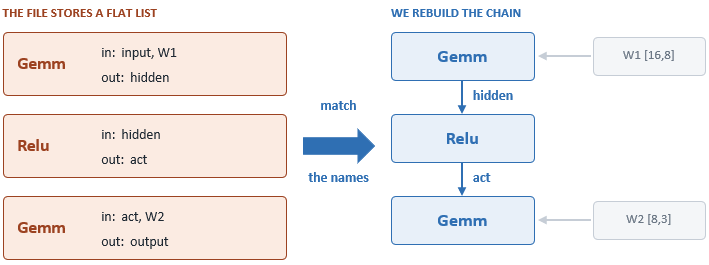
The rule: the node that writes "hidden" is the parent of the node that reads "hidden".
All of that is encoded in Protocol Buffers, a binary format built for compactness rather than readability. A message is a sequence of fields, and every field opens with a tag that packs two things together: which field this is, and how its value is encoded. That second part is what makes a hand-written parser realistic, because it tells a reader how many bytes to consume even when the reader has no idea what the field means. There are only a few encodings in practice. Some values are variable-length integers, where each byte carries seven bits and its top bit says whether another byte follows. Some are length-prefixed blocks, where a count comes first, followed by that many bytes, used for text, for raw weight data, and for nested messages. The rest are fixed at four or eight bytes. Here is an illustration of how we decode a field.
Decoding one field, byte by byte
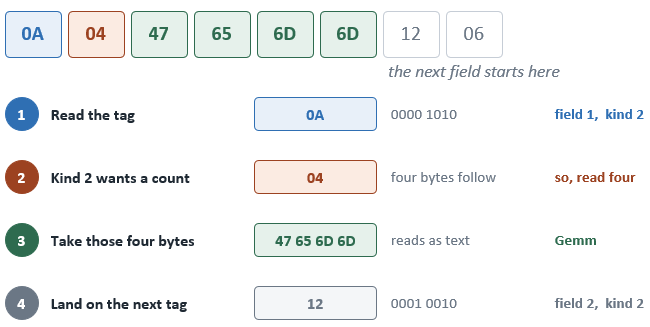
Then repeat. A field we do not want is skipped by its own kind, so the cursor never loses its place.
Because each field declares its encoding, the reader always knows how many bytes to consume. Therefore, we only implement the ONNX parts we actually need. We read a tag, check whether the field number is one we care about, and if it is not, we consume it blindly and move on without losing our place. This also means the work splits cleanly into two layers, and we build them in that order. The lower layer knows only bytes: it reads tags, decodes variable-length integers, extracts text, and locates nested blocks, with no knowledge of neural networks at all. The upper layer knows only structure: it asks the lower layer for fields by number and assembles nodes, weights, and ports, with no knowledge of bytes. Keeping the two apart is what stops the parser from becoming a tangle, and it is why the same reader will serve every later part of this article.
Setting Up Python and Generating the Sample Model
Before any parsing can happen, we need a model file to parse. We build one ourselves rather than borrowing a trained network, because a file we construct is one whose contents we already know.
Preparing Python inside MetaEditor
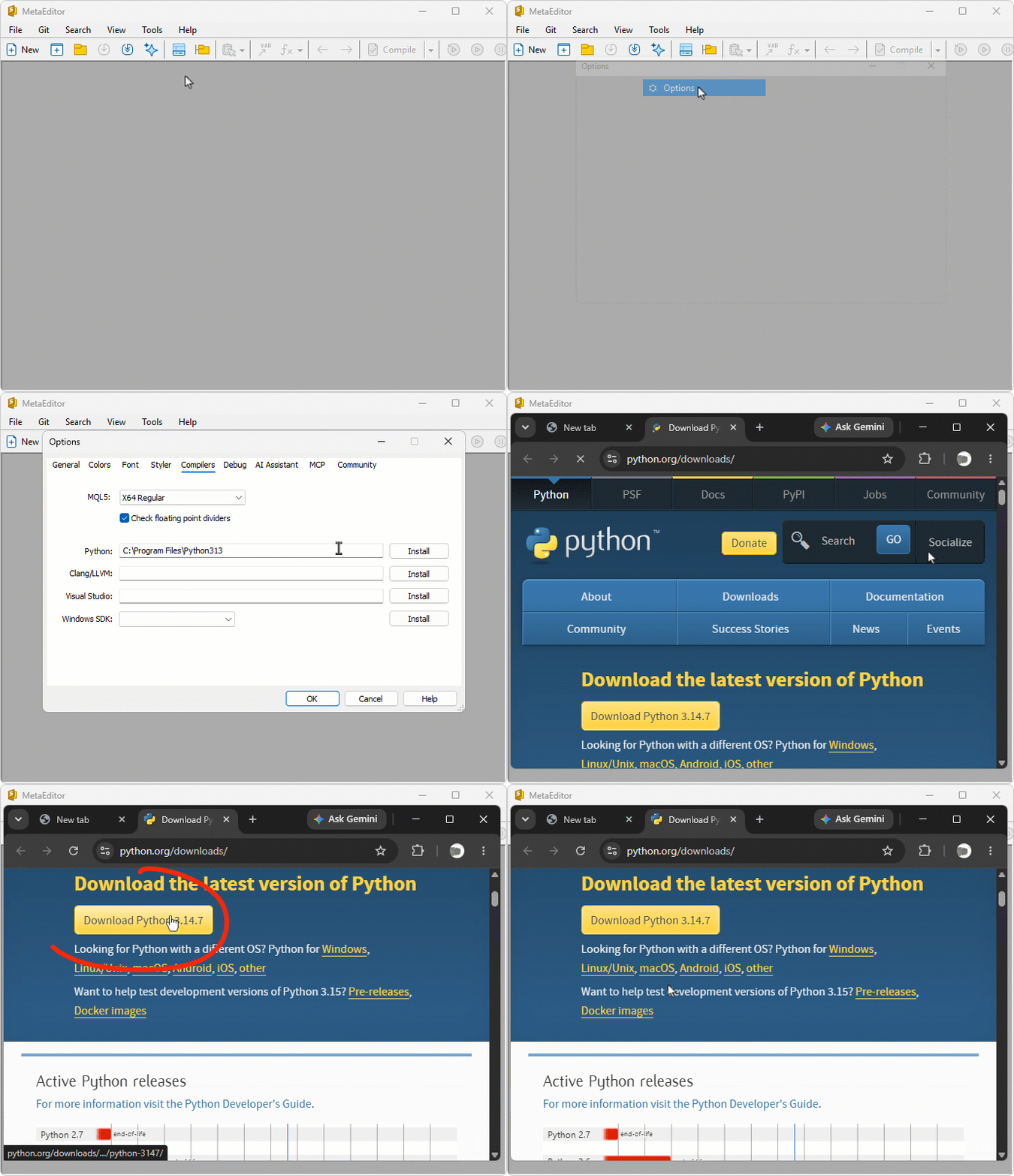
We open MetaEditor, go to Tools and then Options, and select the Compilers tab. Python is listed there alongside the MQL5 compiler, with an Install button beside it that opens the official Python download page in a browser. We download the installer from that page and run it, allowing it to add Python to the system path. Returning to the Compilers tab afterwards, MetaEditor detects the interpreter and reports its version, and from that point it can run Python scripts the same way it handles MQL5 programs. See the process in the illustration below.
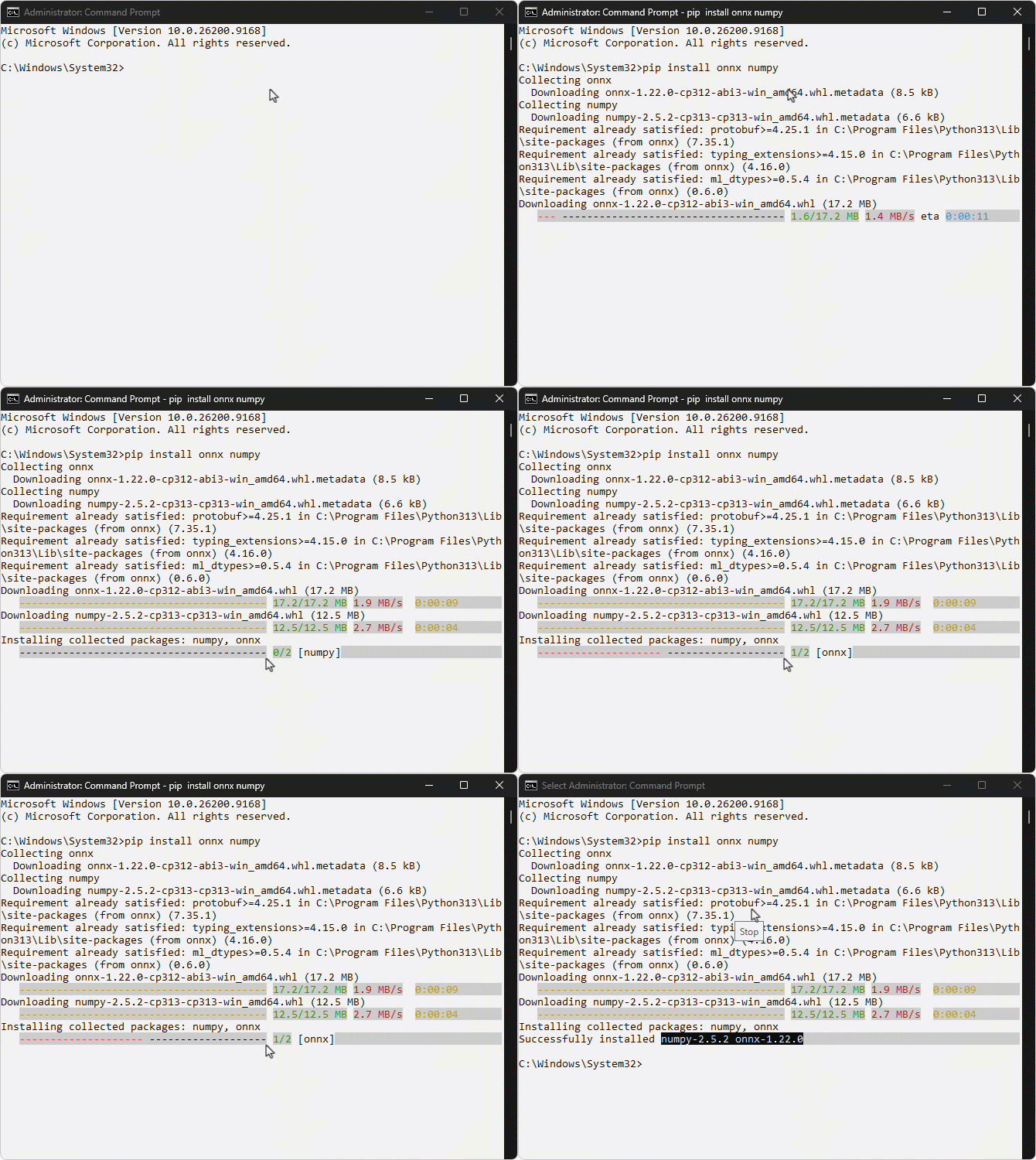
We then install the two packages the generator depends on: "onnx" for building and saving the model and "numpy" for producing the weight values. Since MetaEditor does not expose a Python prompt of its own, we install them from a Command Prompt. Where Python was installed for all users, it lives under the system program folder, so the prompt has to be opened as an administrator for the installation to succeed.
pip install onnx numpy
Building the sample model
We create the script through File, then New, choosing Python Script, and MetaEditor places it inside the data folder for us. The generator defines a small classification network, saves it in ONNX format, and writes the result where the terminal can access it.
# Copyright 2026, Allan Munene Mutiiria.
# https://t.me/Forex_Algo_Trader

import os
import numpy as np
import onnx
from onnx import helper, TensorProto, numpy_helper

# Numbers going in
INPUTS  = 16
# Width of each branch before they rejoin
BRANCH  = 8
# Width after the two branches are concatenated
MERGED  = 10
# Down, flat, up
OUTPUTS = 3

rng = np.random.default_rng(7)

def xavier(rows, cols):
    # Keeps the signal from dying or exploding
    bound = np.sqrt(6.0 / (rows + cols))
    return rng.uniform(-bound, bound, (rows, cols)).astype(np.float32)

# Stored through float_data rather than raw_data, so both paths are covered
Wa = xavier(INPUTS, BRANCH)
initializers = [
    helper.make_tensor("Wa", TensorProto.FLOAT, [INPUTS, BRANCH],
                       Wa.flatten().tolist(), raw=False),
    numpy_helper.from_array(np.zeros(BRANCH, np.float32), "ba"),
    numpy_helper.from_array(xavier(INPUTS, BRANCH), "Wb"),
    numpy_helper.from_array(np.zeros(BRANCH, np.float32), "bb"),
    numpy_helper.from_array(xavier(BRANCH * 2, MERGED), "Wm"),
    numpy_helper.from_array(np.zeros(MERGED, np.float32), "bm"),
    numpy_helper.from_array(xavier(MERGED, OUTPUTS), "Wo"),
    numpy_helper.from_array(np.zeros(OUTPUTS, np.float32), "bo"),
]

# Stored as double so the parser meets a type other than float
initializers.append(numpy_helper.from_array(np.full(MERGED, 0.85, np.float64), "scale"))

# Stored through int64_data, which is a third way a tensor can carry values
initializers.append(helper.make_tensor("reshape_to", TensorProto.INT64, [2],
                                       [1, BRANCH * 2], raw=False))

nodes = [
    # The input feeds two branches at once, so the graph is not a chain
    helper.make_node("Gemm", ["input", "Wa", "ba"], ["gemm_a"], name="branch_a"),
    helper.make_node("Tanh", ["gemm_a"], ["act_a"], name="tanh_a"),
    helper.make_node("Gemm", ["input", "Wb", "bb"], ["gemm_b"], name="branch_b"),
    helper.make_node("Relu", ["gemm_b"], ["act_b"], name="relu_b"),
    # Two edges arrive here, so a layout cannot assume one parent
    helper.make_node("Concat", ["act_a", "act_b"], ["merged"], axis=1, name="join"),
    # Carries a list attribute, which is a form a scalar never exercises
    helper.make_node("Transpose", ["merged"], ["flipped"], perm=[1, 0], name="flip"),
    # Takes its shape from a tensor rather than an attribute
    helper.make_node("Reshape", ["flipped", "reshape_to"], ["restored"], name="restore"),
    helper.make_node("Gemm", ["restored", "Wm", "bm"], ["gemm_m"], name="mixer"),
    helper.make_node("Sigmoid", ["gemm_m"], ["act_m"], name="sigmoid_m"),
    # A node whose second input is an initializer rather than another node
    helper.make_node("Mul", ["act_m", "scale_f"], ["scaled"], name="rescale"),
    helper.make_node("Gemm", ["scaled", "Wo", "bo"], ["gemm_o"], name="output_layer"),
    helper.make_node("Softmax", ["gemm_o"], ["output"], axis=1, name="softmax",
                     doc_string="Turns the three scores into probabilities"),
]

# The double tensor has to be cast before Mul can use it
nodes.insert(9, helper.make_node("Cast", ["scale"], ["scale_f"],
                                 to=TensorProto.FLOAT, name="cast_scale"))

# Holds text rather than numbers, which the reader stores a different way
initializers.append(helper.make_tensor("labels", TensorProto.STRING, [OUTPUTS],
                                       [b"down", b"flat", b"up"], raw=False))

# Named only where a value passes between layers, so every edge can be labelled
inner = [
    helper.make_tensor_value_info("gemm_a",   TensorProto.FLOAT, [1, BRANCH]),
    helper.make_tensor_value_info("act_a",    TensorProto.FLOAT, [1, BRANCH]),
    helper.make_tensor_value_info("gemm_b",   TensorProto.FLOAT, [1, BRANCH]),
    helper.make_tensor_value_info("act_b",    TensorProto.FLOAT, [1, BRANCH]),
    helper.make_tensor_value_info("merged",   TensorProto.FLOAT, [1, BRANCH * 2]),
    helper.make_tensor_value_info("flipped",  TensorProto.FLOAT, [BRANCH * 2, 1]),
    helper.make_tensor_value_info("restored", TensorProto.FLOAT, [1, BRANCH * 2]),
    helper.make_tensor_value_info("gemm_m",   TensorProto.FLOAT, [1, MERGED]),
    helper.make_tensor_value_info("act_m",    TensorProto.FLOAT, [1, MERGED]),
    helper.make_tensor_value_info("scale_f",  TensorProto.FLOAT, [MERGED]),
    helper.make_tensor_value_info("scaled",   TensorProto.FLOAT, [1, MERGED]),
    helper.make_tensor_value_info("gemm_o",   TensorProto.FLOAT, [1, OUTPUTS]),
]

# Stored as an index and value pair rather than a dense run
sparse = helper.make_sparse_tensor(
    helper.make_tensor("sp_values", TensorProto.FLOAT, [3], [0.5, 1.5, 2.5], raw=False),
    helper.make_tensor("sp_index", TensorProto.INT64, [3], [0, 4, 9], raw=False),
    [MERGED])

graph = helper.make_graph(
    nodes, "viewer_sample",
    [helper.make_tensor_value_info("input",  TensorProto.FLOAT, [1, INPUTS])],
    [helper.make_tensor_value_info("output", TensorProto.FLOAT, [1, OUTPUTS])],
    initializer=initializers,
    value_info=inner,
    sparse_initializer=[sparse],
    doc_string="Sample graph carrying every structure the reader handles",
)

model = helper.make_model(graph, producer_name="onnx-model-viewer",
                          opset_imports=[helper.make_opsetid("", 13)])
model.ir_version = 8
model.producer_version = "1.0"
model.domain = "forex.algo.trader"
model.model_version = 1
model.doc_string = "A viewer sample built to exercise every field"

# Key and value pairs the reader reports under metadata
for key, value in (("author", "Allan Munene Mutiiria"),
                   ("purpose", "ONNX Model Viewer sample"),
                   ("built", "make_model.py")):
    entry = model.metadata_props.add()
    entry.key = key
    entry.value = value
onnx.checker.check_model(model)

# Climb to the terminal's MQL5 root from wherever this script was placed
folder = os.path.dirname(os.path.abspath(__file__))
while os.path.basename(folder) != "MQL5" and os.path.dirname(folder) != folder:
    folder = os.path.dirname(folder)

# MQL5 can only read from Files, so the model has to land there
target = os.path.join(folder, "Files", "ONNX Model Viewer Part 1")
os.makedirs(target, exist_ok=True)
path = os.path.join(target, "model.onnx")
onnx.save(model, path)

params = sum(int(np.prod(t.dims)) for t in initializers)
print(f"wrote {path}")
print(f"{len(nodes)} nodes, {params} parameters")
The network takes sixteen inputs, splits them into two parallel branches of eight, rejoins them, and narrows to three outputs. That branching matters more than the arithmetic, because a straight chain would let a parser assume every node has exactly one parent, and this graph refuses that assumption at the "Concat" node where two edges arrive at once. We draw the weights with the "xavier" function, which bounds them by the layer's fan-in and fan-out so the values resemble a trained network rather than arbitrary numbers. We also vary how the tensors are stored on purpose: most go in as raw bytes, but one is written through the float list, one holds whole numbers, one holds text, and one is stored in sparse form as indices paired with values. A parser that handles only the common case reads some of these as empty, and we would rather meet that failure here than months later against someone else's model.
Note that the "scale" tensor is stored in double precision, so we insert a "Cast" node before the "Mul" node (through nodes.insert at index nine) to convert it to float; this keeps the node order valid, since "Mul" consumes the cast "scale_f" value. The closing lines climb from the script's own location up to the "MQL5" folder and write into "Files", since that is the only directory the terminal permits a program to read from. We will now run this script in MetaEditor.
Running the script
We run the script from MetaEditor with the Compile action, which executes Python scripts, and the output appears in the Toolbox below the editor as follows.
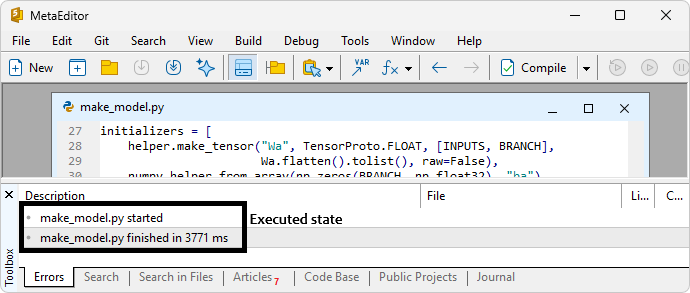
It reports the path it wrote and the size of the model it built when we run it in the Terminal.

The file lands at "MQL5\Files\ONNX Model Viewer Part 1\model.onnx", which we can confirm by opening the data folder from the terminal's File menu and navigating to that path. See the path illustration below.

The next thing we will do is to inspect the model in any model viewer that already knows how to.
Inspecting the model in Netron
Before decoding the file ourselves, we look inside it with a tool that already knows how. Netron is a viewer for machine learning models that runs in a browser at "netron.app" with nothing to install. We load the file we just generated, and the graph appears with its nodes, the weight tensors feeding them, and the shapes travelling along each edge. See below.
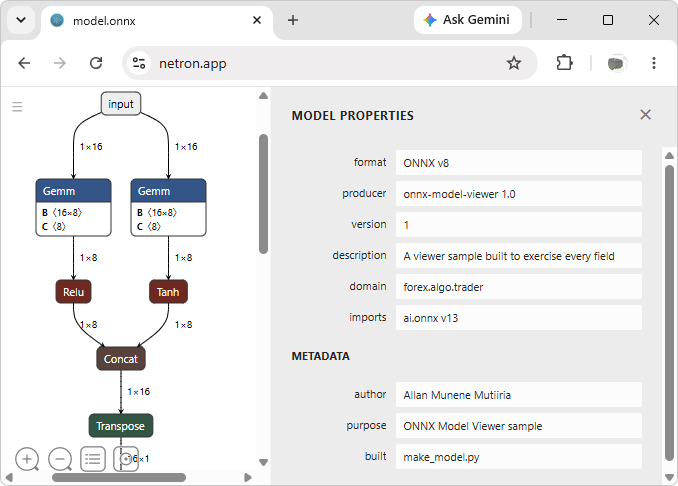
This gives us ground truth. Every node name, every tensor shape, and every element type shown here is what our own parser must report, and comparing the two is how we will know the decoder is correct rather than merely producing plausible output. We are now all set, and we will begin the implementation in MQL5.
Implementation in MQL5
Naming the Wire Types and Reinterpreting Raw Bits
We begin the reader with the vocabulary it needs before it can decode anything: the five encoding kinds a Protocol Buffers field can declare, and a way to turn stored bytes back into the numbers they represent.
//+------------------------------------------------------------------+
//|                                                 OMV Protobuf.mqh |
//|                           Copyright 2026, Allan Munene Mutiiria. |
//|                                   https://t.me/Forex_Algo_Trader |
//+------------------------------------------------------------------+
#property copyright "Copyright 2026, Allan Munene Mutiiria."
#property link      "https://t.me/Forex_Algo_Trader"

#ifndef OMV_PROTOBUF_MQH
#define OMV_PROTOBUF_MQH

//+------------------------------------------------------------------+
//| Wire type constants                                              |
//+------------------------------------------------------------------+
#define PB_VARINT   0   // Variable length integer
#define PB_FIXED64  1   // Eight byte value
#define PB_LENGTH   2   // Length prefixed bytes
#define PB_START    3   // Deprecated group start
#define PB_END      4   // Deprecated group end
#define PB_FIXED32  5   // Four byte value

//+------------------------------------------------------------------+
//| Four byte float overlay                                          |
//+------------------------------------------------------------------+
union PbFloatBits
  {
   // Hold the raw stored bits
   uint              bits;
   // Read the same bits as a number
   float             value;
  };

//+------------------------------------------------------------------+
//| Eight byte double overlay                                        |
//+------------------------------------------------------------------+
union PbDoubleBits
  {
   // Hold the raw stored bits
   ulong             bits;
   // Read the same bits as a number
   double            value;
  };
The six constants name the kinds of encoding a tag can carry, and they are the values we match against every time we decide how many bytes a field occupies. Three of them do the real work in an ONNX file: "PB_VARINT" for numbers, "PB_LENGTH" for text and nested messages, and "PB_FIXED32" and "PB_FIXED64" for weights stored at a fixed width. We define "PB_START" and "PB_END" as well because the format reserves those numbers for a retired grouping syntax; naming them keeps the gap at three and four from looking arbitrary, and lets the reader reject them deliberately rather than by accident. The include guard around the file means both this reader and the parser that follows can be pulled in without the definitions colliding.
The two unions solve a different problem. A float in the file is four bytes that only mean something when interpreted as a floating-point value, but we read them out of the buffer as a plain unsigned integer, and a cast between the two types converts the number rather than reinterpreting the bits. Casting the integer 1065353216 to a float would give us 1065353216.0, when those same bits actually encode 1.0. A union is the right tool here because it places both members at the same address, so we write the raw bits through "PbFloatBits" and read that memory back as a number. The "PbDoubleBits" union does the same across eight bytes. We will now declare a class to do the reading.
Declaring the Byte Cursor
With the vocabulary in place, we declare the class that does the reading. It holds a block of bytes and a position within it, and every decoding routine we write from here on moves that position forward.
//+------------------------------------------------------------------+
//| Protobuf byte cursor                                             |
//+------------------------------------------------------------------+
class CPbReader
  {
private:
   // Store the bytes being read
   uchar             m_buf[];
   // Track the cursor position
   int               m_pos;
   // Mark one past the last readable byte
   int               m_end;
   // Flag a read that ran past the end
   bool              m_failed;

public:
                     CPbReader(void);
   bool              Attach(const uchar &src[], const int from, const int to);
   bool              LoadFile(const string path);

   bool              Eof(void)    const { return m_pos >= m_end || m_failed; }
   bool              Failed(void) const { return m_failed; }
   int               Pos(void)    const { return m_pos; }
   int               End(void)    const { return m_end; }
   int               Size(void)   const { return ArraySize(m_buf); }
   void              Bytes(uchar &out[]) const { ArrayCopy(out, m_buf); }

   ulong             ReadVarint(void);
   bool              ReadTag(int &field, int &wire);
   bool              ReadString(string &out);
   bool              ReadBlock(int &from, int &to);
   uint              ReadFixed32(void);
   ulong             ReadFixed64(void);
   float             ReadFloat(void);
   double            ReadDouble(void);
   bool              SkipField(const int wire);
  };
Here, we design the "CPbReader" class around four pieces of state: the bytes themselves, where we are in them, where we must stop, and whether a read has already gone wrong. That last flag matters more than it looks. Decoding a binary file means every routine can run off the end of the buffer, and checking a return value after each of the dozens of reads a parse involves would bury the parsing logic. Instead we set the flag once and let it stay set, so a caller can decode an entire message and ask a single question at the end. The "Eof" method reports the end of the buffer and a failed read as the same condition, which means a loop written as "while not at the end" also terminates on corrupt input rather than spinning.
The two entry points reflect the two ways bytes arrive. We use "LoadFile" for the model file itself, and "Attach" for every nested message inside it, since a nested message is just a slice of the bytes we already hold. Pairing "Attach" with the "Bytes" method is what lets the parser descend: it takes a copy of the current buffer, then points a fresh cursor at a range within it, and that new cursor reads the nested message without any knowledge of what surrounds it. The reading methods below cover the encodings the wire types name, and "SkipField" is the one that will let us walk past anything we do not care about. We will now define the class members.
Getting Bytes Into the Cursor
Three routines fill the reader: a constructor that leaves it empty and safe to query, and the two ways bytes actually arrive, either as a slice of a buffer we already hold or as a file read from disk.
//+------------------------------------------------------------------+
//| Construct an empty reader                                        |
//+------------------------------------------------------------------+
CPbReader::CPbReader(void)
  {
//--- Set the cursor to an empty range
   m_pos = 0;
   m_end = 0;
//--- Clear the failure flag
   m_failed = false;
  }

//+------------------------------------------------------------------+
//| Attach the cursor to a slice of an existing buffer               |
//+------------------------------------------------------------------+
bool CPbReader::Attach(const uchar &src[], const int from, const int to)
  {
//--- Get the source length
   const int n = ArraySize(src);
//--- Reject a range the source cannot satisfy
   if(from < 0 || to > n || from > to)
     {
      m_failed = true;
      return false;
     }
//--- Size the buffer to the requested slice
   ArrayResize(m_buf, to - from);
//--- Copy every byte of the slice
   for(int i = from; i < to; i++)
      m_buf[i - from] = src[i];
//--- Reset the cursor over the copied slice
   m_pos = 0;
   m_end = to - from;
   m_failed = false;
//--- Report success
   return true;
  }

//+------------------------------------------------------------------+
//| Read a whole file from the terminal Files folder                 |
//+------------------------------------------------------------------+
bool CPbReader::LoadFile(const string path)
  {
//--- Open the file in binary mode
   const int handle = FileOpen(path, FILE_READ | FILE_BIN);
//--- Abort when the file cannot be opened
   if(handle == INVALID_HANDLE)
     {
      m_failed = true;
      return false;
     }
//--- Measure the file
   const int size = (int)FileSize(handle);
//--- Abort on an empty file
   if(size <= 0)
     {
      FileClose(handle);
      m_failed = true;
      return false;
     }
//--- Size the buffer to the whole file
   ArrayResize(m_buf, size);
//--- Read every byte in one call
   const int got = (int)FileReadArray(handle, m_buf, 0, size);
//--- Close before parsing anything
   FileClose(handle);
//--- Abort on a short read
   if(got != size)
     {
      m_failed = true;
      return false;
     }
//--- Reset the cursor over the loaded bytes
   m_pos = 0;
   m_end = size;
   m_failed = false;
//--- Report success
   return true;
  }
The constructor sets the cursor to an empty range rather than leaving it undefined, so a reader that is queried before anything is loaded reports itself at the end instead of reading whatever happened to be in memory. We define "Attach" for the nested case, where a message sits inside bytes we are already holding. It validates the range against the source before touching anything, which is the check that stops a corrupt length field from sending us outside the buffer, then copies the slice and resets the cursor over it. Copying rather than pointing into the original costs a little memory, but it means a nested reader carries its own bounds and cannot wander past the end of its message into the bytes that follow.
We use "LoadFile" for the model. The file is opened in binary mode to avoid text conversion, then read entirely via FileReadArray. Reading it whole rather than streaming it matters for what comes next: the parser descends into nested messages repeatedly, and it can only hand a byte range to "Attach" if every byte is already in memory. We close the file before any parsing begins, so a malformed model leaves no handle open, and we compare the count returned against the size we asked for, since a short read would otherwise leave us decoding a truncated model as though it were complete. Each failure path sets the flag and reports false, and the terminal restricts file access to the "Files" folder, which is why we let the generator write the model there.
Decoding a Variable-Length Integer and Skipping What We Do Not Need
Two routines carry the weight of the whole reader. The first decodes the number format everything else is built on, and the second is what lets us ignore the parts of a model we have no interest in.
//+------------------------------------------------------------------+
//| Read a base 128 variable length integer                          |
//+------------------------------------------------------------------+
ulong CPbReader::ReadVarint(void)
  {
//--- Start the accumulator and the bit offset
   ulong value = 0;
   int shift = 0;
//--- Consume bytes until the continuation bit clears
   while(m_pos < m_end)
     {
      //--- Take the next byte
      const uchar b = m_buf[m_pos++];
      //--- Add its seven payload bits at the current offset
      value |= ((ulong)(b & 0x7F)) << shift;
      //--- Return once the high bit signals the last byte
      if((b & 0x80) == 0)
         return value;
      //--- Advance to the next seven bit group
      shift += 7;
      //--- Fail beyond the width of a sixty-four-bit value
      if(shift > 63)
        {
         m_failed = true;
         return 0;
        }
     }
//--- Fail when the buffer ends mid number
   m_failed = true;
   return 0;
  }

//--- THE OTHER READ CLASS MEMBERS FOLLOW THIS SAME APPROACH

//+------------------------------------------------------------------+
//| Step over an unwanted field                                      |
//+------------------------------------------------------------------+
bool CPbReader::SkipField(const int wire)
  {
//--- Consume the field according to its wire type
   switch(wire)
     {
      case PB_VARINT:
         ReadVarint();
         return !m_failed;
      case PB_FIXED64:
         ReadFixed64();
         return !m_failed;
      case PB_FIXED32:
         ReadFixed32();
         return !m_failed;
      case PB_LENGTH:
        {
         //--- Read the length and jump past the payload
         int from, to;
         return ReadBlock(from, to);
        }
     }
//--- Fail on a deprecated group marker
   m_failed = true;
   return false;
  }
First, we define "ReadVarint" to rebuild a number that was stored across a variable number of bytes. Each byte stores 7 value bits. The highest bit indicates whether another byte follows. So we mask off that flag, shift the seven payload bits into position at an offset that grows by seven each time, and stop as soon as we meet a byte whose flag is clear. This is why a small field number costs one byte while a large tensor length costs several, and it is the reason an ONNX file stays compact. Two guards protect the loop: we abandon the read past sixty-three bits, since no larger value can fit the return type and a corrupt stream would otherwise shift forever, and we fail if the buffer ends while the flag is still set, because a number that never terminates means the bytes are not what we think they are.
The other routines follow the same shape, each reading its own encoding and setting the failure flag rather than returning an error the caller must test. "SkipField" then ties them together, and it is the routine that makes a hand-written parser practical. Given only the wire type from a tag, it consumes exactly the right number of bytes without knowing or caring what the field contained, dispatching to the varint reader, one of the fixed-width readers, or to "ReadBlock", which jumps the cursor past a length-prefixed payload in one move. That is what lets us decode a model while understanding only a fraction of the specification: we read a tag, and if the field number means nothing to us, we hand the wire type to this routine and carry on from exactly the right place. The retired group markers fall through to the failure path deliberately, since no encoder in use today emits them, and meeting one means the bytes are not a valid message. This concludes a byte reader, and next, we define what an ONNX model holds.
Describing What a Model Holds
With the byte reader finished, we move up a layer. Here, we define the three things an ONNX graph is made of and declare the class that fills them, working entirely in field numbers and structures rather than bytes.
//+------------------------------------------------------------------+
//|                                                    OMV Model.mqh |
//|                           Copyright 2026, Allan Munene Mutiiria. |
//|                                   https://t.me/Forex_Algo_Trader |
//+------------------------------------------------------------------+
#property copyright "Copyright 2026, Allan Munene Mutiiria."
#property link      "https://t.me/Forex_Algo_Trader"

#ifndef OMV_MODEL_MQH
#define OMV_MODEL_MQH

#include "OMV Protobuf.mqh"

//+------------------------------------------------------------------+
//| Capacity limits                                                  |
//+------------------------------------------------------------------+
#define OMV_MAX_NODES    512  // Layers the graph may hold
#define OMV_MAX_TENSORS  512  // Weight tensors the graph may hold
#define OMV_MAX_PORTS      8  // Names one node may carry per side
#define OMV_MAX_DIMS       8  // Axes one tensor may have

//+------------------------------------------------------------------+
//| Graph layer                                                      |
//+------------------------------------------------------------------+
struct OmvNode
  {
   // Name the operator this layer applies
   string            op;
   // Name this layer was given
   string            name;
   // List the names feeding this layer
   string            feeds[OMV_MAX_PORTS];
   // Count the names present
   int               feedCount;
   // List the names this layer produces
   string            emits[OMV_MAX_PORTS];
   // Count the names present
   int               emitCount;
  };

//+------------------------------------------------------------------+
//| Weight tensor                                                    |
//+------------------------------------------------------------------+
struct OmvTensor
  {
   // Name the nodes refer to it by
   string            name;
   // Measure each axis
   int               dim[OMV_MAX_DIMS];
   // Count the axes present
   int               dims;
   // Record the ONNX type code
   int               dataType;
   // Multiply every axis to size the block
   int               values;
   // Track the smallest weight held
   double            minValue;
   // Track the largest weight held
   double            maxValue;
   // Track the average weight
   double            meanValue;
  };

//+------------------------------------------------------------------+
//| Exposed graph port                                               |
//+------------------------------------------------------------------+
struct OmvPort
  {
   // Name the graph exposes
   string            name;
   // Measure each axis
   int               dim[OMV_MAX_DIMS];
   // Count the axes present
   int               dims;
   // Record the ONNX type code
   int               elemType;
  };

//+------------------------------------------------------------------+
//| ONNX file reader                                                 |
//+------------------------------------------------------------------+
class COmvModel
  {
private:
   // Store the layers in file order
   OmvNode           m_node[];
   // Store the weight tensors
   OmvTensor         m_tensor[];
   // Store the graph inputs
   OmvPort           m_input[];
   // Store the graph outputs
   OmvPort           m_output[];
   // Count the layers held
   int               m_nodes;
   // Count the tensors held
   int               m_tensors;
   // Count the graph inputs held
   int               m_inputs;
   // Count the graph outputs held
   int               m_outputs;
   // Record the format revision
   long              m_irVersion;
   // Record the operator set version
   int               m_opset;
   // Name the tool that wrote the file
   string            m_producer;
   // Name the graph inside the file
   string            m_graphName;
   // Remember the file that was read
   string            m_path;
   // Explain why the last load failed
   string            m_error;

   bool              ParseGraph(const uchar &raw[], const int from, const int to);
   bool              ParseNode(const uchar &raw[], const int from, const int to);
   bool              ParseTensor(const uchar &raw[], const int from, const int to);
   bool              ParseSparse(const uchar &raw[], const int from, const int to);
   bool              ParsePort(const uchar &raw[], const int from, const int to, OmvPort &port);
   void              TensorStats(const uchar &raw[], const int from, const int to, OmvTensor &tensor);
   void              PackedStats(const uchar &raw[], const int from, const int to,
                                 const int field, OmvTensor &tensor);

public:
                     COmvModel(void);
   bool              Load(const string path);
   void              Clear(void);

   int               Nodes(void)     const { return m_nodes; }
   int               Tensors(void)   const { return m_tensors; }
   int               Inputs(void)    const { return m_inputs; }
   int               Outputs(void)   const { return m_outputs; }
   long              IrVersion(void) const { return m_irVersion; }
   int               Opset(void)     const { return m_opset; }
   string            Producer(void)  const { return m_producer; }
   string            GraphName(void) const { return m_graphName; }
   string            Path(void)      const { return m_path; }
   string            Error(void)     const { return m_error; }
   int               Parameters(void) const;

   void              NodeAt(const int i, OmvNode &out)     const { if(i >= 0 && i < m_nodes)   out = m_node[i]; }
   void              TensorAt(const int i, OmvTensor &out) const { if(i >= 0 && i < m_tensors) out = m_tensor[i]; }
   void              InputAt(const int i, OmvPort &out)    const { if(i >= 0 && i < m_inputs)  out = m_input[i]; }
   void              OutputAt(const int i, OmvPort &out)   const { if(i >= 0 && i < m_outputs) out = m_output[i]; }
   string            DimsText(const int &dim[], const int dims) const;
   string            TypeName(const int code) const;
  };
We start with capacity limits rather than growing every array without bound, because a malformed file can claim any size it likes, and we would rather refuse a model than let a corrupt length exhaust memory. The three structures then mirror what the second section described. The "OmvNode" structure holds an operator, a name, and the two lists of value names that connect it to its neighbors, since a node records what it reads and writes rather than pointing at anything. The "OmvTensor" structure carries a weight tensor's name, its shape, its element type, and the range and average of the values inside it, so a reader can see at a glance whether a layer was actually trained or left at zero. The "OmvPort" structure describes a value the graph exposes, which is what a caller must supply or should expect back.
In the "COmvModel" class, the private routines are the parsing machinery, and their shared signature is the design decision worth noticing. Each takes a byte range rather than a reader, because a nested message is just a range inside bytes we already hold, so one routine can locate a sub-range and hand it straight to the next without either of them knowing where in the file they sit. The public side keeps the collections private and hands out one item at a time through bounds-checked accessors, which lets the report we write later walk the results without being able to disturb them. We will now define the routines.
Reading a Layer and Opening the Model
Two routines show the parsing pattern and the way in. The first turns one node message into a layer, and every other parsing routine follows its shape. The second is what a program actually calls, opening the file and working down to the graph.
//+------------------------------------------------------------------+
//| Read one node into a layer                                       |
//+------------------------------------------------------------------+
bool COmvModel::ParseNode(const uchar &raw[], const int from, const int to)
  {
//--- Refuse a file that exceeds the node limit
   if(m_nodes >= OMV_MAX_NODES)
      return false;
//--- Point a cursor at this node
   CPbReader reader;
   if(!reader.Attach(raw, from, to))
      return false;
//--- Start an empty layer
   OmvNode layer;
   layer.op = "";
   layer.name = "";
   layer.feedCount = 0;
   layer.emitCount = 0;
//--- Read every field of the node
   while(!reader.Eof())
     {
      //--- Take the next field tag
      int field, wire;
      if(!reader.ReadTag(field, wire))
         break;
      //--- Skip anything that is not text
      if(wire != PB_LENGTH)
        {
         if(!reader.SkipField(wire))
            break;
         continue;
        }
      //--- Read the field as text
      string text;
      if(!reader.ReadString(text))
         break;
      //--- Store an input name
      if(field == 1 && layer.feedCount < OMV_MAX_PORTS)
         layer.feeds[layer.feedCount++] = text;
      //--- Store an output name
      else if(field == 2 && layer.emitCount < OMV_MAX_PORTS)
         layer.emits[layer.emitCount++] = text;
      //--- Store the layer name
      else if(field == 3)
         layer.name = text;
      //--- Store the operator
      else if(field == 4)
         layer.op = text;
     }
//--- Reject a node carrying no operator
   if(StringLen(layer.op) == 0)
      return false;
//--- Append the finished layer
   ArrayResize(m_node, m_nodes + 1);
   m_node[m_nodes++] = layer;
//--- Report success
   return true;
  }

//--- Other parser members follow the same approach

//+------------------------------------------------------------------+
//| Open a file and read its whole structure                         |
//+------------------------------------------------------------------+
bool COmvModel::Load(const string path)
  {
//--- Drop any model held from a previous call
   Clear();
//--- Remember which file is being read
   m_path = path;
//--- Read the whole file into memory
   CPbReader reader;
   if(!reader.LoadFile(path))
     {
      m_error = "cannot open " + path;
      return false;
     }
//--- Keep the bytes so nested payloads can be located
   uchar raw[];
   reader.Bytes(raw);
//--- Read every field of the model
   while(!reader.Eof())
     {
      //--- Take the next field tag
      int field, wire;
      if(!reader.ReadTag(field, wire))
         break;
      //--- Store the format revision
      if(field == 1 && wire == PB_VARINT)
         m_irVersion = (long)reader.ReadVarint();
      //--- Store the producing tool
      else if(field == 2 && wire == PB_LENGTH)
         reader.ReadString(m_producer);
      //--- Read the graph itself
      else if(field == 7 && wire == PB_LENGTH)
        {
         int from, to;
         if(!reader.ReadBlock(from, to))
            break;
         if(!ParseGraph(raw, from, to))
            return false;
        }
      //--- Read the operator set version
      else if(field == 8 && wire == PB_LENGTH)
        {
         //--- Locate the operator set message
         int from, to;
         if(!reader.ReadBlock(from, to))
            break;
         //--- Read its version field
         CPbReader ops;
         ops.Attach(raw, from, to);
         while(!ops.Eof())
           {
            int f2, w2;
            if(!ops.ReadTag(f2, w2))
               break;
            if(f2 == 2 && w2 == PB_VARINT)
               m_opset = (int)ops.ReadVarint();
            else
               if(!ops.SkipField(w2))
                  break;
           }
        }
      //--- Step over anything else
      else if(!reader.SkipField(wire))
         break;
     }
//--- Report a file that could not be decoded
   if(reader.Failed() && m_nodes == 0)
     {
      m_error = "malformed protobuf in " + path;
      return false;
     }
//--- Report a file that holds no graph
   if(m_nodes == 0)
     {
      m_error = "no nodes found in " + path;
      return false;
     }
//--- Report success
   return true;
  }
First, we define "ParseNode" around a loop that reads a tag, decides whether the field number means anything, and moves on. Every field a node carries is text, so anything arriving with a different wire type goes straight to "SkipField" and the cursor lands correctly on the next tag regardless. What the field numbers mean is fixed by the format: one is a name the layer reads, two is a name it writes, three is the layer's own name, and four is the operator. Two guards bracket the work. We refuse the node if the graph is already at its limit, and we reject a node that finished without an operator, since a message that carried no operator is not a layer, whatever else it contained.
Then, the "Load" method is the entry point, and its first move is worth noting. After reading the file, we take a copy of the whole byte buffer through the "Bytes" method before parsing anything, because every nested message from here down is located as a slice of those bytes. Without that copy in hand, there would be nothing for the parsing routines to slice. The loop then walks the top level of the model, picking up the format revision and the producing tool as it goes, and descending into the graph when it reaches field seven. Field eight holds the operator set, and we open a second cursor over it to reach the version number nested inside. The two failure checks at the end distinguish between bytes that could not be decoded and a file that decoded cleanly but contained no layers, which are different problems and deserve different messages. With that done, we will wire the program and execute it.
Wiring the Program and Reporting What Was Read
With both layers built, the program takes a file path, hands it to the parser, and turns what comes back into readable output.
//+------------------------------------------------------------------+
//|                                     ONNX Model Viewer Part 1.mq5 |
//|                           Copyright 2026, Allan Munene Mutiiria. |
//|                                   https://t.me/Forex_Algo_Trader |
//+------------------------------------------------------------------+
#property copyright "Copyright 2026, Allan Munene Mutiiria."
#property link      "https://t.me/Forex_Algo_Trader"
#property version   "1.00"
#property strict
#property description "Read an ONNX model file and report its structure"

#include "OMV Model.mqh"

//+------------------------------------------------------------------+
//| Inputs                                                           |
//+------------------------------------------------------------------+
input group "Model"
input string ModelFile   = "ONNX Model Viewer Part 1\\model.onnx"; // Model File Path Inside MQL5 Files
input bool   ShowWeights = true;                            // List Every Weight Tensor

//+------------------------------------------------------------------+
//| Global Variables                                                 |
//+------------------------------------------------------------------+
COmvModel model; // Parsed model held for the life of the chart

//+------------------------------------------------------------------+
//| Report one exposed port                                          |
//+------------------------------------------------------------------+
void ReportPort(const OmvPort &port, const string role)
  {
//--- Print the role, name, element type and shape on one line
   PrintFormat("   %-6s %-10s %-7s %s", role, port.name,
               model.TypeName(port.elemType),
               model.DimsText(port.dim, port.dims));
  }

//+------------------------------------------------------------------+
//| Report every exposed port                                        |
//+------------------------------------------------------------------+
void ReportPorts(void)
  {
//--- Print how many ports sit on each side
   PrintFormat("   ports: %d in, %d out", model.Inputs(), model.Outputs());
//--- Print every graph input
   for(int i = 0; i < model.Inputs(); i++)
     {
      //--- Fetch this input
      OmvPort port;
      model.InputAt(i, port);
      //--- Print it
      ReportPort(port, "in");
     }
//--- Print every graph output
   for(int i = 0; i < model.Outputs(); i++)
     {
      //--- Fetch this output
      OmvPort port;
      model.OutputAt(i, port);
      //--- Print it
      ReportPort(port, "out");
     }
  }

//+------------------------------------------------------------------+
//| Report every layer                                               |
//+------------------------------------------------------------------+
void ReportNodes(void)
  {
//--- Print how many layers the graph holds
   PrintFormat("   nodes: %d", model.Nodes());
//--- Print every layer in file order
   for(int i = 0; i < model.Nodes(); i++)
     {
      //--- Fetch this layer
      OmvNode node;
      model.NodeAt(i, node);
      //--- Join the names feeding it
      string feeds = "";
      for(int j = 0; j < node.feedCount; j++)
         feeds += (j > 0 ? ", " : "") + node.feeds[j];
      //--- Join the names it produces
      string emits = "";
      for(int j = 0; j < node.emitCount; j++)
         emits += (j > 0 ? ", " : "") + node.emits[j];
      //--- Print the layer with both name lists
      PrintFormat("   %2d %-10s %-14s in(%s) out(%s)", i, node.op, node.name, feeds, emits);
     }
  }

//+------------------------------------------------------------------+
//| Report every weight tensor                                       |
//+------------------------------------------------------------------+
void ReportTensors(void)
  {
//--- Print how many tensors and weights the file carries
   PrintFormat("   tensors: %d holding %d parameters", model.Tensors(), model.Parameters());
//--- Stop when the user asked for the summary only
   if(!ShowWeights)
      return;
//--- Print every tensor with its shape and range
   for(int i = 0; i < model.Tensors(); i++)
     {
      //--- Fetch this tensor
      OmvTensor tensor;
      model.TensorAt(i, tensor);
      //--- Print the name, shape and size every tensor has
      PrintFormat("   %-6s %-10s %-8s %-7s %6d values%s",
                  "", tensor.name, model.TypeName(tensor.dataType),
                  model.DimsText(tensor.dim, tensor.dims), tensor.values,
                  //--- A tensor of text has no range to report
                  (tensor.dataType == 8)
                  ? "   text"
                  : StringFormat("   min %+.4f  max %+.4f  mean %+.4f",
                                 tensor.minValue, tensor.maxValue, tensor.meanValue));
     }
  }

//+------------------------------------------------------------------+
//| Report the whole model                                           |
//+------------------------------------------------------------------+
void ReportModel(void)
  {
//--- Print which file was read
   Print("ONNX Model Viewer -> ", model.Path());
//--- Print what the file says about itself
   PrintFormat("   ir_version %d   opset %d   producer %s   graph %s",
               model.IrVersion(), model.Opset(), model.Producer(), model.GraphName());
//--- Print the shapes the model expects and returns
   ReportPorts();
//--- Print the layers
   ReportNodes();
//--- Print the weights
   ReportTensors();
  }

//+------------------------------------------------------------------+
//| Expert initialization function                                   |
//+------------------------------------------------------------------+
int OnInit()
  {
//--- Read the whole file before reporting anything
   if(!model.Load(ModelFile))
     {
      Print("ONNX Model Viewer: ", model.Error());
      return(INIT_FAILED);
     }
//--- Report what was read
   ReportModel();
   return(INIT_SUCCEEDED);
  }

//+------------------------------------------------------------------+
//| Expert deinitialization function                                 |
//+------------------------------------------------------------------+
void OnDeinit(const int reason)
  {
//--- Release the parsed structures
   model.Clear();
  }
//+------------------------------------------------------------------+
The two inputs let the reader point to a different model and choose whether the weight listing appears, since a large network would otherwise flood the log with tensors when only the graph was wanted. We define "ReportPorts", "ReportNodes" and "ReportTensors" to walk each collection through the bounds-checked accessors, and "ReportModel" runs them in the order that reads best: what the file says about itself, then the shapes it expects and returns, then the layers, then the weights.
In "ReportNodes" we join each layer's name lists into a single line rather than printing them separately, which puts what a layer reads and what it writes side by side, and that is what lets a reader trace the graph by eye and see where the two branches split and rejoin. In "ReportTensors" we suppress the range and average for a tensor holding text, because a string tensor has no numeric values and printing zeros for its minimum and maximum would claim something false about the model. The alternative branch prints the range only where numbers exist.
The OnInit event handler loads the model before reporting anything and returns INIT_FAILED with the reason when the load does not succeed, so a missing or malformed file is reported once and clearly rather than producing an empty report. We release the parsed structures in the OnDeinit event handler, since the model stays in memory for as long as the program is attached to the chart. What remains is testing the program, and that is handled in the next section.
Visualization
We attach the program to a chart and let it read the model the generator produced, with the weight listing left switched on. The report appears in the terminal's Experts tab, as shown below.
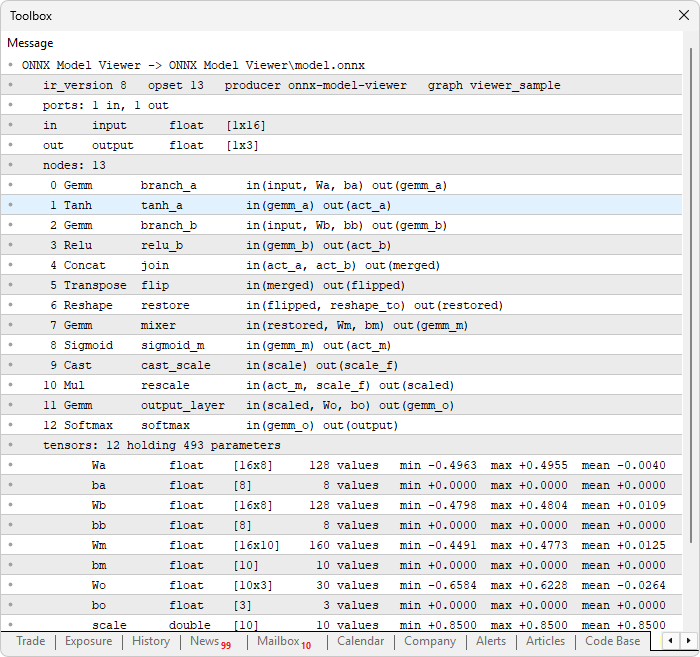
The output confirms the parser recovered the graph rather than merely reading bytes without error. All thirteen layers appear with their operators and name lists, and tracing those names shows "input" arriving at two separate "Gemm" layers whose activations meet again at "Concat". Each tensor reports its element type beside its shape, so the double-precision "scale" and the whole-number "reshape_to" stand apart from the float weights, and the string tensor reports text rather than a fabricated numeric range. The biases read zero across all three columns because the network was never trained, while the weight matrices show the bounded spread the initializer produced.
Conclusion
We opened a file the terminal had always treated as opaque binary and read its contents in MQL5 alone. The byte cursor decodes Protocol Buffers wire format directly, handling variable-length integers, length-prefixed blocks and fixed-width values, and stepping past any field it does not recognize without losing its place. On top of it, the parser recovers the graph the file describes: every layer with its operator and the value names it reads and writes, every weight tensor with its shape, element type, and value range, and the input and output shapes a caller must supply and expect. A model can now be checked before it is trusted with a trade, and a report that shows zeros where weights should be, or a shape that disagrees with the features being fed in, names the fault instead of leaving it to guesswork.
The layering is what makes this worth more than a single report. The byte cursor knows nothing about neural networks and the parser knows nothing about bytes, so the same reader serves anything built on it. In the next parts, we will build the viewer on this foundation and draw the graph on the chart, turning the log output we read here into something we can see and navigate. Stay tuned.
Attachments
| S/N | Name | Type | Description |
|---|---|---|---|
| 1 | make_model.py | Python script | Builds the sample classification network, stores its tensors across several encodings, and saves the result as model.onnx under MQL5\Files\ONNX Model Viewer Part 1\ |
| 2 | OMV Protobuf.mqh | Include file | Defines the wire type constants, the float and double bit overlays, and the byte cursor that decodes variable-length integers, tags, text, nested blocks and fixed-width values, with a skip routine for fields it does not recognize |
| 3 | OMV Model.mqh | Include file | Defines the node, tensor and port structures, and implements the parser that walks the model, graph, node, tensor and port messages to recover the layers, weights and exposed shapes |
| 4 | ONNX Model Viewer Part 1.mq5 | Expert Advisor | The main program entry point that declares the user inputs, includes the two module headers, loads the model on initialization, and prints the structure report to the Experts tab |
| 5 | MQL5.zip | Compiled archive | A ready-to-extract archive containing all 4 project files in a single folder. Unzip it into your MetaTrader 5 terminal data folder; the files will be placed under MQL5/Experts/ with every file in its correct location, ready to compile |
The project is supported in Algo Forge: https://forge.mql5.io/29210372/Article-24231-ONNX-Models-Part-1-Protobuf-Parser
Warning: All rights to these materials are reserved by MetaQuotes Ltd. Copying or reprinting of these materials in whole or in part is prohibited.
This article was written by a user of the site and reflects their personal views. MetaQuotes Ltd is not responsible for the accuracy of the information presented, nor for any consequences resulting from the use of the solutions, strategies or recommendations described.

 Adaptive Position Sizing in MQL5: A Prototype Risk Engine with Generalized Kelly and Bootstrap Calibration
 Building Your Personal Expert Advisor (Part 4): Risk Management III—Risk Models and Order Execution
 Neural Networks in Trading: Decomposition Instead of Scaling — Building Modules
 Automating Classic Market Methods in MQL5 (Part 6): Jesse Livermore's Pivotal Point System

- Free trading apps
- Over 8,000 signals for copying
- Economic news for exploring financial markets
You agree to website policy and terms of use