Tiger Lite

Tiger Lite recreate the history of entry and exit orders.

The goal is that you can grasp their strategy how to play.

CSV format support for WEB, MT4 and MT5 platforms.

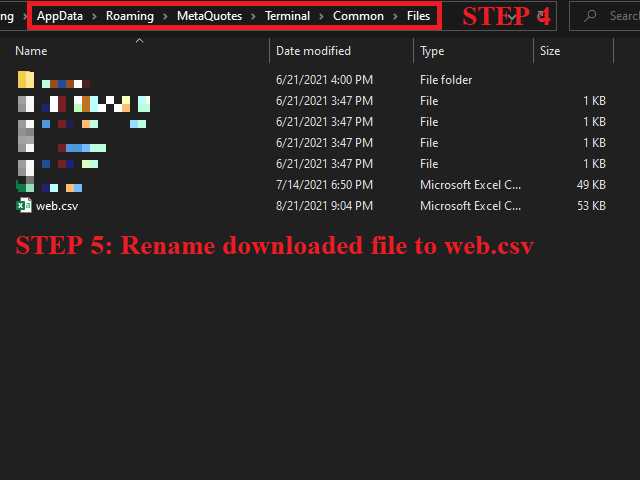
The sequence of steps is described in the photo.

Note:

Please choose the existing date and symbol on the CSV file.

For MT4/5, export historical data and copy the records to excel, save it with the extension CSV.

For MT4/MT5/WEB, save the name with format mt4.csv/mt5.csv/web.csv

If you get the history from another source and your file format is different, please copy the correct column as the sample file.

Please leave a message if this Tiger Lite is valuable to you.


The Most Dangerous Time to Trade


Have you ever noticed that after a solid winning trade you often lose money on the next one? Well, it may be something you

can prevent, at least sometimes. After winners, we may literally invent or see patterns on the charts that are not even there;

we convince ourselves into jumping back in the market, subconsciously. Before we proceed, let me be clear, you cannot avoid

all losing trades, sometimes they are just normal statistical occurrences of your trading edge. What we are talking about here

are the losers that you can prevent; the ones born of emotion.

Why we tend to lose after winning

Right after a winning trade is indeed the most dangerous time to trade. Whilst that may seem surprising to some of you,

it has a scientific basis that we need to understand… After a winning trade, we feel good, there is no denying that and you

cannot stop it, and why would you want to, right? However, this euphoric feeling can lead to disaster of you are not aware of it

and how to deal with how it makes you feel. Dopamine is the feel-good chemical released in your brain when something happens

that makes you happy, like a winning trade. The danger comes in the form of addiction. For a trader, this means after a winner

we are more likely to over-trade and do something stupid with our trading platform because our brains are subconsciously looking

to keep the dopamine high going. When riding a dopamine high after a winning trade, our brains naturally perceive less risk in the

market and that can cause us to deviate from our trading strategy.

The very act of entering a trade, an event that previously made you money and made you happy, will release more dopamine in

your brain, thus keeping the ‘high’ going. So, the brain will get what it wants, whether you win or lose, and as traders, we need

to be aware of this genetic ‘flaw’. Dopamine is truly a double-edged sword that can either reinforce good habits or reinforce bad habits.

Solutions

So, now that you know why it’s so easy to lose money shortly after winning, it’s time to figure out how you will avoid this major

pitfall in the future. The trick is to have some type of filter in place to catch yourself from making an emotion-fueled / dopamine-fueled

trade. Whilst it may sound cliché to once again talk about trading plans, their importance in this matter cannot be over-stated.

The solution to this mistake is to ensure you’re only subjecting yourself to your edge, which needs to be a well-defined trading edge.

You need to build and follow a trading plan so that you are not simply entering on random whims of confidence or because you think

a chart is about to do something.

Summary of solutions to battle the tendency to over-trade after winners:

  • You have an actual trading strategy / trading edge that you fully understand and can define.
  • You have a trading plan built around the above strategy.
  • Make sure you only subject yourself to your edge, which should be well-defined and in your plan.
  • Your trading plan should act as a ‘filter’ of sorts

Conclusion

The best way to avoid giving back trading profits is by making sure you have no doubt about what you’re looking for as you scan the charts each day.

When you reach a point of having mastered your trading strategy, you only need to build a trading plan around it and stick to it, to filter out the

emotion-based trades that traders often make. You can get started learning my trading edge and how I trade the market, as well as how to build a

trading plan around that edge. As they say, a journey of 1,000 miles starts with a single step, and if you want to stop losing money unnecessarily

in the market, it’s time to take the first step on the right path.


추천 제품
Equity Tracker MT5 Equity Tracker MT5는 MetaTrader 5용 계좌 모니터링 Expert Advisor로, 거래 활동, 계좌 상태 및 기술적 조건을 알림 메시지를 통해 보고합니다. 이 Expert Advisor는 거래 로직과 독립적으로 작동하며 주문 실행이나 거래 관리에 어떠한 영향도 미치지 않습니다. 본 제품은 거래를 열거나 수정하거나 종료하지 않습니다. 관찰 및 알림 기능만 수행합니다. 목적 Equity Tracker MT5는 터미널을 지속적으로 모니터링하지 않고도 거래 계좌의 상태를 파악하고자 하는 트레이더를 위해 설계되었습니다. 어떤 거래 전략이나 다른 Expert Advisor와도 함께 사용할 수 있습니다. 계좌 단위 모니터링 거래 활동 알림 기술적 상태 인식 계좌 및 리스크 상태 모니터링 이 Expert Advisor는 계좌 파라미터를 지속적으로 평가하고, 사전에 정의된 조건이 충족되면 변경 사항을 보고합니다. 에퀴티 및 드로우다운 수준 알
AdaptiveStats  is a comprehensive and visually stunning performance analysis tool for the MetaTrader 5 (MQL5) platform, featuring a professional "Fintech Dark" (JARVIS-inspired) aesthetic. It is engineered to provide traders with real-time, actionable insights into their trading performance directly on the chart interface. Key features and capabilities include: Multi-Timeframe Performance Tracking : Automatically calculates and aggregates Net Profit, Win Rate, and Total Trades for three critical
FREE
Overview : The Advanced News Trading Panel is a versatile tool designed for traders who rely on news-based trading strategies. This Expert Advisor (EA) provides an intuitive graphical interface that allows users to quickly set up pending orders and manage risk with ease. With the ability to automatically place Buy/Sell Stop orders based on your pre-set stop order distance from the bid/ask price, stop-loss and take-profit levels, the EA allows for precision trading during high-volatility news eve
Ashinton Smart Ultra Pro – Structured Trading Automation Ashinton Smart Ultra Pro is a trend-following,  risk-controlled MT5 Expert Advisor designed to trade identified trend continuation  opportunities using a multi-stage entry confirmation aligned with directional bias, and price structure-based swing levels. It focuses on clean execution, strict money management, and safety protections (daily drawdown lock, spread protection, cooldown rules, and more), making it suitable for traders who want
MR Intelligent EA
Tran Tieu Linh Vo
MoneyRocket Intelligent EA 는 MetaTrader 5 를 위한 **전문적인 듀얼 전략(이중 전략) 자동매매 시스템(Expert Advisor)**으로, 반전(Reversal) 탐지 와 추세 모멘텀(Trend Momentum) 거래 를 지능적으로 결합하여 일관되고 안정적인 성과 를 목표로 설계되었습니다. User guide  :  https://moneyrockettrend.blogspot.com/2026/02/moneyrocket-ea-v254-user-guide-mr-mql5.html 본 EA는 서로 보완적인 두 가지 강력한 모드를 제공합니다: • 지능형 반전 모드 (Intelligent Reversal Mode) 멀티 타임프레임 확인을 통해 시장의 극단적인 과매수·과매도(소진) 구간을 감지하고, 최적의 전환 지점에서 높은 확률의 역추세 진입 신호 를 제공합니다. • 지능형 추세 모멘텀 모드 (Intelligent Trend Momentum Mode) 고
Bober Real MT5
Arnold Bobrinskii
4.88 (16)
Bober Real MT5 is a fully automatic Forex trading Expert Advisor. This robot was made in 2014 year and did a lot of profitbale trades during this period. So far over 7000% growth on my personal account. There was many updates but 2019 update is the best one. The robot can run on any instrument, but the results are better with EURGBP, GBPUSD, on the M5 timeframe. Robot doesn't show good results in tester or live account if you run incorrect sets. Set files for Live accounts availible only for cu
NineEdge Pro EA
Mohammed Eltayeb Mohammed Khairalla
NineEdge Pro EA 멀티 전략 | 멀티 타임프레임 MetaTrader 5 자동매매 시스템 NineEdge Pro EA 는 MetaTrader 5 플랫폼용 자동매매 프로그램(Expert Advisor)으로, 여러 개의 독립적인 거래 로직 모듈을 하나의 통합된 거래 실행 시스템으로 구성한 제품입니다. 본 EA는 사전에 정의된 규칙 기반 거래 로직을 사용하여 다양한 타임프레임과 시장 환경에서 작동하도록 설계되었습니다. 모든 거래 결정은 자동으로 실행되며, 수동 개입이 필요하지 않습니다. 핵심 개념 NineEdge Pro EA는 단일 거래 방식에 의존하지 않고, 다중 타임프레임 기반의 전략 분산 구조를 사용합니다. 각 전략 모듈은 논리적으로 독립되어 있으며, 고유한 규칙에 따라 작동하여 다음과 같은 다양한 시장 움직임에 대응합니다. 가격 돌파 모멘텀 지속 변동성 변화 평균 회귀 가격 움직임 지지선 및 저항선에 대한 가격 반응 모든 전략은 통합된 리스크 관리 및 주문 실행 프레임워크
Boleta de negociação, adiciona automáticamente as ordens Take Profit e Stop Loss quando excutada uma ordem de compra ou venda. Ao apertar as teclas de atalho (A, D, ou TAB), serão inseridas duas linhas de pre-visualização, representando as futuras ordens de take profit (azul) e stop loss (vermelho), as quais irão manter o distanciamento especificado pelo usuário. Ditas ordens só serão adicionadas ao ser executada a ordem inicial. Ao operar a mercado, as ordens pendentes de take profit, e stop lo
Auto Stop-Loss Guardian Protect Every Manual Trade Automatically ================================================== Are you a manual trader who struggles with emotional decision-making? Do you often forget to set stop-losses or hesitate to cut losses? Auto Stop-Loss Guardian is designed specifically for manual traders who want automatic, disciplined risk management without interfering with their trading decisions. ================================================== WHAT THIS EA DOES =======
Local Trade Copier   is an advanced tool designed for efficiently copying trades between accounts in the   local   mode. It allows for lightning-fast order replication from a master account to a slave account. In local mode, trades are copied instantly, while in remote mode, the copying process takes less than 1 second. MT4 Version MT5 Full Version (Local & Remote) MT4 Full Version (Local & Remote) Local mode refers to both MetaTrader platforms being installed on the same system. It fully suppo
Pro Trader Assistant 1.1 - The Ultimate Trading Companion NB: DOES NOT WORK ON STRATEGY TESTER. FOR TESTING, DM ME   Trade Simple, Smarter, Safer, and More Efficiently Are you ready to transform your trading with institutional-grade risk management? Pro Trader Assistant 1.1  is your complete solution for mastering trading psychology, risk control, and execution efficiency. Built for both prop firm challenges and retail trading. Why Choose Pro Trader Assistant 1.1 Perfect for retail trading
Yellowstone FX
Michael Prescott Burney
4 (5)
옐로스톤 FX: 가장 안전한 금 거래 로봇, MT5 플랫폼 및 올해 상반기 XAUUSD 차트. 옐로스톤의 특수 효과       정교한 디자인이 특징입니다.       가장 안전한 MT5 금 거래 로봇       이 솔루션은 자본 보존, 체계적인 거래 실행 및 관리 가능한 수준의 위험을 중시하는 트레이더를 대상으로 합니다.       XAUUSD 시장은   다음과 같은 목적을 위해 특별히 설계되었습니다...       메타트레이더 5       최적화는 다음 영역에서 수행되었습니다.       상반기 XAUUSD   : 이 고급 자동 거래 시스템은 공격적이고 예측 불가능한 거래 행태보다는 안정성과 체계적인 자동화에 중점을 둡니다. 운영자를 찾고 계신 분들을 위해       SafeGold EA MT5       MT5 저위험 금 거래 로봇   또는       Yellowstone FX   는 MT5 플랫폼에서 금 거래를 위한 전문가 자문 시스템(Expert Advisor)으로, 강력한
Risk Manager for MT5
Sergey Batudayev
4.31 (16)
MT5의 Expert Advisor Risk Manager는 매우 중요하며 제 생각에는 모든 거래자에게 필요한 프로그램입니다. 이 Expert Advisor를 사용하면 거래 계정의 위험을 제어할 수 있습니다. 위험 및 이익 통제는 금전적 측면과 백분율 측면에서 모두 수행될 수 있습니다. Expert Advisor가 작동하려면 통화 쌍 차트에 첨부하고 예금 통화 또는 현재 잔액의 %로 허용되는 위험 값을 설정하기만 하면 됩니다. [Instruction for Risk Manager parameters] 어드바이저 기능 이 위험 관리자는 위험을 제어하는 ​​데 도움이 됩니다. - 거래를 위해 - 하루 - 일주일 동안 - 한 달 동안 당신은 또한 제어할 수 있습니다 1) 거래 시 최대 허용 랏 2) 1일 최대 주문 수 3) 하루 최대 수익 4) 지분 인수 이익 설정 그게 다가 아닙니다. 설정에서 자동 설정을 지정하면 고문이 기본 SL 및 TP를 설정할 수도 있습니다. 상
By :ForextraderEanow   Green Mower 10.0                                                                                                                                                                                                                                                                                                        This EA is Famous Grid Strategy that open grid of trades with the same size (not martingale)  and make PROFIT even when the Forex price moves in the WRONG Direction
G Trade Broker Check
Hamidreza Sadkhosravi
G Trade Broker Check – Instantly Evaluate Broker Performance Across Multiple Accounts and Leverage Settings Take your trading to the next level by analyzing your broker’s performance in real time! With G Trade Broker Check , traders can effortlessly track their broker’s behavior over the past 24 hours on any symbol added to the Market Watch in MT5. Whether you’re comparing multiple brokers, testing different account types, or analyzing varying leverage setups, this powerful Expert Advisor prov
FREE
Uranus STO expert is developed on the basis of a deep mathematical analysis, using the popular indicators: Stochastic, WPR, ATR, RSI. The Expert is optimized for EURUSD trading . The expert analyzes past periods, comparing them to the current period. According to the degree of probability and market behavior, the expert places orders at levels calculated for the best result. The strategy also features a permeability tool: Impact Bar. It works as a probability filter. The range of the Band is fro
Features 1️⃣ Flexible Grid Order Configuration Set price levels and spacing between orders. Customize order sizes and maximum number of positions for better risk control. 2️⃣ Hedge and Netting Modes Hedge Mode : Allows simultaneous long and short positions , ideal for advanced strategies. Netting Mode : Consolidates positions for easier balance management. 3️⃣ Supported Order Types Limit Orders : Buy and sell at predetermined prices. Market Orders : Instant execution. Integrated Take-Profit : Wi
Signals Executor for Telegram is a Utility that allows you to execute and manage positions from messages sent in Telegram Chats. Chat messages are processed to check for the existence of commands, and the command will be executed if its parameters are valid. You need the Telegram Bot Token and Chat Id to configure the input parameters. It is possible to restrict the sending of commands through the User Id, which must be configured in the input parameters. Valid Commands: Buy and Sell: Market or
Ejecutor BTC
Ignacio Agustin Mene Franco
BTC EXECUTOR — Automated System for BTCUSD on M5 BTC Executor is an institutional Expert Advisor developed in MQL5 for MetaTrader 5, designed exclusively for trading Bitcoin (BTCUSD) on the 5-minute timeframe. Its architecture combines three high-performance analytical pillars that work together to identify high-probability entries and manage risk accurately. Strategy London Breakout — The core of the system. During the first hour of the European market opening (8:00–9:00 UTC), the EA construc
AlphaTrader: Your Intelligent Partner in Forex Trading AlphaTrader   is an advanced trading system that utilizes automated analysis and trading strategies to optimize decision-making in the Forex market. Built using geometric patterns and cutting-edge algorithms, this bot detects pricing patterns, providing precise signals for successful trades.   Why Choose AlphaTrader? AlphaTrader is not just a trading bot; it’s a   full-fledged partner   designed to help you manage your capital as efficien
EA Performance Monitor MetaTrader 5용 유틸리티로, 열려 있는 모든 차트에서 활성 Expert Advisor를 자동으로 감지하고, 각 EA를 거래 데이터와 매핑하며, 단일 패널에서 드로다운, 손익, 승률 및 오픈 포지션 지표를 실시간으로 표시합니다. EA Performance Monitor는 MetaTrader 5용 자동 모니터링 유틸리티입니다. 설정 가능한 간격으로 열려 있는 모든 차트를 스캔하고, 매직 넘버와 심볼로 실행 중인 각 Expert Advisor를 식별하며, 차트의 구조화된 패널에 성과 데이터를 표시합니다. 이 도구는 종료된 거래 내역과 실시간 부동 포지션을 모두 추적하여 단일 연결 지점에서 계정의 모든 EA 활동을 통합적으로 볼 수 있습니다.   개요 초기화 시 유틸리티는 연결된 시점부터 계정의 거래 내역을 읽습니다. 활성 매직 넘버를 찾아 모든 오픈 포지션을 스캔하고, 각각을 Expert Advisor가 실행 중인 해당 차트에 매핑합니다.
FREE
YenSync
Michael Prescott Burney
1 (1)
원형 동기화       YenSync는 Fujinami Systems의 검증된 핵심 로직을 기반으로 개발된 USD/JPY 1시간 차트용 고급 거래 시스템입니다. USD/JPY 통화쌍의 독특한 가격 변동에 맞춰 특별히 개발되었으며, 다양한 변동성 조건 하에서 정확한 시장 진입, 추세 동기화 및 위험 관리에 중점을 둡니다. 이 시스템은 내부 모멘텀 추적 및 방향성 정렬 필터를 활용하여 명확하고 일관된 시장 추세를 파악하고 단기 변동의 영향을 최소화합니다. 거래 시점, 최대 스프레드, 자본 감소 필터는 물론, 거래량, 최대 포지션 규모, 거래 빈도를 정밀하게 제어할 수 있어 사용자가 원하는 대로 위험 관리 및 거래 전략을 조정할 수 있습니다. YenSync는 효율성과 적응성을 염두에 두고 개발되었으므로 USD/JPY 쌍의 높은 변동성에 대처하기 위한 안정적이고 체계적인 접근 방식을 찾는 트레이더에게 이상적인 선택입니다.
Net Z
Sugianto
5 (1)
NET Z uses a very well-known trend reversal technique to determine position entry with slight modifications by using virtual trade techniques and virtual pending orders so that position entry is not too early or too late. Why NETZ? NET Z does not require complicated settings and is easy to use because user only need to upload a set file that is already available. Currently there are set files for 20 fx pairs. The best GRID EA with the ability to control risks. I will share my personal daily ro
SmartRisk MA Pro
Oleg Polyanchuk
SmartRisk MA Pro Strategy Overview: SmartRisk MA Pro is an optimized, risk-oriented automated trading strategy (Expert Advisor) developed for the MetaTrader 5 platform. It is designed to identify trading opportunities based on price deviations from moving averages and incorporates a comprehensive capital management system. The Expert Advisor operates on a "new bar" logic, ensuring stability and predictability in trade signal execution. Operating Principles and Trading Logic: At its core, the st
| Fully-automated Smart Money Concept (ICT) inspired trading solution with multi-strategy capabilities | Built by a grid trader >> for grid traders.  This is MT5 version, click  here  for  Blue CARA MT4  (settings and logics are same in both versions)     Real monitoring signal  -->  Cara Gold Intro Blue CARA EA   ('CARA') - short for  C omprehensive  A lgorithmic   R esponsive   A dvisor is a next-gen  multi-currency    multi-timeframe  EA base on the widely known (and perhaps the most popul
BeansAssist
Ivanvielle Bonifacio Dupaya
BeansAssist *Major update 3.00 released. Kindly update your copy of BeansAssist Gives you fruitful information of the price of the symbol that you are trading. Improve your trades simply by following the suggestion that it gives you. Tracks deal stats daily so you keep track of your performance. Don't let emotions take control, be a better and profitable trader with BeansAssist to guide you. *Note: This utility is not for free 
Product Description Silver Trend Signal EA Pro is a repainting-safe Expert Advisor built around the Silver Trend Signal indicator.    The EA automatically identifies trade signals and executes orders without manual intervention, saving time and emotion-based trading errors.  The EA prioritizes reliability by executing trades only after a   confirmed closed bar , minimizing false signals. It includes comprehensive risk management features like stop loss, take profit, trailing stops, and break-
ORB Master Breaker
VALU VENTURES LTD
Configurable Opening Range Breakout EA Professional opening range breakout strategy with comprehensive filtering system and advanced risk management Strategy Overview This Expert Advisor implements the proven Opening Range Breakout (ORB) strategy, designed specifically for NYSE market hours. The EA identifies the opening range during the first 15 minutes after NYSE open and executes breakout trades when price moves beyond this range with confirmation. Core Features Risk Management Configurable
Trading panel for manual trading. Has a fairly wide functionality. Allows you to automatically calculate the order size, open both market and pending orders. It has a wide range of options for closing orders, it is possible to partially close orders, close orders after reaching a certain profit or loss, separately close profitable and unprofitable, buy and sell, as well as pending orders. The panel also contains a simple implementation of a grid of pending orders, reverse and lock functions, tr
이 제품의 구매자들이 또한 구매함
Trade Assistant MT5
Evgeniy Kravchenko
4.43 (211)
거래당 위험 계산, 라인을 사용한 손쉬운 신규 주문, 부분 청산 기능을 통한 주문 관리, 7가지 유형의 트레일링 스탑 및 기타 유용한 기능을 제공합니다. 추가 자료 및 지침 설치 지침   -   애플리케이션 지침   -   데모 계정용 애플리케이션 평가판 라인 기능       - 차트에 개시선, 손절매, 차익실현을 표시합니다. 이 기능을 사용하면 새로운 주문을 쉽게 하고 개봉 전에 추가 특성을 볼 수 있습니다. 위기 관리       -       위험 계산 기능은 설정된 위험과 손절매 주문의 크기를 고려하여 새 주문의 볼륨을 계산합니다. 이를 통해 손절매 크기를 설정하고 동시에 설정된 위험을 존중할 수 있습니다. 로트 계산 버튼 - 위험 계산을 활성화/비활성화합니다. 필요한 위험 값은 위험 필드에 0에서 100 사이의 백분율 또는 예금 통화로 설정됩니다. 설정 탭에서 위험 계산 옵션을 선택합니다. $ 통화, % 잔액, % 지분, % 자유 마진, % 사용자 정의, % AB 이전
Trade Manager EA에 오신 것을 환영합니다. 이 도구는 거래를 보다 직관적이고 정확하며 효율적으로 만들기 위해 설계된 궁극적인 리스크 관리 도구 입니다. 단순한 주문 실행 도구가 아닌, 원활한 거래 계획, 포지션 관리 및 리스크 제어를 위한 종합 솔루션입니다. 초보자부터 고급 트레이더, 빠른 실행이 필요한 스캘퍼에 이르기까지 Trade Manager EA는 외환, 지수, 상품, 암호화폐 등 다양한 시장에서 유연성을 제공합니다. Trade Manager EA를 사용하면 복잡한 계산은 이제 과거의 일이 됩니다. 시장을 분석하고 진입, 손절 및 익절 수준을 차트의 수평선으로 표시한 후 리스크를 설정하면, Trade Manager가 이상적인 포지션 크기를 즉시 계산하고 SL 및 TP 값을 실시간으로 표시합니다. 모든 거래가 간편하게 관리됩니다. 주요 기능: 포지션 크기 계산기 : 정의된 리스크에 따라 거래 크기를 즉시 결정합니다. 간단한 거래 계획 : 진입, 손절, 익절을 위한
Local Trade Copier EA MT5
Juvenille Emperor Limited
4.96 (139)
Local Trade Copier EA MT5 를 사용하여 매우 빠른 거래 복사 경험을 해보세요. 1분 안에 간편하게 설정할 수 있으며, 이 거래 복사기를 사용하면 Windows 컴퓨터 또는 Windows VPS에서 여러 개의 MetaTrader 터미널 간에 거래를 0.5초 미만의 초고속 복사 속도로 복사할 수 있습니다. 초보자든 전문가든   Local Trade Copier EA MT5 는 다양한 옵션을 제공하여 사용자의 특정 요구에 맞게 맞춤 설정할 수 있습니다. 이는 수익 잠재력을 높이려는 모든 사람을 위한 최고의 솔루션입니다. 지금 사용해보시고 이것이 왜 시장에서 가장 빠르고 쉬운 무역용 복사기인지 알아보세요! 팁: 여기 에서 데모 계정에서 Local Trade Copier EA MT5 데모 버전을 다운로드하여 사용해 볼 수 있습니다. 다운로드한 무료 데모 파일을 MT5 >> File >> Open Data Folder >> MQL5 >> Experts 폴더에 붙여넣고 터
AI Agent Supervisor is NOT an Expert Advisor. AI Agent Supervisor   is a   multi-agent AI risk & portfolio supervisor   that watches every EA on your account and intervenes in real time.  WANT AN AI PORTFOLIO MANAGER WATCHING YOUR FLEET 24/7?   Run your fleet on the same brokers I do:   IC MARKETS , IC TRADING   .  Unlike the centralized stock market, Forex has no single, unified price feed.  Every broker sources liquidity from different providers, creating unique data streams. The Supervisor r
베타 출시 Telegram to MT5 Signal Trader 는 곧 공식 알파 버전을 출시할 예정입니다. 일부 기능은 아직 개발 중이며, 작은 버그가 발생할 수 있습니다. 문제가 있으면 꼭 보고해 주세요. 여러분의 피드백은 소프트웨어 개선에 도움이 됩니다. Telegram to MT5 Signal Trader 는 Telegram 채널 또는 그룹의 거래 신호를 자동으로 MetaTrader 5 계정으로 복사하는 강력한 도구입니다. 공개 및 비공개 채널을 모두 지원하며, 여러 신호 제공자를 여러 MT5 계정에 연결할 수 있습니다. 소프트웨어는 빠르고 안정적으로 동작하며, 복사된 거래를 완벽히 제어할 수 있습니다. 인터페이스는 깔끔하며 대시보드와 차트가 시각적으로 구성되어 있고, 직관적인 네비게이션이 가능합니다. 여러 Signal Account를 관리하고, 공급자별 설정을 세밀하게 조정하며, 모든 동작을 실시간으로 모니터링할 수 있습니다. 필수 조건 MQL의 제한으로 인해 EA는 Te
TradePanel MT5
Alfiya Fazylova
4.87 (156)
Trade Panel은 다기능 거래 도우미입니다. 이 애플리케이션에는 50개 이상의 수동 거래 기능이 포함되어 있으며 대부분의 거래 작업을 자동화할 수 있습니다. 구매하기 전에 데모 계정에서 데모 버전을 테스트할 수 있습니다. 데모 계정용 애플리케이션 체험판 다운로드: https://www.mql5.com/en/blogs/post/750865 . 전체 지침 여기 . 거래. 한 번의 클릭으로 거래를 수행할 수 있습니다: 리스크 자동 계산과 함께 예약 주문 및 포지션 열기. 한 번의 클릭으로 여러 주문 및 포지션 열기. 주문 그리드 열기. 예약 주문 및 포지션을 그룹별로 닫기. 포지션 방향 전환 (Buy 닫기 > Sell 열기, Sell 닫기 > Buy 열기). 포지션 잠금 (부족한 포지션을 열어 Buy와 Sell 포지션의 수량을 동일하게 만들기). 모든 포지션 한 번의 클릭으로 부분적으로 닫기. 모든 포지션의 테이크 프로핏과 스톱로스를 같은 가격 수준에 설정. 모든 포지션의 스톱로스를
Quant AI Agents are independent trading Expert Advisors. Instead of trading using a fixed strategy like other conventional EAs, Quant AI Agents   is a   multi-agent AI trading framework   that turns natural-language strategy prompts into live.  WANT THE SAME RESULTS AS MY LIVE SIGNAL?   Use the exact same brokers I do:   IC MARKETS , IC TRADING   .  Unlike the centralized stock market, Forex has no single, unified price feed.  Every broker sources liquidity from different providers, creating un
Exp COPYLOT CLIENT for MT5
Vladislav Andruschenko
3.91 (33)
MetaTrader 5용 전문 트레이드 복사기 MetaTrader 용 빠르고 전문적이며 신뢰할 수 있는 트레이드 복사기 입니다. COPYLOT 은 MT4와 MT5 터미널 간의 Forex 거래 복사를 지원하며, Hedge 및 Netting 계좌를 모두 지원합니다. COPYLOT MT5 버전 지원 구성: - MT5 Hedge → MT5 Hedge - MT5 Hedge → MT5 Netting - MT5 Netting → MT5 Hedge - MT5 Netting → MT5 Netting - MT4 → MT5 Hedge - MT4 → MT5 Netting MT4 버전 전체 설명 + DEMO + PDF 구매 방법 설치 방법 로그 파일 확인 방법 테스트 및 최적화 방법 Expforex의 모든 제품 MT4 터미널로도 거래를 복사할 수 있습니다(MT4 → MT4, MT5 → MT4): COPYLOT CLIENT for MT4 COPYLOT은 2개, 3개, 심지어 10개의 터미널과 동시에 작동할
AntiOverfit PRO MT5
Enrique Enguix
5 (6)
EA를 구매하기 전에, 이 시스템이 정말 버티는지 아니면 백테스트에서 운 좋게 좋아 보였던 것뿐인지 먼저 확인하세요. 대부분의 로봇은 보기 좋은 백테스트와 함께 판매됩니다. 우상향 곡선. 좋은 Profit Factor. 의심할 이유가 거의 없어 보입니다. 그런데도 그런 EA들 중 많은 수가 시장이 그 과거 구간처럼 움직이지 않기 시작하는 순간 무너지기 시작합니다. 왜 그럴까요? 백테스트가 증명하는 것은 딱 한 가지뿐이기 때문입니다. 그 전략이 특정한 하나의 가격 경로에서는 작동했다는 것. 다른 경로에서도 버틴다는 뜻은 아닙니다. 견고하다는 뜻도 아닙니다. 당연히 당신의 돈을 쓸 가치가 있다는 뜻도 아닙니다. 당신이 EA를 사는 이유는 과거의 예쁜 곡선을 감상하기 위해서가 아닙니다. 계속 변하는 시장에서 실제로 쓰기 위해서입니다. AntiOverfit PRO가 하는 일 AntiOverfit PRO는 MetaTrader 5용 Expert Advisor가 정말 탄탄한지, 아니면 특정한
Farmed Hedge Yield Farming | All Markets (Manual - Hybrid - Semi/Automated EA) MULTI-ASSET SUPPORT Trade any asset available on your broker - Forex: Major, Minor, Exotic pairs - Crypto: BTC, ETH, XRP, SOL, BNB - Stocks: Apple, Tesla, Amazon, Google, etc. - Commodities: Gold, Silver, Oil, Gas - Indices: US30, NAS100, SPX500, DAX40 - Any CFD your broker offers VERIFIED TRADING RESULTS - Farmed Hedge Yield Axi Copy:  https://www.mql5.com/en/signals/2356376 - Farmed Hedge Yield Exn Copy:   https:/
The News Filter MT5
Leolouiski Gan
4.77 (22)
이 제품은 뉴스 시간 동안 모든 전문가 어드바이저 및 수동 차트를 필터링하여 수동 거래 설정이나 다른 전문가 어드바이저가 입력한 거래가 파괴될 수 있는 급격한 가격 상승으로부터 걱정하지 않아도 됩니다. 이 제품은 또한 뉴스 발표 전에 열린 포지션과 대기 주문을 처리할 수 있는 완전한 주문 관리 시스템이 함께 제공됩니다.   The News Filter  를 구매하면 더 이상 내장 뉴스 필터에 의존할 필요가 없으며 이제부터 모든 전문가 어드바이저를 여기서 필터링할 수 있습니다. 뉴스 선택 뉴스 소스는 Forex Factory의 경제 캘린더에서 얻어집니다. USD, EUR, GBP, JPY, AUD, CAD, CHF, NZD 및 CNY와 같은 어떤 통화 기준으로 선택할 수 있습니다. Non-Farm (NFP), FOMC, CPI 등과 같은 키워드 식별을 기준으로 선택할 수도 있습니다. 저, 중, 고 영향을 가지는 뉴스를 필터링할 수 있도록 선택할 수 있습니다. 차트와 관련된 뉴스만 선
파워 캔들 전략 스캐너 - 자체 최적화 다중 종목 설정 찾기 도구 파워 캔들 전략 스캐너는 마켓 워치에 등록된 모든 종목에 대해 파워 캔들 지표와 동일한 자체 최적화 엔진을 동시에 실행합니다. 하나의 패널에서 현재 통계적으로 거래 가능한 종목, 각 종목별 최적의 전략, 최적의 손절매/익절 조합을 알려주며, 새로운 신호가 발생하면 즉시 알림을 전송합니다. 이 도구는 Stein Investments 에코시스템의 일부입니다. 18개 이상의 도구와 함께 당신의 1대1 AI 트레이딩 멘토 Max.  항상 대기 중, 모든 인디케이터를 깊이 있게 이해, 무언가를 차근차근 생각해보고 싶은 순간에 도움을 줍니다.  https://stein.investments 에서 만나보세요 완벽한 시장 모니터링. 종목당 3,000건 이상의 자동 최적화. 2가지 알림 유형. 한 번의 클릭으로 차트를 전환하고 바로 거래하세요. 이 도구가 필요한 이유 대부분의 다중 종목 스캐너는 가격 변동만 보여줍니다. 티커별
Premium Trade Manager - MetaTrader 5를 위한 빠르고 규율 있는 거래 관리 도구 Premium Trade Manager 는 결정에만 집중하고 나머지 루틴은 패널이 처리하길 원하는 트레이더를 위한 도구입니다. 크기 계산, 주문 배치, 분할 청산, 트레일링, 뉴스 대응, 프롭 펌 한도 관리까지, 모든 거래에서 동일하게 규율 있는 방식으로 실행됩니다. MetaTrader 5용 빠른 온차트 패널로, 모든 거래에서 기계적인 작업을 완전히 없애줍니다. 방향, 종목, 타이밍은 당신이 결정합니다. 패널이 리스크에 맞춰 포지션 크기를 계산하고, 스톱과 타겟이 설정된 주문을 배치하고, 분할 청산으로 스케일아웃하고, 나머지를 트레일합니다. 펀디드 트레이더에게는 한 걸음 더 나아갑니다. 8개 주요 외환 프롭 펌의 실제 규칙을 내장하고, 각 한도까지 남은 거리를 실시간으로 표시하며, 하드 한도를 위반할 주문은 차단합니다. 구매 전에 직접 체험해 보세요. 인터랙티브 walkthro
Copy Cat More Trade Copier MT5 (복사 고양이 MT5) 는 오늘날의 거래 과제를 위해 설계된 로컬 거래 복사기이자 완전한 위험 관리 및 실행 프레임워크입니다. 프롭펌 챌린지부터 개인 포트폴리오 관리까지, 견고한 실행, 자본 보호, 유연한 구성 및 고급 거래 처리의 조합으로 모든 상황에 적응합니다. 복사기는 마스터(송신자)와 슬레이브(수신자) 모드 모두에서 작동하며, 시장 주문과 예약 주문, 거래 수정, 부분 청산 및 헷지 청산 작업의 실시간 동기화를 제공합니다. 데모 및 실계좌, 거래 또는 투자자 로그인과 호환되며, EA, 터미널 또는 VPS가 재시작되어도 지속적인 거래 메모리 시스템을 통해 복구를 보장합니다. 고유 ID로 여러 마스터와 슬레이브를 동시에 관리할 수 있으며, 브로커 간 차이는 접두사/접미사 조정 또는 사용자 정의 심볼 매핑을 통해 자동으로 처리됩니다. 매뉴얼/설정  | Copy Cat More MT4 | 채널  특별 기능: 설정이 간편함 —
Trade Dashboard MT5
Fatemeh Ameri
4.94 (126)
Trade Dashboard simplifies how you open, manage, and control your trades, with built-in lot size calculation. It allows you to execute trades, manage risk, and control positions directly on the chart, with tools such as partial close, breakeven, and trailing stop. Designed to reduce manual work and help you stay focused on your trading decisions. A demo version is available for testing. Detailed explanations of features are provided within the MQL5 platform. Installation instructions are include
Footprint Chart Pro — Professional OrderFlow EA for MetaTrader 5 Version 6.34 | Professional tool for real traders | Institutional-Grade Visualization DEMO USERS - PLEASE SELECT EVERY TICK / REAL TICK WHEN TESTING AND YOU HAVE DOWNLOADED HISTORICAL DATA. IF YOU SEE A WAITING SCREEN AND IT IS NOT DOWNLOADING, IT MEANS YOU HAVE LOW HISTORICAL DATA. TRY 1 MIN AND 5 MIN FIRST ON 1 DAY DATA. ONE DAY DATA SHOULD BE THE NEWEST AND MOST CURRENT DATE. PLEASE WAIT UNTIL THE MARKET HAS ROLLED OVER PERIOD.
Timeless Charts
Samuel Manoel De Souza
5 (6)
Timeless Charts is an all-in-one trading utility for professional traders. It combines custom chart types such as Seconds Charts and Renko with advanced order flow analysis using Footprints , Clusters , Volume Profiles , VWAP studies, and anchored analysis tools for deeper market insight. Trading and position management are handled directly from the chart through an integrated trade management panel , while Market Replay and Virtual Accounts provide environments for practicing trading skills and
Trade copier MT5
Alfiya Fazylova
4.55 (44)
Trade Copier는 거래 계정 간의 거래를 복사하고 동기화하도록 설계된 전문 유틸리티입니다. 복사는 공급자의 계정/단말기에서 동일한 컴퓨터 또는 vps에 설치된 수신자의 계정/단말기로 발생합니다. 프로모션 - 이미 "Trade copier MT5"를 구매하셨다면, "Trade copier MT4"를 무료로 받으실 수 있습니다 (MT4 → MT5 및 MT4 ← MT5 복사용). 조건에 대한 자세한 정보를 원하시면, 개인 메시지를 통해 저희에게 문의해 주시기 바랍니다! 구매하기 전에 데모 계정에서 데모 버전을 테스트할 수 있습니다. 데모 버전 여기 . 전체 지침 여기 . 주요 기능 및 이점: 복사기는 "МТ5> МТ5", "МТ4> МТ5", "МТ5> МТ4" 복사를 지원합니다. 복사기는 데모 계정 > 실 계정, 실 계정 > 데모 계정, 데모 계정 > 데모 계정 및 실제 계정 > 실 계정 복사를 지원합니다. 복사기는 읽기 전용 암호가 적용된 투자자 계정에서 복사를 지원합니다. 하
HINN MagicEntry Extra
ALGOFLOW OÜ
4.73 (15)
HINN MAGIC ENTRY – the ultimate tool for entry and position management! Place orders by selecting a level directly on the chart! full description   ::  demo-version  :: 60-sec-video-description Key features: - Market, limit, and pending orders - Automatic lot size calculation - Automatic spread and commission accounting - Unlimited partitial take-profits  - Breakeven and trailing stop-loss and take-profit  functions - Invalidation leves - Intuitive, adaptive, and customizable interface - Works
Telegram To MT5 Receiver
Levi Dane Benjamin
4.31 (16)
가입한 모든 채널에서 (개인 및 제한된 채널 포함) 시그널을 바로 MT5로 복사합니다.   이 도구는 사용자를 고려하여 설계되었으며 거래를 관리하고 모니터하는 데 필요한 많은 기능을 제공합니다. 이 제품은 사용하기 쉽고 시각적으로 매력적인 그래픽 인터페이스로 제공됩니다. 설정을 사용자 정의하고 제품을 몇 분 안에 사용할 수 있습니다! 사용자 가이드 + 데모  | MT4 버전 | 디스코드 버전 데모를 시도하려면 사용자 가이드로 이동하십시오. Telegram To MT5 수신기는 전략 테스터에서 작동하지 않습니다! Telegram To MT5 특징 여러 채널에서 동시에 신호를 복사합니다. 개인 및 제한된 채널에서 신호를 복사합니다. Bot 토큰이나 채팅 ID가 필요하지 않습니다.   (원하는 경우에는 사용할 수 있습니다) 위험 % 또는 고정된 로트로 거래합니다. 특정 심볼을 제외합니다. 모든 신호를 복사할지 또는 복사할 신호를 사용자 정의할지 선택할 수 있습니다. 모든 신호를 인
Telegram to mt5 pro
Janet Abu Khalil
3.67 (3)
Telegram to MT5 Pro — Advanced Telegram Signal Copier with Auto-Fix, Multi-TP, Risk Control and Full Trade Management Telegram to MT5 Pro — 전문 텔레그램 신호 복사기 Telegram to MT5 Pro는 텔레그램 신호를 MetaTrader 5 계정으로 자동으로 직접 실행하는 고성능 트레이드 복사기로, 리스크, 실행, 트레이드 관리에 대한 완전한 제어를 제공합니다. 이 시스템은 두 가지 구성 요소로 이루어져 있습니다: • MetaTrader 5 내부에서 실행되는 Expert Advisor (EA) • 텔레그램에 연결되어 신호를 로컬로 EA에 전송하는 데스크톱 브리지 애플리케이션 두 구성 요소는 동일한 컴퓨터에서 실행되어야 합니다. MQL5 플랫폼 제한으로 인해 EA는 텔레그램에 직접 연결할 수 없습니다. 브리지는 텔레그램을 처리하고 EA는 거래를 실행합니다. 지원 및 설치
Prop Firm Os
Gayathiri Gopalakrishnan
5 (1)
PROP FIRM OS Structured Trading Assistant for MetaTrader 5 PROP FIRM OS is a structured trading assistant designed for MetaTrader 5 users who prefer rule-based market analysis and organized trading workflows. The Expert Advisor combines market analysis tools, scanner functions, dashboard monitoring, alerts, risk-control settings, and trade management features inside one system. PROP FIRM OS is designed to help traders follow selected rules, filters, and monitoring conditions during trading activ
MT5 to Telegram Signal Provider 는 사용하기 쉽고 완전히 커스터마이즈 가능한 유틸리티로, 특정 신호를 Telegram의 채팅, 채널 또는 그룹으로 전송하고, 귀하의 계정을 신호 제공자 로 만듭니다. 경쟁 제품과 달리 DLL 임포트를 사용하지 않습니다. [ 데모 ] [ 매뉴얼 ] [ MT4 버전 ] [ 디스코드 버전 ] [ 텔레그램 채널 ]  New: [ Telegram To MT5 ] 설정 단계별 사용자 가이드 가 제공됩니다. 텔레그램 API에 대한 지식은 필요하지 않습니다; 개발자가 제공하는 모든 것이 필요합니다. 주요 특징 구독자에게 보낸 주문 상세 정보를 커스터마이즈할 수 있습니다. 예를 들어, 브론즈, 실버, 골드와 같은 계층 구독 모델을 만들 수 있습니다. 골드 구독에서는 모든 신호를 받습니다. id, 심볼, 또는 코멘트로 주문을 필터링할 수 있습니다. 주문이 실행된 차트의 스크린샷이 포함됩니다 보낸 스크린샷에 닫힌 주문을 그려 추가 검증을 합니다
The product will copy all telegram signal to MT5 ( which you are member) , also it can work as remote copier.  Easy to set up, copy order instant, can work with almost signal formats, image signal,  s upport to translate other language to English Work with all type of channel or group, even channel have "Restrict Saving Content", work with  multi channel, multi MT5 Work as remote copier: with signal have ticket number, it will copy exactly via ticket number. Support to backtest signal. How to s
YuClusters
Yury Kulikov
4.93 (43)
Attention: You can view the program operation in the free version  YuClusters DEMO .  YuClusters is a professional market analysis system. The trader has unique opportunities to analyze the flow of orders, trade volumes, price movements using various charts, profiles, indicators, and graphical objects. YuClusters operates on data based on Time&Sales or ticks information, depending on what is available in the quotes of a financial instrument. YuClusters allows you to build graphs by combining da
Signal TradingView to MT5 Pro Automator TradingView와 MetaTrader 5 간의 즉각적인 전문 실행 TradingView 알림과 MT5의 실제 실행을 연결하는 가장 강력한 커뮤니케이션 브리지로 거래 전략을 자동화하세요. 속도, 유연성 및 완벽한 위험 관리를 요구하는 트레이더를 위해 설계된 이 Expert Advisor는 모든 알림 메시지를 정확한 시장가 또는 지정가 주문으로 변환합니다. 강점 및 이점 범용 파싱 엔진(독점 기술): 모든 알림 형식에서 데이터를 자동으로 인식하고 추출할 수 있는 고급 기술입니다. 단일하고 엄격한 형식에 얽매일 필요가 없습니다. 시스템은 심볼, 액션, 가격, SL 및 TP를 자동으로 이해합니다. 실시간 실행: 지연 시간을 최소화하도록 최적화된 1초 미만의 초고속 폴링 기술. 신호 수신 후 몇 밀리초 내에 주문 실행이 이루어집니다. 기관 수준의 위험 관리: 다음 기준에 따른 자동적이고 정확한 로트(Lot) 크기 계
Trade Manager DaneTrades
Levi Dane Benjamin
4.28 (29)
거래 관리자는 위험을 자동으로 계산하는 동시에 거래를 빠르게 시작하고 종료하는 데 도움을 줍니다. 과잉 거래, 복수 거래 및 감정 거래를 방지하는 데 도움이 되는 기능이 포함되어 있습니다. 거래를 자동으로 관리할 수 있으며 계정 성과 지표를 그래프로 시각화할 수 있습니다. 이러한 기능은 이 패널을 모든 수동 거래자에게 이상적으로 만들고 MetaTrader 5 플랫폼을 향상시키는 데 도움이 됩니다. 다중 언어 지원. MT4 버전  |  사용자 가이드 + 데모 트레이드 매니저는 전략 테스터에서 작동하지 않습니다. 데모를 보려면 사용자 가이드로 이동하세요. 위기 관리 % 또는 $를 기준으로 위험 자동 조정 고정 로트 크기 또는 거래량과 핍을 기반으로 한 자동 로트 크기 계산을 사용하는 옵션 RR, Pips 또는 Price를 사용한 손익분기점 손실 설정 추적 중지 손실 설정 목표 달성 시 모든 거래를 자동으로 마감하는 최대 일일 손실률(%)입니다. 과도한 손실로부터 계정을 보호하고 과도한
SMC Trade Pilot MT5 Smart Money Concepts 트레이더를 위한 반자동 트레이딩 어시스턴트. 차트 스크린샷이 포함된 신호를 Telegram에서 받고, 한 번의 탭으로 트레이드를 실행하세요. 컴퓨터에서 떨어져 있어도 휴대폰에서 포지션을 관리할 수 있습니다. 해결하는 문제 Smart Money 셋업은 당신을 기다리지 않습니다. Order Blocks와 Liquidity Sweeps는 런던 개장, 뉴욕 개장 또는 아시아 세션 중에 형성되며, 이때 당신은 업무 중이거나 회의 중이거나 화면에서 떨어져 있을 때가 많습니다. 차트를 확인할 즈음이면 셋업은 이미 지나갔습니다. SMC Trade Pilot은 당신의 휴대폰을 실시간 트레이딩 콕핏으로 바꿔줍니다. 어시스턴트는 SMC 신호를 찾기 위해 차트를 24시간 스캔합니다. 셋업이 형성되면 완전한 트레이드 티켓을 Telegram 채팅에 전송합니다: 차트 스크린샷, 방향, 진입 가격, 권장 손절, 권장 익절, 품질 점수. 결
The Ultimate TradingView to MT5 Bridge Automation 수동 매매와 지연 시간(Latency) 문제에서 벗어나세요. TradingView to MT5 Copier PRO 는 트레이딩뷰(TradingView) 알람을 메타트레이더 5(MT5)에서 직접 실행할 수 있는 가장 빠르고 안정적인 브릿지입니다. 사용자 지정 지표, 전략 테스터 스크립트, 수동 작도 등 무엇을 사용하든, 이 EA는 초고속 웹소켓(WebSocket) 기술 을 사용하여 매매를 즉시 실행합니다. 단순한 복사기와 달리, 이 PRO 버전에는 Arena Statistics 가 포함되어 있습니다. 이는 차트에서 직접 매매 성과, 드로다운(Drawdown), 샤프 지수(Sharpe ratio)를 분석할 수 있는 전문적인 내장 대시보드입니다. 주요 기능 트레이드 복사기 (Trade Copier) 초고속 실행: 표준 WebRequest보다 빠른 WebSocket 연결을 사용하여 슬리피지(Slippa
EA Portfolio Analyzer
Jimmy Peter Eriksson
4 (1)
설치 가이드:    여기를 클릭하세요! 여러 전문가 자문가의 의견을 종합적으로 분석합니다. 매직 넘버를 기준으로 EA 결과를 비교해 보세요. 수익성 및 손실 추이 추적 날짜 범위를 기준으로 결과 필터링 시각적 형평성 곡선 및 상세 지표 1분 안에 사용 준비 완료 EA 포트폴리오 분석기 EA 포트폴리오 분석기는   여러 전문가용 투자 자문 시스템(EA)의 실시간 성과를   명확하고 체계적인 방식으로   모니터링하도록 설계된   전문 분석 도구 입니다. 동일한 계정에서 여러 개의 EA를 실행할 때 각 EA가 전체 결과에 어떻게 기여하는지 파악하기 어려울 수 있습니다. EA 포트폴리오 분석기를 사용하면   매직 넘버를 기준으로 EA를 필터링하고 조합하여 특정   EA 하나, 선택한 몇 개의 EA 또는 전체 포트폴리오   의 성과를 확인할 수 있습니다   . 이를 통해 다양한 EA 조합을   쉽게 테스트하고   자산 곡선이 어떻게 함께 움직이는지 확인할 수 있습니다. 이를 통해   보다
제작자의 제품 더 보기
Phoenix Ultra
Dang Cong Duong
처음에 저는 Phoenix Ultra Expert Advisor를 완전히 탐구했습니다. Phoenix Ultra는 거래 방향이 올바르면 자동으로 종료하고, 방향이 불리하면 스마트 회복을 수행합니다. 작동 방식: 거래가 유리한 방향으로 움직이고 최소 수익 지점(Min Profit Point)에 도달하면, 현재 수익의 20%를 트레일링 스탑으로 설정합니다. 거래가 불리하게 움직이면 EA는 Recovery Volume Percent에 따라 복구 주문을 열고, 다음 주문은 Step Point 거리만큼 떨어진 곳에 배치됩니다. 복구 볼륨은 피보나치 유사 시퀀스를 따릅니다: 1, 1, 2, 3, 5, 8… 예: 0.01, 0.01, 0.02, 0.03… 모든 복구 주문은 첫 주문과 동일한 스톱로스를 사용합니다. 복구 알고리즘은 검증된 Dragon Ultra Expert Advisor를 기반으로 합니다. “Set and Forget” 거래 – 차트를 장시간 볼 필요가 없습니다. Phoenix U
Dragon Ultra
Dang Cong Duong
5 (2)
처음에 저는 Dragon Ultra Expert Advisor 개발에 전념했습니다. 이 시스템은 추세와 역추세 모두에서 작동할 수 있는 지능형 그리드 시스템으로 설계되었습니다. Dragon Ultra는 강력한 락킹 기술과 부분 손실 회복 방법을 결합하여 균형 잡힌 안정적인 거래 엔진을 제공합니다. 시스템은 지속적인 업데이트를 통해 진화합니다. Dragon Ultra 장점: 피보나치 그리드 기반 스마트 복구 시스템 예기치 못한 시장 상황에 대한 강한 내성 동적 변위 보정 시스템 다단계 수익 종료 알고리즘 전문가 시스템 발전 단계: 단계 1: 기본 그리드 시스템 단계 2: 단순 마틴게일 시스템 단계 3: 피보나치 시스템 단계 4: 피보나치 회복 시스템 단계 5(최신): 헤지 결합 고급 피보나치 회복 시스템 권장 사항: 낮은 스프레드 브로커 사용 최소 예치금: $1000 최소 레버리지: 1:1000 권장 심볼: EURUSD 시장 심리: 시장은 항상 되돌림을 만들어 트레이더 심리를 형성
Dragon Lite
Dang Cong Duong
4.5 (4)
처음에 저는 Dragon Ultra Expert Advisor 를 본격적으로 사용해 보기 시작했습니다. 데모 계정에서 충분한 시간을 가지고 테스트하세요. 실제 거래를 시작하기 전에, 반드시 사용 중인 Expert Advisor를 완벽하게 이해하고 있어야 합니다. 통계에 따르면, 경험을 통해 이 시스템을 사용하는 법을 배울수록 성공 확률이 높아집니다. Dragon Lite 는 봇이 어떻게 작동하는지 이해할 수 있도록 제공되는 무료 버전입니다. Parameter Trading Mode: UNLIMITED 로 변경하세요. Dragon Ultra 를 사용하기 전에 반드시 Dragon Training 을 능숙하게 사용할 수 있어야 합니다. 포렉스 트레이더 vs 포렉스 도박꾼 오늘의 수업은 당신의 눈을 열어주고, 당신이 지금 거래를 하고 있는지 , 아니면 도박을 하고 있는지 를 스스로 판단하게 도와줄 것입니다. 그러므로 필요하다면 세 번이라도 아주 주의 깊게 읽어보세요. 시장 도박에 문제가 없
FREE
Dragon Training
Dang Cong Duong
처음에 저는 Dragon Ultra Expert Advisor 에 깊이 빠져들었습니다. 이 레슨은 정말 “대단합니다” . 사실, 제가 지금까지 작성한 트레이딩 레슨 중 가장 훌륭한 것 중 하나 라고 생각합니다. 이 글을 완성하는 데 최소 이틀간의 집중력 과 아마도 커피 20잔 은 필요했을 겁니다. 부디 이 내용을 다른 사람들과 나누어 주세요. 즐겁게 읽어주시기 바랍니다. Bruce Lee 는 역사상 가장 위대한 무술가 중 한 명이었습니다. 그런데 중요한 사실이 있습니다. 그는 태어날 때부터 최고였던 것이 아닙니다. 그는 헌신과 집중 을 통해 그 자리에 올랐습니다. 자신의 분야에서 **완전한 ‘마스터’**가 되기 위해 끊임없이 노력했습니다. 외환(Forex) 시장에서 성공하고 싶다면, 여러분 역시 브루스 리의 사고방식 을 가져야 합니다. 지금까지 여러분의 트레이딩 인생에서 배워온 모든 것을 잠시 내려놓으세요. 새로운 트레이딩 접근법을 시도하는 트레이더들이 흔히 겪는 가장 큰 문제 중
FREE
Phoenix Training
Dang Cong Duong
At first, I got my teeth into  Phoenix  Ultra   Expert Advisor. This   Expert Advisor  will support automatic close order if the direction is correct and perform recovery if the direction is wrong. If you enter an order: 1. The price goes in the right direction and hits the   Min Profit Point ,   trailing stop 20% of the current profit. 2. The price goes in the opposite direction, the Expert Advisor will place the order with the volume is   Recovery Volume Percent  at the input, the distance to
FREE
Monkey Lite
Dang Cong Duong
Monkey Lite  offers the following array of features: One-click instant order entry (short or long). Track total current orders and total current profit. Instant Close Buy, Close Sell, Close All button. Utility types Risk management, Graphical objects, Panels. Main features Take Profit and Stop Loss by money (not pip). After the price reached the Take Profit threshold, trailing stop 20% of the current profit. After the price reached the Stop Loss threshold, the orders will be closed immediately.
FREE
Phoenix Plus
Dang Cong Duong
At first, I got my teeth into  Phoenix  Ultra   Expert Advisor. This   Expert Advisor  will support automatic close order if the direction is correct and perform recovery if the direction is wrong. If you enter an order: 1. The price goes in the right direction and hits the   Min Profit Point ,   trailing stop 20% of the current profit. 2. The price goes in the opposite direction, the Expert Advisor will place the order with the volume is   Recovery Volume Percent  at the input, the distance to
필터:
Pham Ngoc Huy
165
Pham Ngoc Huy 2021.10.15 09:27 
 

사용자가 평가에 대한 코멘트를 남기지 않았습니다

Walter Lyrer
38
Walter Lyrer 2021.10.15 05:49 
 

사용자가 평가에 대한 코멘트를 남기지 않았습니다

Jonathan Steinemann
28
Jonathan Steinemann 2021.09.30 11:17 
 

사용자가 평가에 대한 코멘트를 남기지 않았습니다

Dang Cong Duong
7397
개발자의 답변 Dang Cong Duong 2021.10.15 09:29
Thank you for your trust and support.
리뷰 답변