HCS RiskGauge

HCS RiskGauge is a read-only daily account risk monitor for MetaTrader 5.

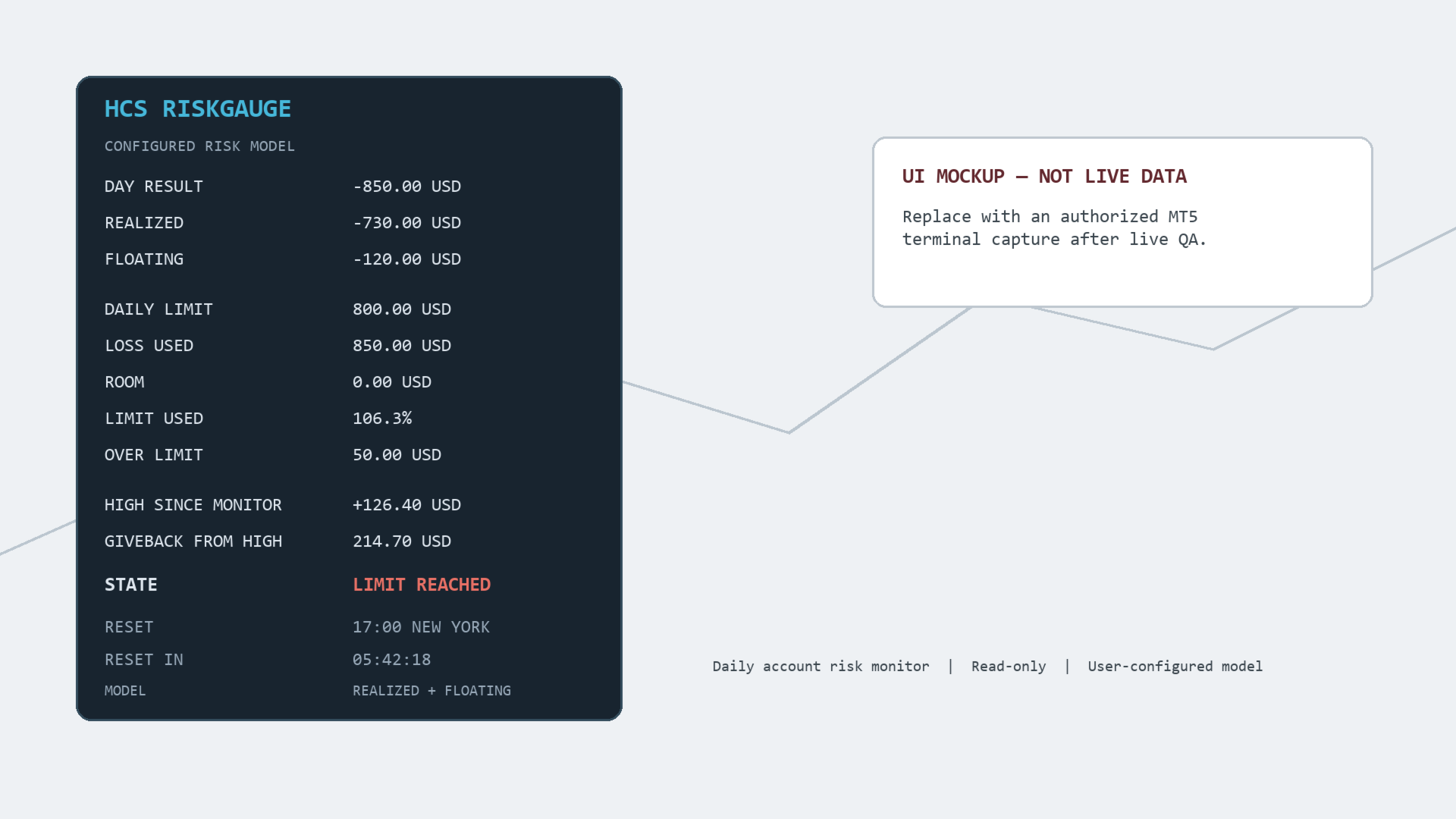
RiskGauge shows where the current MT5 account stands relative to a daily loss boundary you configure. Its compact on-chart panel keeps the current risk window visible while you trade.

The panel displays:

• Day Result
• Realized P/L
• Floating P/L
• Daily Loss Limit
• Loss Used
• Remaining Room
• Limit Used percentage
• Over Limit amount
• High Since Monitor
• Giveback From High
• Current State
• Reset reference and countdown
• Selected risk calculation model

CONFIGURE YOUR RISK MODEL

Choose between:

REALIZED ONLY

or

REALIZED + FLOATING

Set a positive daily loss boundary in your account currency and choose when your monitoring day resets.

Supported reset references:

• MT5 Server Time
• UTC
• Local Computer Time
• New York
• London

New York and London use built-in daylight-saving-time rules without requiring a network connection.

ACCOUNT-WIDE MONITORING

RiskGauge monitors the full signed-in MT5 account from a single chart.

Realized trade P/L is reconstructed from MT5 deal history for the current configured risk window. Current floating P/L is displayed separately and can optionally be included in Day Result.

RiskGauge then calculates how much of the configured loss boundary has been used, how much room remains, the percentage used, and any amount beyond the configured boundary.

DISPLAY STATES

RiskGauge provides textual reference states:

NORMAL
CAUTION
NEAR LIMIT
LIMIT REACHED

These states describe the account relative to the user-configured model.

They are informational only and do not trigger protective action.

BROKERAGE AND PROP-FIRM AGNOSTIC

Users configure the reset boundary, daily loss limit, and calculation model to reflect their own brokerage, prop-firm, evaluation, or personal risk framework.

HCS does not represent that any configuration reproduces a brokerage or prop firm's official account calculations. Users should configure RiskGauge according to the rules applicable to their own account.

FEATURES

• Account-wide fixed daily-loss boundary in account currency
• Current-window realized trade P/L from MT5 deal history
• Current whole-position floating P/L
• Realized-only or realized-plus-floating calculation model
• Remaining Room
• Loss Used
• Limit Used percentage
• Over Limit amount
• High Since Monitor
• Giveback From High
• Textual risk states
• Server, UTC, Local, New York, and London reset references
• Automatic reset countdown
• Timer-based reset without reliance on incoming price ticks
• Mid-window history reconstruction
• Restart-safe monitor high
• Compact configurable chart panel

READ-ONLY BY DESIGN

RiskGauge observes only.

It does not:

• Place trades
• Close trades
• Modify trades
• Block trades
• Change Algo Trading
• Generate entry signals
• Enforce brokerage or prop-firm rules

INPUTS

• Daily Loss Limit
• Risk Calculation Model
• Reset Reference
• Reset Hour
• Reset Minute
• Caution Threshold
• Near Limit Threshold
• Panel Corner
• X/Y Position
• Font Size

IMPORTANT CALCULATION NOTES

Realized P/L includes BUY/SELL deal profit, commission, swap, and fee fields recorded by MT5.

Separate non-trade cash flows, credits, corrections, bonuses, and reversals are excluded.

Floating P/L represents the current whole-position value, including positions that may have been opened before the configured reset.

Historical floating values cannot be reconstructed before RiskGauge begins monitoring, so High Since Monitor is explicitly scoped to the current monitoring period.

INSTALLATION

Install HCS RiskGauge from MQL5 Market and attach it to one chart.

Configure the daily loss limit, calculation model, and reset reference appropriate for the account.

Because RiskGauge monitors the signed-in account rather than an individual symbol, only one instance is required per MT5 account.

No WebRequest, DLL, telemetry, external service, or network dependency is used.

HCS RiskGauge is an informational risk-monitoring utility and is not a trading recommendation or guarantee of compliance with any brokerage, evaluation, or prop-firm rules.
おすすめのプロダクト
Grid Trading EA is a semi-automated one-click trading EA for both Normal Trading and Grid/Martingale Trading . Normal Trading Simply click Buy or Sell directly from the chart. The EA will automatically manage trades by: Setting Stop Loss and Take Profit Managing Trailing Stop Grid / Martingale Trading (For Hedging Account Type Only) When Grid Trading mode is enabled, the EA will automatically open additional grid orders at specified distances while increasing the lot size based on your settings.
Automated Timeframe cycling with Symbols centered.  Force every timeframe onto one clock window, so the story you see on Daily is the same story you are slicing on H4, H1, and M1.  Traders usually flip timeframes and lose the span. A Daily chart shows a few weeks, then M15 shows a few hours, and the eye treats them as different markets. This indicator locks the window to N bars of the highest enabled timeframe — default 10 Daily — and maps every lower timeframe to that same stretch. You stay ins
FREE
Martingale panel MT5
Mohammadbagher Ramezan Akbari
In this article, we would like to introduce the trade panel product with the Martingale panel. This panel is made in such a way that it can meet the needs of traders to a great extent. This trade panel actually consists of two trade panels at the same time, with the first one you can take positions with certain profit and loss limits, and with the second one, you can have positions with profit limits but without loss limits. When positions lose, a new position will be added based on the settings
Prop Firm Shield is a risk management panel for MetaTrader 5, built for prop firm traders who need control over their daily limits. You configure each limit and the tool watches the account around the clock, acting automatically when a limit is reached: closing positions, deleting pending orders and blocking new trading until the next day. Features: - Daily Take Profit - three modes: fixed USD, percent of the day-start balance, or target balance - Daily Stop Loss - three modes: fixed USD, percen
Trade Manager は、リスクを自動的に計算しながら、取引を迅速に開始および終了するのに役立ちます。 過剰取引、復讐取引、感情的な取引を防止する機能が含まれています。 取引は自動的に管理され、アカウントのパフォーマンス指標はグラフで視覚化できます。 これらの機能により、このパネルはすべてのマニュアル トレーダーにとって理想的なものとなり、MetaTrader 5 プラットフォームの強化に役立ちます。多言語サポート。 MT4バージョン  |  ユーザーガイド + デモ Trade Manager はストラテジー テスターでは機能しません。 デモについてはユーザーガイドをご覧ください。 危機管理 % または $ に基づくリスクの自動調整 固定ロットサイズを使用するか、ボリュームとピップに基づいた自動ロットサイズ計算を使用するオプション RR、Pips、または価格を使用した損益分岐点ストップロス設定トレーリングストップロス設定 目標に達したときにすべての取引を自動的に終了するための 1 日あたりの最大損失 (%)。 過度のドローダウンからアカウントを保護し、オーバートレードを防ぎます
Imagine flying a real aircraft without ever stepping into a flight simulator. That's what trading is like. You have to simulate your strategy before you can take it to a live market. It is good if you can simulate things speedily before even stepping into any live market, or before coming up with an automated system.  People don't have all day to stare at a higher timeframe chart until the entry signal finally arrives. That's why I built this so that you can simulate your strategy with speed. Th
FREE
RMT Visual Trade Planner is a lot size calculator, position size calculator and order planner for MetaTrader 5: you plan a trade with three lines on the chart. Drag the stop loss and take profit, and it shows the lot size for your risk, the money at risk, the reward and the margin. The order is sent only after you press SEND and then CONFIRM. The problem it solves Working out the lot size for a given stop and a given risk takes a calculator, and a mistake there costs more than a bad entry. The o
Apex StopLoss Manager
Muhammad Hassan Muhammad Ahmad Atiyah
Apex StopLoss Manager MT5 Script – Stop Loss Control Utility Overview Apex StopLoss Manager is a trade management script for MetaTrader 5 designed to provide precise, rule-based control over Stop Loss behavior on existing open positions . The script focuses on manual execution and accuracy. It does not use automated trading logic, does not open trades, and runs once per attachment . Core Functionality The script provides two independent Stop Loss control functions, both enabled only through exp
Pluton Trade Panel Pluton Trade Panel は、MetaTrader 5 向けのチャート上で操作できるトレーディングパネルです。取引計画、リスク管理、注文執行、ポジション管理を1つのインターフェースに統合しています。 このパネルは、裁量取引および半自動取引向けに設計されています。計算や日常的な操作をサポートしつつ、すべての売買判断はトレーダー自身が行います。 ポジションサイズの手動計算、リスクや証拠金の確認、複数のターミナルウィンドウ間の切り替え、取引統計の個別管理を行う代わりに、トレーダーは取引プロセス全体を1つのワークスペースで管理できます。 計画 → リスク計算 → 執行 → ポジション管理 → パフォーマンス分析 Pluton Trade Panel は、MARKET および PENDING 注文、オープンポジションの管理、日次リスク管理、マルチタイムフレーム市場分析、内蔵 Trading Journal に対応しています。 このパネルは自動売買システムではなく、売買シグナルも提供しません。取引方向、Entry および Stop Loss の水準
Trend Wave Analyzer Overview The Trend Wave Analyzer is a specialized MQL5 tool designed for MetaTrader 5 that identifies,analyzes,and visualizes price trend cycles in financial markets.It detects complete up/down/sideways price movements by identifying key turning points(peaks and troughs)in price action,providing traders with valuable insights into market behavior patterns. #Key Features -Multi-symbol Analysis:Analyze multiple trading instruments simultaneously -Trend Identification:Auto
Put your trading profits to work. Equity Sculptor EA is an MT5 trade-management tool that uses new closed profits to gradually reduce losing positions across your account. Account-wide management: All symbols and magic numbers, including manual trades. Two funding modes: Rescue Wallet or Legacy Balance. Flexible settings: Customize profit allocation, trim size and trade selection. Clear dashboard: View your funds, performance and configurations. Persistent tracking: Saved accounting continues af

LotCalculatorPro
Reynaldo Jr Audencial Pascual
LotCalculatorPro + Smart Trading Panel LotCalculatorPro は、リスク管理、ロットサイズ計算、そしてチャート上でのトレード実行を簡単にするために設計された、強力なオールインワントレーディングアシスタントです。 このツールは、トレーダーがリスクを管理し、正確なロットサイズを計算し、さらに ブレークイーブン(Break-Even)、部分決済、日次利益/損失保護 などのスマート機能によって取引を自動管理するのに役立ちます。 Forexトレーダー、プロップファームトレーダー、リスク管理を重視するトレーダー に最適で、 MetaTrader 5 上でクリーンで効率的なトレーディング環境を提供します。 デフォルト設定: 1日の利益目標: 初期残高の2% 1日の最大損失: 初期残高の1% 主な機能 ロットサイズ計算機 LotCalculatorPro は以下の情報に基づいて 適切なロットサイズを自動計算 します: エントリー価格 ストップロス リスク金額(USD) これにより すべての取引で一貫したリスク管理 が可能になります。 チャート上での
デモ口座向け無料版 | MT4 バージョン SmartLot   MT5  は、チャートから直接ロットを素早く計算し、ペンディングオーダーやマーケットオーダーを発注するための、インタラクティブでシンプルなパネルです。 ストラテジーテスターでは動作しません 。ユーティリティをテストするには、デモ口座用の無料版をダウンロードしてください。説明文の冒頭に手順とファイルがあります。 機能: グラフィカルインターフェース: 利益と損失の領域を色分けした、インタラクティブなエントリー、SL、TPライン。 リアルタイム計算: SL/TPレベルを変更すると、パネルが自動的にリスク/利益値(通貨 / ピップス / %)を再計算します。 執行: グラフィックライン上のボタンをクリックして注文を実行します。主要な注文タイプをサポート。 リスク管理: 動的ロット(預入金の割合)または固定ボリュームで作業するための組み込みモジュール。 個別マジックナンバー: 各注文ごとに個別にマジックナンバーを指定可能。
EA Master Version any Follow Copy Account  (Acc. Number)  need a open MT Terminal, download multiple times Step1:   Open Master MT5 Terminal    =  install master- Version   (on any Symbol just one Time) Step2:   Open Follower MT5 Terminal = install follower- Version  (on any Symbol just one Time) Step3:   all Trades from any Symbol or any Robot are copy now to follow- Terminal immediately for simple copy set on Chart and   Start   no optimization. This Robot is a Trade Copier for MT5 that automa
FREE
News Pause Guard は、MetaTrader 5 内蔵の経済カレンダーから選んだ重要指標の前後に、ご自身の取引を管理するためのユーティリティです。選んだ指標ごとに、発表の N 分前から M 分後までを「ニュース窓」とします。窓の中では、オンにした機能だけを行います:窓の中で建ったポジションの決済、窓の前の保有ポジションへの処理、待機注文の削除と窓の後の復元。あわせて、ほかの EA が自分で一時停止できるように、端末のグローバル変数を出します。 取引を管理するための道具です。指標を狙って売買するものではありません。リアル口座でもデモ口座でも、ポジションを建てたり新しい注文を出したりすることはなく、売買シグナルも出さず、売買の手法でもありません。指標の前後の損失・スリッページ・窓開けを防ぐことはできません。取引するかどうか、どう取引するかはご自身の判断です。 初期設定では口座の中身を何も変えません。パネルの表示とグローバル変数を出すだけです。決済・変更・削除をする機能は、すべてオンにするまでオフです。 機能 ・MT5 内蔵のカレンダーの指標:見る通貨(チャートの銘柄と対
Time Line for MT5 機能: 昨日高値、安値、本日始値、高値、安値の時間から線を引きます。 時間足により表示する時間が変わります。 1分、5分足では1時間ごとの表示 15分、30分足では4時間ごとの表示 1時間、4時間は12時間ごとの表示 日足以降は時間は表示されません。 高値安値は週足より下位足で表示されます。 各ラベルを変更可能になります。 更新頻度を変更できるのでチャート表示が 重くなることはありません。 各パラメータの説明: Server_Time:6 サーバとの時間差を入力 Yesterday_High_Label:昨日高値 Yesterday_Low_Label:昨日安値 Show_Open:true 始値の線を表示するかどうか Today_Open_Label:本日始値 Today_High_Label:本日高値 Today_Low_Label:本日安値 max_bar:true 使用するバーを制限するかどうか Maxbars:1500 制限を使用した場合に1分では5日分 UpdateFrequency:60 更新頻度、ディフォルトは60秒ご
Close All and Change Take Profit and Stop Loss All Orders. Main Features     Ability to Close All Orders the Symbol you put this EA.     Ability to Change Take Profit to All Order.     Ability to Change Stop Loss to All Order.     Show Order count.     Show Average price with info and Horizontal Line.     Show lot open.     Show Price diff from average to price now     Show broken price with info and Horizontal Line.     Easy to use . How to use Close All (Symbol) PC : you can click on CloseAl
トレーダーの皆さん、こんにちは!私はあなたの取引アシスタントです。あまり話さないで、私の特技を教えてあげましょう: 1.私はあなたの持倉を管理するのが得意で、あなたがどの端で注文しても、私は最初にあなたに合理的な停止線と移動停止線を加えることができます。 2.私はあなたのために上昇や下落を回避し、原則を守れない人間的な弱点を根源から根絶することができます。 3.最適なポイントでモバイル端末のMT 5クライアントに通知メッセージを送信します。参考にしてください。もちろん、モバイルデバイス内のMetaTrader 5 APP内のMetaQuotes IDをMetaTrader 5クライアントに登録する必要があります-->オプション-->通知-->MetaQuotes IDの編集ボックスに登録し、オープン通知ポイントの決定をチェックしてください。 4.ポリシーテストでの手動シミュレーションのためのダッシュボード練習をよくサポートします。 5.追加のAI支援クライアントスーパーアシスタントプログラムを入手できるように連絡してください。 メモ:このプロジェクトでは、お客様が利益を得ることは約束
製品を気に入っていただけましたら、ぜひコメントと評価をお願いいたします! Advanced PolyLines は、MetaTrader 5 のチャート上で直接ポリラインを作成・編集するためのツールです。複数の線分を1つの構造として接続できるため、チャート分析で使用するラインの作成や編集を簡単に行えます。 複数の線分で構成された構造を扱いやすくするために設計されています。接続されたポイントをまとめて移動できるため、それぞれのラインを個別に編集せずに構造を調整できます。 主な機能 ツールインターフェース チャート上に統合されたインターフェースから、描画モードの有効化、操作項目の非表示、作成したポリラインの削除を行えます。 Magnetic Snap カーソルがローソク足の OHLC レベルに近づくと、ポイントを自動的に該当する価格へ吸着できます。これにより、始値、高値、安値、終値にラインを配置しやすくなります。 Joint Dragging 複数の線分で共有されているポイントをチャート上で直接移動できます。接続ポイントを移動すると、そのポイントに接続された線分も追従し、構造を維持します
FREE
Modern Dark Chart Theme for MT5 Upgrade your MetaTrader 5 chart into a clean, dark, professional trading workspace. Your chart is your trading office. It is where you analyze the market, test Expert Advisors, review setups, record videos, share screenshots, and make trading decisions. If your MT5 chart looks old, bright, noisy, or unprofessional, your trading environment can feel distracted before you even start your analysis. Modern Dark Chart Theme for MT5 helps you create a cleaner, darker,
FREE
SignalX Level Alert Grid MT5
Ahmed Ismail Muhammad Ismail Al Talhat
SignalX Original MetaTrader tools by Ahmed Ismail. This listing is part of the SignalX range. Watching several charts for a handful of price levels is a poor use of attention. This tool watches the levels for you. You type a list such as 1.0850;1.0900;EURUSD 1.2700 into one input, and it alerts when price approaches, touches or crosses each level. Every level fires once, so an alert means something happened rather than repeating all day. Watches a list of price levels, on one symbol or several,
ULTRA PRO TOOLKIT EA Draw it. Size it. Execute it. Most charts are buried under tools that refuse to talk to each other. You mark a level in one place, work out your lot size somewhere else, then hand-type an order and hope you remembered the stop. Ultra Pro Toolkit EA puts the entire workflow on one panel: sketch your market structure, tell it how many dollars you are willing to lose, and let it handle the arithmetic and the order routing. ️ This is a manual trading cockpit, not a signal
Now, you have your very own  SIMPLE LOT SIZE (POSITION SIZING) CALCULATOR ! There's no need to go to other websites just to compute for the exact lot size. It also opens the trade with a click of a button. All inputs on the calculator can be edited. So if you want to change the SL or TP or the lot size, you can do so before placing an order. ========================================== STOP LOSS . Stop loss in Pips (not points). Click on the SL Price text and it will change from green to red or r
以下是为您翻译的日语版本。为了符合日本交易者的使用习惯,我使用了专业且简洁的表达方式,并特别强调了“纪律性”和“精准度”。 同时也考虑到了您将来要加入的“日损限额进度条”和“圆角UI”设计,文字风格偏向现代与高端感。 Prop Calculator Assistant  計算ミスによるプロップファーム口座の失格をゼロに。リスク管理は「アシスタント」に任せましょう。 Prop Calculator Assistant は、FTMOやなどのチャレンジ合格を目指すトレーダーや、プロップ口座を運用するプロトレーダーのために設計された究極のトレード管理パネルです。暗算や手動での注文修正を排除し、独自のビジュアル・インターフェースによって、あなたのルールを厳格に守り抜きます。 これは、相場を予想する自動売買(EA)ではありません。精度を追求する裁量トレーダーのためのプロ仕様**「コックピット」**です。あなたがセットアップを決めれば、アシスタントが瞬時にロット数を計算し、発注からエグジットまでを自動で管理します。 ️ プロップトレーダーに選ばれる理由 ロット計算のミスを完全排除: チャート上の
Quant Panel
Kevin Craig E Gittins
Quant Panel is a strategy analysis utility for MetaTrader 5. It helps traders review several Expert Advisors or trading strategies running on the same account. The panel groups closed positions by Expert Advisor comment or magic number and calculates each strategy's results separately. You can compare strategy performance, review individual drawdowns and export detailed reports from one dashboard. Independent strategy analysis Each strategy has its own virtual starting balance and closed-trade b
VTB High Watermark Drawdown Lock EA for MT5 Advanced Equity Protection & Drawdown Management System VTB High Watermark Drawdown Lock is a professional risk management Expert Advisor designed to protect trading accounts, funded accounts, and proprietary trading challenges from excessive drawdown. Unlike traditional drawdown protection systems that calculate risk from the initial account balance, this EA uses a dynamic High Watermark (HWM) model that continuously protects both your original capita
RiskRider Pro
Stephane Paul Heritier
RiskRider Pro is a professional manual trading panel for MetaTrader 5. It puts every essential risk management tool at your fingertips without interrupting your chart analysis. KEY FEATURES One-click BUY / SELL Instant market execution with automatic stop-loss calculation. No confirmation dialogs, no delays. Risk:Reward Take Profit Define your R:R ratio once (default 2.0). The take-profit level is calculated automatically on every trade based on your stop-loss distance. Dynamic Lot Sizing W
EA Follower Version any Follow Copy Account  (Acc. Number)  need a open MT Terminal, download multiple times Step1:   Open Master MT5 Terminal    =  install master- Version   (on any Symbol just one Time) Step2:   Open Follower MT5 Terminal = install follower- Version  (on any Symbol just one Time) Step3:   all Trades from any Symbol or any Robot are copy now to follow- Terminal immediately for simple copy set on Chart and   Start   no optimization. This Robot is a Trade Copier for MT5 that auto
FREE
TraderOS | PropGuard プロップファーム向け日次損失&最大ドローダウン保護 日次ドローダウンや最大損失の超過によるプロップファームチャレンジの失敗はもう二度とありません。 TraderOS | PropGuardは、プロップファームトレーダー向けに特別に設計されたプロフェッショナルなリスク管理ツールです。リアルタイムで取引口座を監視し、チャレンジ失敗の主な原因となる日次損失制限や最大ドローダウンルール違反から自動的に保護します。 これは取引戦略やシグナルジェネレーターではありません。既存の取引手法(手動または自動)の上に構築される安全システムであり、プロップファームのルールを遵守することを保証します。 対応プロップファーム EAには、主要なプロップファーム向けに事前設定済みのプロファイルが付属しています。 FTMO Apex FundedNext The5ers Topstep OneFunded カスタムファームプロファイルも手動設定で利用可能です。 主な機能 リアルタイム日次損失追跡 ― 日々の開始残高からのドローダウンを、会社独
Telegram Notify MT5 Telegram Notify MT5 is an utility tool to bridge your MetaTrader 5 activities to your Telegram chat/channel. It is useful for monitoring your MetaTrader 5 account by sending a notification to your particular Telegram chat/channel when someone/EA is placing trades, modifying order's TP/SL, closing trades and etc. This EA does not place any trade for your account. This EA also could be a convenient tool for monitoring other's EA trading activities or a tool for publishing your
このプロダクトを購入した人は以下も購入しています
Trade Assistant MT5
Evgeniy Kravchenko
4.43 (216)
取引 ごとのリスクの 計算、新規注文 の 簡単 な 設置、部分的 な 決済機能 を 持 つ 注文管理、 7 種類 のトレーリングストップなど 、便利 な 機能 を 備 えています 。 追加の資料と説明書 インストール手順   -   アプリケーションの手順   ライン機能 チャート上にオープニングライン、ストップロス、テイクプロフィットを表示します。この機能により、新規注文を簡単に設定することができ、注文を出す前にその特徴を確認することができます。   リスク計算 リスク計算機能は、設定されたリスクとストップロス注文のサイズを考慮して、新規注文のボリュームを計算します。ストップロスの大きさを自由に設定できると同時に、設定したリスクを守ることができます。 Lot calc ボタン - リスク 計算 を 有効 / 無効 にします 。 Risk フィールドでは 、必要 なリスクの 値 を 0 から 100 までのパーセンテージまたは 預金通貨 で 設定 します 。 設定」 タブで 、 リスク 計算 の 種類 を 選択 します :「 $ 通貨」、「 % 残高」、「 % エクイティ 」、「
Farmed Hedge Yield Farming | All Markets (Manual - Hybrid - Semi/Automated EA) VERIFIED TRADING RESULTS - Farmed Hedge Yield Axi Copy:  https://www.mql5.com/en/signals/2356376 - Farmed Hedge Yield Exn Copy:   https://www.mql5.com/en/signals/2356404 - Farmed Hedge Yield V Copy:  https://www.mql5.com/en/signals/2357156 IMPORTANT NOTICE: FarmedHedge is a MANUAL-FOCUSED TRADING UTILITY ,not a fully automated EA. Results shown on this Signal include manual trades and overall strategic management.
Trade Manager EAへようこそ。これは、取引をより直感的、正確、そして効率的にするために設計された究極の リスク管理ツール です。これは単なるオーダー実行ツールではなく、包括的な取引計画、ポジション管理、リスク管理のためのソリューションです。初心者から上級者、迅速な実行を必要とするスキャルパーまで、Trade Manager EAはあらゆるニーズに対応し、為替、指数、商品、暗号通貨などさまざまな市場で柔軟に対応します。 Trade Manager EAを使用すると、複雑な計算が過去のものになります。市場を分析し、エントリーポイント、ストップロス、テイクプロフィットのレベルをチャート上のラインでマークし、リスクを設定するだけで、Trade Managerが最適なポジションサイズを即座に計算し、SLとTPをピップ、ポイント、口座通貨でリアルタイムに表示します。すべての取引が簡単かつ効果的に管理されます。 主な機能: ポジションサイズ計算機 :定義されたリスクに基づいて取引サイズを瞬時に決定します。 簡単な取引計画 :エントリー、ストップロス、テイクプロフィットを設定するためのド
Telegram to MT5 Multi-Channel Copier   は、 Telegram と Discord チャンネルのトレードシグナルを MetaTrader 5 へ自動コピーします。ボット不要、ブラウザ拡張不要、手動コピー不要。Telegram や Discord にシグナルが届くと、EA が数秒であなたのターミナルに注文を出します。 さらに、チャンネルをコピーする前に、内蔵バックテスターでそのチャンネルがあなたの口座でどう動いたかを確認できます。 製品は 2 つのコンポーネントで構成されます:Telegram チャンネルを監視する Windows アプリと、MT5 ターミナルでシグナルを執行する本 EA です。MT4 版もあります   こちら . 購入前にお試しください:   アプリは無料でダウンロードできます。ご自身のチャンネルを接続し、各シグナルがどのように読み取られるかをご確認ください。Backtest タブと実際の取引には、購入またはレンタルした EA が必要です。このページの無料デモはストラテジーテスターでのみ動作し、テスターでは Telegram と D
Local Trade Copier EA MT5
Juvenille Emperor Limited
4.94 (150)
Local Trade Copier EA MT5 は、同一の Windows PC または Windows VPS 上で稼働する複数の MetaTrader 5 口座間で、取引をコピーおよび管理するための高速で柔軟なトレードコピーツールです。 ローカルでの取引同期に加え、Receiver 側でロットサイズ、リスク管理、取引フィルター、シンボルマッピング、取引管理、口座保護を個別に設定できます。 Transmitter と Receiver のターミナルは約 1分 で設定でき、同一ブローカーまたは異なるブローカーの口座間で、手動取引や EA による取引をコピーできます。適切な条件下では、ローカルの MetaTrader ターミナル間で取引情報を 0.5秒未満 で同期できます。実際の約定速度は、ブローカーのレイテンシー、ネットワーク状況、PC/VPS の性能、ターミナルの負荷によって異なります。 ご購入前に無料デモをお試しください Local Trade Copier EA MT5 の完全機能版無料デモ を、MT5 デモ口座で 1回につき4時間 テストできます。 Local Trad
TradePanel MT5
Alfiya Fazylova
4.89 (174)
Trade Panelは多機能なトレーディングアシスタントです。アプリには手動取引用の50以上のトレーディング機能が搭載されており、ほとんどの取引作業を自動化することができます。 アプリの説明書: https://www.mql5.com/en/blogs/post/756482 デモ口座用アプリの試用版: https://www.mql5.com/en/blogs/post/750865 アプリのインストール方法: https://www.mql5.com/en/blogs/post/756239 アプリをビジュアルモードでテストする方法: https://www.mql5.com/en/blogs/post/770277 VPSのMetaTraderにアプリをインストールする方法: https://www.mql5.com/en/blogs/post/770190 取引。 ワンクリックで取引操作を行うことができます: リスクを自動計算して指値注文やポジションを開く。 複数の注文やポジションをワンクリックで開く。 注文のグリッドを開く。 保留中の注文やポジションをグループごとに閉じる
EA Overfitter
Stephen J Martret
5 (4)
That backtest looks great. But will it still be making money tomorrow, next week, next month? EA Overfitter re-runs your EA on 100 price histories it has never seen. One score tells you if the edge is real. A backtest tells you what an EA did on one price history — the one that happened to occur. What you cannot tell from it is how much of that result was the strategy and how much was the particular path. EA Overfitter answers that. It builds up to 100 synthetic price histories your EA has n
自分の取引ルールで Telegram のシグナルをコピー Telegram to MT5 Signal Trader は、Telegram の公開・非公開チャンネルやグループから、テキスト形式の取引シグナルを MetaTrader 5 へ自動でコピーします。1つのデスクトップアプリで複数の配信者と MT5 口座を管理し、 配信者ごとにリスクと取引設定を個別に指定 できます。 シグナルのコピーに Telegram ボットや API 設定は必要ありません。 電話番号または QR コードでご自身の Telegram アカウントにログインし、すでに参加しているチャンネルやグループを選ぶだけです。ボットの作成や、Telegram API トークン、API ID、API hash の入力は不要です。 ポジションサイズを選び、複数の利確水準に分けて決済し、建値へのストップ移動やトレーリングストップを自動化できます。配信者のシグナルを受け取りながら、実際の取引方法は自分で管理できます。 本製品は、この MT5 エキスパートアドバイザ(EA)と、必須の Windows 連携アプリで構成されます。 インス
Exp COPYLOT CLIENT for MT5
Vladislav Andruschenko
3.97 (35)
MetaTrader 5 用のプロフェッショナル取引コピー機 MetaTrader 向けの高速・高性能・信頼性の高い 取引コピー機 です。 COPYLOT は、MT4 と MT5 のターミナル間で Forex 取引をコピーでき、 Hedge 口座と Netting 口座の両方に対応しています。 COPYLOT MT5 版の対応構成: - MT5 Hedge → MT5 Hedge - MT5 Hedge → MT5 Netting - MT5 Netting → MT5 Hedge - MT5 Netting → MT5 Netting - MT4 → MT5 Hedge - MT4 → MT5 Netting MT4 版 完全な説明 + DEMO + PDF 購入方法 インストール方法 ログファイルの取得方法 テストと最適化の方法 Expforex のすべての製品 MT4 ターミナルへのコピーも可能です(MT4 → MT4、MT5 → MT4): COPYLOT CLIENT for MT4 COPYLOT は、2台、3台、さらには10台のターミナル間で同時に動作できる、プロフェッ
News Trade EA MT5
Konstantin Kulikov
4.55 (11)
僕自身が数年間使っている便利なロボットをご紹介します。半自動モードでも完全自動モードでもお使いいただけます。 >>> Chat <<< 当プログラムは経済指標カレンダーで発表されるニュースをもとにした取引の柔軟な設定が可能です。戦略テスターでは確認不可です。実際の取引のみです。 最新の設定アーカイブをダウンロードしてください: https://www.mql5.com/en/blogs/post/747929 シグナルモニタリング: https://www.mql5.com/en/signals/author/test-standart 当該エキスパート・アドバイザーのためのカスタマイズ設定セットを作る場合は、ブログの全パラメータの説明を参照してください :   https://www.mql5.com/en/blogs/post/748545 。 基本的なデフォルト設定について 一つのチャートからGBPとの通貨ペア(GBPUSD、EURGBP、GBPJPY、GBPCAD、GBPAUD、GBPCHF)で取引をします。GBPは最もボラティリティの高い通貨のため、取引が成功するチ
================================================================================ POC BREAKOUT - V20.72. Full Professional Grade Toolkit ================================================================================ POC Breakout is a full MetaTrader 5 trading dashboard for discretionary traders who want breakout signals, Point of Control (POC) context, volume profiles, order flow, market structure, news, alerts, and advanced trade planning in one professional workspace. Attached directly to you
The product will copy all telegram signal to MT5 ( which you are member) , also it can work as remote copier.  Easy to set up, copy order instant, can work with almost signal formats, image signal,  s upport to translate other language to English Work with all type of channel or group, even channel have "Restrict Saving Content", work with  multi channel, multi MT5 Work as remote copier: with signal have ticket number, it will copy exactly via ticket number. Support to backtest signal. How to s
次回アップデート — バージョン 2.52 近日公開!【新機能】 市場分析とトレードワークフローを強化する、4つの主要な新機能にご期待ください 皆様のトレードニーズに応える4つの新機能により、市場分析を次のレベルへと引き上げます。新機能をご紹介します: 1. TRADE OVERVIEW DASHBOARD 2. CONFLUENCE AT ZONE 3. STRONG & WEAK HIGH/LOW 4. OTE 1. TRADE OVERVIEW DASHBOARD 市場全体の状況をより簡単に把握できるダッシュボードです。トレード判断をサポートするガイダンスを提供し、市場分析とトレード計画を体系的に行えるよう支援します。すべてを1つの画面で確認できます。 マルチタイムフレーム市場概要(Multi-Timeframe Market Overview) 市場の方向性と価格構造をより明確に把握 市場状況をすばやく確認 体系的な市場分析とエントリー計画のためのガイダンス 2. CONFLUENCE AT ZONE 価格が重要なゾーンに入るとき…いくつのサポート要因が一致しているかを確認で
EA Auditor
Stephen J Martret
5 (7)
EA Auditor is an independent analysis tool for traders evaluating Expert Advisors and trading signals on MetaTrader 5. It audits backtest reports, reviews posted developer signals, and cross-verifies the two against each other to help traders assess strategies before committing capital. The MQL5 market offers a wide range of Expert Advisors from many developers, with varying approaches, quality, and transparency. EA Auditor provides a consistent, data-driven framework for reviewing them, answer
Telegram To MT5 — シグナルコピア Telegram チャンネルのトレードコールを、実際の MT5 注文に変換します — 自動で、好きなだけの口座に対応し、リスクとルールは完全にあなたの管理下に置けます。 Telegram To MT5 は、あなたが Telegram で既にフォローしている VIP / シグナルチャンネルを MetaTrader 5 端末に接続します。無料の付属デスクトップアプリがメッセージを読み取り(ボットを禁止しているチャンネルでも可能)、この EA があなたの口座でそれらを執行します — あなた自身のリスク設定、シンボルマッピング、テイクプロフィット処理、セッションおよびニュースフィルターを適用します。 これはシグナルコピアであり、ブラックボックス戦略ではありません。どのチャンネルを信頼するか、各トレードのロットと管理方法をあなたが決めます。 ステップバイステップの設定と付属アプリのインストールガイド 仕組み [あなたの Telegram チャンネル] -> [付属デスクトップアプリ] -> [MT5 + この EA] -> 注文 付属デスクトッ
TelegramからMT5へ: 究極のシグナルコピーソリューション Telegram to MT5 を使えば、取引がシンプルになります。DLL を必要とせず、Telegram のチャンネルやチャットから MetaTrader 5 プラットフォームに取引シグナルを直接コピーできる最新ツールです。この強力なソリューションは、正確なシグナル実行、豊富なカスタマイズオプション、時間の節約、そして効率性の向上を実現します。 [ Instructions and DEMO ] 主な特徴 直接的なTelegram API統合 電話番号とセキュアコードで認証します。 ユーザーフレンドリーな EXE ブリッジを通じてチャット ID を簡単に管理できます。 複数のチャネル/チャットを追加、削除、更新して、同時に信号をコピーします。 高度なフィルターによる信号解析 例外的な単語 (例: 「レポート」、「結果」) を含む不要な信号をスキップします。 柔軟な SL および TP 形式 (価格、ピップ、ポイント) をサポートします。 価格ではなくポイントを指定するシグナルのエントリ ポイントを自動的に計算します。
AW Shepherd Safety MT5
AW Trading Software Limited
5 (5)
AW Shepherd Safety EA は、保有中のポジションを管理するエキスパートアドバイザーです。最初の注文はトレーダーがパネルから発注し、その後は EA がバスケットを自動で管理します。トレンドフィルターを通してリカバリー注文を追加し、TakeProfit、トレーリング、またはストップでサイドを決済し、決済の水準をチャートに表示します。 買いと売りは別々に管理され、両方のサイドを同時に保有できます。リカバリー注文は、価格が一定の間隔だけ動いたというだけでは発注されず、Parabolic SAR、2本の MA、またはローソク足の色でポジション方向への反転が確認されてから発注されます。Orders Magic number が一致していれば、手動や他の EA で発注したポジションも管理の対象になります。 EA によるポジション管理の流れ: 1 トレーダーが Open Buy または Open Sell ボタンで、Order Size 欄のロットで最初の注文を発注します。 2 価格がポジションに不利な方向へ Minimal step between recovery orders
EA Portfolio Control & Cloud Monitoring for MetaTrader 5 Your EAs manage trades. KONTROL_01 manages your EAs. A control system for traders running multiple Expert Advisors on the same account. Coordinate EA activity, manage trading risks and monitor your setup remotely. A detailed User Manual is available via DM after purchase. IN PRACTICE Multiple EAs. No coordination. Your EAs trade independently, unaware of each other's activity. KONTROL_01 coordinates them, limits simultaneous activity a
News Filter EA: Advanced Algo Trading Assistant News Filter EA is an advanced algo trading assistant designed to enhance your trading experience. By using the News Filter EA , you can integrate a Forex economic news filter into your existing expert advisor, even if you do not have access to its source code. In addition to the news filter, you can also specify trading days and hours for your expert. The News Filter EA also includes risk management  and equity protection features. MT4 Version Ma
MT5 to Telegram Signal Provider は、Telegramのチャット、チャンネル、またはグループに 指定された シグナルを送信することができる、完全にカスタマイズ可能な簡単なユーティリティです。これにより、あなたのアカウントは シグナルプロバイダー になります。 競合する製品とは異なり、DLLのインポートは使用していません。 [ デモ ] [ マニュアル ] [ MT4版 ] [ Discord版 ] [ Telegramチャンネル ]  New: [ Telegram To MT5 ] セットアップ ステップバイステップの ユーザーガイド が利用可能です。 Telegram APIの知識は必要ありません。必要な全ては開発者から提供されます。 主な特長 購読者に送信する注文の詳細をカスタマイズする機能 例えば、Bronze、Silver、Goldといった階層型のサブスクリプションモデルを作成できます。Goldサブスクリプションでは、すべてのシグナルが提供されます。 id、シンボル、またはコメントによって注文をフィルターできます 注文が実行されたチャート
Seconds Chart - MetaTrader 5で秒足チャートを作成するユニークなツールです。 Seconds Chart を使用すると、秒単位のタイムフレームでチャートを構築でき、標準的な分足や時間足チャートでは得られない柔軟性と分析精度を実現します。例えば、 S15 は15秒足を表します。カスタムシンボルをサポートしているインジケーターやEAをすべて使用できます。標準的なチャートと同様に便利に操作できます。 標準的なツールとは異なり、 Seconds Chart は超短期のタイムフレームでも高い精度と遅延なく作業できるように設計されています。 Free Demo: Seconds Chart v2.29 Demo.ex5 無料デモをダウンロードしてご自身でお確かめください: 完全機能版 - すべての機能が利用可能 24時間テスト - 精度と利便性を評価するのに十分な時間 デモ口座のみ - ほとんどのブローカーで簡単に開設可能 GBPCADチャートのみ - ほとんどの端末で利用可能 これらの制限はデモ版のみに適用されます。製品版は、あらゆる口座タイプ(リアル、デモ、コンテス
VirtualTradePad PRO SE MT5 — MetaTrader 5向けプロフェッショナル取引コントロールセンター VirtualTradePad PRO SE は、 MetaTrader 5 向けのプレミアムなチャートベースの取引パネルであり、トレード管理ワークスペースです。より速い執行、明確なポジション管理、構造化されたトレード管理、視覚的なレベル計画、そしてチャート上で完結するプロフェッショナルなワークフローを求めるトレーダー向けに設計されています。 これは単なる BUY / SELL パネルではありません。PRO SE は、手動取引、予約注文、ポジション管理、部分決済、バスケット損益管理、平均化レベル、ATMルール、シグナル監視、リアルタイム市場情報、ストラテジーテスター (Strategy Tester) ワークフロー、VPS向け運用を、1つの連携されたインターフェースに統合します。 MT4版 | 完全な説明とスクリーンショット | 購入方法 | インストール方法 | ログファイルの取得方法 | テストと最適化の方法 | Expforex のすべての製品 PRO
Trader Evolution
Siarhei Vashchylka
5 (7)
" Trader Evolution " - A utility designed for traders who use wave and technical analysis in their work. One tab of the utility is capable of money management and opening orders, and the other can help in making Elliott wave and technical analysis. Manual (Be sure to read before purchasing) | Version for MT4 Advantages 1. Trading in a few clicks. Immediate and pending orders are available in the panel 2. Money management. The program automatically selects the appropriate lot size 3. Simplifies
AW Trade Manager
AW Trading Software Limited
AW Trade Manager は、チャート上のリスクリワードツールを備えた MetaTrader 5 用のトレードパネルです。トレードは Entry、Stop Loss、Take Profit の線をマウスでドラッグして計画します。ラベルには価格、距離、金額が表示され、ゾーンで利益と損失を示し、ロットはリスクから計算されます。発注前には確認ウィンドウに、リスク、証拠金、ポジションのルールを含むトレード全体が表示されます。 マニュアルと説明 -> こちら / 無料 LIVE デモ版 -> こちら エントリー後のポジション管理のために、パネルにはブレークイーブン、トレーリング、部分決済、時間による決済、非表示の水準が用意されています。これらは Rules タブですべての新規トレードに対して、またはポジションのウィンドウで個別のポジションに対して有効にします。個々のトレードとは別に、口座のリスク制限、バスケット、スケジュールされたタスク、アラート、MT5 の経済指標カレンダーが機能します。 特長: チャート上のトレードプラン: ラベル、ゾーン、R:R 付きの Entry、Stop Los
RETAILBERG FOOTPRINT CHART PRO — Order-Flow Workspace for MetaTrader 5 Version 7.00  |  Professional System  |  31 tools  |  One chart A full 150-page illustrated User Manual is included. Please read the full manual to understand this feature packed footprint chart elements and ui. https://www.mql5.com/en/blogs/post/777982 DEMO / STRATEGY TESTER — PLEASE READ FIRST
チャート型トレードアシスタント&リスク管理パネル マルチモードSL&TP(ATR、リスクリワード比R:R、ポイント、口座通貨)、リアルタイム分析、経済指標カレンダーを搭載した多機能チャート上ツール Ergotick Trade Manager は、裁量トレーダー、プロップファーム挑戦中のトレーダー、およびスキャルパー向けに設計された、オールインワンのプロフェッショナルなトレード用パネルです。ロット数の自動・瞬時計算、マルチモードでのストップロス(SL)やテイクプロフィット(TP)の設定、高度な一括決済(Basket)管理、口座のリアルタイム統計、そしてチャート上に経済指標を表示するニュースカレンダー機能を、MetaTrader 5の洗練された1つのユーザーインターフェースに統合しました。 ポジションサイズの計算に手動で時間を取られるのはもう終わりにしましょう。ミリ秒単位でロットサイズを自動計算し、適切にリスク管理された注文を瞬時に執行するとともに、内蔵された「日次損失制限保護」機能で大切な資金を保護します。 主な特徴 1. インタラクティブなビジュアルツール&自動ロット数計算機能 チャ
RS Trade Copier - 超高速 で動作するローカルトレードコピー機。 真の グラフィカルインターフェース搭載。口座番号の手動入力はもう終わりです。200項目を超える長大なパラメータリストとも、これでおさらばです。 複数のMT5とMT4ターミナル間で取引操作をコピーするための、信頼性が高く柔軟なツールです。経験豊富なトレーダーやシグナルサービス、個人投資家に適しています。1つまたは複数のシグナルソース(Provider)から1つまたは複数のレシーバー(Client)へ、高い精度と最小限の遅延で 取引を同期 します。シンプルな自動設定と高度な手動設定の両方をサポートしています。手動または他のEAで開かれた注文に干渉しません。すべての処理は MT5内でローカルに 行われ、サードパーティサーバーを使用しません。 RS Trade Copierと他のソリューションの比較 RS Trade Copier 他のソリューション 設定 ビジュアルステップバイステップウィザード。 設定時間は約1分。 200以上の分かりにくい入力パラメータ。 設定時間は約20分。 速度 非同期トレード操作。 5
Master Your Trading Discipline   Stop losing your hard-earned gains to overtrading and emotional decisions. The Discipline Tool is your ultimate trading assistant, ensuring strict risk management in real-time. Key Protection Features: Advanced Drawdown Defense : Automatically halts trading if your daily drawdown exceeds a preset threshold (percentage or dollar amount). Real-Time Equity Lock : Safeguard profits by referencing peak equity, ensuring drawdown stays within control. Hard Profit Target
Trade Dashboard simplifies how you open, manage, and control your trades, with built-in lot size calculation. It allows you to execute trades, manage risk, and control positions directly on the chart, with tools such as partial close, breakeven, and trailing stop. Designed to reduce manual work and help you stay focused on your trading decisions. A demo version is available for testing. Detailed explanations of features are provided within the MQL5 platform. Installation instructions are include
Dealer's Panel No signal decides anything here — a hand does. One click, and the panel calculates what's underneath: lot size from risk, target from a 30-step balance ladder that remembers exactly how far an account has climbed. Toggle between market and pending without touching an input field. Set a stop, and the take-profit can write itself — a fixed share of the balance, translated into price with no arithmetic left for the trader to get wrong. One trade live at a time; it won't let a seco
作者のその他のプロダクト
HCS SessionPulse
HADDEN CAPITAL SOLUTIONS LLC
HCS SessionPulse is a free, read-only global trading session monitor for MetaTrader 5. A compact on-chart panel shows the current status of the Sydney, Tokyo, London, and New York trading sessions and continuously counts down to upcoming session transitions. SessionPulse displays: • Sydney session OPEN/CLOSED status • Tokyo session OPEN/CLOSED status • London session OPEN/CLOSED status • New York session OPEN/CLOSED status • Time remaining until each session's next open or close • Currently
FREE
HCS MarketWatch
HADDEN CAPITAL SOLUTIONS LLC
HCS MarketWatch is a free, read-only MetaTrader 5 indicator that displays current spread, ATR, and spread relative to ATR in one compact chart panel. The Spread/ATR ratio provides context for current spread relative to recent market movement. The panel displays: • Latest terminal Bid/Ask spread in points • MT5 ATR in points • Spread/ATR percentage • LEVEL: LOW, MEDIUM, or HIGH • Average spread during the current indicator run • Maximum spread during the current indicator run The ATR timefra
FREE
HCS Basket Exposure
HADDEN CAPITAL SOLUTIONS LLC
HCS Basket Exposure HCS Basket Exposure is a read-only MT5 position monitor that summarizes open-position exposure on the current chart symbol. It is designed for traders working with multiple entries, scaled positions, hedged positions, grids, Expert Advisors or manual multi-position trading. What it shows BUY and SELL position counts, total lots, weighted entry and floating profit/loss. Net lots, gross lots, combined floating profit/loss and a separate swap total. A one-sided basket entry basi
HCS EA Session Ledger
HADDEN CAPITAL SOLUTIONS LLC
HCS EA Session Ledger HCS EA Session Ledger is a read-only MetaTrader 5 utility that groups today's recorded trading activity by Magic Number. It provides a compact view of EA activity and trade history alongside current open-position figures. Automatic Magic Number discovery Session Ledger automatically discovers Magic Numbers from currently open positions and today's deal history. You do not need to remember or manually enter an Expert Advisor's Magic Number. Select: ALL activity MAGIC 0 / UNA
HCS EA Deployment Monitor HCS EA Deployment Monitor is a read-only MetaTrader 5 utility that provides a compact terminal-wide view of which Expert Advisors are attached across your open MT5 charts. Instead of checking charts individually, Deployment Monitor automatically builds an inventory showing where EAs are attached and where no EA is present. Terminal overview The summary displays: Terminal Algo Trading ON/OFF Total open charts Charts with an attached EA Charts without an EA If Expert Advi
フィルタ:
レビューなし
レビューに返信