HCS RiskGauge

HCS RiskGauge is a read-only daily account risk monitor for MetaTrader 5.

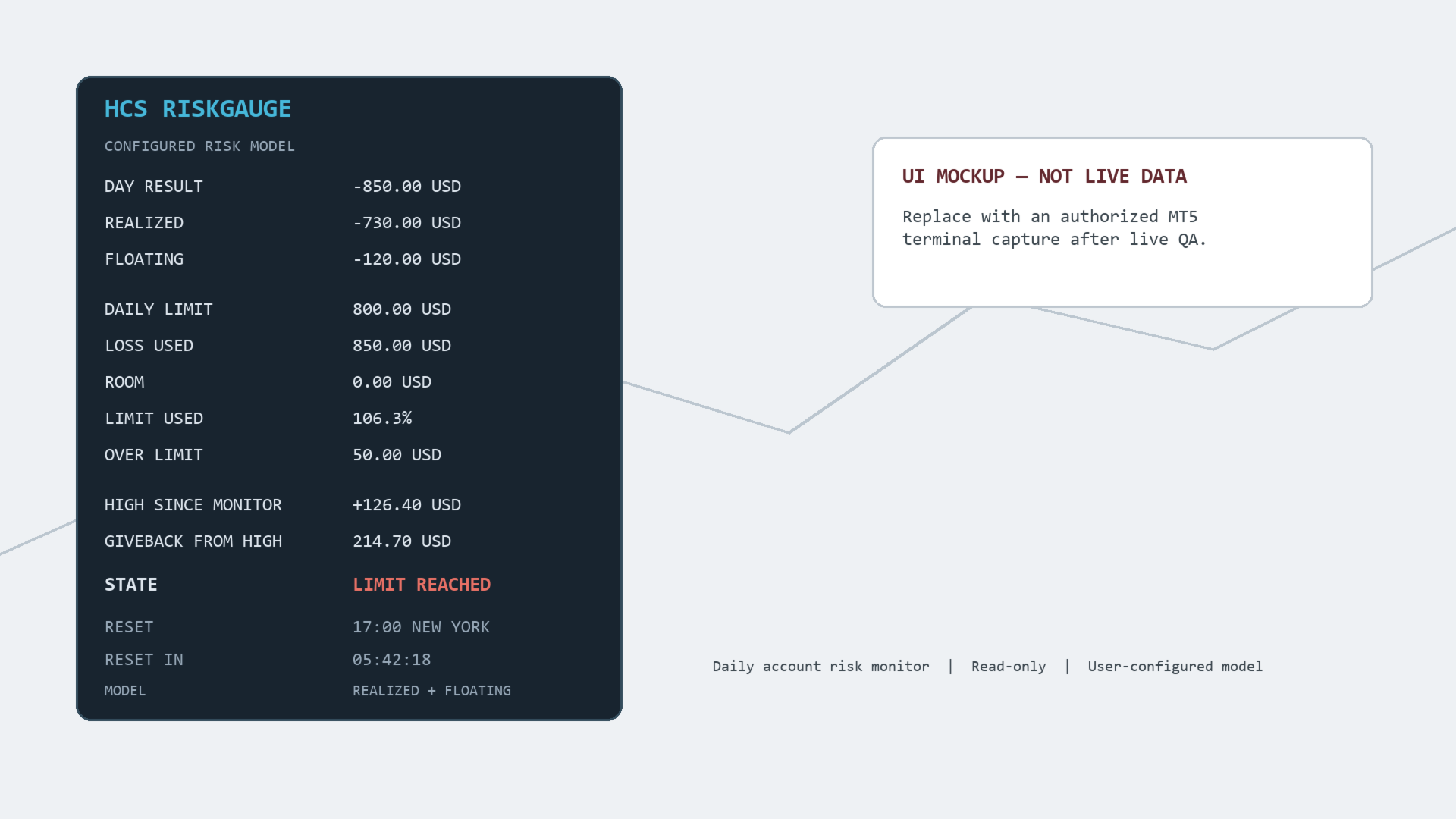
RiskGauge shows where the current MT5 account stands relative to a daily loss boundary you configure. Its compact on-chart panel keeps the current risk window visible while you trade.

The panel displays:

• Day Result
• Realized P/L
• Floating P/L
• Daily Loss Limit
• Loss Used
• Remaining Room
• Limit Used percentage
• Over Limit amount
• High Since Monitor
• Giveback From High
• Current State
• Reset reference and countdown
• Selected risk calculation model

CONFIGURE YOUR RISK MODEL

Choose between:

REALIZED ONLY

or

REALIZED + FLOATING

Set a positive daily loss boundary in your account currency and choose when your monitoring day resets.

Supported reset references:

• MT5 Server Time
• UTC
• Local Computer Time
• New York
• London

New York and London use built-in daylight-saving-time rules without requiring a network connection.

ACCOUNT-WIDE MONITORING

RiskGauge monitors the full signed-in MT5 account from a single chart.

Realized trade P/L is reconstructed from MT5 deal history for the current configured risk window. Current floating P/L is displayed separately and can optionally be included in Day Result.

RiskGauge then calculates how much of the configured loss boundary has been used, how much room remains, the percentage used, and any amount beyond the configured boundary.

DISPLAY STATES

RiskGauge provides textual reference states:

NORMAL
CAUTION
NEAR LIMIT
LIMIT REACHED

These states describe the account relative to the user-configured model.

They are informational only and do not trigger protective action.

BROKERAGE AND PROP-FIRM AGNOSTIC

Users configure the reset boundary, daily loss limit, and calculation model to reflect their own brokerage, prop-firm, evaluation, or personal risk framework.

HCS does not represent that any configuration reproduces a brokerage or prop firm's official account calculations. Users should configure RiskGauge according to the rules applicable to their own account.

FEATURES

• Account-wide fixed daily-loss boundary in account currency
• Current-window realized trade P/L from MT5 deal history
• Current whole-position floating P/L
• Realized-only or realized-plus-floating calculation model
• Remaining Room
• Loss Used
• Limit Used percentage
• Over Limit amount
• High Since Monitor
• Giveback From High
• Textual risk states
• Server, UTC, Local, New York, and London reset references
• Automatic reset countdown
• Timer-based reset without reliance on incoming price ticks
• Mid-window history reconstruction
• Restart-safe monitor high
• Compact configurable chart panel

READ-ONLY BY DESIGN

RiskGauge observes only.

It does not:

• Place trades
• Close trades
• Modify trades
• Block trades
• Change Algo Trading
• Generate entry signals
• Enforce brokerage or prop-firm rules

INPUTS

• Daily Loss Limit
• Risk Calculation Model
• Reset Reference
• Reset Hour
• Reset Minute
• Caution Threshold
• Near Limit Threshold
• Panel Corner
• X/Y Position
• Font Size

IMPORTANT CALCULATION NOTES

Realized P/L includes BUY/SELL deal profit, commission, swap, and fee fields recorded by MT5.

Separate non-trade cash flows, credits, corrections, bonuses, and reversals are excluded.

Floating P/L represents the current whole-position value, including positions that may have been opened before the configured reset.

Historical floating values cannot be reconstructed before RiskGauge begins monitoring, so High Since Monitor is explicitly scoped to the current monitoring period.

INSTALLATION

Install HCS RiskGauge from MQL5 Market and attach it to one chart.

Configure the daily loss limit, calculation model, and reset reference appropriate for the account.

Because RiskGauge monitors the signed-in account rather than an individual symbol, only one instance is required per MT5 account.

No WebRequest, DLL, telemetry, external service, or network dependency is used.

HCS RiskGauge is an informational risk-monitoring utility and is not a trading recommendation or guarantee of compliance with any brokerage, evaluation, or prop-firm rules.
Produits recommandés
Grid Trading EA is a semi-automated one-click trading EA for both Normal Trading and Grid/Martingale Trading . Normal Trading Simply click Buy or Sell directly from the chart. The EA will automatically manage trades by: Setting Stop Loss and Take Profit Managing Trailing Stop Grid / Martingale Trading (For Hedging Account Type Only) When Grid Trading mode is enabled, the EA will automatically open additional grid orders at specified distances while increasing the lot size based on your settings.
Automated Timeframe cycling with Symbols centered.  Force every timeframe onto one clock window, so the story you see on Daily is the same story you are slicing on H4, H1, and M1.  Traders usually flip timeframes and lose the span. A Daily chart shows a few weeks, then M15 shows a few hours, and the eye treats them as different markets. This indicator locks the window to N bars of the highest enabled timeframe — default 10 Daily — and maps every lower timeframe to that same stretch. You stay ins
FREE
Martingale panel MT5
Mohammadbagher Ramezan Akbari
In this article, we would like to introduce the trade panel product with the Martingale panel. This panel is made in such a way that it can meet the needs of traders to a great extent. This trade panel actually consists of two trade panels at the same time, with the first one you can take positions with certain profit and loss limits, and with the second one, you can have positions with profit limits but without loss limits. When positions lose, a new position will be added based on the settings
Prop Firm Shield Full
Pablo Adolfo Cantos
Prop Firm Shield is a risk management panel for MetaTrader 5, built for prop firm traders who need control over their daily limits. You configure each limit and the tool watches the account around the clock, acting automatically when a limit is reached: closing positions, deleting pending orders and blocking new trading until the next day. Features: - Daily Take Profit - three modes: fixed USD, percent of the day-start balance, or target balance - Daily Stop Loss - three modes: fixed USD, percen
Trade Manager DaneTrades
Levi Dane Benjamin
4.13 (31)
Trade Manager pour vous aider à entrer et sortir rapidement des transactions tout en calculant automatiquement votre risque. Y compris des fonctionnalités pour vous aider à éviter le sur-trading, le trading de vengeance et le trading émotionnel. Les transactions peuvent être gérées automatiquement et les mesures de performances du compte peuvent être visualisées dans un graphique. Ces fonctionnalités rendent ce panneau idéal pour tous les traders manuels et contribuent à améliorer la plateforme
Imagine flying a real aircraft without ever stepping into a flight simulator. That's what trading is like. You have to simulate your strategy before you can take it to a live market. It is good if you can simulate things speedily before even stepping into any live market, or before coming up with an automated system.  People don't have all day to stare at a higher timeframe chart until the entry signal finally arrives. That's why I built this so that you can simulate your strategy with speed. Th
FREE
RMT Visual Trade Planner
Denis David Garcia Camejo
RMT Visual Trade Planner is a lot size calculator, position size calculator and order planner for MetaTrader 5: you plan a trade with three lines on the chart. Drag the stop loss and take profit, and it shows the lot size for your risk, the money at risk, the reward and the margin. The order is sent only after you press SEND and then CONFIRM. The problem it solves Working out the lot size for a given stop and a given risk takes a calculator, and a mistake there costs more than a bad entry. The o
Apex StopLoss Manager
Muhammad Hassan Muhammad Ahmad Atiyah
Apex StopLoss Manager Script MT5 – Gestion du Stop Loss Présentation Apex StopLoss Manager est un script pour MetaTrader 5 offrant un contrôle précis sur le Stop Loss des positions déjà ouvertes . Le script s’exécute une seule fois lors de son lancement et toutes les fonctions sont activées uniquement via les paramètres utilisateur. Il n’utilise pas de logique de trading automatique, n’ouvre pas de positions et ne génère aucun signal. Fonctionnalités Ajustement au Breakeven Peut déplacer le St
Pluton Trade Panel Pluton Trade Panel est un panneau de trading intégré au graphique pour MetaTrader 5, qui regroupe la planification des trades, la gestion du risque, l’exécution des ordres et la gestion des positions dans une seule interface. Le panneau est conçu pour le trading manuel et semi-automatique. Il prend en charge les calculs et les opérations répétitives, tandis que toutes les décisions de trading restent sous le contrôle du trader. Au lieu de calculer manuellement la taille de pos
Trend Wave Analyzer Overview The Trend Wave Analyzer is a specialized MQL5 tool designed for MetaTrader 5 that identifies,analyzes,and visualizes price trend cycles in financial markets.It detects complete up/down/sideways price movements by identifying key turning points(peaks and troughs)in price action,providing traders with valuable insights into market behavior patterns. #Key Features -Multi-symbol Analysis:Analyze multiple trading instruments simultaneously -Trend Identification:Auto
LotCalculatorPro
Reynaldo Jr Audencial Pascual
LotCalculatorPro + Smart Trading Panel LotCalculatorPro est un assistant de trading tout-en-un puissant , conçu pour simplifier la gestion du risque, le calcul de la taille des lots et l’exécution des trades directement depuis votre graphique. Cet outil aide les traders à contrôler leur risque, calculer des tailles de lots précises et gérer automatiquement leurs trades grâce à des fonctionnalités intelligentes comme le Break-Even, la fermeture partielle et la protection des profits/pertes journa
SmartLot MT5
Nikita Chernyshov
Version gratuite pour comptes démo | Version MT4 SmartLot   MT5  est un panneau interactif et simple pour le calcul rapide des lots, la passation d'ordres en attente et au marché directement depuis le graphique. Ne fonctionne pas dans le Testeur de Stratégies.   Pour tester l'utilitaire, téléchargez la version gratuite pour comptes démo. Les instructions et le fichier se trouvent dans l'en-tête de la description. Fonctionnalités : Interface Graphique :   Lignes interactives d'Entrée, SL, T
EA Master Version any Follow Copy Account  (Acc. Number)  need a open MT Terminal, download multiple times Step1:   Open Master MT5 Terminal    =  install master- Version   (on any Symbol just one Time) Step2:   Open Follower MT5 Terminal = install follower- Version  (on any Symbol just one Time) Step3:   all Trades from any Symbol or any Robot are copy now to follow- Terminal immediately for simple copy set on Chart and   Start   no optimization. This Robot is a Trade Copier for MT5 that automa
FREE
Time Line for MT5 機能: 昨日高値、安値、本日始値、高値、安値の時間から線を引きます。 時間足により表示する時間が変わります。 1分、5分足では1時間ごとの表示 15分、30分足では4時間ごとの表示 1時間、4時間は12時間ごとの表示 日足以降は時間は表示されません。 高値安値は週足より下位足で表示されます。 各ラベルを変更可能になります。 更新頻度を変更できるのでチャート表示が 重くなることはありません。 各パラメータの説明: Server_Time:6 サーバとの時間差を入力 Yesterday_High_Label:昨日高値 Yesterday_Low_Label:昨日安値 Show_Open:true 始値の線を表示するかどうか Today_Open_Label:本日始値 Today_High_Label:本日高値 Today_Low_Label:本日安値 max_bar:true 使用するバーを制限するかどうか Maxbars:1500 制限を使用した場合に1分では5日分 UpdateFrequency:60 更新頻度、ディフォルトは60秒ご
Close All and Change Take Profit and Stop Loss All Orders. Main Features     Ability to Close All Orders the Symbol you put this EA.     Ability to Change Take Profit to All Order.     Ability to Change Stop Loss to All Order.     Show Order count.     Show Average price with info and Horizontal Line.     Show lot open.     Show Price diff from average to price now     Show broken price with info and Horizontal Line.     Easy to use . How to use Close All (Symbol) PC : you can click on CloseAl
Bonjour les Traders! Je suis votre assistant commercial. Pas beaucoup de mots, laissez - moi vous parler de ma spécialité: 1. Je suis bon dans la gestion de vos positions, peu importe à quelle extrémité vous passez une commande, je peux vous aider à ajouter une ligne de stop raisonnable et à déplacer le stop loss en premier. 2. Je peux vous aider à éviter la hausse et la baisse, à éradiquer les faiblesses humaines qui ne tiennent pas leurs principes à la racine. 3. Je vais vous envoyer un messa
Advanced PolyLines
Felipe Monteiro Rodrigues
N'oubliez pas de laisser un commentaire et d'évaluer le produit si vous l'avez aimé ! Advanced PolyLines est un outil permettant de créer et de modifier des polylignes directement sur le graphique MetaTrader 5. Plusieurs segments peuvent être reliés dans une seule structure, ce qui facilite la création et la gestion des lignes utilisées pour l’analyse graphique. L’outil a été conçu pour simplifier le travail avec des structures composées de plusieurs segments. Les points connectés peuvent être
FREE
Modern Dark Chart Theme for MT5 Upgrade your MetaTrader 5 chart into a clean, dark, professional trading workspace. Your chart is your trading office. It is where you analyze the market, test Expert Advisors, review setups, record videos, share screenshots, and make trading decisions. If your MT5 chart looks old, bright, noisy, or unprofessional, your trading environment can feel distracted before you even start your analysis. Modern Dark Chart Theme for MT5 helps you create a cleaner, darker,
FREE
Click Risk
Evgenii Pchelintsev
Définissez le risque en %, cliquez sur le graphique (mode Market) : un clic pour le stop, un clic pour le take profit. La taille du lot est calculée pour vous. Click Risk est un panneau de trading minimaliste placé directement sur votre graphique MetaTrader 5. Vous définissez le risque, vous cliquez sur trois prix (en mode Limit), et la taille du lot est calculée automatiquement. Pas de calculatrice, pas de saisie du lot, pas de fenêtre d'ordre, pas d'étapes inutiles. COMMENT UN TRADE EST OUV
FREE
Ultra Prokit Tool
Francis Muchai Waweru
ULTRA PRO TOOLKIT EA Draw it. Size it. Execute it. Most charts are buried under tools that refuse to talk to each other. You mark a level in one place, work out your lot size somewhere else, then hand-type an order and hope you remembered the stop. Ultra Pro Toolkit EA puts the entire workflow on one panel: sketch your market structure, tell it how many dollars you are willing to lose, and let it handle the arithmetic and the order routing. ️ This is a manual trading cockpit, not a signal
Now, you have your very own  SIMPLE LOT SIZE (POSITION SIZING) CALCULATOR ! There's no need to go to other websites just to compute for the exact lot size. It also opens the trade with a click of a button. All inputs on the calculator can be edited. So if you want to change the SL or TP or the lot size, you can do so before placing an order. ========================================== STOP LOSS . Stop loss in Pips (not points). Click on the SL Price text and it will change from green to red or r
Prop Calculator Assistant Ne cramez plus vos comptes de Prop Firm à cause d'erreurs de calcul. Laissez l'Assistant gérer le risque pour vous. Prop Calculator Assistant est le panneau de gestion de transactions ultime, conçu spécifiquement pour les traders passant des challenges (FTMO, etc.) ou gérant des capitaux financés. Il remplace le calcul mental et le déplacement manuel des ordres par une interface visuelle de précision qui vous maintient strictement dans vos règles. Ceci n'est pas un bot
Quant Panel
Kevin Craig E Gittins
Quant Panel is a strategy analysis utility for MetaTrader 5. It helps traders review several Expert Advisors or trading strategies running on the same account. The panel groups closed positions by Expert Advisor comment or magic number and calculates each strategy's results separately. You can compare strategy performance, review individual drawdowns and export detailed reports from one dashboard. Independent strategy analysis Each strategy has its own virtual starting balance and closed-trade b
VTB High Watermark Drawdown Lock EA for MT5 Advanced Equity Protection & Drawdown Management System VTB High Watermark Drawdown Lock is a professional risk management Expert Advisor designed to protect trading accounts, funded accounts, and proprietary trading challenges from excessive drawdown. Unlike traditional drawdown protection systems that calculate risk from the initial account balance, this EA uses a dynamic High Watermark (HWM) model that continuously protects both your original capita
RiskRider Pro
Stephane Paul Heritier
RiskRider Pro est un panel de trading manuel professionnel pour MetaTrader 5. Il regroupe tous les outils essentiels de gestion du risque sans perturber votre analyse graphique. FONCTIONNALITES PRINCIPALES BUY / SELL en un clic Execution au marche instantanee avec calcul automatique du stop loss. Aucun dialogue de confirmation, aucun delai. Take Profit en Risk:Reward Definissez votre ratio R:R une seule fois (defaut 2.0). Le niveau de take profit est calcule automatiquement a chaque trade en

EA Follower Version any Follow Copy Account  (Acc. Number)  need a open MT Terminal, download multiple times Step1:   Open Master MT5 Terminal    =  install master- Version   (on any Symbol just one Time) Step2:   Open Follower MT5 Terminal = install follower- Version  (on any Symbol just one Time) Step3:   all Trades from any Symbol or any Robot are copy now to follow- Terminal immediately for simple copy set on Chart and   Start   no optimization. This Robot is a Trade Copier for MT5 that auto
FREE
TraderOS | PropGuard Protection contre les pertes quotidiennes et les pertes maximales pour les sociétés de trading pour compte propre Ne ratez plus jamais un défi pour compte propre à cause d'un dépassement des limites de pertes quotidiennes ou maximales. TraderOS | PropGuard est un outil professionnel de gestion des risques conçu spécifiquement pour les traders travaillant pour des sociétés de trading pour compte propre. Il surveille votre compte de trading en temps réel et vous protège au
Telegram Notify MT5 Telegram Notify MT5 is an utility tool to bridge your MetaTrader 5 activities to your Telegram chat/channel. It is useful for monitoring your MetaTrader 5 account by sending a notification to your particular Telegram chat/channel when someone/EA is placing trades, modifying order's TP/SL, closing trades and etc. This EA does not place any trade for your account. This EA also could be a convenient tool for monitoring other's EA trading activities or a tool for publishing your
ForexcopyLocalMT5
Wei Ming Ding
3 (1)
1. Copiez les commandes, de 12 comptes maîtres vers 100 comptes esclaves. Le nombre de comptes esclaves peut être personnalisé, de 12 à 100. 2. Prend en charge MT4 à MT4, MT4 à MT5, MT5 à MT4, MT5 à MT5. 3. Identifiez les suffixes des variétés de trading sur différentes plateformes, telles que EURUSD, EURUSDm, EURUSDk. 4. Correspondance de devise personnalisée, telle que XAUUSD=GOLD. 5. Peut copier toutes les transactions, ou seulement copier les instructions ACHETER, VENDRE, FERMER 6. Vous pou
Click Trading
Jawad Tauheed
5 (2)
One Click Trading – Auto TP SL Developer TraderLinkz Version 1.00 Category Utility What it does Adds missing TP and SL to your manual trades and pending orders Sets them once per ticket Lets you move TP and SL afterward Works on hedging and netting accounts Scans on every tick and reacts on trade events Why you want it You place faster entries You get consistent risk and exit targets You reduce fat finger errors You keep full manual control Quick start Attach the EA to any chart Keep TP and SL e
FREE
Les acheteurs de ce produit ont également acheté
Trade Assistant MT5
Evgeniy Kravchenko
4.43 (216)
It helps to calculate the risk per trade, the easy installation of a new order, order management with partial closing functions, trailing stop of 7 types and other useful functions. Additional materials and instructions Installation instructions - Application instructions Line function -   shows on the chart the Opening line, Stop Loss, Take Profit. With this function it is easy to set a new order and see its additional characteristics before opening.   Risk management  - The risk calculation
Bienvenue sur Trade Manager EA, l’outil ultime de gestion des risques conçu pour rendre le trading plus intuitif, précis et efficace. Ce n’est pas seulement un outil d’exécution d’ordres ; c’est une solution complète pour la planification des trades, la gestion des positions et le contrôle des risques. Que vous soyez débutant, trader expérimenté ou scalpeur ayant besoin d’une exécution rapide, Trade Manager EA s’adapte à vos besoins, offrant une flexibilité sur tous les marchés, des devises et i
Telegram to MT5 Multi-Channel Copier   copie automatiquement les signaux de trading de vos canaux Telegram et Discord directement vers MetaTrader 5. Pas de bots, pas d'extensions de navigateur, pas de copie manuelle. Un signal arrive sur Telegram ou Discord et l'EA ouvre le trade dans votre terminal en quelques secondes. Et avant de copier un canal, le backtester intégré vous montre ce que ce canal aurait fait sur votre compte. Le produit comprend deux composants : une application Windows qui éc
Local Trade Copier EA MT5
Juvenille Emperor Limited
4.94 (149)
Local Trade Copier EA MT5 est un copieur de trades rapide et flexible permettant de copier et de gérer des trades entre plusieurs comptes MetaTrader 5 sur le même ordinateur Windows ou Windows VPS. Il combine la synchronisation locale des trades avec des contrôles côté Receiver pour la taille des lots, la gestion du risque, le filtrage des trades, le mappage des symboles, la gestion des trades et la protection du compte. Configurez vos terminaux Transmitter et Receiver en environ 1 minute et co
Farmed Hedge Yield Farming | All Markets (Manual - Hybrid - Semi/Automated EA) VERIFIED TRADING RESULTS - Farmed Hedge Yield Axi Copy:  https://www.mql5.com/en/signals/2356376 - Farmed Hedge Yield Exn Copy:   https://www.mql5.com/en/signals/2356404 - Farmed Hedge Yield V Copy:  https://www.mql5.com/en/signals/2357156 IMPORTANT NOTICE: FarmedHedge is a MANUAL-FOCUSED TRADING UTILITY ,not a fully automated EA. Results shown on this Signal include manual trades and overall strategic management.
Copiez les signaux Telegram avec vos propres règles de trading Telegram to MT5 Signal Trader copie automatiquement les signaux de trading au format texte provenant de canaux et de groupes Telegram publics et privés vers MetaTrader 5. Gérez plusieurs fournisseurs et comptes MT5 depuis une seule application de bureau, avec des paramètres de risque et de trading propres à chaque fournisseur . Aucun bot Telegram ni configuration d'API n'est nécessaire pour copier les signaux. Connectez-vous simpleme
TradePanel MT5
Alfiya Fazylova
4.88 (170)
Trade Panel est un assistant commercial multifonction. L'application contient plus de 50 fonctions de trading pour le trading manuel et permet d'automatiser la plupart des tâches commerciales. Instructions d'utilisation : https://www.mql5.com/fr/blogs/post/762589 Version d'essai de l'application pour un compte démo : https://www.mql5.com/fr/blogs/post/762644 Comment installer l'application : https://www.mql5.com/fr/blogs/post/762645 Comment tester l'application en mode visuel : https://www.mql5.
================================================================================ POC BREAKOUT - V20.72. Full Professional Grade Toolkit ================================================================================ POC Breakout is a full MetaTrader 5 trading dashboard for discretionary traders who want breakout signals, Point of Control (POC) context, volume profiles, order flow, market structure, news, alerts, and advanced trade planning in one professional workspace. Attached directly to you
MT5 to Telegram Signal Provider est un utilitaire facile à utiliser et entièrement personnalisable qui permet l'envoi de signaux spécifiés vers un chat, un canal ou un groupe Telegram, transformant ainsi votre compte en fournisseur de signaux. Contrairement à la plupart des produits concurrents, il n'utilise pas d'importations DLL. [ Démonstration ] [ Manuel ] [ Version MT4 ] [ Version Discord ] [ Canal Telegram ]  New: [ Telegram To MT5 ] Configuration Un guide utilisateur étape par étape est
VirtualTradePad PRO SE MT5 — centre de contrôle de trading professionnel pour MetaTrader 5 VirtualTradePad PRO SE est un panneau de trading premium basé sur le graphique et un espace de gestion des trades pour MetaTrader 5 . Il est conçu pour les traders qui souhaitent une exécution plus rapide, un contrôle plus clair des positions, une gestion structurée des trades, une planification visuelle des niveaux et un flux de travail professionnel directement depuis le graphique. Ce n’est pas seulement
Exp COPYLOT CLIENT for MT5
Vladislav Andruschenko
3.97 (35)
Copieur professionnel de trades pour MetaTrader 5 Un copieur de trades rapide, professionnel et fiable pour MetaTrader . COPYLOT permet de copier des trades Forex entre les terminaux MT4 et MT5 avec prise en charge des comptes Hedge et Netting . La version MT5 de COPYLOT prend en charge : - MT5 Hedge → MT5 Hedge - MT5 Hedge → MT5 Netting - MT5 Netting → MT5 Hedge - MT5 Netting → MT5 Netting - MT4 → MT5 Hedge - MT4 → MT5 Netting Version MT4 Description complète + DEMO + PDF Comment acheter Comme
News Trade EA MT5
Konstantin Kulikov
4.55 (11)
Je voudrais vous présenter un robot efficace que j'utilise depuis plusieurs années. Il peut être utilisé en mode semi-automatique, comme en mode totalement automatique. >>> Chat <<< Le programme comporte des paramètres souples pour le commerce sur les nouvelles du calendrier économique. Il est impossible de le vérifier dans le testeur des stratégies. Ce qu’il faut, c’est le travail réel. Il faut ajouter à la liste des URL autorisées, dans les paramètres du terminal, un site d'actualités. Cliqu
The Patch
Mian Rameez Ali
The Patch It never opens a trade. It walks behind the ones that did. Every open position, every pending order — checked twice a second for the one thing that's easy to forget: a stop, a target. Found bare, it doesn't ask. It writes the missing number in, measured in points from wherever the position began, and moves on to the next. No strategy, no opinion on direction. Just the quiet assumption that nothing should ever sit on the market unprotected — not because someone decided it shouldn't,
Telegram To MT5 Ultra
Mirel Daniel Gheonu
5 (5)
Telegram To MT5 — Copieur de signaux Transformez les appels de trading de vos canaux Telegram en véritables ordres MT5 — automatiquement, sur autant de comptes que vous le souhaitez, avec le risque et les règles entièrement sous votre contrôle. Telegram To MT5 relie les canaux VIP / de signaux que vous suivez déjà sur Telegram à votre terminal MetaTrader 5. Une application de bureau compagnon gratuite lit les messages (même des canaux qui bloquent les bots), et cet Expert Advisor les exécute sur
Prochaine mise à jour — Version 2.52 bientôt disponible ! [NOUVEAU] Préparez-vous à découvrir 4 nouvelles fonctionnalités majeures conçues pour améliorer votre analyse du marché et votre flux de travail de trading Nous faisons passer l’analyse du marché au niveau supérieur avec 4 nouvelles fonctionnalités conçues pour répondre à vos besoins en trading. Découvrez : 1. TRADE OVERVIEW DASHBOARD 2. CONFLUENCE AT ZONE 3. STRONG & WEAK HIGH/LOW 4. OTE 1. TRADE OVERVIEW DASHBOARD Un tableau de bord qu
Anchor Trade Manager
Kalinskie Gilliam
5 (8)
Your EAs cannot see each other, but Anchor can. Anchor gives you one place to coordinate your EAs, manage risk, and decide when trading is allowed. It works alongside the trading bots you already use without any changes to them. The Problem One EA opens a trade. Then another starts trading. The next thing you know, you wake up to multiple grids built across your account. Each EA may be doing exactly what it was designed to do, but together they can place far more risk on your account than you in
Trader Evolution
Siarhei Vashchylka
5 (7)
" Trader Evolution " - A utility designed for traders who use wave and technical analysis in their work. One tab of the utility is capable of money management and opening orders, and the other can help in making Elliott wave and technical analysis. Manual (Be sure to read before purchasing) | Version for MT4 Advantages 1. Trading in a few clicks. Immediate and pending orders are available in the panel 2. Money management. The program automatically selects the appropriate lot size 3. Simplifies
Grid Manual MT5
Alfiya Fazylova
4.73 (22)
Grid Manual est un panneau de trading permettant de travailler avec une grille d'ordres. L'utilitaire est universel, possède des paramètres flexibles et une interface intuitive. Il fonctionne avec une grille d'ordres non seulement dans le sens des pertes, mais aussi dans le sens de l'augmentation des profits. Le commerçant n'a pas besoin de créer et de maintenir une grille d'ordres, l'utilitaire le fera. Il suffit d'ouvrir une ordre et "Grid Manual" créera automatiquement une grille de ordres po
The product will copy all telegram signal to MT5 ( which you are member) , also it can work as remote copier.  Easy to set up, copy order instant, can work with almost signal formats, image signal,  s upport to translate other language to English Work with all type of channel or group, even channel have "Restrict Saving Content", work with  multi channel, multi MT5 Work as remote copier: with signal have ticket number, it will copy exactly via ticket number. Support to backtest signal. How to s
RETAILBERG FOOTPRINT CHART PRO — Order-Flow Workspace for MetaTrader 5 Version 7.00  |  Professional System  |  31 tools  |  One chart A full 150-page illustrated User Manual is included. Please read the full manual to understand this feature packed footprint chart elements and ui. https://www.mql5.com/en/blogs/post/777982 DEMO / STRATEGY TESTER — PLEASE READ FIRST
Timeless Charts
Samuel Manoel De Souza
5 (9)
Timeless Charts est un utilitaire de trading tout-en-un destiné aux traders professionnels. Il combine des types de graphiques personnalisés tels que les graphiques en secondes et Renko avec une analyse avancée du flux d’ordre s utilisant Footprints , Clusters , Profils de Volume , études VWAP et outils d’analyse ancrés pour une compréhension plus approfondie du marché. Le trading et la gestion des positions sont effectués directement depuis le graphique via un panneau intégré de gestion des ord
Floor Watch
Syed Tauqeer Hussain Shah
Floor Watch One number, watched every thirty seconds: how far equity has fallen since the day began — or since its highest point, if it's told to trail the peak instead of the open. Cross the line and it doesn't argue. Every open position closes, every pending order vanishes, and anything that slips through afterward gets shut the moment it appears. Not asked. Removed. The floor holds until the clock turns 5 AM Pakistan time — then, and only then, does the day start over. One rule. No except
RS Trade Copier - le copieur de trades local ultra-rapide avec une véritable interface graphique. Arrêtez de saisir les numéros de compte manuellement. Fini les listes interminables de 200+ paramètres dans l'onglet Inputs. Un outil fiable et flexible pour copier les opérations de trading entre plusieurs terminaux MT5 et MT4. Il convient aux traders expérimentés, aux services de signaux ainsi qu'aux investisseurs privés. Il permet la synchronisation du trading d'un ou plusieurs Providers vers un
Seconds Chart MT5
Boris Sedov
4.61 (18)
Seconds Chart - un outil unique pour créer des graphiques en secondes dans MetaTrader 5 . Grâce à Seconds Chart , vous pouvez créer un graphique avec une période définie en secondes, offrant une flexibilité et une précision idéales pour l'analyse, indisponibles sur les graphiques standards en minutes ou en heures. Par exemple, la période S15 indique un graphique avec des bougies d'une durée de 15 secondes. Vous pouvez utiliser n'importe quels indicateurs et experts advisors compatibles avec les
Power Candles Strategy Scanner - Outil de recherche de configurations multi-symboles à optimisation automatique Le Power Candles Strategy Scanner utilise le même moteur d'auto-optimisation que celui qui alimente l'indicateur Power Candles, pour chaque symbole de votre Market Watch, en parallèle. Un panneau vous indique quels symboles sont statistiquement négociables à l'instant, quelle stratégie est la plus performante pour chacun, la paire Stop Loss / Take Profit optimale, et vous alerte dès qu
EA Auditor
Stephen J Martret
5 (6)
EA Auditor is an independent analysis tool for traders evaluating Expert Advisors and trading signals on MetaTrader 5. It audits backtest reports, reviews posted developer signals, and cross-verifies the two against each other to help traders assess strategies before committing capital. The MQL5 market offers a wide range of Expert Advisors from many developers, with varying approaches, quality, and transparency. EA Auditor provides a consistent, data-driven framework for reviewing them, answer
Astro Trade MT5
Indra Maulana
5 (8)
25% discount on the release of the tool: only for the next 3 buyers Send a message to receive a demo version. AstroTrade Trading Assistant AstroTrade is a comprehensive multi-functional trading utility developed for the MetaTrader 5 platform. It integrates essential tools for trade execution, risk management, and technical monitoring into a single unified interface. The application is designed to assist traders in managing their daily operations through a visual and structured environment. Vi
MT5 Professional Copy Trading System (Édition MT5) Le MT5 Professional Copy Trading System est un système de copie de trades LOCAL de niveau industriel, conçu pour les traders professionnels, les fournisseurs de signaux et la gestion multi-comptes de style institutionnel. Contrairement aux outils de copie retail ou basés sur le cloud, cette solution repose sur une architecture LOCAL optimisée pour l’exécution de plusieurs terminaux dans le même environnement Windows. Architecture LOCAL industri
Trade Manager DashPlus
Henry Lyubomir Wallace
4.85 (13)
DashPlus est un outil de gestion de trading avancé conçu pour améliorer l'efficacité et la performance de vos transactions sur la plateforme MetaTrader 5. Il offre un ensemble complet de fonctionnalités, incluant le calcul des risques, la gestion des ordres, des systèmes de grilles avancés, des outils basés sur les graphiques et des analyses de performance. Fonctionnalités principales 1. Grille de récupération Implémente un système de grille flexible et de moyenne pour gérer les transactions dan
YuClusters
Yury Kulikov
4.93 (43)
Attention: You can view the program operation in the free version  YuClusters DEMO .  YuClusters is a professional market analysis system. The trader has unique opportunities to analyze the flow of orders, trade volumes, price movements using various charts, profiles, indicators, and graphical objects. YuClusters operates on data based on Time&Sales or ticks information, depending on what is available in the quotes of a financial instrument. YuClusters allows you to build graphs by combining da
Plus de l'auteur
HCS SessionPulse
HADDEN CAPITAL SOLUTIONS LLC
HCS SessionPulse is a free, read-only global trading session monitor for MetaTrader 5. A compact on-chart panel shows the current status of the Sydney, Tokyo, London, and New York trading sessions and continuously counts down to upcoming session transitions. SessionPulse displays: • Sydney session OPEN/CLOSED status • Tokyo session OPEN/CLOSED status • London session OPEN/CLOSED status • New York session OPEN/CLOSED status • Time remaining until each session's next open or close • Currently
FREE
HCS MarketWatch
HADDEN CAPITAL SOLUTIONS LLC
HCS MarketWatch is a free, read-only MetaTrader 5 indicator that displays current spread, ATR, and spread relative to ATR in one compact chart panel. The Spread/ATR ratio provides context for current spread relative to recent market movement. The panel displays: • Latest terminal Bid/Ask spread in points • MT5 ATR in points • Spread/ATR percentage • LEVEL: LOW, MEDIUM, or HIGH • Average spread during the current indicator run • Maximum spread during the current indicator run The ATR timefra
FREE
HCS Basket Exposure
HADDEN CAPITAL SOLUTIONS LLC
HCS Basket Exposure HCS Basket Exposure is a read-only MT5 position monitor that summarizes open-position exposure on the current chart symbol. It is designed for traders working with multiple entries, scaled positions, hedged positions, grids, Expert Advisors or manual multi-position trading. What it shows BUY and SELL position counts, total lots, weighted entry and floating profit/loss. Net lots, gross lots, combined floating profit/loss and a separate swap total. A one-sided basket entry basi
HCS EA Session Ledger
HADDEN CAPITAL SOLUTIONS LLC
HCS EA Session Ledger HCS EA Session Ledger is a read-only MetaTrader 5 utility that groups today's recorded trading activity by Magic Number. It provides a compact view of EA activity and trade history alongside current open-position figures. Automatic Magic Number discovery Session Ledger automatically discovers Magic Numbers from currently open positions and today's deal history. You do not need to remember or manually enter an Expert Advisor's Magic Number. Select: ALL activity MAGIC 0 / UNA
HCS EA Deployment Monitor
HADDEN CAPITAL SOLUTIONS LLC
HCS EA Deployment Monitor HCS EA Deployment Monitor is a read-only MetaTrader 5 utility that provides a compact terminal-wide view of which Expert Advisors are attached across your open MT5 charts. Instead of checking charts individually, Deployment Monitor automatically builds an inventory showing where EAs are attached and where no EA is present. Terminal overview The summary displays: Terminal Algo Trading ON/OFF Total open charts Charts with an attached EA Charts without an EA If Expert Advi
Filtrer:
Aucun avis
Répondre à l'avis