Trend Wave Analyzer

Trend Wave Analyzer

Overview

The Trend Wave Analyzer is a specialized MQL5 tool designed for MetaTrader 5 that identifies,analyzes,and visualizes price trend cycles in financial markets.It detects complete up/down/sideways price movements by identifying key turning points(peaks and troughs)in price action,providing traders with valuable insights into market behavior patterns.

#Key Features

-Multi-symbol Analysis:Analyze multiple trading instruments simultaneously

-Trend Identification:Automatically detects uptrends,downtrends,and sideways market conditions

-Wave Measurement:Quantifies the size and duration of each price movement

-Statistical Analysis:Calculates average and maximum wave sizes for each trend type

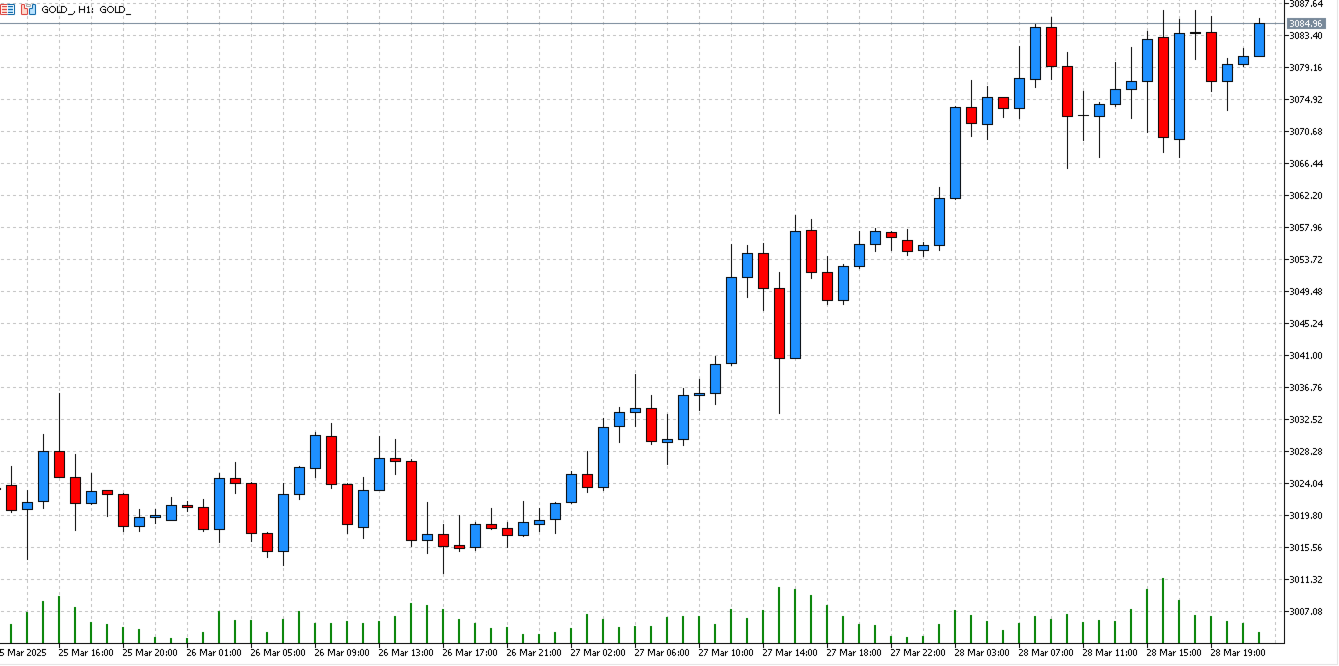
-Visual Representation:Displays trends directly on charts with color-coded visualization

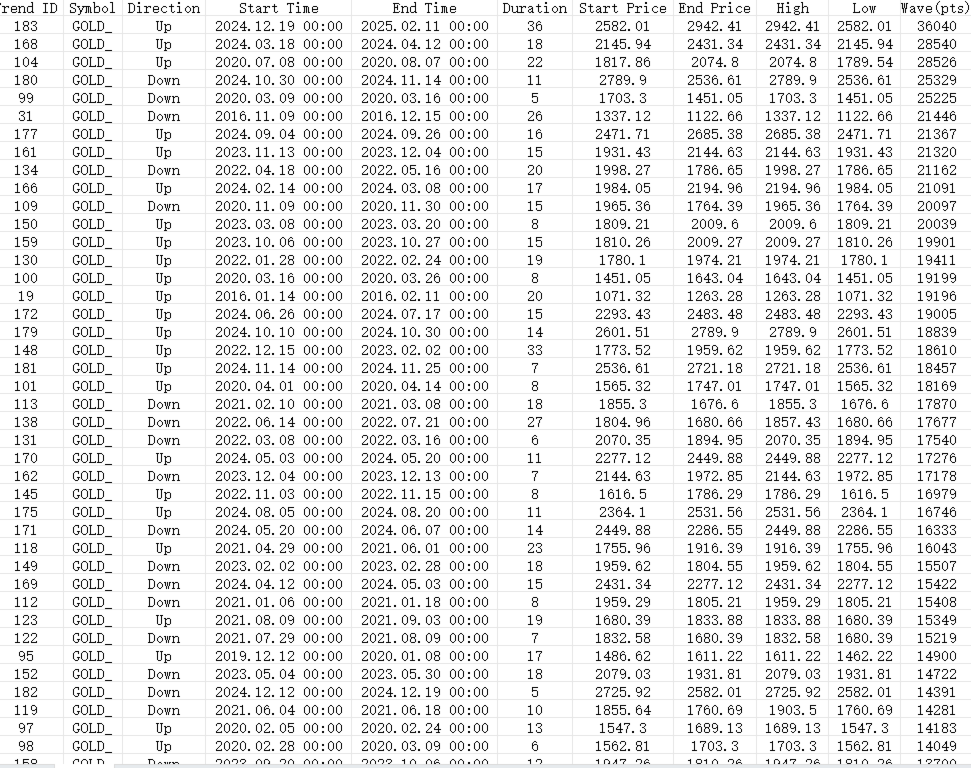
-Data Export:Saves detailed trend data to CSV files for further analysis

-Customizable Parameters:Adjustable settings for trend detection sensitivity and analysis conditions


#Technical Approach

The tool employs a systematic peak-and-trough detection algorithm to identify potential reversal points in the price series.It then analyzes the relationships between these points to determine the direction,strength,and magnitude of each trend segment.Advanced filtering options help eliminate noise and focus on statistically significant price movements.


Installation

1.Download the TrendWaveAnalyzer.ex5 file

2.Open MetaTrader 5 platform

3.Navigate to File→Open Data Folder

4.Place the file in the MQL5/Scripts folder

5.Restart MetaTrader 5 or refresh the Navigator panel

6.The script will appear in the Navigator under"Scripts"


Running the Analysis

1.Open a chart for any symbol you wish to analyze

2.Double-click on the TrendWaveAnalyzer script in the Navigator panel

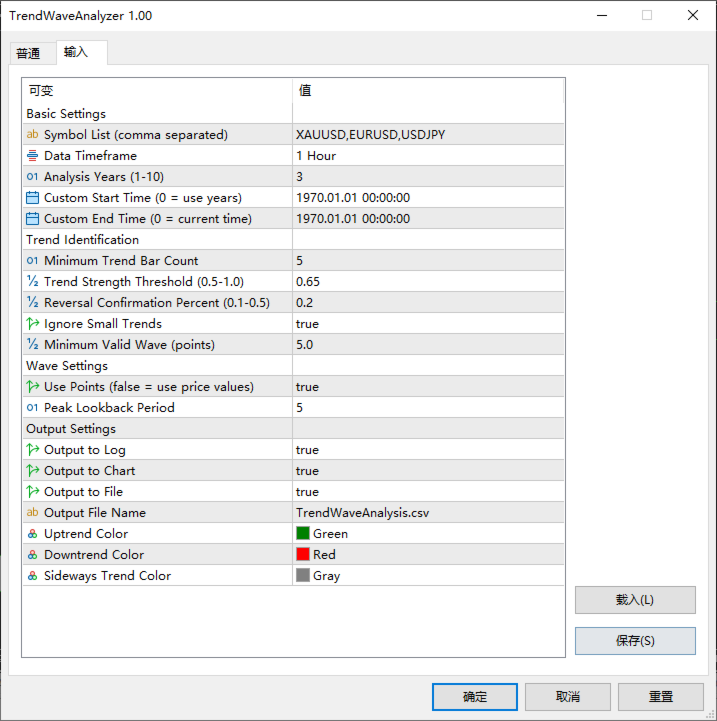
3.Configure the input parameters in the dialog that appears:

-Basic Settings:Define symbols to analyze,timeframe,and time range

-Trend Identification:Set the sensitivity for trend detection

-Wave Settings:Configure how waves are measured

-Output Settings:Select desired output methods and visualization options

4.Click"OK"to start the analysis


Interpreting Results

-Chart Visualization:

-Green lines represent uptrends

-Red lines represent downtrends

-Gray lines represent sideways movements

-Labels show trend number and wave size

-Experts Log:

-Check the"Experts"tab for detailed statistics and information

-Summary statistics are provided for each analyzed symbol

-CSV Export:

-Find the CSV file in the MQL5/Files directory

-The file contains detailed data about each identified trend

-Can be imported into Excel or other analysis software


Advanced Usage

-For more accurate trend identification,adjust the trend strength threshold(0.5-1.0)

-Increase minimum trend length for detecting only major trends

-Use time filters to focus analysis on specific trading sessions

-Compare results across different timeframes to identify multi-timeframe patterns

おすすめのプロダクト
OB FVG Trade Copier: Unified Master & Slave EA Version: 2.00 Type: Trade Copier / Risk Management Utility Compatibility: MetaTrader 4 & MetaTrader 5 (Cross-compatible codebase) Overview The OB FVG Trade Copier is a professional-grade, unified trade copying system designed to mirror trades between Master and Slave accounts seamlessly. Built with a unified architecture, a single EA file serves as both the sender (Master) and receiver (Slave) simply by toggling the EA Mode in the settings. It uti
FREE
Price Action Builder Premium
Florea E. Sorin-Mihai Persoana Fizica Autorizata
The Price Action Builder Premium expert advisor is an extension of the freely available Price Action Builder Basic :     it provides 2 new candlestick patterns besides the pinbar (already available in the basic edition);     in most configurations, backtesting usually shows an average yearly return rate increased by approximately 50%;     the account growth curve is also smoother, due to larger number of trades, almost double (2x) compared to the free version. While aimed primarily at obtaining

1. 注文を 12 個のマスター アカウントから 100 個のスレーブ アカウントにコピーします。 スレーブ アカウントの数は 12 から 100 までカスタマイズできます。 2.MT4からMT4、MT4からMT5、MT5からMT4、MT5からMT5をサポートします。 3. EURUSD、EURUSDm、EURUSDk など、さまざまなプラットフォームでの取引種類のサフィックスを識別します。 4. カスタム通貨マッチング (XAUUSD=GOLD など)。 5. すべての取引をコピーすることも、買い、売り、決済命令のみをコピーすることもできます 6. ストッププロフィットとストップロスをコピーするかどうかを選択できます 7. マスター口座が買い、スレーブ口座が売り、またはその逆など、逆にコピーできます。 マスター口座がポジションを決済すると、同じ方向にコピーされたか逆にコピーされたかに関係なく、スレーブ口座も同時にポジションを決済します。 8. スレーブ口座が閉鎖されるなどの事故が発生した場合、マスター口座には清算シグナルがありますが、スレーブ口座はそれを時間内にコピーしません。 ス
Copy trades with ease using the MetaTrader5 trade copier - the quickest and easiest way to copy transactions between different MetaTrader 5 accounts! This innovative tool allows you to locally copy trades in any direction and quantity, giving you full control over your investments. Attention!   You need to download the Trade Copier Slave mq5 file as well to run this EA. Download it from here  https://www.mql5.com/en/market/product/96541 Designed to work on both Windows PC and Windows VPS, this
FREE
It has never been so easy to manage the risk of your account until now, this tool will allow you to have full control of your capital and manage your entries in the synthetic index derivative markets, in an easy, practical and safe way. The available input and configuration parameters are as follows :  RISK MANAGEMENT 1. Value of your account: Here as its name says you will place the value corresponding to the size of your account, for example if your account is 150 dollars the corresponding val
Session Trade Controller is a broker-time session and trade-permission controller. Key functions: - User-configured trading windows - Live countdown to the next session change - Weekday permission rules - Clear open, closed and transition states - Position and pending-order visibility - Explicit reasons when trading is outside the permitted schedule - Dashboard view based on broker server time The utility monitors and applies time permissions configured by the user. It does not generate entry
try the free limited version first: https://www.mql5.com/en/market/product/188573?source=Site +Profile+Seller Unlock the full power of MT5 with NGA Pro Next Gen Assistant Pro — the most advanced trading assistant designed to give you full control over your trades… even from your phone! . -Risk calculation, dollars stop loss based: by using NGA you can set the exact amount you willing to lose each time, without having to deal with manual pips calculation,     just   drag the visual Stop lo
Imagine flying a real aircraft without ever stepping into a flight simulator. That's what trading is like. You have to simulate your strategy before you can take it to a live market. It is good if you can simulate things speedily before even stepping into any live market, or before coming up with an automated system.  People don't have all day to stare at a higher timeframe chart until the entry signal finally arrives. That's why I built this so that you can simulate your strategy with speed. Th
FREE
SmartRAL
Jemy Yeferson Dimu Ludji
SmartRAL (Smart Risk Auto-Lot EA) SmartRAL: The Ultimate Risk & Lot Management Expert Advisor (EA) SmartRAL is an essential tool for traders who demand precise risk management and automated position sizing in MetaTrader 5. Stop guessing your lot size and let the algorithm handle the calculations. This EA allows you to trade with confidence by guaranteeing your risk exposure on every single trade, while offering absolute flexibility in setting your Stop Loss (SL). Key Features & Benefits Guarante
Kronos is a multi-timer that displays local time, server time and the countdown of the current period. The programme is multilingual, with a choice of English, Italian and Spanish Language selectables in input. Available in four colours and with the choise of five types of font to be used. Like any other programme we have created, the graphic interface is developed to be non-invasive and intuitive. At start-up, the three windows that make up the graphic interface of Kronos are closed on the left
Backtest Trade Simulator (BTS) — MT4/MT5 用手動シミュレーションパネル MetaTrader 4 および MetaTrader 5 向けユーティリティです。ストラテジーテスターのビジュアルモードで、履歴データ上にシミュレーションの成行注文および指値・逆指値注文を発注・管理できます。本製品は自動で取引を行いません。投資助言ではなく、実口座や将来の取引結果を保証するものでもありません。 用途 - ストラテジーテスター内で手動取引の流れを練習する - 待機注文の価格、ロット、必要に応じたストップロス/テイクプロフィット水準を確認する - シミュレーション取引の統計(勝率、プロフィットファクター、最大ドローダウンなど)を確認する 重要な注意 - すべての注文と統計はテスターのシミュレーション内でのみ生成されます。実口座の結果は異なる場合があります - パネルはチャートオブジェクトとテスターイベントに依存します。下記のとおりビジュアルモードを有効にしてください 推奨ストラテジーテスター設定 MT5 - モデリング: 1 minute OHLC
FREE
25R - WASD Order is a visual risk management EA for MetaTrader 5 that combines gaming-style WASD keyboard controls with interactive chart drawing for precise order placement. Designed for active traders who value speed and accuracy, it lets you visually plan trades by dragging entry and stop-loss lines directly on the chart, while automatically calculating position size based on your risk percentage. The tool displays color-coded profit/loss zones with real-time risk metrics, supports automatic
Trade Manager DashPlus
Henry Lyubomir Wallace
4.85 (13)
DashPlus は、MetaTrader 5プラットフォーム上での取引効率と効果を向上させるために設計された高度なトレード管理ツールです。リスク計算、注文管理、高度なグリッドシステム、チャートベースのツール、パフォーマンス分析など、包括的な機能を提供します。 主な機能 1. リカバリーグリッド 逆境の市場環境下で取引を管理するための平均化および柔軟なグリッドシステムを実装します。 取引回復のための戦略的なエントリーおよびエグジットポイントを可能にします。 2. スタックグリッド 強い市場の動きの中でポジションを追加することで、有利な取引での潜在的なリターンを最大化するように設計されています。 トレンド市場で利益を得られるよう、勝ち取引を拡大します。 3. 損益(P&L)ライン チャート上に直接、潜在的な利益と損失のシナリオを視覚的に表示します。 設定を調整し、P&Lラインをドラッグして、実行前にさまざまな取引結果を評価します。 4. バスケットモード 同じシンボルでの複数ポジションの管理を簡素化し、それらを単一の集約ポジションにまとめます。 平均価格に基づいて、ストップロスやテイクプ
Draw price ranges with automatic percentage calculations, customizable visuals, and smart label positioning. Easy to use with intuitive controls - just click and analyze! Key Features ️ Intuitive Drawing Interface One-Click Activation : Simply click the "Draw Price Range" button to start Visual Guide Line : Yellow dashed line helps you position points accurately Two-Point Drawing : Click Point A and click Point B - it's that simple! Real-Time Preview : See your range before finalizing Aut
Grid Trading EA is a semi-automated one-click trading EA for both Normal Trading and Grid/Martingale Trading . Normal Trading Simply click Buy or Sell directly from the chart. The EA will automatically manage trades by: Setting Stop Loss and Take Profit Managing Trailing Stop Grid / Martingale Trading (For Hedging Account Type Only) When Grid Trading mode is enabled, the EA will automatically open additional grid orders at specified distances while increasing the lot size based on your settings.
RiskPilotPanel
Jose Antonio Quintero Cortes
RiskPilot Panel (MT5) is a professional risk & execution panel built for manual traders who want fast, consistent position sizing and clean trade management from a single, lightweight interface. It helps you calculate the correct lot size based on risk, set SL/TP with precision, and optionally manage trades with BreakEven and Partial Close using R-multiples. KEY FEATURES 1) Risk-Based Lot Sizing (Percent or Fixed Money) - Risk Mode: Money → enter a fixed amount in your account currency (e.g.,
Gold Trade Manager PRO MT5 is a manual trade management utility for MetaTrader 5. It is designed for traders who want to open, protect and manage positions directly from the chart without switching between multiple terminal windows. Current price: $59 - increases by $10 after every 20 purchases until reaching the final price of $119 . Next price: $69 . Complete Buyer Kit: 40 Professional Resources included at no additional cost. MT5 Presets, PDF Guides, Checklists, Mindmaps, Reference Cards, and
Renko bars with tail
Dionisio Munir Miziarajunior
This EA generates high-precision Offline Renko charts from 1-minute data. When attached to a live chart, it processes every tick to update the bricks at the configured size (Default: 100 points). Although the generated chart is offline (not directly tradable), the EA features an exclusive synchronization system that mirrors all pending orders, open positions, and trading history from the real asset onto the Renko chart in real-time, allowing for flawless technical analysis and operational forens
Ultra Charts - Advanced Custom Chart Types for MT5 Get Manual Here! Get The Free Ultra Charts Trader Here! Ultra Charts is a comprehensive charting solution that brings professional-grade alternative chart types to MetaTrader 5. This Expert Advisor provides traders with multiple custom chart formats beyond standard time-based candlesticks, enabling enhanced technical analysis and pattern recognition. Chart Types Included The product includes six distinct chart types, each designed to filter mark
FREE
This tool will allow you to export the Historical data (Open, High, Low, Close, Volume) for any financial instrument present in your MetaTrader 5. You can download multiple Symbols and TimeFrames in the same csv file. Also, you can schedule the frequency of download (every 5 minutes, 60 minutes, etc.). No need to open a lot of charts in order to get the last data, the tool will download the data directly. The CSV File will be stored in the folder: \MQL5\Files . How it works Select the Symbols t
FREE
About Equity Watching Telegram EA Equity Watching Telegram is an intelligent assistant tool designed for investors who want to monitor their portfolios in real-time. This EA continuously tracks your account's Equity and sends instant notifications directly to your private Telegram account whenever your Equity changes according to your specified conditions. Why do you need this EA? In highly volatile market conditions, or while you are running other EAs, unexpected errors or significant drawdown
FREE
It mesures the lot size based on the points measured by clicking with the MIDDLE MOUSE BUTTON then CLICK and DRAG , previous that configure the indicator based on the risk you accept; The risk can be % based on fixed account, actual account size, and fix capital risk; If the INDICATOR DOESN'T WORK propperly try after configuring it CHANGE the TIMEFRAME and GET BACK to the PREVIOUS timeframe, SOMETIMES  this FIX IT
Modern Dark Chart Theme for MT5 Upgrade your MetaTrader 5 chart into a clean, dark, professional trading workspace. Your chart is your trading office. It is where you analyze the market, test Expert Advisors, review setups, record videos, share screenshots, and make trading decisions. If your MT5 chart looks old, bright, noisy, or unprofessional, your trading environment can feel distracted before you even start your analysis. Modern Dark Chart Theme for MT5 helps you create a cleaner, darker,
FREE
Tick Volume Chart は、 MetaTrader 5 上でティックボリュームに基づいたチャートを作成するためのユニークなツールです。 Tick Volume Chart を使用すると、時間ではなく、指定したティック数ごとにローソク足が形成されるチャートを構築できます。これにより、標準的な時間足チャートでは得られない、市場活動の極めて正確な分析が可能になります。カスタムシンボルに対応したインジケーターやEA(自動売買プログラム)であれば、すべてご利用いただけます。作成したチャートは、標準チャートと同様に快適に操作できます。 標準ツールとは異なり、 Tick Volume Chart は時間間隔ではなく、実際の取引強度に基づいて市場を分析することを可能にします。 Tick Volume Chart の利点 各バーに 固定ティックボリューム を設定したチャートを作成可能。 内蔵ティックデータベースにより、履歴データの 高速な読み込み を実現。 リアルタイムデータが、 通常のチャートと同期し、遅延なく 更新されます。 複数の ティックボリュームチャートを同時に作成 することが可能
Rhino Chart Drawing Tools — MetaTrader 5用のTradingViewスタイル描画ツール 54個の描画ツール 、適切なツールバー、お気に入りストリップ、クイックスタイリングバー、各オブジェクトの設定パネル、オブジェクトマネージャー — MetaTraderの組み込みオブジェクトではなく、 ベクターエンジン で描画されています。MT5チャートがTradingViewのように描画されることを願ったことがあれば、これが正にそれです。 ツール ライン — トレンドライン、レイ、拡張線、水平線と垂直線、水平レイ、クロスライン、トレンド角、矢印、パス、ポリライン、情報ライン チャネル — 平行、回帰、フラット、分離、ピッチフォーク フィボナッチ — リトレースメント、エクステンション、チャネル、スピードファン、タイムゾーン ガン — ガンボックスとガンファン シェイプ — 矩形、回転矩形、楕円、円、三角形、ポリライン アノテーション — テキスト、ノート、コールアウト、価格ラベル、ポスト、フラグ、矢印マーク パターン — XABCD、ABCD、サイファー、ヘッ
MT5用NAS100 Auto SL and TP Makerをご紹介します: MetaTrader5でナスダック100市場をナビゲートするトレーダーにとって不可欠なアシスタントであるNAS100オートSLおよびTPメーカーで、ストップロスおよびテイクプロフィットの設定をもう見逃すことはありません。このツールは、ストップロスとテイクプロフィットのレベル管理を自動化するシームレスなソリューションを求める方々のために設計されています。 主な特徴 簡単な自動化: ストップロスやテイクプロフィットのないナスダック100取引を自動的に監視します。 ユーザーが構成した設定に基づいてレベルを動的に調整します。 注文タイプの多様性: Nasdaq100の成行注文と未決済注文の両方に対応。 MetaTrader 5で利用可能なさまざまな注文タイプをサポートします。 カスタマイズされた設定: ユーザーフレンドリーなパラメータ設定により、トラッキング設定とストップロス/テイクプロフィットレベルのカスタマイズが可能です。 柔軟な範囲: 実行する特定のNAS100商品または取引されるすべての商品に対してスト
FREE
Here   our more valuable tools SMC Trend Trading   ,  Easy SMC Trading  ,  Institutional SMC Architect Volume Analysis Tools  ,  Volume flow Profile  ,  Market volume profile  , FVG with Volume  , Liquidity Heatmap Profile  ,  Volume Spread Analysis You Give an Instruction: When you run the script, a window pops up with a dropdown menu. You choose exactly what you want it to do from the list (e.g., "Close Profit Only" or "Delete Pending Orders"). It Scans Your Positions: The script then reads
EA Master Version any Follow Copy Account  (Acc. Number)  need a open MT Terminal, download multiple times Step1:   Open Master MT5 Terminal    =  install master- Version   (on any Symbol just one Time) Step2:   Open Follower MT5 Terminal = install follower- Version  (on any Symbol just one Time) Step3:   all Trades from any Symbol or any Robot are copy now to follow- Terminal immediately for simple copy set on Chart and   Start   no optimization. This Robot is a Trade Copier for MT5 that automa
FREE
This System is an Advanced Exit Management for MetaTrader 5 How many times have you watched a profitable trade turn into a loss or give back most of its gains due to a sudden reversal? with Stop Loss Protector remove emotion from exit management, protecting your profits in an automated and disciplined way. Whether you trade manually or use other EAs, this tool works alongside your operations as an intelligent exit manager, intervening only when your predefined conditions are met. Dual Protection
You can: observe the price chart inside the chart of a different price evaluate correlation and relationships observe the difference in charts in the form of a histogram Opportunities: "Auto" mode - auto-adjust the chart for another chart "multiplier" - you can multiply the chart by any number shift up / down the chart by value shift the chart to the left "invert" - mirror flip of the chart Important: only charts added to MarketWatch are used Version for MetaTrader 4 -  https://www.mql5.com/e
このプロダクトを購入した人は以下も購入しています
Trade Assistant MT5
Evgeniy Kravchenko
4.43 (216)
取引 ごとのリスクの 計算、新規注文 の 簡単 な 設置、部分的 な 決済機能 を 持 つ 注文管理、 7 種類 のトレーリングストップなど 、便利 な 機能 を 備 えています 。 追加の資料と説明書 インストール手順   -   アプリケーションの手順   -   デモアカウント用アプリケーションの試用版 ライン機能 チャート上にオープニングライン、ストップロス、テイクプロフィットを表示します。この機能により、新規注文を簡単に設定することができ、注文を出す前にその特徴を確認することができます。   リスク計算 リスク計算機能は、設定されたリスクとストップロス注文のサイズを考慮して、新規注文のボリュームを計算します。ストップロスの大きさを自由に設定できると同時に、設定したリスクを守ることができます。 Lot calc ボタン - リスク 計算 を 有効 / 無効 にします 。 Risk フィールドでは 、必要 なリスクの 値 を 0 から 100 までのパーセンテージまたは 預金通貨 で 設定 します 。 設定」 タブで 、 リスク 計算 の 種類 を 選択 します :「 $ 通
Trade Manager EAへようこそ。これは、取引をより直感的、正確、そして効率的にするために設計された究極の リスク管理ツール です。これは単なるオーダー実行ツールではなく、包括的な取引計画、ポジション管理、リスク管理のためのソリューションです。初心者から上級者、迅速な実行を必要とするスキャルパーまで、Trade Manager EAはあらゆるニーズに対応し、為替、指数、商品、暗号通貨などさまざまな市場で柔軟に対応します。 Trade Manager EAを使用すると、複雑な計算が過去のものになります。市場を分析し、エントリーポイント、ストップロス、テイクプロフィットのレベルをチャート上のラインでマークし、リスクを設定するだけで、Trade Managerが最適なポジションサイズを即座に計算し、SLとTPをピップ、ポイント、口座通貨でリアルタイムに表示します。すべての取引が簡単かつ効果的に管理されます。 主な機能: ポジションサイズ計算機 :定義されたリスクに基づいて取引サイズを瞬時に決定します。 簡単な取引計画 :エントリー、ストップロス、テイクプロフィットを設定するためのド
================================================================================ POC BREAKOUT - V20.72. Full Professional Grade Toolkit ================================================================================ POC Breakout is a full MetaTrader 5 trading dashboard for discretionary traders who want breakout signals, Point of Control (POC) context, volume profiles, order flow, market structure, news, alerts, and advanced trade planning in one professional workspace. Attached directly to you
Local Trade Copier EA MT5
Juvenille Emperor Limited
4.94 (149)
Local Trade Copier EA MT5 は、同一の Windows PC または Windows VPS 上で稼働する複数の MetaTrader 5 口座間で、取引をコピーおよび管理するための高速で柔軟なトレードコピーツールです。 ローカルでの取引同期に加え、Receiver 側でロットサイズ、リスク管理、取引フィルター、シンボルマッピング、取引管理、口座保護を個別に設定できます。 Transmitter と Receiver のターミナルは約 1分 で設定でき、同一ブローカーまたは異なるブローカーの口座間で、手動取引や EA による取引をコピーできます。適切な条件下では、ローカルの MetaTrader ターミナル間で取引情報を 0.5秒未満 で同期できます。実際の約定速度は、ブローカーのレイテンシー、ネットワーク状況、PC/VPS の性能、ターミナルの負荷によって異なります。 ご購入前に無料デモをお試しください Local Trade Copier EA MT5 の完全機能版無料デモ を、MT5 デモ口座で 1回につき4時間 テストできます。 Local Trad
TradePanel MT5
Alfiya Fazylova
4.88 (168)
Trade Panelは多機能なトレーディングアシスタントです。アプリには手動取引用の50以上のトレーディング機能が搭載されており、ほとんどの取引作業を自動化することができます。 アプリの説明書+ビデオガイド: https://www.mql5.com/en/blogs/post/772292 デモ口座用アプリの試用版: https://www.mql5.com/en/blogs/post/750865 アプリのインストール方法: https://www.mql5.com/en/blogs/post/756239 アプリをビジュアルモードでテストする方法: https://www.mql5.com/en/blogs/post/770277 VPSのMetaTraderにアプリをインストールする方法: https://www.mql5.com/en/blogs/post/770190 取引。 ワンクリックで取引操作を行うことができます: リスクを自動計算して指値注文やポジションを開く。 複数の注文やポジションをワンクリックで開く。 注文のグリッドを開く。 保留中の注文やポジションをグルー
自分の取引ルールで Telegram のシグナルをコピー Telegram to MT5 Signal Trader は、Telegram の公開・非公開チャンネルやグループから、テキスト形式の取引シグナルを MetaTrader 5 へ自動でコピーします。1つのデスクトップアプリで複数の配信者と MT5 口座を管理し、 配信者ごとにリスクと取引設定を個別に指定 できます。 シグナルのコピーに Telegram ボットや API 設定は必要ありません。 電話番号または QR コードでご自身の Telegram アカウントにログインし、すでに参加しているチャンネルやグループを選ぶだけです。ボットの作成や、Telegram API トークン、API ID、API hash の入力は不要です。 ポジションサイズを選び、複数の利確水準に分けて決済し、建値へのストップ移動やトレーリングストップを自動化できます。配信者のシグナルを受け取りながら、実際の取引方法は自分で管理できます。 本製品は、この MT5 エキスパートアドバイザ(EA)と、必須の Windows 連携アプリで構成されます。 インス
Farmed Hedge Yield Farming | All Markets (Manual - Hybrid - Semi/Automated EA) VERIFIED TRADING RESULTS - Farmed Hedge Yield Axi Copy:  https://www.mql5.com/en/signals/2356376 - Farmed Hedge Yield Exn Copy:   https://www.mql5.com/en/signals/2356404 - Farmed Hedge Yield V Copy:  https://www.mql5.com/en/signals/2357156 IMPORTANT NOTICE: FarmedHedge is a MANUAL-FOCUSED TRADING UTILITY ,not a fully automated EA. Results shown on this Signal include manual trades and overall strategic management.
Telegram to MT5 Multi-Channel Copier   は、Telegram チャンネルのトレードシグナルを MetaTrader 5 へ自動コピーします。ボット不要、ブラウザ拡張不要、手動コピー不要。Telegram にシグナルが届くと、EA が数秒であなたのターミナルに注文を出します。 さらに、チャンネルをコピーする前に、内蔵バックテスターでそのチャンネルがあなたの口座でどう動いたかを確認できます。 製品は 2 つのコンポーネントで構成されます:Telegram チャンネルを監視する Windows アプリと、MT5 ターミナルでシグナルを執行する本 EA です。MT4 版もあります   こちら . セットアップガイドとアプリのダウンロード:   https://www.mql5.com/en/blogs/post/768988 現在の価格は今後値上げされます。 仕組み アプリはあなた自身の Telegram アカウントで接続するため、フォローしているすべてのチャンネル、グループ、トピック、ボット(プライベートや VIP を含む)を見ることができます。シグナル
Strategy Ledger Pro は MetaTrader 5 向けの読み取り専用の口座分析パネルです。口座の成績をエキスパートアドバイザー、戦略、銘柄、マジックナンバーごとに分けて表示します。 すべての機能を解説した詳細な マニュアル 。 MetaTrader は口座全体でひとつの残高しか表示しません。複数の EA が同時に取引すると、その残高では各 EA の貢献が分かりません。Strategy Ledger Pro は口座履歴を読み取り、決済済みポジションを再構築し、戦略に割り当て、その結果をひとつのパネルに表示します。 本製品は注文の発注・変更・決済を行いません。取引戦略を含まず、インジケーターを作成せず、チャート価格も読み取りません。 主な機能 EA・個別戦略・銘柄・マジックナンバー別の成績。 プリセット期間と任意の日付範囲。 確定損益と含み損益、建玉エクスポージャー、取引統計、pips、ドローダウン、エクイティ曲線。 手数料、スワップ、コスト負担率、推定エントリー/エグジットのスリッページと合計。 固定ルールに基づく成績評価、文章による要約、状態マーク。 セットアッ
Telegram To MT5 — シグナルコピア Telegram チャンネルのトレードコールを、実際の MT5 注文に変換します — 自動で、好きなだけの口座に対応し、リスクとルールは完全にあなたの管理下に置けます。 Telegram To MT5 は、あなたが Telegram で既にフォローしている VIP / シグナルチャンネルを MetaTrader 5 端末に接続します。無料の付属デスクトップアプリがメッセージを読み取り(ボットを禁止しているチャンネルでも可能)、この EA があなたの口座でそれらを執行します — あなた自身のリスク設定、シンボルマッピング、テイクプロフィット処理、セッションおよびニュースフィルターを適用します。 これはシグナルコピアであり、ブラックボックス戦略ではありません。どのチャンネルを信頼するか、各トレードのロットと管理方法をあなたが決めます。 ステップバイステップの設定と付属アプリのインストールガイド 仕組み [あなたの Telegram チャンネル] -> [付属デスクトップアプリ] -> [MT5 + この EA] -> 注文 付属デスクトッ
Premium Trade Manager - コーチ内蔵型トレードパネル Premium Trade Manager は、AIトレーディングコーチをあなたのチャートの中に置き、その下に完全な執行エンジンを備えたツールです。いつも通りにトレードをセットアップし、あなた専任のAIトレーディングコーチ Max にそのセットアップをそのまま読み取らせて、発注前に率直な見解を伝えてもらいましょう。ストップの幅が規律あるアプローチに合っているか、リスクサイズは適切か、高影響のニュースイベントが数分後に迫っていないか、プロップファームの制限に近づいていないか。その下には、クリックの後をすべて処理するエンジンが備わっています。ワンクリックのリスクサイズ計算による発注、チャート上でドラッグして組み立て、発注後も動かせるプラン、最大4段階の分割利確、7種類のトレール方式、リアルタイムのプロップファームコンプライアンス、ニュースガード、そしてコストを自ら採点するスプレッド機能。判断はあなたが下す。Max がもう一度確認する。後のことはすべてパネルが担う。 購入前に実際に触れて試せます。 ブラウザ上でライブ
EA Overfitter
Stephen J Martret
5 (1)
That backtest looks great. But will it still be making money tomorrow, next week, next month? EA Overfitter re-runs your EA on 100 price histories it has never seen. One score tells you if the edge is real. A backtest tells you what an EA did on one price history — the one that happened to occur. What you cannot tell from it is how much of that result was the strategy and how much was the particular path. EA Overfitter answers that. It builds up to 100 synthetic price histories your EA has n
Trade Copier Ultimate
Janitha Sandaruwan Amaradasa Wickramasingha Arachchilage
5 (5)
Trade Copier Ultimate - Telegram to MT5 Signal Copier Trade Copier Ultimate automatically copies Telegram trading signals into MetaTrader 5. The EA can read signal messages, detect the symbol, order type, entry price, Stop Loss, Take Profit levels and selected update commands, then execute or manage the trade in MT5 using your lot and risk settings. It is more than a basic Telegram to MT5 copier. TCU also supports Bot API and user-account Bridge workflows, Discord signal routing, local MT5 to MT
25% discount on the release of the tool: only for the next 3 buyers Send a message to receive a demo version. AstroTrade Trading Assistant AstroTrade is a comprehensive multi-functional trading utility developed for the MetaTrader 5 platform. It integrates essential tools for trade execution, risk management, and technical monitoring into a single unified interface. The application is designed to assist traders in managing their daily operations through a visual and structured environment. Vi
Exp COPYLOT CLIENT for MT5
Vladislav Andruschenko
3.97 (35)
MetaTrader 5 用のプロフェッショナル取引コピー機 MetaTrader 向けの高速・高性能・信頼性の高い 取引コピー機 です。 COPYLOT は、MT4 と MT5 のターミナル間で Forex 取引をコピーでき、 Hedge 口座と Netting 口座の両方に対応しています。 COPYLOT MT5 版の対応構成: - MT5 Hedge → MT5 Hedge - MT5 Hedge → MT5 Netting - MT5 Netting → MT5 Hedge - MT5 Netting → MT5 Netting - MT4 → MT5 Hedge - MT4 → MT5 Netting MT4 版 完全な説明 + DEMO + PDF 購入方法 インストール方法 ログファイルの取得方法 テストと最適化の方法 Expforex のすべての製品 MT4 ターミナルへのコピーも可能です(MT4 → MT4、MT5 → MT4): COPYLOT CLIENT for MT4 COPYLOT は、2台、3台、さらには10台のターミナル間で同時に動作できる、プロフェッ
HINN MAGIC ENTRY – the ultimate tool for entry and position management! SIMPLE. FASTEST. INTUITIVE. MAX AUTOMATED. Place orders by selecting a level directly on the chart! full description   ::  demo-version  :: 60-sec-video-description Key features: - Market, limit, and pending orders - Automatic lot size calculation - Automatic spread and commission accounting - Unlimited partitial take-profits  - Breakeven and trailing stop-loss and take-profit  functions - Invalidation leves - Intuitive, a
FUTURES ORDERFLOW FOOTPRINT CHART Professional OrderFlow EA for MetaTrader 5 Version 1.01| Professional tool for real traders | Institutional-Grade Visualization STRATEGY TESTER USERS - PLEASE SELECT EVERY REAL TICK WHEN TESTING AND YOU HAVE DOWNLOADED HISTORICAL DATA. IF YOU SEE A WAITING SCREEN AND IT IS NOT DOWNLOADING, IT MEANS YOU HAVE LOW HISTORICAL DATA. TRY 1 MIN AND 5 MIN FIRST ON 1 DAY DATA. ONE DAY DATA SHOULD BE THE NEWEST AND MOST CURRENT DATE. PLEASE WAIT UNTIL THE MARKET HAS ROL
The product will copy all telegram signal to MT5 ( which you are member) , also it can work as remote copier.  Easy to set up, copy order instant, can work with almost signal formats, image signal,  s upport to translate other language to English Work with all type of channel or group, even channel have "Restrict Saving Content", work with  multi channel, multi MT5 Work as remote copier: with signal have ticket number, it will copy exactly via ticket number. Support to backtest signal. How to s
Timeless Charts
Samuel Manoel De Souza
5 (8)
Timeless Charts is an all-in-one trading utility for professional traders. It combines custom chart types such as Seconds Charts and Renko with advanced order flow analysis using Footprints , Clusters , Volume Profiles , VWAP studies, and anchored analysis tools for deeper market insight. Trading and position management are handled directly from the chart through an integrated trade management panel , while Market Replay and Virtual Accounts provide environments for practicing trading skills and
Trade Dashboard simplifies how you open, manage, and control your trades, with built-in lot size calculation. It allows you to execute trades, manage risk, and control positions directly on the chart, with tools such as partial close, breakeven, and trailing stop. Designed to reduce manual work and help you stay focused on your trading decisions. A demo version is available for testing. Detailed explanations of features are provided within the MQL5 platform. Installation instructions are include
Trade copier MT5
Alfiya Fazylova
4.6 (55)
Trade Copierは、取引口座間の取引をコピーして同期するように設計された専門的なユーティリティです。 コピーは、同じコンピューターまたはvps にインストールされている、サプライヤーのアカウント/端末から受信者のアカウント/端末に行われます。 キャンペーン - すでに「Trade copier MT5」をご購入の方は、「Trade copier MT4」を無料で入手できます(MT4 → MT5 および MT4 ← MT5 のコピー用)。詳細な条件については、どうぞ個別メッセージでお問い合わせください。 購入する前に、デモ アカウントでデモ バージョンをテストできます。 デモ版 こちら 。 詳細な説明は こちら 。 主な機能と利点: MT5ネッティングアカウントを含む、MT5> MT5、MT4> MT5、MT5> MT4のコピーをサポートします。 高いコピー速度(0.5秒未満)。 ベンダーモードと受信者モードは同じ製品内に実装されています。 チャートから直接リアルタイムでコピーを制御できる、簡単で直感的なインターフェイス。 接続が切断されたり、端末が再起動されたりしても、設定と位
Footprint Chart Pro — Professional OrderFlow EA for MetaTrader 5 Version 6.34 | Professional tool for real traders | Institutional-Grade Visualization DEMO USERS - PLEASE SELECT EVERY TICK / REAL TICK WHEN TESTING AND YOU HAVE DOWNLOADED HISTORICAL DATA. IF YOU SEE A WAITING SCREEN AND IT IS NOT DOWNLOADING, IT MEANS YOU HAVE LOW HISTORICAL DATA. TRY 1 MIN AND 5 MIN FIRST ON 1 DAY DATA. ONE DAY DATA SHOULD BE THE NEWEST AND MOST CURRENT DATE. PLEASE WAIT UNTIL THE MARKET HAS ROLLED OVER PERIOD.
Grid Manual MT5
Alfiya Fazylova
4.73 (22)
「Grid Manual」は、注文のグリッドを操作するための取引パネルです。 ユーティリティはユニバーサルで、柔軟な設定と直感的なインターフェイスを備えています。 それは、損失を平均化する方向だけでなく、利益を増やす方向でも注文のグリッドで機能します。 トレーダーは注文のグリッドを作成して維持する必要はありません。 すべてが「Grid Manual」によって行われます。 注文を開くだけで十分であり、「Grid Manual」は注文のグリッドを自動的に作成し、非常に閉じるまでそれに付随します。 完全な説明とデモバージョン ここ。 ユーティリティの主な機能と機能 ユーティリティは、モバイル端末から開かれた注文を含め、あらゆる方法で開かれた注文を処理します。 「制限」と「停止」の2種類のグリッドで機能します。 グリッド間隔の計算には、固定と動的(ATRインジケーターに基づく)の2つの方法で機能します。 オープンオーダーグリッドの設定を変更できます。 チャート上の各注文グリッドの損益分岐点を表示します。 各注文グリッドの利益率を表示します。 ワンクリックでグリッドから収益性の高い注文を閉じるこ
Trade Indicator Assistant   is a powerful MT5 utility designed to turn indicators into automated trading systems. Its main feature is the ability to automatically detect an indicator’s   BUY and SELL signal buffers , without requiring you to know the buffer numbers, search through indicator settings, or modify the indicator source code. Bonus Indicator:   After purchasing Trade Indicator Assistant, contact me to receive   Trade Signal Pro   completely free as a bonus indicator. [Download Demo V
Your EAs cannot see each other, but Anchor can. Anchor gives you one place to coordinate your EAs, manage risk, and decide when trading is allowed. It works alongside the trading bots you already use without any changes to them. The Problem One EA opens a trade. Then another starts trading. The next thing you know, you wake up to multiple grids built across your account. Each EA may be doing exactly what it was designed to do, but together they can place far more risk on your account than you in
Signal TradingView to MT5 Pro Automator TradingViewとMetaTrader 5間の即時プロフェッショナル実行 TradingViewのシグナル(アラート)とMT5での実際の約定を繋ぐ、最も強固なコミュニケーションブリッジで、取引戦略を自動化します。スピード、柔軟性、そして完璧なリスク管理を求めるトレーダー向けに設計されたこのExpert Advisorは、あらゆるアラートメッセージを正確な成行または指値注文に変換します。 強みと利点 ユニバーサルパーシングエンジン(独自技術): あらゆるアラート形式からデータを自動的に認識し、抽出できる高度なテクノロジー。単一の固定フォーマットに制限されることはありません。システムはシンボル(銘柄)、アクション、価格、SL(ストップロス)、TP(テイクプロフィット)を自動的に理解します。 リアルタイム実行: レイテンシ(遅延)を最小限に抑えるよう最適化された、1秒未満の超高速ポーリング技術。シグナルを受信してから数ミリ秒以内に注文が実行されます。 機関投資家レベルのリスク管理: 以下に基づく自動かつ正確
Seconds Chart - MetaTrader 5で秒足チャートを作成するユニークなツールです。 Seconds Chart を使用すると、秒単位のタイムフレームでチャートを構築でき、標準的な分足や時間足チャートでは得られない柔軟性と分析精度を実現します。例えば、 S15 は15秒足を表します。カスタムシンボルをサポートしているインジケーターやEAをすべて使用できます。標準的なチャートと同様に便利に操作できます。 標準的なツールとは異なり、 Seconds Chart は超短期のタイムフレームでも高い精度と遅延なく作業できるように設計されています。 Free Demo: Seconds Chart v2.29 Demo.ex5 無料デモをダウンロードしてご自身でお確かめください: 完全機能版 - すべての機能が利用可能 24時間テスト - 精度と利便性を評価するのに十分な時間 デモ口座のみ - ほとんどのブローカーで簡単に開設可能 GBPCADチャートのみ - ほとんどの端末で利用可能 これらの制限はデモ版のみに適用されます。製品版は、あらゆる口座タイプ(リアル、デモ、コンテス
Power Candles Strategy Scanner - 自動最適化型マルチシンボル設定ファインダー パワーキャンドル・ストラテジー・スキャナーは 、パワーキャンドル・インジケーターを駆動するのと全く同じ自己最適化エンジンを、マーケットウォッチに登録されているすべての銘柄に対して並行して実行します。1つのパネルで、現在統計的に取引可能な銘柄、各銘柄で勝率の高い戦略、最適なストップロス/テイクプロフィットの組み合わせが表示され、新たなシグナルが発生した瞬間に通知が届きます。 このツールは、Stein Investmentsのエコシステムの一部です。  18種類以上のツールをすべて閲覧し、AIを活用したセットアップの推奨を受け取り、  https://stein.investments でコミュニティに参加しましょう 市場動向を網羅。銘柄ごとに3,000件以上の自動最適化。2種類のアラート。ワンクリックでチャートを切り替えて即座にアクション。 なぜこれが必要なのか 多くのマルチ銘柄スキャナーは、 価格の動き (ボラティリティ、変動率、銘柄ごとのRSI)を表示するだけです。それ
This Expert Advisor waits a position to be opened, no matter if you open manually or with the EA buttons or eventually via mobile: it creates a Grid in Anti Martingale with pending stop orders in the same direction of the first position. You can specify the number of orders, the size and the distance between the orders. You can also adjust the Monetary Target of the Grid, the monetary Stop Loss, the Intermediate Target (when reached the EA insert an order with opposite direction of the total pos
作者のその他のプロダクト
概要 外国為替や金融市場では、迅速な反応と正確な意思決定が非常に重要です。しかし、標準のMetaTrader 5端末は最小でも1分のチャートしかサポートしておらず、トレーダーが市場の変動に敏感であることを制限しています。この問題を解決するために、 秒単位チャートキャンドルインジケーター を導入しました。このインジケーターを使用すれば、1秒から30秒の市場の動向をサブチャートで簡単に表示・分析できます。 主な機能 複数の秒単位タイムフレームのサポート :このインジケーターは、以下のタイムフレームを選択でき、さまざまな取引戦略に対応します: S1 : 1秒 S2 : 2秒 S3 : 3秒 S4 : 4秒 S5 : 5秒 S10 : 10秒 S15 : 15秒 S20 : 20秒 S30 : 30秒 リアルタイム更新 :秒単位チャートはリアルタイムで更新され、各瞬間に最新の市場情報を提供します。これにより、迅速な取引判断が可能になります。 ユーザーフレンドリーなインターフェース :インジケーターはサブチャートに表示され、直感的で使いやすいです。異なるタイムフレームに素早く切り替えて市場を迅速
Overview The Wave Statistics Scanner is a specialized MQL5 tool for MetaTrader 5 that performs statistical analysis of price volatility across multiple financial instruments.It focuses on identifying and measuring price waves(high-low ranges)within individual price bars,allowing traders to quantify market volatility and identify potential trading opportunities based on statistical patterns. #Key Features -Multi-symbol Scanning:Analyze volatility across multiple trading instruments -Volatili
Advanced Wave Statistics Scanner The Advanced Wave Statistics Scanner is an enhanced MQL5 tool for MetaTrader 5 that combines traditional price volatility analysis with ATR(Average True Range)indicator analysis.This sophisticated tool provides deeper insights into market volatility patterns by comparing standard price wave measurements with ATR-based volatility metrics,enabling traders to identify abnormal market conditions and potential trading opportunities with greater precision. #Key Feat


**GoldGOD10U - TP10/SL10 Gold Trading EA** GoldGOD10U is a focused Expert Advisor for XAUUSD / GOLD traders who want a clear TP/SL framework and a small number of operational inputs. The EA is built around a simple fixed-money trade structure: - **TP10 / SL10 at the 0.01 base lot** - Fixed take profit and fixed stop loss - No martingale recovery logic - No loss-doubling sequence - Three risk profiles from Conservative to Aggressive - Automatic 2-digit / 3-digit gold quote adaptation The core
Repainting Indicator Detector ## One-line summary A real-time MT5 chart indicator that reveals drifting, vanishing, and unstable signals from loaded indicators and suggests a safer signal shift. ## Short description Repainting Indicator Detector is built for traders who want answers, not guesswork. Attach it to a chart, let it watch your loaded indicators, and it will expose whether a signal looks trustworthy, drifts to another bar, disappears after appearing, or still needs more observation. 
フィルタ:
レビューなし
レビューに返信