Ticks Charting

Tick Copier EA — Description & Usage Guide

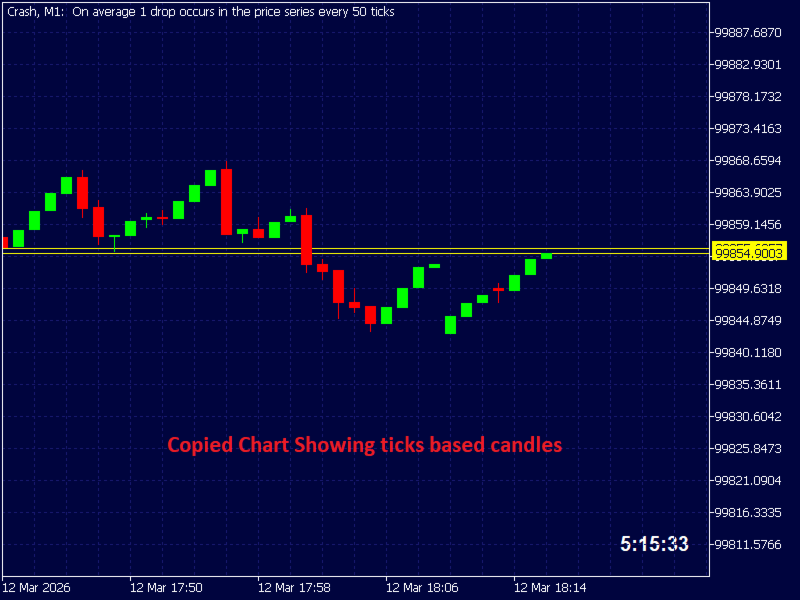
Instead of seeing the market like everybody else using time based charts, instead view the market using ticks like an x-ray.

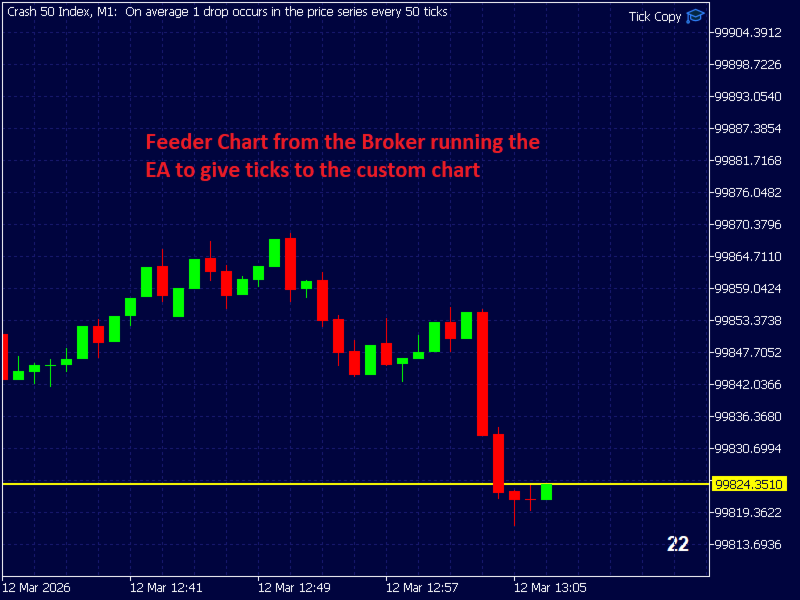
This Expert Advisor (EA) for MetaTrader 5 copies live ticks from the chart it is attached to and sends them to a custom symbol you already created (for example EURUSD TICKS ).

Each time a new market tick arrives:

  1.  EA reads the current tick data from the source symbol.

  2. It copies the tick values:

    • time

    • bid price

    • ask price

    • last price

    • volume

  3. It sends that tick to the custom symbol using CustomTicksAdd() .

Once ticks are fed to the custom symbol, MT5 automatically builds candles (M1, M5, H1, etc.) for that symbol just like a normal market instrument.

This allows you to:

  • create synthetic charts

  • run indicators on the custom symbol

  • run EAs on the custom symbol

  • experiment with tick-driven chart generation

What the EA Does Internally
Step Action
1 EA waits for a market tick
2 SymbolInfoTick() retrieves the latest tick
3 Tick data is copied into a new MqlTick structure
4 CustomTicksAdd() sends the tick to your custom symbol
5 MT5 records the tick and updates the chart
Instructions to Use the EA

1. Download EA

Open MetaEditor and press Compile.

2. Attach the EA to the Source Symbol

Open the real market symbol chart you want to copy ticks from.

Example:

  • EURUSD

Then attach the EA to that chart.

4. Set the Custom Symbol Name

In the EA inputs set:

CustomSymbol = EURUSDTICKS

This must match the custom symbol you already created.

5. Open the Custom Symbol Chart

Open the chart for the custom symbol:

  1. Press Ctrl + U

  2. Go to Create Custom Symbol

  3. Give your symbol a name without spaces (e.g. EURUSD TICK )

  4. Select Copy from (select EURUSD) and click Ok

  5.  Click ok to finalise

  6. Click created symbol to unhide it so that it appears in Market Watch

6. Verify Ticks Are Arriving

Important Notes

The EA must stay running

If the EA is removed or MT5 is closed, the custom symbol stops receiving ticks.

Symbol properties must match

Your custom symbol should have the same:

  • digits

  • tick size

  • pricing format

as the original symbol.

Typical Uses

Pro Traders commonly use this technique to:

  • build tick charts

  • create range charts

  • generate synthetic trading instruments

  • test custom market logic


PLEASE NOTE THAT DEMOS WILL NOT WORK BECAUSE NO TICK DATA WILL HAVE BEEN RECORDED ON THE CUSTOM SYMBOL.
おすすめのプロダクト
Gap Straddle Trailing EA Automated Pending Order Management with Smart Trailing Stop Gap Straddle Trailing EA is an Expert Advisor for MetaTrader 5 designed to manage pending orders and trade protection through configurable settings. It includes automated order management, risk-based lot sizing, trailing stop functionality, session controls, and an on-chart dashboard. Key Features Buy Stop & Sell Stop Management — Automated pending-order placement and management. OCO Functionality — Opposite pen
Orydax Zenvar — XAUUSD Expert Advisor for MetaTrader 5 Turn a demanding market routine into a clear, automated process. Orydax Zenvar is a daily gold level strategy for MetaTrader 5, with XAUUSD D1 as the recommended starting setup. It follows the market continuously, waits for a qualified gold level inside its daily market and risk context, and handles the trading workflow when its confirmation process is complete. It is designed for users seeking selective daily gold automation: traders who va
XAUUSD Smart Strategy EA Price Action • Market Structure • Fibonacci • Smart Risk Management XAUUSD Smart Strategy EA is a professional MetaTrader 5 Expert Advisor designed specifically for Gold (XAUUSD) , combining Price Action, Market Structure, Dynamic Fibonacci analysis, trend confirmation, momentum filters, volatility analysis and advanced trade management into one integrated trading system. The EA is designed to identify structured trading opportunities rather than relying on a single tech
BossFXTradePanelEA (MT5)  [First 10 copies sold at 50 USD price will increase to 99USD] BossFXTradePanelEA is a fully interactive trade management panel designed for MetaTrader 5, providing traders with an easy-to-use, one-click interface to execute and manage trades. This EA simplifies trade execution , risk management, and position control by combining market orders, stop loss, take profit, trailing stops, and breakeven functionalities into a single, intuitive panel.  Key features include: On
FlowAxis
Aysar Alafif
5 (1)
Product Overview   FlowAxis is a semi-automated Expert Advisor for Meta Trader 5 designed for traders who rely on manual trendline analysis and want precise, rule-based trade execution.   Instead of guessing market direction, the trader defines the trend visually, and FlowAxis executes trades automatically when price interacts with predefined trendlines. This approach       combines human market analysis with disciplined, rule-based execution. Important – Please Read Before Use   FlowAxis EA
評価の高いボットの滑らかなエクイティカーブを信じてはいけません。どのボットも美しいバックテスト結果を作るためにトリックを使っていますが、実際にライブ取引をすると全て失敗します。よくあるトリックとしては、1兆ドルものデモ資金を使ったDCAやマーチンゲール、可能な限り最適なパラメータへの過剰最適化などがあります…… 優れたシステムは大抵、少数のシンプルなルールで構成されています。見た目は地味で、エクイティカーブは常に上下しますが、堅牢で実際の市場で生き残る可能性が高いのです。 これはブレイクアウトの原則に基づいたロングオンリー(買いのみ)のトレンドフォロー型エキスパートアドバイザー(EA)で、ATR(平均真実範囲)によるボラティリティ連動型の動的トレーリングストップを組み込んでいます。システムは厳密にバーの終値ベースで動作し、日中の価格ノイズを排除し、ティックスリッページの影響を軽減します。 技術要件と推奨事項 プラットフォーム:MetaTrader 5(MT5)。 適したペア:ゴールド(XAUUSD)。 最適な時間足:H2以上。 口座要件:ヘッジまたはネッティング口座。0.01ロットの取
Orydax Keldrix — XAUUSD Expert Advisor for MetaTrader 5 Turn a demanding market routine into a clear, automated process. Orydax Keldrix is a liquidity-structure breakout strategy for MetaTrader 5, with XAUUSD M15 as the recommended starting setup. It follows the market continuously, waits for a defined liquidity structure with room for expansion, and handles the trading workflow when its confirmation process is complete. It is designed for users seeking selective structure-based breakout exposu
FOREX Strike EA – Discipline Meets Opportunity FOREX Strike EA is an intelligent automated trading system built to bring structure, control, and consistency to the Forex market. Designed with modern MQL5 standards, it focuses on precision execution and disciplined awareness rather than aggressive exposure. By combining smart order placement with adaptive money management, the system engages the market only when conditions align—allowing you to trade with confidence, not emotion. Operating withi
Neuro Power is a neural network-based Expert Advisor developed for MetaTrader 5. It is designed to analyze the psychology of buyers and sellers by studying market behavior through advanced neural network logic. Instead of relying on traditional indicators alone, the EA evaluates multiple market conditions simultaneously to identify high-probability trading opportunities. The system continuously processes price action, momentum, volatility, and other market conditions to estimate where institutio
RoundReflection Live trading signal RoundReflection is a MetaTrader 5 Expert Advisor for USDJPY that trades reversals near round-number levels. Core strategy settings are preset. Users control trading volume, protection filters, tester time settings, and the dashboard. Strategy and risk settings The EA uses a limited sequence of entries at predefined price intervals. Later entries use larger volumes, and each trading set shares a Stop Loss level and a price-based exit target. It does not double
Harness institutional strategies with Institutional VWAP Reversal EA: Capture reversals via VWAP deviation bands, volume spikes, and 200 EMA trend filter. Targets 5% monthly profit with 5% max daily DD, including profit caps, breakeven SL, and signal reversal options—ideal for prop-trading challenges. Customize TP/SL by percentages, RR, or candles; trade with trend or both sides. Optimized for forex majors and gold, with time-restricted execution for low-risk, reliable automation in volatile mar
Bneu Smart Money Concepts Pro — All-in-One ICT/SMC Analysis An automated Smart Money Concepts indicator that marks BOS, CHoCH, Order Blocks, Fair Value Gaps, Liquidity Sweeps, OTE Zone, Kill Zones, Asian Range, and Premium/Discount zones in real time. All signals use closed-bar data only. Non-repainting. WHAT IT DRAWS - BOS (Break of Structure) and CHoCH (Change of Character) labels - HH / HL / LH / LL swing point labels - Order Block zones (supply and demand) with midpoint lines - Fair Val
Titan Backup
Elies Noah Siebenpfeiffer
Introducing Titan Backup : Are you ready to enhance your trading game with an automated system built for precision and flexibility? Meet Titan Backup , your expert trading assistant designed to capture high-profit breakouts by identifying accumulation zones . This powerful Expert Advisor (EA) excels in high-volatility markets such as the Nasdaq 100 and Crypto 10 , offering both hands-free automation and manual assistance to support your trading strategies. How Titan Backup Works: Titan Backup ru
News Hedging Pro  is a unique robot that allows you to trade during the most critical news announcement periods by your predefined strategy. You can preset the strategy to trade, and then it will trade that news automatically when the news comes. News release gives opportunity to have pips since the price usually has big move at that time. Now with this tool, trading news become easier, more flexible and more exciting than ever. No waiting, no confusing anymore. Product Links Fully  Description
MetaTrader 5 用 SuperTrend AI Clustering エキスパートアドバイザー SuperTrend AI Clustering は、変化するマーケット環境に合わせて自動調整されるトレンドフォロー型の MetaTrader 5 用エキスパートアドバイザーです。固定の SuperTrend 乗数を 1 つだけ使うのではなく、複数の係数を同時に評価し、それぞれの直近の成績を測定し、K-Means クラスタリングを適用したうえで、現在もっともパフォーマンスが良い係数グループを選択します。これにより、ボラティリティの regime や相場構造の変化に対応できるダイナミックな SuperTrend モデルが構築され、頻繁な手動再設定なしで環境に順応することができます。 本システムは、適応性・体系的なリスク管理・チャート上の透明な情報表示を重視しながら、トレンドフォローを自動化したいトレーダー向けに設計されています。FX 通貨ペア、貴金属、株価指数、暗号資産、商品など、MetaTrader 5 上で利用可能なシンボルに対応しています。エキスパートアドバイザーは複数の時間足
This program is a GUI for issuing orders that can be done more quickly. Faster TP SL setting This program is not an automated trading platform. Trading is risky, please manage your risk. We do not accept any responsibility. It should be tried with Demo before using it with Real. Normally, the setting sets the risk to 1:1 to shift manually or to enter the risk to x:1, where x can be entered and everything can move freely. Thank you to all customers who have purchased our products. We would like t
Faithify Pro
Saiful Izham Bin Hassan
Faithify Pro:ルールベースの純粋なスマートマネーコンセプト取引システム Faithify Pro は、機関投資家レベルの完全自動取引システムです。堅牢なスマートマネーコンセプト(SMC)に厳密に従い、最高水準の資本保全とリスク管理を徹底します。 Faithify Pro が真にユニークなのは、その基本アーキテクチャにあります。倫理的かつシャリーア準拠の取引原則を尊重するよう、ゼロから構築されています。オーバーナイト・スワップへのエクスポージャーを完全に排除し、高ボラティリティ(不確実)な市場をフィルタリングし、制限資産を回避し、感情的な過剰取引を防ぐために1日の取引上限を設定します。 このEAはグリッドでもマーチンゲールでもなく、非現実的なリターンを保証するものでもありません。厳選された規律あるアルゴリズムツールであり、正確な数学的セットアップを待ってから資本を投入し、厳格なストップロスと動的な部分決済を実行します。 主な利点と特徴 倫理的な取引エンジン:取引可能な資産のホワイトリストを厳格に適用し、金や暗号資産などの商品を回避します。また、ブローカー口座がスワップ
FREE
Hedgehog Pro
Alex Amuyunzu Raymond
Hedgehog Pro: Roll Up. Stay Safe. The Automated Hedge Shield for Your MT5 Account A hedgehog does not run from danger. It curls into a ball and lets nothing through. Hedgehog Pro does the same for your account. When a trade moves against you, it opens an opposite position at the moment you choose and holds the damage there, instead of letting one bad trade eat your balance. What Hedgehog Pro is Hedgehog Pro is a capital protection engine for MetaTrader 5. It does not generate entry signals and i
PrecisionEntry EA is a semi-automatic Expert Advisor for MetaTrader 5 that enables precise order placement at the click of a button — without taking control away from the trader. With a single click on the LONG or SHORT button, the EA automatically places a BuyStop or SellStop order at the high or low of the previous candle. Stop-loss, take-profit, and lot size are calculated fully automatically — based on the configured risk percentage and the desired risk-reward ratio. Features: Interactive on
The CV Volumeprofile Adaptive EA is a professional Expert Advisor for MetaTrader 5, designed for adaptive market analysis and precise institutional-grade trading decisions. The EA combines Volume Profile, market structure analysis, dynamic trend filters, and intelligent signal and risk management into one powerful trading system. Features: Adaptive Volume Profile Dynamic market structure detection Intelligent entry and exit logic Volatility and trend filters Professional risk and money managemen

Multi instrument and multi time frame EA, with the best indicators.  The MSD EA can be used for automated and manual trading. Click on the '?' button on the dashboard to obtain information about the various elements of the MSD EA. Uses ATR Take Profits, ATR Stop Losses and ATR Trailing Stops. Comes with an FX Currency Strength meter and a Market Sessions indicator. Has the option to place Trade Lines (Buy, Sell, Close, Alarm). When the price reaches the trendline, the EA will perform the approp
ALPHATREND INSTITUTIONAL STRUCTURE MODE Descripción general: AlphaTrend es un Expert Advisor híbrido para MetaTrader 5 que combina análisis de estructura de mercado con indicadores de momentum. No es un sistema reactivo tradicional. Opera identificando primero la tendencia real mediante máximos y mínimos, luego espera un retroceso o pullback, y finalmente confirma la entrada con ADX y pendiente de media rápida. Esto permite entrar temprano en la dirección correcta, no perseguir el precio. Lógica
Adaptive Multi-Hybrid (AMH) v3.0: A Next-Generation Intelligent Trading System for MetaTrader 5 Basic concept Unlike classic robots, AMH doesn't use grids, Martingale, or dangerous pending orders. Entries are made only at the market , when the global trend and local momentum are in sync. The system "breathes" with the market, widening or narrowing stop-losses depending on current volatility (ATR-Adaptation). Key Features (The Edge) Market Precision Execution: Entry at market price elim
このユーティリティは、ローソク足が手動で配置されたトレンドラインに触れたときに、より明確な未決注文であるかのように注文をオープンします。  これはどの資産にも使用でき、注文を開くとタッチしたラインが削除され、矢印が作成されます。この場合、これは価格反転操作に使用され、強気のローソク足がボトムアップラインに触れたときに売り注文をオープンし、弱気のローソク足がトップダウンラインに触れたときに買い注文をオープンします。  ストップロスとテイプロフィットを調整できます。このユーティリティは、価格が上昇および下降のサポートラインとレジスタンスライン(両方とも水平線など)に達したときに、注文を開いて画面を終了するようにプログラムできるため、非常に便利です。価格が上昇および下降のサポートラインとレジスタンスラインに達したときに、チャートパターンに非常に機能します。そして垂直。 最新のアップデートでは複数行を配置できるようになりました。 非常に重要: Meta trader 5 には取引履歴があり、注文がクローズされて線が引かれると、この線がロボットのロジックと混同され、不要な注文がオープンさ
FREE
Join Deriv now link on my profile>>>> Boom Trader This robot is developed to trade Boom 1000 which is available on Deriv. Boom 1000 is one of other many indices which its behaviour is to form the spike of few pips, Those spikes always happen after 1000 ticks. To avoid spikes i came up with idea of develop the robot which take sells and few buys. IMPORTANT! After the purchase please send me a private message to receive the installation manual and the setup instructions. •All settings on this ro
Envelope monitoring for multi-EA accounts. Each magic number is watched against its own backtest; you get a traffic light on the chart and an alert only when a state changes. Includes the full free measurement layer. What it is You run several Expert Advisors on one account. This utility reads their closed history, groups it by magic number, and watches every system against its own backtest: a traffic light on the chart, and an alert only when a state actually changes. Underneath sits a full mea
NexusPilot Core is an MT5 EA Manage and Prop Firm Control tool designed for traders who run multiple Expert Advisors, manual trades, or funded account challenges. It is not a signal indicator or trading strategy. Its main purpose is to help you supervise your account, control EA activity, and reduce the risk of breaking prop firm rules. With one centralized dashboard, NexusPilot Core monitors drawdown, Magic Numbers, EA exposure, pending orders, no-SL trades, margin level, floating loss, tradi
Expert Advisorを使用すると、別のエキスパートによって行われ、csvファイルに保存されたトランザクションの実行をシミュ これは、別のサーバー上の取引戦略の結果を確認するのに役立ちます。 Account History Exporterなどの別のプログラムを使用して、アカウントの取引履歴を目的の形式のcsvファイルにエクスポートしたり、Expert History Exporterからexpertにプログラムコードを接続して履歴をエクスポートしたりすることができます。 ファイルの先頭に次のような行があるはずです: DATE,TICKET,TYPE,SYMBOL,VOLUME,ENTRY,PRICE,STOPLOSS,TAKEPROFIT,PROFIT,COMMISSION,FEE,SWAP,MAGIC ,COMMENT つまり、他の情報がその前にある可能性があります。 それらの後とファイルの最後には、1つのトランザクションのコンマ区切りのフィールド値を持つ行があります。 行内のフィールドの値: DATE - date in the format YYYY.M
FREE
FX Monitor EA is a free utility that turns your raw MetaTrader account into a fully analyzed, monitored trading record. It reads your account's trading data — balance, equity, open positions, and closed trade history — and sends it securely over HTTPS to your FX Monitor account (fx-monitor.com), where it becomes the foundation for deep performance analytics. Once connected, you can monitor all your accounts online from any device and dig into your trading the way professionals do: profit factor,
FREE
Account Profit & Loss Killer Full Account-Level Intelligent Risk Management EA (MT5) ⸻ Product Introduction Account Profit & Loss Killer is a true "overall account control and risk management tool". It does not participate in any trading strategy; it focuses on only one thing: When the total floating profit or total floating loss of all positions in the account reaches your set amount, it immediately and within milliseconds forcibly closes all orders in the account. This is a true "
FREE
このプロダクトを購入した人は以下も購入しています
Trade Assistant MT5
Evgeniy Kravchenko
4.43 (216)
取引 ごとのリスクの 計算、新規注文 の 簡単 な 設置、部分的 な 決済機能 を 持 つ 注文管理、 7 種類 のトレーリングストップなど 、便利 な 機能 を 備 えています 。 追加の資料と説明書 インストール手順   -   アプリケーションの手順   -   デモアカウント用アプリケーションの試用版 ライン機能 チャート上にオープニングライン、ストップロス、テイクプロフィットを表示します。この機能により、新規注文を簡単に設定することができ、注文を出す前にその特徴を確認することができます。   リスク計算 リスク計算機能は、設定されたリスクとストップロス注文のサイズを考慮して、新規注文のボリュームを計算します。ストップロスの大きさを自由に設定できると同時に、設定したリスクを守ることができます。 Lot calc ボタン - リスク 計算 を 有効 / 無効 にします 。 Risk フィールドでは 、必要 なリスクの 値 を 0 から 100 までのパーセンテージまたは 預金通貨 で 設定 します 。 設定」 タブで 、 リスク 計算 の 種類 を 選択 します :「 $ 通
Trade Manager EAへようこそ。これは、取引をより直感的、正確、そして効率的にするために設計された究極の リスク管理ツール です。これは単なるオーダー実行ツールではなく、包括的な取引計画、ポジション管理、リスク管理のためのソリューションです。初心者から上級者、迅速な実行を必要とするスキャルパーまで、Trade Manager EAはあらゆるニーズに対応し、為替、指数、商品、暗号通貨などさまざまな市場で柔軟に対応します。 Trade Manager EAを使用すると、複雑な計算が過去のものになります。市場を分析し、エントリーポイント、ストップロス、テイクプロフィットのレベルをチャート上のラインでマークし、リスクを設定するだけで、Trade Managerが最適なポジションサイズを即座に計算し、SLとTPをピップ、ポイント、口座通貨でリアルタイムに表示します。すべての取引が簡単かつ効果的に管理されます。 主な機能: ポジションサイズ計算機 :定義されたリスクに基づいて取引サイズを瞬時に決定します。 簡単な取引計画 :エントリー、ストップロス、テイクプロフィットを設定するためのド
================================================================================ POC BREAKOUT - V20.72. Full Professional Grade Toolkit ================================================================================ POC Breakout is a full MetaTrader 5 trading dashboard for discretionary traders who want breakout signals, Point of Control (POC) context, volume profiles, order flow, market structure, news, alerts, and advanced trade planning in one professional workspace. Attached directly to you
Telegram to MT5 Multi-Channel Copier   は、 Telegram と Discord チャンネルのトレードシグナルを MetaTrader 5 へ自動コピーします。ボット不要、ブラウザ拡張不要、手動コピー不要。Telegram や Discord にシグナルが届くと、EA が数秒であなたのターミナルに注文を出します。 さらに、チャンネルをコピーする前に、内蔵バックテスターでそのチャンネルがあなたの口座でどう動いたかを確認できます。 製品は 2 つのコンポーネントで構成されます:Telegram チャンネルを監視する Windows アプリと、MT5 ターミナルでシグナルを執行する本 EA です。MT4 版もあります   こちら . セットアップガイドとアプリのダウンロード:   https://www.mql5.com/en/blogs/post/768988 Telegramのシグナルチャンネルをバックテストする方法 をご覧ください。 現在の価格は今後値上げされます。 仕組み アプリはあなた自身の Telegram アカウントで接続するため、フォロ
TradePanel MT5
Alfiya Fazylova
4.88 (170)
Trade Panelは多機能なトレーディングアシスタントです。アプリには手動取引用の50以上のトレーディング機能が搭載されており、ほとんどの取引作業を自動化することができます。 アプリの説明書: https://www.mql5.com/en/blogs/post/756482 デモ口座用アプリの試用版: https://www.mql5.com/en/blogs/post/750865 アプリのインストール方法: https://www.mql5.com/en/blogs/post/756239 アプリをビジュアルモードでテストする方法: https://www.mql5.com/en/blogs/post/770277 VPSのMetaTraderにアプリをインストールする方法: https://www.mql5.com/en/blogs/post/770190 取引。 ワンクリックで取引操作を行うことができます: リスクを自動計算して指値注文やポジションを開く。 複数の注文やポジションをワンクリックで開く。 注文のグリッドを開く。 保留中の注文やポジションをグループごとに閉じる
自分の取引ルールで Telegram のシグナルをコピー Telegram to MT5 Signal Trader は、Telegram の公開・非公開チャンネルやグループから、テキスト形式の取引シグナルを MetaTrader 5 へ自動でコピーします。1つのデスクトップアプリで複数の配信者と MT5 口座を管理し、 配信者ごとにリスクと取引設定を個別に指定 できます。 シグナルのコピーに Telegram ボットや API 設定は必要ありません。 電話番号または QR コードでご自身の Telegram アカウントにログインし、すでに参加しているチャンネルやグループを選ぶだけです。ボットの作成や、Telegram API トークン、API ID、API hash の入力は不要です。 ポジションサイズを選び、複数の利確水準に分けて決済し、建値へのストップ移動やトレーリングストップを自動化できます。配信者のシグナルを受け取りながら、実際の取引方法は自分で管理できます。 本製品は、この MT5 エキスパートアドバイザ(EA)と、必須の Windows 連携アプリで構成されます。 インス
Farmed Hedge Yield Farming | All Markets (Manual - Hybrid - Semi/Automated EA) VERIFIED TRADING RESULTS - Farmed Hedge Yield Axi Copy:  https://www.mql5.com/en/signals/2356376 - Farmed Hedge Yield Exn Copy:   https://www.mql5.com/en/signals/2356404 - Farmed Hedge Yield V Copy:  https://www.mql5.com/en/signals/2357156 IMPORTANT NOTICE: FarmedHedge is a MANUAL-FOCUSED TRADING UTILITY ,not a fully automated EA. Results shown on this Signal include manual trades and overall strategic management.
The product will copy all telegram signal to MT5 ( which you are member) , also it can work as remote copier.  Easy to set up, copy order instant, can work with almost signal formats, image signal,  s upport to translate other language to English Work with all type of channel or group, even channel have "Restrict Saving Content", work with  multi channel, multi MT5 Work as remote copier: with signal have ticket number, it will copy exactly via ticket number. Support to backtest signal. How to s
Power Candles Strategy Scanner - 自動最適化型マルチシンボル設定ファインダー パワーキャンドル・ストラテジー・スキャナーは 、パワーキャンドル・インジケーターを駆動するのと全く同じ自己最適化エンジンを、マーケットウォッチに登録されているすべての銘柄に対して並行して実行します。1つのパネルで、現在統計的に取引可能な銘柄、各銘柄で勝率の高い戦略、最適なストップロス/テイクプロフィットの組み合わせが表示され、新たなシグナルが発生した瞬間に通知が届きます。 このツールは、Stein Investmentsのエコシステムの一部です。  18種類以上のツールをすべて閲覧し、AIを活用したセットアップの推奨を受け取り、  https://stein.investments でコミュニティに参加しましょう 市場動向を網羅。銘柄ごとに3,000件以上の自動最適化。2種類のアラート。ワンクリックでチャートを切り替えて即座にアクション。 なぜこれが必要なのか 多くのマルチ銘柄スキャナーは、 価格の動き (ボラティリティ、変動率、銘柄ごとのRSI)を表示するだけです。それ
Quant AI Agents are independent trading Expert Advisors. Instead of trading using a fixed strategy like other conventional EAs, Quant AI Agents   is a   multi-agent AI trading framework   that turns natural-language strategy prompts into live.  WANT THE SAME RESULTS AS MY LIVE SIGNAL?   Use the exact same brokers I do:   IC MARKETS , IC TRADING   .  Unlike the centralized stock market, Forex has no single, unified price feed.  Every broker sources liquidity from different providers, creating un
Grid Manual MT5
Alfiya Fazylova
4.73 (22)
「Grid Manual」は、注文のグリッドを操作するための取引パネルです。 ユーティリティはユニバーサルで、柔軟な設定と直感的なインターフェイスを備えています。 それは、損失を平均化する方向だけでなく、利益を増やす方向でも注文のグリッドで機能します。 トレーダーは注文のグリッドを作成して維持する必要はありません。 すべてが「Grid Manual」によって行われます。 注文を開くだけで十分であり、「Grid Manual」は注文のグリッドを自動的に作成し、非常に閉じるまでそれに付随します。 完全な説明とデモバージョン ここ。 ユーティリティの主な機能と機能 ユーティリティは、モバイル端末から開かれた注文を含め、あらゆる方法で開かれた注文を処理します。 「制限」と「停止」の2種類のグリッドで機能します。 グリッド間隔の計算には、固定と動的(ATRインジケーターに基づく)の2つの方法で機能します。 オープンオーダーグリッドの設定を変更できます。 チャート上の各注文グリッドの損益分岐点を表示します。 各注文グリッドの利益率を表示します。 ワンクリックでグリッドから収益性の高い注文を閉じるこ
Trade Indicator Assistant   is a powerful MT5 utility designed to turn indicators into automated trading systems. Its main feature is the ability to automatically detect an indicator’s   BUY and SELL signal buffers , without requiring you to know the buffer numbers, search through indicator settings, or modify the indicator source code. Bonus Indicator:   After purchasing Trade Indicator Assistant, contact me to receive   Trade Signal Pro   completely free as a bonus indicator. [Download Demo V
Footprint Chart Pro — Professional OrderFlow EA for MetaTrader 5 Version 6.34 | Professional tool for real traders | Institutional-Grade Visualization DEMO USERS - PLEASE SELECT EVERY TICK / REAL TICK WHEN TESTING AND YOU HAVE DOWNLOADED HISTORICAL DATA. IF YOU SEE A WAITING SCREEN AND IT IS NOT DOWNLOADING, IT MEANS YOU HAVE LOW HISTORICAL DATA. TRY 1 MIN AND 5 MIN FIRST ON 1 DAY DATA. ONE DAY DATA SHOULD BE THE NEWEST AND MOST CURRENT DATE. PLEASE WAIT UNTIL THE MARKET HAS ROLLED OVER PERIOD.
FUTURES ORDERFLOW FOOTPRINT CHART Professional OrderFlow EA for MetaTrader 5 Version 1.01| Professional tool for real traders | Institutional-Grade Visualization STRATEGY TESTER USERS - PLEASE SELECT EVERY REAL TICK WHEN TESTING AND YOU HAVE DOWNLOADED HISTORICAL DATA. IF YOU SEE A WAITING SCREEN AND IT IS NOT DOWNLOADING, IT MEANS YOU HAVE LOW HISTORICAL DATA. TRY 1 MIN AND 5 MIN FIRST ON 1 DAY DATA. ONE DAY DATA SHOULD BE THE NEWEST AND MOST CURRENT DATE. PLEASE WAIT UNTIL THE MARKET HAS ROL
The Patch It never opens a trade. It walks behind the ones that did. Every open position, every pending order — checked twice a second for the one thing that's easy to forget: a stop, a target. Found bare, it doesn't ask. It writes the missing number in, measured in points from wherever the position began, and moves on to the next. No strategy, no opinion on direction. Just the quiet assumption that nothing should ever sit on the market unprotected — not because someone decided it shouldn't,
Your EAs cannot see each other, but Anchor can. Anchor gives you one place to coordinate your EAs, manage risk, and decide when trading is allowed. It works alongside the trading bots you already use without any changes to them. The Problem One EA opens a trade. Then another starts trading. The next thing you know, you wake up to multiple grids built across your account. Each EA may be doing exactly what it was designed to do, but together they can place far more risk on your account than you in
Floor Watch
Syed Tauqeer Hussain Shah
Floor Watch One number, watched every thirty seconds: how far equity has fallen since the day began — or since its highest point, if it's told to trail the peak instead of the open. Cross the line and it doesn't argue. Every open position closes, every pending order vanishes, and anything that slips through afterward gets shut the moment it appears. Not asked. Removed. The floor holds until the clock turns 5 AM Pakistan time — then, and only then, does the day start over. One rule. No except
YuClusters
Yury Kulikov
4.93 (43)
Attention: You can view the program operation in the free version  YuClusters DEMO .  YuClusters is a professional market analysis system. The trader has unique opportunities to analyze the flow of orders, trade volumes, price movements using various charts, profiles, indicators, and graphical objects. YuClusters operates on data based on Time&Sales or ticks information, depending on what is available in the quotes of a financial instrument. YuClusters allows you to build graphs by combining da
Ultimate Extractor - Professional Trading Analytics for MT5 *****this is the local HTML version of Ultimate Extractor. !!!!!it is not compatible with Cloud!!!! For the online version please reach out to me directly****** Ultimate EA manager also now available when you use cloud pro and above for free!! Ultimate Extractor transforms your MetaTrader 5 trading history into actionable insights with comprehensive analytics, interactive charts, and real-time performance tracking. What It Does Automa
Advanced Daily Trading Limiter PRO Professional Risk Management. Uncompromising Trading Discipline. One undisciplined trading session can erase weeks of consistent profits. Whether it's overtrading, revenge trading, or exceeding a prop firm's daily risk limits, emotional decisions often become a trader's biggest obstacle—not the market itself. Advanced Daily Trading Limiter PRO is a comprehensive risk management and discipline enforcement utility for MetaTrader 5, designed to help traders stay
一度の購入で、現在提供中および今後リリースする私のすべての MT4・MT5 インジケーターを追加料金なしで受け取れます。 購入後、受け取り方法について私にお問い合わせください。 10 件の購入ごとに 50$ ずつ、最大 999$ まで値上げする予定です。購入手続き時に Market に表示される価格が適用されます。 信頼するインジケーターをそのままに。周辺の取引作業を自動化。 あなたのシグナル。あなたのルール。あなたの取引執行。 信頼する MT5 インジケーターはあるのに、チャートの監視、シグナル待ち、ロット計算、発注、各ポジションの管理を手作業で行っていませんか? Stratiora Signal Engine MT5 は、これらの作業をつなぎます。対応する買い・売りバッファのシグナルを、エントリー、取引量計算、Stop Loss、Take Profit、フィルター、ポジション管理、口座保護までの自動処理に変換できます。 インジケーターや取引アイデアを変えるたびに別の EA を依頼する代わりに、柔軟な一つのエンジンで各シグナルの取引方法を決められます。 あなたのシグナル。あなたのル
AI Trading Assistant | Discord/Telegram → MetaTrader 5 Automation An advanced automation framework that enables natural language trade instructions sent from Discord or Telegram to be executed automatically on MetaTrader 5 using n8n workflows and a custom Expert Advisor. This solution integrates modern workflow automation with MetaTrader 5, allowing users to send trade instructions such as: “buy EURUSD 1% risk 30 pip SL 3R TP” “sell GBPUSD now 2% 20 SL 60 TP” “buy limit EURUSD at 1.0850 with 1%
Premium Trade Manager - コーチ内蔵型トレードパネル Premium Trade Manager は、AIトレーディングコーチをあなたのチャートの中に置き、その下に完全な執行エンジンを備えたツールです。いつも通りにトレードをセットアップし、あなた専任のAIトレーディングコーチ Max にそのセットアップをそのまま読み取らせて、発注前に率直な見解を伝えてもらいましょう。ストップの幅が規律あるアプローチに合っているか、リスクサイズは適切か、高影響のニュースイベントが数分後に迫っていないか、プロップファームの制限に近づいていないか。その下には、クリックの後をすべて処理するエンジンが備わっています。ワンクリックのリスクサイズ計算による発注、チャート上でドラッグして組み立て、発注後も動かせるプラン、最大4段階の分割利確、7種類のトレール方式、リアルタイムのプロップファームコンプライアンス、ニュースガード、そしてコストを自ら採点するスプレッド機能。判断はあなたが下す。Max がもう一度確認する。後のことはすべてパネルが担う。 購入前に実際に触れて試せます。 ブラウザ上でライブ
EASY Insight AIO – スマートで手間いらずな取引のオールインワンソリューション 概要 数秒で市場全体——FX、ゴールド、暗号資産、指数、さらには株式まで——を、手作業のチャート確認や複雑なセットアップ・インジケーター導入なしにスキャンできたらどうでしょうか? EASY Insight AIO はAIトレードのための究極のプラグ&プレイ型エクスポートツールです。市場全体のスナップショットを、クリーンなCSVファイルで一括出力。ChatGPT、Claude、Gemini、Perplexityなど、さまざまなAIプラットフォームで即座に解析できます。 ウィンドウの切り替えやグラフのごちゃごちゃしたオーバーレイはもう不要。自動エクスポートされる純粋で構造化されたインサイトだけで、無駄なチャート監視に悩まされず、スマートなデータ主導の判断に集中できます。 なぜEASY Insight AIOなのか? 本当のオールインワン • セットアップ不要、インジケーターのインストール不要、チャートへのオーバーレイ不要。インストールして起動し、エクスポートするだけです。 マルチアセット対
VirtualTradePad PRO SE MT5 — MetaTrader 5向けプロフェッショナル取引コントロールセンター VirtualTradePad PRO SE は、 MetaTrader 5 向けのプレミアムなチャートベースの取引パネルであり、トレード管理ワークスペースです。より速い執行、明確なポジション管理、構造化されたトレード管理、視覚的なレベル計画、そしてチャート上で完結するプロフェッショナルなワークフローを求めるトレーダー向けに設計されています。 これは単なる BUY / SELL パネルではありません。PRO SE は、手動取引、予約注文、ポジション管理、部分決済、バスケット損益管理、平均化レベル、ATMルール、シグナル監視、リアルタイム市場情報、ストラテジーテスター (Strategy Tester) ワークフロー、VPS向け運用を、1つの連携されたインターフェースに統合します。 MT4版 | 完全な説明とスクリーンショット | 購入方法 | インストール方法 | ログファイルの取得方法 | テストと最適化の方法 | Expforex のすべての製品 PRO
Daily Trading Limiter
AL MOOSAWI ABDULLAH JAFFER BAQER
5 (8)
• Please test the product in the Strategy Tester before purchasing to understand how it works. • If you face any issues, contact me via private message—I’m always available to help. • After purchase, send me a screenshot of your order to receive a FREE EA as a gift. Daily Trading Limiter — the rule you cannot break Every trader knows the number. Three trades. Two percent. One bad day and stop. And every trader has watched themselves take the fourth trade anyway. The problem was never knowing th
One button. One trade. MT5 Trading Deck is a hotkey trading panel for MetaTrader 5 that turns the platform into a keyboard-driven execution cockpit. Stop loss, take profit and lot size are pre-calculated for every key; the moment you press, a market order is live on the broker. A complete technical user manual is attached in the product Comments section. It documents every input parameter, the full hotkey map, the recommended Stream Deck XL layout, and the advanced workflows for Pre-Limit orders
EA Slipstream
Stephen J Martret
5 (1)
Your backtest filled every order at the price it asked for. Your account does not. EA Slipstream measures what execution costs your EA, using your own fills, slippages and spreads to show you the true performance of your EA. A backtest prices every trade at the level the EA named. In live trading a pending order fills at whatever price is available when it triggers, a stop closes wherever the market is when it is hit, and the spread at that moment is whatever the account was quoting. The differ
EA Overfitter
Stephen J Martret
5 (1)
That backtest looks great. But will it still be making money tomorrow, next week, next month? EA Overfitter re-runs your EA on 100 price histories it has never seen. One score tells you if the edge is real. A backtest tells you what an EA did on one price history — the one that happened to occur. What you cannot tell from it is how much of that result was the strategy and how much was the particular path. EA Overfitter answers that. It builds up to 100 synthetic price histories your EA has n
作者のその他のプロダクト
Dynamic Levels Marker
Mativenga Geoffrey Mativenga
Dynamic Levels Marker is a smart MT5 indicator that automatically detects and plots three support and three resistance levels using a tiered historical analysis. Levels are visually distinct, labeled, and adapt as price evolves. Key Features: Dynamic multi-level support/resistance zones Tiered logic based on recent price action Customizable alerts (popup, sound, push notifications) Clean visual lines with auto-positioned labels Lightweight and easy to use on any timeframe Whether you’re
Simple Candle Timer
Mativenga Geoffrey Mativenga
Simple Candle Timer Overview: The Simple Candle Timer is a simple, yet powerful, tool for traders who want to stay informed about the time remaining until the next candle appears on their chart. Whether you are trading on minute charts or higher timeframes, this indicator ensures you never miss a new candle formation. Features: Real-Time Countdown Timer: Displays the time left until the current candle closes and a new one starts. The timer updates smoothly every 100 milliseconds for precision
Volume Flow Analyzer
Mativenga Geoffrey Mativenga
Volume Flow Analyzer The Indicator helps you decode market activity by visualizing real-time volume strength. Whether you're a fast-paced scalper or a patient swing trader , this tool gives you a clearer view of when volume truly supports the price action.  Instructions: Indicator alerts when there is expected increase in volatility by analyzing volumes to allow a trader to prepare. It indicates "High Expected Volatility in such cases", It should be used along with your buy and sell parameters
A multi-timeframe trend and entry confirmation system with the following components:  Trend Signals: Each trend is analyzed on two timeframes: 5-minute and 15-minute Strength (STRENGTH : HIGH | LOW) — possibly indicating volatility or volume strength across timeframes. Entry Confirmations Final Trade Signal (TRADE SIGNAL: BUY/SELL) — suggesting a potential long (buy)/short (sell) opportunity
Seconds Candles
Mativenga Geoffrey Mativenga
Seconds Candles Chart Utility  This Expert Advisor creates custom time-based candles shorter than 1 minute (10s–50s) by converting incoming market ticks into synthetic OHLC bars. Normally, MetaTrader only supports timeframes like:  M1, M5, M15, H1 etc. This EA allows you to generate sub-minute candles such as: 10-second candles, 20-second candles, 30-second candles, 40-second candles, 50-second candles These candles are written into a custom symbol so they behave like a normal chart. Traders
フィルタ:
レビューなし
レビューに返信